BIxPress|ProductOverview
| 2 | BI xPress Product Overview Please visit www.pragmaticworks.com/bixpress
to watch videos of BI xPress features
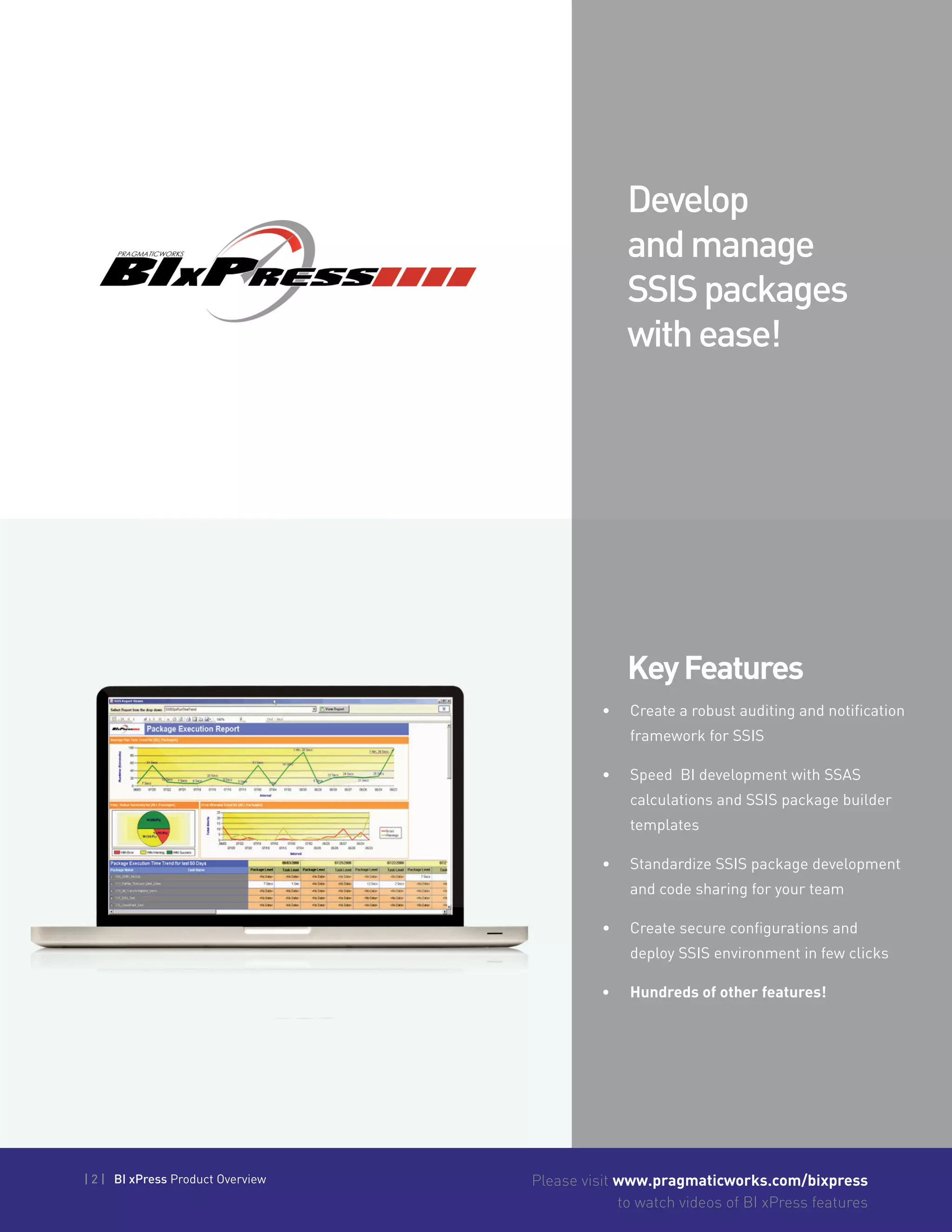
KeyFeatures
•	 Create a robust auditing and notification
framework for SSIS
•	 Speed BI development with SSAS
calculations and SSIS package builder
templates
•	 Standardize SSIS package development
and code sharing for your team
•	 Create secure configurations and
deploy SSIS environment in few clicks
•	 Hundreds of other features!
Develop
andmanage
SSISpackages
withease!
| 3 | BI xPress Product Overview Please visit www.pragmaticworks.com/bixpress
to watch videos of BI xPress features
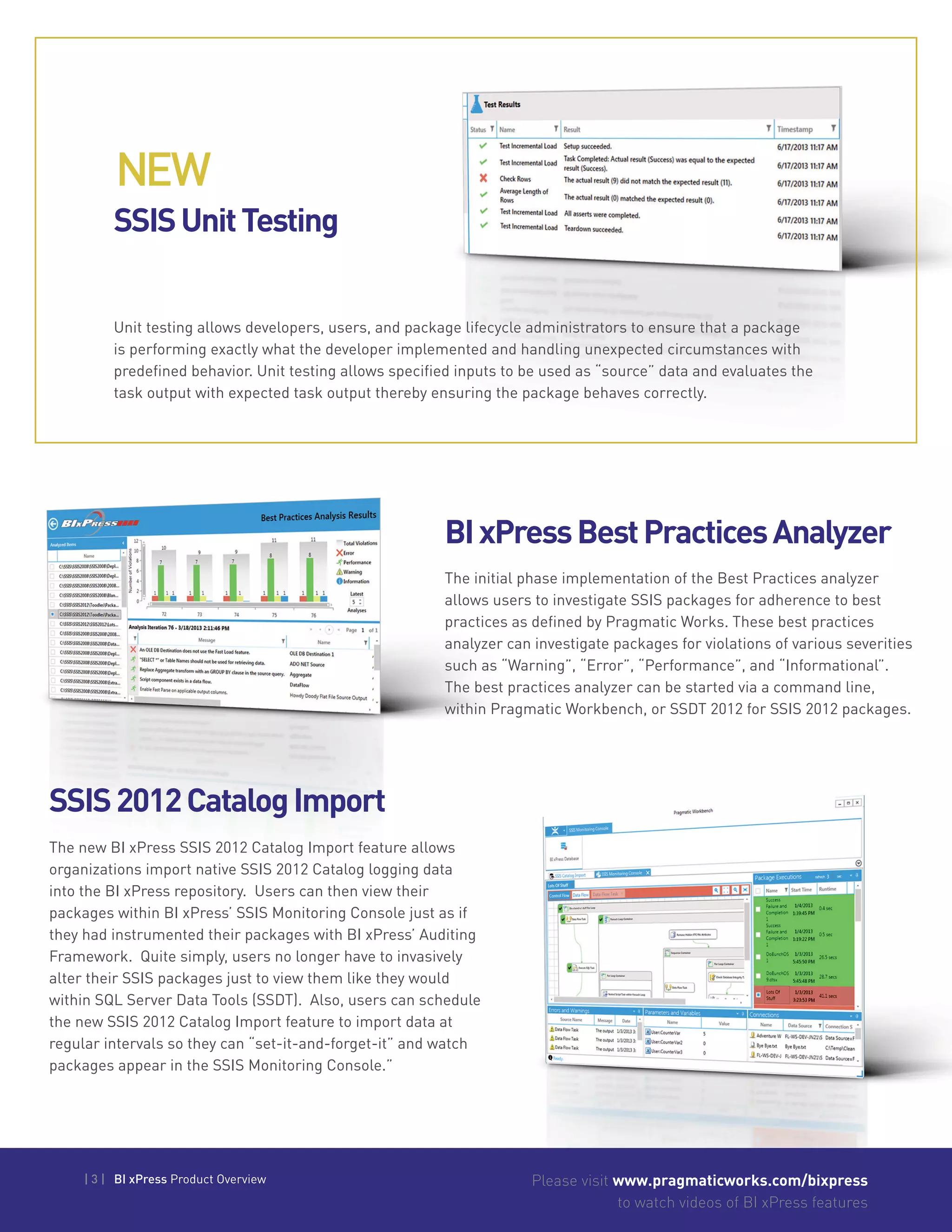
SSISUnitTesting
BIxPressBestPracticesAnalyzer
SSIS2012CatalogImport
Unit testing allows developers, users, and package lifecycle administrators to ensure that a package
is performing exactly what the developer implemented and handling unexpected circumstances with
predefined behavior. Unit testing allows specified inputs to be used as “source” data and evaluates the
task output with expected task output thereby ensuring the package behaves correctly.
The initial phase implementation of the Best Practices analyzer
allows users to investigate SSIS packages for adherence to best
practices as defined by Pragmatic Works. These best practices
analyzer can investigate packages for violations of various severities
such as “Warning”, “Error”, “Performance”, and “Informational”.
The best practices analyzer can be started via a command line,
within Pragmatic Workbench, or SSDT 2012 for SSIS 2012 packages.
The new BI xPress SSIS 2012 Catalog Import feature allows
organizations import native SSIS 2012 Catalog logging data
into the BI xPress repository. Users can then view their
packages within BI xPress’ SSIS Monitoring Console just as if
they had instrumented their packages with BI xPress’ Auditing
Framework. Quite simply, users no longer have to invasively
alter their SSIS packages just to view them like they would
within SQL Server Data Tools (SSDT). Also, users can schedule
the new SSIS 2012 Catalog Import feature to import data at
regular intervals so they can “set-it-and-forget-it” and watch
packages appear in the SSIS Monitoring Console.”
NEW
| 4 | BI xPress Product Overview Please visit www.pragmaticworks.com/bixpress
to watch videos of BI xPress features
Please visit www.pragmaticworks.com/bixpress
to watch videos of BI xPress features
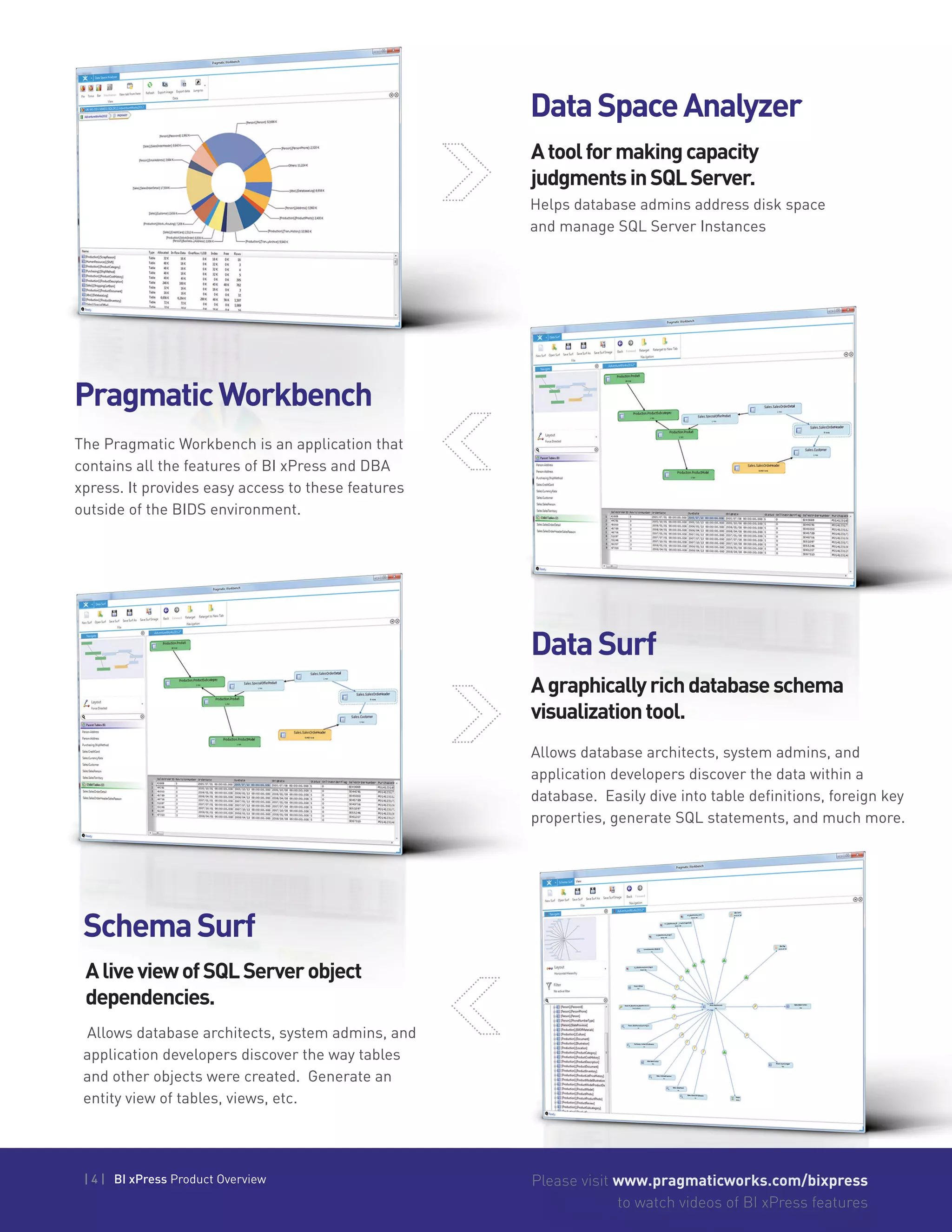
DataSurf
Allows database architects, system admins, and
application developers discover the data within a
database. Easily dive into table definitions, foreign key
properties, generate SQL statements, and much more.
SchemaSurf
Allows database architects, system admins, and
application developers discover the way tables
and other objects were created. Generate an
entity view of tables, views, etc.
AliveviewofSQLServerobject
dependencies.
Agraphicallyrichdatabaseschema
visualizationtool.
PragmaticWorkbench
The Pragmatic Workbench is an application that
contains all the features of BI xPress and DBA
xpress. It provides easy access to these features
outside of the BIDS environment.
DataSpaceAnalyzer
Helps database admins address disk space
and manage SQL Server Instances
Atoolformakingcapacity
judgmentsinSQLServer.
| 5 | BI xPress Product Overview Please visit www.pragmaticworks.com/bixpress
to watch videos of BI xPress features
| 5 | BI xPress Product Overview
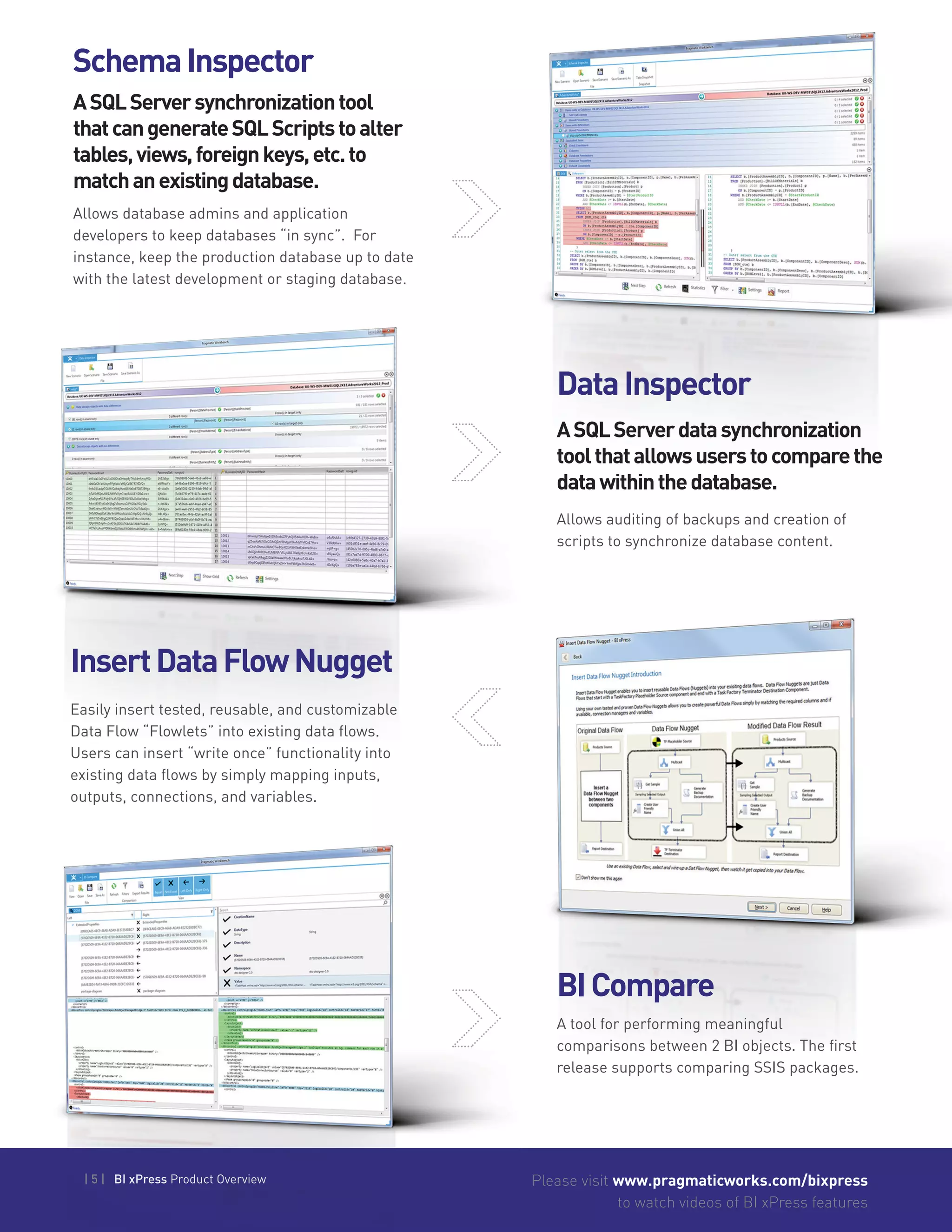
DataInspector
BICompare
InsertDataFlowNugget
Allows auditing of backups and creation of
scripts to synchronize database content.
A tool for performing meaningful
comparisons between 2 BI objects. The first
release supports comparing SSIS packages.
Easily insert tested, reusable, and customizable
Data Flow “Flowlets” into existing data flows.
Users can insert “write once” functionality into
existing data flows by simply mapping inputs,
outputs, connections, and variables.
ASQLServerdatasynchronization
toolthatallowsuserstocomparethe
datawithinthedatabase.
DataInspector
ASQLServerdatasynchronization
toolthatallowsuserstocomparethe
SchemaInspector
Allows database admins and application
developers to keep databases “in sync”. For
instance, keep the production database up to date
with the latest development or staging database.
ASQLServersynchronizationtool
thatcangenerateSQLScriptstoalter
tables,views,foreignkeys,etc.to
matchanexistingdatabase.
| 6 | BI xPress Product Overview Please visit www.pragmaticworks.com/bixpress
to watch videos of BI xPress features
SQLServerIntegration
Services2012Support
SQLServerReporting
ServicesPerformance
Monitor(SSRSReporting
PerformanceMonitor)
Users can now manipulate packages using many of
BI xPress’ features from within SQL Server Data Tools
2012 or using the stand-alone BI xPress application.
The Auditing Framework, Notification Framework,
Package Builder, Snippet Wizard, and the Monitoring
Console have all been updated and tweaked for SQL
Server 2012 and performance gains.
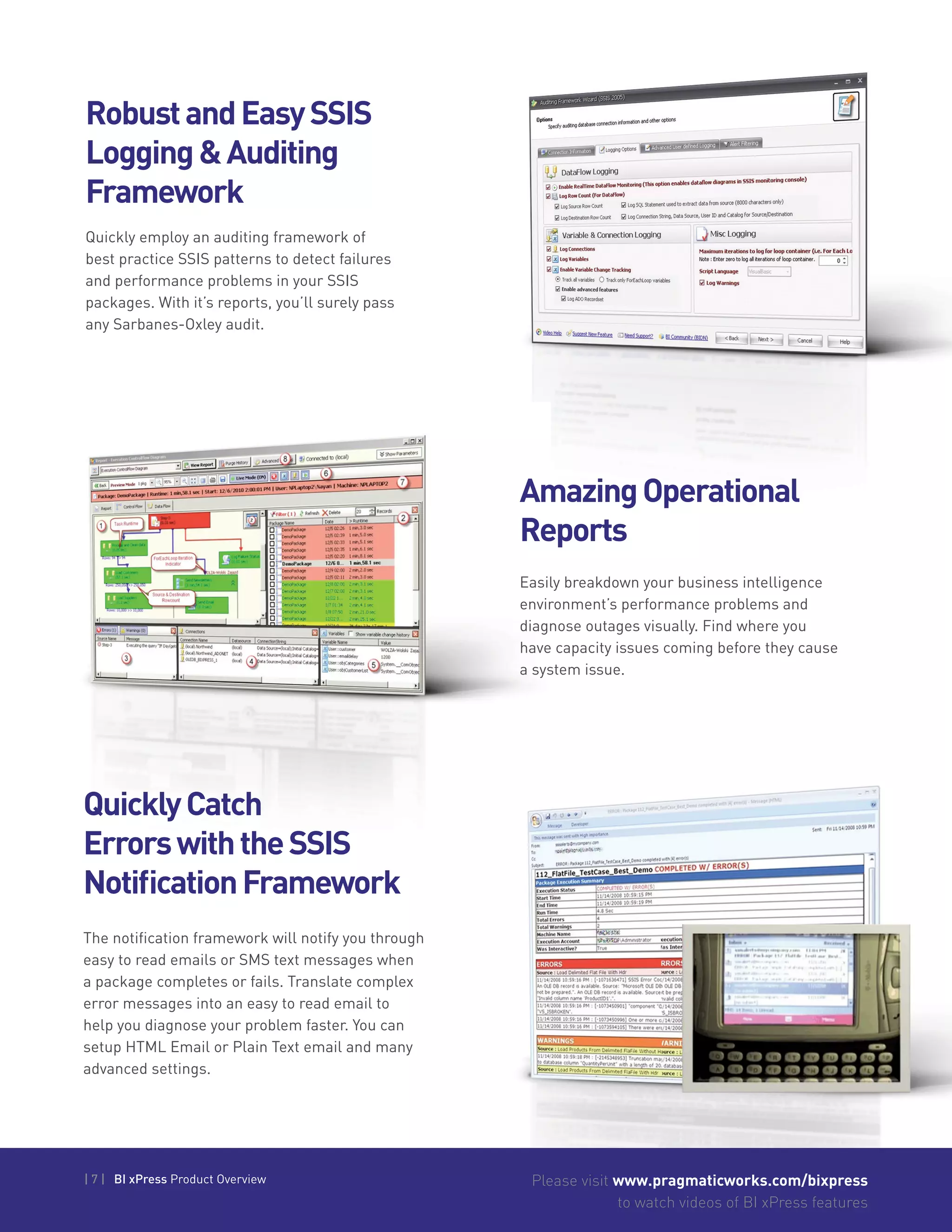
Included with BI xPress 3.5.0. Users can now
quickly view stats for their SQL Server Reporting
Services (SSRS) 2008 and later to see what
reports are taking the longest to run, who is
running the most reports, and also see the
memory and data usage for each report.
SQLServerReporting
ServicesReportDeployment
Tool(SSRSReport
DeploymentTool)
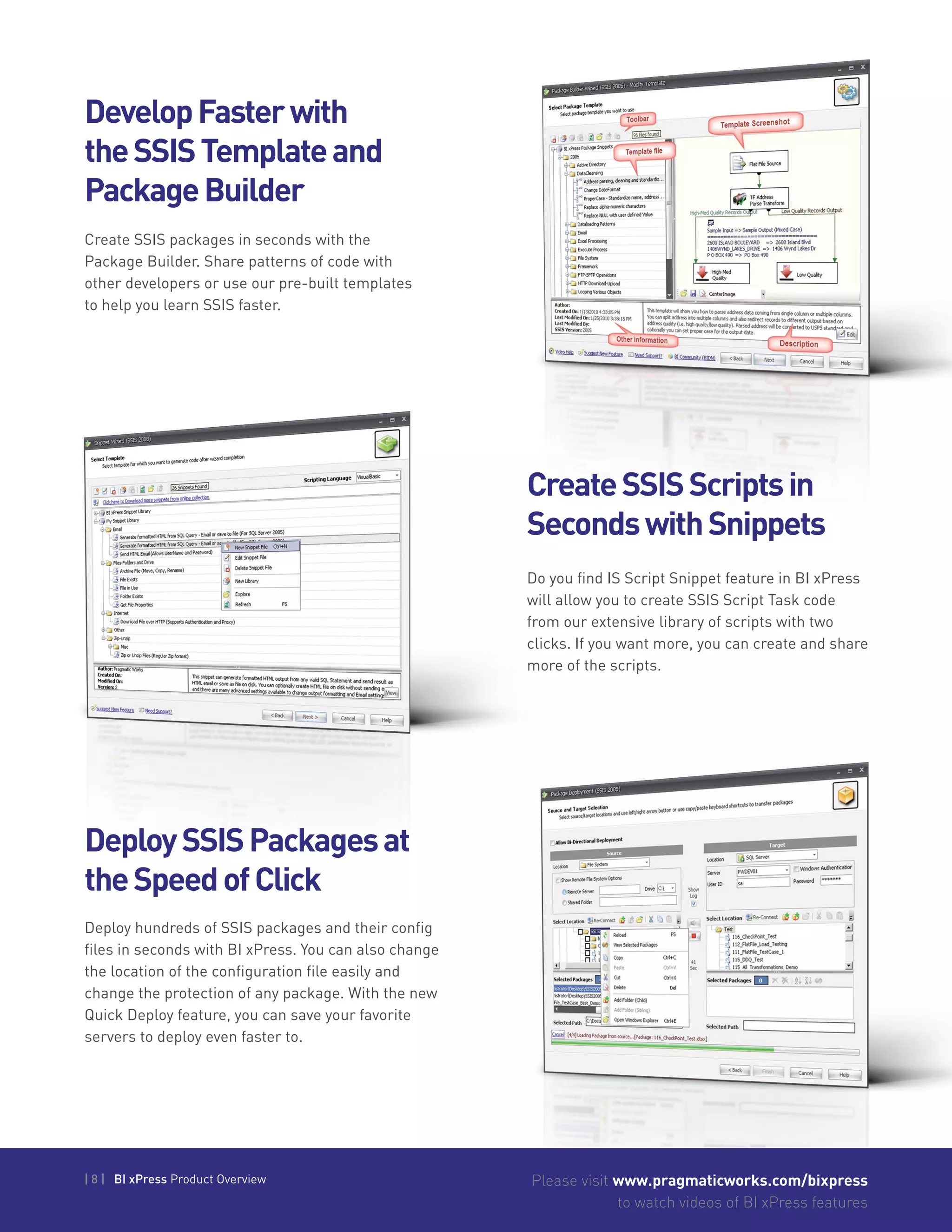
Provides a way for users to move reports from
one Reporting Services instance to another within
their domain allowing easy-as-pie deployment of
reports from a QA server to a production server
simply by dragging-and-dropping reports.
| 7 | BI xPress Product Overview Please visit www.pragmaticworks.com/bixpress
to watch videos of BI xPress features
RobustandEasySSIS
Logging&Auditing
Framework
AmazingOperational
Reports
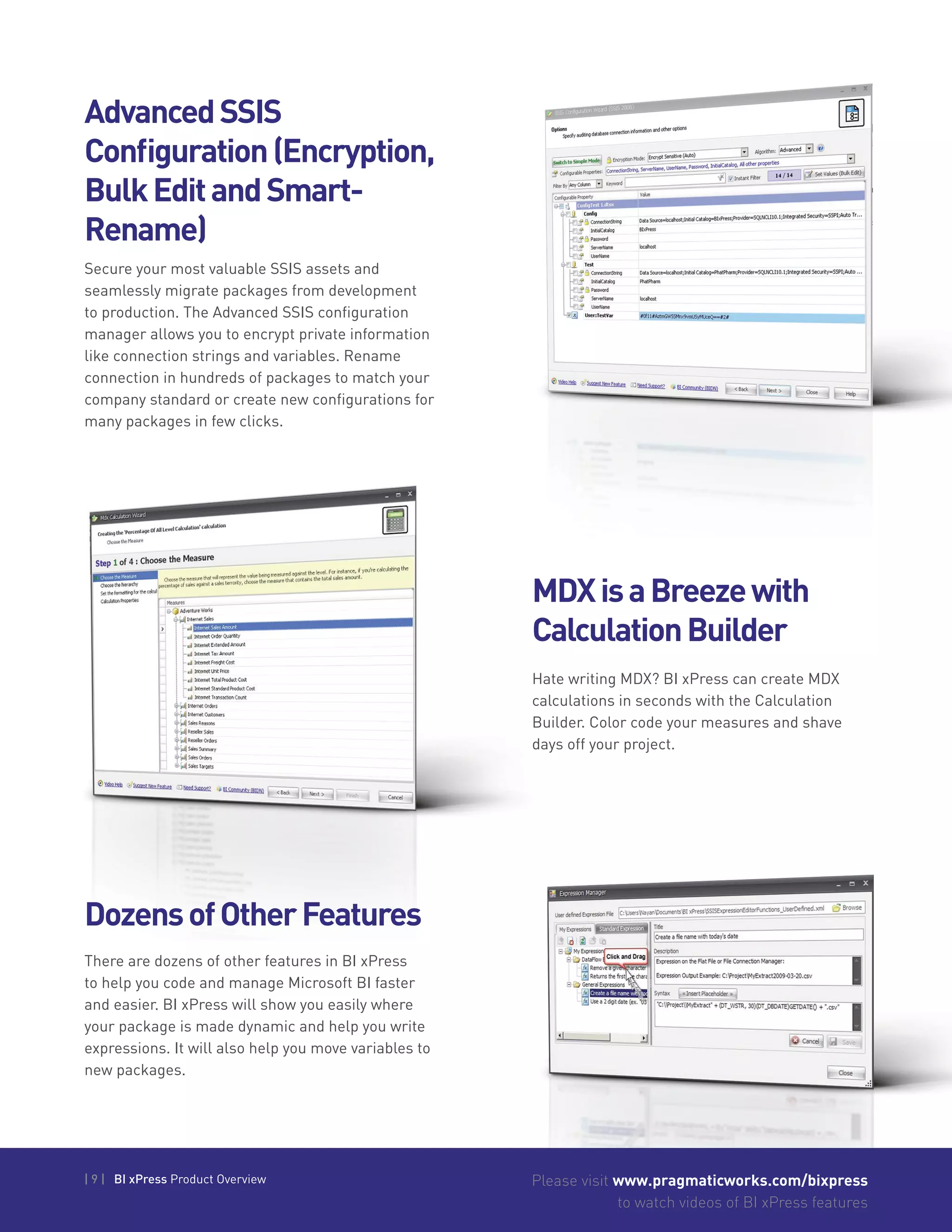
Quickly employ an auditing framework of
best practice SSIS patterns to detect failures
and performance problems in your SSIS
packages. With it’s reports, you’ll surely pass
any Sarbanes-Oxley audit.
Easily breakdown your business intelligence
environment’s performance problems and
diagnose outages visually. Find where you
have capacity issues coming before they cause
a system issue.
QuicklyCatch
ErrorswiththeSSIS
NotificationFramework
The notification framework will notify you through
easy to read emails or SMS text messages when
a package completes or fails. Translate complex
error messages into an easy to read email to
help you diagnose your problem faster. You can
setup HTML Email or Plain Text email and many
advanced settings.
| 8 | BI xPress Product Overview Please visit www.pragmaticworks.com/bixpress
to watch videos of BI xPress features
Create SSIS packages in seconds with the
Package Builder. Share patterns of code with
other developers or use our pre-built templates
to help you learn SSIS faster.
DevelopFasterwith
theSSISTemplateand
PackageBuilder
CreateSSISScriptsin
SecondswithSnippets
DeploySSISPackagesat
theSpeedofClick
Do you find IS Script Snippet feature in BI xPress
will allow you to create SSIS Script Task code
from our extensive library of scripts with two
clicks. If you want more, you can create and share
more of the scripts.
Deploy hundreds of SSIS packages and their config
files in seconds with BI xPress. You can also change
the location of the configuration file easily and
change the protection of any package. With the new
Quick Deploy feature, you can save your favorite
servers to deploy even faster to.
| 9 | BI xPress Product Overview Please visit www.pragmaticworks.com/bixpress
to watch videos of BI xPress features
AdvancedSSIS
Configuration(Encryption,
BulkEditandSmart-
Rename)
Secure your most valuable SSIS assets and
seamlessly migrate packages from development
to production. The Advanced SSIS configuration
manager allows you to encrypt private information
like connection strings and variables. Rename
connection in hundreds of packages to match your
company standard or create new configurations for
many packages in few clicks.
Hate writing MDX? BI xPress can create MDX
calculations in seconds with the Calculation
Builder. Color code your measures and shave
days off your project.
MDXisaBreezewith
CalculationBuilder
DozensofOtherFeatures
There are dozens of other features in BI xPress
to help you code and manage Microsoft BI faster
and easier. BI xPress will show you easily where
your package is made dynamic and help you write
expressions. It will also help you move variables to
new packages.
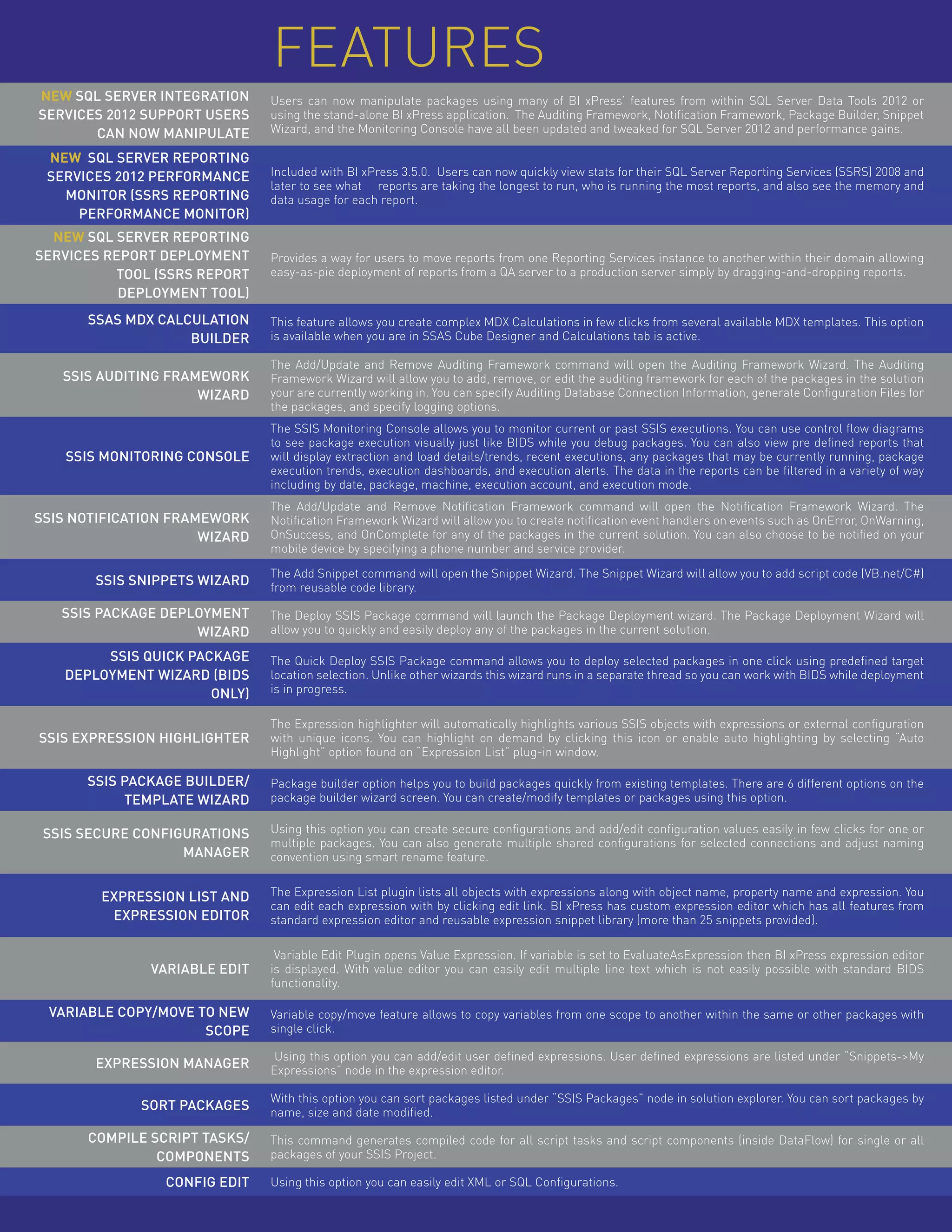
NEW SQL Server Integration
Services 2012 Support Users
can now manipulate
Users can now manipulate packages using many of BI xPress’ features from within SQL Server Data Tools 2012 or
using the stand-alone BI xPress application. The Auditing Framework, Notification Framework, Package Builder, Snippet
Wizard, and the Monitoring Console have all been updated and tweaked for SQL Server 2012 and performance gains.
NEW SQL Server Reporting
Services 2012 Performance
Monitor (SSRS Reporting
Performance Monitor)
Included with BI xPress 3.5.0. Users can now quickly view stats for their SQL Server Reporting Services (SSRS) 2008 and
later to see what reports are taking the longest to run, who is running the most reports, and also see the memory and
data usage for each report.
NEW SQL Server Reporting
Services Report Deployment
Tool (SSRS Report
Deployment Tool)
Provides a way for users to move reports from one Reporting Services instance to another within their domain allowing
easy-as-pie deployment of reports from a QA server to a production server simply by dragging-and-dropping reports.
SSAS MDX Calculation
Builder
This feature allows you create complex MDX Calculations in few clicks from several available MDX templates. This option
is available when you are in SSAS Cube Designer and Calculations tab is active.
SSIS Auditing Framework
Wizard
The Add/Update and Remove Auditing Framework command will open the Auditing Framework Wizard. The Auditing
Framework Wizard will allow you to add, remove, or edit the auditing framework for each of the packages in the solution
your are currently working in. You can specify Auditing Database Connection Information, generate Configuration Files for
the packages, and specify logging options.
SSIS Monitoring Console
The SSIS Monitoring Console allows you to monitor current or past SSIS executions. You can use control flow diagrams
to see package execution visually just like BIDS while you debug packages. You can also view pre defined reports that
will display extraction and load details/trends, recent executions, any packages that may be currently running, package
execution trends, execution dashboards, and execution alerts. The data in the reports can be filtered in a variety of way
including by date, package, machine, execution account, and execution mode.
SSIS Notification Framework
Wizard
The Add/Update and Remove Notification Framework command will open the Notification Framework Wizard. The
Notification Framework Wizard will allow you to create notification event handlers on events such as OnError, OnWarning,
OnSuccess, and OnComplete for any of the packages in the current solution. You can also choose to be notified on your
mobile device by specifying a phone number and service provider.
SSIS Snippets Wizard
The Add Snippet command will open the Snippet Wizard. The Snippet Wizard will allow you to add script code (VB.net/C#)
from reusable code library.
SSIS Package Deployment
Wizard
The Deploy SSIS Package command will launch the Package Deployment wizard. The Package Deployment Wizard will
allow you to quickly and easily deploy any of the packages in the current solution.
SSIS Quick Package
Deployment Wizard (BIDS
Only)
The Quick Deploy SSIS Package command allows you to deploy selected packages in one click using predefined target
location selection. Unlike other wizards this wizard runs in a separate thread so you can work with BIDS while deployment
is in progress.
SSIS Expression Highlighter
The Expression highlighter will automatically highlights various SSIS objects with expressions or external configuration
with unique icons. You can highlight on demand by clicking this icon or enable auto highlighting by selecting “Auto
Highlight” option found on “Expression List” plug-in window.
SSIS Package Builder/
Template Wizard
Package builder option helps you to build packages quickly from existing templates. There are 6 different options on the
package builder wizard screen. You can create/modify templates or packages using this option.
SSIS Secure Configurations
Manager
Using this option you can create secure configurations and add/edit configuration values easily in few clicks for one or
multiple packages. You can also generate multiple shared configurations for selected connections and adjust naming
convention using smart rename feature.
Expression List and
Expression Editor
The Expression List plugin lists all objects with expressions along with object name, property name and expression. You
can edit each expression with by clicking edit link. BI xPress has custom expression editor which has all features from
standard expression editor and reusable expression snippet library (more than 25 snippets provided).
Variable Edit
Variable Edit Plugin opens Value Expression. If variable is set to EvaluateAsExpression then BI xPress expression editor
is displayed. With value editor you can easily edit multiple line text which is not easily possible with standard BIDS
functionality.
Variable Copy/Move to New
Scope
Variable copy/move feature allows to copy variables from one scope to another within the same or other packages with
single click.
Expression Manager
Using this option you can add/edit user defined expressions. User defined expressions are listed under “Snippets->My
Expressions” node in the expression editor.
Sort Packages
With this option you can sort packages listed under “SSIS Packages” node in solution explorer. You can sort packages by
name, size and date modified.
Compile Script Tasks/
Components
This command generates compiled code for all script tasks and script components (inside DataFlow) for single or all
packages of your SSIS Project.
Config Edit Using this option you can easily edit XML or SQL Configurations.
Features
400 College Dr., Suite 216
Middleburg, FL 32068
(904) 638-5743
support@pragmaticworks.com
sales@pragmaticworks.com
www.pragmaticworks.com
Audit, Notify,
Deploy and
Manage
SSIS Packages

B ix press2013_v6

  • 1.
  • 2.
    | 2 |BI xPress Product Overview Please visit www.pragmaticworks.com/bixpress to watch videos of BI xPress features KeyFeatures • Create a robust auditing and notification framework for SSIS • Speed BI development with SSAS calculations and SSIS package builder templates • Standardize SSIS package development and code sharing for your team • Create secure configurations and deploy SSIS environment in few clicks • Hundreds of other features! Develop andmanage SSISpackages withease!
  • 3.
    | 3 |BI xPress Product Overview Please visit www.pragmaticworks.com/bixpress to watch videos of BI xPress features SSISUnitTesting BIxPressBestPracticesAnalyzer SSIS2012CatalogImport Unit testing allows developers, users, and package lifecycle administrators to ensure that a package is performing exactly what the developer implemented and handling unexpected circumstances with predefined behavior. Unit testing allows specified inputs to be used as “source” data and evaluates the task output with expected task output thereby ensuring the package behaves correctly. The initial phase implementation of the Best Practices analyzer allows users to investigate SSIS packages for adherence to best practices as defined by Pragmatic Works. These best practices analyzer can investigate packages for violations of various severities such as “Warning”, “Error”, “Performance”, and “Informational”. The best practices analyzer can be started via a command line, within Pragmatic Workbench, or SSDT 2012 for SSIS 2012 packages. The new BI xPress SSIS 2012 Catalog Import feature allows organizations import native SSIS 2012 Catalog logging data into the BI xPress repository. Users can then view their packages within BI xPress’ SSIS Monitoring Console just as if they had instrumented their packages with BI xPress’ Auditing Framework. Quite simply, users no longer have to invasively alter their SSIS packages just to view them like they would within SQL Server Data Tools (SSDT). Also, users can schedule the new SSIS 2012 Catalog Import feature to import data at regular intervals so they can “set-it-and-forget-it” and watch packages appear in the SSIS Monitoring Console.” NEW
  • 4.
    | 4 |BI xPress Product Overview Please visit www.pragmaticworks.com/bixpress to watch videos of BI xPress features Please visit www.pragmaticworks.com/bixpress to watch videos of BI xPress features DataSurf Allows database architects, system admins, and application developers discover the data within a database. Easily dive into table definitions, foreign key properties, generate SQL statements, and much more. SchemaSurf Allows database architects, system admins, and application developers discover the way tables and other objects were created. Generate an entity view of tables, views, etc. AliveviewofSQLServerobject dependencies. Agraphicallyrichdatabaseschema visualizationtool. PragmaticWorkbench The Pragmatic Workbench is an application that contains all the features of BI xPress and DBA xpress. It provides easy access to these features outside of the BIDS environment. DataSpaceAnalyzer Helps database admins address disk space and manage SQL Server Instances Atoolformakingcapacity judgmentsinSQLServer.
  • 5.
    | 5 |BI xPress Product Overview Please visit www.pragmaticworks.com/bixpress to watch videos of BI xPress features | 5 | BI xPress Product Overview DataInspector BICompare InsertDataFlowNugget Allows auditing of backups and creation of scripts to synchronize database content. A tool for performing meaningful comparisons between 2 BI objects. The first release supports comparing SSIS packages. Easily insert tested, reusable, and customizable Data Flow “Flowlets” into existing data flows. Users can insert “write once” functionality into existing data flows by simply mapping inputs, outputs, connections, and variables. ASQLServerdatasynchronization toolthatallowsuserstocomparethe datawithinthedatabase. DataInspector ASQLServerdatasynchronization toolthatallowsuserstocomparethe SchemaInspector Allows database admins and application developers to keep databases “in sync”. For instance, keep the production database up to date with the latest development or staging database. ASQLServersynchronizationtool thatcangenerateSQLScriptstoalter tables,views,foreignkeys,etc.to matchanexistingdatabase.
  • 6.
    | 6 |BI xPress Product Overview Please visit www.pragmaticworks.com/bixpress to watch videos of BI xPress features SQLServerIntegration Services2012Support SQLServerReporting ServicesPerformance Monitor(SSRSReporting PerformanceMonitor) Users can now manipulate packages using many of BI xPress’ features from within SQL Server Data Tools 2012 or using the stand-alone BI xPress application. The Auditing Framework, Notification Framework, Package Builder, Snippet Wizard, and the Monitoring Console have all been updated and tweaked for SQL Server 2012 and performance gains. Included with BI xPress 3.5.0. Users can now quickly view stats for their SQL Server Reporting Services (SSRS) 2008 and later to see what reports are taking the longest to run, who is running the most reports, and also see the memory and data usage for each report. SQLServerReporting ServicesReportDeployment Tool(SSRSReport DeploymentTool) Provides a way for users to move reports from one Reporting Services instance to another within their domain allowing easy-as-pie deployment of reports from a QA server to a production server simply by dragging-and-dropping reports.
  • 7.
    | 7 |BI xPress Product Overview Please visit www.pragmaticworks.com/bixpress to watch videos of BI xPress features RobustandEasySSIS Logging&Auditing Framework AmazingOperational Reports Quickly employ an auditing framework of best practice SSIS patterns to detect failures and performance problems in your SSIS packages. With it’s reports, you’ll surely pass any Sarbanes-Oxley audit. Easily breakdown your business intelligence environment’s performance problems and diagnose outages visually. Find where you have capacity issues coming before they cause a system issue. QuicklyCatch ErrorswiththeSSIS NotificationFramework The notification framework will notify you through easy to read emails or SMS text messages when a package completes or fails. Translate complex error messages into an easy to read email to help you diagnose your problem faster. You can setup HTML Email or Plain Text email and many advanced settings.
  • 8.
    | 8 |BI xPress Product Overview Please visit www.pragmaticworks.com/bixpress to watch videos of BI xPress features Create SSIS packages in seconds with the Package Builder. Share patterns of code with other developers or use our pre-built templates to help you learn SSIS faster. DevelopFasterwith theSSISTemplateand PackageBuilder CreateSSISScriptsin SecondswithSnippets DeploySSISPackagesat theSpeedofClick Do you find IS Script Snippet feature in BI xPress will allow you to create SSIS Script Task code from our extensive library of scripts with two clicks. If you want more, you can create and share more of the scripts. Deploy hundreds of SSIS packages and their config files in seconds with BI xPress. You can also change the location of the configuration file easily and change the protection of any package. With the new Quick Deploy feature, you can save your favorite servers to deploy even faster to.
  • 9.
    | 9 |BI xPress Product Overview Please visit www.pragmaticworks.com/bixpress to watch videos of BI xPress features AdvancedSSIS Configuration(Encryption, BulkEditandSmart- Rename) Secure your most valuable SSIS assets and seamlessly migrate packages from development to production. The Advanced SSIS configuration manager allows you to encrypt private information like connection strings and variables. Rename connection in hundreds of packages to match your company standard or create new configurations for many packages in few clicks. Hate writing MDX? BI xPress can create MDX calculations in seconds with the Calculation Builder. Color code your measures and shave days off your project. MDXisaBreezewith CalculationBuilder DozensofOtherFeatures There are dozens of other features in BI xPress to help you code and manage Microsoft BI faster and easier. BI xPress will show you easily where your package is made dynamic and help you write expressions. It will also help you move variables to new packages.
  • 10.
    NEW SQL ServerIntegration Services 2012 Support Users can now manipulate Users can now manipulate packages using many of BI xPress’ features from within SQL Server Data Tools 2012 or using the stand-alone BI xPress application. The Auditing Framework, Notification Framework, Package Builder, Snippet Wizard, and the Monitoring Console have all been updated and tweaked for SQL Server 2012 and performance gains. NEW SQL Server Reporting Services 2012 Performance Monitor (SSRS Reporting Performance Monitor) Included with BI xPress 3.5.0. Users can now quickly view stats for their SQL Server Reporting Services (SSRS) 2008 and later to see what reports are taking the longest to run, who is running the most reports, and also see the memory and data usage for each report. NEW SQL Server Reporting Services Report Deployment Tool (SSRS Report Deployment Tool) Provides a way for users to move reports from one Reporting Services instance to another within their domain allowing easy-as-pie deployment of reports from a QA server to a production server simply by dragging-and-dropping reports. SSAS MDX Calculation Builder This feature allows you create complex MDX Calculations in few clicks from several available MDX templates. This option is available when you are in SSAS Cube Designer and Calculations tab is active. SSIS Auditing Framework Wizard The Add/Update and Remove Auditing Framework command will open the Auditing Framework Wizard. The Auditing Framework Wizard will allow you to add, remove, or edit the auditing framework for each of the packages in the solution your are currently working in. You can specify Auditing Database Connection Information, generate Configuration Files for the packages, and specify logging options. SSIS Monitoring Console The SSIS Monitoring Console allows you to monitor current or past SSIS executions. You can use control flow diagrams to see package execution visually just like BIDS while you debug packages. You can also view pre defined reports that will display extraction and load details/trends, recent executions, any packages that may be currently running, package execution trends, execution dashboards, and execution alerts. The data in the reports can be filtered in a variety of way including by date, package, machine, execution account, and execution mode. SSIS Notification Framework Wizard The Add/Update and Remove Notification Framework command will open the Notification Framework Wizard. The Notification Framework Wizard will allow you to create notification event handlers on events such as OnError, OnWarning, OnSuccess, and OnComplete for any of the packages in the current solution. You can also choose to be notified on your mobile device by specifying a phone number and service provider. SSIS Snippets Wizard The Add Snippet command will open the Snippet Wizard. The Snippet Wizard will allow you to add script code (VB.net/C#) from reusable code library. SSIS Package Deployment Wizard The Deploy SSIS Package command will launch the Package Deployment wizard. The Package Deployment Wizard will allow you to quickly and easily deploy any of the packages in the current solution. SSIS Quick Package Deployment Wizard (BIDS Only) The Quick Deploy SSIS Package command allows you to deploy selected packages in one click using predefined target location selection. Unlike other wizards this wizard runs in a separate thread so you can work with BIDS while deployment is in progress. SSIS Expression Highlighter The Expression highlighter will automatically highlights various SSIS objects with expressions or external configuration with unique icons. You can highlight on demand by clicking this icon or enable auto highlighting by selecting “Auto Highlight” option found on “Expression List” plug-in window. SSIS Package Builder/ Template Wizard Package builder option helps you to build packages quickly from existing templates. There are 6 different options on the package builder wizard screen. You can create/modify templates or packages using this option. SSIS Secure Configurations Manager Using this option you can create secure configurations and add/edit configuration values easily in few clicks for one or multiple packages. You can also generate multiple shared configurations for selected connections and adjust naming convention using smart rename feature. Expression List and Expression Editor The Expression List plugin lists all objects with expressions along with object name, property name and expression. You can edit each expression with by clicking edit link. BI xPress has custom expression editor which has all features from standard expression editor and reusable expression snippet library (more than 25 snippets provided). Variable Edit Variable Edit Plugin opens Value Expression. If variable is set to EvaluateAsExpression then BI xPress expression editor is displayed. With value editor you can easily edit multiple line text which is not easily possible with standard BIDS functionality. Variable Copy/Move to New Scope Variable copy/move feature allows to copy variables from one scope to another within the same or other packages with single click. Expression Manager Using this option you can add/edit user defined expressions. User defined expressions are listed under “Snippets->My Expressions” node in the expression editor. Sort Packages With this option you can sort packages listed under “SSIS Packages” node in solution explorer. You can sort packages by name, size and date modified. Compile Script Tasks/ Components This command generates compiled code for all script tasks and script components (inside DataFlow) for single or all packages of your SSIS Project. Config Edit Using this option you can easily edit XML or SQL Configurations. Features
  • 11.
    400 College Dr.,Suite 216 Middleburg, FL 32068 (904) 638-5743 support@pragmaticworks.com sales@pragmaticworks.com www.pragmaticworks.com Audit, Notify, Deploy and Manage SSIS Packages