Azure Machine Learning
Studio
Udayakumar Mathivanan
Cloud Solution Architect
Harman Connected Services
Machine Learning
• Azure Machine Learning is a powerful
cloud-based predictive analytics service
that makes it possible to quickly create and
deploy predictive models as analytics
solutions.
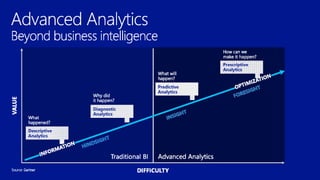
Predictive Analytics?
• Predictive analytics uses various statistical
techniques - in this case, machine learning
- to analyze collected or current data for
patterns or trends in order to forecast
future events.
ML Studio Demo
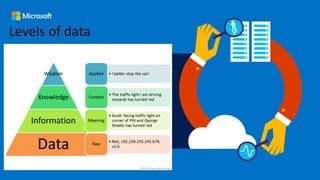
Levels of data
Data Mining
• The computational process of discovering
patterns in large data sets involving
methods at the intersection of artificial
intelligence, machine learning, statistics,
and database systems.
Data Mining process
1. Selection
2. Pre-processing
3. Transformation
4. Data Mining
5. Interpretation/Evaluation
Working with data
• Different sources: databases, web, local files,
semantic web, storages etc.
• Different formats: text, HTML, PDF, Word,
JSON/XML.
• Parsing HTML-based sources.
• Data cleaning, filtering, sorting, saving.
Data Mining tasks
1. Anomaly detection
2. Association rule learning (Dependency modelling)
3. Clustering
4. Classification
5. Regression
6. Summarization
7. NLP
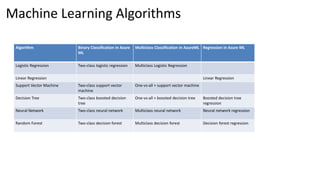
Machine Learning Algorithms
Algorithm Binary Classification in Azure
ML
Multiclass Classification in AzureML Regression in Azure ML
Logistic Regression Two-class logistic regression Multiclass Logistic Regression
Linear Regression Linear Regression
Support Vector Machine Two-class support vector
machine
One-vs-all + support vector machine
Decision Tree Two-class boosted decision
tree
One-vs-all + boosted decision tree Boosted decision tree
regression
Neural Network Two-class neural network Multiclass neural network Neural network regression
Random Forest Two-class decision forest Multiclass decision forest Decision forest regression
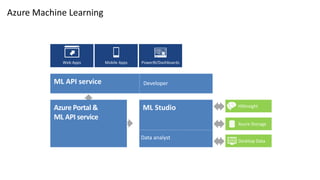
Azure Portal
Azure Ops Team
ML Studio
Data analyst
HDInsight
Azure Storage
Desktop Data
Azure Portal &
ML API service
PowerBI/DashboardsMobile AppsWeb Apps
ML API service Developer
What is R
R is a programming language and software
environment for statistical analysis, graphics
representation and reporting
http://www.tutorialspoint.com/r/
Infographic ML Basics
1. Infographic Algorithms
2. Choose Algorithms
Sample Experiments
1. Cortana Intelligence Gallery
2. Make a Experiment Template
Predictive Solutions
1. Upload Data
2. Create New Experiment
3. Train and evaluate Models
4. Deploy web service
5. Access the web service
https://azure.microsoft.com/en-in/documentation/articles/machine-learning-walkthrough-1-create-ml-workspace/
Create Web Service
Create Experiment
Set input/output ports
Publish your web service
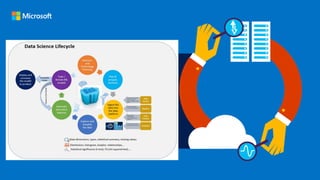
Data Science
The Team Data Science Process (TDSP) provides a
systematic approach to building intelligent
applications that enables teams of data scientists to
collaborate effectively over the full lifecycle of
activities needed to turn these applications into
products.
TDSP Lifecycle
Methodology: It outlines a sequence of steps that define the
development lifecycle providing guidance on how to define
the problem, analyze relevant data, build and evaluate
predictive models, and then deploy those models in
enterprise applications.
Resources: Tools and technologies such as the Data Science
VM to simplify setting up environments for data science
activities and practical guidance for on-boarding new
technologies.
Thanks…
More Advanced Session Later…
Reach out to me @
Udayakumar.Mathivanan@Harman.com
Twitter: techmaharaj

AzureML TechTalk

  • 1.
    Azure Machine Learning Studio UdayakumarMathivanan Cloud Solution Architect Harman Connected Services
  • 2.
    Machine Learning • AzureMachine Learning is a powerful cloud-based predictive analytics service that makes it possible to quickly create and deploy predictive models as analytics solutions.
  • 4.
    Predictive Analytics? • Predictiveanalytics uses various statistical techniques - in this case, machine learning - to analyze collected or current data for patterns or trends in order to forecast future events.
  • 6.
  • 7.
  • 8.
    Data Mining • Thecomputational process of discovering patterns in large data sets involving methods at the intersection of artificial intelligence, machine learning, statistics, and database systems.
  • 9.
    Data Mining process 1.Selection 2. Pre-processing 3. Transformation 4. Data Mining 5. Interpretation/Evaluation
  • 10.
    Working with data •Different sources: databases, web, local files, semantic web, storages etc. • Different formats: text, HTML, PDF, Word, JSON/XML. • Parsing HTML-based sources. • Data cleaning, filtering, sorting, saving.
  • 11.
    Data Mining tasks 1.Anomaly detection 2. Association rule learning (Dependency modelling) 3. Clustering 4. Classification 5. Regression 6. Summarization 7. NLP
  • 12.
    Machine Learning Algorithms AlgorithmBinary Classification in Azure ML Multiclass Classification in AzureML Regression in Azure ML Logistic Regression Two-class logistic regression Multiclass Logistic Regression Linear Regression Linear Regression Support Vector Machine Two-class support vector machine One-vs-all + support vector machine Decision Tree Two-class boosted decision tree One-vs-all + boosted decision tree Boosted decision tree regression Neural Network Two-class neural network Multiclass neural network Neural network regression Random Forest Two-class decision forest Multiclass decision forest Decision forest regression
  • 13.
    Azure Portal Azure OpsTeam ML Studio Data analyst HDInsight Azure Storage Desktop Data Azure Portal & ML API service PowerBI/DashboardsMobile AppsWeb Apps ML API service Developer
  • 14.
    What is R Ris a programming language and software environment for statistical analysis, graphics representation and reporting http://www.tutorialspoint.com/r/
  • 15.
    Infographic ML Basics 1.Infographic Algorithms 2. Choose Algorithms
  • 16.
    Sample Experiments 1. CortanaIntelligence Gallery 2. Make a Experiment Template
  • 17.
    Predictive Solutions 1. UploadData 2. Create New Experiment 3. Train and evaluate Models 4. Deploy web service 5. Access the web service https://azure.microsoft.com/en-in/documentation/articles/machine-learning-walkthrough-1-create-ml-workspace/
  • 18.
  • 19.
    Create Experiment Set input/outputports Publish your web service
  • 20.
    Data Science The TeamData Science Process (TDSP) provides a systematic approach to building intelligent applications that enables teams of data scientists to collaborate effectively over the full lifecycle of activities needed to turn these applications into products.
  • 21.
    TDSP Lifecycle Methodology: Itoutlines a sequence of steps that define the development lifecycle providing guidance on how to define the problem, analyze relevant data, build and evaluate predictive models, and then deploy those models in enterprise applications. Resources: Tools and technologies such as the Data Science VM to simplify setting up environments for data science activities and practical guidance for on-boarding new technologies.
  • 23.
    Thanks… More Advanced SessionLater… Reach out to me @ Udayakumar.Mathivanan@Harman.com Twitter: techmaharaj

Editor's Notes

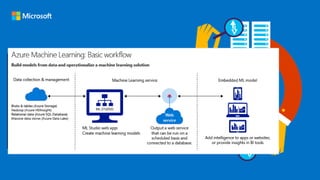
  • #5 Azure Machine Learning is a particularly powerful way to do predictive analytics: You can work from a ready-to-use library of algorithms, create models on an internet-connected PC without purchasing additional equipment or infrastructure, and deploy your predictive solution quickly
  • #14 Let’s walk through how a machine learning solution comes to life, from setting up the environment to extracting insight. First, The Azure ops team, maybe already accustomed to managing storage accounts or provisioning Azure virtual machines, can get a machine learning environment set up right from the Azure Portal. They start by creating an ML Studio workspace and dedicated storage account to get their data scientists up and running. <click> When the Azure Ops team sets up the data scientist, she’ll get an email to her Windows Live account that gives her one-click to get started. The data scientist will then spend her time in ML Studio. From there, she can execute every step in the data science workflow. She can access and prepare data Create, test and train models, as well as import her company’s proprietary models securely into her private workspace Work with R and over 300 of the most popular R packages along with Microsoft’s business class algorithms Collaborate with colleagues within the office or across the globe as easy as clicking “share my workspace” Deploy models within minutes rather than weeks or months <click> And the data scientist has her choice of what data she wants to pull into her models. She can access data already in Azure, query across Big Data in HDInsight, or pull datasets in right from her desktop. <click> Once the data scientist is ready to publish, she signals the Azure Ops team. This is when tested models become available to developers via the API service. <click> The Azure ops team then uses the ML API service to deploy the model in minutes, making it accessible to developers. <click> The developer can surface the model in apps, by simply grabbing auto-generated code and dropping it in. Then business users can access results, from anywhere, on any device. And any model updates simply refresh the model in production with no new development work needed.
  • #15 R, based on the first letter of first name of the two R authors (Robert Gentleman and Ross Ihaka)