Confidential + Proprietary
Date: December 20, 2019
At: Computer Lab, Central University of Punjab, Bathinda
Ease of Applied Machine
Learning using Microsoft
Azure
Learn about the ease of using Azure in Machine Learning and
participate in ML challenge. Also create the web service for applying
machine learning to real life.
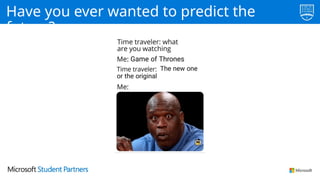
Have you ever wanted to predict the
future?
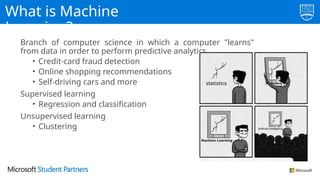
What is Machine
Learning?
Branch of computer science in which a computer "learns"
from data in order to perform predictive analytics
• Credit-card fraud detection
• Online shopping recommendations
• Self-driving cars and more
Supervised learning
• Regression and classification
Unsupervised learning
• Clustering
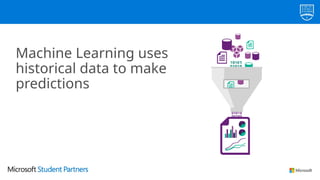
Machine Learning uses
historical data to make
predictions
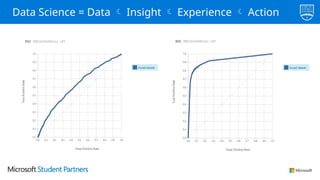
Data Science = Data  Insight  Experience  Action
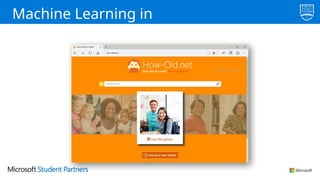
Machine Learning in
Action
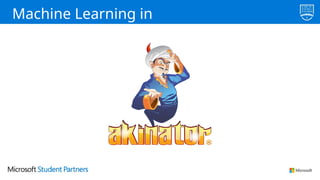
Machine Learning in
Action
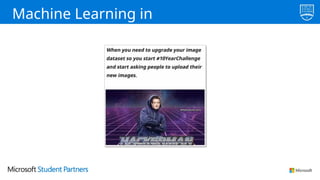
Machine Learning in
Action
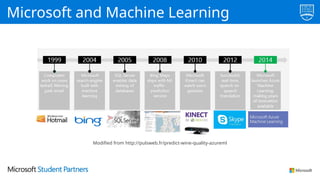
Microsoft and Machine Learning
Modified from http://pulsweb.fr/predict-wine-quality-azureml
I spent last semester
building a Neural Network
model in Python, and I just
did the same thing in 10
minutes with Azure ML
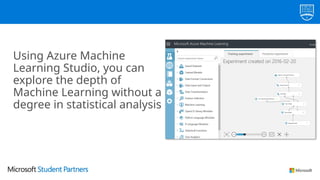
Using Azure Machine
Learning Studio, you can
explore the depth of
Machine Learning without a
degree in statistical analysis
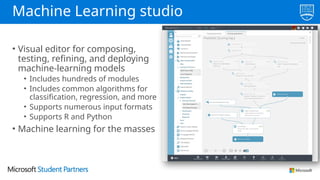
Machine Learning studio
• Visual editor for composing,
testing, refining, and deploying
machine-learning models
• Includes hundreds of modules
• Includes common algorithms for
classification, regression, and more
• Supports numerous input formats
• Supports R and Python
• Machine learning for the masses
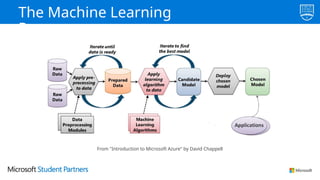
The Machine Learning
Process
From "Introduction to Microsoft Azure" by David Chappell
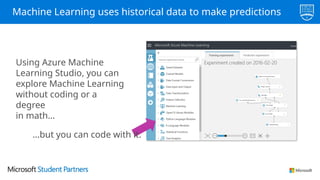
Machine Learning uses historical data to make predictions
Using Azure Machine
Learning Studio, you can
explore Machine Learning
without coding or a
degree
in math…
…but you can code with it.
Challenges?
Start with the data
"Clean" the data and
train the model
Create the web service
Where do you get the
data?
• Use any of the 39 sample data sets built into Azure ML Studio
• Create new data sets by uploading CSV or TSV files
• Use the Import Data module to import data from Web URLs, SQL
databases, Hive queries, OData feeds, blob storage, and other
sources.
• We here use the data: http://tiny.cc/workshopdata
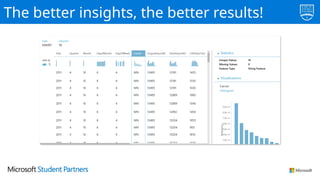
The better insights, the better results!
Demo!
Launch Azure ML Studio
Load a dataset
Visualize the data
Start with the data
"Clean" the data and train the
model
Create the web service
Data almost always requires preparation or "cleaning"
Azure ML Studio provides several modules to help with
this task, including Select Columnsfrom Dataset, Clean
Missing Data, and Remove Duplicate Rows.
Training the model involves using a learning algorithm to
analyze the data and find patterns
ML Studio includes 25 modules implementing common
ML algorithms: Linear Regression, Multiclass Neural
Network, One-Class Support Vector Machine, and many
more.
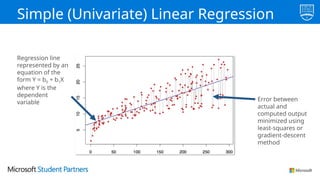
Simple (Univariate) Linear Regression
Regression line
represented by an
equation of the
form Y = b0 + b1X
where Y is the
dependent
variable Error between
actual and
computed output
minimized using
least-squares or
gradient-descent
method
http://aka.ms/
MLCheatSheet
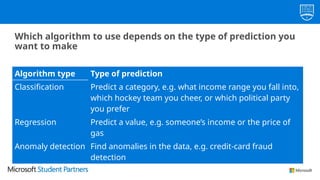
Which algorithm to use depends on the type of prediction you
want to make
Algorithm type Type of prediction
Classification Predict a category, e.g. what income range you fall into,
which hockey team you cheer, or which political party
you prefer
Regression Predict a value, e.g. someone’s income or the price of
gas
Anomaly detection Find anomalies in the data, e.g. credit-card fraud
detection
After you train the model, check the
accuracy
Use Score Model to "score" the model,
and Evaluate Model to visualize the
results
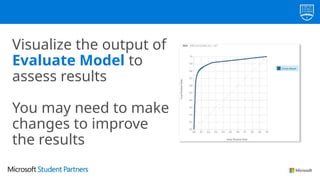
Visualize the output of
Evaluate Model to
assess results
You may need to make
changes to improve
the results
Demo!
Prepare the data
Train the model
Check the accuracy
How can you improve accuracy?
• More rows of data.
• More or fewer columns of data (choose the ones that are most
statistically significant and eliminate ones that aren’t).
• Cleaner data (remove or replace missing or incorrect values, minimize
imbalance, normalize non-normalized values, remove outliers, etc.).
• Different algorithms.
• Different algorithm parameters.
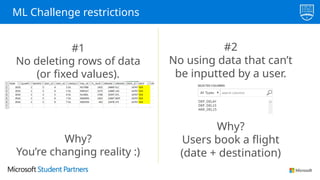
ML Challenge restrictions
#1
No deleting rows of data
(or fixed values).
Why?
You’re changing reality :)
#2
No using data that can’t
be inputted by a user.
Why?
Users book a flight
(date + destination)
Hint #1
garbage in, garbage out
Hint #2
minimize imbalance
Hint #2
Minimize imbalance
Hint #3
Sometimes you must go
backwards to go forward
Hint #4
try more algorithms and parameters
Hint #4
Try more algorithms and parameters
Hint #5
more rows of (clean) data = better results
Hint #5
More clean data
Start with the data
"Clean" the data and
train the model
Create the web
service
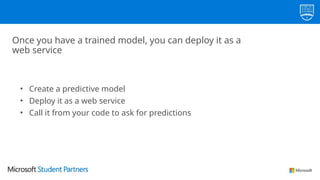
Once you have a trained model, you can deploy it as a
web service
• Create a predictive model
• Deploy it as a web service
• Call it from your code to ask for predictions
Demo!
• Create a predictive model
• Deploy the web service
• Test the web service
You can also use someone else’s trained models to do cool
stuff!
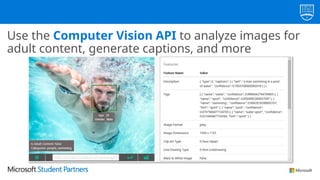
Use the Computer Vision API to analyze images for
adult content, generate captions, and more
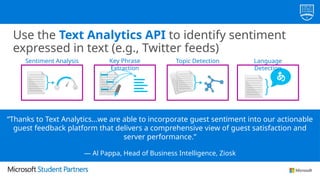
Use the Text Analytics API to identify sentiment
expressed in text (e.g., Twitter feeds)
“Thanks to Text Analytics…we are able to incorporate guest sentiment into our actionable
guest feedback platform that delivers a comprehensive view of guest satisfaction and
server performance.”
— Al Pappa, Head of Business Intelligence, Ziosk
Language
Detection
Topic Detection
Key Phrase
Extraction
Sentiment Analysis
!Time to clean
now!
• Delete the resources which might hurt in
background.
• Keep an eye on the computing resources.
And now finally
..
Thank you!

Thank you

Azure Machine Learning Challenge_Speakers Presentation.pptx

  • 1.
    Confidential + Proprietary Confidential+ Proprietary Date: December 20, 2019 At: Computer Lab, Central University of Punjab, Bathinda Ease of Applied Machine Learning using Microsoft Azure Learn about the ease of using Azure in Machine Learning and participate in ML challenge. Also create the web service for applying machine learning to real life.
  • 2.
    Have you everwanted to predict the future?
  • 3.
    What is Machine Learning? Branchof computer science in which a computer "learns" from data in order to perform predictive analytics • Credit-card fraud detection • Online shopping recommendations • Self-driving cars and more Supervised learning • Regression and classification Unsupervised learning • Clustering
  • 4.
    Machine Learning uses historicaldata to make predictions
  • 5.
    Data Science =Data  Insight  Experience  Action
  • 6.
  • 7.
  • 8.
  • 9.
    Microsoft and MachineLearning Modified from http://pulsweb.fr/predict-wine-quality-azureml
  • 10.
    I spent lastsemester building a Neural Network model in Python, and I just did the same thing in 10 minutes with Azure ML
  • 11.
    Using Azure Machine LearningStudio, you can explore the depth of Machine Learning without a degree in statistical analysis
  • 12.
    Machine Learning studio •Visual editor for composing, testing, refining, and deploying machine-learning models • Includes hundreds of modules • Includes common algorithms for classification, regression, and more • Supports numerous input formats • Supports R and Python • Machine learning for the masses
  • 13.
    The Machine Learning Process From"Introduction to Microsoft Azure" by David Chappell
  • 14.
    Machine Learning useshistorical data to make predictions Using Azure Machine Learning Studio, you can explore Machine Learning without coding or a degree in math… …but you can code with it.
  • 15.
  • 16.
    Start with thedata "Clean" the data and train the model Create the web service
  • 17.
    Where do youget the data? • Use any of the 39 sample data sets built into Azure ML Studio • Create new data sets by uploading CSV or TSV files • Use the Import Data module to import data from Web URLs, SQL databases, Hive queries, OData feeds, blob storage, and other sources. • We here use the data: http://tiny.cc/workshopdata
  • 18.
    The better insights,the better results!
  • 19.
    Demo! Launch Azure MLStudio Load a dataset Visualize the data
  • 20.
    Start with thedata "Clean" the data and train the model Create the web service
  • 21.
    Data almost alwaysrequires preparation or "cleaning" Azure ML Studio provides several modules to help with this task, including Select Columnsfrom Dataset, Clean Missing Data, and Remove Duplicate Rows.
  • 22.
    Training the modelinvolves using a learning algorithm to analyze the data and find patterns ML Studio includes 25 modules implementing common ML algorithms: Linear Regression, Multiclass Neural Network, One-Class Support Vector Machine, and many more.
  • 23.
    Simple (Univariate) LinearRegression Regression line represented by an equation of the form Y = b0 + b1X where Y is the dependent variable Error between actual and computed output minimized using least-squares or gradient-descent method
  • 24.
  • 25.
    Which algorithm touse depends on the type of prediction you want to make Algorithm type Type of prediction Classification Predict a category, e.g. what income range you fall into, which hockey team you cheer, or which political party you prefer Regression Predict a value, e.g. someone’s income or the price of gas Anomaly detection Find anomalies in the data, e.g. credit-card fraud detection
  • 26.
    After you trainthe model, check the accuracy Use Score Model to "score" the model, and Evaluate Model to visualize the results
  • 27.
    Visualize the outputof Evaluate Model to assess results You may need to make changes to improve the results
  • 28.
    Demo! Prepare the data Trainthe model Check the accuracy
  • 29.
    How can youimprove accuracy? • More rows of data. • More or fewer columns of data (choose the ones that are most statistically significant and eliminate ones that aren’t). • Cleaner data (remove or replace missing or incorrect values, minimize imbalance, normalize non-normalized values, remove outliers, etc.). • Different algorithms. • Different algorithm parameters.
  • 30.
    ML Challenge restrictions #1 Nodeleting rows of data (or fixed values). Why? You’re changing reality :) #2 No using data that can’t be inputted by a user. Why? Users book a flight (date + destination)
  • 31.
  • 32.
    Hint #2 minimize imbalance Hint#2 Minimize imbalance
  • 33.
    Hint #3 Sometimes youmust go backwards to go forward
  • 34.
    Hint #4 try morealgorithms and parameters Hint #4 Try more algorithms and parameters
  • 35.
    Hint #5 more rowsof (clean) data = better results Hint #5 More clean data
  • 36.
    Start with thedata "Clean" the data and train the model Create the web service
  • 37.
    Once you havea trained model, you can deploy it as a web service • Create a predictive model • Deploy it as a web service • Call it from your code to ask for predictions
  • 38.
    Demo! • Create apredictive model • Deploy the web service • Test the web service
  • 39.
    You can alsouse someone else’s trained models to do cool stuff!
  • 40.
    Use the ComputerVision API to analyze images for adult content, generate captions, and more
  • 41.
    Use the TextAnalytics API to identify sentiment expressed in text (e.g., Twitter feeds) “Thanks to Text Analytics…we are able to incorporate guest sentiment into our actionable guest feedback platform that delivers a comprehensive view of guest satisfaction and server performance.” — Al Pappa, Head of Business Intelligence, Ziosk Language Detection Topic Detection Key Phrase Extraction Sentiment Analysis
  • 42.
    !Time to clean now! •Delete the resources which might hurt in background. • Keep an eye on the computing resources.
  • 43.
  • 44.
  • 45.

Editor's Notes

  • #4 Machine learning facilitates predictive analytics from large volumes of data by employing algorithms that iteratively learn from that data, and is one of the fastest growing areas of computer science. Its uses range from credit-card fraud detection and self-driving cars to optical character recognition (OCR) and online shopping recommendations. It makes us smarter by making computers smarter. And its usefulness will only increase as more and more data becomes available and our desire to perform predictive analytics from that data grows, too.
  • #11 ML Studio dramatically reduces the effort and expertise required to create machine-learning models. Rather than write reams of code to clean the data, implement a learning algorithm, and assess the results, you create "workflows" by assembling modules on a canvas. ML Studio includes more than 100 different modules that perform common tasks such as removing duplicate rows or cleaning rows with missing data, and that implement common machine-learning algorithms (25 of them, to be exact). There is even a module named Tune Model Hyperparameters that will find the optimum settings for the learning algorithm you choose. And if there's not a module to perform the task you want, you can always use an Execute R Script or Execute Python Script module to inject code of your own.
  • #16 Machine-learning starts with the data used to train the model. Let's talk about where you can find interesting datasets, and how you load them into ML Studio.
  • #17 There are a variety of ways to get data into ML Studio. Of course, that begs the question of where you obtain interesting datasets in the first place. ML Studio includes a number of sample datasets that you can use. In addition, you can download data from public repositories such as kaggle.com, the UCI Machine Learning Repository (https://archive.ics.uci.edu/ml/datasets.html), and various government Web sites, including the Bureau of Transportation Statistics (https://www.transtats.bts.gov/). Data is everywhere. And much of it is freely available.
  • #18 Once a dataset is imported into ML Studio, you can use built-in visualization tools to browse the data and familiarize yourself with its content and structure. That's important, because even the best learning algorithm can't make sense of lousy data.
  • #19 Work Exercise 1 of the challenge and invite students to follow along with you. Take time to explore the dataset and discuss which features might be appropriate to include in a model, and which ones might not. For example, you would not want to include the DEP_DELAY column in a machine-learning model, because while there is probably a strong correlation between flights that are delayed at departure and flights that arrive late, you don't know when you book a flight whether its departure will be delayed. By contrast, it WOULD make sense to include scheduled departure time (CRS_DEP_TIME) in a model, because flights earlier in the day tend to be more on time than flights later in the day.
  • #20 In the real world, datasets can rarely be used as is. They typically require "cleaning" or preparation. Let's discuss what that means, and some of the numerous ways you can clean data in ML Studio.
  • #21 Data scientists often spend 50% or more of the time building a machine-learning model getting the data ready for training by filtering out columns that aren't relevant to the analysis (or that would bias the results), removing rows with missing data or algorithmically filling in missing data, removing duplicate rows from the dataset, etc. ML Studio includes several modules for performing such tasks. It even includes modules for helping select the columns or "features" that have the greatest statistical influence on the outcome.
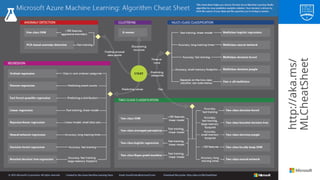
  • #22 Coding these algorithms by hand requires expertise in machine learning as well as time. The fact that they are provided for you means you can get a model up and running quickly AND easily experiment with different algorithms to compare the results. Of course, you can always code your own algorithms in R or Python if circumstances warrant it, or if the algorithm you need isn't included in ML Studio. For a summary of the algorithms featured in ML Studio and help determining which one to use, see http://aka.ms/MLCheatSheet.
  • #24 The Azure ML Cheat Sheet helps you pick the right algorithm for a model, even if you're not a trained data scientist. One example is if you want to use a set of input values to predict an output value from a continuous set of values (e.g., a person's age), use linear regression. But if you're more interested in the distribution of the output, you might use fast forest quantile regression instead. An example of when you would use the latter is using growth charts to assess child development. "Abby's height is in the 10% quantile of the heights of kids her age." Classification algorithms, by contrast, are used to predict a value from a discrete set of values -- for example, classifying an e-mail as spam or not spam.
  • #25 Classification algorithms fall into two categories: two-class algorithms (also known as binary classification algorithms), and multiclass algorithms. Two-class algorithms predict either of two possible outcomes, such as whether a flight will arrive on time or late, or whether an e-mail is spam or not spam. Multiclass algorithms choose from a set of outcomes, such as whether a scanned digit represents a 0, 1, 2, 3, 4, 5, 6, 7, 8, or 9. ML Studio includes many two-class and multiclass classification algorithms. Some of them use regression to compute the probability of each possible outcome and choose the one with the highest probability.
  • #26 You don't know how adept a model is at predicting outcomes until you score it. ML Studio's Score Model module scores a model by predicting outcomes using training data and evaluating the predictions using scoring data. Typically, you use the Split Data module to divide a dataset into a training dataset and a scoring dataset. The Evaluate Model module takes scoring data and allows you to visualize it.
  • #27 The visualizations provided by Evaluate Model differ depending on the algorithm you use. The example above charts a key metric used to evaluate two-class classification models called AUC, which is short for Area Under Curve. The greater the area under the curve (the one above represents 0.92, or 92%), the more accurate the predictive model. The diagonal line represents 50% accuracy, which is basically what you would get by flipping a coin.
  • #28 Work Exercise 2 of the challenge and invite students to follow along with you.
  • #29 Knowing how to improve the accuracy of a model is where real expertise in data science comes in. There is no "secret sauce" that works for every model. But the guidelines above are a good place to start. Generally speaking, more data is better, and picking the right columns is critical because even the best algorithm can't make sense of data that is riddled with non-correlations. Cleaning the data is crucial and is where the typical data scientist spends much of his or her time building machine-learning models. If a column of data contains measurements in inches and centimeters, for example, these values must be normalized, or else the outcome is meaningless.
  • #36 Suppose you build a great machine-learning model and want to use its intelligence in an app you're building for work or school. How do you do that? By deploying the model as a Web service.
  • #37 ML Studio makes it easy to "operationalize" a model by deploying it as a Web service. Once deployed in this manner, a model can be called from client apps using simple REST calls. In this manner, you can build "smart" client apps that leverage the intelligence in your model. The client apps could be iOS apps, Android apps, Windows apps, Web apps, or anything else.
  • #38 Work Exercise 4 of the challenge as the audience watches. Advise students that the client app you connected to your Web service is included in the challenge materials, and that on their own, they may deploy their model as a Web service and connect it to the app if they wish. They are also free to modify the app. It is written in HTML and JavaScript and executes in Node.js, so it works equally well on Windows, macOS, and Linux.
  • #39 Microsoft Cognitive Services is a set of cloud-based intelligence APIs for building richer, smarter, and more sophisticated apps. The product of years of ongoing research from data scientists at Microsoft and research institutions worldwide, these APIs offer a range of capabilities to app developers, from generating captions and search metadata for photos and recognizing faces and emotions in videos to performing sentiment analysis on social media posts and authenticating speakers via voice verification. Cognitive Services APIs can be invoked using REST calls in virtually any programming language and on any device. In addition, free SDKs targeting popular languages such as C# and Java and platforms such as .NET and Android are available for many of the APIs, simplifying the code required to invoke them and insulating the developer from the details of HTTP(S), REST, and JSON.
  • #40 The Computer Vision API, part of Cognitive Services, offers methods for captioning images, generating metadata keywords, recognizing celebrities, reading text, and generating "smart" thumbnails. It can also detect faces in images, identify age and gender, and recognize thousands of celebrities and landmarks. For more information, visit https://www.microsoft.com/cognitive-services/en-us/computer-vision-api.
  • #41 The Microsoft Cognitive Services Text Analytics API (https://www.microsoft.com/cognitive-services/en-us/text-analytics-api) includes methods for sentiment analysis, key-phrase extraction, topic detection, and language detection. The sentiment-analysis API accepts text as input and returns a numeric score between 0 and 1. Scores close to 1 indicate positive sentiment and scores close to 0 indicate negative sentiment. Sentiment score is generated using classification techniques. The input features of the classifier include n-grams, features generated from part-of-speech tags, and word embeddings.