











1
Azure Cosmos DB: Features, practical use
and optimization
Andriy Gorda
Engineering Manager & Lead Software Engineer
Manager of the best new team 2016
13 June 2017
2
Agenda
1. Overview – capabilities and limitations
• Collections
• Indexing
• Global Distribution
• Consistency levels
• Development Tools and SDKs
2. Performance tuning – considerations, steps and tools
• What is request unit?
• Our top 5 performance tips
3. MS Build 2017 announced changes
33
Overview – capabilities and
limitations
4
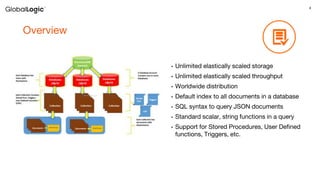
Overview
• Unlimited elastically scaled storage
• Unlimited elastically scaled throughput
• Worldwide distribution
• Default index to all documents in a database
• SQL syntax to query JSON documents
• Standard scalar, string functions in a query
• Support for Stored Procedures, User Defined
functions, Triggers, etc.
5
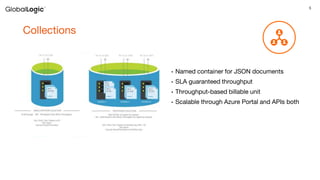
Collections
• Named container for JSON documents
• SLA guaranteed throughput
• Throughput-based billable unit
• Scalable through Azure Portal and APIs both
6
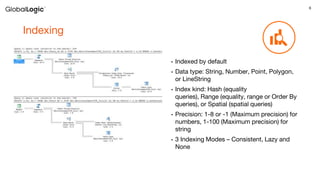
Indexing
• Indexed by default
• Data type: String, Number, Point, Polygon,
or LineString
• Index kind: Hash (equality
queries), Range (equality, range or Order By
queries), or Spatial (spatial queries)
• Precision: 1-8 or -1 (Maximum precision) for
numbers, 1-100 (Maximum precision) for
string
• 3 Indexing Modes – Consistent, Lazy and
None
7
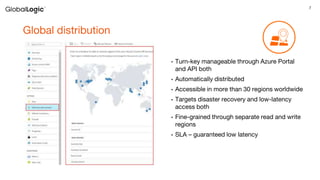
Global distribution
• Turn-key manageable through Azure Portal
and API both
• Automatically distributed
• Accessible in more than 30 regions worldwide
• Targets disaster recovery and low-latency
access both
• Fine-grained through separate read and write
regions
• SLA – guaranteed low latency
8
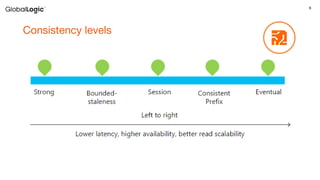
Consistency levels
9
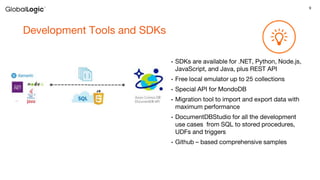
Development Tools and SDKs
• SDKs are available for .NET, Python, Node.js,
JavaScript, and Java, plus REST API
• Free local emulator up to 25 collections
• Special API for MondoDB
• Migration tool to import and export data with
maximum performance
• DocumentDBStudio for all the development
use cases from SQL to stored procedures,
UDFs and triggers
• Github – based comprehensive samples
1010
Performance tuning –
considerations, steps and tools
11
What is request unit?
12
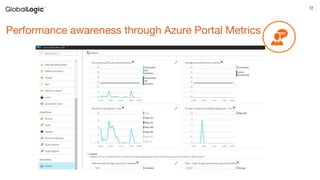
Performance awareness through Azure Portal Metrics
13
Our top 5 performance tips
14
1. Be Creative! Denormalize it!
15
2. Cut the calls! No, I mean it
16
3. Trace request units, be aware of throttling
17
4. Remember where you’re at
18
5. Read the documentation, play with samples
and open-source tools
19
20
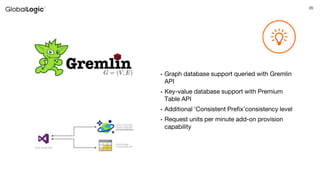
• Graph database support queried with Gremlin
API
• Key-value database support with Premium
Table API
• Additional ‘Consistent Prefix’consistency level
• Request units per minute add-on provision
capability
21
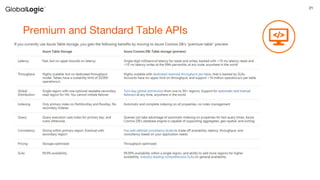
Premium and Standard Table APIs
22
Thank you

Azure Cosmos DB: Features, Practical Use and Optimization "

  • 1.
    1 Azure Cosmos DB:Features, practical use and optimization Andriy Gorda Engineering Manager & Lead Software Engineer Manager of the best new team 2016 13 June 2017
  • 2.
    2 Agenda 1. Overview –capabilities and limitations • Collections • Indexing • Global Distribution • Consistency levels • Development Tools and SDKs 2. Performance tuning – considerations, steps and tools • What is request unit? • Our top 5 performance tips 3. MS Build 2017 announced changes
  • 3.
  • 4.
    4 Overview • Unlimited elasticallyscaled storage • Unlimited elastically scaled throughput • Worldwide distribution • Default index to all documents in a database • SQL syntax to query JSON documents • Standard scalar, string functions in a query • Support for Stored Procedures, User Defined functions, Triggers, etc.
  • 5.
    5 Collections • Named containerfor JSON documents • SLA guaranteed throughput • Throughput-based billable unit • Scalable through Azure Portal and APIs both
  • 6.
    6 Indexing • Indexed bydefault • Data type: String, Number, Point, Polygon, or LineString • Index kind: Hash (equality queries), Range (equality, range or Order By queries), or Spatial (spatial queries) • Precision: 1-8 or -1 (Maximum precision) for numbers, 1-100 (Maximum precision) for string • 3 Indexing Modes – Consistent, Lazy and None
  • 7.
    7 Global distribution • Turn-keymanageable through Azure Portal and API both • Automatically distributed • Accessible in more than 30 regions worldwide • Targets disaster recovery and low-latency access both • Fine-grained through separate read and write regions • SLA – guaranteed low latency
  • 8.
  • 9.
    9 Development Tools andSDKs • SDKs are available for .NET, Python, Node.js, JavaScript, and Java, plus REST API • Free local emulator up to 25 collections • Special API for MondoDB • Migration tool to import and export data with maximum performance • DocumentDBStudio for all the development use cases from SQL to stored procedures, UDFs and triggers • Github – based comprehensive samples
  • 10.
  • 11.
  • 12.
  • 13.
    13 Our top 5performance tips
  • 14.
    14 1. Be Creative!Denormalize it!
  • 15.
    15 2. Cut thecalls! No, I mean it
  • 16.
    16 3. Trace requestunits, be aware of throttling
  • 17.
  • 18.
    18 5. Read thedocumentation, play with samples and open-source tools
  • 19.
  • 20.
    20 • Graph databasesupport queried with Gremlin API • Key-value database support with Premium Table API • Additional ‘Consistent Prefix’consistency level • Request units per minute add-on provision capability
  • 21.
  • 22.