The 30 Year Horizon
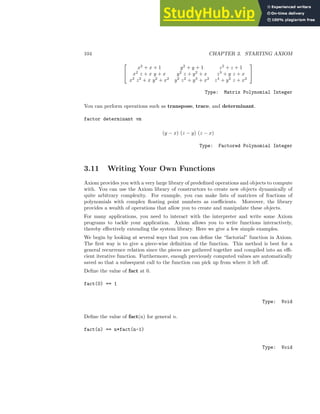
Manuel Bronstein William Burge Timothy Daly
James Davenport Michael Dewar Martin Dunstan
Albrecht Fortenbacher Patrizia Gianni Johannes Grabmeier
Jocelyn Guidry Richard Jenks Larry Lambe
Michael Monagan Scott Morrison William Sit
Jonathan Steinbach Robert Sutor Barry Trager
Stephen Watt Jim Wen Clifton Williamson
Volume 1: Axiom Tutorial
i
Portions Copyright (c) 2005 Timothy Daly
The Blue Bayou image Copyright (c) 2004 Jocelyn Guidry
Portions Copyright (c) 2004 Martin Dunstan
Portions Copyright (c) 1991-2002,
The Numerical ALgorithms Group Ltd.
All rights reserved.
This book and the Axiom software is licensed as follows:
Redistribution and use in source and binary forms, with or
without modification, are permitted provided that the following
conditions are
met:
- Redistributions of source code must retain the above
copyright notice, this list of conditions and the
following disclaimer.
- Redistributions in binary form must reproduce the above
copyright notice, this list of conditions and the
following disclaimer in the documentation and/or other
materials provided with the distribution.
- Neither the name of The Numerical ALgorithms Group Ltd.
nor the names of its contributors may be used to endorse
or promote products derived from this software without
specific prior written permission.
THIS SOFTWARE IS PROVIDED BY THE COPYRIGHT HOLDERS AND
CONTRIBUTORS "AS IS" AND ANY EXPRESS OR IMPLIED WARRANTIES,
INCLUDING, BUT NOT LIMITED TO, THE IMPLIED WARRANTIES OF
MERCHANTABILITY AND FITNESS FOR A PARTICULAR PURPOSE ARE
DISCLAIMED. IN NO EVENT SHALL THE COPYRIGHT OWNER OR
CONTRIBUTORS BE LIABLE FOR ANY DIRECT, INDIRECT, INCIDENTAL,
SPECIAL, EXEMPLARY, OR CONSEQUENTIAL DAMAGES (INCLUDING,
BUT NOT LIMITED TO, PROCUREMENT OF SUBSTITUTE GOODS OR
SERVICES; LOSS OF USE, DATA, OR PROFITS; OR BUSINESS
INTERRUPTION) HOWEVER CAUSED AND ON ANY THEORY OF LIABILITY,
WHETHER IN CONTRACT, STRICT LIABILITY, OR TORT (INCLUDING
NEGLIGENCE OR OTHERWISE) ARISING IN ANY WAY OUT OF THE USE
OF THIS SOFTWARE, EVEN IF ADVISED OF THE POSSIBILITY OF
SUCH DAMAGE.
Inclusion of names in the list of credits is based on historical information and is as accurate
as possible. Inclusion of names does not in any way imply an endorsement but represents
historical influence on Axiom development.
ii
Cyril Alberga Roy Adler Richard Anderson
George Andrews Henry Baker Stephen Balzac
Yurij Baransky David R. Barton Gerald Baumgartner
Gilbert Baumslag Fred Blair Vladimir Bondarenko
Mark Botch Alexandre Bouyer Peter A. Broadbery
Martin Brock Manuel Bronstein Florian Bundschuh
William Burge Quentin Carpent Bob Caviness
Bruce Char Cheekai Chin David V. Chudnovsky
Gregory V. Chudnovsky Josh Cohen Christophe Conil
Don Coppersmith George Corliss Robert Corless
Gary Cornell Meino Cramer Claire Di Crescenzo
Timothy Daly Sr. Timothy Daly Jr. James H. Davenport
Jean Della Dora Gabriel Dos Reis Michael Dewar
Claire DiCrescendo Sam Dooley Lionel Ducos
Martin Dunstan Brian Dupee Dominique Duval
Robert Edwards Heow Eide-Goodman Lars Erickson
Richard Fateman Bertfried Fauser Stuart Feldman
Brian Ford Albrecht Fortenbacher George Frances
Constantine Frangos Timothy Freeman Korrinn Fu
Marc Gaetano Rudiger Gebauer Kathy Gerber
Patricia Gianni Holger Gollan Teresa Gomez-Diaz
Laureano Gonzalez-Vega Stephen Gortler Johannes Grabmeier
Matt Grayson James Griesmer Vladimir Grinberg
Oswald Gschnitzer Jocelyn Guidry Steve Hague
Vilya Harvey Satoshi Hamaguchi Martin Hassner
Ralf Hemmecke Henderson Antoine Hersen
Pietro Iglio Richard Jenks Kai Kaminski
Grant Keady Tony Kennedy Paul Kosinski
Klaus Kusche Bernhard Kutzler Larry Lambe
Frederic Lehobey Michel Levaud Howard Levy
Rudiger Loos Michael Lucks Richard Luczak
Camm Maguire Bob McElrath Michael McGettrick
Ian Meikle David Mentre Victor S. Miller
Gerard Milmeister Mohammed Mobarak H. Michael Moeller
Michael Monagan Marc Moreno-Maza Scott Morrison
Mark Murray William Naylor C. Andrew Neff
John Nelder Godfrey Nolan Arthur Norman
Jinzhong Niu Michael O’Connor Kostas Oikonomou
Julian A. Padget Bill Page Jaap Weel
Susan Pelzel Michel Petitot Didier Pinchon
Claude Quitte Norman Ramsey Michael Richardson
Renaud Rioboo Jean Rivlin Nicolas Robidoux
Simon Robinson Michael Rothstein Martin Rubey
Philip Santas Alfred Scheerhorn William Schelter
Gerhard Schneider Martin Schoenert Marshall Schor
Fritz Schwarz Nick Simicich William Sit
Elena Smirnova Jonathan Steinbach Christine Sundaresan
Robert Sutor Moss E. Sweedler Eugene Surowitz
James Thatcher Baldir Thomas Mike Thomas
Dylan Thurston Barry Trager Themos T. Tsikas
Gregory Vanuxem Bernhard Wall Stephen Watt
Juergen Weiss M. Weller Mark Wegman
James Wen Thorsten Werther Michael Wester
John M. Wiley Berhard Will Clifton J. Williamson
Stephen Wilson Shmuel Winograd Robert Wisbauer
Sandra Wityak Waldemar Wiwianka Knut Wolf
Contents
1 Axiom Features 1
1.1 Introduction to Axiom . . . . . . . . . . . . . . . . . . . . . . . . . . . . . . . 1
1.1.1 Symbolic Computation . . . . . . . . . . . . . . . . . . . . . . . . . . . 1
1.1.2 Numeric Computation . . . . . . . . . . . . . . . . . . . . . . . . . . . 2
1.1.3 Mathematical Structures . . . . . . . . . . . . . . . . . . . . . . . . . . 3
1.1.4 HyperDoc . . . . . . . . . . . . . . . . . . . . . . . . . . . . . . . . . . 4
1.1.5 Interactive Programming . . . . . . . . . . . . . . . . . . . . . . . . . 5
1.1.6 Graphics . . . . . . . . . . . . . . . . . . . . . . . . . . . . . . . . . . 6
1.1.7 Data Structures . . . . . . . . . . . . . . . . . . . . . . . . . . . . . . . 7
1.1.8 Pattern Matching . . . . . . . . . . . . . . . . . . . . . . . . . . . . . . 8
1.1.9 Polymorphic Algorithms . . . . . . . . . . . . . . . . . . . . . . . . . . 9
1.1.10 Extensibility . . . . . . . . . . . . . . . . . . . . . . . . . . . . . . . . 10
1.1.11 Open Source . . . . . . . . . . . . . . . . . . . . . . . . . . . . . . . . 11
2 Ten Fundamental Ideas 13
2.0.12 Types are Defined by Abstract Datatype Programs . . . . . . . . . . . 14
2.0.13 The Type of Basic Objects is a Domain or Subdomain . . . . . . . . . 14
2.0.14 Domains Have Types Called Categories . . . . . . . . . . . . . . . . . 15
2.0.15 Operations Can Refer To Abstract Types . . . . . . . . . . . . . . . . 15
2.0.16 Categories Form Hierarchies . . . . . . . . . . . . . . . . . . . . . . . . 15
2.0.17 Domains Belong to Categories by Assertion . . . . . . . . . . . . . . . 16
2.0.18 Packages Are Clusters of Polymorphic Operations . . . . . . . . . . . 17
2.0.19 The Interpreter Builds Domains Dynamically . . . . . . . . . . . . . . 17
2.0.20 Axiom Code is Compiled . . . . . . . . . . . . . . . . . . . . . . . . . 18
2.0.21 Axiom is Extensible . . . . . . . . . . . . . . . . . . . . . . . . . . . . 18
3 Starting Axiom 21
3.1 Starting Up and Winding Down . . . . . . . . . . . . . . . . . . . . . . . . . . 21
3.1.1 Clef . . . . . . . . . . . . . . . . . . . . . . . . . . . . . . . . . . . . . 22
3.1.2 Typographic Conventions . . . . . . . . . . . . . . . . . . . . . . . . . 22
3.2 The Axiom Language . . . . . . . . . . . . . . . . . . . . . . . . . . . . . . . 23
3.2.1 Arithmetic Expressions . . . . . . . . . . . . . . . . . . . . . . . . . . 23
3.2.2 Previous Results . . . . . . . . . . . . . . . . . . . . . . . . . . . . . . 24
3.2.3 Some Types . . . . . . . . . . . . . . . . . . . . . . . . . . . . . . . . . 25
iii
iv CONTENTS
3.2.4 Symbols, Variables, Assignments, and Declarations . . . . . . . . . . . 26
3.2.5 Conversion . . . . . . . . . . . . . . . . . . . . . . . . . . . . . . . . . 28
3.2.6 Calling Functions . . . . . . . . . . . . . . . . . . . . . . . . . . . . . . 29
3.2.7 Some Predefined Macros . . . . . . . . . . . . . . . . . . . . . . . . . . 30
3.2.8 Long Lines . . . . . . . . . . . . . . . . . . . . . . . . . . . . . . . . . 31
3.2.9 Comments . . . . . . . . . . . . . . . . . . . . . . . . . . . . . . . . . . 31
3.3 Using Axiom as a Pocket Calculator . . . . . . . . . . . . . . . . . . . . . . . 31
3.3.1 Basic Arithmetic . . . . . . . . . . . . . . . . . . . . . . . . . . . . . . 31
3.3.2 Type Conversion . . . . . . . . . . . . . . . . . . . . . . . . . . . . . . 33
3.3.3 Useful Functions . . . . . . . . . . . . . . . . . . . . . . . . . . . . . . 35
3.4 Using Axiom as a Symbolic Calculator . . . . . . . . . . . . . . . . . . . . . . 38
3.4.1 Expressions Involving Symbols . . . . . . . . . . . . . . . . . . . . . . 38
3.4.2 Complex Numbers . . . . . . . . . . . . . . . . . . . . . . . . . . . . . 39
3.4.3 Number Representations . . . . . . . . . . . . . . . . . . . . . . . . . . 41
3.4.4 Modular Arithmetic . . . . . . . . . . . . . . . . . . . . . . . . . . . . 45
3.5 General Points about Axiom . . . . . . . . . . . . . . . . . . . . . . . . . . . 46
3.5.1 Computation Without Output . . . . . . . . . . . . . . . . . . . . . . 46
3.5.2 Accessing Earlier Results . . . . . . . . . . . . . . . . . . . . . . . . . 47
3.5.3 Splitting Expressions Over Several Lines . . . . . . . . . . . . . . . . . 47
3.5.4 Comments and Descriptions . . . . . . . . . . . . . . . . . . . . . . . . 47
3.5.5 Control of Result Types . . . . . . . . . . . . . . . . . . . . . . . . . . 48
3.5.6 Using system commands . . . . . . . . . . . . . . . . . . . . . . . . . . 49
3.5.7 Using undo . . . . . . . . . . . . . . . . . . . . . . . . . . . . . . . . . 50
3.6 Data Structures in Axiom . . . . . . . . . . . . . . . . . . . . . . . . . . . . . 53
3.6.1 Lists . . . . . . . . . . . . . . . . . . . . . . . . . . . . . . . . . . . . . 53
3.6.2 Segmented Lists . . . . . . . . . . . . . . . . . . . . . . . . . . . . . . 61
3.6.3 Streams . . . . . . . . . . . . . . . . . . . . . . . . . . . . . . . . . . . 62
3.6.4 Arrays, Vectors, Strings, and Bits . . . . . . . . . . . . . . . . . . . . . 64
3.6.5 Flexible Arrays . . . . . . . . . . . . . . . . . . . . . . . . . . . . . . . 67
3.7 Functions, Choices, and Loops . . . . . . . . . . . . . . . . . . . . . . . . . . 70
3.7.1 Reading Code from a File . . . . . . . . . . . . . . . . . . . . . . . . . 70
3.7.2 Blocks . . . . . . . . . . . . . . . . . . . . . . . . . . . . . . . . . . . . 70
3.7.3 Functions . . . . . . . . . . . . . . . . . . . . . . . . . . . . . . . . . . 74
3.7.4 Choices . . . . . . . . . . . . . . . . . . . . . . . . . . . . . . . . . . . 77
3.7.5 Loops . . . . . . . . . . . . . . . . . . . . . . . . . . . . . . . . . . . . 77
3.8 Numbers . . . . . . . . . . . . . . . . . . . . . . . . . . . . . . . . . . . . . . . 87
3.9 Data Structures . . . . . . . . . . . . . . . . . . . . . . . . . . . . . . . . . . . 95
3.10 Expanding to Higher Dimensions . . . . . . . . . . . . . . . . . . . . . . . . . 102
3.11 Writing Your Own Functions . . . . . . . . . . . . . . . . . . . . . . . . . . . 104
3.12 Polynomials . . . . . . . . . . . . . . . . . . . . . . . . . . . . . . . . . . . . . 109
3.13 Limits . . . . . . . . . . . . . . . . . . . . . . . . . . . . . . . . . . . . . . . . 111
3.14 Series . . . . . . . . . . . . . . . . . . . . . . . . . . . . . . . . . . . . . . . . 113
3.15 Derivatives . . . . . . . . . . . . . . . . . . . . . . . . . . . . . . . . . . . . . 115
3.16 Integration . . . . . . . . . . . . . . . . . . . . . . . . . . . . . . . . . . . . . 118
3.17 Differential Equations . . . . . . . . . . . . . . . . . . . . . . . . . . . . . . . 121
3.18 Solution of Equations . . . . . . . . . . . . . . . . . . . . . . . . . . . . . . . 124
CONTENTS v
4 Graphics 127
4.0.1 Plotting 2D graphs . . . . . . . . . . . . . . . . . . . . . . . . . . . . . 128
4.0.2 Palette . . . . . . . . . . . . . . . . . . . . . . . . . . . . . . . . . . . . 133
4.0.3 Two-Dimensional Control-Panel . . . . . . . . . . . . . . . . . . . . . 134
4.0.4 Operations for Two-Dimensional Graphics . . . . . . . . . . . . . . . . 137
4.0.5 Building Two-Dimensional Graphs Manually . . . . . . . . . . . . . . 140
4.0.6 Appending a Graph to a Viewport Window Containing a Graph . . . 149
4.0.7 Plotting 3D Graphs . . . . . . . . . . . . . . . . . . . . . . . . . . . . 150
4.0.8 Three-Dimensional Options . . . . . . . . . . . . . . . . . . . . . . . . 152
4.0.9 Three-Dimensional Control-Panel . . . . . . . . . . . . . . . . . . . . . 153
4.0.10 Operations for Three-Dimensional Graphics . . . . . . . . . . . . . . . 158
4.0.11 Customization using .Xdefaults . . . . . . . . . . . . . . . . . . . . . . 161
5 Using Types and Modes 163
5.1 The Basic Idea . . . . . . . . . . . . . . . . . . . . . . . . . . . . . . . . . . . 163
5.1.1 Domain Constructors . . . . . . . . . . . . . . . . . . . . . . . . . . . 165
5.2 Writing Types and Modes . . . . . . . . . . . . . . . . . . . . . . . . . . . . . 170
5.2.1 Types with No Arguments . . . . . . . . . . . . . . . . . . . . . . . . . 171
5.2.2 Types with One Argument . . . . . . . . . . . . . . . . . . . . . . . . 171
5.2.3 Types with More Than One Argument . . . . . . . . . . . . . . . . . . 173
5.2.4 Modes . . . . . . . . . . . . . . . . . . . . . . . . . . . . . . . . . . . . 173
5.2.5 Abbreviations . . . . . . . . . . . . . . . . . . . . . . . . . . . . . . . . 173
5.3 Declarations . . . . . . . . . . . . . . . . . . . . . . . . . . . . . . . . . . . . . 175
5.4 Records . . . . . . . . . . . . . . . . . . . . . . . . . . . . . . . . . . . . . . . 178
5.5 Unions . . . . . . . . . . . . . . . . . . . . . . . . . . . . . . . . . . . . . . . . 182
5.5.1 Unions Without Selectors . . . . . . . . . . . . . . . . . . . . . . . . . 182
5.5.2 Unions With Selectors . . . . . . . . . . . . . . . . . . . . . . . . . . . 185
5.6 The “Any” Domain . . . . . . . . . . . . . . . . . . . . . . . . . . . . . . . . . 187
5.7 Conversion . . . . . . . . . . . . . . . . . . . . . . . . . . . . . . . . . . . . . 188
5.8 Subdomains Again . . . . . . . . . . . . . . . . . . . . . . . . . . . . . . . . . 191
5.9 Package Calling and Target Types . . . . . . . . . . . . . . . . . . . . . . . . 194
5.10 Resolving Types . . . . . . . . . . . . . . . . . . . . . . . . . . . . . . . . . . 198
5.11 Exposing Domains and Packages . . . . . . . . . . . . . . . . . . . . . . . . . 200
5.12 Commands for Snooping . . . . . . . . . . . . . . . . . . . . . . . . . . . . . . 202
6 Using HyperDoc 205
6.1 Headings . . . . . . . . . . . . . . . . . . . . . . . . . . . . . . . . . . . . . . 206
6.2 Key Definitions . . . . . . . . . . . . . . . . . . . . . . . . . . . . . . . . . . . 206
6.3 Scroll Bars . . . . . . . . . . . . . . . . . . . . . . . . . . . . . . . . . . . . . 207
6.4 Input Areas . . . . . . . . . . . . . . . . . . . . . . . . . . . . . . . . . . . . . 207
6.5 Radio Buttons and Toggles . . . . . . . . . . . . . . . . . . . . . . . . . . . . 208
6.6 Search Strings . . . . . . . . . . . . . . . . . . . . . . . . . . . . . . . . . . . . 208
6.6.1 Logical Searches . . . . . . . . . . . . . . . . . . . . . . . . . . . . . . 209
6.7 Example Pages . . . . . . . . . . . . . . . . . . . . . . . . . . . . . . . . . . . 209
6.8 X Window Resources for HyperDoc . . . . . . . . . . . . . . . . . . . . . . . . 209
vi CONTENTS
7 Input Files and Output Styles 211
7.1 Input Files . . . . . . . . . . . . . . . . . . . . . . . . . . . . . . . . . . . . . 211
7.2 The .axiom.input File . . . . . . . . . . . . . . . . . . . . . . . . . . . . . . . 212
7.3 Common Features of Using Output Formats . . . . . . . . . . . . . . . . . . . 212
7.4 Monospace Two-Dimensional Mathematical Format . . . . . . . . . . . . . . 214
7.5 TeX Format . . . . . . . . . . . . . . . . . . . . . . . . . . . . . . . . . . . . . 214
7.6 IBM Script Formula Format . . . . . . . . . . . . . . . . . . . . . . . . . . . . 215
7.7 FORTRAN Format . . . . . . . . . . . . . . . . . . . . . . . . . . . . . . . . . 216
8 Axiom System Commands 221
8.1 Introduction . . . . . . . . . . . . . . . . . . . . . . . . . . . . . . . . . . . . . 221
8.2 )abbreviation . . . . . . . . . . . . . . . . . . . . . . . . . . . . . . . . . . . . 222
8.3 )boot . . . . . . . . . . . . . . . . . . . . . . . . . . . . . . . . . . . . . . . . . 224
8.4 )cd . . . . . . . . . . . . . . . . . . . . . . . . . . . . . . . . . . . . . . . . . . 224
8.5 )close . . . . . . . . . . . . . . . . . . . . . . . . . . . . . . . . . . . . . . . . 225
8.6 )clear . . . . . . . . . . . . . . . . . . . . . . . . . . . . . . . . . . . . . . . . 225
8.7 )compile . . . . . . . . . . . . . . . . . . . . . . . . . . . . . . . . . . . . . . . 227
8.8 )display . . . . . . . . . . . . . . . . . . . . . . . . . . . . . . . . . . . . . . . 229
8.9 )edit . . . . . . . . . . . . . . . . . . . . . . . . . . . . . . . . . . . . . . . . . 230
8.10 )fin . . . . . . . . . . . . . . . . . . . . . . . . . . . . . . . . . . . . . . . . . . 231
8.11 )frame . . . . . . . . . . . . . . . . . . . . . . . . . . . . . . . . . . . . . . . . 231
8.12 )hd . . . . . . . . . . . . . . . . . . . . . . . . . . . . . . . . . . . . . . . . . . 233
8.13 )help . . . . . . . . . . . . . . . . . . . . . . . . . . . . . . . . . . . . . . . . . 233
8.14 )history . . . . . . . . . . . . . . . . . . . . . . . . . . . . . . . . . . . . . . . 234
8.15 )library . . . . . . . . . . . . . . . . . . . . . . . . . . . . . . . . . . . . . . . 236
8.16 )lisp . . . . . . . . . . . . . . . . . . . . . . . . . . . . . . . . . . . . . . . . . 237
8.17 )ltrace . . . . . . . . . . . . . . . . . . . . . . . . . . . . . . . . . . . . . . . . 238
8.18 )pquit . . . . . . . . . . . . . . . . . . . . . . . . . . . . . . . . . . . . . . . . 238
8.19 )quit . . . . . . . . . . . . . . . . . . . . . . . . . . . . . . . . . . . . . . . . . 239
8.20 )read . . . . . . . . . . . . . . . . . . . . . . . . . . . . . . . . . . . . . . . . . 239
8.21 )set . . . . . . . . . . . . . . . . . . . . . . . . . . . . . . . . . . . . . . . . . . 240
8.22 )show . . . . . . . . . . . . . . . . . . . . . . . . . . . . . . . . . . . . . . . . 241
8.23 )spool . . . . . . . . . . . . . . . . . . . . . . . . . . . . . . . . . . . . . . . . 242
8.24 )synonym . . . . . . . . . . . . . . . . . . . . . . . . . . . . . . . . . . . . . . 242
8.25 )system . . . . . . . . . . . . . . . . . . . . . . . . . . . . . . . . . . . . . . . 243
8.26 )trace . . . . . . . . . . . . . . . . . . . . . . . . . . . . . . . . . . . . . . . . 243
8.27 )undo . . . . . . . . . . . . . . . . . . . . . . . . . . . . . . . . . . . . . . . . 247
8.28 )what . . . . . . . . . . . . . . . . . . . . . . . . . . . . . . . . . . . . . . . . 249
8.29 Makefile . . . . . . . . . . . . . . . . . . . . . . . . . . . . . . . . . . . . . . . 250
CONTENTS vii
New Foreword
On October 1, 2001 Axiom was withdrawn from the market and ended life as a commer-
cial product. On September 3, 2002 Axiom was released under the Modified BSD license,
including this document. On August 27, 2003 Axiom was released as free and open source
software available for download from the Free Software Foundation’s website, Savannah.
Work on Axiom has had the generous support of the Center for Algorithms and Interactive
Scientific Computation (CAISS) at City College of New York. Special thanks go to Dr.
Gilbert Baumslag for his support of the long term goal.
The online version of this documentation is roughly 1000 pages. In order to make printed
versions we’ve broken it up into three volumes. The first volume is tutorial in nature. The
second volume is for programmers. The third volume is reference material. We’ve also added
a fourth volume for developers. All of these changes represent an experiment in print-on-
demand delivery of documentation. Time will tell whether the experiment succeeded.
Axiom has been in existence for over thirty years. It is estimated to contain about three
hundred man-years of research and has, as of September 3, 2003, 143 people listed in the
credits. All of these people have contributed directly or indirectly to making Axiom available.
Axiom is being passed to the next generation. I’m looking forward to future milestones.
With that in mind I’ve introduced the theme of the “30 year horizon”. We must invent
the tools that support the Computational Mathematician working 30 years from now. How
will research be done when every bit of mathematical knowledge is online and instantly
available? What happens when we scale Axiom by a factor of 100, giving us 1.1 million
domains? How can we integrate theory with code? How will we integrate theorems and
proofs of the mathematics with space-time complexity proofs and running code? What
visualization tools are needed? How do we support the conceptual structures and semantics
of mathematics in effective ways? How do we support results from the sciences? How do we
teach the next generation to be effective Computational Mathematicians?
The “30 year horizon” is much nearer than it appears.
Tim Daly
CAISS, City College of New York
November 10, 2003 ((iHy))
Chapter 1
Axiom Features
1.1 Introduction to Axiom
Welcome to the world of Axiom. We call Axiom a scientific computation system: a self-
contained toolbox designed to meet your scientific programming needs, from symbolics, to
numerics, to graphics.
This introduction is a quick overview of some of the features Axiom offers.
1.1.1 Symbolic Computation
Axiom provides a wide range of simple commands for symbolic mathematical problem solv-
ing. Do you need to solve an equation, to expand a series, or to obtain an integral? If so,
just ask Axiom to do it.
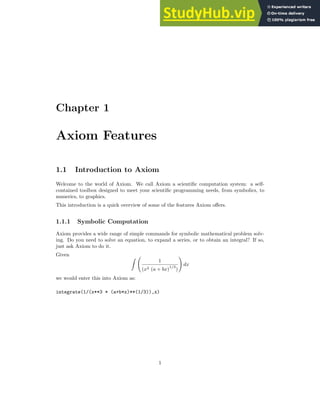
Given Z
1
(x3 (a + bx)
1/3
)
!
dx
we would enter this into Axiom as:
integrate(1/(x**3 * (a+b*x)**(1/3)),x)
1
2 CHAPTER 1. AXIOM FEATURES
which would give the result:















−2 b2
x2
√
3 log

3
√
a
3
√
b x + a
2
+ 3
√
a
2 3
√
b x + a + a

+
4 b2
x2
√
3 log

3
√
a
2 3
√
b x + a − a

+
12 b2
x2
arctan
2
√
3 3
√
a
2 3
√
b x + a + a
√
3
3 a
!
+
(12 b x − 9 a)
√
3 3
√
a
3
√
b x + a
2















18 a2 x2
√
3 3
√
a
Type: Union(Expression Integer,...)
Axiom provides state-of-the-art algebraic machinery to handle your most advanced symbolic
problems.
1.1.2 Numeric Computation
Axiom has a numerical library that includes operations for linear algebra, solution of equa-
tions, and special functions. For many of these operations, you can select any number of
floating point digits to be carried out in the computation.
Solve x49
− 49x4
+ 9 to 49 digits of accuracy. First we need to change the default output
length of numbers:
digits(49)
and then we execute the command:
solve(x**49-49*x**4+9 = 0,1.e-49)
[x = −0.6546536706904271136718122105095984761851224331556,
x = 1.086921395653859508493939035954893289009213388763,
x = 0.6546536707255271739694686066136764835361487607661]
Type: List Equation Polynomial Float
The output of a computation can be converted to FORTRAN to be used in a later numerical
computation. Besides floating point numbers, Axiom provides literally dozens of kinds of
numbers to compute with. These range from various kinds of integers, to fractions, complex
1.1. INTRODUCTION TO AXIOM 3
numbers, quaternions, continued fractions, and to numbers represented with an arbitrary
base.
What is 10 to the 90-th power in base 32?
radix(10**90,32)
returns:
FMM3O955CSEIV0ILKH820CN3I7PICQU0OQMDOFV6TP000000000000000000
Type: RadixExpansion 32
The Axiom numerical library can be enhanced with a substantial number of functions from
the NAG library of numerical and statistical algorithms. These functions will provide cov-
erage of a wide range of areas including roots of functions, Fourier transforms, quadrature,
differential equations, data approximation, non-linear optimization, linear algebra, basic
statistics, step-wise regression, analysis of variance, time series analysis, mathematical pro-
gramming, and special functions. Contact the Numerical Algorithms Group Limited, Oxford,
England.
1.1.3 Mathematical Structures
Axiom also has many kinds of mathematical structures. These range from simple ones (like
polynomials and matrices) to more esoteric ones (like ideals and Clifford algebras). Most
structures allow the construction of arbitrarily complicated “types.”
Even a simple input expression can result in a type with several levels.
matrix [ [x + %i,0], [1,-2] ]

x + %i 0
1 −2

Type: Matrix Polynomial Complex Integer
The “%i” is Axiom’s notation for
√
−1.
The Axiom interpreter builds types in response to user input. Often, the type of the result
is changed in order to be applicable to an operation.
The inverse operation requires that elements of the above matrices are fractions. However
the original elements are polynomials with coefficients which are complex numbers (Com-
plex(Integer)) in Axiom terms. Inverse will coerce these to fractions whose numerator and
denominator are polynomials with coefficients which are complex numbers.
inverse(%)
4 CHAPTER 1. AXIOM FEATURES



1
x + %i
0
1
2 x + 2%i
−1
2



Type: Union(Matrix Fraction Polynomial Complex Integer,...)
1.1.4 HyperDoc
Figure 1.1: Hyperdoc opening menu
HyperDoc presents you windows on the world of Axiom, offering on-line help, examples,
tutorials, a browser, and reference material. HyperDoc gives you on-line access to this
document in a “hypertext” format. Words that appear in a different font (for example,
Matrix, factor, and category) are generally mouse-active; if you click on one with your
mouse, HyperDoc shows you a new window for that word.
As another example of a HyperDoc facility, suppose that you want to compute the roots of
x49
−49x4
+9 to 49 digits (as in our previous example) and you don’t know how to tell Axiom
to do this. The “basic command” facility of HyperDoc leads the way. Through the series of
HyperDoc windows and mouse clicks, you and HyperDoc generate the correct command to
issue to compute the answer.
1.1. INTRODUCTION TO AXIOM 5
1.1.5 Interactive Programming
Axiom’s interactive programming language lets you define your own functions. A simple
example of a user-defined function is one that computes the successive Legendre polynomials.
Axiom lets you define these polynomials in a piece-wise way. The first Legendre polynomial.
p(0) == 1
Type: Void
The second Legendre polynomial.
p(1) == x
Type: Void
The n-th Legendre polynomial for (n  1).
p(n) == ((2*n-1)*x*p(n-1) - (n-1) * p(n-2))/n
Type: Void
In addition to letting you define simple functions like this, the interactive language can be
used to create entire application packages.
The above definitions for p do no computation—they simply tell Axiom how to compute
p(k) for some positive integer k.
To actually get a value of a Legendre polynomial, you ask for it.
What is the tenth Legendre polynomial?
p(10)
Compiling function p with type Integer - Polynomial Fraction
Integer
Compiling function p as a recurrence relation.
46189
256
x10
−
109395
256
x8
+
45045
128
x6
−
15015
128
x4
+
3465
256
x2
−
63
256
Type: Polynomial Fraction Integer
6 CHAPTER 1. AXIOM FEATURES
Axiom applies the above pieces for p to obtain the value of p(10). But it does more: it
creates an optimized, compiled function for p. The function is formed by putting the pieces
together into a single piece of code. By compiled, we mean that the function is translated
into basic machine-code. By optimized, we mean that certain transformations are performed
on that code to make it run faster. For p, Axiom actually translates the original definition
that is recursive (one that calls itself) to one that is iterative (one that consists of a simple
loop).
What is the coefficient of x90
in p(90)?
coefficient(p(90),x,90)
5688265542052017822223458237426581853561497449095175
77371252455336267181195264
Type: Polynomial Fraction Integer
In general, a user function is type-analyzed and compiled on first use. Later, if you use it
with a different kind of object, the function is recompiled if necessary.
1.1.6 Graphics
You may often want to visualize a symbolic formula or draw a graph from a set of numerical
values. To do this, you can call upon the Axiom graphics capability.
Axiom is capable of displaying graphs in two or three dimensions and multiple curves can
be drawn on the same graph. The whole graphics package can be driven from interactive
commands.
Graphs in Axiom are interactive objects you can manipulate with your mouse. Just click
on the graph, and a control panel pops up. Using this mouse and the control panel, you
can translate, rotate, zoom, change the coloring, lighting, shading, and perspective on the
picture. You can also generate a PostScript copy of your graph to produce hard-copy output.
The graphics package runs as a separate process. It interacts with both the Axiom interpreter
and the Hyperdoc facility. In Hyperdoc you can click on an embedded graph and it will
become “live” so you can rotate and translate it.
For example, there is a differential equation known as Bessel’s equation which is
z2 d2
y
dz2
+ z
dy
dz
+ (z2
− v2
)y = 0
We can plot a solution to this equation in Axiom with the command:
draw(5*besselJ(0,sqrt(x**2+y**2)), x=-20..20, y=-20..20)
Draw J0(
p
x2 + y2) for −20 ≤ x, y ≤ 20.
1.1. INTRODUCTION TO AXIOM 7
Figure 1.2: J0(
p
x2 + y2) for −20 ≤ x, y ≤ 20
1.1.7 Data Structures
A variety of data structures are available for interactive use. These include strings, lists,
vectors, sets, multisets, and hash tables. A particularly useful structure for interactive use
is the infinite stream:
Create the infinite stream of derivatives of Legendre polynomials.
[D(p(i),x) for i in 1..]

1, 3 x,
15
2
x2
−
3
2
,
35
2
x3
−
15
2
x,
315
8
x4
−
105
4
x2
+
15
8
,
693
8
x5
−
315
4
x3
+
105
8
x,
3003
16
x6
−
3465
16
x4
+
945
16
x2
−
35
16
,
6435
16
x7
−
9009
16
x5
+
3465
16
x3
−
315
16
x,
109395
128
x8
−
45045
32
x6
+
45045
64
x4
−
3465
32
x2
+
315
128
,
230945
128
x9
−
109395
32
x7
+
135135
64
x5
−
15015
32
x3
+
3465
128
x, . . .

Type: Stream Polynomial Fraction Integer
8 CHAPTER 1. AXIOM FEATURES
Streams display only a few of their initial elements. Otherwise, they are “lazy”: they only
compute elements when you ask for them.
Data structures are an important component for building application software. Advanced
users can represent data for applications in an optimal fashion. In all, Axiom offers over
forty kinds of aggregate data structures, ranging from mutable structures (such as cyclic
lists and flexible arrays) to storage efficient structures (such as bit vectors). As an example,
streams are used as the internal data structure for power series.
What is the series expansion of log(cot(x)) about x = π/2?
series(log(cot(x)),x = %pi/2)
log

−2 x + π
2

+
1
3

x −
π
2
2
+
7
90

x −
π
2
4
+
62
2835

x −
π
2
6
+
127
18900

x −
π
2
8
+
146
66825

x −
π
2
10
+ O

x −
π
2
11

Type: GeneralUnivariatePowerSeries(Expression Integer,x,pi/2)
Series and streams make no attempt to compute all their elements! Rather, they stand ready
to deliver elements on demand.
What is the coefficient of the 50-th term of this series?
coefficient(%,50)
44590788901016030052447242300856550965644
7131469286438669111584090881309360354581359130859375
Type: Expression Integer
Note the use of “%” here. This means the value of the last expression we computed. In this
case it is the long expression above.
1.1.8 Pattern Matching
A convenient facility for symbolic computation is “pattern matching.” Suppose you have a
trigonometric expression and you want to transform it to some equivalent form. Use a rule
command to describe the transformation rules you need. Then give the rules a name and
apply that name as a function to your trigonometric expression.
Here we introduce two rewrite rules. These are given in a “pile” syntax using indentation.
We store them in a file in the following form:
1.1. INTRODUCTION TO AXIOM 9
sinCosExpandRules := rule
sin(x+y) == sin(x)*cos(y) + sin(y)*cos(x)
cos(x+y) == cos(x)*cos(y) - sin(x)*sin(y)
sin(2*x) == 2*sin(x)*cos(x)
cos(2*x) == cos(x)**2 - sin(x)**2
Then we use the )read command to read the input file. The )read command yields:
{sin(y + x) == cos(x)sin(y) + cos(y)sin(x),
cos(y + x) == - sin(x)sin(y) + cos(x)cos(y),
sin(2x) == 2cos(x)sin(x),
2 2
cos(2x) == - sin(x) + cos(x) }
Type: Ruleset(Integer,Integer,Expression Integer)
Now we can apply the rules to a simple trigonometric expression.
sinCosExpandRules(sin(a+2*b+c))

−cos (a) sin (b)
2
− 2 cos (b) sin (a) sin (b) + cos (a) cos (b)
2

sin (c)−
cos (c) sin (a) sin (b)
2
+ 2 cos (a) cos (b) cos (c) sin (b)+
cos (b)
2
cos (c) sin (a)
Type: Expression Integer
Using input files and the )read command, you can create your own library of transformation
rules relevant to your applications, then selectively apply the rules you need.
1.1.9 Polymorphic Algorithms
All components of the Axiom algebra library are written in the Axiom library language called
Spad.1
This language is similar to the interactive language except for protocols that authors
are obliged to follow. The library language permits you to write “polymorphic algorithms,”
algorithms defined to work in their most natural settings and over a variety of types.
Here we define a system of polynomial equations S.
S := [3*x**3 + y + 1 = 0,y**2 = 4]

y + 3 x3
+ 1 = 0, y2
= 4

1Spad is short for Scratchpad which was the original name of the Axiom system
10 CHAPTER 1. AXIOM FEATURES
Type: List Equation Polynomial Integer
And then we solve the system S using rational number arithmetic and 30 digits of accuracy.
solve(S,1/10**30)

y = −2, x =
1757879671211184245283070414507
2535301200456458802993406410752

, [y = 2, x = −1]

Type: List List Equation Polynomial Fraction Integer
Or we can solve S with the solutions expressed in radicals.
radicalSolve(S)

[y = 2, x = −1],

y = 2, x =
−
√
−3 + 1
2

,

y = 2, x =
√
−3 + 1
2

,

y = −2, x =
1
3
√
3

,

y = −2, x =
√
−1
√
3 − 1
2 3
√
3
#
,

y = −2, x =
−
√
−1
√
3 − 1
2 3
√
3
##
Type: List List Equation Expression Integer
While these solutions look very different, the results were produced by the same internal
algorithm! The internal algorithm actually works with equations over any “field.” Examples
of fields are the rational numbers, floating point numbers, rational functions, power series,
and general expressions involving radicals.
1.1.10 Extensibility
Users and system developers alike can augment the Axiom library, all using one common
language. Library code, like interpreter code, is compiled into machine binary code for
run-time efficiency.
Using this language, you can create new computational types and new algorithmic packages.
All library code is polymorphic, described in terms of a database of algebraic properties.
By following the language protocols, there is an automatic, guaranteed interaction between
your code and that of colleagues and system implementers.
1.1. INTRODUCTION TO AXIOM 11
1.1.11 Open Source
Axiom is completely open source. All of the algebra and all of the source code for the
interpreter, compiler, graphics, browser, and numerics is shipped with the system. There
are several websites that host Axiom source code.
Axiom is written using Literate Programming[2] so each file is actually a document rather
than just machine source code. The goal is to make the whole system completely literate so
people can actually read the system and understand it. This is the first volume in a series
of books that will attempt to reach that goal.
The primary site is the Axiom website (http://axiom-developer.org).
Axiom is hosted on Github (http://github.com/daly/axiom)
Axiom is hosted at the Free Software Foundation site which is
(http://savannah.nongnu.org/projects/axiom).
Axiom is hosted at the Sourceforge site which is
(http://sourceforge.net/projects/axiom).
12 CHAPTER 1. AXIOM FEATURES
Chapter 2
Ten Fundamental Ideas
Axiom has both an interactive language for user interactions and a programming language
for building library modules. Like Modula 2, PASCAL, FORTRAN, and Ada, the program-
ming language emphasizes strict type-checking. Unlike these languages, types in Axiom are
dynamic objects: they are created at run-time in response to user commands.
Here is the idea of the Axiom programming language in a nutshell. Axiom types range
from algebraic ones (like polynomials, matrices, and power series) to data structures (like
lists, dictionaries, and input files). Types combine in any meaningful way. You can build
polynomials of matrices, matrices of polynomials of power series, hash tables with symbolic
keys and rational function entries, and so on.
Categories define algebraic properties to ensure mathematical correctness. They ensure, for
example, that matrices of polynomials are OK, but matrices of input files are not. Through
categories, programs can discover that polynomials of continued fractions have a commuta-
tive multiplication whereas polynomials of matrices do not.
Categories allow algorithms to be defined in their most natural setting. For example, an
algorithm can be defined to solve polynomial equations over any field. Likewise a great-
est common divisor can compute the “gcd” of two elements from any Euclidean domain.
Categories foil attempts to compute meaningless “gcds”, for example, of two hashtables.
Categories also enable algorithms to be compiled into machine code that can be run with
arbitrary types.
The Axiom interactive language is oriented towards ease-of-use. The Axiom interpreter uses
type-inferencing to deduce the type of an object from user input. Type declarations can
generally be omitted for common types in the interactive language.
So much for the nutshell. Here are these basic ideas described by ten design principles:
13
14 CHAPTER 2. TEN FUNDAMENTAL IDEAS
2.0.12 Types are Defined by Abstract Datatype Programs
Basic types are called domains of computation, or, simply, domains. Domains are defined
by Axiom programs of the form:
Name(...): Exports == Implementation
Each domain has a capitalized Name that is used to refer to the class of its members. For ex-
ample, Integer denotes “the class of integers,” Float, “the class of floating point numbers,”
and String, “the class of strings.”
The “...” part following Name lists zero or more parameters to the constructor. Some basic
ones like Integer take no parameters. Others, like Matrix, Polynomial and List, take
a single parameter that again must be a domain. For example, Matrix(Integer) denotes
“matrices over the integers,” Polynomial (Float) denotes “polynomial with floating point
coefficients,” and List (Matrix (Polynomial (Integer))) denotes “lists of matrices of
polynomials over the integers.” There is no restriction on the number or type of parameters
of a domain constructor.
SquareMatrix(2,Integer) is an example of a domain constructor that accepts both a particular
data value as well as an integer. In this case the number 2 specifies the number of rows and
columns the square matrix will contain. Elements of the matricies are integers.
The Exports part specifies operations for creating and manipulating objects of the domain.
For example, type Integer exports constants 0 and 1, and operations “+”, “-”, and “*”.
While these operations are common, others such as odd? and bit? are not. In addition
the Exports section can contain symbols that represent properties that can be tested. For
example, the Category EntireRing has the symbol noZeroDivisors which asserts that if a
product is zero then one of the factors must be zero.
The Implementation part defines functions that implement the exported operations of the
domain. These functions are frequently described in terms of another lower-level domain
used to represent the objects of the domain. Thus the operation of adding two vectors of
real numbers can be described and implemented using the addition operation from Float.
2.0.13 The Type of Basic Objects is a Domain or Subdomain
Every Axiom object belongs to a unique domain. The domain of an object is also called its
type. Thus the integer 7 has type Integer and the string daniel has type String.
The type of an object, however, is not unique. The type of integer 7 is not only Integer
but NonNegativeInteger, PositiveInteger, and possibly, in general, any other “subdo-
main” of the domain Integer. A subdomain is a domain with a “membership predicate”.
PositiveInteger is a subdomain of Integer with the predicate “is the integer  0?”.
Subdomains with names are defined by abstract datatype programs similar to those for
domains. The Export part of a subdomain, however, must list a subset of the exports of
the domain. The Implementation part optionally gives special definitions for subdomain
objects.
15
2.0.14 Domains Have Types Called Categories
Domain and subdomains in Axiom are themselves objects that have types. The type of a
domain or subdomain is called a category. Categories are described by programs of the form:
Name(...): Category == Exports
The type of every category is the distinguished symbol Category. The category Name
is used to designate the class of domains of that type. For example, category Ring des-
ignates the class of all rings. Like domains, categories can take zero or more parame-
ters as indicated by the “...” part following Name. Two examples are Module(R) and
MatrixCategory(R,Row,Col).
The Exports part defines a set of operations. For example, Ring exports the operations “0”,
“1”, “+”, “-”, and “*”. Many algebraic domains such as Integer and Polynomial (Float)
are rings. String and List (R) (for any domain R) are not.
Categories serve to ensure the type-correctness. The definition of matrices states Matrix(R:
Ring) requiring its single parameter R to be a ring. Thus a “matrix of polynomials” is
allowed, but “matrix of lists” is not.
Categories say nothing about representation. Domains, which are instances of category
types, specify representations.
2.0.15 Operations Can Refer To Abstract Types
All operations have prescribed source and target types. Types can be denoted by symbols
that stand for domains, called “symbolic domains.” The following lines of Axiom code use
a symbolic domain R:
R: Ring
power: (R, NonNegativeInteger): R - R
power(x, n) == x ** n
Line 1 declares the symbol R to be a ring. Line 2 declares the type of power in terms of
R. From the definition on line 3, power(3, 2) produces 9 for x = 3 and R = Integer. Also,
power(3.0, 2) produces 9.0 for x = 3.0 and R = Float. power(”oxford”, 2) however fails
since ”oxford” has type String which is not a ring.
Using symbolic domains, algorithms can be defined in their most natural or general setting.
2.0.16 Categories Form Hierarchies
Categories form hierarchies (technically, directed-acyclic graphs). A simplified hierarchical
world of algebraic categories is shown below. At the top of this world is SetCategory, the
class of algebraic sets. The notions of parents, ancestors, and descendants is clear. Thus
ordered sets (domains of category OrderedSet) and rings are also algebraic sets. Likewise,
16 CHAPTER 2. TEN FUNDAMENTAL IDEAS
fields and integral domains are rings and algebraic sets. However fields and integral domains
are not ordered sets.
SetCategory +---- Ring ---- IntegralDomain ---- Field
|
+---- Finite ---+
| 
+---- OrderedSet -----+ OrderedFinite
Figure 1. A simplified category hierarchy.
2.0.17 Domains Belong to Categories by Assertion
A category designates a class of domains. Which domains? You might think that Ring
designates the class of all domains that export 0, 1, “+”, “-”, and “*”. But this is not so.
Each domain must assert which categories it belongs to.
The Export part of the definition for Integer reads, for example:
Join(OrderedSet, IntegralDomain, ...) with ...
This definition asserts that Integer is both an ordered set and an integral domain. In fact,
Integer does not explicitly export constants 0 and 1 and operations “+”, “-” and “*” at all:
it inherits them all from Ring! Since IntegralDomain is a descendant of Ring, Integer is
therefore also a ring.
Assertions can be conditional. For example, Complex(R) defines its exports by:
Ring with ... if R has Field then Field ...
Thus Complex(Float) is a field but Complex(Integer) is not since Integer is not a field.
You may wonder: “Why not simply let the set of operations determine whether a domain
belongs to a given category?”. Axiom allows operation names (for example, norm) to have
very different meanings in different contexts. The meaning of an operation in Axiom is
determined by context. By associating operations with categories, operation names can be
reused whenever appropriate or convenient to do so. As a simple example, the operation 
might be used to denote lexicographic-comparison in an algorithm. However, it is wrong to
use the same  with this definition of absolute-value:
abs(x) == if x  0 then − x else x
Such a definition for abs in Axiom is protected by context: argument x is required to be a
member of a domain of category OrderedSet.
17
2.0.18 Packages Are Clusters of Polymorphic Operations
In Axiom, facilities for symbolic integration, solution of equations, and the like are placed
in “packages”. A package is a special kind of domain: one whose exported operations
depend solely on the parameters of the constructor and/or explicit domains. Packages,
unlike Domains, do not specify the representation.
If you want to use Axiom, for example, to define some algorithms for solving equations of
polynomials over an arbitrary field F, you can do so with a package of the form:
MySolve(F: Field): Exports == Implementation
where Exports specifies the solve operations you wish to export from the domain and
the Implementation defines functions for implementing your algorithms. Once Axiom has
compiled your package, your algorithms can then be used for any F: floating-point numbers,
rational numbers, complex rational functions, and power series, to name a few.
2.0.19 The Interpreter Builds Domains Dynamically
The Axiom interpreter reads user input then builds whatever types it needs to perform the
indicated computations. For example, to create the matrix
M =

x2
+ 1 0
0 x/2

using the command:
M = [ [x**2+1,0],[0,x / 2] ]::Matrix(POLY(FRAC(INT)))
M =

x2
+ 1 0
0 x/2

Type: Matrix Polynomial Fraction Integer
the interpreter first loads the modules Matrix, Polynomial, Fraction, and Integer from
the library, then builds the domain tower “matrices of polynomials of rational numbers (i.e.
fractions of integers)”.
You can watch the loading process by first typing
)set message autoload on
In addition to the named domains above many additional domains and categories are loaded.
Most systems are preloaded with such common types. For efficiency reasons the most com-
mon domains are preloaded but most (there are more than 1100 domains, categories, and
18 CHAPTER 2. TEN FUNDAMENTAL IDEAS
packages) are not. Once these domains are loaded they are immediately available to the
interpreter.
Once a domain tower is built, it contains all the operations specific to the type. Computation
proceeds by calling operations that exist in the tower. For example, suppose that the user
asks to square the above matrix. To do this, the function “*” from Matrix is passed the
matrix M to compute M ∗M. The function is also passed an environment containing R that,
in this case, is Polynomial (Fraction (Integer)). This results in the successive calling of
the “*” operations from Polynomial, then from Fraction, and then finally from Integer.
Categories play a policing role in the building of domains. Because the argument of Matrix
is required to be a Ring, Axiom will not build nonsensical types such as “matrices of input
files”.
2.0.20 Axiom Code is Compiled
Axiom programs are statically compiled to machine code, then placed into library modules.
Categories provide an important role in obtaining efficient object code by enabling:
• static type-checking at compile time;
• fast linkage to operations in domain-valued parameters;
• optimization techniques to be used for partially specified types (operations for “vectors
of R”, for instance, can be open-coded even though R is unknown).
2.0.21 Axiom is Extensible
Users and system implementers alike use the Axiom language to add facilities to the Axiom
library. The entire Axiom library is in fact written in the Axiom source code and available
for user modification and/or extension.
Axiom’s use of abstract datatypes clearly separates the exports of a domain (what operations
are defined) from its implementation (how the objects are represented and operations are
defined). Users of a domain can thus only create and manipulate objects through these
exported operations. This allows implementers to “remove and replace” parts of the library
safely by newly upgraded (and, we hope, correct) implementations without consequence to
its users.
Categories protect names by context, making the same names available for use in other
contexts. Categories also provide for code-economy. Algorithms can be parameterized cat-
egorically to characterize their correct and most general context. Once compiled, the same
machine code is applicable in all such contexts.
Finally, Axiom provides an automatic, guaranteed interaction between new and old code.
For example:
• if you write a new algorithm that requires a parameter to be a field, then your algorithm
will work automatically with every field defined in the system; past, present, or future.
19
• if you introduce a new domain constructor that produces a field, then the objects of
that domain can be used as parameters to any algorithm using field objects defined in
the system; past, present, or future.
Before embarking on the tour, we need to brief those readers working interactively with
Axiom on some details.
20 CHAPTER 2. TEN FUNDAMENTAL IDEAS
Chapter 3
Starting Axiom
Welcome to the Axiom environment for interactive computation and problem solving. Con-
sider this chapter a brief, whirlwind tour of the Axiom world. We introduce you to Axiom’s
graphics and the Axiom language. Then we give a sampling of the large variety of facili-
ties in the Axiom system, ranging from the various kinds of numbers, to data types (like
lists, arrays, and sets) and mathematical objects (like matrices, integrals, and differential
equations). We include a discussion of system commands and an interactive “undo.”
3.1 Starting Up and Winding Down
You need to know how to start the Axiom system and how to stop it. We assume that
Axiom has been correctly installed on your machine. Information on how to install Axiom
is available on the wiki website[3].
To begin using Axiom, issue the command axiom to the operating system shell. There is a
brief pause, some start-up messages, and then one or more windows appear.
If you are not running Axiom under the X Window System, there is only one window (the
console). At the lower left of the screen there is a prompt that looks like
(1) -
When you want to enter input to Axiom, you do so on the same line after the prompt.
The “1” in “(1)”, also called the equation number, is the computation step number and is
incremented after you enter Axiom statements. Note, however, that a system command such
as )clear all may change the step number in other ways. We talk about step numbers
more when we discuss system commands and the workspace history facility.
If you are running Axiom under the X Window System, there may be two windows: the
console window (as just described) and the HyperDoc main menu. HyperDoc is a multiple-
window hypertext system that lets you view Axiom documentation and examples on-line,
execute Axiom expressions, and generate graphics. If you are in a graphical windowing
21
22 CHAPTER 3. STARTING AXIOM
environment, it is usually started automatically when Axiom begins. If it is not running,
issue )hd to start it.
To interrupt an Axiom computation, hold down the Ctrl (control) key and press c. This
brings you back to the Axiom prompt.
To exit from Axiom, move to the console window, type )quit at the input
prompt and press the Enter key. You will probably be prompted with the
following message:
Please enter y or yes if you really want to leave the
interactive environment and return to the operating system
You should respond yes, for example, to exit Axiom.
We are purposely vague in describing exactly what your screen looks like or what messages
Axiom displays. Axiom runs on a number of different machines, operating systems and
window environments, and these differences all affect the physical look of the system. You
can also change the way that Axiom behaves via system commands described later in this
chapter and in the Axiom System Commands. (Chapter 8 on page 221) System commands
are special commands, like )set, that begin with a closing parenthesis and are used to change
your environment. For example, you can set a system variable so that you are not prompted
for confirmation when you want to leave Axiom.
3.1.1 Clef
If you are using Axiom under the X Window System, the Clef command line editor is
probably available and installed. With this editor you can recall previous lines with the up
and down arrow keys. To move forward and backward on a line, use the right and left arrows.
You can use the Insert key to toggle insert mode on or off. When you are in insert mode,
the cursor appears as a large block and if you type anything, the characters are inserted into
the line without deleting the previous ones.
If you press the Home key, the cursor moves to the beginning of the line and if you press
the End key, the cursor moves to the end of the line. Pressing Ctrl-End deletes all the text
from the cursor to the end of the line.
Clef also provides Axiom operation name completion for a limited set of operations. If you
enter a few letters and then press the Tab key, Clef tries to use those letters as the prefix of
an Axiom operation name. If a name appears and it is not what you want, press Tab again
to see another name.
3.1.2 Typographic Conventions
In this document we have followed these typographical conventions:
• Categories, domains and packages are displayed in this font: Ring, Integer, DiophantineSolutionP
3.2. THE AXIOM LANGUAGE 23
• Prefix operators, infix operators, and punctuation symbols in the Axiom language are
displayed in the text like this: +, $, +-.
• Axiom expressions or expression fragments are displayed in this font:
inc(x) == x + 1.
• For clarity of presentation, TEX is often used to format expressions
g(x) = x2
+ 1.
• Function names and HyperDoc button names are displayed in the text in this font:
factor, integrate, Lighting.
• Italics are used for emphasis and for words defined in the glossary:
category.
This document contains over many examples of Axiom input and output. All examples were
run though Axiom and their output was created in TEX form. We have deleted system
messages from the example output if those messages are not important for the discussions
in which the examples appear.
3.2 The Axiom Language
The Axiom language is a rich language for performing interactive computations and for
building components of the Axiom library. Here we present only some basic aspects of
the language that you need to know for the rest of this chapter. Our discussion here is
intentionally informal, with details unveiled on an “as needed” basis. For more information
on a particular construct, we suggest you consult the index.
3.2.1 Arithmetic Expressions
For arithmetic expressions, use the “+” and “-” operator as in mathematics. Use “*” for
multiplication, and “**” for exponentiation. To create a fraction, use “/”. When an expres-
sion contains several operators, those of highest precedence are evaluated first. For arithmetic
operators, “**” has highest precedence, “*” and “/” have the next highest precedence, and
“+” and “-” have the lowest precedence.
Axiom puts implicit parentheses around operations of higher precedence, and groups those
of equal precedence from left to right.
1 + 2 - 3 / 4 * 3 ** 2 - 1
−
19
4
Type: Fraction Integer
The above expression is equivalent to this.
24 CHAPTER 3. STARTING AXIOM
((1 + 2) - ((3 / 4) * (3 ** 2))) - 1
−
19
4
Type: Fraction Integer
If an expression contains subexpressions enclosed in parentheses, the parenthesized subex-
pressions are evaluated first (from left to right, from inside out).
1 + 2 - 3/ (4 * 3 ** (2 - 1))
11
4
Type: Fraction Integer
3.2.2 Previous Results
Use the percent sign “%” to refer to the last result. Also, use “%%’ to refer to previous
results. “%%(-1)” is equivalent to “%”, “%%(-2)” returns the next to the last result, and so
on. “%%(1)” returns the result from step number 1, “%%(2)” returns the result from step
number 2, and so on. “%%(0)” is not defined.
This is ten to the tenth power.
10 ** 10
10000000000
Type: PositiveInteger
This is the last result minus one.
% - 1
9999999999
Type: PositiveInteger
This is the last result.
%%(-1)
9999999999
3.2. THE AXIOM LANGUAGE 25
Type: PositiveInteger
This is the result from step number 1.
%%(1)
10000000000
Type: PositiveInteger
3.2.3 Some Types
Everything in Axiom has a type. The type determines what operations you can perform on
an object and how the object can be used.
Positive integers are given type PositiveInteger.
8
8
Type: PositiveInteger
Negative ones are given type Integer. This fine distinction is helpful to the Axiom inter-
preter.
-8
−8
Type: Integer
Here a positive integer exponent gives a polynomial result.
x**8
x8
Type: Polynomial Integer
Here a negative integer exponent produces a fraction.
x**(-8)
1
x8
Type: Fraction Polynomial Integer
26 CHAPTER 3. STARTING AXIOM
3.2.4 Symbols, Variables, Assignments, and Declarations
A symbol is a literal used for the input of things like the “variables” in polynomials and
power series.
We use the three symbols x, y, and z in entering this polynomial.
(x - y*z)**2
y2
z2
− 2 x y z + x2
Type: Polynomial Integer
A symbol has a name beginning with an uppercase or lowercase alphabetic character, “%”,
or “!”. Successive characters (if any) can be any of the above, digits, or “?”. Case is
distinguished: the symbol points is different from the symbol Points.
A symbol can also be used in Axiom as a variable. A variable refers to a value. To assign a
value to a variable, the operator “:=” is used. Axiom actually has two forms of assignment:
immediate assignment, as discussed here, and delayed assignment. A variable initially has
no restrictions on the kinds of values to which it can refer.
This assignment gives the value 4 (an integer) to a variable named x.
x := 4
4
Type: PositiveInteger
This gives the value z + 3/5 (a polynomial) to x.
x := z + 3/5
z +
3
5
Type: Polynomial Fraction Integer
To restrict the types of objects that can be assigned to a variable, use a declaration
y : Integer
Type: Void
After a variable is declared to be of some type, only values of that type can be assigned to
that variable.
3.2. THE AXIOM LANGUAGE 27
y := 89
89
Type: Integer
The declaration for y forces values assigned to y to be converted to integer values.
y := sin %pi
0
Type: Integer
If no such conversion is possible, Axiom refuses to assign a value to y.
y := 2/3
Cannot convert right-hand side of assignment
2
-
3
to an object of the type Integer of the left-hand side.
A type declaration can also be given together with an assignment. The declaration can assist
Axiom in choosing the correct operations to apply.
f : Float := 2/3
0.6666666666 6666666667
Type: Float
Any number of expressions can be given on input line. Just separate them by semicolons.
Only the result of evaluating the last expression is displayed.
These two expressions have the same effect as the previous single expression.
f : Float; f := 2/3
0.6666666666 6666666667
Type: Float
28 CHAPTER 3. STARTING AXIOM
The type of a symbol is either Symbol or Variable(name) where name is the name of the
symbol.
By default, the interpreter gives this symbol the type Variable(q).
q
q
Type: Variable q
When multiple symbols are involved, Symbol is used.
[q, r]
[q, r]
Type: List OrderedVariableList [q,r]
What happens when you try to use a symbol that is the name of a variable?
f
0.6666666666 6666666667
Type: Float
Use a single quote “’” before the name to get the symbol.
’f
f
Type: Variable f
Quoting a name creates a symbol by preventing evaluation of the name as a variable. Expe-
rience will teach you when you are most likely going to need to use a quote. We try to point
out the location of such trouble spots.
3.2.5 Conversion
Objects of one type can usually be “converted” to objects of several other types. To convert
an object to a new type, use the “::” infix operator. For example, to display an object, it
is necessary to convert the object to type OutputForm.
This produces a polynomial with rational number coefficients.
3.2. THE AXIOM LANGUAGE 29
p := r**2 + 2/3
r2
+
2
3
Type: Polynomial Fraction Integer
Create a quotient of polynomials with integer coefficients by using “::”.
p :: Fraction Polynomial Integer
3 r2
+ 2
3
Type: Fraction Polynomial Integer
Some conversions can be performed automatically when Axiom tries to evaluate your input.
Others conversions must be explicitly requested.
3.2.6 Calling Functions
As we saw earlier, when you want to add or subtract two values, you place the arithmetic
operator “+” or “-” between the two arguments denoting the values. To use most other
Axiom operations, however, you use another syntax: write the name of the operation first,
then an open parenthesis, then each of the arguments separated by commas, and, finally, a
closing parenthesis. If the operation takes only one argument and the argument is a number
or a symbol, you can omit the parentheses.
This calls the operation factor with the single integer argument 120.
factor(120)
23
3 5
Type: Factored Integer
This is a call to divide with the two integer arguments 125 and 7.
divide(125,7)
[quotient = 17, remainder = 6]
Type: Record(quotient: Integer, remainder: Integer)
30 CHAPTER 3. STARTING AXIOM
This calls quatern with four floating-point arguments.
quatern(3.4,5.6,2.9,0.1)
3.4 + 5.6 i + 2.9 j + 0.1 k
Type: Quaternion Float
This is the same as factorial(10).
factorial 10
3628800
Type: PositiveInteger
An operations that returns a Boolean value (that is, true or false) frequently has a name
suffixed with a question mark (“?”). For example, the even? operation returns true if its
integer argument is an even number, false otherwise.
An operation that can be destructive on one or more arguments usually has a name ending
in a exclamation point (“!”). This actually means that it is allowed to update its arguments
but it is not required to do so. For example, the underlying representation of a collection type
may not allow the very last element to removed and so an empty object may be returned
instead. Therefore, it is important that you use the object returned by the operation and not
rely on a physical change having occurred within the object. Usually, destructive operations
are provided for efficiency reasons.
3.2.7 Some Predefined Macros
Axiom provides several macros for your convenience. Macros are names (or forms) that
expand to larger expressions for commonly used values.
%i The square root of -1.
%e The base of the natural logarithm.
%pi π.
%infinity ∞.
%plusInfinity +∞.
%minusInfinity −∞.
To display all the macros (along with anything you have defined in the workspace), issue the
system command )display all.
3.3. USING AXIOM AS A POCKET CALCULATOR 31
3.2.8 Long Lines
When you enter Axiom expressions from your keyboard, there will be times when they are
too long to fit on one line. Axiom does not care how long your lines are, so you can let them
continue from the right margin to the left side of the next line.
Alternatively, you may want to enter several shorter lines and have Axiom glue them together.
To get this glue, put an underscore ( ) at the end of each line you wish to continue.
2_
+_
3
is the same as if you had entered
2+3
Axiom statements in an input file can use indentation to indicate the program structure.
3.2.9 Comments
Comment statements begin with two consecutive hyphens or two consecutive plus signs and
continue until the end of the line.
The comment beginning with “--” is ignored by Axiom.
2 + 3 -- this is rather simple, no?
5
Type: PositiveInteger
There is no way to write long multi-line comments other than starting each line with “--”
or “++”.
3.3 Using Axiom as a Pocket Calculator
At the simplest level Axiom can be used as a pocket calculator where expressions involving
numbers and operators are entered directly in infix notation. In this sense the more advanced
features of the calculator can be regarded as operators (e.g sin, cos, etc).
3.3.1 Basic Arithmetic
An example of this might be to calculate the cosine of 2.45 (in radians). To do this one
would type:
32 CHAPTER 3. STARTING AXIOM
(1)- cos 2.45
−0.7702312540473073417
Type: Float
Before proceeding any further it would be best to explain the previous three lines. Axiom
presents a “(1) - ” prompt (shown here but omitted elsewhere) when interacting with the
user. The full prompt has other text preceding this but it is not relevant here. The number
in parenthesis is the step number of the input which may be used to refer to the results of
previous calculations. The step number appears at the start of the second line to tell you
which step the result belongs to. Since the interpreter probably loaded numerous libraries
to calculate the result given above and listed each one in the prcess, there could easily be
several pages of text between your input and the answer.
The last line contains the type of the result. The type Float is used to represent real
numbers of arbitrary size and precision (where the user is able to define how big arbitrary
is – the default is 20 digits but can be as large as your computer system can handle). The
type of the result can help track down mistakes in your input if you don’t get the answer
you expected.
Other arithmetic operations such as addition, subtraction, and multiplication behave as
expected:
6.93 * 4.1328
28.640304
Type: Float
6.93 / 4.1328
1.6768292682926829268
Type: Float
but integer division isn’t quite so obvious. For example, if one types:
4/6
2
3
Type: Fraction Integer
3.3. USING AXIOM AS A POCKET CALCULATOR 33
a fractional result is obtained. The function used to display fractions attempts to produce
the most readable answer. In the example:
4/2
2
Type: Fraction Integer
the result is stored as the fraction 2/1 but is displayed as the integer 2. This fraction
could be converted to type Integer with no loss of information but Axiom will not do so
automatically.
3.3.2 Type Conversion
To obtain the floating point value of a fraction one must convert ( conversions are applied
by the user and coercions are applied automatically by the interpreter) the result to type
Float using the “::” operator as follows:
(4.6)::Float
4.6
Type: Float
Although Axiom can convert this back to a fraction it might not be the same fraction you
started with due to rounding errors. For example, the following conversion appears to be
without error but others might not:
%::Fraction Integer
23
5
Type: Fraction Integer
where “%” represents the previous result (not the calculation).
Although Axiom has the ability to work with floating-point numbers to a very high precision
it must be remembered that calculations with these numbers are not exact. Since Axiom is
a computer algebra package and not a numerical solutions package this should not create too
many problems. The idea is that the user should use Axiom to do all the necessary symbolic
manipulation and only at the end should actual numerical results be extracted.
34 CHAPTER 3. STARTING AXIOM
If you bear in mind that Axiom appears to store expressions just as you have typed them
and does not perform any evalutation of them unless forced to then programming in the
system will be much easier. It means that anything you ask Axiom to do (within reason)
will be carried out with complete accuracy.
In the previous examples the “::” operator was used to convert values from one type to
another. This type conversion is not possible for all values. For instance, it is not possible
to convert the number 3.4 to an integer type since it can’t be represented as an integer. The
number 4.0 can be converted to an integer type since it has no fractional part.
Conversion from floating point values to integers is performed using the functions round
and truncate. The first of these rounds a floating point number to the nearest integer while
the other truncates (i.e. removes the fractional part). Both functions return the result as
a floating point number. To extract the fractional part of a floating point number use
the function fractionPart but note that the sign of the result depends on the sign of the
argument. Axiom obtains the fractional part of x using x − truncate(x):
round(3.77623)
4.0
Type: Float
round(-3.77623)
−4.0
Type: Float
truncate(9.235)
9.0
Type: Float
truncate(-9.654)
−9.0
Type: Float
fractionPart(-3.77623)
−0.77623
Type: Float
3.3. USING AXIOM AS A POCKET CALCULATOR 35
3.3.3 Useful Functions
To obtain the absolute value of a number the abs function can be used. This takes a single
argument which is usually an integer or a floating point value but doesn’t necessarily have
to be. The sign of a value can be obtained via the sign function which returns −1, 0, or 1
depending on the sign of the argument.
abs(4)
4
Type: PositiveInteger
abs(-3)
3
Type: PositiveInteger
abs(-34254.12314)
34254.12314
Type: Float
sign(-49543.2345346)
−1
Type: Integer
sign(0)
0
Type: NonNegativeInteger
sign(234235.42354)
1
36 CHAPTER 3. STARTING AXIOM
Type: PositiveInteger
Tests on values can be done using various functions which are generally more efficient than
using relational operators such as = particularly if the value is a matrix. Examples of some
of these functions are:
positive?(-234)
false
Type: Boolean
negative?(-234)
true
Type: Boolean
zero?(42)
false
Type: Boolean
one?(1)
true
Type: Boolean
odd?(23)
true
Type: Boolean
odd?(9.435)
false
3.3. USING AXIOM AS A POCKET CALCULATOR 37
Type: Boolean
even?(-42)
true
Type: Boolean
prime?(37)
true
Type: Boolean
prime?(-37)
false
Type: Boolean
Some other functions that are quite useful for manipulating numerical values are:
sin(x) Sine of x
cos(x) Cosine of x
tan(x) Tangent of x
asin(x) Arcsin of x
acos(x) Arccos of x
atan(x) Arctangent of x
gcd(x,y) Greatest common divisor of x and y
lcm(x,y) Lowest common multiple of x and y
max(x,y) Maximum of x and y
min(x,y) Minimum of x and y
factorial(x) Factorial of x
factor(x) Prime factors of x
divide(x,y) Quotient and remainder of x/y
Some simple infix and prefix operators:
+ Addition - Subtraction
- Numerical Negation ~ Logical Negation
/ Conjunction (AND) / Disjunction (OR)
and Logical AND (/) or Logical OR (/)
not Logical Negation ** Exponentiation
* Multiplication / Division
quo Quotient rem Remainder
 less than  greater than
= less than or equal = greater than or equal
38 CHAPTER 3. STARTING AXIOM
Some useful Axiom macros:
%i The square root of -1
%e The base of the natural logarithm
%pi Pi
%infinity Infinity
%plusInfinity Positive Infinity
%minusInfinity Negative Infinity
3.4 Using Axiom as a Symbolic Calculator
In the previous section all the examples involved numbers and simple functions. Also none of
the expressions entered were assigned to anything. In this section we will move on to simple
algebra (i.e. expressions involving symbols and other features available on more sophisticated
calculators).
3.4.1 Expressions Involving Symbols
Expressions involving symbols are entered just as they are written down, for example:
xSquared := x**2
x2
Type: Polynomial Integer
where the assignment operator “:=” represents immediate assignment. Later it will be seen
that this form of assignment is not always desirable and the use of the delayed assignment
operator “==” will be introduced. The type of the result is Polynomial Integer which is
used to represent polynomials with integer coefficients. Some other examples along similar
lines are:
xDummy := 3.21*x**2
3.21 x2
Type: Polynomial Float
xDummy := x**2.5
x2
√
x
3.4. USING AXIOM AS A SYMBOLIC CALCULATOR 39
Type: Expression Float
xDummy := x**3.3
x3 10
√
x
3
Type: Expression Float
xyDummy := x**2 - y**2
−y2
+ x2
Type: Polynomial Integer
Given that we can define expressions involving symbols, how do we actually compute the
result when the symbols are assigned values? The answer is to use the eval function which
takes an expression as its first argument followed by a list of assignments. For example, to
evaluate the expressions xDummy and xyDummy resulting from their respective assignments
above we type:
eval(xDummy,x=3)
37.540507598529552193
Type: Expression Float
eval(xyDummy, [x=3, y=2.1])
4.59
Type: Polynomial Float
3.4.2 Complex Numbers
For many scientific calculations real numbers aren’t sufficient and support for complex num-
bers is also required. Complex numbers are handled in an intuitive manner. Axiom uses the
%i macro to represent the square root of −1. Thus expressions involving complex numbers
are entered just like other expressions.
(2/3 + %i)**3
40 CHAPTER 3. STARTING AXIOM
−
46
27
+
1
3
%i
Type: Complex Fraction Integer
The real and imaginary parts of a complex number can be extracted using the real and
imag functions and the complex conjugate of a number can be obtained using conjugate:
real(3 + 2*%i)
3
Type: PositiveInteger
imag(3+ 2*%i)
2
Type: PositiveInteger
conjugate(3 + 2*%i)
3 − 2%i
Type: Complex Integer
The function factor can also be applied to complex numbers but the results aren’t quite so
obvious as for factoring integer:
144 + 24*%i
144 + 24%i
Type: Complex Integer
factor(%)
%i(1 + %i)6
3(6 + %i)
Type: Factored Complex Integer
3.4. USING AXIOM AS A SYMBOLIC CALCULATOR 41
We can see that this multiplies out to the original value by expanding the factored expression:
expand %
144 + 24%i
Type: Complex Integer
3.4.3 Number Representations
By default all numerical results are displayed in decimal with real numbers shown to 20
significant figures. If the integer part of a number is longer than 20 digits then nothing after
the decimal point is shown and the integer part is given in full. To alter the number of digits
shown the function digits can be called. The result returned by this function is the previous
setting. For example, to find the value of π to 40 digits we type:
digits(40)
20
Type: PositiveInteger
%pi::Float
3.1415926535 8979323846 2643383279 502884197
Type: Float
As can be seen in the example above, there is a gap after every ten digits. This can be
changed using the outputSpacing function where the argument is the number of digits
to be displayed before a space is inserted. If no spaces are desired then use the value
0. Two other functions controlling the appearance of real numbers are outputFloating
and outputFixed. The former causes Axiom to display floating-point values in exponent
notation and the latter causes it to use fixed-point notation. For example:
outputFloating(); %
0.3141592653589793238462643383279502884197 E 1
Type: Float
42 CHAPTER 3. STARTING AXIOM
outputFloating(3); 0.00345
0.345 E − 2
Type: Float
outputFixed(); %
0.00345
Type: Float
outputFixed(3); %
0.003
Type: Float
outputGeneral(); %
0.00345
Type: Float
Note that the semicolon “;” in the examples above allows several expressions to be entered
on one line. The result of the last expression is displayed. Remember also that the percent
symbol “%” is used to represent the result of a previous calculation.
To display rational numbers in a base other than 10 the function radix is used. The first
argument of this function is the expression to be displayed and the second is the base to be
used.
radix(10**10,32)
9A0NP00
Type: RadixExpansion 32
radix(3/21,5)
0.032412
3.4. USING AXIOM AS A SYMBOLIC CALCULATOR 43
Type: RadixExpansion 5
Rational numbers can be represented as a repeated decimal expansion using the decimal
function or as a continued fraction using continuedFraction. Any attempt to call these
functions with irrational values will fail.
decimal(22/7)
3.142857
Type: DecimalExpansion
continuedFraction(6543/210)
31 +
1|
|6
+
1|
|2
+
1|
|1
+
1|
|3
Type: ContinuedFraction Integer
Finally, partial fractions in compact and expanded form are available via the functions
partialFraction and padicFraction respectively. The former takes two arguments, the
first being the numerator of the fraction and the second being the denominator. The latter
function takes a fraction and expands it further while the function compactFraction does
the reverse:
partialFraction(234,40)
6 −
3
22
+
3
5
Type: PartialFraction Integer
padicFraction(%)
6 −
1
2
−
1
22
+
3
5
Type: PartialFraction Integer
compactFraction(%)
44 CHAPTER 3. STARTING AXIOM
6 −
3
22
+
3
5
Type: PartialFraction Integer
padicFraction(234/40)
117
20
Type: PartialFraction Fraction Integer
To extract parts of a partial fraction the function nthFractionalTerm is available and
returns a partial fraction of one term. To decompose this further the numerator can be
obtained using firstNumer and the denominator with firstDenom. The whole part of a
partial fraction can be retrieved using wholePart and the number of fractional parts can
be found using the function numberOfFractionalTerms:
t := partialFraction(234,40)
6 −
3
22
+
3
5
Type: PartialFraction Integer
wholePart(t)
6
Type: PositiveInteger
numberOfFractionalTerms(t)
2
Type: PositiveInteger
p := nthFractionalTerm(t,1)
−
3
22
3.4. USING AXIOM AS A SYMBOLIC CALCULATOR 45
Type: PartialFraction Integer
firstNumer(p)
−3
Type: Integer
firstDenom(p)
22
Type: Factored Integer
3.4.4 Modular Arithmetic
By using the type constructor PrimeField it is possible to do arithmetic modulo some prime
number. For example, arithmetic module 7 can be performed as follows:
x : PrimeField 7 := 5
5
Type: PrimeField 7
x**5 + 6
2
Type: PrimeField 7
1/x
3
Type: PrimeField 7
The first example should be read as:
46 CHAPTER 3. STARTING AXIOM
Let x be of type PrimeField(7) and assign to it the value 5
Note that it is only possible to invert non-zero values if the arithmetic is performed modulo
a prime number. Thus arithmetic modulo a non-prime integer is possible but the reciprocal
operation is undefined and will generate an error. Attempting to use the PrimeField type
constructor with a non-prime argument will generate an error. An example of non-prime
modulo arithmetic is:
y : IntegerMod 8 := 11
3
Type: IntegerMod 8
y*4 + 27
7
Type: IntegerMod 8
Note that polynomials can be constructed in a similar way:
(3*a**4 + 27*a - 36)::Polynomial PrimeField 7
3 a4
+ 6 a + 6
Type: Polynomial PrimeField 7
3.5 General Points about Axiom
3.5.1 Computation Without Output
It is sometimes desirable to enter an expression and prevent Axiom from displaying the result.
To do this the expression should be terminated with a semicolon “;”. In a previous section
it was mentioned that a set of expressions separated by semicolons would be evaluated and
the result of the last one displayed. Thus if a single expression is followed by a semicolon no
output will be produced (except for its type):
2 + 4*5;
Type: PositiveInteger
3.5. GENERAL POINTS ABOUT AXIOM 47
3.5.2 Accessing Earlier Results
The “%” macro represents the result of the previous computation. The “%%” macro is
available which takes a single integer argument. If the argument is positive then it refers to
the step number of the calculation where the numbering begins from one and can be seen
at the end of each prompt (the number in parentheses). If the argument is negative then it
refers to previous results counting backwards from the last result. That is, “%%(-1)” is the
same as “%”. The value of “%%(0)” is not defined and will generate an error if requested.
3.5.3 Splitting Expressions Over Several Lines
Although Axiom will quite happily accept expressions that are longer than the width of the
screen (just keep typing without pressing the Return key) it is often preferable to split the
expression being entered at a point where it would result in more readable input. To do
this the underscore “ ” symbol is placed before the break point and then the Return key
is pressed. The rest of the expression is typed on the next line, can be preceeded by any
number of whitespace chars, for example:
2_
+_
3
5
Type: PositiveInteger
The underscore symbol is an escape character and its presence alters the meaning of the
characters that follow it. As mentions above whitespace following an underscore is ignored
(the Return key generates a whitespace character). Any other character following an un-
derscore loses whatever special meaning it may have had. Thus one can create the identifier
“a+b” by typing “a +b” although this might lead to confusions. Also note the result of the
following example:
ThisIsAVeryLong
VariableName
ThisIsAV eryLongV ariableName
Type: Variable ThisIsAVeryLongVariableName
3.5.4 Comments and Descriptions
Comments and descriptions are really only of use in files of Axiom code but can be used
when the output of an interactive session is being spooled to a file (via the system command
48 CHAPTER 3. STARTING AXIOM
)spool). A comment begins with two dashes “- -” and continues until the end of the line.
Multi-line comments are only possible if each individual line begins with two dashes.
Descriptions are the same as comments except that the Axiom compiler will include them
in the object files produced and make them available to the end user for documentation
purposes.
A description is placed before a calculation begins with three “+” signs (i.e. “+++”) and a
description placed after a calculation begins with two plus symbols (i.e.“++”). The so-called
“plus plus” comments are used within the algebra files and are processed by the compiler to
add to the documentation. The so-called “minus minus” comments are ignored everywhere.
3.5.5 Control of Result Types
In earlier sections the type of an expression was converted to another via the “::” operator.
However, this is not the only method for converting between types and two other operators
need to be introduced and explained.
The first operator is “$” and is used to specify the package to be used to calculate the result.
Thus:
(2/3)$Float
0.6666666666 6666666667
Type: Float
tells Axiom to use the “/” operator from the Float package to evaluate the expression 2/3.
This does not necessarily mean that the result will be of the same type as the domain from
which the operator was taken. In the following example the sign operator is taken from the
Float package but the result is of type Integer.
sign(2.3)$Float
1
Type: Integer
The other operator is “@” which is used to tell Axiom what the desired type of the result
of the calculation is. In most situations all three operators yield the same results but the
example below should help distinguish them.
(2 + 3)::String
5
3.5. GENERAL POINTS ABOUT AXIOM 49
Type: String
(2 + 3)@String
An expression involving @ String actually evaluated to one of
type PositiveInteger . Perhaps you should use :: String .
(2 + 3)$String
The function + is not implemented in String .
If an expression X is converted using one of the three operators to type T the interpretations
are:
:: means explicitly convert X to type T if possible.
$ means use the available operators for type T to compute X.
@ means choose operators to compute X so that the result is of type T.
3.5.6 Using system commands
We conclude our tour of Axiom with a brief discussion of system commands. System com-
mands are special statements that start with a closing parenthesis ()). They are used to
control or display your Axiom environment, start the HyperDoc system, issue operating sys-
tem commands and leave Axiom. For example, )system is used to issue commands to the
operating system from Axiom. Here is a brief description of some of these commands.
Perhaps the most important user command is the )clear all command that initializes your
environment. Every section and subsection in this document has an invisible )clear all
that is read prior to the examples given in the section. )clear all gives you a fresh, empty
environment with no user variables defined and the step number reset to 1. The )clear
command can also be used to selectively clear values and properties of system variables.
Another useful system command is )read. A preferred way to develop an application in
Axiom is to put your interactive commands into a file, say my.input file. To get Axiom to
read this file, you use the system command )read my.input. If you need to make changes
to your approach or definitions, go into your favorite editor, change my.input, then )read
my.input again.
Other system commands include: )history, to display previous input and/or output lines;
)display, to display properties and values of workspace variables; and )what.
Issue )what to get a list of Axiom objects that contain a given substring in their name.
)what operations integrate
50 CHAPTER 3. STARTING AXIOM
Operations whose names satisfy the above pattern(s):
HermiteIntegrate algintegrate complexIntegrate
expintegrate extendedIntegrate fintegrate
infieldIntegrate integrate internalIntegrate
internalIntegrate0 lazyGintegrate lazyIntegrate
lfintegrate limitedIntegrate monomialIntegrate
nagPolygonIntegrate palgintegrate pmComplexintegrate
pmintegrate primintegrate tanintegrate
To get more information about an operation such as
limitedIntegrate , issue the command )display op limitedIntegrate
3.5.7 Using undo
A useful system command is )undo. Sometimes while computing interactively with Axiom,
you make a mistake and enter an incorrect definition or assignment. Or perhaps you need to
try one of several alternative approaches, one after another, to find the best way to approach
an application. For this, you will find the undo facility of Axiom helpful.
System command )undo n means “undo back to step n”; it restores the values of user
variables to those that existed immediately after input expression n was evaluated. Similarly,
)undo -n undoes changes caused by the last n input expressions. Once you have done an
)undo, you can continue on from there, or make a change and redo all your input expressions
from the point of the )undo forward. The )undo is completely general: it changes the
environment like any user expression. Thus you can )undo any previous undo.
Here is a sample dialogue between user and Axiom.
“Let me define two mutually dependent functions f and g piece-wise.”
f(0) == 1; g(0) == 1
Type: Void
“Here is the general term for f.”
f(n) == e/2*f(n-1) - x*g(n-1)
Type: Void
“And here is the general term for g.”
g(n) == -x*f(n-1) + d/3*g(n-1)
3.5. GENERAL POINTS ABOUT AXIOM 51
Type: Void
“What is value of f(3)?”
f(3)
−x3
+

e +
1
3
d

x2
+

−
1
4
e2
−
1
6
d e −
1
9
d2

x +
1
8
e3
Type: Polynomial Fraction Integer
“Hmm, I think I want to define f differently. Undo to the environment right after I defined
f.”
)undo 2
“Here is how I think I want f to be defined instead.”
f(n) == d/3*f(n-1) - x*g(n-1)
1 old definition(s) deleted for function or rule f
Type: Void
Redo the computation from expression 3 forward.
)undo )redo
g(n) == -x*f(n-1) + d/3*g(n-1)
Type: Void
f(3)
Compiling function g with type Integer - Polynomial Fraction
Integer
Compiling function g as a recurrence relation.
+++ |*1;g;1;G82322;AUX| redefined
+++ |*1;g;1;G82322| redefined
Compiling function g with type Integer - Polynomial Fraction
Integer
Compiling function g as a recurrence relation.
+++ |*1;g;1;G82322;AUX| redefined
52 CHAPTER 3. STARTING AXIOM
+++ |*1;g;1;G82322| redefined
Compiling function f with type Integer - Polynomial Fraction
Integer
Compiling function f as a recurrence relation.
+++ |*1;f;1;G82322;AUX| redefined
+++ |*1;f;1;G82322| redefined
−x3
+ d x2
−
1
3
d2
x +
1
27
d3
Type: Polynomial Fraction Integer
“I want my old definition of f after all. Undo the undo and restore the environment to that
immediately after (4).”
)undo 4
“Check that the value of f(3) is restored.”
f(3)
Compiling function g with type Integer - Polynomial Fraction
Integer
Compiling function g as a recurrence relation.
+++ |*1;g;1;G82322;AUX| redefined
+++ |*1;g;1;G82322| redefined
Compiling function g with type Integer - Polynomial Fraction
Integer
Compiling function g as a recurrence relation.
+++ |*1;g;1;G82322;AUX| redefined
+++ |*1;g;1;G82322| redefined
Compiling function f with type Integer - Polynomial Fraction
Integer
Compiling function f as a recurrence relation.
+++ |*1;f;1;G82322;AUX| redefined
+++ |*1;f;1;G82322| redefined
−x3
+

e +
1
3
d

x2
+

−
1
4
e2
−
1
6
d e −
1
9
d2

x +
1
8
e3
3.6. DATA STRUCTURES IN AXIOM 53
Type: Polynomial Fraction Integer
After you have gone off on several tangents, then backtracked to previous points in your
conversation using )undo, you might want to save all the “correct” input commands you
issued, disregarding those undone. The system command )history )write mynew.input
writes a clean straight-line program onto the file mynew.input on your disk.
3.6 Data Structures in Axiom
This chapter is an overview of some of the data structures provided by Axiom.
3.6.1 Lists
The Axiom List type constructor is used to create homogenous lists of finite size. The
notation for lists and the names of the functions that operate over them are similar to those
found in functional languages such as ML.
Lists can be created by placing a comma separated list of values inside square brackets or if
a list with just one element is desired then the function list is available:
[4]
[4]
Type: List PositiveInteger
list(4)
[4]
Type: List PositiveInteger
[1,2,3,5,7,11]
[1, 2, 3, 5, 7, 11]
Type: List PositiveInteger
The function append takes two lists as arguments and returns the list consisting of the
second argument appended to the first. A single element can be added to the front of a list
using cons:
54 CHAPTER 3. STARTING AXIOM
append([1,2,3,5],[7,11])
[1, 2, 3, 5, 7, 11]
Type: List PositiveInteger
cons(23,[65,42,19])
[23, 65, 42, 19]
Type: List PositiveInteger
Lists are accessed sequentially so if Axiom is asked for the value of the twentieth element in
the list it will move from the start of the list over nineteen elements before it reaches the
desired element. Each element of a list is stored as a node consisting of the value of the
element and a pointer to the rest of the list. As a result the two main operations on a list
are called first and rest. Both of these functions take a second optional argument which
specifies the length of the first part of the list:
first([1,5,6,2,3])
1
Type: PositiveInteger
first([1,5,6,2,3],2)
[1, 5]
Type: List PositiveInteger
rest([1,5,6,2,3])
[5, 6, 2, 3]
Type: List PositiveInteger
rest([1,5,6,2,3],2)
[6, 2, 3]
3.6. DATA STRUCTURES IN AXIOM 55
Type: List PositiveInteger
Other functions are empty? which tests to see if a list contains no elements, member?
which tests to see if the first argument is a member of the second, reverse which reverses
the order of the list, sort which sorts a list, and removeDuplicates which removes any
duplicates. The length of a list can be obtained using the “#” operator.
empty?([7,2,-1,2])
false
Type: Boolean
member?(-1,[7,2,-1,2])
true
Type: Boolean
reverse([7,2,-1,2])
[2, −1, 2, 7]
Type: List Integer
sort([7,2,-1,2])
[−1, 2, 2, 7]
Type: List Integer
removeDuplicates([1,5,3,5,1,1,2])
[1, 5, 3, 2]
Type: List PositiveInteger
#[7,2,-1,2]
56 CHAPTER 3. STARTING AXIOM
4
Type: PositiveInteger
Lists in Axiom are mutable and so their contents (the elements and the links) can be modified
in place. Functions that operate over lists in this way have names ending in the symbol “!”.
For example, concat! takes two lists as arguments and appends the second argument to
the first (except when the first argument is an empty list) and setrest! changes the link
emanating from the first argument to point to the second argument:
u := [9,2,4,7]
[9, 2, 4, 7]
Type: List PositiveInteger
concat!(u,[1,5,42]); u
[9, 2, 4, 7, 1, 5, 42]
Type: List PositiveInteger
endOfu := rest(u,4)
[1, 5, 42]
Type: List PositiveInteger
partOfu := rest(u,2)
[4, 7, 1, 5, 42]
Type: List PositiveInteger
setrest!(endOfu,partOfu); u

9, 2, 4, 7, 1

Type: List PositiveInteger
3.6. DATA STRUCTURES IN AXIOM 57
From this it can be seen that the lists returned by first and rest are pointers to the original
list and not a copy. Thus great care must be taken when dealing with lists in Axiom.
Although the nth element of the list l can be obtained by applying the first function to n−1
applications of rest to l, Axiom provides a more useful access method in the form of the “.”
operator:
u.3
4
Type: PositiveInteger
u.5
1
Type: PositiveInteger
u.6
4
Type: PositiveInteger
first rest rest u -- Same as u.3
4
Type: PositiveInteger
u.first
9
Type: PositiveInteger
u(3)
4
58 CHAPTER 3. STARTING AXIOM
Type: PositiveInteger
The operation u.i is referred to as indexing into u or elting into u. The latter term comes
from the elt function which is used to extract elements (the first element of the list is at
index 1).
elt(u,4)
7
Type: PositiveInteger
If a list has no cycles then any attempt to access an element beyond the end of the list will
generate an error. However, in the example above there was a cycle starting at the third
element so the access to the sixth element wrapped around to give the third element. Since
lists are mutable it is possible to modify elements directly:
u.3 := 42; u

9, 2, 42, 7, 1

Type: List PositiveInteger
Other list operations are:
L := [9,3,4,7]; #L
4
Type: PositiveInteger
last(L)
7
Type: PositiveInteger
L.last
7
Type: PositiveInteger
3.6. DATA STRUCTURES IN AXIOM 59
L.(#L - 1)
4
Type: PositiveInteger
Note that using the “#” operator on a list with cycles causes Axiom to enter an infinite
loop.
Note that any operation on a list L that returns a list LL
′
will, in general, be such that any
changes to LL
′
will have the side-effect of altering L. For example:
m := rest(L,2)
[4, 7]
Type: List PositiveInteger
m.1 := 20; L
[9, 3, 20, 7]
Type: List PositiveInteger
n := L
[9, 3, 20, 7]
Type: List PositiveInteger
n.2 := 99; L
[9, 99, 20, 7]
Type: List PositiveInteger
n
[9, 99, 20, 7]
Type: List PositiveInteger
60 CHAPTER 3. STARTING AXIOM
Thus the only safe way of copying lists is to copy each element from one to another and not
use the assignment operator:
p := [i for i in n] -- Same as ‘p := copy(n)’
[9, 99, 20, 7]
Type: List PositiveInteger
p.2 := 5; p
[9, 5, 20, 7]
Type: List PositiveInteger
n
[9, 99, 20, 7]
Type: List PositiveInteger
In the previous example a new way of constructing lists was given. This is a powerful method
which gives the reader more information about the contents of the list than before and which
is extremely flexible. The example
[i for i in 1..10]
[1, 2, 3, 4, 5, 6, 7, 8, 9, 10]
Type: List PositiveInteger
should be read as
“Using the expression i, generate each element of the list by iterating the symbol i over the
range of integers [1,10]”
To generate the list of the squares of the first ten elements we just use:
[i**2 for i in 1..10]
[1, 4, 9, 16, 25, 36, 49, 64, 81, 100]
3.6. DATA STRUCTURES IN AXIOM 61
Type: List PositiveInteger
For more complex lists we can apply a condition to the elements that are to be placed into
the list to obtain a list of even numbers between 0 and 11:
[i for i in 1..10 | even?(i)]
[2, 4, 6, 8, 10]
Type: List PositiveInteger
This example should be read as:
“Using the expression i, generate each element of the list by iterating the symbol i over the
range of integers [1,10] such that i is even”
The following achieves the same result:
[i for i in 2..10 by 2]
[2, 4, 6, 8, 10]
Type: List PositiveInteger
3.6.2 Segmented Lists
A segmented list is one in which some of the elements are ranges of values. The expand
function converts lists of this type into ordinary lists:
[1..10]
[1..10]
Type: List Segment PositiveInteger
[1..3,5,6,8..10]
[1..3, 5..5, 6..6, 8..10]
Type: List Segment PositiveInteger
62 CHAPTER 3. STARTING AXIOM
expand(%)
[1, 2, 3, 5, 6, 8, 9, 10]
Type: List Integer
If the upper bound of a segment is omitted then a different type of segmented list is obtained
and expanding it will produce a stream (which will be considered in the next section):
[1..]
[1..]
Type: List UniversalSegment PositiveInteger
expand(%)
[1, 2, 3, 4, 5, 6, 7, 8, 9, 10, . . .]
Type: Stream Integer
3.6.3 Streams
Streams are infinite lists which have the ability to calculate the next element should it be
required. For example, a stream of positive integers and a list of prime numbers can be
generated by:
[i for i in 1..]
[1, 2, 3, 4, 5, 6, 7, 8, 9, 10, . . .]
Type: Stream PositiveInteger
[i for i in 1.. | prime?(i)]
[2, 3, 5, 7, 11, 13, 17, 19, 23, 29, . . .]
Type: Stream PositiveInteger
3.6. DATA STRUCTURES IN AXIOM 63
In each case the first few elements of the stream are calculated for display purposes but the
rest of the stream remains unevaluated. The value of items in a stream are only calculated
when they are needed which gives rise to their alternative name of “lazy lists”.
Another method of creating streams is to use the generate(f,a) function. This applies its
first argument repeatedly onto its second to produce the stream [a, f(a), f(f(a)), f(f(f(a))) . . .].
Given that the function nextPrime returns the lowest prime number greater than its argu-
ment we can generate a stream of primes as follows:
generate(nextPrime,2)$Stream Integer
[2, 3, 5, 7, 11, 13, 17, 19, 23, 29, . . .]
Type: Stream Integer
As a longer example a stream of Fibonacci numbers will be computed. The Fibonacci
numbers start at 1 and each following number is the addition of the two numbers that
precede it so the Fibonacci sequence is:
1, 1, 2, 3, 5, 8, . . .
.
Since the generation of any Fibonacci number only relies on knowing the previous two num-
bers we can look at the series through a window of two elements. To create the series the
window is placed at the start over the values [1, 1] and their sum obtained. The window
is now shifted to the right by one position and the sum placed into the empty slot of the
window; the process is then repeated. To implement this we require a function that takes
a list of two elements (the current view of the window), adds them, and outputs the new
window. The result is the function [a, b] - [b, a + b]:
win : List Integer - List Integer
Type: Void
win(x) == [x.2, x.1 + x.2]
Type: Void
win([1,1])
[1, 2]
64 CHAPTER 3. STARTING AXIOM
Type: List Integer
win(%)
[2, 3]
Type: List Integer
Thus it can be seen that by repeatedly applying win to the results of the previous invocation
each element of the series is obtained. Clearly win is an ideal function to construct streams
using the generate function:
fibs := [generate(win,[1,1])]
[[1, 1], [1, 2], [2, 3], [3, 5], [5, 8], [8, 13], [13, 21], [21, 34], [34, 55], [55, 89], . . .]
Type: Stream List Integer
This isn’t quite what is wanted – we need to extract the first element of each list and place
that in our series:
fibs := [i.1 for i in [generate(win,[1,1])] ]
[1, 1, 2, 3, 5, 8, 13, 21, 34, 55, . . .]
Type: Stream Integer
Obtaining the 200th Fibonacci number is trivial:
fibs.200
280571172992510140037611932413038677189525
Type: PositiveInteger
One other function of interest is complete which expands a finite stream derived from an
infinite one (and thus was still stored as an infinite stream) to form a finite stream.
3.6.4 Arrays, Vectors, Strings, and Bits
The simplest array data structure is the one-dimensional array which can be obtained by
applying the oneDimensionalArray function to a list:
3.6. DATA STRUCTURES IN AXIOM 65
oneDimensionalArray([7,2,5,4,1,9])
[7, 2, 5, 4, 1, 9]
Type: OneDimensionalArray PositiveInteger
One-dimensional arrays are homogenous (all elements must have the same type) and mutable
(elements can be changed) like lists but unlike lists they are constant in size and have uniform
access times (it is just as quick to read the last element of a one-dimensional array as it is
to read the first; this is not true for lists).
Since these arrays are mutable all the warnings that apply to lists apply to arrays. That is,
it is possible to modify an element in a copy of an array and change the original:
x := oneDimensionalArray([7,2,5,4,1,9])
[7, 2, 5, 4, 1, 9]
Type: OneDimensionalArray PositiveInteger
y := x
[7, 2, 5, 4, 1, 9]
Type: OneDimensionalArray PositiveInteger
y.3 := 20 ; x
[7, 2, 20, 4, 1, 9]
Type: OneDimensionalArray PositiveInteger
Note that because these arrays are of fixed size the concat! function cannot be applied to
them without generating an error. If arrays of this type are required use the FlexibleArray
constructor.
One-dimensional arrays can be created using new which specifies the size of the array and
the initial value for each of the elements. Other operations that can be applied to one-
dimensional arrays are map! which applies a mapping onto each element, swap! which
swaps two elements and copyInto!(a,b,c) which copies the array b onto a starting at
position c.
a : ARRAY1 PositiveInteger := new(10,3)
66 CHAPTER 3. STARTING AXIOM
[3, 3, 3, 3, 3, 3, 3, 3, 3, 3]
Type: OneDimensionalArray PositiveInteger
(note that ARRAY1 is an abbreviation for the type OneDimensionalArray.) Other types
based on one-dimensional arrays are Vector, String, and Bits.
map!(i +- i+1,a); a
[4, 4, 4, 4, 4, 4, 4, 4, 4, 4]
Type: OneDimensionalArray PositiveInteger
b := oneDimensionalArray([2,3,4,5,6])
[2, 3, 4, 5, 6]
Type: OneDimensionalArray PositiveInteger
swap!(b,2,3); b
[2, 4, 3, 5, 6]
Type: OneDimensionalArray PositiveInteger
copyInto!(a,b,3)
[4, 4, 2, 4, 3, 5, 6, 4, 4, 4]
Type: OneDimensionalArray PositiveInteger
a
[4, 4, 2, 4, 3, 5, 6, 4, 4, 4]
Type: OneDimensionalArray PositiveInteger
vector([1/2,1/3,1/14])
3.6. DATA STRUCTURES IN AXIOM 67

1
2
,
1
3
,
1
14

Type: Vector Fraction Integer
Hello, World
Hello, World
Type: String
bits(8,true)
11111111
Type: Bits
A vector is similar to a one-dimensional array except that if its components belong to a ring
then arithmetic operations are provided.
3.6.5 Flexible Arrays
Flexible arrays are designed to provide the efficiency of one-dimensional arrays while retain-
ing the flexibility of lists. They are implemented by allocating a fixed block of storage for
the array. If the array needs to be expanded then a larger block of storage is allocated and
the contents of the old block are copied into the new one.
There are several operations that can be applied to this type, most of which modify the array
in place. As a result these functions all have names ending in “!”. The physicalLength
returns the actual length of the array as stored in memory while the physicalLength!
allows this value to be changed by the user.
f : FARRAY INT := new(6,1)
[1, 1, 1, 1, 1, 1]
Type: FlexibleArray Integer
f.1:=4; f.2:=3 ; f.3:=8 ; f.5:=2 ; f
[4, 3, 8, 1, 2, 1]
68 CHAPTER 3. STARTING AXIOM
Type: FlexibleArray Integer
insert!(42,f,3); f
[4, 3, 42, 8, 1, 2, 1]
Type: FlexibleArray Integer
insert!(28,f,8); f
[4, 3, 42, 8, 1, 2, 1, 28]
Type: FlexibleArray Integer
removeDuplicates!(f)
[4, 3, 42, 8, 1, 2, 28]
Type: FlexibleArray Integer
delete!(f,5)
[4, 3, 42, 8, 2, 28]
Type: FlexibleArray Integer
g:=f(3..5)
[42, 8, 2]
Type: FlexibleArray Integer
g.2:=7; f
[4, 3, 42, 8, 2, 28]
Type: FlexibleArray Integer
3.6. DATA STRUCTURES IN AXIOM 69
insert!(g,f,1)
[42, 7, 2, 4, 3, 42, 8, 2, 28]
Type: FlexibleArray Integer
physicalLength(f)
10
Type: PositiveInteger
physicalLength!(f,20)
[42, 7, 2, 4, 3, 42, 8, 2, 28]
Type: FlexibleArray Integer
merge!(sort!(f),sort!(g))
[2, 2, 2, 3, 4, 7, 7, 8, 28, 42, 42, 42]
Type: FlexibleArray Integer
shrinkable(false)$FlexibleArray(Integer)
true
Type: Boolean
There are several things to point out concerning these examples. First, although flexible
arrays are mutable, making copies of these arrays creates separate entities. This can be seen
by the fact that the modification of element g.2 above did not alter f. Second, the merge!
function can take an extra argument before the two arrays are merged. The argument is a
comparison function and defaults to “=” if omitted. Lastly, shrinkable tells the system
whether or not to let flexible arrays contract when elements are deleted from them. An
explicit package reference must be given as in the example above.
70 CHAPTER 3. STARTING AXIOM
3.7 Functions, Choices, and Loops
By now the reader should be able to construct simple one-line expressions involving variables
and different data structures. This section builds on this knowledge and shows how to use
iteration, make choices, and build functions in Axiom. At the moment it is assumed that the
reader has a rough idea of how types are specified and constructed so that they can follow
the examples given.
From this point on most examples will be taken from input files.
3.7.1 Reading Code from a File
Input files contain code that will be fed to the command prompt. The primary difference
between the command line and an input file is that indentation matters. In an input file you
can specify “piles” of code by using indentation.
The names of all input files in Axiom should end in “.input” otherwise Axiom will refuse to
read them.
If an input file is named foo.input you can feed the contents of the file to the command
prompt (as though you typed them) by writing: )read foo.input.
It is good practice to start each input file with the )clear all command so that all functions
and variables in the current environment are erased.
3.7.2 Blocks
The Axiom constructs that provide looping, choices, and user-defined functions all rely on
the notion of blocks. A block is a sequence of expressions which are evaluated in the order
that they appear except when it is modified by control expressions such as loops. To leave a
block prematurely use an expression of the form: BoolExpr = Expr where BoolExpr is any
Axiom expression that has type Boolean. The value and type of Expr determines the value
and type returned by the block.
If blocks are entered at the keyboard (as opposed to reading them from a text file) then
there is only one way of creating them. The syntax is:
(expression1; expression2; . . . ; expressionN)
In an input file a block can be constructed as above or by placing all the statements at the
same indentation level. When indentation is used to indicate program structure the block
is called a pile. As an example of a simple block a list of three integers can be constructed
using parentheses:
( a:=4; b:=1; c:=9; L:=[a,b,c])
[4, 1, 9]
3.7. FUNCTIONS, CHOICES, AND LOOPS 71
Type: List PositiveInteger
Doing the same thing using piles in an input file you could type:
L :=
a:=4
b:=1
c:=9
[a,b,c]
[4, 1, 9]
Type: List PositiveInteger
Since blocks have a type and a value they can be used as arguments to functions or as part of
other expressions. It should be pointed out that the following example is not recommended
practice but helps to illustrate the idea of blocks and their ability to return values:
sqrt(4.0 +
a:=3.0
b:=1.0
c:=a + b
c
)
2.8284271247 461900976
Type: Float
Note that indentation is extremely important. If the example above had the pile starting
at “a:=” moved left by two spaces so that the “a” was under the “(” of the first line then
the interpreter would signal an error. Furthermore if the closing parenthesis “)” is moved
up to give
sqrt(4.0 +
a:=3.0
b:=1.0
c:=a + b
c)
Line 1: sqrt(4.0 +
....A
Error A: Missing mate.
Line 2: a:=3.0
Line 3: b:=1.0
Line 4: c:=a + b
Line 5: c)
72 CHAPTER 3. STARTING AXIOM
.........AB
Error A: (from A up to B) Ignored.
Error B: Improper syntax.
Error B: syntax error at top level
Error B: Possibly missing a )
5 error(s) parsing
then the parser will generate errors. If the parenthesis is shifted right by several spaces so
that it is in line with the “c” thus:
sqrt(4.0 +
a:=3.0
b:=1.0
c:=a + b
c
)
Line 1: sqrt(4.0 +
....A
Error A: Missing mate.
Line 2: a:=3.0
Line 3: b:=1.0
Line 4: c:=a + b
Line 5: c
Line 6: )
.........A
Error A: (from A up to A) Ignored.
Error A: Improper syntax.
Error A: syntax error at top level
Error A: Possibly missing a )
5 error(s) parsing
a similar error will be raised. Finally, the “)” must be indented by at least one space relative
to the sqrt thus:
sqrt(4.0 +
a:=3.0
b:=1.0
c:=a + b
c
)
2.8284271247 461900976
Type: Float
or an error will be generated.
3.7. FUNCTIONS, CHOICES, AND LOOPS 73
It can be seen that great care needs to be taken when constructing input files consisting
of piles of expressions. It would seem prudent to add one pile at a time and check if it
is acceptable before adding more, particularly if piles are nested. However, it should be
pointed out that the use of piles as values for functions is not very readable and so perhaps
the delicate nature of their interpretation should deter programmers from using them in
these situations. Using piles should really be restricted to constructing functions, etc. and
a small amount of rewriting can remove the need to use them as arguments. For example,
the previous block could easily be implemented as:
a:=3.0
b:=1.0
c:=a + b
sqrt(4.0 + c)
the )read yields:
a:=3.0
3.0
Type: Float
b:=1.0
1.0
Type: Float
c:=a + b
4.0
Type: Float
sqrt(4.0 + c)
2.8284271247 461900976
Type: Float
which achieves the same result and is easier to understand. Note that this is still a pile but
it is not as fragile as the previous version.
74 CHAPTER 3. STARTING AXIOM
3.7.3 Functions
Definitions of functions in Axiom are quite simple providing two things are observed. First,
the type of the function must either be completely specified or completely unspecified. Sec-
ond, the body of the function is assigned to the function identifier using the delayed assign-
ment operator “==”.
To specify the type of something the “:” operator is used. Thus to define a variable x to be
of type Fraction Integer we enter:
x : Fraction Integer
Type: Void
For functions the method is the same except that the arguments are placed in parentheses
and the return type is placed after the symbol “-”. Some examples of function definitions
taking zero, one, two, or three arguments and returning a list of integers are:
f : () - List Integer
Type: Void
g : (Integer) - List Integer
Type: Void
h : (Integer, Integer) - List Integer
Type: Void
k : (Integer, Integer, Integer) - List Integer
Type: Void
Now the actual function definitions might be:
f() == [ ]
3.7. FUNCTIONS, CHOICES, AND LOOPS 75
Type: Void
g(a) == [a]
Type: Void
h(a,b) == [a,b]
Type: Void
k(a,b,c) == [a,b,c]
Type: Void
with some invocations of these functions:
f()
Compiling function f with type () - List Integer
[ ]
Type: List Integer
g(4)
Compiling function g with type Integer - List Integer
[4]
Type: List Integer
h(2,9)
Compiling function h with type (Integer,Integer) - List Integer
76 CHAPTER 3. STARTING AXIOM
[2, 9]
Type: List Integer
k(-3,42,100)
Compiling function k with type (Integer,Integer,Integer) - List
Integer
[−3, 42, 100]
Type: List Integer
The value returned by a function is either the value of the last expression evaluated or the
result of a return statement. For example, the following are effectively the same:
p : Integer - Integer
Type: Void
p x == (a:=1; b:=2; a+b+x)
Type: Void
p x == (a:=1; b:=2; return(a+b+x))
Type: Void
Note that a block (pile) is assigned to the function identifier p and thus all the rules about
blocks apply to function definitions. Also there was only one argument so the parenthese
are not needed.
This is basically all that one needs to know about defining functions in Axiom – first specify
the complete type and then assign a block to the function name. The rest of this section
is concerned with defining more complex blocks than those in this section and as a result
function definitions will crop up continually particularly since they are a good way of testing
examples. Since the block structure is more complex we will use the pile notation and thus
have to use input files to read the piles.
3.7. FUNCTIONS, CHOICES, AND LOOPS 77
3.7.4 Choices
Apart from the “=” operator that allows a block to exit before the end Axiom provides the
standard if-then-else construct. The general syntax is:
if BooleanExpr then Expr1 else Expr2
where “else Expr2” can be omitted. If the expression BooleanExpr evaluates to true then
Expr1 is executed otherwise Expr2 (if present) will be executed. An example of piles and
if-then-else is: (read from an input file)
h := 2.0
if h  3.1 then
1.0
else
z:= cos(h)
max(x,0.5)
the )read yields:
h := 2.0
2.0
Type: Float
if h  3.1 then
1.0
else
z:= cos(h)
max(x,0.5)
x
Type: Polynomial Float
Note the indentation – the “else” must be indented relative to the “if” otherwise it will
generate an error (Axiom will think there are two piles, the second one beginning with
“else”).
Any expression that has type Boolean can be used as BooleanExpr and the most common
will be those involving the relational operators “”, “”, and “=”. Usually the type of an
expression involving the equality operator “=” will be Boolean but in those situations when
it isn’t you may need to use the “@” operator to ensure that it is.
3.7.5 Loops
Loops in Axiom are regarded as expressions containing another expression called the loop
body. The loop body is executed zero or more times depending on the kind of loop. Loops
can be nested to any depth.
78 CHAPTER 3. STARTING AXIOM
The repeat loop
The simplest kind of loop provided by Axiom is the repeat loop. The general syntax of this
is:
repeat loopBody
This will cause Axiom to execute loopBody repeatedly until either a break or return
statement is encountered. If loopBody contains neither of these statements then it will loop
forever. The following piece of code will display the numbers from 1 to 4:
i:=1
repeat
if i  4 then break
output(i)
i:=i+1
the )read yields:
i:=1
1
Type: PositiveInteger
repeat
if i  4 then break
output(i)
i:=i+1
1
2
3
4
Type: Void
It was mentioned that loops will only be left when either a break or return statement is
encountered so why can’t one use the “=” operator? The reason is that the “=” operator
tells Axiom to leave the current block whereas break leaves the current loop. The return
statement leaves the current function.
To skip the rest of a loop body and continue the next iteration of the loop use the iterate
statement (the -- starts a comment in Axiom)
i := 0
repeat
3.7. FUNCTIONS, CHOICES, AND LOOPS 79
i := i + 1
if i  6 then break
-- Return to start if i is odd
if odd?(i) then iterate
output(i)
the )read yields:
i := 0
0
Type: NonNegativeInteger
repeat
i := i + 1
if i  6 then break
-- Return to start if i is odd
if odd?(i) then iterate
output(i)
2
4
6
Type: Void
The while loop
The while statement extends the basic repeat loop to place the control of leaving the loop
at the start rather than have it buried in the middle. Since the body of the loop is still part
of a repeat loop, break and “=” work in the same way as in the previous section. The
general syntax of a while loop is:
while BoolExpr repeat loopBody
As before, BoolExpr must be an expression of type Boolean. Before the body of the loop is
executed BoolExpr is tested. If it evaluates to true then the loop body is entered otherwise
the loop is terminated. Multiple conditions can be applied using the logical operators such
as and or by using several while statements before the repeat.
By using and in the test we get
x:=1
y:=1
while x  4 and y  10 repeat
output [x,y]
x := x + 1
y := y + 2
80 CHAPTER 3. STARTING AXIOM
the )read yields:
x:=1
1
Type: PositiveInteger
y:=1
1
Type: PositiveInteger
while x  4 and y  10 repeat
output [x,y]
x := x + 1
y := y + 2
[1,1]
[2,3]
[3,5]
Type: Void
We could use two parallel whiles
x:=1
y:=1
while x  4 while y  10 repeat
output [x,y]
x := x + 1
y := y + 2
the )read yields:
x:=1
1
Type: PositiveInteger
y:=1
1
3.7. FUNCTIONS, CHOICES, AND LOOPS 81
Type: PositiveInteger
while x  4 while y  10 repeat
output [x,y]
x := x + 1
y := y + 2
[1,1]
[2,3]
[3,5]
Type: Void
Note that the last example using two while statements is not a nested loop but the following
one is:
x:=1
y:=1
while x  4 repeat
while y  10 repeat
output [x,y]
x := x + 1
y := y + 2
the )read yields:
1
Type: PositiveInteger
y:=1
1
Type: PositiveInteger
while x  4 repeat
while y  10 repeat
output [x,y]
x := x + 1
y := y + 2
[1,1]
[2,3]
[3,5]
[4,7]
[5,9]
82 CHAPTER 3. STARTING AXIOM
Type: Void
Suppose that, given a matrix of arbitrary size, we find the position and value of the first
negative element by examining the matrix in row-major order:
m := matrix [ [ 21, 37, 53, 14 ],_
[ 8, 22,-24, 16 ],_
[ 2, 10, 15, 14 ],_
[ 26, 33, 55,-13 ] ]
lastrow := nrows(m)
lastcol := ncols(m)
r := 1
while r = lastrow repeat
c := 1 -- Index of first column
while c = lastcol repeat
if elt(m,r,c)  0 then
output [r,c,elt(m,r,c)]
r := lastrow
break -- Don’t look any further
c := c + 1
r := r + 1
the )read yields:
m := matrix [ [ 21, 37, 53, 14 ],_
[ 8, 22,-24, 16 ],_
[ 2, 10, 15, 14 ],_
[ 26, 33, 55,-13 ] ]




21 37 53 14
8 22 −24 16
2 10 15 14
26 33 55 −13




Type: Matrix Integer
lastrow := nrows(m)
4
Type: PositiveInteger
lastcol := ncols(m)
4
3.7. FUNCTIONS, CHOICES, AND LOOPS 83
Type: PositiveInteger
r := 1
1
Type: PositiveInteger
while r = lastrow repeat
c := 1 -- Index of first column
while c = lastcol repeat
if elt(m,r,c)  0 then
output [r,c,elt(m,r,c)]
r := lastrow
break -- Don’t look any further
c := c + 1
r := r + 1
[2,3,- 24]
Type: Void
The for loop
The last loop statement of interest is the for loop. There are two ways of creating a for
loop. The first way uses either a list or a segment:
for var in seg repeat loopBody
for var in list repeat loopBody
where var is an index variable which is iterated over the values in seg or list. The value seg
is a segment such as 1 . . . 10 or 1 . . . and list is a list of some type. For example:
We can iterate the block thus:
for i in 1..10 repeat
~prime?(i) = iterate
output(i)
the )read yields:
for i in 1..10 repeat
~prime?(i) = iterate
output(i)
84 CHAPTER 3. STARTING AXIOM
2
3
5
7
Type: Void
We can iterate over a list
for w in [This, is, your, life!] repeat
output(w)
the )read yields:
for w in [This, is, your, life!] repeat
output(w)
This
is
your
life!
Type: Void
The second form of the for loop syntax includes a “such that” clause which must be of
type Boolean:
for var in seg | BoolExpr repeat loopBody
for var in list | BoolExpr repeat loopBody
We can iterate over a segment
for i in 1..10 | prime?(i) repeat
output(i)
the )read yields:
for i in 1..10 | prime?(i) repeat
output(i)
2
3
5
7
Type: Void
3.7. FUNCTIONS, CHOICES, AND LOOPS 85
or over a list
for i in [1,2,3,4,5,6,7,8,9,10] | prime?(i) repeat
output(i)
the )read yields:
for i in [1,2,3,4,5,6,7,8,9,10] | prime?(i) repeat
output(i)
2
3
5
7
Type: Void
You can also use a while clause:
for i in 1.. while i  7 repeat
if even?(i) then output(i)
the )read yields:
for i in 1.. while i  7 repeat
if even?(i) then output(i)
2
4
6
Type: Void
Using the “such that” clause makes this appear simpler:
for i in 1.. | even?(i) while i  7 repeat
output(i)
the )read yields:
for i in 1.. | even?(i) while i  7 repeat
output(i)
2
4
6
86 CHAPTER 3. STARTING AXIOM
Type: Void
You can use multiple for clauses to iterate over several sequences in parallel:
for a in 1..4 for b in 5..8 repeat
output [a,b]
the )read yields:
for a in 1..4 for b in 5..8 repeat
output [a,b]
[1,5]
[2,6]
[3,7]
[4,8]
Type: Void
As a general point it should be noted that any symbols referred to in the “such that” and
while clauses must be pre-defined. This either means that the symbols must have been
defined in an outer level (e.g. in an enclosing loop) or in a for clause appearing before the
“such that” or while. For example:
for a in 1..4 repeat
for b in 7..9 | prime?(a+b) repeat
output [a,b,a+b]
the )read yields:
for a in 1..4 repeat
for b in 7..9 | prime?(a+b) repeat
output [a,b,a+b]
[2,9,11]
[3,8,11]
[4,7,11]
[4,9,13]
Type: Void
Finally, the for statement has a by clause to specify the step size. This makes it possible to
iterate over the segment in reverse order:
for a in 1..4 for b in 8..5 by -1 repeat
output [a,b]
3.8. NUMBERS 87
the )read yields:
for a in 1..4 for b in 8..5 by -1 repeat
output [a,b]
[1,8]
[2,7]
[3,6]
[4,5]
Type: Void
Note that without the “by -1” the segment 8..5 is empty so there is nothing to iterate over
and the loop exits immediately.
3.8 Numbers
Axiom distinguishes very carefully between different kinds of numbers, how they are repre-
sented and what their properties are. Here are a sampling of some of these kinds of numbers
and some things you can do with them.
Integer arithmetic is always exact.
11**13 * 13**11 * 17**7 - 19**5 * 23**3
25387751112538918594666224484237298
Type: PositiveInteger
Integers can be represented in factored form.
factor 643238070748569023720594412551704344145570763243
1113
1311
177
195
233
292
Type: Factored Integer
Results stay factored when you do arithmetic. Note that the 12 is automatically factored
for you.
% * 12
22
3 1113
1311
177
195
233
292
88 CHAPTER 3. STARTING AXIOM
Type: Factored Integer
Integers can also be displayed to bases other than 10. This is an integer in base 11.
radix(25937424601,11)
10000000000
Type: RadixExpansion 11
Roman numerals are also available for those special occasions.
roman(1992)
MCMXCII
Type: RomanNumeral
Rational number arithmetic is also exact.
r := 10 + 9/2 + 8/3 + 7/4 + 6/5 + 5/6 + 4/7 + 3/8 + 2/9
55739
2520
Type: Fraction Integer
To factor fractions, you have to map factor onto the numerator and denominator.
map(factor,r)
139 401
23 32 5 7
Type: Fraction Factored Integer
SingleInteger refers to machine word-length integers. In English, this expression means
“11 as a small integer”.
11@SingleInteger
11
Type: SingleInteger
3.8. NUMBERS 89
Machine double-precision floating-point numbers are also available for numeric and graphical
applications.
123.21@DoubleFloat
123.21000000000001
Type: DoubleFloat
The normal floating-point type in Axiom, Float, is a software implementation of floating-
point numbers in which the exponent and the mantissa may have any number of digits. The
types Complex(Float) and Complex(DoubleFloat) are the corresponding software imple-
mentations of complex floating-point numbers.
This is a floating-point approximation to about twenty digits. The “::” is used here to
change from one kind of object (here, a rational number) to another (a floating-point num-
ber).
r :: Float
22.118650793650793651
Type: Float
Use digits to change the number of digits in the representation. This operation returns the
previous value so you can reset it later.
digits(22)
20
Type: PositiveInteger
To 22 digits of precision, the number eπ
√
163.0
appears to be an integer.
exp(%pi * sqrt 163.0)
262537412640768744.0
Type: Float
Increase the precision to forty digits and try again.
digits(40); exp(%pi * sqrt 163.0)
90 CHAPTER 3. STARTING AXIOM
26253741 2640768743.9999999999 9925007259 76
Type: Float
Here are complex numbers with rational numbers as real and imaginary parts.
(2/3 + %i)**3
−
46
27
+
1
3
i
Type: Complex Fraction Integer
The standard operations on complex numbers are available.
conjugate %
−
46
27
−
1
3
i
Type: Complex Fraction Integer
You can factor complex integers.
factor(89 - 23 * %i)
−(1 + i) (2 + i)
2
(3 + 2 i)
2
Type: Factored Complex Integer
Complex numbers with floating point parts are also available.
exp(%pi/4.0 * %i)
0.7071067811 8654752440 0844362104 8490392849+
0.7071067811 8654752440 0844362104 8490392848 i
Type: Complex Float
The real and imaginary parts can be symbolic.
complex(u,v)
u + v i
3.8. NUMBERS 91
Type: Complex Polynomial Integer
Of course, you can do complex arithmetic with these also.
% ** 2
−v2
+ u2
+ 2 u v i
Type: Complex Polynomial Integer
Every rational number has an exact representation as a repeating decimal expansion
decimal(1/352)
0.0028409
Type: DecimalExpansion
A rational number can also be expressed as a continued fraction.
continuedFraction(6543/210)
31 +
1|
|6
+
1|
|2
+
1|
|1
+
1|
|3
Type: ContinuedFraction Integer
Also, partial fractions can be used and can be displayed in a compact format
partialFraction(1,factorial(10))
159
28
−
23
34
−
12
52
+
1
7
Type: PartialFraction Integer
or expanded format.
padicFraction(%)
1
2
+
1
24
+
1
25
+
1
26
+
1
27
+
1
28
−
2
32
−
1
33
−
2
34
−
2
5
−
2
52
+
1
7
Type: PartialFraction Integer
92 CHAPTER 3. STARTING AXIOM
Like integers, bases (radices) other than ten can be used for rational numbers. Here we use
base eight.
radix(4/7, 8)
0.4
Type: RadixExpansion 8
Of course, there are complex versions of these as well. Axiom decides to make the result a
complex rational number.
% + 2/3*%i
4
7
+
2
3
i
Type: Complex Fraction Integer
You can also use Axiom to manipulate fractional powers.
(5 + sqrt 63 + sqrt 847)**(1/3)
3
q
14
√
7 + 5
Type: AlgebraicNumber
You can also compute with integers modulo a prime.
x : PrimeField 7 := 5
5
Type: PrimeField 7
Arithmetic is then done modulo 7.
x**3
6
Type: PrimeField 7
Since 7 is prime, you can invert nonzero values.
3.8. NUMBERS 93
1/x
3
Type: PrimeField 7
You can also compute modulo an integer that is not a prime.
y : IntegerMod 6 := 5
5
Type: IntegerMod 6
All of the usual arithmetic operations are available.
y**3
5
Type: IntegerMod 6
Inversion is not available if the modulus is not a prime number.
1/y
There are 12 exposed and 13 unexposed library operations named /
having 2 argument(s) but none was determined to be applicable.
Use HyperDoc Browse, or issue
)display op /
to learn more about the available operations. Perhaps
package-calling the operation or using coercions on the arguments
will allow you to apply the operation.
Cannot find a definition or applicable library operation named /
with argument type(s)
PositiveInteger
IntegerMod 6
Perhaps you should use @ to indicate the required return type,
or $ to specify which version of the function you need.
This defines a to be an algebraic number, that is, a root of a polynomial equation.
a := rootOf(a**5 + a**3 + a**2 + 3,a)
94 CHAPTER 3. STARTING AXIOM
a
Type: Expression Integer
Computations with a are reduced according to the polynomial equation.
(a + 1)**10
−85 a4
− 264 a3
− 378 a2
− 458 a − 287
Type: Expression Integer
Define b to be an algebraic number involving a.
b := rootOf(b**4 + a,b)
b
Type: Expression Integer
Do some arithmetic.
2/(b - 1)
2
b − 1
Type: Expression Integer
To expand and simplify this, call ratDenom to rationalize the denominator.
ratDenom(%)
a4
− a3
+ 2 a2
− a + 1

b3
+ a4
− a3
+ 2 a2
− a + 1

b2
+
a4
− a3
+ 2 a2
− a + 1

b + a4
− a3
+ 2 a2
− a + 1
Type: Expression Integer
If we do this, we should get b.
2/%+1
3.9. DATA STRUCTURES 95


a4
− a3
+ 2 a2
− a + 1

b3
+ a4
− a3
+ 2 a2
− a + 1

b2
+
a4
− a3
+ 2 a2
− a + 1

b + a4
− a3
+ 2 a2
− a + 3




a4
− a3
+ 2 a2
− a + 1

b3
+ a4
− a3
+ 2 a2
− a + 1

b2
+
a4
− a3
+ 2 a2
− a + 1

b + a4
− a3
+ 2 a2
− a + 1


Type: Expression Integer
But we need to rationalize the denominator again.
ratDenom(%)
b
Type: Expression Integer
Types Quaternion and Octonion are also available. Multiplication of quaternions is non-
commutative, as expected.
q:=quatern(1,2,3,4)*quatern(5,6,7,8) - quatern(5,6,7,8)*quatern(1,2,3,4)
−8 i + 16 j − 8 k
Type: Quaternion Integer
3.9 Data Structures
Axiom has a large variety of data structures available. Many data structures are particularly
useful for interactive computation and others are useful for building applications. The data
structures of Axiom are organized into category hierarchies.
A list is the most commonly used data structure in Axiom for holding objects all of the
same type. The name list is short for “linked-list of nodes.” Each node consists of a value
(first) and a link (rest) that points to the next node, or to a distinguished value denoting
the empty list. To get to, say, the third element, Axiom starts at the front of the list, then
traverses across two links to the third node.
Write a list of elements using square brackets with commas separating the elements.
u := [1,-7,11]
[1, −7, 11]
96 CHAPTER 3. STARTING AXIOM
Type: List Integer
This is the value at the third node. Alternatively, you can say u.3.
first rest rest u
11
Type: PositiveInteger
Many operations are defined on lists, such as: empty?, to test that a list has no elements;
cons(x, l), to create a new list with first element x and rest l; reverse, to create a new list
with elements in reverse order; and sort, to arrange elements in order.
An important point about lists is that they are “mutable”: their constituent elements and
links can be changed “in place.” To do this, use any of the operations whose names end with
the character “!”.
The operation concat!(u, v) replaces the last link of the list u to point to some other list v.
Since u refers to the original list, this change is seen by u.
concat!(u,[9,1,3,-4]); u
[1, −7, 11, 9, 1, 3, −4]
Type: List Integer
A cyclic list is a list with a “cycle”: a link pointing back to an earlier node of the list. To
create a cycle, first get a node somewhere down the list.
lastnode := rest(u,3)
[9, 1, 3, −4]
Type: List Integer
Use setrest! to change the link emanating from that node to point back to an earlier part
of the list.
setrest!(lastnode,rest(u,2)); u

1, −7, 11, 9

Type: List Integer
3.9. DATA STRUCTURES 97
A stream is a structure that (potentially) has an infinite number of distinct elements. Think
of a stream as an “infinite list” where elements are computed successively.
Create an infinite stream of factored integers. Only a certain number of initial elements are
computed and displayed.
[factor(i) for i in 2.. by 2]

2, 22
, 2 3, 23
, 2 5, 22
3, 2 7, 24
, 2 32
, 22
5, . . .

Type: Stream Factored Integer
Axiom represents streams by a collection of already-computed elements together with a
function to compute the next element “on demand.” Asking for the n-th element causes
elements 1 through n to be evaluated.
%.36
23
32
Type: Factored Integer
Streams can also be finite or cyclic. They are implemented by a linked list structure similar
to lists and have many of the same operations. For example, first and rest are used to
access elements and successive nodes of a stream.
A one-dimensional array is another data structure used to hold objects of the same type.
Unlike lists, one-dimensional arrays are inflexible—they are implemented using a fixed block
of storage. Their advantage is that they give quick and equal access time to any element.
A simple way to create a one-dimensional array is to apply the operation oneDimension-
alArray to a list of elements.
a := oneDimensionalArray [1, -7, 3, 3/2]

1, −7, 3,
3
2

Type: OneDimensionalArray Fraction Integer
One-dimensional arrays are also mutable: you can change their constituent elements “in
place.”
a.3 := 11; a

1, −7, 11,
3
2
98 CHAPTER 3. STARTING AXIOM
Type: OneDimensionalArray Fraction Integer
However, one-dimensional arrays are not flexible structures. You cannot destructively con-
cat! them together.
concat!(a,oneDimensionalArray [1,-2])
There are 5 exposed and 0 unexposed library operations named concat!
having 2 argument(s) but none was determined to be applicable.
Use HyperDoc Browse, or issue
)display op concat!
to learn more about the available operations. Perhaps
package-calling the operation or using coercions on the arguments
will allow you to apply the operation.
Cannot find a definition or applicable library operation named
concat! with argument type(s)
OneDimensionalArray Fraction Integer
OneDimensionalArray Integer
Perhaps you should use @ to indicate the required return type,
or $ to specify which version of the function you need.
Examples of datatypes similar to OneDimensionalArray are: Vector (vectors are mathe-
matical structures implemented by one-dimensional arrays), String (arrays of “characters,”
represented by byte vectors), and Bits (represented by “bit vectors”).
A vector of 32 bits, each representing the Boolean value true.
bits(32,true)
11111111111111111111111111111111
Type: Bits
A flexible array is a cross between a list and a one-dimensional array. Like a one-dimensional
array, a flexible array occupies a fixed block of storage. Its block of storage, however, has
room to expand. When it gets full, it grows (a new, larger block of storage is allocated);
when it has too much room, it contracts.
Create a flexible array of three elements.
f := flexibleArray [2, 7, -5]
[2, 7, −5]
Type: FlexibleArray Integer
3.9. DATA STRUCTURES 99
Insert some elements between the second and third elements.
insert!(flexibleArray [11, -3],f,2)
[2, 11, −3, 7, −5]
Type: FlexibleArray Integer
Flexible arrays are used to implement “heaps.” A heap is an example of a data structure
called a priority queue, where elements are ordered with respect to one another. A heap is
organized so as to optimize insertion and extraction of maximum elements. The extract!
operation returns the maximum element of the heap, after destructively removing that ele-
ment and reorganizing the heap so that the next maximum element is ready to be delivered.
An easy way to create a heap is to apply the operation heap to a list of values.
h := heap [-4,7,11,3,4,-7]
[11, 4, 7, −4, 3, −7]
Type: Heap Integer
This loop extracts elements one-at-a-time from h until the heap is exhausted, returning the
elements as a list in the order they were extracted.
[extract!(h) while not empty?(h)]
[11, 7, 4, 3, −4, −7]
Type: List Integer
A binary tree is a “tree” with at most two branches per node: it is either empty, or else
is a node consisting of a value, and a left and right subtree (again, binary trees). Ex-
amples of binary tree types are BinarySearchTree, PendantTree, TournamentTree, and
BalancedBinaryTree.
A binary search tree is a binary tree such that, for each node, the value of the node is greater
than all values (if any) in the left subtree, and less than or equal all values (if any) in the
right subtree.
binarySearchTree [5,3,2,9,4,7,11]
[[2, 3, 4], 5, [7, 9, 11]]
Type: BinarySearchTree PositiveInteger
100 CHAPTER 3. STARTING AXIOM
A balanced binary tree is useful for doing modular computations. Given a list lm of moduli,
modTree(a, lm) produces a balanced binary tree with the values a mod m at its leaves.
modTree(8,[2,3,5,7])
[0, 2, 3, 1]
Type: List Integer
A set is a collection of elements where duplication and order is irrelevant. Sets are always
finite and have no corresponding structure like streams for infinite collections.
Create sets using braces “{“ and “}” rather than brackets.
fs := set [1/3,4/5,-1/3,4/5]

−
1
3
,
1
3
,
4
5

Type: Set Fraction Integer
A multiset is a set that keeps track of the number of duplicate values.
For all the primes p between 2 and 1000, find the distribution of p mod 5.
multiset [x rem 5 for x in primes(2,1000)]
{0, 42: 3, 40: 1, 38: 4, 47: 2}
Type: Multiset Integer
A table is conceptually a set of “key–value” pairs and is a generalization of a multiset.
For examples of tables, see AssociationList, HashTable, KeyedAccessFile, Library,
SparseTable, StringTable, and Table. The domain Table(Key, Entry) provides a general-
purpose type for tables with values of type Entry indexed by keys of type Key.
Compute the above distribution of primes using tables. First, let t denote an empty table of
keys and values, each of type Integer.
t : Table(Integer,Integer) := empty()
table()
Type: Table(Integer,Integer)
3.9. DATA STRUCTURES 101
We define a function howMany to return the number of values of a given modulus k seen
so far. It calls search(k, t) which returns the number of values stored under the key k in
table t, or ‘‘failed’’ if no such value is yet stored in t under k.
In English, this says “Define howMany(k) as follows. First, let n be the value of search(k, t).
Then, if n has the value ”failed”, return the value 1; otherwise return n + 1.”
howMany(k) == (n:=search(k,t); n case failed = 1; n+1)
Type: Void
Run through the primes to create the table, then print the table. The expression t.m :=
howMany(m) updates the value in table t stored under key m.
for p in primes(2,1000) repeat (m:= p rem 5; t.m:= howMany(m)); t
Compiling function howMany with type Integer - Integer
table (2 = 47, 4 = 38, 1 = 40, 3 = 42, 0 = 1)
Type: Table(Integer,Integer)
A record is an example of an inhomogeneous collection of objects.A record consists of a set
of named selectors that can be used to access its components.
Declare that daniel can only be assigned a record with two prescribed fields.
daniel : Record(age : Integer, salary : Float)
Type: Void
Give daniel a value, using square brackets to enclose the values of the fields.
daniel := [28, 32005.12]
[age = 28, salary = 32005.12]
Type: Record(age: Integer,salary: Float)
Give daniel a raise.
daniel.salary := 35000; daniel
[age = 28, salary = 35000.0]
102 CHAPTER 3. STARTING AXIOM
Type: Record(age: Integer,salary: Float)
A union is a data structure used when objects have multiple types.
Let dog be either an integer or a string value.
dog: Union(licenseNumber: Integer, name: String)
Type: Void
Give dog a name.
dog := Whisper
Whisper
Type: Union(name: String,...)
All told, there are over forty different data structures in Axiom. Using the domain construc-
tors you can add your own data structure or extend an existing one. Choosing the right data
structure for your application may be the key to obtaining good performance.
3.10 Expanding to Higher Dimensions
To get higher dimensional aggregates, you can create one-dimensional aggregates with el-
ements that are themselves aggregates, for example, lists of lists, one-dimensional arrays
of lists of multisets, and so on. For applications requiring two-dimensional homogeneous
aggregates, you will likely find two-dimensional arrays and matrices most useful.
The entries in TwoDimensionalArray and Matrix objects are all the same type, except
that those for Matrix must belong to a Ring. You create and access elements in roughly
the same way. Since matrices have an understood algebraic structure, certain algebraic
operations are available for matrices but not for arrays. Because of this, we limit our dis-
cussion here to Matrix, that can be regarded as an extension of TwoDimensionalArray. See
TwoDimensionalArray for more information about arrays. There are also Axiom’s linear
algebra facilities like, see Matrix, Permanent, SquareMatrix, Vector,
You can create a matrix from a list of lists, where each of the inner lists represents a row of
the matrix.
m := matrix([ [1,2], [3,4] ])

1 2
3 4
3.10. EXPANDING TO HIGHER DIMENSIONS 103
Type: Matrix Integer
The “collections” construct is useful for creating matrices whose entries are given by formulas.
matrix([ [1/(i + j - x) for i in 1..4] for j in 1..4])




− 1
x−2 − 1
x−3 − 1
x−4 − 1
x−5
− 1
x−3 − 1
x−4 − 1
x−5 − 1
x−6
− 1
x−4 − 1
x−5 − 1
x−6 − 1
x−7
− 1
x−5 − 1
x−6 − 1
x−7 − 1
x−8




Type: Matrix Fraction Polynomial Integer
Let vm denote the three by three Vandermonde matrix.
vm := matrix [ [1,1,1], [x,y,z], [x*x,y*y,z*z] ]


1 1 1
x y z
x2
y2
z2


Type: Matrix Polynomial Integer
Use this syntax to extract an entry in the matrix.
vm(3,3)
z2
Type: Polynomial Integer
You can also pull out a row or a column.
column(vm,2)

1, y, y2

Type: Vector Polynomial Integer
You can do arithmetic.
vm * vm
104 CHAPTER 3. STARTING AXIOM


x2
+ x + 1 y2
+ y + 1 z2
+ z + 1
x2
z + x y + x y2
z + y2
+ x z3
+ y z + x
x2
z2
+ x y2
+ x2
y2
z2
+ y3
+ x2
z4
+ y2
z + x2


Type: Matrix Polynomial Integer
You can perform operations such as transpose, trace, and determinant.
factor determinant vm
(y − x) (z − y) (z − x)
Type: Factored Polynomial Integer
3.11 Writing Your Own Functions
Axiom provides you with a very large library of predefined operations and objects to compute
with. You can use the Axiom library of constructors to create new objects dynamically of
quite arbitrary complexity. For example, you can make lists of matrices of fractions of
polynomials with complex floating point numbers as coefficients. Moreover, the library
provides a wealth of operations that allow you to create and manipulate these objects.
For many applications, you need to interact with the interpreter and write some Axiom
programs to tackle your application. Axiom allows you to write functions interactively,
thereby effectively extending the system library. Here we give a few simple examples.
We begin by looking at several ways that you can define the “factorial” function in Axiom.
The first way is to give a piece-wise definition of the function. This method is best for a
general recurrence relation since the pieces are gathered together and compiled into an effi-
cient iterative function. Furthermore, enough previously computed values are automatically
saved so that a subsequent call to the function can pick up from where it left off.
Define the value of fact at 0.
fact(0) == 1
Type: Void
Define the value of fact(n) for general n.
fact(n) == n*fact(n-1)
Type: Void
3.11. WRITING YOUR OWN FUNCTIONS 105
Ask for the value at 50. The resulting function created by Axiom computes the value by
iteration.
fact(50)
Compiling function fact with type Integer - Integer
Compiling function fact as a recurrence relation.
30414093201713378043612608166064768844377641568960512000000000000
Type: PositiveInteger
A second definition uses an if-then-else and recursion.
fac(n) == if n  3 then n else n * fac(n - 1)
Type: Void
This function is less efficient than the previous version since each iteration involves a recursive
function call.
fac(50)
30414093201713378043612608166064768844377641568960512000000000000
Type: PositiveInteger
A third version directly uses iteration.
fa(n) == (a := 1; for i in 2..n repeat a := a*i; a)
Type: Void
This is the least space-consumptive version.
fa(50)
Compiling function fac with type Integer - Integer
30414093201713378043612608166064768844377641568960512000000000000
106 CHAPTER 3. STARTING AXIOM
Type: PositiveInteger
A final version appears to construct a large list and then reduces over it with multiplication.
f(n) == reduce(*,[i for i in 2..n])
Type: Void
In fact, the resulting computation is optimized into an efficient iteration loop equivalent to
that of the third version.
f(50)
Compiling function f with type
PositiveInteger - PositiveInteger
30414093201713378043612608166064768844377641568960512000000000000
Type: PositiveInteger
The library version uses an algorithm that is different from the four above because it highly
optimizes the recurrence relation definition of factorial.
factorial(50)
30414093201713378043612608166064768844377641568960512000000000000
Type: PositiveInteger
Remember you are not limited to one-line functions in Axiom. If you place your function
definitions in .input files , you can have multi-line functions that use indentation for group-
ing.
Given n elements, diagonalMatrix creates an n by n matrix with those elements down the
diagonal. This function uses a permutation matrix that interchanges the ith and jth rows
of a matrix by which it is right-multiplied.
This function definition shows a style of definition that can be used in .input files. Indenta-
tion is used to create blocks: sequences of expressions that are evaluated in sequence except
as modified by control statements such as if-then-else and return.
3.11. WRITING YOUR OWN FUNCTIONS 107
permMat(n, i, j) ==
m := diagonalMatrix
[(if i = k or j = k then 0 else 1)
for k in 1..n]
m(i,j) := 1
m(j,i) := 1
m
This creates a four by four matrix that interchanges the second and third rows.
p := permMat(4,2,3)
Compiling function permMat with type (PositiveInteger,
PositiveInteger,PositiveInteger) - Matrix Integer




1 0 0 0
0 0 1 0
0 1 0 0
0 0 0 1




Type: Matrix Integer
Create an example matrix to permute.
m := matrix [ [4*i + j for j in 1..4] for i in 0..3]




1 2 3 4
5 6 7 8
9 10 11 12
13 14 15 16




Type: Matrix Integer
Interchange the second and third rows of m.
permMat(4,2,3) * m




1 2 3 4
9 10 11 12
5 6 7 8
13 14 15 16




Type: Matrix Integer
108 CHAPTER 3. STARTING AXIOM
A function can also be passed as an argument to another function, which then applies the
function or passes it off to some other function that does. You often have to declare the type
of a function that has functional arguments.
This declares t to be a two-argument function that returns a Float. The first argument is
a function that takes one Float argument and returns a Float.
t : (Float - Float, Float) - Float
Type: Void
This is the definition of t.
t(fun, x) == fun(x)**2 + sin(x)**2
Type: Void
We have not defined a cos in the workspace. The one from the Axiom library will do.
t(cos, 5.2058)
1.0
Type: Float
Here we define our own (user-defined) function.
cosinv(y) == cos(1/y)
Type: Void
Pass this function as an argument to t.
t(cosinv, 5.2058)
1.7392237241 8005164925 4147684772 932520785
Type: Float
3.12. POLYNOMIALS 109
Axiom also has pattern matching capabilities for simplification of expressions and for defining
new functions by rules. For example, suppose that you want to apply regularly a transfor-
mation that groups together products of radicals:
√
a
√
b 7→
√
ab, (∀a)(∀b)
Note that such a transformation is not generally correct. Axiom never uses it automatically.
Give this rule the name groupSqrt.
groupSqrt := rule(sqrt(a) * sqrt(b) == sqrt(a*b))
%C
√
a
√
b== %C
√
a b
Type: RewriteRule(Integer,Integer,Expression Integer)
Here is a test expression.
a := (sqrt(x) + sqrt(y) + sqrt(z))**4
(4 z + 4 y + 12 x)
√
y + (4 z + 12 y + 4 x)
√
x
 √
z+
(12 z + 4 y + 4 x)
√
x
√
y + z2
+ (6 y + 6 x) z + y2
+ 6 x y + x2
Type: Expression Integer
The rule groupSqrt successfully simplifies the expression.
groupSqrt a
(4 z + 4 y + 12 x)
√
y z + (4 z + 12 y + 4 x)
√
x z+
(12 z + 4 y + 4 x)
√
x y + z2
+ (6 y + 6 x) z + y2
+ 6 x y + x2
Type: Expression Integer
3.12 Polynomials
Polynomials are the commonly used algebraic types in symbolic computation. Interactive
users of Axiom generally only see one type of polynomial they can use: Polynomial(R).
This type represents polynomials in any number of unspecified variables over a particular
coefficient domain R. This type represents its coefficients sparsely: only terms with non-zero
coefficients are represented.
110 CHAPTER 3. STARTING AXIOM
In building applications, many other kinds of polynomial representations are useful. Polyno-
mials may have one variable or multiple variables, the variables can be named or unnamed,
the coefficients can be stored sparsely or densely. So-called “distributed multivariate poly-
nomials” store polynomials as coefficients paired with vectors of exponents. This type is
particularly efficient for use in algorithms for solving systems of non-linear polynomial equa-
tions.
The polynomial constructor most familiar to the interactive user is Polynomial.
(x**2 - x*y**3 +3*y)**2
x2
y6
− 6 x y4
− 2 x3
y3
+ 9 y2
+ 6 x2
y + x4
Type: Polynomial Integer
If you wish to restrict the variables used, UnivariatePolynomial provides polynomials in
one variable.
p: UP(x,INT) := (3*x-1)**2 * (2*x + 8)
18 x3
+ 60 x2
− 46 x + 8
Type: UnivariatePolynomial(x,Integer)
The constructor MultivariatePolynomial, which can be abbreviated as MPOLY, provides
polynomials in one or more specified variables.
m: MPOLY([x,y],INT) := (x**2-x*y**3+3*y)**2
x4
− 2 y3
x3
+ y6
+ 6 y

x2
− 6 y4
x + 9 y2
Type: MultivariatePolynomial([x,y],Integer)
You can change the way the polynomial appears by modifying the variable ordering in the
explicit list.
m :: MPOLY([y,x],INT)
x2
y6
− 6 x y4
− 2 x3
y3
+ 9 y2
+ 6 x2
y + x4
Type: MultivariatePolynomial([y,x],Integer)
The constructor DistributedMultivariatePolynomial, which can be abbreviated as DMP,
provides polynomials in one or more specified variables with the monomials ordered lexico-
graphically.
3.13. LIMITS 111
m :: DMP([y,x],INT)
y6
x2
− 6 y4
x − 2 y3
x3
+ 9 y2
+ 6 y x2
+ x4
Type: DistributedMultivariatePolynomial([y,x],Integer)
The constructor HomogeneousDistributedMultivariatePolynomial, which can be abbre-
viated as HDMP, is similar except that the monomials are ordered by total order refined by
reverse lexicographic order.
m :: HDMP([y,x],INT)
y6
x2
− 2 y3
x3
− 6 y4
x + x4
+ 6 y x2
+ 9 y2
Type: HomogeneousDistributedMultivariatePolynomial([y,x],Integer)
More generally, the domain constructor GeneralDistributedMultivariatePolynomial al-
lows the user to provide an arbitrary predicate to define his own term ordering. These last
three constructors are typically used in Gröbner basis applications and when a flat (that is,
non-recursive) display is wanted and the term ordering is critical for controlling the compu-
tation.
3.13 Limits
Axiom’s limit function is usually used to evaluate limits of quotients where the numerator
and denominator both tend to zero or both tend to infinity. To find the limit of an expression
f as a real variable x tends to a limit value a, enter limit(f, x=a). Use complexLimit if
the variable is complex.
You can take limits of functions with parameters.
g := csc(a*x) / csch(b*x)
csc (a x)
csch (b x)
Type: Expression Integer
As you can see, the limit is expressed in terms of the parameters.
limit(g,x=0)
b
a
112 CHAPTER 3. STARTING AXIOM
Type: Union(OrderedCompletion Expression Integer,...)
A variable may also approach plus or minus infinity:
h := (1 + k/x)**x
x + k
x
x
Type: Expression Integer
Use %plusInfinity and %minusInfinity to denote ∞ and −∞.
limit(h,x=%plusInfinity)
ek
Type: Union(OrderedCompletion Expression Integer,...)
A function can be defined on both sides of a particular value, but may tend to different limits
as its variable approaches that value from the left and from the right.
limit(sqrt(y**2)/y,y = 0)
[leftHandLimit = −1, rightHandLimit = 1]
Type: Union(Record(leftHandLimit: Union(OrderedCompletion Expression
Integer,failed),rightHandLimit: Union(OrderedCompletion Expression
Integer,failed)),...)
As x approaches 0 along the real axis, exp(-1/x**2) tends to 0.
limit(exp(-1/x**2),x = 0)
0
Type: Union(OrderedCompletion Expression Integer,...)
However, if x is allowed to approach 0 along any path in the complex plane, the limiting
value of exp(-1/x**2) depends on the path taken because the function has an essential
singularity at x = 0. This is reflected in the error message returned by the function.
complexLimit(exp(-1/x**2),x = 0)
failed
Type: Union(failed,...)
3.14. SERIES 113
3.14 Series
Axiom also provides power series. By default, Axiom tries to compute and display the
first ten elements of a series. Use )set streams calculate to change the default value to
something else. For the purposes of this document, we have used this system command to
display fewer than ten terms.
You can convert a functional expression to a power series by using the operation series. In
this example, sin(a*x) is expanded in powers of (x − 0), that is, in powers of x.
series(sin(a*x),x = 0)
a x −
a3
6
x3
+
a5
120
x5
−
a7
5040
x7
+
a9
362880
x9
−
a11
39916800
x11
+ O x12

Type: UnivariatePuiseuxSeries(Expression Integer,x,0)
This expression expands sin(a*x) in powers of (x - %pi/4).
series(sin(a*x),x = %pi/4)
sin
a π
4

+ a cos
a π
4
 
x −
π
4

−
a2
sin a π
4

2

x −
π
4
2
−
a3
cos a π
4

6

x −
π
4
3
+
a4
sin a π
4

24

x −
π
4
4
+
a5
cos a π
4

120

x −
π
4
5
−
a6
sin a π
4

720

x −
π
4
6
−
a7
cos a π
4

5040

x −
π
4
7
+
a8
sin a π
4

40320

x −
π
4
8
+
a9
cos a π
4

362880

x −
π
4
9
−
a10
sin a π
4

3628800

x −
π
4
10
+ O

x −
π
4
11

Type: UnivariatePuiseuxSeries(Expression Integer,x,pi/4)
Axiom provides Puiseux series: series with rational number exponents. The first argument
to series is an in-place function that computes the n-th coefficient. (Recall that the “+-”
is an infix operator meaning “maps to.”)
series(n +- (-1)**((3*n - 4)/6)/factorial(n - 1/3),x=0,4/3..,2)
x
4
3 −
1
6
x
10
3 + O x5
114 CHAPTER 3. STARTING AXIOM
Type: UnivariatePuiseuxSeries(Expression Integer,x,0)
Once you have created a power series, you can perform arithmetic operations on that series.
We compute the Taylor expansion of 1/(1 − x).
f := series(1/(1-x),x = 0)
1 + x + x2
+ x3
+ x4
+ x5
+ x6
+ x7
+ x8
+ x9
+ x10
+ O x11

Type: UnivariatePuiseuxSeries(Expression Integer,x,0)
Compute the square of the series.
f ** 2
1 + 2 x + 3 x2
+ 4 x3
+ 5 x4
+ 6 x5
+ 7 x6
+ 8 x7
+ 9 x8
+ 10 x9
+ 11 x10
+ O x11

Type: UnivariatePuiseuxSeries(Expression Integer,x,0)
The usual elementary functions (log, exp, trigonometric functions, and so on) are defined
for power series.
f := series(1/(1-x),x = 0)
1 + x + x2
+ x3
+ x4
+ x5
+ x6
+ x7
+ x8
+ x9
+ x10
+ O x11

Type: UnivariatePuiseuxSeries(Expression Integer,x,0)
g := log(f)
x + 1
2 x2
+ 1
3 x3
+ 1
4 x4
+ 1
5 x5
+ 1
6 x6
+ 1
7 x7
+
1
8
x8
+
1
9
x9
+
1
10
x10
+
1
11
x11
+ O x12

Type: UnivariatePuiseuxSeries(Expression Integer,x,0)
exp(g)
1 + x + x2
+ x3
+ x4
+ x5
+ x6
+ x7
+ x8
+ x9
+ x10
+ O x11

Type: UnivariatePuiseuxSeries(Expression Integer,x,0)
3.15. DERIVATIVES 115
Here is a way to obtain numerical approximations of e from the Taylor series expansion of
exp(x). First create the desired Taylor expansion.
f := taylor(exp(x))
1 + x +
1
2
x2
+
1
6
x3
+
1
24
x4
+
1
120
x5
+
1
720
x6
+
1
5040
x7
+
1
40320
x8
+
1
362880
x9
+
1
3628800
x10
+ O x11

Type: UnivariateTaylorSeries(Expression Integer,x,0)
Evaluate the series at the value 1.0. As you see, you get a sequence of partial sums.
eval(f,1.0)
[1.0, 2.0, 2.5, 2.6666666666666666667,
2.7083333333333333333, 2.7166666666666666667,
2.7180555555555555556, 2.718253968253968254,
2.7182787698412698413, 2.7182815255731922399, . . . ]
Type: Stream Expression Float
3.15 Derivatives
Use the Axiom function D to differentiate an expression.
To find the derivative of an expression f with respect to a variable x, enter D(f, x).
f := exp exp x
eex
Type: Expression Integer
D(f, x)
ex
eex
Type: Expression Integer
116 CHAPTER 3. STARTING AXIOM
An optional third argument n in D asks Axiom for the n-th derivative of f. This finds the
fourth derivative of f with respect to x.
D(f, x, 4)

ex4
+ 6 ex3
+ 7 ex2
+ ex

eex
Type: Expression Integer
You can also compute partial derivatives by specifying the order of differentiation.
g := sin(x**2 + y)
sin y + x2

Type: Expression Integer
D(g, y)
cos y + x2

Type: Expression Integer
D(g, [y, y, x, x])
4 x2
sin y + x2

− 2 cos y + x2

Type: Expression Integer
Axiom can manipulate the derivatives (partial and iterated) of expressions involving formal
operators. All the dependencies must be explicit.
This returns 0 since F (so far) does not explicitly depend on x.
D(F,x)
0
Type: Polynomial Integer
Suppose that we have F a function of x, y, and z, where x and y are themselves functions
of z.
Start by declaring that F, x, and y are operators.
3.15. DERIVATIVES 117
F := operator ’F; x := operator ’x; y := operator ’y
y
Type: BasicOperator
You can use F, x, and y in expressions.
a := F(x z, y z, z**2) + x y(z+1)
x (y (z + 1)) + F x (z), y (z), z2

Type: Expression Integer
Differentiate formally with respect to z. The formal derivatives appearing in dadz are not
just formal symbols, but do represent the derivatives of x, y, and F.
dadz := D(a, z)
2 z F,3 x (z), y (z), z2

+ y,
(z) F,2 x (z), y (z), z2

+
x,
(z) F,1 x (z), y (z), z2

+ x,
(y (z + 1)) y,
(z + 1)
Type: Expression Integer
You can evaluate the above for particular functional values of F, x, and y. If x(z) is exp(z)
and y(z) is log(z+1), then evaluates dadz.
eval(eval(dadz, ’x, z +- exp z), ’y, z +- log(z+1))






2 z2
+ 2 z

F,3 ez
, log (z + 1), z2

+
F,2 ez
, log (z + 1), z2

+
(z + 1) ez
F,1 ez
, log (z + 1), z2

+ z + 1






z + 1
Type: Expression Integer
You obtain the same result by first evaluating a and then differentiating.
eval(eval(a, ’x, z +- exp z), ’y, z +- log(z+1))
118 CHAPTER 3. STARTING AXIOM
F ez
, log (z + 1), z2

+ z + 2
Type: Expression Integer
D(%, z)






2 z2
+ 2 z

F,3 ez
, log (z + 1), z2

+
F,2 ez
, log (z + 1), z2

+
(z + 1) ez
F,1 ez
, log (z + 1), z2

+ z + 1






z + 1
Type: Expression Integer
3.16 Integration
Axiom has extensive library facilities for integration.
The first example is the integration of a fraction with denominator that factors into a
quadratic and a quartic irreducible polynomial. The usual partial fraction approach used by
most other computer algebra systems either fails or introduces expensive unneeded algebraic
numbers.
We use a factorization-free algorithm.
integrate((x**2+2*x+1)/((x+1)**6+1),x)
arctan x3
+ 3 x2
+ 3 x + 1

3
Type: Union(Expression Integer,...)
When real parameters are present, the form of the integral can depend on the signs of some
expressions.
Rather than query the user or make sign assumptions, Axiom returns all possible answers.
integrate(1/(x**2 + a),x)




log

(x2
−a)
√
−a+2 a x
x2+a

2
√
−a
,
arctan

x
√
a
a

√
a




3.16. INTEGRATION 119
Type: Union(List Expression Integer,...)
The integrate operation generally assumes that all parameters are real. The only exception
is when the integrand has complex valued quantities.
If the parameter is complex instead of real, then the notion of sign is undefined and there is
a unique answer. You can request this answer by “prepending” the word “complex” to the
command name:
complexIntegrate(1/(x**2 + a),x)
log

x
√
−a+a
√
−a

− log

x
√
−a−a
√
−a

2
√
−a
Type: Expression Integer
The following two examples illustrate the limitations of table-based approaches. The two
integrands are very similar, but the answer to one of them requires the addition of two new
algebraic numbers.
This one is the easy one. The next one looks very similar but the answer is much more
complicated.
integrate(x**3 / (a+b*x)**(1/3),x)
120 b3
x3
− 135 a b2
x2
+ 162 a2
b x − 243 a3
 3
√
b x + a
2
440 b4
Type: Union(Expression Integer,...)
Only an algorithmic approach is guaranteed to find what new constants must be added in
order to find a solution.
integrate(1 / (x**3 * (a+b*x)**(1/3)),x)















−2 b2
x2
√
3 log

3
√
a 3
√
b x + a
2
+ 3
√
a
2 3
√
b x + a + a

+
4 b2
x2
√
3 log

3
√
a
2 3
√
b x + a − a

+
12 b2
x2
arctan
2
√
3 3
√
a
2 3
√
b x + a + a
√
3
3 a
!
+
(12 b x − 9 a)
√
3 3
√
a
3
√
b x + a
2















18 a2 x2
√
3 3
√
a
120 CHAPTER 3. STARTING AXIOM
Type: Union(Expression Integer,...)
Some computer algebra systems use heuristics or table-driven approaches to integration.
When these systems cannot determine the answer to an integration problem, they reply
“I don’t know.” Axiom uses an algorithm which is a decision procedure for integration.
If Axiom returns the original integral that conclusively proves that an integral cannot be
expressed in terms of elementary functions.
When Axiom returns an integral sign, it has proved that no answer exists as an elementary
function.
integrate(log(1 + sqrt(a*x + b)) / x,x)
Z x log
p
b + %Q a + 1

%Q
d%Q
Type: Union(Expression Integer,...)
Axiom can handle complicated mixed functions much beyond what you can find in tables.
Whenever possible, Axiom tries to express the answer using the functions present in the
integrand.
integrate((sinh(1+sqrt(x+b))+2*sqrt(x+b)) / (sqrt(x+b) * (x + cosh(1+sqrt(x
+ b)))), x)
2 log
−2 cosh
√
x + b + 1

− 2 x
sinh
√
x + b + 1

− cosh
√
x + b + 1

!
− 2
√
x + b
Type: Union(Expression Integer,...)
A strong structure-checking algorithm in Axiom finds hidden algebraic relationships between
functions.
integrate(tan(atan(x)/3),x)






8 log

3 tan

arctan(x)
3
2
− 1

− 3 tan

arctan(x)
3
2
+
18 x tan

arctan (x)
3







18
Type: Union(Expression Integer,...)
3.17. DIFFERENTIAL EQUATIONS 121
The discovery of this algebraic relationship is necessary for correct integration of this func-
tion. Here are the details:
1. If x = tan t and g = tan(t/3) then the following algebraic relation is true:
g3
− 3xg2
− 3g + x = 0
2. Integrate g using this algebraic relation; this produces:
(24g2
− 8) log(3g2
− 1) + (81x2
+ 24)g2
+ 72xg − 27x2
− 16
54g2 − 18
3. Rationalize the denominator, producing:
8 log(3g2
− 1) − 3g2
+ 18xg + 16
18
Replace g by the initial definition g = tan(arctan(x)/3) to produce the final result.
This is an example of a mixed function where the algebraic layer is over the transcendental
one.
integrate((x + 1) / (x*(x + log x) ** (3/2)), x)
−
2
p
log (x) + x
log (x) + x
Type: Union(Expression Integer,...)
While incomplete for non-elementary functions, Axiom can handle some of them.
integrate(exp(-x**2) * erf(x) / (erf(x)**3 - erf(x)**2 - erf(x) + 1),x)
(erf (x) − 1)
√
π log

erf(x)−1
erf(x)+1

− 2
√
π
8 erf (x) − 8
Type: Union(Expression Integer,...)
3.17 Differential Equations
The general approach used in integration also carries over to the solution of linear differential
equations.
Let’s solve some differential equations. Let y be the unknown function in terms of x.
122 CHAPTER 3. STARTING AXIOM
y := operator ’y
y
Type: BasicOperator
Here we solve a third order equation with polynomial coefficients.
deq := x**3 * D(y x, x, 3) + x**2 * D(y x, x, 2) - 2 * x * D(y x, x) + 2 * y
x = 2 * x**4
x3
y,,,
(x) + x2
y,,
(x) − 2 x y,
(x) + 2 y (x) = 2 x4
Type: Equation Expression Integer
solve(deq, y, x)
h
particular = x5
−10 x3
+20 x2
+4
15 x ,
basis =

2 x3
− 3 x2
+ 1
x
,
x3
− 1
x
,
x3
− 3 x2
− 1
x

Type: Union(Record(particular: Expression Integer,basis: List Expression
Integer),...)
Here we find all the algebraic function solutions of the equation.
deq := (x**2 + 1) * D(y x, x, 2) + 3 * x * D(y x, x) + y x = 0
x2
+ 1

y,,
(x) + 3 x y,
(x) + y (x) = 0
Type: Equation Expression Integer
solve(deq, y, x)

particular = 0, basis =

1
√
x2 + 1
,
log
√
x2 + 1 − x

√
x2 + 1
##
Type: Union(Record(particular: Expression Integer,basis: List Expression
Integer),...)
3.17. DIFFERENTIAL EQUATIONS 123
Coefficients of differential equations can come from arbitrary constant fields. For example,
coefficients can contain algebraic numbers.
This example has solutions whose logarithmic derivative is an algebraic function of degree
two.
eq := 2*x**3 * D(y x,x,2) + 3*x**2 * D(y x,x) - 2 * y x
2 x3
y,,
(x) + 3 x2
y,
(x) − 2 y (x)
Type: Expression Integer
solve(eq,y,x).basis

e
− 2
√
x

, e
2
√
x

Type: List Expression Integer
Here’s another differential equation to solve.
deq := D(y x, x) = y(x) / (x + y(x) * log y x)
y,
(x) =
y (x)
y (x) log (y (x)) + x
Type: Equation Expression Integer
solve(deq, y, x)
y (x) log (y (x))
2
− 2 x
2 y (x)
Type: Union(Expression Integer,...)
Rather than attempting to get a closed form solution of a differential equation, you instead
might want to find an approximate solution in the form of a series.
Let’s solve a system of nonlinear first order equations and get a solution in power series. Tell
Axiom that x is also an operator.
x := operator ’x
x
124 CHAPTER 3. STARTING AXIOM
Type: BasicOperator
Here are the two equations forming our system.
eq1 := D(x(t), t) = 1 + x(t)**2
x,
(t) = x (t)
2
+ 1
Type: Equation Expression Integer
eq2 := D(y(t), t) = x(t) * y(t)
y,
(t) = x (t) y (t)
Type: Equation Expression Integer
We can solve the system around t = 0 with the initial conditions x(0) = 0 and y(0) = 1.
Notice that since we give the unknowns in the order [x, y], the answer is a list of two series
in the order [series for x(t), series for y(t)].
seriesSolve([eq2, eq1], [x, y], t = 0, [y(0) = 1, x(0) = 0])

t +
1
3
t3
+
2
15
t5
+
17
315
t7
+
62
2835
t9
+ O t11

,
1 +
1
2
t2
+
5
24
t4
+
61
720
t6
+
277
8064
t8
+
50521
3628800
t10
+ O t11


Type: List UnivariateTaylorSeries(Expression Integer,t,0)
3.18 Solution of Equations
Axiom also has state-of-the-art algorithms for the solution of systems of polynomial equa-
tions. When the number of equations and unknowns is the same, and you have no symbolic
coefficients, you can use solve for real roots and complexSolve for complex roots. In each
case, you tell Axiom how accurate you want your result to be. All operations in the solve
family return answers in the form of a list of solution sets, where each solution set is a list
of equations.
A system of two equations involving a symbolic parameter t.
S(t) == [x**2-2*y**2 - t,x*y-y-5*x + 5]
3.18. SOLUTION OF EQUATIONS 125
Type: Void
Find the real roots of S(19) with rational arithmetic, correct to within 1/1020
.
solve(S(19),1/10**20)

y = 5, x = −
2451682632253093442511
295147905179352825856

,

y = 5, x =
2451682632253093442511
295147905179352825856

Type: List List Equation Polynomial Fraction Integer
Find the complex roots of S(19) with floating point coefficients to 20 digits accuracy in the
mantissa.
complexSolve(S(19),10.e-20)
[[y = 5.0, x = 8.3066238629180748526],
[y = 5.0, x = −8.3066238629180748526],
[y = −3.0 i, x = 1.0], [y = 3.0 i, x = 1.0]]
Type: List List Equation Polynomial Complex Float
If a system of equations has symbolic coefficients and you want a solution in radicals, try
radicalSolve.
radicalSolve(S(a),[x,y])

x = −
√
a + 50, y = 5

,

x =
√
a + 50, y = 5

,

x = 1, y =
r
−a + 1
2
#
,

x = 1, y = −
r
−a + 1
2
##
Type: List List Equation Expression Integer
For systems of equations with symbolic coefficients, you can apply solve, listing the variables
that you want Axiom to solve for. For polynomial equations, a solution cannot usually
be expressed solely in terms of the other variables. Instead, the solution is presented as
a “triangular” system of equations, where each polynomial has coefficients involving only
the succeeding variables. This is analogous to converting a linear system of equations to
“triangular form”.
A system of three equations in five variables.
126 CHAPTER 3. STARTING AXIOM
eqns := [x**2 - y + z,x**2*z + x**4 - b*y, y**2 *z - a - b*x]

z − y + x2
, x2
z − b y + x4
, y2
z − b x − a

Type: List Polynomial Integer
Solve the system for unknowns [x, y, z], reducing the solution to triangular form.
solve(eqns,[x,y,z])

x = −
a
b
, y = 0, z = −
a2
b2

,
h
x = z3
+2 b z2
+b2
z−a
b , y = z + b,
z6
+ 4 b z5
+ 6 b2
z4
+ 4 b3
− 2 a

z3
+ b4
− 4 a b

z2
−
2 a b2
z − b3
+ a2
= 0








Type: List List Equation Fraction Polynomial Integer
Chapter 4
Graphics
Figure 4.1: An Axiom Graphic
Axiom has a two- and three-dimensional drawing and rendering package that allows you to
draw, shade, color, rotate, translate, map, clip, scale and combine graphic output of Axiom
computations. The graphics interface is capable of plotting functions of one or more variables
and plotting parametric surfaces. Once the graphics figure appears in a window, move your
mouse to the window and click. A control panel appears immediately and allows you to
interactively transform the object. Refer to the original Axiom book[1] and the input files
included with Axiom for additional examples.
This is an example of Axiom’s graphics. From the Control Panel you can rescale the plot,
turn axes and units on and off and save the image, among other things. Axiom is capable of
127
128 CHAPTER 4. GRAPHICS
many different kinds of graphs in both 2D and 3D settings. Points, lines, planes, wireframe,
solids, shaded solids, multiple graphs, parametric graphs, tubes, and many other kinds of
objects can be created and manipulated by the algebra and on the control panels.
This is an example of Axiom’s three-dimensional plotting. It is a graph of the complex
arctangent function. The image displayed was rotated and had the “shade” and “outline”
display options set from the 3D Control Panel. The PostScript output was produced by
clicking on the save 3D Control Panel button and then clicking on the PS button.
draw((x,y) +- real atan complex(x,y), -%pi..%pi, -%pi..%pi, colorFunction
== (x,y) +- argument atan complex(x,y))
Figure 4.2: (x, y) → realatancomplex(x, y), −π . . . π, −π . . . π
4.0.1 Plotting 2D graphs
There are three kinds of 2D graphs of curves defined by
1. a function y = f(x) over a finite interval of x (page 129)
2. parametric equations x = f(t) y = g(t) (page 130)
3. nonsingular solutions in a rectangular region (page 131)
PostScript output is available so that Axiom images can be printed.1
1PostScript is a trademark of Adobe Systems Incorporated, registered in the United States.
129
Plotting 2D graphs of 1 variable
The general format for drawing a function defined by a formula f(x) is:
draw(f(x), x = a..b, options)
where a..b defines the range of x, and where options prescribes zero or
more options as described in 4.0.1 on page 132. An example of an option
is curveColor == brightred(). An alternative format involving functions f
and g is also available.
Give the names of the functions and drop the variable name specification in the second
argument. Axiom supplies a default title if one is not given.
draw(sin(tan(x)) - tan(sin(x)), x=0..6)
Figure 4.3: sin(tan(x)) − tan(sin(x)), x = 0 . . . 6
130 CHAPTER 4. GRAPHICS
Plotting 2D parametric plane curves
The general format for drawing a two-dimensional plane curve defined by
parametric formulas x = f(t) and y = g(t) is:
draw(curve(f(t), g(t)), t = a..b, options)
where a..b defines the range of the independent variable t, and where options
prescribes zero or more options as described in 4.0.8 on page 152. An
example of an option is curveColor == brightred().
The second kind of two-dimensional graph are curves produced by parametric equations. Let
x = f(t) and y = g(t) be formulas of two functions f and g as the parameter t ranges over
an interval [a, b]. The function curve takes the two functions f and g as its parameters.
draw(curve(sin(t)*sin(2*t)*sin(3*t), sin(4*t)*sin(5*t)*sin(6*t)), t =
0..2*%pi)
Figure 4.4: curve(sin(t) ∗ sin(2 ∗ t) ∗ sin(3 ∗ t), sin(4 ∗ t) ∗ sin(5 ∗ t) ∗ sin(6 ∗ t)), t = 0..2 ∗ π
131
Plotting 2D algebraic curves
The general format for drawing a non-singular solution curve given by a
polynomial of the form p(x, y) = 0 is:
draw(p(x,y) = 0, x, y, range == [a..b, c..d], options)
where the second and third arguments name the first and second independent
variables of p. A range option is always given to designate a bounding
rectangular region of the plane a ≤ x ≤ b, c ≤ y ≤ d. Zero or more additional
options as described in 4.0.1 on page 132 may be given.
A third kind of two-dimensional graph is a non-singular “solution curve” in a rectangular
region of the plane. For example:
p := ((x**2 + y**2 + 1) - 8*x)**2 - (8*(x**2 + y**2 + 1)-4*x-1)
y4
+ 2 x2
− 16 x − 6

y2
+ x4
− 16 x3
+ 58 x2
− 12 x − 6
Type: Polynomial Integer
draw(p = 0, x, y, range == [-1..11, -7..7])
Figure 4.5: p = 0, x, y, range == [−1..11, −7..7]
A solution curve is a curve defined by a polynomial equation p(x, y) = 0. Non-singular
means that the curve is “smooth” in that it does not cross itself or come to a point (cusp).
132 CHAPTER 4. GRAPHICS
Algebraically, this means that for any point (x, y) on the curve, that is, a point such that
p(x, y) = 0, the partial derivatives ∂p
∂x (x, y) and ∂p
∂y (x, y) are not both zero. We require
that the polynomial has rational or integral coefficients.
The first argument is always expressed as an equation of the form p = 0 where p is a
polynomial.
Colors
The domain Color provides operations for manipulating colors in two-dimensional graphs.
Colors are objects of Color. Each color has a hue and a weight. Hues are represented by
integers that range from 1 to the numberOfHues(), normally 27. Weights are floats and
have the value 1.0 by default.
color (integer)
creates a color of hue integer and weight 1.0.
hue (color)
returns the hue of color as an integer.
red ()
blue(), green(), and yellow() create colors of that hue with weight 1.0.
color1 + color2 returns the color that results from additively combining the indicated color1
and color2. Color addition is not commutative: changing the order of the arguments
produces different results.
integer * color changes the weight of color by integer without affecting its hue. For example,
red() + 3 ∗ yellow() produces a color closer to yellow than to red. Color multiplication
is not associative: changing the order of grouping produces different results.
These functions can be used to change the point and curve colors for two- and three-dimen-
sional graphs. Use the pointColor option for points.
Two-Dimensional Options
The draw commands take an optional list of options, such as title shown above. Each
option is given by the syntax: name == value. Here is a list of the available options in the
order that they are described below.
133
adaptive The adaptive option turns adaptive plotting on or off.
Adaptive plotting uses an algorithm that traverses a graph
and computes more points for those parts of the graph
with high curvature. The higher the curvature of a region is,
the more points the algorithm computes.
adaptive == true or adaptive == false
clip The clip option turns clipping on or off. If on,
large values are cut off according to clipPointsDefault
clip == true or clip == false or a range
clip == [-2*%pi..2*%pi,%pi..%pi]
unit The unit option sets the intervals to which the axis
units are plotted according to the indicated steps
unit == [2.0, 1.0]
curveColor The curveColor option sets the color of the graph curves
or lines to be the indicated palette and color
curveColor == bright red() (see pp 132 and 133)
range The range option sets the range of variables in a graph
to be within the ranges for solving plane algebraic curve plots
range=[-2..2,-2..1]
toScale The toScale option does plotting to scale if true
or uses the entire viewport if false. The default can
be determined using drawToScale
toScale == true or toScale == false
pointColor The pointColor option sets the color of the graph curves
or lines to be the indicated palette and color
pointColor == bright red() (see page 132)
coordinates The coordinates option indicates the coordinate system
in which the graph is plotted. This can be one of:
bipolar, bipolarCylindrical, cartesian,
conical, cylindrical, elliptic,
ellipticCylindrical, oblateSpheroidal,
parabolic, parabolicCylindrical, paraboloidal
polar, prolateSpheroidal, spherical, and
toroidal
coordinates == polar
4.0.2 Palette
Domain Palette is the domain of shades of colors: dark, dim, bright, pastel, and light,
designated by the integers 1 through 5, respectively.
Colors are normally “bright.”
shade red()
3
134 CHAPTER 4. GRAPHICS
Type: PositiveInteger
To change the shade of a color, apply the name of a shade to it.
myFavoriteColor := dark blue()
[Hue: 22Weight: 1.0] from the Darkpalette
Type: Palette
The expression shade(color) returns the value of a shade of color.
shade myFavoriteColor
1
Type: PositiveInteger
The expression hue(color) returns its hue.
hue myFavoriteColor
Hue: 22Weight: 1.0
Type: Color
Palettes can be used in specifying colors in two-dimensional graphs.
draw(x**2,x=-1..1,curveColor == dark blue())
4.0.3 Two-Dimensional Control-Panel
Once you have created a viewport, move your mouse to the viewport and click with your left
mouse button to display a control-panel. The panel is displayed on the side of the viewport
closest to where you clicked. Each of the buttons which toggle on and off show the current
state of the graph.
135
Figure 4.6: Two-dimensional control-panel.
Transformations
Object transformations are executed from the control-panel by mouse-activated potentiome-
ter windows.
Scale: To scale a graph, click on a mouse button within the Scale window in the upper left
corner of the control-panel. The axes along which the scaling is to occur are indicated
by setting the toggles above the arrow. With X On and Y On appearing, both axes are
selected and scaling is uniform. If either is not selected, for example, if X Off appears,
136 CHAPTER 4. GRAPHICS
scaling is non-uniform.
Translate: To translate a graph, click the mouse in the Translate window in the direction
you wish the graph to move. This window is located in the upper right corner of the
control-panel. Along the top of the Translate window are two buttons for selecting
the direction of translation. Translation along both coordinate axes results when X
On and Y On appear or along one axis when one is on, for example, X On and Y Off
appear.
Messages
The window directly below the transformation potentiometer windows is used to display
system messages relating to the viewport and the control-panel. The following format is
displayed:
[scaleX, scaleY] graph [translateX, translateY]
The two values to the left show the scale factor along the X and Y coordinate axes. The
two values to the right show the distance of translation from the center in the X and Y
directions. The number in the center shows which graph in the viewport this data pertains
to. When multiple graphs exist in the same viewport, the graph must be selected (see
“Multiple Graphs,” below) in order for its transformation data to be shown, otherwise the
number is 1.
Multiple Graphs
The Graphs window contains buttons that allow the placement of two-dimensional graphs
into one of nine available slots in any other two-dimensional viewport. In the center of the
window are numeral buttons from one to nine that show whether a graph is displayed in the
viewport. Below each number button is a button showing whether a graph that is present is
selected for application of some transformation. When the caret symbol is displayed, then
the graph in that slot will be manipulated. Initially, the graph for which the viewport is
created occupies the first slot, is displayed, and is selected.
Clear: The Clear button deselects every viewport graph slot. A graph slot is reselected by
selecting the button below its number.
Query: The Query button is used to display the scale and translate data for the indicated
graph. When this button is selected the message “Click on the graph to query” ap-
pears. Select a slot number button from the Graphs window. The scaling factor and
translation offset of the graph are then displayed in the message window.
Pick: The Pick button is used to select a graph to be placed or dropped into the indicated
viewport. When this button is selected, the message “Click on the graph to pick”
137
appears. Click on the slot with the graph number of the desired graph. The graph
information is held waiting for you to execute a Drop in some other graph.
Drop: Once a graph has been picked up using the Pick button, the Drop button places
it into a new viewport slot. The message “Click on the graph to drop” appears in
the message window when the Drop button is selected. By selecting one of the slot
number buttons in the Graphs window, the graph currently being held is dropped
into this slot and displayed.
Buttons
Axes turns the coordinate axes on or off.
Units turns the units along the x and y axis on or off.
Box encloses the area of the viewport graph in a bounding box, or removes the box if already
enclosed.
Pts turns on or off the display of points.
Lines turns on or off the display of lines connecting points.
PS writes the current viewport contents to a file axiom2d.ps or to a name specified in the
user’s .Xdefaults file. The file is placed in the directory from which Axiom or the
viewalone program was invoked.
Reset resets the object transformation characteristics and attributes back to their initial
states.
Hide makes the control-panel disappear.
Quit queries whether the current viewport session should be terminated.
4.0.4 Operations for Two-Dimensional Graphics
Here is a summary of useful Axiom operations for two-dimensional graphics. Each operation
name is followed by a list of arguments. Each argument is written as a variable informally
named according to the type of the argument (for example, integer). If appropriate, a default
value for an argument is given in parentheses immediately following the name.
adaptive ([boolean(true)])
sets or indicates whether graphs are plotted according to the adaptive refinement al-
gorithm.
axesColorDefault ([color(dark blue())])
sets or indicates the default color of the axes in a two-dimensional graph viewport.
clipPointsDefault ([boolean(false)])
sets or indicates whether point clipping is to be applied as the default for graph plots.
138 CHAPTER 4. GRAPHICS
drawToScale ([boolean(false)])
sets or indicates whether the plot of a graph is “to scale” or uses the entire viewport
space as the default.
lineColorDefault ([color(pastel yellow())])
sets or indicates the default color of the lines or curves in a two-dimensional graph
viewport.
maxPoints ([integer(500)])
sets or indicates the default maximum number of possible points to be used when
constructing a two-dimensional graph.
minPoints ([integer(21)])
sets or indicates the default minimum number of possible points to be used when
constructing a two-dimensional graph.
pointColorDefault ([color(bright red())])
sets or indicates the default color of the points in a two-dimensional graph viewport.
pointSizeDefault ([integer(5)])
sets or indicates the default size of the dot used to plot points in a two-dimensional
graph.
screenResolution ([integer(600)])
sets or indicates the default screen resolution constant used in setting the computation
limit of adaptively generated curve plots.
unitsColorDefault ([color(dim green())])
sets or indicates the default color of the unit labels in a two-dimensional graph viewport.
viewDefaults ()
resets the default settings for the following attributes: point color, line color, axes color,
units color, point size, viewport upper left-hand corner position, and the viewport size.
viewPosDefault ([list([100,100])])
sets or indicates the default position of the upper left-hand corner of a two-dimension-
al viewport, relative to the display root window. The upper left-hand corner of the
display is considered to be at the (0, 0) position.
viewSizeDefault ([list([200,200])])
sets or indicates the default size in which two dimensional viewport windows are shown.
It is defined by a width and then a height.
viewWriteAvailable ([list([pixmap,bitmap, postscript, image])])
indicates the possible file types that can be created with the write function.
viewWriteDefault ([list([])])
sets or indicates the default types of files, in addition to the data file, that are created
when a write function is executed on a viewport.
139
units (viewport, integer(1), string(off))
turns the units on or off for the graph with index integer.
axes (viewport, integer(1), string(on))
turns the axes on or off for the graph with index integer.
close (viewport)
closes viewport.
connect (viewport, integer(1), string(on))
declares whether lines connecting the points are displayed or not.
controlPanel (viewport, string(off))
declares whether the two-dimensional control-panel is automatically displayed or not.
graphs (viewport)
returns a list describing the state of each graph. If the graph state is not being used
this is shown by undefined, otherwise a description of the graph’s contents is shown.
graphStates (viewport)
displays a list of all the graph states available for viewport, giving the values for every
property.
key (viewport)
returns the process ID number for viewport.
move (viewport, integerx(viewPosDefault), integery(viewPosDefault))
moves viewport on the screen so that the upper left-hand corner of viewport is at the
position (x,y).
options (viewport)
returns a list of all the DrawOptions used by viewport.
points (viewport, integer(1), string(on))
specifies whether the graph points for graph integer are to be displayed or not.
region (viewport, integer(1), string(off))
declares whether graph integer is or is not to be displayed with a bounding rectangle.
reset (viewport)
resets all the properties of viewport.
resize (viewport, integerwidth,integerheight)
resizes viewport with a new width and height.
scale (viewport, integern(1), integerx(0.9), integery(0.9))
scales values for the x and y coordinates of graph n.
show (viewport, integern(1), string(on))
indicates if graph n is shown or not.
140 CHAPTER 4. GRAPHICS
title (viewport, string(Axiom 2D))
designates the title for viewport.
translate (viewport, integern(1), floatx(0.0), floaty(0.0))
causes graph n to be moved x and y units in the respective directions.
write (viewport, stringdirectory, [strings])
if no third argument is given, writes the data file onto the directory with extension
data. The third argument can be a single string or a list of strings with some or all
the entries pixmap, bitmap, postscript, and image.
4.0.5 Building Two-Dimensional Graphs Manually
In this section we demonstrate how to create two-dimensional graphs from lists of points and
give an example showing how to read the lists of points from a file.
Creating a Two-Dimensional Viewport from a List of Points
Axiom creates lists of points in a two-dimensional viewport by utilizing the GraphImage and
TwoDimensionalViewport domains. The makeGraphImage function takes a list of lists
of points parameter, a list of colors for each point in the graph, a list of colors for each line
in the graph, and a list of sizes for each point in the graph.
The following expressions create a list of lists of points which will be read by Axiom and
made into a two-dimensional viewport.
p1 := point [1,1]$(Point DFLOAT)
[1.0, 1.0]
Type: Point DoubleFloat
p2 := point [0,1]$(Point DFLOAT)
[0.0, 1.0]
Type: Point DoubleFloat
p3 := point [0,0]$(Point DFLOAT)
[0.0, 0.0]
Type: Point DoubleFloat
141
p4 := point [1,0]$(Point DFLOAT)
[1.0, 0.0]
Type: Point DoubleFloat
p5 := point [1,.5]$(Point DFLOAT)
[1.0, 0.5]
Type: Point DoubleFloat
p6 := point [.5,0]$(Point DFLOAT)
[0.5, 0.0]
Type: Point DoubleFloat
p7 := point [0,0.5]$(Point DFLOAT)
[0.0, 0.5]
Type: Point DoubleFloat
p8 := point [.5,1]$(Point DFLOAT)
[0.5, 1.0]
Type: Point DoubleFloat
p9 := point [.25,.25]$(Point DFLOAT)
[0.25, 0.25]
Type: Point DoubleFloat
p10 := point [.25,.75]$(Point DFLOAT)
[0.25, 0.75]
142 CHAPTER 4. GRAPHICS
Type: Point DoubleFloat
p11 := point [.75,.75]$(Point DFLOAT)
[0.75, 0.75]
Type: Point DoubleFloat
p12 := point [.75,.25]$(Point DFLOAT)
[0.75, 0.25]
Type: Point DoubleFloat
Finally, here is the list.
llp := [ [p1,p2], [p2,p3], [p3,p4], [p4,p1], [p5,p6], [p6,p7], [p7,p8],
[p8,p5], [p9,p10], [p10,p11], [p11,p12], [p12,p9] ]
[[[1.0, 1.0], [0.0, 1.0]], [[0.0, 1.0], [0.0, 0.0]], [[0.0, 0.0], [1.0, 0.0]],
[[1.0, 0.0], [1.0, 1.0]], [[1.0, 0.5], [0.5, 0.0]], [[0.5, 0.0], [0.0, 0.5]],
[[0.0, 0.5], [0.5, 1.0]], [[0.5, 1.0], [1.0, 0.5]], [[0.25, 0.25], [0.25, 0.75]],
[[0.25, 0.75], [0.75, 0.75]], [[0.75, 0.75], [0.75, 0.25]], [[0.75, 0.25], [0.25, 0.25]]]
Type: List List Point DoubleFloat
Now we set the point sizes for all components of the graph.
size1 := 6::PositiveInteger
6
Type: PositiveInteger
size2 := 8::PositiveInteger
8
Type: PositiveInteger
143
size3 := 10::PositiveInteger
lsize := [size1, size1, size1, size1, size2, size2, size2, size2, size3,
size3, size3, size3]
[6, 6, 6, 6, 8, 8, 8, 8, 10, 10, 10, 10]
Type: List PositiveInteger
Here are the colors for the points.
pc1 := pastel red()
[Hue: 1Weight: 1.0] from the Pastelpalette
Type: Palette
pc2 := dim green()
[Hue: 14Weight: 1.0] from the Dimpalette
Type: Palette
pc3 := pastel yellow()
[Hue: 11Weight: 1.0] from the Pastelpalette
Type: Palette
lpc := [pc1, pc1, pc1, pc1, pc2, pc2, pc2, pc2, pc3, pc3, pc3, pc3]
[[Hue: 1Weight: 1.0] from the Pastelpalette,
[Hue: 1Weight: 1.0] from the Pastelpalette,
[Hue: 1Weight: 1.0] from the Pastelpalette,
[Hue: 1Weight: 1.0] from the Pastelpalette,
[Hue: 14Weight: 1.0] from the Dimpalette,
[Hue: 14Weight: 1.0] from the Dimpalette,
[Hue: 14Weight: 1.0] from the Dimpalette,
144 CHAPTER 4. GRAPHICS
[Hue: 14Weight: 1.0] from the Dimpalette,
[Hue: 11Weight: 1.0] from the Pastelpalette,
[Hue: 11Weight: 1.0] from the Pastelpalette,
[Hue: 11Weight: 1.0] from the Pastelpalette,
[Hue: 11Weight: 1.0] from the Pastelpalette]
Type: List Palette
Here are the colors for the lines.
lc := [pastel blue(), light yellow(), dim green(), bright red(), light
green(), dim yellow(), bright blue(), dark red(), pastel red(), light
blue(), dim green(), light yellow()]
[[Hue: 22Weight: 1.0] from the Pastelpalette,
[Hue: 11Weight: 1.0] from the Lightpalette,
[Hue: 14Weight: 1.0] from the Dimpalette,
[Hue: 1Weight: 1.0] from the Brightpalette,
[Hue: 14Weight: 1.0] from the Lightpalette,
[Hue: 11Weight: 1.0] from the Dimpalette,
[Hue: 22Weight: 1.0] from the Brightpalette,
[Hue: 1Weight: 1.0] from the Darkpalette,
[Hue: 1Weight: 1.0] from the Pastelpalette,
[Hue: 22Weight: 1.0] from the Lightpalette,
[Hue: 14Weight: 1.0] from the Dimpalette,
[Hue: 11Weight: 1.0] from the Lightpalette]
Type: List Palette
Now the GraphImage is created according to the component specifications indicated above.
g := makeGraphImage(llp,lpc,lc,lsize)$GRIMAGE
The makeViewport2D function now creates a TwoDimensionalViewport for this graph
according to the list of options specified within the brackets.
makeViewport2D(g,[title(Lines)])$VIEW2D
145
Figure 4.7: The Hand Constructed Line Graph
This example demonstrates the use of the GraphImage functions component and append-
Point in adding points to an empty GraphImage.
g := graphImage()$GRIMAGE
Graph with 0point lists
Type: GraphImage
p1 := point [0,0]$(Point DFLOAT)
[0.0, 0.0]
Type: Point DoubleFloat
p2 := point [.25,.25]$(Point DFLOAT)
[0.25, 0.25]
Type: Point DoubleFloat
p3 := point [.5,.5]$(Point DFLOAT)
146 CHAPTER 4. GRAPHICS
[0.5, 0.5]
Type: Point DoubleFloat
p4 := point [.75,.75]$(Point DFLOAT)
[0.75, 0.75]
Type: Point DoubleFloat
p5 := point [1,1]$(Point DFLOAT)
[1.0, 1.0]
Type: Point DoubleFloat
component(g,p1)$GRIMAGE
Type: Void
component(g,p2)$GRIMAGE
Type: Void
appendPoint(g,p3)$GRIMAGE
Type: Void
appendPoint(g,p4)$GRIMAGE
Type: Void
appendPoint(g,p5)$GRIMAGE
Type: Void
147
Figure 4.8: Graph Points
g1 := makeGraphImage(g)$GRIMAGE
makeViewport2D(g1,[title(Graph Points)])$VIEW2D
A list of points can also be made into a GraphImage by using the operation coerce. It is
equivalent to adding each point to g2 using component.
g2 := coerce([ [p1],[p2],[p3],[p4],[p5] ])$GRIMAGE
Now, create an empty TwoDimensionalViewport.
v := viewport2D()$VIEW2D
options(v,[title(Just Points)])$VIEW2D
Place the graph into the viewport.
putGraph(v,g2,1)$VIEW2D
Take a look.
makeViewport2D(v)$VIEW2D
Creating a Two-Dimensional Viewport of a List of Points from a File
The following three functions read a list of points from a file and then draw the points and
the connecting lines. The points are stored in the file in readable form as floating point
numbers (specifically, DoubleFloat values) as an alternating stream of x- and y-values. For
example,
148 CHAPTER 4. GRAPHICS
Figure 4.9: Just Points
0.0 0.0 1.0 1.0 2.0 4.0
3.0 9.0 4.0 16.0 5.0 25.0
drawPoints(lp:List Point DoubleFloat):VIEW2D ==
g := graphImage()$GRIMAGE
for p in lp repeat
component(g,p,pointColorDefault(),lineColorDefault(),
pointSizeDefault())
gi := makeGraphImage(g)$GRIMAGE
makeViewport2D(gi,[title(Points)])$VIEW2D
drawLines(lp:List Point DoubleFloat):VIEW2D ==
g := graphImage()$GRIMAGE
component(g, lp, pointColorDefault(), lineColorDefault(),
pointSizeDefault())$GRIMAGE
gi := makeGraphImage(g)$GRIMAGE
makeViewport2D(gi,[title(Points)])$VIEW2D
plotData2D(name, title) ==
f:File(DFLOAT) := open(name,input)
lp:LIST(Point DFLOAT) := empty()
while ((x := readIfCan!(f)) case DFLOAT) repeat
y : DFLOAT := read!(f)
lp := cons(point [x,y]$(Point DFLOAT), lp)
lp
close!(f)
drawPoints(lp)
drawLines(lp)
This command will actually create the viewport and the graph if the point data is in the file
”file.data”.
plotData2D(file.data, 2D Data Plot)
149
4.0.6 Appending a Graph to a Viewport Window Containing a
Graph
This section demonstrates how to append a two-dimensional graph to a viewport already con-
taining other graphs. The default draw command places a graph into the first GraphImage
slot position of the TwoDimensionalViewport.
We createa a graph in the first slot of a viewport.
v1 := draw(sin(x),x=0..2*%pi)
Then we create a second graph.
v2 := draw(cos(x),x=0..2*%pi, curveColor==light red())
The operation getGraph retrieves the GraphImage g1 from the first slot position in the
viewport v1.
g1 := getGraph(v1,1)
Now putGraph places g1 into the the second slot position of v2.
putGraph(v2,g1,2)
Display the new TwoDimensionalViewport containing both graphs.
makeViewport2D(v2)
Figure 4.10: Two graphs on one viewport
In general you can plot up to 9 graphs on the 2D viewport. Each graph can be manipulated
separately using the 2D control panel.
The Pick and Drop buttons on the 2D control panel work like cut and paste mechanisms
in a windowing environment (except that they don’t use the clipboard). So it is possible to
pick one graph and drop it on a different graph.
150 CHAPTER 4. GRAPHICS
4.0.7 Plotting 3D Graphs
There are 3 kinds of three dimensional graphs you can generate:
1. surfaces defined by a function of two real variables (page 150)
2. space curves and tubes defined by parametric equations (page 150)
3. surfaces defined by parametric equations (page 151)
Plotting 3D functions of 2 variables
The general format for drawing a surface defined by a formula f(x, y) of two
variables x and y is:
draw(f(x,y), x = a..b, y = c..d, options)
where a..b and c..d define the range of x and y, and where options prescribes
zero or more options as described in 4.0.8 on page 152. An example of
an option is title == ”TitleofGraph”. An alternative format involving a
function f is also available.
The simplest way to plot a function of two variables is to use a formula. With formulas you
always precede the range specifications with the variable name and an = sign.
draw(cos(x*y),x=-3..3,y=-3..3)
Plotting 3D parametric space curves
The general format for drawing a three-dimensional space curve defined by
parametric formulas x = f(t), y = g(t), and z = h(t) is:
draw(curve(f(t),g(t),h(t)), t = a..b, options)
where a..b defines the range of the independent variable t, and where options
prescribes zero or more options as described in 4.0.8 on page 152. An
example of an option is title == ”TitleofGraph”. An alternative format
involving functions f, g and h is also available.
If you use explicit formulas to draw a space curve, always precede the range specification
with the variable name and an = sign.
draw(curve(5*cos(t), 5*sin(t),t), t=-12..12)
151
Figure 4.11: cos(x ∗ y), x = −3..3, y = −3..3
Figure 4.12: curve(5 ∗ cos(t), 5 ∗ sin(t), t), t = −12..12
Plotting 3D parametric surfaces
The general format for drawing a three-dimensional graph defined by para-
metric formulas x = f(u, v), y = g(u, v), and z = h(u, v) is:
draw(surface(f(u,v),g(u,v),h(u,v)), u = a..b, v = c..d, options)
where a..b and c..d define the range of the independent variables u and v,
and where options prescribes zero or more options as described in 4.0.8
on page 152. An example of an option is title == ”TitleofGraph”. An
alternative format involving functions f, g and h is also available.
152 CHAPTER 4. GRAPHICS
This example draws a graph of a surface plotted using the parabolic cylindrical coordinate
system option. The values of the functions supplied to surface are interpreted in coordinates
as given by a coordinates option, here as parabolic cylindrical coordinates.
draw(surface(u*cos(v), u*sin(v), v*cos(u)), u=-4..4, v=0..%pi, coordinates==
parabolicCylindrical)
Figure 4.13: surface(u ∗ cos(v), u ∗ sin(v), v ∗ cos(u)), u = −4..4, v = 0..π
4.0.8 Three-Dimensional Options
The draw commands optionally take an optional list of options such as coordinates as
shown in the last example. Each option is given by the syntax: name == value. Here is a
list of the available options in the order that they are described below:
153
title The title option gives a title to the graph
title == Title of Graph
coordinates The coordinates option indicates the coordinate system
in which the graph is plotted. This can be one of:
bipolar, bipolarCylindrical, cartesian,
conical, cylindrical, elliptic,
ellipticCylindrical, oblateSpheroidal,
parabolic, parabolicCylindrical, paraboloidal
polar, prolateSpheroidal, spherical, and
toroidal
coordinates == polar
var1Steps The var1Steps option specifies the number of intervals
to divide a surface plot for the first parameter
var1Steps == 30
var2Steps The var1Steps option specifies the number of intervals
to divide a surface plot for the second parameter
var2Steps == 30
style The style determines which of four rendering algorithms
is used for the graph. The choices are wireMesh,
solid, shade, smooth
style == smooth
colorFunction The colorFunction names a function that will be called
to determine the color of each point. If we have the function
color2(u,v) == u**2 - v**2 we can call it with
colorFunction == color2
tubeRadius The tubeRadius option specifies the radius of the tube
that encircles the specified space curve.
tubeRadius == .3
tubePoints The tubePoints option specifies the number of vertices
defining the polygon that is used to create a tube around the
specified space curve. The larger this number is the more
cylindrical the tube becomes.
tubePoints == 3
space The space option lets you build multiple graphs in
three space. To use this option, first create an empty
three-space object calling create3Space as in:
s:=create3Space()$(ThreeSpace SF)
and then use the space option thereafter.
space == s
4.0.9 Three-Dimensional Control-Panel
Once you have created a viewport, move your mouse to the viewport and click with your
left mouse button. This displays a control-panel on the side of the viewport that is closest
to where you clicked.
154 CHAPTER 4. GRAPHICS
Figure 4.14: Three-dimensional control-panel.
Transformations
We recommend you first select the Bounds button while executing transformations since
the bounding box displayed indicates the object’s position as it changes.
Rotate: A rotation transformation occurs by clicking the mouse within the Rotate window
in the upper left corner of the control-panel. The rotation is computed in spherical
coordinates, using the horizontal mouse position to increment or decrement the value
of the longitudinal angle θ within the range of 0 to 2π and the vertical mouse position
to increment or decrement the value of the latitudinal angle φ within the range of -π
to π. The active mode of rotation is displayed in green on a color monitor or in clear
text on a black and white monitor, while the inactive mode is displayed in red for color
display or a mottled pattern for black and white.
origin: The origin button indicates that the rotation is to occur with respect to the
origin of the viewing space, that is indicated by the axes.
object: The object button indicates that the rotation is to occur with respect to the
center of volume of the object, independent of the axes’ origin position.
Scale: A scaling transformation occurs by clicking the mouse within the Scale window in
the upper center of the control-panel, containing a zoom arrow. The axes along which
the scaling is to occur are indicated by selecting the appropriate button above the
zoom arrow window. The selected axes are displayed in green on a color monitor or
in clear text on a black and white monitor, while the unselected axes are displayed in
red for a color display or a mottled pattern for black and white.
155
uniform: Uniform scaling along the x, y and z axes occurs when all the axes buttons
are selected.
non-uniform: If any of the axes buttons are not selected, non-uniform scaling occurs,
that is, scaling occurs only in the direction of the axes that are selected.
Translate: Translation occurs by indicating with the mouse in the Translate window the
direction you want the graph to move. This window is located in the upper right corner
of the control-panel and contains a potentiometer with crossed arrows pointing up,
down, left and right. Along the top of the Translate window are three buttons (XY,
XZ, and YZ) indicating the three orthographic projection planes. Each orientates the
group as a view into that plane. Any translation of the graph occurs only along this
plane.
Messages
The window directly below the potentiometer windows for transformations is used to display
system messages relating to the viewport, the control-panel and the current graph displaying
status.
Colormap
Directly below the message window is the colormap range indicator window. The Axiom
Colormap shows a sampling of the spectrum from which hues can be drawn to represent the
colors of a surface. The Colormap is composed of five shades for each of the hues along this
spectrum. By moving the markers above and below the Colormap, the range of hues that are
used to color the existing surface are set. The bottom marker shows the hue for the low end
of the color range and the top marker shows the hue for the upper end of the range. Setting
the bottom and top markers at the same hue results in monochromatic smooth shading of the
graph when Smooth mode is selected. At each end of the Colormap are + and - buttons.
When clicked on, these increment or decrement the top or bottom marker.
Buttons
Below the Colormap window and to the left are located various buttons that determine the
characteristics of a graph. The buttons along the bottom and right hand side all have special
meanings; the remaining buttons in the first row indicate the mode or style used to display
the graph. The second row are toggles that turn on or off a property of the graph. On a
color monitor, the property is on if green (clear text, on a monochrome monitor) and off if
red (mottled pattern, on a monochrome monitor). Here is a list of their functions.
Wire displays surface and tube plots as a wireframe image in a single color (blue) with
no hidden surfaces removed, or displays space curve plots in colors based upon their
parametric variables. This is the fastest mode for displaying a graph. This is very
useful when you want to find a good orientation of your graph.
156 CHAPTER 4. GRAPHICS
Solid displays the graph with hidden surfaces removed, drawing each polygon beginning
with the furthest from the viewer. The edges of the polygons are displayed in the hues
specified by the range in the Colormap window.
Shade displays the graph with hidden surfaces removed and with the polygons shaded,
drawing each polygon beginning with the furthest from the viewer. Polygons are
shaded in the hues specified by the range in the Colormap window using the Phong
illumination model.
Smooth displays the graph using a renderer that computes the graph one line at a time.
The location and color of the graph at each visible point on the screen are determined
and displayed using the Phong illumination model. Smooth shading is done in one of
two ways, depending on the range selected in the colormap window and the number
of colors available from the hardware and/or window manager. When the top and
bottom markers of the colormap range are set to different hues, the graph is rendered
by dithering between the transitions in color hue. When the top and bottom markers
of the colormap range are set to the same hue, the graph is rendered using the Phong
smooth shading model. However, if enough colors cannot be allocated for this purpose,
the renderer reverts to the color dithering method until a sufficient color supply is
available. For this reason, it may not be possible to render multiple Phong smooth
shaded graphs at the same time on some systems.
Bounds encloses the entire volume of the viewgraph within a bounding box, or removes the
box if previously selected. The region that encloses the entire volume of the viewport
graph is displayed.
Axes displays Cartesian coordinate axes of the space, or turns them off if previously selected.
Outline causes quadrilateral polygons forming the graph surface to be outlined in black
when the graph is displayed in Shade mode.
BW converts a color viewport to black and white, or vice-versa. When this button is
selected the control-panel and viewport switch to an immutable colormap composed
of a range of grey scale patterns or tiles that are used wherever shading is necessary.
Light takes you to a control-panel described below.
ViewVolume takes you to another control-panel as described below.
Save creates a menu of the possible file types that can be written using the control-panel.
The Exit button leaves the save menu. The Pixmap button writes an Axiom pixmap
of the current viewport contents. The file is called axiom3d.pixmap and is located in
the directory from which Axiom or viewalone was started. The PS button writes the
current viewport contents to PostScript output rather than to the viewport window.
By default the file is called axiom3d.ps; however, if a file name is specified in the
user’s .Xdefaults file it is used. The file is placed in the directory from which the
Axiom or viewalone session was begun. See also the write function.
Reset returns the object transformation characteristics back to their initial states.
157
Hide causes the control-panel for the corresponding viewport to disappear from the screen.
Quit queries whether the current viewport session should be terminated.
Light
The Light button changes the control-panel into the Lighting Control-Panel. At the top
of this panel, the three axes are shown with the same orientation as the object. A light
vector from the origin of the axes shows the current position of the light source relative to
the object. At the bottom of the panel is an Abort button that cancels any changes to the
lighting that were made, and a Return button that carries out the current set of lighting
changes on the graph.
XY: The XY lighting axes window is below the Lighting Control-Panel title and to the
left. This changes the light vector within the XY view plane.
Z: The Z lighting axis window is below the Lighting Control-Panel title and in the center.
This changes the Z location of the light vector.
Intensity: Below the Lighting Control-Panel title and to the right is the light intensity
meter. Moving the intensity indicator down decreases the amount of light emitted
from the light source. When the indicator is at the top of the meter the light source is
emitting at 100% intensity. At the bottom of the meter the light source is emitting at
a level slightly above ambient lighting.
View Volume
The View Volume button changes the control-panel into the Viewing Volume Panel.
At the bottom of the viewing panel is an Abort button that cancels any changes to the
viewing volume that were made and a Return button that carries out the current set of
viewing changes to the graph.
Eye Reference: At the top of this panel is the Eye Reference window. It shows a planar
projection of the viewing pyramid from the eye of the viewer relative to the location of
the object. This has a bounding region represented by the rectangle on the left. Below
the object rectangle is the Hither window. By moving the slider in this window the
hither clipping plane sets the front of the view volume. As a result of this depth
clipping all points of the object closer to the eye than this hither plane are not shown.
The Eye Distance slider to the right of the Hither slider is used to change the degree
of perspective in the image.
Clip Volume: The Clip Volume window is at the bottom of the Viewing Volume
Panel. On the right is a Settings menu. In this menu are buttons to select viewing
attributes. Selecting the Perspective button computes the image using perspective
projection. The Show Region button indicates whether the clipping region of the
volume is to be drawn in the viewport and the Clipping On button shows whether
158 CHAPTER 4. GRAPHICS
the view volume clipping is to be in effect when the image is drawn. The left side of the
Clip Volume window shows the clipping boundary of the graph. Moving the knobs
along the X, Y, and Z sliders adjusts the volume of the clipping region accordingly.
4.0.10 Operations for Three-Dimensional Graphics
Here is a summary of useful Axiom operations for three-dimensional graphics. Each operation
name is followed by a list of arguments. Each argument is written as a variable informally
named according to the type of the argument (for example, integer). If appropriate, a default
value for an argument is given in parentheses immediately following the name.
adaptive3D? ()
tests whether space curves are to be plotted according to the adaptive refinement
algorithm.
axes (viewport, string(on))
turns the axes on and off.
close (viewport)
closes the viewport.
colorDef (viewport, color1(1), color2(27))
sets the colormap range to be from color1 to color2.
controlPanel (viewport, string(off))
declares whether the control-panel for the viewport is to be displayed or not.
diagonals (viewport, string(off))
declares whether the polygon outline includes the diagonals or not.
drawStyle (viewport, style)
selects which of four drawing styles are used: wireMesh, solid, shade, or
smooth.
eyeDistance (viewport,float(500))
sets the distance of the eye from the origin of the object for use in the perspective.
key (viewport)
returns the operating system process ID number for the viewport.
lighting (viewport, floatx(-0.5), floaty(0.5), floatz(0.5))
sets the Cartesian coordinates of the light source.
modifyPointData (viewport,integer,point)
replaces the coordinates of the point with the index integer with point.
move (viewport, integerx(viewPosDefault), integery(viewPosDefault))
moves the upper left-hand corner of the viewport to screen position (integerx, integery).
159
options (viewport)
returns a list of all current draw options.
outlineRender (viewport, string(off))
turns polygon outlining off or on when drawing in shade mode.
perspective (viewport, string(on))
turns perspective viewing on and off.
reset (viewport)
resets the attributes of a viewport to their initial settings.
resize (viewport, integerwidth (viewSizeDefault), integerheight (viewSizeDefault))
resets the width and height values for a viewport.
rotate (viewport, numberθ(viewThetaDefapult), numberφ(viewPhiDefault))
rotates the viewport by rotation angles for longitude (θ) and latitude (φ). Angles
designate radians if given as floats, or degrees if given as integers.
setAdaptive3D (boolean(true))
sets whether space curves are to be plotted according to the adaptive refinement algo-
rithm.
setMaxPoints3D (integer(1000))
sets the default maximum number of possible points to be used when constructing a
three-dimensional space curve.
setMinPoints3D (integer(49))
sets the default minimum number of possible points to be used when constructing a
three-dimensional space curve.
setScreenResolution3D (integer(49))
sets the default screen resolution constant used in setting the computation limit of
adaptively generated three-dimensional space curve plots.
showRegion (viewport, string(off))
declares whether the bounding box of a graph is shown or not.
subspace (viewport)
returns the space component.
subspace (viewport, subspace)
resets the space component to subspace.
title (viewport, string)
gives the viewport the title string.
translate (viewport, floatx(viewDeltaXDefault), floaty(viewDeltaYDefault))
translates the object horizontally and vertically relative to the center of the viewport.
160 CHAPTER 4. GRAPHICS
intensity (viewport,float(1.0))
resets the intensity I of the light source, 0 ≤ I ≤ 1.
tubePointsDefault ([integer(6)])
sets or indicates the default number of vertices defining the polygon that is used to
create a tube around a space curve.
tubeRadiusDefault ([float(0.5)])
sets or indicates the default radius of the tube that encircles a space curve.
var1StepsDefault ([integer(27)])
sets or indicates the default number of increments into which the grid defining a surface
plot is subdivided with respect to the first parameter declared in the surface function.
var2StepsDefault ([integer(27)])
sets or indicates the default number of increments into which the grid defining a surface
plot is subdivided with respect to the second parameter declared in the surface function.
viewDefaults ([integerpoint, integerline, integeraxes, integerunits, floatpoint, listposition,
listsize])
resets the default settings for the point color, line color, axes color, units color, point
size, viewport upper left-hand corner position, and the viewport size.
viewDeltaXDefault ([float(0)])
resets the default horizontal offset from the center of the viewport, or returns the
current default offset if no argument is given.
viewDeltaYDefault ([float(0)])
resets the default vertical offset from the center of the viewport, or returns the current
default offset if no argument is given.
viewPhiDefault ([float(-π/4)])
resets the default latitudinal view angle, or returns the current default angle if no
argument is given. φ is set to this value.
viewpoint (viewport, floatx, floaty, floatz)
sets the viewing position in Cartesian coordinates.
viewpoint (viewport, floatθ, Floatφ)
sets the viewing position in spherical coordinates.
viewpoint (viewport, Floatθ, Floatφ, FloatscaleF actor, FloatxOffset, FloatyOffset)
sets the viewing position in spherical coordinates, the scale factor, and offsets. θ
(longitude) and φ (latitude) are in radians.
viewPosDefault ([list([0,0])])
sets or indicates the position of the upper left-hand corner of a two-dimensional view-
port, relative to the display root window (the upper left-hand corner of the display is
[0, 0]).
161
viewSizeDefault ([list([400,400])])
sets or indicates the width and height dimensions of a viewport.
viewThetaDefault ([float(π/4)])
resets the default longitudinal view angle, or returns the current default angle if no
argument is given. When a parameter is specified, the default longitudinal view angle
θ is set to this value.
viewWriteAvailable ([list([pixmap, bitmap, postscript, image])])
indicates the possible file types that can be created with the write function.
viewWriteDefault ([list([])])
sets or indicates the default types of files that are created in addition to the data file
when a write command is executed on a viewport.
viewScaleDefault ([float])
sets the default scaling factor, or returns the current factor if no argument is given.
write (viewport, directory, [option])
writes the file data for viewport in the directory directory. An optional third argument
specifies a file type (one of pixmap, bitmap, postscript, or image), or a list of file
types. An additional file is written for each file type listed.
scale (viewport, float(2.5))
specifies the scaling factor.
4.0.11 Customization using .Xdefaults
Both the two-dimensional and three-dimensional drawing facilities consult the .Xdefaults
file for various defaults. The list of defaults that are recognized by the graphing routines is
discussed in this section. These defaults are preceded by Axiom.3D. for three-dimensional
viewport defaults, Axiom.2D. for two-dimensional viewport defaults, or Axiom* (no dot) for
those defaults that are acceptable to either viewport type.
Axiom*buttonFont: font
This indicates which font type is used for the button text on the control-panel. Rom11
Axiom.2D.graphFont: font (2D only)
This indicates which font type is used for displaying the graph numbers and slots in
the Graphs section of the two-dimensional control-panel. Rom22
Axiom.3D.headerFont: font
This indicates which font type is used for the axes labels and potentiometer header
names on three-dimensional viewport windows. This is also used for two-dimensional
control-panels for indicating which font type is used for potentionmeter header names
and multiple graph title headers. Itl14
162 CHAPTER 4. GRAPHICS
Axiom*inverse: switch
This indicates whether the background color is to be inverted from white to black. If
on, the graph viewports use black as the background color. If off or no declaration is
made, the graph viewports use a white background. off
Axiom.3D.lightingFont: font (3D only)
This indicates which font type is used for the x, y, and z labels of the two lighting axes
potentiometers, and for the Intensity title on the lighting control-panel. Rom10
Axiom.2D.messageFont, Axiom.3D.messageFont: font
These indicate the font type to be used for the text in the control-panel message
window. Rom14
Axiom*monochrome: switch
This indicates whether the graph viewports are to be displayed as if the monitor is
black and white, that is, a 1 bit plane. If on is specified, the viewport display is black
and white. If off is specified, or no declaration for this default is given, the viewports
are displayed in the normal fashion for the monitor in use. off
Axiom.2D.postScript: filename
This specifies the name of the file that is generated when a 2D PostScript graph is
saved. axiom2d.ps
Axiom.3D.postScript: filename
This specifies the name of the file that is generated when a 3D PostScript graph is
saved. axiom3d.ps
Axiom*titleFont font
This indicates which font type is used for the title text and, for three-dimensional
graphs, in the lighting and viewing-volume control-panel windows. Rom14
Axiom.2D.unitFont: font (2D only)
This indicates which font type is used for displaying the unit labels on two-dimensional
viewport graphs. 6x10
Axiom.3D.volumeFont: font (3D only)
This indicates which font type is used for the x, y, and z labels of the clipping re-
gion sliders; for the Perspective, Show Region, and Clipping On buttons under
Settings, and above the windows for the Hither and Eye Distance sliders in the
Viewing Volume Panel of the three-dimensional control-panel. Rom8
Chapter 5
Using Types and Modes
In this chapter we look at the key notion of type and its generalization mode. We show
that every Axiom object has a type that determines what you can do with the object. In
particular, we explain how to use types to call specific functions from particular parts of the
library and how types and modes can be used to create new objects from old. We also look
at Record and Union types and the special type Any . Finally, we give you an idea of how
Axiom manipulates types and modes internally to resolve ambiguities.
5.1 The Basic Idea
The Axiom world deals with many kinds of objects. There are mathematical objects such
as numbers and polynomials, data structure objects such as lists and arrays, and graphics
objects such as points and graphic images. Functions are objects too.
Axiom organizes objects using the notion of domain of computation, or simply domain.
Each domain denotes a class of objects. The class of objects it denotes is usually given by
the name of the domain: Integer for the integers, Float for floating-point numbers, and
so on. The convention is that the first letter of a domain name is capitalized. Similarly,
the domain Polynomial(Integer) denotes “polynomials with integer coefficients.” Also,
Matrix(Float) denotes “matrices with floating-point entries.”
Every basic Axiom object belongs to a unique domain. The integer 3 belongs to the domain
Integer and the polynomial x + 3 belongs to the domain Polynomial(Integer). The
domain of an object is also called its type. Thus we speak of “the type Integer” and “the
type Polynomial(Integer).”
After an Axiom computation, the type is displayed toward the right-hand side of the page
(or screen).
-3
−3
163
164 CHAPTER 5. USING TYPES AND MODES
Type: Integer
Here we create a rational number but it looks like the last result. The type however tells you
it is different. You cannot identify the type of an object by how Axiom displays the object.
-3/1
−3
Type: Fraction Integer
When a computation produces a result of a simpler type, Axiom leaves the type unsimplified.
Thus no information is lost.
x + 3 - x
3
Type: Polynomial Integer
This seldom matters since Axiom retracts the answer to the simpler type if it is necessary.
factorial(%)
6
Type: Expression Integer
When you issue a positive number, the type PositiveInteger is printed. Surely, 3 also has
type Integer! The curious reader may now have two questions. First, is the type of an
object not unique? Second, how is PositiveInteger related to Integer?
3
3
Type: PositiveInteger
Any domain can be refined to a subdomain by a membership predicate. A predicate is a
function that, when applied to an object of the domain, returns either true or false. For
example, the domain Integer can be refined to the subdomain PositiveInteger, the set of
integers x such that x  0, by giving the Axiom predicate x +- x  0. Similarly, Axiom
can define subdomains such as “the subdomain of diagonal matrices,” “the subdomain of
5.1. THE BASIC IDEA 165
lists of length two,” “the subdomain of monic irreducible polynomials in x,” and so on.
Trivially, any domain is a subdomain of itself.
While an object belongs to a unique domain, it can belong to any number of subdomains.
Any subdomain of the domain of an object can be used as the type of that object. The type
of 3 is indeed both Integer and PositiveInteger as well as any other subdomain of integer
whose predicate is satisfied, such as “the prime integers,” “the odd positive integers between
3 and 17,” and so on.
5.1.1 Domain Constructors
In Axiom, domains are objects. You can create them, pass them to functions, and, as we’ll
see later, test them for certain properties.
You ask for a value of a function by applying its name to a set of arguments.
To ask for “the factorial of 7” you enter this expression to Axiom. This applies the function
factorial to the value 7 to compute the result.
factorial(7)
5040
Type: PositiveInteger
Enter the type Polynomial (Integer) as an expression to Axiom. This looks much like a
function call as well. It is! The result is appropriately stated to be of type Domain, which
according to our usual convention, denotes the class of all domains.
Polynomial(Integer)
Polynomial Integer
Type: Domain
The most basic operation involving domains is that of building a new domain from a given
one. To create the domain of “polynomials over the integers,” Axiom applies the function
Polynomial to the domain Integer. A function like Polynomial is called a domain con-
structor or, more simply, a constructor. A domain constructor is a function that creates a
domain. An argument to a domain constructor can be another domain or, in general, an
arbitrary kind of object. Polynomial takes a single domain argument while SquareMatrix
takes a positive integer as a first argument to give the matrix dimension and a domain as a
second argument to give the type of its components.
What kinds of domains can you use as the argument to List or Polynomial or SquareMatrix?
Well, the last two are mathematical in nature. You want to be able to perform algebraic
operations like “+” and “*” on polynomials and square matrices, and operations such as
166 CHAPTER 5. USING TYPES AND MODES
determinant on square matrices. So you want to allow polynomials of integers and poly-
nomials of square matrices with complex number coefficients and, in general, anything that
“makes sense.” At the same time, you don’t want Axiom to be able to build nonsense
domains such as “polynomials of strings!”
In contrast to algebraic structures, data structures can hold any kind of object. Operations
on lists such as insert, delete, and concat just manipulate the list itself without changing
or operating on its elements. Thus you can build List over almost any datatype, including
itself.
Create a complicated algebraic domain.
List (List (Matrix (Polynomial (Complex (Fraction (Integer))))))
List List Matrix Polynomial Complex Fraction Integer
Type: Domain
Try to create a meaningless domain.
Polynomial(String)
Polynomial String is not a valid type.
Evidently from our last example, Axiom has some mechanism that tells what a constructor
can use as an argument. This brings us to the notion of category. As domains are objects,
they too have a domain. The domain of a domain is a category. A category is simply a type
whose members are domains.
A common algebraic category is Ring, the class of all domains that are “rings.” A ring
is an algebraic structure with constants 0 and 1 and operations “+”, “-”, and “*”. These
operations are assumed “closed” with respect to the domain, meaning that they take two
objects of the domain and produce a result object also in the domain. The operations
are understood to satisfy certain “axioms,” certain mathematical principles providing the
algebraic foundation for rings. For example, the additive inverse axiom for rings states:
Every element x has an additive inverse y such that x + y = 0.
The prototypical example of a domain that is a ring is the integers. Keep them in mind
whenever we mention Ring.
Many algebraic domain constructors such as Complex, Polynomial, Fraction, take rings as
arguments and return rings as values. You can use the infix operator “has” to ask a domain
if it belongs to a particular category.
All numerical types are rings. Domain constructor Polynomial builds “the ring of polyno-
mials over any other ring.”
5.1. THE BASIC IDEA 167
Polynomial(Integer) has Ring
true
Type: Boolean
Constructor List never produces a ring.
List(Integer) has Ring
false
Type: Boolean
The constructor Matrix(R) builds “the domain of all matrices over the ring R.” This domain
is never a ring since the operations “+”, “-”, and “*” on matrices of arbitrary shapes are
undefined.
Matrix(Integer) has Ring
false
Type: Boolean
Thus you can never build polynomials over matrices.
Polynomial(Matrix(Integer))
Polynomial Matrix Integer is not a valid type.
Use SquareMatrix(n,R) instead. For any positive integer n, it builds “the ring of n by n
matrices over R.”
Polynomial(SquareMatrix(7,Complex(Integer)))
Polynomial SquareMatrix(7,Complex Integer)
Type: Domain
Another common category is Field, the class of all fields. A field is a ring with additional
operations. For example, a field has commutative multiplication and a closed operation “/”
for the division of two elements. Integer is not a field since, for example, 3/2 does not have
an integer result. The prototypical example of a field is the rational numbers, that is, the
domain Fraction(Integer). In general, the constructor Fraction takes an IntegralDomain,
which is a ring with additional properties, as an argument and returns a field. Other domain
constructors, such as Complex, build fields only if their argument domain is a field.
The complex integers (often called the “Gaussian integers”) do not form a field.
168 CHAPTER 5. USING TYPES AND MODES
Complex(Integer) has Field
false
Type: Boolean
But fractions of complex integers do.
Fraction(Complex(Integer)) has Field
true
Type: Boolean
The algebraically equivalent domain of complex rational numbers is a field since domain
constructor Complex produces a field whenever its argument is a field.
Complex(Fraction(Integer)) has Field
true
Type: Boolean
The most basic category is Type. It denotes the class of all domains and subdomains. Note
carefully that Type does not denote the class of all types. The type of all categories is
Category. The type of Type itself is undefined. Domain constructor List is able to build
“lists of elements from domain D” for arbitrary D simply by requiring that D belong to
category Type.
Now, you may ask, what exactly is a category? Like domains, categories can be defined in
the Axiom language. A category is defined by three components:
1. a name (for example, Ring), used to refer to the class of domains that the category
represents;
2. a set of operations, used to refer to the operations that the domains of this class support
(for example, “+”, “-”, and “*” for rings); and
3. an optional list of other categories that this category extends.
This last component is a new idea. And it is key to the design of Axiom. Because categories
can extend one another, they form hierarchies. All categories are extensions of Type and
that Field is an extension of Ring.
The operations supported by the domains of a category are called the exports of that category
because these are the operations made available for system-wide use. The exports of a
5.1. THE BASIC IDEA 169
domain of a given category are not only the ones explicitly mentioned by the category.
Since a category extends other categories, the operations of these other categories—and all
categories these other categories extend—are also exported by the domains.
For example, polynomial domains belong to PolynomialCategory. This category explicitly
mentions some twenty-nine operations on polynomials, but it extends eleven other cate-
gories (including Ring). As a result, the current system has over one hundred operations on
polynomials.
If a domain belongs to a category that extends, say, Ring, it is convenient to say that the
domain exports Ring. The name of the category thus provides a convenient shorthand for
the list of operations exported by the category. Rather than listing operations such as “+”
and “*” of Ring each time they are needed, the definition of a type simply asserts that it
exports category Ring.
The category name, however, is more than a shorthand. The name Ring, in fact, implies that
the operations exported by rings are required to satisfy a set of “axioms” associated with
the name Ring. This subtle but important feature distinguishes Axiom from other abstract
datatype designs.
Why is it not correct to assume that some type is a ring if it exports all of the operations
of Ring? Here is why. Some languages such as APL denote the Boolean constants true
and false by the integers 1 and 0 respectively, then use “+” and “*” to denote the logical
operators or and and. But with these definitions Boolean is not a ring since the additive
inverse axiom is violated. That is, there is no inverse element a such that 1 + a = 0, or,
in the usual terms: true or a = false. This alternative definition of Boolean can be
easily and correctly implemented in Axiom, since Boolean simply does not assert that it
is of category Ring. This prevents the system from building meaningless domains such as
Polynomial(Boolean) and then wrongfully applying algorithms that presume that the ring
axioms hold.
Enough on categories. We now return to our discussion of domains.
Domains export a set of operations to make them available for system-wide use. Integer, for
example, exports the operations “+” and “=” given by the signatures “+”: (Integer,Integer)
→ Integer and “=”: (Integer,Integer) → Boolean, respectively. Each of these operations takes
two Integer arguments. The “+” operation also returns an Integer but “=” returns a
Boolean: true or false. The operations exported by a domain usually manipulate objects
of the domain—but not always.
The operations of a domain may actually take as arguments, and return as values, objects
from any domain. For example, Fraction (Integer) exports the operations “/”: (Inte-
ger,Integer) → Fraction(Integer) and characteristic: → NonNegativeInteger.
Suppose all operations of a domain take as arguments and return as values, only objects
from other domains. This kind of domain is what Axiom calls a package.
A package does not designate a class of objects at all. Rather, a package is just a collection
of operations. Actually the bulk of the Axiom library of algorithms consists of packages.
The facilities for factorization; integration; solution of linear, polynomial, and differential
equations; computation of limits; and so on, are all defined in packages. Domains needed
170 CHAPTER 5. USING TYPES AND MODES
by algorithms can be passed to a package as arguments or used by name if they are not
“variable.” Packages are useful for defining operations that convert objects of one type to
another, particularly when these types have different parameterizations. As an example,
the package PolynomialFunction2(R,S) defines operations that convert polynomials over
a domain R to polynomials over S. To convert an object from Polynomial(Integer) to
Polynomial(Float), Axiom builds the package PolynomialFunctions2(Integer,Float)
in order to create the required conversion function. (This happens “behind the scenes” for
you.)
Axiom categories, domains and packages and all their contained functions are written in
the Axiom programming language, called the Spad language, and have been compiled into
machine code. This is what comprises the Axiom library. We will show you how to use these
domains and their functions and how to write your own functions.
There is a second language, called Aldor[4] that is compatible with the Spad language. They
both can create programs than can execute under Axiom. Aldor is a standalone version of
the Spad language and contains some additional syntax to support standalone programs.
In addition, Aldor includes some new ideas such as post-facto domain extensions.
5.2 Writing Types and Modes
We have already seen in the last section several examples of types. Most of these examples
had either no arguments (for example, Integer) or one argument (for example, Polynomial
(Integer)). In this section we give details about writing arbitrary types. We then de-
fine modes and discuss how to write them. We conclude the section with a discussion on
constructor abbreviations.
When might you need to write a type or mode? You need to do so when you declare variables.
a : PositiveInteger
Type: Void
You need to do so when you declare functions
f : Integer - String
Type: Void
You need to do so when you convert an object from one type to another.
factor(2 :: Complex(Integer))
5.2. WRITING TYPES AND MODES 171
−i (1 + i)
2
Type: Factored Complex Integer
(2 = 3)$Integer
false
Type: Boolean
You need to do so when you give computation target type information.
(2 = 3)@Boolean
false
Type: Boolean
5.2.1 Types with No Arguments
A constructor with no arguments can be written either with or without trailing opening and
closing parentheses “()”.
Boolean() is the same as Boolean
Integer() is the same as Integer
String() is the same as String
Void() is the same as Void
It is customary to omit the parentheses.
5.2.2 Types with One Argument
A constructor with one argument can frequently be written with no parentheses. Types nest
from right to left so that Complex Fraction Polynomial Integer is the same as Complex
(Fraction (Polynomial (Integer))). You need to use parentheses to force the appli-
cation of a constructor to the correct argument, but you need not use any more than is
necessary to remove ambiguities.
Here are some guidelines for using parentheses (they are possibly slightly more restrictive
than they need to be).
If the argument is an expression like 2+3 then you must enclose the argument in parentheses.
e : PrimeField(2 + 3)
172 CHAPTER 5. USING TYPES AND MODES
Type: Void
If the type is to be used with package calling then you must enclose the argument in paren-
theses.
content(2)$Polynomial(Integer)
2
Type: Integer
Alternatively, you can write the type without parentheses then enclose the whole type ex-
pression with parentheses.
content(2)$(Polynomial Complex Fraction Integer)
2
Type: Complex Fraction Integer
If you supply computation target type information then you should enclose the argument in
parentheses.
(2/3)@Fraction(Polynomial(Integer))
2
3
Type: Fraction Polynomial Integer
If the type itself has parentheses around it and we are not in the case of the first example
above, then the parentheses can usually be omitted.
(2/3)@Fraction(Polynomial Integer)
2
3
Type: Fraction Polynomial Integer
If the type is used in a declaration and the argument is a single-word type, integer or symbol,
then the parentheses can usually be omitted.
(d,f,g) : Complex Polynomial Integer
Type: Void
5.2. WRITING TYPES AND MODES 173
5.2.3 Types with More Than One Argument
If a constructor has more than one argument, you must use parentheses. Some examples are
UnivariatePolynomial(x, Float)
MultivariatePolynomial([z,w,r], Complex Float)
SquareMatrix(3, Integer)
FactoredFunctions2(Integer,Fraction Integer)
5.2.4 Modes
A mode is a type that possibly is a question mark (?) or contains one in an argument posi-
tion. For example, the following are all modes.
?
Polynomial ?
Matrix Polynomial ?
SquareMatrix(3,?)
Integer
OneDimensionalArray(Float)
As is evident from these examples, a mode is a type with a part that is not specified (indicated
by a question mark). Only one “?” is allowed per mode and it must appear in the most
deeply nested argument that is a type. Thus ?(Integer), Matrix(? (Polynomial)),
SquareMatrix(?, Integer) (it requires a numeric argument) and SquareMatrix(?, ?)
are all invalid. The question mark must take the place of a domain, not data. This rules
out, for example, the two SquareMatrix expressions.
Modes can be used for declarations and conversions. However, you cannot use a mode for
package calling or giving target type information.
5.2.5 Abbreviations
Every constructor has an abbreviation that you can freely substitute for the constructor
name. In some cases, the abbreviation is nothing more than the capitalized version of the
constructor name.
174 CHAPTER 5. USING TYPES AND MODES
Aside from allowing types to be written more concisely, abbreviations are
used by Axiom to name various system files for constructors (such as library
filenames, test input files and example files). Here are some common abbre-
viations.
COMPLEX abbreviates Complex DFLOAT abbreviates DoubleFloat
EXPR abbreviates Expression FLOAT abbreviates Float
FRAC abbreviates Fraction INT abbreviates Integer
MATRIX abbreviates Matrix NNI abbreviates NonNegativeInteger
PI abbreviates PositiveInteger POLY abbreviates Polynomial
STRING abbreviates String UP abbreviates UnivariatePolynomial
You can combine both full constructor names and abbreviations in a type expression. Here
are some types using abbreviations.
POLY INT is the same as Polynomial(INT)
POLY(Integer) is the same as Polynomial(Integer)
POLY(Integer) is the same as Polynomial(INT)
FRAC(COMPLEX(INT)) is the same as Fraction Complex Integer
FRAC(COMPLEX(INT)) is the same as FRAC(Complex Integer)
There are several ways of finding the names of constructors and their abbreviations. For a
specific constructor, use )abbreviation query. You can also use the )what system com-
mand to see the names and abbreviations of constructors.
)abbreviation query can be abbreviated (no pun intended) to )abb q.
)abb q Integer
INT abbreviates domain Integer
The )abbreviation query command lists the constructor name if you give the abbreviation.
Issue )abb q if you want to see the names and abbreviations of all Axiom constructors.
)abb q DMP
DMP abbreviates domain DistributedMultivariatePolynomial
Issue this to see all packages whose names contain the string “ode”.
)what packages ode
5.3. DECLARATIONS 175
---------------------- Packages -----------------------
Packages with names matching patterns:
ode
EXPRODE ExpressionSpaceODESolver
FCPAK1 FortranCodePackage1
GRAY GrayCode
LODEEF ElementaryFunctionLODESolver
NODE1 NonLinearFirstOrderODESolver
ODECONST ConstantLODE
ODEEF ElementaryFunctionODESolver
ODEINT ODEIntegration
ODEPAL PureAlgebraicLODE
ODERAT RationalLODE
ODERED ReduceLODE
ODESYS SystemODESolver
ODETOOLS ODETools
UTSODE UnivariateTaylorSeriesODESolver
UTSODETL UTSodetools
5.3 Declarations
A declaration is an expression used to restrict the type of values that can be assigned to
variables. A colon “:” is always used after a variable or list of variables to be declared.
For a single variable, the syntax for declaration is
variableName : typeOrMode
For multiple variables, the syntax is
(variableName1, variableName2, ...variableNameN ): typeOrMode
You can always combine a declaration with an assignment. When you do, it is equivalent to
first giving a declaration statement, then giving an assignment.
This declares one variable to have a type.
a : Integer
Type: Void
This declares several variables to have a type.
(b,c) : Integer
176 CHAPTER 5. USING TYPES AND MODES
Type: Void
a, b and c can only hold integer values.
a := 45
45
Type: Integer
If a value cannot be converted to a declared type, an error message is displayed.
b := 4/5
Cannot convert right-hand side of assignment
4
-
5
to an object of the type Integer of the left-hand side.
This declares a variable with a mode.
n : Complex ?
Type: Void
This declares several variables with a mode.
(p,q,r) : Matrix Polynomial ?
Type: Void
This complex object has integer real and imaginary parts.
n := -36 + 9 * %i
−36 + 9 i
Type: Complex Integer
This complex object has fractional symbolic real and imaginary parts.
5.3. DECLARATIONS 177
n := complex(4/(x + y),y/x)
4
y + x
+
y
x
i
Type: Complex Fraction Polynomial Integer
This matrix has entries that are polynomials with integer coefficients.
p := [ [1,2],[3,4],[5,6] ]


1 2
3 4
5 6


Type: Matrix Polynomial Integer
This matrix has a single entry that is a polynomial with rational number coefficients.
q := [ [x - 2/3] ]

x − 2
3

Type: Matrix Polynomial Fraction Integer
This matrix has entries that are polynomials with complex integer coefficients.
r := [ [1-%i*x,7*y+4*%i] ]

−i x + 1 7 y + 4 i

Type: Matrix Polynomial Complex Integer
Note the difference between this and the next example. This is a complex object with
polynomial real and imaginary parts.
f : COMPLEX POLY ? := (x + y*%i)**2
−y2
+ x2
+ 2 x y i
Type: Complex Polynomial Integer
This is a polynomial with complex integer coefficients. The objects are convertible from one
to the other.
178 CHAPTER 5. USING TYPES AND MODES
g : POLY COMPLEX ? := (x + y*%i)**2
−y2
+ 2 i x y + x2
Type: Polynomial Complex Integer
5.4 Records
A Record is an object composed of one or more other objects, each of which is referenced
with a selector. Components can all belong to the same type or each can have a different
type.
The syntax for writing a Record type is
Record(selector1:type1, selector2:type2, ..., selectorN :typeN )
You must be careful if a selector has the same name as a variable in the
workspace. If this occurs, precede the selector name by a single quote.
Record components are implicitly ordered. All the components of a record can be set at
once by assigning the record a bracketed tuple of values of the proper length. For example:
r : Record(a:Integer, b: String) := [1, two]
[a = 1, b = two]
Type: Record(a: Integer,b: String)
To access a component of a record r, write the name r, followed by a period, followed by a
selector.
The object returned by this computation is a record with two components: a quotient part
and a remainder part.
u := divide(5,2)
[quotient = 2, remainder = 1]
Type: Record(quotient: Integer,remainder: Integer)
This is the quotient part.
u.quotient
5.4. RECORDS 179
2
Type: PositiveInteger
This is the remainder part.
u.remainder
1
Type: PositiveInteger
You can use selector expressions on the left-hand side of an assignment to change destruc-
tively the components of a record.
u.quotient := 8978
8978
Type: PositiveInteger
The selected component quotient has the value 8978, which is what is returned by the
assignment. Check that the value of u was modified.
u
[quotient = 8978, remainder = 1]
Type: Record(quotient: Integer,remainder: Integer)
Selectors are evaluated. Thus you can use variables that evaluate to selectors instead of the
selectors themselves.
s := ’quotient
quotient
Type: Variable quotient
Be careful! A selector could have the same name as a variable in the workspace. If this
occurs, precede the selector name by a single quote, as in u.′
quotient.
divide(5,2).s
180 CHAPTER 5. USING TYPES AND MODES
2
Type: PositiveInteger
Here we declare that the value of bd has two components: a string, to be accessed via name,
and an integer, to be accessed via birthdayMonth.
bd : Record(name : String, birthdayMonth : Integer)
Type: Void
You must initially set the value of the entire Record at once.
bd := [Judith, 3]
[name = Judith, birthdayMonth = 3]
Type: Record(name: String,birthdayMonth: Integer)
Once set, you can change any of the individual components.
bd.name := Katie
Katie
Type: String
Records may be nested and the selector names can be shared at different levels.
r : Record(a : Record(b: Integer, c: Integer), b: Integer)
Type: Void
The record r has a b selector at two different levels. Here is an initial value for r.
r := [ [1,2], 3 ]
[a = [b = 1, c = 2], b = 3]
Type: Record(a: Record(b: Integer,c: Integer),b: Integer)
This extracts the b component from the a component of r.
5.4. RECORDS 181
r.a.b
1
Type: PositiveInteger
This extracts the b component from r.
r.b
3
Type: PositiveInteger
You can also use spaces or parentheses to refer to Record components. This is the same as
r.a.
r(a)
[b = 1, c = 2]
Type: Record(b: Integer,c: Integer)
This is the same as r.b.
r b
3
Type: PositiveInteger
This is the same as r.b := 10.
r(b) := 10
10
Type: PositiveInteger
Look at r to make sure it was modified.
r
[a = [b = 1, c = 2], b = 10]
Type: Record(a: Record(b: Integer,c: Integer),b: Integer)
182 CHAPTER 5. USING TYPES AND MODES
5.5 Unions
Type Union is used for objects that can be of any of a specific finite set of types. Two
versions of unions are available, one with selectors (like records) and one without.
5.5.1 Unions Without Selectors
The declaration x : Union(Integer, String, Float) states that x can have values that are
integers, strings or “big” floats. If, for example, the Union object is an integer, the object is
said to belong to the Integer branch of the Union. Note that we are being a bit careless with
the language here. Technically, the type of x is always Union(Integer, String, Float).
If it belongs to the Integer branch, x may be converted to an object of type Integer.
The syntax for writing a Union type without selectors is
Union(type1, type2, ..., typeN )
The types in a union without selectors must be distinct.
It is possible to create unions like Union(Integer, PositiveInteger) but they are difficult
to work with because of the overlap in the branch types. See below for the rules Axiom uses
for converting something into a union object.
The case infix operator returns a Boolean and can be used to determine the branch in which
an object lies.
This function displays a message stating in which branch of the Union the object (defined
as x above) lies.
sayBranch(x : Union(Integer,String,Float)) : Void ==
output
x case Integer = Integer branch
x case String = String branch
Float branch
This tries sayBranch with an integer.
sayBranch 1
Compiling function sayBranch with type Union(Integer,String,Float)
- Void
Integer branch
Type: Void
This tries sayBranch with a string.
5.5. UNIONS 183
sayBranch hello
String branch
Type: Void
This tries sayBranch with a floating-point number.
sayBranch 2.718281828
Float branch
Type: Void
There are two things of interest about this particular example to which we would like to
draw your attention.
1. Axiom normally converts a result to the target value before passing it to the function. If
we left the declaration information out of this function definition then the sayBranch
call would have been attempted with an Integer rather than a Union, and an error
would have resulted.
2. The types in a Union are searched in the order given. So if the type were given as
sayBranch(x: Union(String,Integer,Float,Any)): Void
then the result would have been “String branch” because there is a conversion from
Integer to String.
Sometimes Union types can have extremely long names. Axiom therefore abbreviates the
names of unions by printing the type of the branch first within the Union and then eliding
the remaining types with an ellipsis (...).
Here the Integer branch is displayed first. Use “::” to create a Union object from an
object.
78 :: Union(Integer,String)
78
Type: Union(Integer,...)
Here the String branch is displayed first.
s := string :: Union(Integer,String)
184 CHAPTER 5. USING TYPES AND MODES
string
Type: Union(String,...)
Use typeOf to see the full and actual Union type.
typeOf s
Union(Integer, String)
Type: Domain
A common operation that returns a union is exquo which returns the “exact quotient” if
the quotient is exact,
three := exquo(6,2)
3
Type: Union(Integer,...)
and failed if the quotient is not exact.
exquo(5,2)
failed
Type: Union(failed,...)
A union with a failed is frequently used to indicate the failure or lack of applicability
of an object. As another example, assign an integer a variable r declared to be a rational
number.
r: FRAC INT := 3
3
Type: Fraction Integer
The operation retractIfCan tries to retract the fraction to the underlying domain Integer.
It produces a union object. Here it succeeds.
retractIfCan(r)
5.5. UNIONS 185
3
Type: Union(Integer,...)
Assign it a rational number.
r := 3/2
3
2
Type: Fraction Integer
Here the retraction fails.
retractIfCan(r)
failed
Type: Union(failed,...)
5.5.2 Unions With Selectors
Like records, you can write Union types with selectors.
The syntax for writing a Union type with selectors is
Union(selector1:type1, selector2:type2, ..., selectorN :typeN )
You must be careful if a selector has the same name as a variable in the
workspace. If this occurs, precede the selector name by a single quote. It
is an error to use a selector that does not correspond to the branch of the
Union in which the element actually lies.
Be sure to understand the difference between records and unions with selectors. Records
can have more than one component and the selectors are used to refer to the components.
Unions always have one component but the type of that one component can vary. An object
of type Record(a: Integer, b: Float, c: String) contains an integer and a float
and a string. An object of type Union(a: Integer, b: Float, c: String) contains
an integer or a float or a string.
Here is a version of the sayBranch function that works with a union with selectors. It
displays a message stating in which branch of the Union the object lies.
186 CHAPTER 5. USING TYPES AND MODES
sayBranch(x:Union(i:Integer,s:String,f:Float)):Void==
output
x case i = Integer branch
x case s = String branch
Float branch
Note that case uses the selector name as its right-hand argument. If you accidentally use
the branch type on the right-hand side of case, false will be returned.
Declare variable u to have a union type with selectors.
u : Union(i : Integer, s : String)
Type: Void
Give an initial value to u.
u := good morning
good morning
Type: Union(s: String,...)
Use case to determine in which branch of a Union an object lies.
u case i
false
Type: Boolean
u case s
true
Type: Boolean
To access the element in a particular branch, use the selector.
u.s
good morning
Type: String
5.6. THE “ANY” DOMAIN 187
5.6 The “Any” Domain
With the exception of objects of type Record, all Axiom data structures are homogenous,
that is, they hold objects all of the same type. If you need to get around this, you can use
type Any. Using Any, for example, you can create lists whose elements are integers, rational
numbers, strings, and even other lists.
Declare u to have type Any.
u: Any
Type: Void
Assign a list of mixed type values to u
u := [1, 7.2, 3/2, x**2, wally]

1, 7.2,
3
2
, x2
, wally

Type: List Any
When we ask for the elements, Axiom displays these types.
u.1
1
Type: PositiveInteger
Actually, these objects belong to Any but Axiom automatically converts them to their natural
types for you.
u.3
3
2
Type: Fraction Integer
Since type Any can be anything, it can only belong to type Type. Therefore it cannot be
used in algebraic domains.
v : Matrix(Any)
188 CHAPTER 5. USING TYPES AND MODES
Matrix Any is not a valid type.
Perhaps you are wondering how Axiom internally represents objects of type Any. An object
of type Any consists not only a data part representing its normal value, but also a type part
(a badge) giving its type. For example, the value 1 of type PositiveInteger as an object
of type Any internally looks like [1, PositiveInteger()].
When should you use Any instead of a Union type? For a Union, you must know in advance
exactly which types you are going to allow. For Any, anything that comes along can be
accommodated.
5.7 Conversion
Conversion is the process of changing an object of one type into an object of
another type. The syntax for conversion is:
object::newType
By default, 3 has the type PositiveInteger.
3
3
Type: PositiveInteger
We can change this into an object of type Fraction Integer by using “::”.
3 :: Fraction Integer
3
Type: Fraction Integer
A coercion is a special kind of conversion that Axiom is allowed to do automatically when
you enter an expression. Coercions are usually somewhat safer than more general conver-
sions. The Axiom library contains operations called coerce and convert. Only the coerce
operations can be used by the interpreter to change an object into an object of another type
unless you explicitly use a ::.
By now you will be quite familiar with what types and modes look like. It is useful to think
of a type or mode as a pattern for what you want the result to be.
Let’s start with a square matrix of polynomials with complex rational number coefficients.
5.7. CONVERSION 189
m : SquareMatrix(2,POLY COMPLEX FRAC INT)
Type: Void
m := matrix [ [x-3/4*%i,z*y**2+1/2],[3/7*%i*y**4 - x,12-%i*9/5] ]

x − 3
4 i y2
z + 1
2
3
7 i y4
− x 12 − 9
5 i

Type: SquareMatrix(2,Polynomial Complex Fraction Integer)
We first want to interchange the Complex and Fraction layers. We do the conversion by
doing the interchange in the type expression.
m1 := m :: SquareMatrix(2,POLY FRAC COMPLEX INT)

x − 3 i
4 y2
z + 1
2
3 i
7 y4
− x 60−9 i
5

Type: SquareMatrix(2,Polynomial Fraction Complex Integer)
Interchange the Polynomial and the Fraction levels.
m2 := m1 :: SquareMatrix(2,FRAC POLY COMPLEX INT)

4 x−3 i
4
2 y2
z+1
2
3 i y4
−7 x
7
60−9 i
5
#
Type: SquareMatrix(2,Fraction Polynomial Complex Integer)
Interchange the Polynomial and the Complex levels.
m3 := m2 :: SquareMatrix(2,FRAC COMPLEX POLY INT)

4 x−3 i
4
2 y2
z+1
2
−7 x+3 y4
i
7
60−9 i
5
#
Type: SquareMatrix(2,Fraction Complex Polynomial Integer)
All the entries have changed types, although in comparing the last two results only the entry
in the lower left corner looks different. We did all the intermediate steps to show you what
Axiom can do.
In fact, we could have combined all these into one conversion.
190 CHAPTER 5. USING TYPES AND MODES
m :: SquareMatrix(2,FRAC COMPLEX POLY INT)

4 x−3 i
4
2 y2
z+1
2
−7 x+3 y4
i
7
60−9 i
5
#
Type: SquareMatrix(2,Fraction Complex Polynomial Integer)
There are times when Axiom is not be able to do the conversion in one step. You may
need to break up the transformation into several conversions in order to get an object of the
desired type.
We cannot move either Fraction or Complex above (or to the left of, depending on how you
look at it) SquareMatrix because each of these levels requires that its argument type have
commutative multiplication, whereas SquareMatrix does not. That is because Fraction
requires that its argument belong to the category IntegralDomain and Complex requires
that its argument belong to CommutativeRing. The Integer level did not move anywhere
because it does not allow any arguments. We also did not move the SquareMatrix part
anywhere, but we could have.
Recall that m looks like this.
m

x − 3
4 i y2
z + 1
2
3
7 i y4
− x 12 − 9
5 i

Type: SquareMatrix(2,Polynomial Complex Fraction Integer)
If we want a polynomial with matrix coefficients rather than a matrix with polynomial
entries, we can just do the conversion.
m :: POLY SquareMatrix(2,COMPLEX FRAC INT)

0 1
0 0

y2
z +

0 0
3
7 i 0

y4
+

1 0
−1 0

x +

−3
4 i 1
2
0 12 − 9
5 i

Type: Polynomial SquareMatrix(2,Complex Fraction Integer)
We have not yet used modes for any conversions. Modes are a great shorthand for indicating
the type of the object you want. Instead of using the long type expression in the last example,
we could have simply said this.
m :: POLY ?

0 1
0 0

y2
z +

0 0
3
7 i 0

y4
+

1 0
−1 0

x +

−3
4 i 1
2
0 12 − 9
5 i
5.8. SUBDOMAINS AGAIN 191
Type: Polynomial SquareMatrix(2,Complex Fraction Integer)
We can also indicate more structure if we want the entries of the matrices to be fractions.
m :: POLY SquareMatrix(2,FRAC ?)

0 1
0 0

y2
z +

0 0
3 i
7 0

y4
+

1 0
−1 0

x +

−3 i
4
1
2
0 60−9 i
5

Type: Polynomial SquareMatrix(2,Fraction Complex Integer)
5.8 Subdomains Again
A subdomain S of a domain D is a domain consisting of
1. those elements of D that satisfy some predicate (that is, a test that returns true or
false) and
2. a subset of the operations of D.
Every domain is a subdomain of itself, trivially satisfying the membership test: true.
Currently, there are only two system-defined subdomains in Axiom that receive substantial
use. PositiveInteger and NonNegativeInteger are subdomains of Integer. An element
x of NonNegativeInteger is an integer that is greater than or equal to zero, that is, satisfies
x = 0. An element x of PositiveInteger is a nonnegative integer that is, in fact, greater
than zero, that is, satisfies x  0. Not all operations from Integer are available for these
subdomains. For example, negation and subtraction are not provided since the subdomains
are not closed under those operations. When you use an integer in an expression, Axiom
assigns to it the type that is the most specific subdomain whose predicate is satisfied.
This is a positive integer.
5
5
Type: PositiveInteger
This is a nonnegative integer.
0
0
192 CHAPTER 5. USING TYPES AND MODES
Type: NonNegativeInteger
This is neither of the above.
-5
−5
Type: Integer
Furthermore, unless you are assigning an integer to a declared variable or using a conversion,
any integer result has as type the most specific subdomain.
(-2) - (-3)
1
Type: PositiveInteger
0 :: Integer
0
Type: Integer
x : NonNegativeInteger := 5
5
Type: NonNegativeInteger
When necessary, Axiom converts an integer object into one belonging to a less specific sub-
domain. For example, in 3−2, the arguments to “-” are both elements of PositiveInteger,
but this type does not provide a subtraction operation. Neither does NonNegativeInteger,
so 3 and 2 are viewed as elements of Integer, where their difference can be calculated. The
result is 1, which Axiom then automatically assigns the type PositiveInteger.
Certain operations are very sensitive to the subdomains to which their arguments belong.
This is an element of PositiveInteger.
2 ** 2
4
5.8. SUBDOMAINS AGAIN 193
Type: PositiveInteger
This is an element of Fraction Integer.
2 ** (-2)
1
4
Type: Fraction Integer
It makes sense then that this is a list of elements of PositiveInteger.
[10**i for i in 2..5]
[100, 1000, 10000, 100000]
Type: List PositiveInteger
What should the type of [10**(i-1) for i in 2..5] be? On one hand, i − 1 is always
an integer greater than zero as i ranges from 2 to 5 and so 10 ∗ ∗i is also always a positive
integer. On the other, i − 1 is a very simple function of i. Axiom does not try to analyze
every such function over the index’s range of values to determine whether it is always positive
or nowhere negative. For an arbitrary Axiom function, this analysis is not possible.
So, to be consistent no such analysis is done and we get this.
[10**(i-1) for i in 2..5]
[10, 100, 1000, 10000]
Type: List Fraction Integer
To get a list of elements of PositiveInteger instead, you have two choices. You can use a
conversion.
[10**((i-1) :: PI) for i in 2..5]
Compiling function G82696 with type Integer - Boolean
Compiling function G82708 with type NonNegativeInteger - Boolean
[10, 100, 1000, 10000]
Type: List PositiveInteger
194 CHAPTER 5. USING TYPES AND MODES
Or you can use pretend.
[10**((i-1) pretend PI) for i in 2..5]
[10, 100, 1000, 10000]
Type: List PositiveInteger
The operation pretend is used to defeat the Axiom type system. The expression object
pretend D means “make a new object (without copying) of type D from object.” If object
were an integer and you told Axiom to pretend it was a list, you would probably see a
message about a fatal error being caught and memory possibly being damaged. Lists do not
have the same internal representation as integers!
You use pretend at your peril.
Use pretend with great care! Axiom trusts you that the value is of the specified type.
(2/3) pretend Complex Integer
2 + 3 i
Type: Complex Integer
5.9 Package Calling and Target Types
Axiom works hard to figure out what you mean by an expression without your having to
qualify it with type information. Nevertheless, there are times when you need to help it
along by providing hints (or even orders!) to get Axiom to do what you want.
Declarations using types and modes control the type of the results produced. For example,
we can either produce a complex object with polynomial real and imaginary parts or a
polynomial with complex integer coefficients, depending on the declaration.
Package calling is used to tell Axiom to use a particular function from a particular part of
the library.
Use the “/” from Fraction Integer to create a fraction of two integers.
2/3
2
3
Type: Fraction Integer
If we wanted a floating point number, we can say “use the “/” in Float.”
5.9. PACKAGE CALLING AND TARGET TYPES 195
(2/3)$Float
0.66666666666666666667
Type: Float
Perhaps we actually wanted a fraction of complex integers.
(2/3)$Fraction(Complex Integer)
2
3
Type: Fraction Complex Integer
In each case, Axiom used the indicated operations, sometimes first needing to convert the
two integers into objects of the appropriate type. In these examples, “/” is written as an
infix operator.
To use package calling with an infix operator, use the following syntax:
( arg1 op arg2 )$type
We used, for example, (2/3)$Float. The expression 2 + 3 + 4 is equivalent to (2 + 3) + 4.
Therefore in the expression (2 + 3 + 4)$Float the second “+” comes from the Float domain.
The first “+” comes from Float because the package call causes Axiom to convert (2 + 3)
and 4 to type Float. Before the sum is converted, it is given a target type of Float by Axiom
and then evaluated. The target type causes the “+” from Float to be used.
For an operator written before its arguments, you must use parentheses
around the arguments (even if there is only one), and follow the closing
parenthesis by a “$” and then the type.
fun ( arg1, arg2, . . . , argN )$type
For example, to call the “minimum” function from DoubleFloat on two integers, you could
write min(4,89)$DoubleFloat. Another use of package calling is to tell Axiom to use a
library function rather than a function you defined.
Sometimes rather than specifying where an operation comes from, you just want to say what
type the result should be. We say that you provide a target type for the expression. Instead
of using a “$”, use a “@” to specify the requested target type. Otherwise, the syntax is the
196 CHAPTER 5. USING TYPES AND MODES
same. Note that giving a target type is not the same as explicitly doing a conversion. The
first says “try to pick operations so that the result has such-and-such a type.” The second
says “compute the result and then convert to an object of such-and-such a type.”
Sometimes it makes sense, as in this expression, to say “choose the operations in this ex-
pression so that the final result is Float.
(2/3)@Float
0.66666666666666666667
Type: Float
Here we used “@” to say that the target type of the left-hand side was Float. In this simple
case, there was no real difference between using “$” and “@”. You can see the difference if
you try the following.
This says to try to choose “+” so that the result is a string. Axiom cannot do this.
(2 + 3)@String
An expression involving @ String actually evaluated to one of
type PositiveInteger . Perhaps you should use :: String .
This says to get the + from String and apply it to the two integers. Axiom also cannot do
this because there is no + exported by String.
(2 + 3)$String
The function + is not implemented in String .
(By the way, the operation concat or juxtaposition is used to concatenate two strings.)
When we have more than one operation in an expression, the difference is even more evident.
The following two expressions show that Axiom uses the target type to create different
objects. The “+”, “*” and “**” operations are all chosen so that an object of the correct
final type is created.
This says that the operations should be chosen so that the result is a Complex object.
((x + y * %i)**2)@(Complex Polynomial Integer)
−y2
+ x2
+ 2 x y i
Type: Complex Polynomial Integer
5.9. PACKAGE CALLING AND TARGET TYPES 197
This says that the operations should be chosen so that the result is a Polynomial object.
((x + y * %i)**2)@(Polynomial Complex Integer)
−y2
+ 2 i x y + x2
Type: Polynomial Complex Integer
What do you think might happen if we left off all target type and package call information
in this last example?
(x + y * %i)**2
−y2
+ 2 i x y + x2
Type: Polynomial Complex Integer
We can convert it to Complex as an afterthought. But this is more work than just saying
making what we want in the first place.
% :: Complex ?
−y2
+ x2
+ 2 x y i
Type: Complex Polynomial Integer
Finally, another use of package calling is to qualify fully an operation that is passed as an
argument to a function.
Start with a small matrix of integers.
h := matrix [ [8,6],[-4,9] ]

8 6
−4 9

Type: Matrix Integer
We want to produce a new matrix that has for entries the multiplicative inverses of the
entries of h. One way to do this is by calling map with the inv function from Fraction
(Integer).
map(inv$Fraction(Integer),h)
198 CHAPTER 5. USING TYPES AND MODES
 1
8
1
6
−1
4
1
9

Type: Matrix Fraction Integer
We could have been a bit less verbose and used abbreviations.
map(inv$FRAC(INT),h)
 1
8
1
6
−1
4
1
9

Type: Matrix Fraction Integer
As it turns out, Axiom is smart enough to know what we mean anyway. We can just say
this.
map(inv,h)
 1
8
1
6
−1
4
1
9

Type: Matrix Fraction Integer
5.10 Resolving Types
In this section we briefly describe an internal process by which Axiom determines a type
to which two objects of possibly different types can be converted. We do this to give you
further insight into how Axiom takes your input, analyzes it, and produces a result.
What happens when you enter x + 1 to Axiom? Let’s look at what you get from the two
terms of this expression.
This is a symbolic object whose type indicates the name.
x
x
Type: Variable x
This is a positive integer.
1
5.10. RESOLVING TYPES 199
1
Type: PositiveInteger
There are no operations in PositiveInteger that add positive integers to objects of type
Variable(x) nor are there any in Variable(x). Before it can add the two parts, Axiom
must come up with a common type to which both x and 1 can be converted. We say that
Axiom must resolve the two types into a common type. In this example, the common type
is Polynomial(Integer).
Once this is determined, both parts are converted into polynomials, and the addition oper-
ation from Polynomial(Integer) is used to get the answer.
x + 1
x + 1
Type: Polynomial Integer
Axiom can always resolve two types: if nothing resembling the original types can be found,
then Any is be used. This is fine and useful in some cases.
[string,3.14159]
[string, 3.14159]
Type: List Any
In other cases objects of type Any can’t be used by the operations you specified.
string + 3.14159
There are 11 exposed and 5 unexposed library operations named +
having 2 argument(s) but none was determined to be applicable.
Use HyperDoc Browse, or issue
)display op +
to learn more about the available operations. Perhaps
package-calling the operation or using coercions on the
arguments will allow you to apply the operation.
Cannot find a definition or applicable library operation named +
with argument type(s)
String
Float
Perhaps you should use @ to indicate the required return type,
or $ to specify which version of the function you need.
200 CHAPTER 5. USING TYPES AND MODES
Although this example was contrived, your expressions may need to be qualified slightly to
help Axiom resolve the types involved. You may need to declare a few variables, do some
package calling, provide some target type information or do some explicit conversions.
We suggest that you just enter the expression you want evaluated and see what Axiom does.
We think you will be impressed with its ability to “do what I mean.” If Axiom is still being
obtuse, give it some hints. As you work with Axiom, you will learn where it needs a little
help to analyze quickly and perform your computations.
5.11 Exposing Domains and Packages
In this section we discuss how Axiom makes some operations available to you while hiding
others that are meant to be used by developers or only in rare cases. If you are a new user
of Axiom, it is likely that everything you need is available by default and you may want to
skip over this section on first reading.
Every domain and package in the Axiom library is either exposed (meaning that you can use
its operations without doing anything special) or it is hidden (meaning you have to either
package call the operations it contains or explicitly expose it to use the operations). The
initial exposure status for a constructor is set in the file exposed.lsp (see the Installer’s
Note for Axiom if you need to know the location of this file). Constructors are collected
together in exposure groups. Categories are all in the exposure group “categories” and the
bulk of the basic set of packages and domains that are exposed are in the exposure group
“basic.” Here is an abbreviated sample of the file (without the Lisp parentheses):
basic
AlgebraicNumber AN
AlgebraGivenByStructuralConstants ALGSC
Any ANY
AnyFunctions1 ANY1
BinaryExpansion BINARY
Boolean BOOLEAN
CardinalNumber CARD
CartesianTensor CARTEN
Character CHAR
CharacterClass CCLASS
CliffordAlgebra CLIF
Color COLOR
Complex COMPLEX
ContinuedFraction CONTFRAC
DecimalExpansion DECIMAL
...
categories
AbelianGroup ABELGRP
AbelianMonoid ABELMON
AbelianMonoidRing AMR
5.11. EXPOSING DOMAINS AND PACKAGES 201
AbelianSemiGroup ABELSG
Aggregate AGG
Algebra ALGEBRA
AlgebraicallyClosedField ACF
AlgebraicallyClosedFunctionSpace ACFS
ArcHyperbolicFunctionCategory AHYP
...
For each constructor in a group, the full name and the abbreviation is given. There are
other groups in exposed.lsp but initially only the constructors in exposure groups “basic”
“categories” “naglink” and “anna” are exposed.
As an interactive user of Axiom, you do not need to modify this file. Instead, use )set
expose to expose, hide or query the exposure status of an individual constructor or expo-
sure group. The reason for having exposure groups is to be able to expose or hide multiple
constructors with a single command. For example, you might group together into exposure
group “quantum” a number of domains and packages useful for quantum mechanical com-
putations. These probably should not be available to every user, but you want an easy way
to make the whole collection visible to Axiom when it is looking for operations to apply.
If you wanted to hide all the basic constructors available by default, you would issue )set
expose drop group basic. We do not recommend that you do this. If, however, you
discover that you have hidden all the basic constructors, you should issue )set expose add
group basic to restore your default environment.
It is more likely that you would want to expose or hide individual constructors. We use
several operations from OutputForm, a domain usually hidden. To avoid package calling
every operation from OutputForm, we expose the domain and let Axiom conclude that those
operations should be used. Use )set expose add constructor and )set expose drop
constructor to expose and hide a constructor, respectively. You should use the constructor
name, not the abbreviation. The )set expose command guides you through these options.
If you expose a previously hidden constructor, Axiom exhibits new behavior (that was your
intention) though you might not expect the results that you get. OutputForm is, in fact, one
of the worst offenders in this regard. This domain is meant to be used by other domains for
creating a structure that Axiom knows how to display. It has functions like “+” that form
output representations rather than do mathematical calculations. Because of the order in
which Axiom looks at constructors when it is deciding what operation to apply, OutputForm
might be used instead of what you expect.
This is a polynomial.
x + x
2 x
Type: Polynomial Integer
Expose OutputForm.
202 CHAPTER 5. USING TYPES AND MODES
)set expose add constructor OutputForm
OutputForm is now explicitly exposed in frame G82322
This is what we get when OutputForm is automatically available.
x + x
x + x
Type: OutputForm
Hide OutputForm so we don’t run into problems with any later examples!
)set expose drop constructor OutputForm
OutputForm is now explicitly hidden in frame G82322
Finally, exposure is done on a frame-by-frame basis. A frame is one of possibly several logical
Axiom workspaces within a physical one, each having its own environment (for example,
variables and function definitions). If you have several Axiom workspace windows on your
screen, they are all different frames, automatically created for you by HyperDoc. Frames
can be manually created, made active and destroyed by the )frame system command. They
do not share exposure information, so you need to use )set expose in each one to add or
drop constructors from view.
5.12 Commands for Snooping
To conclude this chapter, we introduce you to some system commands that you can use for
getting more information about domains, packages, categories, and operations. The most
powerful Axiom facility for getting information about constructors and operations is the
Browse component of HyperDoc.
Use the )what system command to see lists of system objects whose name contain a particular
substring (uppercase or lowercase is not significant).
Issue this to see a list of all operations with “complex” in their names.
)what operation complex
Operations whose names satisfy the above pattern(s):
complex complex?
5.12. COMMANDS FOR SNOOPING 203
complexEigenvalues complexEigenvectors
complexElementary complexExpand
complexForm complexIntegrate
complexLimit complexNormalize
complexNumeric complexNumericIfCan
complexRoots complexSolve
complexZeros createLowComplexityNormalBasis
createLowComplexityTable doubleComplex?
drawComplex drawComplexVectorField
fortranComplex fortranDoubleComplex
pmComplexintegrate
To get more information about an operation such as
complexZeros, issue the command )display op complexZeros
If you want to see all domains with “matrix” in their names, issue this.
)what domain matrix
----------------------- Domains -----------------------
Domains with names matching patterns:
matrix
DHMATRIX DenavitHartenbergMatrix
DPMM DirectProductMatrixModule
IMATRIX IndexedMatrix
LSQM LieSquareMatrix
M3D ThreeDimensionalMatrix
MATCAT- MatrixCategory
MATRIX Matrix
RMATCAT- RectangularMatrixCategory
RMATRIX RectangularMatrix
SMATCAT- SquareMatrixCategory
SQMATRIX SquareMatrix
Similarly, if you wish to see all packages whose names contain “gauss”, enter this.
)what package gauss
---------------------- Packages -----------------------
Packages with names matching patterns:
gauss
GAUSSFAC GaussianFactorizationPackage
204 CHAPTER 5. USING TYPES AND MODES
This command shows all the operations that Any provides. Wherever $ appears, it means
“Any”.
)show Any
Any is a domain constructor
Abbreviation for Any is ANY
This constructor is exposed in this frame.
Issue )edit /usr/local/axiom/mnt/algebra/any.spad
to see algebra source code for ANY
--------------------- Operations ----------------------
?=? : (%,%) - Boolean
any : (SExpression,None) - %
coerce : % - OutputForm
dom : % - SExpression
domainOf : % - OutputForm
hash : % - SingleInteger
latex : % - String
obj : % - None
objectOf : % - OutputForm
?~=? : (%,%) - Boolean
showTypeInOutput : Boolean - String
This displays all operations with the name complex.
)display operation complex
There is one exposed function called complex :
[1] (D1,D1) - D from D if D has COMPCAT D1 and D1 has COMRING
Let’s analyze this output.
First we find out what some of the abbreviations mean.
)abbreviation query COMPCAT
COMPCAT abbreviates category ComplexCategory
)abbreviation query COMRING
COMRING abbreviates category CommutativeRing
So if D1 is a commutative ring (such as the integers or floats) and D belongs to ComplexCategory
D1, then there is an operation called complex that takes two elements of D1 and creates
an element of D. The primary example of a constructor implementing domains belonging to
ComplexCategory is Complex.
Chapter 6
Using HyperDoc
Figure 6.1: The HyperDoc root window page
HyperDoc is the gateway to Axiom. It’s both an on-line tutorial and an on-line reference
manual. It also enables you to use Axiom simply by using the mouse and filling in templates.
HyperDoc is available to you if you are running Axiom under the X Window System.
Pages usually have active areas, marked in this font (bold face). As you move the mouse
pointer to an active area, the pointer changes from a filled dot to an open circle. The active
areas are usually linked to other pages. When you click on an active area, you move to the
linked page.
205
206 CHAPTER 6. USING HYPERDOC
6.1 Headings
Most pages have a standard set of buttons at the top of the page. This is what they mean:
Click on this to get help. The button only appears if there is specific help for the
page you are viewing. You can get general help for HyperDoc by clicking the help
button on the home page.
Click here to go back one page. By clicking on this button repeatedly, you can go
back several pages and then take off in a new direction.
Go back to the home page, that is, the page on which you started. Use HyperDoc to
explore, to make forays into new topics. Don’t worry about how to get back. HyperDoc
remembers where you came from. Just click on this button to return.
From the root window (the one that is displayed when you start the system) this
button leaves the HyperDoc program, and it must be restarted if you want to use it
again. From any other HyperDoc window, it just makes that one window go away. You
must use this button to get rid of a window. If you use the window manager “Close”
button, then all of HyperDoc goes away.
The buttons are not displayed if they are not applicable to the page you are viewing. For
example, there is no button on the top-level menu.
6.2 Key Definitions
The following keyboard definitions are in effect throughout HyperDoc.
F1 Display the main help page.
F3 Same as , makes the window go away if you are not at the top-level window or
quits the HyperDoc facility if you are at the top-level.
F5 Rereads the HyperDoc database, if necessary (for system developers).
F9 Displays this information about key definitions.
F12 Same as F3.
Up Arrow Scroll up one line.
Down Arrow Scroll down one line.
Page Up Scroll up one page.
Page Down Scroll down one page.
6.3. SCROLL BARS 207
6.3 Scroll Bars
Whenever there is too much text to fit on a page, a scroll bar automatically appears along
the right side.
With a scroll bar, your page becomes an aperture, that is, a window into a larger amount
of text than can be displayed at one time. The scroll bar lets you move up and down in the
text to see different parts. It also shows where the aperture is relative to the whole text.
The aperture is indicated by a strip on the scroll bar.
Move the cursor with the mouse to the “down-arrow” at the bottom of the scroll bar and
click. See that the aperture moves down one line. Do it several times. Each time you click,
the aperture moves down one line. Move the mouse to the “up-arrow” at the top of the
scroll bar and click. The aperture moves up one line each time you click.
Next move the mouse to any position along the middle of the scroll bar and click. HyperDoc
attempts to move the top of the aperture to this point in the text.
You cannot make the aperture go off the bottom edge. When the aperture is about half the
size of text, the lowest you can move the aperture is halfway down.
To move up or down one screen at a time, use the PageUp and PageDown keys on
your keyboard. They move the visible part of the region up and down one page each time
you press them.
If the HyperDoc page does not contain an input area, you can also use the Home and ↑
and ↓ arrow keys to navigate. When you press the Home key, the screen is positioned
at the very top of the page. Use the ↑ and ↓ arrow keys to move the screen up and down
one line at a time, respectively.
6.4 Input Areas
Input areas are boxes where you can put data.
To enter characters, first move your mouse cursor to somewhere within the HyperDoc page.
Characters that you type are inserted in front of the underscore. This means that when you
type characters at your keyboard, they go into this first input area.
The input area grows to accommodate as many characters as you type. Use the Backspace
key to erase characters to the left. To modify what you type, use the right-arrow → and
left-arrow keys ← and the keys Insert , Delete , Home and End . These keys are
found immediately on the right of the standard IBM keyboard.
If you press the Home key, the cursor moves to the beginning of the line and if you press
the End key, the cursor moves to the end of the line. Pressing Ctrl – End deletes all
the text from the cursor to the end of the line.
A page may have more than one input area. Only one input area has an underscore cursor.
When you first see apage, the top-most input area contains the cursor. To type information
208 CHAPTER 6. USING HYPERDOC
into another input area, use the Enter or Tab key to move from one input area to
xanother. To move in the reverse order, use Shift – Tab .
You can also move from one input area to another using your mouse. Notice that each input
area is active. Click on one of the areas. As you can see, the underscore cursor moves to
that window.
6.5 Radio Buttons and Toggles
Some pages have radio buttons and toggles. Radio buttons are a group of buttons like those
on car radios: you can select only one at a time.
Once you have selected a button, it appears to be inverted and contains a checkmark. To
change the selection, move the cursor with the mouse to a different radio button and click.
A toggle is an independent button that displays some on/off state. When “on”, the button
appears to be inverted and contains a checkmark. When “off”, the button is raised.
Unlike radio buttons, you can set a group of them any way you like. To change toggle the
selection, move the cursor with the mouse to the button and click.
6.6 Search Strings
A search string is used for searching some database. To learn about search strings, we suggest
that you bring up the HyperDoc glossary. To do this from the top-level page of HyperDoc:
1. Click on Reference, bringing up the Axiom Reference page.
2. Click on Glossary, bringing up the glossary.
The glossary has an input area at its bottom. We review the various kinds of search strings
you can enter to search the glossary.
The simplest search string is a word, for example, operation. A word only matches an entry
having exactly that spelling. Enter the word operation into the input area above then click
on Search. As you can see, operation matches only one entry, namely with operation
itself.
Normally matching is insensitive to whether the alphabetic characters of your search string
are in uppercase or lowercase. Thus operation and OperAtion both have the same effect.
You will very often want to use the wildcard “*” in your search string so as to match multiple
entries in the list. The search key “*” matches every entry in the list. You can also use “*”
anywhere within a search string to match an arbitrary substring. Try “cat*” for example:
enter “cat*” into the input area and click on Search. This matches several entries.
You use any number of wildcards in a search string as long as they are not adjacent. Try
search strings such as “*dom*”. As you see, this search string matches “domain”, “domain
constructor”, “subdomain”, and so on.
6.7. EXAMPLE PAGES 209
6.6.1 Logical Searches
For more complicated searches, you can use “and”, “or”, and “not” with basic search strings;
write logical expressions using these three operators just as in the Axiom language. For ex-
ample, domain or package matches the two entries domain and package. Similarly, “dom*
and *con*” matches “domain constructor” and others. Also “not *a*” matches every
entry that does not contain the letter “a” somewhere.
Use parentheses for grouping. For example, “dom* and (not *con*)” matches “domain”
but not “domain constructor”.
There is no limit to how complex your logical expression can be. For example,
a* or b* or c* or d* or e* and (not *a*)
is a valid expression.
6.7 Example Pages
Many pages have Axiom example commands.
Each command has an active “button” along the left margin. When you click on this button,
the output for the command is “pasted-in.” Click again on the button and you see that the
pasted-in output disappears.
Maybe you would like to run an example? To do so, just click on any part of its text! When
you do, the example line is copied into a new interactive Axiom buffer for this HyperDoc
page.
Sometimes one example line cannot be run before you run an earlier one. Don’t worry—
HyperDoc automatically runs all the necessary lines in the right order!
The new interactive Axiom buffer disappears when you leave HyperDoc. If you want to get
rid of it beforehand, use the Cancel button of the X Window manager or issue the Axiom
system command )close.
6.8 X Window Resources for HyperDoc
You can control the appearance of HyperDoc while running under Version 11 of the X
Window System by placing the following resources in the file .Xdefaults in your home
directory. In what follows, font is any valid X11 font name (for example, Rom14) and color
is any valid X11 color specification (for example, NavyBlue). For more information about
fonts and colors, refer to the X Window documentation for your system.
Axiom.hyperdoc.RmFont: font
This is the standard text font. The default value is Rom14
210 CHAPTER 6. USING HYPERDOC
Axiom.hyperdoc.RmColor: color
This is the standard text color. The default value is black
Axiom.hyperdoc.ActiveFont: font
This is the font used for HyperDoc link buttons. The default value is Bld14
Axiom.hyperdoc.ActiveColor: color
This is the color used for HyperDoc link buttons. The default value is black
Axiom.hyperdoc.AxiomFont: font
This is the font used for active Axiom commands. The default value is Bld14
Axiom.hyperdoc.AxiomColor: color
This is the color used for active Axiom commands. The default value is black
Axiom.hyperdoc.BoldFont: font
This is the font used for bold face. The default value is Bld14
Axiom.hyperdoc.BoldColor: color
This is the color used for bold face. The default value is black
Axiom.hyperdoc.TtFont: font
This is the font used for Axiom output in HyperDoc. This font must be fixed-width.
The default value is Rom14
Axiom.hyperdoc.TtColor: color
This is the color used for Axiom output in HyperDoc. The default value is black
Axiom.hyperdoc.EmphasizeFont: font
This is the font used for italics. The default value is Itl14
Axiom.hyperdoc.EmphasizeColor: color
This is the color used for italics. The default value is black
Axiom.hyperdoc.InputBackground: color
This is the color used as the background for input areas. The default value is black
Axiom.hyperdoc.InputForeground: color
This is the color used as the foreground for input areas. The default value is white
Axiom.hyperdoc.BorderColor: color
This is the color used for drawing border lines. The default value is black
Axiom.hyperdoc.Background: color
This is the color used for the background of all windows. The default value is white
Chapter 7
Input Files and Output Styles
In this chapter we discuss how to collect Axiom statements and commands into files and
then read the contents into the workspace. We also show how to display the results of
your computations in several different styles including TEX, FORTRAN and monospace
two-dimensional format.1
The printed version of this book uses the Axiom TEX output formatter. When we demon-
strate a particular output style, we will need to turn TEX formatting off and the output style
on so that the correct output is shown in the text.
7.1 Input Files
In this section we explain what an input file is and why you would want to know about it.
We discuss where Axiom looks for input files and how you can direct it to look elsewhere.
We also show how to read the contents of an input file into the workspace and how to use
the history facility to generate an input file from the statements you have entered directly
into the workspace.
An input file contains Axiom expressions and system commands. Anything that you can
enter directly to Axiom can be put into an input file. This is how you save input functions
and expressions that you wish to read into Axiom more than one time.
To read an input file into Axiom, use the )read system command. For example, you can
read a file in a particular directory by issuing
)read /spad/src/input/matrix.input
The “.input” is optional; this also works:
)read /spad/src/input/matrix
1TEX is a trademark of the American Mathematical Society.
211
212 CHAPTER 7. INPUT FILES AND OUTPUT STYLES
What happens if you just enter )read matrix.input or even )read matrix? Axiom looks
in your current working directory for input files that are not qualified by a directory name.
Typically, this directory is the directory from which you invoked Axiom.
To change the current working directory, use the )cd system command. The command )cd
by itself shows the current working directory. To change it to the src/input subdirectory
for user “babar”, issue
)cd /u/babar/src/input
Axiom looks first in this directory for an input file. If it is not found, it looks in the system’s
directories, assuming you meant some input file that was provided with Axiom.
If you have the Axiom history facility turned on (which it is by default), you
can save all the lines you have entered into the workspace by entering
)history )write
Axiom tells you what input file to edit to see your statements. The file is in
your home directory or in the directory you specified with )cd.
7.2 The .axiom.input File
When Axiom starts up, it tries to read the input file .axiom.input2
from your home direc-
tory. It there is no .axiom.input in your home directory, it reads the copy located in its
own src/input directory. The file usually contains system commands to personalize your
Axiom environment. In the remainder of this section we mention a few things that users
frequently place in their .axiom.input files.
In order to have FORTRAN output always produced from your computations, place the
system command )set output fortran on in .axiom.input. If you do not want to be
prompted for confirmation when you issue the )quit system command, place )set quit
unprotected in .axiom.input. If you then decide that you do want to be prompted, issue
)set quit protected. This is the default setting so that new users do not leave Axiom
inadvertently. The system command )pquit always prompts you for confirmation.
7.3 Common Features of Using Output Formats
In this section we discuss how to start and stop the display of the different output formats
and how to send the output to the screen or to a file. To fix ideas, we use FORTRAN output
format for most of the examples.
You can use the )set output system command to toggle or redirect the different kinds of
output. The name of the kind of output follows “output” in the command. The names are
2.axiom.input used to be called axiom.input in the NAG version
7.3. COMMON FEATURES OF USING OUTPUT FORMATS 213
fortran for FORTRAN output.
algebra for monospace two-dimensional mathematical output.
tex for TEX output.
script for IBM Script Formula Format output.
For example, issue )set output fortran on to turn on FORTRAN format and issue )set
output fortran off to turn it off. By default, algebra is on and all others are off. When
output is started, it is sent to the screen. To send the output to a file, give the file name
without directory or extension. Axiom appends a file extension depending on the kind of
output being produced.
Issue this to redirect FORTRAN output to, for example, the file linalg.sfort.
)set output fortran linalg
FORTRAN output will be written to file linalg.sfort .
You must also turn on the creation of FORTRAN output. The above just says where it goes
if it is created.
)set output fortran on
In what directory is this output placed? It goes into the directory from which you started
Axiom, or if you have used the )cd system command, the one that you specified with )cd.
You should use )cd before you send the output to the file.
You can always direct output back to the screen by issuing this.
)set output fortran console
Let’s make sure FORTRAN formatting is off so that nothing we do from now on produces
FORTRAN output.
)set output fortran off
We also delete the demonstrated output file we created.
)system rm linalg.sfort
You can abbreviate the words “on,” “off,” and “console” to the minimal number of char-
acters needed to distinguish them. Because of this, you cannot send output to files called
on.sfort, off.sfort, of.sfort, console.sfort, consol.sfort and so on.
The width of the output on the page is set by )set output length for all formats except
FORTRAN. Use )set fortran fortlength to change the FORTRAN line length from its
default value of 72.
214 CHAPTER 7. INPUT FILES AND OUTPUT STYLES
7.4 Monospace Two-Dimensional Mathematical Format
This is the default output format for Axiom. It is usually on when you start the system.
If it is not, issue this.
)set output algebra on
Since the printed version of this book (as opposed to the HyperDoc version) shows output
produced by the TEX output formatter, let us temporarily turn off TEX output.
)set output tex off
Here is an example of what it looks like.
matrix [ [i*x**i + j*%i*y**j for i in 1..2] for j in 3..4]
+ 3 3 2+
|3%i y + x 3%i y + 2x |
(1) | |
| 4 4 2|
+4%i y + x 4%i y + 2x +
Type: Matrix Polynomial Complex Integer
Issue this to turn off this kind of formatting.
)set output algebra off
Turn TEX output on again.
)set output tex on
The characters used for the matrix brackets above are rather ugly. You get this character set
when you issue )set output characters plain. This character set should be used when
you are running on a machine that does not support the IBM extended ASCII character set.
If you are running on an IBM workstation, for example, issue )set output characters
default to get better looking output.
7.5 TeX Format
Axiom can produce TEX output for your expressions. The output is produced using macros
from the L
A
TEX document preparation system by Leslie Lamport[5]. The printed version of
this book was produced using this formatter.
To turn on TEX output formatting, issue this.
7.6. IBM SCRIPT FORMULA FORMAT 215
)set output tex on
Here is an example of its output.
matrix [ [i*x**i + j*%i*y**j for i in 1..2] for j in 3..4]
$$
left[
begin{array}{cc}
{{3  i  {y sp 3}}+x} 
{{3  i  {y sp 3}}+{2  {x sp 2}}} 
{{4  i  {y sp 4}}+x} 
{{4  i  {y sp 4}}+{2  {x sp 2}}}
end{array}
right]
$$
This formats as 
3 i y3
+ x 3 i y3
+ 2 x2
4 i y4
+ x 4 i y4
+ 2 x2

To turn TEX output formatting off, issue )set output tex off. The L
A
TEXmacros in the
output generated by Axiom are all standard except for the following definitions:
defcsch{mathop{rm csch}nolimits}
deferf{mathop{rm erf}nolimits}
defzag#1#2{
{{hfill left. {#1} right|}
over
{left| {#2} right. hfill}
}
}
7.6 IBM Script Formula Format
Axiom can produce IBM Script Formula Format output for your expressions.
To turn IBM Script Formula Format on, issue this.
)set output script on
Here is an example of its output.
matrix [ [i*x**i + j*%i*y**j for i in 1..2] for j in 3..4]
216 CHAPTER 7. INPUT FILES AND OUTPUT STYLES
.eq set blank @
:df.
left lb    3 @@ %i @@ y sup 3 +x here  3 @@ %i @@
y sup 3 +2 @@ x sup 2    habove   4 @@ %i @@
y sup 4 +x here  4 @@ %i @@ y sup 4 +2 @@
x up 2     right rb
:edf.
To turn IBM Script Formula Format output formatting off, issue this.
)set output script off
7.7 FORTRAN Format
In addition to turning FORTRAN output on and off and stating where the output should
be placed, there are many options that control the appearance of the generated code. In
this section we describe some of the basic options. Issue )set fortran to see a full list with
their current settings.
The output FORTRAN expression usually begins in column 7. If the expression needs
more than one line, the ampersand character  is used in column 6. Since some versions
of FORTRAN have restrictions on the number of lines per statement, Axiom breaks long
expressions into segments with a maximum of 1320 characters (20 lines of 66 characters)
per segment. If you want to change this, say, to 660 characters, issue the system command
)set fortran explength 660. You can turn off the line breaking by issuing )set fortran
segment off. Various code optimization levels are available.
FORTRAN output is produced after you issue this.
)set output fortran on
For the initial examples, we set the optimization level to 0, which is the lowest level.
)set fortran optlevel 0
The output is usually in columns 7 through 72, although fewer columns are used in the
following examples so that the output fits nicely on the page.
)set fortran fortlength 60
By default, the output goes to the screen and is displayed before the standard Axiom two-
dimensional output. In this example, an assignment to the variable R1 was generated because
this is the result of step 1.
(x+y)**3
7.7. FORTRAN FORMAT 217
R1=y**3+3*x*y*y+3*x*x*y+x**3
y3
+ 3 x y2
+ 3 x2
y + x3
Type: Polynomial Integer
Here is an example that illustrates the line breaking.
(x+y+z)**3
R2=z**3+(3*y+3*x)*z*z+(3*y*y+6*x*y+3*x*x)*z+y**3+3*x*y
*y+3*x*x*y+x**3
z3
+ (3 y + 3 x) z2
+ 3 y2
+ 6 x y + 3 x2

z + y3
+ 3 x y2
+ 3 x2
y + x3
Type: Polynomial Integer
Note in the above examples that integers are generally converted to floating point numbers,
except in exponents. This is the default behavior but can be turned off by issuing )set
fortran ints2floats off. The rules governing when the conversion is done are:
1. If an integer is an exponent, convert it to a floating point number if it is greater than
32767 in absolute value, otherwise leave it as an integer.
2. Convert all other integers in an expression to floating point numbers.
These rules only govern integers in expressions. Numbers generated by Axiom for DIMENSION
statements are also integers.
To set the type of generated FORTRAN data, use one of the following:
)set fortran defaulttype REAL
)set fortran defaulttype INTEGER
)set fortran defaulttype COMPLEX
)set fortran defaulttype LOGICAL
)set fortran defaulttype CHARACTER
When temporaries are created, they are given a default type of REAL. Also, the REAL versions
of functions are used by default.
sin(x)
R3=DSIN(x)
sin (x)
218 CHAPTER 7. INPUT FILES AND OUTPUT STYLES
Type: Expression Integer
At optimization level 1, Axiom removes common subexpressions.
)set fortran optlevel 1
(x+y+z)**3
T2=y*y
T3=x*x
R4=z**3+(3*y+3*x)*z*z+(3*T2+6*x*y+3*T3)*z+y**3+3*x*T2+
3*T3*y+x**3
z3
+ (3 y + 3 x) z2
+ 3 y2
+ 6 x y + 3 x2

z + y3
+ 3 x y2
+ 3 x2
y + x3
Type: Polynomial Integer
This changes the precision to DOUBLE. Substitute single for double to return to single
precision.
)set fortran precision double
Complex constants display the precision.
2.3 + 5.6*%i
R5=(2.3D0,5.6D0)
2.3 + 5.6 i
Type: Complex Float
The function names that Axiom generates depend on the chosen precision.
sin %e
R6=DSIN(DEXP(1))
sin (e)
Type: Expression Integer
7.7. FORTRAN FORMAT 219
Reset the precision to single and look at these two examples again.
)set fortran precision single
2.3 + 5.6*%i
R7=(2.3,5.6)
2.3 + 5.6 i
Type: Complex Float
sin %e
R8=SIN(EXP(1))
sin (e)
Type: Expression Integer
Expressions that look like lists, streams, sets or matrices cause array code to be generated.
[x+1,y+1,z+1]
T1(1)=x+1
T1(2)=y+1
T1(3)=z+1
R9=T1
[x + 1, y + 1, z + 1]
Type: List Polynomial Integer
A temporary variable is generated to be the name of the array. This may have to be changed
in your particular application.
set[2,3,4,3,5]
T1(1)=2
T1(2)=3
T1(3)=4
T1(4)=5
R10=T1
220 CHAPTER 7. INPUT FILES AND OUTPUT STYLES
{2, 3, 4, 5}
Type: Set PositiveInteger
By default, the starting index for generated FORTRAN arrays is 0.
matrix [ [2.3,9.7],[0.0,18.778] ]
T1(0,0)=2.3
T1(0,1)=9.7
T1(1,0)=0.0
T1(1,1)=18.778
T1

2.3 9.7
0.0 18.778

Type: Matrix Float
To change the starting index for generated FORTRAN arrays to be 1, issue this. This value
can only be 0 or 1.
)set fortran startindex 1
Look at the code generated for the matrix again.
matrix [ [2.3,9.7],[0.0,18.778] ]
T1(1,1)=2.3
T1(1,2)=9.7
T1(2,1)=0.0
T1(2,2)=18.778
T1

2.3 9.7
0.0 18.778

Type: Matrix Float
Chapter 8
Axiom System Commands
This chapter describes system commands, the command-line facilities used to control the
Axiom environment. The first section is an introduction and discusses the common syntax
of the commands available.
8.1 Introduction
System commands are used to perform Axiom environment management. Among the com-
mands are those that display what has been defined or computed, set up multiple logical
Axiom environments (frames), clear definitions, read files of expressions and commands,
show what functions are available, and terminate Axiom.
Some commands are restricted: the commands
)set userlevel interpreter
)set userlevel compiler
)set userlevel development
set the user-access level to the three possible choices. All commands are available at
development level and the fewest are available at interpreter level. The default user-
level is interpreter. In addition to the )set command you can use the HyperDoc settings
facility to change the user-level.
Each command listing begins with one or more syntax pattern descriptions plus examples
of related commands. The syntax descriptions are intended to be easy to read and do not
necessarily represent the most compact way of specifying all possible arguments and options;
the descriptions may occasionally be redundant.
All system commands begin with a right parenthesis which should be in the first available
column of the input line (that is, immediately after the input prompt, if any). System
commands may be issued directly to Axiom or be included in .input files.
A system command argument is a word that directly follows the command name and is not
221
222 CHAPTER 8. AXIOM SYSTEM COMMANDS
followed or preceded by a right parenthesis. A system command option follows the system
command and is directly preceded by a right parenthesis. Options may have arguments:
they directly follow the option. This example may make it easier to remember what is an
option and what is an argument:
)syscmd arg1 arg2 )opt1 opt1arg1 opt1arg2 )opt2 opt2arg1 ...
In the system command descriptions, optional arguments and options are enclosed in brackets
(“[” and “]”). If an argument or option name is in italics, it is meant to be a variable and
must have some actual value substituted for it when the system command call is made. For
example, the syntax pattern description
)read fileName [)quietly]
would imply that you must provide an actual file name for fileName but need not use the
)quietly option. Thus
)read matrix.input
is a valid instance of the above pattern.
System command names and options may be abbreviated and may be in upper or lower case.
The case of actual arguments may be significant, depending on the particular situation (such
as in file names). System command names and options may be abbreviated to the minimum
number of starting letters so that the name or option is unique. Thus
)s Integer
is not a valid abbreviation for the )set command, because both )set and )show begin with
the letter “s”. Typically, two or three letters are sufficient for disambiguating names. In our
descriptions of the commands, we have used no abbreviations for either command names or
options.
In some syntax descriptions we use a vertical line “|” to indicate that you must specify one
of the listed choices. For example, in
)set output fortran on | off
only on and off are acceptable words for following boot. We also sometimes use “...” to
indicate that additional arguments or options of the listed form are allowed. Finally, in the
syntax descriptions we may also list the syntax of related commands.
8.2 )abbreviation
User Level Required: compiler
Command Syntax:
8.2. )ABBREVIATION 223
)abbreviation query [nameOrAbbrev]
)abbreviation category abbrev fullname [)quiet]
)abbreviation domain abbrev fullname [)quiet]
)abbreviation package abbrev fullname [)quiet]
)abbreviation remove nameOrAbbrev
Command Description:
This command is used to query, set and remove abbreviations for category, domain and pack-
age constructors. Every constructor must have a unique abbreviation. This abbreviation is
part of the name of the subdirectory under which the components of the compiled construc-
tor are stored. Furthermore, by issuing this command you let the system know what file to
load automatically if you use a new constructor. Abbreviations must start with a letter and
then be followed by up to seven letters or digits. Any letters appearing in the abbreviation
must be in uppercase.
When used with the query argument, this command may be used to list the name associated
with a particular abbreviation or the abbreviation for a constructor. If no abbreviation or
name is given, the names and corresponding abbreviations for all constructors are listed.
The following shows the abbreviation for the constructor List:
)abbreviation query List
The following shows the constructor name corresponding to the abbreviation NNI:
)abbreviation query NNI
The following lists all constructor names and their abbreviations.
)abbreviation query
To add an abbreviation for a constructor, use this command with category, domain or
package. The following add abbreviations to the system for a category, domain and
package, respectively:
)abbreviation domain SET Set
)abbreviation category COMPCAT ComplexCategory
)abbreviation package LIST2MAP ListToMap
If the )quiet option is used, no output is displayed from this command. You would normally
only define an abbreviation in a library source file. If this command is issued for a constructor
that has already been loaded, the constructor will be reloaded next time it is referenced. In
particular, you can use this command to force the automatic reloading of constructors.
To remove an abbreviation, the remove argument is used. This is usually only used to
correct a previous command that set an abbreviation for a constructor name. If, in fact, the
224 CHAPTER 8. AXIOM SYSTEM COMMANDS
abbreviation does exist, you are prompted for confirmation of the removal request. Either
of the following commands will remove the abbreviation VECTOR2 and the constructor name
VectorFunctions2 from the system:
)abbreviation remove VECTOR2
)abbreviation remove VectorFunctions2
Also See: )compile
8.3 )boot
User Level Required: development
Command Syntax:
)boot bootExpression
Command Description:
This command is used by Axiom system developers to execute expressions written in the
BOOT language. For example,
)boot times3(x) == 3*x
creates and compiles the Common Lisp function “times3” obtained by translating the BOOT
code.
Also See: )fin )lisp , )set , and )system .
8.4 )cd
User Level Required: interpreter
Command Syntax:
)cd directory
Command Description:
This command sets the Axiom working current directory. The current directory is used for
looking for input files (for )read), Axiom library source files (for )compile), saved history
environment files (for )history )restore), compiled Axiom library files (for )library), and
files to edit (for )edit). It is also used for writing spool files (via )spool), writing history
input files (via )history )write) and history environment files (via )history )save),and
compiled Axiom library files (via )compile).
If issued with no argument, this command sets the Axiom current directory to your home
directory. If an argument is used, it must be a valid directory name. Except for the “)”
at the beginning of the command, this has the same syntax as the operating system cd
command.
8.5. )CLOSE 225
Also See: )compile , )edit , )history , )library , )read , and )spool .
8.5 )close
User Level Required: interpreter
Command Syntax:
)close
)close )quietly
Command Description:
This command is used to close down interpreter client processes. Such processes are started
by HyperDoc to run Axiom examples when you click on their text. When you have finished
examining or modifying the example and you do not want the extra window around anymore,
issue
)close
to the Axiom prompt in the window.
If you try to close down the last remaining interpreter client process, Axiom will offer to
close down the entire Axiom session and return you to the operating system by displaying
something like
This is the last Axiom session. Do you want to kill Axiom?
Type “y” (followed by the Return key) if this is what you had in mind. Type “n” (followed
by the Return key) to cancel the command.
You can use the )quietly option to force Axiom to close down the interpreter client process
without closing down the entire Axiom session.
Also See: )quit and )pquit
8.6 )clear
User Level Required: interpreter
Command Syntax:
)clear all
)clear completely
)clear properties all
)clear properties obj1 [obj2 ...]
226 CHAPTER 8. AXIOM SYSTEM COMMANDS
)clear value all
)clear value obj1 [obj2 ...]
)clear mode all
)clear mode obj1 [obj2 ...]
Command Description:
This command is used to remove function and variable declarations, definitions and values
from the workspace. To empty the entire workspace and reset the step counter to 1, issue
)clear all
To remove everything in the workspace but not reset the step counter, issue
)clear properties all
To remove everything about the object x, issue
)clear properties x
To remove everything about the objects x, y and f, issue
)clear properties x y f
The word properties may be abbreviated to the single letter “p”.
)clear p all
)clear p x
)clear p x y f
All definitions of functions and values of variables may be removed by either
)clear value all
)clear v all
This retains whatever declarations the objects had. To remove definitions and values for the
specific objects x, y and f, issue
)clear value x y f
)clear v x y f
To remove the declarations of everything while leaving the definitions and values, issue
)clear mode all
)clear m all
To remove declarations for the specific objects x, y and f, issue
8.7. )COMPILE 227
)clear mode x y f
)clear m x y f
The )display names and )display properties commands may be used to see what is
currently in the workspace.
The command
)clear completely
does everything that )clear all does, and also clears the internal system function and
constructor caches.
Also See: )display , )history , and )undo .
8.7 )compile
User Level Required: compiler
Command Syntax:
)compile
)compile fileName
)compile fileName.spad
)compile directory/fileName.spad
)compile fileName )quiet
)compile fileName )noquiet
)compile fileName )break
)compile fileName )nobreak
)compile fileName )library
)compile fileName )nolibrary
)compile fileName )vartrace
)compile fileName )constructor nameOrAbbrev
Command Description:
You use this command to invoke the Axiom library compiler. This compiles files with file
extension .spad with the Axiom system compiler. The command first looks in the standard
system directories for files with extension .spad.
Should you not want the )library command automatically invoked, call )compile with the
)nolibrary option. For example,
228 CHAPTER 8. AXIOM SYSTEM COMMANDS
)compile mycode )nolibrary
By default, the )library system command exposes all domains and categories it processes.
This means that the Axiom intepreter will consider those domains and categories when it is
trying to resolve a reference to a function. Sometimes domains and categories should not be
exposed. For example, a domain may just be used privately by another domain and may not
be meant for top-level use. The )library command should still be used, though, so that
the code will be loaded on demand. In this case, you should use the )nolibrary option on
)compile and the )noexpose option in the )library command. For example,
)compile mycode.spad )nolibrary
)library mycode )noexpose
Once you have established your own collection of compiled code, you may find it handy to
use the )dir option on the )library command. This causes )library to process all compiled
code in the specified directory. For example,
)library )dir /u/jones/quantum
You must give an explicit directory after )dir, even if you want all compiled code in the
current working directory processed.
)library )dir .
You can compile category, domain, and package constructors contained in files with file
extension .spad. You can compile individual constructors or every constructor in a file.
The full filename is remembered between invocations of this command and )edit commands.
The sequence of commands
)compile matrix.spad
)edit
)compile
will call the compiler, edit, and then call the compiler again on the file matrix.spad. If you
do not specify a directory, the working current directory (see description of command )cd )
is searched for the file. If the file is not found, the standard system directories are searched.
If you do not give any options, all constructors within a file are compiled. Each constructor
should have an )abbreviation command in the file in which it is defined. We suggest that
you place the )abbreviation commands at the top of the file in the order in which the
constructors are defined. The list of commands serves as a table of contents for the file.
The )library option causes directories containing the compiled code for each constructor
to be created in the working current directory. The name of such a directory consists of
the constructor abbreviation and the .nrlib file extension. For example, the directory
containing the compiled code for the MATRIX constructor is called MATRIX.nrlib. The
)nolibrary option says that such files should not be created.
8.8. )DISPLAY 229
The )vartrace option causes the compiler to generate extra code for the constructor to sup-
port conditional tracing of variable assignments. Without this option, this code is suppressed
and one cannot use the )vars option for the trace command.
The )constructor option is used to specify a particular constructor to compile. All other
constructors in the file are ignored. The constructor name or abbreviation follows )constructor.
Thus either
)compile matrix.spad )constructor RectangularMatrix
or
)compile matrix.spad )constructor RMATRIX
compiles the RectangularMatrix constructor defined in matrix.spad.
The )break and )nobreak options determine what the compiler does when it encounters an
error. )break is the default and it indicates that processing should stop at the first error.
The value of the )set break variable then controls what happens.
Also See: )abbreviation , )edit , and )library .
8.8 )display
User Level Required: interpreter
Command Syntax:
)display all
)display properties
)display properties all
)display properties [obj1 [obj2 ...]]
)display value all
)display value [obj1 [obj2 ...]]
)display mode all
)display mode [obj1 [obj2 ...]]
)display names
)display operations opName
Command Description:
This command is used to display the contents of the workspace and signatures of functions
with a given name.
The command
230 CHAPTER 8. AXIOM SYSTEM COMMANDS
)display names
lists the names of all user-defined objects in the workspace. This is useful if you do not wish
to see everything about the objects and need only be reminded of their names.
The commands
)display all
)display properties
)display properties all
all do the same thing: show the values and types and declared modes of all variables in
the workspace. If you have defined functions, their signatures and definitions will also be
displayed.
To show all information about a particular variable or user functions, for example, something
named d, issue
)display properties d
To just show the value (and the type) of d, issue
)display value d
To just show the declared mode of d, issue
)display mode d
All modemaps for a given operation may be displayed by using )display operations. A
modemap is a collection of information about a particular reference to an operation. This
includes the types of the arguments and the return value, the location of the implementation
and any conditions on the types. The modemap may contain patterns. The following displays
the modemaps for the operation complex:
)d op complex
Also See: )clear , )history , )set , )show , and )what .
8.9 )edit
User Level Required: interpreter
Command Syntax:
)edit [filename]
Command Description:
This command is used to edit files. It works in conjunction with the )read and )compile
commands to remember the name of the file on which you are working. By specifying the
name fully, you can edit any file you wish. Thus
8.10. )FIN 231
)edit /u/julius/matrix.input
will place you in an editor looking at the file /u/julius/matrix.input. By default, the
editor is vi, but if you have an EDITOR shell environment variable defined, that editor will
be used. When Axiom is running under the X Window System, it will try to open a separate
xterm running your editor if it thinks one is necessary. For example, under the Korn shell,
if you issue
export EDITOR=emacs
then the emacs editor will be used by )edit.
If you do not specify a file name, the last file you edited, read or compiled will be used. If
there is no “last file” you will be placed in the editor editing an empty unnamed file.
It is possible to use the )system command to edit a file directly. For example,
)system emacs /etc/rc.tcpip
calls emacs to edit the file.
Also See: )system , )compile , and )read .
8.10 )fin
User Level Required: development
Command Syntax:
)fin
Command Description:
This command is used by Axiom developers to leave the Axiom system and return to the
underlying Common Lisp system. To return to Axiom, issue the “(|spad|)” function call
to Common Lisp.
Also See: )pquit and )quit .
8.11 )frame
User Level Required: interpreter
Command Syntax:
)frame new frameName
)frame drop [frameName]
)frame next
232 CHAPTER 8. AXIOM SYSTEM COMMANDS
)frame last
)frame names
)frame import frameName [objectName1 [objectName2 ...]]
)set message frame on | off
)set message prompt frame
Command Description:
A frame can be thought of as a logical session within the physical session that you get
when you start the system. You can have as many frames as you want, within the limits
of your computer’s storage, paging space, and so on. Each frame has its own step number,
environment and history. You can have a variable named a in one frame and it will have
nothing to do with anything that might be called a in any other frame.
Some frames are created by the HyperDoc program and these can have pretty strange names,
since they are generated automatically. To find out the names of all frames, issue
)frame names
It will indicate the name of the current frame.
You create a new frame “quark” by issuing
)frame new quark
The history facility can be turned on by issuing either )set history on or )history )on.
If the history facility is on and you are saving history information in a file rather than in
the Axiom environment then a history file with filename quark.axh will be created as you
enter commands. If you wish to go back to what you were doing in the “initial” frame, use
)frame next
or
)frame last
to cycle through the ring of available frames to get back to “initial”.
If you want to throw away a frame (say “quark”), issue
)frame drop quark
If you omit the name, the current frame is dropped.
If you do use frames with the history facility on and writing to a file, you may want to delete
some of the older history files. These are directories, so you may want to issue a command
like rm -r quark.axh to the operating system.
You can bring things from another frame by using )frame import. For example, to bring
the f and g from the frame “quark” to the current frame, issue
8.12. )HD 233
)frame import quark f g
If you want everything from the frame “quark”, issue
)frame import quark
You will be asked to verify that you really want everything.
There are two )set flags to make it easier to tell where you are.
)set message frame on | off
will print more messages about frames when it is set on. By default, it is off.
)set message prompt frame
will give a prompt that looks like
initial (1) -
when you start up. In this case, the frame name and step make up the prompt.
Also See: )history and )set .
8.12 )hd
User Level Required: interpreter
Command Syntax:
)hd
Command Description:
This command will start the HyperDoc facility if it is not running. Note that if it issues the
message:
binding UNIX server socket: Address already in use
(HyperDoc) Warning: Not connected to AXIOM Server!
then you probably already had HyperDoc running and the new copy cannot connect. In this
circumstance HyperDoc will still work but certain interactions with Axiom will not, such as
the Basic Commands facility.
8.13 )help
User Level Required: interpreter
Command Syntax:
234 CHAPTER 8. AXIOM SYSTEM COMMANDS
)help
)help commandName
Command Description:
This command displays help information about system commands. If you issue
)help
then this very text will be shown. You can also give the name or abbreviation of a system
command to display information about it. For example,
)help clear
will display the description of the )clear system command.
All this material is available in the Axiom User Guide and in HyperDoc. In HyperDoc,
choose the Commands item from the Reference menu.
8.14 )history
User Level Required: interpreter
Command Syntax:
)history )on
)history )off
)history )write historyInputFileName
)history )show [n] [both]
)history )save savedHistoryName
)history )restore [savedHistoryName]
)history )reset
)history )change n
)history )memory
)history )file
%
%%(n)
8.14. )HISTORY 235
)set history on | off
Command Description:
The history facility within Axiom allows you to restore your environment to that of another
session and recall previous computational results. Additional commands allow you to review
previous input lines and to create an .input file of the lines typed to Axiom.
Axiom saves your input and output if the history facility is turned on (which is the default).
This information is saved if either of
)set history on
)history )on
has been issued. Issuing either
)set history off
)history )off
will discontinue the recording of information.
Whether the facility is disabled or not, the value of % in Axiom always refers to the result
of the last computation. If you have not yet entered anything, % evaluates to an object of
type Variable(’%). The function %% may be used to refer to other previous results if the
history facility is enabled. In that case, %%(n) is the output from step n if n  0. If n 
0, the step is computed relative to the current step. Thus %%(-1) is also the previous step,
%%(-2), is the step before that, and so on. If an invalid step number is given, Axiom will
signal an error.
The environment information can either be saved in a file or entirely in memory (the default).
Each frame has its own history database. When it is kept in a file, some of it may also be
kept in memory for efficiency. When the information is saved in a file, the name of the file is
of the form FRAME.axh where “FRAME” is the name of the current frame. The history
file is placed in the current working directory. Note that these history database files are not
text files (in fact, they are directories themselves), and so are not in human-readable format.
The options to the )history command are as follows:
)change n will set the number of steps that are saved in memory to n. This option only
has effect when the history data is maintained in a file. If you have issued )history
)memory (or not changed the default) there is no need to use )history )change.
)on will start the recording of information. If the workspace is not empty, you will be asked
to confirm this request. If you do so, the workspace will be cleared and history data
will begin being saved. You can also turn the facility on by issuing )set history on.
)off will stop the recording of information. The )history )show command will not work
after issuing this command. Note that this command may be issued to save time, as
there is some performance penalty paid for saving the environment data. You can also
turn the facility off by issuing )set history off.
236 CHAPTER 8. AXIOM SYSTEM COMMANDS
)file indicates that history data should be saved in an external file on disk.
)memory indicates that all history data should be kept in memory rather than saved in a
file. Note that if you are computing with very large objects it may not be practical to
kept this data in memory.
)reset will flush the internal list of the most recent workspace calculations so that the data
structures may be garbage collected by the underlying Common Lisp system. Like
)history )change, this option only has real effect when history data is being saved
in a file.
)restore [savedHistoryName ] completely clears the environment and restores it to a saved
session, if possible. The )save option below allows you to save a session to a file with
a given name. If you had issued )history )save jacobi the command )history
)restore jacobi would clear the current workspace and load the contents of the
named saved session. If no saved session name is specified, the system looks for a file
called last.axh.
)save savedHistoryName is used to save a snapshot of the environment in a file. This file
is placed in the current working directory. Use )history )restore to restore the
environment to the state preserved in the file. This option also creates an input file
containing all the lines of input since you created the workspace frame (for example,
by starting your Axiom session) or last did a )clear all or )clear completely.
)show [n [both]] can show previous input lines and output results. )show will display up
to twenty of the last input lines (fewer if you haven’t typed in twenty lines). )show n
will display up to n of the last input lines. )show both will display up to five of the
last input lines and output results. )show n both will display up to n of the last input
lines and output results.
)write historyInputFile creates an .input file with the input lines typed since the start
of the session/frame or the last )clear all or )clear completely. If historyInput-
FileName does not contain a period (“.”) in the filename, .input is appended to
it. For example, )history )write chaos and )history )write chaos.input both
write the input lines to a file called chaos.input in your current working directory. If
you issued one or more )undo commands, )history )write eliminates all input lines
backtracked over as a result of )undo. You can edit this file and then use )read to
have Axiom process the contents.
Also See: )frame , )read , )set , and )undo .
8.15 )library
User Level Required: interpreter
Command Syntax:
8.16. )LISP 237
)library libName1 [libName2 ...]
)library )dir dirName
)library )only objName1 [objlib2 ...]
)library )noexpose
Command Description:
This command replaces the )load system command that was available in Axiom releases
before version 2.0. The )library command makes available to Axiom the compiled objects
in the libraries listed.
For example, if you )compile dopler.as in your home directory, issue )library dopler
to have Axiom look at the library, determine the category and domain constructors present,
update the internal database with various properties of the constructors, and arrange for the
constructors to be automatically loaded when needed. If the )noexpose option has not been
given, the constructors will be exposed (that is, available) in the current frame.
If you compiled a file with the Spad compiler, you will have an nrlib present, for exam-
ple, DOPLER.nrlib, where DOPLER is a constructor abbreviation. The command )library
DOPLER will then do the analysis and database updates as above.
To tell the system about all libraries in a directory, use )library )dir dirName where
dirName is an explicit directory. You may specify “.” as the directory, which means the
current directory from which you started the system or the one you set via the )cd command.
The directory name is required.
You may only want to tell the system about particular constructors within a library. In this
case, use the )only option. The command )library dopler )only Test1 will only cause
the Test1 constructor to be analyzed, autoloaded, etc..
Finally, each constructor in a library are usually automatically exposed when the )library
command is used. Use the )noexpose option if you not want them exposed. At a later time
you can use )set expose add constructor to expose any hidden constructors.
Also See: )cd , )compile , )frame , and )set .
8.16 )lisp
User Level Required: development
Command Syntax:
)lisp [lispExpression]
Command Description:
This command is used by Axiom system developers to have single expressions evaluated by
the Common Lisp system on which Axiom is built. The lispExpression is read by the Com-
mon Lisp reader and evaluated. If this expression is not complete (unbalanced parentheses,
say), the reader will wait until a complete expression is entered.
238 CHAPTER 8. AXIOM SYSTEM COMMANDS
Since this command is only useful for evaluating single expressions, the )fin command may
be used to drop out of Axiom into Common Lisp.
Also See: )system , )boot , and )fin .
8.17 )ltrace
User Level Required: development
Command Syntax:
This command has the same arguments as options as the )trace command.
Command Description:
This command is used by Axiom system developers to trace Common Lisp or BOOT func-
tions. It is not supported for general use.
Also See: )boot , )lisp , and )trace .
8.18 )pquit
User Level Required: interpreter
Command Syntax:
)pquit
Command Description:
This command is used to terminate Axiom and return to the operating system. Other than
by redoing all your computations or by using the )history )restore command to try to
restore your working environment, you cannot return to Axiom in the same state.
)pquit differs from the )quit in that it always asks for confirmation that you want to
terminate Axiom (the “p” is for “protected”). When you enter the )pquit command, Axiom
responds
Please enter y or yes if you really want to leave the interactive
environment and return to the operating system:
If you respond with y or yes, Axiom will terminate and return you to the operating system
(or the environment from which you invoked the system). If you responded with something
other than y or yes, then the message
You have chosen to remain in the Axiom interactive environment.
will be displayed and, indeed, Axiom would still be running.
Also See: )fin , )history , )close , )quit , and )system .
8.19. )QUIT 239
8.19 )quit
User Level Required: interpreter
Command Syntax:
)quit
)set quit protected | unprotected
Command Description:
This command is used to terminate Axiom and return to the operating system. Other than
by redoing all your computations or by using the )history )restore command to try to
restore your working environment, you cannot return to Axiom in the same state.
)quit differs from the )pquit in that it asks for confirmation only if the command
)set quit protected
has been issued. Otherwise, )quit will make Axiom terminate and return you to the oper-
ating system (or the environment from which you invoked the system).
The default setting is )set quit protected so that )quit and )pquit behave in the same
way. If you do issue
)set quit unprotected
we suggest that you do not (somehow) assign )quit to be executed when you press, say, a
function key.
Also See: )fin , )history , )close , )pquit , and )system .
8.20 )read
User Level Required: interpreter
Command Syntax:
)read [fileName]
)read [fileName] [)quiet] [)ifthere]
Command Description:
This command is used to read .input files into Axiom. The command
)read matrix.input
will read the contents of the file matrix.input into Axiom. The “.input” file extension is
optional.
240 CHAPTER 8. AXIOM SYSTEM COMMANDS
This command remembers the previous file you edited, read or compiled. If you do not
specify a file name, the previous file will be read.
The )ifthere option checks to see whether the .input file exists. If it does not, the )read
command does nothing. If you do not use this option and the file does not exist, you are
asked to give the name of an existing .input file.
The )quiet option suppresses output while the file is being read.
Also See: )compile , )edit , and )history .
8.21 )set
User Level Required: interpreter
Command Syntax:
)set
)set label1 [... labelN]
)set label1 [... labelN] newValue
Command Description:
The )set command is used to view or set system variables that control what messages are
displayed, the type of output desired, the status of the history facility, the way Axiom user
functions are cached, and so on. Since this collection is very large, we will not discuss them
here. Rather, we will show how the facility is used. We urge you to explore the )set options
to familiarize yourself with how you can modify your Axiom working environment. There is
a HyperDoc version of this same facility available from the main HyperDoc menu.
The )set command is command-driven with a menu display. It is tree-structured. To see
all top-level nodes, issue )set by itself.
)set
Variables with values have them displayed near the right margin. Subtrees of selections have
“...” displayed in the value field. For example, there are many kinds of messages, so issue
)set message to see the choices.
)set message
The current setting for the variable that displays whether computation times are displayed
is visible in the menu displayed by the last command. To see more information, issue
)set message time
This shows that time printing is on now. To turn it off, issue
)set message time off
8.22. )SHOW 241
As noted above, not all settings have so many qualifiers. For example, to change the )quit
command to being unprotected (that is, you will not be prompted for verification), you need
only issue
)set quit unprotected
Also See: )quit .
8.22 )show
User Level Required: interpreter
Command Syntax:
)show nameOrAbbrev
)show nameOrAbbrev )operations
)show nameOrAbbrev )attributes
Command Description: This command displays information about Axiom domain, pack-
age and category constructors. If no options are given, then the )operations option is
assumed. For example,
)show POLY
)show POLY )operations
)show Polynomial
)show Polynomial )operations
each display basic information about the Polynomial domain constructor and then provide a
listing of operations. Since Polynomial requires a Ring (for example, Integer) as argument,
the above commands all refer to a unspecified ring R. In the list of operations, $ means
Polynomial(R).
The basic information displayed includes the signature of the constructor (the name and
arguments), the constructor abbreviation, the exposure status of the constructor, and the
name of the library source file for the constructor.
If operation information about a specific domain is wanted, the full or abbreviated domain
name may be used. For example,
)show POLY INT
)show POLY INT )operations
)show Polynomial Integer
)show Polynomial Integer )operations
are among the combinations that will display the operations exported by the domain Polynomial(Integer)
(as opposed to the general domain constructor Polynomial). Attributes may be listed by
using the )attributes option.
Also See: )display , )set , and )what .
242 CHAPTER 8. AXIOM SYSTEM COMMANDS
8.23 )spool
User Level Required: interpreter
Command Syntax:
)spool [fileName]
)spool
Command Description:
This command is used to save (spool) all Axiom input and output into a file, called a spool
file. You can only have one spool file active at a time. To start spool, issue this command
with a filename. For example,
)spool integrate.out
To stop spooling, issue )spool with no filename.
If the filename is qualified with a directory, then the output will be placed in that directory.
If no directory information is given, the spool file will be placed in the current directory.
The current directory is the directory from which you started Axiom or is the directory you
specified using the )cd command.
Also See: )cd .
8.24 )synonym
User Level Required: interpreter
Command Syntax:
)synonym
)synonym synonym fullCommand
)what synonyms
Command Description:
This command is used to create short synonyms for system command expressions. For
example, the following synonyms might simplify commands you often use.
)synonym save history )save
)synonym restore history )restore
)synonym mail system mail
)synonym ls system ls
)synonym fortran set output fortran
Once defined, synonyms can be used in place of the longer command expressions. Thus
)fortran on
8.25. )SYSTEM 243
is the same as the longer
)set fortran output on
To list all defined synonyms, issue either of
)synonyms
)what synonyms
To list, say, all synonyms that contain the substring “ap”, issue
)what synonyms ap
Also See: )set and )what .
8.25 )system
User Level Required: interpreter
Command Syntax:
)system cmdExpression
Command Description:
This command may be used to issue commands to the operating system while remaining in
Axiom. The cmdExpression is passed to the operating system for execution.
To get an operating system shell, issue, for example, )system sh. When you enter the key
combination, Ctrl – D (pressing and holding the Ctrl key and then pressing the D
key) the shell will terminate and you will return to Axiom. We do not recommend this way
of creating a shell because Common Lisp may field some interrupts instead of the shell. If
possible, use a shell running in another window.
If you execute programs that misbehave you may not be able to return to Axiom. If this
happens, you may have no other choice than to restart Axiom and restore the environment
via )history )restore, if possible.
Also See: )boot , )fin , )lisp , )pquit , and )quit .
8.26 )trace
User Level Required: interpreter
Command Syntax:
)trace
)trace )off
244 CHAPTER 8. AXIOM SYSTEM COMMANDS
)trace function [options]
)trace constructor [options ]
)trace domainOrPackage [options ]
where options can be one or more of
)after S-expression
)before S-expression
)break after
)break before
)cond S-expression
)count
)count n
)depth n
)local op1 [... opN ]
)nonquietly
)nt
)off
)only listOfDataToDisplay
)ops
)ops op1 [... opN ]
)restore
)stats
)stats reset
)timer
)varbreak
)varbreak var1 [... varN ]
)vars
)vars var1 [... varN ]
8.26. )TRACE 245
)within executingFunction
Command Description:
This command is used to trace the execution of functions that make up the Axiom system,
functions defined by users, and functions from the system library. Almost all options are
available for each type of function but exceptions will be noted below.
To list all functions, constructors, domains and packages that are traced, )issue
)trace
To untrace everything that is traced, issue
)trace )off
When a function is traced, the default system action is to display the arguments to the
function and the return value when the function is exited. Note that if a function is left
via an action such as a THROW, no return value will be displayed. Also, optimization of tail
recursion may decrease the number of times a function is actually invoked and so may cause
less trace information to be displayed. Other information can be displayed or collected when
a function is traced and this is controlled by the various options. Most options will be of
interest only to Axiom system developers. If a domain or package is traced, the default
action is to trace all functions exported.
Individual interpreter, lisp or boot functions can be traced by listing their names after
)trace. Any options that are present must follow the functions to be traced.
)trace f
traces the function f. To untrace f, issue
)trace f )off
Note that if a function name contains a special character, it will be necessary to escape the
character with an underscore
)trace _/D_,1
To trace all domains or packages that are or will be created from a particular constructor,
give the constructor name or abbreviation after )trace.
)trace MATRIX
)trace List Integer
The first command traces all domains currently instantiated with Matrix. If additional do-
mains are instantiated with this constructor (for example, if you have used Matrix(Integer)
and Matrix(Float)), they will be automatically traced. The second command traces
List(Integer). It is possible to trace individual functions in a domain or package. See
the )ops option below.
The following are the general options for the )trace command.
246 CHAPTER 8. AXIOM SYSTEM COMMANDS
)break after causes a Common Lisp break loop to be entered after exiting the traced
function.
)break before causes a Common Lisp break loop to be entered before entering the traced
function.
)break is the same as )break before.
)count causes the system to keep a count of the number of times the traced function is
entered. The total can be displayed with )trace )stats and cleared with )trace
)stats reset.
)count n causes information about the traced function to be displayed for the first n exe-
cutions. After the n-th execution, the function is untraced.
)depth n causes trace information to be shown for only n levels of recursion of the traced
function. The command
)trace fib )depth 10
will cause the display of only 10 levels of trace information for the recursive execution
of a user function fib.
)math causes the function arguments and return value to be displayed in the Axiom monospace
two-dimensional math format.
)nonquietly causes the display of additional messages when a function is traced.
)nt This suppresses all normal trace information. This option is useful if the )count or
)timer options are used and you are interested in the statistics but not the function
calling information.
)off causes untracing of all or specific functions. Without an argument, all functions, con-
structors, domains and packages are untraced. Otherwise, the given functions and other
objects are untraced. To immediately retrace the untraced functions, issue )trace
)restore.
)only listOfDataToDisplay causes only specific trace information to be shown. The items
are listed by using the following abbreviations:
a display all arguments
v display return value
1 display first argument
2 display second argument
15 display the 15th argument, and so on
)restore causes the last untraced functions to be retraced. If additional options are present,
they are added to those previously in effect.
8.27. )UNDO 247
)stats causes the display of statistics collected by the use of the )count and )timer options.
)stats reset resets to 0 the statistics collected by the use of the )count and )timer
options.
)timer causes the system to keep a count of execution times for the traced function. The
total can be displayed with )trace )stats and cleared with )trace )stats reset.
)varbreak var1 [... varN ] causes a Common Lisp break loop to be entered after the as-
signment to any of the listed variables in the traced function.
)vars causes the display of the value of any variable after it is assigned in the traced function.
Note that library code must have been compiled using the )vartrace option in order
to support this option.
)vars var1 [... varN ] causes the display of the value of any of the specified variables after
they are assigned in the traced function. Note that library code must have been
compiled using the )vartrace option in order to support this option.
)within executingFunction causes the display of trace information only if the traced func-
tion is called when the given executingFunction is running.
The following are the options for tracing constructors, domains and packages.
)local [ op1 [. . . opN]] causes local functions of the constructor to be traced. Note that
to untrace an individual local function, you must use the fully qualified internal name,
using the escape character before the semicolon.
)trace FRAC )local
)trace FRAC_;cancelGcd )off
)ops op1 [... opN ] By default, all operations from a domain or package are traced when
the domain or package is traced. This option allows you to specify that only particular
operations should be traced. The command
)trace Integer )ops min max _+ _-
traces four operations from the domain Integer. Since + and - are special characters,
it is necessary to escape them with an underscore.
Also See: )boot , )lisp , and )ltrace .
8.27 )undo
User Level Required: interpreter
Command Syntax:
248 CHAPTER 8. AXIOM SYSTEM COMMANDS
)undo
)undo integer
)undo integer [option ]
)undo )redo
where option is one of
)after
)before
Command Description:
This command is used to restore the state of the user environment to an earlier point in the
interactive session. The argument of an )undo is an integer which must designate some step
number in the interactive session.
)undo n
)undo n )after
These commands return the state of the interactive environment to that immediately after
step n. If n is a positive number, then n refers to step nummber n. If n is a negative number,
it refers to the n-th previous command (that is, undoes the effects of the last −n commands).
A )clear all resets the )undo facility. Otherwise, an )undo undoes the effect of )clear
with options properties, value, and mode, and that of a previous undo. If any such system
commands are given between steps n and n + 1 (n  0), their effect is undone for )undo m
for any 0  m ≤ n..
The command )undo is equivalent to )undo -1 (it undoes the effect of the previous user
expression). The command )undo 0 undoes any of the above system commands issued since
the last user expression.
)undo n )before
This command returns the state of the interactive environment to that immediately before
step n. Any )undo or )clear system commands given before step n will not be undone.
)undo )redo
This command reads the file redo.input. created by the last )undo command. This file
consists of all user input lines, excluding those backtracked over due to a previous )undo.
Also See: )history . The command )history )write will eliminate the “undone” com-
mand lines of your program.
8.28. )WHAT 249
8.28 )what
User Level Required: interpreter
Command Syntax:
)what categories pattern1 [pattern2 ...]
)what commands pattern1 [pattern2 ...]
)what domains pattern1 [pattern2 ...]
)what operations pattern1 [pattern2 ...]
)what packages pattern1 [pattern2 ...]
)what synonym pattern1 [pattern2 ...]
)what things pattern1 [pattern2 ...]
)apropos pattern1 [pattern2 ...]
Command Description:
This command is used to display lists of things in the system. The patterns are all strings
and, if present, restrict the contents of the lists. Only those items that contain one or more
of the strings as substrings are displayed. For example,
)what synonym
displays all command synonyms,
)what synonym ver
displays all command synonyms containing the substring “ver”,
)what synonym ver pr
displays all command synonyms containing the substring “ver” or the substring “pr”. Out-
put similar to the following will be displayed
---------------- System Command Synonyms -----------------
user-defined synonyms satisfying patterns:
ver pr
)apr ........................... )what things
)apropos ....................... )what things
)prompt ........................ )set message prompt
)version ....................... )lisp *yearweek*
Several other things can be listed with the )what command:
250 CHAPTER 8. AXIOM SYSTEM COMMANDS
categories displays a list of category constructors.
commands displays a list of system commands available at your user-level. Your user-level is
set via the )set userlevel command. To get a description of a particular command,
such as “)what”, issue )help what.
domains displays a list of domain constructors.
operations displays a list of operations in the system library. It is recommended that you
qualify this command with one or more patterns, as there are thousands of operations
available. For example, say you are looking for functions that involve computation of
eigenvalues. To find their names, try )what operations eig. A rather large list of
operations is loaded into the workspace when this command is first issued. This list
will be deleted when you clear the workspace via )clear all or )clear completely.
It will be re-created if it is needed again.
packages displays a list of package constructors.
synonym lists system command synonyms.
things displays all of the above types for items containing the pattern strings as substrings.
The command synonym )apropos is equivalent to )what things.
Also See: )display , )set , and )show .
8.29 Makefile
This book is actually a literate program[2] and can contain executable source code. In
particular, the Makefile for this book is part of the source of the book and is included below.
Axiom uses the “noweb” literate programming system by Norman Ramsey[6].
h*i≡
PROJECT=bookvol1
TANGLE=/usr/local/bin/NOTANGLE
WEAVE=/usr/local/bin/NOWEAVE
LATEX=/usr/bin/latex
MAKEINDEX=/usr/bin/makeindex
all:
${WEAVE} -t8 -delay ${PROJECT}.pamphlet ${PROJECT}.tex
${LATEX} ${PROJECT}.tex 2/dev/null 1/dev/null
${MAKEINDEX} ${PROJECT}.idx
${LATEX} ${PROJECT}.tex 2/dev/null 1/dev/null
Bibliography
[1] Jenks, R.J. and Sutor, R.S. “Axiom – The Scientific Computation System” Springer-
Verlag New York (1992) ISBN 0-387-97855-0
[2] Knuth, Donald E., “Literate Programming” Center for the Study of Language and
Information ISBN 0-937073-81-4 Stanford CA (1992)
[3] Daly, Timothy, “The Axiom Wiki Website”
http://axiom.axiom-developer.org
[4] Watt, Stephen, “Aldor”,
http://www.aldor.org
[5] Lamport, Leslie, “Latex – A Document Preparation System”, Addison-Wesley, New
York ISBN 0-201-52983-1
[6] Ramsey, Norman “Noweb – A Simple, Extensible Tool for Literate Programming”
http://www.eecs.harvard.edu/˜
nr/noweb
[7] Daly, Timothy, ”The Axiom Literate Documentation”
http://axiom.axiom-developer.org/axiom-website/documentation.html
251
Index
∗ Multiplication, 38
∗∗ Exponentiation, 38
+ Addition, 38
− Numerical Negation, 38
− Subtraction, 38
/ Division, 38
 less than, 38
= less than or equal, 38
= block exit, 77–79
 greater than, 38
= greater than or equal, 38
˜Logical Negation, 38
)abb, 174
)abbreviation, 174, 229
)boot, 224, 238, 243, 247
)cd, 224, 237, 242
)clear, 49, 225, 230
)close, 225, 238, 239
)compile, 225, 227, 231, 237, 240
)display, 49, 227, 229, 241, 250
)edit, 225, 229, 230, 240
)fin, 224, 231, 238, 239, 243
)frame, 231, 236, 237
)hd, 233
)help, 233
)history, 49, 225, 227, 230, 233, 234, 238–240,
248
)library, 225, 229, 236
)lisp, 224, 237, 238, 243, 247
)ltrace, 238, 247
)pquit, 225, 231, 238, 239, 243
)quit, 225, 231, 238, 239, 241, 243
)read, 49, 70, 225, 231, 236, 239
)set, 224, 230, 233, 236, 237, 240, 241, 243,
250
)set streams calculate, 113
)show, 230, 241, 250
)spool, 225, 242
)synonym, 242
)system, 49, 224, 231, 238, 239, 243
)trace, 238, 243
)undo, 50, 227, 236, 247
)what, 49, 230, 241, 243, 249
++ comments, 31, 47
+++ comments, 31, 47
– comments, 31, 47
. Record selector, 178
: declaration, 175
::, 28
:: conversion, 33, 48, 49, 170, 188
:: failure, 34
; output suppression, 42, 46
# list length, 55
$ package call, 171, 194
$ package calling, 48, 49
%, 8, 24, 33, 47
%%, 24, 47
%e, 30
%i, 30
%infinity, 30
%minusInfinity, 30, 112
%pi, 30, 89
%plusInfinity, 30, 112
escape, 31, 47
abbreviation, 174, 222
constructor, 173
abbreviation category, 223
abbreviation domain, 223
abbreviation package, 223
abbreviation query, 223
abbreviation remove, 223
abs, 35
acos, 37
252
INDEX 253
Ada, 13
adaptive, 133
adaptive plotting, 137, 138, 158, 159
Aldor, 170
Spad, 170
Any, 163, 187, 199
APL, 169
append, 53
appendPoint , 145
apropos, 250
arctan, 121
array
flexible, 98
one-dimensional, 97
two-dimensional, 102
asin, 37
assignment, 26
delayed, 26
immediate, 26
assignment delayed, 74
assignment immediate, 38
AssociationList, 100
atan, 37, 120
axiom, 21
badge, 188
balanced binary tree, 100
BalancedBinaryTree, 99
BasicOperator, 122
binary search tree, 99
BinarySearchTree, 99
binarySearchTree, 99
bit? , 14
Bits, 66, 98
bits, 67, 98
Blocks, 70
blue, 132
Boolean, 171
boot, 224
break, 78, 79
by for, 86
case, 182, 186
Category, 168
category, 15, 166, 168, 190
category exports, 168
cd, 212, 213, 224, 242
character set, 214
characteristic , 169
Choices, 77
clear, 225
Clef, 22
clip, 133
close, 209, 225
coefficient, 6, 8
coerce , 147
Color, 132
color, 132, 209
multiplication, 132
shade, 134
colormap, 155
Colors, 132
command line editor, 22
CommutativeRing, 190
compactFraction, 43
compile, 224, 227
complete, 64
complex, 90
complex , 230
complex numbers, 39, 90
Complex(Fraction(Integer)), 168
Complex(Integer), 170
ComplexCategory, 230
complexIntegrate, 119
complexLimit, 111, 112
complexSolve, 124, 125
component , 145, 147
computation timings
displaying, 240
concat
concat
, 96
concat , 166, 196
concat 56, 96
conjugate, 90
conjugate, complex numbers, 40
cons, 54
constructor
abbreviation, 173
domain, 165
exposed, 200
hidden, 200
254 INDEX
package, 169
continuedFraction, 43, 91
conversion, 28
coordinate system
parabolic cylindrical, 152
coordinates, 133
copy, 60
copyInto 66
cos, 37
cosh, 120
curve
non-singular, 132
parametric plane, 130
plane algebraic, 131
smooth, 132
curveColor, 133
cyclic list, 96
D Derivatives, 115
decimal, 43, 91
DecimalExpansion, 43
declaration, 26
declarations, 175
delayed assignment, 26, 74
delete , 166
delete 68
derivative, 115
Derivatives, 115
destructive operations, 30
determinant, 104
diagonalMatrix, 106
differentiation, 115
formal, 116
partial, 116
digits, 89
digits , 89
digits function, 41
directory
default for searching, 212
for spool files, 242
display, 229
display operation, 204
DistributedMultivariatePolynomial, 110
dithering, 156
divide, 29, 37
Domain, 165
domain, 14, 163
domain constructor, 165
DoubleFloat, 89
edit, 224, 230
editing files, 231
elt, 58
emacs, 231
empty?, 55, 99
Equation, 122
erf, 121
eval, 39, 115, 117
even?, 37
exiting Axiom, 22
exp, 89, 90, 112, 114, 115, 121
expand, 61
exports
category, 168
Domain, 169
exposed
constructor, 200
exposed.lsp, 200
exposure
group, 200
exquo , 184
extract 99
factor, 29, 37, 87, 88, 90, 97, 104
factor, complex numbers, 40
FactoredFunctions2, 173
factorial, 30, 37, 104, 106, 113, 165
Fibonacci, 63
Field, 167
field, 167
file
.Xdefaults, 209
.Xdefaults, 137, 156, 161
.axiom.input, 212
exposed.lsp, 200
history, 232
input, 106, 211, 221, 235, 239
where found, 212
sending output to, 212
spool, 242
start-up profile, 212
fin, 231
INDEX 255
first, 54, 96
first , 95
firstDenom, 45
firstNumer, 45
Flexible Arrays, 67
FlexibleArray, 65
flexibleArray, 98
Float, 89, 163, 194
floating point, 89
font, 209
for, 83
for by, 86
for list, 83
for segment, 83
FORTRAN, 13
FORTRAN output format, 216
arrays, 219
breaking into multiple statements, 216
data types, 217
integers vs. floats, 217
line length, 216
optimization level, 218
precision, 218
Fraction, 18, 167, 169, 184, 194, 197
fraction
partial, 91
Fraction(Complex(Integer)), 168
Fraction(Integer), 167
fractionPart, 34
frame, 202, 231
exposure and, 202
frame drop, 232
frame import, 232
frame last, 232
frame names, 232
frame new, 232
frame next, 232
function, 104
calling, 29
piece-wise definition, 104
Gaussian Integers, 167
gcd, 37
generate, 63
getGraph , 149
Gröbner, 111
graphics, 127
.Xdefaults, 161
button font, 161
graph label font, 161
graph number font, 161
inverting background, 162
lighting font, 162
message font, 162
monochrome, 162
PostScript file name, 137, 156, 162
title font, 162
unit label font, 162
volume label font, 162
2D commands
axes, 139
close, 139
connect, 139
graphs, 139
key, 139
move, 139
options, 139
points, 139
resize, 139
scale, 139
state of graphs, 139
translate, 140
2D control-panel, 134
axes, 137
box, 137
buttons, 137
clear, 136
drop, 137
hide, 137
lines, 137
messages, 136
multiple graphs, 136
pick, 136
points, 137
ps, 137
query, 136
quit, 137
reset, 137
scale, 135
transformations, 135
translate, 136
units, 137
256 INDEX
2D defaults
available viewport writes, 138
3D commands
axes, 158
close, 158
control-panel, 158
define color, 158
deltaX default, 160
deltaY default, 160
diagonals, 158
drawing style, 158
eye distance, 158
intensity, 160
key, 158
lighting, 158
modify point data, 158
move, 158
outline, 159
perspective, 159
phi default, 160
reset, 159
resize, 159
rotate, 159
scale, 161
scale default, 161
showRegion, 159
subspace, 159
theta default, 161
title, 159
translate, 159
viewpoint, 160
3D control-panel, 153
axes, 156
bounds, 156
buttons, 155
bw, 156
clip volume, 157, 158
clipping on, 158
color map, 155
eye reference, 157
hide, 157
intensity, 157
light, 157
messages, 155
move xy, 157
move z, 157
outline, 156
perspective, 157
pixmap, 156
ps, 156
quit, 157
reset, 156
rotate, 154
save, 156
scale, 154
shade, 156
show clip region, 157
smooth, 156
solid, 156
transformations, 154
translate, 155
view volume, 157
wire, 155
3D defaults
available viewport writes, 161
reset viewport defaults, 160
tube points, 160
tube radius, 160
var1 steps, 160
var2 steps, 160
viewport position, 160
viewport size, 161
viewport writes, 161
3D options, 152
color, 132
color function, 132
hue function, 132
multiply function, 132
number of hues, 132
primary color functions, 132
palette, 133
plot3d defaults
adaptive, 158
set adaptive, 159
set max points, 159
set min points, 159
set screen resolution, 159
set 2D defaults
adaptive, 137
axes color, 137
clip points, 137
line color, 138
INDEX 257
max points, 138
min points, 138
point color, 138
point size, 138
reset viewport, 138
screen resolution, 138
to scale, 138
units color, 138
viewport position, 138
viewport size, 138
write viewport, 138
Xdefaults
2d, 162
GraphImage, 140, 145, 147
green, 132
group
exposure, 200
groupSqrt, 109
HashTable, 100
hd, 233
heap, 99
help, 233
history, 234
history )change, 235
history )off, 235
history )on, 235
history )restore, 224
history )save, 224
history )write, 212, 224
hither clipping plane, 157
HomogeneousDistributedMultivariatePolynomial,
111
howMany, 101
hue, 132
HyperDoc, 21
HyperDoc, 205
HyperDoc X Window System defaults, 209
IBM Script Formula Format, 215
if-then-else, 77
imag, complex numbers, 40
immediate assignment, 26, 38
∞ (= %infinity), 30
insert , 166
insert 68, 99
Integer, 14, 16, 163, 169, 171, 184, 192
IntegerMod, 46, 93
IntegralDomain, 167, 190
integrate, 118, 120
integration, 118
interrupt, 22
inv , 197
iterate, 78, 83
KeyedAccessFile, 100
Korn shell, 231
last, 58
lcm, 37
Legendre Polynomial, 5
Legendre polynomials, 5
Library, 100
library, 236
operations
* , 14–16, 18, 166, 169
+ , 14–16, 166, 169, 201
- , 14–16, 166, 192
/ , 167, 169, 194
= , 169
0 , 15
1 , 15
limit, 111, 112
of function with parameters, 111
lisp, 237
List, 95, 96, 166
list, 53
cyclic, 96
log, 114
Loops, 77
Loops repeat, 77
ltrace, 238
macro
predefined, 30
makeGraphImage , 140
makeViewport2D , 144
map, 88
map , 197
map 66
Matrix, 18, 102
matrix, 102
258 INDEX
creating, 102
Hilbert, 103
Matrix(Float), 163
MatrixCategoryFunctions2, 197
max, 37
member?, 55
merge 69
min, 37
mode, 163, 173
modTree, 100
Modula 2, 13
monospace 2D output format, 214
multiset, 100
MultivariatePolynomial, 110, 173
negative?, 36
nextPrime, 63
non-singular curve, 132
not Logical Negation, 38
nthFractionalTerm, 44
numberOfFractionalTerms, 44
numberOfHues() , 132
Octonion, 95
odd?, 36
odd? , 14
one?, 36
OneDimensionalArray, 64, 173
oneDimensionalArray, 97
operation name completion, 22
operator, 116
operator function, 116, 121, 123
OrderedCompletion, 112
output formats
common features, 212
FORTRAN, 216
IBM Script Formula Format, 215
line length, 213
monospace 2D, 214
sending to file, 213
sending to screen, 213
starting, 212
stopping, 212
TEX, 214
outputFixed, 42
outputFloating, 41
OutputForm, 201
outputGeneral, 42
outputSpacing, 41
package, 17, 169
padicFraction, 43, 91
Palette, 133
Palettes, 132
parabolic cylindrical coordinate system, 152
parametric plane curve, 130
parentheses
using with types, 171, 173
partialFraction, 43, 91
PASCAL, 13
pattern matching, 109
PendantTree, 99
%%, 24
peril, 194
Permanent, 102
permutation matrix, 106
perspective , 158
Phong
illumination model, 156
smooth shading model, 156
physicalLength, 69
physicalLength 69
π (= %pi), 30
piece-wise function definition, 104
pile, 70, 77
plane algebraic curve, 131
pointColor, 133
polynomial, 109
Polynomial(Integer), 163
Polynomial(R), 109
PolynomialFunction2(R,S), 170
positive?, 36
PositiveInteger, 164, 170
PostScript, 128, 137, 156, 162
pquit, 238, 239
pretend, 194
prime?, 37
PrimeField, 45, 92
primes, 100, 101
priority queue, 99
prompt, 21
with frame name, 233
INDEX 259
Puiseux series, 113
putGraph , 149
quatern, 30, 95
Quaternion, 95
quit, 212, 238, 239
quo Quotient, 38
quote, 28, 178, 185
quote symbols, 28
radical, 92
radicalSolve, 10, 125
radix, 42, 88, 92
RadixExpansion, 42
range, 133
ratDenom, 94
read, 211, 224, 239
real, complex numbers, 40
Record, 101, 163, 178
Record, 101
record, 101
difference from union, 185
selector, 178
red, 132
reduce, 106
rem, 101
rem Remainder, 38
removeDuplicates, 55
removeDuplicates 68
repeat, 79
repeat Loops, 77
resolve, 198
rest, 54, 96
rest , 95
result
previous, 24
retract, 164
retractIfCan , 184
return, 78
reverse, 55
Ring, 15, 16, 102, 166, 169
roman, 88
Roman numerals, 88
rootOf, 93
round, 34
rule, 8, 109
scaling graphs, 161
scroll bar, 207
search, 101
Segmented Lists, 61
selector
quoting, 179, 185
record, 178
union, 185
series, 8, 113
power, 113
Puiseux, 113
Taylor, 114
seriesSolve, 124
set, 100, 240
set expose, 201
set expose add constructor, 201
set expose add group, 201
set expose drop constructor, 201
set expose drop group, 201
set fortran, 216
set fortran explength, 216
set fortran ints2floats, 217
set fortran optlevel, 216, 218
set fortran precision double, 218
set fortran precision single, 218
set fortran segment, 216
set fortran startindex, 220
set history off, 235
set history on, 235
set message frame, 233
set message prompt frame, 233
set message time, 241
set output, 212
set output algebra, 214
set output characters, 214
set output fortran, 213, 216
set output length, 213
set output script, 215
set output tex, 214
set quit protected, 212, 239
set quit unprotected, 212, 239, 241
set userlevel, 250
set userlevel compiler, 221
set userlevel development, 221
set userlevel interpreter, 221
setrest
260 INDEX
setrest
, 96
setrest 56, 96
shade, 134
show, 204, 241
shrinkable, 69
sign, 35
simplification, 109
sin, 37, 113, 116, 129
SingleInteger, 88
sinh, 120
smooth curve, 132
solve, 10, 122, 123
sort, 55
sort 69
Spad, 170
Aldor, 170
spad, 227
SparseTable, 100
spool, 224, 242
sqrt, 89, 112, 120
SquareMatrix, 102, 167, 173, 188
start-up profile file, 212
step number, 21
stopping Axiom, 22
stream, 7, 97
Streams, 62
String, 66, 98, 171, 196
StringTable, 100
subdomain, 14, 164
subdomains, 191
such that, 84
swap 66
symbol
naming, 26
symbol quoting, 28
synonym, 242
system, 243
Table, 100
table, 100
tan, 37, 120, 129
target type, 171, 195
taylor, 115
TEX output format, 214
ThreeDimensionalViewport, 156, 158, 161
timings
displaying, 240
toScale, 133
TournamentTree, 99
trace, 104, 243
transpose, 104
tree, 99
balanced binary, 100
binary search, 99
truncate, 34
TwoDimensionalArray, 102
TwoDimensionalViewport, 138, 144, 149
Type, 168
type, 163
using parentheses, 171, 173
type target, 48, 49
typeOf, 184
undo, 247
Union, 102, 163, 182
Union, 102
union, 102, 182
difference from record, 185
selector, 185
unit, 133
UnivariatePolynomial, 110, 173
UnivariatePuiseuxSeries, 113
UnivariateTaylorSeries, 124
UniversalSegment, 62
user-level, 221, 250
variable
naming, 26
Vector, 66, 98, 102
vector, 66
vi, 231
Void, 171
weight, 132
what, 174, 202, 249
what categories, 250
what commands, 250
what domain, 203
what domains, 250
what operation, 202
what operations, 250
INDEX 261
what packages, 174, 203, 250
what synonym, 250
what things, 250
while, 79
wholePart, 44
window, 21
write , 138, 156, 161
X Window System, 21, 209
zero?, 36

Axiom Computer Algebra System Tutorial.pdf

  • 1.
    The 30 YearHorizon Manuel Bronstein William Burge Timothy Daly James Davenport Michael Dewar Martin Dunstan Albrecht Fortenbacher Patrizia Gianni Johannes Grabmeier Jocelyn Guidry Richard Jenks Larry Lambe Michael Monagan Scott Morrison William Sit Jonathan Steinbach Robert Sutor Barry Trager Stephen Watt Jim Wen Clifton Williamson Volume 1: Axiom Tutorial
  • 2.
    i Portions Copyright (c)2005 Timothy Daly The Blue Bayou image Copyright (c) 2004 Jocelyn Guidry Portions Copyright (c) 2004 Martin Dunstan Portions Copyright (c) 1991-2002, The Numerical ALgorithms Group Ltd. All rights reserved. This book and the Axiom software is licensed as follows: Redistribution and use in source and binary forms, with or without modification, are permitted provided that the following conditions are met: - Redistributions of source code must retain the above copyright notice, this list of conditions and the following disclaimer. - Redistributions in binary form must reproduce the above copyright notice, this list of conditions and the following disclaimer in the documentation and/or other materials provided with the distribution. - Neither the name of The Numerical ALgorithms Group Ltd. nor the names of its contributors may be used to endorse or promote products derived from this software without specific prior written permission. THIS SOFTWARE IS PROVIDED BY THE COPYRIGHT HOLDERS AND CONTRIBUTORS "AS IS" AND ANY EXPRESS OR IMPLIED WARRANTIES, INCLUDING, BUT NOT LIMITED TO, THE IMPLIED WARRANTIES OF MERCHANTABILITY AND FITNESS FOR A PARTICULAR PURPOSE ARE DISCLAIMED. IN NO EVENT SHALL THE COPYRIGHT OWNER OR CONTRIBUTORS BE LIABLE FOR ANY DIRECT, INDIRECT, INCIDENTAL, SPECIAL, EXEMPLARY, OR CONSEQUENTIAL DAMAGES (INCLUDING, BUT NOT LIMITED TO, PROCUREMENT OF SUBSTITUTE GOODS OR SERVICES; LOSS OF USE, DATA, OR PROFITS; OR BUSINESS INTERRUPTION) HOWEVER CAUSED AND ON ANY THEORY OF LIABILITY, WHETHER IN CONTRACT, STRICT LIABILITY, OR TORT (INCLUDING NEGLIGENCE OR OTHERWISE) ARISING IN ANY WAY OUT OF THE USE OF THIS SOFTWARE, EVEN IF ADVISED OF THE POSSIBILITY OF SUCH DAMAGE. Inclusion of names in the list of credits is based on historical information and is as accurate as possible. Inclusion of names does not in any way imply an endorsement but represents historical influence on Axiom development.
  • 3.
    ii Cyril Alberga RoyAdler Richard Anderson George Andrews Henry Baker Stephen Balzac Yurij Baransky David R. Barton Gerald Baumgartner Gilbert Baumslag Fred Blair Vladimir Bondarenko Mark Botch Alexandre Bouyer Peter A. Broadbery Martin Brock Manuel Bronstein Florian Bundschuh William Burge Quentin Carpent Bob Caviness Bruce Char Cheekai Chin David V. Chudnovsky Gregory V. Chudnovsky Josh Cohen Christophe Conil Don Coppersmith George Corliss Robert Corless Gary Cornell Meino Cramer Claire Di Crescenzo Timothy Daly Sr. Timothy Daly Jr. James H. Davenport Jean Della Dora Gabriel Dos Reis Michael Dewar Claire DiCrescendo Sam Dooley Lionel Ducos Martin Dunstan Brian Dupee Dominique Duval Robert Edwards Heow Eide-Goodman Lars Erickson Richard Fateman Bertfried Fauser Stuart Feldman Brian Ford Albrecht Fortenbacher George Frances Constantine Frangos Timothy Freeman Korrinn Fu Marc Gaetano Rudiger Gebauer Kathy Gerber Patricia Gianni Holger Gollan Teresa Gomez-Diaz Laureano Gonzalez-Vega Stephen Gortler Johannes Grabmeier Matt Grayson James Griesmer Vladimir Grinberg Oswald Gschnitzer Jocelyn Guidry Steve Hague Vilya Harvey Satoshi Hamaguchi Martin Hassner Ralf Hemmecke Henderson Antoine Hersen Pietro Iglio Richard Jenks Kai Kaminski Grant Keady Tony Kennedy Paul Kosinski Klaus Kusche Bernhard Kutzler Larry Lambe Frederic Lehobey Michel Levaud Howard Levy Rudiger Loos Michael Lucks Richard Luczak Camm Maguire Bob McElrath Michael McGettrick Ian Meikle David Mentre Victor S. Miller Gerard Milmeister Mohammed Mobarak H. Michael Moeller Michael Monagan Marc Moreno-Maza Scott Morrison Mark Murray William Naylor C. Andrew Neff John Nelder Godfrey Nolan Arthur Norman Jinzhong Niu Michael O’Connor Kostas Oikonomou Julian A. Padget Bill Page Jaap Weel Susan Pelzel Michel Petitot Didier Pinchon Claude Quitte Norman Ramsey Michael Richardson Renaud Rioboo Jean Rivlin Nicolas Robidoux Simon Robinson Michael Rothstein Martin Rubey Philip Santas Alfred Scheerhorn William Schelter Gerhard Schneider Martin Schoenert Marshall Schor Fritz Schwarz Nick Simicich William Sit Elena Smirnova Jonathan Steinbach Christine Sundaresan Robert Sutor Moss E. Sweedler Eugene Surowitz James Thatcher Baldir Thomas Mike Thomas Dylan Thurston Barry Trager Themos T. Tsikas Gregory Vanuxem Bernhard Wall Stephen Watt Juergen Weiss M. Weller Mark Wegman James Wen Thorsten Werther Michael Wester John M. Wiley Berhard Will Clifton J. Williamson Stephen Wilson Shmuel Winograd Robert Wisbauer Sandra Wityak Waldemar Wiwianka Knut Wolf
  • 4.
    Contents 1 Axiom Features1 1.1 Introduction to Axiom . . . . . . . . . . . . . . . . . . . . . . . . . . . . . . . 1 1.1.1 Symbolic Computation . . . . . . . . . . . . . . . . . . . . . . . . . . . 1 1.1.2 Numeric Computation . . . . . . . . . . . . . . . . . . . . . . . . . . . 2 1.1.3 Mathematical Structures . . . . . . . . . . . . . . . . . . . . . . . . . . 3 1.1.4 HyperDoc . . . . . . . . . . . . . . . . . . . . . . . . . . . . . . . . . . 4 1.1.5 Interactive Programming . . . . . . . . . . . . . . . . . . . . . . . . . 5 1.1.6 Graphics . . . . . . . . . . . . . . . . . . . . . . . . . . . . . . . . . . 6 1.1.7 Data Structures . . . . . . . . . . . . . . . . . . . . . . . . . . . . . . . 7 1.1.8 Pattern Matching . . . . . . . . . . . . . . . . . . . . . . . . . . . . . . 8 1.1.9 Polymorphic Algorithms . . . . . . . . . . . . . . . . . . . . . . . . . . 9 1.1.10 Extensibility . . . . . . . . . . . . . . . . . . . . . . . . . . . . . . . . 10 1.1.11 Open Source . . . . . . . . . . . . . . . . . . . . . . . . . . . . . . . . 11 2 Ten Fundamental Ideas 13 2.0.12 Types are Defined by Abstract Datatype Programs . . . . . . . . . . . 14 2.0.13 The Type of Basic Objects is a Domain or Subdomain . . . . . . . . . 14 2.0.14 Domains Have Types Called Categories . . . . . . . . . . . . . . . . . 15 2.0.15 Operations Can Refer To Abstract Types . . . . . . . . . . . . . . . . 15 2.0.16 Categories Form Hierarchies . . . . . . . . . . . . . . . . . . . . . . . . 15 2.0.17 Domains Belong to Categories by Assertion . . . . . . . . . . . . . . . 16 2.0.18 Packages Are Clusters of Polymorphic Operations . . . . . . . . . . . 17 2.0.19 The Interpreter Builds Domains Dynamically . . . . . . . . . . . . . . 17 2.0.20 Axiom Code is Compiled . . . . . . . . . . . . . . . . . . . . . . . . . 18 2.0.21 Axiom is Extensible . . . . . . . . . . . . . . . . . . . . . . . . . . . . 18 3 Starting Axiom 21 3.1 Starting Up and Winding Down . . . . . . . . . . . . . . . . . . . . . . . . . . 21 3.1.1 Clef . . . . . . . . . . . . . . . . . . . . . . . . . . . . . . . . . . . . . 22 3.1.2 Typographic Conventions . . . . . . . . . . . . . . . . . . . . . . . . . 22 3.2 The Axiom Language . . . . . . . . . . . . . . . . . . . . . . . . . . . . . . . 23 3.2.1 Arithmetic Expressions . . . . . . . . . . . . . . . . . . . . . . . . . . 23 3.2.2 Previous Results . . . . . . . . . . . . . . . . . . . . . . . . . . . . . . 24 3.2.3 Some Types . . . . . . . . . . . . . . . . . . . . . . . . . . . . . . . . . 25 iii
  • 5.
    iv CONTENTS 3.2.4 Symbols,Variables, Assignments, and Declarations . . . . . . . . . . . 26 3.2.5 Conversion . . . . . . . . . . . . . . . . . . . . . . . . . . . . . . . . . 28 3.2.6 Calling Functions . . . . . . . . . . . . . . . . . . . . . . . . . . . . . . 29 3.2.7 Some Predefined Macros . . . . . . . . . . . . . . . . . . . . . . . . . . 30 3.2.8 Long Lines . . . . . . . . . . . . . . . . . . . . . . . . . . . . . . . . . 31 3.2.9 Comments . . . . . . . . . . . . . . . . . . . . . . . . . . . . . . . . . . 31 3.3 Using Axiom as a Pocket Calculator . . . . . . . . . . . . . . . . . . . . . . . 31 3.3.1 Basic Arithmetic . . . . . . . . . . . . . . . . . . . . . . . . . . . . . . 31 3.3.2 Type Conversion . . . . . . . . . . . . . . . . . . . . . . . . . . . . . . 33 3.3.3 Useful Functions . . . . . . . . . . . . . . . . . . . . . . . . . . . . . . 35 3.4 Using Axiom as a Symbolic Calculator . . . . . . . . . . . . . . . . . . . . . . 38 3.4.1 Expressions Involving Symbols . . . . . . . . . . . . . . . . . . . . . . 38 3.4.2 Complex Numbers . . . . . . . . . . . . . . . . . . . . . . . . . . . . . 39 3.4.3 Number Representations . . . . . . . . . . . . . . . . . . . . . . . . . . 41 3.4.4 Modular Arithmetic . . . . . . . . . . . . . . . . . . . . . . . . . . . . 45 3.5 General Points about Axiom . . . . . . . . . . . . . . . . . . . . . . . . . . . 46 3.5.1 Computation Without Output . . . . . . . . . . . . . . . . . . . . . . 46 3.5.2 Accessing Earlier Results . . . . . . . . . . . . . . . . . . . . . . . . . 47 3.5.3 Splitting Expressions Over Several Lines . . . . . . . . . . . . . . . . . 47 3.5.4 Comments and Descriptions . . . . . . . . . . . . . . . . . . . . . . . . 47 3.5.5 Control of Result Types . . . . . . . . . . . . . . . . . . . . . . . . . . 48 3.5.6 Using system commands . . . . . . . . . . . . . . . . . . . . . . . . . . 49 3.5.7 Using undo . . . . . . . . . . . . . . . . . . . . . . . . . . . . . . . . . 50 3.6 Data Structures in Axiom . . . . . . . . . . . . . . . . . . . . . . . . . . . . . 53 3.6.1 Lists . . . . . . . . . . . . . . . . . . . . . . . . . . . . . . . . . . . . . 53 3.6.2 Segmented Lists . . . . . . . . . . . . . . . . . . . . . . . . . . . . . . 61 3.6.3 Streams . . . . . . . . . . . . . . . . . . . . . . . . . . . . . . . . . . . 62 3.6.4 Arrays, Vectors, Strings, and Bits . . . . . . . . . . . . . . . . . . . . . 64 3.6.5 Flexible Arrays . . . . . . . . . . . . . . . . . . . . . . . . . . . . . . . 67 3.7 Functions, Choices, and Loops . . . . . . . . . . . . . . . . . . . . . . . . . . 70 3.7.1 Reading Code from a File . . . . . . . . . . . . . . . . . . . . . . . . . 70 3.7.2 Blocks . . . . . . . . . . . . . . . . . . . . . . . . . . . . . . . . . . . . 70 3.7.3 Functions . . . . . . . . . . . . . . . . . . . . . . . . . . . . . . . . . . 74 3.7.4 Choices . . . . . . . . . . . . . . . . . . . . . . . . . . . . . . . . . . . 77 3.7.5 Loops . . . . . . . . . . . . . . . . . . . . . . . . . . . . . . . . . . . . 77 3.8 Numbers . . . . . . . . . . . . . . . . . . . . . . . . . . . . . . . . . . . . . . . 87 3.9 Data Structures . . . . . . . . . . . . . . . . . . . . . . . . . . . . . . . . . . . 95 3.10 Expanding to Higher Dimensions . . . . . . . . . . . . . . . . . . . . . . . . . 102 3.11 Writing Your Own Functions . . . . . . . . . . . . . . . . . . . . . . . . . . . 104 3.12 Polynomials . . . . . . . . . . . . . . . . . . . . . . . . . . . . . . . . . . . . . 109 3.13 Limits . . . . . . . . . . . . . . . . . . . . . . . . . . . . . . . . . . . . . . . . 111 3.14 Series . . . . . . . . . . . . . . . . . . . . . . . . . . . . . . . . . . . . . . . . 113 3.15 Derivatives . . . . . . . . . . . . . . . . . . . . . . . . . . . . . . . . . . . . . 115 3.16 Integration . . . . . . . . . . . . . . . . . . . . . . . . . . . . . . . . . . . . . 118 3.17 Differential Equations . . . . . . . . . . . . . . . . . . . . . . . . . . . . . . . 121 3.18 Solution of Equations . . . . . . . . . . . . . . . . . . . . . . . . . . . . . . . 124
  • 6.
    CONTENTS v 4 Graphics127 4.0.1 Plotting 2D graphs . . . . . . . . . . . . . . . . . . . . . . . . . . . . . 128 4.0.2 Palette . . . . . . . . . . . . . . . . . . . . . . . . . . . . . . . . . . . . 133 4.0.3 Two-Dimensional Control-Panel . . . . . . . . . . . . . . . . . . . . . 134 4.0.4 Operations for Two-Dimensional Graphics . . . . . . . . . . . . . . . . 137 4.0.5 Building Two-Dimensional Graphs Manually . . . . . . . . . . . . . . 140 4.0.6 Appending a Graph to a Viewport Window Containing a Graph . . . 149 4.0.7 Plotting 3D Graphs . . . . . . . . . . . . . . . . . . . . . . . . . . . . 150 4.0.8 Three-Dimensional Options . . . . . . . . . . . . . . . . . . . . . . . . 152 4.0.9 Three-Dimensional Control-Panel . . . . . . . . . . . . . . . . . . . . . 153 4.0.10 Operations for Three-Dimensional Graphics . . . . . . . . . . . . . . . 158 4.0.11 Customization using .Xdefaults . . . . . . . . . . . . . . . . . . . . . . 161 5 Using Types and Modes 163 5.1 The Basic Idea . . . . . . . . . . . . . . . . . . . . . . . . . . . . . . . . . . . 163 5.1.1 Domain Constructors . . . . . . . . . . . . . . . . . . . . . . . . . . . 165 5.2 Writing Types and Modes . . . . . . . . . . . . . . . . . . . . . . . . . . . . . 170 5.2.1 Types with No Arguments . . . . . . . . . . . . . . . . . . . . . . . . . 171 5.2.2 Types with One Argument . . . . . . . . . . . . . . . . . . . . . . . . 171 5.2.3 Types with More Than One Argument . . . . . . . . . . . . . . . . . . 173 5.2.4 Modes . . . . . . . . . . . . . . . . . . . . . . . . . . . . . . . . . . . . 173 5.2.5 Abbreviations . . . . . . . . . . . . . . . . . . . . . . . . . . . . . . . . 173 5.3 Declarations . . . . . . . . . . . . . . . . . . . . . . . . . . . . . . . . . . . . . 175 5.4 Records . . . . . . . . . . . . . . . . . . . . . . . . . . . . . . . . . . . . . . . 178 5.5 Unions . . . . . . . . . . . . . . . . . . . . . . . . . . . . . . . . . . . . . . . . 182 5.5.1 Unions Without Selectors . . . . . . . . . . . . . . . . . . . . . . . . . 182 5.5.2 Unions With Selectors . . . . . . . . . . . . . . . . . . . . . . . . . . . 185 5.6 The “Any” Domain . . . . . . . . . . . . . . . . . . . . . . . . . . . . . . . . . 187 5.7 Conversion . . . . . . . . . . . . . . . . . . . . . . . . . . . . . . . . . . . . . 188 5.8 Subdomains Again . . . . . . . . . . . . . . . . . . . . . . . . . . . . . . . . . 191 5.9 Package Calling and Target Types . . . . . . . . . . . . . . . . . . . . . . . . 194 5.10 Resolving Types . . . . . . . . . . . . . . . . . . . . . . . . . . . . . . . . . . 198 5.11 Exposing Domains and Packages . . . . . . . . . . . . . . . . . . . . . . . . . 200 5.12 Commands for Snooping . . . . . . . . . . . . . . . . . . . . . . . . . . . . . . 202 6 Using HyperDoc 205 6.1 Headings . . . . . . . . . . . . . . . . . . . . . . . . . . . . . . . . . . . . . . 206 6.2 Key Definitions . . . . . . . . . . . . . . . . . . . . . . . . . . . . . . . . . . . 206 6.3 Scroll Bars . . . . . . . . . . . . . . . . . . . . . . . . . . . . . . . . . . . . . 207 6.4 Input Areas . . . . . . . . . . . . . . . . . . . . . . . . . . . . . . . . . . . . . 207 6.5 Radio Buttons and Toggles . . . . . . . . . . . . . . . . . . . . . . . . . . . . 208 6.6 Search Strings . . . . . . . . . . . . . . . . . . . . . . . . . . . . . . . . . . . . 208 6.6.1 Logical Searches . . . . . . . . . . . . . . . . . . . . . . . . . . . . . . 209 6.7 Example Pages . . . . . . . . . . . . . . . . . . . . . . . . . . . . . . . . . . . 209 6.8 X Window Resources for HyperDoc . . . . . . . . . . . . . . . . . . . . . . . . 209
  • 7.
    vi CONTENTS 7 InputFiles and Output Styles 211 7.1 Input Files . . . . . . . . . . . . . . . . . . . . . . . . . . . . . . . . . . . . . 211 7.2 The .axiom.input File . . . . . . . . . . . . . . . . . . . . . . . . . . . . . . . 212 7.3 Common Features of Using Output Formats . . . . . . . . . . . . . . . . . . . 212 7.4 Monospace Two-Dimensional Mathematical Format . . . . . . . . . . . . . . 214 7.5 TeX Format . . . . . . . . . . . . . . . . . . . . . . . . . . . . . . . . . . . . . 214 7.6 IBM Script Formula Format . . . . . . . . . . . . . . . . . . . . . . . . . . . . 215 7.7 FORTRAN Format . . . . . . . . . . . . . . . . . . . . . . . . . . . . . . . . . 216 8 Axiom System Commands 221 8.1 Introduction . . . . . . . . . . . . . . . . . . . . . . . . . . . . . . . . . . . . . 221 8.2 )abbreviation . . . . . . . . . . . . . . . . . . . . . . . . . . . . . . . . . . . . 222 8.3 )boot . . . . . . . . . . . . . . . . . . . . . . . . . . . . . . . . . . . . . . . . . 224 8.4 )cd . . . . . . . . . . . . . . . . . . . . . . . . . . . . . . . . . . . . . . . . . . 224 8.5 )close . . . . . . . . . . . . . . . . . . . . . . . . . . . . . . . . . . . . . . . . 225 8.6 )clear . . . . . . . . . . . . . . . . . . . . . . . . . . . . . . . . . . . . . . . . 225 8.7 )compile . . . . . . . . . . . . . . . . . . . . . . . . . . . . . . . . . . . . . . . 227 8.8 )display . . . . . . . . . . . . . . . . . . . . . . . . . . . . . . . . . . . . . . . 229 8.9 )edit . . . . . . . . . . . . . . . . . . . . . . . . . . . . . . . . . . . . . . . . . 230 8.10 )fin . . . . . . . . . . . . . . . . . . . . . . . . . . . . . . . . . . . . . . . . . . 231 8.11 )frame . . . . . . . . . . . . . . . . . . . . . . . . . . . . . . . . . . . . . . . . 231 8.12 )hd . . . . . . . . . . . . . . . . . . . . . . . . . . . . . . . . . . . . . . . . . . 233 8.13 )help . . . . . . . . . . . . . . . . . . . . . . . . . . . . . . . . . . . . . . . . . 233 8.14 )history . . . . . . . . . . . . . . . . . . . . . . . . . . . . . . . . . . . . . . . 234 8.15 )library . . . . . . . . . . . . . . . . . . . . . . . . . . . . . . . . . . . . . . . 236 8.16 )lisp . . . . . . . . . . . . . . . . . . . . . . . . . . . . . . . . . . . . . . . . . 237 8.17 )ltrace . . . . . . . . . . . . . . . . . . . . . . . . . . . . . . . . . . . . . . . . 238 8.18 )pquit . . . . . . . . . . . . . . . . . . . . . . . . . . . . . . . . . . . . . . . . 238 8.19 )quit . . . . . . . . . . . . . . . . . . . . . . . . . . . . . . . . . . . . . . . . . 239 8.20 )read . . . . . . . . . . . . . . . . . . . . . . . . . . . . . . . . . . . . . . . . . 239 8.21 )set . . . . . . . . . . . . . . . . . . . . . . . . . . . . . . . . . . . . . . . . . . 240 8.22 )show . . . . . . . . . . . . . . . . . . . . . . . . . . . . . . . . . . . . . . . . 241 8.23 )spool . . . . . . . . . . . . . . . . . . . . . . . . . . . . . . . . . . . . . . . . 242 8.24 )synonym . . . . . . . . . . . . . . . . . . . . . . . . . . . . . . . . . . . . . . 242 8.25 )system . . . . . . . . . . . . . . . . . . . . . . . . . . . . . . . . . . . . . . . 243 8.26 )trace . . . . . . . . . . . . . . . . . . . . . . . . . . . . . . . . . . . . . . . . 243 8.27 )undo . . . . . . . . . . . . . . . . . . . . . . . . . . . . . . . . . . . . . . . . 247 8.28 )what . . . . . . . . . . . . . . . . . . . . . . . . . . . . . . . . . . . . . . . . 249 8.29 Makefile . . . . . . . . . . . . . . . . . . . . . . . . . . . . . . . . . . . . . . . 250
  • 8.
    CONTENTS vii New Foreword OnOctober 1, 2001 Axiom was withdrawn from the market and ended life as a commer- cial product. On September 3, 2002 Axiom was released under the Modified BSD license, including this document. On August 27, 2003 Axiom was released as free and open source software available for download from the Free Software Foundation’s website, Savannah. Work on Axiom has had the generous support of the Center for Algorithms and Interactive Scientific Computation (CAISS) at City College of New York. Special thanks go to Dr. Gilbert Baumslag for his support of the long term goal. The online version of this documentation is roughly 1000 pages. In order to make printed versions we’ve broken it up into three volumes. The first volume is tutorial in nature. The second volume is for programmers. The third volume is reference material. We’ve also added a fourth volume for developers. All of these changes represent an experiment in print-on- demand delivery of documentation. Time will tell whether the experiment succeeded. Axiom has been in existence for over thirty years. It is estimated to contain about three hundred man-years of research and has, as of September 3, 2003, 143 people listed in the credits. All of these people have contributed directly or indirectly to making Axiom available. Axiom is being passed to the next generation. I’m looking forward to future milestones. With that in mind I’ve introduced the theme of the “30 year horizon”. We must invent the tools that support the Computational Mathematician working 30 years from now. How will research be done when every bit of mathematical knowledge is online and instantly available? What happens when we scale Axiom by a factor of 100, giving us 1.1 million domains? How can we integrate theory with code? How will we integrate theorems and proofs of the mathematics with space-time complexity proofs and running code? What visualization tools are needed? How do we support the conceptual structures and semantics of mathematics in effective ways? How do we support results from the sciences? How do we teach the next generation to be effective Computational Mathematicians? The “30 year horizon” is much nearer than it appears. Tim Daly CAISS, City College of New York November 10, 2003 ((iHy))
  • 9.
    Chapter 1 Axiom Features 1.1Introduction to Axiom Welcome to the world of Axiom. We call Axiom a scientific computation system: a self- contained toolbox designed to meet your scientific programming needs, from symbolics, to numerics, to graphics. This introduction is a quick overview of some of the features Axiom offers. 1.1.1 Symbolic Computation Axiom provides a wide range of simple commands for symbolic mathematical problem solv- ing. Do you need to solve an equation, to expand a series, or to obtain an integral? If so, just ask Axiom to do it. Given Z 1 (x3 (a + bx) 1/3 ) ! dx we would enter this into Axiom as: integrate(1/(x**3 * (a+b*x)**(1/3)),x) 1
  • 10.
    2 CHAPTER 1.AXIOM FEATURES which would give the result:                −2 b2 x2 √ 3 log 3 √ a 3 √ b x + a 2 + 3 √ a 2 3 √ b x + a + a + 4 b2 x2 √ 3 log 3 √ a 2 3 √ b x + a − a + 12 b2 x2 arctan 2 √ 3 3 √ a 2 3 √ b x + a + a √ 3 3 a ! + (12 b x − 9 a) √ 3 3 √ a 3 √ b x + a 2                18 a2 x2 √ 3 3 √ a Type: Union(Expression Integer,...) Axiom provides state-of-the-art algebraic machinery to handle your most advanced symbolic problems. 1.1.2 Numeric Computation Axiom has a numerical library that includes operations for linear algebra, solution of equa- tions, and special functions. For many of these operations, you can select any number of floating point digits to be carried out in the computation. Solve x49 − 49x4 + 9 to 49 digits of accuracy. First we need to change the default output length of numbers: digits(49) and then we execute the command: solve(x**49-49*x**4+9 = 0,1.e-49) [x = −0.6546536706904271136718122105095984761851224331556, x = 1.086921395653859508493939035954893289009213388763, x = 0.6546536707255271739694686066136764835361487607661] Type: List Equation Polynomial Float The output of a computation can be converted to FORTRAN to be used in a later numerical computation. Besides floating point numbers, Axiom provides literally dozens of kinds of numbers to compute with. These range from various kinds of integers, to fractions, complex
  • 11.
    1.1. INTRODUCTION TOAXIOM 3 numbers, quaternions, continued fractions, and to numbers represented with an arbitrary base. What is 10 to the 90-th power in base 32? radix(10**90,32) returns: FMM3O955CSEIV0ILKH820CN3I7PICQU0OQMDOFV6TP000000000000000000 Type: RadixExpansion 32 The Axiom numerical library can be enhanced with a substantial number of functions from the NAG library of numerical and statistical algorithms. These functions will provide cov- erage of a wide range of areas including roots of functions, Fourier transforms, quadrature, differential equations, data approximation, non-linear optimization, linear algebra, basic statistics, step-wise regression, analysis of variance, time series analysis, mathematical pro- gramming, and special functions. Contact the Numerical Algorithms Group Limited, Oxford, England. 1.1.3 Mathematical Structures Axiom also has many kinds of mathematical structures. These range from simple ones (like polynomials and matrices) to more esoteric ones (like ideals and Clifford algebras). Most structures allow the construction of arbitrarily complicated “types.” Even a simple input expression can result in a type with several levels. matrix [ [x + %i,0], [1,-2] ] x + %i 0 1 −2 Type: Matrix Polynomial Complex Integer The “%i” is Axiom’s notation for √ −1. The Axiom interpreter builds types in response to user input. Often, the type of the result is changed in order to be applicable to an operation. The inverse operation requires that elements of the above matrices are fractions. However the original elements are polynomials with coefficients which are complex numbers (Com- plex(Integer)) in Axiom terms. Inverse will coerce these to fractions whose numerator and denominator are polynomials with coefficients which are complex numbers. inverse(%)
  • 12.
    4 CHAPTER 1.AXIOM FEATURES    1 x + %i 0 1 2 x + 2%i −1 2    Type: Union(Matrix Fraction Polynomial Complex Integer,...) 1.1.4 HyperDoc Figure 1.1: Hyperdoc opening menu HyperDoc presents you windows on the world of Axiom, offering on-line help, examples, tutorials, a browser, and reference material. HyperDoc gives you on-line access to this document in a “hypertext” format. Words that appear in a different font (for example, Matrix, factor, and category) are generally mouse-active; if you click on one with your mouse, HyperDoc shows you a new window for that word. As another example of a HyperDoc facility, suppose that you want to compute the roots of x49 −49x4 +9 to 49 digits (as in our previous example) and you don’t know how to tell Axiom to do this. The “basic command” facility of HyperDoc leads the way. Through the series of HyperDoc windows and mouse clicks, you and HyperDoc generate the correct command to issue to compute the answer.
  • 13.
    1.1. INTRODUCTION TOAXIOM 5 1.1.5 Interactive Programming Axiom’s interactive programming language lets you define your own functions. A simple example of a user-defined function is one that computes the successive Legendre polynomials. Axiom lets you define these polynomials in a piece-wise way. The first Legendre polynomial. p(0) == 1 Type: Void The second Legendre polynomial. p(1) == x Type: Void The n-th Legendre polynomial for (n 1). p(n) == ((2*n-1)*x*p(n-1) - (n-1) * p(n-2))/n Type: Void In addition to letting you define simple functions like this, the interactive language can be used to create entire application packages. The above definitions for p do no computation—they simply tell Axiom how to compute p(k) for some positive integer k. To actually get a value of a Legendre polynomial, you ask for it. What is the tenth Legendre polynomial? p(10) Compiling function p with type Integer - Polynomial Fraction Integer Compiling function p as a recurrence relation. 46189 256 x10 − 109395 256 x8 + 45045 128 x6 − 15015 128 x4 + 3465 256 x2 − 63 256 Type: Polynomial Fraction Integer
  • 14.
    6 CHAPTER 1.AXIOM FEATURES Axiom applies the above pieces for p to obtain the value of p(10). But it does more: it creates an optimized, compiled function for p. The function is formed by putting the pieces together into a single piece of code. By compiled, we mean that the function is translated into basic machine-code. By optimized, we mean that certain transformations are performed on that code to make it run faster. For p, Axiom actually translates the original definition that is recursive (one that calls itself) to one that is iterative (one that consists of a simple loop). What is the coefficient of x90 in p(90)? coefficient(p(90),x,90) 5688265542052017822223458237426581853561497449095175 77371252455336267181195264 Type: Polynomial Fraction Integer In general, a user function is type-analyzed and compiled on first use. Later, if you use it with a different kind of object, the function is recompiled if necessary. 1.1.6 Graphics You may often want to visualize a symbolic formula or draw a graph from a set of numerical values. To do this, you can call upon the Axiom graphics capability. Axiom is capable of displaying graphs in two or three dimensions and multiple curves can be drawn on the same graph. The whole graphics package can be driven from interactive commands. Graphs in Axiom are interactive objects you can manipulate with your mouse. Just click on the graph, and a control panel pops up. Using this mouse and the control panel, you can translate, rotate, zoom, change the coloring, lighting, shading, and perspective on the picture. You can also generate a PostScript copy of your graph to produce hard-copy output. The graphics package runs as a separate process. It interacts with both the Axiom interpreter and the Hyperdoc facility. In Hyperdoc you can click on an embedded graph and it will become “live” so you can rotate and translate it. For example, there is a differential equation known as Bessel’s equation which is z2 d2 y dz2 + z dy dz + (z2 − v2 )y = 0 We can plot a solution to this equation in Axiom with the command: draw(5*besselJ(0,sqrt(x**2+y**2)), x=-20..20, y=-20..20) Draw J0( p x2 + y2) for −20 ≤ x, y ≤ 20.
  • 15.
    1.1. INTRODUCTION TOAXIOM 7 Figure 1.2: J0( p x2 + y2) for −20 ≤ x, y ≤ 20 1.1.7 Data Structures A variety of data structures are available for interactive use. These include strings, lists, vectors, sets, multisets, and hash tables. A particularly useful structure for interactive use is the infinite stream: Create the infinite stream of derivatives of Legendre polynomials. [D(p(i),x) for i in 1..] 1, 3 x, 15 2 x2 − 3 2 , 35 2 x3 − 15 2 x, 315 8 x4 − 105 4 x2 + 15 8 , 693 8 x5 − 315 4 x3 + 105 8 x, 3003 16 x6 − 3465 16 x4 + 945 16 x2 − 35 16 , 6435 16 x7 − 9009 16 x5 + 3465 16 x3 − 315 16 x, 109395 128 x8 − 45045 32 x6 + 45045 64 x4 − 3465 32 x2 + 315 128 , 230945 128 x9 − 109395 32 x7 + 135135 64 x5 − 15015 32 x3 + 3465 128 x, . . . Type: Stream Polynomial Fraction Integer
  • 16.
    8 CHAPTER 1.AXIOM FEATURES Streams display only a few of their initial elements. Otherwise, they are “lazy”: they only compute elements when you ask for them. Data structures are an important component for building application software. Advanced users can represent data for applications in an optimal fashion. In all, Axiom offers over forty kinds of aggregate data structures, ranging from mutable structures (such as cyclic lists and flexible arrays) to storage efficient structures (such as bit vectors). As an example, streams are used as the internal data structure for power series. What is the series expansion of log(cot(x)) about x = π/2? series(log(cot(x)),x = %pi/2) log −2 x + π 2 + 1 3 x − π 2 2 + 7 90 x − π 2 4 + 62 2835 x − π 2 6 + 127 18900 x − π 2 8 + 146 66825 x − π 2 10 + O x − π 2 11 Type: GeneralUnivariatePowerSeries(Expression Integer,x,pi/2) Series and streams make no attempt to compute all their elements! Rather, they stand ready to deliver elements on demand. What is the coefficient of the 50-th term of this series? coefficient(%,50) 44590788901016030052447242300856550965644 7131469286438669111584090881309360354581359130859375 Type: Expression Integer Note the use of “%” here. This means the value of the last expression we computed. In this case it is the long expression above. 1.1.8 Pattern Matching A convenient facility for symbolic computation is “pattern matching.” Suppose you have a trigonometric expression and you want to transform it to some equivalent form. Use a rule command to describe the transformation rules you need. Then give the rules a name and apply that name as a function to your trigonometric expression. Here we introduce two rewrite rules. These are given in a “pile” syntax using indentation. We store them in a file in the following form:
  • 17.
    1.1. INTRODUCTION TOAXIOM 9 sinCosExpandRules := rule sin(x+y) == sin(x)*cos(y) + sin(y)*cos(x) cos(x+y) == cos(x)*cos(y) - sin(x)*sin(y) sin(2*x) == 2*sin(x)*cos(x) cos(2*x) == cos(x)**2 - sin(x)**2 Then we use the )read command to read the input file. The )read command yields: {sin(y + x) == cos(x)sin(y) + cos(y)sin(x), cos(y + x) == - sin(x)sin(y) + cos(x)cos(y), sin(2x) == 2cos(x)sin(x), 2 2 cos(2x) == - sin(x) + cos(x) } Type: Ruleset(Integer,Integer,Expression Integer) Now we can apply the rules to a simple trigonometric expression. sinCosExpandRules(sin(a+2*b+c)) −cos (a) sin (b) 2 − 2 cos (b) sin (a) sin (b) + cos (a) cos (b) 2 sin (c)− cos (c) sin (a) sin (b) 2 + 2 cos (a) cos (b) cos (c) sin (b)+ cos (b) 2 cos (c) sin (a) Type: Expression Integer Using input files and the )read command, you can create your own library of transformation rules relevant to your applications, then selectively apply the rules you need. 1.1.9 Polymorphic Algorithms All components of the Axiom algebra library are written in the Axiom library language called Spad.1 This language is similar to the interactive language except for protocols that authors are obliged to follow. The library language permits you to write “polymorphic algorithms,” algorithms defined to work in their most natural settings and over a variety of types. Here we define a system of polynomial equations S. S := [3*x**3 + y + 1 = 0,y**2 = 4] y + 3 x3 + 1 = 0, y2 = 4 1Spad is short for Scratchpad which was the original name of the Axiom system
  • 18.
    10 CHAPTER 1.AXIOM FEATURES Type: List Equation Polynomial Integer And then we solve the system S using rational number arithmetic and 30 digits of accuracy. solve(S,1/10**30) y = −2, x = 1757879671211184245283070414507 2535301200456458802993406410752 , [y = 2, x = −1] Type: List List Equation Polynomial Fraction Integer Or we can solve S with the solutions expressed in radicals. radicalSolve(S) [y = 2, x = −1], y = 2, x = − √ −3 + 1 2 , y = 2, x = √ −3 + 1 2 , y = −2, x = 1 3 √ 3 , y = −2, x = √ −1 √ 3 − 1 2 3 √ 3 # , y = −2, x = − √ −1 √ 3 − 1 2 3 √ 3 ## Type: List List Equation Expression Integer While these solutions look very different, the results were produced by the same internal algorithm! The internal algorithm actually works with equations over any “field.” Examples of fields are the rational numbers, floating point numbers, rational functions, power series, and general expressions involving radicals. 1.1.10 Extensibility Users and system developers alike can augment the Axiom library, all using one common language. Library code, like interpreter code, is compiled into machine binary code for run-time efficiency. Using this language, you can create new computational types and new algorithmic packages. All library code is polymorphic, described in terms of a database of algebraic properties. By following the language protocols, there is an automatic, guaranteed interaction between your code and that of colleagues and system implementers.
  • 19.
    1.1. INTRODUCTION TOAXIOM 11 1.1.11 Open Source Axiom is completely open source. All of the algebra and all of the source code for the interpreter, compiler, graphics, browser, and numerics is shipped with the system. There are several websites that host Axiom source code. Axiom is written using Literate Programming[2] so each file is actually a document rather than just machine source code. The goal is to make the whole system completely literate so people can actually read the system and understand it. This is the first volume in a series of books that will attempt to reach that goal. The primary site is the Axiom website (http://axiom-developer.org). Axiom is hosted on Github (http://github.com/daly/axiom) Axiom is hosted at the Free Software Foundation site which is (http://savannah.nongnu.org/projects/axiom). Axiom is hosted at the Sourceforge site which is (http://sourceforge.net/projects/axiom).
  • 20.
    12 CHAPTER 1.AXIOM FEATURES
  • 21.
    Chapter 2 Ten FundamentalIdeas Axiom has both an interactive language for user interactions and a programming language for building library modules. Like Modula 2, PASCAL, FORTRAN, and Ada, the program- ming language emphasizes strict type-checking. Unlike these languages, types in Axiom are dynamic objects: they are created at run-time in response to user commands. Here is the idea of the Axiom programming language in a nutshell. Axiom types range from algebraic ones (like polynomials, matrices, and power series) to data structures (like lists, dictionaries, and input files). Types combine in any meaningful way. You can build polynomials of matrices, matrices of polynomials of power series, hash tables with symbolic keys and rational function entries, and so on. Categories define algebraic properties to ensure mathematical correctness. They ensure, for example, that matrices of polynomials are OK, but matrices of input files are not. Through categories, programs can discover that polynomials of continued fractions have a commuta- tive multiplication whereas polynomials of matrices do not. Categories allow algorithms to be defined in their most natural setting. For example, an algorithm can be defined to solve polynomial equations over any field. Likewise a great- est common divisor can compute the “gcd” of two elements from any Euclidean domain. Categories foil attempts to compute meaningless “gcds”, for example, of two hashtables. Categories also enable algorithms to be compiled into machine code that can be run with arbitrary types. The Axiom interactive language is oriented towards ease-of-use. The Axiom interpreter uses type-inferencing to deduce the type of an object from user input. Type declarations can generally be omitted for common types in the interactive language. So much for the nutshell. Here are these basic ideas described by ten design principles: 13
  • 22.
    14 CHAPTER 2.TEN FUNDAMENTAL IDEAS 2.0.12 Types are Defined by Abstract Datatype Programs Basic types are called domains of computation, or, simply, domains. Domains are defined by Axiom programs of the form: Name(...): Exports == Implementation Each domain has a capitalized Name that is used to refer to the class of its members. For ex- ample, Integer denotes “the class of integers,” Float, “the class of floating point numbers,” and String, “the class of strings.” The “...” part following Name lists zero or more parameters to the constructor. Some basic ones like Integer take no parameters. Others, like Matrix, Polynomial and List, take a single parameter that again must be a domain. For example, Matrix(Integer) denotes “matrices over the integers,” Polynomial (Float) denotes “polynomial with floating point coefficients,” and List (Matrix (Polynomial (Integer))) denotes “lists of matrices of polynomials over the integers.” There is no restriction on the number or type of parameters of a domain constructor. SquareMatrix(2,Integer) is an example of a domain constructor that accepts both a particular data value as well as an integer. In this case the number 2 specifies the number of rows and columns the square matrix will contain. Elements of the matricies are integers. The Exports part specifies operations for creating and manipulating objects of the domain. For example, type Integer exports constants 0 and 1, and operations “+”, “-”, and “*”. While these operations are common, others such as odd? and bit? are not. In addition the Exports section can contain symbols that represent properties that can be tested. For example, the Category EntireRing has the symbol noZeroDivisors which asserts that if a product is zero then one of the factors must be zero. The Implementation part defines functions that implement the exported operations of the domain. These functions are frequently described in terms of another lower-level domain used to represent the objects of the domain. Thus the operation of adding two vectors of real numbers can be described and implemented using the addition operation from Float. 2.0.13 The Type of Basic Objects is a Domain or Subdomain Every Axiom object belongs to a unique domain. The domain of an object is also called its type. Thus the integer 7 has type Integer and the string daniel has type String. The type of an object, however, is not unique. The type of integer 7 is not only Integer but NonNegativeInteger, PositiveInteger, and possibly, in general, any other “subdo- main” of the domain Integer. A subdomain is a domain with a “membership predicate”. PositiveInteger is a subdomain of Integer with the predicate “is the integer 0?”. Subdomains with names are defined by abstract datatype programs similar to those for domains. The Export part of a subdomain, however, must list a subset of the exports of the domain. The Implementation part optionally gives special definitions for subdomain objects.
  • 23.
    15 2.0.14 Domains HaveTypes Called Categories Domain and subdomains in Axiom are themselves objects that have types. The type of a domain or subdomain is called a category. Categories are described by programs of the form: Name(...): Category == Exports The type of every category is the distinguished symbol Category. The category Name is used to designate the class of domains of that type. For example, category Ring des- ignates the class of all rings. Like domains, categories can take zero or more parame- ters as indicated by the “...” part following Name. Two examples are Module(R) and MatrixCategory(R,Row,Col). The Exports part defines a set of operations. For example, Ring exports the operations “0”, “1”, “+”, “-”, and “*”. Many algebraic domains such as Integer and Polynomial (Float) are rings. String and List (R) (for any domain R) are not. Categories serve to ensure the type-correctness. The definition of matrices states Matrix(R: Ring) requiring its single parameter R to be a ring. Thus a “matrix of polynomials” is allowed, but “matrix of lists” is not. Categories say nothing about representation. Domains, which are instances of category types, specify representations. 2.0.15 Operations Can Refer To Abstract Types All operations have prescribed source and target types. Types can be denoted by symbols that stand for domains, called “symbolic domains.” The following lines of Axiom code use a symbolic domain R: R: Ring power: (R, NonNegativeInteger): R - R power(x, n) == x ** n Line 1 declares the symbol R to be a ring. Line 2 declares the type of power in terms of R. From the definition on line 3, power(3, 2) produces 9 for x = 3 and R = Integer. Also, power(3.0, 2) produces 9.0 for x = 3.0 and R = Float. power(”oxford”, 2) however fails since ”oxford” has type String which is not a ring. Using symbolic domains, algorithms can be defined in their most natural or general setting. 2.0.16 Categories Form Hierarchies Categories form hierarchies (technically, directed-acyclic graphs). A simplified hierarchical world of algebraic categories is shown below. At the top of this world is SetCategory, the class of algebraic sets. The notions of parents, ancestors, and descendants is clear. Thus ordered sets (domains of category OrderedSet) and rings are also algebraic sets. Likewise,
  • 24.
    16 CHAPTER 2.TEN FUNDAMENTAL IDEAS fields and integral domains are rings and algebraic sets. However fields and integral domains are not ordered sets. SetCategory +---- Ring ---- IntegralDomain ---- Field | +---- Finite ---+ | +---- OrderedSet -----+ OrderedFinite Figure 1. A simplified category hierarchy. 2.0.17 Domains Belong to Categories by Assertion A category designates a class of domains. Which domains? You might think that Ring designates the class of all domains that export 0, 1, “+”, “-”, and “*”. But this is not so. Each domain must assert which categories it belongs to. The Export part of the definition for Integer reads, for example: Join(OrderedSet, IntegralDomain, ...) with ... This definition asserts that Integer is both an ordered set and an integral domain. In fact, Integer does not explicitly export constants 0 and 1 and operations “+”, “-” and “*” at all: it inherits them all from Ring! Since IntegralDomain is a descendant of Ring, Integer is therefore also a ring. Assertions can be conditional. For example, Complex(R) defines its exports by: Ring with ... if R has Field then Field ... Thus Complex(Float) is a field but Complex(Integer) is not since Integer is not a field. You may wonder: “Why not simply let the set of operations determine whether a domain belongs to a given category?”. Axiom allows operation names (for example, norm) to have very different meanings in different contexts. The meaning of an operation in Axiom is determined by context. By associating operations with categories, operation names can be reused whenever appropriate or convenient to do so. As a simple example, the operation might be used to denote lexicographic-comparison in an algorithm. However, it is wrong to use the same with this definition of absolute-value: abs(x) == if x 0 then − x else x Such a definition for abs in Axiom is protected by context: argument x is required to be a member of a domain of category OrderedSet.
  • 25.
    17 2.0.18 Packages AreClusters of Polymorphic Operations In Axiom, facilities for symbolic integration, solution of equations, and the like are placed in “packages”. A package is a special kind of domain: one whose exported operations depend solely on the parameters of the constructor and/or explicit domains. Packages, unlike Domains, do not specify the representation. If you want to use Axiom, for example, to define some algorithms for solving equations of polynomials over an arbitrary field F, you can do so with a package of the form: MySolve(F: Field): Exports == Implementation where Exports specifies the solve operations you wish to export from the domain and the Implementation defines functions for implementing your algorithms. Once Axiom has compiled your package, your algorithms can then be used for any F: floating-point numbers, rational numbers, complex rational functions, and power series, to name a few. 2.0.19 The Interpreter Builds Domains Dynamically The Axiom interpreter reads user input then builds whatever types it needs to perform the indicated computations. For example, to create the matrix M = x2 + 1 0 0 x/2 using the command: M = [ [x**2+1,0],[0,x / 2] ]::Matrix(POLY(FRAC(INT))) M = x2 + 1 0 0 x/2 Type: Matrix Polynomial Fraction Integer the interpreter first loads the modules Matrix, Polynomial, Fraction, and Integer from the library, then builds the domain tower “matrices of polynomials of rational numbers (i.e. fractions of integers)”. You can watch the loading process by first typing )set message autoload on In addition to the named domains above many additional domains and categories are loaded. Most systems are preloaded with such common types. For efficiency reasons the most com- mon domains are preloaded but most (there are more than 1100 domains, categories, and
  • 26.
    18 CHAPTER 2.TEN FUNDAMENTAL IDEAS packages) are not. Once these domains are loaded they are immediately available to the interpreter. Once a domain tower is built, it contains all the operations specific to the type. Computation proceeds by calling operations that exist in the tower. For example, suppose that the user asks to square the above matrix. To do this, the function “*” from Matrix is passed the matrix M to compute M ∗M. The function is also passed an environment containing R that, in this case, is Polynomial (Fraction (Integer)). This results in the successive calling of the “*” operations from Polynomial, then from Fraction, and then finally from Integer. Categories play a policing role in the building of domains. Because the argument of Matrix is required to be a Ring, Axiom will not build nonsensical types such as “matrices of input files”. 2.0.20 Axiom Code is Compiled Axiom programs are statically compiled to machine code, then placed into library modules. Categories provide an important role in obtaining efficient object code by enabling: • static type-checking at compile time; • fast linkage to operations in domain-valued parameters; • optimization techniques to be used for partially specified types (operations for “vectors of R”, for instance, can be open-coded even though R is unknown). 2.0.21 Axiom is Extensible Users and system implementers alike use the Axiom language to add facilities to the Axiom library. The entire Axiom library is in fact written in the Axiom source code and available for user modification and/or extension. Axiom’s use of abstract datatypes clearly separates the exports of a domain (what operations are defined) from its implementation (how the objects are represented and operations are defined). Users of a domain can thus only create and manipulate objects through these exported operations. This allows implementers to “remove and replace” parts of the library safely by newly upgraded (and, we hope, correct) implementations without consequence to its users. Categories protect names by context, making the same names available for use in other contexts. Categories also provide for code-economy. Algorithms can be parameterized cat- egorically to characterize their correct and most general context. Once compiled, the same machine code is applicable in all such contexts. Finally, Axiom provides an automatic, guaranteed interaction between new and old code. For example: • if you write a new algorithm that requires a parameter to be a field, then your algorithm will work automatically with every field defined in the system; past, present, or future.
  • 27.
    19 • if youintroduce a new domain constructor that produces a field, then the objects of that domain can be used as parameters to any algorithm using field objects defined in the system; past, present, or future. Before embarking on the tour, we need to brief those readers working interactively with Axiom on some details.
  • 28.
    20 CHAPTER 2.TEN FUNDAMENTAL IDEAS
  • 29.
    Chapter 3 Starting Axiom Welcometo the Axiom environment for interactive computation and problem solving. Con- sider this chapter a brief, whirlwind tour of the Axiom world. We introduce you to Axiom’s graphics and the Axiom language. Then we give a sampling of the large variety of facili- ties in the Axiom system, ranging from the various kinds of numbers, to data types (like lists, arrays, and sets) and mathematical objects (like matrices, integrals, and differential equations). We include a discussion of system commands and an interactive “undo.” 3.1 Starting Up and Winding Down You need to know how to start the Axiom system and how to stop it. We assume that Axiom has been correctly installed on your machine. Information on how to install Axiom is available on the wiki website[3]. To begin using Axiom, issue the command axiom to the operating system shell. There is a brief pause, some start-up messages, and then one or more windows appear. If you are not running Axiom under the X Window System, there is only one window (the console). At the lower left of the screen there is a prompt that looks like (1) - When you want to enter input to Axiom, you do so on the same line after the prompt. The “1” in “(1)”, also called the equation number, is the computation step number and is incremented after you enter Axiom statements. Note, however, that a system command such as )clear all may change the step number in other ways. We talk about step numbers more when we discuss system commands and the workspace history facility. If you are running Axiom under the X Window System, there may be two windows: the console window (as just described) and the HyperDoc main menu. HyperDoc is a multiple- window hypertext system that lets you view Axiom documentation and examples on-line, execute Axiom expressions, and generate graphics. If you are in a graphical windowing 21
  • 30.
    22 CHAPTER 3.STARTING AXIOM environment, it is usually started automatically when Axiom begins. If it is not running, issue )hd to start it. To interrupt an Axiom computation, hold down the Ctrl (control) key and press c. This brings you back to the Axiom prompt. To exit from Axiom, move to the console window, type )quit at the input prompt and press the Enter key. You will probably be prompted with the following message: Please enter y or yes if you really want to leave the interactive environment and return to the operating system You should respond yes, for example, to exit Axiom. We are purposely vague in describing exactly what your screen looks like or what messages Axiom displays. Axiom runs on a number of different machines, operating systems and window environments, and these differences all affect the physical look of the system. You can also change the way that Axiom behaves via system commands described later in this chapter and in the Axiom System Commands. (Chapter 8 on page 221) System commands are special commands, like )set, that begin with a closing parenthesis and are used to change your environment. For example, you can set a system variable so that you are not prompted for confirmation when you want to leave Axiom. 3.1.1 Clef If you are using Axiom under the X Window System, the Clef command line editor is probably available and installed. With this editor you can recall previous lines with the up and down arrow keys. To move forward and backward on a line, use the right and left arrows. You can use the Insert key to toggle insert mode on or off. When you are in insert mode, the cursor appears as a large block and if you type anything, the characters are inserted into the line without deleting the previous ones. If you press the Home key, the cursor moves to the beginning of the line and if you press the End key, the cursor moves to the end of the line. Pressing Ctrl-End deletes all the text from the cursor to the end of the line. Clef also provides Axiom operation name completion for a limited set of operations. If you enter a few letters and then press the Tab key, Clef tries to use those letters as the prefix of an Axiom operation name. If a name appears and it is not what you want, press Tab again to see another name. 3.1.2 Typographic Conventions In this document we have followed these typographical conventions: • Categories, domains and packages are displayed in this font: Ring, Integer, DiophantineSolutionP
  • 31.
    3.2. THE AXIOMLANGUAGE 23 • Prefix operators, infix operators, and punctuation symbols in the Axiom language are displayed in the text like this: +, $, +-. • Axiom expressions or expression fragments are displayed in this font: inc(x) == x + 1. • For clarity of presentation, TEX is often used to format expressions g(x) = x2 + 1. • Function names and HyperDoc button names are displayed in the text in this font: factor, integrate, Lighting. • Italics are used for emphasis and for words defined in the glossary: category. This document contains over many examples of Axiom input and output. All examples were run though Axiom and their output was created in TEX form. We have deleted system messages from the example output if those messages are not important for the discussions in which the examples appear. 3.2 The Axiom Language The Axiom language is a rich language for performing interactive computations and for building components of the Axiom library. Here we present only some basic aspects of the language that you need to know for the rest of this chapter. Our discussion here is intentionally informal, with details unveiled on an “as needed” basis. For more information on a particular construct, we suggest you consult the index. 3.2.1 Arithmetic Expressions For arithmetic expressions, use the “+” and “-” operator as in mathematics. Use “*” for multiplication, and “**” for exponentiation. To create a fraction, use “/”. When an expres- sion contains several operators, those of highest precedence are evaluated first. For arithmetic operators, “**” has highest precedence, “*” and “/” have the next highest precedence, and “+” and “-” have the lowest precedence. Axiom puts implicit parentheses around operations of higher precedence, and groups those of equal precedence from left to right. 1 + 2 - 3 / 4 * 3 ** 2 - 1 − 19 4 Type: Fraction Integer The above expression is equivalent to this.
  • 32.
    24 CHAPTER 3.STARTING AXIOM ((1 + 2) - ((3 / 4) * (3 ** 2))) - 1 − 19 4 Type: Fraction Integer If an expression contains subexpressions enclosed in parentheses, the parenthesized subex- pressions are evaluated first (from left to right, from inside out). 1 + 2 - 3/ (4 * 3 ** (2 - 1)) 11 4 Type: Fraction Integer 3.2.2 Previous Results Use the percent sign “%” to refer to the last result. Also, use “%%’ to refer to previous results. “%%(-1)” is equivalent to “%”, “%%(-2)” returns the next to the last result, and so on. “%%(1)” returns the result from step number 1, “%%(2)” returns the result from step number 2, and so on. “%%(0)” is not defined. This is ten to the tenth power. 10 ** 10 10000000000 Type: PositiveInteger This is the last result minus one. % - 1 9999999999 Type: PositiveInteger This is the last result. %%(-1) 9999999999
  • 33.
    3.2. THE AXIOMLANGUAGE 25 Type: PositiveInteger This is the result from step number 1. %%(1) 10000000000 Type: PositiveInteger 3.2.3 Some Types Everything in Axiom has a type. The type determines what operations you can perform on an object and how the object can be used. Positive integers are given type PositiveInteger. 8 8 Type: PositiveInteger Negative ones are given type Integer. This fine distinction is helpful to the Axiom inter- preter. -8 −8 Type: Integer Here a positive integer exponent gives a polynomial result. x**8 x8 Type: Polynomial Integer Here a negative integer exponent produces a fraction. x**(-8) 1 x8 Type: Fraction Polynomial Integer
  • 34.
    26 CHAPTER 3.STARTING AXIOM 3.2.4 Symbols, Variables, Assignments, and Declarations A symbol is a literal used for the input of things like the “variables” in polynomials and power series. We use the three symbols x, y, and z in entering this polynomial. (x - y*z)**2 y2 z2 − 2 x y z + x2 Type: Polynomial Integer A symbol has a name beginning with an uppercase or lowercase alphabetic character, “%”, or “!”. Successive characters (if any) can be any of the above, digits, or “?”. Case is distinguished: the symbol points is different from the symbol Points. A symbol can also be used in Axiom as a variable. A variable refers to a value. To assign a value to a variable, the operator “:=” is used. Axiom actually has two forms of assignment: immediate assignment, as discussed here, and delayed assignment. A variable initially has no restrictions on the kinds of values to which it can refer. This assignment gives the value 4 (an integer) to a variable named x. x := 4 4 Type: PositiveInteger This gives the value z + 3/5 (a polynomial) to x. x := z + 3/5 z + 3 5 Type: Polynomial Fraction Integer To restrict the types of objects that can be assigned to a variable, use a declaration y : Integer Type: Void After a variable is declared to be of some type, only values of that type can be assigned to that variable.
  • 35.
    3.2. THE AXIOMLANGUAGE 27 y := 89 89 Type: Integer The declaration for y forces values assigned to y to be converted to integer values. y := sin %pi 0 Type: Integer If no such conversion is possible, Axiom refuses to assign a value to y. y := 2/3 Cannot convert right-hand side of assignment 2 - 3 to an object of the type Integer of the left-hand side. A type declaration can also be given together with an assignment. The declaration can assist Axiom in choosing the correct operations to apply. f : Float := 2/3 0.6666666666 6666666667 Type: Float Any number of expressions can be given on input line. Just separate them by semicolons. Only the result of evaluating the last expression is displayed. These two expressions have the same effect as the previous single expression. f : Float; f := 2/3 0.6666666666 6666666667 Type: Float
  • 36.
    28 CHAPTER 3.STARTING AXIOM The type of a symbol is either Symbol or Variable(name) where name is the name of the symbol. By default, the interpreter gives this symbol the type Variable(q). q q Type: Variable q When multiple symbols are involved, Symbol is used. [q, r] [q, r] Type: List OrderedVariableList [q,r] What happens when you try to use a symbol that is the name of a variable? f 0.6666666666 6666666667 Type: Float Use a single quote “’” before the name to get the symbol. ’f f Type: Variable f Quoting a name creates a symbol by preventing evaluation of the name as a variable. Expe- rience will teach you when you are most likely going to need to use a quote. We try to point out the location of such trouble spots. 3.2.5 Conversion Objects of one type can usually be “converted” to objects of several other types. To convert an object to a new type, use the “::” infix operator. For example, to display an object, it is necessary to convert the object to type OutputForm. This produces a polynomial with rational number coefficients.
  • 37.
    3.2. THE AXIOMLANGUAGE 29 p := r**2 + 2/3 r2 + 2 3 Type: Polynomial Fraction Integer Create a quotient of polynomials with integer coefficients by using “::”. p :: Fraction Polynomial Integer 3 r2 + 2 3 Type: Fraction Polynomial Integer Some conversions can be performed automatically when Axiom tries to evaluate your input. Others conversions must be explicitly requested. 3.2.6 Calling Functions As we saw earlier, when you want to add or subtract two values, you place the arithmetic operator “+” or “-” between the two arguments denoting the values. To use most other Axiom operations, however, you use another syntax: write the name of the operation first, then an open parenthesis, then each of the arguments separated by commas, and, finally, a closing parenthesis. If the operation takes only one argument and the argument is a number or a symbol, you can omit the parentheses. This calls the operation factor with the single integer argument 120. factor(120) 23 3 5 Type: Factored Integer This is a call to divide with the two integer arguments 125 and 7. divide(125,7) [quotient = 17, remainder = 6] Type: Record(quotient: Integer, remainder: Integer)
  • 38.
    30 CHAPTER 3.STARTING AXIOM This calls quatern with four floating-point arguments. quatern(3.4,5.6,2.9,0.1) 3.4 + 5.6 i + 2.9 j + 0.1 k Type: Quaternion Float This is the same as factorial(10). factorial 10 3628800 Type: PositiveInteger An operations that returns a Boolean value (that is, true or false) frequently has a name suffixed with a question mark (“?”). For example, the even? operation returns true if its integer argument is an even number, false otherwise. An operation that can be destructive on one or more arguments usually has a name ending in a exclamation point (“!”). This actually means that it is allowed to update its arguments but it is not required to do so. For example, the underlying representation of a collection type may not allow the very last element to removed and so an empty object may be returned instead. Therefore, it is important that you use the object returned by the operation and not rely on a physical change having occurred within the object. Usually, destructive operations are provided for efficiency reasons. 3.2.7 Some Predefined Macros Axiom provides several macros for your convenience. Macros are names (or forms) that expand to larger expressions for commonly used values. %i The square root of -1. %e The base of the natural logarithm. %pi π. %infinity ∞. %plusInfinity +∞. %minusInfinity −∞. To display all the macros (along with anything you have defined in the workspace), issue the system command )display all.
  • 39.
    3.3. USING AXIOMAS A POCKET CALCULATOR 31 3.2.8 Long Lines When you enter Axiom expressions from your keyboard, there will be times when they are too long to fit on one line. Axiom does not care how long your lines are, so you can let them continue from the right margin to the left side of the next line. Alternatively, you may want to enter several shorter lines and have Axiom glue them together. To get this glue, put an underscore ( ) at the end of each line you wish to continue. 2_ +_ 3 is the same as if you had entered 2+3 Axiom statements in an input file can use indentation to indicate the program structure. 3.2.9 Comments Comment statements begin with two consecutive hyphens or two consecutive plus signs and continue until the end of the line. The comment beginning with “--” is ignored by Axiom. 2 + 3 -- this is rather simple, no? 5 Type: PositiveInteger There is no way to write long multi-line comments other than starting each line with “--” or “++”. 3.3 Using Axiom as a Pocket Calculator At the simplest level Axiom can be used as a pocket calculator where expressions involving numbers and operators are entered directly in infix notation. In this sense the more advanced features of the calculator can be regarded as operators (e.g sin, cos, etc). 3.3.1 Basic Arithmetic An example of this might be to calculate the cosine of 2.45 (in radians). To do this one would type:
  • 40.
    32 CHAPTER 3.STARTING AXIOM (1)- cos 2.45 −0.7702312540473073417 Type: Float Before proceeding any further it would be best to explain the previous three lines. Axiom presents a “(1) - ” prompt (shown here but omitted elsewhere) when interacting with the user. The full prompt has other text preceding this but it is not relevant here. The number in parenthesis is the step number of the input which may be used to refer to the results of previous calculations. The step number appears at the start of the second line to tell you which step the result belongs to. Since the interpreter probably loaded numerous libraries to calculate the result given above and listed each one in the prcess, there could easily be several pages of text between your input and the answer. The last line contains the type of the result. The type Float is used to represent real numbers of arbitrary size and precision (where the user is able to define how big arbitrary is – the default is 20 digits but can be as large as your computer system can handle). The type of the result can help track down mistakes in your input if you don’t get the answer you expected. Other arithmetic operations such as addition, subtraction, and multiplication behave as expected: 6.93 * 4.1328 28.640304 Type: Float 6.93 / 4.1328 1.6768292682926829268 Type: Float but integer division isn’t quite so obvious. For example, if one types: 4/6 2 3 Type: Fraction Integer
  • 41.
    3.3. USING AXIOMAS A POCKET CALCULATOR 33 a fractional result is obtained. The function used to display fractions attempts to produce the most readable answer. In the example: 4/2 2 Type: Fraction Integer the result is stored as the fraction 2/1 but is displayed as the integer 2. This fraction could be converted to type Integer with no loss of information but Axiom will not do so automatically. 3.3.2 Type Conversion To obtain the floating point value of a fraction one must convert ( conversions are applied by the user and coercions are applied automatically by the interpreter) the result to type Float using the “::” operator as follows: (4.6)::Float 4.6 Type: Float Although Axiom can convert this back to a fraction it might not be the same fraction you started with due to rounding errors. For example, the following conversion appears to be without error but others might not: %::Fraction Integer 23 5 Type: Fraction Integer where “%” represents the previous result (not the calculation). Although Axiom has the ability to work with floating-point numbers to a very high precision it must be remembered that calculations with these numbers are not exact. Since Axiom is a computer algebra package and not a numerical solutions package this should not create too many problems. The idea is that the user should use Axiom to do all the necessary symbolic manipulation and only at the end should actual numerical results be extracted.
  • 42.
    34 CHAPTER 3.STARTING AXIOM If you bear in mind that Axiom appears to store expressions just as you have typed them and does not perform any evalutation of them unless forced to then programming in the system will be much easier. It means that anything you ask Axiom to do (within reason) will be carried out with complete accuracy. In the previous examples the “::” operator was used to convert values from one type to another. This type conversion is not possible for all values. For instance, it is not possible to convert the number 3.4 to an integer type since it can’t be represented as an integer. The number 4.0 can be converted to an integer type since it has no fractional part. Conversion from floating point values to integers is performed using the functions round and truncate. The first of these rounds a floating point number to the nearest integer while the other truncates (i.e. removes the fractional part). Both functions return the result as a floating point number. To extract the fractional part of a floating point number use the function fractionPart but note that the sign of the result depends on the sign of the argument. Axiom obtains the fractional part of x using x − truncate(x): round(3.77623) 4.0 Type: Float round(-3.77623) −4.0 Type: Float truncate(9.235) 9.0 Type: Float truncate(-9.654) −9.0 Type: Float fractionPart(-3.77623) −0.77623 Type: Float
  • 43.
    3.3. USING AXIOMAS A POCKET CALCULATOR 35 3.3.3 Useful Functions To obtain the absolute value of a number the abs function can be used. This takes a single argument which is usually an integer or a floating point value but doesn’t necessarily have to be. The sign of a value can be obtained via the sign function which returns −1, 0, or 1 depending on the sign of the argument. abs(4) 4 Type: PositiveInteger abs(-3) 3 Type: PositiveInteger abs(-34254.12314) 34254.12314 Type: Float sign(-49543.2345346) −1 Type: Integer sign(0) 0 Type: NonNegativeInteger sign(234235.42354) 1
  • 44.
    36 CHAPTER 3.STARTING AXIOM Type: PositiveInteger Tests on values can be done using various functions which are generally more efficient than using relational operators such as = particularly if the value is a matrix. Examples of some of these functions are: positive?(-234) false Type: Boolean negative?(-234) true Type: Boolean zero?(42) false Type: Boolean one?(1) true Type: Boolean odd?(23) true Type: Boolean odd?(9.435) false
  • 45.
    3.3. USING AXIOMAS A POCKET CALCULATOR 37 Type: Boolean even?(-42) true Type: Boolean prime?(37) true Type: Boolean prime?(-37) false Type: Boolean Some other functions that are quite useful for manipulating numerical values are: sin(x) Sine of x cos(x) Cosine of x tan(x) Tangent of x asin(x) Arcsin of x acos(x) Arccos of x atan(x) Arctangent of x gcd(x,y) Greatest common divisor of x and y lcm(x,y) Lowest common multiple of x and y max(x,y) Maximum of x and y min(x,y) Minimum of x and y factorial(x) Factorial of x factor(x) Prime factors of x divide(x,y) Quotient and remainder of x/y Some simple infix and prefix operators: + Addition - Subtraction - Numerical Negation ~ Logical Negation / Conjunction (AND) / Disjunction (OR) and Logical AND (/) or Logical OR (/) not Logical Negation ** Exponentiation * Multiplication / Division quo Quotient rem Remainder less than greater than = less than or equal = greater than or equal
  • 46.
    38 CHAPTER 3.STARTING AXIOM Some useful Axiom macros: %i The square root of -1 %e The base of the natural logarithm %pi Pi %infinity Infinity %plusInfinity Positive Infinity %minusInfinity Negative Infinity 3.4 Using Axiom as a Symbolic Calculator In the previous section all the examples involved numbers and simple functions. Also none of the expressions entered were assigned to anything. In this section we will move on to simple algebra (i.e. expressions involving symbols and other features available on more sophisticated calculators). 3.4.1 Expressions Involving Symbols Expressions involving symbols are entered just as they are written down, for example: xSquared := x**2 x2 Type: Polynomial Integer where the assignment operator “:=” represents immediate assignment. Later it will be seen that this form of assignment is not always desirable and the use of the delayed assignment operator “==” will be introduced. The type of the result is Polynomial Integer which is used to represent polynomials with integer coefficients. Some other examples along similar lines are: xDummy := 3.21*x**2 3.21 x2 Type: Polynomial Float xDummy := x**2.5 x2 √ x
  • 47.
    3.4. USING AXIOMAS A SYMBOLIC CALCULATOR 39 Type: Expression Float xDummy := x**3.3 x3 10 √ x 3 Type: Expression Float xyDummy := x**2 - y**2 −y2 + x2 Type: Polynomial Integer Given that we can define expressions involving symbols, how do we actually compute the result when the symbols are assigned values? The answer is to use the eval function which takes an expression as its first argument followed by a list of assignments. For example, to evaluate the expressions xDummy and xyDummy resulting from their respective assignments above we type: eval(xDummy,x=3) 37.540507598529552193 Type: Expression Float eval(xyDummy, [x=3, y=2.1]) 4.59 Type: Polynomial Float 3.4.2 Complex Numbers For many scientific calculations real numbers aren’t sufficient and support for complex num- bers is also required. Complex numbers are handled in an intuitive manner. Axiom uses the %i macro to represent the square root of −1. Thus expressions involving complex numbers are entered just like other expressions. (2/3 + %i)**3
  • 48.
    40 CHAPTER 3.STARTING AXIOM − 46 27 + 1 3 %i Type: Complex Fraction Integer The real and imaginary parts of a complex number can be extracted using the real and imag functions and the complex conjugate of a number can be obtained using conjugate: real(3 + 2*%i) 3 Type: PositiveInteger imag(3+ 2*%i) 2 Type: PositiveInteger conjugate(3 + 2*%i) 3 − 2%i Type: Complex Integer The function factor can also be applied to complex numbers but the results aren’t quite so obvious as for factoring integer: 144 + 24*%i 144 + 24%i Type: Complex Integer factor(%) %i(1 + %i)6 3(6 + %i) Type: Factored Complex Integer
  • 49.
    3.4. USING AXIOMAS A SYMBOLIC CALCULATOR 41 We can see that this multiplies out to the original value by expanding the factored expression: expand % 144 + 24%i Type: Complex Integer 3.4.3 Number Representations By default all numerical results are displayed in decimal with real numbers shown to 20 significant figures. If the integer part of a number is longer than 20 digits then nothing after the decimal point is shown and the integer part is given in full. To alter the number of digits shown the function digits can be called. The result returned by this function is the previous setting. For example, to find the value of π to 40 digits we type: digits(40) 20 Type: PositiveInteger %pi::Float 3.1415926535 8979323846 2643383279 502884197 Type: Float As can be seen in the example above, there is a gap after every ten digits. This can be changed using the outputSpacing function where the argument is the number of digits to be displayed before a space is inserted. If no spaces are desired then use the value 0. Two other functions controlling the appearance of real numbers are outputFloating and outputFixed. The former causes Axiom to display floating-point values in exponent notation and the latter causes it to use fixed-point notation. For example: outputFloating(); % 0.3141592653589793238462643383279502884197 E 1 Type: Float
  • 50.
    42 CHAPTER 3.STARTING AXIOM outputFloating(3); 0.00345 0.345 E − 2 Type: Float outputFixed(); % 0.00345 Type: Float outputFixed(3); % 0.003 Type: Float outputGeneral(); % 0.00345 Type: Float Note that the semicolon “;” in the examples above allows several expressions to be entered on one line. The result of the last expression is displayed. Remember also that the percent symbol “%” is used to represent the result of a previous calculation. To display rational numbers in a base other than 10 the function radix is used. The first argument of this function is the expression to be displayed and the second is the base to be used. radix(10**10,32) 9A0NP00 Type: RadixExpansion 32 radix(3/21,5) 0.032412
  • 51.
    3.4. USING AXIOMAS A SYMBOLIC CALCULATOR 43 Type: RadixExpansion 5 Rational numbers can be represented as a repeated decimal expansion using the decimal function or as a continued fraction using continuedFraction. Any attempt to call these functions with irrational values will fail. decimal(22/7) 3.142857 Type: DecimalExpansion continuedFraction(6543/210) 31 + 1| |6 + 1| |2 + 1| |1 + 1| |3 Type: ContinuedFraction Integer Finally, partial fractions in compact and expanded form are available via the functions partialFraction and padicFraction respectively. The former takes two arguments, the first being the numerator of the fraction and the second being the denominator. The latter function takes a fraction and expands it further while the function compactFraction does the reverse: partialFraction(234,40) 6 − 3 22 + 3 5 Type: PartialFraction Integer padicFraction(%) 6 − 1 2 − 1 22 + 3 5 Type: PartialFraction Integer compactFraction(%)
  • 52.
    44 CHAPTER 3.STARTING AXIOM 6 − 3 22 + 3 5 Type: PartialFraction Integer padicFraction(234/40) 117 20 Type: PartialFraction Fraction Integer To extract parts of a partial fraction the function nthFractionalTerm is available and returns a partial fraction of one term. To decompose this further the numerator can be obtained using firstNumer and the denominator with firstDenom. The whole part of a partial fraction can be retrieved using wholePart and the number of fractional parts can be found using the function numberOfFractionalTerms: t := partialFraction(234,40) 6 − 3 22 + 3 5 Type: PartialFraction Integer wholePart(t) 6 Type: PositiveInteger numberOfFractionalTerms(t) 2 Type: PositiveInteger p := nthFractionalTerm(t,1) − 3 22
  • 53.
    3.4. USING AXIOMAS A SYMBOLIC CALCULATOR 45 Type: PartialFraction Integer firstNumer(p) −3 Type: Integer firstDenom(p) 22 Type: Factored Integer 3.4.4 Modular Arithmetic By using the type constructor PrimeField it is possible to do arithmetic modulo some prime number. For example, arithmetic module 7 can be performed as follows: x : PrimeField 7 := 5 5 Type: PrimeField 7 x**5 + 6 2 Type: PrimeField 7 1/x 3 Type: PrimeField 7 The first example should be read as:
  • 54.
    46 CHAPTER 3.STARTING AXIOM Let x be of type PrimeField(7) and assign to it the value 5 Note that it is only possible to invert non-zero values if the arithmetic is performed modulo a prime number. Thus arithmetic modulo a non-prime integer is possible but the reciprocal operation is undefined and will generate an error. Attempting to use the PrimeField type constructor with a non-prime argument will generate an error. An example of non-prime modulo arithmetic is: y : IntegerMod 8 := 11 3 Type: IntegerMod 8 y*4 + 27 7 Type: IntegerMod 8 Note that polynomials can be constructed in a similar way: (3*a**4 + 27*a - 36)::Polynomial PrimeField 7 3 a4 + 6 a + 6 Type: Polynomial PrimeField 7 3.5 General Points about Axiom 3.5.1 Computation Without Output It is sometimes desirable to enter an expression and prevent Axiom from displaying the result. To do this the expression should be terminated with a semicolon “;”. In a previous section it was mentioned that a set of expressions separated by semicolons would be evaluated and the result of the last one displayed. Thus if a single expression is followed by a semicolon no output will be produced (except for its type): 2 + 4*5; Type: PositiveInteger
  • 55.
    3.5. GENERAL POINTSABOUT AXIOM 47 3.5.2 Accessing Earlier Results The “%” macro represents the result of the previous computation. The “%%” macro is available which takes a single integer argument. If the argument is positive then it refers to the step number of the calculation where the numbering begins from one and can be seen at the end of each prompt (the number in parentheses). If the argument is negative then it refers to previous results counting backwards from the last result. That is, “%%(-1)” is the same as “%”. The value of “%%(0)” is not defined and will generate an error if requested. 3.5.3 Splitting Expressions Over Several Lines Although Axiom will quite happily accept expressions that are longer than the width of the screen (just keep typing without pressing the Return key) it is often preferable to split the expression being entered at a point where it would result in more readable input. To do this the underscore “ ” symbol is placed before the break point and then the Return key is pressed. The rest of the expression is typed on the next line, can be preceeded by any number of whitespace chars, for example: 2_ +_ 3 5 Type: PositiveInteger The underscore symbol is an escape character and its presence alters the meaning of the characters that follow it. As mentions above whitespace following an underscore is ignored (the Return key generates a whitespace character). Any other character following an un- derscore loses whatever special meaning it may have had. Thus one can create the identifier “a+b” by typing “a +b” although this might lead to confusions. Also note the result of the following example: ThisIsAVeryLong VariableName ThisIsAV eryLongV ariableName Type: Variable ThisIsAVeryLongVariableName 3.5.4 Comments and Descriptions Comments and descriptions are really only of use in files of Axiom code but can be used when the output of an interactive session is being spooled to a file (via the system command
  • 56.
    48 CHAPTER 3.STARTING AXIOM )spool). A comment begins with two dashes “- -” and continues until the end of the line. Multi-line comments are only possible if each individual line begins with two dashes. Descriptions are the same as comments except that the Axiom compiler will include them in the object files produced and make them available to the end user for documentation purposes. A description is placed before a calculation begins with three “+” signs (i.e. “+++”) and a description placed after a calculation begins with two plus symbols (i.e.“++”). The so-called “plus plus” comments are used within the algebra files and are processed by the compiler to add to the documentation. The so-called “minus minus” comments are ignored everywhere. 3.5.5 Control of Result Types In earlier sections the type of an expression was converted to another via the “::” operator. However, this is not the only method for converting between types and two other operators need to be introduced and explained. The first operator is “$” and is used to specify the package to be used to calculate the result. Thus: (2/3)$Float 0.6666666666 6666666667 Type: Float tells Axiom to use the “/” operator from the Float package to evaluate the expression 2/3. This does not necessarily mean that the result will be of the same type as the domain from which the operator was taken. In the following example the sign operator is taken from the Float package but the result is of type Integer. sign(2.3)$Float 1 Type: Integer The other operator is “@” which is used to tell Axiom what the desired type of the result of the calculation is. In most situations all three operators yield the same results but the example below should help distinguish them. (2 + 3)::String 5
  • 57.
    3.5. GENERAL POINTSABOUT AXIOM 49 Type: String (2 + 3)@String An expression involving @ String actually evaluated to one of type PositiveInteger . Perhaps you should use :: String . (2 + 3)$String The function + is not implemented in String . If an expression X is converted using one of the three operators to type T the interpretations are: :: means explicitly convert X to type T if possible. $ means use the available operators for type T to compute X. @ means choose operators to compute X so that the result is of type T. 3.5.6 Using system commands We conclude our tour of Axiom with a brief discussion of system commands. System com- mands are special statements that start with a closing parenthesis ()). They are used to control or display your Axiom environment, start the HyperDoc system, issue operating sys- tem commands and leave Axiom. For example, )system is used to issue commands to the operating system from Axiom. Here is a brief description of some of these commands. Perhaps the most important user command is the )clear all command that initializes your environment. Every section and subsection in this document has an invisible )clear all that is read prior to the examples given in the section. )clear all gives you a fresh, empty environment with no user variables defined and the step number reset to 1. The )clear command can also be used to selectively clear values and properties of system variables. Another useful system command is )read. A preferred way to develop an application in Axiom is to put your interactive commands into a file, say my.input file. To get Axiom to read this file, you use the system command )read my.input. If you need to make changes to your approach or definitions, go into your favorite editor, change my.input, then )read my.input again. Other system commands include: )history, to display previous input and/or output lines; )display, to display properties and values of workspace variables; and )what. Issue )what to get a list of Axiom objects that contain a given substring in their name. )what operations integrate
  • 58.
    50 CHAPTER 3.STARTING AXIOM Operations whose names satisfy the above pattern(s): HermiteIntegrate algintegrate complexIntegrate expintegrate extendedIntegrate fintegrate infieldIntegrate integrate internalIntegrate internalIntegrate0 lazyGintegrate lazyIntegrate lfintegrate limitedIntegrate monomialIntegrate nagPolygonIntegrate palgintegrate pmComplexintegrate pmintegrate primintegrate tanintegrate To get more information about an operation such as limitedIntegrate , issue the command )display op limitedIntegrate 3.5.7 Using undo A useful system command is )undo. Sometimes while computing interactively with Axiom, you make a mistake and enter an incorrect definition or assignment. Or perhaps you need to try one of several alternative approaches, one after another, to find the best way to approach an application. For this, you will find the undo facility of Axiom helpful. System command )undo n means “undo back to step n”; it restores the values of user variables to those that existed immediately after input expression n was evaluated. Similarly, )undo -n undoes changes caused by the last n input expressions. Once you have done an )undo, you can continue on from there, or make a change and redo all your input expressions from the point of the )undo forward. The )undo is completely general: it changes the environment like any user expression. Thus you can )undo any previous undo. Here is a sample dialogue between user and Axiom. “Let me define two mutually dependent functions f and g piece-wise.” f(0) == 1; g(0) == 1 Type: Void “Here is the general term for f.” f(n) == e/2*f(n-1) - x*g(n-1) Type: Void “And here is the general term for g.” g(n) == -x*f(n-1) + d/3*g(n-1)
  • 59.
    3.5. GENERAL POINTSABOUT AXIOM 51 Type: Void “What is value of f(3)?” f(3) −x3 + e + 1 3 d x2 + − 1 4 e2 − 1 6 d e − 1 9 d2 x + 1 8 e3 Type: Polynomial Fraction Integer “Hmm, I think I want to define f differently. Undo to the environment right after I defined f.” )undo 2 “Here is how I think I want f to be defined instead.” f(n) == d/3*f(n-1) - x*g(n-1) 1 old definition(s) deleted for function or rule f Type: Void Redo the computation from expression 3 forward. )undo )redo g(n) == -x*f(n-1) + d/3*g(n-1) Type: Void f(3) Compiling function g with type Integer - Polynomial Fraction Integer Compiling function g as a recurrence relation. +++ |*1;g;1;G82322;AUX| redefined +++ |*1;g;1;G82322| redefined Compiling function g with type Integer - Polynomial Fraction Integer Compiling function g as a recurrence relation. +++ |*1;g;1;G82322;AUX| redefined
  • 60.
    52 CHAPTER 3.STARTING AXIOM +++ |*1;g;1;G82322| redefined Compiling function f with type Integer - Polynomial Fraction Integer Compiling function f as a recurrence relation. +++ |*1;f;1;G82322;AUX| redefined +++ |*1;f;1;G82322| redefined −x3 + d x2 − 1 3 d2 x + 1 27 d3 Type: Polynomial Fraction Integer “I want my old definition of f after all. Undo the undo and restore the environment to that immediately after (4).” )undo 4 “Check that the value of f(3) is restored.” f(3) Compiling function g with type Integer - Polynomial Fraction Integer Compiling function g as a recurrence relation. +++ |*1;g;1;G82322;AUX| redefined +++ |*1;g;1;G82322| redefined Compiling function g with type Integer - Polynomial Fraction Integer Compiling function g as a recurrence relation. +++ |*1;g;1;G82322;AUX| redefined +++ |*1;g;1;G82322| redefined Compiling function f with type Integer - Polynomial Fraction Integer Compiling function f as a recurrence relation. +++ |*1;f;1;G82322;AUX| redefined +++ |*1;f;1;G82322| redefined −x3 + e + 1 3 d x2 + − 1 4 e2 − 1 6 d e − 1 9 d2 x + 1 8 e3
  • 61.
    3.6. DATA STRUCTURESIN AXIOM 53 Type: Polynomial Fraction Integer After you have gone off on several tangents, then backtracked to previous points in your conversation using )undo, you might want to save all the “correct” input commands you issued, disregarding those undone. The system command )history )write mynew.input writes a clean straight-line program onto the file mynew.input on your disk. 3.6 Data Structures in Axiom This chapter is an overview of some of the data structures provided by Axiom. 3.6.1 Lists The Axiom List type constructor is used to create homogenous lists of finite size. The notation for lists and the names of the functions that operate over them are similar to those found in functional languages such as ML. Lists can be created by placing a comma separated list of values inside square brackets or if a list with just one element is desired then the function list is available: [4] [4] Type: List PositiveInteger list(4) [4] Type: List PositiveInteger [1,2,3,5,7,11] [1, 2, 3, 5, 7, 11] Type: List PositiveInteger The function append takes two lists as arguments and returns the list consisting of the second argument appended to the first. A single element can be added to the front of a list using cons:
  • 62.
    54 CHAPTER 3.STARTING AXIOM append([1,2,3,5],[7,11]) [1, 2, 3, 5, 7, 11] Type: List PositiveInteger cons(23,[65,42,19]) [23, 65, 42, 19] Type: List PositiveInteger Lists are accessed sequentially so if Axiom is asked for the value of the twentieth element in the list it will move from the start of the list over nineteen elements before it reaches the desired element. Each element of a list is stored as a node consisting of the value of the element and a pointer to the rest of the list. As a result the two main operations on a list are called first and rest. Both of these functions take a second optional argument which specifies the length of the first part of the list: first([1,5,6,2,3]) 1 Type: PositiveInteger first([1,5,6,2,3],2) [1, 5] Type: List PositiveInteger rest([1,5,6,2,3]) [5, 6, 2, 3] Type: List PositiveInteger rest([1,5,6,2,3],2) [6, 2, 3]
  • 63.
    3.6. DATA STRUCTURESIN AXIOM 55 Type: List PositiveInteger Other functions are empty? which tests to see if a list contains no elements, member? which tests to see if the first argument is a member of the second, reverse which reverses the order of the list, sort which sorts a list, and removeDuplicates which removes any duplicates. The length of a list can be obtained using the “#” operator. empty?([7,2,-1,2]) false Type: Boolean member?(-1,[7,2,-1,2]) true Type: Boolean reverse([7,2,-1,2]) [2, −1, 2, 7] Type: List Integer sort([7,2,-1,2]) [−1, 2, 2, 7] Type: List Integer removeDuplicates([1,5,3,5,1,1,2]) [1, 5, 3, 2] Type: List PositiveInteger #[7,2,-1,2]
  • 64.
    56 CHAPTER 3.STARTING AXIOM 4 Type: PositiveInteger Lists in Axiom are mutable and so their contents (the elements and the links) can be modified in place. Functions that operate over lists in this way have names ending in the symbol “!”. For example, concat! takes two lists as arguments and appends the second argument to the first (except when the first argument is an empty list) and setrest! changes the link emanating from the first argument to point to the second argument: u := [9,2,4,7] [9, 2, 4, 7] Type: List PositiveInteger concat!(u,[1,5,42]); u [9, 2, 4, 7, 1, 5, 42] Type: List PositiveInteger endOfu := rest(u,4) [1, 5, 42] Type: List PositiveInteger partOfu := rest(u,2) [4, 7, 1, 5, 42] Type: List PositiveInteger setrest!(endOfu,partOfu); u 9, 2, 4, 7, 1 Type: List PositiveInteger
  • 65.
    3.6. DATA STRUCTURESIN AXIOM 57 From this it can be seen that the lists returned by first and rest are pointers to the original list and not a copy. Thus great care must be taken when dealing with lists in Axiom. Although the nth element of the list l can be obtained by applying the first function to n−1 applications of rest to l, Axiom provides a more useful access method in the form of the “.” operator: u.3 4 Type: PositiveInteger u.5 1 Type: PositiveInteger u.6 4 Type: PositiveInteger first rest rest u -- Same as u.3 4 Type: PositiveInteger u.first 9 Type: PositiveInteger u(3) 4
  • 66.
    58 CHAPTER 3.STARTING AXIOM Type: PositiveInteger The operation u.i is referred to as indexing into u or elting into u. The latter term comes from the elt function which is used to extract elements (the first element of the list is at index 1). elt(u,4) 7 Type: PositiveInteger If a list has no cycles then any attempt to access an element beyond the end of the list will generate an error. However, in the example above there was a cycle starting at the third element so the access to the sixth element wrapped around to give the third element. Since lists are mutable it is possible to modify elements directly: u.3 := 42; u 9, 2, 42, 7, 1 Type: List PositiveInteger Other list operations are: L := [9,3,4,7]; #L 4 Type: PositiveInteger last(L) 7 Type: PositiveInteger L.last 7 Type: PositiveInteger
  • 67.
    3.6. DATA STRUCTURESIN AXIOM 59 L.(#L - 1) 4 Type: PositiveInteger Note that using the “#” operator on a list with cycles causes Axiom to enter an infinite loop. Note that any operation on a list L that returns a list LL ′ will, in general, be such that any changes to LL ′ will have the side-effect of altering L. For example: m := rest(L,2) [4, 7] Type: List PositiveInteger m.1 := 20; L [9, 3, 20, 7] Type: List PositiveInteger n := L [9, 3, 20, 7] Type: List PositiveInteger n.2 := 99; L [9, 99, 20, 7] Type: List PositiveInteger n [9, 99, 20, 7] Type: List PositiveInteger
  • 68.
    60 CHAPTER 3.STARTING AXIOM Thus the only safe way of copying lists is to copy each element from one to another and not use the assignment operator: p := [i for i in n] -- Same as ‘p := copy(n)’ [9, 99, 20, 7] Type: List PositiveInteger p.2 := 5; p [9, 5, 20, 7] Type: List PositiveInteger n [9, 99, 20, 7] Type: List PositiveInteger In the previous example a new way of constructing lists was given. This is a powerful method which gives the reader more information about the contents of the list than before and which is extremely flexible. The example [i for i in 1..10] [1, 2, 3, 4, 5, 6, 7, 8, 9, 10] Type: List PositiveInteger should be read as “Using the expression i, generate each element of the list by iterating the symbol i over the range of integers [1,10]” To generate the list of the squares of the first ten elements we just use: [i**2 for i in 1..10] [1, 4, 9, 16, 25, 36, 49, 64, 81, 100]
  • 69.
    3.6. DATA STRUCTURESIN AXIOM 61 Type: List PositiveInteger For more complex lists we can apply a condition to the elements that are to be placed into the list to obtain a list of even numbers between 0 and 11: [i for i in 1..10 | even?(i)] [2, 4, 6, 8, 10] Type: List PositiveInteger This example should be read as: “Using the expression i, generate each element of the list by iterating the symbol i over the range of integers [1,10] such that i is even” The following achieves the same result: [i for i in 2..10 by 2] [2, 4, 6, 8, 10] Type: List PositiveInteger 3.6.2 Segmented Lists A segmented list is one in which some of the elements are ranges of values. The expand function converts lists of this type into ordinary lists: [1..10] [1..10] Type: List Segment PositiveInteger [1..3,5,6,8..10] [1..3, 5..5, 6..6, 8..10] Type: List Segment PositiveInteger
  • 70.
    62 CHAPTER 3.STARTING AXIOM expand(%) [1, 2, 3, 5, 6, 8, 9, 10] Type: List Integer If the upper bound of a segment is omitted then a different type of segmented list is obtained and expanding it will produce a stream (which will be considered in the next section): [1..] [1..] Type: List UniversalSegment PositiveInteger expand(%) [1, 2, 3, 4, 5, 6, 7, 8, 9, 10, . . .] Type: Stream Integer 3.6.3 Streams Streams are infinite lists which have the ability to calculate the next element should it be required. For example, a stream of positive integers and a list of prime numbers can be generated by: [i for i in 1..] [1, 2, 3, 4, 5, 6, 7, 8, 9, 10, . . .] Type: Stream PositiveInteger [i for i in 1.. | prime?(i)] [2, 3, 5, 7, 11, 13, 17, 19, 23, 29, . . .] Type: Stream PositiveInteger
  • 71.
    3.6. DATA STRUCTURESIN AXIOM 63 In each case the first few elements of the stream are calculated for display purposes but the rest of the stream remains unevaluated. The value of items in a stream are only calculated when they are needed which gives rise to their alternative name of “lazy lists”. Another method of creating streams is to use the generate(f,a) function. This applies its first argument repeatedly onto its second to produce the stream [a, f(a), f(f(a)), f(f(f(a))) . . .]. Given that the function nextPrime returns the lowest prime number greater than its argu- ment we can generate a stream of primes as follows: generate(nextPrime,2)$Stream Integer [2, 3, 5, 7, 11, 13, 17, 19, 23, 29, . . .] Type: Stream Integer As a longer example a stream of Fibonacci numbers will be computed. The Fibonacci numbers start at 1 and each following number is the addition of the two numbers that precede it so the Fibonacci sequence is: 1, 1, 2, 3, 5, 8, . . . . Since the generation of any Fibonacci number only relies on knowing the previous two num- bers we can look at the series through a window of two elements. To create the series the window is placed at the start over the values [1, 1] and their sum obtained. The window is now shifted to the right by one position and the sum placed into the empty slot of the window; the process is then repeated. To implement this we require a function that takes a list of two elements (the current view of the window), adds them, and outputs the new window. The result is the function [a, b] - [b, a + b]: win : List Integer - List Integer Type: Void win(x) == [x.2, x.1 + x.2] Type: Void win([1,1]) [1, 2]
  • 72.
    64 CHAPTER 3.STARTING AXIOM Type: List Integer win(%) [2, 3] Type: List Integer Thus it can be seen that by repeatedly applying win to the results of the previous invocation each element of the series is obtained. Clearly win is an ideal function to construct streams using the generate function: fibs := [generate(win,[1,1])] [[1, 1], [1, 2], [2, 3], [3, 5], [5, 8], [8, 13], [13, 21], [21, 34], [34, 55], [55, 89], . . .] Type: Stream List Integer This isn’t quite what is wanted – we need to extract the first element of each list and place that in our series: fibs := [i.1 for i in [generate(win,[1,1])] ] [1, 1, 2, 3, 5, 8, 13, 21, 34, 55, . . .] Type: Stream Integer Obtaining the 200th Fibonacci number is trivial: fibs.200 280571172992510140037611932413038677189525 Type: PositiveInteger One other function of interest is complete which expands a finite stream derived from an infinite one (and thus was still stored as an infinite stream) to form a finite stream. 3.6.4 Arrays, Vectors, Strings, and Bits The simplest array data structure is the one-dimensional array which can be obtained by applying the oneDimensionalArray function to a list:
  • 73.
    3.6. DATA STRUCTURESIN AXIOM 65 oneDimensionalArray([7,2,5,4,1,9]) [7, 2, 5, 4, 1, 9] Type: OneDimensionalArray PositiveInteger One-dimensional arrays are homogenous (all elements must have the same type) and mutable (elements can be changed) like lists but unlike lists they are constant in size and have uniform access times (it is just as quick to read the last element of a one-dimensional array as it is to read the first; this is not true for lists). Since these arrays are mutable all the warnings that apply to lists apply to arrays. That is, it is possible to modify an element in a copy of an array and change the original: x := oneDimensionalArray([7,2,5,4,1,9]) [7, 2, 5, 4, 1, 9] Type: OneDimensionalArray PositiveInteger y := x [7, 2, 5, 4, 1, 9] Type: OneDimensionalArray PositiveInteger y.3 := 20 ; x [7, 2, 20, 4, 1, 9] Type: OneDimensionalArray PositiveInteger Note that because these arrays are of fixed size the concat! function cannot be applied to them without generating an error. If arrays of this type are required use the FlexibleArray constructor. One-dimensional arrays can be created using new which specifies the size of the array and the initial value for each of the elements. Other operations that can be applied to one- dimensional arrays are map! which applies a mapping onto each element, swap! which swaps two elements and copyInto!(a,b,c) which copies the array b onto a starting at position c. a : ARRAY1 PositiveInteger := new(10,3)
  • 74.
    66 CHAPTER 3.STARTING AXIOM [3, 3, 3, 3, 3, 3, 3, 3, 3, 3] Type: OneDimensionalArray PositiveInteger (note that ARRAY1 is an abbreviation for the type OneDimensionalArray.) Other types based on one-dimensional arrays are Vector, String, and Bits. map!(i +- i+1,a); a [4, 4, 4, 4, 4, 4, 4, 4, 4, 4] Type: OneDimensionalArray PositiveInteger b := oneDimensionalArray([2,3,4,5,6]) [2, 3, 4, 5, 6] Type: OneDimensionalArray PositiveInteger swap!(b,2,3); b [2, 4, 3, 5, 6] Type: OneDimensionalArray PositiveInteger copyInto!(a,b,3) [4, 4, 2, 4, 3, 5, 6, 4, 4, 4] Type: OneDimensionalArray PositiveInteger a [4, 4, 2, 4, 3, 5, 6, 4, 4, 4] Type: OneDimensionalArray PositiveInteger vector([1/2,1/3,1/14])
  • 75.
    3.6. DATA STRUCTURESIN AXIOM 67 1 2 , 1 3 , 1 14 Type: Vector Fraction Integer Hello, World Hello, World Type: String bits(8,true) 11111111 Type: Bits A vector is similar to a one-dimensional array except that if its components belong to a ring then arithmetic operations are provided. 3.6.5 Flexible Arrays Flexible arrays are designed to provide the efficiency of one-dimensional arrays while retain- ing the flexibility of lists. They are implemented by allocating a fixed block of storage for the array. If the array needs to be expanded then a larger block of storage is allocated and the contents of the old block are copied into the new one. There are several operations that can be applied to this type, most of which modify the array in place. As a result these functions all have names ending in “!”. The physicalLength returns the actual length of the array as stored in memory while the physicalLength! allows this value to be changed by the user. f : FARRAY INT := new(6,1) [1, 1, 1, 1, 1, 1] Type: FlexibleArray Integer f.1:=4; f.2:=3 ; f.3:=8 ; f.5:=2 ; f [4, 3, 8, 1, 2, 1]
  • 76.
    68 CHAPTER 3.STARTING AXIOM Type: FlexibleArray Integer insert!(42,f,3); f [4, 3, 42, 8, 1, 2, 1] Type: FlexibleArray Integer insert!(28,f,8); f [4, 3, 42, 8, 1, 2, 1, 28] Type: FlexibleArray Integer removeDuplicates!(f) [4, 3, 42, 8, 1, 2, 28] Type: FlexibleArray Integer delete!(f,5) [4, 3, 42, 8, 2, 28] Type: FlexibleArray Integer g:=f(3..5) [42, 8, 2] Type: FlexibleArray Integer g.2:=7; f [4, 3, 42, 8, 2, 28] Type: FlexibleArray Integer
  • 77.
    3.6. DATA STRUCTURESIN AXIOM 69 insert!(g,f,1) [42, 7, 2, 4, 3, 42, 8, 2, 28] Type: FlexibleArray Integer physicalLength(f) 10 Type: PositiveInteger physicalLength!(f,20) [42, 7, 2, 4, 3, 42, 8, 2, 28] Type: FlexibleArray Integer merge!(sort!(f),sort!(g)) [2, 2, 2, 3, 4, 7, 7, 8, 28, 42, 42, 42] Type: FlexibleArray Integer shrinkable(false)$FlexibleArray(Integer) true Type: Boolean There are several things to point out concerning these examples. First, although flexible arrays are mutable, making copies of these arrays creates separate entities. This can be seen by the fact that the modification of element g.2 above did not alter f. Second, the merge! function can take an extra argument before the two arrays are merged. The argument is a comparison function and defaults to “=” if omitted. Lastly, shrinkable tells the system whether or not to let flexible arrays contract when elements are deleted from them. An explicit package reference must be given as in the example above.
  • 78.
    70 CHAPTER 3.STARTING AXIOM 3.7 Functions, Choices, and Loops By now the reader should be able to construct simple one-line expressions involving variables and different data structures. This section builds on this knowledge and shows how to use iteration, make choices, and build functions in Axiom. At the moment it is assumed that the reader has a rough idea of how types are specified and constructed so that they can follow the examples given. From this point on most examples will be taken from input files. 3.7.1 Reading Code from a File Input files contain code that will be fed to the command prompt. The primary difference between the command line and an input file is that indentation matters. In an input file you can specify “piles” of code by using indentation. The names of all input files in Axiom should end in “.input” otherwise Axiom will refuse to read them. If an input file is named foo.input you can feed the contents of the file to the command prompt (as though you typed them) by writing: )read foo.input. It is good practice to start each input file with the )clear all command so that all functions and variables in the current environment are erased. 3.7.2 Blocks The Axiom constructs that provide looping, choices, and user-defined functions all rely on the notion of blocks. A block is a sequence of expressions which are evaluated in the order that they appear except when it is modified by control expressions such as loops. To leave a block prematurely use an expression of the form: BoolExpr = Expr where BoolExpr is any Axiom expression that has type Boolean. The value and type of Expr determines the value and type returned by the block. If blocks are entered at the keyboard (as opposed to reading them from a text file) then there is only one way of creating them. The syntax is: (expression1; expression2; . . . ; expressionN) In an input file a block can be constructed as above or by placing all the statements at the same indentation level. When indentation is used to indicate program structure the block is called a pile. As an example of a simple block a list of three integers can be constructed using parentheses: ( a:=4; b:=1; c:=9; L:=[a,b,c]) [4, 1, 9]
  • 79.
    3.7. FUNCTIONS, CHOICES,AND LOOPS 71 Type: List PositiveInteger Doing the same thing using piles in an input file you could type: L := a:=4 b:=1 c:=9 [a,b,c] [4, 1, 9] Type: List PositiveInteger Since blocks have a type and a value they can be used as arguments to functions or as part of other expressions. It should be pointed out that the following example is not recommended practice but helps to illustrate the idea of blocks and their ability to return values: sqrt(4.0 + a:=3.0 b:=1.0 c:=a + b c ) 2.8284271247 461900976 Type: Float Note that indentation is extremely important. If the example above had the pile starting at “a:=” moved left by two spaces so that the “a” was under the “(” of the first line then the interpreter would signal an error. Furthermore if the closing parenthesis “)” is moved up to give sqrt(4.0 + a:=3.0 b:=1.0 c:=a + b c) Line 1: sqrt(4.0 + ....A Error A: Missing mate. Line 2: a:=3.0 Line 3: b:=1.0 Line 4: c:=a + b Line 5: c)
  • 80.
    72 CHAPTER 3.STARTING AXIOM .........AB Error A: (from A up to B) Ignored. Error B: Improper syntax. Error B: syntax error at top level Error B: Possibly missing a ) 5 error(s) parsing then the parser will generate errors. If the parenthesis is shifted right by several spaces so that it is in line with the “c” thus: sqrt(4.0 + a:=3.0 b:=1.0 c:=a + b c ) Line 1: sqrt(4.0 + ....A Error A: Missing mate. Line 2: a:=3.0 Line 3: b:=1.0 Line 4: c:=a + b Line 5: c Line 6: ) .........A Error A: (from A up to A) Ignored. Error A: Improper syntax. Error A: syntax error at top level Error A: Possibly missing a ) 5 error(s) parsing a similar error will be raised. Finally, the “)” must be indented by at least one space relative to the sqrt thus: sqrt(4.0 + a:=3.0 b:=1.0 c:=a + b c ) 2.8284271247 461900976 Type: Float or an error will be generated.
  • 81.
    3.7. FUNCTIONS, CHOICES,AND LOOPS 73 It can be seen that great care needs to be taken when constructing input files consisting of piles of expressions. It would seem prudent to add one pile at a time and check if it is acceptable before adding more, particularly if piles are nested. However, it should be pointed out that the use of piles as values for functions is not very readable and so perhaps the delicate nature of their interpretation should deter programmers from using them in these situations. Using piles should really be restricted to constructing functions, etc. and a small amount of rewriting can remove the need to use them as arguments. For example, the previous block could easily be implemented as: a:=3.0 b:=1.0 c:=a + b sqrt(4.0 + c) the )read yields: a:=3.0 3.0 Type: Float b:=1.0 1.0 Type: Float c:=a + b 4.0 Type: Float sqrt(4.0 + c) 2.8284271247 461900976 Type: Float which achieves the same result and is easier to understand. Note that this is still a pile but it is not as fragile as the previous version.
  • 82.
    74 CHAPTER 3.STARTING AXIOM 3.7.3 Functions Definitions of functions in Axiom are quite simple providing two things are observed. First, the type of the function must either be completely specified or completely unspecified. Sec- ond, the body of the function is assigned to the function identifier using the delayed assign- ment operator “==”. To specify the type of something the “:” operator is used. Thus to define a variable x to be of type Fraction Integer we enter: x : Fraction Integer Type: Void For functions the method is the same except that the arguments are placed in parentheses and the return type is placed after the symbol “-”. Some examples of function definitions taking zero, one, two, or three arguments and returning a list of integers are: f : () - List Integer Type: Void g : (Integer) - List Integer Type: Void h : (Integer, Integer) - List Integer Type: Void k : (Integer, Integer, Integer) - List Integer Type: Void Now the actual function definitions might be: f() == [ ]
  • 83.
    3.7. FUNCTIONS, CHOICES,AND LOOPS 75 Type: Void g(a) == [a] Type: Void h(a,b) == [a,b] Type: Void k(a,b,c) == [a,b,c] Type: Void with some invocations of these functions: f() Compiling function f with type () - List Integer [ ] Type: List Integer g(4) Compiling function g with type Integer - List Integer [4] Type: List Integer h(2,9) Compiling function h with type (Integer,Integer) - List Integer
  • 84.
    76 CHAPTER 3.STARTING AXIOM [2, 9] Type: List Integer k(-3,42,100) Compiling function k with type (Integer,Integer,Integer) - List Integer [−3, 42, 100] Type: List Integer The value returned by a function is either the value of the last expression evaluated or the result of a return statement. For example, the following are effectively the same: p : Integer - Integer Type: Void p x == (a:=1; b:=2; a+b+x) Type: Void p x == (a:=1; b:=2; return(a+b+x)) Type: Void Note that a block (pile) is assigned to the function identifier p and thus all the rules about blocks apply to function definitions. Also there was only one argument so the parenthese are not needed. This is basically all that one needs to know about defining functions in Axiom – first specify the complete type and then assign a block to the function name. The rest of this section is concerned with defining more complex blocks than those in this section and as a result function definitions will crop up continually particularly since they are a good way of testing examples. Since the block structure is more complex we will use the pile notation and thus have to use input files to read the piles.
  • 85.
    3.7. FUNCTIONS, CHOICES,AND LOOPS 77 3.7.4 Choices Apart from the “=” operator that allows a block to exit before the end Axiom provides the standard if-then-else construct. The general syntax is: if BooleanExpr then Expr1 else Expr2 where “else Expr2” can be omitted. If the expression BooleanExpr evaluates to true then Expr1 is executed otherwise Expr2 (if present) will be executed. An example of piles and if-then-else is: (read from an input file) h := 2.0 if h 3.1 then 1.0 else z:= cos(h) max(x,0.5) the )read yields: h := 2.0 2.0 Type: Float if h 3.1 then 1.0 else z:= cos(h) max(x,0.5) x Type: Polynomial Float Note the indentation – the “else” must be indented relative to the “if” otherwise it will generate an error (Axiom will think there are two piles, the second one beginning with “else”). Any expression that has type Boolean can be used as BooleanExpr and the most common will be those involving the relational operators “”, “”, and “=”. Usually the type of an expression involving the equality operator “=” will be Boolean but in those situations when it isn’t you may need to use the “@” operator to ensure that it is. 3.7.5 Loops Loops in Axiom are regarded as expressions containing another expression called the loop body. The loop body is executed zero or more times depending on the kind of loop. Loops can be nested to any depth.
  • 86.
    78 CHAPTER 3.STARTING AXIOM The repeat loop The simplest kind of loop provided by Axiom is the repeat loop. The general syntax of this is: repeat loopBody This will cause Axiom to execute loopBody repeatedly until either a break or return statement is encountered. If loopBody contains neither of these statements then it will loop forever. The following piece of code will display the numbers from 1 to 4: i:=1 repeat if i 4 then break output(i) i:=i+1 the )read yields: i:=1 1 Type: PositiveInteger repeat if i 4 then break output(i) i:=i+1 1 2 3 4 Type: Void It was mentioned that loops will only be left when either a break or return statement is encountered so why can’t one use the “=” operator? The reason is that the “=” operator tells Axiom to leave the current block whereas break leaves the current loop. The return statement leaves the current function. To skip the rest of a loop body and continue the next iteration of the loop use the iterate statement (the -- starts a comment in Axiom) i := 0 repeat
  • 87.
    3.7. FUNCTIONS, CHOICES,AND LOOPS 79 i := i + 1 if i 6 then break -- Return to start if i is odd if odd?(i) then iterate output(i) the )read yields: i := 0 0 Type: NonNegativeInteger repeat i := i + 1 if i 6 then break -- Return to start if i is odd if odd?(i) then iterate output(i) 2 4 6 Type: Void The while loop The while statement extends the basic repeat loop to place the control of leaving the loop at the start rather than have it buried in the middle. Since the body of the loop is still part of a repeat loop, break and “=” work in the same way as in the previous section. The general syntax of a while loop is: while BoolExpr repeat loopBody As before, BoolExpr must be an expression of type Boolean. Before the body of the loop is executed BoolExpr is tested. If it evaluates to true then the loop body is entered otherwise the loop is terminated. Multiple conditions can be applied using the logical operators such as and or by using several while statements before the repeat. By using and in the test we get x:=1 y:=1 while x 4 and y 10 repeat output [x,y] x := x + 1 y := y + 2
  • 88.
    80 CHAPTER 3.STARTING AXIOM the )read yields: x:=1 1 Type: PositiveInteger y:=1 1 Type: PositiveInteger while x 4 and y 10 repeat output [x,y] x := x + 1 y := y + 2 [1,1] [2,3] [3,5] Type: Void We could use two parallel whiles x:=1 y:=1 while x 4 while y 10 repeat output [x,y] x := x + 1 y := y + 2 the )read yields: x:=1 1 Type: PositiveInteger y:=1 1
  • 89.
    3.7. FUNCTIONS, CHOICES,AND LOOPS 81 Type: PositiveInteger while x 4 while y 10 repeat output [x,y] x := x + 1 y := y + 2 [1,1] [2,3] [3,5] Type: Void Note that the last example using two while statements is not a nested loop but the following one is: x:=1 y:=1 while x 4 repeat while y 10 repeat output [x,y] x := x + 1 y := y + 2 the )read yields: 1 Type: PositiveInteger y:=1 1 Type: PositiveInteger while x 4 repeat while y 10 repeat output [x,y] x := x + 1 y := y + 2 [1,1] [2,3] [3,5] [4,7] [5,9]
  • 90.
    82 CHAPTER 3.STARTING AXIOM Type: Void Suppose that, given a matrix of arbitrary size, we find the position and value of the first negative element by examining the matrix in row-major order: m := matrix [ [ 21, 37, 53, 14 ],_ [ 8, 22,-24, 16 ],_ [ 2, 10, 15, 14 ],_ [ 26, 33, 55,-13 ] ] lastrow := nrows(m) lastcol := ncols(m) r := 1 while r = lastrow repeat c := 1 -- Index of first column while c = lastcol repeat if elt(m,r,c) 0 then output [r,c,elt(m,r,c)] r := lastrow break -- Don’t look any further c := c + 1 r := r + 1 the )read yields: m := matrix [ [ 21, 37, 53, 14 ],_ [ 8, 22,-24, 16 ],_ [ 2, 10, 15, 14 ],_ [ 26, 33, 55,-13 ] ]     21 37 53 14 8 22 −24 16 2 10 15 14 26 33 55 −13     Type: Matrix Integer lastrow := nrows(m) 4 Type: PositiveInteger lastcol := ncols(m) 4
  • 91.
    3.7. FUNCTIONS, CHOICES,AND LOOPS 83 Type: PositiveInteger r := 1 1 Type: PositiveInteger while r = lastrow repeat c := 1 -- Index of first column while c = lastcol repeat if elt(m,r,c) 0 then output [r,c,elt(m,r,c)] r := lastrow break -- Don’t look any further c := c + 1 r := r + 1 [2,3,- 24] Type: Void The for loop The last loop statement of interest is the for loop. There are two ways of creating a for loop. The first way uses either a list or a segment: for var in seg repeat loopBody for var in list repeat loopBody where var is an index variable which is iterated over the values in seg or list. The value seg is a segment such as 1 . . . 10 or 1 . . . and list is a list of some type. For example: We can iterate the block thus: for i in 1..10 repeat ~prime?(i) = iterate output(i) the )read yields: for i in 1..10 repeat ~prime?(i) = iterate output(i)
  • 92.
    84 CHAPTER 3.STARTING AXIOM 2 3 5 7 Type: Void We can iterate over a list for w in [This, is, your, life!] repeat output(w) the )read yields: for w in [This, is, your, life!] repeat output(w) This is your life! Type: Void The second form of the for loop syntax includes a “such that” clause which must be of type Boolean: for var in seg | BoolExpr repeat loopBody for var in list | BoolExpr repeat loopBody We can iterate over a segment for i in 1..10 | prime?(i) repeat output(i) the )read yields: for i in 1..10 | prime?(i) repeat output(i) 2 3 5 7 Type: Void
  • 93.
    3.7. FUNCTIONS, CHOICES,AND LOOPS 85 or over a list for i in [1,2,3,4,5,6,7,8,9,10] | prime?(i) repeat output(i) the )read yields: for i in [1,2,3,4,5,6,7,8,9,10] | prime?(i) repeat output(i) 2 3 5 7 Type: Void You can also use a while clause: for i in 1.. while i 7 repeat if even?(i) then output(i) the )read yields: for i in 1.. while i 7 repeat if even?(i) then output(i) 2 4 6 Type: Void Using the “such that” clause makes this appear simpler: for i in 1.. | even?(i) while i 7 repeat output(i) the )read yields: for i in 1.. | even?(i) while i 7 repeat output(i) 2 4 6
  • 94.
    86 CHAPTER 3.STARTING AXIOM Type: Void You can use multiple for clauses to iterate over several sequences in parallel: for a in 1..4 for b in 5..8 repeat output [a,b] the )read yields: for a in 1..4 for b in 5..8 repeat output [a,b] [1,5] [2,6] [3,7] [4,8] Type: Void As a general point it should be noted that any symbols referred to in the “such that” and while clauses must be pre-defined. This either means that the symbols must have been defined in an outer level (e.g. in an enclosing loop) or in a for clause appearing before the “such that” or while. For example: for a in 1..4 repeat for b in 7..9 | prime?(a+b) repeat output [a,b,a+b] the )read yields: for a in 1..4 repeat for b in 7..9 | prime?(a+b) repeat output [a,b,a+b] [2,9,11] [3,8,11] [4,7,11] [4,9,13] Type: Void Finally, the for statement has a by clause to specify the step size. This makes it possible to iterate over the segment in reverse order: for a in 1..4 for b in 8..5 by -1 repeat output [a,b]
  • 95.
    3.8. NUMBERS 87 the)read yields: for a in 1..4 for b in 8..5 by -1 repeat output [a,b] [1,8] [2,7] [3,6] [4,5] Type: Void Note that without the “by -1” the segment 8..5 is empty so there is nothing to iterate over and the loop exits immediately. 3.8 Numbers Axiom distinguishes very carefully between different kinds of numbers, how they are repre- sented and what their properties are. Here are a sampling of some of these kinds of numbers and some things you can do with them. Integer arithmetic is always exact. 11**13 * 13**11 * 17**7 - 19**5 * 23**3 25387751112538918594666224484237298 Type: PositiveInteger Integers can be represented in factored form. factor 643238070748569023720594412551704344145570763243 1113 1311 177 195 233 292 Type: Factored Integer Results stay factored when you do arithmetic. Note that the 12 is automatically factored for you. % * 12 22 3 1113 1311 177 195 233 292
  • 96.
    88 CHAPTER 3.STARTING AXIOM Type: Factored Integer Integers can also be displayed to bases other than 10. This is an integer in base 11. radix(25937424601,11) 10000000000 Type: RadixExpansion 11 Roman numerals are also available for those special occasions. roman(1992) MCMXCII Type: RomanNumeral Rational number arithmetic is also exact. r := 10 + 9/2 + 8/3 + 7/4 + 6/5 + 5/6 + 4/7 + 3/8 + 2/9 55739 2520 Type: Fraction Integer To factor fractions, you have to map factor onto the numerator and denominator. map(factor,r) 139 401 23 32 5 7 Type: Fraction Factored Integer SingleInteger refers to machine word-length integers. In English, this expression means “11 as a small integer”. 11@SingleInteger 11 Type: SingleInteger
  • 97.
    3.8. NUMBERS 89 Machinedouble-precision floating-point numbers are also available for numeric and graphical applications. 123.21@DoubleFloat 123.21000000000001 Type: DoubleFloat The normal floating-point type in Axiom, Float, is a software implementation of floating- point numbers in which the exponent and the mantissa may have any number of digits. The types Complex(Float) and Complex(DoubleFloat) are the corresponding software imple- mentations of complex floating-point numbers. This is a floating-point approximation to about twenty digits. The “::” is used here to change from one kind of object (here, a rational number) to another (a floating-point num- ber). r :: Float 22.118650793650793651 Type: Float Use digits to change the number of digits in the representation. This operation returns the previous value so you can reset it later. digits(22) 20 Type: PositiveInteger To 22 digits of precision, the number eπ √ 163.0 appears to be an integer. exp(%pi * sqrt 163.0) 262537412640768744.0 Type: Float Increase the precision to forty digits and try again. digits(40); exp(%pi * sqrt 163.0)
  • 98.
    90 CHAPTER 3.STARTING AXIOM 26253741 2640768743.9999999999 9925007259 76 Type: Float Here are complex numbers with rational numbers as real and imaginary parts. (2/3 + %i)**3 − 46 27 + 1 3 i Type: Complex Fraction Integer The standard operations on complex numbers are available. conjugate % − 46 27 − 1 3 i Type: Complex Fraction Integer You can factor complex integers. factor(89 - 23 * %i) −(1 + i) (2 + i) 2 (3 + 2 i) 2 Type: Factored Complex Integer Complex numbers with floating point parts are also available. exp(%pi/4.0 * %i) 0.7071067811 8654752440 0844362104 8490392849+ 0.7071067811 8654752440 0844362104 8490392848 i Type: Complex Float The real and imaginary parts can be symbolic. complex(u,v) u + v i
  • 99.
    3.8. NUMBERS 91 Type:Complex Polynomial Integer Of course, you can do complex arithmetic with these also. % ** 2 −v2 + u2 + 2 u v i Type: Complex Polynomial Integer Every rational number has an exact representation as a repeating decimal expansion decimal(1/352) 0.0028409 Type: DecimalExpansion A rational number can also be expressed as a continued fraction. continuedFraction(6543/210) 31 + 1| |6 + 1| |2 + 1| |1 + 1| |3 Type: ContinuedFraction Integer Also, partial fractions can be used and can be displayed in a compact format partialFraction(1,factorial(10)) 159 28 − 23 34 − 12 52 + 1 7 Type: PartialFraction Integer or expanded format. padicFraction(%) 1 2 + 1 24 + 1 25 + 1 26 + 1 27 + 1 28 − 2 32 − 1 33 − 2 34 − 2 5 − 2 52 + 1 7 Type: PartialFraction Integer
  • 100.
    92 CHAPTER 3.STARTING AXIOM Like integers, bases (radices) other than ten can be used for rational numbers. Here we use base eight. radix(4/7, 8) 0.4 Type: RadixExpansion 8 Of course, there are complex versions of these as well. Axiom decides to make the result a complex rational number. % + 2/3*%i 4 7 + 2 3 i Type: Complex Fraction Integer You can also use Axiom to manipulate fractional powers. (5 + sqrt 63 + sqrt 847)**(1/3) 3 q 14 √ 7 + 5 Type: AlgebraicNumber You can also compute with integers modulo a prime. x : PrimeField 7 := 5 5 Type: PrimeField 7 Arithmetic is then done modulo 7. x**3 6 Type: PrimeField 7 Since 7 is prime, you can invert nonzero values.
  • 101.
    3.8. NUMBERS 93 1/x 3 Type:PrimeField 7 You can also compute modulo an integer that is not a prime. y : IntegerMod 6 := 5 5 Type: IntegerMod 6 All of the usual arithmetic operations are available. y**3 5 Type: IntegerMod 6 Inversion is not available if the modulus is not a prime number. 1/y There are 12 exposed and 13 unexposed library operations named / having 2 argument(s) but none was determined to be applicable. Use HyperDoc Browse, or issue )display op / to learn more about the available operations. Perhaps package-calling the operation or using coercions on the arguments will allow you to apply the operation. Cannot find a definition or applicable library operation named / with argument type(s) PositiveInteger IntegerMod 6 Perhaps you should use @ to indicate the required return type, or $ to specify which version of the function you need. This defines a to be an algebraic number, that is, a root of a polynomial equation. a := rootOf(a**5 + a**3 + a**2 + 3,a)
  • 102.
    94 CHAPTER 3.STARTING AXIOM a Type: Expression Integer Computations with a are reduced according to the polynomial equation. (a + 1)**10 −85 a4 − 264 a3 − 378 a2 − 458 a − 287 Type: Expression Integer Define b to be an algebraic number involving a. b := rootOf(b**4 + a,b) b Type: Expression Integer Do some arithmetic. 2/(b - 1) 2 b − 1 Type: Expression Integer To expand and simplify this, call ratDenom to rationalize the denominator. ratDenom(%) a4 − a3 + 2 a2 − a + 1 b3 + a4 − a3 + 2 a2 − a + 1 b2 + a4 − a3 + 2 a2 − a + 1 b + a4 − a3 + 2 a2 − a + 1 Type: Expression Integer If we do this, we should get b. 2/%+1
  • 103.
    3.9. DATA STRUCTURES95   a4 − a3 + 2 a2 − a + 1 b3 + a4 − a3 + 2 a2 − a + 1 b2 + a4 − a3 + 2 a2 − a + 1 b + a4 − a3 + 2 a2 − a + 3     a4 − a3 + 2 a2 − a + 1 b3 + a4 − a3 + 2 a2 − a + 1 b2 + a4 − a3 + 2 a2 − a + 1 b + a4 − a3 + 2 a2 − a + 1   Type: Expression Integer But we need to rationalize the denominator again. ratDenom(%) b Type: Expression Integer Types Quaternion and Octonion are also available. Multiplication of quaternions is non- commutative, as expected. q:=quatern(1,2,3,4)*quatern(5,6,7,8) - quatern(5,6,7,8)*quatern(1,2,3,4) −8 i + 16 j − 8 k Type: Quaternion Integer 3.9 Data Structures Axiom has a large variety of data structures available. Many data structures are particularly useful for interactive computation and others are useful for building applications. The data structures of Axiom are organized into category hierarchies. A list is the most commonly used data structure in Axiom for holding objects all of the same type. The name list is short for “linked-list of nodes.” Each node consists of a value (first) and a link (rest) that points to the next node, or to a distinguished value denoting the empty list. To get to, say, the third element, Axiom starts at the front of the list, then traverses across two links to the third node. Write a list of elements using square brackets with commas separating the elements. u := [1,-7,11] [1, −7, 11]
  • 104.
    96 CHAPTER 3.STARTING AXIOM Type: List Integer This is the value at the third node. Alternatively, you can say u.3. first rest rest u 11 Type: PositiveInteger Many operations are defined on lists, such as: empty?, to test that a list has no elements; cons(x, l), to create a new list with first element x and rest l; reverse, to create a new list with elements in reverse order; and sort, to arrange elements in order. An important point about lists is that they are “mutable”: their constituent elements and links can be changed “in place.” To do this, use any of the operations whose names end with the character “!”. The operation concat!(u, v) replaces the last link of the list u to point to some other list v. Since u refers to the original list, this change is seen by u. concat!(u,[9,1,3,-4]); u [1, −7, 11, 9, 1, 3, −4] Type: List Integer A cyclic list is a list with a “cycle”: a link pointing back to an earlier node of the list. To create a cycle, first get a node somewhere down the list. lastnode := rest(u,3) [9, 1, 3, −4] Type: List Integer Use setrest! to change the link emanating from that node to point back to an earlier part of the list. setrest!(lastnode,rest(u,2)); u 1, −7, 11, 9 Type: List Integer
  • 105.
    3.9. DATA STRUCTURES97 A stream is a structure that (potentially) has an infinite number of distinct elements. Think of a stream as an “infinite list” where elements are computed successively. Create an infinite stream of factored integers. Only a certain number of initial elements are computed and displayed. [factor(i) for i in 2.. by 2] 2, 22 , 2 3, 23 , 2 5, 22 3, 2 7, 24 , 2 32 , 22 5, . . . Type: Stream Factored Integer Axiom represents streams by a collection of already-computed elements together with a function to compute the next element “on demand.” Asking for the n-th element causes elements 1 through n to be evaluated. %.36 23 32 Type: Factored Integer Streams can also be finite or cyclic. They are implemented by a linked list structure similar to lists and have many of the same operations. For example, first and rest are used to access elements and successive nodes of a stream. A one-dimensional array is another data structure used to hold objects of the same type. Unlike lists, one-dimensional arrays are inflexible—they are implemented using a fixed block of storage. Their advantage is that they give quick and equal access time to any element. A simple way to create a one-dimensional array is to apply the operation oneDimension- alArray to a list of elements. a := oneDimensionalArray [1, -7, 3, 3/2] 1, −7, 3, 3 2 Type: OneDimensionalArray Fraction Integer One-dimensional arrays are also mutable: you can change their constituent elements “in place.” a.3 := 11; a 1, −7, 11, 3 2
  • 106.
    98 CHAPTER 3.STARTING AXIOM Type: OneDimensionalArray Fraction Integer However, one-dimensional arrays are not flexible structures. You cannot destructively con- cat! them together. concat!(a,oneDimensionalArray [1,-2]) There are 5 exposed and 0 unexposed library operations named concat! having 2 argument(s) but none was determined to be applicable. Use HyperDoc Browse, or issue )display op concat! to learn more about the available operations. Perhaps package-calling the operation or using coercions on the arguments will allow you to apply the operation. Cannot find a definition or applicable library operation named concat! with argument type(s) OneDimensionalArray Fraction Integer OneDimensionalArray Integer Perhaps you should use @ to indicate the required return type, or $ to specify which version of the function you need. Examples of datatypes similar to OneDimensionalArray are: Vector (vectors are mathe- matical structures implemented by one-dimensional arrays), String (arrays of “characters,” represented by byte vectors), and Bits (represented by “bit vectors”). A vector of 32 bits, each representing the Boolean value true. bits(32,true) 11111111111111111111111111111111 Type: Bits A flexible array is a cross between a list and a one-dimensional array. Like a one-dimensional array, a flexible array occupies a fixed block of storage. Its block of storage, however, has room to expand. When it gets full, it grows (a new, larger block of storage is allocated); when it has too much room, it contracts. Create a flexible array of three elements. f := flexibleArray [2, 7, -5] [2, 7, −5] Type: FlexibleArray Integer
  • 107.
    3.9. DATA STRUCTURES99 Insert some elements between the second and third elements. insert!(flexibleArray [11, -3],f,2) [2, 11, −3, 7, −5] Type: FlexibleArray Integer Flexible arrays are used to implement “heaps.” A heap is an example of a data structure called a priority queue, where elements are ordered with respect to one another. A heap is organized so as to optimize insertion and extraction of maximum elements. The extract! operation returns the maximum element of the heap, after destructively removing that ele- ment and reorganizing the heap so that the next maximum element is ready to be delivered. An easy way to create a heap is to apply the operation heap to a list of values. h := heap [-4,7,11,3,4,-7] [11, 4, 7, −4, 3, −7] Type: Heap Integer This loop extracts elements one-at-a-time from h until the heap is exhausted, returning the elements as a list in the order they were extracted. [extract!(h) while not empty?(h)] [11, 7, 4, 3, −4, −7] Type: List Integer A binary tree is a “tree” with at most two branches per node: it is either empty, or else is a node consisting of a value, and a left and right subtree (again, binary trees). Ex- amples of binary tree types are BinarySearchTree, PendantTree, TournamentTree, and BalancedBinaryTree. A binary search tree is a binary tree such that, for each node, the value of the node is greater than all values (if any) in the left subtree, and less than or equal all values (if any) in the right subtree. binarySearchTree [5,3,2,9,4,7,11] [[2, 3, 4], 5, [7, 9, 11]] Type: BinarySearchTree PositiveInteger
  • 108.
    100 CHAPTER 3.STARTING AXIOM A balanced binary tree is useful for doing modular computations. Given a list lm of moduli, modTree(a, lm) produces a balanced binary tree with the values a mod m at its leaves. modTree(8,[2,3,5,7]) [0, 2, 3, 1] Type: List Integer A set is a collection of elements where duplication and order is irrelevant. Sets are always finite and have no corresponding structure like streams for infinite collections. Create sets using braces “{“ and “}” rather than brackets. fs := set [1/3,4/5,-1/3,4/5] − 1 3 , 1 3 , 4 5 Type: Set Fraction Integer A multiset is a set that keeps track of the number of duplicate values. For all the primes p between 2 and 1000, find the distribution of p mod 5. multiset [x rem 5 for x in primes(2,1000)] {0, 42: 3, 40: 1, 38: 4, 47: 2} Type: Multiset Integer A table is conceptually a set of “key–value” pairs and is a generalization of a multiset. For examples of tables, see AssociationList, HashTable, KeyedAccessFile, Library, SparseTable, StringTable, and Table. The domain Table(Key, Entry) provides a general- purpose type for tables with values of type Entry indexed by keys of type Key. Compute the above distribution of primes using tables. First, let t denote an empty table of keys and values, each of type Integer. t : Table(Integer,Integer) := empty() table() Type: Table(Integer,Integer)
  • 109.
    3.9. DATA STRUCTURES101 We define a function howMany to return the number of values of a given modulus k seen so far. It calls search(k, t) which returns the number of values stored under the key k in table t, or ‘‘failed’’ if no such value is yet stored in t under k. In English, this says “Define howMany(k) as follows. First, let n be the value of search(k, t). Then, if n has the value ”failed”, return the value 1; otherwise return n + 1.” howMany(k) == (n:=search(k,t); n case failed = 1; n+1) Type: Void Run through the primes to create the table, then print the table. The expression t.m := howMany(m) updates the value in table t stored under key m. for p in primes(2,1000) repeat (m:= p rem 5; t.m:= howMany(m)); t Compiling function howMany with type Integer - Integer table (2 = 47, 4 = 38, 1 = 40, 3 = 42, 0 = 1) Type: Table(Integer,Integer) A record is an example of an inhomogeneous collection of objects.A record consists of a set of named selectors that can be used to access its components. Declare that daniel can only be assigned a record with two prescribed fields. daniel : Record(age : Integer, salary : Float) Type: Void Give daniel a value, using square brackets to enclose the values of the fields. daniel := [28, 32005.12] [age = 28, salary = 32005.12] Type: Record(age: Integer,salary: Float) Give daniel a raise. daniel.salary := 35000; daniel [age = 28, salary = 35000.0]
  • 110.
    102 CHAPTER 3.STARTING AXIOM Type: Record(age: Integer,salary: Float) A union is a data structure used when objects have multiple types. Let dog be either an integer or a string value. dog: Union(licenseNumber: Integer, name: String) Type: Void Give dog a name. dog := Whisper Whisper Type: Union(name: String,...) All told, there are over forty different data structures in Axiom. Using the domain construc- tors you can add your own data structure or extend an existing one. Choosing the right data structure for your application may be the key to obtaining good performance. 3.10 Expanding to Higher Dimensions To get higher dimensional aggregates, you can create one-dimensional aggregates with el- ements that are themselves aggregates, for example, lists of lists, one-dimensional arrays of lists of multisets, and so on. For applications requiring two-dimensional homogeneous aggregates, you will likely find two-dimensional arrays and matrices most useful. The entries in TwoDimensionalArray and Matrix objects are all the same type, except that those for Matrix must belong to a Ring. You create and access elements in roughly the same way. Since matrices have an understood algebraic structure, certain algebraic operations are available for matrices but not for arrays. Because of this, we limit our dis- cussion here to Matrix, that can be regarded as an extension of TwoDimensionalArray. See TwoDimensionalArray for more information about arrays. There are also Axiom’s linear algebra facilities like, see Matrix, Permanent, SquareMatrix, Vector, You can create a matrix from a list of lists, where each of the inner lists represents a row of the matrix. m := matrix([ [1,2], [3,4] ]) 1 2 3 4
  • 111.
    3.10. EXPANDING TOHIGHER DIMENSIONS 103 Type: Matrix Integer The “collections” construct is useful for creating matrices whose entries are given by formulas. matrix([ [1/(i + j - x) for i in 1..4] for j in 1..4])     − 1 x−2 − 1 x−3 − 1 x−4 − 1 x−5 − 1 x−3 − 1 x−4 − 1 x−5 − 1 x−6 − 1 x−4 − 1 x−5 − 1 x−6 − 1 x−7 − 1 x−5 − 1 x−6 − 1 x−7 − 1 x−8     Type: Matrix Fraction Polynomial Integer Let vm denote the three by three Vandermonde matrix. vm := matrix [ [1,1,1], [x,y,z], [x*x,y*y,z*z] ]   1 1 1 x y z x2 y2 z2   Type: Matrix Polynomial Integer Use this syntax to extract an entry in the matrix. vm(3,3) z2 Type: Polynomial Integer You can also pull out a row or a column. column(vm,2) 1, y, y2 Type: Vector Polynomial Integer You can do arithmetic. vm * vm
  • 112.
    104 CHAPTER 3.STARTING AXIOM   x2 + x + 1 y2 + y + 1 z2 + z + 1 x2 z + x y + x y2 z + y2 + x z3 + y z + x x2 z2 + x y2 + x2 y2 z2 + y3 + x2 z4 + y2 z + x2   Type: Matrix Polynomial Integer You can perform operations such as transpose, trace, and determinant. factor determinant vm (y − x) (z − y) (z − x) Type: Factored Polynomial Integer 3.11 Writing Your Own Functions Axiom provides you with a very large library of predefined operations and objects to compute with. You can use the Axiom library of constructors to create new objects dynamically of quite arbitrary complexity. For example, you can make lists of matrices of fractions of polynomials with complex floating point numbers as coefficients. Moreover, the library provides a wealth of operations that allow you to create and manipulate these objects. For many applications, you need to interact with the interpreter and write some Axiom programs to tackle your application. Axiom allows you to write functions interactively, thereby effectively extending the system library. Here we give a few simple examples. We begin by looking at several ways that you can define the “factorial” function in Axiom. The first way is to give a piece-wise definition of the function. This method is best for a general recurrence relation since the pieces are gathered together and compiled into an effi- cient iterative function. Furthermore, enough previously computed values are automatically saved so that a subsequent call to the function can pick up from where it left off. Define the value of fact at 0. fact(0) == 1 Type: Void Define the value of fact(n) for general n. fact(n) == n*fact(n-1) Type: Void
  • 113.
    3.11. WRITING YOUROWN FUNCTIONS 105 Ask for the value at 50. The resulting function created by Axiom computes the value by iteration. fact(50) Compiling function fact with type Integer - Integer Compiling function fact as a recurrence relation. 30414093201713378043612608166064768844377641568960512000000000000 Type: PositiveInteger A second definition uses an if-then-else and recursion. fac(n) == if n 3 then n else n * fac(n - 1) Type: Void This function is less efficient than the previous version since each iteration involves a recursive function call. fac(50) 30414093201713378043612608166064768844377641568960512000000000000 Type: PositiveInteger A third version directly uses iteration. fa(n) == (a := 1; for i in 2..n repeat a := a*i; a) Type: Void This is the least space-consumptive version. fa(50) Compiling function fac with type Integer - Integer 30414093201713378043612608166064768844377641568960512000000000000
  • 114.
    106 CHAPTER 3.STARTING AXIOM Type: PositiveInteger A final version appears to construct a large list and then reduces over it with multiplication. f(n) == reduce(*,[i for i in 2..n]) Type: Void In fact, the resulting computation is optimized into an efficient iteration loop equivalent to that of the third version. f(50) Compiling function f with type PositiveInteger - PositiveInteger 30414093201713378043612608166064768844377641568960512000000000000 Type: PositiveInteger The library version uses an algorithm that is different from the four above because it highly optimizes the recurrence relation definition of factorial. factorial(50) 30414093201713378043612608166064768844377641568960512000000000000 Type: PositiveInteger Remember you are not limited to one-line functions in Axiom. If you place your function definitions in .input files , you can have multi-line functions that use indentation for group- ing. Given n elements, diagonalMatrix creates an n by n matrix with those elements down the diagonal. This function uses a permutation matrix that interchanges the ith and jth rows of a matrix by which it is right-multiplied. This function definition shows a style of definition that can be used in .input files. Indenta- tion is used to create blocks: sequences of expressions that are evaluated in sequence except as modified by control statements such as if-then-else and return.
  • 115.
    3.11. WRITING YOUROWN FUNCTIONS 107 permMat(n, i, j) == m := diagonalMatrix [(if i = k or j = k then 0 else 1) for k in 1..n] m(i,j) := 1 m(j,i) := 1 m This creates a four by four matrix that interchanges the second and third rows. p := permMat(4,2,3) Compiling function permMat with type (PositiveInteger, PositiveInteger,PositiveInteger) - Matrix Integer     1 0 0 0 0 0 1 0 0 1 0 0 0 0 0 1     Type: Matrix Integer Create an example matrix to permute. m := matrix [ [4*i + j for j in 1..4] for i in 0..3]     1 2 3 4 5 6 7 8 9 10 11 12 13 14 15 16     Type: Matrix Integer Interchange the second and third rows of m. permMat(4,2,3) * m     1 2 3 4 9 10 11 12 5 6 7 8 13 14 15 16     Type: Matrix Integer
  • 116.
    108 CHAPTER 3.STARTING AXIOM A function can also be passed as an argument to another function, which then applies the function or passes it off to some other function that does. You often have to declare the type of a function that has functional arguments. This declares t to be a two-argument function that returns a Float. The first argument is a function that takes one Float argument and returns a Float. t : (Float - Float, Float) - Float Type: Void This is the definition of t. t(fun, x) == fun(x)**2 + sin(x)**2 Type: Void We have not defined a cos in the workspace. The one from the Axiom library will do. t(cos, 5.2058) 1.0 Type: Float Here we define our own (user-defined) function. cosinv(y) == cos(1/y) Type: Void Pass this function as an argument to t. t(cosinv, 5.2058) 1.7392237241 8005164925 4147684772 932520785 Type: Float
  • 117.
    3.12. POLYNOMIALS 109 Axiomalso has pattern matching capabilities for simplification of expressions and for defining new functions by rules. For example, suppose that you want to apply regularly a transfor- mation that groups together products of radicals: √ a √ b 7→ √ ab, (∀a)(∀b) Note that such a transformation is not generally correct. Axiom never uses it automatically. Give this rule the name groupSqrt. groupSqrt := rule(sqrt(a) * sqrt(b) == sqrt(a*b)) %C √ a √ b== %C √ a b Type: RewriteRule(Integer,Integer,Expression Integer) Here is a test expression. a := (sqrt(x) + sqrt(y) + sqrt(z))**4 (4 z + 4 y + 12 x) √ y + (4 z + 12 y + 4 x) √ x √ z+ (12 z + 4 y + 4 x) √ x √ y + z2 + (6 y + 6 x) z + y2 + 6 x y + x2 Type: Expression Integer The rule groupSqrt successfully simplifies the expression. groupSqrt a (4 z + 4 y + 12 x) √ y z + (4 z + 12 y + 4 x) √ x z+ (12 z + 4 y + 4 x) √ x y + z2 + (6 y + 6 x) z + y2 + 6 x y + x2 Type: Expression Integer 3.12 Polynomials Polynomials are the commonly used algebraic types in symbolic computation. Interactive users of Axiom generally only see one type of polynomial they can use: Polynomial(R). This type represents polynomials in any number of unspecified variables over a particular coefficient domain R. This type represents its coefficients sparsely: only terms with non-zero coefficients are represented.
  • 118.
    110 CHAPTER 3.STARTING AXIOM In building applications, many other kinds of polynomial representations are useful. Polyno- mials may have one variable or multiple variables, the variables can be named or unnamed, the coefficients can be stored sparsely or densely. So-called “distributed multivariate poly- nomials” store polynomials as coefficients paired with vectors of exponents. This type is particularly efficient for use in algorithms for solving systems of non-linear polynomial equa- tions. The polynomial constructor most familiar to the interactive user is Polynomial. (x**2 - x*y**3 +3*y)**2 x2 y6 − 6 x y4 − 2 x3 y3 + 9 y2 + 6 x2 y + x4 Type: Polynomial Integer If you wish to restrict the variables used, UnivariatePolynomial provides polynomials in one variable. p: UP(x,INT) := (3*x-1)**2 * (2*x + 8) 18 x3 + 60 x2 − 46 x + 8 Type: UnivariatePolynomial(x,Integer) The constructor MultivariatePolynomial, which can be abbreviated as MPOLY, provides polynomials in one or more specified variables. m: MPOLY([x,y],INT) := (x**2-x*y**3+3*y)**2 x4 − 2 y3 x3 + y6 + 6 y x2 − 6 y4 x + 9 y2 Type: MultivariatePolynomial([x,y],Integer) You can change the way the polynomial appears by modifying the variable ordering in the explicit list. m :: MPOLY([y,x],INT) x2 y6 − 6 x y4 − 2 x3 y3 + 9 y2 + 6 x2 y + x4 Type: MultivariatePolynomial([y,x],Integer) The constructor DistributedMultivariatePolynomial, which can be abbreviated as DMP, provides polynomials in one or more specified variables with the monomials ordered lexico- graphically.
  • 119.
    3.13. LIMITS 111 m:: DMP([y,x],INT) y6 x2 − 6 y4 x − 2 y3 x3 + 9 y2 + 6 y x2 + x4 Type: DistributedMultivariatePolynomial([y,x],Integer) The constructor HomogeneousDistributedMultivariatePolynomial, which can be abbre- viated as HDMP, is similar except that the monomials are ordered by total order refined by reverse lexicographic order. m :: HDMP([y,x],INT) y6 x2 − 2 y3 x3 − 6 y4 x + x4 + 6 y x2 + 9 y2 Type: HomogeneousDistributedMultivariatePolynomial([y,x],Integer) More generally, the domain constructor GeneralDistributedMultivariatePolynomial al- lows the user to provide an arbitrary predicate to define his own term ordering. These last three constructors are typically used in Gröbner basis applications and when a flat (that is, non-recursive) display is wanted and the term ordering is critical for controlling the compu- tation. 3.13 Limits Axiom’s limit function is usually used to evaluate limits of quotients where the numerator and denominator both tend to zero or both tend to infinity. To find the limit of an expression f as a real variable x tends to a limit value a, enter limit(f, x=a). Use complexLimit if the variable is complex. You can take limits of functions with parameters. g := csc(a*x) / csch(b*x) csc (a x) csch (b x) Type: Expression Integer As you can see, the limit is expressed in terms of the parameters. limit(g,x=0) b a
  • 120.
    112 CHAPTER 3.STARTING AXIOM Type: Union(OrderedCompletion Expression Integer,...) A variable may also approach plus or minus infinity: h := (1 + k/x)**x x + k x x Type: Expression Integer Use %plusInfinity and %minusInfinity to denote ∞ and −∞. limit(h,x=%plusInfinity) ek Type: Union(OrderedCompletion Expression Integer,...) A function can be defined on both sides of a particular value, but may tend to different limits as its variable approaches that value from the left and from the right. limit(sqrt(y**2)/y,y = 0) [leftHandLimit = −1, rightHandLimit = 1] Type: Union(Record(leftHandLimit: Union(OrderedCompletion Expression Integer,failed),rightHandLimit: Union(OrderedCompletion Expression Integer,failed)),...) As x approaches 0 along the real axis, exp(-1/x**2) tends to 0. limit(exp(-1/x**2),x = 0) 0 Type: Union(OrderedCompletion Expression Integer,...) However, if x is allowed to approach 0 along any path in the complex plane, the limiting value of exp(-1/x**2) depends on the path taken because the function has an essential singularity at x = 0. This is reflected in the error message returned by the function. complexLimit(exp(-1/x**2),x = 0) failed Type: Union(failed,...)
  • 121.
    3.14. SERIES 113 3.14Series Axiom also provides power series. By default, Axiom tries to compute and display the first ten elements of a series. Use )set streams calculate to change the default value to something else. For the purposes of this document, we have used this system command to display fewer than ten terms. You can convert a functional expression to a power series by using the operation series. In this example, sin(a*x) is expanded in powers of (x − 0), that is, in powers of x. series(sin(a*x),x = 0) a x − a3 6 x3 + a5 120 x5 − a7 5040 x7 + a9 362880 x9 − a11 39916800 x11 + O x12 Type: UnivariatePuiseuxSeries(Expression Integer,x,0) This expression expands sin(a*x) in powers of (x - %pi/4). series(sin(a*x),x = %pi/4) sin a π 4 + a cos a π 4 x − π 4 − a2 sin a π 4 2 x − π 4 2 − a3 cos a π 4 6 x − π 4 3 + a4 sin a π 4 24 x − π 4 4 + a5 cos a π 4 120 x − π 4 5 − a6 sin a π 4 720 x − π 4 6 − a7 cos a π 4 5040 x − π 4 7 + a8 sin a π 4 40320 x − π 4 8 + a9 cos a π 4 362880 x − π 4 9 − a10 sin a π 4 3628800 x − π 4 10 + O x − π 4 11 Type: UnivariatePuiseuxSeries(Expression Integer,x,pi/4) Axiom provides Puiseux series: series with rational number exponents. The first argument to series is an in-place function that computes the n-th coefficient. (Recall that the “+-” is an infix operator meaning “maps to.”) series(n +- (-1)**((3*n - 4)/6)/factorial(n - 1/3),x=0,4/3..,2) x 4 3 − 1 6 x 10 3 + O x5
  • 122.
    114 CHAPTER 3.STARTING AXIOM Type: UnivariatePuiseuxSeries(Expression Integer,x,0) Once you have created a power series, you can perform arithmetic operations on that series. We compute the Taylor expansion of 1/(1 − x). f := series(1/(1-x),x = 0) 1 + x + x2 + x3 + x4 + x5 + x6 + x7 + x8 + x9 + x10 + O x11 Type: UnivariatePuiseuxSeries(Expression Integer,x,0) Compute the square of the series. f ** 2 1 + 2 x + 3 x2 + 4 x3 + 5 x4 + 6 x5 + 7 x6 + 8 x7 + 9 x8 + 10 x9 + 11 x10 + O x11 Type: UnivariatePuiseuxSeries(Expression Integer,x,0) The usual elementary functions (log, exp, trigonometric functions, and so on) are defined for power series. f := series(1/(1-x),x = 0) 1 + x + x2 + x3 + x4 + x5 + x6 + x7 + x8 + x9 + x10 + O x11 Type: UnivariatePuiseuxSeries(Expression Integer,x,0) g := log(f) x + 1 2 x2 + 1 3 x3 + 1 4 x4 + 1 5 x5 + 1 6 x6 + 1 7 x7 + 1 8 x8 + 1 9 x9 + 1 10 x10 + 1 11 x11 + O x12 Type: UnivariatePuiseuxSeries(Expression Integer,x,0) exp(g) 1 + x + x2 + x3 + x4 + x5 + x6 + x7 + x8 + x9 + x10 + O x11 Type: UnivariatePuiseuxSeries(Expression Integer,x,0)
  • 123.
    3.15. DERIVATIVES 115 Hereis a way to obtain numerical approximations of e from the Taylor series expansion of exp(x). First create the desired Taylor expansion. f := taylor(exp(x)) 1 + x + 1 2 x2 + 1 6 x3 + 1 24 x4 + 1 120 x5 + 1 720 x6 + 1 5040 x7 + 1 40320 x8 + 1 362880 x9 + 1 3628800 x10 + O x11 Type: UnivariateTaylorSeries(Expression Integer,x,0) Evaluate the series at the value 1.0. As you see, you get a sequence of partial sums. eval(f,1.0) [1.0, 2.0, 2.5, 2.6666666666666666667, 2.7083333333333333333, 2.7166666666666666667, 2.7180555555555555556, 2.718253968253968254, 2.7182787698412698413, 2.7182815255731922399, . . . ] Type: Stream Expression Float 3.15 Derivatives Use the Axiom function D to differentiate an expression. To find the derivative of an expression f with respect to a variable x, enter D(f, x). f := exp exp x eex Type: Expression Integer D(f, x) ex eex Type: Expression Integer
  • 124.
    116 CHAPTER 3.STARTING AXIOM An optional third argument n in D asks Axiom for the n-th derivative of f. This finds the fourth derivative of f with respect to x. D(f, x, 4) ex4 + 6 ex3 + 7 ex2 + ex eex Type: Expression Integer You can also compute partial derivatives by specifying the order of differentiation. g := sin(x**2 + y) sin y + x2 Type: Expression Integer D(g, y) cos y + x2 Type: Expression Integer D(g, [y, y, x, x]) 4 x2 sin y + x2 − 2 cos y + x2 Type: Expression Integer Axiom can manipulate the derivatives (partial and iterated) of expressions involving formal operators. All the dependencies must be explicit. This returns 0 since F (so far) does not explicitly depend on x. D(F,x) 0 Type: Polynomial Integer Suppose that we have F a function of x, y, and z, where x and y are themselves functions of z. Start by declaring that F, x, and y are operators.
  • 125.
    3.15. DERIVATIVES 117 F:= operator ’F; x := operator ’x; y := operator ’y y Type: BasicOperator You can use F, x, and y in expressions. a := F(x z, y z, z**2) + x y(z+1) x (y (z + 1)) + F x (z), y (z), z2 Type: Expression Integer Differentiate formally with respect to z. The formal derivatives appearing in dadz are not just formal symbols, but do represent the derivatives of x, y, and F. dadz := D(a, z) 2 z F,3 x (z), y (z), z2 + y, (z) F,2 x (z), y (z), z2 + x, (z) F,1 x (z), y (z), z2 + x, (y (z + 1)) y, (z + 1) Type: Expression Integer You can evaluate the above for particular functional values of F, x, and y. If x(z) is exp(z) and y(z) is log(z+1), then evaluates dadz. eval(eval(dadz, ’x, z +- exp z), ’y, z +- log(z+1))       2 z2 + 2 z F,3 ez , log (z + 1), z2 + F,2 ez , log (z + 1), z2 + (z + 1) ez F,1 ez , log (z + 1), z2 + z + 1       z + 1 Type: Expression Integer You obtain the same result by first evaluating a and then differentiating. eval(eval(a, ’x, z +- exp z), ’y, z +- log(z+1))
  • 126.
    118 CHAPTER 3.STARTING AXIOM F ez , log (z + 1), z2 + z + 2 Type: Expression Integer D(%, z)       2 z2 + 2 z F,3 ez , log (z + 1), z2 + F,2 ez , log (z + 1), z2 + (z + 1) ez F,1 ez , log (z + 1), z2 + z + 1       z + 1 Type: Expression Integer 3.16 Integration Axiom has extensive library facilities for integration. The first example is the integration of a fraction with denominator that factors into a quadratic and a quartic irreducible polynomial. The usual partial fraction approach used by most other computer algebra systems either fails or introduces expensive unneeded algebraic numbers. We use a factorization-free algorithm. integrate((x**2+2*x+1)/((x+1)**6+1),x) arctan x3 + 3 x2 + 3 x + 1 3 Type: Union(Expression Integer,...) When real parameters are present, the form of the integral can depend on the signs of some expressions. Rather than query the user or make sign assumptions, Axiom returns all possible answers. integrate(1/(x**2 + a),x)     log (x2 −a) √ −a+2 a x x2+a 2 √ −a , arctan x √ a a √ a    
  • 127.
    3.16. INTEGRATION 119 Type:Union(List Expression Integer,...) The integrate operation generally assumes that all parameters are real. The only exception is when the integrand has complex valued quantities. If the parameter is complex instead of real, then the notion of sign is undefined and there is a unique answer. You can request this answer by “prepending” the word “complex” to the command name: complexIntegrate(1/(x**2 + a),x) log x √ −a+a √ −a − log x √ −a−a √ −a 2 √ −a Type: Expression Integer The following two examples illustrate the limitations of table-based approaches. The two integrands are very similar, but the answer to one of them requires the addition of two new algebraic numbers. This one is the easy one. The next one looks very similar but the answer is much more complicated. integrate(x**3 / (a+b*x)**(1/3),x) 120 b3 x3 − 135 a b2 x2 + 162 a2 b x − 243 a3 3 √ b x + a 2 440 b4 Type: Union(Expression Integer,...) Only an algorithmic approach is guaranteed to find what new constants must be added in order to find a solution. integrate(1 / (x**3 * (a+b*x)**(1/3)),x)                −2 b2 x2 √ 3 log 3 √ a 3 √ b x + a 2 + 3 √ a 2 3 √ b x + a + a + 4 b2 x2 √ 3 log 3 √ a 2 3 √ b x + a − a + 12 b2 x2 arctan 2 √ 3 3 √ a 2 3 √ b x + a + a √ 3 3 a ! + (12 b x − 9 a) √ 3 3 √ a 3 √ b x + a 2                18 a2 x2 √ 3 3 √ a
  • 128.
    120 CHAPTER 3.STARTING AXIOM Type: Union(Expression Integer,...) Some computer algebra systems use heuristics or table-driven approaches to integration. When these systems cannot determine the answer to an integration problem, they reply “I don’t know.” Axiom uses an algorithm which is a decision procedure for integration. If Axiom returns the original integral that conclusively proves that an integral cannot be expressed in terms of elementary functions. When Axiom returns an integral sign, it has proved that no answer exists as an elementary function. integrate(log(1 + sqrt(a*x + b)) / x,x) Z x log p b + %Q a + 1 %Q d%Q Type: Union(Expression Integer,...) Axiom can handle complicated mixed functions much beyond what you can find in tables. Whenever possible, Axiom tries to express the answer using the functions present in the integrand. integrate((sinh(1+sqrt(x+b))+2*sqrt(x+b)) / (sqrt(x+b) * (x + cosh(1+sqrt(x + b)))), x) 2 log −2 cosh √ x + b + 1 − 2 x sinh √ x + b + 1 − cosh √ x + b + 1 ! − 2 √ x + b Type: Union(Expression Integer,...) A strong structure-checking algorithm in Axiom finds hidden algebraic relationships between functions. integrate(tan(atan(x)/3),x)       8 log 3 tan arctan(x) 3 2 − 1 − 3 tan arctan(x) 3 2 + 18 x tan arctan (x) 3       18 Type: Union(Expression Integer,...)
  • 129.
    3.17. DIFFERENTIAL EQUATIONS121 The discovery of this algebraic relationship is necessary for correct integration of this func- tion. Here are the details: 1. If x = tan t and g = tan(t/3) then the following algebraic relation is true: g3 − 3xg2 − 3g + x = 0 2. Integrate g using this algebraic relation; this produces: (24g2 − 8) log(3g2 − 1) + (81x2 + 24)g2 + 72xg − 27x2 − 16 54g2 − 18 3. Rationalize the denominator, producing: 8 log(3g2 − 1) − 3g2 + 18xg + 16 18 Replace g by the initial definition g = tan(arctan(x)/3) to produce the final result. This is an example of a mixed function where the algebraic layer is over the transcendental one. integrate((x + 1) / (x*(x + log x) ** (3/2)), x) − 2 p log (x) + x log (x) + x Type: Union(Expression Integer,...) While incomplete for non-elementary functions, Axiom can handle some of them. integrate(exp(-x**2) * erf(x) / (erf(x)**3 - erf(x)**2 - erf(x) + 1),x) (erf (x) − 1) √ π log erf(x)−1 erf(x)+1 − 2 √ π 8 erf (x) − 8 Type: Union(Expression Integer,...) 3.17 Differential Equations The general approach used in integration also carries over to the solution of linear differential equations. Let’s solve some differential equations. Let y be the unknown function in terms of x.
  • 130.
    122 CHAPTER 3.STARTING AXIOM y := operator ’y y Type: BasicOperator Here we solve a third order equation with polynomial coefficients. deq := x**3 * D(y x, x, 3) + x**2 * D(y x, x, 2) - 2 * x * D(y x, x) + 2 * y x = 2 * x**4 x3 y,,, (x) + x2 y,, (x) − 2 x y, (x) + 2 y (x) = 2 x4 Type: Equation Expression Integer solve(deq, y, x) h particular = x5 −10 x3 +20 x2 +4 15 x , basis = 2 x3 − 3 x2 + 1 x , x3 − 1 x , x3 − 3 x2 − 1 x Type: Union(Record(particular: Expression Integer,basis: List Expression Integer),...) Here we find all the algebraic function solutions of the equation. deq := (x**2 + 1) * D(y x, x, 2) + 3 * x * D(y x, x) + y x = 0 x2 + 1 y,, (x) + 3 x y, (x) + y (x) = 0 Type: Equation Expression Integer solve(deq, y, x) particular = 0, basis = 1 √ x2 + 1 , log √ x2 + 1 − x √ x2 + 1 ## Type: Union(Record(particular: Expression Integer,basis: List Expression Integer),...)
  • 131.
    3.17. DIFFERENTIAL EQUATIONS123 Coefficients of differential equations can come from arbitrary constant fields. For example, coefficients can contain algebraic numbers. This example has solutions whose logarithmic derivative is an algebraic function of degree two. eq := 2*x**3 * D(y x,x,2) + 3*x**2 * D(y x,x) - 2 * y x 2 x3 y,, (x) + 3 x2 y, (x) − 2 y (x) Type: Expression Integer solve(eq,y,x).basis e − 2 √ x , e 2 √ x Type: List Expression Integer Here’s another differential equation to solve. deq := D(y x, x) = y(x) / (x + y(x) * log y x) y, (x) = y (x) y (x) log (y (x)) + x Type: Equation Expression Integer solve(deq, y, x) y (x) log (y (x)) 2 − 2 x 2 y (x) Type: Union(Expression Integer,...) Rather than attempting to get a closed form solution of a differential equation, you instead might want to find an approximate solution in the form of a series. Let’s solve a system of nonlinear first order equations and get a solution in power series. Tell Axiom that x is also an operator. x := operator ’x x
  • 132.
    124 CHAPTER 3.STARTING AXIOM Type: BasicOperator Here are the two equations forming our system. eq1 := D(x(t), t) = 1 + x(t)**2 x, (t) = x (t) 2 + 1 Type: Equation Expression Integer eq2 := D(y(t), t) = x(t) * y(t) y, (t) = x (t) y (t) Type: Equation Expression Integer We can solve the system around t = 0 with the initial conditions x(0) = 0 and y(0) = 1. Notice that since we give the unknowns in the order [x, y], the answer is a list of two series in the order [series for x(t), series for y(t)]. seriesSolve([eq2, eq1], [x, y], t = 0, [y(0) = 1, x(0) = 0]) t + 1 3 t3 + 2 15 t5 + 17 315 t7 + 62 2835 t9 + O t11 , 1 + 1 2 t2 + 5 24 t4 + 61 720 t6 + 277 8064 t8 + 50521 3628800 t10 + O t11 Type: List UnivariateTaylorSeries(Expression Integer,t,0) 3.18 Solution of Equations Axiom also has state-of-the-art algorithms for the solution of systems of polynomial equa- tions. When the number of equations and unknowns is the same, and you have no symbolic coefficients, you can use solve for real roots and complexSolve for complex roots. In each case, you tell Axiom how accurate you want your result to be. All operations in the solve family return answers in the form of a list of solution sets, where each solution set is a list of equations. A system of two equations involving a symbolic parameter t. S(t) == [x**2-2*y**2 - t,x*y-y-5*x + 5]
  • 133.
    3.18. SOLUTION OFEQUATIONS 125 Type: Void Find the real roots of S(19) with rational arithmetic, correct to within 1/1020 . solve(S(19),1/10**20) y = 5, x = − 2451682632253093442511 295147905179352825856 , y = 5, x = 2451682632253093442511 295147905179352825856 Type: List List Equation Polynomial Fraction Integer Find the complex roots of S(19) with floating point coefficients to 20 digits accuracy in the mantissa. complexSolve(S(19),10.e-20) [[y = 5.0, x = 8.3066238629180748526], [y = 5.0, x = −8.3066238629180748526], [y = −3.0 i, x = 1.0], [y = 3.0 i, x = 1.0]] Type: List List Equation Polynomial Complex Float If a system of equations has symbolic coefficients and you want a solution in radicals, try radicalSolve. radicalSolve(S(a),[x,y]) x = − √ a + 50, y = 5 , x = √ a + 50, y = 5 , x = 1, y = r −a + 1 2 # , x = 1, y = − r −a + 1 2 ## Type: List List Equation Expression Integer For systems of equations with symbolic coefficients, you can apply solve, listing the variables that you want Axiom to solve for. For polynomial equations, a solution cannot usually be expressed solely in terms of the other variables. Instead, the solution is presented as a “triangular” system of equations, where each polynomial has coefficients involving only the succeeding variables. This is analogous to converting a linear system of equations to “triangular form”. A system of three equations in five variables.
  • 134.
    126 CHAPTER 3.STARTING AXIOM eqns := [x**2 - y + z,x**2*z + x**4 - b*y, y**2 *z - a - b*x] z − y + x2 , x2 z − b y + x4 , y2 z − b x − a Type: List Polynomial Integer Solve the system for unknowns [x, y, z], reducing the solution to triangular form. solve(eqns,[x,y,z]) x = − a b , y = 0, z = − a2 b2 , h x = z3 +2 b z2 +b2 z−a b , y = z + b, z6 + 4 b z5 + 6 b2 z4 + 4 b3 − 2 a z3 + b4 − 4 a b z2 − 2 a b2 z − b3 + a2 = 0        Type: List List Equation Fraction Polynomial Integer
  • 135.
    Chapter 4 Graphics Figure 4.1:An Axiom Graphic Axiom has a two- and three-dimensional drawing and rendering package that allows you to draw, shade, color, rotate, translate, map, clip, scale and combine graphic output of Axiom computations. The graphics interface is capable of plotting functions of one or more variables and plotting parametric surfaces. Once the graphics figure appears in a window, move your mouse to the window and click. A control panel appears immediately and allows you to interactively transform the object. Refer to the original Axiom book[1] and the input files included with Axiom for additional examples. This is an example of Axiom’s graphics. From the Control Panel you can rescale the plot, turn axes and units on and off and save the image, among other things. Axiom is capable of 127
  • 136.
    128 CHAPTER 4.GRAPHICS many different kinds of graphs in both 2D and 3D settings. Points, lines, planes, wireframe, solids, shaded solids, multiple graphs, parametric graphs, tubes, and many other kinds of objects can be created and manipulated by the algebra and on the control panels. This is an example of Axiom’s three-dimensional plotting. It is a graph of the complex arctangent function. The image displayed was rotated and had the “shade” and “outline” display options set from the 3D Control Panel. The PostScript output was produced by clicking on the save 3D Control Panel button and then clicking on the PS button. draw((x,y) +- real atan complex(x,y), -%pi..%pi, -%pi..%pi, colorFunction == (x,y) +- argument atan complex(x,y)) Figure 4.2: (x, y) → realatancomplex(x, y), −π . . . π, −π . . . π 4.0.1 Plotting 2D graphs There are three kinds of 2D graphs of curves defined by 1. a function y = f(x) over a finite interval of x (page 129) 2. parametric equations x = f(t) y = g(t) (page 130) 3. nonsingular solutions in a rectangular region (page 131) PostScript output is available so that Axiom images can be printed.1 1PostScript is a trademark of Adobe Systems Incorporated, registered in the United States.
  • 137.
    129 Plotting 2D graphsof 1 variable The general format for drawing a function defined by a formula f(x) is: draw(f(x), x = a..b, options) where a..b defines the range of x, and where options prescribes zero or more options as described in 4.0.1 on page 132. An example of an option is curveColor == brightred(). An alternative format involving functions f and g is also available. Give the names of the functions and drop the variable name specification in the second argument. Axiom supplies a default title if one is not given. draw(sin(tan(x)) - tan(sin(x)), x=0..6) Figure 4.3: sin(tan(x)) − tan(sin(x)), x = 0 . . . 6
  • 138.
    130 CHAPTER 4.GRAPHICS Plotting 2D parametric plane curves The general format for drawing a two-dimensional plane curve defined by parametric formulas x = f(t) and y = g(t) is: draw(curve(f(t), g(t)), t = a..b, options) where a..b defines the range of the independent variable t, and where options prescribes zero or more options as described in 4.0.8 on page 152. An example of an option is curveColor == brightred(). The second kind of two-dimensional graph are curves produced by parametric equations. Let x = f(t) and y = g(t) be formulas of two functions f and g as the parameter t ranges over an interval [a, b]. The function curve takes the two functions f and g as its parameters. draw(curve(sin(t)*sin(2*t)*sin(3*t), sin(4*t)*sin(5*t)*sin(6*t)), t = 0..2*%pi) Figure 4.4: curve(sin(t) ∗ sin(2 ∗ t) ∗ sin(3 ∗ t), sin(4 ∗ t) ∗ sin(5 ∗ t) ∗ sin(6 ∗ t)), t = 0..2 ∗ π
  • 139.
    131 Plotting 2D algebraiccurves The general format for drawing a non-singular solution curve given by a polynomial of the form p(x, y) = 0 is: draw(p(x,y) = 0, x, y, range == [a..b, c..d], options) where the second and third arguments name the first and second independent variables of p. A range option is always given to designate a bounding rectangular region of the plane a ≤ x ≤ b, c ≤ y ≤ d. Zero or more additional options as described in 4.0.1 on page 132 may be given. A third kind of two-dimensional graph is a non-singular “solution curve” in a rectangular region of the plane. For example: p := ((x**2 + y**2 + 1) - 8*x)**2 - (8*(x**2 + y**2 + 1)-4*x-1) y4 + 2 x2 − 16 x − 6 y2 + x4 − 16 x3 + 58 x2 − 12 x − 6 Type: Polynomial Integer draw(p = 0, x, y, range == [-1..11, -7..7]) Figure 4.5: p = 0, x, y, range == [−1..11, −7..7] A solution curve is a curve defined by a polynomial equation p(x, y) = 0. Non-singular means that the curve is “smooth” in that it does not cross itself or come to a point (cusp).
  • 140.
    132 CHAPTER 4.GRAPHICS Algebraically, this means that for any point (x, y) on the curve, that is, a point such that p(x, y) = 0, the partial derivatives ∂p ∂x (x, y) and ∂p ∂y (x, y) are not both zero. We require that the polynomial has rational or integral coefficients. The first argument is always expressed as an equation of the form p = 0 where p is a polynomial. Colors The domain Color provides operations for manipulating colors in two-dimensional graphs. Colors are objects of Color. Each color has a hue and a weight. Hues are represented by integers that range from 1 to the numberOfHues(), normally 27. Weights are floats and have the value 1.0 by default. color (integer) creates a color of hue integer and weight 1.0. hue (color) returns the hue of color as an integer. red () blue(), green(), and yellow() create colors of that hue with weight 1.0. color1 + color2 returns the color that results from additively combining the indicated color1 and color2. Color addition is not commutative: changing the order of the arguments produces different results. integer * color changes the weight of color by integer without affecting its hue. For example, red() + 3 ∗ yellow() produces a color closer to yellow than to red. Color multiplication is not associative: changing the order of grouping produces different results. These functions can be used to change the point and curve colors for two- and three-dimen- sional graphs. Use the pointColor option for points. Two-Dimensional Options The draw commands take an optional list of options, such as title shown above. Each option is given by the syntax: name == value. Here is a list of the available options in the order that they are described below.
  • 141.
    133 adaptive The adaptiveoption turns adaptive plotting on or off. Adaptive plotting uses an algorithm that traverses a graph and computes more points for those parts of the graph with high curvature. The higher the curvature of a region is, the more points the algorithm computes. adaptive == true or adaptive == false clip The clip option turns clipping on or off. If on, large values are cut off according to clipPointsDefault clip == true or clip == false or a range clip == [-2*%pi..2*%pi,%pi..%pi] unit The unit option sets the intervals to which the axis units are plotted according to the indicated steps unit == [2.0, 1.0] curveColor The curveColor option sets the color of the graph curves or lines to be the indicated palette and color curveColor == bright red() (see pp 132 and 133) range The range option sets the range of variables in a graph to be within the ranges for solving plane algebraic curve plots range=[-2..2,-2..1] toScale The toScale option does plotting to scale if true or uses the entire viewport if false. The default can be determined using drawToScale toScale == true or toScale == false pointColor The pointColor option sets the color of the graph curves or lines to be the indicated palette and color pointColor == bright red() (see page 132) coordinates The coordinates option indicates the coordinate system in which the graph is plotted. This can be one of: bipolar, bipolarCylindrical, cartesian, conical, cylindrical, elliptic, ellipticCylindrical, oblateSpheroidal, parabolic, parabolicCylindrical, paraboloidal polar, prolateSpheroidal, spherical, and toroidal coordinates == polar 4.0.2 Palette Domain Palette is the domain of shades of colors: dark, dim, bright, pastel, and light, designated by the integers 1 through 5, respectively. Colors are normally “bright.” shade red() 3
  • 142.
    134 CHAPTER 4.GRAPHICS Type: PositiveInteger To change the shade of a color, apply the name of a shade to it. myFavoriteColor := dark blue() [Hue: 22Weight: 1.0] from the Darkpalette Type: Palette The expression shade(color) returns the value of a shade of color. shade myFavoriteColor 1 Type: PositiveInteger The expression hue(color) returns its hue. hue myFavoriteColor Hue: 22Weight: 1.0 Type: Color Palettes can be used in specifying colors in two-dimensional graphs. draw(x**2,x=-1..1,curveColor == dark blue()) 4.0.3 Two-Dimensional Control-Panel Once you have created a viewport, move your mouse to the viewport and click with your left mouse button to display a control-panel. The panel is displayed on the side of the viewport closest to where you clicked. Each of the buttons which toggle on and off show the current state of the graph.
  • 143.
    135 Figure 4.6: Two-dimensionalcontrol-panel. Transformations Object transformations are executed from the control-panel by mouse-activated potentiome- ter windows. Scale: To scale a graph, click on a mouse button within the Scale window in the upper left corner of the control-panel. The axes along which the scaling is to occur are indicated by setting the toggles above the arrow. With X On and Y On appearing, both axes are selected and scaling is uniform. If either is not selected, for example, if X Off appears,
  • 144.
    136 CHAPTER 4.GRAPHICS scaling is non-uniform. Translate: To translate a graph, click the mouse in the Translate window in the direction you wish the graph to move. This window is located in the upper right corner of the control-panel. Along the top of the Translate window are two buttons for selecting the direction of translation. Translation along both coordinate axes results when X On and Y On appear or along one axis when one is on, for example, X On and Y Off appear. Messages The window directly below the transformation potentiometer windows is used to display system messages relating to the viewport and the control-panel. The following format is displayed: [scaleX, scaleY] graph [translateX, translateY] The two values to the left show the scale factor along the X and Y coordinate axes. The two values to the right show the distance of translation from the center in the X and Y directions. The number in the center shows which graph in the viewport this data pertains to. When multiple graphs exist in the same viewport, the graph must be selected (see “Multiple Graphs,” below) in order for its transformation data to be shown, otherwise the number is 1. Multiple Graphs The Graphs window contains buttons that allow the placement of two-dimensional graphs into one of nine available slots in any other two-dimensional viewport. In the center of the window are numeral buttons from one to nine that show whether a graph is displayed in the viewport. Below each number button is a button showing whether a graph that is present is selected for application of some transformation. When the caret symbol is displayed, then the graph in that slot will be manipulated. Initially, the graph for which the viewport is created occupies the first slot, is displayed, and is selected. Clear: The Clear button deselects every viewport graph slot. A graph slot is reselected by selecting the button below its number. Query: The Query button is used to display the scale and translate data for the indicated graph. When this button is selected the message “Click on the graph to query” ap- pears. Select a slot number button from the Graphs window. The scaling factor and translation offset of the graph are then displayed in the message window. Pick: The Pick button is used to select a graph to be placed or dropped into the indicated viewport. When this button is selected, the message “Click on the graph to pick”
  • 145.
    137 appears. Click onthe slot with the graph number of the desired graph. The graph information is held waiting for you to execute a Drop in some other graph. Drop: Once a graph has been picked up using the Pick button, the Drop button places it into a new viewport slot. The message “Click on the graph to drop” appears in the message window when the Drop button is selected. By selecting one of the slot number buttons in the Graphs window, the graph currently being held is dropped into this slot and displayed. Buttons Axes turns the coordinate axes on or off. Units turns the units along the x and y axis on or off. Box encloses the area of the viewport graph in a bounding box, or removes the box if already enclosed. Pts turns on or off the display of points. Lines turns on or off the display of lines connecting points. PS writes the current viewport contents to a file axiom2d.ps or to a name specified in the user’s .Xdefaults file. The file is placed in the directory from which Axiom or the viewalone program was invoked. Reset resets the object transformation characteristics and attributes back to their initial states. Hide makes the control-panel disappear. Quit queries whether the current viewport session should be terminated. 4.0.4 Operations for Two-Dimensional Graphics Here is a summary of useful Axiom operations for two-dimensional graphics. Each operation name is followed by a list of arguments. Each argument is written as a variable informally named according to the type of the argument (for example, integer). If appropriate, a default value for an argument is given in parentheses immediately following the name. adaptive ([boolean(true)]) sets or indicates whether graphs are plotted according to the adaptive refinement al- gorithm. axesColorDefault ([color(dark blue())]) sets or indicates the default color of the axes in a two-dimensional graph viewport. clipPointsDefault ([boolean(false)]) sets or indicates whether point clipping is to be applied as the default for graph plots.
  • 146.
    138 CHAPTER 4.GRAPHICS drawToScale ([boolean(false)]) sets or indicates whether the plot of a graph is “to scale” or uses the entire viewport space as the default. lineColorDefault ([color(pastel yellow())]) sets or indicates the default color of the lines or curves in a two-dimensional graph viewport. maxPoints ([integer(500)]) sets or indicates the default maximum number of possible points to be used when constructing a two-dimensional graph. minPoints ([integer(21)]) sets or indicates the default minimum number of possible points to be used when constructing a two-dimensional graph. pointColorDefault ([color(bright red())]) sets or indicates the default color of the points in a two-dimensional graph viewport. pointSizeDefault ([integer(5)]) sets or indicates the default size of the dot used to plot points in a two-dimensional graph. screenResolution ([integer(600)]) sets or indicates the default screen resolution constant used in setting the computation limit of adaptively generated curve plots. unitsColorDefault ([color(dim green())]) sets or indicates the default color of the unit labels in a two-dimensional graph viewport. viewDefaults () resets the default settings for the following attributes: point color, line color, axes color, units color, point size, viewport upper left-hand corner position, and the viewport size. viewPosDefault ([list([100,100])]) sets or indicates the default position of the upper left-hand corner of a two-dimension- al viewport, relative to the display root window. The upper left-hand corner of the display is considered to be at the (0, 0) position. viewSizeDefault ([list([200,200])]) sets or indicates the default size in which two dimensional viewport windows are shown. It is defined by a width and then a height. viewWriteAvailable ([list([pixmap,bitmap, postscript, image])]) indicates the possible file types that can be created with the write function. viewWriteDefault ([list([])]) sets or indicates the default types of files, in addition to the data file, that are created when a write function is executed on a viewport.
  • 147.
    139 units (viewport, integer(1),string(off)) turns the units on or off for the graph with index integer. axes (viewport, integer(1), string(on)) turns the axes on or off for the graph with index integer. close (viewport) closes viewport. connect (viewport, integer(1), string(on)) declares whether lines connecting the points are displayed or not. controlPanel (viewport, string(off)) declares whether the two-dimensional control-panel is automatically displayed or not. graphs (viewport) returns a list describing the state of each graph. If the graph state is not being used this is shown by undefined, otherwise a description of the graph’s contents is shown. graphStates (viewport) displays a list of all the graph states available for viewport, giving the values for every property. key (viewport) returns the process ID number for viewport. move (viewport, integerx(viewPosDefault), integery(viewPosDefault)) moves viewport on the screen so that the upper left-hand corner of viewport is at the position (x,y). options (viewport) returns a list of all the DrawOptions used by viewport. points (viewport, integer(1), string(on)) specifies whether the graph points for graph integer are to be displayed or not. region (viewport, integer(1), string(off)) declares whether graph integer is or is not to be displayed with a bounding rectangle. reset (viewport) resets all the properties of viewport. resize (viewport, integerwidth,integerheight) resizes viewport with a new width and height. scale (viewport, integern(1), integerx(0.9), integery(0.9)) scales values for the x and y coordinates of graph n. show (viewport, integern(1), string(on)) indicates if graph n is shown or not.
  • 148.
    140 CHAPTER 4.GRAPHICS title (viewport, string(Axiom 2D)) designates the title for viewport. translate (viewport, integern(1), floatx(0.0), floaty(0.0)) causes graph n to be moved x and y units in the respective directions. write (viewport, stringdirectory, [strings]) if no third argument is given, writes the data file onto the directory with extension data. The third argument can be a single string or a list of strings with some or all the entries pixmap, bitmap, postscript, and image. 4.0.5 Building Two-Dimensional Graphs Manually In this section we demonstrate how to create two-dimensional graphs from lists of points and give an example showing how to read the lists of points from a file. Creating a Two-Dimensional Viewport from a List of Points Axiom creates lists of points in a two-dimensional viewport by utilizing the GraphImage and TwoDimensionalViewport domains. The makeGraphImage function takes a list of lists of points parameter, a list of colors for each point in the graph, a list of colors for each line in the graph, and a list of sizes for each point in the graph. The following expressions create a list of lists of points which will be read by Axiom and made into a two-dimensional viewport. p1 := point [1,1]$(Point DFLOAT) [1.0, 1.0] Type: Point DoubleFloat p2 := point [0,1]$(Point DFLOAT) [0.0, 1.0] Type: Point DoubleFloat p3 := point [0,0]$(Point DFLOAT) [0.0, 0.0] Type: Point DoubleFloat
  • 149.
    141 p4 := point[1,0]$(Point DFLOAT) [1.0, 0.0] Type: Point DoubleFloat p5 := point [1,.5]$(Point DFLOAT) [1.0, 0.5] Type: Point DoubleFloat p6 := point [.5,0]$(Point DFLOAT) [0.5, 0.0] Type: Point DoubleFloat p7 := point [0,0.5]$(Point DFLOAT) [0.0, 0.5] Type: Point DoubleFloat p8 := point [.5,1]$(Point DFLOAT) [0.5, 1.0] Type: Point DoubleFloat p9 := point [.25,.25]$(Point DFLOAT) [0.25, 0.25] Type: Point DoubleFloat p10 := point [.25,.75]$(Point DFLOAT) [0.25, 0.75]
  • 150.
    142 CHAPTER 4.GRAPHICS Type: Point DoubleFloat p11 := point [.75,.75]$(Point DFLOAT) [0.75, 0.75] Type: Point DoubleFloat p12 := point [.75,.25]$(Point DFLOAT) [0.75, 0.25] Type: Point DoubleFloat Finally, here is the list. llp := [ [p1,p2], [p2,p3], [p3,p4], [p4,p1], [p5,p6], [p6,p7], [p7,p8], [p8,p5], [p9,p10], [p10,p11], [p11,p12], [p12,p9] ] [[[1.0, 1.0], [0.0, 1.0]], [[0.0, 1.0], [0.0, 0.0]], [[0.0, 0.0], [1.0, 0.0]], [[1.0, 0.0], [1.0, 1.0]], [[1.0, 0.5], [0.5, 0.0]], [[0.5, 0.0], [0.0, 0.5]], [[0.0, 0.5], [0.5, 1.0]], [[0.5, 1.0], [1.0, 0.5]], [[0.25, 0.25], [0.25, 0.75]], [[0.25, 0.75], [0.75, 0.75]], [[0.75, 0.75], [0.75, 0.25]], [[0.75, 0.25], [0.25, 0.25]]] Type: List List Point DoubleFloat Now we set the point sizes for all components of the graph. size1 := 6::PositiveInteger 6 Type: PositiveInteger size2 := 8::PositiveInteger 8 Type: PositiveInteger
  • 151.
    143 size3 := 10::PositiveInteger lsize:= [size1, size1, size1, size1, size2, size2, size2, size2, size3, size3, size3, size3] [6, 6, 6, 6, 8, 8, 8, 8, 10, 10, 10, 10] Type: List PositiveInteger Here are the colors for the points. pc1 := pastel red() [Hue: 1Weight: 1.0] from the Pastelpalette Type: Palette pc2 := dim green() [Hue: 14Weight: 1.0] from the Dimpalette Type: Palette pc3 := pastel yellow() [Hue: 11Weight: 1.0] from the Pastelpalette Type: Palette lpc := [pc1, pc1, pc1, pc1, pc2, pc2, pc2, pc2, pc3, pc3, pc3, pc3] [[Hue: 1Weight: 1.0] from the Pastelpalette, [Hue: 1Weight: 1.0] from the Pastelpalette, [Hue: 1Weight: 1.0] from the Pastelpalette, [Hue: 1Weight: 1.0] from the Pastelpalette, [Hue: 14Weight: 1.0] from the Dimpalette, [Hue: 14Weight: 1.0] from the Dimpalette, [Hue: 14Weight: 1.0] from the Dimpalette,
  • 152.
    144 CHAPTER 4.GRAPHICS [Hue: 14Weight: 1.0] from the Dimpalette, [Hue: 11Weight: 1.0] from the Pastelpalette, [Hue: 11Weight: 1.0] from the Pastelpalette, [Hue: 11Weight: 1.0] from the Pastelpalette, [Hue: 11Weight: 1.0] from the Pastelpalette] Type: List Palette Here are the colors for the lines. lc := [pastel blue(), light yellow(), dim green(), bright red(), light green(), dim yellow(), bright blue(), dark red(), pastel red(), light blue(), dim green(), light yellow()] [[Hue: 22Weight: 1.0] from the Pastelpalette, [Hue: 11Weight: 1.0] from the Lightpalette, [Hue: 14Weight: 1.0] from the Dimpalette, [Hue: 1Weight: 1.0] from the Brightpalette, [Hue: 14Weight: 1.0] from the Lightpalette, [Hue: 11Weight: 1.0] from the Dimpalette, [Hue: 22Weight: 1.0] from the Brightpalette, [Hue: 1Weight: 1.0] from the Darkpalette, [Hue: 1Weight: 1.0] from the Pastelpalette, [Hue: 22Weight: 1.0] from the Lightpalette, [Hue: 14Weight: 1.0] from the Dimpalette, [Hue: 11Weight: 1.0] from the Lightpalette] Type: List Palette Now the GraphImage is created according to the component specifications indicated above. g := makeGraphImage(llp,lpc,lc,lsize)$GRIMAGE The makeViewport2D function now creates a TwoDimensionalViewport for this graph according to the list of options specified within the brackets. makeViewport2D(g,[title(Lines)])$VIEW2D
  • 153.
    145 Figure 4.7: TheHand Constructed Line Graph This example demonstrates the use of the GraphImage functions component and append- Point in adding points to an empty GraphImage. g := graphImage()$GRIMAGE Graph with 0point lists Type: GraphImage p1 := point [0,0]$(Point DFLOAT) [0.0, 0.0] Type: Point DoubleFloat p2 := point [.25,.25]$(Point DFLOAT) [0.25, 0.25] Type: Point DoubleFloat p3 := point [.5,.5]$(Point DFLOAT)
  • 154.
    146 CHAPTER 4.GRAPHICS [0.5, 0.5] Type: Point DoubleFloat p4 := point [.75,.75]$(Point DFLOAT) [0.75, 0.75] Type: Point DoubleFloat p5 := point [1,1]$(Point DFLOAT) [1.0, 1.0] Type: Point DoubleFloat component(g,p1)$GRIMAGE Type: Void component(g,p2)$GRIMAGE Type: Void appendPoint(g,p3)$GRIMAGE Type: Void appendPoint(g,p4)$GRIMAGE Type: Void appendPoint(g,p5)$GRIMAGE Type: Void
  • 155.
    147 Figure 4.8: GraphPoints g1 := makeGraphImage(g)$GRIMAGE makeViewport2D(g1,[title(Graph Points)])$VIEW2D A list of points can also be made into a GraphImage by using the operation coerce. It is equivalent to adding each point to g2 using component. g2 := coerce([ [p1],[p2],[p3],[p4],[p5] ])$GRIMAGE Now, create an empty TwoDimensionalViewport. v := viewport2D()$VIEW2D options(v,[title(Just Points)])$VIEW2D Place the graph into the viewport. putGraph(v,g2,1)$VIEW2D Take a look. makeViewport2D(v)$VIEW2D Creating a Two-Dimensional Viewport of a List of Points from a File The following three functions read a list of points from a file and then draw the points and the connecting lines. The points are stored in the file in readable form as floating point numbers (specifically, DoubleFloat values) as an alternating stream of x- and y-values. For example,
  • 156.
    148 CHAPTER 4.GRAPHICS Figure 4.9: Just Points 0.0 0.0 1.0 1.0 2.0 4.0 3.0 9.0 4.0 16.0 5.0 25.0 drawPoints(lp:List Point DoubleFloat):VIEW2D == g := graphImage()$GRIMAGE for p in lp repeat component(g,p,pointColorDefault(),lineColorDefault(), pointSizeDefault()) gi := makeGraphImage(g)$GRIMAGE makeViewport2D(gi,[title(Points)])$VIEW2D drawLines(lp:List Point DoubleFloat):VIEW2D == g := graphImage()$GRIMAGE component(g, lp, pointColorDefault(), lineColorDefault(), pointSizeDefault())$GRIMAGE gi := makeGraphImage(g)$GRIMAGE makeViewport2D(gi,[title(Points)])$VIEW2D plotData2D(name, title) == f:File(DFLOAT) := open(name,input) lp:LIST(Point DFLOAT) := empty() while ((x := readIfCan!(f)) case DFLOAT) repeat y : DFLOAT := read!(f) lp := cons(point [x,y]$(Point DFLOAT), lp) lp close!(f) drawPoints(lp) drawLines(lp) This command will actually create the viewport and the graph if the point data is in the file ”file.data”. plotData2D(file.data, 2D Data Plot)
  • 157.
    149 4.0.6 Appending aGraph to a Viewport Window Containing a Graph This section demonstrates how to append a two-dimensional graph to a viewport already con- taining other graphs. The default draw command places a graph into the first GraphImage slot position of the TwoDimensionalViewport. We createa a graph in the first slot of a viewport. v1 := draw(sin(x),x=0..2*%pi) Then we create a second graph. v2 := draw(cos(x),x=0..2*%pi, curveColor==light red()) The operation getGraph retrieves the GraphImage g1 from the first slot position in the viewport v1. g1 := getGraph(v1,1) Now putGraph places g1 into the the second slot position of v2. putGraph(v2,g1,2) Display the new TwoDimensionalViewport containing both graphs. makeViewport2D(v2) Figure 4.10: Two graphs on one viewport In general you can plot up to 9 graphs on the 2D viewport. Each graph can be manipulated separately using the 2D control panel. The Pick and Drop buttons on the 2D control panel work like cut and paste mechanisms in a windowing environment (except that they don’t use the clipboard). So it is possible to pick one graph and drop it on a different graph.
  • 158.
    150 CHAPTER 4.GRAPHICS 4.0.7 Plotting 3D Graphs There are 3 kinds of three dimensional graphs you can generate: 1. surfaces defined by a function of two real variables (page 150) 2. space curves and tubes defined by parametric equations (page 150) 3. surfaces defined by parametric equations (page 151) Plotting 3D functions of 2 variables The general format for drawing a surface defined by a formula f(x, y) of two variables x and y is: draw(f(x,y), x = a..b, y = c..d, options) where a..b and c..d define the range of x and y, and where options prescribes zero or more options as described in 4.0.8 on page 152. An example of an option is title == ”TitleofGraph”. An alternative format involving a function f is also available. The simplest way to plot a function of two variables is to use a formula. With formulas you always precede the range specifications with the variable name and an = sign. draw(cos(x*y),x=-3..3,y=-3..3) Plotting 3D parametric space curves The general format for drawing a three-dimensional space curve defined by parametric formulas x = f(t), y = g(t), and z = h(t) is: draw(curve(f(t),g(t),h(t)), t = a..b, options) where a..b defines the range of the independent variable t, and where options prescribes zero or more options as described in 4.0.8 on page 152. An example of an option is title == ”TitleofGraph”. An alternative format involving functions f, g and h is also available. If you use explicit formulas to draw a space curve, always precede the range specification with the variable name and an = sign. draw(curve(5*cos(t), 5*sin(t),t), t=-12..12)
  • 159.
    151 Figure 4.11: cos(x∗ y), x = −3..3, y = −3..3 Figure 4.12: curve(5 ∗ cos(t), 5 ∗ sin(t), t), t = −12..12 Plotting 3D parametric surfaces The general format for drawing a three-dimensional graph defined by para- metric formulas x = f(u, v), y = g(u, v), and z = h(u, v) is: draw(surface(f(u,v),g(u,v),h(u,v)), u = a..b, v = c..d, options) where a..b and c..d define the range of the independent variables u and v, and where options prescribes zero or more options as described in 4.0.8 on page 152. An example of an option is title == ”TitleofGraph”. An alternative format involving functions f, g and h is also available.
  • 160.
    152 CHAPTER 4.GRAPHICS This example draws a graph of a surface plotted using the parabolic cylindrical coordinate system option. The values of the functions supplied to surface are interpreted in coordinates as given by a coordinates option, here as parabolic cylindrical coordinates. draw(surface(u*cos(v), u*sin(v), v*cos(u)), u=-4..4, v=0..%pi, coordinates== parabolicCylindrical) Figure 4.13: surface(u ∗ cos(v), u ∗ sin(v), v ∗ cos(u)), u = −4..4, v = 0..π 4.0.8 Three-Dimensional Options The draw commands optionally take an optional list of options such as coordinates as shown in the last example. Each option is given by the syntax: name == value. Here is a list of the available options in the order that they are described below:
  • 161.
    153 title The titleoption gives a title to the graph title == Title of Graph coordinates The coordinates option indicates the coordinate system in which the graph is plotted. This can be one of: bipolar, bipolarCylindrical, cartesian, conical, cylindrical, elliptic, ellipticCylindrical, oblateSpheroidal, parabolic, parabolicCylindrical, paraboloidal polar, prolateSpheroidal, spherical, and toroidal coordinates == polar var1Steps The var1Steps option specifies the number of intervals to divide a surface plot for the first parameter var1Steps == 30 var2Steps The var1Steps option specifies the number of intervals to divide a surface plot for the second parameter var2Steps == 30 style The style determines which of four rendering algorithms is used for the graph. The choices are wireMesh, solid, shade, smooth style == smooth colorFunction The colorFunction names a function that will be called to determine the color of each point. If we have the function color2(u,v) == u**2 - v**2 we can call it with colorFunction == color2 tubeRadius The tubeRadius option specifies the radius of the tube that encircles the specified space curve. tubeRadius == .3 tubePoints The tubePoints option specifies the number of vertices defining the polygon that is used to create a tube around the specified space curve. The larger this number is the more cylindrical the tube becomes. tubePoints == 3 space The space option lets you build multiple graphs in three space. To use this option, first create an empty three-space object calling create3Space as in: s:=create3Space()$(ThreeSpace SF) and then use the space option thereafter. space == s 4.0.9 Three-Dimensional Control-Panel Once you have created a viewport, move your mouse to the viewport and click with your left mouse button. This displays a control-panel on the side of the viewport that is closest to where you clicked.
  • 162.
    154 CHAPTER 4.GRAPHICS Figure 4.14: Three-dimensional control-panel. Transformations We recommend you first select the Bounds button while executing transformations since the bounding box displayed indicates the object’s position as it changes. Rotate: A rotation transformation occurs by clicking the mouse within the Rotate window in the upper left corner of the control-panel. The rotation is computed in spherical coordinates, using the horizontal mouse position to increment or decrement the value of the longitudinal angle θ within the range of 0 to 2π and the vertical mouse position to increment or decrement the value of the latitudinal angle φ within the range of -π to π. The active mode of rotation is displayed in green on a color monitor or in clear text on a black and white monitor, while the inactive mode is displayed in red for color display or a mottled pattern for black and white. origin: The origin button indicates that the rotation is to occur with respect to the origin of the viewing space, that is indicated by the axes. object: The object button indicates that the rotation is to occur with respect to the center of volume of the object, independent of the axes’ origin position. Scale: A scaling transformation occurs by clicking the mouse within the Scale window in the upper center of the control-panel, containing a zoom arrow. The axes along which the scaling is to occur are indicated by selecting the appropriate button above the zoom arrow window. The selected axes are displayed in green on a color monitor or in clear text on a black and white monitor, while the unselected axes are displayed in red for a color display or a mottled pattern for black and white.
  • 163.
    155 uniform: Uniform scalingalong the x, y and z axes occurs when all the axes buttons are selected. non-uniform: If any of the axes buttons are not selected, non-uniform scaling occurs, that is, scaling occurs only in the direction of the axes that are selected. Translate: Translation occurs by indicating with the mouse in the Translate window the direction you want the graph to move. This window is located in the upper right corner of the control-panel and contains a potentiometer with crossed arrows pointing up, down, left and right. Along the top of the Translate window are three buttons (XY, XZ, and YZ) indicating the three orthographic projection planes. Each orientates the group as a view into that plane. Any translation of the graph occurs only along this plane. Messages The window directly below the potentiometer windows for transformations is used to display system messages relating to the viewport, the control-panel and the current graph displaying status. Colormap Directly below the message window is the colormap range indicator window. The Axiom Colormap shows a sampling of the spectrum from which hues can be drawn to represent the colors of a surface. The Colormap is composed of five shades for each of the hues along this spectrum. By moving the markers above and below the Colormap, the range of hues that are used to color the existing surface are set. The bottom marker shows the hue for the low end of the color range and the top marker shows the hue for the upper end of the range. Setting the bottom and top markers at the same hue results in monochromatic smooth shading of the graph when Smooth mode is selected. At each end of the Colormap are + and - buttons. When clicked on, these increment or decrement the top or bottom marker. Buttons Below the Colormap window and to the left are located various buttons that determine the characteristics of a graph. The buttons along the bottom and right hand side all have special meanings; the remaining buttons in the first row indicate the mode or style used to display the graph. The second row are toggles that turn on or off a property of the graph. On a color monitor, the property is on if green (clear text, on a monochrome monitor) and off if red (mottled pattern, on a monochrome monitor). Here is a list of their functions. Wire displays surface and tube plots as a wireframe image in a single color (blue) with no hidden surfaces removed, or displays space curve plots in colors based upon their parametric variables. This is the fastest mode for displaying a graph. This is very useful when you want to find a good orientation of your graph.
  • 164.
    156 CHAPTER 4.GRAPHICS Solid displays the graph with hidden surfaces removed, drawing each polygon beginning with the furthest from the viewer. The edges of the polygons are displayed in the hues specified by the range in the Colormap window. Shade displays the graph with hidden surfaces removed and with the polygons shaded, drawing each polygon beginning with the furthest from the viewer. Polygons are shaded in the hues specified by the range in the Colormap window using the Phong illumination model. Smooth displays the graph using a renderer that computes the graph one line at a time. The location and color of the graph at each visible point on the screen are determined and displayed using the Phong illumination model. Smooth shading is done in one of two ways, depending on the range selected in the colormap window and the number of colors available from the hardware and/or window manager. When the top and bottom markers of the colormap range are set to different hues, the graph is rendered by dithering between the transitions in color hue. When the top and bottom markers of the colormap range are set to the same hue, the graph is rendered using the Phong smooth shading model. However, if enough colors cannot be allocated for this purpose, the renderer reverts to the color dithering method until a sufficient color supply is available. For this reason, it may not be possible to render multiple Phong smooth shaded graphs at the same time on some systems. Bounds encloses the entire volume of the viewgraph within a bounding box, or removes the box if previously selected. The region that encloses the entire volume of the viewport graph is displayed. Axes displays Cartesian coordinate axes of the space, or turns them off if previously selected. Outline causes quadrilateral polygons forming the graph surface to be outlined in black when the graph is displayed in Shade mode. BW converts a color viewport to black and white, or vice-versa. When this button is selected the control-panel and viewport switch to an immutable colormap composed of a range of grey scale patterns or tiles that are used wherever shading is necessary. Light takes you to a control-panel described below. ViewVolume takes you to another control-panel as described below. Save creates a menu of the possible file types that can be written using the control-panel. The Exit button leaves the save menu. The Pixmap button writes an Axiom pixmap of the current viewport contents. The file is called axiom3d.pixmap and is located in the directory from which Axiom or viewalone was started. The PS button writes the current viewport contents to PostScript output rather than to the viewport window. By default the file is called axiom3d.ps; however, if a file name is specified in the user’s .Xdefaults file it is used. The file is placed in the directory from which the Axiom or viewalone session was begun. See also the write function. Reset returns the object transformation characteristics back to their initial states.
  • 165.
    157 Hide causes thecontrol-panel for the corresponding viewport to disappear from the screen. Quit queries whether the current viewport session should be terminated. Light The Light button changes the control-panel into the Lighting Control-Panel. At the top of this panel, the three axes are shown with the same orientation as the object. A light vector from the origin of the axes shows the current position of the light source relative to the object. At the bottom of the panel is an Abort button that cancels any changes to the lighting that were made, and a Return button that carries out the current set of lighting changes on the graph. XY: The XY lighting axes window is below the Lighting Control-Panel title and to the left. This changes the light vector within the XY view plane. Z: The Z lighting axis window is below the Lighting Control-Panel title and in the center. This changes the Z location of the light vector. Intensity: Below the Lighting Control-Panel title and to the right is the light intensity meter. Moving the intensity indicator down decreases the amount of light emitted from the light source. When the indicator is at the top of the meter the light source is emitting at 100% intensity. At the bottom of the meter the light source is emitting at a level slightly above ambient lighting. View Volume The View Volume button changes the control-panel into the Viewing Volume Panel. At the bottom of the viewing panel is an Abort button that cancels any changes to the viewing volume that were made and a Return button that carries out the current set of viewing changes to the graph. Eye Reference: At the top of this panel is the Eye Reference window. It shows a planar projection of the viewing pyramid from the eye of the viewer relative to the location of the object. This has a bounding region represented by the rectangle on the left. Below the object rectangle is the Hither window. By moving the slider in this window the hither clipping plane sets the front of the view volume. As a result of this depth clipping all points of the object closer to the eye than this hither plane are not shown. The Eye Distance slider to the right of the Hither slider is used to change the degree of perspective in the image. Clip Volume: The Clip Volume window is at the bottom of the Viewing Volume Panel. On the right is a Settings menu. In this menu are buttons to select viewing attributes. Selecting the Perspective button computes the image using perspective projection. The Show Region button indicates whether the clipping region of the volume is to be drawn in the viewport and the Clipping On button shows whether
  • 166.
    158 CHAPTER 4.GRAPHICS the view volume clipping is to be in effect when the image is drawn. The left side of the Clip Volume window shows the clipping boundary of the graph. Moving the knobs along the X, Y, and Z sliders adjusts the volume of the clipping region accordingly. 4.0.10 Operations for Three-Dimensional Graphics Here is a summary of useful Axiom operations for three-dimensional graphics. Each operation name is followed by a list of arguments. Each argument is written as a variable informally named according to the type of the argument (for example, integer). If appropriate, a default value for an argument is given in parentheses immediately following the name. adaptive3D? () tests whether space curves are to be plotted according to the adaptive refinement algorithm. axes (viewport, string(on)) turns the axes on and off. close (viewport) closes the viewport. colorDef (viewport, color1(1), color2(27)) sets the colormap range to be from color1 to color2. controlPanel (viewport, string(off)) declares whether the control-panel for the viewport is to be displayed or not. diagonals (viewport, string(off)) declares whether the polygon outline includes the diagonals or not. drawStyle (viewport, style) selects which of four drawing styles are used: wireMesh, solid, shade, or smooth. eyeDistance (viewport,float(500)) sets the distance of the eye from the origin of the object for use in the perspective. key (viewport) returns the operating system process ID number for the viewport. lighting (viewport, floatx(-0.5), floaty(0.5), floatz(0.5)) sets the Cartesian coordinates of the light source. modifyPointData (viewport,integer,point) replaces the coordinates of the point with the index integer with point. move (viewport, integerx(viewPosDefault), integery(viewPosDefault)) moves the upper left-hand corner of the viewport to screen position (integerx, integery).
  • 167.
    159 options (viewport) returns alist of all current draw options. outlineRender (viewport, string(off)) turns polygon outlining off or on when drawing in shade mode. perspective (viewport, string(on)) turns perspective viewing on and off. reset (viewport) resets the attributes of a viewport to their initial settings. resize (viewport, integerwidth (viewSizeDefault), integerheight (viewSizeDefault)) resets the width and height values for a viewport. rotate (viewport, numberθ(viewThetaDefapult), numberφ(viewPhiDefault)) rotates the viewport by rotation angles for longitude (θ) and latitude (φ). Angles designate radians if given as floats, or degrees if given as integers. setAdaptive3D (boolean(true)) sets whether space curves are to be plotted according to the adaptive refinement algo- rithm. setMaxPoints3D (integer(1000)) sets the default maximum number of possible points to be used when constructing a three-dimensional space curve. setMinPoints3D (integer(49)) sets the default minimum number of possible points to be used when constructing a three-dimensional space curve. setScreenResolution3D (integer(49)) sets the default screen resolution constant used in setting the computation limit of adaptively generated three-dimensional space curve plots. showRegion (viewport, string(off)) declares whether the bounding box of a graph is shown or not. subspace (viewport) returns the space component. subspace (viewport, subspace) resets the space component to subspace. title (viewport, string) gives the viewport the title string. translate (viewport, floatx(viewDeltaXDefault), floaty(viewDeltaYDefault)) translates the object horizontally and vertically relative to the center of the viewport.
  • 168.
    160 CHAPTER 4.GRAPHICS intensity (viewport,float(1.0)) resets the intensity I of the light source, 0 ≤ I ≤ 1. tubePointsDefault ([integer(6)]) sets or indicates the default number of vertices defining the polygon that is used to create a tube around a space curve. tubeRadiusDefault ([float(0.5)]) sets or indicates the default radius of the tube that encircles a space curve. var1StepsDefault ([integer(27)]) sets or indicates the default number of increments into which the grid defining a surface plot is subdivided with respect to the first parameter declared in the surface function. var2StepsDefault ([integer(27)]) sets or indicates the default number of increments into which the grid defining a surface plot is subdivided with respect to the second parameter declared in the surface function. viewDefaults ([integerpoint, integerline, integeraxes, integerunits, floatpoint, listposition, listsize]) resets the default settings for the point color, line color, axes color, units color, point size, viewport upper left-hand corner position, and the viewport size. viewDeltaXDefault ([float(0)]) resets the default horizontal offset from the center of the viewport, or returns the current default offset if no argument is given. viewDeltaYDefault ([float(0)]) resets the default vertical offset from the center of the viewport, or returns the current default offset if no argument is given. viewPhiDefault ([float(-π/4)]) resets the default latitudinal view angle, or returns the current default angle if no argument is given. φ is set to this value. viewpoint (viewport, floatx, floaty, floatz) sets the viewing position in Cartesian coordinates. viewpoint (viewport, floatθ, Floatφ) sets the viewing position in spherical coordinates. viewpoint (viewport, Floatθ, Floatφ, FloatscaleF actor, FloatxOffset, FloatyOffset) sets the viewing position in spherical coordinates, the scale factor, and offsets. θ (longitude) and φ (latitude) are in radians. viewPosDefault ([list([0,0])]) sets or indicates the position of the upper left-hand corner of a two-dimensional view- port, relative to the display root window (the upper left-hand corner of the display is [0, 0]).
  • 169.
    161 viewSizeDefault ([list([400,400])]) sets orindicates the width and height dimensions of a viewport. viewThetaDefault ([float(π/4)]) resets the default longitudinal view angle, or returns the current default angle if no argument is given. When a parameter is specified, the default longitudinal view angle θ is set to this value. viewWriteAvailable ([list([pixmap, bitmap, postscript, image])]) indicates the possible file types that can be created with the write function. viewWriteDefault ([list([])]) sets or indicates the default types of files that are created in addition to the data file when a write command is executed on a viewport. viewScaleDefault ([float]) sets the default scaling factor, or returns the current factor if no argument is given. write (viewport, directory, [option]) writes the file data for viewport in the directory directory. An optional third argument specifies a file type (one of pixmap, bitmap, postscript, or image), or a list of file types. An additional file is written for each file type listed. scale (viewport, float(2.5)) specifies the scaling factor. 4.0.11 Customization using .Xdefaults Both the two-dimensional and three-dimensional drawing facilities consult the .Xdefaults file for various defaults. The list of defaults that are recognized by the graphing routines is discussed in this section. These defaults are preceded by Axiom.3D. for three-dimensional viewport defaults, Axiom.2D. for two-dimensional viewport defaults, or Axiom* (no dot) for those defaults that are acceptable to either viewport type. Axiom*buttonFont: font This indicates which font type is used for the button text on the control-panel. Rom11 Axiom.2D.graphFont: font (2D only) This indicates which font type is used for displaying the graph numbers and slots in the Graphs section of the two-dimensional control-panel. Rom22 Axiom.3D.headerFont: font This indicates which font type is used for the axes labels and potentiometer header names on three-dimensional viewport windows. This is also used for two-dimensional control-panels for indicating which font type is used for potentionmeter header names and multiple graph title headers. Itl14
  • 170.
    162 CHAPTER 4.GRAPHICS Axiom*inverse: switch This indicates whether the background color is to be inverted from white to black. If on, the graph viewports use black as the background color. If off or no declaration is made, the graph viewports use a white background. off Axiom.3D.lightingFont: font (3D only) This indicates which font type is used for the x, y, and z labels of the two lighting axes potentiometers, and for the Intensity title on the lighting control-panel. Rom10 Axiom.2D.messageFont, Axiom.3D.messageFont: font These indicate the font type to be used for the text in the control-panel message window. Rom14 Axiom*monochrome: switch This indicates whether the graph viewports are to be displayed as if the monitor is black and white, that is, a 1 bit plane. If on is specified, the viewport display is black and white. If off is specified, or no declaration for this default is given, the viewports are displayed in the normal fashion for the monitor in use. off Axiom.2D.postScript: filename This specifies the name of the file that is generated when a 2D PostScript graph is saved. axiom2d.ps Axiom.3D.postScript: filename This specifies the name of the file that is generated when a 3D PostScript graph is saved. axiom3d.ps Axiom*titleFont font This indicates which font type is used for the title text and, for three-dimensional graphs, in the lighting and viewing-volume control-panel windows. Rom14 Axiom.2D.unitFont: font (2D only) This indicates which font type is used for displaying the unit labels on two-dimensional viewport graphs. 6x10 Axiom.3D.volumeFont: font (3D only) This indicates which font type is used for the x, y, and z labels of the clipping re- gion sliders; for the Perspective, Show Region, and Clipping On buttons under Settings, and above the windows for the Hither and Eye Distance sliders in the Viewing Volume Panel of the three-dimensional control-panel. Rom8
  • 171.
    Chapter 5 Using Typesand Modes In this chapter we look at the key notion of type and its generalization mode. We show that every Axiom object has a type that determines what you can do with the object. In particular, we explain how to use types to call specific functions from particular parts of the library and how types and modes can be used to create new objects from old. We also look at Record and Union types and the special type Any . Finally, we give you an idea of how Axiom manipulates types and modes internally to resolve ambiguities. 5.1 The Basic Idea The Axiom world deals with many kinds of objects. There are mathematical objects such as numbers and polynomials, data structure objects such as lists and arrays, and graphics objects such as points and graphic images. Functions are objects too. Axiom organizes objects using the notion of domain of computation, or simply domain. Each domain denotes a class of objects. The class of objects it denotes is usually given by the name of the domain: Integer for the integers, Float for floating-point numbers, and so on. The convention is that the first letter of a domain name is capitalized. Similarly, the domain Polynomial(Integer) denotes “polynomials with integer coefficients.” Also, Matrix(Float) denotes “matrices with floating-point entries.” Every basic Axiom object belongs to a unique domain. The integer 3 belongs to the domain Integer and the polynomial x + 3 belongs to the domain Polynomial(Integer). The domain of an object is also called its type. Thus we speak of “the type Integer” and “the type Polynomial(Integer).” After an Axiom computation, the type is displayed toward the right-hand side of the page (or screen). -3 −3 163
  • 172.
    164 CHAPTER 5.USING TYPES AND MODES Type: Integer Here we create a rational number but it looks like the last result. The type however tells you it is different. You cannot identify the type of an object by how Axiom displays the object. -3/1 −3 Type: Fraction Integer When a computation produces a result of a simpler type, Axiom leaves the type unsimplified. Thus no information is lost. x + 3 - x 3 Type: Polynomial Integer This seldom matters since Axiom retracts the answer to the simpler type if it is necessary. factorial(%) 6 Type: Expression Integer When you issue a positive number, the type PositiveInteger is printed. Surely, 3 also has type Integer! The curious reader may now have two questions. First, is the type of an object not unique? Second, how is PositiveInteger related to Integer? 3 3 Type: PositiveInteger Any domain can be refined to a subdomain by a membership predicate. A predicate is a function that, when applied to an object of the domain, returns either true or false. For example, the domain Integer can be refined to the subdomain PositiveInteger, the set of integers x such that x 0, by giving the Axiom predicate x +- x 0. Similarly, Axiom can define subdomains such as “the subdomain of diagonal matrices,” “the subdomain of
  • 173.
    5.1. THE BASICIDEA 165 lists of length two,” “the subdomain of monic irreducible polynomials in x,” and so on. Trivially, any domain is a subdomain of itself. While an object belongs to a unique domain, it can belong to any number of subdomains. Any subdomain of the domain of an object can be used as the type of that object. The type of 3 is indeed both Integer and PositiveInteger as well as any other subdomain of integer whose predicate is satisfied, such as “the prime integers,” “the odd positive integers between 3 and 17,” and so on. 5.1.1 Domain Constructors In Axiom, domains are objects. You can create them, pass them to functions, and, as we’ll see later, test them for certain properties. You ask for a value of a function by applying its name to a set of arguments. To ask for “the factorial of 7” you enter this expression to Axiom. This applies the function factorial to the value 7 to compute the result. factorial(7) 5040 Type: PositiveInteger Enter the type Polynomial (Integer) as an expression to Axiom. This looks much like a function call as well. It is! The result is appropriately stated to be of type Domain, which according to our usual convention, denotes the class of all domains. Polynomial(Integer) Polynomial Integer Type: Domain The most basic operation involving domains is that of building a new domain from a given one. To create the domain of “polynomials over the integers,” Axiom applies the function Polynomial to the domain Integer. A function like Polynomial is called a domain con- structor or, more simply, a constructor. A domain constructor is a function that creates a domain. An argument to a domain constructor can be another domain or, in general, an arbitrary kind of object. Polynomial takes a single domain argument while SquareMatrix takes a positive integer as a first argument to give the matrix dimension and a domain as a second argument to give the type of its components. What kinds of domains can you use as the argument to List or Polynomial or SquareMatrix? Well, the last two are mathematical in nature. You want to be able to perform algebraic operations like “+” and “*” on polynomials and square matrices, and operations such as
  • 174.
    166 CHAPTER 5.USING TYPES AND MODES determinant on square matrices. So you want to allow polynomials of integers and poly- nomials of square matrices with complex number coefficients and, in general, anything that “makes sense.” At the same time, you don’t want Axiom to be able to build nonsense domains such as “polynomials of strings!” In contrast to algebraic structures, data structures can hold any kind of object. Operations on lists such as insert, delete, and concat just manipulate the list itself without changing or operating on its elements. Thus you can build List over almost any datatype, including itself. Create a complicated algebraic domain. List (List (Matrix (Polynomial (Complex (Fraction (Integer)))))) List List Matrix Polynomial Complex Fraction Integer Type: Domain Try to create a meaningless domain. Polynomial(String) Polynomial String is not a valid type. Evidently from our last example, Axiom has some mechanism that tells what a constructor can use as an argument. This brings us to the notion of category. As domains are objects, they too have a domain. The domain of a domain is a category. A category is simply a type whose members are domains. A common algebraic category is Ring, the class of all domains that are “rings.” A ring is an algebraic structure with constants 0 and 1 and operations “+”, “-”, and “*”. These operations are assumed “closed” with respect to the domain, meaning that they take two objects of the domain and produce a result object also in the domain. The operations are understood to satisfy certain “axioms,” certain mathematical principles providing the algebraic foundation for rings. For example, the additive inverse axiom for rings states: Every element x has an additive inverse y such that x + y = 0. The prototypical example of a domain that is a ring is the integers. Keep them in mind whenever we mention Ring. Many algebraic domain constructors such as Complex, Polynomial, Fraction, take rings as arguments and return rings as values. You can use the infix operator “has” to ask a domain if it belongs to a particular category. All numerical types are rings. Domain constructor Polynomial builds “the ring of polyno- mials over any other ring.”
  • 175.
    5.1. THE BASICIDEA 167 Polynomial(Integer) has Ring true Type: Boolean Constructor List never produces a ring. List(Integer) has Ring false Type: Boolean The constructor Matrix(R) builds “the domain of all matrices over the ring R.” This domain is never a ring since the operations “+”, “-”, and “*” on matrices of arbitrary shapes are undefined. Matrix(Integer) has Ring false Type: Boolean Thus you can never build polynomials over matrices. Polynomial(Matrix(Integer)) Polynomial Matrix Integer is not a valid type. Use SquareMatrix(n,R) instead. For any positive integer n, it builds “the ring of n by n matrices over R.” Polynomial(SquareMatrix(7,Complex(Integer))) Polynomial SquareMatrix(7,Complex Integer) Type: Domain Another common category is Field, the class of all fields. A field is a ring with additional operations. For example, a field has commutative multiplication and a closed operation “/” for the division of two elements. Integer is not a field since, for example, 3/2 does not have an integer result. The prototypical example of a field is the rational numbers, that is, the domain Fraction(Integer). In general, the constructor Fraction takes an IntegralDomain, which is a ring with additional properties, as an argument and returns a field. Other domain constructors, such as Complex, build fields only if their argument domain is a field. The complex integers (often called the “Gaussian integers”) do not form a field.
  • 176.
    168 CHAPTER 5.USING TYPES AND MODES Complex(Integer) has Field false Type: Boolean But fractions of complex integers do. Fraction(Complex(Integer)) has Field true Type: Boolean The algebraically equivalent domain of complex rational numbers is a field since domain constructor Complex produces a field whenever its argument is a field. Complex(Fraction(Integer)) has Field true Type: Boolean The most basic category is Type. It denotes the class of all domains and subdomains. Note carefully that Type does not denote the class of all types. The type of all categories is Category. The type of Type itself is undefined. Domain constructor List is able to build “lists of elements from domain D” for arbitrary D simply by requiring that D belong to category Type. Now, you may ask, what exactly is a category? Like domains, categories can be defined in the Axiom language. A category is defined by three components: 1. a name (for example, Ring), used to refer to the class of domains that the category represents; 2. a set of operations, used to refer to the operations that the domains of this class support (for example, “+”, “-”, and “*” for rings); and 3. an optional list of other categories that this category extends. This last component is a new idea. And it is key to the design of Axiom. Because categories can extend one another, they form hierarchies. All categories are extensions of Type and that Field is an extension of Ring. The operations supported by the domains of a category are called the exports of that category because these are the operations made available for system-wide use. The exports of a
  • 177.
    5.1. THE BASICIDEA 169 domain of a given category are not only the ones explicitly mentioned by the category. Since a category extends other categories, the operations of these other categories—and all categories these other categories extend—are also exported by the domains. For example, polynomial domains belong to PolynomialCategory. This category explicitly mentions some twenty-nine operations on polynomials, but it extends eleven other cate- gories (including Ring). As a result, the current system has over one hundred operations on polynomials. If a domain belongs to a category that extends, say, Ring, it is convenient to say that the domain exports Ring. The name of the category thus provides a convenient shorthand for the list of operations exported by the category. Rather than listing operations such as “+” and “*” of Ring each time they are needed, the definition of a type simply asserts that it exports category Ring. The category name, however, is more than a shorthand. The name Ring, in fact, implies that the operations exported by rings are required to satisfy a set of “axioms” associated with the name Ring. This subtle but important feature distinguishes Axiom from other abstract datatype designs. Why is it not correct to assume that some type is a ring if it exports all of the operations of Ring? Here is why. Some languages such as APL denote the Boolean constants true and false by the integers 1 and 0 respectively, then use “+” and “*” to denote the logical operators or and and. But with these definitions Boolean is not a ring since the additive inverse axiom is violated. That is, there is no inverse element a such that 1 + a = 0, or, in the usual terms: true or a = false. This alternative definition of Boolean can be easily and correctly implemented in Axiom, since Boolean simply does not assert that it is of category Ring. This prevents the system from building meaningless domains such as Polynomial(Boolean) and then wrongfully applying algorithms that presume that the ring axioms hold. Enough on categories. We now return to our discussion of domains. Domains export a set of operations to make them available for system-wide use. Integer, for example, exports the operations “+” and “=” given by the signatures “+”: (Integer,Integer) → Integer and “=”: (Integer,Integer) → Boolean, respectively. Each of these operations takes two Integer arguments. The “+” operation also returns an Integer but “=” returns a Boolean: true or false. The operations exported by a domain usually manipulate objects of the domain—but not always. The operations of a domain may actually take as arguments, and return as values, objects from any domain. For example, Fraction (Integer) exports the operations “/”: (Inte- ger,Integer) → Fraction(Integer) and characteristic: → NonNegativeInteger. Suppose all operations of a domain take as arguments and return as values, only objects from other domains. This kind of domain is what Axiom calls a package. A package does not designate a class of objects at all. Rather, a package is just a collection of operations. Actually the bulk of the Axiom library of algorithms consists of packages. The facilities for factorization; integration; solution of linear, polynomial, and differential equations; computation of limits; and so on, are all defined in packages. Domains needed
  • 178.
    170 CHAPTER 5.USING TYPES AND MODES by algorithms can be passed to a package as arguments or used by name if they are not “variable.” Packages are useful for defining operations that convert objects of one type to another, particularly when these types have different parameterizations. As an example, the package PolynomialFunction2(R,S) defines operations that convert polynomials over a domain R to polynomials over S. To convert an object from Polynomial(Integer) to Polynomial(Float), Axiom builds the package PolynomialFunctions2(Integer,Float) in order to create the required conversion function. (This happens “behind the scenes” for you.) Axiom categories, domains and packages and all their contained functions are written in the Axiom programming language, called the Spad language, and have been compiled into machine code. This is what comprises the Axiom library. We will show you how to use these domains and their functions and how to write your own functions. There is a second language, called Aldor[4] that is compatible with the Spad language. They both can create programs than can execute under Axiom. Aldor is a standalone version of the Spad language and contains some additional syntax to support standalone programs. In addition, Aldor includes some new ideas such as post-facto domain extensions. 5.2 Writing Types and Modes We have already seen in the last section several examples of types. Most of these examples had either no arguments (for example, Integer) or one argument (for example, Polynomial (Integer)). In this section we give details about writing arbitrary types. We then de- fine modes and discuss how to write them. We conclude the section with a discussion on constructor abbreviations. When might you need to write a type or mode? You need to do so when you declare variables. a : PositiveInteger Type: Void You need to do so when you declare functions f : Integer - String Type: Void You need to do so when you convert an object from one type to another. factor(2 :: Complex(Integer))
  • 179.
    5.2. WRITING TYPESAND MODES 171 −i (1 + i) 2 Type: Factored Complex Integer (2 = 3)$Integer false Type: Boolean You need to do so when you give computation target type information. (2 = 3)@Boolean false Type: Boolean 5.2.1 Types with No Arguments A constructor with no arguments can be written either with or without trailing opening and closing parentheses “()”. Boolean() is the same as Boolean Integer() is the same as Integer String() is the same as String Void() is the same as Void It is customary to omit the parentheses. 5.2.2 Types with One Argument A constructor with one argument can frequently be written with no parentheses. Types nest from right to left so that Complex Fraction Polynomial Integer is the same as Complex (Fraction (Polynomial (Integer))). You need to use parentheses to force the appli- cation of a constructor to the correct argument, but you need not use any more than is necessary to remove ambiguities. Here are some guidelines for using parentheses (they are possibly slightly more restrictive than they need to be). If the argument is an expression like 2+3 then you must enclose the argument in parentheses. e : PrimeField(2 + 3)
  • 180.
    172 CHAPTER 5.USING TYPES AND MODES Type: Void If the type is to be used with package calling then you must enclose the argument in paren- theses. content(2)$Polynomial(Integer) 2 Type: Integer Alternatively, you can write the type without parentheses then enclose the whole type ex- pression with parentheses. content(2)$(Polynomial Complex Fraction Integer) 2 Type: Complex Fraction Integer If you supply computation target type information then you should enclose the argument in parentheses. (2/3)@Fraction(Polynomial(Integer)) 2 3 Type: Fraction Polynomial Integer If the type itself has parentheses around it and we are not in the case of the first example above, then the parentheses can usually be omitted. (2/3)@Fraction(Polynomial Integer) 2 3 Type: Fraction Polynomial Integer If the type is used in a declaration and the argument is a single-word type, integer or symbol, then the parentheses can usually be omitted. (d,f,g) : Complex Polynomial Integer Type: Void
  • 181.
    5.2. WRITING TYPESAND MODES 173 5.2.3 Types with More Than One Argument If a constructor has more than one argument, you must use parentheses. Some examples are UnivariatePolynomial(x, Float) MultivariatePolynomial([z,w,r], Complex Float) SquareMatrix(3, Integer) FactoredFunctions2(Integer,Fraction Integer) 5.2.4 Modes A mode is a type that possibly is a question mark (?) or contains one in an argument posi- tion. For example, the following are all modes. ? Polynomial ? Matrix Polynomial ? SquareMatrix(3,?) Integer OneDimensionalArray(Float) As is evident from these examples, a mode is a type with a part that is not specified (indicated by a question mark). Only one “?” is allowed per mode and it must appear in the most deeply nested argument that is a type. Thus ?(Integer), Matrix(? (Polynomial)), SquareMatrix(?, Integer) (it requires a numeric argument) and SquareMatrix(?, ?) are all invalid. The question mark must take the place of a domain, not data. This rules out, for example, the two SquareMatrix expressions. Modes can be used for declarations and conversions. However, you cannot use a mode for package calling or giving target type information. 5.2.5 Abbreviations Every constructor has an abbreviation that you can freely substitute for the constructor name. In some cases, the abbreviation is nothing more than the capitalized version of the constructor name.
  • 182.
    174 CHAPTER 5.USING TYPES AND MODES Aside from allowing types to be written more concisely, abbreviations are used by Axiom to name various system files for constructors (such as library filenames, test input files and example files). Here are some common abbre- viations. COMPLEX abbreviates Complex DFLOAT abbreviates DoubleFloat EXPR abbreviates Expression FLOAT abbreviates Float FRAC abbreviates Fraction INT abbreviates Integer MATRIX abbreviates Matrix NNI abbreviates NonNegativeInteger PI abbreviates PositiveInteger POLY abbreviates Polynomial STRING abbreviates String UP abbreviates UnivariatePolynomial You can combine both full constructor names and abbreviations in a type expression. Here are some types using abbreviations. POLY INT is the same as Polynomial(INT) POLY(Integer) is the same as Polynomial(Integer) POLY(Integer) is the same as Polynomial(INT) FRAC(COMPLEX(INT)) is the same as Fraction Complex Integer FRAC(COMPLEX(INT)) is the same as FRAC(Complex Integer) There are several ways of finding the names of constructors and their abbreviations. For a specific constructor, use )abbreviation query. You can also use the )what system com- mand to see the names and abbreviations of constructors. )abbreviation query can be abbreviated (no pun intended) to )abb q. )abb q Integer INT abbreviates domain Integer The )abbreviation query command lists the constructor name if you give the abbreviation. Issue )abb q if you want to see the names and abbreviations of all Axiom constructors. )abb q DMP DMP abbreviates domain DistributedMultivariatePolynomial Issue this to see all packages whose names contain the string “ode”. )what packages ode
  • 183.
    5.3. DECLARATIONS 175 ----------------------Packages ----------------------- Packages with names matching patterns: ode EXPRODE ExpressionSpaceODESolver FCPAK1 FortranCodePackage1 GRAY GrayCode LODEEF ElementaryFunctionLODESolver NODE1 NonLinearFirstOrderODESolver ODECONST ConstantLODE ODEEF ElementaryFunctionODESolver ODEINT ODEIntegration ODEPAL PureAlgebraicLODE ODERAT RationalLODE ODERED ReduceLODE ODESYS SystemODESolver ODETOOLS ODETools UTSODE UnivariateTaylorSeriesODESolver UTSODETL UTSodetools 5.3 Declarations A declaration is an expression used to restrict the type of values that can be assigned to variables. A colon “:” is always used after a variable or list of variables to be declared. For a single variable, the syntax for declaration is variableName : typeOrMode For multiple variables, the syntax is (variableName1, variableName2, ...variableNameN ): typeOrMode You can always combine a declaration with an assignment. When you do, it is equivalent to first giving a declaration statement, then giving an assignment. This declares one variable to have a type. a : Integer Type: Void This declares several variables to have a type. (b,c) : Integer
  • 184.
    176 CHAPTER 5.USING TYPES AND MODES Type: Void a, b and c can only hold integer values. a := 45 45 Type: Integer If a value cannot be converted to a declared type, an error message is displayed. b := 4/5 Cannot convert right-hand side of assignment 4 - 5 to an object of the type Integer of the left-hand side. This declares a variable with a mode. n : Complex ? Type: Void This declares several variables with a mode. (p,q,r) : Matrix Polynomial ? Type: Void This complex object has integer real and imaginary parts. n := -36 + 9 * %i −36 + 9 i Type: Complex Integer This complex object has fractional symbolic real and imaginary parts.
  • 185.
    5.3. DECLARATIONS 177 n:= complex(4/(x + y),y/x) 4 y + x + y x i Type: Complex Fraction Polynomial Integer This matrix has entries that are polynomials with integer coefficients. p := [ [1,2],[3,4],[5,6] ]   1 2 3 4 5 6   Type: Matrix Polynomial Integer This matrix has a single entry that is a polynomial with rational number coefficients. q := [ [x - 2/3] ] x − 2 3 Type: Matrix Polynomial Fraction Integer This matrix has entries that are polynomials with complex integer coefficients. r := [ [1-%i*x,7*y+4*%i] ] −i x + 1 7 y + 4 i Type: Matrix Polynomial Complex Integer Note the difference between this and the next example. This is a complex object with polynomial real and imaginary parts. f : COMPLEX POLY ? := (x + y*%i)**2 −y2 + x2 + 2 x y i Type: Complex Polynomial Integer This is a polynomial with complex integer coefficients. The objects are convertible from one to the other.
  • 186.
    178 CHAPTER 5.USING TYPES AND MODES g : POLY COMPLEX ? := (x + y*%i)**2 −y2 + 2 i x y + x2 Type: Polynomial Complex Integer 5.4 Records A Record is an object composed of one or more other objects, each of which is referenced with a selector. Components can all belong to the same type or each can have a different type. The syntax for writing a Record type is Record(selector1:type1, selector2:type2, ..., selectorN :typeN ) You must be careful if a selector has the same name as a variable in the workspace. If this occurs, precede the selector name by a single quote. Record components are implicitly ordered. All the components of a record can be set at once by assigning the record a bracketed tuple of values of the proper length. For example: r : Record(a:Integer, b: String) := [1, two] [a = 1, b = two] Type: Record(a: Integer,b: String) To access a component of a record r, write the name r, followed by a period, followed by a selector. The object returned by this computation is a record with two components: a quotient part and a remainder part. u := divide(5,2) [quotient = 2, remainder = 1] Type: Record(quotient: Integer,remainder: Integer) This is the quotient part. u.quotient
  • 187.
    5.4. RECORDS 179 2 Type:PositiveInteger This is the remainder part. u.remainder 1 Type: PositiveInteger You can use selector expressions on the left-hand side of an assignment to change destruc- tively the components of a record. u.quotient := 8978 8978 Type: PositiveInteger The selected component quotient has the value 8978, which is what is returned by the assignment. Check that the value of u was modified. u [quotient = 8978, remainder = 1] Type: Record(quotient: Integer,remainder: Integer) Selectors are evaluated. Thus you can use variables that evaluate to selectors instead of the selectors themselves. s := ’quotient quotient Type: Variable quotient Be careful! A selector could have the same name as a variable in the workspace. If this occurs, precede the selector name by a single quote, as in u.′ quotient. divide(5,2).s
  • 188.
    180 CHAPTER 5.USING TYPES AND MODES 2 Type: PositiveInteger Here we declare that the value of bd has two components: a string, to be accessed via name, and an integer, to be accessed via birthdayMonth. bd : Record(name : String, birthdayMonth : Integer) Type: Void You must initially set the value of the entire Record at once. bd := [Judith, 3] [name = Judith, birthdayMonth = 3] Type: Record(name: String,birthdayMonth: Integer) Once set, you can change any of the individual components. bd.name := Katie Katie Type: String Records may be nested and the selector names can be shared at different levels. r : Record(a : Record(b: Integer, c: Integer), b: Integer) Type: Void The record r has a b selector at two different levels. Here is an initial value for r. r := [ [1,2], 3 ] [a = [b = 1, c = 2], b = 3] Type: Record(a: Record(b: Integer,c: Integer),b: Integer) This extracts the b component from the a component of r.
  • 189.
    5.4. RECORDS 181 r.a.b 1 Type:PositiveInteger This extracts the b component from r. r.b 3 Type: PositiveInteger You can also use spaces or parentheses to refer to Record components. This is the same as r.a. r(a) [b = 1, c = 2] Type: Record(b: Integer,c: Integer) This is the same as r.b. r b 3 Type: PositiveInteger This is the same as r.b := 10. r(b) := 10 10 Type: PositiveInteger Look at r to make sure it was modified. r [a = [b = 1, c = 2], b = 10] Type: Record(a: Record(b: Integer,c: Integer),b: Integer)
  • 190.
    182 CHAPTER 5.USING TYPES AND MODES 5.5 Unions Type Union is used for objects that can be of any of a specific finite set of types. Two versions of unions are available, one with selectors (like records) and one without. 5.5.1 Unions Without Selectors The declaration x : Union(Integer, String, Float) states that x can have values that are integers, strings or “big” floats. If, for example, the Union object is an integer, the object is said to belong to the Integer branch of the Union. Note that we are being a bit careless with the language here. Technically, the type of x is always Union(Integer, String, Float). If it belongs to the Integer branch, x may be converted to an object of type Integer. The syntax for writing a Union type without selectors is Union(type1, type2, ..., typeN ) The types in a union without selectors must be distinct. It is possible to create unions like Union(Integer, PositiveInteger) but they are difficult to work with because of the overlap in the branch types. See below for the rules Axiom uses for converting something into a union object. The case infix operator returns a Boolean and can be used to determine the branch in which an object lies. This function displays a message stating in which branch of the Union the object (defined as x above) lies. sayBranch(x : Union(Integer,String,Float)) : Void == output x case Integer = Integer branch x case String = String branch Float branch This tries sayBranch with an integer. sayBranch 1 Compiling function sayBranch with type Union(Integer,String,Float) - Void Integer branch Type: Void This tries sayBranch with a string.
  • 191.
    5.5. UNIONS 183 sayBranchhello String branch Type: Void This tries sayBranch with a floating-point number. sayBranch 2.718281828 Float branch Type: Void There are two things of interest about this particular example to which we would like to draw your attention. 1. Axiom normally converts a result to the target value before passing it to the function. If we left the declaration information out of this function definition then the sayBranch call would have been attempted with an Integer rather than a Union, and an error would have resulted. 2. The types in a Union are searched in the order given. So if the type were given as sayBranch(x: Union(String,Integer,Float,Any)): Void then the result would have been “String branch” because there is a conversion from Integer to String. Sometimes Union types can have extremely long names. Axiom therefore abbreviates the names of unions by printing the type of the branch first within the Union and then eliding the remaining types with an ellipsis (...). Here the Integer branch is displayed first. Use “::” to create a Union object from an object. 78 :: Union(Integer,String) 78 Type: Union(Integer,...) Here the String branch is displayed first. s := string :: Union(Integer,String)
  • 192.
    184 CHAPTER 5.USING TYPES AND MODES string Type: Union(String,...) Use typeOf to see the full and actual Union type. typeOf s Union(Integer, String) Type: Domain A common operation that returns a union is exquo which returns the “exact quotient” if the quotient is exact, three := exquo(6,2) 3 Type: Union(Integer,...) and failed if the quotient is not exact. exquo(5,2) failed Type: Union(failed,...) A union with a failed is frequently used to indicate the failure or lack of applicability of an object. As another example, assign an integer a variable r declared to be a rational number. r: FRAC INT := 3 3 Type: Fraction Integer The operation retractIfCan tries to retract the fraction to the underlying domain Integer. It produces a union object. Here it succeeds. retractIfCan(r)
  • 193.
    5.5. UNIONS 185 3 Type:Union(Integer,...) Assign it a rational number. r := 3/2 3 2 Type: Fraction Integer Here the retraction fails. retractIfCan(r) failed Type: Union(failed,...) 5.5.2 Unions With Selectors Like records, you can write Union types with selectors. The syntax for writing a Union type with selectors is Union(selector1:type1, selector2:type2, ..., selectorN :typeN ) You must be careful if a selector has the same name as a variable in the workspace. If this occurs, precede the selector name by a single quote. It is an error to use a selector that does not correspond to the branch of the Union in which the element actually lies. Be sure to understand the difference between records and unions with selectors. Records can have more than one component and the selectors are used to refer to the components. Unions always have one component but the type of that one component can vary. An object of type Record(a: Integer, b: Float, c: String) contains an integer and a float and a string. An object of type Union(a: Integer, b: Float, c: String) contains an integer or a float or a string. Here is a version of the sayBranch function that works with a union with selectors. It displays a message stating in which branch of the Union the object lies.
  • 194.
    186 CHAPTER 5.USING TYPES AND MODES sayBranch(x:Union(i:Integer,s:String,f:Float)):Void== output x case i = Integer branch x case s = String branch Float branch Note that case uses the selector name as its right-hand argument. If you accidentally use the branch type on the right-hand side of case, false will be returned. Declare variable u to have a union type with selectors. u : Union(i : Integer, s : String) Type: Void Give an initial value to u. u := good morning good morning Type: Union(s: String,...) Use case to determine in which branch of a Union an object lies. u case i false Type: Boolean u case s true Type: Boolean To access the element in a particular branch, use the selector. u.s good morning Type: String
  • 195.
    5.6. THE “ANY”DOMAIN 187 5.6 The “Any” Domain With the exception of objects of type Record, all Axiom data structures are homogenous, that is, they hold objects all of the same type. If you need to get around this, you can use type Any. Using Any, for example, you can create lists whose elements are integers, rational numbers, strings, and even other lists. Declare u to have type Any. u: Any Type: Void Assign a list of mixed type values to u u := [1, 7.2, 3/2, x**2, wally] 1, 7.2, 3 2 , x2 , wally Type: List Any When we ask for the elements, Axiom displays these types. u.1 1 Type: PositiveInteger Actually, these objects belong to Any but Axiom automatically converts them to their natural types for you. u.3 3 2 Type: Fraction Integer Since type Any can be anything, it can only belong to type Type. Therefore it cannot be used in algebraic domains. v : Matrix(Any)
  • 196.
    188 CHAPTER 5.USING TYPES AND MODES Matrix Any is not a valid type. Perhaps you are wondering how Axiom internally represents objects of type Any. An object of type Any consists not only a data part representing its normal value, but also a type part (a badge) giving its type. For example, the value 1 of type PositiveInteger as an object of type Any internally looks like [1, PositiveInteger()]. When should you use Any instead of a Union type? For a Union, you must know in advance exactly which types you are going to allow. For Any, anything that comes along can be accommodated. 5.7 Conversion Conversion is the process of changing an object of one type into an object of another type. The syntax for conversion is: object::newType By default, 3 has the type PositiveInteger. 3 3 Type: PositiveInteger We can change this into an object of type Fraction Integer by using “::”. 3 :: Fraction Integer 3 Type: Fraction Integer A coercion is a special kind of conversion that Axiom is allowed to do automatically when you enter an expression. Coercions are usually somewhat safer than more general conver- sions. The Axiom library contains operations called coerce and convert. Only the coerce operations can be used by the interpreter to change an object into an object of another type unless you explicitly use a ::. By now you will be quite familiar with what types and modes look like. It is useful to think of a type or mode as a pattern for what you want the result to be. Let’s start with a square matrix of polynomials with complex rational number coefficients.
  • 197.
    5.7. CONVERSION 189 m: SquareMatrix(2,POLY COMPLEX FRAC INT) Type: Void m := matrix [ [x-3/4*%i,z*y**2+1/2],[3/7*%i*y**4 - x,12-%i*9/5] ] x − 3 4 i y2 z + 1 2 3 7 i y4 − x 12 − 9 5 i Type: SquareMatrix(2,Polynomial Complex Fraction Integer) We first want to interchange the Complex and Fraction layers. We do the conversion by doing the interchange in the type expression. m1 := m :: SquareMatrix(2,POLY FRAC COMPLEX INT) x − 3 i 4 y2 z + 1 2 3 i 7 y4 − x 60−9 i 5 Type: SquareMatrix(2,Polynomial Fraction Complex Integer) Interchange the Polynomial and the Fraction levels. m2 := m1 :: SquareMatrix(2,FRAC POLY COMPLEX INT) 4 x−3 i 4 2 y2 z+1 2 3 i y4 −7 x 7 60−9 i 5 # Type: SquareMatrix(2,Fraction Polynomial Complex Integer) Interchange the Polynomial and the Complex levels. m3 := m2 :: SquareMatrix(2,FRAC COMPLEX POLY INT) 4 x−3 i 4 2 y2 z+1 2 −7 x+3 y4 i 7 60−9 i 5 # Type: SquareMatrix(2,Fraction Complex Polynomial Integer) All the entries have changed types, although in comparing the last two results only the entry in the lower left corner looks different. We did all the intermediate steps to show you what Axiom can do. In fact, we could have combined all these into one conversion.
  • 198.
    190 CHAPTER 5.USING TYPES AND MODES m :: SquareMatrix(2,FRAC COMPLEX POLY INT) 4 x−3 i 4 2 y2 z+1 2 −7 x+3 y4 i 7 60−9 i 5 # Type: SquareMatrix(2,Fraction Complex Polynomial Integer) There are times when Axiom is not be able to do the conversion in one step. You may need to break up the transformation into several conversions in order to get an object of the desired type. We cannot move either Fraction or Complex above (or to the left of, depending on how you look at it) SquareMatrix because each of these levels requires that its argument type have commutative multiplication, whereas SquareMatrix does not. That is because Fraction requires that its argument belong to the category IntegralDomain and Complex requires that its argument belong to CommutativeRing. The Integer level did not move anywhere because it does not allow any arguments. We also did not move the SquareMatrix part anywhere, but we could have. Recall that m looks like this. m x − 3 4 i y2 z + 1 2 3 7 i y4 − x 12 − 9 5 i Type: SquareMatrix(2,Polynomial Complex Fraction Integer) If we want a polynomial with matrix coefficients rather than a matrix with polynomial entries, we can just do the conversion. m :: POLY SquareMatrix(2,COMPLEX FRAC INT) 0 1 0 0 y2 z + 0 0 3 7 i 0 y4 + 1 0 −1 0 x + −3 4 i 1 2 0 12 − 9 5 i Type: Polynomial SquareMatrix(2,Complex Fraction Integer) We have not yet used modes for any conversions. Modes are a great shorthand for indicating the type of the object you want. Instead of using the long type expression in the last example, we could have simply said this. m :: POLY ? 0 1 0 0 y2 z + 0 0 3 7 i 0 y4 + 1 0 −1 0 x + −3 4 i 1 2 0 12 − 9 5 i
  • 199.
    5.8. SUBDOMAINS AGAIN191 Type: Polynomial SquareMatrix(2,Complex Fraction Integer) We can also indicate more structure if we want the entries of the matrices to be fractions. m :: POLY SquareMatrix(2,FRAC ?) 0 1 0 0 y2 z + 0 0 3 i 7 0 y4 + 1 0 −1 0 x + −3 i 4 1 2 0 60−9 i 5 Type: Polynomial SquareMatrix(2,Fraction Complex Integer) 5.8 Subdomains Again A subdomain S of a domain D is a domain consisting of 1. those elements of D that satisfy some predicate (that is, a test that returns true or false) and 2. a subset of the operations of D. Every domain is a subdomain of itself, trivially satisfying the membership test: true. Currently, there are only two system-defined subdomains in Axiom that receive substantial use. PositiveInteger and NonNegativeInteger are subdomains of Integer. An element x of NonNegativeInteger is an integer that is greater than or equal to zero, that is, satisfies x = 0. An element x of PositiveInteger is a nonnegative integer that is, in fact, greater than zero, that is, satisfies x 0. Not all operations from Integer are available for these subdomains. For example, negation and subtraction are not provided since the subdomains are not closed under those operations. When you use an integer in an expression, Axiom assigns to it the type that is the most specific subdomain whose predicate is satisfied. This is a positive integer. 5 5 Type: PositiveInteger This is a nonnegative integer. 0 0
  • 200.
    192 CHAPTER 5.USING TYPES AND MODES Type: NonNegativeInteger This is neither of the above. -5 −5 Type: Integer Furthermore, unless you are assigning an integer to a declared variable or using a conversion, any integer result has as type the most specific subdomain. (-2) - (-3) 1 Type: PositiveInteger 0 :: Integer 0 Type: Integer x : NonNegativeInteger := 5 5 Type: NonNegativeInteger When necessary, Axiom converts an integer object into one belonging to a less specific sub- domain. For example, in 3−2, the arguments to “-” are both elements of PositiveInteger, but this type does not provide a subtraction operation. Neither does NonNegativeInteger, so 3 and 2 are viewed as elements of Integer, where their difference can be calculated. The result is 1, which Axiom then automatically assigns the type PositiveInteger. Certain operations are very sensitive to the subdomains to which their arguments belong. This is an element of PositiveInteger. 2 ** 2 4
  • 201.
    5.8. SUBDOMAINS AGAIN193 Type: PositiveInteger This is an element of Fraction Integer. 2 ** (-2) 1 4 Type: Fraction Integer It makes sense then that this is a list of elements of PositiveInteger. [10**i for i in 2..5] [100, 1000, 10000, 100000] Type: List PositiveInteger What should the type of [10**(i-1) for i in 2..5] be? On one hand, i − 1 is always an integer greater than zero as i ranges from 2 to 5 and so 10 ∗ ∗i is also always a positive integer. On the other, i − 1 is a very simple function of i. Axiom does not try to analyze every such function over the index’s range of values to determine whether it is always positive or nowhere negative. For an arbitrary Axiom function, this analysis is not possible. So, to be consistent no such analysis is done and we get this. [10**(i-1) for i in 2..5] [10, 100, 1000, 10000] Type: List Fraction Integer To get a list of elements of PositiveInteger instead, you have two choices. You can use a conversion. [10**((i-1) :: PI) for i in 2..5] Compiling function G82696 with type Integer - Boolean Compiling function G82708 with type NonNegativeInteger - Boolean [10, 100, 1000, 10000] Type: List PositiveInteger
  • 202.
    194 CHAPTER 5.USING TYPES AND MODES Or you can use pretend. [10**((i-1) pretend PI) for i in 2..5] [10, 100, 1000, 10000] Type: List PositiveInteger The operation pretend is used to defeat the Axiom type system. The expression object pretend D means “make a new object (without copying) of type D from object.” If object were an integer and you told Axiom to pretend it was a list, you would probably see a message about a fatal error being caught and memory possibly being damaged. Lists do not have the same internal representation as integers! You use pretend at your peril. Use pretend with great care! Axiom trusts you that the value is of the specified type. (2/3) pretend Complex Integer 2 + 3 i Type: Complex Integer 5.9 Package Calling and Target Types Axiom works hard to figure out what you mean by an expression without your having to qualify it with type information. Nevertheless, there are times when you need to help it along by providing hints (or even orders!) to get Axiom to do what you want. Declarations using types and modes control the type of the results produced. For example, we can either produce a complex object with polynomial real and imaginary parts or a polynomial with complex integer coefficients, depending on the declaration. Package calling is used to tell Axiom to use a particular function from a particular part of the library. Use the “/” from Fraction Integer to create a fraction of two integers. 2/3 2 3 Type: Fraction Integer If we wanted a floating point number, we can say “use the “/” in Float.”
  • 203.
    5.9. PACKAGE CALLINGAND TARGET TYPES 195 (2/3)$Float 0.66666666666666666667 Type: Float Perhaps we actually wanted a fraction of complex integers. (2/3)$Fraction(Complex Integer) 2 3 Type: Fraction Complex Integer In each case, Axiom used the indicated operations, sometimes first needing to convert the two integers into objects of the appropriate type. In these examples, “/” is written as an infix operator. To use package calling with an infix operator, use the following syntax: ( arg1 op arg2 )$type We used, for example, (2/3)$Float. The expression 2 + 3 + 4 is equivalent to (2 + 3) + 4. Therefore in the expression (2 + 3 + 4)$Float the second “+” comes from the Float domain. The first “+” comes from Float because the package call causes Axiom to convert (2 + 3) and 4 to type Float. Before the sum is converted, it is given a target type of Float by Axiom and then evaluated. The target type causes the “+” from Float to be used. For an operator written before its arguments, you must use parentheses around the arguments (even if there is only one), and follow the closing parenthesis by a “$” and then the type. fun ( arg1, arg2, . . . , argN )$type For example, to call the “minimum” function from DoubleFloat on two integers, you could write min(4,89)$DoubleFloat. Another use of package calling is to tell Axiom to use a library function rather than a function you defined. Sometimes rather than specifying where an operation comes from, you just want to say what type the result should be. We say that you provide a target type for the expression. Instead of using a “$”, use a “@” to specify the requested target type. Otherwise, the syntax is the
  • 204.
    196 CHAPTER 5.USING TYPES AND MODES same. Note that giving a target type is not the same as explicitly doing a conversion. The first says “try to pick operations so that the result has such-and-such a type.” The second says “compute the result and then convert to an object of such-and-such a type.” Sometimes it makes sense, as in this expression, to say “choose the operations in this ex- pression so that the final result is Float. (2/3)@Float 0.66666666666666666667 Type: Float Here we used “@” to say that the target type of the left-hand side was Float. In this simple case, there was no real difference between using “$” and “@”. You can see the difference if you try the following. This says to try to choose “+” so that the result is a string. Axiom cannot do this. (2 + 3)@String An expression involving @ String actually evaluated to one of type PositiveInteger . Perhaps you should use :: String . This says to get the + from String and apply it to the two integers. Axiom also cannot do this because there is no + exported by String. (2 + 3)$String The function + is not implemented in String . (By the way, the operation concat or juxtaposition is used to concatenate two strings.) When we have more than one operation in an expression, the difference is even more evident. The following two expressions show that Axiom uses the target type to create different objects. The “+”, “*” and “**” operations are all chosen so that an object of the correct final type is created. This says that the operations should be chosen so that the result is a Complex object. ((x + y * %i)**2)@(Complex Polynomial Integer) −y2 + x2 + 2 x y i Type: Complex Polynomial Integer
  • 205.
    5.9. PACKAGE CALLINGAND TARGET TYPES 197 This says that the operations should be chosen so that the result is a Polynomial object. ((x + y * %i)**2)@(Polynomial Complex Integer) −y2 + 2 i x y + x2 Type: Polynomial Complex Integer What do you think might happen if we left off all target type and package call information in this last example? (x + y * %i)**2 −y2 + 2 i x y + x2 Type: Polynomial Complex Integer We can convert it to Complex as an afterthought. But this is more work than just saying making what we want in the first place. % :: Complex ? −y2 + x2 + 2 x y i Type: Complex Polynomial Integer Finally, another use of package calling is to qualify fully an operation that is passed as an argument to a function. Start with a small matrix of integers. h := matrix [ [8,6],[-4,9] ] 8 6 −4 9 Type: Matrix Integer We want to produce a new matrix that has for entries the multiplicative inverses of the entries of h. One way to do this is by calling map with the inv function from Fraction (Integer). map(inv$Fraction(Integer),h)
  • 206.
    198 CHAPTER 5.USING TYPES AND MODES 1 8 1 6 −1 4 1 9 Type: Matrix Fraction Integer We could have been a bit less verbose and used abbreviations. map(inv$FRAC(INT),h) 1 8 1 6 −1 4 1 9 Type: Matrix Fraction Integer As it turns out, Axiom is smart enough to know what we mean anyway. We can just say this. map(inv,h) 1 8 1 6 −1 4 1 9 Type: Matrix Fraction Integer 5.10 Resolving Types In this section we briefly describe an internal process by which Axiom determines a type to which two objects of possibly different types can be converted. We do this to give you further insight into how Axiom takes your input, analyzes it, and produces a result. What happens when you enter x + 1 to Axiom? Let’s look at what you get from the two terms of this expression. This is a symbolic object whose type indicates the name. x x Type: Variable x This is a positive integer. 1
  • 207.
    5.10. RESOLVING TYPES199 1 Type: PositiveInteger There are no operations in PositiveInteger that add positive integers to objects of type Variable(x) nor are there any in Variable(x). Before it can add the two parts, Axiom must come up with a common type to which both x and 1 can be converted. We say that Axiom must resolve the two types into a common type. In this example, the common type is Polynomial(Integer). Once this is determined, both parts are converted into polynomials, and the addition oper- ation from Polynomial(Integer) is used to get the answer. x + 1 x + 1 Type: Polynomial Integer Axiom can always resolve two types: if nothing resembling the original types can be found, then Any is be used. This is fine and useful in some cases. [string,3.14159] [string, 3.14159] Type: List Any In other cases objects of type Any can’t be used by the operations you specified. string + 3.14159 There are 11 exposed and 5 unexposed library operations named + having 2 argument(s) but none was determined to be applicable. Use HyperDoc Browse, or issue )display op + to learn more about the available operations. Perhaps package-calling the operation or using coercions on the arguments will allow you to apply the operation. Cannot find a definition or applicable library operation named + with argument type(s) String Float Perhaps you should use @ to indicate the required return type, or $ to specify which version of the function you need.
  • 208.
    200 CHAPTER 5.USING TYPES AND MODES Although this example was contrived, your expressions may need to be qualified slightly to help Axiom resolve the types involved. You may need to declare a few variables, do some package calling, provide some target type information or do some explicit conversions. We suggest that you just enter the expression you want evaluated and see what Axiom does. We think you will be impressed with its ability to “do what I mean.” If Axiom is still being obtuse, give it some hints. As you work with Axiom, you will learn where it needs a little help to analyze quickly and perform your computations. 5.11 Exposing Domains and Packages In this section we discuss how Axiom makes some operations available to you while hiding others that are meant to be used by developers or only in rare cases. If you are a new user of Axiom, it is likely that everything you need is available by default and you may want to skip over this section on first reading. Every domain and package in the Axiom library is either exposed (meaning that you can use its operations without doing anything special) or it is hidden (meaning you have to either package call the operations it contains or explicitly expose it to use the operations). The initial exposure status for a constructor is set in the file exposed.lsp (see the Installer’s Note for Axiom if you need to know the location of this file). Constructors are collected together in exposure groups. Categories are all in the exposure group “categories” and the bulk of the basic set of packages and domains that are exposed are in the exposure group “basic.” Here is an abbreviated sample of the file (without the Lisp parentheses): basic AlgebraicNumber AN AlgebraGivenByStructuralConstants ALGSC Any ANY AnyFunctions1 ANY1 BinaryExpansion BINARY Boolean BOOLEAN CardinalNumber CARD CartesianTensor CARTEN Character CHAR CharacterClass CCLASS CliffordAlgebra CLIF Color COLOR Complex COMPLEX ContinuedFraction CONTFRAC DecimalExpansion DECIMAL ... categories AbelianGroup ABELGRP AbelianMonoid ABELMON AbelianMonoidRing AMR
  • 209.
    5.11. EXPOSING DOMAINSAND PACKAGES 201 AbelianSemiGroup ABELSG Aggregate AGG Algebra ALGEBRA AlgebraicallyClosedField ACF AlgebraicallyClosedFunctionSpace ACFS ArcHyperbolicFunctionCategory AHYP ... For each constructor in a group, the full name and the abbreviation is given. There are other groups in exposed.lsp but initially only the constructors in exposure groups “basic” “categories” “naglink” and “anna” are exposed. As an interactive user of Axiom, you do not need to modify this file. Instead, use )set expose to expose, hide or query the exposure status of an individual constructor or expo- sure group. The reason for having exposure groups is to be able to expose or hide multiple constructors with a single command. For example, you might group together into exposure group “quantum” a number of domains and packages useful for quantum mechanical com- putations. These probably should not be available to every user, but you want an easy way to make the whole collection visible to Axiom when it is looking for operations to apply. If you wanted to hide all the basic constructors available by default, you would issue )set expose drop group basic. We do not recommend that you do this. If, however, you discover that you have hidden all the basic constructors, you should issue )set expose add group basic to restore your default environment. It is more likely that you would want to expose or hide individual constructors. We use several operations from OutputForm, a domain usually hidden. To avoid package calling every operation from OutputForm, we expose the domain and let Axiom conclude that those operations should be used. Use )set expose add constructor and )set expose drop constructor to expose and hide a constructor, respectively. You should use the constructor name, not the abbreviation. The )set expose command guides you through these options. If you expose a previously hidden constructor, Axiom exhibits new behavior (that was your intention) though you might not expect the results that you get. OutputForm is, in fact, one of the worst offenders in this regard. This domain is meant to be used by other domains for creating a structure that Axiom knows how to display. It has functions like “+” that form output representations rather than do mathematical calculations. Because of the order in which Axiom looks at constructors when it is deciding what operation to apply, OutputForm might be used instead of what you expect. This is a polynomial. x + x 2 x Type: Polynomial Integer Expose OutputForm.
  • 210.
    202 CHAPTER 5.USING TYPES AND MODES )set expose add constructor OutputForm OutputForm is now explicitly exposed in frame G82322 This is what we get when OutputForm is automatically available. x + x x + x Type: OutputForm Hide OutputForm so we don’t run into problems with any later examples! )set expose drop constructor OutputForm OutputForm is now explicitly hidden in frame G82322 Finally, exposure is done on a frame-by-frame basis. A frame is one of possibly several logical Axiom workspaces within a physical one, each having its own environment (for example, variables and function definitions). If you have several Axiom workspace windows on your screen, they are all different frames, automatically created for you by HyperDoc. Frames can be manually created, made active and destroyed by the )frame system command. They do not share exposure information, so you need to use )set expose in each one to add or drop constructors from view. 5.12 Commands for Snooping To conclude this chapter, we introduce you to some system commands that you can use for getting more information about domains, packages, categories, and operations. The most powerful Axiom facility for getting information about constructors and operations is the Browse component of HyperDoc. Use the )what system command to see lists of system objects whose name contain a particular substring (uppercase or lowercase is not significant). Issue this to see a list of all operations with “complex” in their names. )what operation complex Operations whose names satisfy the above pattern(s): complex complex?
  • 211.
    5.12. COMMANDS FORSNOOPING 203 complexEigenvalues complexEigenvectors complexElementary complexExpand complexForm complexIntegrate complexLimit complexNormalize complexNumeric complexNumericIfCan complexRoots complexSolve complexZeros createLowComplexityNormalBasis createLowComplexityTable doubleComplex? drawComplex drawComplexVectorField fortranComplex fortranDoubleComplex pmComplexintegrate To get more information about an operation such as complexZeros, issue the command )display op complexZeros If you want to see all domains with “matrix” in their names, issue this. )what domain matrix ----------------------- Domains ----------------------- Domains with names matching patterns: matrix DHMATRIX DenavitHartenbergMatrix DPMM DirectProductMatrixModule IMATRIX IndexedMatrix LSQM LieSquareMatrix M3D ThreeDimensionalMatrix MATCAT- MatrixCategory MATRIX Matrix RMATCAT- RectangularMatrixCategory RMATRIX RectangularMatrix SMATCAT- SquareMatrixCategory SQMATRIX SquareMatrix Similarly, if you wish to see all packages whose names contain “gauss”, enter this. )what package gauss ---------------------- Packages ----------------------- Packages with names matching patterns: gauss GAUSSFAC GaussianFactorizationPackage
  • 212.
    204 CHAPTER 5.USING TYPES AND MODES This command shows all the operations that Any provides. Wherever $ appears, it means “Any”. )show Any Any is a domain constructor Abbreviation for Any is ANY This constructor is exposed in this frame. Issue )edit /usr/local/axiom/mnt/algebra/any.spad to see algebra source code for ANY --------------------- Operations ---------------------- ?=? : (%,%) - Boolean any : (SExpression,None) - % coerce : % - OutputForm dom : % - SExpression domainOf : % - OutputForm hash : % - SingleInteger latex : % - String obj : % - None objectOf : % - OutputForm ?~=? : (%,%) - Boolean showTypeInOutput : Boolean - String This displays all operations with the name complex. )display operation complex There is one exposed function called complex : [1] (D1,D1) - D from D if D has COMPCAT D1 and D1 has COMRING Let’s analyze this output. First we find out what some of the abbreviations mean. )abbreviation query COMPCAT COMPCAT abbreviates category ComplexCategory )abbreviation query COMRING COMRING abbreviates category CommutativeRing So if D1 is a commutative ring (such as the integers or floats) and D belongs to ComplexCategory D1, then there is an operation called complex that takes two elements of D1 and creates an element of D. The primary example of a constructor implementing domains belonging to ComplexCategory is Complex.
  • 213.
    Chapter 6 Using HyperDoc Figure6.1: The HyperDoc root window page HyperDoc is the gateway to Axiom. It’s both an on-line tutorial and an on-line reference manual. It also enables you to use Axiom simply by using the mouse and filling in templates. HyperDoc is available to you if you are running Axiom under the X Window System. Pages usually have active areas, marked in this font (bold face). As you move the mouse pointer to an active area, the pointer changes from a filled dot to an open circle. The active areas are usually linked to other pages. When you click on an active area, you move to the linked page. 205
  • 214.
    206 CHAPTER 6.USING HYPERDOC 6.1 Headings Most pages have a standard set of buttons at the top of the page. This is what they mean: Click on this to get help. The button only appears if there is specific help for the page you are viewing. You can get general help for HyperDoc by clicking the help button on the home page. Click here to go back one page. By clicking on this button repeatedly, you can go back several pages and then take off in a new direction. Go back to the home page, that is, the page on which you started. Use HyperDoc to explore, to make forays into new topics. Don’t worry about how to get back. HyperDoc remembers where you came from. Just click on this button to return. From the root window (the one that is displayed when you start the system) this button leaves the HyperDoc program, and it must be restarted if you want to use it again. From any other HyperDoc window, it just makes that one window go away. You must use this button to get rid of a window. If you use the window manager “Close” button, then all of HyperDoc goes away. The buttons are not displayed if they are not applicable to the page you are viewing. For example, there is no button on the top-level menu. 6.2 Key Definitions The following keyboard definitions are in effect throughout HyperDoc. F1 Display the main help page. F3 Same as , makes the window go away if you are not at the top-level window or quits the HyperDoc facility if you are at the top-level. F5 Rereads the HyperDoc database, if necessary (for system developers). F9 Displays this information about key definitions. F12 Same as F3. Up Arrow Scroll up one line. Down Arrow Scroll down one line. Page Up Scroll up one page. Page Down Scroll down one page.
  • 215.
    6.3. SCROLL BARS207 6.3 Scroll Bars Whenever there is too much text to fit on a page, a scroll bar automatically appears along the right side. With a scroll bar, your page becomes an aperture, that is, a window into a larger amount of text than can be displayed at one time. The scroll bar lets you move up and down in the text to see different parts. It also shows where the aperture is relative to the whole text. The aperture is indicated by a strip on the scroll bar. Move the cursor with the mouse to the “down-arrow” at the bottom of the scroll bar and click. See that the aperture moves down one line. Do it several times. Each time you click, the aperture moves down one line. Move the mouse to the “up-arrow” at the top of the scroll bar and click. The aperture moves up one line each time you click. Next move the mouse to any position along the middle of the scroll bar and click. HyperDoc attempts to move the top of the aperture to this point in the text. You cannot make the aperture go off the bottom edge. When the aperture is about half the size of text, the lowest you can move the aperture is halfway down. To move up or down one screen at a time, use the PageUp and PageDown keys on your keyboard. They move the visible part of the region up and down one page each time you press them. If the HyperDoc page does not contain an input area, you can also use the Home and ↑ and ↓ arrow keys to navigate. When you press the Home key, the screen is positioned at the very top of the page. Use the ↑ and ↓ arrow keys to move the screen up and down one line at a time, respectively. 6.4 Input Areas Input areas are boxes where you can put data. To enter characters, first move your mouse cursor to somewhere within the HyperDoc page. Characters that you type are inserted in front of the underscore. This means that when you type characters at your keyboard, they go into this first input area. The input area grows to accommodate as many characters as you type. Use the Backspace key to erase characters to the left. To modify what you type, use the right-arrow → and left-arrow keys ← and the keys Insert , Delete , Home and End . These keys are found immediately on the right of the standard IBM keyboard. If you press the Home key, the cursor moves to the beginning of the line and if you press the End key, the cursor moves to the end of the line. Pressing Ctrl – End deletes all the text from the cursor to the end of the line. A page may have more than one input area. Only one input area has an underscore cursor. When you first see apage, the top-most input area contains the cursor. To type information
  • 216.
    208 CHAPTER 6.USING HYPERDOC into another input area, use the Enter or Tab key to move from one input area to xanother. To move in the reverse order, use Shift – Tab . You can also move from one input area to another using your mouse. Notice that each input area is active. Click on one of the areas. As you can see, the underscore cursor moves to that window. 6.5 Radio Buttons and Toggles Some pages have radio buttons and toggles. Radio buttons are a group of buttons like those on car radios: you can select only one at a time. Once you have selected a button, it appears to be inverted and contains a checkmark. To change the selection, move the cursor with the mouse to a different radio button and click. A toggle is an independent button that displays some on/off state. When “on”, the button appears to be inverted and contains a checkmark. When “off”, the button is raised. Unlike radio buttons, you can set a group of them any way you like. To change toggle the selection, move the cursor with the mouse to the button and click. 6.6 Search Strings A search string is used for searching some database. To learn about search strings, we suggest that you bring up the HyperDoc glossary. To do this from the top-level page of HyperDoc: 1. Click on Reference, bringing up the Axiom Reference page. 2. Click on Glossary, bringing up the glossary. The glossary has an input area at its bottom. We review the various kinds of search strings you can enter to search the glossary. The simplest search string is a word, for example, operation. A word only matches an entry having exactly that spelling. Enter the word operation into the input area above then click on Search. As you can see, operation matches only one entry, namely with operation itself. Normally matching is insensitive to whether the alphabetic characters of your search string are in uppercase or lowercase. Thus operation and OperAtion both have the same effect. You will very often want to use the wildcard “*” in your search string so as to match multiple entries in the list. The search key “*” matches every entry in the list. You can also use “*” anywhere within a search string to match an arbitrary substring. Try “cat*” for example: enter “cat*” into the input area and click on Search. This matches several entries. You use any number of wildcards in a search string as long as they are not adjacent. Try search strings such as “*dom*”. As you see, this search string matches “domain”, “domain constructor”, “subdomain”, and so on.
  • 217.
    6.7. EXAMPLE PAGES209 6.6.1 Logical Searches For more complicated searches, you can use “and”, “or”, and “not” with basic search strings; write logical expressions using these three operators just as in the Axiom language. For ex- ample, domain or package matches the two entries domain and package. Similarly, “dom* and *con*” matches “domain constructor” and others. Also “not *a*” matches every entry that does not contain the letter “a” somewhere. Use parentheses for grouping. For example, “dom* and (not *con*)” matches “domain” but not “domain constructor”. There is no limit to how complex your logical expression can be. For example, a* or b* or c* or d* or e* and (not *a*) is a valid expression. 6.7 Example Pages Many pages have Axiom example commands. Each command has an active “button” along the left margin. When you click on this button, the output for the command is “pasted-in.” Click again on the button and you see that the pasted-in output disappears. Maybe you would like to run an example? To do so, just click on any part of its text! When you do, the example line is copied into a new interactive Axiom buffer for this HyperDoc page. Sometimes one example line cannot be run before you run an earlier one. Don’t worry— HyperDoc automatically runs all the necessary lines in the right order! The new interactive Axiom buffer disappears when you leave HyperDoc. If you want to get rid of it beforehand, use the Cancel button of the X Window manager or issue the Axiom system command )close. 6.8 X Window Resources for HyperDoc You can control the appearance of HyperDoc while running under Version 11 of the X Window System by placing the following resources in the file .Xdefaults in your home directory. In what follows, font is any valid X11 font name (for example, Rom14) and color is any valid X11 color specification (for example, NavyBlue). For more information about fonts and colors, refer to the X Window documentation for your system. Axiom.hyperdoc.RmFont: font This is the standard text font. The default value is Rom14
  • 218.
    210 CHAPTER 6.USING HYPERDOC Axiom.hyperdoc.RmColor: color This is the standard text color. The default value is black Axiom.hyperdoc.ActiveFont: font This is the font used for HyperDoc link buttons. The default value is Bld14 Axiom.hyperdoc.ActiveColor: color This is the color used for HyperDoc link buttons. The default value is black Axiom.hyperdoc.AxiomFont: font This is the font used for active Axiom commands. The default value is Bld14 Axiom.hyperdoc.AxiomColor: color This is the color used for active Axiom commands. The default value is black Axiom.hyperdoc.BoldFont: font This is the font used for bold face. The default value is Bld14 Axiom.hyperdoc.BoldColor: color This is the color used for bold face. The default value is black Axiom.hyperdoc.TtFont: font This is the font used for Axiom output in HyperDoc. This font must be fixed-width. The default value is Rom14 Axiom.hyperdoc.TtColor: color This is the color used for Axiom output in HyperDoc. The default value is black Axiom.hyperdoc.EmphasizeFont: font This is the font used for italics. The default value is Itl14 Axiom.hyperdoc.EmphasizeColor: color This is the color used for italics. The default value is black Axiom.hyperdoc.InputBackground: color This is the color used as the background for input areas. The default value is black Axiom.hyperdoc.InputForeground: color This is the color used as the foreground for input areas. The default value is white Axiom.hyperdoc.BorderColor: color This is the color used for drawing border lines. The default value is black Axiom.hyperdoc.Background: color This is the color used for the background of all windows. The default value is white
  • 219.
    Chapter 7 Input Filesand Output Styles In this chapter we discuss how to collect Axiom statements and commands into files and then read the contents into the workspace. We also show how to display the results of your computations in several different styles including TEX, FORTRAN and monospace two-dimensional format.1 The printed version of this book uses the Axiom TEX output formatter. When we demon- strate a particular output style, we will need to turn TEX formatting off and the output style on so that the correct output is shown in the text. 7.1 Input Files In this section we explain what an input file is and why you would want to know about it. We discuss where Axiom looks for input files and how you can direct it to look elsewhere. We also show how to read the contents of an input file into the workspace and how to use the history facility to generate an input file from the statements you have entered directly into the workspace. An input file contains Axiom expressions and system commands. Anything that you can enter directly to Axiom can be put into an input file. This is how you save input functions and expressions that you wish to read into Axiom more than one time. To read an input file into Axiom, use the )read system command. For example, you can read a file in a particular directory by issuing )read /spad/src/input/matrix.input The “.input” is optional; this also works: )read /spad/src/input/matrix 1TEX is a trademark of the American Mathematical Society. 211
  • 220.
    212 CHAPTER 7.INPUT FILES AND OUTPUT STYLES What happens if you just enter )read matrix.input or even )read matrix? Axiom looks in your current working directory for input files that are not qualified by a directory name. Typically, this directory is the directory from which you invoked Axiom. To change the current working directory, use the )cd system command. The command )cd by itself shows the current working directory. To change it to the src/input subdirectory for user “babar”, issue )cd /u/babar/src/input Axiom looks first in this directory for an input file. If it is not found, it looks in the system’s directories, assuming you meant some input file that was provided with Axiom. If you have the Axiom history facility turned on (which it is by default), you can save all the lines you have entered into the workspace by entering )history )write Axiom tells you what input file to edit to see your statements. The file is in your home directory or in the directory you specified with )cd. 7.2 The .axiom.input File When Axiom starts up, it tries to read the input file .axiom.input2 from your home direc- tory. It there is no .axiom.input in your home directory, it reads the copy located in its own src/input directory. The file usually contains system commands to personalize your Axiom environment. In the remainder of this section we mention a few things that users frequently place in their .axiom.input files. In order to have FORTRAN output always produced from your computations, place the system command )set output fortran on in .axiom.input. If you do not want to be prompted for confirmation when you issue the )quit system command, place )set quit unprotected in .axiom.input. If you then decide that you do want to be prompted, issue )set quit protected. This is the default setting so that new users do not leave Axiom inadvertently. The system command )pquit always prompts you for confirmation. 7.3 Common Features of Using Output Formats In this section we discuss how to start and stop the display of the different output formats and how to send the output to the screen or to a file. To fix ideas, we use FORTRAN output format for most of the examples. You can use the )set output system command to toggle or redirect the different kinds of output. The name of the kind of output follows “output” in the command. The names are 2.axiom.input used to be called axiom.input in the NAG version
  • 221.
    7.3. COMMON FEATURESOF USING OUTPUT FORMATS 213 fortran for FORTRAN output. algebra for monospace two-dimensional mathematical output. tex for TEX output. script for IBM Script Formula Format output. For example, issue )set output fortran on to turn on FORTRAN format and issue )set output fortran off to turn it off. By default, algebra is on and all others are off. When output is started, it is sent to the screen. To send the output to a file, give the file name without directory or extension. Axiom appends a file extension depending on the kind of output being produced. Issue this to redirect FORTRAN output to, for example, the file linalg.sfort. )set output fortran linalg FORTRAN output will be written to file linalg.sfort . You must also turn on the creation of FORTRAN output. The above just says where it goes if it is created. )set output fortran on In what directory is this output placed? It goes into the directory from which you started Axiom, or if you have used the )cd system command, the one that you specified with )cd. You should use )cd before you send the output to the file. You can always direct output back to the screen by issuing this. )set output fortran console Let’s make sure FORTRAN formatting is off so that nothing we do from now on produces FORTRAN output. )set output fortran off We also delete the demonstrated output file we created. )system rm linalg.sfort You can abbreviate the words “on,” “off,” and “console” to the minimal number of char- acters needed to distinguish them. Because of this, you cannot send output to files called on.sfort, off.sfort, of.sfort, console.sfort, consol.sfort and so on. The width of the output on the page is set by )set output length for all formats except FORTRAN. Use )set fortran fortlength to change the FORTRAN line length from its default value of 72.
  • 222.
    214 CHAPTER 7.INPUT FILES AND OUTPUT STYLES 7.4 Monospace Two-Dimensional Mathematical Format This is the default output format for Axiom. It is usually on when you start the system. If it is not, issue this. )set output algebra on Since the printed version of this book (as opposed to the HyperDoc version) shows output produced by the TEX output formatter, let us temporarily turn off TEX output. )set output tex off Here is an example of what it looks like. matrix [ [i*x**i + j*%i*y**j for i in 1..2] for j in 3..4] + 3 3 2+ |3%i y + x 3%i y + 2x | (1) | | | 4 4 2| +4%i y + x 4%i y + 2x + Type: Matrix Polynomial Complex Integer Issue this to turn off this kind of formatting. )set output algebra off Turn TEX output on again. )set output tex on The characters used for the matrix brackets above are rather ugly. You get this character set when you issue )set output characters plain. This character set should be used when you are running on a machine that does not support the IBM extended ASCII character set. If you are running on an IBM workstation, for example, issue )set output characters default to get better looking output. 7.5 TeX Format Axiom can produce TEX output for your expressions. The output is produced using macros from the L A TEX document preparation system by Leslie Lamport[5]. The printed version of this book was produced using this formatter. To turn on TEX output formatting, issue this.
  • 223.
    7.6. IBM SCRIPTFORMULA FORMAT 215 )set output tex on Here is an example of its output. matrix [ [i*x**i + j*%i*y**j for i in 1..2] for j in 3..4] $$ left[ begin{array}{cc} {{3 i {y sp 3}}+x} {{3 i {y sp 3}}+{2 {x sp 2}}} {{4 i {y sp 4}}+x} {{4 i {y sp 4}}+{2 {x sp 2}}} end{array} right] $$ This formats as 3 i y3 + x 3 i y3 + 2 x2 4 i y4 + x 4 i y4 + 2 x2 To turn TEX output formatting off, issue )set output tex off. The L A TEXmacros in the output generated by Axiom are all standard except for the following definitions: defcsch{mathop{rm csch}nolimits} deferf{mathop{rm erf}nolimits} defzag#1#2{ {{hfill left. {#1} right|} over {left| {#2} right. hfill} } } 7.6 IBM Script Formula Format Axiom can produce IBM Script Formula Format output for your expressions. To turn IBM Script Formula Format on, issue this. )set output script on Here is an example of its output. matrix [ [i*x**i + j*%i*y**j for i in 1..2] for j in 3..4]
  • 224.
    216 CHAPTER 7.INPUT FILES AND OUTPUT STYLES .eq set blank @ :df. left lb 3 @@ %i @@ y sup 3 +x here 3 @@ %i @@ y sup 3 +2 @@ x sup 2 habove 4 @@ %i @@ y sup 4 +x here 4 @@ %i @@ y sup 4 +2 @@ x up 2 right rb :edf. To turn IBM Script Formula Format output formatting off, issue this. )set output script off 7.7 FORTRAN Format In addition to turning FORTRAN output on and off and stating where the output should be placed, there are many options that control the appearance of the generated code. In this section we describe some of the basic options. Issue )set fortran to see a full list with their current settings. The output FORTRAN expression usually begins in column 7. If the expression needs more than one line, the ampersand character is used in column 6. Since some versions of FORTRAN have restrictions on the number of lines per statement, Axiom breaks long expressions into segments with a maximum of 1320 characters (20 lines of 66 characters) per segment. If you want to change this, say, to 660 characters, issue the system command )set fortran explength 660. You can turn off the line breaking by issuing )set fortran segment off. Various code optimization levels are available. FORTRAN output is produced after you issue this. )set output fortran on For the initial examples, we set the optimization level to 0, which is the lowest level. )set fortran optlevel 0 The output is usually in columns 7 through 72, although fewer columns are used in the following examples so that the output fits nicely on the page. )set fortran fortlength 60 By default, the output goes to the screen and is displayed before the standard Axiom two- dimensional output. In this example, an assignment to the variable R1 was generated because this is the result of step 1. (x+y)**3
  • 225.
    7.7. FORTRAN FORMAT217 R1=y**3+3*x*y*y+3*x*x*y+x**3 y3 + 3 x y2 + 3 x2 y + x3 Type: Polynomial Integer Here is an example that illustrates the line breaking. (x+y+z)**3 R2=z**3+(3*y+3*x)*z*z+(3*y*y+6*x*y+3*x*x)*z+y**3+3*x*y *y+3*x*x*y+x**3 z3 + (3 y + 3 x) z2 + 3 y2 + 6 x y + 3 x2 z + y3 + 3 x y2 + 3 x2 y + x3 Type: Polynomial Integer Note in the above examples that integers are generally converted to floating point numbers, except in exponents. This is the default behavior but can be turned off by issuing )set fortran ints2floats off. The rules governing when the conversion is done are: 1. If an integer is an exponent, convert it to a floating point number if it is greater than 32767 in absolute value, otherwise leave it as an integer. 2. Convert all other integers in an expression to floating point numbers. These rules only govern integers in expressions. Numbers generated by Axiom for DIMENSION statements are also integers. To set the type of generated FORTRAN data, use one of the following: )set fortran defaulttype REAL )set fortran defaulttype INTEGER )set fortran defaulttype COMPLEX )set fortran defaulttype LOGICAL )set fortran defaulttype CHARACTER When temporaries are created, they are given a default type of REAL. Also, the REAL versions of functions are used by default. sin(x) R3=DSIN(x) sin (x)
  • 226.
    218 CHAPTER 7.INPUT FILES AND OUTPUT STYLES Type: Expression Integer At optimization level 1, Axiom removes common subexpressions. )set fortran optlevel 1 (x+y+z)**3 T2=y*y T3=x*x R4=z**3+(3*y+3*x)*z*z+(3*T2+6*x*y+3*T3)*z+y**3+3*x*T2+ 3*T3*y+x**3 z3 + (3 y + 3 x) z2 + 3 y2 + 6 x y + 3 x2 z + y3 + 3 x y2 + 3 x2 y + x3 Type: Polynomial Integer This changes the precision to DOUBLE. Substitute single for double to return to single precision. )set fortran precision double Complex constants display the precision. 2.3 + 5.6*%i R5=(2.3D0,5.6D0) 2.3 + 5.6 i Type: Complex Float The function names that Axiom generates depend on the chosen precision. sin %e R6=DSIN(DEXP(1)) sin (e) Type: Expression Integer
  • 227.
    7.7. FORTRAN FORMAT219 Reset the precision to single and look at these two examples again. )set fortran precision single 2.3 + 5.6*%i R7=(2.3,5.6) 2.3 + 5.6 i Type: Complex Float sin %e R8=SIN(EXP(1)) sin (e) Type: Expression Integer Expressions that look like lists, streams, sets or matrices cause array code to be generated. [x+1,y+1,z+1] T1(1)=x+1 T1(2)=y+1 T1(3)=z+1 R9=T1 [x + 1, y + 1, z + 1] Type: List Polynomial Integer A temporary variable is generated to be the name of the array. This may have to be changed in your particular application. set[2,3,4,3,5] T1(1)=2 T1(2)=3 T1(3)=4 T1(4)=5 R10=T1
  • 228.
    220 CHAPTER 7.INPUT FILES AND OUTPUT STYLES {2, 3, 4, 5} Type: Set PositiveInteger By default, the starting index for generated FORTRAN arrays is 0. matrix [ [2.3,9.7],[0.0,18.778] ] T1(0,0)=2.3 T1(0,1)=9.7 T1(1,0)=0.0 T1(1,1)=18.778 T1 2.3 9.7 0.0 18.778 Type: Matrix Float To change the starting index for generated FORTRAN arrays to be 1, issue this. This value can only be 0 or 1. )set fortran startindex 1 Look at the code generated for the matrix again. matrix [ [2.3,9.7],[0.0,18.778] ] T1(1,1)=2.3 T1(1,2)=9.7 T1(2,1)=0.0 T1(2,2)=18.778 T1 2.3 9.7 0.0 18.778 Type: Matrix Float
  • 229.
    Chapter 8 Axiom SystemCommands This chapter describes system commands, the command-line facilities used to control the Axiom environment. The first section is an introduction and discusses the common syntax of the commands available. 8.1 Introduction System commands are used to perform Axiom environment management. Among the com- mands are those that display what has been defined or computed, set up multiple logical Axiom environments (frames), clear definitions, read files of expressions and commands, show what functions are available, and terminate Axiom. Some commands are restricted: the commands )set userlevel interpreter )set userlevel compiler )set userlevel development set the user-access level to the three possible choices. All commands are available at development level and the fewest are available at interpreter level. The default user- level is interpreter. In addition to the )set command you can use the HyperDoc settings facility to change the user-level. Each command listing begins with one or more syntax pattern descriptions plus examples of related commands. The syntax descriptions are intended to be easy to read and do not necessarily represent the most compact way of specifying all possible arguments and options; the descriptions may occasionally be redundant. All system commands begin with a right parenthesis which should be in the first available column of the input line (that is, immediately after the input prompt, if any). System commands may be issued directly to Axiom or be included in .input files. A system command argument is a word that directly follows the command name and is not 221
  • 230.
    222 CHAPTER 8.AXIOM SYSTEM COMMANDS followed or preceded by a right parenthesis. A system command option follows the system command and is directly preceded by a right parenthesis. Options may have arguments: they directly follow the option. This example may make it easier to remember what is an option and what is an argument: )syscmd arg1 arg2 )opt1 opt1arg1 opt1arg2 )opt2 opt2arg1 ... In the system command descriptions, optional arguments and options are enclosed in brackets (“[” and “]”). If an argument or option name is in italics, it is meant to be a variable and must have some actual value substituted for it when the system command call is made. For example, the syntax pattern description )read fileName [)quietly] would imply that you must provide an actual file name for fileName but need not use the )quietly option. Thus )read matrix.input is a valid instance of the above pattern. System command names and options may be abbreviated and may be in upper or lower case. The case of actual arguments may be significant, depending on the particular situation (such as in file names). System command names and options may be abbreviated to the minimum number of starting letters so that the name or option is unique. Thus )s Integer is not a valid abbreviation for the )set command, because both )set and )show begin with the letter “s”. Typically, two or three letters are sufficient for disambiguating names. In our descriptions of the commands, we have used no abbreviations for either command names or options. In some syntax descriptions we use a vertical line “|” to indicate that you must specify one of the listed choices. For example, in )set output fortran on | off only on and off are acceptable words for following boot. We also sometimes use “...” to indicate that additional arguments or options of the listed form are allowed. Finally, in the syntax descriptions we may also list the syntax of related commands. 8.2 )abbreviation User Level Required: compiler Command Syntax:
  • 231.
    8.2. )ABBREVIATION 223 )abbreviationquery [nameOrAbbrev] )abbreviation category abbrev fullname [)quiet] )abbreviation domain abbrev fullname [)quiet] )abbreviation package abbrev fullname [)quiet] )abbreviation remove nameOrAbbrev Command Description: This command is used to query, set and remove abbreviations for category, domain and pack- age constructors. Every constructor must have a unique abbreviation. This abbreviation is part of the name of the subdirectory under which the components of the compiled construc- tor are stored. Furthermore, by issuing this command you let the system know what file to load automatically if you use a new constructor. Abbreviations must start with a letter and then be followed by up to seven letters or digits. Any letters appearing in the abbreviation must be in uppercase. When used with the query argument, this command may be used to list the name associated with a particular abbreviation or the abbreviation for a constructor. If no abbreviation or name is given, the names and corresponding abbreviations for all constructors are listed. The following shows the abbreviation for the constructor List: )abbreviation query List The following shows the constructor name corresponding to the abbreviation NNI: )abbreviation query NNI The following lists all constructor names and their abbreviations. )abbreviation query To add an abbreviation for a constructor, use this command with category, domain or package. The following add abbreviations to the system for a category, domain and package, respectively: )abbreviation domain SET Set )abbreviation category COMPCAT ComplexCategory )abbreviation package LIST2MAP ListToMap If the )quiet option is used, no output is displayed from this command. You would normally only define an abbreviation in a library source file. If this command is issued for a constructor that has already been loaded, the constructor will be reloaded next time it is referenced. In particular, you can use this command to force the automatic reloading of constructors. To remove an abbreviation, the remove argument is used. This is usually only used to correct a previous command that set an abbreviation for a constructor name. If, in fact, the
  • 232.
    224 CHAPTER 8.AXIOM SYSTEM COMMANDS abbreviation does exist, you are prompted for confirmation of the removal request. Either of the following commands will remove the abbreviation VECTOR2 and the constructor name VectorFunctions2 from the system: )abbreviation remove VECTOR2 )abbreviation remove VectorFunctions2 Also See: )compile 8.3 )boot User Level Required: development Command Syntax: )boot bootExpression Command Description: This command is used by Axiom system developers to execute expressions written in the BOOT language. For example, )boot times3(x) == 3*x creates and compiles the Common Lisp function “times3” obtained by translating the BOOT code. Also See: )fin )lisp , )set , and )system . 8.4 )cd User Level Required: interpreter Command Syntax: )cd directory Command Description: This command sets the Axiom working current directory. The current directory is used for looking for input files (for )read), Axiom library source files (for )compile), saved history environment files (for )history )restore), compiled Axiom library files (for )library), and files to edit (for )edit). It is also used for writing spool files (via )spool), writing history input files (via )history )write) and history environment files (via )history )save),and compiled Axiom library files (via )compile). If issued with no argument, this command sets the Axiom current directory to your home directory. If an argument is used, it must be a valid directory name. Except for the “)” at the beginning of the command, this has the same syntax as the operating system cd command.
  • 233.
    8.5. )CLOSE 225 AlsoSee: )compile , )edit , )history , )library , )read , and )spool . 8.5 )close User Level Required: interpreter Command Syntax: )close )close )quietly Command Description: This command is used to close down interpreter client processes. Such processes are started by HyperDoc to run Axiom examples when you click on their text. When you have finished examining or modifying the example and you do not want the extra window around anymore, issue )close to the Axiom prompt in the window. If you try to close down the last remaining interpreter client process, Axiom will offer to close down the entire Axiom session and return you to the operating system by displaying something like This is the last Axiom session. Do you want to kill Axiom? Type “y” (followed by the Return key) if this is what you had in mind. Type “n” (followed by the Return key) to cancel the command. You can use the )quietly option to force Axiom to close down the interpreter client process without closing down the entire Axiom session. Also See: )quit and )pquit 8.6 )clear User Level Required: interpreter Command Syntax: )clear all )clear completely )clear properties all )clear properties obj1 [obj2 ...]
  • 234.
    226 CHAPTER 8.AXIOM SYSTEM COMMANDS )clear value all )clear value obj1 [obj2 ...] )clear mode all )clear mode obj1 [obj2 ...] Command Description: This command is used to remove function and variable declarations, definitions and values from the workspace. To empty the entire workspace and reset the step counter to 1, issue )clear all To remove everything in the workspace but not reset the step counter, issue )clear properties all To remove everything about the object x, issue )clear properties x To remove everything about the objects x, y and f, issue )clear properties x y f The word properties may be abbreviated to the single letter “p”. )clear p all )clear p x )clear p x y f All definitions of functions and values of variables may be removed by either )clear value all )clear v all This retains whatever declarations the objects had. To remove definitions and values for the specific objects x, y and f, issue )clear value x y f )clear v x y f To remove the declarations of everything while leaving the definitions and values, issue )clear mode all )clear m all To remove declarations for the specific objects x, y and f, issue
  • 235.
    8.7. )COMPILE 227 )clearmode x y f )clear m x y f The )display names and )display properties commands may be used to see what is currently in the workspace. The command )clear completely does everything that )clear all does, and also clears the internal system function and constructor caches. Also See: )display , )history , and )undo . 8.7 )compile User Level Required: compiler Command Syntax: )compile )compile fileName )compile fileName.spad )compile directory/fileName.spad )compile fileName )quiet )compile fileName )noquiet )compile fileName )break )compile fileName )nobreak )compile fileName )library )compile fileName )nolibrary )compile fileName )vartrace )compile fileName )constructor nameOrAbbrev Command Description: You use this command to invoke the Axiom library compiler. This compiles files with file extension .spad with the Axiom system compiler. The command first looks in the standard system directories for files with extension .spad. Should you not want the )library command automatically invoked, call )compile with the )nolibrary option. For example,
  • 236.
    228 CHAPTER 8.AXIOM SYSTEM COMMANDS )compile mycode )nolibrary By default, the )library system command exposes all domains and categories it processes. This means that the Axiom intepreter will consider those domains and categories when it is trying to resolve a reference to a function. Sometimes domains and categories should not be exposed. For example, a domain may just be used privately by another domain and may not be meant for top-level use. The )library command should still be used, though, so that the code will be loaded on demand. In this case, you should use the )nolibrary option on )compile and the )noexpose option in the )library command. For example, )compile mycode.spad )nolibrary )library mycode )noexpose Once you have established your own collection of compiled code, you may find it handy to use the )dir option on the )library command. This causes )library to process all compiled code in the specified directory. For example, )library )dir /u/jones/quantum You must give an explicit directory after )dir, even if you want all compiled code in the current working directory processed. )library )dir . You can compile category, domain, and package constructors contained in files with file extension .spad. You can compile individual constructors or every constructor in a file. The full filename is remembered between invocations of this command and )edit commands. The sequence of commands )compile matrix.spad )edit )compile will call the compiler, edit, and then call the compiler again on the file matrix.spad. If you do not specify a directory, the working current directory (see description of command )cd ) is searched for the file. If the file is not found, the standard system directories are searched. If you do not give any options, all constructors within a file are compiled. Each constructor should have an )abbreviation command in the file in which it is defined. We suggest that you place the )abbreviation commands at the top of the file in the order in which the constructors are defined. The list of commands serves as a table of contents for the file. The )library option causes directories containing the compiled code for each constructor to be created in the working current directory. The name of such a directory consists of the constructor abbreviation and the .nrlib file extension. For example, the directory containing the compiled code for the MATRIX constructor is called MATRIX.nrlib. The )nolibrary option says that such files should not be created.
  • 237.
    8.8. )DISPLAY 229 The)vartrace option causes the compiler to generate extra code for the constructor to sup- port conditional tracing of variable assignments. Without this option, this code is suppressed and one cannot use the )vars option for the trace command. The )constructor option is used to specify a particular constructor to compile. All other constructors in the file are ignored. The constructor name or abbreviation follows )constructor. Thus either )compile matrix.spad )constructor RectangularMatrix or )compile matrix.spad )constructor RMATRIX compiles the RectangularMatrix constructor defined in matrix.spad. The )break and )nobreak options determine what the compiler does when it encounters an error. )break is the default and it indicates that processing should stop at the first error. The value of the )set break variable then controls what happens. Also See: )abbreviation , )edit , and )library . 8.8 )display User Level Required: interpreter Command Syntax: )display all )display properties )display properties all )display properties [obj1 [obj2 ...]] )display value all )display value [obj1 [obj2 ...]] )display mode all )display mode [obj1 [obj2 ...]] )display names )display operations opName Command Description: This command is used to display the contents of the workspace and signatures of functions with a given name. The command
  • 238.
    230 CHAPTER 8.AXIOM SYSTEM COMMANDS )display names lists the names of all user-defined objects in the workspace. This is useful if you do not wish to see everything about the objects and need only be reminded of their names. The commands )display all )display properties )display properties all all do the same thing: show the values and types and declared modes of all variables in the workspace. If you have defined functions, their signatures and definitions will also be displayed. To show all information about a particular variable or user functions, for example, something named d, issue )display properties d To just show the value (and the type) of d, issue )display value d To just show the declared mode of d, issue )display mode d All modemaps for a given operation may be displayed by using )display operations. A modemap is a collection of information about a particular reference to an operation. This includes the types of the arguments and the return value, the location of the implementation and any conditions on the types. The modemap may contain patterns. The following displays the modemaps for the operation complex: )d op complex Also See: )clear , )history , )set , )show , and )what . 8.9 )edit User Level Required: interpreter Command Syntax: )edit [filename] Command Description: This command is used to edit files. It works in conjunction with the )read and )compile commands to remember the name of the file on which you are working. By specifying the name fully, you can edit any file you wish. Thus
  • 239.
    8.10. )FIN 231 )edit/u/julius/matrix.input will place you in an editor looking at the file /u/julius/matrix.input. By default, the editor is vi, but if you have an EDITOR shell environment variable defined, that editor will be used. When Axiom is running under the X Window System, it will try to open a separate xterm running your editor if it thinks one is necessary. For example, under the Korn shell, if you issue export EDITOR=emacs then the emacs editor will be used by )edit. If you do not specify a file name, the last file you edited, read or compiled will be used. If there is no “last file” you will be placed in the editor editing an empty unnamed file. It is possible to use the )system command to edit a file directly. For example, )system emacs /etc/rc.tcpip calls emacs to edit the file. Also See: )system , )compile , and )read . 8.10 )fin User Level Required: development Command Syntax: )fin Command Description: This command is used by Axiom developers to leave the Axiom system and return to the underlying Common Lisp system. To return to Axiom, issue the “(|spad|)” function call to Common Lisp. Also See: )pquit and )quit . 8.11 )frame User Level Required: interpreter Command Syntax: )frame new frameName )frame drop [frameName] )frame next
  • 240.
    232 CHAPTER 8.AXIOM SYSTEM COMMANDS )frame last )frame names )frame import frameName [objectName1 [objectName2 ...]] )set message frame on | off )set message prompt frame Command Description: A frame can be thought of as a logical session within the physical session that you get when you start the system. You can have as many frames as you want, within the limits of your computer’s storage, paging space, and so on. Each frame has its own step number, environment and history. You can have a variable named a in one frame and it will have nothing to do with anything that might be called a in any other frame. Some frames are created by the HyperDoc program and these can have pretty strange names, since they are generated automatically. To find out the names of all frames, issue )frame names It will indicate the name of the current frame. You create a new frame “quark” by issuing )frame new quark The history facility can be turned on by issuing either )set history on or )history )on. If the history facility is on and you are saving history information in a file rather than in the Axiom environment then a history file with filename quark.axh will be created as you enter commands. If you wish to go back to what you were doing in the “initial” frame, use )frame next or )frame last to cycle through the ring of available frames to get back to “initial”. If you want to throw away a frame (say “quark”), issue )frame drop quark If you omit the name, the current frame is dropped. If you do use frames with the history facility on and writing to a file, you may want to delete some of the older history files. These are directories, so you may want to issue a command like rm -r quark.axh to the operating system. You can bring things from another frame by using )frame import. For example, to bring the f and g from the frame “quark” to the current frame, issue
  • 241.
    8.12. )HD 233 )frameimport quark f g If you want everything from the frame “quark”, issue )frame import quark You will be asked to verify that you really want everything. There are two )set flags to make it easier to tell where you are. )set message frame on | off will print more messages about frames when it is set on. By default, it is off. )set message prompt frame will give a prompt that looks like initial (1) - when you start up. In this case, the frame name and step make up the prompt. Also See: )history and )set . 8.12 )hd User Level Required: interpreter Command Syntax: )hd Command Description: This command will start the HyperDoc facility if it is not running. Note that if it issues the message: binding UNIX server socket: Address already in use (HyperDoc) Warning: Not connected to AXIOM Server! then you probably already had HyperDoc running and the new copy cannot connect. In this circumstance HyperDoc will still work but certain interactions with Axiom will not, such as the Basic Commands facility. 8.13 )help User Level Required: interpreter Command Syntax:
  • 242.
    234 CHAPTER 8.AXIOM SYSTEM COMMANDS )help )help commandName Command Description: This command displays help information about system commands. If you issue )help then this very text will be shown. You can also give the name or abbreviation of a system command to display information about it. For example, )help clear will display the description of the )clear system command. All this material is available in the Axiom User Guide and in HyperDoc. In HyperDoc, choose the Commands item from the Reference menu. 8.14 )history User Level Required: interpreter Command Syntax: )history )on )history )off )history )write historyInputFileName )history )show [n] [both] )history )save savedHistoryName )history )restore [savedHistoryName] )history )reset )history )change n )history )memory )history )file % %%(n)
  • 243.
    8.14. )HISTORY 235 )sethistory on | off Command Description: The history facility within Axiom allows you to restore your environment to that of another session and recall previous computational results. Additional commands allow you to review previous input lines and to create an .input file of the lines typed to Axiom. Axiom saves your input and output if the history facility is turned on (which is the default). This information is saved if either of )set history on )history )on has been issued. Issuing either )set history off )history )off will discontinue the recording of information. Whether the facility is disabled or not, the value of % in Axiom always refers to the result of the last computation. If you have not yet entered anything, % evaluates to an object of type Variable(’%). The function %% may be used to refer to other previous results if the history facility is enabled. In that case, %%(n) is the output from step n if n 0. If n 0, the step is computed relative to the current step. Thus %%(-1) is also the previous step, %%(-2), is the step before that, and so on. If an invalid step number is given, Axiom will signal an error. The environment information can either be saved in a file or entirely in memory (the default). Each frame has its own history database. When it is kept in a file, some of it may also be kept in memory for efficiency. When the information is saved in a file, the name of the file is of the form FRAME.axh where “FRAME” is the name of the current frame. The history file is placed in the current working directory. Note that these history database files are not text files (in fact, they are directories themselves), and so are not in human-readable format. The options to the )history command are as follows: )change n will set the number of steps that are saved in memory to n. This option only has effect when the history data is maintained in a file. If you have issued )history )memory (or not changed the default) there is no need to use )history )change. )on will start the recording of information. If the workspace is not empty, you will be asked to confirm this request. If you do so, the workspace will be cleared and history data will begin being saved. You can also turn the facility on by issuing )set history on. )off will stop the recording of information. The )history )show command will not work after issuing this command. Note that this command may be issued to save time, as there is some performance penalty paid for saving the environment data. You can also turn the facility off by issuing )set history off.
  • 244.
    236 CHAPTER 8.AXIOM SYSTEM COMMANDS )file indicates that history data should be saved in an external file on disk. )memory indicates that all history data should be kept in memory rather than saved in a file. Note that if you are computing with very large objects it may not be practical to kept this data in memory. )reset will flush the internal list of the most recent workspace calculations so that the data structures may be garbage collected by the underlying Common Lisp system. Like )history )change, this option only has real effect when history data is being saved in a file. )restore [savedHistoryName ] completely clears the environment and restores it to a saved session, if possible. The )save option below allows you to save a session to a file with a given name. If you had issued )history )save jacobi the command )history )restore jacobi would clear the current workspace and load the contents of the named saved session. If no saved session name is specified, the system looks for a file called last.axh. )save savedHistoryName is used to save a snapshot of the environment in a file. This file is placed in the current working directory. Use )history )restore to restore the environment to the state preserved in the file. This option also creates an input file containing all the lines of input since you created the workspace frame (for example, by starting your Axiom session) or last did a )clear all or )clear completely. )show [n [both]] can show previous input lines and output results. )show will display up to twenty of the last input lines (fewer if you haven’t typed in twenty lines). )show n will display up to n of the last input lines. )show both will display up to five of the last input lines and output results. )show n both will display up to n of the last input lines and output results. )write historyInputFile creates an .input file with the input lines typed since the start of the session/frame or the last )clear all or )clear completely. If historyInput- FileName does not contain a period (“.”) in the filename, .input is appended to it. For example, )history )write chaos and )history )write chaos.input both write the input lines to a file called chaos.input in your current working directory. If you issued one or more )undo commands, )history )write eliminates all input lines backtracked over as a result of )undo. You can edit this file and then use )read to have Axiom process the contents. Also See: )frame , )read , )set , and )undo . 8.15 )library User Level Required: interpreter Command Syntax:
  • 245.
    8.16. )LISP 237 )librarylibName1 [libName2 ...] )library )dir dirName )library )only objName1 [objlib2 ...] )library )noexpose Command Description: This command replaces the )load system command that was available in Axiom releases before version 2.0. The )library command makes available to Axiom the compiled objects in the libraries listed. For example, if you )compile dopler.as in your home directory, issue )library dopler to have Axiom look at the library, determine the category and domain constructors present, update the internal database with various properties of the constructors, and arrange for the constructors to be automatically loaded when needed. If the )noexpose option has not been given, the constructors will be exposed (that is, available) in the current frame. If you compiled a file with the Spad compiler, you will have an nrlib present, for exam- ple, DOPLER.nrlib, where DOPLER is a constructor abbreviation. The command )library DOPLER will then do the analysis and database updates as above. To tell the system about all libraries in a directory, use )library )dir dirName where dirName is an explicit directory. You may specify “.” as the directory, which means the current directory from which you started the system or the one you set via the )cd command. The directory name is required. You may only want to tell the system about particular constructors within a library. In this case, use the )only option. The command )library dopler )only Test1 will only cause the Test1 constructor to be analyzed, autoloaded, etc.. Finally, each constructor in a library are usually automatically exposed when the )library command is used. Use the )noexpose option if you not want them exposed. At a later time you can use )set expose add constructor to expose any hidden constructors. Also See: )cd , )compile , )frame , and )set . 8.16 )lisp User Level Required: development Command Syntax: )lisp [lispExpression] Command Description: This command is used by Axiom system developers to have single expressions evaluated by the Common Lisp system on which Axiom is built. The lispExpression is read by the Com- mon Lisp reader and evaluated. If this expression is not complete (unbalanced parentheses, say), the reader will wait until a complete expression is entered.
  • 246.
    238 CHAPTER 8.AXIOM SYSTEM COMMANDS Since this command is only useful for evaluating single expressions, the )fin command may be used to drop out of Axiom into Common Lisp. Also See: )system , )boot , and )fin . 8.17 )ltrace User Level Required: development Command Syntax: This command has the same arguments as options as the )trace command. Command Description: This command is used by Axiom system developers to trace Common Lisp or BOOT func- tions. It is not supported for general use. Also See: )boot , )lisp , and )trace . 8.18 )pquit User Level Required: interpreter Command Syntax: )pquit Command Description: This command is used to terminate Axiom and return to the operating system. Other than by redoing all your computations or by using the )history )restore command to try to restore your working environment, you cannot return to Axiom in the same state. )pquit differs from the )quit in that it always asks for confirmation that you want to terminate Axiom (the “p” is for “protected”). When you enter the )pquit command, Axiom responds Please enter y or yes if you really want to leave the interactive environment and return to the operating system: If you respond with y or yes, Axiom will terminate and return you to the operating system (or the environment from which you invoked the system). If you responded with something other than y or yes, then the message You have chosen to remain in the Axiom interactive environment. will be displayed and, indeed, Axiom would still be running. Also See: )fin , )history , )close , )quit , and )system .
  • 247.
    8.19. )QUIT 239 8.19)quit User Level Required: interpreter Command Syntax: )quit )set quit protected | unprotected Command Description: This command is used to terminate Axiom and return to the operating system. Other than by redoing all your computations or by using the )history )restore command to try to restore your working environment, you cannot return to Axiom in the same state. )quit differs from the )pquit in that it asks for confirmation only if the command )set quit protected has been issued. Otherwise, )quit will make Axiom terminate and return you to the oper- ating system (or the environment from which you invoked the system). The default setting is )set quit protected so that )quit and )pquit behave in the same way. If you do issue )set quit unprotected we suggest that you do not (somehow) assign )quit to be executed when you press, say, a function key. Also See: )fin , )history , )close , )pquit , and )system . 8.20 )read User Level Required: interpreter Command Syntax: )read [fileName] )read [fileName] [)quiet] [)ifthere] Command Description: This command is used to read .input files into Axiom. The command )read matrix.input will read the contents of the file matrix.input into Axiom. The “.input” file extension is optional.
  • 248.
    240 CHAPTER 8.AXIOM SYSTEM COMMANDS This command remembers the previous file you edited, read or compiled. If you do not specify a file name, the previous file will be read. The )ifthere option checks to see whether the .input file exists. If it does not, the )read command does nothing. If you do not use this option and the file does not exist, you are asked to give the name of an existing .input file. The )quiet option suppresses output while the file is being read. Also See: )compile , )edit , and )history . 8.21 )set User Level Required: interpreter Command Syntax: )set )set label1 [... labelN] )set label1 [... labelN] newValue Command Description: The )set command is used to view or set system variables that control what messages are displayed, the type of output desired, the status of the history facility, the way Axiom user functions are cached, and so on. Since this collection is very large, we will not discuss them here. Rather, we will show how the facility is used. We urge you to explore the )set options to familiarize yourself with how you can modify your Axiom working environment. There is a HyperDoc version of this same facility available from the main HyperDoc menu. The )set command is command-driven with a menu display. It is tree-structured. To see all top-level nodes, issue )set by itself. )set Variables with values have them displayed near the right margin. Subtrees of selections have “...” displayed in the value field. For example, there are many kinds of messages, so issue )set message to see the choices. )set message The current setting for the variable that displays whether computation times are displayed is visible in the menu displayed by the last command. To see more information, issue )set message time This shows that time printing is on now. To turn it off, issue )set message time off
  • 249.
    8.22. )SHOW 241 Asnoted above, not all settings have so many qualifiers. For example, to change the )quit command to being unprotected (that is, you will not be prompted for verification), you need only issue )set quit unprotected Also See: )quit . 8.22 )show User Level Required: interpreter Command Syntax: )show nameOrAbbrev )show nameOrAbbrev )operations )show nameOrAbbrev )attributes Command Description: This command displays information about Axiom domain, pack- age and category constructors. If no options are given, then the )operations option is assumed. For example, )show POLY )show POLY )operations )show Polynomial )show Polynomial )operations each display basic information about the Polynomial domain constructor and then provide a listing of operations. Since Polynomial requires a Ring (for example, Integer) as argument, the above commands all refer to a unspecified ring R. In the list of operations, $ means Polynomial(R). The basic information displayed includes the signature of the constructor (the name and arguments), the constructor abbreviation, the exposure status of the constructor, and the name of the library source file for the constructor. If operation information about a specific domain is wanted, the full or abbreviated domain name may be used. For example, )show POLY INT )show POLY INT )operations )show Polynomial Integer )show Polynomial Integer )operations are among the combinations that will display the operations exported by the domain Polynomial(Integer) (as opposed to the general domain constructor Polynomial). Attributes may be listed by using the )attributes option. Also See: )display , )set , and )what .
  • 250.
    242 CHAPTER 8.AXIOM SYSTEM COMMANDS 8.23 )spool User Level Required: interpreter Command Syntax: )spool [fileName] )spool Command Description: This command is used to save (spool) all Axiom input and output into a file, called a spool file. You can only have one spool file active at a time. To start spool, issue this command with a filename. For example, )spool integrate.out To stop spooling, issue )spool with no filename. If the filename is qualified with a directory, then the output will be placed in that directory. If no directory information is given, the spool file will be placed in the current directory. The current directory is the directory from which you started Axiom or is the directory you specified using the )cd command. Also See: )cd . 8.24 )synonym User Level Required: interpreter Command Syntax: )synonym )synonym synonym fullCommand )what synonyms Command Description: This command is used to create short synonyms for system command expressions. For example, the following synonyms might simplify commands you often use. )synonym save history )save )synonym restore history )restore )synonym mail system mail )synonym ls system ls )synonym fortran set output fortran Once defined, synonyms can be used in place of the longer command expressions. Thus )fortran on
  • 251.
    8.25. )SYSTEM 243 isthe same as the longer )set fortran output on To list all defined synonyms, issue either of )synonyms )what synonyms To list, say, all synonyms that contain the substring “ap”, issue )what synonyms ap Also See: )set and )what . 8.25 )system User Level Required: interpreter Command Syntax: )system cmdExpression Command Description: This command may be used to issue commands to the operating system while remaining in Axiom. The cmdExpression is passed to the operating system for execution. To get an operating system shell, issue, for example, )system sh. When you enter the key combination, Ctrl – D (pressing and holding the Ctrl key and then pressing the D key) the shell will terminate and you will return to Axiom. We do not recommend this way of creating a shell because Common Lisp may field some interrupts instead of the shell. If possible, use a shell running in another window. If you execute programs that misbehave you may not be able to return to Axiom. If this happens, you may have no other choice than to restart Axiom and restore the environment via )history )restore, if possible. Also See: )boot , )fin , )lisp , )pquit , and )quit . 8.26 )trace User Level Required: interpreter Command Syntax: )trace )trace )off
  • 252.
    244 CHAPTER 8.AXIOM SYSTEM COMMANDS )trace function [options] )trace constructor [options ] )trace domainOrPackage [options ] where options can be one or more of )after S-expression )before S-expression )break after )break before )cond S-expression )count )count n )depth n )local op1 [... opN ] )nonquietly )nt )off )only listOfDataToDisplay )ops )ops op1 [... opN ] )restore )stats )stats reset )timer )varbreak )varbreak var1 [... varN ] )vars )vars var1 [... varN ]
  • 253.
    8.26. )TRACE 245 )withinexecutingFunction Command Description: This command is used to trace the execution of functions that make up the Axiom system, functions defined by users, and functions from the system library. Almost all options are available for each type of function but exceptions will be noted below. To list all functions, constructors, domains and packages that are traced, )issue )trace To untrace everything that is traced, issue )trace )off When a function is traced, the default system action is to display the arguments to the function and the return value when the function is exited. Note that if a function is left via an action such as a THROW, no return value will be displayed. Also, optimization of tail recursion may decrease the number of times a function is actually invoked and so may cause less trace information to be displayed. Other information can be displayed or collected when a function is traced and this is controlled by the various options. Most options will be of interest only to Axiom system developers. If a domain or package is traced, the default action is to trace all functions exported. Individual interpreter, lisp or boot functions can be traced by listing their names after )trace. Any options that are present must follow the functions to be traced. )trace f traces the function f. To untrace f, issue )trace f )off Note that if a function name contains a special character, it will be necessary to escape the character with an underscore )trace _/D_,1 To trace all domains or packages that are or will be created from a particular constructor, give the constructor name or abbreviation after )trace. )trace MATRIX )trace List Integer The first command traces all domains currently instantiated with Matrix. If additional do- mains are instantiated with this constructor (for example, if you have used Matrix(Integer) and Matrix(Float)), they will be automatically traced. The second command traces List(Integer). It is possible to trace individual functions in a domain or package. See the )ops option below. The following are the general options for the )trace command.
  • 254.
    246 CHAPTER 8.AXIOM SYSTEM COMMANDS )break after causes a Common Lisp break loop to be entered after exiting the traced function. )break before causes a Common Lisp break loop to be entered before entering the traced function. )break is the same as )break before. )count causes the system to keep a count of the number of times the traced function is entered. The total can be displayed with )trace )stats and cleared with )trace )stats reset. )count n causes information about the traced function to be displayed for the first n exe- cutions. After the n-th execution, the function is untraced. )depth n causes trace information to be shown for only n levels of recursion of the traced function. The command )trace fib )depth 10 will cause the display of only 10 levels of trace information for the recursive execution of a user function fib. )math causes the function arguments and return value to be displayed in the Axiom monospace two-dimensional math format. )nonquietly causes the display of additional messages when a function is traced. )nt This suppresses all normal trace information. This option is useful if the )count or )timer options are used and you are interested in the statistics but not the function calling information. )off causes untracing of all or specific functions. Without an argument, all functions, con- structors, domains and packages are untraced. Otherwise, the given functions and other objects are untraced. To immediately retrace the untraced functions, issue )trace )restore. )only listOfDataToDisplay causes only specific trace information to be shown. The items are listed by using the following abbreviations: a display all arguments v display return value 1 display first argument 2 display second argument 15 display the 15th argument, and so on )restore causes the last untraced functions to be retraced. If additional options are present, they are added to those previously in effect.
  • 255.
    8.27. )UNDO 247 )statscauses the display of statistics collected by the use of the )count and )timer options. )stats reset resets to 0 the statistics collected by the use of the )count and )timer options. )timer causes the system to keep a count of execution times for the traced function. The total can be displayed with )trace )stats and cleared with )trace )stats reset. )varbreak var1 [... varN ] causes a Common Lisp break loop to be entered after the as- signment to any of the listed variables in the traced function. )vars causes the display of the value of any variable after it is assigned in the traced function. Note that library code must have been compiled using the )vartrace option in order to support this option. )vars var1 [... varN ] causes the display of the value of any of the specified variables after they are assigned in the traced function. Note that library code must have been compiled using the )vartrace option in order to support this option. )within executingFunction causes the display of trace information only if the traced func- tion is called when the given executingFunction is running. The following are the options for tracing constructors, domains and packages. )local [ op1 [. . . opN]] causes local functions of the constructor to be traced. Note that to untrace an individual local function, you must use the fully qualified internal name, using the escape character before the semicolon. )trace FRAC )local )trace FRAC_;cancelGcd )off )ops op1 [... opN ] By default, all operations from a domain or package are traced when the domain or package is traced. This option allows you to specify that only particular operations should be traced. The command )trace Integer )ops min max _+ _- traces four operations from the domain Integer. Since + and - are special characters, it is necessary to escape them with an underscore. Also See: )boot , )lisp , and )ltrace . 8.27 )undo User Level Required: interpreter Command Syntax:
  • 256.
    248 CHAPTER 8.AXIOM SYSTEM COMMANDS )undo )undo integer )undo integer [option ] )undo )redo where option is one of )after )before Command Description: This command is used to restore the state of the user environment to an earlier point in the interactive session. The argument of an )undo is an integer which must designate some step number in the interactive session. )undo n )undo n )after These commands return the state of the interactive environment to that immediately after step n. If n is a positive number, then n refers to step nummber n. If n is a negative number, it refers to the n-th previous command (that is, undoes the effects of the last −n commands). A )clear all resets the )undo facility. Otherwise, an )undo undoes the effect of )clear with options properties, value, and mode, and that of a previous undo. If any such system commands are given between steps n and n + 1 (n 0), their effect is undone for )undo m for any 0 m ≤ n.. The command )undo is equivalent to )undo -1 (it undoes the effect of the previous user expression). The command )undo 0 undoes any of the above system commands issued since the last user expression. )undo n )before This command returns the state of the interactive environment to that immediately before step n. Any )undo or )clear system commands given before step n will not be undone. )undo )redo This command reads the file redo.input. created by the last )undo command. This file consists of all user input lines, excluding those backtracked over due to a previous )undo. Also See: )history . The command )history )write will eliminate the “undone” com- mand lines of your program.
  • 257.
    8.28. )WHAT 249 8.28)what User Level Required: interpreter Command Syntax: )what categories pattern1 [pattern2 ...] )what commands pattern1 [pattern2 ...] )what domains pattern1 [pattern2 ...] )what operations pattern1 [pattern2 ...] )what packages pattern1 [pattern2 ...] )what synonym pattern1 [pattern2 ...] )what things pattern1 [pattern2 ...] )apropos pattern1 [pattern2 ...] Command Description: This command is used to display lists of things in the system. The patterns are all strings and, if present, restrict the contents of the lists. Only those items that contain one or more of the strings as substrings are displayed. For example, )what synonym displays all command synonyms, )what synonym ver displays all command synonyms containing the substring “ver”, )what synonym ver pr displays all command synonyms containing the substring “ver” or the substring “pr”. Out- put similar to the following will be displayed ---------------- System Command Synonyms ----------------- user-defined synonyms satisfying patterns: ver pr )apr ........................... )what things )apropos ....................... )what things )prompt ........................ )set message prompt )version ....................... )lisp *yearweek* Several other things can be listed with the )what command:
  • 258.
    250 CHAPTER 8.AXIOM SYSTEM COMMANDS categories displays a list of category constructors. commands displays a list of system commands available at your user-level. Your user-level is set via the )set userlevel command. To get a description of a particular command, such as “)what”, issue )help what. domains displays a list of domain constructors. operations displays a list of operations in the system library. It is recommended that you qualify this command with one or more patterns, as there are thousands of operations available. For example, say you are looking for functions that involve computation of eigenvalues. To find their names, try )what operations eig. A rather large list of operations is loaded into the workspace when this command is first issued. This list will be deleted when you clear the workspace via )clear all or )clear completely. It will be re-created if it is needed again. packages displays a list of package constructors. synonym lists system command synonyms. things displays all of the above types for items containing the pattern strings as substrings. The command synonym )apropos is equivalent to )what things. Also See: )display , )set , and )show . 8.29 Makefile This book is actually a literate program[2] and can contain executable source code. In particular, the Makefile for this book is part of the source of the book and is included below. Axiom uses the “noweb” literate programming system by Norman Ramsey[6]. h*i≡ PROJECT=bookvol1 TANGLE=/usr/local/bin/NOTANGLE WEAVE=/usr/local/bin/NOWEAVE LATEX=/usr/bin/latex MAKEINDEX=/usr/bin/makeindex all: ${WEAVE} -t8 -delay ${PROJECT}.pamphlet ${PROJECT}.tex ${LATEX} ${PROJECT}.tex 2/dev/null 1/dev/null ${MAKEINDEX} ${PROJECT}.idx ${LATEX} ${PROJECT}.tex 2/dev/null 1/dev/null
  • 259.
    Bibliography [1] Jenks, R.J.and Sutor, R.S. “Axiom – The Scientific Computation System” Springer- Verlag New York (1992) ISBN 0-387-97855-0 [2] Knuth, Donald E., “Literate Programming” Center for the Study of Language and Information ISBN 0-937073-81-4 Stanford CA (1992) [3] Daly, Timothy, “The Axiom Wiki Website” http://axiom.axiom-developer.org [4] Watt, Stephen, “Aldor”, http://www.aldor.org [5] Lamport, Leslie, “Latex – A Document Preparation System”, Addison-Wesley, New York ISBN 0-201-52983-1 [6] Ramsey, Norman “Noweb – A Simple, Extensible Tool for Literate Programming” http://www.eecs.harvard.edu/˜ nr/noweb [7] Daly, Timothy, ”The Axiom Literate Documentation” http://axiom.axiom-developer.org/axiom-website/documentation.html 251
  • 260.
    Index ∗ Multiplication, 38 ∗∗Exponentiation, 38 + Addition, 38 − Numerical Negation, 38 − Subtraction, 38 / Division, 38 less than, 38 = less than or equal, 38 = block exit, 77–79 greater than, 38 = greater than or equal, 38 ˜Logical Negation, 38 )abb, 174 )abbreviation, 174, 229 )boot, 224, 238, 243, 247 )cd, 224, 237, 242 )clear, 49, 225, 230 )close, 225, 238, 239 )compile, 225, 227, 231, 237, 240 )display, 49, 227, 229, 241, 250 )edit, 225, 229, 230, 240 )fin, 224, 231, 238, 239, 243 )frame, 231, 236, 237 )hd, 233 )help, 233 )history, 49, 225, 227, 230, 233, 234, 238–240, 248 )library, 225, 229, 236 )lisp, 224, 237, 238, 243, 247 )ltrace, 238, 247 )pquit, 225, 231, 238, 239, 243 )quit, 225, 231, 238, 239, 241, 243 )read, 49, 70, 225, 231, 236, 239 )set, 224, 230, 233, 236, 237, 240, 241, 243, 250 )set streams calculate, 113 )show, 230, 241, 250 )spool, 225, 242 )synonym, 242 )system, 49, 224, 231, 238, 239, 243 )trace, 238, 243 )undo, 50, 227, 236, 247 )what, 49, 230, 241, 243, 249 ++ comments, 31, 47 +++ comments, 31, 47 – comments, 31, 47 . Record selector, 178 : declaration, 175 ::, 28 :: conversion, 33, 48, 49, 170, 188 :: failure, 34 ; output suppression, 42, 46 # list length, 55 $ package call, 171, 194 $ package calling, 48, 49 %, 8, 24, 33, 47 %%, 24, 47 %e, 30 %i, 30 %infinity, 30 %minusInfinity, 30, 112 %pi, 30, 89 %plusInfinity, 30, 112 escape, 31, 47 abbreviation, 174, 222 constructor, 173 abbreviation category, 223 abbreviation domain, 223 abbreviation package, 223 abbreviation query, 223 abbreviation remove, 223 abs, 35 acos, 37 252
  • 261.
    INDEX 253 Ada, 13 adaptive,133 adaptive plotting, 137, 138, 158, 159 Aldor, 170 Spad, 170 Any, 163, 187, 199 APL, 169 append, 53 appendPoint , 145 apropos, 250 arctan, 121 array flexible, 98 one-dimensional, 97 two-dimensional, 102 asin, 37 assignment, 26 delayed, 26 immediate, 26 assignment delayed, 74 assignment immediate, 38 AssociationList, 100 atan, 37, 120 axiom, 21 badge, 188 balanced binary tree, 100 BalancedBinaryTree, 99 BasicOperator, 122 binary search tree, 99 BinarySearchTree, 99 binarySearchTree, 99 bit? , 14 Bits, 66, 98 bits, 67, 98 Blocks, 70 blue, 132 Boolean, 171 boot, 224 break, 78, 79 by for, 86 case, 182, 186 Category, 168 category, 15, 166, 168, 190 category exports, 168 cd, 212, 213, 224, 242 character set, 214 characteristic , 169 Choices, 77 clear, 225 Clef, 22 clip, 133 close, 209, 225 coefficient, 6, 8 coerce , 147 Color, 132 color, 132, 209 multiplication, 132 shade, 134 colormap, 155 Colors, 132 command line editor, 22 CommutativeRing, 190 compactFraction, 43 compile, 224, 227 complete, 64 complex, 90 complex , 230 complex numbers, 39, 90 Complex(Fraction(Integer)), 168 Complex(Integer), 170 ComplexCategory, 230 complexIntegrate, 119 complexLimit, 111, 112 complexSolve, 124, 125 component , 145, 147 computation timings displaying, 240 concat concat , 96 concat , 166, 196 concat 56, 96 conjugate, 90 conjugate, complex numbers, 40 cons, 54 constructor abbreviation, 173 domain, 165 exposed, 200 hidden, 200
  • 262.
    254 INDEX package, 169 continuedFraction,43, 91 conversion, 28 coordinate system parabolic cylindrical, 152 coordinates, 133 copy, 60 copyInto 66 cos, 37 cosh, 120 curve non-singular, 132 parametric plane, 130 plane algebraic, 131 smooth, 132 curveColor, 133 cyclic list, 96 D Derivatives, 115 decimal, 43, 91 DecimalExpansion, 43 declaration, 26 declarations, 175 delayed assignment, 26, 74 delete , 166 delete 68 derivative, 115 Derivatives, 115 destructive operations, 30 determinant, 104 diagonalMatrix, 106 differentiation, 115 formal, 116 partial, 116 digits, 89 digits , 89 digits function, 41 directory default for searching, 212 for spool files, 242 display, 229 display operation, 204 DistributedMultivariatePolynomial, 110 dithering, 156 divide, 29, 37 Domain, 165 domain, 14, 163 domain constructor, 165 DoubleFloat, 89 edit, 224, 230 editing files, 231 elt, 58 emacs, 231 empty?, 55, 99 Equation, 122 erf, 121 eval, 39, 115, 117 even?, 37 exiting Axiom, 22 exp, 89, 90, 112, 114, 115, 121 expand, 61 exports category, 168 Domain, 169 exposed constructor, 200 exposed.lsp, 200 exposure group, 200 exquo , 184 extract 99 factor, 29, 37, 87, 88, 90, 97, 104 factor, complex numbers, 40 FactoredFunctions2, 173 factorial, 30, 37, 104, 106, 113, 165 Fibonacci, 63 Field, 167 field, 167 file .Xdefaults, 209 .Xdefaults, 137, 156, 161 .axiom.input, 212 exposed.lsp, 200 history, 232 input, 106, 211, 221, 235, 239 where found, 212 sending output to, 212 spool, 242 start-up profile, 212 fin, 231
  • 263.
    INDEX 255 first, 54,96 first , 95 firstDenom, 45 firstNumer, 45 Flexible Arrays, 67 FlexibleArray, 65 flexibleArray, 98 Float, 89, 163, 194 floating point, 89 font, 209 for, 83 for by, 86 for list, 83 for segment, 83 FORTRAN, 13 FORTRAN output format, 216 arrays, 219 breaking into multiple statements, 216 data types, 217 integers vs. floats, 217 line length, 216 optimization level, 218 precision, 218 Fraction, 18, 167, 169, 184, 194, 197 fraction partial, 91 Fraction(Complex(Integer)), 168 Fraction(Integer), 167 fractionPart, 34 frame, 202, 231 exposure and, 202 frame drop, 232 frame import, 232 frame last, 232 frame names, 232 frame new, 232 frame next, 232 function, 104 calling, 29 piece-wise definition, 104 Gaussian Integers, 167 gcd, 37 generate, 63 getGraph , 149 Gröbner, 111 graphics, 127 .Xdefaults, 161 button font, 161 graph label font, 161 graph number font, 161 inverting background, 162 lighting font, 162 message font, 162 monochrome, 162 PostScript file name, 137, 156, 162 title font, 162 unit label font, 162 volume label font, 162 2D commands axes, 139 close, 139 connect, 139 graphs, 139 key, 139 move, 139 options, 139 points, 139 resize, 139 scale, 139 state of graphs, 139 translate, 140 2D control-panel, 134 axes, 137 box, 137 buttons, 137 clear, 136 drop, 137 hide, 137 lines, 137 messages, 136 multiple graphs, 136 pick, 136 points, 137 ps, 137 query, 136 quit, 137 reset, 137 scale, 135 transformations, 135 translate, 136 units, 137
  • 264.
    256 INDEX 2D defaults availableviewport writes, 138 3D commands axes, 158 close, 158 control-panel, 158 define color, 158 deltaX default, 160 deltaY default, 160 diagonals, 158 drawing style, 158 eye distance, 158 intensity, 160 key, 158 lighting, 158 modify point data, 158 move, 158 outline, 159 perspective, 159 phi default, 160 reset, 159 resize, 159 rotate, 159 scale, 161 scale default, 161 showRegion, 159 subspace, 159 theta default, 161 title, 159 translate, 159 viewpoint, 160 3D control-panel, 153 axes, 156 bounds, 156 buttons, 155 bw, 156 clip volume, 157, 158 clipping on, 158 color map, 155 eye reference, 157 hide, 157 intensity, 157 light, 157 messages, 155 move xy, 157 move z, 157 outline, 156 perspective, 157 pixmap, 156 ps, 156 quit, 157 reset, 156 rotate, 154 save, 156 scale, 154 shade, 156 show clip region, 157 smooth, 156 solid, 156 transformations, 154 translate, 155 view volume, 157 wire, 155 3D defaults available viewport writes, 161 reset viewport defaults, 160 tube points, 160 tube radius, 160 var1 steps, 160 var2 steps, 160 viewport position, 160 viewport size, 161 viewport writes, 161 3D options, 152 color, 132 color function, 132 hue function, 132 multiply function, 132 number of hues, 132 primary color functions, 132 palette, 133 plot3d defaults adaptive, 158 set adaptive, 159 set max points, 159 set min points, 159 set screen resolution, 159 set 2D defaults adaptive, 137 axes color, 137 clip points, 137 line color, 138
  • 265.
    INDEX 257 max points,138 min points, 138 point color, 138 point size, 138 reset viewport, 138 screen resolution, 138 to scale, 138 units color, 138 viewport position, 138 viewport size, 138 write viewport, 138 Xdefaults 2d, 162 GraphImage, 140, 145, 147 green, 132 group exposure, 200 groupSqrt, 109 HashTable, 100 hd, 233 heap, 99 help, 233 history, 234 history )change, 235 history )off, 235 history )on, 235 history )restore, 224 history )save, 224 history )write, 212, 224 hither clipping plane, 157 HomogeneousDistributedMultivariatePolynomial, 111 howMany, 101 hue, 132 HyperDoc, 21 HyperDoc, 205 HyperDoc X Window System defaults, 209 IBM Script Formula Format, 215 if-then-else, 77 imag, complex numbers, 40 immediate assignment, 26, 38 ∞ (= %infinity), 30 insert , 166 insert 68, 99 Integer, 14, 16, 163, 169, 171, 184, 192 IntegerMod, 46, 93 IntegralDomain, 167, 190 integrate, 118, 120 integration, 118 interrupt, 22 inv , 197 iterate, 78, 83 KeyedAccessFile, 100 Korn shell, 231 last, 58 lcm, 37 Legendre Polynomial, 5 Legendre polynomials, 5 Library, 100 library, 236 operations * , 14–16, 18, 166, 169 + , 14–16, 166, 169, 201 - , 14–16, 166, 192 / , 167, 169, 194 = , 169 0 , 15 1 , 15 limit, 111, 112 of function with parameters, 111 lisp, 237 List, 95, 96, 166 list, 53 cyclic, 96 log, 114 Loops, 77 Loops repeat, 77 ltrace, 238 macro predefined, 30 makeGraphImage , 140 makeViewport2D , 144 map, 88 map , 197 map 66 Matrix, 18, 102 matrix, 102
  • 266.
    258 INDEX creating, 102 Hilbert,103 Matrix(Float), 163 MatrixCategoryFunctions2, 197 max, 37 member?, 55 merge 69 min, 37 mode, 163, 173 modTree, 100 Modula 2, 13 monospace 2D output format, 214 multiset, 100 MultivariatePolynomial, 110, 173 negative?, 36 nextPrime, 63 non-singular curve, 132 not Logical Negation, 38 nthFractionalTerm, 44 numberOfFractionalTerms, 44 numberOfHues() , 132 Octonion, 95 odd?, 36 odd? , 14 one?, 36 OneDimensionalArray, 64, 173 oneDimensionalArray, 97 operation name completion, 22 operator, 116 operator function, 116, 121, 123 OrderedCompletion, 112 output formats common features, 212 FORTRAN, 216 IBM Script Formula Format, 215 line length, 213 monospace 2D, 214 sending to file, 213 sending to screen, 213 starting, 212 stopping, 212 TEX, 214 outputFixed, 42 outputFloating, 41 OutputForm, 201 outputGeneral, 42 outputSpacing, 41 package, 17, 169 padicFraction, 43, 91 Palette, 133 Palettes, 132 parabolic cylindrical coordinate system, 152 parametric plane curve, 130 parentheses using with types, 171, 173 partialFraction, 43, 91 PASCAL, 13 pattern matching, 109 PendantTree, 99 %%, 24 peril, 194 Permanent, 102 permutation matrix, 106 perspective , 158 Phong illumination model, 156 smooth shading model, 156 physicalLength, 69 physicalLength 69 π (= %pi), 30 piece-wise function definition, 104 pile, 70, 77 plane algebraic curve, 131 pointColor, 133 polynomial, 109 Polynomial(Integer), 163 Polynomial(R), 109 PolynomialFunction2(R,S), 170 positive?, 36 PositiveInteger, 164, 170 PostScript, 128, 137, 156, 162 pquit, 238, 239 pretend, 194 prime?, 37 PrimeField, 45, 92 primes, 100, 101 priority queue, 99 prompt, 21 with frame name, 233
  • 267.
    INDEX 259 Puiseux series,113 putGraph , 149 quatern, 30, 95 Quaternion, 95 quit, 212, 238, 239 quo Quotient, 38 quote, 28, 178, 185 quote symbols, 28 radical, 92 radicalSolve, 10, 125 radix, 42, 88, 92 RadixExpansion, 42 range, 133 ratDenom, 94 read, 211, 224, 239 real, complex numbers, 40 Record, 101, 163, 178 Record, 101 record, 101 difference from union, 185 selector, 178 red, 132 reduce, 106 rem, 101 rem Remainder, 38 removeDuplicates, 55 removeDuplicates 68 repeat, 79 repeat Loops, 77 resolve, 198 rest, 54, 96 rest , 95 result previous, 24 retract, 164 retractIfCan , 184 return, 78 reverse, 55 Ring, 15, 16, 102, 166, 169 roman, 88 Roman numerals, 88 rootOf, 93 round, 34 rule, 8, 109 scaling graphs, 161 scroll bar, 207 search, 101 Segmented Lists, 61 selector quoting, 179, 185 record, 178 union, 185 series, 8, 113 power, 113 Puiseux, 113 Taylor, 114 seriesSolve, 124 set, 100, 240 set expose, 201 set expose add constructor, 201 set expose add group, 201 set expose drop constructor, 201 set expose drop group, 201 set fortran, 216 set fortran explength, 216 set fortran ints2floats, 217 set fortran optlevel, 216, 218 set fortran precision double, 218 set fortran precision single, 218 set fortran segment, 216 set fortran startindex, 220 set history off, 235 set history on, 235 set message frame, 233 set message prompt frame, 233 set message time, 241 set output, 212 set output algebra, 214 set output characters, 214 set output fortran, 213, 216 set output length, 213 set output script, 215 set output tex, 214 set quit protected, 212, 239 set quit unprotected, 212, 239, 241 set userlevel, 250 set userlevel compiler, 221 set userlevel development, 221 set userlevel interpreter, 221 setrest
  • 268.
    260 INDEX setrest , 96 setrest56, 96 shade, 134 show, 204, 241 shrinkable, 69 sign, 35 simplification, 109 sin, 37, 113, 116, 129 SingleInteger, 88 sinh, 120 smooth curve, 132 solve, 10, 122, 123 sort, 55 sort 69 Spad, 170 Aldor, 170 spad, 227 SparseTable, 100 spool, 224, 242 sqrt, 89, 112, 120 SquareMatrix, 102, 167, 173, 188 start-up profile file, 212 step number, 21 stopping Axiom, 22 stream, 7, 97 Streams, 62 String, 66, 98, 171, 196 StringTable, 100 subdomain, 14, 164 subdomains, 191 such that, 84 swap 66 symbol naming, 26 symbol quoting, 28 synonym, 242 system, 243 Table, 100 table, 100 tan, 37, 120, 129 target type, 171, 195 taylor, 115 TEX output format, 214 ThreeDimensionalViewport, 156, 158, 161 timings displaying, 240 toScale, 133 TournamentTree, 99 trace, 104, 243 transpose, 104 tree, 99 balanced binary, 100 binary search, 99 truncate, 34 TwoDimensionalArray, 102 TwoDimensionalViewport, 138, 144, 149 Type, 168 type, 163 using parentheses, 171, 173 type target, 48, 49 typeOf, 184 undo, 247 Union, 102, 163, 182 Union, 102 union, 102, 182 difference from record, 185 selector, 185 unit, 133 UnivariatePolynomial, 110, 173 UnivariatePuiseuxSeries, 113 UnivariateTaylorSeries, 124 UniversalSegment, 62 user-level, 221, 250 variable naming, 26 Vector, 66, 98, 102 vector, 66 vi, 231 Void, 171 weight, 132 what, 174, 202, 249 what categories, 250 what commands, 250 what domain, 203 what domains, 250 what operation, 202 what operations, 250
  • 269.
    INDEX 261 what packages,174, 203, 250 what synonym, 250 what things, 250 while, 79 wholePart, 44 window, 21 write , 138, 156, 161 X Window System, 21, 209 zero?, 36