Give a quick overview of the Microsoft
Dynamics AX 2012 system architecture
Discuss „Day in the life‟ benchmark study
Provide the first sizing guidelines
Show what is still expect to come in terms
of sizing help


                                             2
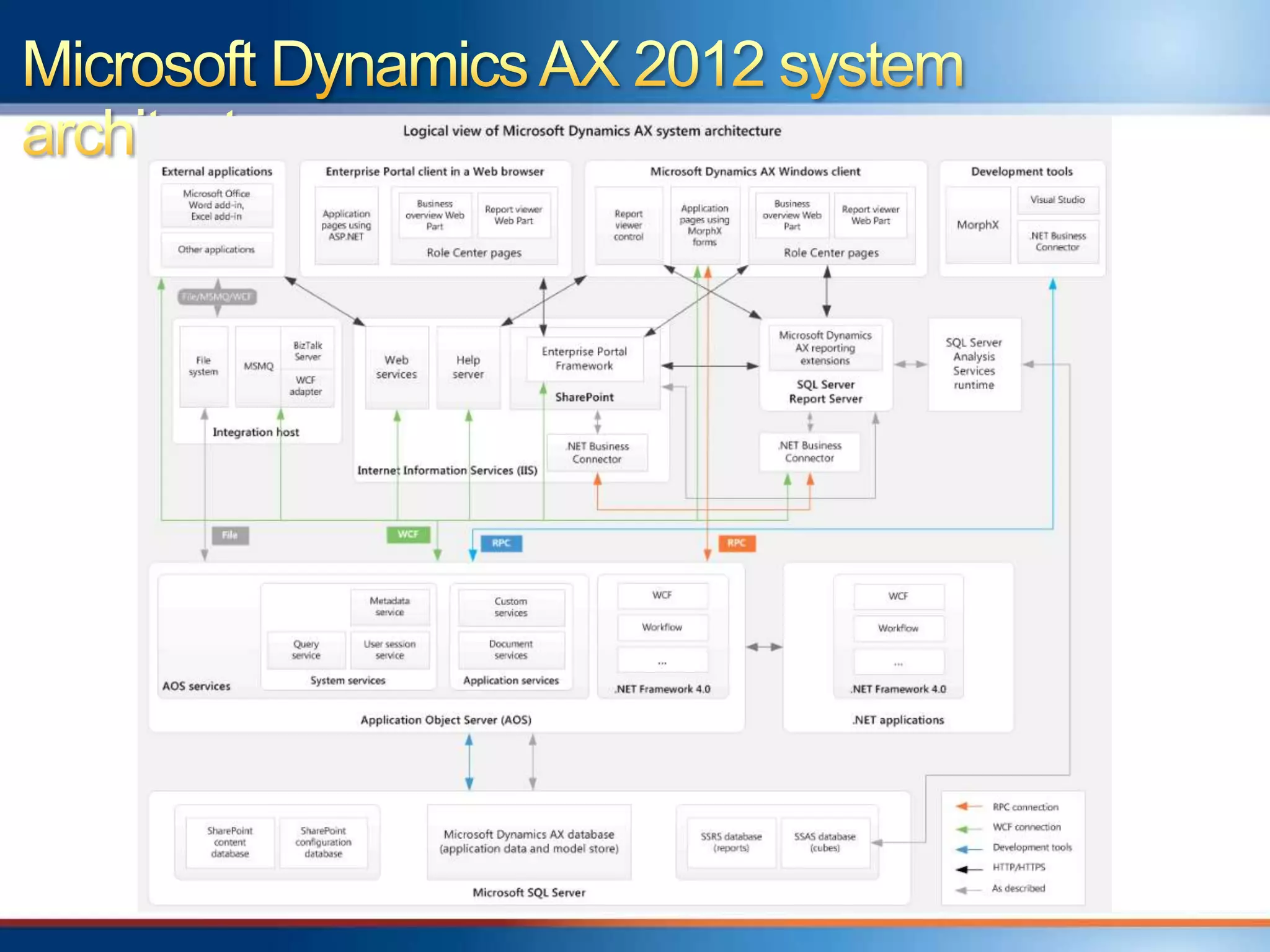
Overview of Microsoft Dynamics AX 2012
system architecture
„Day in the life‟ benchmark study
Microsoft Dynamics AX 2012 sizing guidance
  General
  For each AX component
Future help on sizing
Resources
Q&A
Done in August and published in October 2011
  CustomerSource:
  https://mbs.microsoft.com/customersource/documentation/whitepape
  rs/ax2012_benchmarkpapers
  PartnerSource:
  https://mbs.microsoft.com/partnersource/deployment/documentation/
  whitepapers/ax2012_benchmarkpapers
Variety of functional scenarios
Different client and integration technologies
Goal: Providing a view of ERP workload
performance on Microsoft Dynamics AX 2012
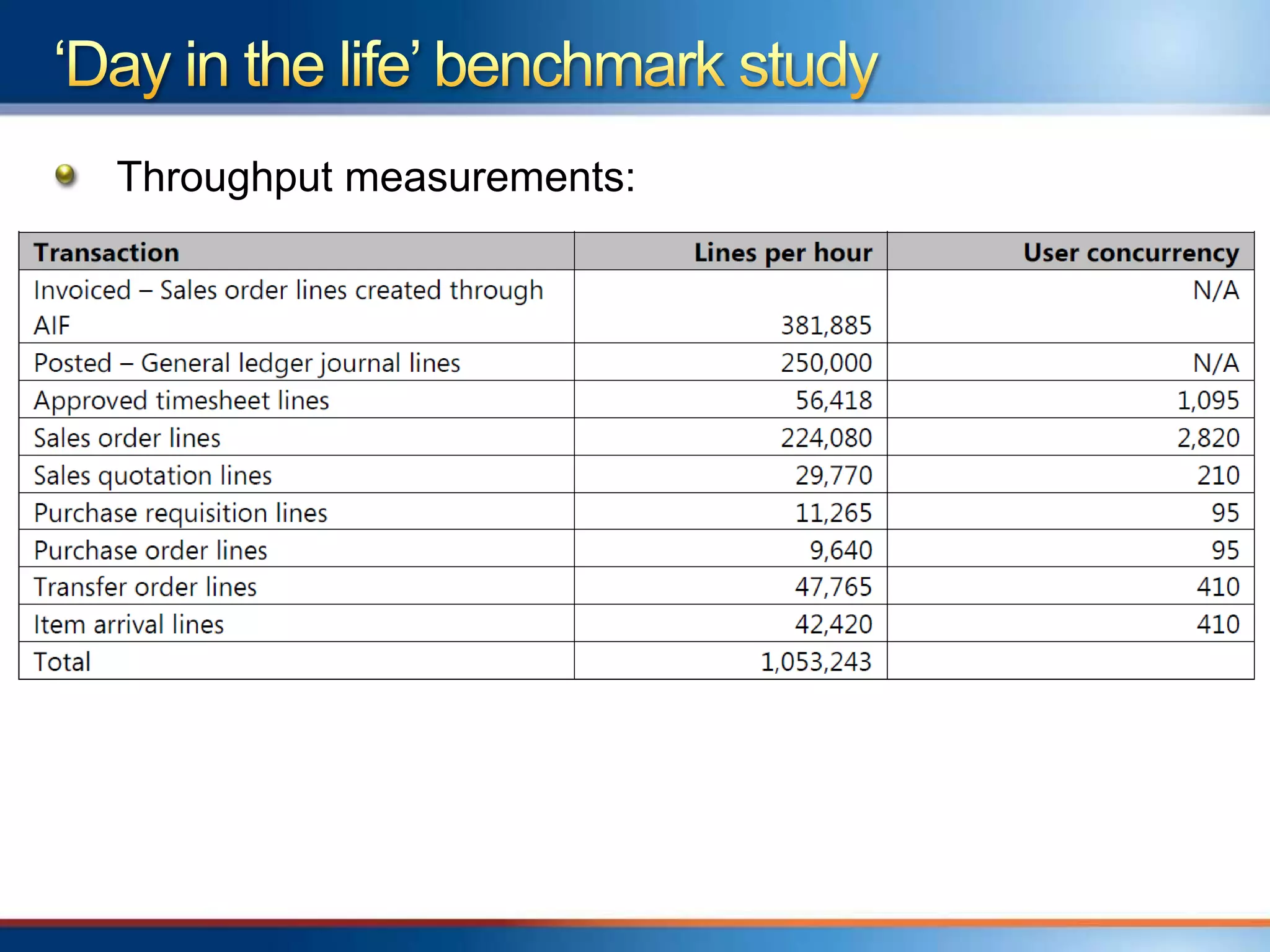
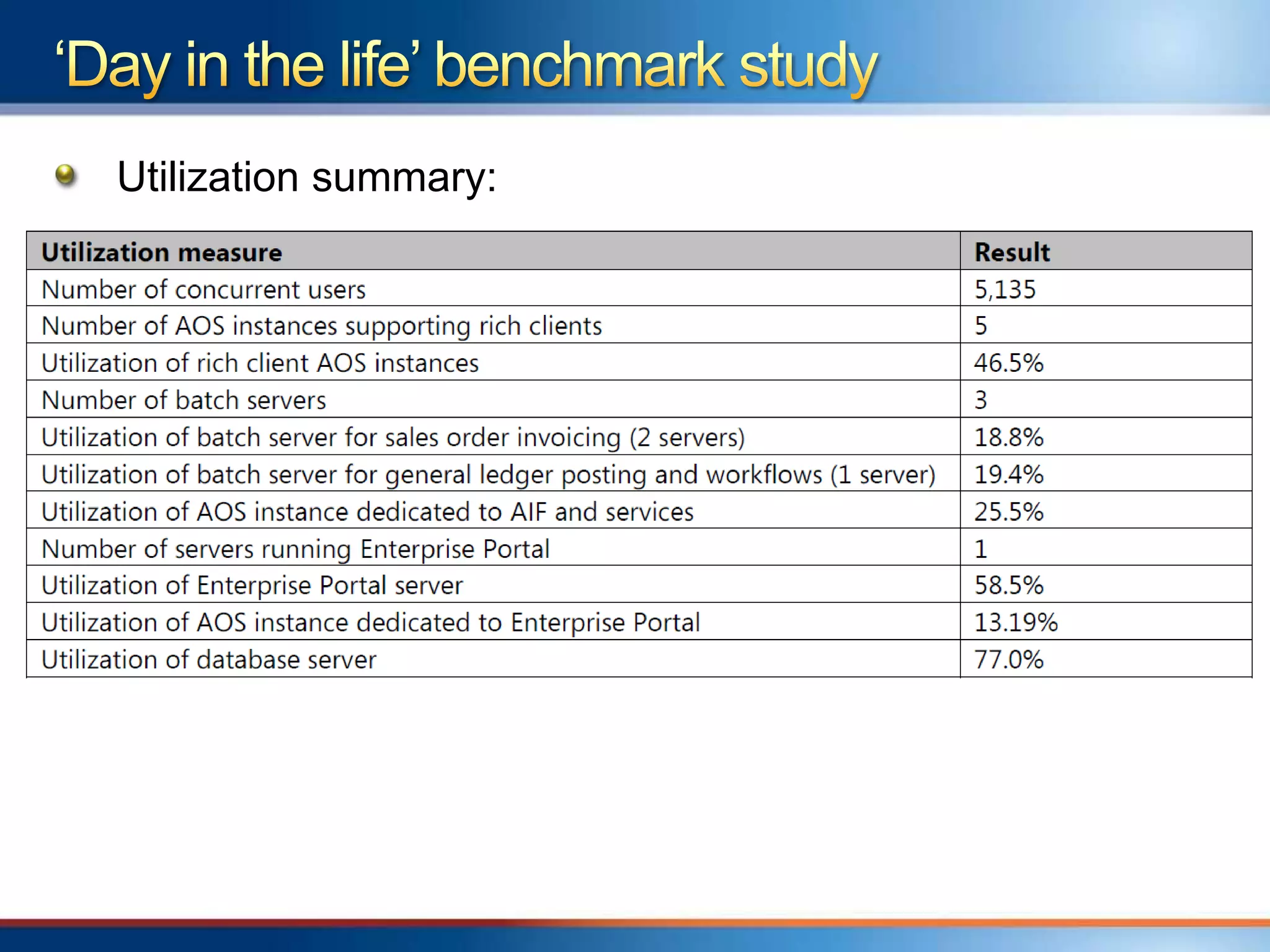
Simulation of 5135 concurrent users
Sustained rate of more than 1 million lines per hour
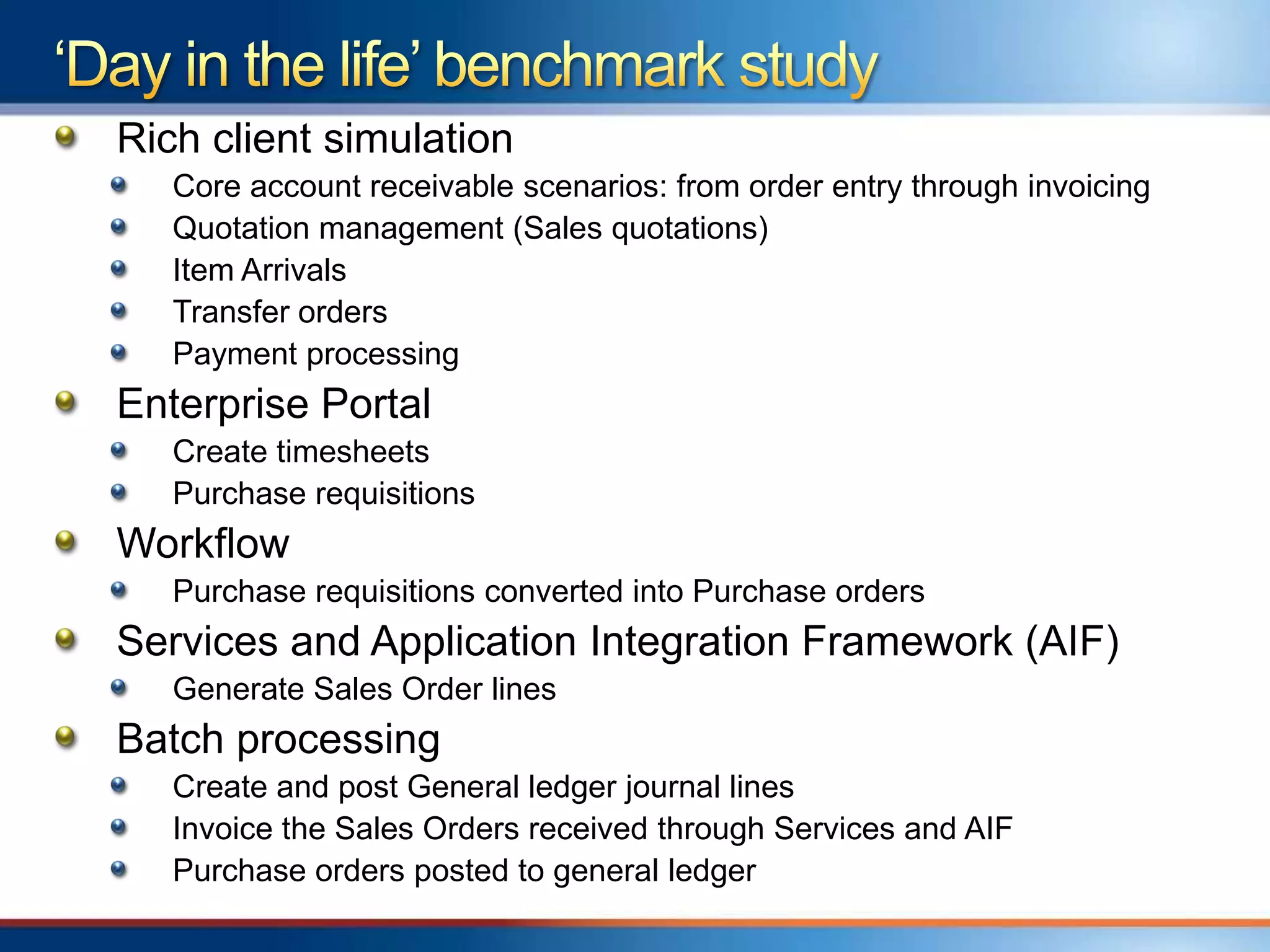
Rich client simulation
   Core account receivable scenarios: from order entry through invoicing
   Quotation management (Sales quotations)
   Item Arrivals
   Transfer orders
   Payment processing
Enterprise Portal
   Create timesheets
   Purchase requisitions
Workflow
   Purchase requisitions converted into Purchase orders
Services and Application Integration Framework (AIF)
   Generate Sales Order lines
Batch processing
   Create and post General ledger journal lines
   Invoice the Sales Orders received through Services and AIF
   Purchase orders posted to general ledger
Throughput measurements:
Utilization summary:
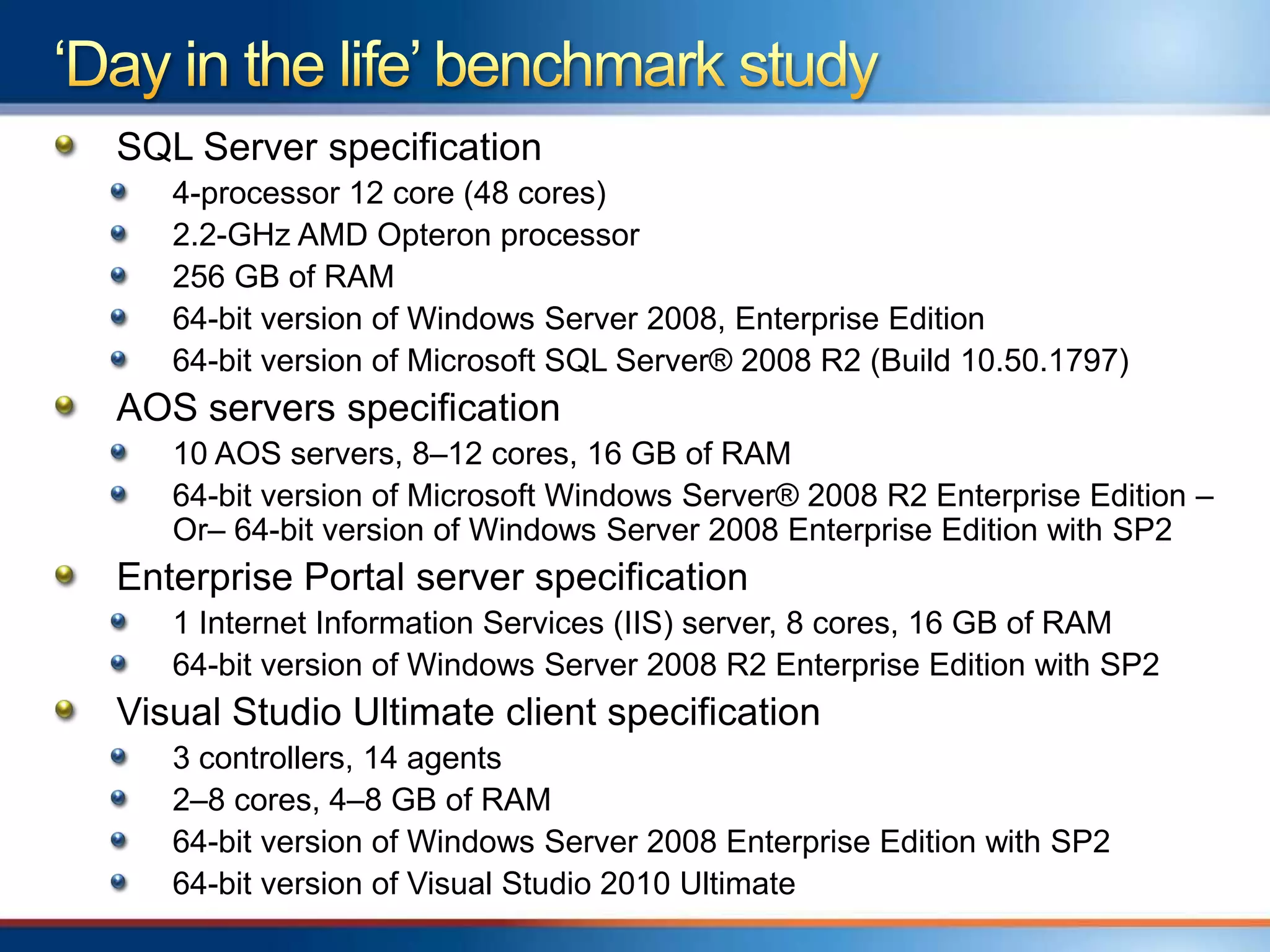
SQL Server specification
   4-processor 12 core (48 cores)
   2.2-GHz AMD Opteron processor
   256 GB of RAM
   64-bit version of Windows Server 2008, Enterprise Edition
   64-bit version of Microsoft SQL Server® 2008 R2 (Build 10.50.1797)
AOS servers specification
   10 AOS servers, 8–12 cores, 16 GB of RAM
   64-bit version of Microsoft Windows Server® 2008 R2 Enterprise Edition –
   Or– 64-bit version of Windows Server 2008 Enterprise Edition with SP2
Enterprise Portal server specification
   1 Internet Information Services (IIS) server, 8 cores, 16 GB of RAM
   64-bit version of Windows Server 2008 R2 Enterprise Edition with SP2
Visual Studio Ultimate client specification
   3 controllers, 14 agents
   2–8 cores, 4–8 GB of RAM
   64-bit version of Windows Server 2008 Enterprise Edition with SP2
   64-bit version of Visual Studio 2010 Ultimate
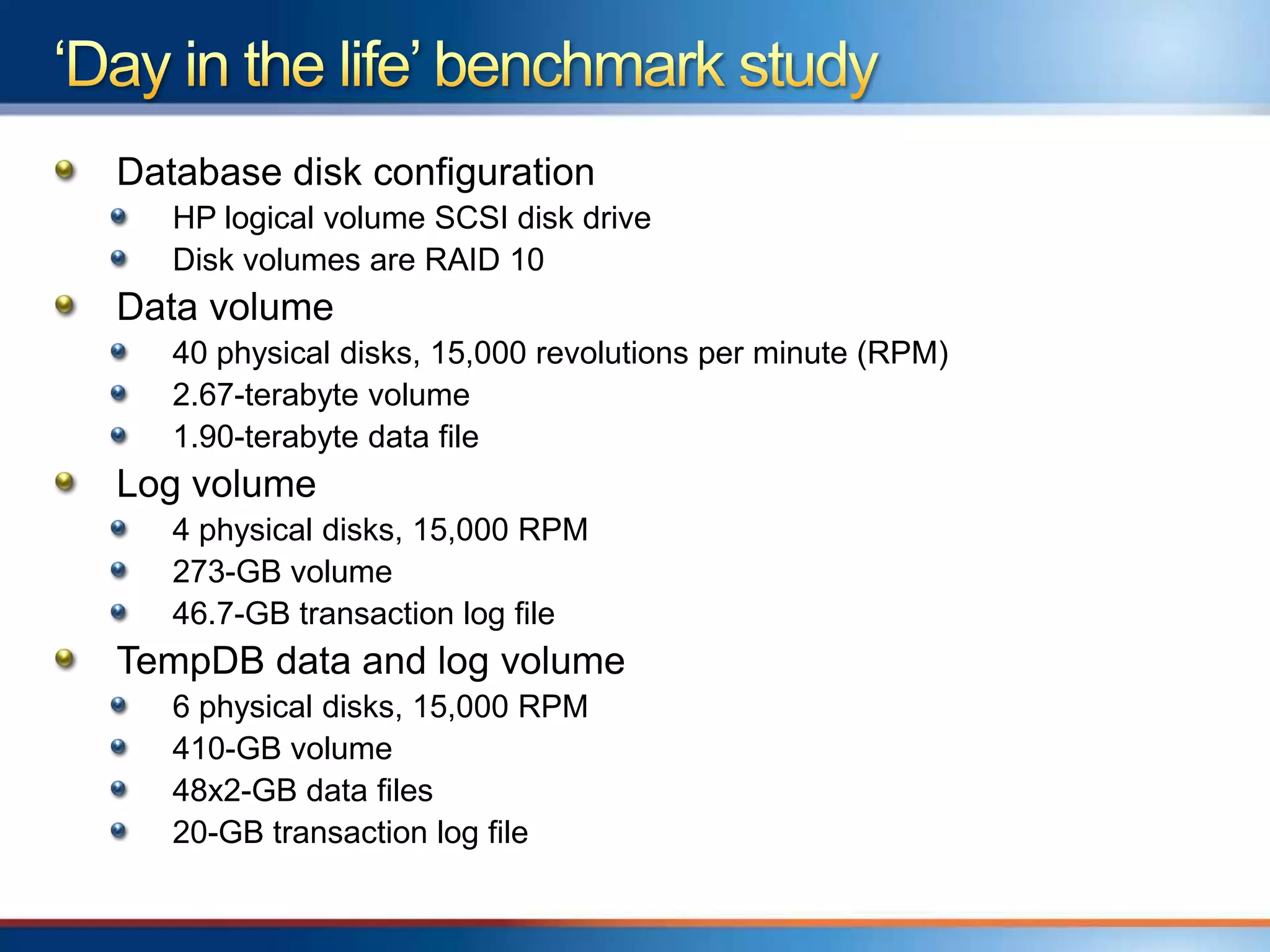
Database disk configuration
   HP logical volume SCSI disk drive
   Disk volumes are RAID 10
Data volume
   40 physical disks, 15,000 revolutions per minute (RPM)
   2.67-terabyte volume
   1.90-terabyte data file
Log volume
   4 physical disks, 15,000 RPM
   273-GB volume
   46.7-GB transaction log file
TempDB data and log volume
   6 physical disks, 15,000 RPM
   410-GB volume
   48x2-GB data files
   20-GB transaction log file
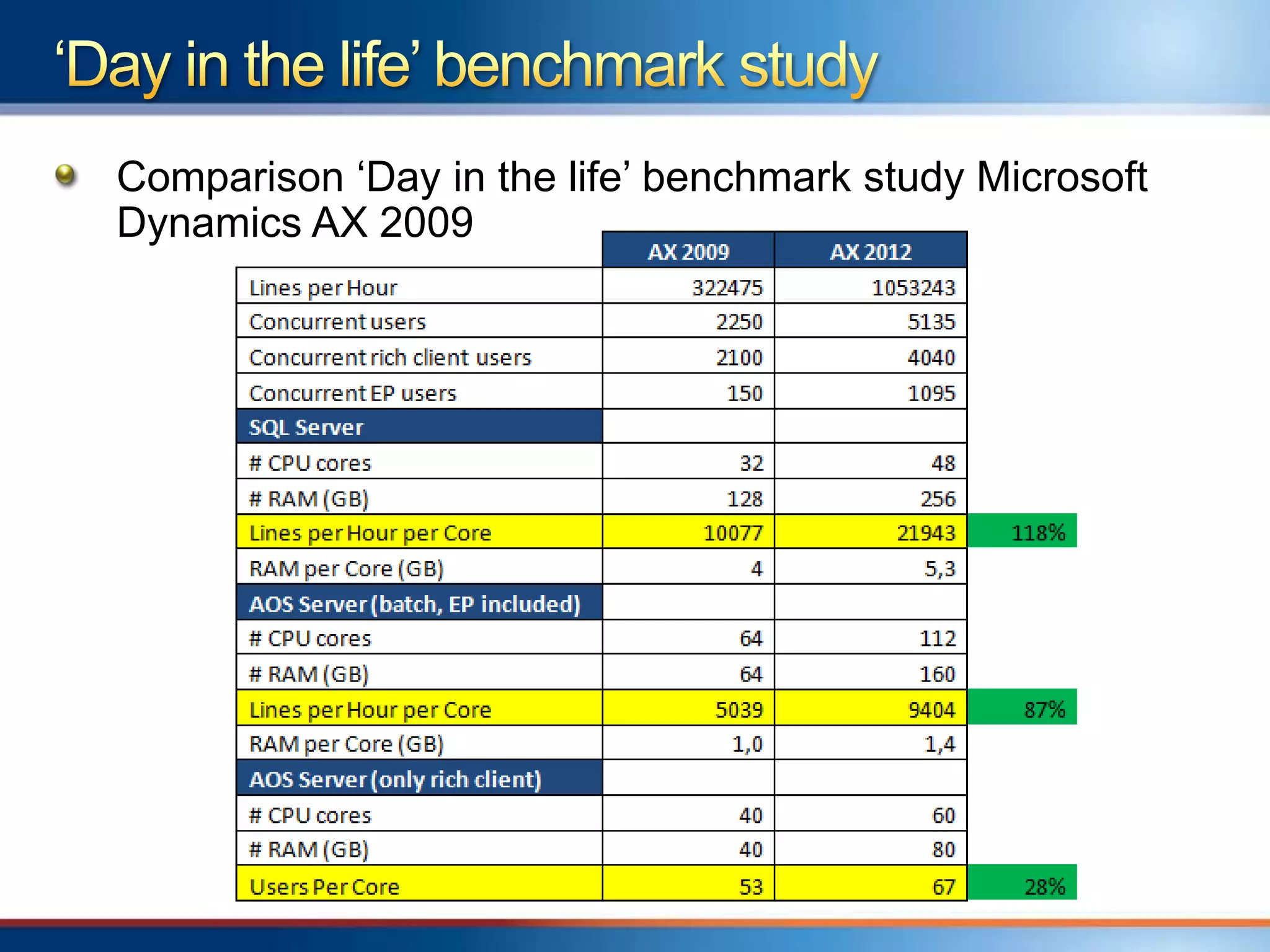
Comparison „Day in the life‟ benchmark study Microsoft
Dynamics AX 2009
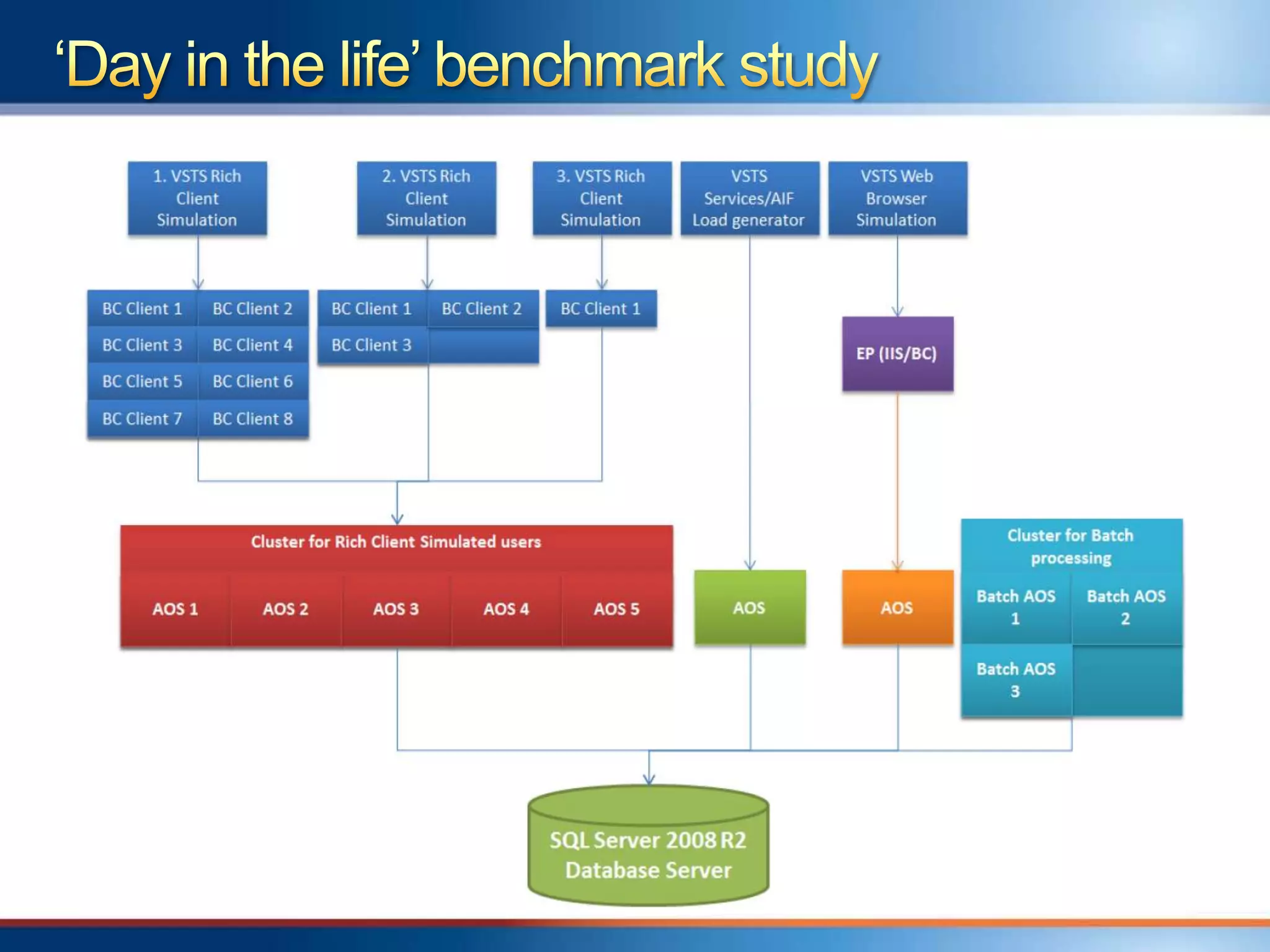
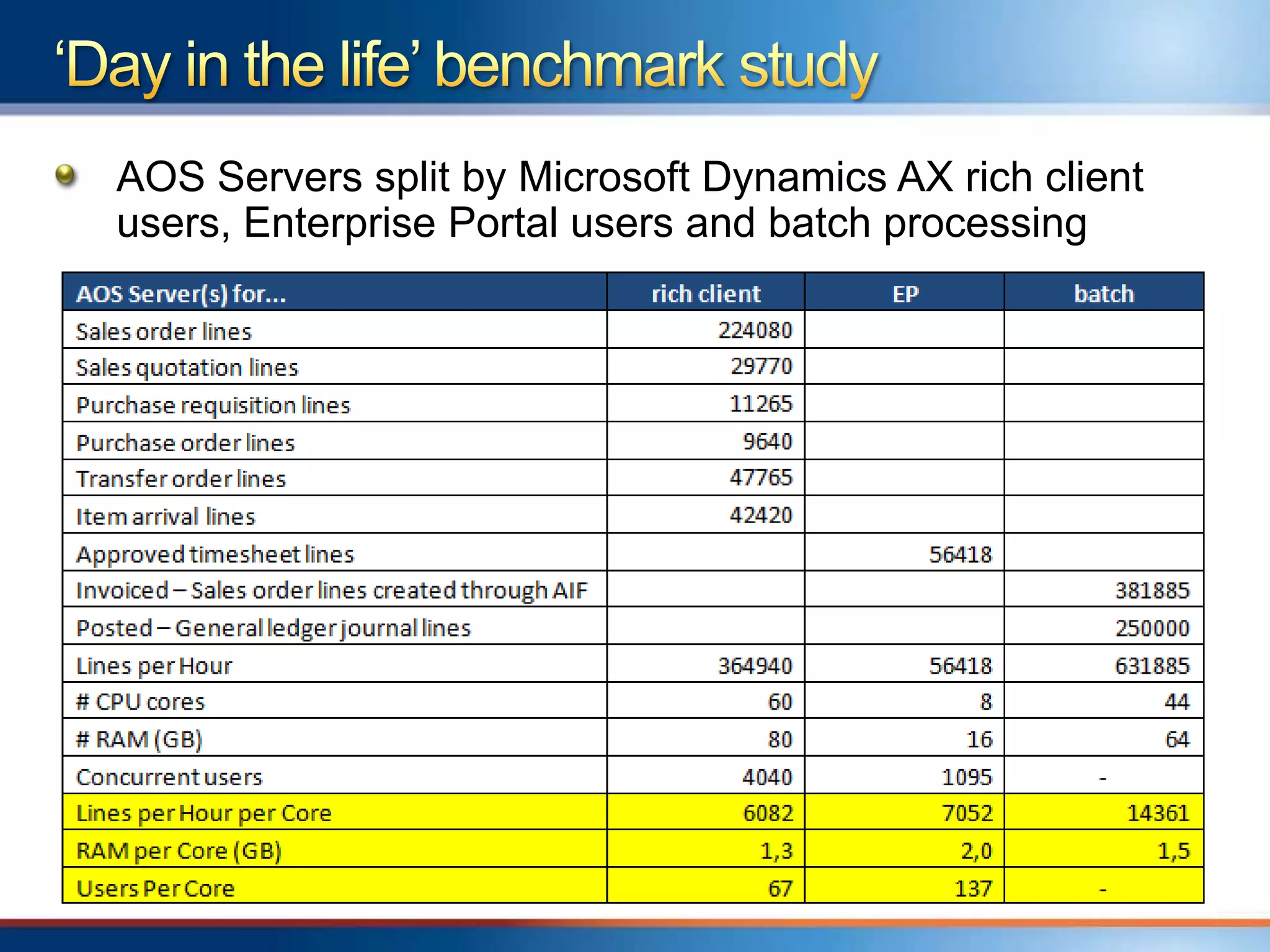
AOS Servers split by Microsoft Dynamics AX rich client
users, Enterprise Portal users and batch processing
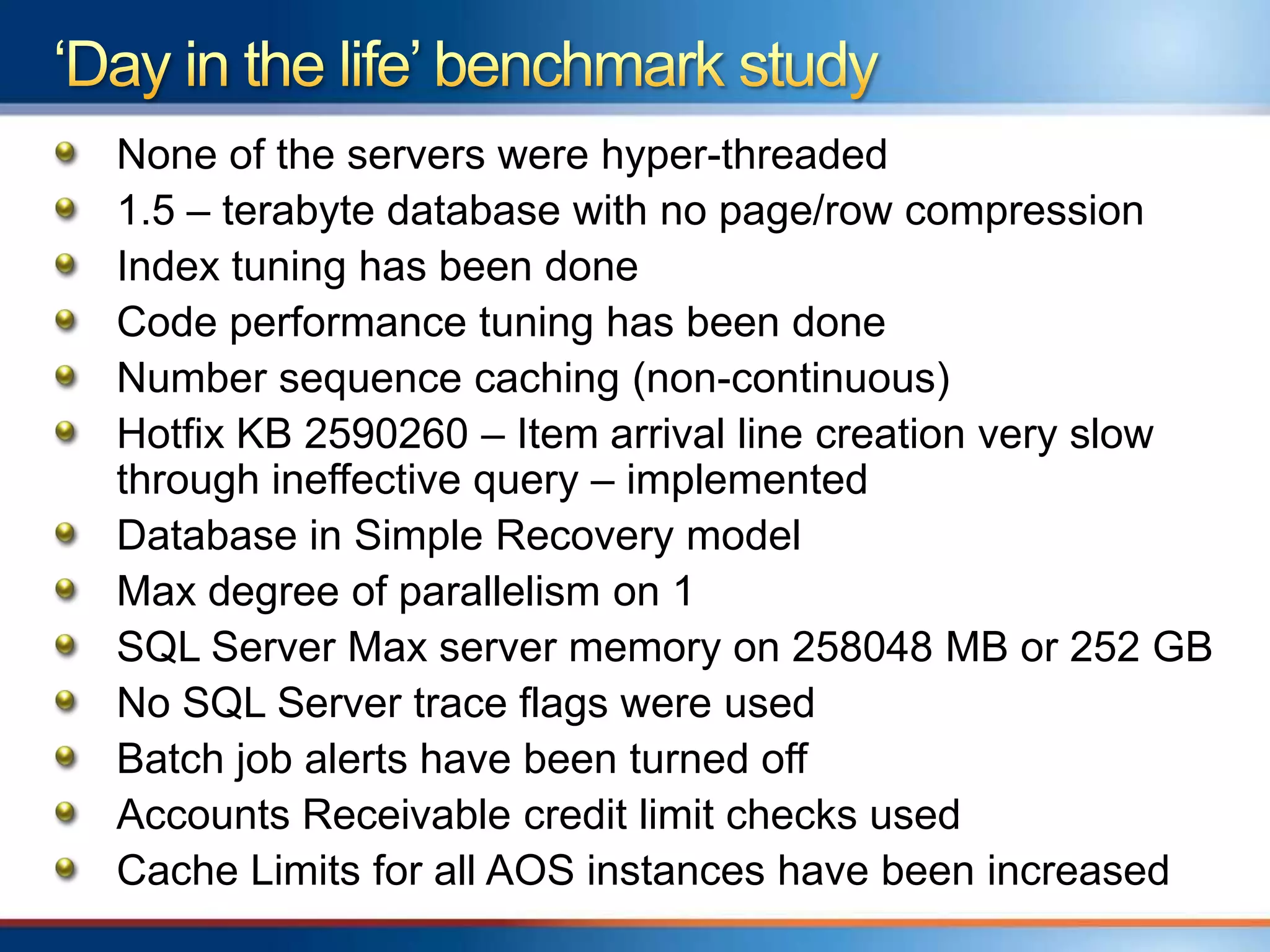
None of the servers were hyper-threaded
1.5 – terabyte database with no page/row compression
Index tuning has been done
Code performance tuning has been done
Number sequence caching (non-continuous)
Hotfix KB 2590260 – Item arrival line creation very slow
through ineffective query – implemented
Database in Simple Recovery model
Max degree of parallelism on 1
SQL Server Max server memory on 258048 MB or 252 GB
No SQL Server trace flags were used
Batch job alerts have been turned off
Accounts Receivable credit limit checks used
Cache Limits for all AOS instances have been increased
Overview of Microsoft Dynamics AX 2012
system architecture
„Day in the life‟ benchmark study
Microsoft Dynamics AX 2012 sizing guidance
  General
  For each AX component
Future help on sizing
16
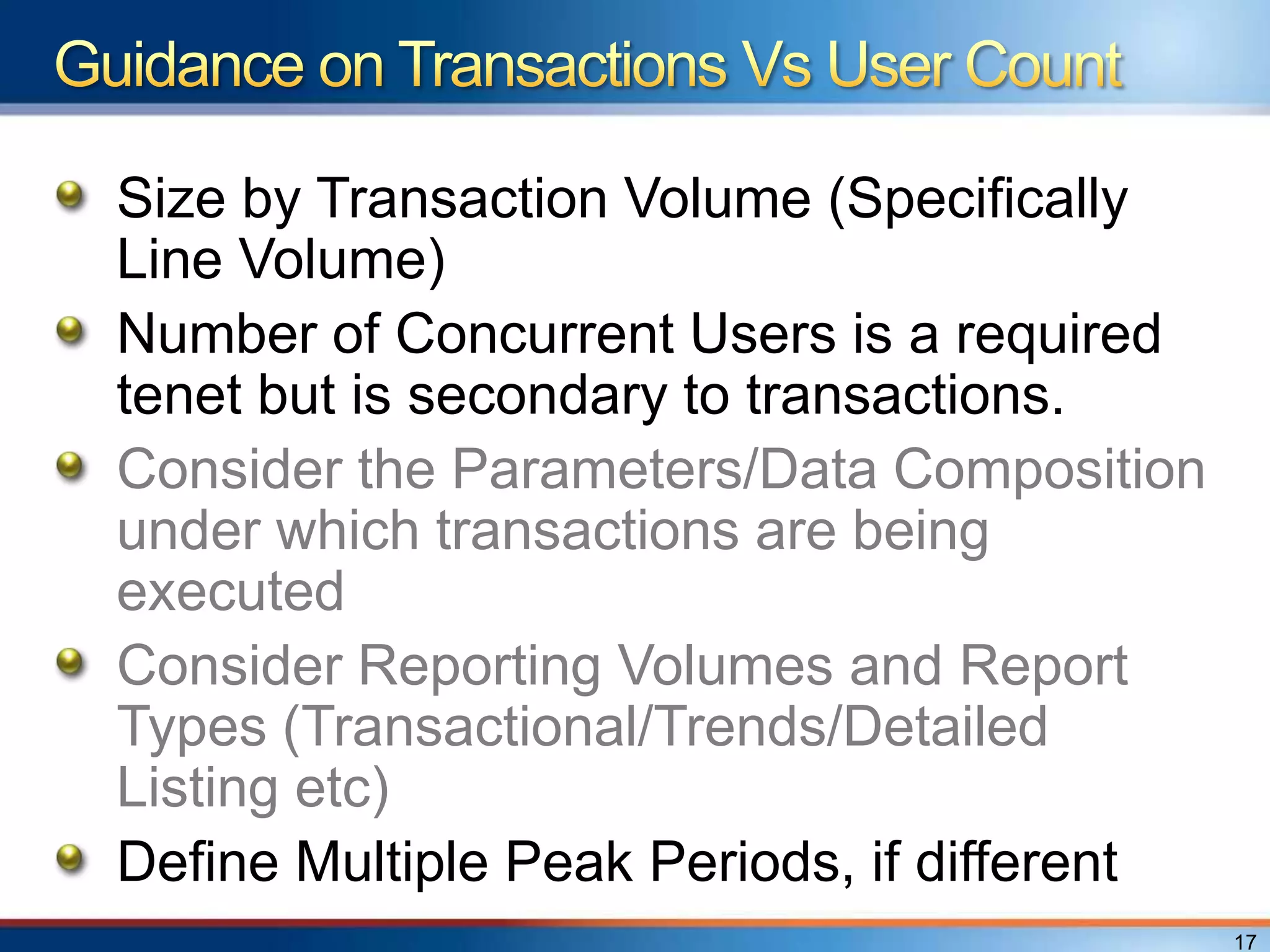
Size by Transaction Volume (Specifically
Line Volume)
Number of Concurrent Users is a required
tenet but is secondary to transactions.
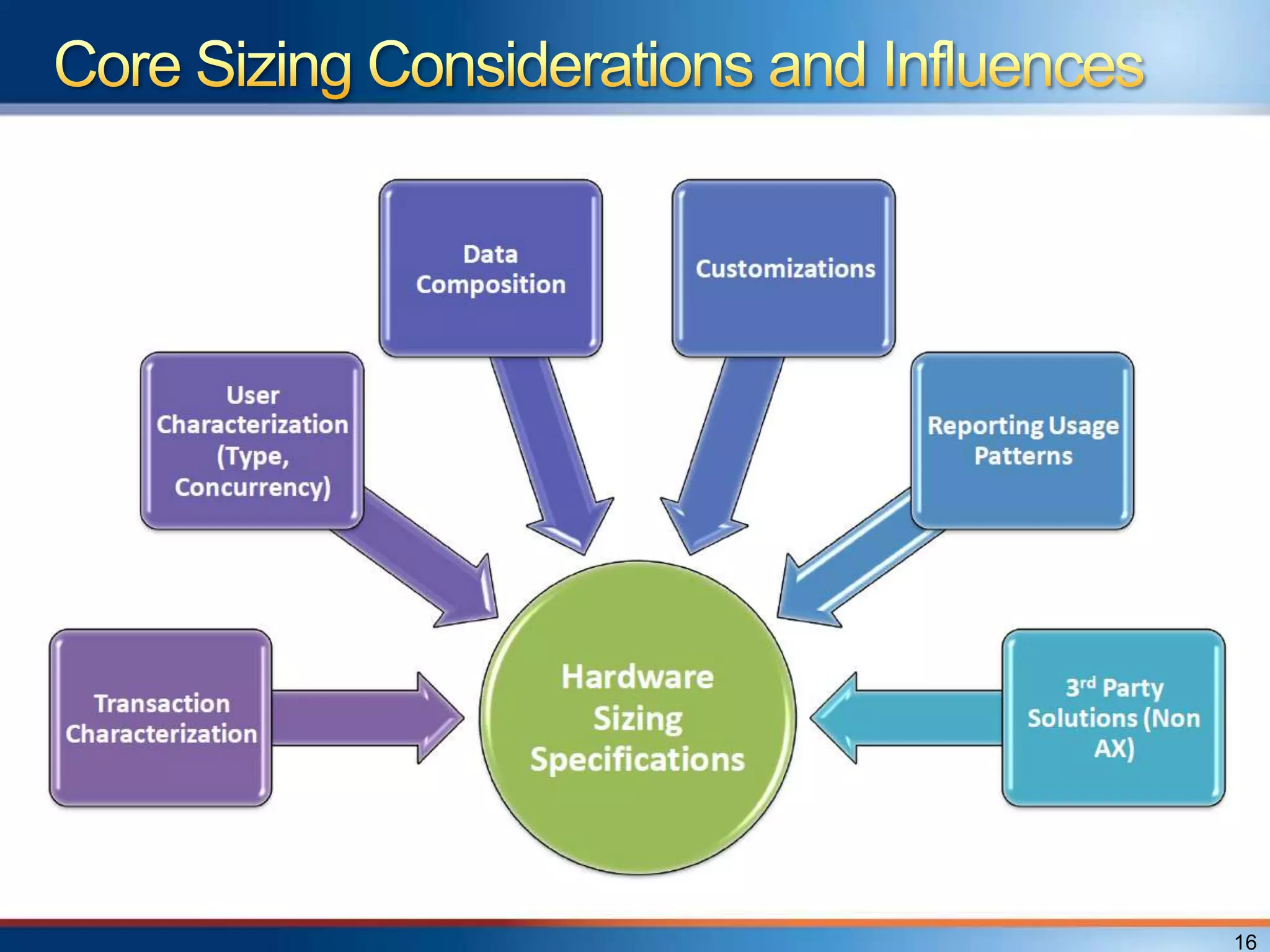
Consider the Parameters/Data Composition
under which transactions are being
executed
Consider Reporting Volumes and Report
Types (Transactional/Trends/Detailed
Listing etc)
Define Multiple Peak Periods, if different
                                             17
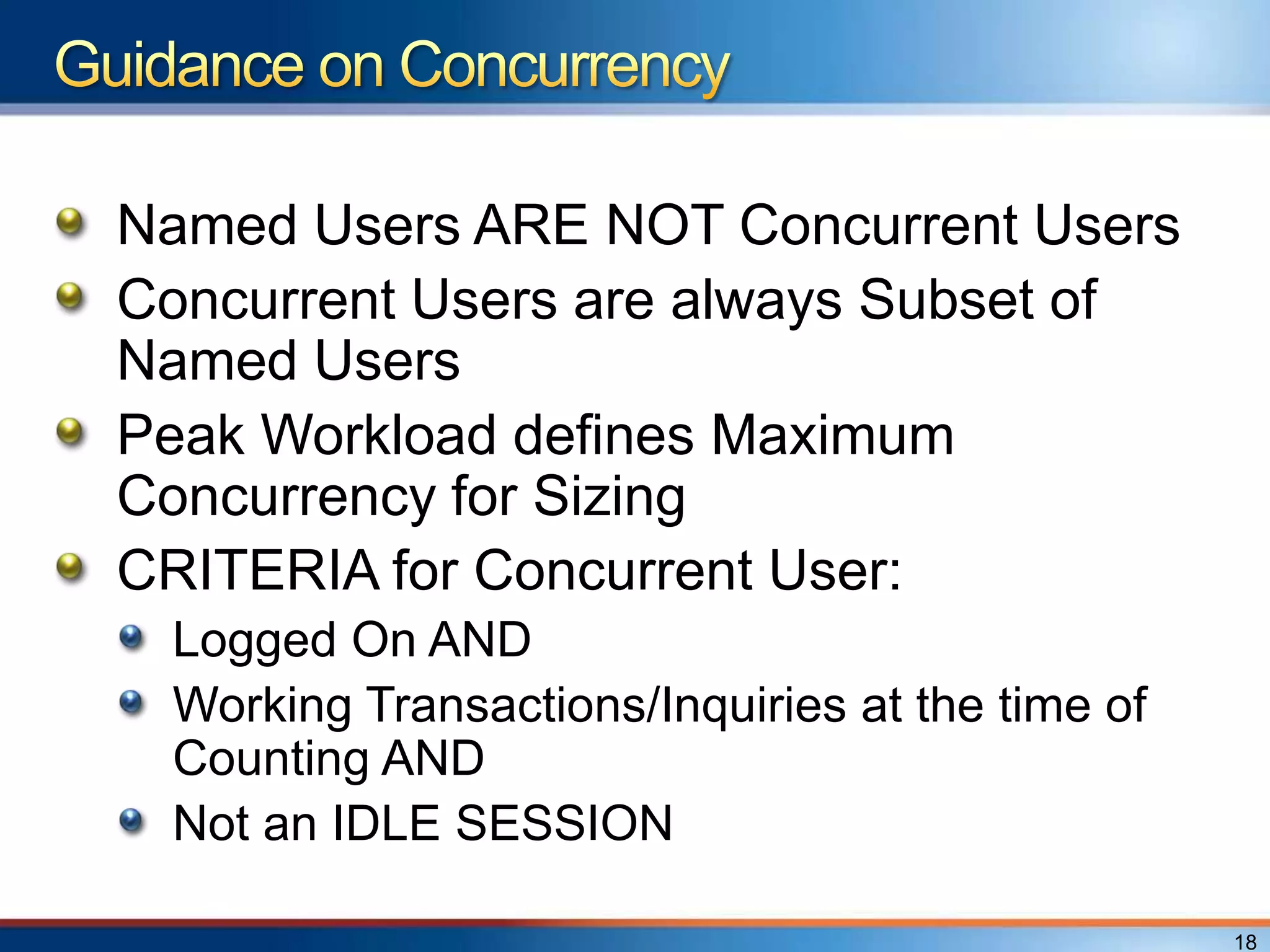
Named Users ARE NOT Concurrent Users
Concurrent Users are always Subset of
Named Users
Peak Workload defines Maximum
Concurrency for Sizing
CRITERIA for Concurrent User:
 Logged On AND
 Working Transactions/Inquiries at the time of
 Counting AND
 Not an IDLE SESSION

                                                 18
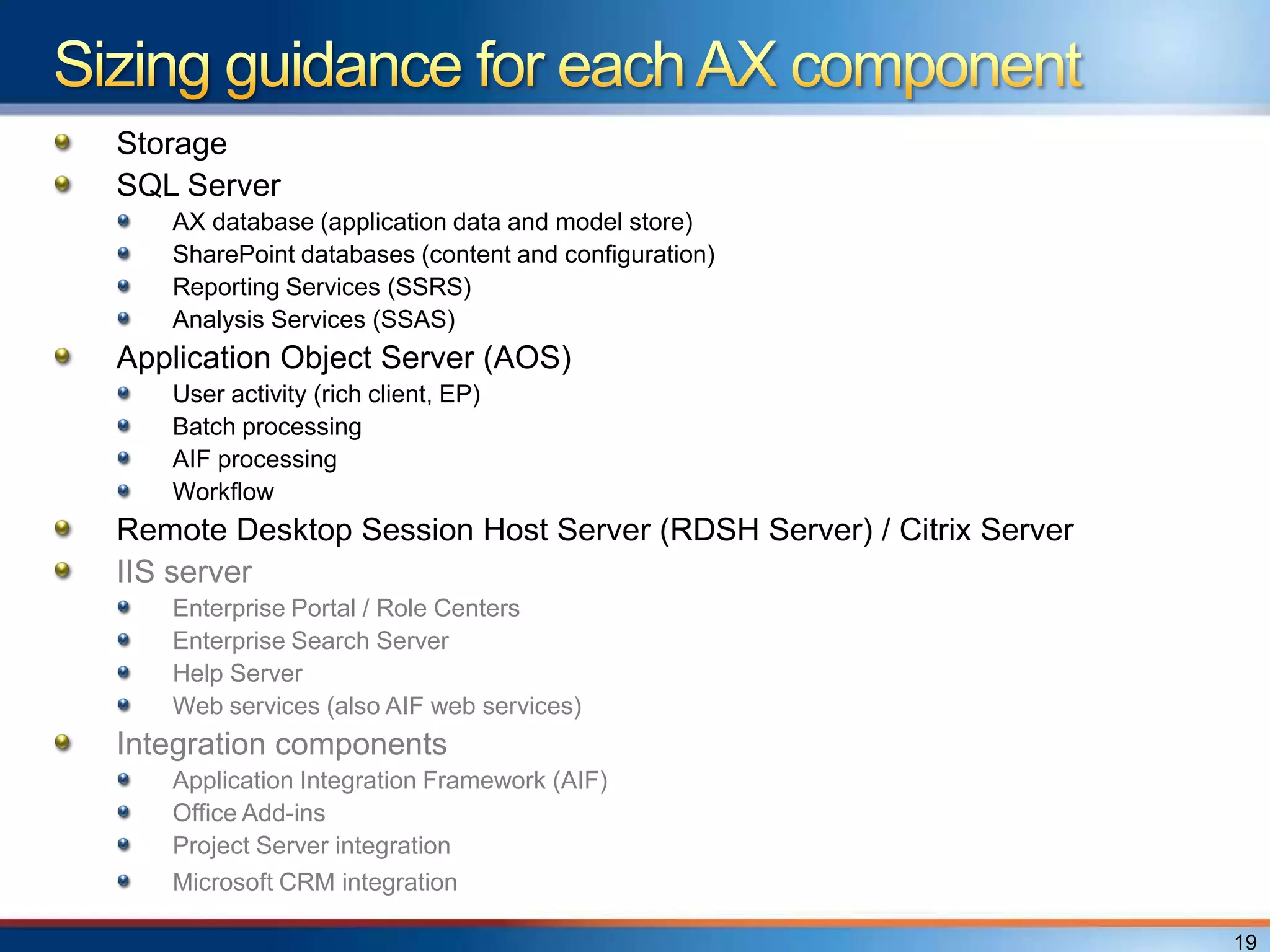
Storage
SQL Server
   AX database (application data and model store)
   SharePoint databases (content and configuration)
   Reporting Services (SSRS)
   Analysis Services (SSAS)
Application Object Server (AOS)
   User activity (rich client, EP)
   Batch processing
   AIF processing
   Workflow
Remote Desktop Session Host Server (RDSH Server) / Citrix Server
IIS server
   Enterprise Portal / Role Centers
   Enterprise Search Server
   Help Server
   Web services (also AIF web services)
Integration components
   Application Integration Framework (AIF)
   Office Add-ins
   Project Server integration
   Microsoft CRM integration

                                                                   19
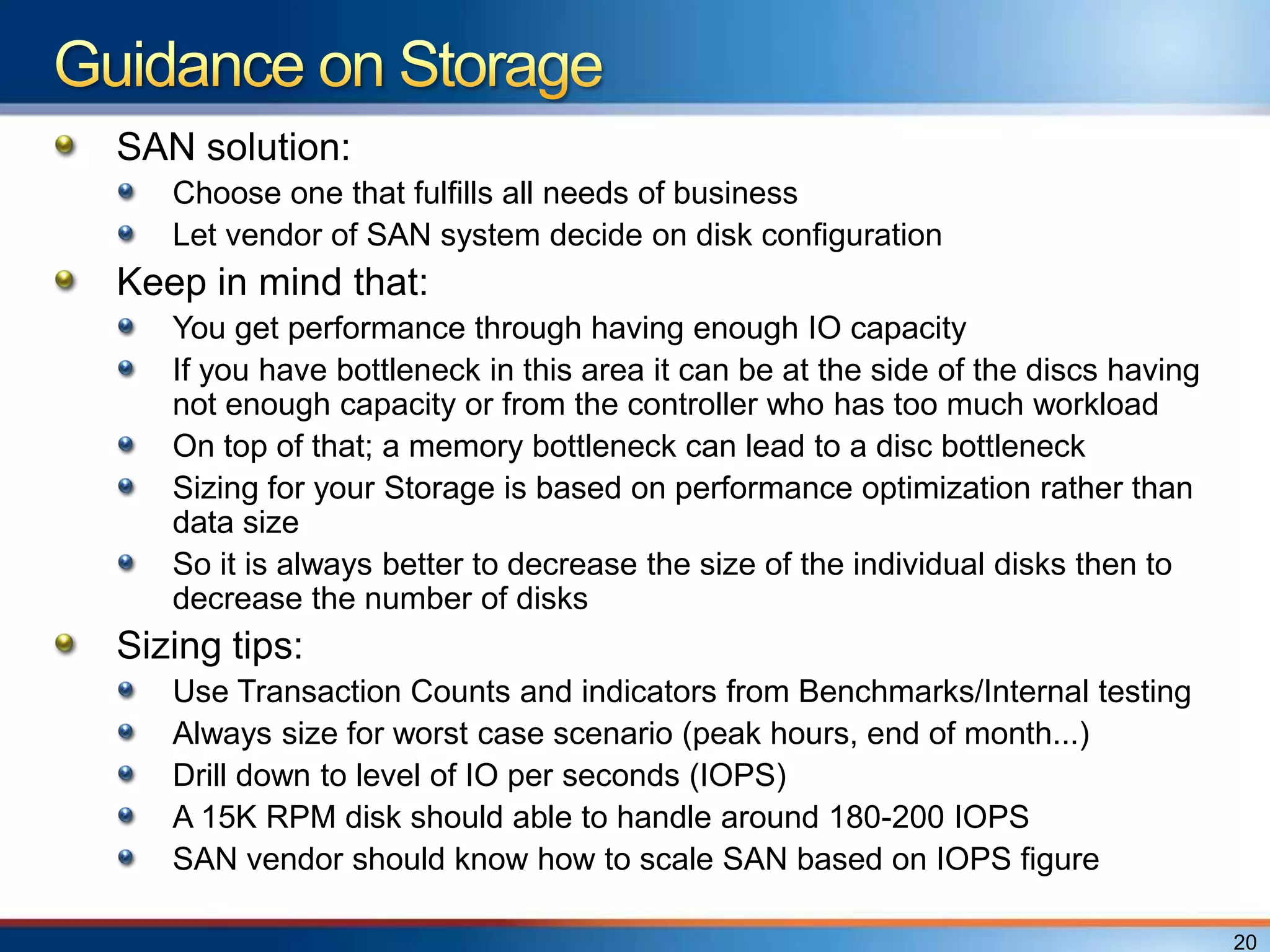
SAN solution:
   Choose one that fulfills all needs of business
   Let vendor of SAN system decide on disk configuration
Keep in mind that:
   You get performance through having enough IO capacity
   If you have bottleneck in this area it can be at the side of the discs having
   not enough capacity or from the controller who has too much workload
   On top of that; a memory bottleneck can lead to a disc bottleneck
   Sizing for your Storage is based on performance optimization rather than
   data size
   So it is always better to decrease the size of the individual disks then to
   decrease the number of disks
Sizing tips:
   Use Transaction Counts and indicators from Benchmarks/Internal testing
   Always size for worst case scenario (peak hours, end of month...)
   Drill down to level of IO per seconds (IOPS)
   A 15K RPM disk should able to handle around 180-200 IOPS
   SAN vendor should know how to scale SAN based on IOPS figure

                                                                                   20
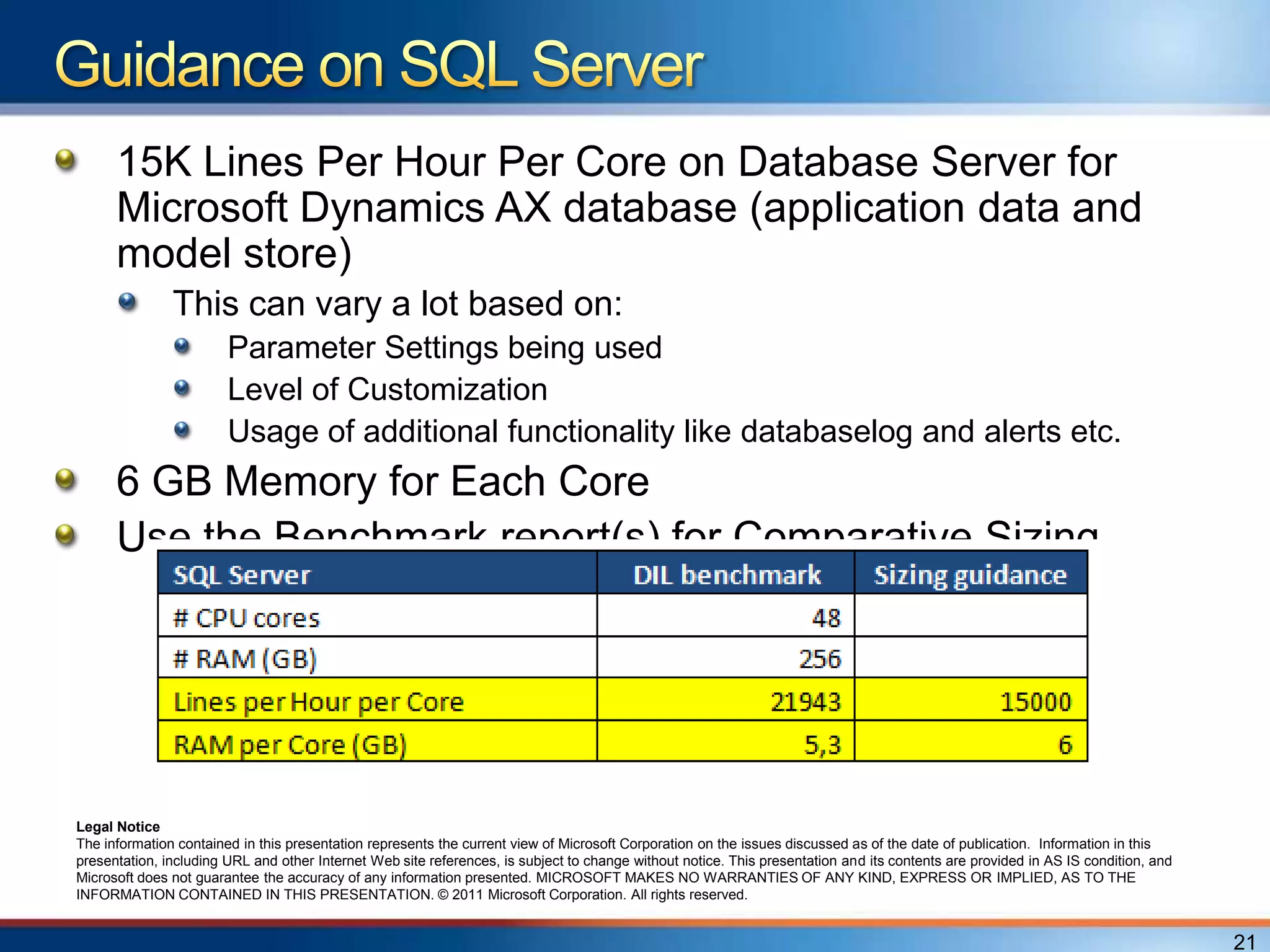
15K Lines Per Hour Per Core on Database Server for
      Microsoft Dynamics AX database (application data and
      model store)
               This can vary a lot based on:
                        Parameter Settings being used
                        Level of Customization
                        Usage of additional functionality like databaselog and alerts etc.
      6 GB Memory for Each Core
      Use the Benchmark report(s) for Comparative Sizing


Legal Notice
The information contained in this presentation represents the current view of Microsoft Corporation on the issues discussed as of the date of publication. Information in this
presentation, including URL and other Internet Web site references, is subject to change without notice. This presentation and its contents are provided in AS IS condition, and
Microsoft does not guarantee the accuracy of any information presented. MICROSOFT MAKES NO WARRANTIES OF ANY KIND, EXPRESS OR IMPLIED, AS TO THE
INFORMATION CONTAINED IN THIS PRESENTATION. © 2011 Microsoft Corporation. All rights reserved.


                                                                                                                                                                                   21
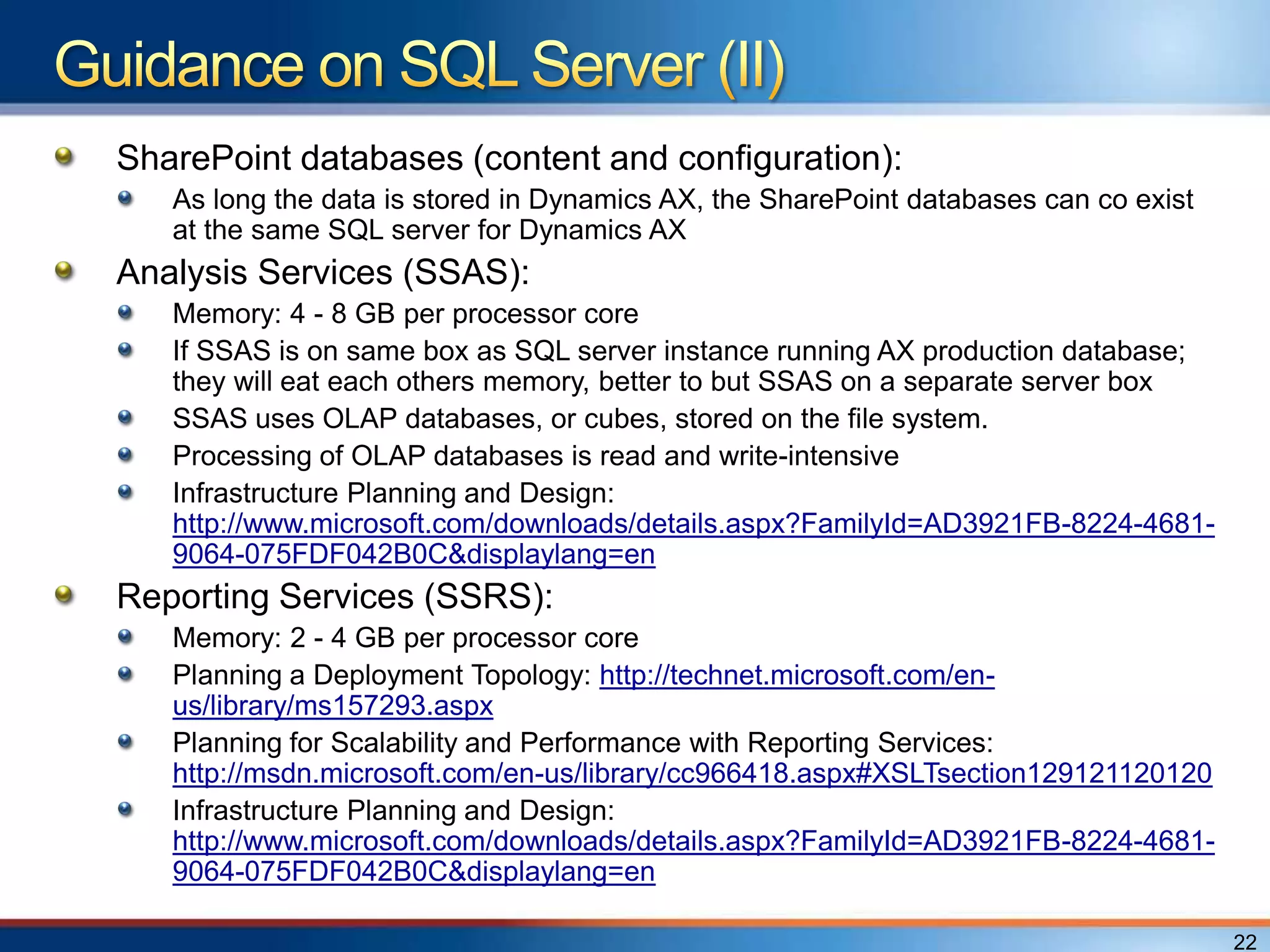
SharePoint databases (content and configuration):
   As long the data is stored in Dynamics AX, the SharePoint databases can co exist
   at the same SQL server for Dynamics AX
Analysis Services (SSAS):
   Memory: 4 - 8 GB per processor core
   If SSAS is on same box as SQL server instance running AX production database;
   they will eat each others memory, better to but SSAS on a separate server box
   SSAS uses OLAP databases, or cubes, stored on the file system.
   Processing of OLAP databases is read and write-intensive
   Infrastructure Planning and Design:
   http://www.microsoft.com/downloads/details.aspx?FamilyId=AD3921FB-8224-4681-
   9064-075FDF042B0C&displaylang=en
Reporting Services (SSRS):
   Memory: 2 - 4 GB per processor core
   Planning a Deployment Topology: http://technet.microsoft.com/en-
   us/library/ms157293.aspx
   Planning for Scalability and Performance with Reporting Services:
   http://msdn.microsoft.com/en-us/library/cc966418.aspx#XSLTsection129121120120
   Infrastructure Planning and Design:
   http://www.microsoft.com/downloads/details.aspx?FamilyId=AD3921FB-8224-4681-
   9064-075FDF042B0C&displaylang=en

                                                                                      22
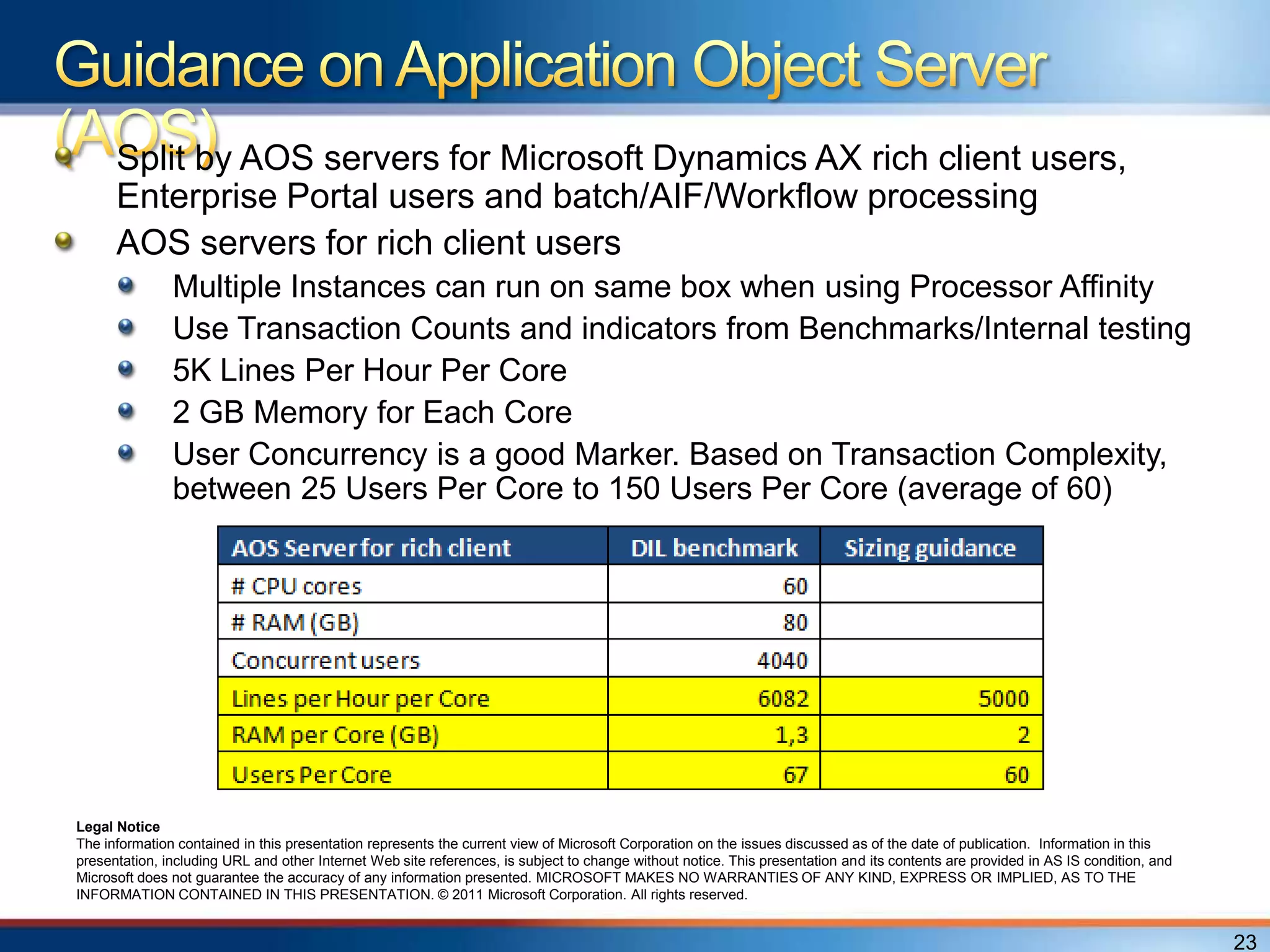
Split by AOS servers for Microsoft Dynamics AX rich client users,
      Enterprise Portal users and batch/AIF/Workflow processing
      AOS servers for rich client users
               Multiple Instances can run on same box when using Processor Affinity
               Use Transaction Counts and indicators from Benchmarks/Internal testing
               5K Lines Per Hour Per Core
               2 GB Memory for Each Core
               User Concurrency is a good Marker. Based on Transaction Complexity,
               between 25 Users Per Core to 150 Users Per Core (average of 60)


Legal Notice
The information contained in this presentation represents the current view of Microsoft Corporation on the issues discussed as of the date of publication. Information in this
presentation, including URL and other Internet Web site references, is subject to change without notice. This presentation and its contents are provided in AS IS condition, and
Microsoft does not guarantee the accuracy of any information presented. MICROSOFT MAKES NO WARRANTIES OF ANY KIND, EXPRESS OR IMPLIED, AS TO THE
INFORMATION CONTAINED IN THIS PRESENTATION. © 2011 Microsoft Corporation. All rights reserved.


                                                                                                                                                                                   23
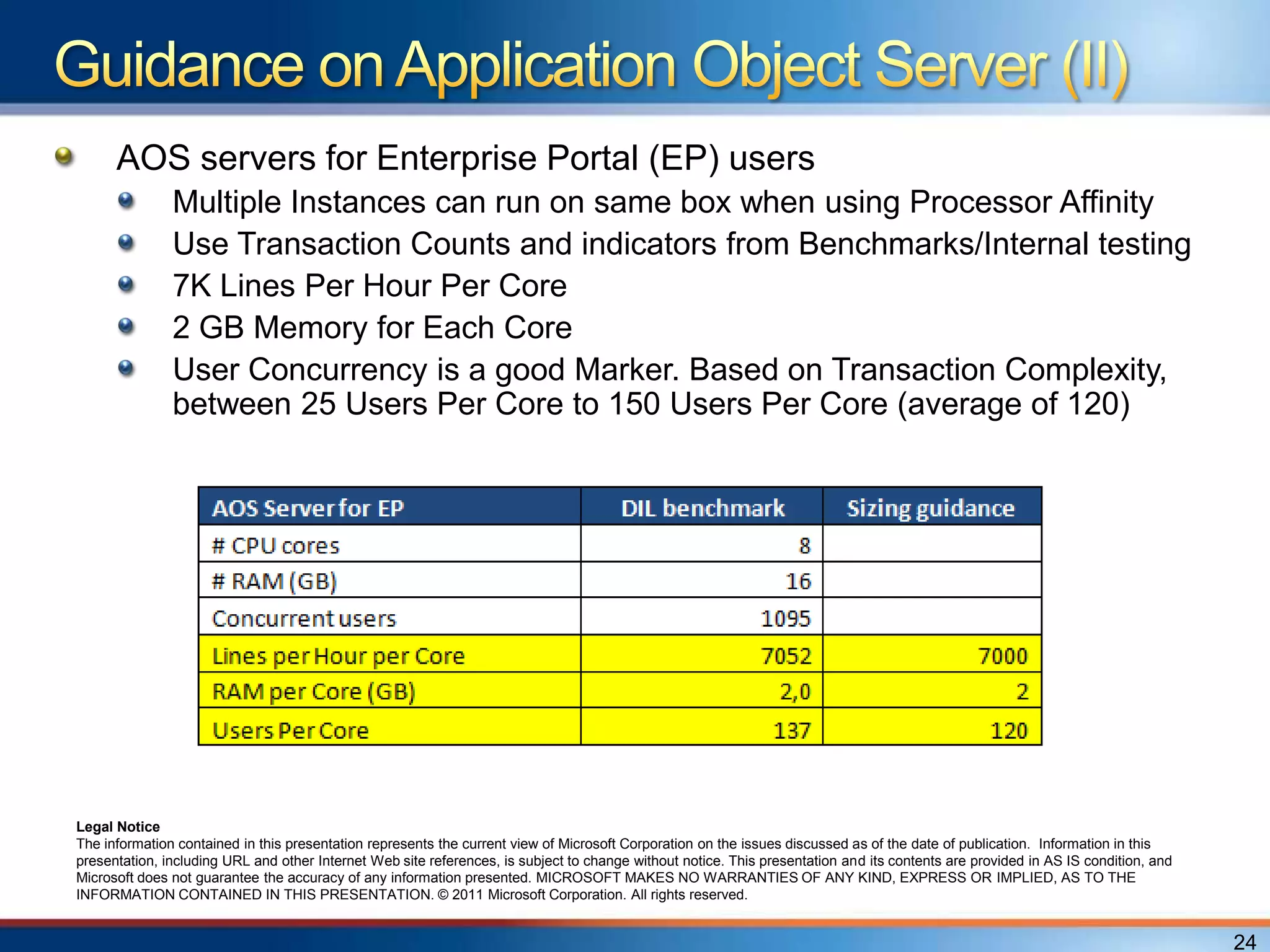
AOS servers for Enterprise Portal (EP) users
               Multiple Instances can run on same box when using Processor Affinity
               Use Transaction Counts and indicators from Benchmarks/Internal testing
               7K Lines Per Hour Per Core
               2 GB Memory for Each Core
               User Concurrency is a good Marker. Based on Transaction Complexity,
               between 25 Users Per Core to 150 Users Per Core (average of 120)


Legal Notice
The information contained in this presentation represents the current view of Microsoft Corporation on the issues discussed as of the date of publication. Information in this
presentation, including URL and other Internet Web site references, is subject to change without notice. This presentation and its contents are provided in AS IS condition, and
Microsoft does not guarantee the accuracy of any information presented. MICROSOFT MAKES NO WARRANTIES OF ANY KIND, EXPRESS OR IMPLIED, AS TO THE
INFORMATION CONTAINED IN THIS PRESENTATION. © 2011 Microsoft Corporation. All rights reserved.


                                                                                                                                                                                   24
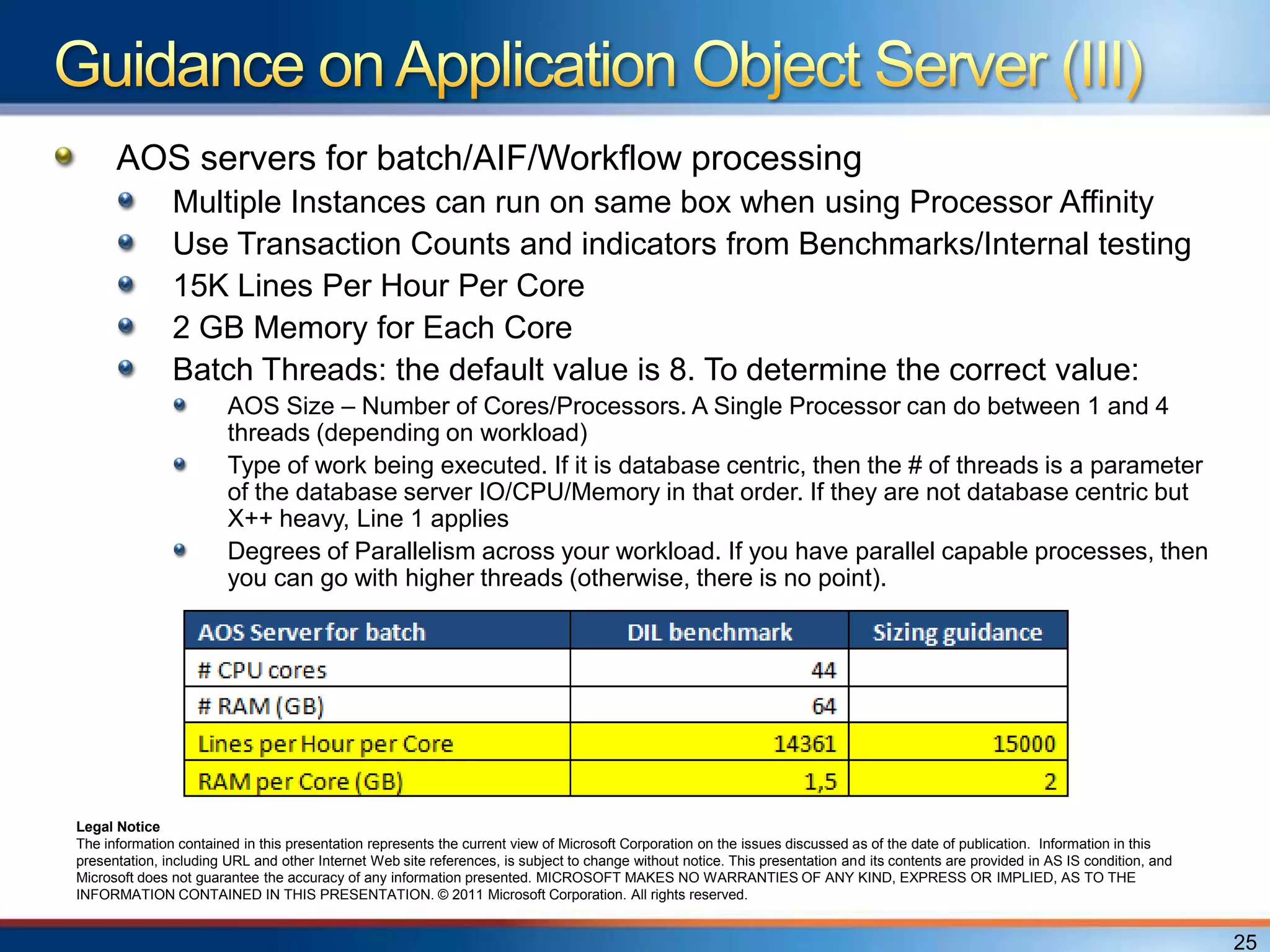
AOS servers for batch/AIF/Workflow processing
               Multiple Instances can run on same box when using Processor Affinity
               Use Transaction Counts and indicators from Benchmarks/Internal testing
               15K Lines Per Hour Per Core
               2 GB Memory for Each Core
               Batch Threads: the default value is 8. To determine the correct value:
                        AOS Size – Number of Cores/Processors. A Single Processor can do between 1 and 4
                        threads (depending on workload)
                        Type of work being executed. If it is database centric, then the # of threads is a parameter
                        of the database server IO/CPU/Memory in that order. If they are not database centric but
                        X++ heavy, Line 1 applies
                        Degrees of Parallelism across your workload. If you have parallel capable processes, then
                        you can go with higher threads (otherwise, there is no point).


Legal Notice
The information contained in this presentation represents the current view of Microsoft Corporation on the issues discussed as of the date of publication. Information in this
presentation, including URL and other Internet Web site references, is subject to change without notice. This presentation and its contents are provided in AS IS condition, and
Microsoft does not guarantee the accuracy of any information presented. MICROSOFT MAKES NO WARRANTIES OF ANY KIND, EXPRESS OR IMPLIED, AS TO THE
INFORMATION CONTAINED IN THIS PRESENTATION. © 2011 Microsoft Corporation. All rights reserved.


                                                                                                                                                                                   25
Remote Desktop Session Host (RDSH) Server: New name in
Win2008R2
Client memory considerations drive sizing
What else are you running on the server?
   Office etc.
What controls are you running on the client?
   Browser controls
   Custom controls
Base client sizing guidelines
   50 MB to 200 MB per client Instance. Usage determines peak memory footprint per
   client. Use client configuration settings to manage memory.
   Additional controls will have additional footprint
Latency guidance
   RDSH Server / Citrix Server is NOT required when:
       Bandwidth constraints do not exist
       User interactions on client require 6 or fewer round trips
       Less than 100 milliseconds peak latency (expected delay of approximately 600 ms)
   RDSH Server / Citrix Server IS required when:
       The above conditions cannot be met
       WAN environment that uses legacy X++ reporting

                                                                                          26
Microsoft Dynamics AX 2012 Hardware sizing best practices
guide planned to be released
More benchmark studies in pipeline:
   AX 2012 Terminal Services benchmark
   AX 2012 EP technology benchmark
   AX 2012 Services AIF benchmark
   AX 2012 Hyper-V benchmark
   AX 2012 Retail benchmark
Hardware sizing tool still to be planned
Business partners:
   Contact your Services Account Manager
   Contact Advisory Services: apssinfo@microsoft.com
Customers:
   Ask your business partner
   Contact your Technical Account Manager (Premier contract)
   Contact PFE Dynamics Enablement Assistance
   PFEDEA@microsoft.com
Microsoft Dynamics AX 2012 System Requirements guide
   http://www.microsoft.com/download/en/confirmation.aspx?id=11094
Microsoft Dynamics AX 2012 “Day in the Life” Benchmark
   CustomerSource:
   https://mbs.microsoft.com/customersource/documentation/whitepapers/ax2012_be
   nchmarkpapers
   PartnerSource:
   https://mbs.microsoft.com/partnersource/deployment/documentation/whitepapers/a
   x2012_benchmarkpapers
Microsoft Dynamics SureStep 2012
   https://mbs.microsoft.com/customersource/downloads/servicepacks/MSDSureStep
   downloads.htm
Microsoft Dynamics InformationSource
   http://informationsource.dynamics.com/rfpservicesonline/
Microsoft Dynamics AX Performance Team Blog
   http://blogs.msdn.com/b/axperf/
Microsoft Dynamics AX Sustained Engineering Blog
   http://blogs.technet.com/b/dynamicsaxse/
Microsoft Dynamics AX Technical Support Blog
   http://blogs.msdn.com/b/emeadaxsupport/
Diamond Sponsors


Gold Sponsors
Q&A

© 2008 Microsoft Corporation. All rights reserved. Microsoft, Windows, Windows Vista and other product names are or may be registered trademarks and/or trademarks in the U.S. and/or other countries.
The information herein is for informational purposes only and represents the current view of Microsoft Corporation as of the date of this presentation. Because Microsoft must respond to changing market
     conditions, it should not be interpreted to be a commitment on the part of Microsoft, and Microsoft cannot guarantee the accuracy of any information provided after the date of this presentation.
                                 MICROSOFT MAKES NO WARRANTIES, EXPRESS, IMPLIED OR STATUTORY, AS TO THE INFORMATION IN THIS PRESENTATION.
© 2008 Microsoft Corporation. All rights reserved. Microsoft, Windows, Windows Vista and other product names are or may be registered trademarks and/or trademarks in the U.S. and/or other countries.
The information herein is for informational purposes only and represents the current view of Microsoft Corporation as of the date of this presentation. Because Microsoft must respond to changing market
     conditions, it should not be interpreted to be a commitment on the part of Microsoft, and Microsoft cannot guarantee the accuracy of any information provided after the date of this presentation.
                                 MICROSOFT MAKES NO WARRANTIES, EXPRESS, IMPLIED OR STATUTORY, AS TO THE INFORMATION IN THIS PRESENTATION.

AX2012 Technical Track - Infrastructure, Davy Vliegen

  • 2.
    Give a quickoverview of the Microsoft Dynamics AX 2012 system architecture Discuss „Day in the life‟ benchmark study Provide the first sizing guidelines Show what is still expect to come in terms of sizing help 2
  • 3.
    Overview of MicrosoftDynamics AX 2012 system architecture „Day in the life‟ benchmark study Microsoft Dynamics AX 2012 sizing guidance General For each AX component Future help on sizing Resources Q&A
  • 5.
    Done in Augustand published in October 2011 CustomerSource: https://mbs.microsoft.com/customersource/documentation/whitepape rs/ax2012_benchmarkpapers PartnerSource: https://mbs.microsoft.com/partnersource/deployment/documentation/ whitepapers/ax2012_benchmarkpapers Variety of functional scenarios Different client and integration technologies Goal: Providing a view of ERP workload performance on Microsoft Dynamics AX 2012 Simulation of 5135 concurrent users Sustained rate of more than 1 million lines per hour
  • 6.
    Rich client simulation Core account receivable scenarios: from order entry through invoicing Quotation management (Sales quotations) Item Arrivals Transfer orders Payment processing Enterprise Portal Create timesheets Purchase requisitions Workflow Purchase requisitions converted into Purchase orders Services and Application Integration Framework (AIF) Generate Sales Order lines Batch processing Create and post General ledger journal lines Invoice the Sales Orders received through Services and AIF Purchase orders posted to general ledger
  • 8.
  • 9.
  • 10.
    SQL Server specification 4-processor 12 core (48 cores) 2.2-GHz AMD Opteron processor 256 GB of RAM 64-bit version of Windows Server 2008, Enterprise Edition 64-bit version of Microsoft SQL Server® 2008 R2 (Build 10.50.1797) AOS servers specification 10 AOS servers, 8–12 cores, 16 GB of RAM 64-bit version of Microsoft Windows Server® 2008 R2 Enterprise Edition – Or– 64-bit version of Windows Server 2008 Enterprise Edition with SP2 Enterprise Portal server specification 1 Internet Information Services (IIS) server, 8 cores, 16 GB of RAM 64-bit version of Windows Server 2008 R2 Enterprise Edition with SP2 Visual Studio Ultimate client specification 3 controllers, 14 agents 2–8 cores, 4–8 GB of RAM 64-bit version of Windows Server 2008 Enterprise Edition with SP2 64-bit version of Visual Studio 2010 Ultimate
  • 11.
    Database disk configuration HP logical volume SCSI disk drive Disk volumes are RAID 10 Data volume 40 physical disks, 15,000 revolutions per minute (RPM) 2.67-terabyte volume 1.90-terabyte data file Log volume 4 physical disks, 15,000 RPM 273-GB volume 46.7-GB transaction log file TempDB data and log volume 6 physical disks, 15,000 RPM 410-GB volume 48x2-GB data files 20-GB transaction log file
  • 12.
    Comparison „Day inthe life‟ benchmark study Microsoft Dynamics AX 2009
  • 13.
    AOS Servers splitby Microsoft Dynamics AX rich client users, Enterprise Portal users and batch processing
  • 14.
    None of theservers were hyper-threaded 1.5 – terabyte database with no page/row compression Index tuning has been done Code performance tuning has been done Number sequence caching (non-continuous) Hotfix KB 2590260 – Item arrival line creation very slow through ineffective query – implemented Database in Simple Recovery model Max degree of parallelism on 1 SQL Server Max server memory on 258048 MB or 252 GB No SQL Server trace flags were used Batch job alerts have been turned off Accounts Receivable credit limit checks used Cache Limits for all AOS instances have been increased
  • 15.
    Overview of MicrosoftDynamics AX 2012 system architecture „Day in the life‟ benchmark study Microsoft Dynamics AX 2012 sizing guidance General For each AX component Future help on sizing
  • 16.
  • 17.
    Size by TransactionVolume (Specifically Line Volume) Number of Concurrent Users is a required tenet but is secondary to transactions. Consider the Parameters/Data Composition under which transactions are being executed Consider Reporting Volumes and Report Types (Transactional/Trends/Detailed Listing etc) Define Multiple Peak Periods, if different 17
  • 18.
    Named Users ARENOT Concurrent Users Concurrent Users are always Subset of Named Users Peak Workload defines Maximum Concurrency for Sizing CRITERIA for Concurrent User: Logged On AND Working Transactions/Inquiries at the time of Counting AND Not an IDLE SESSION 18
  • 19.
    Storage SQL Server AX database (application data and model store) SharePoint databases (content and configuration) Reporting Services (SSRS) Analysis Services (SSAS) Application Object Server (AOS) User activity (rich client, EP) Batch processing AIF processing Workflow Remote Desktop Session Host Server (RDSH Server) / Citrix Server IIS server Enterprise Portal / Role Centers Enterprise Search Server Help Server Web services (also AIF web services) Integration components Application Integration Framework (AIF) Office Add-ins Project Server integration Microsoft CRM integration 19
  • 20.
    SAN solution: Choose one that fulfills all needs of business Let vendor of SAN system decide on disk configuration Keep in mind that: You get performance through having enough IO capacity If you have bottleneck in this area it can be at the side of the discs having not enough capacity or from the controller who has too much workload On top of that; a memory bottleneck can lead to a disc bottleneck Sizing for your Storage is based on performance optimization rather than data size So it is always better to decrease the size of the individual disks then to decrease the number of disks Sizing tips: Use Transaction Counts and indicators from Benchmarks/Internal testing Always size for worst case scenario (peak hours, end of month...) Drill down to level of IO per seconds (IOPS) A 15K RPM disk should able to handle around 180-200 IOPS SAN vendor should know how to scale SAN based on IOPS figure 20
  • 21.
    15K Lines PerHour Per Core on Database Server for Microsoft Dynamics AX database (application data and model store) This can vary a lot based on: Parameter Settings being used Level of Customization Usage of additional functionality like databaselog and alerts etc. 6 GB Memory for Each Core Use the Benchmark report(s) for Comparative Sizing Legal Notice The information contained in this presentation represents the current view of Microsoft Corporation on the issues discussed as of the date of publication. Information in this presentation, including URL and other Internet Web site references, is subject to change without notice. This presentation and its contents are provided in AS IS condition, and Microsoft does not guarantee the accuracy of any information presented. MICROSOFT MAKES NO WARRANTIES OF ANY KIND, EXPRESS OR IMPLIED, AS TO THE INFORMATION CONTAINED IN THIS PRESENTATION. © 2011 Microsoft Corporation. All rights reserved. 21
  • 22.
    SharePoint databases (contentand configuration): As long the data is stored in Dynamics AX, the SharePoint databases can co exist at the same SQL server for Dynamics AX Analysis Services (SSAS): Memory: 4 - 8 GB per processor core If SSAS is on same box as SQL server instance running AX production database; they will eat each others memory, better to but SSAS on a separate server box SSAS uses OLAP databases, or cubes, stored on the file system. Processing of OLAP databases is read and write-intensive Infrastructure Planning and Design: http://www.microsoft.com/downloads/details.aspx?FamilyId=AD3921FB-8224-4681- 9064-075FDF042B0C&displaylang=en Reporting Services (SSRS): Memory: 2 - 4 GB per processor core Planning a Deployment Topology: http://technet.microsoft.com/en- us/library/ms157293.aspx Planning for Scalability and Performance with Reporting Services: http://msdn.microsoft.com/en-us/library/cc966418.aspx#XSLTsection129121120120 Infrastructure Planning and Design: http://www.microsoft.com/downloads/details.aspx?FamilyId=AD3921FB-8224-4681- 9064-075FDF042B0C&displaylang=en 22
  • 23.
    Split by AOSservers for Microsoft Dynamics AX rich client users, Enterprise Portal users and batch/AIF/Workflow processing AOS servers for rich client users Multiple Instances can run on same box when using Processor Affinity Use Transaction Counts and indicators from Benchmarks/Internal testing 5K Lines Per Hour Per Core 2 GB Memory for Each Core User Concurrency is a good Marker. Based on Transaction Complexity, between 25 Users Per Core to 150 Users Per Core (average of 60) Legal Notice The information contained in this presentation represents the current view of Microsoft Corporation on the issues discussed as of the date of publication. Information in this presentation, including URL and other Internet Web site references, is subject to change without notice. This presentation and its contents are provided in AS IS condition, and Microsoft does not guarantee the accuracy of any information presented. MICROSOFT MAKES NO WARRANTIES OF ANY KIND, EXPRESS OR IMPLIED, AS TO THE INFORMATION CONTAINED IN THIS PRESENTATION. © 2011 Microsoft Corporation. All rights reserved. 23
  • 24.
    AOS servers forEnterprise Portal (EP) users Multiple Instances can run on same box when using Processor Affinity Use Transaction Counts and indicators from Benchmarks/Internal testing 7K Lines Per Hour Per Core 2 GB Memory for Each Core User Concurrency is a good Marker. Based on Transaction Complexity, between 25 Users Per Core to 150 Users Per Core (average of 120) Legal Notice The information contained in this presentation represents the current view of Microsoft Corporation on the issues discussed as of the date of publication. Information in this presentation, including URL and other Internet Web site references, is subject to change without notice. This presentation and its contents are provided in AS IS condition, and Microsoft does not guarantee the accuracy of any information presented. MICROSOFT MAKES NO WARRANTIES OF ANY KIND, EXPRESS OR IMPLIED, AS TO THE INFORMATION CONTAINED IN THIS PRESENTATION. © 2011 Microsoft Corporation. All rights reserved. 24
  • 25.
    AOS servers forbatch/AIF/Workflow processing Multiple Instances can run on same box when using Processor Affinity Use Transaction Counts and indicators from Benchmarks/Internal testing 15K Lines Per Hour Per Core 2 GB Memory for Each Core Batch Threads: the default value is 8. To determine the correct value: AOS Size – Number of Cores/Processors. A Single Processor can do between 1 and 4 threads (depending on workload) Type of work being executed. If it is database centric, then the # of threads is a parameter of the database server IO/CPU/Memory in that order. If they are not database centric but X++ heavy, Line 1 applies Degrees of Parallelism across your workload. If you have parallel capable processes, then you can go with higher threads (otherwise, there is no point). Legal Notice The information contained in this presentation represents the current view of Microsoft Corporation on the issues discussed as of the date of publication. Information in this presentation, including URL and other Internet Web site references, is subject to change without notice. This presentation and its contents are provided in AS IS condition, and Microsoft does not guarantee the accuracy of any information presented. MICROSOFT MAKES NO WARRANTIES OF ANY KIND, EXPRESS OR IMPLIED, AS TO THE INFORMATION CONTAINED IN THIS PRESENTATION. © 2011 Microsoft Corporation. All rights reserved. 25
  • 26.
    Remote Desktop SessionHost (RDSH) Server: New name in Win2008R2 Client memory considerations drive sizing What else are you running on the server? Office etc. What controls are you running on the client? Browser controls Custom controls Base client sizing guidelines 50 MB to 200 MB per client Instance. Usage determines peak memory footprint per client. Use client configuration settings to manage memory. Additional controls will have additional footprint Latency guidance RDSH Server / Citrix Server is NOT required when: Bandwidth constraints do not exist User interactions on client require 6 or fewer round trips Less than 100 milliseconds peak latency (expected delay of approximately 600 ms) RDSH Server / Citrix Server IS required when: The above conditions cannot be met WAN environment that uses legacy X++ reporting 26
  • 27.
    Microsoft Dynamics AX2012 Hardware sizing best practices guide planned to be released More benchmark studies in pipeline: AX 2012 Terminal Services benchmark AX 2012 EP technology benchmark AX 2012 Services AIF benchmark AX 2012 Hyper-V benchmark AX 2012 Retail benchmark Hardware sizing tool still to be planned Business partners: Contact your Services Account Manager Contact Advisory Services: apssinfo@microsoft.com Customers: Ask your business partner Contact your Technical Account Manager (Premier contract) Contact PFE Dynamics Enablement Assistance PFEDEA@microsoft.com
  • 28.
    Microsoft Dynamics AX2012 System Requirements guide http://www.microsoft.com/download/en/confirmation.aspx?id=11094 Microsoft Dynamics AX 2012 “Day in the Life” Benchmark CustomerSource: https://mbs.microsoft.com/customersource/documentation/whitepapers/ax2012_be nchmarkpapers PartnerSource: https://mbs.microsoft.com/partnersource/deployment/documentation/whitepapers/a x2012_benchmarkpapers Microsoft Dynamics SureStep 2012 https://mbs.microsoft.com/customersource/downloads/servicepacks/MSDSureStep downloads.htm Microsoft Dynamics InformationSource http://informationsource.dynamics.com/rfpservicesonline/ Microsoft Dynamics AX Performance Team Blog http://blogs.msdn.com/b/axperf/ Microsoft Dynamics AX Sustained Engineering Blog http://blogs.technet.com/b/dynamicsaxse/ Microsoft Dynamics AX Technical Support Blog http://blogs.msdn.com/b/emeadaxsupport/
  • 29.
  • 30.
    Q&A © 2008 MicrosoftCorporation. All rights reserved. Microsoft, Windows, Windows Vista and other product names are or may be registered trademarks and/or trademarks in the U.S. and/or other countries. The information herein is for informational purposes only and represents the current view of Microsoft Corporation as of the date of this presentation. Because Microsoft must respond to changing market conditions, it should not be interpreted to be a commitment on the part of Microsoft, and Microsoft cannot guarantee the accuracy of any information provided after the date of this presentation. MICROSOFT MAKES NO WARRANTIES, EXPRESS, IMPLIED OR STATUTORY, AS TO THE INFORMATION IN THIS PRESENTATION.
  • 31.
    © 2008 MicrosoftCorporation. All rights reserved. Microsoft, Windows, Windows Vista and other product names are or may be registered trademarks and/or trademarks in the U.S. and/or other countries. The information herein is for informational purposes only and represents the current view of Microsoft Corporation as of the date of this presentation. Because Microsoft must respond to changing market conditions, it should not be interpreted to be a commitment on the part of Microsoft, and Microsoft cannot guarantee the accuracy of any information provided after the date of this presentation. MICROSOFT MAKES NO WARRANTIES, EXPRESS, IMPLIED OR STATUTORY, AS TO THE INFORMATION IN THIS PRESENTATION.