ROS 로 실현하는
어릴 적 로봇과학자의 꿈
박천구 솔루션즈 아키텍트
Amazon Web Services
E m e r g i n g T e c h
김갑겸 책임연구원
두산 로보틱스
박진용 책임연구원
우아한 형제들
Agenda
2. 고객사례 - 우아한 형제들
3. 고객사례 - 두산 로보틱스
1. ROS와 RoboMaker
5
Robotics in RE:MARS 2019
© 2019, Amazon Web Services, Inc. or its affiliates. All rights reserved.6
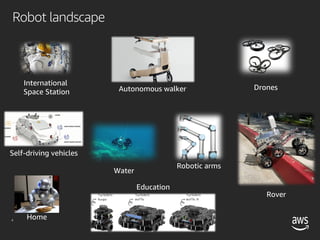
Robotic arms
International
Space Station
Drones
Education
Water
Home
Self-driving vehicles
Autonomous walker
Rover
Robot landscape
© 2019, Amazon Web Services, Inc. or its affiliates. All rights reserved.7
Source: IDTechEx
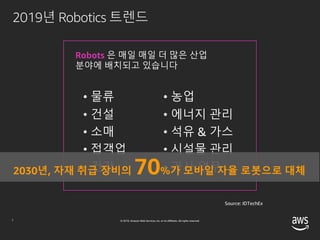
• 물류
• 건설
• 소매
• 접객업
• 건강
Robots 은 매일 매일 더 많은 산업
분야에 배치되고 있습니다
• 농업
• 에너지 관리
• 석유 & 가스
• 시설물 관리
• 가사 업무2030년, 자재 취급 장비의 70%가 모바일 자율 로봇으로 대체
2019년 Robotics 트렌드
© 2019, Amazon Web Services, Inc. or its affiliates. All rights reserved.8
2-3년 전에 비해 거의 10배 이상 증가할 것으로 예상
2019년 Robotics 트렌드
© 2019, Amazon Web Services, Inc. or its affiliates. All rights reserved.9
인공지능 기능은
기계 학습에 대한
전문지식을
요구합니다.
프로토타이핑
과정을
수 없이 반복해야
합니다.
개발환경 구축에
많은 날을 허비해야
합니다.
현실적인
시뮬레이션 환경
구축에 수개월이
걸립니다.
애플리케이션 관리
시스템 개발에 중복
투자하게
됩니다.
Robot 개발은 어렵고, 많은 시간이 소요됩니다.
© 2019, Amazon Web Services, Inc. or its affiliates. All rights reserved.10
Robotic 개발 사이클
일반 SW 개발/배포 주기 보다 너무 길다
© 2019, Amazon Web Services, Inc. or its affiliates. All rights reserved.11
스탠포드 연구소에서 10여년 전에 개발, 지금은 오픈 로보틱스 재단(open robotics)이 관리
글로벌 오픈소스 커뮤니티가 로봇 운영 체제(ROS)와 Gazebo 두 개의 프러덕트를 지원
ROS
드라이버, 알고리즘 등 다양한 소프트웨어 라이브러리와 툴의 집합
로봇 애플리케이션의 개발에 사용
Gazebo
로봇 애플리케이션의 시뮬레이션에 사용
견고한 물리엔진과 프로그래밍 가능한 그래픽 인터페이스를 제공
2018년 16M다운로드 기록, 2014년 대비 400%증가
Robot Operating System (ROS)
© 2019, Amazon Web Services, Inc. or its affiliates. All rights reserved.12
Robot Operating System (ROS)
© 2019, Amazon Web Services, Inc. or its affiliates. All rights reserved.13
v ROS2의 LTS(Long Term Service) 지원을 위한 투자
• 하위 호환성 유지
• LTS 를 통해 개발자들이 ROS2 기반의 프러덕션
서비스를 릴리즈 할 수 있도록 지원
v ROS2 패키지 마이그레이션에 투자
• 첫번째 ROS2 LTS 릴리즈 전까지,
113개의 중요 패키지의 마이그레이션을 리딩
AWS RoboMaker Investment in ROS
© 2019, Amazon Web Services, Inc. or its affiliates. All rights reserved.14
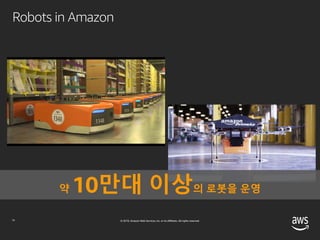
Robots in Amazon
약 10만대 이상의 로봇을 운영
© 2019, Amazon Web Services, Inc. or its affiliates. All rights reserved.15
v 로봇 개발을 위한 DevOps 툴
• 개발 & 시뮬레이션 환경 제공
• CI/CD 서비스 파이프라인 최적화
v 지능형 로봇을 개발 지원
• 보고, 듣고, 말하는 로봇
AWS RoboMaker 소개
© 2019, Amazon Web Services, Inc. or its affiliates. All rights reserved.16
개발 환경 시뮬레이션 환경
ROS용
클라우드 익스텐션
플릿 관리
AWS RoboMaker 서비스 스위트
© 2019, Amazon Web Services, Inc. or its affiliates. All rights reserved.17
개발 일정 가속화 바로 꺼내 쓸 수 있는
인공지능 관련 기능
인프라 프로비저닝이
필요 없음
라이프 사이클 관리
AWS RoboMaker 가 제공하는 이점
© 2019, Amazon Web Services, Inc. or its affiliates. All rights reserved.18
Application
Developer
테스트
개발 사이클 반복
Quality
Engineer
회귀 테스트
메트릭 분석
System
Engineer
애플리케이션 배포
소프트웨어 업데이트
Researchers,
Hobbyists,
Students
커리큘럼 개발
R&D
개발자를 위해, 개발자가 설계
© 2019, Amazon Web Services, Inc. or its affiliates. All rights reserved.
AWS Cloud
Robot
applications
Simulation
Log Files
Developers
Deploy
application
Robot
Rviz
Gazebo
Rqt
AWS RoboMaker architecture
© 2019, Amazon Web Services, Inc. or its affiliates. All rights reserved.20
ROS/ROS2
개발 환경 시뮬레이션 플릿 관리ROS 용 클라우드 익스텐션
BuildTool
CloudDevelopment
Environment
Debug
MLModelTraining
Iterative
Simulation
Regression
Testing
Registration
Deployment
Monitoring
Management
Lex
Polly
Rekognition
KinesisVideoStreams
CloudWatchMetrics
CloudWatchLogs
MetricandLogging
AWS RoboMaker architecture
© 2019, Amazon Web Services, Inc. or its affiliates. All rights reserved.21
AWS RoboMaker
ROS 용 클라우드 익스텐션
• 익숙한 ROS 패키지로 작성되었으며 자동으로 AWS로의 연결을 생성
• Amazon Lex, Amazon Polly, Amazon Kinesis 비디오 스트림, Amazon Rekognition
및 Amazon CloudWatch와 연동
LEX POLLY KINESIS
VIDEO
STREAMS
REKOGNITION CLOUD WATCH
음성인식 텍스트를
음성으로 변환
비디오 스트림
이미지,
비디오 분석
로깅, 모니터링
© 2019, Amazon Web Services, Inc. or its affiliates. All rights reserved.22
AWS RoboMaker
개발 환경
v 개발 환경을 구축하지 않고 바로 시작
v 단 한 번의 클릭만으로 RoboMaker 개발 환경
생성
v 사전에 설치된 RoboMaker 클라우드 익스텐션
및 샘플 로봇 응용 프로그램 포함
v 운영 체제, 개발용 소프트웨어 및 ROS가
자동으로 다운로드, 컴파일, 구성됨
© 2019, Amazon Web Services, Inc. or its affiliates. All rights reserved.23
AWS RoboMaker
시뮬레이션
v 제공되는 가상 3D 환경을 사용하거나 커스텀
생성 시뮬레이션 환경 적용 가능
v 인프라를 프로비저닝, 구성, 관리할 필요가 없음
v 동시에 여러 개의 시뮬레이션을 실행 가능
v 시뮬레이션의 복잡도에 따라 인프라가 자동
확장
v 시뮬레이션에 사용된 리소스 만큼만 비용 지불
© 2019, Amazon Web Services, Inc. or its affiliates. All rights reserved.24
AWS RoboMaker
플릿 관리
v AWS Greengrass 와 통합
v Robot의 registry, security, fault-tolerance
지원 기능 내장
v AWS 관리 콘솔에서 단 몇 번의 클릭만으로
로봇 애플리케이션을 OTA로 배포
© 2019, Amazon Web Services, Inc. or its affiliates. All rights reserved.25
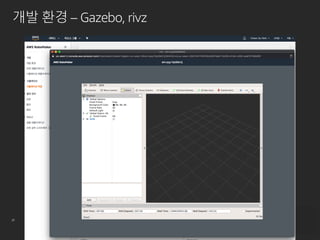
개발 환경 – Gazebo, rivz
© 2019, Amazon Web Services, Inc. or its affiliates. All rights reserved.26
개발 환경 – Gazebo, rivz
© 2019, Amazon Web Services, Inc. or its affiliates. All rights reserved.27
개발 환경 – Gazebo, rivz
© 2019, Amazon Web Services, Inc. or its affiliates. All rights reserved.28
Hello
World
Navigation and
Person Recognition
Voice
Commands
Robot
Monitoring
Self-driving
using
Reinforcement
Learning
Object-following
using
Reinforcement Learning
AWS RoboMaker
Sample Robot Applications
© 2019, Amazon Web Services, Inc. or its affiliates. All rights reserved.29
Human Robot Interaction with Alexa
https://www.youtube.com/watch?v=RTIHsZQx5Xg
Woowa Brothers Corp.
로봇딜리버리셀
박진용
Woowa Brothers Corp.
매년 주문수 50%증가
Woowa Brothers Corp.
출처:https://www.hankookilbo.com/News/Read/201811201329398091
Woowa Brothers Corp.
진지하게,
장기적인
해결책을 고민
Woowa Brothers Corp.
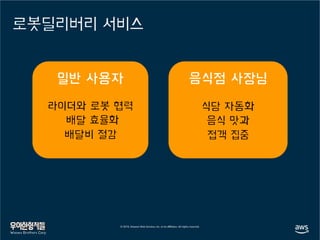
로봇딜리버리 서비스
라이더와 로봇 협력
배달 효율화
배달비 절감
식당 자동화
음식 맛과
접객 집중
Woowa Brothers Corp.
출처: https://www.zdnet.co.kr/view/?no=20180808105516 출처: https://www.hankyung.com/news/article/2019072333033
Woowa Brothers Corp.
출처: https://www.zdnet.co.kr/view/?no=20190412181355 출처: https://www.zdnet.co.kr/view/?no=20190503083315
Woowa Brothers Corp.
우형에서 는
Woowa Brothers Corp.
우형에서 AWS RoboMaker는
Woowa Brothers Corp.
우형에서 AWS RoboMaker는
Dilly 의 목소리는 서연 (AWS Polly)
쉽게 시작하는 로봇 개발
서비스 운영을 위한 관리, 배포, 모니터링 도구
Woowa Brothers Corp.
아직은 아쉬운 점
작은 화면에 반응이 느린
Gazebo와 rviz
Woowa Brothers Corp.
아직은 아쉬운 점
코드 한줄 수정하면
번들링하는데 700MB*
* Hello world 샘플 어플리케이션 기준
Woowa Brothers Corp.
아직은 아쉬운 점
가끔 틀릴 때도…
Woowa Brothers Corp.
그래도 개선되고 있음
오프라인 버퍼링Bundle V2Melodic 지원
Woowa Brothers Corp.
RoboMaker 사용팁
잘 안된다면
Developer guide를 의심
AWS Forum과 Support 활용
Woowa Brothers Corp.
Doosan robots
in AWS RoboMaker
본 문서는 두산로보틱스 정보자산으로, 승인을 받지 않은 문서의 열람, 수정, 배포, 복사를 금지
합니다.
This document is the informational asset of Doosan Robotics. Thus, unauthorized access,
revision, distribution and copying of this document are strictly prohibited.
Doosan Robotics 소개
01
51
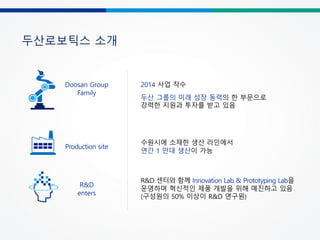
두산로보틱스 소개
Doosan Group
Family
2014 사업 착수
두산 그룹의 미래 성장 동력의 한 부문으로
강력한 지원과 투자를 받고 있음
R&D
enters
R&D 센터와 함께 Innovation Lab & Prototyping Lab을
운영하며 혁신적인 제품 개발을 위해 매진하고 있음
(구성원의 50% 이상이 R&D 연구원)
수원시에 소재한 생산 라인에서
연간 1 만대 생산이 가능
Production site
52
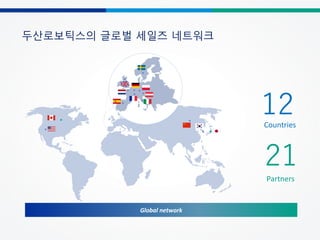
두산로보틱스의 글로벌 세일즈 네트워크
Global network
Countries
12
21
Partners
협동로봇 시장의 성장 가능성
02
54
협동로봇이란?
산업용 로봇 협동 로봇
• 빠른 속도와 높은 가반하중
• 학습이 어려운 사용 방법
로봇 특징
안전 기능
운영
용이성
• 추가 안전 펜스 및 센서가 필요
• 변경이 어렵고, 추가 비용이 필요
• 작업자와 유사한 동작 성능*
• 손쉬운 프로그래밍 환경
• 작업자와 같은 공간에서 사용 가능(펜스 X)
• 충돌 감지와 같은 안전 기능을 제공
• 설치 및 변경이 손쉬움
From Google image search
*: 15 kg 이하 가반하중, 1 m/s 수준 속도
55
협동로봇의 적용 사례
협동 로봇 사용의 장점
• 작업자와 협동 로봇이 함께 작업
가능
• 사람과 함께 작업 할 수 있는 안전
기능 제공
• 하나의 로봇으로 다양한 작업을
구현하여 생산성을 향상시킬 수
있음
• 작업자가 로봇 사용 경험이 없음
• 100개 이상의 제품에 대한
프로그래밍이 필요
• 제한된 설치 공간
사례
• 산업용 로봇은 작업자의 다양한
작업 형태를 완전히 대체하기
어려움
• 여러 로봇 사용에 대해 안전
펜스 및 센서 사용 등으로 넓은
공간과 추가 비용이 요구됨
• 손쉬운 프로그래밍
• 좁은 공간에 설치 가능
산업용 로봇의 한계점
56
CNC 장비 보조 작업
CNC 장비에 소재 로딩 및 가공물
언로딩 작업 자동화
단위 작업 사이에 작업물을
로딩/언로딩 하는 자동화
Pick & Place
부품 내부의 불량이나 조립
상태를 검사하는 자동화
검사
스크류 고정 또는 기어 조립과 같은
전통적인 수작업 대체
조립(Screw, Gear) 폴리싱 & 디버링
이물질 제거 및 표면 폴리싱
작업 자동화
글루잉/본딩
글루잉이나 본딩을 위한 일정
속도 및 자세의 토출 작업
자동화
플라스틱 사출 자동화
사출기에서 부품 언로딩 및 후속
작업에 로딩하는 자동화
포장 & 팔레타이징
포장 및 이송을 위한 제품 적재
작업 자동화(예, 전기전자,
식음료 등)
프레스 작업 자동화
프레스 장비에 소재
로딩/언로딩 작업 자동화
협동로봇의 주요 응용 사례
두산 로봇 소개
03
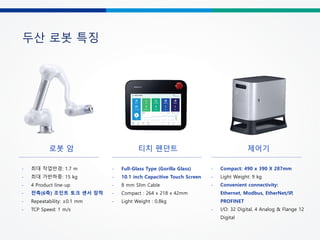
두산 로봇 특징
티치 펜던트
- Full-Glass Type (Gorilla Glass)
- 10.1 inch Capacitive Touch Screen
- 8 mm Slim Cable
- Compact : 264 x 218 x 42mm
- Light Weight : 0.8kg
제어기
- Compact: 490 x 390 X 287mm
- Light Weight: 9 kg
- Convenient connectivity:
Ethernet, Modbus, EtherNet/IP,
PROFINET
- I/O: 32 Digital, 4 Analog & Flange 12
Digital
로봇 암
- 최대 작업반경: 1.7 m
- 최대 가반하중: 15 kg
- 4 Product line-up
- 전축(6축) 조인트 토크 센서 장착
- Repeatability: ±0.1 mm
- TCP Speed: 1 m/s
두산 로봇 라인업 구성
고성능 토크센서 탑재로 그 어떤 고난도 작업도 완벽하고 안정감 있게
Dexterous
Superb Safety System으로 로봇 작업을 보다 안전하게
Safe
Flexible
스마트 기기와 같은 직관적인 사용성으로 로봇 티칭을 가장 쉽고
빠르게
Easy & Flexible
두산 로봇의 3가지 장점
Safe
Superb Safety System으로 로봇 작업을 보다 안전하게
§ 5가지 작업 공간 설정으로 작업 효율성을 향상시킬 뿐
아니라 작업자의 안전을 최우선으로 보호
§ 5가지 작업 공간
① 로봇 단독 작업공간, ② 협동작업공간, ③ 로봇 진입
금지 구역
④ 툴 방향 제한 구역 ⑤ 충돌 감도 개별 설정 구역
Superb
Safety
System
• 6개의 관철 축마다 고성능 토크센서 탑재돼 있어
업계 최고 수준의 충돌 민감도를 자랑
• 전류제어 방식으로는 구현이 어렵던 0.2N 수준의
미세한 힘 변화를 로봇의 모든 축에서 완벽히
감지
Robot adapts to external force which
can compensate position errors
allowing precise work, and protecting
both the robot and the workpiece
순응 제어 (Compliance Control)
Dexterous
고성능 토크센서 탑재로 그 어떤 고난도 작업도 완벽하고 안정감 있게
Stops when force setting and detected
force are at equilibrium enabling more
delicate and dexterous operation
compared to current-control type
collaborative robots
힘 제어 (Force Control)
§ 6개의 고성능 토크센서를 기반으로 한 고도의 힘
제어, 순응제어 알고리즘을 바탕으로 폴리싱,
나사조립, 다림질 등과 같은 사람의 손재주가
필요한 섬세하고 정교한 작업을 더욱 정밀하고
완벽하게 수행
Easy & Flexible
스마트 기기와 같은 직관적 사용성으로 로봇 티칭을 가장 쉽고 빠르게
§ 티치 팬던트에 픽&플레이스, 조립, 팔레타이징 등
현장에서 자주 쓰이는 다양한 스킬이 사전 탑재돼
있어 로봇 사용경험이 없는 초보자들도 매우 쉽고
간편하게 프로그래밍이 가능
§ 두산 로봇은 5개의 버튼으로 구성된 콕핏(직접 교시
버튼)이 장착돼 있어 간단한 버튼 동작만으로도 각종
티칭 모드 선택은 물론 좌표 저장까지 누구나 손쉽게
직접교시가 가능
Teach Pendant Direct Teaching
ROS Package
of Doosan cobot
04
ROS?
History - 2007년 미국의 스탠포드 대학 인공지능 연구소(AI LAB)가 진행하던 STAIR(STanford
AI Robot) 프로젝트를 위해 Morgan Quigley 이 개발한 "Switchyard" 이라는
시스템에서 시작함.
- 로봇 소프트웨어 개발을 전 세계 레벨에서 공동 작업이 가능하도록 하는 환경 구축Purpose
2018.05
melodic
- ROS는 로봇 응용 프로그램 개발을 위한 운영체제와 같은 로봇 플랫폼.
- 로봇 app을 개발 시 필요한 하드웨어 추상화, 하위 디바이스 제어, 일반적으로
사용되는 기능의 구현, 프로세스간의 메시지 패싱, 패키지 관리, 개발환경에
필요한 라이브러리와 다양한 개발 및 디버깅 도구를 제공.
Features
- 툴과 라이브러리와 함께, ROS 시스템은 정기적으로 ROS배포판 형태로 배포.
- 배포판 형식은 리눅스 배포판과 유사, 사용/빌드에 있어 S/W 적인 호환성이 있는
세트로 공급됨.
Distribution
- 로봇 및 센서 제조사와 같은 개발자, ROS 개발 운용팀, app개발자, 사용자가 이용ROS
Community
Why ROS?
Direct Teaching
Why ROS?
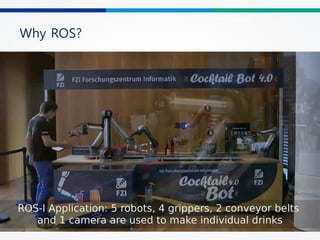
ü ROS Application
- 5 robots, 4 grippers, 2 conveyor belts and 1 camera are used to make individual drinks
ü How to connect robots ?
- Filed-bus, API, robot script …
ü Should I learn the language of each robot?
User Application
Direct Teaching
Cocktail Bot 4.0
Linux
ROS
Linux
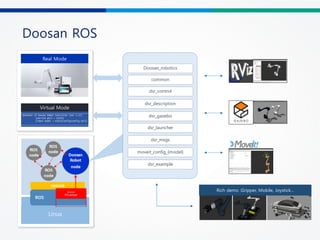
Doosan ROS
Virtual Mode
Real Mode
Doosan_robotics
common
dsr_control
dsr_description
dsr_example
dsr_launcher
dsr_msgs
moveit_config_{model}
dsr_gazebo
Rich demo :Gripper, Mobile, Joystick...
Linux
Doosan
ROS package
Linux
NO Description Related Packages
1
joint_state_publisher+ Rviz
- Loading robot models with Rviz
- Driving robot with joint_state_publisher
dsr_description
2
moveIt+ Rviz
- set target position with the Interactive maker → motion planning with MoveIt →
dispatch motion to real robot.
- C ++ / python can be used to control moveIt.
moveit_config_{model}
dsr_control
3
Single Robot
- Simulating a single robot on Rviz or Gazebo in virtual mode.
- Driving a real robot in real mode
common
dsr_msgs
dsr_control
dsr_gazebo
dsr_launcher
4
Multi Robot
- Simulating a single robot on Rviz or Gazebo in virtual mode.
- Driving a real robot in real mode
5
Integration with Gripper device
- Integrated with ROBOTIQ's Gripper (ROS Support).
- Simulation and real driving is supported.
6
Mobile Robot
- Integration with Clearpath Robotics’ Husky UGV (Mobile Robot)
7
Demo
- Rich examples for Doosan cobots written in C ++ and Python
dsr_example
Doosan ROS
Doosan ROS
Doosan ROS package Distribution
Doosan cobot
in AWS RoboMaker
05
AWS RoboMaker?
§ Helps developing robot applications in cloud-based environment.
§ Provides robotics development environment for editing and building robotics applications.
§ Provides simulation tools such as Gazebo and Rviz in the cloud environment.
§ Fleet Management helps distributing bundled packages.
Advantage of RoboMaker
▶ 빠르고 쉬운 인공지능 로봇의 개발
RoboMaker의 ROS용 클라우드 익스텐션을 통해 다양한 인공지능 서비스 연동
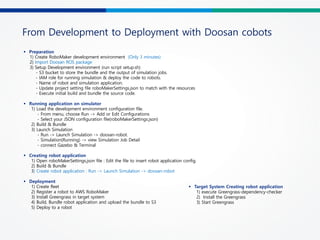
From Development to Deployment with Doosan cobots
§ Preparation
1) Create RoboMaker development environment (Only 3 minutes)
2) Import Doosan ROS package
3) Setup Development environment (run script setup.sh)
- S3 bucket to store the bundle and the output of simulation jobs.
- IAM role for running simulation & deploy the code to robots.
- Name of robot and simulation application.
- Update project setting file roboMakerSettings.json to match with the resources
- Execute initial build and bundle the source code.
§ Running application on simulator
1) Load the development environment configuration file.
- From menu, choose Run -> Add or Edit Configurations
- Select your JSON configuration file(roboMakerSettings.json)
2) Build & Bundle
3) Launch Simulation
- Run -> Launch Simulation -> doosan-robot.
- Simulation(Running) -> view Simulation Job Detail
- connect Gazebo & Terminal
§ Creating robot application
1) Open roboMakerSettings.json file : Edit the file to insert robot application config.
2) Build & Bundle
3) Create robot application : Run -> Launch Simulation -> doosan-robot
§ Deployment
1) Create fleet
2) Register a robot to AWS RoboMaker
3) Install Greengrass in target system
4) Build, Bundle robot application and upload the bundle to S3
5) Deploy to a robot
§ Target System Creating robot application
1) execute Greengrass-dependency-checker
2) Install the Greengrass
3) Start Greengrass
From Development to Deployment with Doosan cobots
Lesson Learned
§ 항상 자신의 개발 환경이 클라우드 에 있음에 유의!
§ 사용하고자 하는 ROS 패키지를 RoboMaker 환경에 맞게 수정 필요. (자동 X)
- ROS 패키지 안의 라이브러리 실행파일들이 모두 사용자 계정으로 실행 가능 해야 함. (root 권한 X)
- ROS 패키지를 robot_ws와 simulation_ws로 분할.
- package.xml : <run_depend>, <exec_depend> 를 엄격하게 지정해야 함.
- CMakeLists.txt : 실행에 관여되는 바이너리,라이브러리,스크립트 등이 CATKIN_PACKAGE_BIN_DESTINATION 에
install 되도록 해야 함.
§ Build & bundling 한 후, 반드시 Launch Simulation을 해야만 Robot applications 생성 됨을 유의!
§ 타겟 PC에는 ROS가 설치되어 있지 않아도 됨. (Greengrass 만 설치되면 O.K. )
- bundling 결과물 : output.tar 사이즈 약 700MB? → user app 뿐만 아니라 ROS+관련 패키지 함께 포함.
§ Greengrass 설치 시 , dependency software 설치 유의
- Ubuntu 16.04 표준 설치 기준 java8, python3.5, node.js8.10 등의 dependency SW 설치 필요.
- 해당 SW 설치 후, /usr/bin에 심볼릭 링크 등록 필요 : ex> java8 → node.js8.10
Demonstration
06
© 2019, Amazon Web Services, Inc. or its affiliates. All rights reserved.
Additional resources
• Step-by-step tutorial: How to Train a Robot Using Reinforcement
Learning with AWS RoboMaker
• Blog: Reinforcement learning with AWS RoboMaker
• AWS RoboMaker sample applications
• Learn more about AWS RoboMaker
여러분의 피드백을 기다립니다!
#AWSDEVDAYSEOUL

[AWS Dev Day] 이머징 테크 | ROS 로 실현하는 어릴 적 로봇과학자의 꿈 - 박천구 AWS 솔루션즈 아키텍트, 박진용 우아한 형제들 책임연구원, 김갑겸 두산 로보틱스 책임연구원

  • 1.
    ROS 로 실현하는 어릴적 로봇과학자의 꿈 박천구 솔루션즈 아키텍트 Amazon Web Services E m e r g i n g T e c h 김갑겸 책임연구원 두산 로보틱스 박진용 책임연구원 우아한 형제들
  • 2.
    Agenda 2. 고객사례 -우아한 형제들 3. 고객사례 - 두산 로보틱스 1. ROS와 RoboMaker
  • 4.
  • 5.
    © 2019, AmazonWeb Services, Inc. or its affiliates. All rights reserved.6 Robotic arms International Space Station Drones Education Water Home Self-driving vehicles Autonomous walker Rover Robot landscape
  • 6.
    © 2019, AmazonWeb Services, Inc. or its affiliates. All rights reserved.7 Source: IDTechEx • 물류 • 건설 • 소매 • 접객업 • 건강 Robots 은 매일 매일 더 많은 산업 분야에 배치되고 있습니다 • 농업 • 에너지 관리 • 석유 & 가스 • 시설물 관리 • 가사 업무2030년, 자재 취급 장비의 70%가 모바일 자율 로봇으로 대체 2019년 Robotics 트렌드
  • 7.
    © 2019, AmazonWeb Services, Inc. or its affiliates. All rights reserved.8 2-3년 전에 비해 거의 10배 이상 증가할 것으로 예상 2019년 Robotics 트렌드
  • 8.
    © 2019, AmazonWeb Services, Inc. or its affiliates. All rights reserved.9 인공지능 기능은 기계 학습에 대한 전문지식을 요구합니다. 프로토타이핑 과정을 수 없이 반복해야 합니다. 개발환경 구축에 많은 날을 허비해야 합니다. 현실적인 시뮬레이션 환경 구축에 수개월이 걸립니다. 애플리케이션 관리 시스템 개발에 중복 투자하게 됩니다. Robot 개발은 어렵고, 많은 시간이 소요됩니다.
  • 9.
    © 2019, AmazonWeb Services, Inc. or its affiliates. All rights reserved.10 Robotic 개발 사이클 일반 SW 개발/배포 주기 보다 너무 길다
  • 10.
    © 2019, AmazonWeb Services, Inc. or its affiliates. All rights reserved.11 스탠포드 연구소에서 10여년 전에 개발, 지금은 오픈 로보틱스 재단(open robotics)이 관리 글로벌 오픈소스 커뮤니티가 로봇 운영 체제(ROS)와 Gazebo 두 개의 프러덕트를 지원 ROS 드라이버, 알고리즘 등 다양한 소프트웨어 라이브러리와 툴의 집합 로봇 애플리케이션의 개발에 사용 Gazebo 로봇 애플리케이션의 시뮬레이션에 사용 견고한 물리엔진과 프로그래밍 가능한 그래픽 인터페이스를 제공 2018년 16M다운로드 기록, 2014년 대비 400%증가 Robot Operating System (ROS)
  • 11.
    © 2019, AmazonWeb Services, Inc. or its affiliates. All rights reserved.12 Robot Operating System (ROS)
  • 12.
    © 2019, AmazonWeb Services, Inc. or its affiliates. All rights reserved.13 v ROS2의 LTS(Long Term Service) 지원을 위한 투자 • 하위 호환성 유지 • LTS 를 통해 개발자들이 ROS2 기반의 프러덕션 서비스를 릴리즈 할 수 있도록 지원 v ROS2 패키지 마이그레이션에 투자 • 첫번째 ROS2 LTS 릴리즈 전까지, 113개의 중요 패키지의 마이그레이션을 리딩 AWS RoboMaker Investment in ROS
  • 13.
    © 2019, AmazonWeb Services, Inc. or its affiliates. All rights reserved.14 Robots in Amazon 약 10만대 이상의 로봇을 운영
  • 14.
    © 2019, AmazonWeb Services, Inc. or its affiliates. All rights reserved.15 v 로봇 개발을 위한 DevOps 툴 • 개발 & 시뮬레이션 환경 제공 • CI/CD 서비스 파이프라인 최적화 v 지능형 로봇을 개발 지원 • 보고, 듣고, 말하는 로봇 AWS RoboMaker 소개
  • 15.
    © 2019, AmazonWeb Services, Inc. or its affiliates. All rights reserved.16 개발 환경 시뮬레이션 환경 ROS용 클라우드 익스텐션 플릿 관리 AWS RoboMaker 서비스 스위트
  • 16.
    © 2019, AmazonWeb Services, Inc. or its affiliates. All rights reserved.17 개발 일정 가속화 바로 꺼내 쓸 수 있는 인공지능 관련 기능 인프라 프로비저닝이 필요 없음 라이프 사이클 관리 AWS RoboMaker 가 제공하는 이점
  • 17.
    © 2019, AmazonWeb Services, Inc. or its affiliates. All rights reserved.18 Application Developer 테스트 개발 사이클 반복 Quality Engineer 회귀 테스트 메트릭 분석 System Engineer 애플리케이션 배포 소프트웨어 업데이트 Researchers, Hobbyists, Students 커리큘럼 개발 R&D 개발자를 위해, 개발자가 설계
  • 18.
    © 2019, AmazonWeb Services, Inc. or its affiliates. All rights reserved. AWS Cloud Robot applications Simulation Log Files Developers Deploy application Robot Rviz Gazebo Rqt AWS RoboMaker architecture
  • 19.
    © 2019, AmazonWeb Services, Inc. or its affiliates. All rights reserved.20 ROS/ROS2 개발 환경 시뮬레이션 플릿 관리ROS 용 클라우드 익스텐션 BuildTool CloudDevelopment Environment Debug MLModelTraining Iterative Simulation Regression Testing Registration Deployment Monitoring Management Lex Polly Rekognition KinesisVideoStreams CloudWatchMetrics CloudWatchLogs MetricandLogging AWS RoboMaker architecture
  • 20.
    © 2019, AmazonWeb Services, Inc. or its affiliates. All rights reserved.21 AWS RoboMaker ROS 용 클라우드 익스텐션 • 익숙한 ROS 패키지로 작성되었으며 자동으로 AWS로의 연결을 생성 • Amazon Lex, Amazon Polly, Amazon Kinesis 비디오 스트림, Amazon Rekognition 및 Amazon CloudWatch와 연동 LEX POLLY KINESIS VIDEO STREAMS REKOGNITION CLOUD WATCH 음성인식 텍스트를 음성으로 변환 비디오 스트림 이미지, 비디오 분석 로깅, 모니터링
  • 21.
    © 2019, AmazonWeb Services, Inc. or its affiliates. All rights reserved.22 AWS RoboMaker 개발 환경 v 개발 환경을 구축하지 않고 바로 시작 v 단 한 번의 클릭만으로 RoboMaker 개발 환경 생성 v 사전에 설치된 RoboMaker 클라우드 익스텐션 및 샘플 로봇 응용 프로그램 포함 v 운영 체제, 개발용 소프트웨어 및 ROS가 자동으로 다운로드, 컴파일, 구성됨
  • 22.
    © 2019, AmazonWeb Services, Inc. or its affiliates. All rights reserved.23 AWS RoboMaker 시뮬레이션 v 제공되는 가상 3D 환경을 사용하거나 커스텀 생성 시뮬레이션 환경 적용 가능 v 인프라를 프로비저닝, 구성, 관리할 필요가 없음 v 동시에 여러 개의 시뮬레이션을 실행 가능 v 시뮬레이션의 복잡도에 따라 인프라가 자동 확장 v 시뮬레이션에 사용된 리소스 만큼만 비용 지불
  • 23.
    © 2019, AmazonWeb Services, Inc. or its affiliates. All rights reserved.24 AWS RoboMaker 플릿 관리 v AWS Greengrass 와 통합 v Robot의 registry, security, fault-tolerance 지원 기능 내장 v AWS 관리 콘솔에서 단 몇 번의 클릭만으로 로봇 애플리케이션을 OTA로 배포
  • 24.
    © 2019, AmazonWeb Services, Inc. or its affiliates. All rights reserved.25 개발 환경 – Gazebo, rivz
  • 25.
    © 2019, AmazonWeb Services, Inc. or its affiliates. All rights reserved.26 개발 환경 – Gazebo, rivz
  • 26.
    © 2019, AmazonWeb Services, Inc. or its affiliates. All rights reserved.27 개발 환경 – Gazebo, rivz
  • 27.
    © 2019, AmazonWeb Services, Inc. or its affiliates. All rights reserved.28 Hello World Navigation and Person Recognition Voice Commands Robot Monitoring Self-driving using Reinforcement Learning Object-following using Reinforcement Learning AWS RoboMaker Sample Robot Applications
  • 28.
    © 2019, AmazonWeb Services, Inc. or its affiliates. All rights reserved.29 Human Robot Interaction with Alexa https://www.youtube.com/watch?v=RTIHsZQx5Xg
  • 30.
  • 31.
  • 32.
  • 33.
  • 34.
  • 35.
    로봇딜리버리 서비스 라이더와 로봇협력 배달 효율화 배달비 절감 식당 자동화 음식 맛과 접객 집중 Woowa Brothers Corp.
  • 36.
    출처: https://www.zdnet.co.kr/view/?no=20180808105516 출처:https://www.hankyung.com/news/article/2019072333033 Woowa Brothers Corp.
  • 37.
    출처: https://www.zdnet.co.kr/view/?no=20190412181355 출처:https://www.zdnet.co.kr/view/?no=20190503083315 Woowa Brothers Corp.
  • 38.
  • 39.
  • 40.
    우형에서 AWS RoboMaker는 Dilly의 목소리는 서연 (AWS Polly) 쉽게 시작하는 로봇 개발 서비스 운영을 위한 관리, 배포, 모니터링 도구 Woowa Brothers Corp.
  • 41.
    아직은 아쉬운 점 작은화면에 반응이 느린 Gazebo와 rviz Woowa Brothers Corp.
  • 42.
    아직은 아쉬운 점 코드한줄 수정하면 번들링하는데 700MB* * Hello world 샘플 어플리케이션 기준 Woowa Brothers Corp.
  • 43.
    아직은 아쉬운 점 가끔틀릴 때도… Woowa Brothers Corp.
  • 44.
    그래도 개선되고 있음 오프라인버퍼링Bundle V2Melodic 지원 Woowa Brothers Corp.
  • 45.
    RoboMaker 사용팁 잘 안된다면 Developerguide를 의심 AWS Forum과 Support 활용 Woowa Brothers Corp.
  • 46.
  • 48.
    Doosan robots in AWSRoboMaker 본 문서는 두산로보틱스 정보자산으로, 승인을 받지 않은 문서의 열람, 수정, 배포, 복사를 금지 합니다. This document is the informational asset of Doosan Robotics. Thus, unauthorized access, revision, distribution and copying of this document are strictly prohibited.
  • 49.
  • 50.
    51 두산로보틱스 소개 Doosan Group Family 2014사업 착수 두산 그룹의 미래 성장 동력의 한 부문으로 강력한 지원과 투자를 받고 있음 R&D enters R&D 센터와 함께 Innovation Lab & Prototyping Lab을 운영하며 혁신적인 제품 개발을 위해 매진하고 있음 (구성원의 50% 이상이 R&D 연구원) 수원시에 소재한 생산 라인에서 연간 1 만대 생산이 가능 Production site
  • 51.
    52 두산로보틱스의 글로벌 세일즈네트워크 Global network Countries 12 21 Partners
  • 52.
  • 53.
    54 협동로봇이란? 산업용 로봇 협동로봇 • 빠른 속도와 높은 가반하중 • 학습이 어려운 사용 방법 로봇 특징 안전 기능 운영 용이성 • 추가 안전 펜스 및 센서가 필요 • 변경이 어렵고, 추가 비용이 필요 • 작업자와 유사한 동작 성능* • 손쉬운 프로그래밍 환경 • 작업자와 같은 공간에서 사용 가능(펜스 X) • 충돌 감지와 같은 안전 기능을 제공 • 설치 및 변경이 손쉬움 From Google image search *: 15 kg 이하 가반하중, 1 m/s 수준 속도
  • 54.
    55 협동로봇의 적용 사례 협동로봇 사용의 장점 • 작업자와 협동 로봇이 함께 작업 가능 • 사람과 함께 작업 할 수 있는 안전 기능 제공 • 하나의 로봇으로 다양한 작업을 구현하여 생산성을 향상시킬 수 있음 • 작업자가 로봇 사용 경험이 없음 • 100개 이상의 제품에 대한 프로그래밍이 필요 • 제한된 설치 공간 사례 • 산업용 로봇은 작업자의 다양한 작업 형태를 완전히 대체하기 어려움 • 여러 로봇 사용에 대해 안전 펜스 및 센서 사용 등으로 넓은 공간과 추가 비용이 요구됨 • 손쉬운 프로그래밍 • 좁은 공간에 설치 가능 산업용 로봇의 한계점
  • 55.
    56 CNC 장비 보조작업 CNC 장비에 소재 로딩 및 가공물 언로딩 작업 자동화 단위 작업 사이에 작업물을 로딩/언로딩 하는 자동화 Pick & Place 부품 내부의 불량이나 조립 상태를 검사하는 자동화 검사 스크류 고정 또는 기어 조립과 같은 전통적인 수작업 대체 조립(Screw, Gear) 폴리싱 & 디버링 이물질 제거 및 표면 폴리싱 작업 자동화 글루잉/본딩 글루잉이나 본딩을 위한 일정 속도 및 자세의 토출 작업 자동화 플라스틱 사출 자동화 사출기에서 부품 언로딩 및 후속 작업에 로딩하는 자동화 포장 & 팔레타이징 포장 및 이송을 위한 제품 적재 작업 자동화(예, 전기전자, 식음료 등) 프레스 작업 자동화 프레스 장비에 소재 로딩/언로딩 작업 자동화 협동로봇의 주요 응용 사례
  • 56.
  • 57.
    두산 로봇 특징 티치펜던트 - Full-Glass Type (Gorilla Glass) - 10.1 inch Capacitive Touch Screen - 8 mm Slim Cable - Compact : 264 x 218 x 42mm - Light Weight : 0.8kg 제어기 - Compact: 490 x 390 X 287mm - Light Weight: 9 kg - Convenient connectivity: Ethernet, Modbus, EtherNet/IP, PROFINET - I/O: 32 Digital, 4 Analog & Flange 12 Digital 로봇 암 - 최대 작업반경: 1.7 m - 최대 가반하중: 15 kg - 4 Product line-up - 전축(6축) 조인트 토크 센서 장착 - Repeatability: ±0.1 mm - TCP Speed: 1 m/s
  • 58.
  • 59.
    고성능 토크센서 탑재로그 어떤 고난도 작업도 완벽하고 안정감 있게 Dexterous Superb Safety System으로 로봇 작업을 보다 안전하게 Safe Flexible 스마트 기기와 같은 직관적인 사용성으로 로봇 티칭을 가장 쉽고 빠르게 Easy & Flexible 두산 로봇의 3가지 장점
  • 60.
    Safe Superb Safety System으로로봇 작업을 보다 안전하게 § 5가지 작업 공간 설정으로 작업 효율성을 향상시킬 뿐 아니라 작업자의 안전을 최우선으로 보호 § 5가지 작업 공간 ① 로봇 단독 작업공간, ② 협동작업공간, ③ 로봇 진입 금지 구역 ④ 툴 방향 제한 구역 ⑤ 충돌 감도 개별 설정 구역 Superb Safety System • 6개의 관철 축마다 고성능 토크센서 탑재돼 있어 업계 최고 수준의 충돌 민감도를 자랑 • 전류제어 방식으로는 구현이 어렵던 0.2N 수준의 미세한 힘 변화를 로봇의 모든 축에서 완벽히 감지
  • 61.
    Robot adapts toexternal force which can compensate position errors allowing precise work, and protecting both the robot and the workpiece 순응 제어 (Compliance Control) Dexterous 고성능 토크센서 탑재로 그 어떤 고난도 작업도 완벽하고 안정감 있게 Stops when force setting and detected force are at equilibrium enabling more delicate and dexterous operation compared to current-control type collaborative robots 힘 제어 (Force Control) § 6개의 고성능 토크센서를 기반으로 한 고도의 힘 제어, 순응제어 알고리즘을 바탕으로 폴리싱, 나사조립, 다림질 등과 같은 사람의 손재주가 필요한 섬세하고 정교한 작업을 더욱 정밀하고 완벽하게 수행
  • 62.
    Easy & Flexible 스마트기기와 같은 직관적 사용성으로 로봇 티칭을 가장 쉽고 빠르게 § 티치 팬던트에 픽&플레이스, 조립, 팔레타이징 등 현장에서 자주 쓰이는 다양한 스킬이 사전 탑재돼 있어 로봇 사용경험이 없는 초보자들도 매우 쉽고 간편하게 프로그래밍이 가능 § 두산 로봇은 5개의 버튼으로 구성된 콕핏(직접 교시 버튼)이 장착돼 있어 간단한 버튼 동작만으로도 각종 티칭 모드 선택은 물론 좌표 저장까지 누구나 손쉽게 직접교시가 가능 Teach Pendant Direct Teaching
  • 63.
  • 64.
    ROS? History - 2007년미국의 스탠포드 대학 인공지능 연구소(AI LAB)가 진행하던 STAIR(STanford AI Robot) 프로젝트를 위해 Morgan Quigley 이 개발한 "Switchyard" 이라는 시스템에서 시작함. - 로봇 소프트웨어 개발을 전 세계 레벨에서 공동 작업이 가능하도록 하는 환경 구축Purpose 2018.05 melodic - ROS는 로봇 응용 프로그램 개발을 위한 운영체제와 같은 로봇 플랫폼. - 로봇 app을 개발 시 필요한 하드웨어 추상화, 하위 디바이스 제어, 일반적으로 사용되는 기능의 구현, 프로세스간의 메시지 패싱, 패키지 관리, 개발환경에 필요한 라이브러리와 다양한 개발 및 디버깅 도구를 제공. Features - 툴과 라이브러리와 함께, ROS 시스템은 정기적으로 ROS배포판 형태로 배포. - 배포판 형식은 리눅스 배포판과 유사, 사용/빌드에 있어 S/W 적인 호환성이 있는 세트로 공급됨. Distribution - 로봇 및 센서 제조사와 같은 개발자, ROS 개발 운용팀, app개발자, 사용자가 이용ROS Community
  • 65.
  • 66.
    Why ROS? ü ROSApplication - 5 robots, 4 grippers, 2 conveyor belts and 1 camera are used to make individual drinks ü How to connect robots ? - Filed-bus, API, robot script … ü Should I learn the language of each robot? User Application Direct Teaching Cocktail Bot 4.0 Linux ROS Linux
  • 67.
    Doosan ROS Virtual Mode RealMode Doosan_robotics common dsr_control dsr_description dsr_example dsr_launcher dsr_msgs moveit_config_{model} dsr_gazebo Rich demo :Gripper, Mobile, Joystick... Linux Doosan ROS package Linux
  • 68.
    NO Description RelatedPackages 1 joint_state_publisher+ Rviz - Loading robot models with Rviz - Driving robot with joint_state_publisher dsr_description 2 moveIt+ Rviz - set target position with the Interactive maker → motion planning with MoveIt → dispatch motion to real robot. - C ++ / python can be used to control moveIt. moveit_config_{model} dsr_control 3 Single Robot - Simulating a single robot on Rviz or Gazebo in virtual mode. - Driving a real robot in real mode common dsr_msgs dsr_control dsr_gazebo dsr_launcher 4 Multi Robot - Simulating a single robot on Rviz or Gazebo in virtual mode. - Driving a real robot in real mode 5 Integration with Gripper device - Integrated with ROBOTIQ's Gripper (ROS Support). - Simulation and real driving is supported. 6 Mobile Robot - Integration with Clearpath Robotics’ Husky UGV (Mobile Robot) 7 Demo - Rich examples for Doosan cobots written in C ++ and Python dsr_example Doosan ROS
  • 69.
  • 70.
    Doosan ROS packageDistribution
  • 71.
    Doosan cobot in AWSRoboMaker 05
  • 72.
    AWS RoboMaker? § Helpsdeveloping robot applications in cloud-based environment. § Provides robotics development environment for editing and building robotics applications. § Provides simulation tools such as Gazebo and Rviz in the cloud environment. § Fleet Management helps distributing bundled packages.
  • 73.
    Advantage of RoboMaker ▶빠르고 쉬운 인공지능 로봇의 개발 RoboMaker의 ROS용 클라우드 익스텐션을 통해 다양한 인공지능 서비스 연동
  • 74.
    From Development toDeployment with Doosan cobots § Preparation 1) Create RoboMaker development environment (Only 3 minutes) 2) Import Doosan ROS package 3) Setup Development environment (run script setup.sh) - S3 bucket to store the bundle and the output of simulation jobs. - IAM role for running simulation & deploy the code to robots. - Name of robot and simulation application. - Update project setting file roboMakerSettings.json to match with the resources - Execute initial build and bundle the source code. § Running application on simulator 1) Load the development environment configuration file. - From menu, choose Run -> Add or Edit Configurations - Select your JSON configuration file(roboMakerSettings.json) 2) Build & Bundle 3) Launch Simulation - Run -> Launch Simulation -> doosan-robot. - Simulation(Running) -> view Simulation Job Detail - connect Gazebo & Terminal § Creating robot application 1) Open roboMakerSettings.json file : Edit the file to insert robot application config. 2) Build & Bundle 3) Create robot application : Run -> Launch Simulation -> doosan-robot § Deployment 1) Create fleet 2) Register a robot to AWS RoboMaker 3) Install Greengrass in target system 4) Build, Bundle robot application and upload the bundle to S3 5) Deploy to a robot § Target System Creating robot application 1) execute Greengrass-dependency-checker 2) Install the Greengrass 3) Start Greengrass
  • 75.
    From Development toDeployment with Doosan cobots
  • 76.
    Lesson Learned § 항상자신의 개발 환경이 클라우드 에 있음에 유의! § 사용하고자 하는 ROS 패키지를 RoboMaker 환경에 맞게 수정 필요. (자동 X) - ROS 패키지 안의 라이브러리 실행파일들이 모두 사용자 계정으로 실행 가능 해야 함. (root 권한 X) - ROS 패키지를 robot_ws와 simulation_ws로 분할. - package.xml : <run_depend>, <exec_depend> 를 엄격하게 지정해야 함. - CMakeLists.txt : 실행에 관여되는 바이너리,라이브러리,스크립트 등이 CATKIN_PACKAGE_BIN_DESTINATION 에 install 되도록 해야 함. § Build & bundling 한 후, 반드시 Launch Simulation을 해야만 Robot applications 생성 됨을 유의! § 타겟 PC에는 ROS가 설치되어 있지 않아도 됨. (Greengrass 만 설치되면 O.K. ) - bundling 결과물 : output.tar 사이즈 약 700MB? → user app 뿐만 아니라 ROS+관련 패키지 함께 포함. § Greengrass 설치 시 , dependency software 설치 유의 - Ubuntu 16.04 표준 설치 기준 java8, python3.5, node.js8.10 등의 dependency SW 설치 필요. - 해당 SW 설치 후, /usr/bin에 심볼릭 링크 등록 필요 : ex> java8 → node.js8.10
  • 77.
  • 78.
    © 2019, AmazonWeb Services, Inc. or its affiliates. All rights reserved. Additional resources • Step-by-step tutorial: How to Train a Robot Using Reinforcement Learning with AWS RoboMaker • Blog: Reinforcement learning with AWS RoboMaker • AWS RoboMaker sample applications • Learn more about AWS RoboMaker
  • 80.