over
AV-over-IP Defined
AV-over-IP is the transport of AV
signals over a standard Ethernet
network, including…
 HD Video (e.g. HDMI, DVI)
 Audio
 Control Signals (e.g. IR)
 Peripheral Signals (e.g. USB)
Eliminate port limits
Why AV-over-IP? Scalability!
Distribute content from a single source
to hundreds of displays
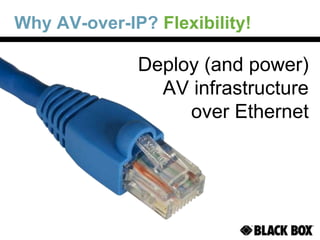
Why AV-over-IP? Flexibility!
Deploy (and power)
AV infrastructure
over Ethernet
Why AV-over-IP? Distance!
No distance limitations
Send video as far as your network reaches
Why AV-over-IP? Image Quality!
Lossless video and ultra-low latency
Why AV-over-IP? Cost Savings!
No need to install
separate cabling
Use existing networking equipment
Avoid using expensive
electrical contractors
AV-over-IP Applications
• Corporate/Educational
Campuses
• Hospitality
• Digital Signage
• Conference Rooms
• Smart Home AV distribution
• Professional AV Broadcast
Transmit HD-video wherever Ethernet
network technology is available!
AV-over-IP vs. HDBaseT
AV-over-IP HDBaseT
Cabling CAT5e, 6, 6a CAT6 (shielded)
Network Standard Ethernet Dedicated cable runs
Multi-cast Yes No
Video signal Lossless compression Uncompressed
Bandwidth requirement <150 Mbps 6 Gbps
Distance Unlimited* 330 ft.
Number of displays Unlimited
Depending on number
of ports on transmitter
Cost for 1:8 application $3300 $5000
AV-over-IP solutions provide a compelling alternative
to overlay technologies like HDBaseT
*330 ft. per segment, add switches or use fiber to extend
AV-over-IP networking
What is multicasting?
• One-to-many communication over network
infrastructure
• IGMP (Internet Group Management Protocol)
• Using only a single stream saves bandwidth
Choosing networking equipment
• Pick good quality switches supporting Gigabit
and IGMP snooping.
• For optional remote powering add PoE.
Black Box Network switches are tested
and approved with AV-over-IP solutions
PoE+ Gigabit Managed Switch
(LPB2826A)
Black Box AV-over-IP Solutions
Distribution & Extension
www.blackbox.com/go/MIPX
KVM and HD Video Switching
www.blackbox.com/go/ServSwitchAgility
HD Encoding and Decoding
www.blackbox.com/HDIP
Black Box AV-over-IP Solutions
Wireless Presentation System
www.blackbox.com/go/VPS
Digital Signage
www.blackbox.com/DSPlayers
MediaCento™ IPX
• Transmits HDMI (video and audio) over a LAN.
• Plug-and-play – no IP expertise needed!
• Power-over-Ethernet or local AC power.
• Supports HDCP for distribution of copy-
protected content.
• All cables are lockable for security:
HDMI, network and power.
• Configurations for:
- Unicast (point-to-point)
- Multicast (point-to-multipoint)
- Video walls
www.blackbox.com/go/MIPX
MediaCento IPX (Unicast)
Transmit HDMI over an Ethernet
LAN to a single display.
LAN
Source
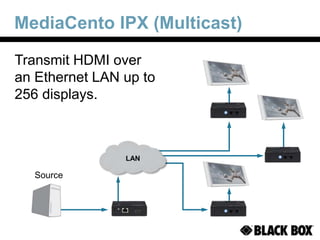
MediaCento IPX (Multicast)
LAN
Transmit HDMI over
an Ethernet LAN up to
256 displays.
Source
MediaCento IPX (Video Wall)
Transmit HDMI over
an Ethernet LAN and
split into multiple
displays for a video
wall (up to 8x8).
LAN
Source
HD-over-IP Encoder/Decoder
• Extend broadcast-quality 3G-SDI, HDMI,
or DVI video over a LAN or WAN
• Captures, compresses, and encodes
video for streaming over an IP network
• Decodes an IP signal as well,
decompressing if for HD output
• Ensures lossless video transmission
through JPEG 2000 intraframe
compression technology
• Delivers full 1080p/60 Hz video with no
noticeable loss of image quality
ServSwitch™ Agility KVM
• HD video and peripheral switching over an
Ethernet LAN: DVI-D, Audio, USB, RS-232
• Multicasting and target sharing
• Point-to-point extension
• Dual-head and dual-link capability
• Copper and fiber network interfaces
LAN
Digital Signage Platforms
Web-based
solution that
deploys in
minutes
MediaFlyer™
EXPRESS
Robust solution
for networked,
interactive
signage
iCOMPEL™
RSS & Social Media
Touch / Interactive
Drag & Drop Design
Live HDTV
IP Streaming
HTML5 & Flash
Multi-zone
Active Text
Tickers & Widgets
Advanced
solution for
large-scale
networks
iCOMPEL EDS
Wireless Presentation System
AVX-HDMI-WI
• Wireless presentation from any Windows
or Mac laptop over Wi-Fi
• Eliminates sharing the ugly VGA cable
across a conference table
• Up to 4 simultaneous presenters
• HDMI or VGA output
AV & Digital Signage Design Guide
Resources and
solutions to help
you plan and build
AV and digital
signage networks
Request your FREE copy!
blackbox.com/ProAVGuide
KVM & Matrix Switching Design Guide
Resources and
solutions to help
you plan and build
KVM and HD video
switching systems
Request your FREE copy!
blackbox.com/go/KVMGuide
IT & AV Product Portfolio
IT Infrastructure
Cabinets | Racks | Panels
Cooling | Power | Monitoring
Cable
Copper | Fiber
Patch | Bulk | Custom
KVM & HD Video
Switching | Extension
Trays | KVM-over-IP
AV & Multimedia
AV-over-IP | Switching | Extension
Scaling | Converting | Video Walls
Wireless Presentation
Digital Signage
Media Players | Touch Screens
Specialty Networking
Extenders | Media Converters
PoE | Wireless | Switching
Serial | Hardened Devices
The Black Box Difference
 Free Application Engineering
 24/7 Lifetime Technical Support
 No-hassle 45-day returns
724-746-5500
or
blackbox.com

av-over-ip-130819080827-phpapp02.pptx

  • 1.
  • 2.
    AV-over-IP Defined AV-over-IP isthe transport of AV signals over a standard Ethernet network, including…  HD Video (e.g. HDMI, DVI)  Audio  Control Signals (e.g. IR)  Peripheral Signals (e.g. USB)
  • 3.
    Eliminate port limits WhyAV-over-IP? Scalability! Distribute content from a single source to hundreds of displays
  • 4.
    Why AV-over-IP? Flexibility! Deploy(and power) AV infrastructure over Ethernet
  • 5.
    Why AV-over-IP? Distance! Nodistance limitations Send video as far as your network reaches
  • 6.
    Why AV-over-IP? ImageQuality! Lossless video and ultra-low latency
  • 7.
    Why AV-over-IP? CostSavings! No need to install separate cabling Use existing networking equipment Avoid using expensive electrical contractors
  • 8.
    AV-over-IP Applications • Corporate/Educational Campuses •Hospitality • Digital Signage • Conference Rooms • Smart Home AV distribution • Professional AV Broadcast Transmit HD-video wherever Ethernet network technology is available!
  • 9.
    AV-over-IP vs. HDBaseT AV-over-IPHDBaseT Cabling CAT5e, 6, 6a CAT6 (shielded) Network Standard Ethernet Dedicated cable runs Multi-cast Yes No Video signal Lossless compression Uncompressed Bandwidth requirement <150 Mbps 6 Gbps Distance Unlimited* 330 ft. Number of displays Unlimited Depending on number of ports on transmitter Cost for 1:8 application $3300 $5000 AV-over-IP solutions provide a compelling alternative to overlay technologies like HDBaseT *330 ft. per segment, add switches or use fiber to extend
  • 10.
    AV-over-IP networking What ismulticasting? • One-to-many communication over network infrastructure • IGMP (Internet Group Management Protocol) • Using only a single stream saves bandwidth Choosing networking equipment • Pick good quality switches supporting Gigabit and IGMP snooping. • For optional remote powering add PoE. Black Box Network switches are tested and approved with AV-over-IP solutions PoE+ Gigabit Managed Switch (LPB2826A)
  • 11.
    Black Box AV-over-IPSolutions Distribution & Extension www.blackbox.com/go/MIPX KVM and HD Video Switching www.blackbox.com/go/ServSwitchAgility HD Encoding and Decoding www.blackbox.com/HDIP
  • 12.
    Black Box AV-over-IPSolutions Wireless Presentation System www.blackbox.com/go/VPS Digital Signage www.blackbox.com/DSPlayers
  • 13.
    MediaCento™ IPX • TransmitsHDMI (video and audio) over a LAN. • Plug-and-play – no IP expertise needed! • Power-over-Ethernet or local AC power. • Supports HDCP for distribution of copy- protected content. • All cables are lockable for security: HDMI, network and power. • Configurations for: - Unicast (point-to-point) - Multicast (point-to-multipoint) - Video walls www.blackbox.com/go/MIPX
  • 14.
    MediaCento IPX (Unicast) TransmitHDMI over an Ethernet LAN to a single display. LAN Source
  • 15.
    MediaCento IPX (Multicast) LAN TransmitHDMI over an Ethernet LAN up to 256 displays. Source
  • 16.
    MediaCento IPX (VideoWall) Transmit HDMI over an Ethernet LAN and split into multiple displays for a video wall (up to 8x8). LAN Source
  • 17.
    HD-over-IP Encoder/Decoder • Extendbroadcast-quality 3G-SDI, HDMI, or DVI video over a LAN or WAN • Captures, compresses, and encodes video for streaming over an IP network • Decodes an IP signal as well, decompressing if for HD output • Ensures lossless video transmission through JPEG 2000 intraframe compression technology • Delivers full 1080p/60 Hz video with no noticeable loss of image quality
  • 18.
    ServSwitch™ Agility KVM •HD video and peripheral switching over an Ethernet LAN: DVI-D, Audio, USB, RS-232 • Multicasting and target sharing • Point-to-point extension • Dual-head and dual-link capability • Copper and fiber network interfaces LAN
  • 19.
    Digital Signage Platforms Web-based solutionthat deploys in minutes MediaFlyer™ EXPRESS Robust solution for networked, interactive signage iCOMPEL™ RSS & Social Media Touch / Interactive Drag & Drop Design Live HDTV IP Streaming HTML5 & Flash Multi-zone Active Text Tickers & Widgets Advanced solution for large-scale networks iCOMPEL EDS
  • 20.
    Wireless Presentation System AVX-HDMI-WI •Wireless presentation from any Windows or Mac laptop over Wi-Fi • Eliminates sharing the ugly VGA cable across a conference table • Up to 4 simultaneous presenters • HDMI or VGA output
  • 21.
    AV & DigitalSignage Design Guide Resources and solutions to help you plan and build AV and digital signage networks Request your FREE copy! blackbox.com/ProAVGuide
  • 22.
    KVM & MatrixSwitching Design Guide Resources and solutions to help you plan and build KVM and HD video switching systems Request your FREE copy! blackbox.com/go/KVMGuide
  • 23.
    IT & AVProduct Portfolio IT Infrastructure Cabinets | Racks | Panels Cooling | Power | Monitoring Cable Copper | Fiber Patch | Bulk | Custom KVM & HD Video Switching | Extension Trays | KVM-over-IP AV & Multimedia AV-over-IP | Switching | Extension Scaling | Converting | Video Walls Wireless Presentation Digital Signage Media Players | Touch Screens Specialty Networking Extenders | Media Converters PoE | Wireless | Switching Serial | Hardened Devices
  • 24.
    The Black BoxDifference  Free Application Engineering  24/7 Lifetime Technical Support  No-hassle 45-day returns 724-746-5500 or blackbox.com