1.กล้องโทรทัศน์วงจรปิดชนิดเครือข่าย แบบ
มุมมองคงที่สาหรับติดตั้งภายนอกอาคาร
สาหรับใช้งาน รักษาความปลอดภัยทั่วไป
1
DATASHEET
1
2MP HD IR VF Bullet Network Camera
IPC2322LB-ADZK-H
Key Features
High quality image with 2MP, 1/2.7"CMOS sensor
2MP (1920*1080)@30/25fps; 720P (1280*720)@30/25fps
Ultra 265, H.265, H.264, MJPEG
120dB true WDR technology enables clear image in strong light scene
Support 9:16 Corridor Mode
Smart IR, up to 50m (164ft) IR distance
Supports 256 G Micro SD card
IP67 protection
Support PoE power supply
3-Axis
2
1.2
1.1
1
2
DATASHEET
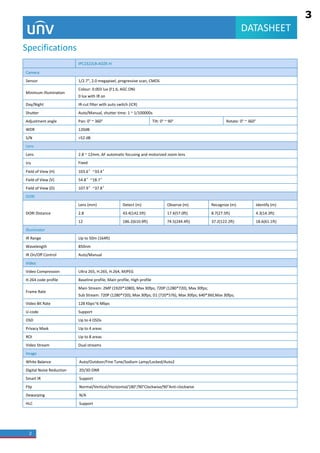
Specifications
IPC2322LB-ADZK-H
Camera
Sensor 1/2.7", 2.0 megapixel, progressive scan, CMOS
Minimum Illumination
Colour: 0.003 lux (F1.6, AGC ON)
0 lux with IR on
Day/Night IR-cut filter with auto switch (ICR)
Shutter Auto/Manual, shutter time: 1 ~ 1/100000s
Adjustment angle Pan: 0°~ 360° Tilt: 0°~ 90° Rotate: 0°~ 360°
WDR 120dB
S/N >52 dB
Lens
Lens 2.8 ~ 12mm, AF automatic focusing and motorized zoom lens
Iris Fixed
Field of View (H) 103.6°~33.4°
Field of View (V) 54.8°~18.7°
Field of View (D) 107.9°~37.8°
DORI
DORI Distance
Lens (mm) Detect (m) Observe (m) Recognize (m) Identify (m)
2.8 43.4(142.5ft) 17.4(57.0ft) 8.7(27.5ft) 4.3(14.3ft)
12 186.2(610.9ft) 74.5(244.4ft) 37.2(122.2ft) 18.6(61.1ft)
Illuminator
IR Range Up to 50m (164ft)
Wavelength 850nm
IR On/Off Control Auto/Manual
Video
Video Compression Ultra 265, H.265, H.264, MJPEG
H.264 code profile Baseline profile, Main profile, High profile
Frame Rate
Main Stream: 2MP (1920*1080), Max 30fps; 720P (1280*720), Max 30fps;
Sub Stream: 720P (1280*720), Max 30fps; D1 (720*576), Max 30fps; 640*360,Max 30fps;
Video Bit Rate 128 Kbps~6 Mbps
U-code Support
OSD Up to 4 OSDs
Privacy Mask Up to 4 areas
ROI Up to 8 areas
Video Stream Dual streams
Image
White Balance Auto/Outdoor/Fine Tune/Sodium Lamp/Locked/Auto2
Digital Noise Reduction 2D/3D DNR
Smart IR Support
Flip Normal/Vertical/Horizontal/180°/90°Clockwise/90°Anti-clockwise
Dewarping N/A
HLC Support
3
1.3
1.4
1.5
1.8
1.6
1.9
1.11
3
DATASHEET
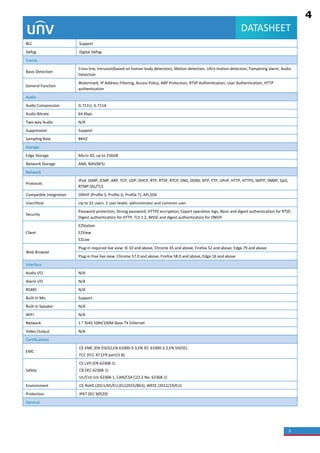
BLC Support
Defog Digital Defog
Events
Basic Detection
Cross line, intrusion(based on human body detection), Motion detection, Ultra motion detection, Tampering alarm, Audio
Detection
General Function
Watermark, IP Address Filtering, Access Policy, ARP Protection, RTSP Authentication, User Authentication, HTTP
authentication
Audio
Audio Compression G.711U, G.711A
Audio Bitrate 64 Kbps
Two-way Audio N/A
Suppression Support
Sampling Rate 8KHZ
Storage
Edge Storage Micro SD, up to 256GB
Network Storage ANR, NAS(NFS)
Network
Protocols
IPv4, IGMP, ICMP, ARP, TCP, UDP, DHCP, RTP, RTSP, RTCP, DNS, DDNS, NTP, FTP, UPnP, HTTP, HTTPS, SMTP, SNMP, QoS,
RTMP,SSL/TLS
Compatible Integration ONVIF (Profile S, Profile G, Profile T), API,SDK
User/Host Up to 32 users. 2 user levels: administrator and common user
Security
Password protection, Strong password, HTTPS encryption, Export operation logs, Basic and digest authentication for RTSP,
Digest authentication for HTTP, TLS 1.2, WSSE and digest authentication for ONVIF
Client
EZStation
EZView
EZLive
Web Browser
Plug-in required live view: IE 10 and above, Chrome 45 and above, Firefox 52 and above, Edge 79 and above
Plug-in free live view: Chrome 57.0 and above, Firefox 58.0 and above, Edge 16 and above
Interface
Audio I/O N/A
Alarm I/O N/A
RS485 N/A
Built-in Mic Support
Built-in Speaker N/A
WIFI N/A
Network 1 * RJ45 10M/100M Base-TX Ethernet
Video Output N/A
Certifications
EMC
CE-EMC (EN 55032,EN 61000-3-3,EN IEC 61000-3-2,EN 55035)
FCC (FCC 47 CFR part15 B)
Safety
CE LVD (EN 62368-1)
CB (IEC 62368-1)
UL/CUL (UL 62368-1, CAN/CSA C22.2 No. 62368-1)
Environment CE-RoHS (2011/65/EU;(EU)2015/863); WEEE (2012/19/EU)
Protection IP67 (IEC 60529)
General
4
1.13
1.14
1.19
1.10
1.18
1.16
1.17
1.7
4
DATASHEET
Power
DC 12V±25%, PoE (IEEE 802.3af)
Power consumption: Max 9.6W
Power Interface Ø 5.5mm coaxial power plug
Dimensions (L × W × H) 206 × 73 × 73mm (8.1” × 2.9” × 2.9”)
Weight 0.51kg(1.12lb)
Material Graphene + Metal
Working Environment -30°C ~ 60°C (-22°F ~ 140°F), Humidity: ≤95% RH (non-condensing)
Strorage Environment -30°C ~ 60°C (-22°F ~ 140°F), Humidity: ≤95% RH (non-condensing)
Surge Protection 6KV
Reset Button Support
Dimensions
5
1.15
1.13
5
DATASHEET
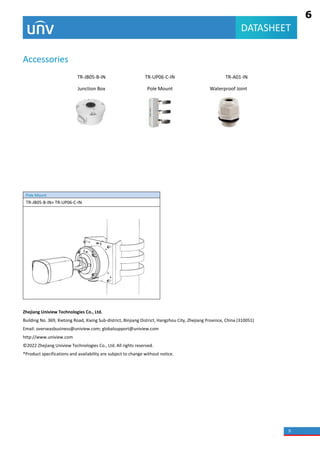
Accessories
TR-JB05-B-IN TR-UP06-C-IN TR-A01-IN
Junction Box Pole Mount Waterproof Joint
Pole Mount
TR-JB05-B-IN+ TR-UP06-C-IN
Zhejiang Uniview Technologies Co., Ltd.
Building No. 369, Xietong Road, Xixing Sub-district, Binjiang District, Hangzhou City, Zhejiang Province, China (310051)
Email: overseasbusiness@uniview.com; globalsupport@uniview.com
http://www.uniview.com
© 2022 Zhejiang Uniview Technologies Co., Ltd. All rights reserved.
*Product specifications and availability are subject to change without notice.
6
23
Subsection Time
(min)/Subsection
Size (MB)
 Subsection Time (min): Available when Subsection By Time is selected. 1
to 60 minutes allowed.
 Subsection Size (MB): Available when Subsection By Size is selected. 10
to 1024MB allowed.
When Storage Full
 Overwrite Recording: When the local recording capacity is full, older
recordings are overwritten automatically.
 Stop Recording: When the local recording capacity is full, recording stops
automatically.
Total Capacity
(GB)
Allocate storage capacity for local recording.
Range: 1 to 1024GB.
Local Recording Set the file format for saving local recordings, including TS and MP4.
Files Folder
Set the location where snapshots and recordings are saved.
 Click Browse... to select the storage location.
 Click Open to quickly open the folder.
NOTE!
The maximum length of the directory is 260 bytes. If the limit is exceeded,
recording or snapshot during live view will fail.
Click Save.
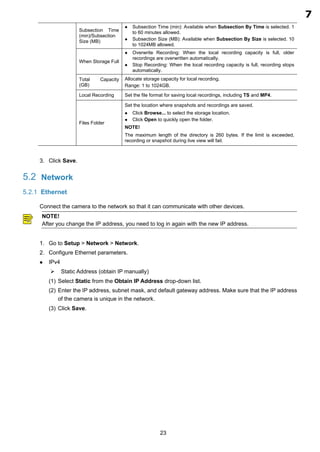
5.2 Network
5.2.1 Ethernet
Connect the camera to the network so that it can communicate with other devices.
NOTE!
After you change the IP address, you need to log in again with the new IP address.
Go to Setup > Network > Network.
Configure Ethernet parameters.
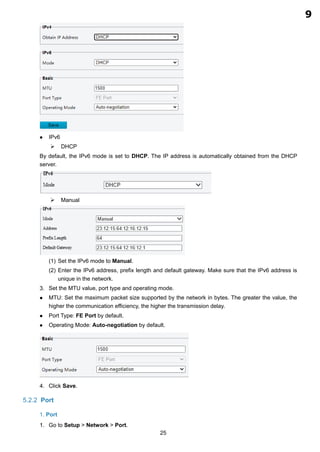
 IPv4
 Static Address (obtain IP manually)
(1) Select Static from the Obtain IP Address drop-down list.
(2) Enter the IP address, subnet mask, and default gateway address. Make sure that the IP address
of the camera is unique in the network.
(3) Click Save.
7
1.12
24
 PPPoE
Configure PPPoE to assign the camera a dynamic IP address to establish network connection.
(1) Select PPPoE from the Obtain IP Address drop-down list.
(2) Enter the username and password provided by your ISP (Internet Service Provider).
(3) Click Save.
 DHCP
DHCP (Dynamic Host Configuration Protocol) is enabled by default. If a DHCP server is deployed
in the network, the camera can automatically obtain an IP address from the DHCP server.
(1) Select DHCP from the Obtain IP Address drop-down list.
(2) Click Save.
8
25
 IPv6
 DHCP
By default, the IPv6 mode is set to DHCP. The IP address is automatically obtained from the DHCP
server.
 Manual
(1) Set the IPv6 mode to Manual.
(2) Enter the IPv6 address, prefix length and default gateway. Make sure that the IPv6 address is
unique in the network.
Set the MTU value, port type and operating mode.
 MTU: Set the maximum packet size supported by the network in bytes. The greater the value, the
higher the communication efficiency, the higher the transmission delay.
 Port Type: FE Port by default.
 Operating Mode: Auto-negotiation by default.
Click Save.
5.2.2 Port
1. Port
Go to Setup > Network > Port.
9
1.12
33
Item Description
SNMP Type Select SNMPv2. After you select SNMPv2, a message pops up to remind you of potential risks
and ask if you want to continue. Click OK.
Read Community The default read community name is public, and you may change it as needed. Make sure the
read community names of the server and camera are the same, otherwise the two-way
authentication will fail.
Trap Server Address Set the trap server address in Management Server.
SNMP Port The default SNMP port number is 161. You may change it as needed.
Click Save.
5.2.8 802.1x
802.1x provides authentication to devices for access to the network and enhances network security by
allowing only authenticated devices to access.
Go to Setup > Network > 802.1x.
Enable 802.1x.
By default, the protocol is set to EAP-MD5. Select the same EAPOL version as that of the router or
the switch.
Enter the username and password for authentication.
Click Save.
5.2.9 QoS
QoS (Quality of Service) has the ability to guarantee the performance of high-priority services under
limited network capacity.
Go to Setup > Network > QoS.
Set a priority level (0 to 63) for each service.
10
1.16
Network Device SDK (for Windows 64-bit)
2024-03-03
Back
Software Name Network Device SDK_V2.7.0.1 (for Windows 64-bit) download
Software
Description
Containing SDK, User Manual and Demo(MFC、C#)
NetDEVSDK, also known as network device SDK, is a module developed based on
private network communication protocols to serve products such as IP cameras and
NVRs, including the interfaces for surveillance management and control, device
management, resource management and system maintenance. These interfaces can
be used to develop software for functions like remote access and control.
The products can be supported as following:
1.VMS
Unicorn, VMS-B800
2.NVR
NVR201 Series, NVR202 Series, NVR204 Series, NVR208 Series, NVR301 Series,
NVR302 Series, NVR304 Series, NVR308 Series, NVR316 Series, NVR516
Series,NVR502-B NVR504,NVR508 series
3.Network Camera
IPC21Series、IPC22Series、IPC23Series、IPC24Series、IPC25Series、IPC26Series、
IPC31Series、IPC32Series、IPC33Series、IPC35Series、IPC36Series、IPC54Series、
IPC56Series、IPC62Series、IPC63Series、IPC64Series、IPC66Series、IPC67Series、
IPC68Series、IPC74Series、IPC76Series、IPC81Series、IPC85Series、IPC86Series、
IPC2ASeries、IPC2CSeries、TIC22Series、TIC25Series、TIC68Series、TIC76Series
4.Decoder
ADU8700 Series, DC5500-E Series, DMC8000 Series, DC5301-IN
Looking for something else?
How to buy
Contact us
Support
Ready for your need
Consulting on demand
Home Support Download Center
All Products Support How to buy
9.2.19
9.2.19
1.18
11
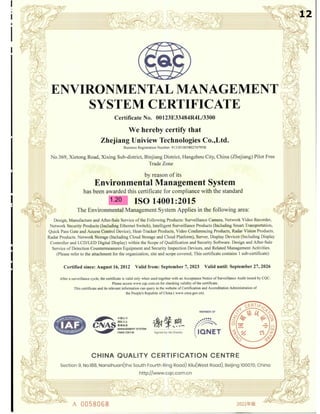
1.20
12
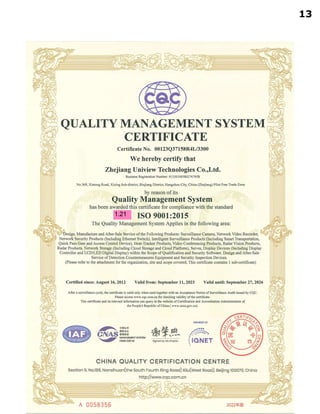
1.21
13
2.กล้องโทรทัศน์วงจรปิดชนิดเครือข่าย แบบ
มุมมองคงที่สาหรับติดตั้งภายนอกอาคาร แบบ
ที่ 1 สาหรับใช้ในงานรักษาความปลอดภัยและ
วิเคราะห์ภาพ และงานอื่น
14
1
DATASHEET
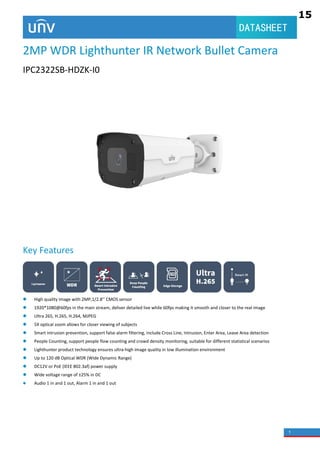
2MP WDR Lighthunter IR Network Bullet Camera
IPC2322SB-HDZK-I0
Key Features
 High quality image with 2MP,1/2.8’’ CMOS sensor
 1920*1080@60fps in the main stream, deliver detailed live while 60fps making it smooth and closer to the real image
 Ultra 265, H.265, H.264, MJPEG
 5X optical zoom allows for closer viewing of subjects
 Smart intrusion prevention, support false alarm filtering, include Cross Line, Intrusion, Enter Area, Leave Area detection
 People Counting, support people flow counting and crowd density monitoring, suitable for different statistical scenarios
 Lighthunter product technology ensures ultra-high image quality in low illumination environment
 Up to 120 dB Optical WDR (Wide Dynamic Range)
 DC12V or PoE (IEEE 802.3af) power supply
 Wide voltage range of ±25% in DC
 Audio 1 in and 1 out, Alarm 1 in and 1 out
15
2.1
2.2
2
2
DATASHEET
Specifications
IPC2322SB-HDZK-I0
Camera
Sensor 1/2.8", 2.0 megapixel, progressive scan, CMOS
Min. Illumination
Colour:0.001 lux (F1.2, AGC ON)
0 lux with IR
Day/Night IR-cut filter with auto switch (ICR)
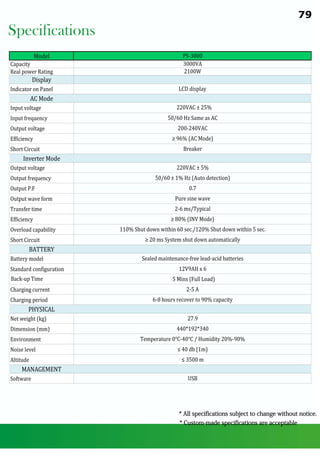
Shutter Auto/Manual, 1 ~ 1/100000s
WDR 120dB
S/N >52dB
Lens
Lens type 2.7~13.5mm@F1.2, AF automatic focusing and motorized zoom lens
Iris Fixed
Field of View (H) 98.2°~30.6°
Field of View (V) 53.3°~17.3°
Field of View (D) 127.7°~37.6°
DORI
DORI Distance
Lens
(mm)
Detect (m) Observe (m) Recognize (m) Identify (m)
2.7 70.9(232.5ft) 28.4(93.0ft) 14.2(46.5ft) 7.1(23.3ft)
13.5 247.5(812.0ft) 99.0(324.8ft) 49.5(162.4ft) 24.8(81.2ft)
Illuminator
IR Range Up to 50m (164 ft) IR range
Wavelength 850nm
IR On/Off Control Auto/Manual
Video
Video Compression Ultra 265, H.265, H.264, MJPEG
Frame Rate
Main Stream: 1080P (1920*1080),Max 60fps;
Sub Stream: 1080P (1920*1080), Max 60fps;
Third Stream: D1 (720*576), Max 60fps
Video Bit Rate 128 Kbps~16 Mbps
ROI Up to 8 areas
Video stream Triple streams
OSD Up to 8 OSDs
Privacy Mask Up to 4 areas per scene
Image
White Balance Auto/Outdoor/Fine Tune/Sodium Lamp/Locked/Auto2
Digital noise reduction 2D/3D DNR
Smart IR Support
Flip Normal/Flip Vertical/Flip Horizontal/180°/90°Clockwise/90°Anti-clockwise
HLC Support
BLC Support
Defog Digital Defog
Intelligent
Smart intrusion
prevention
Support false alarm filtering: Cross Line detection, Intrusion detection, Enter Area detection, Leave Area detection
16
2.5
2.4
2.3
2.9
2.6
2.12
2.10
2.8
3
DATASHEET
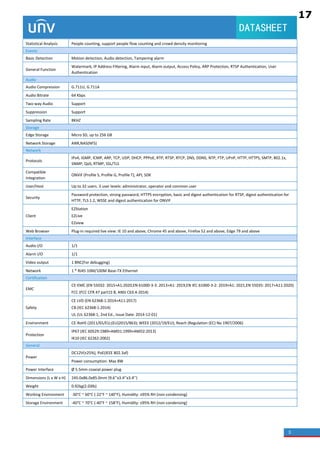
Statistical Analysis People counting, support people flow counting and crowd density monitoring
Events
Basic Detection Motion detection, Audio detection, Tampering alarm
General Function
Watermark, IP Address Filtering, Alarm input, Alarm output, Access Policy, ARP Protection, RTSP Authentication, User
Authentication
Audio
Audio Compression G.711U, G.711A
Audio Bitrate 64 Kbps
Two-way Audio Support
Suppression Support
Sampling Rate 8KHZ
Storage
Edge Storage Micro SD, up to 256 GB
Network Storage ANR,NAS(NFS)
Network
Protocols
IPv4, IGMP, ICMP, ARP, TCP, UDP, DHCP, PPPoE, RTP, RTSP, RTCP, DNS, DDNS, NTP, FTP, UPnP, HTTP, HTTPS, SMTP, 802.1x,
SNMP, QoS, RTMP, SSL/TLS
Compatible
Integration
ONVIF (Profile S, Profile G, Profile T), API, SDK
User/Host Up to 32 users. 3 user levels: administrator, operator and common user
Security
Password protection, strong password, HTTPS encryption, basic and digest authentication for RTSP, digest authentication for
HTTP, TLS 1.2, WSSE and digest authentication for ONVIF
Client
EZStation
EZLive
EZview
Web Browser Plug-in required live view: IE 10 and above, Chrome 45 and above, Firefox 52 and above, Edge 79 and above
Interface
Audio I/O 1/1
Alarm I/O 1/1
Video output 1 BNC(For debugging)
Network 1 * RJ45 10M/100M Base-TX Ethernet
Certification
EMC
CE-EMC (EN 55032: 2015+A1:2020,EN 61000-3-3: 2013+A1: 2019,EN IEC 61000-3-2: 2019+A1: 2021,EN 55035: 2017+A11:2020)
FCC (FCC CFR 47 part15 B, ANSI C63.4-2014)
Safety
CE LVD (EN 62368-1:2014+A11:2017)
CB (IEC 62368-1:2014)
UL (UL 62368-1, 2nd Ed., Issue Date: 2014-12-01)
Environment CE-RoHS (2011/65/EU;(EU)2015/863); WEEE (2012/19/EU); Reach (Regulation (EC) No 1907/2006)
Protection
IP67 (IEC 60529:1989+AMD1:1999+AMD2:2013)
IK10 (IEC 62262:2002)
General
Power
DC12V(±25%), PoE(IEEE 802.3af)
Power consumption: Max 8W
Power Interface Ø 5.5mm coaxial power plug
Dimensions (L x W x H) 245.0x86.0x85.0mm (9.6’’x3.4’’x3.4’’)
Weight 0.92kg(2.03lb)
Working Environment -30°C ~ 60°C (-22°F ~ 140°F), Humidity: ≤95% RH (non-condensing)
Storage Environment -40°C ~ 70°C (-40°F ~ 158°F), Humidity: ≤95% RH (non-condensing)
17
2.7
2.16
2.20
2.14
2.16
2.15
2.18
2.13 2.17
2.11
4
DATASHEET
Surge protection 6KV
Reset button N/A
Accessories
TR-JB07-D-IN TR-UP06-B-IN TR-UP06-C-IN TR-A01-IN(Optional)
Junction Box Pole Mount Pole Mount Waterproof Joint
Junction Mount Pole Mount
TR-JB07-D-IN + TR-UP06-C-IN TR-UP06-B-IN
Zhejiang Uniview Technologies Co., Ltd.
Building No.10, Wanlun Science Park, Jiangling Road 88, Binjiang District, Hangzhou, Zhejiang, China (310051)
Email: overseasbusiness@uniview.com; globalsupport@uniview.com
http://www.uniview.com
©2022 Zhejiang Uniview Technologies Co., Ltd. All rights reserved.
*Product specifications and availability are subject to change without notice
18
23
Subsection Time
(min)/Subsection
Size (MB)
 Subsection Time (min): Available when Subsection By Time is selected. 1
to 60 minutes allowed.
 Subsection Size (MB): Available when Subsection By Size is selected. 10
to 1024MB allowed.
When Storage Full
 Overwrite Recording: When the local recording capacity is full, older
recordings are overwritten automatically.
 Stop Recording: When the local recording capacity is full, recording stops
automatically.
Total Capacity
(GB)
Allocate storage capacity for local recording.
Range: 1 to 1024GB.
Local Recording Set the file format for saving local recordings, including TS and MP4.
Files Folder
Set the location where snapshots and recordings are saved.
 Click Browse... to select the storage location.
 Click Open to quickly open the folder.
NOTE!
The maximum length of the directory is 260 bytes. If the limit is exceeded,
recording or snapshot during live view will fail.
Click Save.
5.2 Network
5.2.1 Ethernet
Connect the camera to the network so that it can communicate with other devices.
NOTE!
After you change the IP address, you need to log in again with the new IP address.
Go to Setup > Network > Network.
Configure Ethernet parameters.
 IPv4
 Static Address (obtain IP manually)
(1) Select Static from the Obtain IP Address drop-down list.
(2) Enter the IP address, subnet mask, and default gateway address. Make sure that the IP address
of the camera is unique in the network.
(3) Click Save.
19
2.13
24
 PPPoE
Configure PPPoE to assign the camera a dynamic IP address to establish network connection.
(1) Select PPPoE from the Obtain IP Address drop-down list.
(2) Enter the username and password provided by your ISP (Internet Service Provider).
(3) Click Save.
 DHCP
DHCP (Dynamic Host Configuration Protocol) is enabled by default. If a DHCP server is deployed
in the network, the camera can automatically obtain an IP address from the DHCP server.
(1) Select DHCP from the Obtain IP Address drop-down list.
(2) Click Save.
20
25
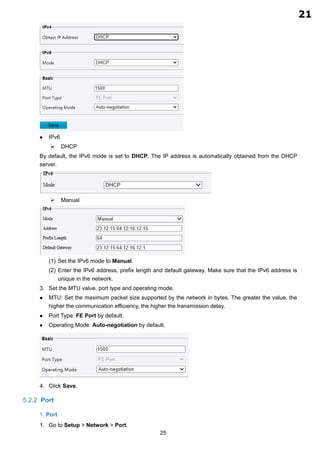
 IPv6
 DHCP
By default, the IPv6 mode is set to DHCP. The IP address is automatically obtained from the DHCP
server.
 Manual
(1) Set the IPv6 mode to Manual.
(2) Enter the IPv6 address, prefix length and default gateway. Make sure that the IPv6 address is
unique in the network.
Set the MTU value, port type and operating mode.
 MTU: Set the maximum packet size supported by the network in bytes. The greater the value, the
higher the communication efficiency, the higher the transmission delay.
 Port Type: FE Port by default.
 Operating Mode: Auto-negotiation by default.
Click Save.
5.2.2 Port
1. Port
Go to Setup > Network > Port.
21
2.13
Network Device SDK (for Windows 64-bit)
2024-03-03
Back
Software Name Network Device SDK_V2.7.0.1 (for Windows 64-bit) download
Software
Description
Containing SDK, User Manual and Demo(MFC、C#)
NetDEVSDK, also known as network device SDK, is a module developed based on
private network communication protocols to serve products such as IP cameras and
NVRs, including the interfaces for surveillance management and control, device
management, resource management and system maintenance. These interfaces can
be used to develop software for functions like remote access and control.
The products can be supported as following:
1.VMS
Unicorn, VMS-B800
2.NVR
NVR201 Series, NVR202 Series, NVR204 Series, NVR208 Series, NVR301 Series,
NVR302 Series, NVR304 Series, NVR308 Series, NVR316 Series, NVR516
Series,NVR502-B NVR504,NVR508 series
3.Network Camera
IPC21Series、IPC22Series、IPC23Series、IPC24Series、IPC25Series、IPC26Series、
IPC31Series、IPC32Series、IPC33Series、IPC35Series、IPC36Series、IPC54Series、
IPC56Series、IPC62Series、IPC63Series、IPC64Series、IPC66Series、IPC67Series、
IPC68Series、IPC74Series、IPC76Series、IPC81Series、IPC85Series、IPC86Series、
IPC2ASeries、IPC2CSeries、TIC22Series、TIC25Series、TIC68Series、TIC76Series
4.Decoder
ADU8700 Series, DC5500-E Series, DMC8000 Series, DC5301-IN
Looking for something else?
How to buy
Contact us
Support
Ready for your need
Consulting on demand
Home Support Download Center
All Products Support How to buy
9.2.19
9.2.19
1.18
22
2.19
1.20
23
2.21
1.21
24
2.22
3.อุปกรณ์กระจายสัญญาณแบบ POE
(POE L2 SWITCH) ขนาด 8 ช่อง
25
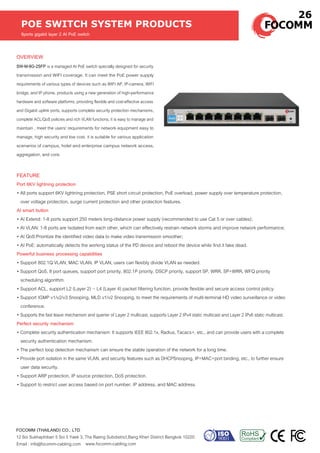
OVERVIEW
SW-M-8G-2SFP is a managed AI PoE switch specially designed for security
transmission and WIFI coverage. It can meet the PoE power supply
requirements of various types of devices such as WIFI AP, IP-camera, WIFI
bridge, and IP phone. products using a new generation of high-performance
hardware and software platforms, providing flexible and cost-effective access
and Gigabit uplink ports, supports complete security protection mechanisms,
complete ACL/QoS policies and rich VLAN functions, it is easy to manage and
maintain , meet the users' requirements for network equipment easy to
manage, high security and low cost. it is suitable for various application
scenarios of campus, hotel and enterprise campus network access,
aggregation, and core.
POE SWITCH SYSTEM PRODUCTS
8ports gigabit layer 2 AI PoE switch
www.focomm-cabling.com
FOCOMM (THAILAND) CO., LTD
12 Soi Sukhaphiban 5 Soi 5 Yaek 3, Tha Raeng Subdistrict,Bang Khen District Bangkok 10220
Email : info@focomm-cabling.com
FEATURE
Port 6KV lightning protection
• All ports support 6KV lightning protection, PSE short circuit protection, PoE overload, power supply over temperature protection,
over voltage protection, surge current protection and other protection features.
AI smart button
• AI Extend: 1-8 ports support 250 meters long-distance power supply (recommended to use Cat 5 or over cables);
• AI VLAN: 1-8 ports are Isolated from each other, which can effectively restrain network storms and improve network performance;
• AI QoS:Prioritize the identified video data to make video transmission smoother;
• AI PoE: automatically detects the working status of the PD device and reboot the device while find it fake dead.
Powerful business processing capabilities
• Support 802.1Q VLAN, MAC VLAN, IP VLAN, users can flexibly divide VLAN as needed.
• Support QoS, 8 port queues, support port priority, 802.1P priority, DSCP priority, support SP, WRR, SP+WRR, WFQ priority
scheduling algorithm.
• Support ACL, support L2 (Layer 2) ~ L4 (Layer 4) packet filtering function, provide flexible and secure access control policy.
• Support IGMP v1/v2/v3 Snooping, MLD v1/v2 Snooping, to meet the requirements of multi-terminal HD video surveillance or video
conference.
• Supports the fast leave mechanism and querier of Layer 2 multicast, supports Layer 2 IPv4 static multicast and Layer 2 IPv6 static multicast.
Perfect security mechanism
• Complete security authentication mechanism: It supports IEEE 802.1x, Radius, Tacacs+, etc., and can provide users with a complete
security authentication mechanism.
• The perfect loop detection mechanism can ensure the stable operation of the network for a long time.
• Provide port isolation in the same VLAN, and security features such as DHCPSnooping, IP+MAC+port binding, etc., to further ensure
user data security.
• Support ARP protection, IP source protection, DoS protection.
• Support to restrict user access based on port number, IP address, and MAC address.
26
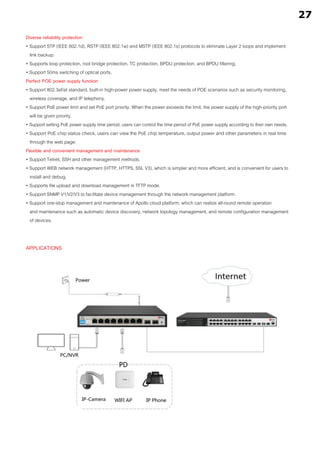
APPLICATIONS
Diverse reliability protection
• Support STP (IEEE 802.1d), RSTP (IEEE 802.1w) and MSTP (IEEE 802.1s) protocols to eliminate Layer 2 loops and implement
link backup.
• Supports loop protection, root bridge protection, TC protection, BPDU protection, and BPDU filtering.
• Support 50ms switching of optical ports.
Perfect POE power supply function
• Support 802.3af/at standard, built-in high-power power supply, meet the needs of POE scenarios such as security monitoring,
wireless coverage, and IP telephony.
• Support PoE power limit and set PoE port priority. When the power exceeds the limit, the power supply of the high-priority port
will be given priority.
• Support setting PoE power supply time period, users can control the time period of PoE power supply according to their own needs.
• Support PoE chip status check, users can view the PoE chip temperature, output power and other parameters in real time
through the web page.
Flexible and convenient management and maintenance
• Support Telnet, SSH and other management methods.
• Support WEB network management (HTTP, HTTPS, SSL V3), which is simpler and more efficient, and is convenient for users to
install and debug.
• Supports file upload and download management in TFTP mode.
• Support SNMP V1/V2/V3 to facilitate device management through the network management platform.
• Support one-stop management and maintenance of Apollo cloud platform, which can realize all-round remote operation
and maintenance such as automatic device discovery, network topology management, and remote configuration management
of devices.
27
TECHNICAL SPECIFICATION
SOFTWARE SPECIFICATIONS
Network Interface
protocol standard
Performance Specifications
LED indicator
PoE pin
Power support
Physical Specifications
Environmental Specifications
safety regulations
Warranty
8 10/100/1000Mbps RJ45 ports
2 Gigabit SFP fiber ports
IEEE802.3, IEEE802.3i, IEEE802.3u, IEEE802.3ab,
IEEE802.3z, IEEE802.3ad, IEEE802.3x, IEEE802.3af/at,
IEEE802.1p, IEEE802.1q, IEEE802.1w, IEEE802.1d,
IEEE802.1s
Backplane bandwidth : 20Gbps (non-blocking)
Packet forwarding rate : 14.9Mpps
MAC address table : 8K
port cache : 4.1Mb
Forwarding mode: store and forward
10 Link/Act indicator
8 PoE indicator
1 Power indicator
1 SYS indicator
1/2 (+), 3/6/ (-)
Single port maximum output power : 30W
The maximum power of the whole machine: 96W
Dimensions (LxWxH) : 225mm×120mm×35mm
Working temperature : 0°C~50°C
Storage temperature : -40°C~70°C
Working humidit : 10%~ 90% RH without condensation
Storage humidity : 5%~90% RH without condensation
CE/ROHS/FCC
3 years
Protocol standard
One-click shortcut function
DHCP
IEEE 802.3:Ethernet media access control (MAC) protocol
IEEE 802.3i:10BASE-TEthernet
IEEE 802.3u:100BASE-TX Fast Ethernet
IEEE 802.3ab:1000BASE-T gigabit Ethernet
IEEE 802.3z:1000BASE-X gigabit Ethernet (optical)
IEEE 802.3ad:perform link aggregation standard way
IEEE 802.3x:flow control
IEEE 802.1p:LAN Layer 2 QoS/Cos protocol for traffic prioritization (multicast filtering function)
IEEE 802.1q:VLAN bridge operation
IEEE 802.1d:STP spanning tree
IEEE 802.1s:MSTPspanning tree
IEEE 802.1w:RSTPspanning tree
IEEE 802.3af
IEEE 802.3at
AI VLAN , AI Extend , AIPoE , AI QoS
support DHCP Snooping
28
3.7
3.3
3.2
3.4
3.5
3.4
ORDER INFOMATION
8 ports gigabit layer 2 AI PoE switch
PRODUCT PART NUMBER
SW-M-8G-2SFP
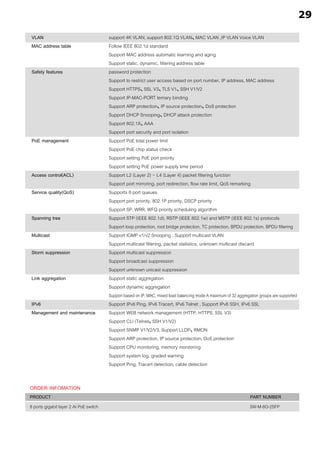
support 4K VLAN, support 802.1Q VLAN、
MAC VLAN ,IP VLAN Voice VLAN
Follow IEEE 802.1d standard
Support MAC address automatic learning and aging
Support static, dynamic, filtering address table
password protection
Support to restrict user access based on port number, IP address, MAC address
Support HTTPS、
SSL V3、
TLS V1、
SSH V1/V2
Support IP-MAC-PORT ternary binding
Support ARP protection、
IP source protection、
DoS protection
Support DHCP Snooping、
DHCP attack protection
Support 802.1X、
AAA
Support port security and port isolation
Support PoE total power limit
Support PoE chip status check
Support setting PoE port priority
Support setting PoE power supply time period
Support L2 (Layer 2) ~ L4 (Layer 4) packet filtering function
Support port mirroring, port redirection, flow rate limit, QoS remarking
Supports 8 port queues
Support port priority, 802.1P priority, DSCP priority
Support SP, WRR, WFQ priority scheduling algorithm
Support STP (IEEE 802.1d), RSTP (IEEE 802.1w) and MSTP (IEEE 802.1s) protocols
Support loop protection, root bridge protection, TC protection, BPDU protection, BPDU filtering
Support IGMP v1/v2 Snooping , Support multicast VLAN
Support multicast filtering, packet statistics, unknown multicast discard
Support multicast suppression
Support broadcast suppression
Support unknown unicast suppression
Support static aggregation
Support dynamic aggregation
Support based on IP, MAC, mixed load balancing mode A maximum of 32 aggregation groups are supported
Support IPv6 Ping, IPv6 Tracert, IPv6 Telnet , Support IPv6 SSH, IPv6 SSL
Support WEB network management (HTTP, HTTPS, SSL V3)
Support CLI (Telnet、
SSH V1/V2)
Support SNMP V1/V2/V3, Support LLDP、
RMON
Support ARP protection, IP source protection, DoS protection
Support CPU monitoring, memory monitoring
Support system log, graded warning
Support Ping, Tracert detection, cable detection
VLAN
MAC address table
Safety features
PoE management
Access control(ACL)
Service quality(QoS)
Spanning tree
Multicast
Storm suppression
Link aggregation
IPv6
Management and maintenance
29
3
3.6
3.1
4.อุปกรณ์บันทึกภาพผ่านเครือข่าย
(NETWORK VIDEO RECORDER)
แบบ 32 ช่อง
30
1
DATASHEET
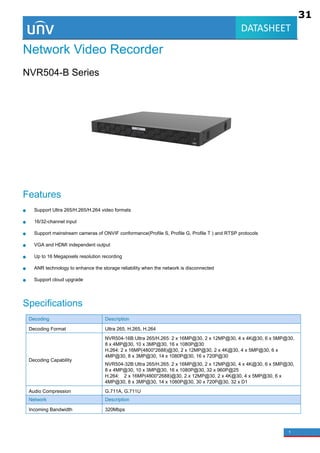
Network Video Recorder
NVR504-B Series
Features
Support Ultra 265/H.265/H.264 video formats
16/32-channel input
Support mainstream cameras of ONVIF conformance(Profile S, Profile G, Profile T ) and RTSP protocols
VGA and HDMI independent output
Up to 16 Megapixels resolution recording
ANR technology to enhance the storage reliability when the network is disconnected
Support cloud upgrade
Specifications
Decoding Description
Decoding Format Ultra 265, H.265, H.264
Decoding Capability
NVR504-16B:Ultra 265/H.265: 2 x 16MP@30, 2 x 12MP@30, 4 x 4K@30, 6 x 5MP@30,
8 x 4MP@30, 10 x 3MP@30, 16 x 1080P@30
H.264: 2 x 16MP(4800*2688)@30, 2 x 12MP@30, 2 x 4K@30, 4 x 5MP@30, 6 x
4MP@30, 8 x 3MP@30, 14 x 1080P@30, 16 x 720P@30
NVR504-32B:Ultra 265/H.265: 2 x 16MP@30, 2 x 12MP@30, 4 x 4K@30, 6 x 5MP@30,
8 x 4MP@30, 10 x 3MP@30, 16 x 1080P@30, 32 x 960P@25
H.264: 2 x 16MP(4800*2688)@30, 2 x 12MP@30, 2 x 4K@30, 4 x 5MP@30, 6 x
4MP@30, 8 x 3MP@30, 14 x 1080P@30, 30 x 720P@30, 32 x D1
Audio Compression G.711A, G.711U
Network Description
Incoming Bandwidth 320Mbps
31
4
4
4.2
4.3
4.1
2
DATASHEET
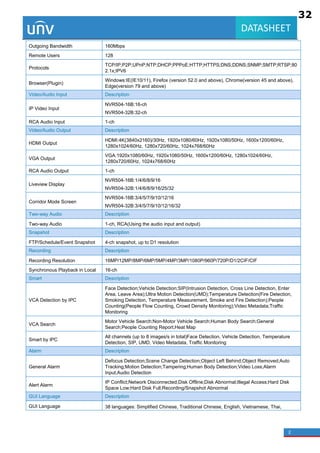
Outgoing Bandwidth 160Mbps
Remote Users 128
Protocols
TCP/IP;P2P;UPnP;NTP;DHCP;PPPoE;HTTP;HTTPS;DNS;DDNS;SNMP;SMTP;RTSP;80
2.1x;IPV6
Browser(Plugin)
Windows:IE(IE10/11), Firefox (version 52.0 and above), Chrome(version 45 and above),
Edge(version 79 and above)
Video/Audio Input Description
IP Video Input
NVR504-16B:16-ch
NVR504-32B:32-ch
RCA Audio Input 1-ch
Video/Audio Output Description
HDMI Output
HDMI:4K(3840x2160)/30Hz, 1920x1080/60Hz, 1920x1080/50Hz, 1600x1200/60Hz,
1280x1024/60Hz, 1280x720/60Hz, 1024x768/60Hz
VGA Output
VGA:1920x1080/60Hz, 1920x1080/50Hz, 1600x1200/60Hz, 1280x1024/60Hz,
1280x720/60Hz, 1024x768/60Hz
RCA Audio Output 1-ch
Liveview Display
NVR504-16B:1/4/6/8/9/16
NVR504-32B:1/4/6/8/9/16/25/32
Corridor Mode Screen
NVR504-16B:3/4/5/7/9/10/12/16
NVR504-32B:3/4/5/7/9/10/12/16/32
Two-way Audio Description
Two-way Audio 1-ch, RCA(Using the audio input and output)
Snapshot Description
FTP/Schedule/Event Snapshot 4-ch snapshot, up to D1 resolution
Recording Description
Recording Resolution 16MP/12MP/8MP/6MP/5MP/4MP/3MP/1080P/960P/720P/D1/2CIF/CIF
Synchronous Playback in Local 16-ch
Smart Description
VCA Detection by IPC
Face Detection;Vehicle Detection;SIP(Intrusion Detection, Cross Line Detection, Enter
Area, Leave Area);Ultra Motion Detection(UMD);Temperature Detection(Fire Detection,
Smoking Detection, Temperature Measurement, Smoke and Fire Detection);People
Counting(People Flow Counting, Crowd Density Monitoring);Video Metadata;Traffic
Monitoring
VCA Search
Motor Vehicle Search;Non-Motor Vehicle Search;Human Body Search;General
Search;People Counting Report;Heat Map
Smart by IPC
All channels (up to 8 images/s in total)Face Detection, Vehicle Detection, Temperature
Detection, SIP, UMD, Video Metadata, Traffic Monitoring
Alarm Description
General Alarm
Defocus Detection;Scene Change Detection;Object Left Behind;Object Removed;Auto
Tracking;Motion Detection;Tampering;Human Body Detection;Video Loss;Alarm
Input;Audio Detection
Alert Alarm
IP Conflict;Network Disconnected;Disk Offline;Disk Abnormal;Illegal Access;Hard Disk
Space Low;Hard Disk Full;Recording/Snapshot Abnormal
GUI Language Description
GUI Language 38 languages: Simplified Chinese, Traditional Chinese, English, Vietnamese, Thai,
32
4
4.5
4.6
3
DATASHEET
Turkish, Spanish (Latin America), Portuguese (Brazil), Spanish, Portuguese, French,
German, Italian, Dutch, Polish, Czech, Hungarian, Slovak, Russian, Hebrew, Arabic,
Ukrainian, Estonian, Bulgarian, Greek, Romanian, Danish, Swedish, Norwegian, Finnish,
Croatian, Slovenia, Serbia, Korean, Japanese, Latvian, Lithuanian, Persian
Hard Disk Description
SATA 4 SATA Interfaces
Capacity
Up to 16TB for each HDD(The maximum HDD capacity varies with environment
temperature)
Disk Group Support
Redundant Storage Support
Disk Array Type RAID 1, 5
External Interface Description
Network Interface 2 RJ45 10M/100M/1000M self-adaptive Ethernet Interface
USB Front: 1 x USB2.0;Rear panel: 1 x USB2.0, 1 x USB3.0
RS485 1
RS232 N/A
Alarm In 16-ch
Alarm Out 4-ch
Power Supply DC 12V/5A
Power Switch Support
Working Environment Description
Working Temperature -10 °C ~ 55 °C (14 °F ~ 131 °F)
Working Humidity ≤ 90% RH (non-condensing)
Power Consumption (without HD
D)
≤ 20W
Dimensions Description
Weight (without HDD) ≤ 3.4Kg (7.50lb)
Dimensions
NVR504-16B:440mm × 344mm × 48mm(17.3"×13.5"×1.9")
NVR504-32B:440mm × 344mm × 48mm
(17.3"×13.5"×1.9")
Certification Description
Certification CE;FCC;UL;RoHS;WEEE
CE EN 55032, EN 61000-3-3, EN IEC 61000-3-2, EN 55035
FCC Part15 Subpart B
33
4.4
4.7 Harddisk 8 TB 4 ลูก = 32 TB
4.8
4
DATASHEET
Dimensions
Rear Panel
Zhejiang Uniview Technologies Co., Ltd.
No. 369, Xietong Road, Xixing Sub-district, Binjiang District, Hangzhou City, 310051, Zhejiang Province, China
Email: overseasbusiness@uniview.com; globalsupport@uniview.com
http://www.uniview.com
©2023-2024 Zhejiang Uniview Technologies Co., Ltd. All rights reserved.
*Product specifications and availability are subject to change without notice.
*Despite our best efforts, technical or typographical errors may exist in this document. Uniview cannot be held responsible for any such
errors and reserves the right to change the contents of this document without prior notice.
34
7.1.1 Network Configuration
Configure IP address and other network parameters of the NVR.
1. Go to Menu > Network > Basic > Network.
2. Choose a working mode. Only multi-NIC NVRs support these three working modes.
Working Mode Description
Multi-address Two NICs work independently. You need to configure the NICs separately.
Load Balance Two NICs use the same IP address and work together to share the sending and
receiving bandwidth.
Net Fault-tolerance Two NICs use the same IP address, and if the primary NIC fails, the standby NIC
takes over seamlessly to ensure uninterrupted network connection.
Note: Switching working modes with 802.1x and ARP protection enabled will disable 802.1x and ARP
protection.
3. Configure the network parameters according to the actual network environment.
Note:
• For a multi-NIC NVR, you can choose an NIC as the default route. When the NVR connects to an
external network, data will be forwarded via the default route.
• For an NVR with PoE ports, you can configure an IPv4 address for the internal NIC.
• The MTU must be in the range of [576-1500]. To use IPv6, you must set MTU within [1280-1500], and
make sure the IPv6 addresses of the NVR and PC are connected. To use functions such as live view,
playback, make sure IPv4 addresses of the NVR and PC are also connected.
4. Click Apply.
7.1.2 EZCloud
With EZCloud you can manage and operate the NVR remotely on a mobile phone.
Configure EZCloud
1. Go to Menu > Network > Basic > EZCloud. EZCloud is enabled by default.
120
35
4.9
4.9
SDK - Uniview - Leader of AIoT Solution
https://global.uniview.com/Support/Download_Center/SDK/201603/788662_168459_0.htm 1/1
Network Device SDK (for Windows 64-bit)
9/22/2021 9:31:26 AM
Software Name Network Device SDK_V2.3.18.0 (for Windows 64-bit) download
Software Description
Containing SDK, User Manual and Demo(MFC、C#)
NetDEVSDK, also known as network device SDK, is a module developed based on private network
communication protocols to serve products such as IP cameras and NVRs, including the interfaces for
surveillance management and control, device management, resource management and system
maintenance. These interfaces can be used to develop software for functions like remote access and
control.
The products can be supported as following:
1.VMS
Unicorn, VMS-B800
2.NVR
NVR201 Series, NVR202 Series, NVR204 Series, NVR208 Series, NVR301 Series, NVR302 Series, NVR304 Series,
NVR308 Series, NVR316 Series, NVR516 Series
3.Network Camera
IPC21Series、IPC22Series、IPC23Series、IPC24Series、IPC25Series、IPC26Series、IPC31Series、
IPC32Series、IPC33Series、IPC35Series、IPC36Series、IPC54Series、IPC56Series、IPC62Series、
IPC63Series、IPC64Series、IPC66Series、IPC67Series、IPC68Series、IPC74Series、IPC76Series、
IPC81Series、IPC85Series、IPC86Series、IPC2ASeries、IPC2CSeries、TIC22Series、TIC25Series、
TIC68Series、TIC76Series
4.Decoder
ADU8700 Series, DC5500-E Series, DMC8000 Series, DC5301-IN
Back
Privacy Policy Cookie Policy Uniview Legal Notices
Copyright 2011-2022 Zhejiang Uniview Technologies Co.,Ltd.All rights reserved.
Products
IP Camera
PTZ Camera
Thermal Camera
Network Video Recorder
VMS
Digital Video Recorder
Heat-Tracker Series
Display & Control
Transmission
storage & calculation
Intelligent Computing
Client Software
Accessories
News
News
Events
Success Cases
Videos
Support
Tools
Service Policy
Download Center
Product Licensing
Anti-Counterfeiting Query
About Us
Our Company
Find A Partner
Partner Program
Careers
Contact Us
Online Inquiry
Legal Notice
Security Response Center
Management System
Follow Us
浙ICP备11061412号-2 浙公网安备 33010802004032号
UNV Support Tools SDK
Home Product & Technology Solutions News Support About Us
4.10
36
1
DATASHEET
EZView Mobile Surveillance App
Overview
EZView is a mobile surveillance app for medium and large surveillance scenarios. With this app you can connect Uniview devices through
the network and play live and recorded video, control PTZ cameras, receive alarm notifications, manage devices, and start two-way audio
on a mobile device.
EZView is free for download from app stores and is compatible with mobile phones (Android and iOS) and iPad.
Key Features
Mobility: live view, playback, and device management anytime, anywhere
Remote control: cloud device management by a cloud account; two-way audio, PTZ control
Security: data encryption, pin/pattern password protection, each device can bind with only one cloud account
Alarm notification: alarm notifications on mobile device; view live video, alarm video and snapshots
Sharing: share devices; share videos/images through third-party apps
Stability: P2P networking technology, elastic and scalable architecture
Easy to use: add a device by QR code scanning, tap to switch live view/playback, cellular/Wi-Fi data usage
4.11
37
2
DATASHEET
Specifications
Function Description
Device Management
Device management
Max. 64 local devices and 64 cloud devices
Max. 10000 channels (local and cloud)
IPC, NVR and Unicorn
Demo devices
Add device by QR code scanning, automatic search (LAN), or add manually (IP/domain and EZDDNS)
Edit/delete devices
Sync cloud devices automatically when logged in
Device upgrade, speed test, device sharing
Tap a button to start live video
Live View
Play control
1/4/9/16 split view
Live view on multiple screens
Image quality: HD/SD/Smooth (main/sub/third stream)
Drag video to play in another window
Resume live video in the previous split view
Tap to playback video in the selected window
Snapshot and record; tap to view saved snapshots/videos
PTZ control
PTZ control by gestures
Focus, zoom and preset
Note: Actual functionality may vary depending on device capability.
Two-way audio
Two-way audio with NVR and camera (including NVR-connected camera)
Touch and hold to select device
Note: Actual functionality may vary depending on device capability.
Recording and Playback
Search
Search by date, custom video start time
Image quality: clear/smooth (sub/third stream)
Drag the timeline to search, pinch the timeline to zoom in/out
Tap to play live video in the selected window
Playback
Up to 4-ch playback
Split video into small segments by 4-split or 9-split to pinpoint an event
Play recordings saved on an SD card
Digital zoom
Snapshot and record, tap to view saved snapshots/videos.
1/4x, 1/2x, 1x, 2x and 4x playback speed
Resume playback in the previous split view
Alarm Notifications
Alarm list
Live view and playback when a device alarm occurs
Push alarms in real time for cloud devices
Multiple alarm types
Share, delete and acknowledge alarms
Allow notifications Set the mobile phone to receive or not receive alarms from a specified device
Advanced settings
Custom alarm notification by channel, time, alarm type
Save configurations locally to keep custom configurations on different clients
Favorites
Favorites Save split view and cameras as Favorites during live view
38
3
DATASHEET
Add, edit, rename, delete Favorites
Tap a button to start live video
Picture & Video
File list
Sort files by time and type
Delete files
Export files to the mobile phone
Share files through third-party apps
Files View local videos and pictures
Cloud Account Management
Sign up and login
Sign up by an e-mail address
Select region for optimal experience (region cannot change when signed up)
Remember accounts that you have successfully logged in
Allows users to use the app without a cloud account
Management Change password and edit personal info
Device sharing
Share devices
View your sharing history
Generate a QR code for a device to share
View the QR codes that you have generated
Temporary password Obtain temporary password for cloud device
Configuration
Snapshot 1x, 3x and 5x snapshot modes
PTZ speed 1-9 (slow to fast)
Password protection PIN or pattern
Do Not Disturb When enabled, the mobile phone does not alert you when receiving an alarm.
Auto Discover New Devices Automatically discover NVR (PoE kit only)
Device Wi-Fi Configuration Connect your devices to Wi-Fi
Forget Device Password Get a temporary password for your cloud device
Data usage Cellular/Wi-Fi data usage
Help
Update Check for update automatically
EZCloud announcement Support
Help
Online help
Tutorial video
User feedback
Contact email addresses
Language Multiple languages
Requirements
Operating system
iOS 7.1 or later
Android 4.0 or later
Memory 1 GB or higher
Display resolution 480 x 800 or higher
Compatibility Mobile phone (Android and iOS) and iPad
39
4
DATASHEET
Zhejiang Uniview Technologies Co., Ltd.
South Tower, Building 10, Wanlun Science Park, 88 Jiangling Road, Hangzhou, P. R. China 310051
Email: overseasbusiness@uniview.com; globalsupport@uniview.com
http://www.uniview.com
© 2011-2018 Zhejiang Uniview Technologies Co., Ltd. All rights reserved.
*Product specifications and availability are subject to change without notice.
40
4.12
41
5.เครื่องคอมพิวเตอร์ สาหรับงานประมวลผล
แบบที่ 2
(จอแสดงภาพขนาดไม่น้อยกว่า 19 นิ้ว)
42
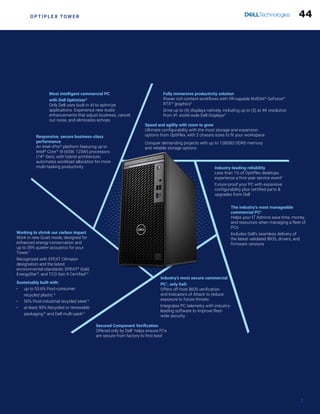
Most secure1
, intelligent2
and manageable3
commercial PC
OptiPlex Tower
Intel®
Core™ processors (14th
Gen) [Gen ID: 7020]
Ultimate desktop
configurability
43
O P T I P L E X T O W E R
Fully immersive productivity solution
Power rich content workflows with VR-capable NVIDIA®
GeForce®
RTX™ graphics2
Drive up to (4) displays natively, including up to (3) at 4K resolution
from #1 world-wide Dell Displays4
Speed and agility with room to grow
Ultimate configurability with the most storage and expansion
options from OptiPlex, with 2 chassis sizes to fit your workspace
Conquer demanding projects with up to 128GB3 DDR5 memory
and reliable storage options
Industry-leading reliability
Less than 1% of OptiPlex desktops
experience a first-year service event5
Future-proof your PC with expansive
configurability plus certified parts &
upgrades from Dell
The industry’s most manageable
commercial PC6
Helps your IT Admins save time, money,
and resources when managing a fleet of
PCs
Includes Dell’s seamless delivery of
the latest validated BIOS, drivers, and
firmware versions
Most intelligent commercial PC
with Dell Optimizer2
Only Dell uses built-in AI to optimize
applications. Experience new Audio
enhancements that adjust loudness, cancel
out noise, and eliminates echoes
Responsive, secure business-class
performance
An Intel vPro®
platform featuring up to
Intel®
Core™ i9 (65W, 125W) processors
(14th
Gen), with hybrid architecture,
automates workload allocation for more
multi-tasking productivity.
Working to shrink our carbon impact
Work in new Quiet mode, designed for
enhanced energy-conservation and
up to 39% quieter acoustics for your
Tower.7
Recognized with EPEAT Climate+
designation and the latest
environmental standards: EPEAT®
Gold,
EnergyStar®
, and TCO Gen 9 Certified12
Sustainably built with:
• up to 53.6% Post-consumer
recycled plastic 8
• 50% Post-industrial recycled steel 9
• at least 90% Recycled or renewable
packaging10
and Dell multi-pack11
Industry’s most secure commercial
PC1
, only Dell:
Offers off-host BIOS verification
and Indicators of Attack to reduce
exposure to future threats
Integrates PC telemetry with industry-
leading software to improve fleet-
wide security
Secured Component Verification
Offered only by Dell1
helps ensure PCs
are secure from factory to first boot
2
44
Sustainable
innovation
OptiPlex is passionate about reducing our
products’ carbon footprint and helping our
customers make an impact on the future.
Committed to circular design throughout the
lifecycle, we’re driving the innovative use of
materials, packaging, energy conservation,
recycling and even repairability.
O P T I P L E X T O W E R
Eco-labels
Sharing eco-label certifications help our
customers make informed, sustainable
IT purchase decisions. OptiPlex Tower
is registered EPEAT Gold with Climate+
designation, meeting the industry’s
best practices for decarbonization.6
Sustainable materials
OptiPlex Towers are built with up to 53.6% Post-
consumer recycled plastic (PCR)
and closed loop ITE derived plastic.1
And now select chassis contain up to 50% Post-
industrial recycled steel.2
Responsible IT Asset Retirement
Asset Recovery Services makes it easy for
our customers to retire legacy equipment
securely and responsibly, regardless of brand.
Prioritizing material reuse lets us extend the
product lifecycle and maximize value return. The
outcome is a seamless transition from old to
new technology, that protects both your business
and the planet.8
Efficient & Reliable
Built with high-quality components, the Tower
drives top performance and value throughout its
lifecycle.7
From the new User Selected Thermal
Table (USTT), chose to work in Quiet mode,
designed for enhanced energy-conservation and
up to 39% quieter acoustics for your Tower.7
And
Dell makes it simple to access and replace parts to
get the most life out of our products.
EPEAT Gold, ENERGY STAR®
and TCO
9.0 certifications available6
Learn More ›
Learn More ›
3
Packaging
OptiPlex Towers ship in packaging made with
at least 90% recycled or renewable content3
to
reduce our logistical footprint. Select desktops
are also eligible for multipack shipping which
helps reduce packaging and transportation
waste4
. Multipack packaging is designed with
100% recycled or renewable corrugate.5
45
O P T I P L E X T O W E R
Powering the world’s most intelligent
commercial PC’s1
Built-in AI from Dell Optimizer, with advanced privacy
features, optimizes audio, connectivity, performance
and configurability, all in one software.
Experience clearer, more productive conference calls.
Your PC’s sound, mic and network performance is
optimized discreetly by Dell Optimizer, so you can stay
confidently engaged in meetings.
Minimize user downtime and IT admin hours3
Rely on the AI-driven technology of ProSupport Suite for
PCs to automate support tasks, detect and deploy fixes and
generate security scores for your fleet.
Accelerate business success with AI-powered
multi-tasking
With features like Copilot in Windows2
, get better answers,
grow your skills, and effortlessly optimize workflows.
Windows 11 Pro on Dell PCs come with the latest advances
in security and AI delivered conveniently to your desktop.
Help combat advanced threats with
foundational security
Only Dell provides firmware-level threat detection integration
via third-party security consoles* with AI-powered
capabilities, e.g., CrowdStrike and Carbon Black.**
AI-enabled solutions
from Dell
Transform work with new levels of productivity
4
Learn More ›
Learn More › Learn More ›
*Based on Dell internal analysis, September 2023. Applicable to PCs on Intel processors. Not all features available with all PCs. Additional purchase required for some features.
**Integrations available for CrowdStrike Falcon Insight XDR and Carbon Black Audit & Remediation.
46
O P T I P L E X T O W E R
Future of Work ready
As the world’s #1 monitor company8
, Dell knows that modern workplace requires
more than PCs. We offer 200+ branded accessories to keep you connected and
collaborative no matter your work style.				 Learn more
5
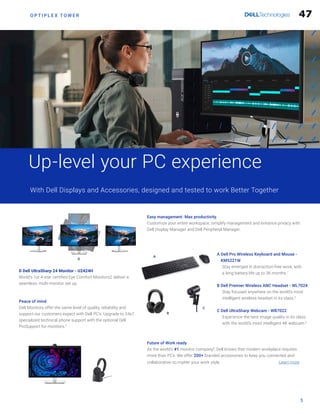
Up-level your PC experience
With Dell Displays and Accessories, designed and tested to work Better Together
Easy management. Max productivity.
Customize your entire workspace, simplify management and enhance privacy with
Dell Display Manager and Dell Peripheral Manager.
Peace of mind
Dell Monitors offer the same level of quality, reliability and
support our customers expect with Dell PC’s. Upgrade to 24x7
specialized technical phone support with the optional Dell
ProSupport for monitors.3
A
D
C
B
A 
Dell Pro Wireless Keyboard and Mouse -
KM5221W

Stay emerged in distraction-free work, with
a long battery life up to 36 months.7
B 
Dell Premier Wireless ANC Headset - WL7024

Stay focused anywhere on the world’s most
intelligent wireless headset in its class.5
C 
Dell UltraSharp Webcam - WB7022

Experience the best image quality in its class
with the world’s most intelligent 4K webcam.6
D Dell UltraSharp 24 Monitor - U2424H
World’s 1st 4-star certified Eye Comfort Monitors2 deliver a
seamless, multi-monitor set up.
47
O P T I P L E X T O W E R
Simplify IT
Our most secure1
and most manageable6
offerings make IT management a breeze
Help secure and optimize your endpoints and deliver
end-user productivity with Dell Manageability Solutions
Dell Trusted Update Experience makes it simple to
update endpoints, packing the latest BIOS, driver, and
firmware version. Dell is the only Top-5 PC vendor that:
Manage your fleet of PCs - reliably and easily
Learn More ›
Reduce the attack surface and enhance long-term
cyber resilience with Dell Trusted Workspace
Dell offers the industry’s most secure commercial
PCs1
with protections competitors cannot match:
Improve fleet-wide security with
multiple layers of defense
SECURITY MANAGEABILITY
Publishes2
a device drivers and downloads release schedule:
IT Admins can deploy fleet-wide device updates on a predictable
timeline.
Performs3
integrated validation of all driver and BIOS modules in
an update:
IT Admins can expect a trusted, system compatible update
deployment, across a fleet of devices.
Dell has the industry’s first:6
Binary Large Object (BLOB) package-based solution using Microsoft
Intune
Systems Management Solution to integrate with Workspace ONE
Hardware OEM systems management solution to integrate with Intel
vPro®
One BIOS
OptiPlex facilitates easy maintenance with a single BIOS across new
Micro, Small Form Factor and Tower configurations and a single BIOS
for All-in-Ones.
Learn More ›
Be secure from first boot
Rigorous, state-of-the-art supply chain controls and Dell-unique
Secured Component Verification reduce the risk of product tampering.
Spot ticking timebombs
Early-alert feature Indicators of Attack, offered only by Dell, scans
for behavior-based threats.
Stay protected from evolving threats
Only Dell offers off-host BIOS and firmware verification, providing
greater security than other PCs. The latest Intel vPro®
-based PCs
provide an estimated 70% attack surface reduction.5
Layer on advanced threat protection with software from our ecosystem
of best-of-breed partners.
Only Dell integrates device telemetry1
with industry-leading software to
improve fleet-wide security.4
6
48
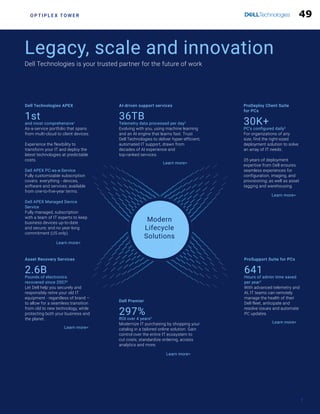
Dell Technologies APEX
1st
and most comprehensive1
As-a-service portfolio that spans
from multi-cloud to client devices.
Experience the flexibility to
transform your IT and deploy the
latest technologies at predictable
costs.
Dell APEX PC-as-a-Service
Fully customizable subscription
covers everything - devices,
software and services; available
from one-to-five-year terms.
Dell APEX Managed Device
Service
Fully managed, subscription
with a team of IT experts to keep
business devices up-to-date
and secure; and no year-long
commitment (US only).
AI-driven support services
36TB
Telemetry data processed per day2
Evolving with you, using machine learning
and an AI engine that learns fast. Trust
Dell Technologies to deliver hyper-efficient,
automated IT support, drawn from
decades of AI experience and
top-ranked services.
ProDeploy Client Suite
for PCs
30K+
PC’s configured daily3
For organizations of any
size, find the right-sized
deployment solution to solve
an array of IT needs.
35 years of deployment
expertise from Dell ensures
seamless experiences for
configuration, imaging, and
provisioning; as well as asset
tagging and warehousing.
ProSupport Suite for PCs
641
Hours of admin time saved
per year4
With advanced telemetry and
AI, IT teams can remotely
manage the health of their
Dell fleet, anticipate and
resolve issues and automate
PC updates.
Asset Recovery Services
2.6B
Pounds of electronics
recovered since 20076
Let Dell help you securely and
responsibly retire your old IT
equipment - regardless of brand –
to allow for a seamless transition
from old to new technology, while
protecting both your business and
the planet.
Dell Premier
297%
ROI over 4 years5
Modernize IT purchasing by shopping your
catalog in a tailored online solution. Gain
control over the entire IT ecosystem to
cut costs, standardize ordering, access
analytics and more.
Legacy, scale and innovation
Dell Technologies is your trusted partner for the future of work
O P T I P L E X T O W E R
7
Modern
Lifecycle
Solutions
Learn more
Learn more
Learn more
Learn more
Learn more
Learn more
49
TWO base configuration options*
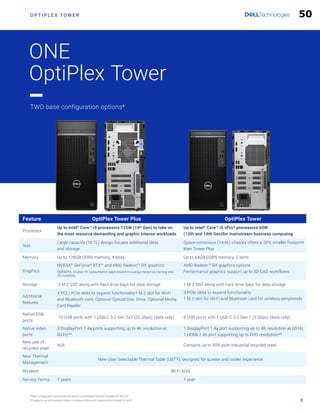
Feature OptiPlex Tower Plus OptiPlex Tower
Processor
Up to Intel®
Core™ i9 processors 125W (14th
Gen) to take on
the most resource-demanding and graphic intense workloads
Up to Intel®
Core™ i5 vPro®
processors 65W
(12th and 14th Gen)for mainstream business computing
Size
Large capacity (18.7L) design houses additional slots
and storage
Space-conscious (14.6L) chassis offers a 20% smaller footprint
than Tower Plus
Memory Up to 128GB DDR5 memory, 4 slots Up to 64GB DDR5 memory, 2 slots
Graphics
NVIDIA®
GeForce®
RTX™ and AMD Radeon™ RX graphics
options. Enable VR-consumption applications including interactive training and
3D modeling.
AMD Radeon™ RX graphics options
Performance graphics support up to 3D CAD workflows
Storage 3 M.2 SSD along with hard drive bays for data storage 1 M.2 SSD along with hard drive bays for data storage
Additional
features
4 PCI / PCIe slots to expand functionality1 M.2 slot for Wi-Fi
and Bluetooth card; Optional Optical Disc Drive; Optional Media
Card Reader
3 PCIe slots to expand functionality
1 M.2 slot for Wi-Fi and Bluetooth card for wireless peripherals
Native USB
ports
10 USB ports with 1 USB-C 3.2 Gen 2x2 (20 Gbps) (data only) 8 USB ports with 1 USB-C 3.2 Gen 1 (5 Gbps) (data only)
Native video
ports
3 DisplayPort 1.4a ports supporting up to 4K resolution at
60 Hz**
1 DisplayPort 1.4a port supporting up to 4K resolution at 60 Hz
1 HDMI 1.4b port supporting up to FHD resolution**
New use of
recycled steel
N/A Contains up to 50% post-industrial recycled steel
New Thermal
Management
New User Selectable Thermal Table (USTT), designed for quieter and cooler experience
Wireless Wi-Fi 6/6E
Service Terms 3 years 1 year
*Base configuration determines the set of customizable features available for this PC.
**Supports up to 4 monitors (option to choose Advanced Customization for add-on port)
ONE
OptiPlex Tower
O P T I P L E X T O W E R
8
50
5
FEATURE TECHNICAL SPECIFICATION TECHNICAL SPECIFICATION
MODEL NUMBER1
OptiPlex Tower Plus [Gen ID: 7020] OptiPlex Tower [Gen ID: 7020]
CHASSIS COLOR Dell Standard Black Dell Standard Black
SYSTEM DISPLAY1
N/A N/A
PROCESSOR
OPTIONS1
Intel®
Core™
i7-12700 (25 MB cache, 12 cores, 20 threads, up 4.90 GHz Turbo,
65W) (12th Gen) Intel®
Core™
i3-14100 (12 MB cache, 4 cores, 8 threads,
up to 4.70 GHz Turbo, 60W) (14th
Gen)
Intel®
Core™ i5-14500 vPro®
(24 MB cache, 14 cores, 20 threads,
up to 5.00 GHz Turbo, 65W) (14th
Gen)
Intel®
Core™ i5-14600 vPro®
(24 MB cache, 14 cores, 20 threads,
up to 5.20 GHz Turbo, 65W) (14th
Gen)
Intel®
Core™ i5-14600K vPro®
(24 MB cache, 14 cores, 20 threads,
up to 5.30 GHz Turbo, 125W) (14th
Gen)
Intel®
Core™ i7-14700 vPro®
(33 MB cache, 20 cores, 28 threads,
up to 5.30 GHz Turbo, 65W) (14th
Gen)
Intel®
Core™ i7-14700K vPro®
(33 MB cache, 20 cores, 28 threads,
up to 5.50 GHz Turbo, 125W) (14th
Gen)
Intel®
Core™ i9-14900 vPro®
(36 MB cache, 24 cores, 32 threads,
up to 5.40 GHz Turbo, 65W) (14th
Gen)
Intel®
Core™ i9-14900K vPro®
(36 MB cache, 24 cores, 32 threads,
up to 5.60 GHz Turbo, 125W) (14th
Gen)
Intel®
Core™ 300 (6 MB cache, 2 cores, 4 threads, 3.90 GHz, 46W)
Intel®
Core™ i3-14100 (12 MB cache, 4 cores, 8 threads, up to 4.70 GHz Turbo,
60W) (14th
Gen)
Intel®
Core™ i5-14500 vPro®
(24 MB cache, 14 cores, 20 threads, up to 5.00
GHz Turbo, 65W) (14th
Gen)
Intel®
Core™ i5-14600 vPro®
(24 MB cache, 14 cores, 20 threads, up to 5.20
GHz Turbo, 65W) (14th
Gen)
Intel®
Core™ i3-12100 (12 MB cache, 4 cores, 8 threads, up to 4.30 GHz Turbo,
60W) (12th
Gen)
Intel®
Core™ i5-12500 (18 MB cache, 6 cores, 12 threads, up 4.60 GHz Turbo,
65W) (12th
Gen)
Intel®
Core™ i7-12700 (25 MB cache, 12 cores, 20 threads,
up 4.90 GHz Turbo, 65W) (12th Gen)
CHIPSET Intel®
Q670 Intel®
Q670
OPERATING
SYSTEM1
Windows 11 Home
Windows 11 Pro
Windows 11 Pro National Education
Ubuntu®
Linux®
22.04 LTS
Windows 11 Home
Windows 11 Pro
Windows 11 Pro National Education
Ubuntu®
Linux®
22.04 LTS
THIN OS1
N/A N/A
GRAPHICS Integrated Graphics:
Intel®
UHD Graphics 730 for Intel®
Core™ i3-14100 processor (14th Gen)
Intel®
UHD Graphics 770 for Intel®
Core™ i5-14500 vPro®
, i5-14600 vPro®
,
i5-14600K vPro®
, i7-14700 vPro®
, i7-14700K vPro®
, i9-14900 vPro®
and
i9-14900K processors (14th
Gen)
Discrete Graphics:
AMD Radeon™ RX 6300, 2 GB GDDR6
AMD Radeon™ RX 6500, 4 GB GDDR6
NVIDIA®
GeForce®
RTX™ 4060, 8 GB GDDR6
Integrated Graphics:
Intel®
UHD Graphics 710 for Intel®
300 processor
Intel®
UHD Graphics 730 for Intel®
Core™ i3-14100 (14th Gen) and Intel®
Core™ i3-12100 (12th Gen) processors
Intel®
UHD Graphics 770 for Intel®
Core™ i5-14500/i5-14600 vPro®
(14th Gen)
and Intel®
Core™ i5-12500 vPro®
(12th Gen) processors
Discrete Graphics:
AMD Radeon™ RX 6300, 2 GB GDDR6
AMD Radeon™ RX 6500, 4 GB GDDR6
MEMORY1,2
8 GB: 1 x 8 GB, DDR5, 4400 MT/s, UDIMM, single-channel
16 GB: 1 x 16 GB, DDR5, 4400 MT/s, UDIMM, single-channel
16 GB: 2 x 8 GB, DDR5, 4400 MT/s, UDIMM, dual-channel
32 GB: 1 x 32 GB, DDR5, 4400 MT/s, UDIMM, single-channel
32 GB: 2 x 16 GB, DDR5, 4400 MT/s, UDIMM, dual-channel
32 GB: 4 x 8 GB, DDR5, 4000 MT/s, UDIMM, dual-channel
64 GB: 2 x 32 GB, DDR5, 4400 MT/s, UDIMM, dual-channel
64 GB: 4 x 16 GB, DDR5, 4000 MT/s, UDIMM, dual-channel
128 GB: 4 x 32 GB, DDR5, 3600 MT/s, UDIMM, dual-channel
For Intel®
300 or Intel®
Core™ i3-14100/i5-14500 vPro®
(14th Gen ) or Intel®
Core™ i3-12100/i5-12500 (12th Gen) processors:
8 GB: 1 x 8 GB, DDR5, 4800 MT/s, UDIMM, single-channel
16 GB: 1 x 16 GB, DDR5, 4800 MT/s, UDIMM, single-channel
16 GB: 2 x 8 GB, DDR5, 4800 MT/s, UDIMM, dual-channel
32 GB: 1 x 32 GB, DDR5, 4800 MT/s, UDIMM, single-channel
32 GB: 2 x 16 GB, DDR5, 4800 MT/s, UDIMM, dual-channel
64 GB: 2 x 32 GB, DDR5, 4800 MT/s, UDIMM, dual-channel
For Intel®
Core™ i5-14600 vPro®
processor (14th Gen):
8 GB: 1 x 8 GB, DDR5, 5600 MT/s, UDIMM, single-channel
16 GB: 1 x 16 GB, DDR5, 5600 MT/s, UDIMM, single-channel
16 GB: 2 x 8 GB, DDR5, 5600 MT/s, UDIMM, dual-channel
32 GB: 1 x 32 GB, DDR5, 5600 MT/s, UDIMM, single-channel
32 GB: 2 x 16 GB, DDR5, 5600 MT/s, UDIMM, dual-channel
64 GB: 2 x 32 GB, DDR5, 5600 MT/s, UDIMM, dual-channel
STORAGE1,3
512 GB, M.2 2230, Gen 4 PCIe NVMe, SSD, Class 25
1 TB, M.2 2230, Gen 4 PCIe NVMe, SSD, Class 25
2 TB, M.2 2230, Gen 4 PCIe NVMe, SSD, Class 25
256 GB, M.2 2230, Gen 4 PCIe NVMe, SSD, Class 35
512 GB, M.2 2230, Gen 4 PCIe NVMe, SSD, Class 35
1 TB, M.2 2230, Gen 4 PCIe NVMe, SSD, Class 35
256 GB, M.2 2230, Gen 4 PCIe NVMe, SSD, Self Encrypting Opal 2.0, Class 35
512 GB, M.2 2280, Gen 4 PCIe NVMe, SSD, Class 40
1 TB, M.2 2280, Gen 4 PCIe NVMe, SSD, Class 40
2 TB, M.2 2280, Gen 4 PCIe NVMe, SSD, Class 40
512 GB, M.2 2280, Gen 4 PCIe NVMe, SSD, Self Encrypting Opal 2.0, Class 40
1 TB, M.2 2280, Gen 4 PCIe NVMe, SSD, Self Encrypting Opal 2.0, Class 40
4 TB, 5400 RPM, 3.5-inch, SATA, HDD
1 TB, 7200 RPM, 3.5-inch, SATA, HDD
2 TB, 7200 RPM, 3.5-inch, SATA, HDD
512 GB, M.2 2230, Gen 4 PCIe NVMe, SSD, Class 25
1 TB, M.2 2230, Gen 4 PCIe NVMe, SSD, Class 25
2 TB, M.2 2230, Gen 4 PCIe NVMe, SSD, Class 25
256 GB, M.2 2230, Gen 4 PCIe NVMe, SSD, Class 35
512 GB, M.2 2230, Gen 4 PCIe NVMe, SSD, Class 35
1 TB, M.2 2230, Gen 4 PCIe NVMe, SSD, Class 35
256 GB, M.2 2230, Gen 4 PCIe NVMe, SSD, Self Encrypting Opal 2.0, Class 35
512 GB, M.2 2280, Gen 4 PCIe NVMe, SSD, Class 40
1 TB, M.2 2280, Gen 4 PCIe NVMe, SSD, Class 40
512 GB, M.2 2280, Gen 4 PCIe NVMe, SSD, Self Encrypting Opal 2.0, Class 40
1 TB, M.2 2280, Gen 4 PCIe NVMe, SSD, Self Encrypting Opal 2.0,
Class 40
1 TB, 7200 RPM, 3.5-inch, SATA, HDD
2 TB, 7200 RPM, 3.5-inch, SATA, HDD
WIRELESS Intel®
Wi-Fi 6E AX211, 2x2, 802.11ax, MU-MIMO, Bluetooth®
5.3 wireless card
Realtek Wi-Fi 6 RTL8852BE, 2x2, 802.11ax, MU-MIMO, Bluetooth®
5.3 wireless
card
Intel®
Wi-Fi 7 BE200, 2x2, 802.11be, MU-MIMO, Bluetooth®
5.4 wireless card
Intel®
Wi-Fi 6E AX211, 2x2, 802.11ax, MU-MIMO, Bluetooth®
5.3 wireless card
Realtek Wi-Fi 6 RTL8852BE, 2x2, 802.11ax, MU-MIMO, Bluetooth®
5.3 wireless
card
Realtek Wi-Fi 6 RTL8851BE, 1x1, 802.11ax, MU-MIMO, Bluetooth®
5.3 wireless
card
AUDIO  SPEAKERS1
Realtek Audio Controller ALC3246-CG Realtek Audio Controller ALC3204-CG
O P T I P L E X T O W E R
Not All Technical Specifications Available Per System Configuration.
Please search Dell.com/support for product owner’s manual or contact your Dell Technologies sales expert.
9
51
5.2 5.1 5.1
5.3.2
5.4
5.5
O P T I P L E X T O W E R
10
POWER 260W 80 PLUS Bronze internal power supply unit; 85% Efficient
500W 80 PLUS Platinum internal power supply unit unit; 92% Efficient
180W 80 PLUS Bronze internal power supply unit; 85% Efficient
300W 80 PLUS Platinum internal power supply unit; 92% Efficient
FEATURE
TECHNICAL SPECIFICATION TECHNICAL SPECIFICATION
MODEL NUMBER1
OptiPlex Tower Plus [Gen ID: 7020] OptiPlex Tower [Gen ID: 7020]
PORTS Front:
1 USB 2.0 (480 Mbps) port with PowerShare
1 USB 2.0 (480 Mbps) port
1 USB 3.2 Gen 2x2 (20 Gbps) Type-C®
port
1 USB 3.2 Gen 2 (10 Gbps) port
1 Universal audio port
Rear:
3 USB 3.2 Gen 1 (5 Gbps) ports
3 DisplayPort™ 1.4a ports
2 USB 2.0 (480 Mbps) ports with SmartPower On
1 USB 3.2 Gen 2 (10 Gbps) port
1 RJ45 (1 Gbps) Ethernet port
1 Retaskable line-in/line-out audio port
1 Video port (HDMI 2.1/DisplayPort™ 1.4a/VGA/USB 3.2 Gen 2 (10 Gbps)
Type-C®
port with DisplayPort™ Alt Mode) (optional)
1 Serial port (optional)
Front:
2 USB 2.0 (480 Mbps) ports
1 USB 3.2 Gen 1 (10 Gbps) Type-C®
port
1 USB 3.2 Gen 1 (5 Gbps) port
1 Universal audio port
Rear:
2 USB 2.0 (480 Mbps) ports with SmartPower On
2 USB 3.2 Gen 1 (5 Gbps) ports
1 DisplayPort™ 1.4a port
1 RJ45 (1 Gbps) Ethernet port
1 HDMI 1.4b port
1 Video port (VGA/DisplayPort™ 1.4a/HDMI 2.1) (optional)
1 Serial port (optional)
SLOTS 4 SATA 3.0 slots for Hard Disk Drive and Optical Disc Drive; ODD supports
SATA 2.0
3 M.2 2230/2280 slots for solid-state drive
1 Full-height Gen4 PCIe x16 slot
1 Full-height Gen3 PCIe x4 open-end slot
1 Full-height Gen3 PCIe x1 slot
1 Full-height PCI slot
1 M.2 2230 slot for WiFi and Bluetooth combo card
1 SD-card 4.0 slot (optional)
3 SATA 3.0 slots for Hard Disk Drive and Optical Disc Drive; ODD supports
SATA 2.0
2 Full-height Gen3 PCIe x1 slots
1 M.2 2230/2280 slot for solid-state drive
1 Full-height Gen3 PCIe x16 slot
1 M.2 2230 slot for WiFi and Bluetooth combo card
ADD IN CARDS USB Type-C®
3.2 Gen 2 (10 Gbps) PCIe Card, Full Height
Serial/Parallel Port Card, Full Height
I226 PCIe x1 2.5 GbE NIC card
Powered Serial PCIe card
USB 3.2 Gen 2 PCIe Card, Full Height
Powered USB PCIe Card (Full Height, 1x 24V, 2x 12V)
Thunderbolt PCIe card
PS/2 and Serial port card, Full Height
USB Type-C®
3.2 Gen 2 (10 Gbps) PCIe Card, Full Height
USB 3.2 Gen 2 PCIe Card, Full Height
Serial/Parallel Port Card, Full Height
PS/2 and Serial port card, Full Height
Zoom PCIe Card for Additional SSD
OPTICAL DRIVE Dell Slimline 8x DVD +/- RW (optional)
Dell Slimline 8x DVD +/- ROM (optional)
Dell Slimline 8x DVD +/- RW (optional)
Dell Slimline 8x DVD +/- ROM (optional)
DIMENSIONS US Dimensions
Height: 14.45 in. (367.00 mm)
Width: 6.65 in. (169.00 mm)
Depth: 11.84 in. (300.80 mm)
Weight (Minimum): 13.07 lb (5.93 kg)
Weight (Maximum): 21.24 lb (9.63 kg)
ROW Dimensions
Height: 367.00 mm (14.45 in.)
Width: 169.00 mm (6.65 in.)
Depth: 300.80 mm (11.84 in.)
Weight (Minimum): 5.93 kg (13.07 lb)
Weight (Maximum): 9.63 kg (21.24 lb)
US Dimensions
Height: 12.77 in. (324.30 mm)
Width: 6.06 in. (154.00 mm)
Depth: 11.50 in. (292.20 mm)
Weight (Minimum): 11.42 lb (5.18 kg)
Weight (Maximum): 14.04 lb (6.37 kg)
ROW Dimensions
Height: 324.30 mm (12.77 in.)
Width: 154.00 mm (6.06 in.)
Depth: 292.20 mm (11.50 in.)
Weight (Minimum): 5.18 kg (11.42 lb)
Weight (Maximum): 6.37 kg (14.04 lb)
PRODUCTIVITY
SOFTWARE1
Adobe Acrobat
Adobe Creative Cloud
Adobe Lightroom
Adobe Photoshop Elements
China HDD Deluxe
Dell Hybrid Client 1.6 (optional)
Dell Hybrid Client (Ubuntu)
Microsoft Office 30-day trial
Microsoft Office Home and Business 2019
Microsoft Office Professional 2019
Adobe Acrobat
Adobe Creative Cloud
Adobe Lightroom
Adobe Photoshop Elements
China HDD Deluxe
Dell Hybrid Client 1.6 (optional)
Dell Hybrid Client (Ubuntu)
Microsoft Office 30-day trial
Microsoft Office Home and Business 2019
Microsoft Office Professional 2019
CONTINUE TO MORE TECHNICAL SPECIFICATIONS 
52
5.7
5.6
FEATURE TECHNICAL SPECIFICATION DESCRIPTION
MODEL NUMBER1
OptiPlex Tower Plus and OptiPlex Tower (available for all configurations)
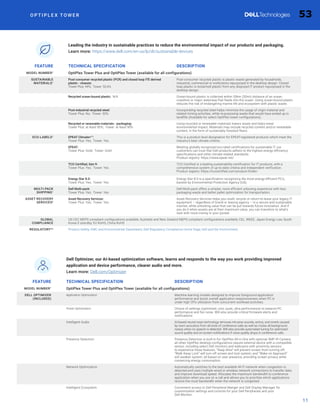
SUSTAINABLE
MATERIALS1
Post-consumer recycled plastic (PCR) and closed loop ITE derived
plastic - chassis:
Tower Plus: 44%; Tower: 53.6%
Post-consumer recycled plastic is plastic waste generated by households,
industrial, commercial or institutions repurposed in the desktop design. Closed
loop plastic is reclaimed plastic from any disposed IT product repurposed in the
desktop design.
Recycled ocean-bound plastic: N/A Ocean-bound plastic is collected within 50km (30mi) distance of an ocean
coastline or major waterway that feeds into the ocean. Using ocean-bound plastic
reduces the risk of endangering marine life and ecosystem with plastic waste.
Post-industrial recycled steel:
Tower Plus: No; Tower: 50%
Incorporating recycled steel helps minimize the usage of virgin material and
related mining activities, while re-purposing waste that would have ended up in
landfills (Available for select OptiPlex tower configurations).
Recycled or renewable materials - packaging:
Tower Plus: at least 90%; Tower: at least 90%
Using recycled or renewable materials lowers waste and helps lower
environmental impact. Materials may include recycled content and/or renewable
content, in the form of sustainably forested fibers.
ECO-LABELS1
EPEAT Climate+™:
Tower Plus: Yes; Tower: Yes
This is a product level designation for EPEAT-registered products which meet the
industry's best climate criteria.
EPEAT:
Tower Plus: Gold; Tower: Gold
Meeting globally recognized eco-label certifications for sustainable IT, our
customers can trust that Dell products adhere to the highest energy-efficiency
specifications and other climate-related standards.
Product registry: https://www.epeat.net/
TCO Certified, Gen 9:
Tower Plus: Yes; Tower: Yes
TCO Certified is a leading sustainability certification for IT products, with a
comprehensive system of up-to-date criteria and independent verification.
Product registry: https://tcocertified.com/product-finder/
Energy Star 8.0:
Tower Plus: Yes; Tower: Yes
Energy Star 8.0 is a specification recognizing the most energy-efficient PC's,
backed by Environmental Protection Agency (US).
MULTI-PACK
SHIPPING1
Dell Multi-pack:
Tower Plus: Yes; Tower: Yes
Dell Multi-pack offers a simpler, more efficient unboxing experience with less
packaging waste and better pallet optimization for transportation.
ASSET RECOVERY
SERVICES6
Asset Recovery Services:
Tower Plus: Yes; Tower: Yes
Asset Recovery Services helps you resell, recycle or return-to-lease your legacy IT
equipment – regardless of brand or leasing agency – in a secure and sustainable
manner, while unlocking value that can be put towards future innovation. And if
you do it when assets are at their maximum value, you can transition to what’s
next with more money in your pocket.
GLOBAL
COMPLIANCE
US CEC MEPS compliant configurations available; Australia and New Zealand MEPS compliant configurations available; CEL, WEEE, Japan Energy Law, South
Korea E-standby, EU RoHS, China RoHS
REGULATORY4,6
Product Safety, EMC and Environmental Datasheets; Dell Regulatory Compliance Home Page; Dell and the Environment;
O P T I P L E X T O W E R
Leading the industry in sustainable practices to reduce the environmental impact of our products and packaging.
Learn more: https://www.dell.com/en-us/lp/dt/sustainable-devices
11
FEATURE TECHNICAL SPECIFICATION DESCRIPTION
MODEL NUMBER1
OptiPlex Tower Plus and OptiPlex Tower (available for all configurations)
DELL OPTIMIZER
(INCLUDED)
Application Optimization Machine learning models designed to improve foreground application
performance and boost overall application responsiveness when PC is
under high CPU utilization from concurrent workload activities.
Power Optimization Choice of settings (optimized, cool, quiet, ultra performance) to balance PC
performance and fan noise. Will also provide critical firmware alerts and
notifications.
Intelligent Audio AI-based neural noise technology removes intrusive sounds, echos, and reverb caused
by room acoustics from all ends of conference calls as well as mutes all background
noises when no speech is detected. Will also provide automated tuning for optimized
sound quality and on-screen notifications if voice quality drops in conference calls.
Presence Detection: Presence Detection is built-in for OptiPlex All-in-One with optional 5MP IR Camera;
all other OptiPlex desktop configurations require external device with a compatible
sensor, including select Dell monitors and webcams with proximity sensors
to experience these features. “Keep Alive” will prevent screen from turning off;
“Walk Away Lock” will turn off screen and lock system; and “Wake on Approach”
will awaken system, all based on user presence, providing screen privacy while
conserving energy consumption.
Network Optimization Automatically switches to the best available Wi-Fi network when congestion is
detected and uses multiple wired or wireless network connections to transfer data
and improve download speed. Allocates the maximum bandwidth to conference
application when you are on a call and allows you to prioritize which applications
receive the most bandwidth when the network is congested
Intelligent Ecosystem Convenient access to Dell Peripheral Manger and Dell Display Manager for
customization settings and controls for your Dell Peripherals and your
Dell Monitor.
Dell Optimizer, our AI-based optimization software, learns and responds to the way you work providing improved
application and device performance, clearer audio and more.
Learn more: Dell.com/Optimizer
53
O P T I P L E X T O W E R
12
FEATURE TECHNICAL SPECIFICATION DESCRIPTION
MODEL NUMBER1
OptiPlex Tower Plus and OptiPlex Tower (available for all configurations)
HARDWARE
AND FIRMWARE
(INCLUDED)
Dell SafeBIOS Verify the integrity of the BIOS with tamper detection and secure, off-host BIOS
image capture.
Dell SafeBIOS Indicators of Attack Early-alert feature scans for behavior-based threats. Telemetry integration with
popular third-party security and endpoint management solutions, e.g., Microsoft
Intune, CrowdStrike, Splunk.
Dell SafeBIOS CVE Detection Identify and address common vulnerabilities and exposures (CVEs) for the BIOS
and patch devices swiftly. *Available early 2024.
Dell Trusted Device
Trusted Platform Module (Discrete TPM Enabled)
Software that generates insights into the security state of a platform, monitoring
changes to BIOS attributes, detecting possible tampering of BIOS firmware,
and more.
Trusted Platform Module (TPM) 2.0 discrete FIPS 140-2 certification for TPM
Chassis intrusion switch Remotely detects hardware tampering and is integrated with Dell SafeBIOS
Indicators of Attack.
Kensington Security Slot™ (T-bar) Device locking option helps reduce the risk of a data breach. Standard slot that
can be paired with a standard security cable lock.
SPI Flash Tamper Detection Circuit Detects and prevents tampering with BIOS SPI flash chips on the motherboard.
HARDWARE
AND FIRMWARE
(OPTIONAL)
Dell SafeID Secure end-user credentials with a unique hardware-based security solution to
store and process user credentials. Credential security options vary by device.
Dell Secured Component Verification Provides assurance that the device and its components remain secure from
factory to first boot.
Dell SafeSupply Chain Detect tampering with this supply chain assurance offering. Available in US and
Canada only.
Hard drive wipes Sanitize the hard drive in accordance with National Institute of Standards and
Technology (NIST) guidelines with this supply chain assurance offering. Available
in US and Canada only. US and Canada only.
Intel ME Verification Verify the integrity of critical firmware using a secure off-host source. Requires
Intel vPro®
.
OPAL drive / Self-encrypting drive (SED) Hardware-based full disk encryption that protects user data without storing
encryption keys in RAM where it can be accessed by malicious parties.
SECURITY
SOFTWARE
(OPTIONAL)
Dell SafeGuard  Response: CrowdStrike, Carbon Black, Secureworks Threat detection, response and remediation
Dell SafeData: Absolute Self-healing for endpoints, applications and networks
Dell SafeData: Netskope Cloud and network data protection
McAfee Business Protection Simple, automated, all-in-one security made for small businesses
Improve fleet-wide security with hardware and software protections from Dell Trusted Workspace.
Learn more: Dell.com/endpoint-security
CONTINUE TO MORE TECHNICAL SPECIFICATIONS 
54
Securely manage  optimize your endpoints and deliver end-user productivity with Dell Manageability Solutions.
Learn more: Dell.com/command
O P T I P L E X T O W E R
13
FEATURE TECHNICAL SPECIFICATION DESCRIPTION
MODEL NUMBER1
OptiPlex Tower Plus and OptiPlex Tower (available for all configurations)
MANAGEABILITY
SOLUTIONS
(INCLUDED)
Dell Client Command Suite Streamline how you deploy drivers, configure BIOS, monitor devices, and manage
updates.
Dell Trusted Update Experience Simplify how you update your endpoints with latest BIOS, driver, and firmware
versions.
Modernize IT with comprehensive lifecycle services and support.
Learn more: Dell.com/support
FEATURE TECHNICAL SPECIFICATION DESCRIPTION
MODEL NUMBER1
OptiPlex Tower Plus and OptiPlex Tower (available for all configurations)
SUPPORT SERVICES
(OPTIONAL)5,6
ProSupport for PCs Hardware break/fix with next business day service, 24x7 in-region technical
technical support on hardware and software issues. Includes access to
SupportAssist for proactive issue resolution and AI-powered fleet insights.
ProSupport Plus for PCs Hardware break/fix with next business day service, 24x7 priority access to
in-region technical support for hardware and software issues PLUS Accidental
Damage coverage, Keep Your Hard Drive and a Service Account Manager (with
500 devices). Includes access to SupportAssist for proactive and predictive
automations and AI-powered fleet insights.
ProSupport Flex for PCs Flexible options to supplement in-house IT (1,000 device requirement): Hardware
break/fix with next business day service, 24x7 in-region technical support on
hardware and software issues and a Service Account Manager plus the OPTION
to choose Accidental Damage coverage or Keep Your Hard Drive. Includes access
to SupportAssist for proactive and predictive automations and AI-powered fleet
insights.
DEPLOY SERVICES
(OPTIONAL)6
ProDeploy Flex for Client ProDeploy Flex allows customers with specific deployment needs to mix and
match standardized options to fit their needs.
ProDeploy Essentials for Client From initial PC setup and preparation to data transfer, whether remote or onsite,
ProDeploy Essentials is geared toward limited interruption for the end user.
ProDeploy for Client ProDeploy partners with IT to apply common customization of hardware settings
and software so systems meet IT specifications for security, software and
network protocols.
ProDeploy Plus for Client With ProDeploy Plus, we bring it all together to take care of end-user needs and
efficiently meet IT specifications while working with IT teams to plan, configure
and deploy systems that are ready-to-work, using modern solutions.
Asset Recovery Services Asset Recovery Services helps you resell, recycle or return-to-lease your legacy IT
equipment – regardless of brand or leasing agency – in a secure and sustainable
manner, while unlocking value that can be put towards future innovation. And if
you do it when assets are at their maximum value, you can transition to what’s
next with more money in your pocket.
Logistic Services Warehouse your products at our facility for up to 180 days and take delivery on
the day and time that best meets your needs. Schedule your IT resources to be in
place when you need them — on the exact day the new systems arrive. Available
in NA, EMEA and APJ.
Configuration Services Image Load, Asset Tag, BIOS Customization, HDD Partitioning, Software
Installation, Laser Etch, Data Security.
MANAGE SERVICES
(OPTIONAL)6
Lifecycle Hub Combines warehousing and inventory management with configuration services
and deployment expertise into one end-to-end solution. With included return,
repair, and refurbishing services, Dell Lifecycle Hub helps keep employees
working, maximizes use of device inventory and frees up IT resources to focus on
business priorities. Available in US, Austria, Belgium, Czech Republic, Denmark,
Finland, France, Germany, Greece, Ireland, Italy, Luxembourg, Netherlands, Poland,
Portugal, Slovakia, Spain, Sweden, UK.
Managed Detection and Response Pro Plus A fully-managed, 360-degree security operations solution designed to prevent
threats, quickly detect and contain attack attempts, and help recover your IT
environment in the event of a breach.
55
O P T I P L E X T O W E R
FEATURE TECHNICAL SPECIFICATION TECHNICAL SPECIFICATION
MODEL NUMBER1
OptiPlex Tower Plus OptiPlex Tower
WARRANTY4,6
3-5 Year Basic Warranty with Hardware Onsite Service 1-5 Year Basic Warranty with Hardware Onsite Service
SERVICES TERMS6
3-5 Year ProSupport Same Business Day Service 1-5 Year ProSupport Same Business Day Service
3-5 Year ProSupport Next Business Day Onsite Service 1-5 Year ProSupport Next Business Day Onsite Service
3-5 Year Specialized Onsite Services Onsite Diagnosis Service 1-5 Year Specialized Onsite Services Onsite Diagnosis Service
3-5 Year ProSupport for Software 1-5 Year ProSupport for Software
3-5 Year ProSupport Flex for Client 1-5 Year ProSupport Flex for Client
3-5 Year ProSupport Channel Extended SKU's (Add 3 months) 1-5 Year ProSupport Channel Extended SKU's (Add 3 months)
3-5 Year ProSupport Plus Same Business Day Service 1-5 Year ProSupport Plus Same Business Day Service
3-5 Year ProSupport Plus for Client 1-5 Year ProSupport Plus for Client
ACCIDENTAL
DAMAGE1
3-5 Year Accidental Damage Service 1-5 Year Accidental Damage Service
3-5 Year Accidental Damage with Theft Service 1-5 Year Accidental Damage with Theft Service
3-5 Year Accidental Damage Protection 1-5 Year Accidental Damage Protection
3-5 Year Complete Care Service 1-5 Year Complete Care Service
3-5 Year Keep Your Hard Drive 1-5 Year Keep Your Hard Drive
3-5 Year Keep Your Component - US FED only 1-5 Year Keep Your Component - US FED only
3-5 Year TechDirect: Parts and Labor Reimbursement 1-5 Year TechDirect: Parts and Labor Reimbursement
14
Product Disclaimers/Citations
OptiPlex Tower [Gen ID: 7020]
Cover page
1. Dell has the industry’s most secure commercial PCs - with built-in below the OS security features that our competitors cannot match. Based on Dell internal analysis, September 2023. Applicable to
PCs on Intel processors. Not all features available with all PCs. Additional purchase required for some features. Do not use in China, Colombia, or Guatemala.
2. Dell has the industry’s most intelligent commercial PCs - Based on Dell analysis, November 2023. Dell Optimizer not available in OptiPlex 3000 series, Latitude Chromebook Enterprise, and Linux-
based devices. Feature availability and functionality may vary by model. For more details visit: https://www.delltechnologies.com/asset/en-us/solutions/business-solutions/technical-support/dell-
optimizer-features-availability-matrix.pdf.external
3. Dell has the industry’s most manageable commercial PCs - Based on Dell internal analysis, January 2024. Details: Most manageable commercial PC when comparing the systems management
capabilities of Dell Update Processes, Dell Manageability Solution capabilities and integrations with 3rd Party Management Solutions, with competitor update processes, systems management
solution capabilities and integrations with 3rd party management solutions. 3rd Party Management Solutions - Microsoft Intune, Workspace ONE, are separate purchases. Intel vPro, to support out-of-
band systems management, is an additional system configuration upgrade.
Page 2
1. Dell has the industry’s most secure commercial PCs. (Claim Details: Cover page - #1)
2. Dell has the industry’s most intelligent commercial PCs. (Claim Details: Cover page - #2)
3. OptiPlex Tower Plus offers up to 128GB DDR5 Memory and VR-capable NVIDIA®
GeForce®
RTX™ graphics; OptiPlex Tower offers up to 64GB DDR5 memory and AMD Radeon™ RX graphic options.
4. Dell is the world’s #1 monitor company. Source: IDC Worldwide Quarterly PC Monitor Tracker, Q1 2024.
5. Less than 1% of OptiPlex desktops experience a first-year service event. Source: Based on Dell Quality Intelligence (Qi) tool - Dell Internal Analysis, August 2023. Details: When quantifying Dell FY19-
FY24 YTD through August 2023; whereby “service event” is indicated by Dell facilitating 1.) part replacement or 2.) service technician dispatch for repair.
6. Dell has the industry’s most manageable commercial PCs (Claim details: Cover page - #3)
7. Customize your PC thermal / fan settings to work your way in Optimized or Quiet mode. Source: Based on internal Dell analysis, January, 2024, final benchmarks pending. Details: Quiet mode is
designed to index PC performance on quieter acoustics and energy conservation for your Tower. Experience up to 39% gen over gen improvement in acoustics with new OptiPlex Tower Plus and
OptiPlex Tower. (CY23 default vs CY24 Quiet mode).
8. OptiPlex Towers are made with up to 53.6% Post-consumer recycled plastic (PCR) and closed loop ITE derived plastic Source: Based on Dell internal analysis, February 2023. Percentage is of total
plastic weight in product and may vary by model.
9. OptiPlex Tower is designed with up to 50% recycled steel in select tower configurations. Percentage applies to total steel weight in the chassis. Includes OptiPlex Micro, OptiPlex Micro Plus, OptiPlex
Tower, OptiPlex SFF and OptiPlex SFF Plus. Based on Dell internal analysis, December 2023. Not available for OptiPlex Tower Plus configuration.
10.OptiPlex Tower ships with at least 90% recycled or renewable packaging, in the form of sustainably forested fibers. Percentages may vary slightly by region. Excludes optional items added to order and
included in box.
11.Ship multiple products in a single package with Dell Multipack, Applies to OptiPlex Micro, OptiPlex Micro Plus, OptiPlex SFF, OptiPlex SFF Plus, OptiPlex Tower and OptiPlex Tower Plus. Based on
internal analysis, December 2023.
12.OptiPlex Tower is certified ENERGY STAR®
8.0, carries TCO Generation 9 certifications and is EPEAT Gold registered with Climate+ designation. Applies to OptiPlex Micro Plus, OptiPlex SFF, OptiPlex
SFF Plus, OptiPlex Tower, OptiPlex Tower Plus, OptiPlex AIO 35W and OptiPlex AIO Plus. Based on internal analysis, October 2023. Based on EPEAT Climate+ Designations achieved in all applicable
countries. EPEAT registered where applicable. EPEAT registration varies by country. See www.epeat.net for registration status and tier levels. See Owner’s manual for eco-label conditions.
Page 3 Sustainable innovation
1. OptiPlex Towers are made with up to 53.6% Post-consumer recycled plastic (PCR) and closed loop ITE derived plastic Source: Based on Dell internal analysis, February 2023. Percentage is of total
plastic weight in product and may vary by model. (Claim details: page: 1.8).
2. OptiPlex Tower is designed with up to 50% recycled steel in select tower configurations. (Claim details: page: 1.9).
3. OptiPlex Tower ships withat least 90% recycled or renewable packaging. (Claim details: page: 1.10).
4. Ship multiple products in a single package with Dell Multipack. (Claim details: page: 1.11).
5. Multipack packaging is designed with 100% recycled or renewable corrugate. Based on internal analysis, February 2022. Renewable material in the form of FSC paper fibers.
6. OptiPlex Tower is certified ENERGY STAR®
8.0, carries TCO Generation 9 certifications and is EPEAT Gold registered with Climate+ designation (Claim details: page: 1.12).
7. Customize your PC thermal / fan settings to work your way in Optimized or Quiet mode. (Claim Details: page 1.7).
8. Asset Recovery Services is conveniently available as a stand-alone service or part of Dell APEX, Lifecycle Hub and ProDeploy Client Suite; in 35 countries.
56
O P T I P L E X T O W E R
15
Page 4 AI-enabled solutions
1. Dell has the industry’s most intelligent commercial PC’s. (Claim Details: Cover page - #2)
2. Copilot in Windows, get better answers, grow your skills, and effortlessly optimize workflows. Timing of feature delivery and availability varies by market and device. Use Copilot with a Microsoft
Account or use Copilot with commercial data protection at no additional cost by signing into a work or school account (Microsoft Entra ID) with Microsoft 365 E3, E5, F3, A3 or A5 for faculty, Business
Premium, and Business Standard. Coming to more Entra ID users over time.
3. Minimize user downtime and IT admin hours.: Based on Dell internal analysis, December 2023. Detailed requirements:
• Optional ProSupport Plus for PCs or ProSupport Flex is required to automate support tasks, detect and deploy fixes
• Optional SupportAssist for Business PCs, enabling the “Dell Trusted Device module” and activating a TechDirect account for your company, are required to view security scores for your fleet via
TechDirect.
4. *Based on Dell internal analysis, September 2023. Applicable to PCs on Intel processors. Not all features available with all PCs. Additional purchase required for some features.
5. **Integrations available for CrowdStrike Falcon Insight XDR and Carbon Black Audit  Remediation.
Page 5 Better together
1. OptiPlex Tower drives up to (4) displays natively, including up to (3) at 4K resolution. OptiPlex Tower supports up to four displays at one time, from native HDMI, native DisplayPort, and/or from
optional video port up to 5K. OptiPlex Tower Plus supports up to four displays at one time, from native DisplayPorts up to 4K, and/or from optional video port up to 5K.
2. Enjoy a near-seamless multi-monitor set up and new levels of comfort with the World’s 1st
4-star certified Eye Comfort Monitor: Based off TÜV Rheinland®
Eye Comfort certification, August 2023.
Monitor certified by TÜV for 4-star eye comfort.
3. Dell monitors come with:
• Advanced Exchange Service: Your monitor comes with a 3-year Advanced Exchange Service3 so that if a replacement becomes necessary, it will be shipped to you the next business day during
your 3-year Limited Hardware Warranty. Replacement part/unit dispatched, if needed, following completion of phone/online diagnosis. Fee charged for failure to return defective unit. Availability
varies.
• For copy of Ltd Hardware Warranty, write to Dell USA LP, Attn: Warranties, One Dell Way, Round Rock, TX 78682 or see http://www.dell.com/warranty.
• The Dell Premium Panel Warranty allows a free panel replacement during the Limited Hardware Warranty** period even if only one bright pixel is found.
• Upgrade to 24x7 specialized technical phone support with the optional Dell ProSupport.
• Dell Premier Wireless ANC Headset - WL7024; Based on Dell internal analysis of publicly available data, Dec. 2023.
• Dell UltraSharp Webcam - WB7022; Based on Dell internal analysis of external 4K personal conferencing webcams, August 2023.
• Dell Pro Wireless Keyboard  Mouse - KM5221W; Based on Dell internal analysis of battery life usage model calculations, Nov. 2020. Results vary depending on use, operating conditions  other
factors.
Page 6 Simplify IT
1. Dell has the industry’s most secure commercial PCs. (Claim Details: Cover page - #1)
2. Dell publishes a device drivers and downloads release schedule. Source: Source: Based on internal analysis, May 2023. When comparing publicly available device drivers and downloads release
schedules published by the Top 5 PC vendors, as of May 2023.
3. Dell performs integrated validation of all driver and BIOS modules in an update. Source: Based on Dell internal analysis, May 2023, of integrated validation approaches of Top 5 PC vendors, for driver
and BIOS modules in an update, by currently shipping and future-state product system images.
4. Applicable to PCs on Intel processors. Not all features are available with all PCs. Additional purchase required for some features. Availability varies by region. Integrations available for CrowdStrike
Falcon Insight XDR and Carbon Black Audit  Remediation.
5. Only Dell offers off-host BIOS and firmware verification, providing greater security than other PCs. Details: The latest Intel vPro based PCs provide an estimated 70% attack surface reduction
compared to four-year-old devices. Based on IOActive’s “Intel vPro 13th Gen Attack Surface Study” published March 2023 (commissioned by Intel), which evaluates Intel vPro devices powered by 13th
Gen Intel Core processors against four-year-old Intel-based PCs on Windows OS. Details at www.intel.com/performance-vpro. Results may vary.
6. Most Manageable Commercial PC. (Claim details; Cover page - #3); and Dell has the industry’s first:
• Dell Command | Endpoint Configure for Microsoft Intune - the industry’s first Binary Large Object (BLOB) package-based solution, for securely configuring  managing endpoints, using
Microsoft Intune. Disclaimer: Industry’s first device manageability solution to use a Binary Large Object (BLOB) package, recognized by Microsoft Intune, for secure endpoint configuration and
management
• Dell Client Command Suite – the industry’s first Systems Management Solution to integrate with VMWare Workspace ONE, for secure BIOS, firmware, OS and update management of PCs, from
the cloud. Disclaimer: Based on Dell internal analysis, July 2023
• Dell Command | Intel vPro Out of Band– the industry’s first hardware OEM systems management solution to integrate with Intel vPro - for remote management of systems, regardless of power-
state. Disclaimer: Based on Dell internal analysis, November 2023.
Page 7 Legacy, scale  innovation
1. Dell Technologies APEX offers the 1st
and most comprehensive As-a-service portfolio that spans from multi-cloud to client devices. Source: Based on Dell internal analysis, April 2023. Payment
solutions provided to qualified commercial customers by Dell Financial Services through Dell Technologies group companies or authorized business partners. Solutions may be changed without
notice and are subject to product availability, eligibility, credit approval, acceptable documentation and local applicable law. Some solutions, including end of term purchase options, may not
be available or may vary by country. Within the EU, the EEA, the UK and Switzerland certain solutions are provided by Dell Bank International d.a.c. and its local branches, including by Dell Bank
International d.a.c Sucursal en España in Spain. Dell Bank International d.a.c. is regulated by the Central Bank of Ireland. Dell Technologies and Dell logos are trademarks of Dell Inc.
2. Dell Technologies processes 36TB of telemetry data per day. Source: Based on Dell internal analysis, November 2023.
3. ProDeploy Client Suite for PCs configures 30K PC daily. Source: Based on Dell internal analysis, April 2023.
4. ProSupport Suite for PCs saves 641 hours of IT admin time per year* (on recurring tasks for a 1,000-device fleet. *vs. a manual approach based on data extrapolated from hands-on testing).
Source: Based on a Principled Technologies test report, “Simplify PC management and save IT admin time with an automated support service,” dated September 2023. Testing commissioned by Dell,
conducted in the United States. Actual results will vary. Full report: https://facts.pt/PELu7lm
5. Dell Premier offers up to 297% ROI, or return on investment, over a span of 4 years. Source: Based on a Forrester Total Economic Impact™ Study Commissioned by Dell Technologies and Intel, “The
Total Economic Impact™ Of Dell Premier Solutions”, August 2021. These findings were aggregated into a 15,000-employee composite organization to create a four-year financial model that calculates
the likely ROI a company should expect by adopting Dell Premier. Actual results may vary. Full study https://tools.totaleconomicimpact.com/go/dell/premiersolutions/
6. Dell Technologies has recovered 2.6 billion pounds of electronics since 2007. Source: Based on Dell internal analysis of publicly available data, April 2023.
Technotes:
1. Not all technical specifications available per system configuration. Offering may vary by region. Some items may be available after product introduction. For complete details, refer to the Owner’s
Manual published on www.dell.com/support.
2. System Memory and Graphics: Significant system memory may be used to support graphics, depending on system memory size and other factors.
3. Storage Option: GB means 1 billion bytes and TB equals 1 trillion bytes; actual capacity varies with preloaded material and operating environment and will be less.
4. Limited Hardware Warranty: For copy of Ltd Hardware Warranty, write Dell USA LP, Attn: Warranties, One Dell Way, Round Rock, TX 78682 or see www.dell.com/warranty.
5. On-site service after Remote Diagnosis: Remote Diagnosis is determination by online/phone technician of cause of issue; may involve customer access to inside of system and multiple or extended
sessions. If issue is covered by Limited Hardware Warranty (www.dell.com/warranty) and not resolved remotely, technician and/or part will be dispatched, usually within 1 business day following
completion of Remote Diagnosis. Availability varies. Other conditions apply.
6. Dell Services: Availability and terms of Dell Services vary by region. For more information, visit www.dell.com/servicedescriptions.
7. For complete listing of declarations and certifications, refer to the Dell Regulatory and Environmental Datasheet found in the Manuals section of Product Support information www.dell.com/support/
home/us/en/19.
Technical specifications subject to change without prior notice. Product availability varies by country. Please contact your Dell representative for more information. Copyright © 2023 Dell Inc. or its
subsidiaries. All Rights Reserved. Dell Technologies, Dell, EMC and Dell EMC are trademarks of Dell Inc. or its subsidiaries. Other trademarks may be trademarks of their respective owners.
57
5.8
The world’s # 1 monitor company*
* Dell monitors are #1 Worldwide for 10 years! Source: IDC Worldwide Quarterly PC Monitor Tracker, Q1 2024. From 2014 to 2023. CLM-011283
Dell 22 Monitor | SE2225H
Dell 24 Monitor | SE2425H
Dell 27 Monitor | SE2725H
Breeze through
everyday tasks
58
Enjoy extended viewing with
enhanced eye comfort
Enjoy visual well-being with
ComfortView Plus, engineered
to minimize harmful blue light
exposure without sacrificing color
accuracy. Coupled with a 75 Hz
refresh rate, these monitors achieve
TÜV Rheinland®
3-star eye comfort
certification1
— the latest industry
standard for eye comfort to help
reduce signs of eye fatigue.
Dependable from every angle
Contemporary design with slim
bezels mean you see more with less
distraction for better way to work
or play.
Get superb clarity in FHD resolution
with minimized reflections. These
monitors offer a wide 178°/178° viewing
angle and impressive 3000:1 contrast
ratio, so you can view your work with
consistent color and image quality.
Get organized between applications,
emails and windows with the various
predefined or custom window layouts
using Dell Easy Arrange.2
Functional, space-saving
design
Connect with ease with simple
connectivity to most PCs, current
or legacy, via HDMI or VGA. These
monitors feature a small footprint
and built-in power supply unit and
cable holder to keep your space neat
and organized. You can easily tilt the
monitor to get just the right viewing
angle or hook it up with a compatible
VESA mount.
1 TÜV Rheinland certified - Low Blue Light Hardware Solution and Flicker Free (ID 0217010014).
2 Requires Dell Display Manager software installation.
Breeze through everyday tasks with these 21.5, 23.8 and 27 monitors certified by TÜV Rheinland
for 3-star eye comfort.
D E L L 22, 24 A N D 27 M O N I T O R S - SE2225H, SE2425H, SE2725H 59
D E L L 22, 24 A N D 27 M O N I T O R S - SE2225H, SE2425H, SE2725H
World's number 1 monitor company*
We deliver world-class monitors that have gone through rigorous development processes and stringent tests to ensure dependable
performance. Get peace of mind with unmatched warranty and support options. Being environmentally forward in thinking, our monitors
adhere to environment standards and are made with sustainable materials.
* Dell monitors are #1 Worldwide for 10 years! Source: IDC Worldwide Quarterly PC Monitor Tracker, Q1 2024. From 2014 to 2023. CLM-011283
1 TÜV Rheinland certified - Low Blue Light Hardware Solution and Flicker Free (ID 0217010014).
2 Requires Dell Display Manager software installation.
Space-saving design
Keep your space neat with this
small footprint monitor featuring
a built-in power supply unit and
cable holder.
Improved visual comfort
Enjoy visual well-being with ComfortView Plus, engineered
to minimize harmful blue light exposure without
sacrificing color accuracy. Coupled with a 75
Hz refresh rate, these monitors deliver a
TÜV Rheinland 3-star1
certified viewing
experience.
Dependable from every angle
Get consistent views across a wide 178°/178°
viewing angle. Boost productivity with
Easy Arrange2
, setting up applications,
emails and windows neatly on
one screen. Experience deeper
blacks, brighter whites and
vivid color with 3000:1
contrast ratio.
Easily connect
Simple connectivity to most PCs,
current or legacy, via HDMI or VGA.
60
D E L L 22, 24 A N D 27 M O N I T O R S - SE2225H, SE2425H, SE2725H
Designed
for you
Contemporary design with slim bezels
mean you see more with less distraction
for better way to work or play.
1 Requires Dell Display Manager software installation.
Functional, space-saving design
A small footprint and built-in power
supply unit and cable holder to keep
your space neat. Easily tilt the monitor to
get just the right viewing angle or hook it
up with a compatible VESA mount.
Connect with ease
Simple connectivity to most PCs, current or
legacy, via HDMI or VGA.
Dell Display Manager
Stay organized between applications,
emails and windows on one screen
using Easy Arrange1
and boost
productivity while working from home.
61
D E L L 22, 24 A N D 27 M O N I T O R S - SE2225H, SE2425H, SE2725H
Environmentally-forward
thinking
1 Based on internal analysis, June 2024. Designed with 34.9% post-consumer recycled plastic and 49.9% closed-loop IT equipment derived plastic..
2 Applicable to all new monitors launching in CY 2024. Recycled glass is present in monitor panel. Based on internal analysis, January 2024.
3 Applies to all Dell monitors launched since 2023. Made from FSC mix sources which is a mix of material from FSC certified forests, recycled content and/or FSC controlled wood. Based on internal analysis, August 2023.
4 Based on internal analysis, June 2024 .
Low impact packaging
This monitor ships in a box made
with 100% renewable content that is
also recyclable.3
Energy conservation and
environmental standards
This monitor is certified ENERGY STAR®4
meaning it meets high standards for
energy efficiency.
Material innovation
Your monitor has been thoughtfully crafted
with a selection of sustainable materials
including 84% post-consumer recycled
plastic and closed-loop ITE-derived
plastic1
, and at least 20% recycled glass.2
Using recycled materials helps conserve
natural resources and contributes to a
lower environmental footprint.
62
D E L L 22, 24 A N D 27 M O N I T O R S - SE2225H, SE2425H, SE2725H
1 Security lock slot1
2 Power connector
3 HDMI
4 VGA
Cables included
• Power cable
• HDMI cable
Ports  Slots
1 2 4
3
1 Based on Kensington Security Slot™
63
D E L L 22, 24 A N D 27 M O N I T O R S - SE2225H, SE2425H, SE2725H
FEATURE TECHNICAL SPECIFICATION TECHNICAL SPECIFICATION TECHNICAL SPECIFICATION
MODEL Dell 22 Monitor - SE2225H Dell 24 Monitor - SE2425H Dell 27 Monitor - SE2725H
DIAGONAL
VIEWING SIZE
544.85 mm (21.45 in.) 604.70 mm (23.81 in.) 685.99 mm (27.00 in.)
PANEL TYPE Vertical Alignment Technology Vertical Alignment Technology Vertical Alignment (VA) Technology
MAXIMUM PRESET
RESOLUTION AND
REFRESH RATE
1920 x 1080 up to 75 Hz 1920 x 1080 up to 75 Hz 1920 x 1080 up to 75 Hz
VIEWING ANGLE 178° vertical
178° horizontal
178° vertical
178° horizontal
178° vertical
178° horizontal
PIXEL PITCH 0.2493 mm x 0.2410 mm 0.2745 mm x 0.2745 mm 0.3114 mm x 0.3114 mm
PIXEL PER INCH (PPI) 103 93 81
CONTRAST RATIO 3000:1 (typical) 3000:1 (typical) 3000:1 (typical)
ASPECT RATIO 16:9 16:9 16:9
BACKLIGHT
TECHNOLOGY
LED Edgelight System LED Edgelight System LED Edgelight System
BRIGHTNESS 250 cd/m² (typical) 250 cd/m² (typical) 300 cd/m² (typical)
RESPONSE TIME • 5 milliseconds (gray to gray - fast mode)
• 8 milliseconds (gray to gray - normal mode)
• 5 milliseconds (gray to gray - fast mode)
• 8 milliseconds (gray to gray - normal mode)
• 5 milliseconds (gray to gray - fast mode)
• 8 milliseconds (gray to gray - normal mode)
COLOR GAMUT NTSC minimum 72% (CIE 1931), NTSC minimum
83% (CIE 1976)
NTSC minimum 72% (CIE 1931), NTSC minimum
83% (CIE 1976)
NTSC 72% (CIE 1931), NTSC 83% (CIE 1976)
COLOR DEPTH 16.7 Million colors 16.7 Million colors 16.70 Million colors
TÜV RHEINLAND
EYE COMFORT
3-Stars 3-Stars 3-Stars
CONNECTIVITY • One HDMI (HDCP 1.4) (supports up to
FHD 1920 x 1080 75Hz as per specified in
HDMI 1.4)
• One VGA connector
• One HDMI (HDCP 1.4) (supports up to
FHD 1920 x 1080 75Hz as per specified in
HDMI 1.4)
• One VGA connector
• One HDMI port (HDCP 1.4) (Supports up to
FHD 1920 x 1080, 75 Hz as per specified in
HDMI 1.4)
• One VGA connector
ADJUSTABILITY Tilt -5°/+21° Tilt -5°/+21° Tilt -5°/+21°
DISPLAY SCREEN
COATING
Anti-glare with hard-coating 3H Anti-glare with hard-coating 3H Anti-glare with hard-coating 3H
DAISY CHAIN
AVAILABILITY
Not Applicable Not Applicable Not Applicable
SOFTWARE
COMPATIBILITY
Dell Display Manager (DDM) for Windows
operating system
Dell Display Manager (DDM) for Windows
operating system
Dell Display Manager (DDM) for Windows
operating system
VOLTAGE REQUIRED 100 VAC to 240 VAC / 50 Hz or
60 Hz ± 3 Hz / 0.7 A (typical)
100 VAC to 240 VAC / 50 Hz or
60 Hz ± 3 Hz / 0.7 A (typical)
100 VAC to 240 VAC/50 Hz or
60 Hz ± 3 Hz/1.5 A
POWER
CONSUMPTION
• 0.3 W (Off mode)1
• 0.3 W (Standby mode)1
• 11.6 W (On mode)1
• 19 W (Max)2
• 11.9 W (Pon)3
• 38.2 kWh (TEC)3
• 0.3 W (Off mode)1
• 0.3 W (Standby mode)1
• 14.3 W (On mode)1
• 22 W (Max)2
• 14.1 W (Pon)3
• 45.0 kWh (TEC)3
0.3 W (Off mode)
0.3 W (Standby Mode)
17 W (On Mode)
30 W (Maximum)
16 W (Pon)
50.76 kWh (TEC)
AUDIO OUTPUT Not Applicable Not Applicable Not Applicable
HEIGHT WITH STAND 384.08 mm (15.12 in.) 420.26 mm (16.55 in.) (Compressed ~ Extended):
459.21 mm (18.08 in.) - 459.21 mm (18.08 in.)
WIDTH WITH STAND 504.26 mm (19.85 in.) 552.64 mm (21.76 in.) 623.30 mm (24.54 in.)
DEPTH WITH STAND 178.81 mm (7.04 in.) 178.81 mm (7.04 in.) 199.87 mm (7.87 in.)
HEIGHT WITHOUT
STAND
295.38 mm (11.63 in.) 331.61 mm (13.06 in.) 369.61 mm (14.55 in.)
WIDTH WITHOUT
STAND
504.26 mm (19.85 in.) 552.64 mm (21.76 in.) 623.30 mm (24.54 in.)
DEPTH WITHOUT
STAND
49.21 mm (1.94 in.) 49.26 mm (1.94 in.) 55.56 mm (2.19 in.)
1 As defined in EU 2019/2021 and EU 2019/2013.
2 Max brightness and contrast setting with maximum power loading on all USB ports.
3 Pon: Power consumption of On mode as defined in Energy Star 8.0 version. TEC: Total energy consumption in kWh as defined in Energy Star 8.0 version.
64
5.9
FEATURE TECHNICAL SPECIFICATION TECHNICAL SPECIFICATION TECHNICAL SPECIFICATION
MODEL Dell 22 Monitor - SE2225H Dell 24 Monitor - SE2425H Dell 27 Monitor - SE2725H
WEIGHT (WITH
PACKAGING)
4.11 kg (9.06 lb) 4.70 kg (10.36 lb) 6.58 kg (14.51 lb)
WEIGHT (PANEL ONLY
- FOR VESA MOUNT)
2.26 kg (4.98 lb) 2.80 kg (6.17 lb) 3.74 kg (8.25 lb)
WEIGHT WITH STAND
ASSEMBLY AND
CABLES
2.94 kg (6.98 lb) 3.46 kg (7.63 lb) 4.59 kg (10.12 lb)
FLAT PANEL MOUNT
INTERFACE
VESA (100 mm x 100 mm) VESA (100 mm x 100 mm) VESA (100 mm x 100 mm)
SECURITY Security lock slot (cable lock sold separately) Security lock slot (cable lock sold separately) Security lock slot (cable lock sold separately)
COMPLIANT
STANDARDS
• ENERGY STAR 8.0
• RoHS Compliant
• Product Safety, EMC and Environmental
Datasheets
• Dell Regulatory Compliance Home Page
• Dell and the Environment
• TÜV Rheinland Eye Comfort 3-Stars
• BFR/PVC reduce monitor. (The circuit boards
are made from BFR/PVC-free laminates.)
• Meets NFPA 99 leakage current requirements.
• Arsenic-Free glass and Mercury-Free for the
panel only.
• ENERGY STAR 8.0
• RoHS Compliant
• Product Safety, EMC and Environmental
Datasheets
• Dell Regulatory Compliance Home Page
• Dell and the Environment
• TÜV Rheinland Eye Comfort 3-Stars
• BFR/PVC reduce monitor. (The circuit boards
are made from BFR/PVC-free laminates.)
• Meets NFPA 99 leakage current requirements.
• Arsenic-Free glass and Mercury-Free for the
panel only.
• ENERGY STAR 8.0
• RoHS Compliant
• Product Safety, EMC and Environmental
Datasheets
• Dell Regulatory Compliance Home Page
• Dell and the Environment
• TÜV Rheinland Eye Comfort 3-Stars
• BFR/PVC reduce monitor (The circuit boards
are made from BFR/PVC-free laminates)
• Meets NFPA 99 leakage current requirements.
• Arsenic-Free glass and Mercury-Free for the
panel only.
TEMPERATURE
RANGE
• Operating: 0°C to 40°C (32°F to 104°F)
• Non-operating: -20°C to 60°C (-4°F to 140°F)
• Operating: 0°C to 40°C (32°F to 104°F)
• Non-operating: -20°C to 60°C (-4°F to 140°F)
• Operating: 0°C to 40°C (32°F to 104°F)
• Non-operating: -20°C to 60°C (-4°F to 140°F)
HUMIDITY RANGE • Operating: 10% to 80% (non-condensing)
• Non-Operating: 5% to 90% (non-condensing)
• Operating: 10% to 80% (non-condensing)
• Non-Operating: 5% to 90% (non-condensing)
• Operating: 10% to 80% (non-condensing)
• Non-Operating: 5% to 90% (non-condensing)
ALTITUDE • Operating: 5,000 m (16,400 ft) maximum
• Non-operating: 12,191 m (40,000 ft) maximum
• Operating: 5,000 m (16,400 ft) maximum
• Non-operating: 12,191 m (40,000 ft) maximum
• Operating: 5,000 m (16,400 ft) maximum
• Non-operating: 12,191 m (40,000 ft) maximum
WHAT’S INCLUDED • Monitor with stand
• Power cable
• One HDMI cable - 1.8 m
• Quick Start guide
• Safety Information
• Monitor with stand
• Power cable
• One HDMI cable - 1.8 m
• Quick Start guide
• Safety Information
• Monitor with stand
• Power cable
• One HDMI cable - 1.8 m
• Quick Start guide
• Safety Information
STANDARD SERVICE
PLAN
• (US/Canada) 1-year Advanced Exchange
Service1
• (WW) 3-year Advanced Exchange Service1
• (US/Canada) 1-year Advanced Exchange
Service1
• (WW) 3-year Advanced Exchange Service1
• (US/Canada) 1-year Advanced Exchange
Service1
• (WW) 3-year Advanced Exchange Service1
v.1 07/2024
1 Advanced Exchange Service: Replacement part/unit dispatched, if needed, following completion of phone/online diagnosis. Fee charged for failure to return defective unit. Availability varies. Other conditions apply.
Technical specifications subject to change without prior notice. Product availability varies by country. Please contact your Dell representative for more information.
© 2024 Dell Inc. or its subsidiaries. All Rights Reserved. Dell Technologies, Dell, EMC, Dell EMC and other trademarks are trademarks of Dell Inc. or its subsidiaries. Other trademarks may be trademarks of their respective
owners. USB Type-C®
and USB-C®
are registered trademarks of USB Implementers Forum. Thunderbolt and the Thunderbolt logo are trademarks of Intel Corporation in the U.S. and/or other countries.
D E L L 22, 24 A N D 27 M O N I T O R S - SE2225H, SE2425H, SE2725H 65
6.ชุดโปรแกรมระบบปฏิบัติการสาหรับเครื่อง
คอมพิวเตอร์ และเครื่องคอมพิวเตอร์โน้ตบุ๊ก
แบบสิทธิการใช้งานประเภทติดตั้งมาจาก
โรงงาน (OEM) ที่มีลิขสิทธิ์ถูกต้องตาม
กฎหมาย
66
67
6
6.1
68
7.อุปกรณ์กระจายสัญญาณ (L3 Switch)
ขนาด 24 ช่อง
69
Ruijie RG-S5300-E
Series Gigabit Switches Datasheet
Scan QR Code
For More Enquiry
70
-03-
High Reliability
The Spanning Tree Protocol (STP), Rapid Spanning Tree
Protocol (RSTP), and MSTP help the RG-S5300-E series
switches achieve fast convergence, improve the fault
tolerance capability, and ensure stable network operation and
load balance of links. The switches utilize network channels
appropriately to raise the utilization of redundant links.
The Virtual Router Redundancy Protocol (VRRP) helps the
switches effectively ensure the network stability.
With the Rapid Link Detection Protocol (RLDP), the switches
can quickly detect the link connectivity and unidirectional
optical fiber links. The port loop detection function helps the
switches prevent network failures caused by loops resulting
from unauthorized port connection to hubs.
The RG-S5300-E series switches support the Ethernet
Ring Protection Switching (ERPS) technology, which is
an international layer-2 link redundancy backup protocol
designed for the core Ethernet. The loop block and link
recovery of ERPS are implemented on the controlling device,
and non-controlling devices directly report their link status
to the controlling device, without processing from other non-
controlling devices. Therefore, loop disruption and recovery
time of ERPS is faster than that of STP. Based on the above
differences, ERPS supports link recovery within milliseconds
in the ideal environment.
When STP is disabled, the Rapid Link Protection Protocol
(RLDP) can still provide basic link redundancy and
millisecond-level fault recovery faster than STP.
With the Bidirectional Forwarding Detection (BFD), the
switches are able to detect links within milliseconds, and
quickly converge routing and other services through the
correlation with upper-layer routing protocols, ensuring the
continuity of services.
Software-Defined Networking (SDN)
The RG-S5300-E series support OpenFlow 1.3 as the times
require, and will collaborate with Ruijie's SDN controller
to easily build large-scale L2/L3 networks. The switches
allow you to smoothly upgrade the whole network to an
SDN network and provide access control, visualized OM,
and other SDN features. The products greatly reduce
network OM costs while significantly simplifying network
management.
Energy Efficiency
In response to China's call for energy efficiency, Ruijie deeply
studies noise and energy consumption issues of conventional
switches and integrates multiple energy-saving design ideas
into the RG-S5300-E series switches. The switches reduce
loud noise produced by deployment in offices and solve
excessive energy consumption resulted from the large-scale
deployment of access devices.
In addition, the RG-S5300-E series adopt the new-generation
hardware architecture as well as advanced energy-efficient
circuit design and components, to significantly save energy
and lower noise. The entire series are equipped with variable-
speed axial fans to intelligently control the fan speed based
on the ambient temperature, which reduces the power
consumption and noise while ensuring stable operation of the
devices.
Increase in return on investment: Aggregate links
used for connecting the VSU to peripheral devices not
only provide redundancy links but also implement load
balancing. All network devices and bandwidth resources
are fully leveraged. Any 10G port can be used to build a
VSU virtual network through data transmission cables. No
additional cables and expansion cards are required, and
the types of ports and cables are not limited. Therefore,
the return on investment is best protected.
71
7.1
-04-
In the PoE networking environment, the RG-S5300-E series
provide automatic PoE mode and energy-saving PoE mode to
meet needs of users.
Easy Network Maintenance
The RG-S5300-E series switches support the Simple Network
Management Protocol (SNMP), Remote Network Monitoring
(RMON), Syslog, Sampled Flow (sFlow), log and configuration
backup using USB flash drives for routine network diagnosis
and maintenance. Administrators can also use CLI, Web-
based management, telnet, CPE WAN Management Protocol
(CWMP(TR069) based zero configuration and other methods
to manage and maintain devices conveniently.
An LED Mode button is available on the panel of the switches.
You can press this button to check the current communication
status and PoE status of all ports on the switches.
IPv4/IPv6 Dual-stack Multi-layer Switching
The hardware of the RG-S5300-E series switches supports
line-rate IPv4/IPv6 dual-stack multi-layer switching,
distinguishes and processes IPv4 and IPv6 protocol packets.
In that case, the switches can plan networks or maintain the
network status based on IPv6 network requirements, and
flexibly create IPv6 network communication solutions. The RG-
S5300-E series switches support a wide range of IPv4 routing
protocols, including static routing, RIPv1  RIPv2, OSPFv2, IS-
ISv4 and BGP4. Users can select appropriate routing protocols
based on network environments to flexibly build networks. The
RG- S5300-E series switches also support abundant IPv6
routing protocols, including static routing, Routing Information
Protocol next generation (RIPng), OSPFv3, IS-ISv6 and
BGP4+, which can be selected flexibly to either upgrade the
existing network to an IPv6 network or build a new IPv6
network.
Technical Specifications
Item Description
Model RG-S5300-24GT4XS-E RG-S5300-48GT4XS-E
Basic Features
Fixed Ports
24 x 10/100/1000M adaptive electrical
ports, 4 x 1G/10G SFP+ ports
48 x 10/100/1000M adaptive electrical
ports, 4 x 1G/10G SFP+ ports
Power Slot NA NA
Switching
Capacity
336 Gbps/3.36 Tbps 432 Gbps/4.32 Tbps
Packet
Forwarding Rate
95.23 Mpps/126 Mpps 130.95 Mpps/166 Mpps
72
7.5
7
7.4
7.3
-05-
Item Description
Model RG-S5300-24GT4XS-E RG-S5300-48GT4XS-E
MAC Address 32K
ARP Table 2000
Routing Table
Size
(IPv4/IPv6)
4000 (IPv4/IPv6)
ACL Entries
In: 3,500
Out: 1,500
Software Features
802.1Q VLAN
The following are
supported: 4K 802.1Q
VLAN
Port-based VLAN
MAC-based VLAN
Private VLAN
Voice VLAN
GVRP
Layer 2 feature LLDP, LLDP-MED, LLDP-PoE, RLDP, IGMP Snooping, IGMP v1/v2/v3
QinQ
Basic QinQ
Flexible QinQ
ACL
The following are supported:
Standard IP ACLs (IP-based hardware ACLs)
Extended IP ACLs (hardware ACLs based on IP addresses or TCP/UDP port IDs)
MAC-based extended ACLs (hardware ACLs based on source MAC addresses, destination MAC
addresses, and optional Ethernet type)
Time-based ACLs
Expert-level ACLs (hardware ACLs based on flexible combinations of the VLAN ID, Ethernet type,
MAC address, IP address, TCP/UDP port ID, protocol type, and time)
ACL 80
IPv6 ACLs
Global ACLs
ACL redirection
73
7.6
7.9
-06-
Item Description
Model RG-S5300-24GT4XS-E RG-S5300-48GT4XS-E
QoS
The following are supported:
Port traffic identification
Port traffic rate limiting
802.1p/DSCP/ToS traffic classification
Eight priority queues per port
SP, WRR, SP+WRR, RED/WRED queue scheduling mechanisms
Mirror
One-to-one mirroring, many-to-one mirroring, and one-to-many
mirroring RSPAN
Flow-based local and remote mirroring
DHCP
The following are
supported: DHCP server
DHCP client
DHCP snooping
DHCP relay
IPv6 DHCP snooping
IPv6 DHCP client
IPv6 DHCP relay
Multiple
Spanning Tree
Protocol (MSTP)
Instances
65
Maximum
Aggregation
Port (AP)
128 (max. 8 ports per group)
Security
Features
The following are supported:
3-tuple binding (IP address, MAC address, and port) 3-tuple binding (IPv6 address, MAC address,
and port) Filtering of invalid MAC addresses
Port- and MAC-based 802.1x authentication MAB authentication
Portal authentication and Portal 2.0 authentication ARP-check
DAI
ARP packet rate limiting
74
-07-
Item Description
Model RG-S5300-24GT4XS-E RG-S5300-48GT4XS-E
Security
Features
Gateway ARP spoofing prevention
Broadcast storm suppression
Hierarchical management of administrators and password protection RADIUS and TACACS+
AAA (IPv4/IPv6) for device login management
SSH and SSH V2.0
BPDU guard
IP source guard
CPP, and NFPP
Port protection
ERPS
G.8032 v1/v2, Sing-ring, Tangent-ring, Intersecting-ring, Load balancing, compatible with products of
this protocol.
PoE NA
IP Routing
The following are supported:
IPv4/IPv6 static routing
RIPv1RIPv2, RIPng, OSPFv2, OSPFv3, BGP, and
ISIS Routing policy, MLD Snooping
IPv6
Basic Protocol
IPv6 addressing, Neighbor Discovery (ND), ICMPv6, IPv6 ping, IPv6 Tracert, and IPv6 multicast
VSU Features
4 members
Local stacking and remote stacking
Inter-chassis link binding in a stack
Virtualization via standard service
interfaces
Zero
Configuration
CPE WAN Management Protocol (CWMP(TR069))
Management
Features
SNMPv1/v2c/v3, CLI(Telnet/Console), RMON(1, 2, 3, 9), SSH, Syslog, NTP/SNTP, Web,
CLI(Telnet/Console), RMON, SSH, Syslog/Debug, NTP/SNTP, FTP, TFTP, Web, and sFLOW
75
7.2
7.8
7.7
This is a translation of the certificate CN13/31307.01
Ruijie Networks Co., Ltd.
Unified Social Credit Code: 913500007549617646
Business Registration Address: Building 19, Juyuanzhou Industrial Park, No.618 Jinshan Avenue, Cangshan District,
Fuzhou City
Business Operation Address: Building B, Ruijie Technology park, No33, Xingang Avenue,, High-Tech Development
District, Fuzhou City,Fujian Province P.R.China
Has been assessed under the management system of the certified organisation defined in the main certificate CN13/31307.00 as
meeting the requirements of
GB/T 19001-2016 / ISO 9001:2015
For the following activities
Design and services of network  communication and computer products (cloud desktop products), Provide the design and services
of the relative software and information system integration
This certificate is valid from 01 October 2022 until 30 September 2025 and remains valid subject to satisfactory surveillance audits.
Issue 7.
The validity of this certificate depends on the validity of the main certificate.
Authorised by
David Xin
Sr. Director - Knowledge
SGS-CSTC Standards Technical Services Co., Ltd.
16F Century YuHui Mansion, No. 73 Fucheng Road, Beijing, P.R. CHINA 100142
t +86 (0)10 58251188 - www.sgsgroup.com.cn
The certification information can be verified on the web site of Certification and Accreditation Administration of the People’s Republic of China
www.cnca.gov.cn
This document is an authentic electronic certificate for Client’ business purposes use only. Printed version of the electronic certificate are permitted and will be considered as a copy.
This document is issued by the Company subject to SGS General Conditions of certification services available on Terms and Conditions | SGS. Attention is drawn to the limitation of
liability, indemnification and jurisdictional clauses contained therein. This document is copyright protected and any unauthorized alteration, forgery or falsification of the content or
appearance of this document is unlawful.
Page 1 of 1
76
8.เครื่องสารองไฟฟ้า ขนาด 3 kVA
77
PS-3000
PS series line interactive UPS with CPU control, pure sine
wave output,wide input voltage, automatic voltage regulator
quick transfer time and the charging current is optional. The
long back up time models can be connected to external battery
as per user’s requirement of unlimited back up time.
Humanized alarm system
Features
.
.
.
.
.
.
.
LCD display
Pure sine wave output
Microprocessor - based digital control
Boost and buck AVR for voltage stabilization
Frequency adaptive
Automatically diagnose when starts
.
.
.
.
Cold start
Intelligent battery management
Output overload and short circuit protection
Automatically charging battery at UPS off mode
.
Battery sealed lead acid maintenance free (VRLA)
.
Intelligent monitoring USB
S.HIGH METAL ENGINEERING CO.,LTD
Tel.02-138-7155 Email: info@skdpower.com www.skdpower.com
Power Supply
Uninterruptible
78
8
Specifications
* All specifications subject to change without notice.
* Custom-made specifications are acceptable
Model
Capacity
Real power Rating
Display
Indicator on Panel
AC Mode
Input voltage
Input frequency
Output voltage
Efficiency
Short Circuit
Inverter Mode
Output voltage
Output frequency
Output P.F
Output wave form
Transfer time
Efficiency
Overload capability
Short Circuit
BATTERY
Battery model
Standard configuration
Charging current
Charging period
PHYSICAL
Net weight (kg)
Dimension (mm)
Environment
Noise level
Altitude
MANAGEMENT
Software
Temperature 0°C-40°C / Humidity 20%-90%
ζͶͲ†„ȋͳȌ
ζ͵ͷͲͲ
USB
6-8 hours recover to 90% capacity
ͳͳͲΨŠ—–†‘™™‹–Š‹͸Ͳ•‡ ǤȀͳʹͲΨŠ—–†‘™™‹–Š‹ͷ•‡ Ǥ
ηʹͲ•›•–‡•Š—–†‘™ƒ—–‘ƒ–‹ ƒŽŽ›
Sealed maintenance-free lead-acid batteries
ʹʹͲάͷΨ
ͷͲȀ͸ͲάͳΨ œȋ—–‘†‡–‡ –‹‘Ȍ
0.7
Pure sine wave
2-6 ms/Typical
ηͺͲΨȋ ‘†‡Ȍ
Breaker
ʹǦͷ
27.9
Ͷ40ȗͳͻ2ȗ͵4Ͳ
Ǧ͵ͲͲͲ
͵ͲͲͲ
ʹͳͲͲ
ͳʹͻ š6
LCD display
ͷͲȀ͸Ͳ œƒ‡ƒ•
200-240VAC
ηͻ͸Ψȋ‘†‡Ȍ
Back-up Time 5 Mins (Full Load)
ʹʹͲά2ͷΨ
79
8
8.1
8.2
8.3
8.4
9.ตู้สาหรับจัดเก็บเครื่องคอมพิวเตอร์และ
อุปกรณ์แบบที่ 2 (ขนา
80
Cabinet Rack
: 19” High Quality Export Rack (Close Rack) ะ
ล
แ
บ
บ
แ
ก
อ
อ
ก
ู
ถ
บ
บ
แ
น
็
ป
เ
ต
ิ
ล
ผ Modular knock down ก
ย
แ
ด
อ
ถ
ร
า
ก
น
ใ
ก
ว
ด
ะ
ส
ม
า
ว
ค
อ
่ื
พ
เ
อบ
: ก
็
ล
ห
เ
ก
า
จ
ต
ิ
ล
ผ Electro Galvanized ความหนา 1.5 m ง
ร
แ
ง
็
ข
แ
ม
า
ว
ค
ี
ม
ง
่ึ
ซ
ม
ิ
น
ส
น
ั
ก
ง
อ
้
ป
ะ
ล
แ 100%
ก
็
ล
ห
เ
ก
า
จ
ต
ิ
ล
ผ Electro Galvanized
ม
า
ว
ค
ี
ม
ง
่ึ
ซ ม
ิ
น
ส
น
ั
ก
ง
อ
้
ป
ะ
ล
แ
ง
ร
แ
ง
็
ข
แ 100%
า
น
ห
ม
า
ว
ค
ี
ม
อ
้
ล
น
า
ฐ
ะ
ล
แ 3 mm. ก
็
ล
ห
เ
ก
า
จ
ต
ิ
ล
ผ
:
้
ด
ไ
ง
ู
ส
ก
ย
า
ค
ง
ั
ล
ห
น
็
ป
เ
บ
บ
แ
ก
อ
อ
ะ
ล
แ ( ษ
ศ
เิ
พ
ำ
ท
ง
่ั
ส
ี
ณ
ร
ก )
: ฟ
ไ
ด
อ
ล
ห
ง
้ั
ต
ด
ิ
ต
ถ
ร
า
ม
า
ส PL 7 w. และ limit switch ด
ิ
ป
เ
ะ
จ
ฟ
ไ
ง
่ึ
ซ - ด
ิ
ป ด
ิ
ป
เ
อ
่ื
ม
เิ
ต
ั
ม
น
โ
ต
ั
อ
ย
ด
โ - ู
ต
ะ
ร
ป
ด
ิ
ป ( ษ
ศ
เิ
พ
ำ
ท
ง
่ั
ส
ี
ณ
ร
ก )
:
ย
า
้
ซ
น
า
้
ด
ง
้ั
ท
้
ด
ไ
ด
ิ
ป
ด
ิ
ป
เ้
ห
ใ
ง
้ั
ต
ด
ิ
ต
ถ
ร
า
ม
า
ส อ
ื
ร
ห ง
ร
แ
ง
็
ข
แ
่ี
ท
ม
ย
ี
น
เิ
ม
ู
ล
อ
บ
ั
พ
น
า
บ
ย
ว
้
ด
า
ว
ข
น
า
้
ด Turn Lock ย
ั
ภ
ด
อ
ล
ป
ม
า
ว
ค
อ
่ื
พ
เ
: น
ุ่
ฝ
น
ั
ก
น
่
ผ
แ
ะ
ล
แ
ศ
า
ก
า
อ
ย
า
บ
ะ
ร
ง
อ
่
ช
ี
ม
ง
า
่
ล
น
ว
่
ส
ณ
ว
เิ
ร
บ (Dust proof filter) ู
ต
ะ
ร
ป
บ
อ
ข
บ
อ
ร
น
ุ่
ฝ
น
ั
ก
ง
า
ย
ม
อ
้
ร
พ ง
้ั
ต
ด
ิ
ต
ถ
ร
า
ม
า
ส
ง
ั
ล
ห
ู
ต
ะ
ร
ป
ด
ิ
ป
เ้
ห
ใ - Push Lock ย
ั
ภ
ด
อ
ล
ป
ม
า
ว
ค
อ
่ื
พ
เ
: ้
ด
ไ
ะ
ย
ะ
ร
บ
ั
ร
ป
ถ
ร
า
ม
า
ส
ด
ิ
ป
น
่
ผ
แ
ม
อ
้
ร
พ
ย
า
ส
า
้
ข
เ
บ
ั
ร
ห
ำ
ส
ง
อ
่
ช
ี
ม
ู้
ต
น
ใ
ย
า
ภ
ง
า
่
ล
น
า
้
ด ู้
ต
น
ใ
ป
ไ
า
้
ข
เ์
ว
ต
ั
ส
น
ั
ก
ง
อ
้
ป
บ
ั
ร
ห
ำ
ส
: Turn Lock 2 ว
ั
ต า
ษ
ก
ั
ร
ง
ุ
ร
ำ
บ
ร
า
ก
อ
่
ต
ย
า
บ
ส
ก
ว
ด
ะ
ส
ง
่ึ
ซ
ย
ั
ภ
ด
อ
ล
ป
ม
า
ว
ค
อ
่ื
พ
เ
: า
้
น
ห
ู
ต
ะ
ร
ป
ง
้ั
ท ม
ย
ี
น
เิ
ม
ู
ล
อ
ก
า
จ
ำ
ท
ำ
ด
ี
ส
บ
ั
พ
น
า
บ
น
็
ป
เ
ง
ั
ล
ห
ู
ต
ะ
ร
ป
ะ
ล
แ ง
ร
แ
ง
็
ข
แ
ม
า
ว
ค
อ
่ื
พ
เ และ ม
ิ
น
ส
น
ั
ก
ง
อ
้
ป 100%
: มี 4 ว
ั
ต ร
า
ก
ง
อ
้
ต
ม
า
ว
ค
ม
า
ต
้
ด
ไ
ง
ู
ส
ม
า
ว
ค
บ
ั
ด
ะ
ร
บ
ั
ร
ป
ร
า
ก
อ
่
ต
ย
า
่
ง
ง
่ึ
ซ
: มี 4 อ
้
ล ทำจาก Nylon Six ว
า
ข
ี
ส
้
ด
ไ
น
ุ
ม
ห
ถ
ร
า
ม
า
ส 360 ะ
ล
อ
้
ล
้
ด
ไ
ก
ั
น
ห
ำ
้
น
บ
ั
ร
ะ
ล
แ
า
ศ
ง
อ 100 ม
ั
ร
ก
ล
โ
ิ
ก
: น
ั
ก
ง
ึ
ถ
อ
่
ต
ม
อ
่ื
ช
เ
น
ว
่
ส
น
้ิ
ช
ก
ุ
ท ย
า
ส
ด
ุ
ช
ย
ว
้
ด Earth cable kit.
: น
ท
โ
ู
ท
ี
ส
น
็
ป
เ ( ำ
ด
า
ท
เี
ส
ะ
ล
แ
ว
า
ข
ี
ส ) แบบ powder epoxy บ
บ
ะ
ร
้
ช
ใ
ย
ด
โ Electro Static น
า
ท
น
ท
ง
ร
แ
ง
็
ข
แ
ม
า
ว
ค
อ
่ื
พ
เ
: ต
อ
็
น
ด
ุ
ช M6, Cage nuts ก
ิ
ต
ส
า
ล
พ
น
ว
ห
แ
ะ
ล
แ
: น
า
ฐ
ร
ต
า
ม
า
่
ท
เ
บ
ย
ี
ท
เ ANIS/EIA-310D-1992 (Rev.EIA-310 C), IEC-60297-1,
IEC 60297 -2, BS 5954 : Part 2, DIN 41494
: ISO 9001 : 2000
CLOSE RACK
น
ง
ั
ล
ห
น
า
้
ด
ง
า
่
ล
น
า
้
ด
ู้
ต
น
ใ
ย
า
ภ
์
ด
ว
า
ร
ก
อ
่
ต
ู
ต
ะ
ร
ป
บ
ั
พ
น
า
บ
ู้
ต
น
บ
น
า
้
ด
www.bismon.com
19”
High
Quality
Export
Rack
P.1
U
1U: 44.45mm
15U
27U
36U
39U
42U
45U
Height (mm)
H
850
1390
1790
1921
2050
2185
Order No: ( Width x Depth : mm.)
600x600
BMR-6615
BMR-6627
BMR-6636
BMR-6639
BMR-6642
BMR-6645
600x800
BMR-6815
BMR-6827
BMR-6836
BMR-6839
BMR-6842
BMR-6845
600x900
BMR-6915
BMR-6927
BMR-6936
BMR-6939
BMR-6942
BMR-6945
600x1000
BMR-6015
BMR-6027
BMR-6036
BMR-6039
BMR-6042
BMR-6045
600x1100
BMR-6115
BMR-6127
BMR-6136
BMR-6139
BMR-6142
BMR-6145
800x800
BMR-8815
BMR-8827
BMR-8836
BMR-8839
BMR-8842
BMR-8845
Frame ของตัวตู้, เสายึดอุปกรณ์, ตัวฐานตู้:
และประกอบ
ความหนา 2 mm. สามารถปรับระยะ
การติดตั้งตามแนวลึกของตู้ได้
สามารถติดตั้งพัดลม ขนาด 4 นิ้ว ได้ 1-6 ตัว (1x4”, 2x4”, 3x4”) มีช่องสำหรับติดตั้งพัดลมระบายอากาศได้
เป็นเหล็กเจาะช่องฝังแผ่น Plastic Acylic สีชา ความหนา 5 มม. น้ำหนักเบาขอบประตูฝังยางกันฝุ่นสีเทาเพื่อป้องกันฝุ่น ประตูหน้า
ฐานตู้: มีบานสไลด์ พร้อมฟองน้ำสีเทาบริเวณที่ร้อยสายสัญญาณเพื่อป้องกันสัตว์
เล็ดลอดเข้าไปในตู้และผลิตจากเหล็ก Electro Galvanized ป้องกันสนิมได้ 100%
เพื่อป้องกันไฟฟ้าสถิตและป้องกันการรั่วของกระแสไฟฟ้าลงพื้น
กุญแจ: เป็นแบบ Master Key เพื่อความปลอดภัยของอุปกรณ์ภายในตู้
81
9.2
9.1
9
9.1
คุณลักษณะ รางไฟ (AC POWER DISTRIBUTION)
: ผลิตจากเหล็ก Electro-galvanized ที่มีความแข็งแรงและป้องกันสนิม 100%
: ทนกระแสได้ 15A, 220 โวลท์, 1 เฟส, 50 เฮิรตท์, ป้องกันกระแสไฟฟ้า
เกินและลัดวงจรด้วย Electronic circuit breaker หรือ Miniature circuit
breaker (กรณีสั่งทำพิเศษ)
: ป้องกันไฟกระชากด้วย Line Suppression. Withstanding surge current
10 KA. Champing voltage 775V.
: สวิทซ์ เปิด-ปิด พร้อมไฟแสดงสภาวะการทำงาน
: ระบบป้องกันไฟรั่ว (Grounding) เพื่อความปลอดภัย
: สายไฟขนาด 2.5 mm2 (14 AWG) 3C ยาว 3 เมตรพร้อมปลั๊ก
: เต้ารับแบบ 3 ขา (Duplex universal type (L, N, G)
: ขนาด 4, 6, 8, 12 และ 20 Outlets โดยขนาด 6 outlet สามารถติดตั้งในแนวนอนตามระยะ 19” ของ Rack ได้
: สายไฟมาตรฐาน UL E150631, ปลั๊กมาตรฐาน UL E147650
ACCESSORIES
www.bismon.com
19”
High
Quality
Export
Rack
P.6
Universal Plug
ปลั๊ก Power Plug
(กรณีสั่งทำพิเศษ)
: ติดตั้งได้มากสุด 6 ตัว (1x4, 2x4, 3x4)
: ใบพัดขนาด 4 นิ้ว โครงผลิตจากอลูมิเนียมและมีตระแกรงผลิตจากเหล็กและชุบโครมเมียม
: มาตรฐานความปลอดภัย UL/CSA
Order No.
BMR-6606
BMR-6608
BMR-6612
BMR-6620
AC Power Distribution 6 Universal Outlet with 3M.cable
AC Power Distribution 8 Universal Outlet with 3M.cable
AC Power Distribution 12 Universal Outlet with 3M.cable
AC Power Distribution 20 Universal Outlet with 3M.cable
Description
Order No.
BMR-6601
BMR-6602
BMR-6603
BMR-6604
Ventilating Fan 1x4” with Plate (Heavy Duty)
Ventilating Fan 2x4” with Plate (Heavy Duty)
Ventilating Fan 3x4” with Plate (Heavy Duty)
Ventilating Fan 4x4” with Plate (Heavy Duty)
Description
2x4” Wall Rack
2x4” Rack
3x4” Rack
1x4” Rack
คุณลักษณะ พัดลมระบายอากาศ (VENTILATING FAN)
: แรงดันไฟฟ้า Volt 220/240 VAC 50/60 HZ หรือ 48 VDC.
: Heavy-duty design and heavy duty operating.
: ความเร็ว 2550 รอบ/นาที
: อัตราการไหลของอากาศ 2.3 ลูกบาศก์เมตร/นาที
: ทำงานในสภาวะปกติที่อุณหภูมิ +25 ถึง +72 องศาเซลเซียส
: เสียงเงียบขณะใช้งาน
: สายไฟยาว 1.5 เมตร พร้อมปลั๊ก
: สามารถติดตั้งได้ทั้งด้านบนหลังคาและด้านล่างของตู้ หรือที่ฝาด้านข้างสำหรับการระบายอากาศ
82
9.3
9.4
10.เครื่องบริหารจัดการกล้องวงจรปิดพร้อม
รองรับการวิเคราะห์ภาพ
83
PHYSICAL
SECURITY
INTEGRATION
PLATFORM
Any Scale
Unlimited number of servers,
workstations, and security
devices in the system
Integration
Dozens of physical security
systems and open commu-
nication protocols
Automation
From standard event
responses to complex
programmable scenarios
Video Analytics
Detectors based on neural
networks and standard
image analysis methods
axxonsoft.com
Axxon PSIM is a software platform
for creating comprehensive security
systems of any scale
VMS at the Core
Axxon PSIM is based on
a full-featured video
management system
84
2 Physical Security Integration Platform
Benefit from the Security
Integration Platform
• Combine equipment from different
manufacturers and manage it from
a single control center and local or
remote workstations.
• Integrate third-party software and
equipment using standard protocols.
• Minimize the financial costs of equipping
the facility by reducing the hardware and
software needed and connecting existing
equipment to the system.
• Implement new features that are not
available with standalone systems.
• Reduce the amount of information that
the operator has to process, with a more
intuitive interface.
• Improve situational analysis based on
information from different sources.
• Automate decision making for standard
situations.
• Significantly reduce the likelihood of
operator mistakes.
• Better protect the system from
external interference.
PHYSICAL
SECURITY
INFORMATION
MANAGEMENT
SYSTEM
CORE
VIDEO ANALYTICS
FIRE ALARM
PIDS/FIDS PLC/SCADA
INTRUDER ALARM
INTERCOMS
PUBLIC ADDRESS SYSTEM
ACCESS CONTROL SYSTEM
I/O DEVICES
BMS/BAS
CONTROL
LOGIC
3rd party
applications
Data Representation
Interactive Maps
Report Management
Audit Trail
MACRO
USERS DB INCIDENTS  EVIDENCE
HANDLING
SITUATIONAL
AWARENESS
SCRIPT
SDK
OPEN PLATFORM
SOFTWARE
SCENARIO CHECK
AND RESPONSE
REACTION
EVENT
OBJECTS STATUS
10.2
85
10.2
axxonsoft.com 3
About
AxxonSoft
Global Presence
Based in Cork, Ireland, AxxonSoft has over 30 offices world-
wide, which helps ensure the company’s visibility, 24/7 sup-
port, and quick response times for its partners and clients
in every corner of the globe. More than 20,000 customers in
140+ countries rely on AxxonSoft to safeguard critical opera-
tions, protect people and assets, and boost business efficiency
using video intelligence.
Integrated Approach
We believe that intelligent technology can deliver great value
to business and society through extracting actionable data
from video and making decisions based on that data in com-
bination with information from other sources. That is why we
see the unification of standalone systems and seamlessly in-
tegrated AI video analytics as our key competitive advantag-
es. And why we have always taken an integrated approach,
forging strong partnerships with IT market leaders and being
among the first VMS developers to support advanced video
camera capabilities and interoperability standards, such as
ONVIF Profile G, T, and M.
Our Partners
AxxonSoft is an extremely partner-oriented company that
puts its partner’s needs first. We never compete with our part-
ners, integrators and distributors, as system implementation
is not our business. Moreover, functionality enhancements
are often made based on partner requests according to spe-
cific project requirements. Alongside leading-edge products,
we provide our partners with training, presale, project assess-
ment, hardware calculation, marketing and sales support, and
24/7 technical support.
AxxonSoft is a software
development company that offers
video management software (VMS),
a physical security information
management platform (PSIM),
cloud solutions (VSaaS), and
in-house-designed customizable AI
video analytics. AxxonSoft software
provides best-in-class integration
and customization capacity for
building intelligent video surveillance
and integrated security systems of
any scale and for diverse industries.
axxonsoft.com
86
4 Physical Security Integration Platform
Axxon PSIM
Axxon PSIM is a software platform for creating comprehensive security
solutions of any scale. It integrates all physical security systems and
allows them to be managed through unified interfaces and flexibly
customizable automated scripts.
512 25 407
56.6 t
Р
Operator
Workstation
Interactive Map,
Incident Manager,
Event Viewer
Video Wall
Road Traffic
Monitoring Server
Data Storage
System
Cash Register
System
POS Supervision
Server
Physical Security
Systems Server
Physical Security
Systems Equipment
License Plate
Recognition
Server
I
P
C
a
m
e
r
a
s
V
i
d
e
o
M
a
n
a
g
e
m
e
n
t
S
e
r
v
e
r
R
a
i
l
C
a
r
N
u
m
b
e
r
R
e
c
o
g
n
i
t
i
o
n
S
e
r
v
e
r
VIDEO
GATE
VIDEO
GATE
AB 1234 CD
EU
87
axxonsoft.com 5
Distributed Architecture
A comprehensive security system based on Axxon PSIM can
include an unlimited number of devices, such as cameras and
sensors, and system components:
∞ Servers for working with equipment, data processing
and storage.
∞ Remote Administrator Workstations for system
administration and handling special functions (web server,
backup storage server, etc.).
∞ Remote Clients used by operators.
∞ Video Gates that route video streams between servers
and clients.
Axxon PSIM synchronizes all data, including events, com-
mands, and configuration parameters, across all components.
The system can incorporate Failover servers that take over the
functions of malfunctioning servers.
Integration
Axxon PSIM integrates with IP cameras, access control systems,
public address systems, fire/intruder alarms and perimeter se-
curity systems, inspection equipment, and other types of sys-
tems and devices. Support for open communication protocols
makes it possible to interact with building automation systems,
engineering equipment, industrial automation applications, etc.
Automation
Axxon PSIM supports four layers of automation, ranging from
standard reactions to events, which can be easily activated
through the graphical user interface, to scripting program-
ming languages for creating scenarios of any complexity.
User Interfaces
Axxon PSIM provides user interfaces for a variety of tasks.
Basic operator tools include:
∞ Video Surveillance Monitor for camera operation.
∞ Event Viewer that enables getting general and detailed
information about events along with corresponding
video footage.
∞ Operator Protocol and Incident Manager — interfaces
for handling events by a group of operators with
differentiation of rights, the ability to customize processing
scenarios and get reports on operator actions.
∞ Interactive Map — multifunctional interface for monitoring
events and device status and controlling equipment.
Axxon PSIM also supports remote access via mobile apps and
offers dedicated interfaces for specific tasks such as POS super-
vision. An integrator can build custom operator interfaces from
ready blocks to create best-fit solutions for the customer needs.
Examples of solutions based on
Axxon PSIM:
Video surveillance with audio recording
and video analytics
Access control and working time
management
Fire and intruder alarm management
License plate recognition, road traffic
monitoring, traffic violation recording
Rail car and container number
recognition, rolling stock monitoring
Point-of-sale/retail monitoring
Monitoring of multiple
distributed sites
Incident Manager
Incident Manager is a universal tool for handling any events,
such as triggering a video detector or alarm sensor, or receiv-
ing specified events from the integrated systems. It helps or-
ganize an efficient and reliable incident management system
that fully corresponds to the specifics of the protected site.
For each type of event, a step-by-step processing logic can be
configured, with the option to add comments and automat-
ically initiate a predefined scenario at each step. Every next
step can be selected based on the operator’s actions. Due to
its step-by-step approach, Incident Manager helps the opera-
tor handle any alarm in even the most stressful situation.
When an event occurs, the operator receives complete infor-
mation about it, can view related videos and locate the event
source on the map. A time limit can be defined, after which
an unprocessed event will be transferred to another operator.
Operator rights for processing, transferring, and tracking
events can be flexibly configured, allowing for the creation
of a hierarchical structure. Based on events and operator
actions, the system generates reports that can be used to
track operator performance.
10.7
10.1
88
10.7
10.1
6 Physical Security Integration Platform
Intelligent Search in Video
Footage
Object tracker or neural tracker analyzes the video stream
during recording, and metadata is stored in the database.
The user sets search criteria similar to the settings of situa-
tional video analytics detectors, for example: line crossing
and object type. The system processes the stored metadata
and quickly finds all video recordings matching the request.
Equipment Support
Axxon PSIM supports more than 10,000 models of IP and
locally connected devices:
∞ IP-cameras: fixed and PTZ, thermal imaging,
and fisheye cameras.
∞ Video recorders of various types.
∞ Encoders/decoders, communication panels, network
loudspeakers, input/output (I/O) modules, PTZ device
control modules.
∞ Control panels, security control keyboards, joysticks.
Axxon PSIM supports ONVIF (Profile S, G, T, C), RTSP, SIP, and
proprietary protocols of equipment manufacturers, as well
as all common codecs, including intelligent: H.264+, H.265+,
and others.
Video Management
and Audio Monitoring
Axxon PSIM is based on a video management system (VMS) with all the
advantages of a distributed architecture: unlimited number of cameras,
servers and workstations, local and remote monitoring and administration.
VMS interaction with other integrated systems can be flexibly customized.
Video Analytics
Axxon PSIM video detectors utilize both classical and neural
network methods for video analysis. The basic set includes
motion detector, and service detectors that register camera
tampering and malfunctions.
Situational video analytics is based on an object tracker that
records metadata about object movement in the scene and
triggers alarms on specified events — line crossings or move-
ment within a zone, including entry, exit, appearance, disap-
pearance of objects, etc. Additional object parameters such as
perspective-aware size and color can be configured to reduce
false alarms. A neural tracker is used for accurate detection
of objects of a specific type, and a neural counter counts such
objects in a specified area.
Also available: fire and smoke detectors, pose detector rec-
ognizing squatting person, man down, raised arms, etc., and
personal protective equipment detector for helmets, jackets,
pants, gloves, and shoes. In addition, Axxon PSIM can receive
events and metadata (scene description) from smart cameras
and third-party video analytics modules.
Video analytics for transportation and
retail are described in the POS PSIM and
Auto PSIM sections on pages 10–13.
10.3
10.4
10.10
10.12
89
10.11
10.3
10.4
10.11
10.10
10.12
axxonsoft.com 7
Video Wall Management
The Display Manager interface allows you to flexibly customize
camera layouts and manage layouts on the screens of other
computers. This makes it possible to create a video wall based
on one or more monitoring workstations without the use of
dedicated video wall controllers.
Backup Storage
This module backs up video recordings for long-term storage.
It supports recording of video archive to local or network disks
and USB drives, with or without audio, as well as loop record-
ing to connected data carriers and frame rate reduction dur-
ing copying. Backup frequency and archive retention time are
customizable.
Video Gate
Video Gate is a software module that is usually installed on
a dedicated computer and routes video streams between
servers and clients located in different subnets. It reduces the
network load when several clients request the same video
stream from the server. It also increases system security:
Administrator Workstations do not have access to administer
servers located in another subnet.
Video Gate can record video into its own storage, reduce the
frame rate, and change the compression level of broadcast
video streams (recompression is performed on the server).
Video Gate can receive video streams from a server, another
Video Gate, and from the Backup Storage.
ONVIF Server and RTSP Server
Axxon PSIM can transmit video to third-party ONVIF clients
and RTSP players. Transmission of audio, live video, video
recordings, and metadata is supported.
Working with Sound
and Intercoms
The audio subsystem complements the video subsystem, pro-
viding the operator with a more complete picture of the events
taking place, and solves a number of other tasks. The follow-
ing capabilities are supported:
∞ Receiving audio streams from IP devices.
∞ Recording and playback of audio in sync with video
or separately.
∞ Connection of microphones and intercoms.
∞ Switching microphones and speakers of any devices
in any order.
∞ Integration of sound notification systems.
∞ Sound recording when the volume threshold is
exceeded or at the operator’s command.
SIP Server
The SIP Server is used to connect SIP-based intercom devices
to Axxon PSIM. It supports audio and video calls with record-
ing; group calls, call forwarding, and call holding/resuming
are supported as well. Operators use the SIP Panel interface
for communications. Each device and SIP Panel is assigned
a number to call, and address books containing a list of availa-
ble numbers can be set up on the SIP Panels.
Operator
Workstation
Administrator
Workstation
Server
Server
Backup Storage
Administration
Server
SIP-operator
Connected
Show last events
Call start 24.02.24 | 15:45:07
End call
Call (forward/take)
Hold
10.16/10.17
90
10.16/10.16
8 Physical Security Integration Platform
ACFA PSIM
ACFA PSIM is a subsystem for managing access control
systems, fire and intruder alarms, and perimeter protection
systems. It includes integration and service modules,
dedicated user interfaces and supports dozens
of physical security systems.
Access Control, Time and
Attendance
ACFA PSIM provides interfaces for managing all integrated ac-
cess control systems, including creating employees (cardhold-
ers) and departments, customizing time zones and access lev-
els. It supports passport scanning and access card issuance,
as well as user identification at the entrance by card and video
image based on comparing the face captured by the video
camera with the cardholder’s photo from the database, which
is performed using the Event Manager window.
The Time and Attendance module helps monitor work disci-
pline. It allows flexible configuration of work schedules, taking
into account days off, holidays, justification documents, and
overtime; it also generates reports.
In total, more than 20 types of access control and time and at-
tendance reports are available, which can be centrally obtained
via the web interface, printed, and exported in various formats.
Equipment Operation
The Interactive Map and Event Viewer interfaces are used to
display and control the status of devices. According to speci-
fied permissions, operators can monitor events from devices,
view video from linked cameras, configure and manage equip-
ment, including arming/disarming alarm groups, controlling
actuators, etc. For a number of systems, auto-configuration is
available, which involves reading the equipment configuration
and automatic creation of the object tree in Axxon PSIM.
Multi-Factor Identification and
Vehicle Access Control
ACFA PSIM supports long-range identification readers for or-
ganizing vehicle access, breathalyzers, biometric readers for
fingerprint recognition, palm vein scanning, and iris identifi-
cation. It also supports devices for body temperature meas-
urement and mask-wearing control, as well as cameras with
built-in license plate recognition.
Any identifier can be used for access organization. In case
of multi-factor identification, access is granted based on two
or more identifiers: access card + biometric attribute, access
card + license plate, biometric attribute + PIN, access card +
biometric attribute + PIN, etc. Breathalyzer testing can also be
used in the multi-factor access scenario.
Arrival–leaving Report
Period: 08.02.2024
Full name, position
Luciano Hessel
Tech Writer
09:12:55 18:45:15
08:59:03 21:31:08
09:05:48 17:59:23
09:00:21 18:02:43
Arrival Leaving
Linwood Conatser
Tech Consulting
Courtney Pestone
Product Manager
Tommie Kastner
Support Engineer
PDF 100%
10.1
11.5
91
10.1
axxonsoft.com 9
Event Manager is an
interface for requesting
operator action, such as
confirming or denying
access. The appearance
of the window and the
information that the
operator will receive at
the request can be flexibly
customized for each type
of event, which makes this
interface a convenient
versatile tool for managing
the security system.
Low-level integration with
a range of systems allows
for direct interaction with
devices without the need
for vendor software.
10.15
10.13
92
10.15
10.13
10 Physical Security Integration Platform
POS PSIM
POS PSIM is a solution for retail that combines video monitoring of cash register operations, re-
tail video analytics, and web reports. It helps detect fraud and compliance violations and is used
by security departments and commercial units of retail enterprises. Support for QR/barcode
reading enables POS PSIM to track items in manufacturing and logistics applications.
POS Supervision
POS PSIM’s cashier operations supervision capability is based
on synchronizing the cash register information with video se-
quences captured by a camera pointed at the cash register.
As a result, watching real-time video or recorded footage, the
operator sees the picture of the customer’s checkout accom-
panied by captions. The captions include the receipt text and
cash register operations that are not indicated on the receipt,
such as cash drawer opening or manual product code input.
This gives the operator the full picture of what is happening
at the cash operation unit, helping detect common fraud inci-
dents, cashier errors, violations and facilitating faster resolu-
tion of disputed situations with customers.
Cashier: Cliff Marcano Receipt: 2553
Data
29 Feb 2024
17:08:20
Sub total: 132.6 USD
29 Feb 2024
17:08:24
46078310244520
Men's Dress Shirt Regular Fit Solid
69.51 USD*1 = 69.51 USD
54490000021854
DSP Men's High Polo — Short Sleeve
55.8 USD*1 = 55.8 USD
29 Feb 2024
17:08:29
46700000560024
Hanes Men's Double Tough Ankle Socks
7.29 USD*1 = 7.29 USD
29 Feb 2024
17:08:31
Date/time
PDF 100%
93
axxonsoft.com 11
Retail Video Analytics
Video detectors determine the number of people in queues
and count visitors to the store or a selected area of the sales
floor. The data can be obtained in real time or in reports.
This makes it possible to quickly take necessary measures,
such as opening an additional cash register, and optimize the
work schedule of staff, as well as analyze the efficiency of
store operations.
The Heat Map tool creates a graphical representation of move-
ment in the camera’s field of view, such as foot traffic: it shows
the areas where people prefer to stay and the less frequented
areas in different colors. The data collected can also be dis-
played in the form of a graph or table. The Heat Map enables
you to draw conclusions about the attractiveness of different
areas of the retail space, such as promo stands, showcases,
shelves, product placement areas, etc. It also helps identify
bottlenecks and efficiently manage staff allocation.
POS Reports
The Web Report System provides access to centralized statis-
tics of the cashier operations supervision from any store of the
retail chain. It can be used as part of an integrated monitoring
center and individually to provide remote access to required
statistics for managers, security department heads, and retail
chain top management. The system allows for viewing reports
on cashier operations, including related footage and the re-
ceipts, as well as printing the reports out or emailing them.
The report by potential violations allows you to quickly view
sequences of events that may correspond to cashier errors
and fraud. These include, for example, canceling all items in
a receipt and then adding items to the same receipt, voiding
a receipt, double scanning, and reloading the cash register.
POS PSIM supports simple
text search of recorded
transactions by captions
and complex search
queries, such as search by
total amount of a receipt
in a specified range,
receipts with canceled
items, search by number
of items in a receipt,
search by weight
and cost of goods,
and many others.
09:00
200
300
400
500
12:00 15:00 18:00 21:00
Visitor
number
Time
Visitor Count Report
10.5
10.16/10.17
10.16/10.17
94
10.16/10.16
10.5
10.16/10.16
12 Physical Security Integration Platform
Auto PSIM
Auto PSIM is a solution for transportation and logistics. It helps public and commercial
enterprises monitor road traffic, manage vehicle fleets and rolling stock. It is also applied
for law enforcement, traffic statistics collection, and vehicle access control.
License Plate Recognition and
Vehicle Search
Auto PSIM recognizes the license plates of vehicles and stores
the plate number, video recording, vehicle image, date, time,
location of capture, and other data. It supports the identifica-
tion of vehicle types, makes, models, and speeds. This creates
a database of all vehicles passing through control zones, with
the ability to add comments to each license plate.
The recognized license plate can be compared in real time with
internal and external databases, such as federal and regional
wanted lists. If a match is found, an alert window is displayed
with the vehicle’s license plate and associated information,
such as make and color.
Vehicles in the accumulated database can be searched by li-
cense plate and other data, such as make and model. Cen-
tralized search can be performed across multiple remote da-
tabases at different control points. This allows determining
where and when a specific vehicle appeared and in which di-
rection it traveled.
Auto PSIM also finds escort vehicles and helps detect surveil-
lance by identifying license plates that have been captured
near a specified license plate, that is, before and after it within
a certain time.
Remote Operator
Workstation
Local Operator
Workstation
State Information
System
Distributed
Information
System
11.6.5
11.6.6
11.2
11.3
11.1
11.1
95
axxonsoft.com 13
Recording Traffic Violations
Auto PSIM automatically detects traffic violations in real time,
notifies the operator, and stores the data necessary to provide
evidence for further action. Types of violations include speed-
ing, running a red light, driving over the stop line on a red light,
stopping at a crosswalk on a red light, exceeding the parking
time, and wrong-way driving.
Stopped Vehicle Detection
This detector recognizes congestion and idle/stalled vehicles
in specified areas, detects dissolved congestion and the begin-
ning of movement of the idle/stalled vehicle. It notifies about
these events in real time and records them in the database.
Traffic Statistics Collection and
Web Reports
Auto PSIM collects traffic statistics and provides reports by ve-
hicle types and vehicle type groups: total number of vehicles;
average vehicle speed; number of violations, vehicle stops,
and traffic jams; average road congestion. The report by rec-
ognized license plates contains a list of vehicle plate numbers
recognized within a specified timeframe and includes date
and time, place, vehicle speed, still frame/video, and addition-
al information.
Railroad Solution
Auto PSIM recognizes UIC-standard rail car numbers, includ-
ing flat and tank cars, as well as single-line 8-digit numbers on
car bodies and chassis. It determines the direction of rail car
movement, automatically measures tank car level using ther-
mal imaging cameras, counts the cars in the train, and stores
the obtained data linked to video recordings in the database.
You can get a report for each rail car, containing the time of
passing the checkpoint, name of checkpoint, related data and
still frames. This ensures reliable control of rolling stock turn-
over on the selected route or on the company’s territory, for
example, at refineries.
Automatic Container Code
Recognition
Auto PSIM recognizes standard ISO 6346 (BIC), MOCO, and
ILU codes (both horizontal and vertical) and dimension codes.
It stores the recognized container codes in the database and
links them to video footage. This solution is designed for ap-
plication in port, airport, and railroad logistics and freight cus-
toms control. It helps track the movement of containers and
perform container search.
Custom Solutions
Flexible customization of interaction between Axxon PSIM
modules enables you to create solutions for various tasks. For
example, Auto PSIM can be used in combination with ACFA
PSIM for vehicle access control, including multi-factor identi-
fication mode.
Another example is a video control system for a weighing sta-
tion based on POS PSIM and Auto PSIM. POS PSIM receives
readings of automobile or railroad scales, records them in the
database, and overlays them on the video as captions. At the
same time, Auto PSIM registers the numbers of rail cars or
vehicles being weighed. These numbers can be used later to
locate the weighing video and view the scale readings.
AB 1234 CD
EU
Stopped Vehicle
Detection
11.4
11.6.1
11.6.2
11.6.3
11.6.6
96
14 Physical Security Integration Platform
Comprehensive Security
System Monitoring Module
The Comprehensive Monitoring
Module significantly improves
reliability and efficiency of
distributed systems and
reduces the number of
false calls of service and
security companies.
This module is designed for centralized monitoring of large distributed
systems. It processes alarm messages from remote protected sites and
monitors the technical condition of the equipment. The module can
utilize low bandwidth communication channels.
Equipment and Software Health
Monitoring
The Comprehensive Monitoring Module receives, records,
and displays information on the status of distributed security
system components: operability of video cameras, video sub-
system software and hard disks; availability of communication
channel; size of video storage; operability of access control
and alarm systems; technical parameters of servers; signals
from uninterruptible power supplies. Real-time monitoring
helps quickly eliminate malfunctions and maintain a high level
of security at all protected sites.
Monitoring Distributed Sites
The Monitoring Module receives and records alarm messages
from local systems installed at distributed sites. The opera-
tor receives a notification and can view detailed information
about the alarm, including associated video recordings or still
frames. The time of alarm reception is logged, enabling the
monitoring of operator performance.
Operators have access to real-time video feeds from the cam-
eras and can request video recordings from the storage of re-
mote servers. They can also remotely control alarms, access
control systems, and executive devices. This includes actions
such as activating a siren, locking a door, arming or disarming
the site, and more.
Decoding
Communication
channel
Hardware
Videosystem
software
Size of archives
Cameras
ACS
SFA
Detections
Temperature
in warning area
Temperature
in alarm area
Temperature
sensors
97
axxonsoft.com 15
Unique User Interface
The user interface of the Comprehensive Monitoring Module
makes it possible to control an integrated security system of
any scale with a minimum number of workstations. Protected
sites are displayed in the form of blocks with icons, in which
all alarms and equipment statuses are organized into groups.
Sites can be grouped by affiliation (territorial, administrative,
departmental) for centralized monitoring of multiple distribut-
ed locations, such as bank branches, retail chain stores, or gas
stations in different cities.
Individual events can be configured for each site, which will
be displayed in the interface in the way familiar to the oper-
ator. Distinguishing operator access rights to groups of sites
protects against unauthorized interference in the operation of
certain segments of the security system.
The failure of even one
component of the security
system means vulnerability.
Therefore, monitoring
the health of equipment
is instrumental for any
system, especially a large
and distributed one.
Interaction with Auto PSIM
The system based on the Monitoring Module and Auto PSIM is
used at gas stations and other sites that do not have a broad-
band connection with the monitoring center. It addresses
remote control tasks, including those related to the use of a
unified license plate number database:
∞ Matching a plate number recognized at a site with
the centralized or local database.
∞ Notification of the operator in the monitoring center
and/or at a site in case of a match.
∞ Centralized viewing of information on license plates
recognized at the sites.
∞ Generating site-related reports: average vehicle
dwell time, number of vehicles during a specified time,
license plate list.
Reports
The reporting system generates general and detailed reports
on equipment failures, alarm situations, operator actions, video
and photo reports, and statistical reports on alarms and equip-
ment malfunctions. Analyzing these reports enables you to:
∞ Obtain information about the impact of various types
of faults on the overall system performance.
∞ Identify recurring issues in the equipment operation
and prevent its failure by replacing components with
more reliable ones.
∞ Strengthen the security of sites where alarm situations
are more frequent.
Type text here
10.16/10.17
Dashboard
98
10.16/10.16
axxonsoft.com
Disclaimer: This document is for informational purposes only and is not a complete description of AxxonSoft products and
their operation. Detailed documentation is available at docs.axxonsoft.com. Product features and specifications are subject
to change without notice. © 2024 AxxonSoft
99
14
5. Failover Server
6. ONVIF Server
7. RS-RTP Server
8. Data gate
5.3 Server
1. The Server shall receive and process video signals arriving from analog and IP video
cameras. It provides several options: audio signal receipt and processing, PTZ unit
control, security services, and custom auto functions (macro commands and scripts).
2. The Server shall record video through Motion Wavelet, Motion JPEG, MPEG-4, H.264
and H.265 video compression, in the following modes:
2.1. continuously
2.2. real time (for specified events)
2.3. alarm recording triggered by an alarm event or by the Operator’s command, with
pre-history/post-history (pre-event recording/post-event recording) support
3. The Server shall support IP devices connection via ONVIF standard profiles G, S, T.
4. The Server shall support recording video archives to local disks.
5. The Server shall support recording video archives to network disks.
6. The Server shall support recording video archives to USB drives.
7. The Server shall guarantee the capacity to compress camera video streams for storage
on the Archive Server (intra-frame coding for Motion Wavelet and MJPEG and inter-
frame coding for H.264, H.265 and MPEG4).
8. The Server shall allow Clients to view video recordings, with support for searching the
video archive by time, event, and video camera;
9. The Server shall allow Clients to view recorded video from multiple video cameras
simultaneously;
10. The Server shall measure the recording time of archive video.
10.12
100
10.12
4. If necessary, do the following operations with the report, then quit the report preview program by
clicking the File - Exit viewer in the main menu, or by clicking the button in the top right corner.
The available operations for the report are listed in the table below.
Operation
Operation invocation
Main menu item
Context
menu item
Toolbar
button
Open the report, saved in .rsd or .xml File - Open -
Save the report in .rsd or .xml File - Save -
Export the report to one of the common formats File - Export -
Print the report File - Print -
Activate the «Hand» tool View - Scrolling Scrolling
Zoom in the report pages View - Zoom in Zoom in
Zoom out the report pages View - Zoom out Zoom out
Enable dynamic scaling of report pages
View - Dynamic
scaling
Dynamic
scaling
Zoom in the selected area of the report
View - Region
scaling
Region
scaling
Scale in page size
View - In page
size
In page size
Scale in page width
View - In page's
width size
In page's
width size
11.5
101
Fragment search by the date and time of creation
Apart from time scale browsing, the playback control panel also allows searching for certain recording fragments by the exact date and
time.
The time table displayed in the bottom left corner of the panel is designed for the above search.
The upper part of the table shows the date, whereas the current playback position is shown in the bottom part.
To start the search, enter the date and time in the table. Double-click the date and time line and a green cursor will appear.
Now, using the keyboard, enter the required time of the recording.
If you double-click on the date, you will see not only the green cursor, but also a calendar to assist you visually in the selection of the
required recording date.
148
10.8
102
10.8
Export of silent video recordings
The video recording segment without sound is exported using the playback control panel. The main archive of the video server can be
exported as well as the backup archive, the video gate archive and the external archive depending on the playback mode selected (see
).
Archive browsing modes
Select in the function menu of the video surveillance window and then select .
Export Save Recording to AVI
Parameters of the video and audio, which will be saved, may be configured in the displayed menu.
Compression quality is selected in the standard Windows dialog box.
Select in the dialog box and, if available, compression quality.
Codec
Note
Settings of video compression will be ignored if export of the archive period in original format was performed (see Export of
).
the archive period
185
10.9
103
10.9
You can also export the report to a file of the specified format. To export the report, click the button. A standard dialog box for
saving the file will open. The following export file formats are available: pdf, rtf, htm, xls, csv, gif, jpg, bmp, emf, tif, png.
Note
The standard dialog box (Windows OS) isn't a part of It is a Windows system dialog box.
Print Axxon PSIM.
Note
All further operations with the exported report file are performed in the associated applications and do not depend on Axxon
.
PSIM
287
11.5
104
Examples of time schedules usage
Example 1. Consider two micros which work together and allow recording a video within the time schedule limits.
Set the events and actions values in setting window that is given in the table.
Macro
№ Event Action
1 Time schedule 1 begin (1) Start recording from Camera 1 (2)
2 Time schedule 1 end (1) Stop recording from Camera 1 (2)
Example of a macro with a time schedule. Time schedule beginning.
Example of a macro with a time schedule. Time schedule ending.
Example 2. Time schedules can be used for the Backup archive. Consider an example of scheduling the archiving of the video feed
from a camera at a specific time.
871
10.6
105
10.6
80
11.6.1
11.6.2
11.6.3
11.6.4
11.6.5
11.6.6
106
Inspired Design
The OptiPlex 7020 business-class desktop delivers
essential performance, security and manageability
features to match your productivity needs. Available
in the mini-tower and small form factor chassis, the
OptiPlex 7020 will seamlessly integrate into any office
setting.
Empower your staff
Built with the end-user in mind, OptiPlex 7020
provides the power and performance of 4th
Generation Intel® Core™ processors, with Intel®
integrated graphics and discrete graphics options that
supply increased performance over previous
generations. Rich collaborative features include
wireless connectivity options, front microphone and
headset mini-jacks for voice-over-IP, and Microsoft™
Lync Certification. Plus, OptiPlex 7020 comes with
six native USB ports, and legacy PCI support on the
mini-tower.
Security you can trust
OptiPlex 7020 is the most secure commercial
desktop in its class, providing comprehensive
encryption, advanced authentication and malware
prevention from a single source. The flexibility of
Dell’s security offerings allow you to choose the level
of data protection necessary for your business and
budget.
Simplify life for IT
Tool-less serviceability combined with Dell
automated technology for deploying, monitoring and
updating systems reduces complexity and improves IT
efficiency. For increased management of your Dell
desktop fleet, integration with Dell KACE applications
is available.
Built to last
OptiPlex 7020 desktops are designed and tested to
assure long term reliability and durability in hard
working environments. Under Dell’s Highly
Accelerated Life Cycle Testing (H.A.L.T) regimen,
engineers verify the system’s tolerance to heat, cold,
vibration, shocks and drops.
We’re here to help
By partnering with Dell for your business needs, you’ll
receive full lifecycle client management, from
deployment to controlled transitions and end-of-life
product recycling. Additionally, OptiPlex 7020 is
available with award-winning Dell ProSupport™ for
24X7 access to experts who will keep your systems up
and running.
Simply do more
Dell offers a complete portfolio of accessories
including wireless keyboards and mice, universal
headsets, USB port covers, security locks and award
winning monitors. And all accessories and software
are covered under Dell ProSupport™.
Order your configured OptiPlex 7020 through Dell
Smart Selection and expect shipment within 24-48
hours.
Dell OptiPlex 7020
107
OptiPlex 7020 MT/SFF Technical Specifications1
Processors1
Intel®
4th
generation Core™ i7/i5 Quad Core, and Core™ i3 Dual Core, PDC
Chipset Intel®
Q87 Express Chipset
Operating System
Options1
Microsoft®
Windows 8 Standard 64-bit, Microsoft ®
Windows 8 Pro 64-bit
Microsoft®
Windows 7®
Professional SP1 (32/64 bit)
Ubuntu®
Graphics2
Integrated Intel® HD Graphics 4600 (i5/i7); Integrated Intel® HD Graphics 4400 (i3); Integrated Intel® HD
Graphics (PDC); supports optional discrete graphics solutions from AMD
Memory3
Up to 4 DIMM slots; Non-ECC dual-channel 1600MHz DDR3 SDRAM, supports up to 16GB. Not all options
available in every country nor in every configuration.
Networking Integrated Intel®
I217LM Ethernet LAN 10/100/1000; supports optional wireless 802.11n card
I/O Ports 4 External USB 3.0 ports (2 front, 2 rear) and 6 External USB 2.0 ports (2 front, 4 rear) and 1 Internal USB 2.0
(MT only); 1 RJ-45; 1 Serial; 1 VGA; 2 DisplayPort; 2 PS/2; 2 Line-in (stereo/microphone), 2 Line-out
(headphone/speaker)
Removable Media Supports optional optical disc drives and media card reader options
Hard Drives4
Options Hard Disk Drives: up to 1TB; Supports Hybrid and Solid State Drive
No Hard Drive – Supports Dell Cloud Desktop diskless option
Chassis Minitower (MT) Small Form Factor (SFF)
Dimensions
(H x W x D)
Inches/(cm)
14.2 x 6.9 x 16.4 /
(36.0 x 17.5 x 41.7)
11.4 x 3.7 x 12.3 /
(29.0 x 9.3 x 31.2)
Min. Weight
(lbs/kg)
20.68 / 9.4 13.2 /6.0
Number of Bays 2 internal 3.5”
2 external 5.25”
1 internal 3.5”
1 external 5.25” (slimline)
Expansion Slots 1 full height PCIe x16
1 full height PCIe x16 (wired x 4)
1 full height PCIe x1
1 full height PCI
PCIe x16
PCIe x16 wired as x4
Power Supply5
Unit (PSU)
Standard 290W PSU Active PFC; 290W up
to 90% Efficient PSU (80 PLUS Gold);
290W up to 85% Efficient PSU (80PLUS
Bronze);ENERGY STAR 6.0 compliant,
Active PFC
Standard 255W PSU Active PFC; 255W up
to 90% Efficient PSU (80 PLUS Gold); 255W
up to 85% Efficient PSU (80PLUS Bronze);
ENERGY STAR 6.0 compliant, Active PFC
Recommended
Accessories1
Monitors: Dell UltraSharp Monitors - Award-winning, high-performance with ultra wide viewing, from 21.5-
30; and Dell Professional series monitors available from 17-24
Dell Single Monitor Arm and Dual Monitor Stand
Keyboards: Dell USB Entry Keyboard, Dell Multimedia Pro Keyboard, Dell Smart Card Keyboard
Mouse: Dell USB Optical Mouse, Dell Laser Mouse
Audio Speakers: Internal Dell 2.0 and 2.1 stereo speaker systems available; Dell sound bar for select flat-panel
displays.
Dell Print Solutions: Black-and-White, Color and Multifunction Lasers for printing and document
management
Security Trusted Platform Module6
(TPM) 1.2, Dell Data Protection|SecurityTools, Dell Data Protection|Encryption,
Chassis lock slot support, optional Chassis Intrusion Switch, Setup/BIOS Password, I/O Interface Security,
optional Smart Card keyboards, Intel®
Trusted Execution Technology, Intel® Identity Protection Technology,
Intel® Ant-Theft Technology, KACE Security, Dell Secure Works, BIOS support for optional Computrace7
Systems Management 8
Intel®
Standard Manageability; No Out of Band Systems Management
Environmental 
Regulatory Standards
Environmental Standards (eco-labels): ENERGY STAR 6.0, EPEAT Registered10
, CECP, WEEE, Japan Energy
Law, South Korea E-standby, South Korea Eco-label (for SFF/USFF only), EU RoHS, China RoHS
Other Environmental Options: Carbon Off-set; Asset Resale and Recovery Service.
USFF BFR/PVC Free9
Warranty and Service Limited Hardware Warranty11
; Standard 3-year Next Business Day On Site Service after Remote Diagnosis12
(3-
3-3); Optional 3-year Dell ProSupport™ for IT; 4 year and 5 year service and support options13
1. Offering may vary by region. Some items may be available post-RTS. For complete details, refer to the Technical Guidebook published on dell.com.
2. System Memory and Graphics: Significant system memory may be used to support graphics, depending on system memory size and other factors.
3. 4GB or Greater System Memory Capability: A 64-bit operating system is required to support 4GB or more of system memory.
4. Hard Drive: GB means 1 billion bytes and TB equals 1 trillion bytes; actual capacity varies with preloaded material and operating environment and will be less.
5. PSU: This form factor utilizes a more efficient Active Power Factor Correction (APFC) power supply. Dell recommends only Universal Power Supplies (UPS) based on Sine Wave output for APFC PSUs, not
an approximation of a Sine Wave, Square Wave, or quasi-Square Wave (see UPS technical specifications). If you have questions, please contact the manufacturer to confirm the output type. Additionally,
APFC not available in EMEA.
6. TPM is not available in all regions.
7. Computrace: Not a Dell offer. Certain conditions apply. For full details, see terms and conditions at www.lojackforlaptops.com.
8. Systems Management Options:
- Intel® Standard Manageability – Fully enabled at point of purchase, the Intel Standard Management option is a subset of the AMT features. ISM is not upgradeable to vPro technology post-purchase.
- No Out-of-Band Systems Management - This option entirely removes Intel out of band systems (OOB) management features. The system can still support in band management. OOB management
support through AMT cannot be upgraded post-purchase.
9. Dell adopts the BFR/CFR/PVC-free definition as set forth in the iNEMI Position Statement on the Definition of 'Low-Halogen' Electronics (BFR/CFR/PVC-Free). Some exceptions may apply in external
peripherals and power cords.
10. Please refer to www.epeat.net for specific country registration rating and participation
11. Limited Hardware Warranty: For copy of Ltd Hardware Warranty, write Dell USA LP, Attn: Warranties, One Dell Way, Round Rock, TX 78682 or see www.dell.com/warranty.
12. Next Business Day Onsite Service after Remote Diagnosis: Remote Diagnosis is determination by online/phone technician of cause of issue; may involve customer access to inside of system and multiple
or extended sessions. If issue is covered by Limited Hardware Warranty (www.dell.com/warranty) and not resolved remotely, technician and/or part will be dispatched, usually within 1 business day following
completion of Remote Diagnosis. Availability varies. Other conditions apply.
13. Dell Services: Availability and terms of Dell Services vary by region. For more information, visit www.dell.com/servicedescriptions.
10.14
108
10.14

01.คุณลักษณะเฉพาะของอุปกรณ์_pagenumber.pdf

  • 1.
  • 2.
    DATASHEET 1 2MP HD IRVF Bullet Network Camera IPC2322LB-ADZK-H Key Features High quality image with 2MP, 1/2.7"CMOS sensor 2MP (1920*1080)@30/25fps; 720P (1280*720)@30/25fps Ultra 265, H.265, H.264, MJPEG 120dB true WDR technology enables clear image in strong light scene Support 9:16 Corridor Mode Smart IR, up to 50m (164ft) IR distance Supports 256 G Micro SD card IP67 protection Support PoE power supply 3-Axis 2 1.2 1.1 1
  • 3.
    2 DATASHEET Specifications IPC2322LB-ADZK-H Camera Sensor 1/2.7", 2.0megapixel, progressive scan, CMOS Minimum Illumination Colour: 0.003 lux (F1.6, AGC ON) 0 lux with IR on Day/Night IR-cut filter with auto switch (ICR) Shutter Auto/Manual, shutter time: 1 ~ 1/100000s Adjustment angle Pan: 0°~ 360° Tilt: 0°~ 90° Rotate: 0°~ 360° WDR 120dB S/N >52 dB Lens Lens 2.8 ~ 12mm, AF automatic focusing and motorized zoom lens Iris Fixed Field of View (H) 103.6°~33.4° Field of View (V) 54.8°~18.7° Field of View (D) 107.9°~37.8° DORI DORI Distance Lens (mm) Detect (m) Observe (m) Recognize (m) Identify (m) 2.8 43.4(142.5ft) 17.4(57.0ft) 8.7(27.5ft) 4.3(14.3ft) 12 186.2(610.9ft) 74.5(244.4ft) 37.2(122.2ft) 18.6(61.1ft) Illuminator IR Range Up to 50m (164ft) Wavelength 850nm IR On/Off Control Auto/Manual Video Video Compression Ultra 265, H.265, H.264, MJPEG H.264 code profile Baseline profile, Main profile, High profile Frame Rate Main Stream: 2MP (1920*1080), Max 30fps; 720P (1280*720), Max 30fps; Sub Stream: 720P (1280*720), Max 30fps; D1 (720*576), Max 30fps; 640*360,Max 30fps; Video Bit Rate 128 Kbps~6 Mbps U-code Support OSD Up to 4 OSDs Privacy Mask Up to 4 areas ROI Up to 8 areas Video Stream Dual streams Image White Balance Auto/Outdoor/Fine Tune/Sodium Lamp/Locked/Auto2 Digital Noise Reduction 2D/3D DNR Smart IR Support Flip Normal/Vertical/Horizontal/180°/90°Clockwise/90°Anti-clockwise Dewarping N/A HLC Support 3 1.3 1.4 1.5 1.8 1.6 1.9 1.11
  • 4.
    3 DATASHEET BLC Support Defog DigitalDefog Events Basic Detection Cross line, intrusion(based on human body detection), Motion detection, Ultra motion detection, Tampering alarm, Audio Detection General Function Watermark, IP Address Filtering, Access Policy, ARP Protection, RTSP Authentication, User Authentication, HTTP authentication Audio Audio Compression G.711U, G.711A Audio Bitrate 64 Kbps Two-way Audio N/A Suppression Support Sampling Rate 8KHZ Storage Edge Storage Micro SD, up to 256GB Network Storage ANR, NAS(NFS) Network Protocols IPv4, IGMP, ICMP, ARP, TCP, UDP, DHCP, RTP, RTSP, RTCP, DNS, DDNS, NTP, FTP, UPnP, HTTP, HTTPS, SMTP, SNMP, QoS, RTMP,SSL/TLS Compatible Integration ONVIF (Profile S, Profile G, Profile T), API,SDK User/Host Up to 32 users. 2 user levels: administrator and common user Security Password protection, Strong password, HTTPS encryption, Export operation logs, Basic and digest authentication for RTSP, Digest authentication for HTTP, TLS 1.2, WSSE and digest authentication for ONVIF Client EZStation EZView EZLive Web Browser Plug-in required live view: IE 10 and above, Chrome 45 and above, Firefox 52 and above, Edge 79 and above Plug-in free live view: Chrome 57.0 and above, Firefox 58.0 and above, Edge 16 and above Interface Audio I/O N/A Alarm I/O N/A RS485 N/A Built-in Mic Support Built-in Speaker N/A WIFI N/A Network 1 * RJ45 10M/100M Base-TX Ethernet Video Output N/A Certifications EMC CE-EMC (EN 55032,EN 61000-3-3,EN IEC 61000-3-2,EN 55035) FCC (FCC 47 CFR part15 B) Safety CE LVD (EN 62368-1) CB (IEC 62368-1) UL/CUL (UL 62368-1, CAN/CSA C22.2 No. 62368-1) Environment CE-RoHS (2011/65/EU;(EU)2015/863); WEEE (2012/19/EU) Protection IP67 (IEC 60529) General 4 1.13 1.14 1.19 1.10 1.18 1.16 1.17 1.7
  • 5.
    4 DATASHEET Power DC 12V±25%, PoE(IEEE 802.3af) Power consumption: Max 9.6W Power Interface Ø 5.5mm coaxial power plug Dimensions (L × W × H) 206 × 73 × 73mm (8.1” × 2.9” × 2.9”) Weight 0.51kg(1.12lb) Material Graphene + Metal Working Environment -30°C ~ 60°C (-22°F ~ 140°F), Humidity: ≤95% RH (non-condensing) Strorage Environment -30°C ~ 60°C (-22°F ~ 140°F), Humidity: ≤95% RH (non-condensing) Surge Protection 6KV Reset Button Support Dimensions 5 1.15 1.13
  • 6.
    5 DATASHEET Accessories TR-JB05-B-IN TR-UP06-C-IN TR-A01-IN JunctionBox Pole Mount Waterproof Joint Pole Mount TR-JB05-B-IN+ TR-UP06-C-IN Zhejiang Uniview Technologies Co., Ltd. Building No. 369, Xietong Road, Xixing Sub-district, Binjiang District, Hangzhou City, Zhejiang Province, China (310051) Email: overseasbusiness@uniview.com; globalsupport@uniview.com http://www.uniview.com © 2022 Zhejiang Uniview Technologies Co., Ltd. All rights reserved. *Product specifications and availability are subject to change without notice. 6
  • 7.
    23 Subsection Time (min)/Subsection Size (MB) Subsection Time (min): Available when Subsection By Time is selected. 1 to 60 minutes allowed.  Subsection Size (MB): Available when Subsection By Size is selected. 10 to 1024MB allowed. When Storage Full  Overwrite Recording: When the local recording capacity is full, older recordings are overwritten automatically.  Stop Recording: When the local recording capacity is full, recording stops automatically. Total Capacity (GB) Allocate storage capacity for local recording. Range: 1 to 1024GB. Local Recording Set the file format for saving local recordings, including TS and MP4. Files Folder Set the location where snapshots and recordings are saved.  Click Browse... to select the storage location.  Click Open to quickly open the folder. NOTE! The maximum length of the directory is 260 bytes. If the limit is exceeded, recording or snapshot during live view will fail. Click Save. 5.2 Network 5.2.1 Ethernet Connect the camera to the network so that it can communicate with other devices. NOTE! After you change the IP address, you need to log in again with the new IP address. Go to Setup > Network > Network. Configure Ethernet parameters.  IPv4  Static Address (obtain IP manually) (1) Select Static from the Obtain IP Address drop-down list. (2) Enter the IP address, subnet mask, and default gateway address. Make sure that the IP address of the camera is unique in the network. (3) Click Save. 7 1.12
  • 8.
    24  PPPoE Configure PPPoEto assign the camera a dynamic IP address to establish network connection. (1) Select PPPoE from the Obtain IP Address drop-down list. (2) Enter the username and password provided by your ISP (Internet Service Provider). (3) Click Save.  DHCP DHCP (Dynamic Host Configuration Protocol) is enabled by default. If a DHCP server is deployed in the network, the camera can automatically obtain an IP address from the DHCP server. (1) Select DHCP from the Obtain IP Address drop-down list. (2) Click Save. 8
  • 9.
    25  IPv6  DHCP Bydefault, the IPv6 mode is set to DHCP. The IP address is automatically obtained from the DHCP server.  Manual (1) Set the IPv6 mode to Manual. (2) Enter the IPv6 address, prefix length and default gateway. Make sure that the IPv6 address is unique in the network. Set the MTU value, port type and operating mode.  MTU: Set the maximum packet size supported by the network in bytes. The greater the value, the higher the communication efficiency, the higher the transmission delay.  Port Type: FE Port by default.  Operating Mode: Auto-negotiation by default. Click Save. 5.2.2 Port 1. Port Go to Setup > Network > Port. 9 1.12
  • 10.
    33 Item Description SNMP TypeSelect SNMPv2. After you select SNMPv2, a message pops up to remind you of potential risks and ask if you want to continue. Click OK. Read Community The default read community name is public, and you may change it as needed. Make sure the read community names of the server and camera are the same, otherwise the two-way authentication will fail. Trap Server Address Set the trap server address in Management Server. SNMP Port The default SNMP port number is 161. You may change it as needed. Click Save. 5.2.8 802.1x 802.1x provides authentication to devices for access to the network and enhances network security by allowing only authenticated devices to access. Go to Setup > Network > 802.1x. Enable 802.1x. By default, the protocol is set to EAP-MD5. Select the same EAPOL version as that of the router or the switch. Enter the username and password for authentication. Click Save. 5.2.9 QoS QoS (Quality of Service) has the ability to guarantee the performance of high-priority services under limited network capacity. Go to Setup > Network > QoS. Set a priority level (0 to 63) for each service. 10 1.16
  • 11.
    Network Device SDK(for Windows 64-bit) 2024-03-03 Back Software Name Network Device SDK_V2.7.0.1 (for Windows 64-bit) download Software Description Containing SDK, User Manual and Demo(MFC、C#) NetDEVSDK, also known as network device SDK, is a module developed based on private network communication protocols to serve products such as IP cameras and NVRs, including the interfaces for surveillance management and control, device management, resource management and system maintenance. These interfaces can be used to develop software for functions like remote access and control. The products can be supported as following: 1.VMS Unicorn, VMS-B800 2.NVR NVR201 Series, NVR202 Series, NVR204 Series, NVR208 Series, NVR301 Series, NVR302 Series, NVR304 Series, NVR308 Series, NVR316 Series, NVR516 Series,NVR502-B NVR504,NVR508 series 3.Network Camera IPC21Series、IPC22Series、IPC23Series、IPC24Series、IPC25Series、IPC26Series、 IPC31Series、IPC32Series、IPC33Series、IPC35Series、IPC36Series、IPC54Series、 IPC56Series、IPC62Series、IPC63Series、IPC64Series、IPC66Series、IPC67Series、 IPC68Series、IPC74Series、IPC76Series、IPC81Series、IPC85Series、IPC86Series、 IPC2ASeries、IPC2CSeries、TIC22Series、TIC25Series、TIC68Series、TIC76Series 4.Decoder ADU8700 Series, DC5500-E Series, DMC8000 Series, DC5301-IN Looking for something else? How to buy Contact us Support Ready for your need Consulting on demand Home Support Download Center All Products Support How to buy 9.2.19 9.2.19 1.18 11
  • 12.
  • 13.
  • 14.
    2.กล้องโทรทัศน์วงจรปิดชนิดเครือข่าย แบบ มุมมองคงที่สาหรับติดตั้งภายนอกอาคาร แบบ ที่1 สาหรับใช้ในงานรักษาความปลอดภัยและ วิเคราะห์ภาพ และงานอื่น 14
  • 15.
    1 DATASHEET 2MP WDR LighthunterIR Network Bullet Camera IPC2322SB-HDZK-I0 Key Features  High quality image with 2MP,1/2.8’’ CMOS sensor  1920*1080@60fps in the main stream, deliver detailed live while 60fps making it smooth and closer to the real image  Ultra 265, H.265, H.264, MJPEG  5X optical zoom allows for closer viewing of subjects  Smart intrusion prevention, support false alarm filtering, include Cross Line, Intrusion, Enter Area, Leave Area detection  People Counting, support people flow counting and crowd density monitoring, suitable for different statistical scenarios  Lighthunter product technology ensures ultra-high image quality in low illumination environment  Up to 120 dB Optical WDR (Wide Dynamic Range)  DC12V or PoE (IEEE 802.3af) power supply  Wide voltage range of ±25% in DC  Audio 1 in and 1 out, Alarm 1 in and 1 out 15 2.1 2.2 2
  • 16.
    2 DATASHEET Specifications IPC2322SB-HDZK-I0 Camera Sensor 1/2.8", 2.0megapixel, progressive scan, CMOS Min. Illumination Colour:0.001 lux (F1.2, AGC ON) 0 lux with IR Day/Night IR-cut filter with auto switch (ICR) Shutter Auto/Manual, 1 ~ 1/100000s WDR 120dB S/N >52dB Lens Lens type 2.7~13.5mm@F1.2, AF automatic focusing and motorized zoom lens Iris Fixed Field of View (H) 98.2°~30.6° Field of View (V) 53.3°~17.3° Field of View (D) 127.7°~37.6° DORI DORI Distance Lens (mm) Detect (m) Observe (m) Recognize (m) Identify (m) 2.7 70.9(232.5ft) 28.4(93.0ft) 14.2(46.5ft) 7.1(23.3ft) 13.5 247.5(812.0ft) 99.0(324.8ft) 49.5(162.4ft) 24.8(81.2ft) Illuminator IR Range Up to 50m (164 ft) IR range Wavelength 850nm IR On/Off Control Auto/Manual Video Video Compression Ultra 265, H.265, H.264, MJPEG Frame Rate Main Stream: 1080P (1920*1080),Max 60fps; Sub Stream: 1080P (1920*1080), Max 60fps; Third Stream: D1 (720*576), Max 60fps Video Bit Rate 128 Kbps~16 Mbps ROI Up to 8 areas Video stream Triple streams OSD Up to 8 OSDs Privacy Mask Up to 4 areas per scene Image White Balance Auto/Outdoor/Fine Tune/Sodium Lamp/Locked/Auto2 Digital noise reduction 2D/3D DNR Smart IR Support Flip Normal/Flip Vertical/Flip Horizontal/180°/90°Clockwise/90°Anti-clockwise HLC Support BLC Support Defog Digital Defog Intelligent Smart intrusion prevention Support false alarm filtering: Cross Line detection, Intrusion detection, Enter Area detection, Leave Area detection 16 2.5 2.4 2.3 2.9 2.6 2.12 2.10 2.8
  • 17.
    3 DATASHEET Statistical Analysis Peoplecounting, support people flow counting and crowd density monitoring Events Basic Detection Motion detection, Audio detection, Tampering alarm General Function Watermark, IP Address Filtering, Alarm input, Alarm output, Access Policy, ARP Protection, RTSP Authentication, User Authentication Audio Audio Compression G.711U, G.711A Audio Bitrate 64 Kbps Two-way Audio Support Suppression Support Sampling Rate 8KHZ Storage Edge Storage Micro SD, up to 256 GB Network Storage ANR,NAS(NFS) Network Protocols IPv4, IGMP, ICMP, ARP, TCP, UDP, DHCP, PPPoE, RTP, RTSP, RTCP, DNS, DDNS, NTP, FTP, UPnP, HTTP, HTTPS, SMTP, 802.1x, SNMP, QoS, RTMP, SSL/TLS Compatible Integration ONVIF (Profile S, Profile G, Profile T), API, SDK User/Host Up to 32 users. 3 user levels: administrator, operator and common user Security Password protection, strong password, HTTPS encryption, basic and digest authentication for RTSP, digest authentication for HTTP, TLS 1.2, WSSE and digest authentication for ONVIF Client EZStation EZLive EZview Web Browser Plug-in required live view: IE 10 and above, Chrome 45 and above, Firefox 52 and above, Edge 79 and above Interface Audio I/O 1/1 Alarm I/O 1/1 Video output 1 BNC(For debugging) Network 1 * RJ45 10M/100M Base-TX Ethernet Certification EMC CE-EMC (EN 55032: 2015+A1:2020,EN 61000-3-3: 2013+A1: 2019,EN IEC 61000-3-2: 2019+A1: 2021,EN 55035: 2017+A11:2020) FCC (FCC CFR 47 part15 B, ANSI C63.4-2014) Safety CE LVD (EN 62368-1:2014+A11:2017) CB (IEC 62368-1:2014) UL (UL 62368-1, 2nd Ed., Issue Date: 2014-12-01) Environment CE-RoHS (2011/65/EU;(EU)2015/863); WEEE (2012/19/EU); Reach (Regulation (EC) No 1907/2006) Protection IP67 (IEC 60529:1989+AMD1:1999+AMD2:2013) IK10 (IEC 62262:2002) General Power DC12V(±25%), PoE(IEEE 802.3af) Power consumption: Max 8W Power Interface Ø 5.5mm coaxial power plug Dimensions (L x W x H) 245.0x86.0x85.0mm (9.6’’x3.4’’x3.4’’) Weight 0.92kg(2.03lb) Working Environment -30°C ~ 60°C (-22°F ~ 140°F), Humidity: ≤95% RH (non-condensing) Storage Environment -40°C ~ 70°C (-40°F ~ 158°F), Humidity: ≤95% RH (non-condensing) 17 2.7 2.16 2.20 2.14 2.16 2.15 2.18 2.13 2.17 2.11
  • 18.
    4 DATASHEET Surge protection 6KV Resetbutton N/A Accessories TR-JB07-D-IN TR-UP06-B-IN TR-UP06-C-IN TR-A01-IN(Optional) Junction Box Pole Mount Pole Mount Waterproof Joint Junction Mount Pole Mount TR-JB07-D-IN + TR-UP06-C-IN TR-UP06-B-IN Zhejiang Uniview Technologies Co., Ltd. Building No.10, Wanlun Science Park, Jiangling Road 88, Binjiang District, Hangzhou, Zhejiang, China (310051) Email: overseasbusiness@uniview.com; globalsupport@uniview.com http://www.uniview.com ©2022 Zhejiang Uniview Technologies Co., Ltd. All rights reserved. *Product specifications and availability are subject to change without notice 18
  • 19.
    23 Subsection Time (min)/Subsection Size (MB) Subsection Time (min): Available when Subsection By Time is selected. 1 to 60 minutes allowed.  Subsection Size (MB): Available when Subsection By Size is selected. 10 to 1024MB allowed. When Storage Full  Overwrite Recording: When the local recording capacity is full, older recordings are overwritten automatically.  Stop Recording: When the local recording capacity is full, recording stops automatically. Total Capacity (GB) Allocate storage capacity for local recording. Range: 1 to 1024GB. Local Recording Set the file format for saving local recordings, including TS and MP4. Files Folder Set the location where snapshots and recordings are saved.  Click Browse... to select the storage location.  Click Open to quickly open the folder. NOTE! The maximum length of the directory is 260 bytes. If the limit is exceeded, recording or snapshot during live view will fail. Click Save. 5.2 Network 5.2.1 Ethernet Connect the camera to the network so that it can communicate with other devices. NOTE! After you change the IP address, you need to log in again with the new IP address. Go to Setup > Network > Network. Configure Ethernet parameters.  IPv4  Static Address (obtain IP manually) (1) Select Static from the Obtain IP Address drop-down list. (2) Enter the IP address, subnet mask, and default gateway address. Make sure that the IP address of the camera is unique in the network. (3) Click Save. 19 2.13
  • 20.
    24  PPPoE Configure PPPoEto assign the camera a dynamic IP address to establish network connection. (1) Select PPPoE from the Obtain IP Address drop-down list. (2) Enter the username and password provided by your ISP (Internet Service Provider). (3) Click Save.  DHCP DHCP (Dynamic Host Configuration Protocol) is enabled by default. If a DHCP server is deployed in the network, the camera can automatically obtain an IP address from the DHCP server. (1) Select DHCP from the Obtain IP Address drop-down list. (2) Click Save. 20
  • 21.
    25  IPv6  DHCP Bydefault, the IPv6 mode is set to DHCP. The IP address is automatically obtained from the DHCP server.  Manual (1) Set the IPv6 mode to Manual. (2) Enter the IPv6 address, prefix length and default gateway. Make sure that the IPv6 address is unique in the network. Set the MTU value, port type and operating mode.  MTU: Set the maximum packet size supported by the network in bytes. The greater the value, the higher the communication efficiency, the higher the transmission delay.  Port Type: FE Port by default.  Operating Mode: Auto-negotiation by default. Click Save. 5.2.2 Port 1. Port Go to Setup > Network > Port. 21 2.13
  • 22.
    Network Device SDK(for Windows 64-bit) 2024-03-03 Back Software Name Network Device SDK_V2.7.0.1 (for Windows 64-bit) download Software Description Containing SDK, User Manual and Demo(MFC、C#) NetDEVSDK, also known as network device SDK, is a module developed based on private network communication protocols to serve products such as IP cameras and NVRs, including the interfaces for surveillance management and control, device management, resource management and system maintenance. These interfaces can be used to develop software for functions like remote access and control. The products can be supported as following: 1.VMS Unicorn, VMS-B800 2.NVR NVR201 Series, NVR202 Series, NVR204 Series, NVR208 Series, NVR301 Series, NVR302 Series, NVR304 Series, NVR308 Series, NVR316 Series, NVR516 Series,NVR502-B NVR504,NVR508 series 3.Network Camera IPC21Series、IPC22Series、IPC23Series、IPC24Series、IPC25Series、IPC26Series、 IPC31Series、IPC32Series、IPC33Series、IPC35Series、IPC36Series、IPC54Series、 IPC56Series、IPC62Series、IPC63Series、IPC64Series、IPC66Series、IPC67Series、 IPC68Series、IPC74Series、IPC76Series、IPC81Series、IPC85Series、IPC86Series、 IPC2ASeries、IPC2CSeries、TIC22Series、TIC25Series、TIC68Series、TIC76Series 4.Decoder ADU8700 Series, DC5500-E Series, DMC8000 Series, DC5301-IN Looking for something else? How to buy Contact us Support Ready for your need Consulting on demand Home Support Download Center All Products Support How to buy 9.2.19 9.2.19 1.18 22 2.19
  • 23.
  • 24.
  • 25.
  • 26.
    OVERVIEW SW-M-8G-2SFP is amanaged AI PoE switch specially designed for security transmission and WIFI coverage. It can meet the PoE power supply requirements of various types of devices such as WIFI AP, IP-camera, WIFI bridge, and IP phone. products using a new generation of high-performance hardware and software platforms, providing flexible and cost-effective access and Gigabit uplink ports, supports complete security protection mechanisms, complete ACL/QoS policies and rich VLAN functions, it is easy to manage and maintain , meet the users' requirements for network equipment easy to manage, high security and low cost. it is suitable for various application scenarios of campus, hotel and enterprise campus network access, aggregation, and core. POE SWITCH SYSTEM PRODUCTS 8ports gigabit layer 2 AI PoE switch www.focomm-cabling.com FOCOMM (THAILAND) CO., LTD 12 Soi Sukhaphiban 5 Soi 5 Yaek 3, Tha Raeng Subdistrict,Bang Khen District Bangkok 10220 Email : info@focomm-cabling.com FEATURE Port 6KV lightning protection • All ports support 6KV lightning protection, PSE short circuit protection, PoE overload, power supply over temperature protection, over voltage protection, surge current protection and other protection features. AI smart button • AI Extend: 1-8 ports support 250 meters long-distance power supply (recommended to use Cat 5 or over cables); • AI VLAN: 1-8 ports are Isolated from each other, which can effectively restrain network storms and improve network performance; • AI QoS:Prioritize the identified video data to make video transmission smoother; • AI PoE: automatically detects the working status of the PD device and reboot the device while find it fake dead. Powerful business processing capabilities • Support 802.1Q VLAN, MAC VLAN, IP VLAN, users can flexibly divide VLAN as needed. • Support QoS, 8 port queues, support port priority, 802.1P priority, DSCP priority, support SP, WRR, SP+WRR, WFQ priority scheduling algorithm. • Support ACL, support L2 (Layer 2) ~ L4 (Layer 4) packet filtering function, provide flexible and secure access control policy. • Support IGMP v1/v2/v3 Snooping, MLD v1/v2 Snooping, to meet the requirements of multi-terminal HD video surveillance or video conference. • Supports the fast leave mechanism and querier of Layer 2 multicast, supports Layer 2 IPv4 static multicast and Layer 2 IPv6 static multicast. Perfect security mechanism • Complete security authentication mechanism: It supports IEEE 802.1x, Radius, Tacacs+, etc., and can provide users with a complete security authentication mechanism. • The perfect loop detection mechanism can ensure the stable operation of the network for a long time. • Provide port isolation in the same VLAN, and security features such as DHCPSnooping, IP+MAC+port binding, etc., to further ensure user data security. • Support ARP protection, IP source protection, DoS protection. • Support to restrict user access based on port number, IP address, and MAC address. 26
  • 27.
    APPLICATIONS Diverse reliability protection •Support STP (IEEE 802.1d), RSTP (IEEE 802.1w) and MSTP (IEEE 802.1s) protocols to eliminate Layer 2 loops and implement link backup. • Supports loop protection, root bridge protection, TC protection, BPDU protection, and BPDU filtering. • Support 50ms switching of optical ports. Perfect POE power supply function • Support 802.3af/at standard, built-in high-power power supply, meet the needs of POE scenarios such as security monitoring, wireless coverage, and IP telephony. • Support PoE power limit and set PoE port priority. When the power exceeds the limit, the power supply of the high-priority port will be given priority. • Support setting PoE power supply time period, users can control the time period of PoE power supply according to their own needs. • Support PoE chip status check, users can view the PoE chip temperature, output power and other parameters in real time through the web page. Flexible and convenient management and maintenance • Support Telnet, SSH and other management methods. • Support WEB network management (HTTP, HTTPS, SSL V3), which is simpler and more efficient, and is convenient for users to install and debug. • Supports file upload and download management in TFTP mode. • Support SNMP V1/V2/V3 to facilitate device management through the network management platform. • Support one-stop management and maintenance of Apollo cloud platform, which can realize all-round remote operation and maintenance such as automatic device discovery, network topology management, and remote configuration management of devices. 27
  • 28.
    TECHNICAL SPECIFICATION SOFTWARE SPECIFICATIONS NetworkInterface protocol standard Performance Specifications LED indicator PoE pin Power support Physical Specifications Environmental Specifications safety regulations Warranty 8 10/100/1000Mbps RJ45 ports 2 Gigabit SFP fiber ports IEEE802.3, IEEE802.3i, IEEE802.3u, IEEE802.3ab, IEEE802.3z, IEEE802.3ad, IEEE802.3x, IEEE802.3af/at, IEEE802.1p, IEEE802.1q, IEEE802.1w, IEEE802.1d, IEEE802.1s Backplane bandwidth : 20Gbps (non-blocking) Packet forwarding rate : 14.9Mpps MAC address table : 8K port cache : 4.1Mb Forwarding mode: store and forward 10 Link/Act indicator 8 PoE indicator 1 Power indicator 1 SYS indicator 1/2 (+), 3/6/ (-) Single port maximum output power : 30W The maximum power of the whole machine: 96W Dimensions (LxWxH) : 225mm×120mm×35mm Working temperature : 0°C~50°C Storage temperature : -40°C~70°C Working humidit : 10%~ 90% RH without condensation Storage humidity : 5%~90% RH without condensation CE/ROHS/FCC 3 years Protocol standard One-click shortcut function DHCP IEEE 802.3:Ethernet media access control (MAC) protocol IEEE 802.3i:10BASE-TEthernet IEEE 802.3u:100BASE-TX Fast Ethernet IEEE 802.3ab:1000BASE-T gigabit Ethernet IEEE 802.3z:1000BASE-X gigabit Ethernet (optical) IEEE 802.3ad:perform link aggregation standard way IEEE 802.3x:flow control IEEE 802.1p:LAN Layer 2 QoS/Cos protocol for traffic prioritization (multicast filtering function) IEEE 802.1q:VLAN bridge operation IEEE 802.1d:STP spanning tree IEEE 802.1s:MSTPspanning tree IEEE 802.1w:RSTPspanning tree IEEE 802.3af IEEE 802.3at AI VLAN , AI Extend , AIPoE , AI QoS support DHCP Snooping 28 3.7 3.3 3.2 3.4 3.5 3.4
  • 29.
    ORDER INFOMATION 8 portsgigabit layer 2 AI PoE switch PRODUCT PART NUMBER SW-M-8G-2SFP support 4K VLAN, support 802.1Q VLAN、 MAC VLAN ,IP VLAN Voice VLAN Follow IEEE 802.1d standard Support MAC address automatic learning and aging Support static, dynamic, filtering address table password protection Support to restrict user access based on port number, IP address, MAC address Support HTTPS、 SSL V3、 TLS V1、 SSH V1/V2 Support IP-MAC-PORT ternary binding Support ARP protection、 IP source protection、 DoS protection Support DHCP Snooping、 DHCP attack protection Support 802.1X、 AAA Support port security and port isolation Support PoE total power limit Support PoE chip status check Support setting PoE port priority Support setting PoE power supply time period Support L2 (Layer 2) ~ L4 (Layer 4) packet filtering function Support port mirroring, port redirection, flow rate limit, QoS remarking Supports 8 port queues Support port priority, 802.1P priority, DSCP priority Support SP, WRR, WFQ priority scheduling algorithm Support STP (IEEE 802.1d), RSTP (IEEE 802.1w) and MSTP (IEEE 802.1s) protocols Support loop protection, root bridge protection, TC protection, BPDU protection, BPDU filtering Support IGMP v1/v2 Snooping , Support multicast VLAN Support multicast filtering, packet statistics, unknown multicast discard Support multicast suppression Support broadcast suppression Support unknown unicast suppression Support static aggregation Support dynamic aggregation Support based on IP, MAC, mixed load balancing mode A maximum of 32 aggregation groups are supported Support IPv6 Ping, IPv6 Tracert, IPv6 Telnet , Support IPv6 SSH, IPv6 SSL Support WEB network management (HTTP, HTTPS, SSL V3) Support CLI (Telnet、 SSH V1/V2) Support SNMP V1/V2/V3, Support LLDP、 RMON Support ARP protection, IP source protection, DoS protection Support CPU monitoring, memory monitoring Support system log, graded warning Support Ping, Tracert detection, cable detection VLAN MAC address table Safety features PoE management Access control(ACL) Service quality(QoS) Spanning tree Multicast Storm suppression Link aggregation IPv6 Management and maintenance 29 3 3.6 3.1
  • 30.
  • 31.
    1 DATASHEET Network Video Recorder NVR504-BSeries Features Support Ultra 265/H.265/H.264 video formats 16/32-channel input Support mainstream cameras of ONVIF conformance(Profile S, Profile G, Profile T ) and RTSP protocols VGA and HDMI independent output Up to 16 Megapixels resolution recording ANR technology to enhance the storage reliability when the network is disconnected Support cloud upgrade Specifications Decoding Description Decoding Format Ultra 265, H.265, H.264 Decoding Capability NVR504-16B:Ultra 265/H.265: 2 x 16MP@30, 2 x 12MP@30, 4 x 4K@30, 6 x 5MP@30, 8 x 4MP@30, 10 x 3MP@30, 16 x 1080P@30 H.264: 2 x 16MP(4800*2688)@30, 2 x 12MP@30, 2 x 4K@30, 4 x 5MP@30, 6 x 4MP@30, 8 x 3MP@30, 14 x 1080P@30, 16 x 720P@30 NVR504-32B:Ultra 265/H.265: 2 x 16MP@30, 2 x 12MP@30, 4 x 4K@30, 6 x 5MP@30, 8 x 4MP@30, 10 x 3MP@30, 16 x 1080P@30, 32 x 960P@25 H.264: 2 x 16MP(4800*2688)@30, 2 x 12MP@30, 2 x 4K@30, 4 x 5MP@30, 6 x 4MP@30, 8 x 3MP@30, 14 x 1080P@30, 30 x 720P@30, 32 x D1 Audio Compression G.711A, G.711U Network Description Incoming Bandwidth 320Mbps 31 4 4 4.2 4.3 4.1
  • 32.
    2 DATASHEET Outgoing Bandwidth 160Mbps RemoteUsers 128 Protocols TCP/IP;P2P;UPnP;NTP;DHCP;PPPoE;HTTP;HTTPS;DNS;DDNS;SNMP;SMTP;RTSP;80 2.1x;IPV6 Browser(Plugin) Windows:IE(IE10/11), Firefox (version 52.0 and above), Chrome(version 45 and above), Edge(version 79 and above) Video/Audio Input Description IP Video Input NVR504-16B:16-ch NVR504-32B:32-ch RCA Audio Input 1-ch Video/Audio Output Description HDMI Output HDMI:4K(3840x2160)/30Hz, 1920x1080/60Hz, 1920x1080/50Hz, 1600x1200/60Hz, 1280x1024/60Hz, 1280x720/60Hz, 1024x768/60Hz VGA Output VGA:1920x1080/60Hz, 1920x1080/50Hz, 1600x1200/60Hz, 1280x1024/60Hz, 1280x720/60Hz, 1024x768/60Hz RCA Audio Output 1-ch Liveview Display NVR504-16B:1/4/6/8/9/16 NVR504-32B:1/4/6/8/9/16/25/32 Corridor Mode Screen NVR504-16B:3/4/5/7/9/10/12/16 NVR504-32B:3/4/5/7/9/10/12/16/32 Two-way Audio Description Two-way Audio 1-ch, RCA(Using the audio input and output) Snapshot Description FTP/Schedule/Event Snapshot 4-ch snapshot, up to D1 resolution Recording Description Recording Resolution 16MP/12MP/8MP/6MP/5MP/4MP/3MP/1080P/960P/720P/D1/2CIF/CIF Synchronous Playback in Local 16-ch Smart Description VCA Detection by IPC Face Detection;Vehicle Detection;SIP(Intrusion Detection, Cross Line Detection, Enter Area, Leave Area);Ultra Motion Detection(UMD);Temperature Detection(Fire Detection, Smoking Detection, Temperature Measurement, Smoke and Fire Detection);People Counting(People Flow Counting, Crowd Density Monitoring);Video Metadata;Traffic Monitoring VCA Search Motor Vehicle Search;Non-Motor Vehicle Search;Human Body Search;General Search;People Counting Report;Heat Map Smart by IPC All channels (up to 8 images/s in total)Face Detection, Vehicle Detection, Temperature Detection, SIP, UMD, Video Metadata, Traffic Monitoring Alarm Description General Alarm Defocus Detection;Scene Change Detection;Object Left Behind;Object Removed;Auto Tracking;Motion Detection;Tampering;Human Body Detection;Video Loss;Alarm Input;Audio Detection Alert Alarm IP Conflict;Network Disconnected;Disk Offline;Disk Abnormal;Illegal Access;Hard Disk Space Low;Hard Disk Full;Recording/Snapshot Abnormal GUI Language Description GUI Language 38 languages: Simplified Chinese, Traditional Chinese, English, Vietnamese, Thai, 32 4 4.5 4.6
  • 33.
    3 DATASHEET Turkish, Spanish (LatinAmerica), Portuguese (Brazil), Spanish, Portuguese, French, German, Italian, Dutch, Polish, Czech, Hungarian, Slovak, Russian, Hebrew, Arabic, Ukrainian, Estonian, Bulgarian, Greek, Romanian, Danish, Swedish, Norwegian, Finnish, Croatian, Slovenia, Serbia, Korean, Japanese, Latvian, Lithuanian, Persian Hard Disk Description SATA 4 SATA Interfaces Capacity Up to 16TB for each HDD(The maximum HDD capacity varies with environment temperature) Disk Group Support Redundant Storage Support Disk Array Type RAID 1, 5 External Interface Description Network Interface 2 RJ45 10M/100M/1000M self-adaptive Ethernet Interface USB Front: 1 x USB2.0;Rear panel: 1 x USB2.0, 1 x USB3.0 RS485 1 RS232 N/A Alarm In 16-ch Alarm Out 4-ch Power Supply DC 12V/5A Power Switch Support Working Environment Description Working Temperature -10 °C ~ 55 °C (14 °F ~ 131 °F) Working Humidity ≤ 90% RH (non-condensing) Power Consumption (without HD D) ≤ 20W Dimensions Description Weight (without HDD) ≤ 3.4Kg (7.50lb) Dimensions NVR504-16B:440mm × 344mm × 48mm(17.3"×13.5"×1.9") NVR504-32B:440mm × 344mm × 48mm (17.3"×13.5"×1.9") Certification Description Certification CE;FCC;UL;RoHS;WEEE CE EN 55032, EN 61000-3-3, EN IEC 61000-3-2, EN 55035 FCC Part15 Subpart B 33 4.4 4.7 Harddisk 8 TB 4 ลูก = 32 TB 4.8
  • 34.
    4 DATASHEET Dimensions Rear Panel Zhejiang UniviewTechnologies Co., Ltd. No. 369, Xietong Road, Xixing Sub-district, Binjiang District, Hangzhou City, 310051, Zhejiang Province, China Email: overseasbusiness@uniview.com; globalsupport@uniview.com http://www.uniview.com ©2023-2024 Zhejiang Uniview Technologies Co., Ltd. All rights reserved. *Product specifications and availability are subject to change without notice. *Despite our best efforts, technical or typographical errors may exist in this document. Uniview cannot be held responsible for any such errors and reserves the right to change the contents of this document without prior notice. 34
  • 35.
    7.1.1 Network Configuration ConfigureIP address and other network parameters of the NVR. 1. Go to Menu > Network > Basic > Network. 2. Choose a working mode. Only multi-NIC NVRs support these three working modes. Working Mode Description Multi-address Two NICs work independently. You need to configure the NICs separately. Load Balance Two NICs use the same IP address and work together to share the sending and receiving bandwidth. Net Fault-tolerance Two NICs use the same IP address, and if the primary NIC fails, the standby NIC takes over seamlessly to ensure uninterrupted network connection. Note: Switching working modes with 802.1x and ARP protection enabled will disable 802.1x and ARP protection. 3. Configure the network parameters according to the actual network environment. Note: • For a multi-NIC NVR, you can choose an NIC as the default route. When the NVR connects to an external network, data will be forwarded via the default route. • For an NVR with PoE ports, you can configure an IPv4 address for the internal NIC. • The MTU must be in the range of [576-1500]. To use IPv6, you must set MTU within [1280-1500], and make sure the IPv6 addresses of the NVR and PC are connected. To use functions such as live view, playback, make sure IPv4 addresses of the NVR and PC are also connected. 4. Click Apply. 7.1.2 EZCloud With EZCloud you can manage and operate the NVR remotely on a mobile phone. Configure EZCloud 1. Go to Menu > Network > Basic > EZCloud. EZCloud is enabled by default. 120 35 4.9 4.9
  • 36.
    SDK - Uniview- Leader of AIoT Solution https://global.uniview.com/Support/Download_Center/SDK/201603/788662_168459_0.htm 1/1 Network Device SDK (for Windows 64-bit) 9/22/2021 9:31:26 AM Software Name Network Device SDK_V2.3.18.0 (for Windows 64-bit) download Software Description Containing SDK, User Manual and Demo(MFC、C#) NetDEVSDK, also known as network device SDK, is a module developed based on private network communication protocols to serve products such as IP cameras and NVRs, including the interfaces for surveillance management and control, device management, resource management and system maintenance. These interfaces can be used to develop software for functions like remote access and control. The products can be supported as following: 1.VMS Unicorn, VMS-B800 2.NVR NVR201 Series, NVR202 Series, NVR204 Series, NVR208 Series, NVR301 Series, NVR302 Series, NVR304 Series, NVR308 Series, NVR316 Series, NVR516 Series 3.Network Camera IPC21Series、IPC22Series、IPC23Series、IPC24Series、IPC25Series、IPC26Series、IPC31Series、 IPC32Series、IPC33Series、IPC35Series、IPC36Series、IPC54Series、IPC56Series、IPC62Series、 IPC63Series、IPC64Series、IPC66Series、IPC67Series、IPC68Series、IPC74Series、IPC76Series、 IPC81Series、IPC85Series、IPC86Series、IPC2ASeries、IPC2CSeries、TIC22Series、TIC25Series、 TIC68Series、TIC76Series 4.Decoder ADU8700 Series, DC5500-E Series, DMC8000 Series, DC5301-IN Back Privacy Policy Cookie Policy Uniview Legal Notices Copyright 2011-2022 Zhejiang Uniview Technologies Co.,Ltd.All rights reserved. Products IP Camera PTZ Camera Thermal Camera Network Video Recorder VMS Digital Video Recorder Heat-Tracker Series Display & Control Transmission storage & calculation Intelligent Computing Client Software Accessories News News Events Success Cases Videos Support Tools Service Policy Download Center Product Licensing Anti-Counterfeiting Query About Us Our Company Find A Partner Partner Program Careers Contact Us Online Inquiry Legal Notice Security Response Center Management System Follow Us 浙ICP备11061412号-2 浙公网安备 33010802004032号 UNV Support Tools SDK Home Product & Technology Solutions News Support About Us 4.10 36
  • 37.
    1 DATASHEET EZView Mobile SurveillanceApp Overview EZView is a mobile surveillance app for medium and large surveillance scenarios. With this app you can connect Uniview devices through the network and play live and recorded video, control PTZ cameras, receive alarm notifications, manage devices, and start two-way audio on a mobile device. EZView is free for download from app stores and is compatible with mobile phones (Android and iOS) and iPad. Key Features Mobility: live view, playback, and device management anytime, anywhere Remote control: cloud device management by a cloud account; two-way audio, PTZ control Security: data encryption, pin/pattern password protection, each device can bind with only one cloud account Alarm notification: alarm notifications on mobile device; view live video, alarm video and snapshots Sharing: share devices; share videos/images through third-party apps Stability: P2P networking technology, elastic and scalable architecture Easy to use: add a device by QR code scanning, tap to switch live view/playback, cellular/Wi-Fi data usage 4.11 37
  • 38.
    2 DATASHEET Specifications Function Description Device Management Devicemanagement Max. 64 local devices and 64 cloud devices Max. 10000 channels (local and cloud) IPC, NVR and Unicorn Demo devices Add device by QR code scanning, automatic search (LAN), or add manually (IP/domain and EZDDNS) Edit/delete devices Sync cloud devices automatically when logged in Device upgrade, speed test, device sharing Tap a button to start live video Live View Play control 1/4/9/16 split view Live view on multiple screens Image quality: HD/SD/Smooth (main/sub/third stream) Drag video to play in another window Resume live video in the previous split view Tap to playback video in the selected window Snapshot and record; tap to view saved snapshots/videos PTZ control PTZ control by gestures Focus, zoom and preset Note: Actual functionality may vary depending on device capability. Two-way audio Two-way audio with NVR and camera (including NVR-connected camera) Touch and hold to select device Note: Actual functionality may vary depending on device capability. Recording and Playback Search Search by date, custom video start time Image quality: clear/smooth (sub/third stream) Drag the timeline to search, pinch the timeline to zoom in/out Tap to play live video in the selected window Playback Up to 4-ch playback Split video into small segments by 4-split or 9-split to pinpoint an event Play recordings saved on an SD card Digital zoom Snapshot and record, tap to view saved snapshots/videos. 1/4x, 1/2x, 1x, 2x and 4x playback speed Resume playback in the previous split view Alarm Notifications Alarm list Live view and playback when a device alarm occurs Push alarms in real time for cloud devices Multiple alarm types Share, delete and acknowledge alarms Allow notifications Set the mobile phone to receive or not receive alarms from a specified device Advanced settings Custom alarm notification by channel, time, alarm type Save configurations locally to keep custom configurations on different clients Favorites Favorites Save split view and cameras as Favorites during live view 38
  • 39.
    3 DATASHEET Add, edit, rename,delete Favorites Tap a button to start live video Picture & Video File list Sort files by time and type Delete files Export files to the mobile phone Share files through third-party apps Files View local videos and pictures Cloud Account Management Sign up and login Sign up by an e-mail address Select region for optimal experience (region cannot change when signed up) Remember accounts that you have successfully logged in Allows users to use the app without a cloud account Management Change password and edit personal info Device sharing Share devices View your sharing history Generate a QR code for a device to share View the QR codes that you have generated Temporary password Obtain temporary password for cloud device Configuration Snapshot 1x, 3x and 5x snapshot modes PTZ speed 1-9 (slow to fast) Password protection PIN or pattern Do Not Disturb When enabled, the mobile phone does not alert you when receiving an alarm. Auto Discover New Devices Automatically discover NVR (PoE kit only) Device Wi-Fi Configuration Connect your devices to Wi-Fi Forget Device Password Get a temporary password for your cloud device Data usage Cellular/Wi-Fi data usage Help Update Check for update automatically EZCloud announcement Support Help Online help Tutorial video User feedback Contact email addresses Language Multiple languages Requirements Operating system iOS 7.1 or later Android 4.0 or later Memory 1 GB or higher Display resolution 480 x 800 or higher Compatibility Mobile phone (Android and iOS) and iPad 39
  • 40.
    4 DATASHEET Zhejiang Uniview TechnologiesCo., Ltd. South Tower, Building 10, Wanlun Science Park, 88 Jiangling Road, Hangzhou, P. R. China 310051 Email: overseasbusiness@uniview.com; globalsupport@uniview.com http://www.uniview.com © 2011-2018 Zhejiang Uniview Technologies Co., Ltd. All rights reserved. *Product specifications and availability are subject to change without notice. 40
  • 41.
  • 42.
  • 43.
    Most secure1 , intelligent2 andmanageable3 commercial PC OptiPlex Tower Intel® Core™ processors (14th Gen) [Gen ID: 7020] Ultimate desktop configurability 43
  • 44.
    O P TI P L E X T O W E R Fully immersive productivity solution Power rich content workflows with VR-capable NVIDIA® GeForce® RTX™ graphics2 Drive up to (4) displays natively, including up to (3) at 4K resolution from #1 world-wide Dell Displays4 Speed and agility with room to grow Ultimate configurability with the most storage and expansion options from OptiPlex, with 2 chassis sizes to fit your workspace Conquer demanding projects with up to 128GB3 DDR5 memory and reliable storage options Industry-leading reliability Less than 1% of OptiPlex desktops experience a first-year service event5 Future-proof your PC with expansive configurability plus certified parts & upgrades from Dell The industry’s most manageable commercial PC6 Helps your IT Admins save time, money, and resources when managing a fleet of PCs Includes Dell’s seamless delivery of the latest validated BIOS, drivers, and firmware versions Most intelligent commercial PC with Dell Optimizer2 Only Dell uses built-in AI to optimize applications. Experience new Audio enhancements that adjust loudness, cancel out noise, and eliminates echoes Responsive, secure business-class performance An Intel vPro® platform featuring up to Intel® Core™ i9 (65W, 125W) processors (14th Gen), with hybrid architecture, automates workload allocation for more multi-tasking productivity. Working to shrink our carbon impact Work in new Quiet mode, designed for enhanced energy-conservation and up to 39% quieter acoustics for your Tower.7 Recognized with EPEAT Climate+ designation and the latest environmental standards: EPEAT® Gold, EnergyStar® , and TCO Gen 9 Certified12 Sustainably built with: • up to 53.6% Post-consumer recycled plastic 8 • 50% Post-industrial recycled steel 9 • at least 90% Recycled or renewable packaging10 and Dell multi-pack11 Industry’s most secure commercial PC1 , only Dell: Offers off-host BIOS verification and Indicators of Attack to reduce exposure to future threats Integrates PC telemetry with industry- leading software to improve fleet- wide security Secured Component Verification Offered only by Dell1 helps ensure PCs are secure from factory to first boot 2 44
  • 45.
    Sustainable innovation OptiPlex is passionateabout reducing our products’ carbon footprint and helping our customers make an impact on the future. Committed to circular design throughout the lifecycle, we’re driving the innovative use of materials, packaging, energy conservation, recycling and even repairability. O P T I P L E X T O W E R Eco-labels Sharing eco-label certifications help our customers make informed, sustainable IT purchase decisions. OptiPlex Tower is registered EPEAT Gold with Climate+ designation, meeting the industry’s best practices for decarbonization.6 Sustainable materials OptiPlex Towers are built with up to 53.6% Post- consumer recycled plastic (PCR) and closed loop ITE derived plastic.1 And now select chassis contain up to 50% Post- industrial recycled steel.2 Responsible IT Asset Retirement Asset Recovery Services makes it easy for our customers to retire legacy equipment securely and responsibly, regardless of brand. Prioritizing material reuse lets us extend the product lifecycle and maximize value return. The outcome is a seamless transition from old to new technology, that protects both your business and the planet.8 Efficient & Reliable Built with high-quality components, the Tower drives top performance and value throughout its lifecycle.7 From the new User Selected Thermal Table (USTT), chose to work in Quiet mode, designed for enhanced energy-conservation and up to 39% quieter acoustics for your Tower.7 And Dell makes it simple to access and replace parts to get the most life out of our products. EPEAT Gold, ENERGY STAR® and TCO 9.0 certifications available6 Learn More › Learn More › 3 Packaging OptiPlex Towers ship in packaging made with at least 90% recycled or renewable content3 to reduce our logistical footprint. Select desktops are also eligible for multipack shipping which helps reduce packaging and transportation waste4 . Multipack packaging is designed with 100% recycled or renewable corrugate.5 45
  • 46.
    O P TI P L E X T O W E R Powering the world’s most intelligent commercial PC’s1 Built-in AI from Dell Optimizer, with advanced privacy features, optimizes audio, connectivity, performance and configurability, all in one software. Experience clearer, more productive conference calls. Your PC’s sound, mic and network performance is optimized discreetly by Dell Optimizer, so you can stay confidently engaged in meetings. Minimize user downtime and IT admin hours3 Rely on the AI-driven technology of ProSupport Suite for PCs to automate support tasks, detect and deploy fixes and generate security scores for your fleet. Accelerate business success with AI-powered multi-tasking With features like Copilot in Windows2 , get better answers, grow your skills, and effortlessly optimize workflows. Windows 11 Pro on Dell PCs come with the latest advances in security and AI delivered conveniently to your desktop. Help combat advanced threats with foundational security Only Dell provides firmware-level threat detection integration via third-party security consoles* with AI-powered capabilities, e.g., CrowdStrike and Carbon Black.** AI-enabled solutions from Dell Transform work with new levels of productivity 4 Learn More › Learn More › Learn More › *Based on Dell internal analysis, September 2023. Applicable to PCs on Intel processors. Not all features available with all PCs. Additional purchase required for some features. **Integrations available for CrowdStrike Falcon Insight XDR and Carbon Black Audit & Remediation. 46
  • 47.
    O P TI P L E X T O W E R Future of Work ready As the world’s #1 monitor company8 , Dell knows that modern workplace requires more than PCs. We offer 200+ branded accessories to keep you connected and collaborative no matter your work style. Learn more 5 Up-level your PC experience With Dell Displays and Accessories, designed and tested to work Better Together Easy management. Max productivity. Customize your entire workspace, simplify management and enhance privacy with Dell Display Manager and Dell Peripheral Manager. Peace of mind Dell Monitors offer the same level of quality, reliability and support our customers expect with Dell PC’s. Upgrade to 24x7 specialized technical phone support with the optional Dell ProSupport for monitors.3 A D C B A Dell Pro Wireless Keyboard and Mouse - KM5221W Stay emerged in distraction-free work, with a long battery life up to 36 months.7 B Dell Premier Wireless ANC Headset - WL7024 Stay focused anywhere on the world’s most intelligent wireless headset in its class.5 C Dell UltraSharp Webcam - WB7022 Experience the best image quality in its class with the world’s most intelligent 4K webcam.6 D Dell UltraSharp 24 Monitor - U2424H World’s 1st 4-star certified Eye Comfort Monitors2 deliver a seamless, multi-monitor set up. 47
  • 48.
    O P TI P L E X T O W E R Simplify IT Our most secure1 and most manageable6 offerings make IT management a breeze Help secure and optimize your endpoints and deliver end-user productivity with Dell Manageability Solutions Dell Trusted Update Experience makes it simple to update endpoints, packing the latest BIOS, driver, and firmware version. Dell is the only Top-5 PC vendor that: Manage your fleet of PCs - reliably and easily Learn More › Reduce the attack surface and enhance long-term cyber resilience with Dell Trusted Workspace Dell offers the industry’s most secure commercial PCs1 with protections competitors cannot match: Improve fleet-wide security with multiple layers of defense SECURITY MANAGEABILITY Publishes2 a device drivers and downloads release schedule: IT Admins can deploy fleet-wide device updates on a predictable timeline. Performs3 integrated validation of all driver and BIOS modules in an update: IT Admins can expect a trusted, system compatible update deployment, across a fleet of devices. Dell has the industry’s first:6 Binary Large Object (BLOB) package-based solution using Microsoft Intune Systems Management Solution to integrate with Workspace ONE Hardware OEM systems management solution to integrate with Intel vPro® One BIOS OptiPlex facilitates easy maintenance with a single BIOS across new Micro, Small Form Factor and Tower configurations and a single BIOS for All-in-Ones. Learn More › Be secure from first boot Rigorous, state-of-the-art supply chain controls and Dell-unique Secured Component Verification reduce the risk of product tampering. Spot ticking timebombs Early-alert feature Indicators of Attack, offered only by Dell, scans for behavior-based threats. Stay protected from evolving threats Only Dell offers off-host BIOS and firmware verification, providing greater security than other PCs. The latest Intel vPro® -based PCs provide an estimated 70% attack surface reduction.5 Layer on advanced threat protection with software from our ecosystem of best-of-breed partners. Only Dell integrates device telemetry1 with industry-leading software to improve fleet-wide security.4 6 48
  • 49.
    Dell Technologies APEX 1st andmost comprehensive1 As-a-service portfolio that spans from multi-cloud to client devices. Experience the flexibility to transform your IT and deploy the latest technologies at predictable costs. Dell APEX PC-as-a-Service Fully customizable subscription covers everything - devices, software and services; available from one-to-five-year terms. Dell APEX Managed Device Service Fully managed, subscription with a team of IT experts to keep business devices up-to-date and secure; and no year-long commitment (US only). AI-driven support services 36TB Telemetry data processed per day2 Evolving with you, using machine learning and an AI engine that learns fast. Trust Dell Technologies to deliver hyper-efficient, automated IT support, drawn from decades of AI experience and top-ranked services. ProDeploy Client Suite for PCs 30K+ PC’s configured daily3 For organizations of any size, find the right-sized deployment solution to solve an array of IT needs. 35 years of deployment expertise from Dell ensures seamless experiences for configuration, imaging, and provisioning; as well as asset tagging and warehousing. ProSupport Suite for PCs 641 Hours of admin time saved per year4 With advanced telemetry and AI, IT teams can remotely manage the health of their Dell fleet, anticipate and resolve issues and automate PC updates. Asset Recovery Services 2.6B Pounds of electronics recovered since 20076 Let Dell help you securely and responsibly retire your old IT equipment - regardless of brand – to allow for a seamless transition from old to new technology, while protecting both your business and the planet. Dell Premier 297% ROI over 4 years5 Modernize IT purchasing by shopping your catalog in a tailored online solution. Gain control over the entire IT ecosystem to cut costs, standardize ordering, access analytics and more. Legacy, scale and innovation Dell Technologies is your trusted partner for the future of work O P T I P L E X T O W E R 7 Modern Lifecycle Solutions Learn more Learn more Learn more Learn more Learn more Learn more 49
  • 50.
    TWO base configurationoptions* Feature OptiPlex Tower Plus OptiPlex Tower Processor Up to Intel® Core™ i9 processors 125W (14th Gen) to take on the most resource-demanding and graphic intense workloads Up to Intel® Core™ i5 vPro® processors 65W (12th and 14th Gen)for mainstream business computing Size Large capacity (18.7L) design houses additional slots and storage Space-conscious (14.6L) chassis offers a 20% smaller footprint than Tower Plus Memory Up to 128GB DDR5 memory, 4 slots Up to 64GB DDR5 memory, 2 slots Graphics NVIDIA® GeForce® RTX™ and AMD Radeon™ RX graphics options. Enable VR-consumption applications including interactive training and 3D modeling. AMD Radeon™ RX graphics options Performance graphics support up to 3D CAD workflows Storage 3 M.2 SSD along with hard drive bays for data storage 1 M.2 SSD along with hard drive bays for data storage Additional features 4 PCI / PCIe slots to expand functionality1 M.2 slot for Wi-Fi and Bluetooth card; Optional Optical Disc Drive; Optional Media Card Reader 3 PCIe slots to expand functionality 1 M.2 slot for Wi-Fi and Bluetooth card for wireless peripherals Native USB ports 10 USB ports with 1 USB-C 3.2 Gen 2x2 (20 Gbps) (data only) 8 USB ports with 1 USB-C 3.2 Gen 1 (5 Gbps) (data only) Native video ports 3 DisplayPort 1.4a ports supporting up to 4K resolution at 60 Hz** 1 DisplayPort 1.4a port supporting up to 4K resolution at 60 Hz 1 HDMI 1.4b port supporting up to FHD resolution** New use of recycled steel N/A Contains up to 50% post-industrial recycled steel New Thermal Management New User Selectable Thermal Table (USTT), designed for quieter and cooler experience Wireless Wi-Fi 6/6E Service Terms 3 years 1 year *Base configuration determines the set of customizable features available for this PC. **Supports up to 4 monitors (option to choose Advanced Customization for add-on port) ONE OptiPlex Tower O P T I P L E X T O W E R 8 50 5
  • 51.
    FEATURE TECHNICAL SPECIFICATIONTECHNICAL SPECIFICATION MODEL NUMBER1 OptiPlex Tower Plus [Gen ID: 7020] OptiPlex Tower [Gen ID: 7020] CHASSIS COLOR Dell Standard Black Dell Standard Black SYSTEM DISPLAY1 N/A N/A PROCESSOR OPTIONS1 Intel® Core™ i7-12700 (25 MB cache, 12 cores, 20 threads, up 4.90 GHz Turbo, 65W) (12th Gen) Intel® Core™ i3-14100 (12 MB cache, 4 cores, 8 threads, up to 4.70 GHz Turbo, 60W) (14th Gen) Intel® Core™ i5-14500 vPro® (24 MB cache, 14 cores, 20 threads, up to 5.00 GHz Turbo, 65W) (14th Gen) Intel® Core™ i5-14600 vPro® (24 MB cache, 14 cores, 20 threads, up to 5.20 GHz Turbo, 65W) (14th Gen) Intel® Core™ i5-14600K vPro® (24 MB cache, 14 cores, 20 threads, up to 5.30 GHz Turbo, 125W) (14th Gen) Intel® Core™ i7-14700 vPro® (33 MB cache, 20 cores, 28 threads, up to 5.30 GHz Turbo, 65W) (14th Gen) Intel® Core™ i7-14700K vPro® (33 MB cache, 20 cores, 28 threads, up to 5.50 GHz Turbo, 125W) (14th Gen) Intel® Core™ i9-14900 vPro® (36 MB cache, 24 cores, 32 threads, up to 5.40 GHz Turbo, 65W) (14th Gen) Intel® Core™ i9-14900K vPro® (36 MB cache, 24 cores, 32 threads, up to 5.60 GHz Turbo, 125W) (14th Gen) Intel® Core™ 300 (6 MB cache, 2 cores, 4 threads, 3.90 GHz, 46W) Intel® Core™ i3-14100 (12 MB cache, 4 cores, 8 threads, up to 4.70 GHz Turbo, 60W) (14th Gen) Intel® Core™ i5-14500 vPro® (24 MB cache, 14 cores, 20 threads, up to 5.00 GHz Turbo, 65W) (14th Gen) Intel® Core™ i5-14600 vPro® (24 MB cache, 14 cores, 20 threads, up to 5.20 GHz Turbo, 65W) (14th Gen) Intel® Core™ i3-12100 (12 MB cache, 4 cores, 8 threads, up to 4.30 GHz Turbo, 60W) (12th Gen) Intel® Core™ i5-12500 (18 MB cache, 6 cores, 12 threads, up 4.60 GHz Turbo, 65W) (12th Gen) Intel® Core™ i7-12700 (25 MB cache, 12 cores, 20 threads, up 4.90 GHz Turbo, 65W) (12th Gen) CHIPSET Intel® Q670 Intel® Q670 OPERATING SYSTEM1 Windows 11 Home Windows 11 Pro Windows 11 Pro National Education Ubuntu® Linux® 22.04 LTS Windows 11 Home Windows 11 Pro Windows 11 Pro National Education Ubuntu® Linux® 22.04 LTS THIN OS1 N/A N/A GRAPHICS Integrated Graphics: Intel® UHD Graphics 730 for Intel® Core™ i3-14100 processor (14th Gen) Intel® UHD Graphics 770 for Intel® Core™ i5-14500 vPro® , i5-14600 vPro® , i5-14600K vPro® , i7-14700 vPro® , i7-14700K vPro® , i9-14900 vPro® and i9-14900K processors (14th Gen) Discrete Graphics: AMD Radeon™ RX 6300, 2 GB GDDR6 AMD Radeon™ RX 6500, 4 GB GDDR6 NVIDIA® GeForce® RTX™ 4060, 8 GB GDDR6 Integrated Graphics: Intel® UHD Graphics 710 for Intel® 300 processor Intel® UHD Graphics 730 for Intel® Core™ i3-14100 (14th Gen) and Intel® Core™ i3-12100 (12th Gen) processors Intel® UHD Graphics 770 for Intel® Core™ i5-14500/i5-14600 vPro® (14th Gen) and Intel® Core™ i5-12500 vPro® (12th Gen) processors Discrete Graphics: AMD Radeon™ RX 6300, 2 GB GDDR6 AMD Radeon™ RX 6500, 4 GB GDDR6 MEMORY1,2 8 GB: 1 x 8 GB, DDR5, 4400 MT/s, UDIMM, single-channel 16 GB: 1 x 16 GB, DDR5, 4400 MT/s, UDIMM, single-channel 16 GB: 2 x 8 GB, DDR5, 4400 MT/s, UDIMM, dual-channel 32 GB: 1 x 32 GB, DDR5, 4400 MT/s, UDIMM, single-channel 32 GB: 2 x 16 GB, DDR5, 4400 MT/s, UDIMM, dual-channel 32 GB: 4 x 8 GB, DDR5, 4000 MT/s, UDIMM, dual-channel 64 GB: 2 x 32 GB, DDR5, 4400 MT/s, UDIMM, dual-channel 64 GB: 4 x 16 GB, DDR5, 4000 MT/s, UDIMM, dual-channel 128 GB: 4 x 32 GB, DDR5, 3600 MT/s, UDIMM, dual-channel For Intel® 300 or Intel® Core™ i3-14100/i5-14500 vPro® (14th Gen ) or Intel® Core™ i3-12100/i5-12500 (12th Gen) processors: 8 GB: 1 x 8 GB, DDR5, 4800 MT/s, UDIMM, single-channel 16 GB: 1 x 16 GB, DDR5, 4800 MT/s, UDIMM, single-channel 16 GB: 2 x 8 GB, DDR5, 4800 MT/s, UDIMM, dual-channel 32 GB: 1 x 32 GB, DDR5, 4800 MT/s, UDIMM, single-channel 32 GB: 2 x 16 GB, DDR5, 4800 MT/s, UDIMM, dual-channel 64 GB: 2 x 32 GB, DDR5, 4800 MT/s, UDIMM, dual-channel For Intel® Core™ i5-14600 vPro® processor (14th Gen): 8 GB: 1 x 8 GB, DDR5, 5600 MT/s, UDIMM, single-channel 16 GB: 1 x 16 GB, DDR5, 5600 MT/s, UDIMM, single-channel 16 GB: 2 x 8 GB, DDR5, 5600 MT/s, UDIMM, dual-channel 32 GB: 1 x 32 GB, DDR5, 5600 MT/s, UDIMM, single-channel 32 GB: 2 x 16 GB, DDR5, 5600 MT/s, UDIMM, dual-channel 64 GB: 2 x 32 GB, DDR5, 5600 MT/s, UDIMM, dual-channel STORAGE1,3 512 GB, M.2 2230, Gen 4 PCIe NVMe, SSD, Class 25 1 TB, M.2 2230, Gen 4 PCIe NVMe, SSD, Class 25 2 TB, M.2 2230, Gen 4 PCIe NVMe, SSD, Class 25 256 GB, M.2 2230, Gen 4 PCIe NVMe, SSD, Class 35 512 GB, M.2 2230, Gen 4 PCIe NVMe, SSD, Class 35 1 TB, M.2 2230, Gen 4 PCIe NVMe, SSD, Class 35 256 GB, M.2 2230, Gen 4 PCIe NVMe, SSD, Self Encrypting Opal 2.0, Class 35 512 GB, M.2 2280, Gen 4 PCIe NVMe, SSD, Class 40 1 TB, M.2 2280, Gen 4 PCIe NVMe, SSD, Class 40 2 TB, M.2 2280, Gen 4 PCIe NVMe, SSD, Class 40 512 GB, M.2 2280, Gen 4 PCIe NVMe, SSD, Self Encrypting Opal 2.0, Class 40 1 TB, M.2 2280, Gen 4 PCIe NVMe, SSD, Self Encrypting Opal 2.0, Class 40 4 TB, 5400 RPM, 3.5-inch, SATA, HDD 1 TB, 7200 RPM, 3.5-inch, SATA, HDD 2 TB, 7200 RPM, 3.5-inch, SATA, HDD 512 GB, M.2 2230, Gen 4 PCIe NVMe, SSD, Class 25 1 TB, M.2 2230, Gen 4 PCIe NVMe, SSD, Class 25 2 TB, M.2 2230, Gen 4 PCIe NVMe, SSD, Class 25 256 GB, M.2 2230, Gen 4 PCIe NVMe, SSD, Class 35 512 GB, M.2 2230, Gen 4 PCIe NVMe, SSD, Class 35 1 TB, M.2 2230, Gen 4 PCIe NVMe, SSD, Class 35 256 GB, M.2 2230, Gen 4 PCIe NVMe, SSD, Self Encrypting Opal 2.0, Class 35 512 GB, M.2 2280, Gen 4 PCIe NVMe, SSD, Class 40 1 TB, M.2 2280, Gen 4 PCIe NVMe, SSD, Class 40 512 GB, M.2 2280, Gen 4 PCIe NVMe, SSD, Self Encrypting Opal 2.0, Class 40 1 TB, M.2 2280, Gen 4 PCIe NVMe, SSD, Self Encrypting Opal 2.0, Class 40 1 TB, 7200 RPM, 3.5-inch, SATA, HDD 2 TB, 7200 RPM, 3.5-inch, SATA, HDD WIRELESS Intel® Wi-Fi 6E AX211, 2x2, 802.11ax, MU-MIMO, Bluetooth® 5.3 wireless card Realtek Wi-Fi 6 RTL8852BE, 2x2, 802.11ax, MU-MIMO, Bluetooth® 5.3 wireless card Intel® Wi-Fi 7 BE200, 2x2, 802.11be, MU-MIMO, Bluetooth® 5.4 wireless card Intel® Wi-Fi 6E AX211, 2x2, 802.11ax, MU-MIMO, Bluetooth® 5.3 wireless card Realtek Wi-Fi 6 RTL8852BE, 2x2, 802.11ax, MU-MIMO, Bluetooth® 5.3 wireless card Realtek Wi-Fi 6 RTL8851BE, 1x1, 802.11ax, MU-MIMO, Bluetooth® 5.3 wireless card AUDIO SPEAKERS1 Realtek Audio Controller ALC3246-CG Realtek Audio Controller ALC3204-CG O P T I P L E X T O W E R Not All Technical Specifications Available Per System Configuration. Please search Dell.com/support for product owner’s manual or contact your Dell Technologies sales expert. 9 51 5.2 5.1 5.1 5.3.2 5.4 5.5
  • 52.
    O P TI P L E X T O W E R 10 POWER 260W 80 PLUS Bronze internal power supply unit; 85% Efficient 500W 80 PLUS Platinum internal power supply unit unit; 92% Efficient 180W 80 PLUS Bronze internal power supply unit; 85% Efficient 300W 80 PLUS Platinum internal power supply unit; 92% Efficient FEATURE TECHNICAL SPECIFICATION TECHNICAL SPECIFICATION MODEL NUMBER1 OptiPlex Tower Plus [Gen ID: 7020] OptiPlex Tower [Gen ID: 7020] PORTS Front: 1 USB 2.0 (480 Mbps) port with PowerShare 1 USB 2.0 (480 Mbps) port 1 USB 3.2 Gen 2x2 (20 Gbps) Type-C® port 1 USB 3.2 Gen 2 (10 Gbps) port 1 Universal audio port Rear: 3 USB 3.2 Gen 1 (5 Gbps) ports 3 DisplayPort™ 1.4a ports 2 USB 2.0 (480 Mbps) ports with SmartPower On 1 USB 3.2 Gen 2 (10 Gbps) port 1 RJ45 (1 Gbps) Ethernet port 1 Retaskable line-in/line-out audio port 1 Video port (HDMI 2.1/DisplayPort™ 1.4a/VGA/USB 3.2 Gen 2 (10 Gbps) Type-C® port with DisplayPort™ Alt Mode) (optional) 1 Serial port (optional) Front: 2 USB 2.0 (480 Mbps) ports 1 USB 3.2 Gen 1 (10 Gbps) Type-C® port 1 USB 3.2 Gen 1 (5 Gbps) port 1 Universal audio port Rear: 2 USB 2.0 (480 Mbps) ports with SmartPower On 2 USB 3.2 Gen 1 (5 Gbps) ports 1 DisplayPort™ 1.4a port 1 RJ45 (1 Gbps) Ethernet port 1 HDMI 1.4b port 1 Video port (VGA/DisplayPort™ 1.4a/HDMI 2.1) (optional) 1 Serial port (optional) SLOTS 4 SATA 3.0 slots for Hard Disk Drive and Optical Disc Drive; ODD supports SATA 2.0 3 M.2 2230/2280 slots for solid-state drive 1 Full-height Gen4 PCIe x16 slot 1 Full-height Gen3 PCIe x4 open-end slot 1 Full-height Gen3 PCIe x1 slot 1 Full-height PCI slot 1 M.2 2230 slot for WiFi and Bluetooth combo card 1 SD-card 4.0 slot (optional) 3 SATA 3.0 slots for Hard Disk Drive and Optical Disc Drive; ODD supports SATA 2.0 2 Full-height Gen3 PCIe x1 slots 1 M.2 2230/2280 slot for solid-state drive 1 Full-height Gen3 PCIe x16 slot 1 M.2 2230 slot for WiFi and Bluetooth combo card ADD IN CARDS USB Type-C® 3.2 Gen 2 (10 Gbps) PCIe Card, Full Height Serial/Parallel Port Card, Full Height I226 PCIe x1 2.5 GbE NIC card Powered Serial PCIe card USB 3.2 Gen 2 PCIe Card, Full Height Powered USB PCIe Card (Full Height, 1x 24V, 2x 12V) Thunderbolt PCIe card PS/2 and Serial port card, Full Height USB Type-C® 3.2 Gen 2 (10 Gbps) PCIe Card, Full Height USB 3.2 Gen 2 PCIe Card, Full Height Serial/Parallel Port Card, Full Height PS/2 and Serial port card, Full Height Zoom PCIe Card for Additional SSD OPTICAL DRIVE Dell Slimline 8x DVD +/- RW (optional) Dell Slimline 8x DVD +/- ROM (optional) Dell Slimline 8x DVD +/- RW (optional) Dell Slimline 8x DVD +/- ROM (optional) DIMENSIONS US Dimensions Height: 14.45 in. (367.00 mm) Width: 6.65 in. (169.00 mm) Depth: 11.84 in. (300.80 mm) Weight (Minimum): 13.07 lb (5.93 kg) Weight (Maximum): 21.24 lb (9.63 kg) ROW Dimensions Height: 367.00 mm (14.45 in.) Width: 169.00 mm (6.65 in.) Depth: 300.80 mm (11.84 in.) Weight (Minimum): 5.93 kg (13.07 lb) Weight (Maximum): 9.63 kg (21.24 lb) US Dimensions Height: 12.77 in. (324.30 mm) Width: 6.06 in. (154.00 mm) Depth: 11.50 in. (292.20 mm) Weight (Minimum): 11.42 lb (5.18 kg) Weight (Maximum): 14.04 lb (6.37 kg) ROW Dimensions Height: 324.30 mm (12.77 in.) Width: 154.00 mm (6.06 in.) Depth: 292.20 mm (11.50 in.) Weight (Minimum): 5.18 kg (11.42 lb) Weight (Maximum): 6.37 kg (14.04 lb) PRODUCTIVITY SOFTWARE1 Adobe Acrobat Adobe Creative Cloud Adobe Lightroom Adobe Photoshop Elements China HDD Deluxe Dell Hybrid Client 1.6 (optional) Dell Hybrid Client (Ubuntu) Microsoft Office 30-day trial Microsoft Office Home and Business 2019 Microsoft Office Professional 2019 Adobe Acrobat Adobe Creative Cloud Adobe Lightroom Adobe Photoshop Elements China HDD Deluxe Dell Hybrid Client 1.6 (optional) Dell Hybrid Client (Ubuntu) Microsoft Office 30-day trial Microsoft Office Home and Business 2019 Microsoft Office Professional 2019 CONTINUE TO MORE TECHNICAL SPECIFICATIONS 52 5.7 5.6
  • 53.
    FEATURE TECHNICAL SPECIFICATIONDESCRIPTION MODEL NUMBER1 OptiPlex Tower Plus and OptiPlex Tower (available for all configurations) SUSTAINABLE MATERIALS1 Post-consumer recycled plastic (PCR) and closed loop ITE derived plastic - chassis: Tower Plus: 44%; Tower: 53.6% Post-consumer recycled plastic is plastic waste generated by households, industrial, commercial or institutions repurposed in the desktop design. Closed loop plastic is reclaimed plastic from any disposed IT product repurposed in the desktop design. Recycled ocean-bound plastic: N/A Ocean-bound plastic is collected within 50km (30mi) distance of an ocean coastline or major waterway that feeds into the ocean. Using ocean-bound plastic reduces the risk of endangering marine life and ecosystem with plastic waste. Post-industrial recycled steel: Tower Plus: No; Tower: 50% Incorporating recycled steel helps minimize the usage of virgin material and related mining activities, while re-purposing waste that would have ended up in landfills (Available for select OptiPlex tower configurations). Recycled or renewable materials - packaging: Tower Plus: at least 90%; Tower: at least 90% Using recycled or renewable materials lowers waste and helps lower environmental impact. Materials may include recycled content and/or renewable content, in the form of sustainably forested fibers. ECO-LABELS1 EPEAT Climate+™: Tower Plus: Yes; Tower: Yes This is a product level designation for EPEAT-registered products which meet the industry's best climate criteria. EPEAT: Tower Plus: Gold; Tower: Gold Meeting globally recognized eco-label certifications for sustainable IT, our customers can trust that Dell products adhere to the highest energy-efficiency specifications and other climate-related standards. Product registry: https://www.epeat.net/ TCO Certified, Gen 9: Tower Plus: Yes; Tower: Yes TCO Certified is a leading sustainability certification for IT products, with a comprehensive system of up-to-date criteria and independent verification. Product registry: https://tcocertified.com/product-finder/ Energy Star 8.0: Tower Plus: Yes; Tower: Yes Energy Star 8.0 is a specification recognizing the most energy-efficient PC's, backed by Environmental Protection Agency (US). MULTI-PACK SHIPPING1 Dell Multi-pack: Tower Plus: Yes; Tower: Yes Dell Multi-pack offers a simpler, more efficient unboxing experience with less packaging waste and better pallet optimization for transportation. ASSET RECOVERY SERVICES6 Asset Recovery Services: Tower Plus: Yes; Tower: Yes Asset Recovery Services helps you resell, recycle or return-to-lease your legacy IT equipment – regardless of brand or leasing agency – in a secure and sustainable manner, while unlocking value that can be put towards future innovation. And if you do it when assets are at their maximum value, you can transition to what’s next with more money in your pocket. GLOBAL COMPLIANCE US CEC MEPS compliant configurations available; Australia and New Zealand MEPS compliant configurations available; CEL, WEEE, Japan Energy Law, South Korea E-standby, EU RoHS, China RoHS REGULATORY4,6 Product Safety, EMC and Environmental Datasheets; Dell Regulatory Compliance Home Page; Dell and the Environment; O P T I P L E X T O W E R Leading the industry in sustainable practices to reduce the environmental impact of our products and packaging. Learn more: https://www.dell.com/en-us/lp/dt/sustainable-devices 11 FEATURE TECHNICAL SPECIFICATION DESCRIPTION MODEL NUMBER1 OptiPlex Tower Plus and OptiPlex Tower (available for all configurations) DELL OPTIMIZER (INCLUDED) Application Optimization Machine learning models designed to improve foreground application performance and boost overall application responsiveness when PC is under high CPU utilization from concurrent workload activities. Power Optimization Choice of settings (optimized, cool, quiet, ultra performance) to balance PC performance and fan noise. Will also provide critical firmware alerts and notifications. Intelligent Audio AI-based neural noise technology removes intrusive sounds, echos, and reverb caused by room acoustics from all ends of conference calls as well as mutes all background noises when no speech is detected. Will also provide automated tuning for optimized sound quality and on-screen notifications if voice quality drops in conference calls. Presence Detection: Presence Detection is built-in for OptiPlex All-in-One with optional 5MP IR Camera; all other OptiPlex desktop configurations require external device with a compatible sensor, including select Dell monitors and webcams with proximity sensors to experience these features. “Keep Alive” will prevent screen from turning off; “Walk Away Lock” will turn off screen and lock system; and “Wake on Approach” will awaken system, all based on user presence, providing screen privacy while conserving energy consumption. Network Optimization Automatically switches to the best available Wi-Fi network when congestion is detected and uses multiple wired or wireless network connections to transfer data and improve download speed. Allocates the maximum bandwidth to conference application when you are on a call and allows you to prioritize which applications receive the most bandwidth when the network is congested Intelligent Ecosystem Convenient access to Dell Peripheral Manger and Dell Display Manager for customization settings and controls for your Dell Peripherals and your Dell Monitor. Dell Optimizer, our AI-based optimization software, learns and responds to the way you work providing improved application and device performance, clearer audio and more. Learn more: Dell.com/Optimizer 53
  • 54.
    O P TI P L E X T O W E R 12 FEATURE TECHNICAL SPECIFICATION DESCRIPTION MODEL NUMBER1 OptiPlex Tower Plus and OptiPlex Tower (available for all configurations) HARDWARE AND FIRMWARE (INCLUDED) Dell SafeBIOS Verify the integrity of the BIOS with tamper detection and secure, off-host BIOS image capture. Dell SafeBIOS Indicators of Attack Early-alert feature scans for behavior-based threats. Telemetry integration with popular third-party security and endpoint management solutions, e.g., Microsoft Intune, CrowdStrike, Splunk. Dell SafeBIOS CVE Detection Identify and address common vulnerabilities and exposures (CVEs) for the BIOS and patch devices swiftly. *Available early 2024. Dell Trusted Device Trusted Platform Module (Discrete TPM Enabled) Software that generates insights into the security state of a platform, monitoring changes to BIOS attributes, detecting possible tampering of BIOS firmware, and more. Trusted Platform Module (TPM) 2.0 discrete FIPS 140-2 certification for TPM Chassis intrusion switch Remotely detects hardware tampering and is integrated with Dell SafeBIOS Indicators of Attack. Kensington Security Slot™ (T-bar) Device locking option helps reduce the risk of a data breach. Standard slot that can be paired with a standard security cable lock. SPI Flash Tamper Detection Circuit Detects and prevents tampering with BIOS SPI flash chips on the motherboard. HARDWARE AND FIRMWARE (OPTIONAL) Dell SafeID Secure end-user credentials with a unique hardware-based security solution to store and process user credentials. Credential security options vary by device. Dell Secured Component Verification Provides assurance that the device and its components remain secure from factory to first boot. Dell SafeSupply Chain Detect tampering with this supply chain assurance offering. Available in US and Canada only. Hard drive wipes Sanitize the hard drive in accordance with National Institute of Standards and Technology (NIST) guidelines with this supply chain assurance offering. Available in US and Canada only. US and Canada only. Intel ME Verification Verify the integrity of critical firmware using a secure off-host source. Requires Intel vPro® . OPAL drive / Self-encrypting drive (SED) Hardware-based full disk encryption that protects user data without storing encryption keys in RAM where it can be accessed by malicious parties. SECURITY SOFTWARE (OPTIONAL) Dell SafeGuard Response: CrowdStrike, Carbon Black, Secureworks Threat detection, response and remediation Dell SafeData: Absolute Self-healing for endpoints, applications and networks Dell SafeData: Netskope Cloud and network data protection McAfee Business Protection Simple, automated, all-in-one security made for small businesses Improve fleet-wide security with hardware and software protections from Dell Trusted Workspace. Learn more: Dell.com/endpoint-security CONTINUE TO MORE TECHNICAL SPECIFICATIONS 54
  • 55.
    Securely manage optimize your endpoints and deliver end-user productivity with Dell Manageability Solutions. Learn more: Dell.com/command O P T I P L E X T O W E R 13 FEATURE TECHNICAL SPECIFICATION DESCRIPTION MODEL NUMBER1 OptiPlex Tower Plus and OptiPlex Tower (available for all configurations) MANAGEABILITY SOLUTIONS (INCLUDED) Dell Client Command Suite Streamline how you deploy drivers, configure BIOS, monitor devices, and manage updates. Dell Trusted Update Experience Simplify how you update your endpoints with latest BIOS, driver, and firmware versions. Modernize IT with comprehensive lifecycle services and support. Learn more: Dell.com/support FEATURE TECHNICAL SPECIFICATION DESCRIPTION MODEL NUMBER1 OptiPlex Tower Plus and OptiPlex Tower (available for all configurations) SUPPORT SERVICES (OPTIONAL)5,6 ProSupport for PCs Hardware break/fix with next business day service, 24x7 in-region technical technical support on hardware and software issues. Includes access to SupportAssist for proactive issue resolution and AI-powered fleet insights. ProSupport Plus for PCs Hardware break/fix with next business day service, 24x7 priority access to in-region technical support for hardware and software issues PLUS Accidental Damage coverage, Keep Your Hard Drive and a Service Account Manager (with 500 devices). Includes access to SupportAssist for proactive and predictive automations and AI-powered fleet insights. ProSupport Flex for PCs Flexible options to supplement in-house IT (1,000 device requirement): Hardware break/fix with next business day service, 24x7 in-region technical support on hardware and software issues and a Service Account Manager plus the OPTION to choose Accidental Damage coverage or Keep Your Hard Drive. Includes access to SupportAssist for proactive and predictive automations and AI-powered fleet insights. DEPLOY SERVICES (OPTIONAL)6 ProDeploy Flex for Client ProDeploy Flex allows customers with specific deployment needs to mix and match standardized options to fit their needs. ProDeploy Essentials for Client From initial PC setup and preparation to data transfer, whether remote or onsite, ProDeploy Essentials is geared toward limited interruption for the end user. ProDeploy for Client ProDeploy partners with IT to apply common customization of hardware settings and software so systems meet IT specifications for security, software and network protocols. ProDeploy Plus for Client With ProDeploy Plus, we bring it all together to take care of end-user needs and efficiently meet IT specifications while working with IT teams to plan, configure and deploy systems that are ready-to-work, using modern solutions. Asset Recovery Services Asset Recovery Services helps you resell, recycle or return-to-lease your legacy IT equipment – regardless of brand or leasing agency – in a secure and sustainable manner, while unlocking value that can be put towards future innovation. And if you do it when assets are at their maximum value, you can transition to what’s next with more money in your pocket. Logistic Services Warehouse your products at our facility for up to 180 days and take delivery on the day and time that best meets your needs. Schedule your IT resources to be in place when you need them — on the exact day the new systems arrive. Available in NA, EMEA and APJ. Configuration Services Image Load, Asset Tag, BIOS Customization, HDD Partitioning, Software Installation, Laser Etch, Data Security. MANAGE SERVICES (OPTIONAL)6 Lifecycle Hub Combines warehousing and inventory management with configuration services and deployment expertise into one end-to-end solution. With included return, repair, and refurbishing services, Dell Lifecycle Hub helps keep employees working, maximizes use of device inventory and frees up IT resources to focus on business priorities. Available in US, Austria, Belgium, Czech Republic, Denmark, Finland, France, Germany, Greece, Ireland, Italy, Luxembourg, Netherlands, Poland, Portugal, Slovakia, Spain, Sweden, UK. Managed Detection and Response Pro Plus A fully-managed, 360-degree security operations solution designed to prevent threats, quickly detect and contain attack attempts, and help recover your IT environment in the event of a breach. 55
  • 56.
    O P TI P L E X T O W E R FEATURE TECHNICAL SPECIFICATION TECHNICAL SPECIFICATION MODEL NUMBER1 OptiPlex Tower Plus OptiPlex Tower WARRANTY4,6 3-5 Year Basic Warranty with Hardware Onsite Service 1-5 Year Basic Warranty with Hardware Onsite Service SERVICES TERMS6 3-5 Year ProSupport Same Business Day Service 1-5 Year ProSupport Same Business Day Service 3-5 Year ProSupport Next Business Day Onsite Service 1-5 Year ProSupport Next Business Day Onsite Service 3-5 Year Specialized Onsite Services Onsite Diagnosis Service 1-5 Year Specialized Onsite Services Onsite Diagnosis Service 3-5 Year ProSupport for Software 1-5 Year ProSupport for Software 3-5 Year ProSupport Flex for Client 1-5 Year ProSupport Flex for Client 3-5 Year ProSupport Channel Extended SKU's (Add 3 months) 1-5 Year ProSupport Channel Extended SKU's (Add 3 months) 3-5 Year ProSupport Plus Same Business Day Service 1-5 Year ProSupport Plus Same Business Day Service 3-5 Year ProSupport Plus for Client 1-5 Year ProSupport Plus for Client ACCIDENTAL DAMAGE1 3-5 Year Accidental Damage Service 1-5 Year Accidental Damage Service 3-5 Year Accidental Damage with Theft Service 1-5 Year Accidental Damage with Theft Service 3-5 Year Accidental Damage Protection 1-5 Year Accidental Damage Protection 3-5 Year Complete Care Service 1-5 Year Complete Care Service 3-5 Year Keep Your Hard Drive 1-5 Year Keep Your Hard Drive 3-5 Year Keep Your Component - US FED only 1-5 Year Keep Your Component - US FED only 3-5 Year TechDirect: Parts and Labor Reimbursement 1-5 Year TechDirect: Parts and Labor Reimbursement 14 Product Disclaimers/Citations OptiPlex Tower [Gen ID: 7020] Cover page 1. Dell has the industry’s most secure commercial PCs - with built-in below the OS security features that our competitors cannot match. Based on Dell internal analysis, September 2023. Applicable to PCs on Intel processors. Not all features available with all PCs. Additional purchase required for some features. Do not use in China, Colombia, or Guatemala. 2. Dell has the industry’s most intelligent commercial PCs - Based on Dell analysis, November 2023. Dell Optimizer not available in OptiPlex 3000 series, Latitude Chromebook Enterprise, and Linux- based devices. Feature availability and functionality may vary by model. For more details visit: https://www.delltechnologies.com/asset/en-us/solutions/business-solutions/technical-support/dell- optimizer-features-availability-matrix.pdf.external 3. Dell has the industry’s most manageable commercial PCs - Based on Dell internal analysis, January 2024. Details: Most manageable commercial PC when comparing the systems management capabilities of Dell Update Processes, Dell Manageability Solution capabilities and integrations with 3rd Party Management Solutions, with competitor update processes, systems management solution capabilities and integrations with 3rd party management solutions. 3rd Party Management Solutions - Microsoft Intune, Workspace ONE, are separate purchases. Intel vPro, to support out-of- band systems management, is an additional system configuration upgrade. Page 2 1. Dell has the industry’s most secure commercial PCs. (Claim Details: Cover page - #1) 2. Dell has the industry’s most intelligent commercial PCs. (Claim Details: Cover page - #2) 3. OptiPlex Tower Plus offers up to 128GB DDR5 Memory and VR-capable NVIDIA® GeForce® RTX™ graphics; OptiPlex Tower offers up to 64GB DDR5 memory and AMD Radeon™ RX graphic options. 4. Dell is the world’s #1 monitor company. Source: IDC Worldwide Quarterly PC Monitor Tracker, Q1 2024. 5. Less than 1% of OptiPlex desktops experience a first-year service event. Source: Based on Dell Quality Intelligence (Qi) tool - Dell Internal Analysis, August 2023. Details: When quantifying Dell FY19- FY24 YTD through August 2023; whereby “service event” is indicated by Dell facilitating 1.) part replacement or 2.) service technician dispatch for repair. 6. Dell has the industry’s most manageable commercial PCs (Claim details: Cover page - #3) 7. Customize your PC thermal / fan settings to work your way in Optimized or Quiet mode. Source: Based on internal Dell analysis, January, 2024, final benchmarks pending. Details: Quiet mode is designed to index PC performance on quieter acoustics and energy conservation for your Tower. Experience up to 39% gen over gen improvement in acoustics with new OptiPlex Tower Plus and OptiPlex Tower. (CY23 default vs CY24 Quiet mode). 8. OptiPlex Towers are made with up to 53.6% Post-consumer recycled plastic (PCR) and closed loop ITE derived plastic Source: Based on Dell internal analysis, February 2023. Percentage is of total plastic weight in product and may vary by model. 9. OptiPlex Tower is designed with up to 50% recycled steel in select tower configurations. Percentage applies to total steel weight in the chassis. Includes OptiPlex Micro, OptiPlex Micro Plus, OptiPlex Tower, OptiPlex SFF and OptiPlex SFF Plus. Based on Dell internal analysis, December 2023. Not available for OptiPlex Tower Plus configuration. 10.OptiPlex Tower ships with at least 90% recycled or renewable packaging, in the form of sustainably forested fibers. Percentages may vary slightly by region. Excludes optional items added to order and included in box. 11.Ship multiple products in a single package with Dell Multipack, Applies to OptiPlex Micro, OptiPlex Micro Plus, OptiPlex SFF, OptiPlex SFF Plus, OptiPlex Tower and OptiPlex Tower Plus. Based on internal analysis, December 2023. 12.OptiPlex Tower is certified ENERGY STAR® 8.0, carries TCO Generation 9 certifications and is EPEAT Gold registered with Climate+ designation. Applies to OptiPlex Micro Plus, OptiPlex SFF, OptiPlex SFF Plus, OptiPlex Tower, OptiPlex Tower Plus, OptiPlex AIO 35W and OptiPlex AIO Plus. Based on internal analysis, October 2023. Based on EPEAT Climate+ Designations achieved in all applicable countries. EPEAT registered where applicable. EPEAT registration varies by country. See www.epeat.net for registration status and tier levels. See Owner’s manual for eco-label conditions. Page 3 Sustainable innovation 1. OptiPlex Towers are made with up to 53.6% Post-consumer recycled plastic (PCR) and closed loop ITE derived plastic Source: Based on Dell internal analysis, February 2023. Percentage is of total plastic weight in product and may vary by model. (Claim details: page: 1.8). 2. OptiPlex Tower is designed with up to 50% recycled steel in select tower configurations. (Claim details: page: 1.9). 3. OptiPlex Tower ships withat least 90% recycled or renewable packaging. (Claim details: page: 1.10). 4. Ship multiple products in a single package with Dell Multipack. (Claim details: page: 1.11). 5. Multipack packaging is designed with 100% recycled or renewable corrugate. Based on internal analysis, February 2022. Renewable material in the form of FSC paper fibers. 6. OptiPlex Tower is certified ENERGY STAR® 8.0, carries TCO Generation 9 certifications and is EPEAT Gold registered with Climate+ designation (Claim details: page: 1.12). 7. Customize your PC thermal / fan settings to work your way in Optimized or Quiet mode. (Claim Details: page 1.7). 8. Asset Recovery Services is conveniently available as a stand-alone service or part of Dell APEX, Lifecycle Hub and ProDeploy Client Suite; in 35 countries. 56
  • 57.
    O P TI P L E X T O W E R 15 Page 4 AI-enabled solutions 1. Dell has the industry’s most intelligent commercial PC’s. (Claim Details: Cover page - #2) 2. Copilot in Windows, get better answers, grow your skills, and effortlessly optimize workflows. Timing of feature delivery and availability varies by market and device. Use Copilot with a Microsoft Account or use Copilot with commercial data protection at no additional cost by signing into a work or school account (Microsoft Entra ID) with Microsoft 365 E3, E5, F3, A3 or A5 for faculty, Business Premium, and Business Standard. Coming to more Entra ID users over time. 3. Minimize user downtime and IT admin hours.: Based on Dell internal analysis, December 2023. Detailed requirements: • Optional ProSupport Plus for PCs or ProSupport Flex is required to automate support tasks, detect and deploy fixes • Optional SupportAssist for Business PCs, enabling the “Dell Trusted Device module” and activating a TechDirect account for your company, are required to view security scores for your fleet via TechDirect. 4. *Based on Dell internal analysis, September 2023. Applicable to PCs on Intel processors. Not all features available with all PCs. Additional purchase required for some features. 5. **Integrations available for CrowdStrike Falcon Insight XDR and Carbon Black Audit Remediation. Page 5 Better together 1. OptiPlex Tower drives up to (4) displays natively, including up to (3) at 4K resolution. OptiPlex Tower supports up to four displays at one time, from native HDMI, native DisplayPort, and/or from optional video port up to 5K. OptiPlex Tower Plus supports up to four displays at one time, from native DisplayPorts up to 4K, and/or from optional video port up to 5K. 2. Enjoy a near-seamless multi-monitor set up and new levels of comfort with the World’s 1st 4-star certified Eye Comfort Monitor: Based off TÜV Rheinland® Eye Comfort certification, August 2023. Monitor certified by TÜV for 4-star eye comfort. 3. Dell monitors come with: • Advanced Exchange Service: Your monitor comes with a 3-year Advanced Exchange Service3 so that if a replacement becomes necessary, it will be shipped to you the next business day during your 3-year Limited Hardware Warranty. Replacement part/unit dispatched, if needed, following completion of phone/online diagnosis. Fee charged for failure to return defective unit. Availability varies. • For copy of Ltd Hardware Warranty, write to Dell USA LP, Attn: Warranties, One Dell Way, Round Rock, TX 78682 or see http://www.dell.com/warranty. • The Dell Premium Panel Warranty allows a free panel replacement during the Limited Hardware Warranty** period even if only one bright pixel is found. • Upgrade to 24x7 specialized technical phone support with the optional Dell ProSupport. • Dell Premier Wireless ANC Headset - WL7024; Based on Dell internal analysis of publicly available data, Dec. 2023. • Dell UltraSharp Webcam - WB7022; Based on Dell internal analysis of external 4K personal conferencing webcams, August 2023. • Dell Pro Wireless Keyboard Mouse - KM5221W; Based on Dell internal analysis of battery life usage model calculations, Nov. 2020. Results vary depending on use, operating conditions other factors. Page 6 Simplify IT 1. Dell has the industry’s most secure commercial PCs. (Claim Details: Cover page - #1) 2. Dell publishes a device drivers and downloads release schedule. Source: Source: Based on internal analysis, May 2023. When comparing publicly available device drivers and downloads release schedules published by the Top 5 PC vendors, as of May 2023. 3. Dell performs integrated validation of all driver and BIOS modules in an update. Source: Based on Dell internal analysis, May 2023, of integrated validation approaches of Top 5 PC vendors, for driver and BIOS modules in an update, by currently shipping and future-state product system images. 4. Applicable to PCs on Intel processors. Not all features are available with all PCs. Additional purchase required for some features. Availability varies by region. Integrations available for CrowdStrike Falcon Insight XDR and Carbon Black Audit Remediation. 5. Only Dell offers off-host BIOS and firmware verification, providing greater security than other PCs. Details: The latest Intel vPro based PCs provide an estimated 70% attack surface reduction compared to four-year-old devices. Based on IOActive’s “Intel vPro 13th Gen Attack Surface Study” published March 2023 (commissioned by Intel), which evaluates Intel vPro devices powered by 13th Gen Intel Core processors against four-year-old Intel-based PCs on Windows OS. Details at www.intel.com/performance-vpro. Results may vary. 6. Most Manageable Commercial PC. (Claim details; Cover page - #3); and Dell has the industry’s first: • Dell Command | Endpoint Configure for Microsoft Intune - the industry’s first Binary Large Object (BLOB) package-based solution, for securely configuring managing endpoints, using Microsoft Intune. Disclaimer: Industry’s first device manageability solution to use a Binary Large Object (BLOB) package, recognized by Microsoft Intune, for secure endpoint configuration and management • Dell Client Command Suite – the industry’s first Systems Management Solution to integrate with VMWare Workspace ONE, for secure BIOS, firmware, OS and update management of PCs, from the cloud. Disclaimer: Based on Dell internal analysis, July 2023 • Dell Command | Intel vPro Out of Band– the industry’s first hardware OEM systems management solution to integrate with Intel vPro - for remote management of systems, regardless of power- state. Disclaimer: Based on Dell internal analysis, November 2023. Page 7 Legacy, scale innovation 1. Dell Technologies APEX offers the 1st and most comprehensive As-a-service portfolio that spans from multi-cloud to client devices. Source: Based on Dell internal analysis, April 2023. Payment solutions provided to qualified commercial customers by Dell Financial Services through Dell Technologies group companies or authorized business partners. Solutions may be changed without notice and are subject to product availability, eligibility, credit approval, acceptable documentation and local applicable law. Some solutions, including end of term purchase options, may not be available or may vary by country. Within the EU, the EEA, the UK and Switzerland certain solutions are provided by Dell Bank International d.a.c. and its local branches, including by Dell Bank International d.a.c Sucursal en España in Spain. Dell Bank International d.a.c. is regulated by the Central Bank of Ireland. Dell Technologies and Dell logos are trademarks of Dell Inc. 2. Dell Technologies processes 36TB of telemetry data per day. Source: Based on Dell internal analysis, November 2023. 3. ProDeploy Client Suite for PCs configures 30K PC daily. Source: Based on Dell internal analysis, April 2023. 4. ProSupport Suite for PCs saves 641 hours of IT admin time per year* (on recurring tasks for a 1,000-device fleet. *vs. a manual approach based on data extrapolated from hands-on testing). Source: Based on a Principled Technologies test report, “Simplify PC management and save IT admin time with an automated support service,” dated September 2023. Testing commissioned by Dell, conducted in the United States. Actual results will vary. Full report: https://facts.pt/PELu7lm 5. Dell Premier offers up to 297% ROI, or return on investment, over a span of 4 years. Source: Based on a Forrester Total Economic Impact™ Study Commissioned by Dell Technologies and Intel, “The Total Economic Impact™ Of Dell Premier Solutions”, August 2021. These findings were aggregated into a 15,000-employee composite organization to create a four-year financial model that calculates the likely ROI a company should expect by adopting Dell Premier. Actual results may vary. Full study https://tools.totaleconomicimpact.com/go/dell/premiersolutions/ 6. Dell Technologies has recovered 2.6 billion pounds of electronics since 2007. Source: Based on Dell internal analysis of publicly available data, April 2023. Technotes: 1. Not all technical specifications available per system configuration. Offering may vary by region. Some items may be available after product introduction. For complete details, refer to the Owner’s Manual published on www.dell.com/support. 2. System Memory and Graphics: Significant system memory may be used to support graphics, depending on system memory size and other factors. 3. Storage Option: GB means 1 billion bytes and TB equals 1 trillion bytes; actual capacity varies with preloaded material and operating environment and will be less. 4. Limited Hardware Warranty: For copy of Ltd Hardware Warranty, write Dell USA LP, Attn: Warranties, One Dell Way, Round Rock, TX 78682 or see www.dell.com/warranty. 5. On-site service after Remote Diagnosis: Remote Diagnosis is determination by online/phone technician of cause of issue; may involve customer access to inside of system and multiple or extended sessions. If issue is covered by Limited Hardware Warranty (www.dell.com/warranty) and not resolved remotely, technician and/or part will be dispatched, usually within 1 business day following completion of Remote Diagnosis. Availability varies. Other conditions apply. 6. Dell Services: Availability and terms of Dell Services vary by region. For more information, visit www.dell.com/servicedescriptions. 7. For complete listing of declarations and certifications, refer to the Dell Regulatory and Environmental Datasheet found in the Manuals section of Product Support information www.dell.com/support/ home/us/en/19. Technical specifications subject to change without prior notice. Product availability varies by country. Please contact your Dell representative for more information. Copyright © 2023 Dell Inc. or its subsidiaries. All Rights Reserved. Dell Technologies, Dell, EMC and Dell EMC are trademarks of Dell Inc. or its subsidiaries. Other trademarks may be trademarks of their respective owners. 57 5.8
  • 58.
    The world’s #1 monitor company* * Dell monitors are #1 Worldwide for 10 years! Source: IDC Worldwide Quarterly PC Monitor Tracker, Q1 2024. From 2014 to 2023. CLM-011283 Dell 22 Monitor | SE2225H Dell 24 Monitor | SE2425H Dell 27 Monitor | SE2725H Breeze through everyday tasks 58
  • 59.
    Enjoy extended viewingwith enhanced eye comfort Enjoy visual well-being with ComfortView Plus, engineered to minimize harmful blue light exposure without sacrificing color accuracy. Coupled with a 75 Hz refresh rate, these monitors achieve TÜV Rheinland® 3-star eye comfort certification1 — the latest industry standard for eye comfort to help reduce signs of eye fatigue. Dependable from every angle Contemporary design with slim bezels mean you see more with less distraction for better way to work or play. Get superb clarity in FHD resolution with minimized reflections. These monitors offer a wide 178°/178° viewing angle and impressive 3000:1 contrast ratio, so you can view your work with consistent color and image quality. Get organized between applications, emails and windows with the various predefined or custom window layouts using Dell Easy Arrange.2 Functional, space-saving design Connect with ease with simple connectivity to most PCs, current or legacy, via HDMI or VGA. These monitors feature a small footprint and built-in power supply unit and cable holder to keep your space neat and organized. You can easily tilt the monitor to get just the right viewing angle or hook it up with a compatible VESA mount. 1 TÜV Rheinland certified - Low Blue Light Hardware Solution and Flicker Free (ID 0217010014). 2 Requires Dell Display Manager software installation. Breeze through everyday tasks with these 21.5, 23.8 and 27 monitors certified by TÜV Rheinland for 3-star eye comfort. D E L L 22, 24 A N D 27 M O N I T O R S - SE2225H, SE2425H, SE2725H 59
  • 60.
    D E LL 22, 24 A N D 27 M O N I T O R S - SE2225H, SE2425H, SE2725H World's number 1 monitor company* We deliver world-class monitors that have gone through rigorous development processes and stringent tests to ensure dependable performance. Get peace of mind with unmatched warranty and support options. Being environmentally forward in thinking, our monitors adhere to environment standards and are made with sustainable materials. * Dell monitors are #1 Worldwide for 10 years! Source: IDC Worldwide Quarterly PC Monitor Tracker, Q1 2024. From 2014 to 2023. CLM-011283 1 TÜV Rheinland certified - Low Blue Light Hardware Solution and Flicker Free (ID 0217010014). 2 Requires Dell Display Manager software installation. Space-saving design Keep your space neat with this small footprint monitor featuring a built-in power supply unit and cable holder. Improved visual comfort Enjoy visual well-being with ComfortView Plus, engineered to minimize harmful blue light exposure without sacrificing color accuracy. Coupled with a 75 Hz refresh rate, these monitors deliver a TÜV Rheinland 3-star1 certified viewing experience. Dependable from every angle Get consistent views across a wide 178°/178° viewing angle. Boost productivity with Easy Arrange2 , setting up applications, emails and windows neatly on one screen. Experience deeper blacks, brighter whites and vivid color with 3000:1 contrast ratio. Easily connect Simple connectivity to most PCs, current or legacy, via HDMI or VGA. 60
  • 61.
    D E LL 22, 24 A N D 27 M O N I T O R S - SE2225H, SE2425H, SE2725H Designed for you Contemporary design with slim bezels mean you see more with less distraction for better way to work or play. 1 Requires Dell Display Manager software installation. Functional, space-saving design A small footprint and built-in power supply unit and cable holder to keep your space neat. Easily tilt the monitor to get just the right viewing angle or hook it up with a compatible VESA mount. Connect with ease Simple connectivity to most PCs, current or legacy, via HDMI or VGA. Dell Display Manager Stay organized between applications, emails and windows on one screen using Easy Arrange1 and boost productivity while working from home. 61
  • 62.
    D E LL 22, 24 A N D 27 M O N I T O R S - SE2225H, SE2425H, SE2725H Environmentally-forward thinking 1 Based on internal analysis, June 2024. Designed with 34.9% post-consumer recycled plastic and 49.9% closed-loop IT equipment derived plastic.. 2 Applicable to all new monitors launching in CY 2024. Recycled glass is present in monitor panel. Based on internal analysis, January 2024. 3 Applies to all Dell monitors launched since 2023. Made from FSC mix sources which is a mix of material from FSC certified forests, recycled content and/or FSC controlled wood. Based on internal analysis, August 2023. 4 Based on internal analysis, June 2024 . Low impact packaging This monitor ships in a box made with 100% renewable content that is also recyclable.3 Energy conservation and environmental standards This monitor is certified ENERGY STAR®4 meaning it meets high standards for energy efficiency. Material innovation Your monitor has been thoughtfully crafted with a selection of sustainable materials including 84% post-consumer recycled plastic and closed-loop ITE-derived plastic1 , and at least 20% recycled glass.2 Using recycled materials helps conserve natural resources and contributes to a lower environmental footprint. 62
  • 63.
    D E LL 22, 24 A N D 27 M O N I T O R S - SE2225H, SE2425H, SE2725H 1 Security lock slot1 2 Power connector 3 HDMI 4 VGA Cables included • Power cable • HDMI cable Ports Slots 1 2 4 3 1 Based on Kensington Security Slot™ 63
  • 64.
    D E LL 22, 24 A N D 27 M O N I T O R S - SE2225H, SE2425H, SE2725H FEATURE TECHNICAL SPECIFICATION TECHNICAL SPECIFICATION TECHNICAL SPECIFICATION MODEL Dell 22 Monitor - SE2225H Dell 24 Monitor - SE2425H Dell 27 Monitor - SE2725H DIAGONAL VIEWING SIZE 544.85 mm (21.45 in.) 604.70 mm (23.81 in.) 685.99 mm (27.00 in.) PANEL TYPE Vertical Alignment Technology Vertical Alignment Technology Vertical Alignment (VA) Technology MAXIMUM PRESET RESOLUTION AND REFRESH RATE 1920 x 1080 up to 75 Hz 1920 x 1080 up to 75 Hz 1920 x 1080 up to 75 Hz VIEWING ANGLE 178° vertical 178° horizontal 178° vertical 178° horizontal 178° vertical 178° horizontal PIXEL PITCH 0.2493 mm x 0.2410 mm 0.2745 mm x 0.2745 mm 0.3114 mm x 0.3114 mm PIXEL PER INCH (PPI) 103 93 81 CONTRAST RATIO 3000:1 (typical) 3000:1 (typical) 3000:1 (typical) ASPECT RATIO 16:9 16:9 16:9 BACKLIGHT TECHNOLOGY LED Edgelight System LED Edgelight System LED Edgelight System BRIGHTNESS 250 cd/m² (typical) 250 cd/m² (typical) 300 cd/m² (typical) RESPONSE TIME • 5 milliseconds (gray to gray - fast mode) • 8 milliseconds (gray to gray - normal mode) • 5 milliseconds (gray to gray - fast mode) • 8 milliseconds (gray to gray - normal mode) • 5 milliseconds (gray to gray - fast mode) • 8 milliseconds (gray to gray - normal mode) COLOR GAMUT NTSC minimum 72% (CIE 1931), NTSC minimum 83% (CIE 1976) NTSC minimum 72% (CIE 1931), NTSC minimum 83% (CIE 1976) NTSC 72% (CIE 1931), NTSC 83% (CIE 1976) COLOR DEPTH 16.7 Million colors 16.7 Million colors 16.70 Million colors TÜV RHEINLAND EYE COMFORT 3-Stars 3-Stars 3-Stars CONNECTIVITY • One HDMI (HDCP 1.4) (supports up to FHD 1920 x 1080 75Hz as per specified in HDMI 1.4) • One VGA connector • One HDMI (HDCP 1.4) (supports up to FHD 1920 x 1080 75Hz as per specified in HDMI 1.4) • One VGA connector • One HDMI port (HDCP 1.4) (Supports up to FHD 1920 x 1080, 75 Hz as per specified in HDMI 1.4) • One VGA connector ADJUSTABILITY Tilt -5°/+21° Tilt -5°/+21° Tilt -5°/+21° DISPLAY SCREEN COATING Anti-glare with hard-coating 3H Anti-glare with hard-coating 3H Anti-glare with hard-coating 3H DAISY CHAIN AVAILABILITY Not Applicable Not Applicable Not Applicable SOFTWARE COMPATIBILITY Dell Display Manager (DDM) for Windows operating system Dell Display Manager (DDM) for Windows operating system Dell Display Manager (DDM) for Windows operating system VOLTAGE REQUIRED 100 VAC to 240 VAC / 50 Hz or 60 Hz ± 3 Hz / 0.7 A (typical) 100 VAC to 240 VAC / 50 Hz or 60 Hz ± 3 Hz / 0.7 A (typical) 100 VAC to 240 VAC/50 Hz or 60 Hz ± 3 Hz/1.5 A POWER CONSUMPTION • 0.3 W (Off mode)1 • 0.3 W (Standby mode)1 • 11.6 W (On mode)1 • 19 W (Max)2 • 11.9 W (Pon)3 • 38.2 kWh (TEC)3 • 0.3 W (Off mode)1 • 0.3 W (Standby mode)1 • 14.3 W (On mode)1 • 22 W (Max)2 • 14.1 W (Pon)3 • 45.0 kWh (TEC)3 0.3 W (Off mode) 0.3 W (Standby Mode) 17 W (On Mode) 30 W (Maximum) 16 W (Pon) 50.76 kWh (TEC) AUDIO OUTPUT Not Applicable Not Applicable Not Applicable HEIGHT WITH STAND 384.08 mm (15.12 in.) 420.26 mm (16.55 in.) (Compressed ~ Extended): 459.21 mm (18.08 in.) - 459.21 mm (18.08 in.) WIDTH WITH STAND 504.26 mm (19.85 in.) 552.64 mm (21.76 in.) 623.30 mm (24.54 in.) DEPTH WITH STAND 178.81 mm (7.04 in.) 178.81 mm (7.04 in.) 199.87 mm (7.87 in.) HEIGHT WITHOUT STAND 295.38 mm (11.63 in.) 331.61 mm (13.06 in.) 369.61 mm (14.55 in.) WIDTH WITHOUT STAND 504.26 mm (19.85 in.) 552.64 mm (21.76 in.) 623.30 mm (24.54 in.) DEPTH WITHOUT STAND 49.21 mm (1.94 in.) 49.26 mm (1.94 in.) 55.56 mm (2.19 in.) 1 As defined in EU 2019/2021 and EU 2019/2013. 2 Max brightness and contrast setting with maximum power loading on all USB ports. 3 Pon: Power consumption of On mode as defined in Energy Star 8.0 version. TEC: Total energy consumption in kWh as defined in Energy Star 8.0 version. 64 5.9
  • 65.
    FEATURE TECHNICAL SPECIFICATIONTECHNICAL SPECIFICATION TECHNICAL SPECIFICATION MODEL Dell 22 Monitor - SE2225H Dell 24 Monitor - SE2425H Dell 27 Monitor - SE2725H WEIGHT (WITH PACKAGING) 4.11 kg (9.06 lb) 4.70 kg (10.36 lb) 6.58 kg (14.51 lb) WEIGHT (PANEL ONLY - FOR VESA MOUNT) 2.26 kg (4.98 lb) 2.80 kg (6.17 lb) 3.74 kg (8.25 lb) WEIGHT WITH STAND ASSEMBLY AND CABLES 2.94 kg (6.98 lb) 3.46 kg (7.63 lb) 4.59 kg (10.12 lb) FLAT PANEL MOUNT INTERFACE VESA (100 mm x 100 mm) VESA (100 mm x 100 mm) VESA (100 mm x 100 mm) SECURITY Security lock slot (cable lock sold separately) Security lock slot (cable lock sold separately) Security lock slot (cable lock sold separately) COMPLIANT STANDARDS • ENERGY STAR 8.0 • RoHS Compliant • Product Safety, EMC and Environmental Datasheets • Dell Regulatory Compliance Home Page • Dell and the Environment • TÜV Rheinland Eye Comfort 3-Stars • BFR/PVC reduce monitor. (The circuit boards are made from BFR/PVC-free laminates.) • Meets NFPA 99 leakage current requirements. • Arsenic-Free glass and Mercury-Free for the panel only. • ENERGY STAR 8.0 • RoHS Compliant • Product Safety, EMC and Environmental Datasheets • Dell Regulatory Compliance Home Page • Dell and the Environment • TÜV Rheinland Eye Comfort 3-Stars • BFR/PVC reduce monitor. (The circuit boards are made from BFR/PVC-free laminates.) • Meets NFPA 99 leakage current requirements. • Arsenic-Free glass and Mercury-Free for the panel only. • ENERGY STAR 8.0 • RoHS Compliant • Product Safety, EMC and Environmental Datasheets • Dell Regulatory Compliance Home Page • Dell and the Environment • TÜV Rheinland Eye Comfort 3-Stars • BFR/PVC reduce monitor (The circuit boards are made from BFR/PVC-free laminates) • Meets NFPA 99 leakage current requirements. • Arsenic-Free glass and Mercury-Free for the panel only. TEMPERATURE RANGE • Operating: 0°C to 40°C (32°F to 104°F) • Non-operating: -20°C to 60°C (-4°F to 140°F) • Operating: 0°C to 40°C (32°F to 104°F) • Non-operating: -20°C to 60°C (-4°F to 140°F) • Operating: 0°C to 40°C (32°F to 104°F) • Non-operating: -20°C to 60°C (-4°F to 140°F) HUMIDITY RANGE • Operating: 10% to 80% (non-condensing) • Non-Operating: 5% to 90% (non-condensing) • Operating: 10% to 80% (non-condensing) • Non-Operating: 5% to 90% (non-condensing) • Operating: 10% to 80% (non-condensing) • Non-Operating: 5% to 90% (non-condensing) ALTITUDE • Operating: 5,000 m (16,400 ft) maximum • Non-operating: 12,191 m (40,000 ft) maximum • Operating: 5,000 m (16,400 ft) maximum • Non-operating: 12,191 m (40,000 ft) maximum • Operating: 5,000 m (16,400 ft) maximum • Non-operating: 12,191 m (40,000 ft) maximum WHAT’S INCLUDED • Monitor with stand • Power cable • One HDMI cable - 1.8 m • Quick Start guide • Safety Information • Monitor with stand • Power cable • One HDMI cable - 1.8 m • Quick Start guide • Safety Information • Monitor with stand • Power cable • One HDMI cable - 1.8 m • Quick Start guide • Safety Information STANDARD SERVICE PLAN • (US/Canada) 1-year Advanced Exchange Service1 • (WW) 3-year Advanced Exchange Service1 • (US/Canada) 1-year Advanced Exchange Service1 • (WW) 3-year Advanced Exchange Service1 • (US/Canada) 1-year Advanced Exchange Service1 • (WW) 3-year Advanced Exchange Service1 v.1 07/2024 1 Advanced Exchange Service: Replacement part/unit dispatched, if needed, following completion of phone/online diagnosis. Fee charged for failure to return defective unit. Availability varies. Other conditions apply. Technical specifications subject to change without prior notice. Product availability varies by country. Please contact your Dell representative for more information. © 2024 Dell Inc. or its subsidiaries. All Rights Reserved. Dell Technologies, Dell, EMC, Dell EMC and other trademarks are trademarks of Dell Inc. or its subsidiaries. Other trademarks may be trademarks of their respective owners. USB Type-C® and USB-C® are registered trademarks of USB Implementers Forum. Thunderbolt and the Thunderbolt logo are trademarks of Intel Corporation in the U.S. and/or other countries. D E L L 22, 24 A N D 27 M O N I T O R S - SE2225H, SE2425H, SE2725H 65
  • 66.
  • 67.
  • 68.
  • 69.
  • 70.
    Ruijie RG-S5300-E Series GigabitSwitches Datasheet Scan QR Code For More Enquiry 70
  • 71.
    -03- High Reliability The SpanningTree Protocol (STP), Rapid Spanning Tree Protocol (RSTP), and MSTP help the RG-S5300-E series switches achieve fast convergence, improve the fault tolerance capability, and ensure stable network operation and load balance of links. The switches utilize network channels appropriately to raise the utilization of redundant links. The Virtual Router Redundancy Protocol (VRRP) helps the switches effectively ensure the network stability. With the Rapid Link Detection Protocol (RLDP), the switches can quickly detect the link connectivity and unidirectional optical fiber links. The port loop detection function helps the switches prevent network failures caused by loops resulting from unauthorized port connection to hubs. The RG-S5300-E series switches support the Ethernet Ring Protection Switching (ERPS) technology, which is an international layer-2 link redundancy backup protocol designed for the core Ethernet. The loop block and link recovery of ERPS are implemented on the controlling device, and non-controlling devices directly report their link status to the controlling device, without processing from other non- controlling devices. Therefore, loop disruption and recovery time of ERPS is faster than that of STP. Based on the above differences, ERPS supports link recovery within milliseconds in the ideal environment. When STP is disabled, the Rapid Link Protection Protocol (RLDP) can still provide basic link redundancy and millisecond-level fault recovery faster than STP. With the Bidirectional Forwarding Detection (BFD), the switches are able to detect links within milliseconds, and quickly converge routing and other services through the correlation with upper-layer routing protocols, ensuring the continuity of services. Software-Defined Networking (SDN) The RG-S5300-E series support OpenFlow 1.3 as the times require, and will collaborate with Ruijie's SDN controller to easily build large-scale L2/L3 networks. The switches allow you to smoothly upgrade the whole network to an SDN network and provide access control, visualized OM, and other SDN features. The products greatly reduce network OM costs while significantly simplifying network management. Energy Efficiency In response to China's call for energy efficiency, Ruijie deeply studies noise and energy consumption issues of conventional switches and integrates multiple energy-saving design ideas into the RG-S5300-E series switches. The switches reduce loud noise produced by deployment in offices and solve excessive energy consumption resulted from the large-scale deployment of access devices. In addition, the RG-S5300-E series adopt the new-generation hardware architecture as well as advanced energy-efficient circuit design and components, to significantly save energy and lower noise. The entire series are equipped with variable- speed axial fans to intelligently control the fan speed based on the ambient temperature, which reduces the power consumption and noise while ensuring stable operation of the devices. Increase in return on investment: Aggregate links used for connecting the VSU to peripheral devices not only provide redundancy links but also implement load balancing. All network devices and bandwidth resources are fully leveraged. Any 10G port can be used to build a VSU virtual network through data transmission cables. No additional cables and expansion cards are required, and the types of ports and cables are not limited. Therefore, the return on investment is best protected. 71 7.1
  • 72.
    -04- In the PoEnetworking environment, the RG-S5300-E series provide automatic PoE mode and energy-saving PoE mode to meet needs of users. Easy Network Maintenance The RG-S5300-E series switches support the Simple Network Management Protocol (SNMP), Remote Network Monitoring (RMON), Syslog, Sampled Flow (sFlow), log and configuration backup using USB flash drives for routine network diagnosis and maintenance. Administrators can also use CLI, Web- based management, telnet, CPE WAN Management Protocol (CWMP(TR069) based zero configuration and other methods to manage and maintain devices conveniently. An LED Mode button is available on the panel of the switches. You can press this button to check the current communication status and PoE status of all ports on the switches. IPv4/IPv6 Dual-stack Multi-layer Switching The hardware of the RG-S5300-E series switches supports line-rate IPv4/IPv6 dual-stack multi-layer switching, distinguishes and processes IPv4 and IPv6 protocol packets. In that case, the switches can plan networks or maintain the network status based on IPv6 network requirements, and flexibly create IPv6 network communication solutions. The RG- S5300-E series switches support a wide range of IPv4 routing protocols, including static routing, RIPv1 RIPv2, OSPFv2, IS- ISv4 and BGP4. Users can select appropriate routing protocols based on network environments to flexibly build networks. The RG- S5300-E series switches also support abundant IPv6 routing protocols, including static routing, Routing Information Protocol next generation (RIPng), OSPFv3, IS-ISv6 and BGP4+, which can be selected flexibly to either upgrade the existing network to an IPv6 network or build a new IPv6 network. Technical Specifications Item Description Model RG-S5300-24GT4XS-E RG-S5300-48GT4XS-E Basic Features Fixed Ports 24 x 10/100/1000M adaptive electrical ports, 4 x 1G/10G SFP+ ports 48 x 10/100/1000M adaptive electrical ports, 4 x 1G/10G SFP+ ports Power Slot NA NA Switching Capacity 336 Gbps/3.36 Tbps 432 Gbps/4.32 Tbps Packet Forwarding Rate 95.23 Mpps/126 Mpps 130.95 Mpps/166 Mpps 72 7.5 7 7.4 7.3
  • 73.
    -05- Item Description Model RG-S5300-24GT4XS-ERG-S5300-48GT4XS-E MAC Address 32K ARP Table 2000 Routing Table Size (IPv4/IPv6) 4000 (IPv4/IPv6) ACL Entries In: 3,500 Out: 1,500 Software Features 802.1Q VLAN The following are supported: 4K 802.1Q VLAN Port-based VLAN MAC-based VLAN Private VLAN Voice VLAN GVRP Layer 2 feature LLDP, LLDP-MED, LLDP-PoE, RLDP, IGMP Snooping, IGMP v1/v2/v3 QinQ Basic QinQ Flexible QinQ ACL The following are supported: Standard IP ACLs (IP-based hardware ACLs) Extended IP ACLs (hardware ACLs based on IP addresses or TCP/UDP port IDs) MAC-based extended ACLs (hardware ACLs based on source MAC addresses, destination MAC addresses, and optional Ethernet type) Time-based ACLs Expert-level ACLs (hardware ACLs based on flexible combinations of the VLAN ID, Ethernet type, MAC address, IP address, TCP/UDP port ID, protocol type, and time) ACL 80 IPv6 ACLs Global ACLs ACL redirection 73 7.6 7.9
  • 74.
    -06- Item Description Model RG-S5300-24GT4XS-ERG-S5300-48GT4XS-E QoS The following are supported: Port traffic identification Port traffic rate limiting 802.1p/DSCP/ToS traffic classification Eight priority queues per port SP, WRR, SP+WRR, RED/WRED queue scheduling mechanisms Mirror One-to-one mirroring, many-to-one mirroring, and one-to-many mirroring RSPAN Flow-based local and remote mirroring DHCP The following are supported: DHCP server DHCP client DHCP snooping DHCP relay IPv6 DHCP snooping IPv6 DHCP client IPv6 DHCP relay Multiple Spanning Tree Protocol (MSTP) Instances 65 Maximum Aggregation Port (AP) 128 (max. 8 ports per group) Security Features The following are supported: 3-tuple binding (IP address, MAC address, and port) 3-tuple binding (IPv6 address, MAC address, and port) Filtering of invalid MAC addresses Port- and MAC-based 802.1x authentication MAB authentication Portal authentication and Portal 2.0 authentication ARP-check DAI ARP packet rate limiting 74
  • 75.
    -07- Item Description Model RG-S5300-24GT4XS-ERG-S5300-48GT4XS-E Security Features Gateway ARP spoofing prevention Broadcast storm suppression Hierarchical management of administrators and password protection RADIUS and TACACS+ AAA (IPv4/IPv6) for device login management SSH and SSH V2.0 BPDU guard IP source guard CPP, and NFPP Port protection ERPS G.8032 v1/v2, Sing-ring, Tangent-ring, Intersecting-ring, Load balancing, compatible with products of this protocol. PoE NA IP Routing The following are supported: IPv4/IPv6 static routing RIPv1RIPv2, RIPng, OSPFv2, OSPFv3, BGP, and ISIS Routing policy, MLD Snooping IPv6 Basic Protocol IPv6 addressing, Neighbor Discovery (ND), ICMPv6, IPv6 ping, IPv6 Tracert, and IPv6 multicast VSU Features 4 members Local stacking and remote stacking Inter-chassis link binding in a stack Virtualization via standard service interfaces Zero Configuration CPE WAN Management Protocol (CWMP(TR069)) Management Features SNMPv1/v2c/v3, CLI(Telnet/Console), RMON(1, 2, 3, 9), SSH, Syslog, NTP/SNTP, Web, CLI(Telnet/Console), RMON, SSH, Syslog/Debug, NTP/SNTP, FTP, TFTP, Web, and sFLOW 75 7.2 7.8 7.7
  • 76.
    This is atranslation of the certificate CN13/31307.01 Ruijie Networks Co., Ltd. Unified Social Credit Code: 913500007549617646 Business Registration Address: Building 19, Juyuanzhou Industrial Park, No.618 Jinshan Avenue, Cangshan District, Fuzhou City Business Operation Address: Building B, Ruijie Technology park, No33, Xingang Avenue,, High-Tech Development District, Fuzhou City,Fujian Province P.R.China Has been assessed under the management system of the certified organisation defined in the main certificate CN13/31307.00 as meeting the requirements of GB/T 19001-2016 / ISO 9001:2015 For the following activities Design and services of network communication and computer products (cloud desktop products), Provide the design and services of the relative software and information system integration This certificate is valid from 01 October 2022 until 30 September 2025 and remains valid subject to satisfactory surveillance audits. Issue 7. The validity of this certificate depends on the validity of the main certificate. Authorised by David Xin Sr. Director - Knowledge SGS-CSTC Standards Technical Services Co., Ltd. 16F Century YuHui Mansion, No. 73 Fucheng Road, Beijing, P.R. CHINA 100142 t +86 (0)10 58251188 - www.sgsgroup.com.cn The certification information can be verified on the web site of Certification and Accreditation Administration of the People’s Republic of China www.cnca.gov.cn This document is an authentic electronic certificate for Client’ business purposes use only. Printed version of the electronic certificate are permitted and will be considered as a copy. This document is issued by the Company subject to SGS General Conditions of certification services available on Terms and Conditions | SGS. Attention is drawn to the limitation of liability, indemnification and jurisdictional clauses contained therein. This document is copyright protected and any unauthorized alteration, forgery or falsification of the content or appearance of this document is unlawful. Page 1 of 1 76
  • 77.
  • 78.
    PS-3000 PS series lineinteractive UPS with CPU control, pure sine wave output,wide input voltage, automatic voltage regulator quick transfer time and the charging current is optional. The long back up time models can be connected to external battery as per user’s requirement of unlimited back up time. Humanized alarm system Features . . . . . . . LCD display Pure sine wave output Microprocessor - based digital control Boost and buck AVR for voltage stabilization Frequency adaptive Automatically diagnose when starts . . . . Cold start Intelligent battery management Output overload and short circuit protection Automatically charging battery at UPS off mode . Battery sealed lead acid maintenance free (VRLA) . Intelligent monitoring USB S.HIGH METAL ENGINEERING CO.,LTD Tel.02-138-7155 Email: info@skdpower.com www.skdpower.com Power Supply Uninterruptible 78 8
  • 79.
    Specifications * All specificationssubject to change without notice. * Custom-made specifications are acceptable Model Capacity Real power Rating Display Indicator on Panel AC Mode Input voltage Input frequency Output voltage Efficiency Short Circuit Inverter Mode Output voltage Output frequency Output P.F Output wave form Transfer time Efficiency Overload capability Short Circuit BATTERY Battery model Standard configuration Charging current Charging period PHYSICAL Net weight (kg) Dimension (mm) Environment Noise level Altitude MANAGEMENT Software Temperature 0°C-40°C / Humidity 20%-90% ζͶͲ†„ȋͳȌ ζ͵ͷͲͲ USB 6-8 hours recover to 90% capacity ͳͳͲΨŠ—–†‘™™‹–Š‹͸Ͳ•‡ ǤȀͳʹͲΨŠ—–†‘™™‹–Š‹ͷ•‡ Ǥ ηʹͲ•›•–‡•Š—–†‘™ƒ—–‘ƒ–‹ ƒŽŽ› Sealed maintenance-free lead-acid batteries ʹʹͲάͷΨ ͷͲȀ͸ͲάͳΨ œȋ—–‘†‡–‡ –‹‘Ȍ 0.7 Pure sine wave 2-6 ms/Typical ηͺͲΨȋ ‘†‡Ȍ Breaker ʹǦͷ 27.9 Ͷ40ȗͳͻ2ȗ͵4Ͳ Ǧ͵ͲͲͲ ͵ͲͲͲ ʹͳͲͲ ͳʹͻ š6 LCD display ͷͲȀ͸Ͳ œƒ‡ƒ• 200-240VAC ηͻ͸Ψȋ‘†‡Ȍ Back-up Time 5 Mins (Full Load) ʹʹͲά2ͷΨ 79 8 8.1 8.2 8.3 8.4
  • 80.
  • 81.
    Cabinet Rack : 19”High Quality Export Rack (Close Rack) ะ ล แ บ บ แ ก อ อ ก ู ถ บ บ แ น ็ ป เ ต ิ ล ผ Modular knock down ก ย แ ด อ ถ ร า ก น ใ ก ว ด ะ ส ม า ว ค อ ่ื พ เ อบ : ก ็ ล ห เ ก า จ ต ิ ล ผ Electro Galvanized ความหนา 1.5 m ง ร แ ง ็ ข แ ม า ว ค ี ม ง ่ึ ซ ม ิ น ส น ั ก ง อ ้ ป ะ ล แ 100% ก ็ ล ห เ ก า จ ต ิ ล ผ Electro Galvanized ม า ว ค ี ม ง ่ึ ซ ม ิ น ส น ั ก ง อ ้ ป ะ ล แ ง ร แ ง ็ ข แ 100% า น ห ม า ว ค ี ม อ ้ ล น า ฐ ะ ล แ 3 mm. ก ็ ล ห เ ก า จ ต ิ ล ผ : ้ ด ไ ง ู ส ก ย า ค ง ั ล ห น ็ ป เ บ บ แ ก อ อ ะ ล แ ( ษ ศ เิ พ ำ ท ง ่ั ส ี ณ ร ก ) : ฟ ไ ด อ ล ห ง ้ั ต ด ิ ต ถ ร า ม า ส PL 7 w. และ limit switch ด ิ ป เ ะ จ ฟ ไ ง ่ึ ซ - ด ิ ป ด ิ ป เ อ ่ื ม เิ ต ั ม น โ ต ั อ ย ด โ - ู ต ะ ร ป ด ิ ป ( ษ ศ เิ พ ำ ท ง ่ั ส ี ณ ร ก ) : ย า ้ ซ น า ้ ด ง ้ั ท ้ ด ไ ด ิ ป ด ิ ป เ้ ห ใ ง ้ั ต ด ิ ต ถ ร า ม า ส อ ื ร ห ง ร แ ง ็ ข แ ่ี ท ม ย ี น เิ ม ู ล อ บ ั พ น า บ ย ว ้ ด า ว ข น า ้ ด Turn Lock ย ั ภ ด อ ล ป ม า ว ค อ ่ื พ เ : น ุ่ ฝ น ั ก น ่ ผ แ ะ ล แ ศ า ก า อ ย า บ ะ ร ง อ ่ ช ี ม ง า ่ ล น ว ่ ส ณ ว เิ ร บ (Dust proof filter) ู ต ะ ร ป บ อ ข บ อ ร น ุ่ ฝ น ั ก ง า ย ม อ ้ ร พ ง ้ั ต ด ิ ต ถ ร า ม า ส ง ั ล ห ู ต ะ ร ป ด ิ ป เ้ ห ใ - Push Lock ย ั ภ ด อ ล ป ม า ว ค อ ่ื พ เ : ้ ด ไ ะ ย ะ ร บ ั ร ป ถ ร า ม า ส ด ิ ป น ่ ผ แ ม อ ้ ร พ ย า ส า ้ ข เ บ ั ร ห ำ ส ง อ ่ ช ี ม ู้ ต น ใ ย า ภ ง า ่ ล น า ้ ด ู้ ต น ใ ป ไ า ้ ข เ์ ว ต ั ส น ั ก ง อ ้ ป บ ั ร ห ำ ส : Turn Lock 2 ว ั ต า ษ ก ั ร ง ุ ร ำ บ ร า ก อ ่ ต ย า บ ส ก ว ด ะ ส ง ่ึ ซ ย ั ภ ด อ ล ป ม า ว ค อ ่ื พ เ : า ้ น ห ู ต ะ ร ป ง ้ั ท ม ย ี น เิ ม ู ล อ ก า จ ำ ท ำ ด ี ส บ ั พ น า บ น ็ ป เ ง ั ล ห ู ต ะ ร ป ะ ล แ ง ร แ ง ็ ข แ ม า ว ค อ ่ื พ เ และ ม ิ น ส น ั ก ง อ ้ ป 100% : มี 4 ว ั ต ร า ก ง อ ้ ต ม า ว ค ม า ต ้ ด ไ ง ู ส ม า ว ค บ ั ด ะ ร บ ั ร ป ร า ก อ ่ ต ย า ่ ง ง ่ึ ซ : มี 4 อ ้ ล ทำจาก Nylon Six ว า ข ี ส ้ ด ไ น ุ ม ห ถ ร า ม า ส 360 ะ ล อ ้ ล ้ ด ไ ก ั น ห ำ ้ น บ ั ร ะ ล แ า ศ ง อ 100 ม ั ร ก ล โ ิ ก : น ั ก ง ึ ถ อ ่ ต ม อ ่ื ช เ น ว ่ ส น ้ิ ช ก ุ ท ย า ส ด ุ ช ย ว ้ ด Earth cable kit. : น ท โ ู ท ี ส น ็ ป เ ( ำ ด า ท เี ส ะ ล แ ว า ข ี ส ) แบบ powder epoxy บ บ ะ ร ้ ช ใ ย ด โ Electro Static น า ท น ท ง ร แ ง ็ ข แ ม า ว ค อ ่ื พ เ : ต อ ็ น ด ุ ช M6, Cage nuts ก ิ ต ส า ล พ น ว ห แ ะ ล แ : น า ฐ ร ต า ม า ่ ท เ บ ย ี ท เ ANIS/EIA-310D-1992 (Rev.EIA-310 C), IEC-60297-1, IEC 60297 -2, BS 5954 : Part 2, DIN 41494 : ISO 9001 : 2000 CLOSE RACK น ง ั ล ห น า ้ ด ง า ่ ล น า ้ ด ู้ ต น ใ ย า ภ ์ ด ว า ร ก อ ่ ต ู ต ะ ร ป บ ั พ น า บ ู้ ต น บ น า ้ ด www.bismon.com 19” High Quality Export Rack P.1 U 1U: 44.45mm 15U 27U 36U 39U 42U 45U Height (mm) H 850 1390 1790 1921 2050 2185 Order No: ( Width x Depth : mm.) 600x600 BMR-6615 BMR-6627 BMR-6636 BMR-6639 BMR-6642 BMR-6645 600x800 BMR-6815 BMR-6827 BMR-6836 BMR-6839 BMR-6842 BMR-6845 600x900 BMR-6915 BMR-6927 BMR-6936 BMR-6939 BMR-6942 BMR-6945 600x1000 BMR-6015 BMR-6027 BMR-6036 BMR-6039 BMR-6042 BMR-6045 600x1100 BMR-6115 BMR-6127 BMR-6136 BMR-6139 BMR-6142 BMR-6145 800x800 BMR-8815 BMR-8827 BMR-8836 BMR-8839 BMR-8842 BMR-8845 Frame ของตัวตู้, เสายึดอุปกรณ์, ตัวฐานตู้: และประกอบ ความหนา 2 mm. สามารถปรับระยะ การติดตั้งตามแนวลึกของตู้ได้ สามารถติดตั้งพัดลม ขนาด 4 นิ้ว ได้ 1-6 ตัว (1x4”, 2x4”, 3x4”) มีช่องสำหรับติดตั้งพัดลมระบายอากาศได้ เป็นเหล็กเจาะช่องฝังแผ่น Plastic Acylic สีชา ความหนา 5 มม. น้ำหนักเบาขอบประตูฝังยางกันฝุ่นสีเทาเพื่อป้องกันฝุ่น ประตูหน้า ฐานตู้: มีบานสไลด์ พร้อมฟองน้ำสีเทาบริเวณที่ร้อยสายสัญญาณเพื่อป้องกันสัตว์ เล็ดลอดเข้าไปในตู้และผลิตจากเหล็ก Electro Galvanized ป้องกันสนิมได้ 100% เพื่อป้องกันไฟฟ้าสถิตและป้องกันการรั่วของกระแสไฟฟ้าลงพื้น กุญแจ: เป็นแบบ Master Key เพื่อความปลอดภัยของอุปกรณ์ภายในตู้ 81 9.2 9.1 9 9.1
  • 82.
    คุณลักษณะ รางไฟ (ACPOWER DISTRIBUTION) : ผลิตจากเหล็ก Electro-galvanized ที่มีความแข็งแรงและป้องกันสนิม 100% : ทนกระแสได้ 15A, 220 โวลท์, 1 เฟส, 50 เฮิรตท์, ป้องกันกระแสไฟฟ้า เกินและลัดวงจรด้วย Electronic circuit breaker หรือ Miniature circuit breaker (กรณีสั่งทำพิเศษ) : ป้องกันไฟกระชากด้วย Line Suppression. Withstanding surge current 10 KA. Champing voltage 775V. : สวิทซ์ เปิด-ปิด พร้อมไฟแสดงสภาวะการทำงาน : ระบบป้องกันไฟรั่ว (Grounding) เพื่อความปลอดภัย : สายไฟขนาด 2.5 mm2 (14 AWG) 3C ยาว 3 เมตรพร้อมปลั๊ก : เต้ารับแบบ 3 ขา (Duplex universal type (L, N, G) : ขนาด 4, 6, 8, 12 และ 20 Outlets โดยขนาด 6 outlet สามารถติดตั้งในแนวนอนตามระยะ 19” ของ Rack ได้ : สายไฟมาตรฐาน UL E150631, ปลั๊กมาตรฐาน UL E147650 ACCESSORIES www.bismon.com 19” High Quality Export Rack P.6 Universal Plug ปลั๊ก Power Plug (กรณีสั่งทำพิเศษ) : ติดตั้งได้มากสุด 6 ตัว (1x4, 2x4, 3x4) : ใบพัดขนาด 4 นิ้ว โครงผลิตจากอลูมิเนียมและมีตระแกรงผลิตจากเหล็กและชุบโครมเมียม : มาตรฐานความปลอดภัย UL/CSA Order No. BMR-6606 BMR-6608 BMR-6612 BMR-6620 AC Power Distribution 6 Universal Outlet with 3M.cable AC Power Distribution 8 Universal Outlet with 3M.cable AC Power Distribution 12 Universal Outlet with 3M.cable AC Power Distribution 20 Universal Outlet with 3M.cable Description Order No. BMR-6601 BMR-6602 BMR-6603 BMR-6604 Ventilating Fan 1x4” with Plate (Heavy Duty) Ventilating Fan 2x4” with Plate (Heavy Duty) Ventilating Fan 3x4” with Plate (Heavy Duty) Ventilating Fan 4x4” with Plate (Heavy Duty) Description 2x4” Wall Rack 2x4” Rack 3x4” Rack 1x4” Rack คุณลักษณะ พัดลมระบายอากาศ (VENTILATING FAN) : แรงดันไฟฟ้า Volt 220/240 VAC 50/60 HZ หรือ 48 VDC. : Heavy-duty design and heavy duty operating. : ความเร็ว 2550 รอบ/นาที : อัตราการไหลของอากาศ 2.3 ลูกบาศก์เมตร/นาที : ทำงานในสภาวะปกติที่อุณหภูมิ +25 ถึง +72 องศาเซลเซียส : เสียงเงียบขณะใช้งาน : สายไฟยาว 1.5 เมตร พร้อมปลั๊ก : สามารถติดตั้งได้ทั้งด้านบนหลังคาและด้านล่างของตู้ หรือที่ฝาด้านข้างสำหรับการระบายอากาศ 82 9.3 9.4
  • 83.
  • 84.
    PHYSICAL SECURITY INTEGRATION PLATFORM Any Scale Unlimited numberof servers, workstations, and security devices in the system Integration Dozens of physical security systems and open commu- nication protocols Automation From standard event responses to complex programmable scenarios Video Analytics Detectors based on neural networks and standard image analysis methods axxonsoft.com Axxon PSIM is a software platform for creating comprehensive security systems of any scale VMS at the Core Axxon PSIM is based on a full-featured video management system 84
  • 85.
    2 Physical SecurityIntegration Platform Benefit from the Security Integration Platform • Combine equipment from different manufacturers and manage it from a single control center and local or remote workstations. • Integrate third-party software and equipment using standard protocols. • Minimize the financial costs of equipping the facility by reducing the hardware and software needed and connecting existing equipment to the system. • Implement new features that are not available with standalone systems. • Reduce the amount of information that the operator has to process, with a more intuitive interface. • Improve situational analysis based on information from different sources. • Automate decision making for standard situations. • Significantly reduce the likelihood of operator mistakes. • Better protect the system from external interference. PHYSICAL SECURITY INFORMATION MANAGEMENT SYSTEM CORE VIDEO ANALYTICS FIRE ALARM PIDS/FIDS PLC/SCADA INTRUDER ALARM INTERCOMS PUBLIC ADDRESS SYSTEM ACCESS CONTROL SYSTEM I/O DEVICES BMS/BAS CONTROL LOGIC 3rd party applications Data Representation Interactive Maps Report Management Audit Trail MACRO USERS DB INCIDENTS EVIDENCE HANDLING SITUATIONAL AWARENESS SCRIPT SDK OPEN PLATFORM SOFTWARE SCENARIO CHECK AND RESPONSE REACTION EVENT OBJECTS STATUS 10.2 85 10.2
  • 86.
    axxonsoft.com 3 About AxxonSoft Global Presence Basedin Cork, Ireland, AxxonSoft has over 30 offices world- wide, which helps ensure the company’s visibility, 24/7 sup- port, and quick response times for its partners and clients in every corner of the globe. More than 20,000 customers in 140+ countries rely on AxxonSoft to safeguard critical opera- tions, protect people and assets, and boost business efficiency using video intelligence. Integrated Approach We believe that intelligent technology can deliver great value to business and society through extracting actionable data from video and making decisions based on that data in com- bination with information from other sources. That is why we see the unification of standalone systems and seamlessly in- tegrated AI video analytics as our key competitive advantag- es. And why we have always taken an integrated approach, forging strong partnerships with IT market leaders and being among the first VMS developers to support advanced video camera capabilities and interoperability standards, such as ONVIF Profile G, T, and M. Our Partners AxxonSoft is an extremely partner-oriented company that puts its partner’s needs first. We never compete with our part- ners, integrators and distributors, as system implementation is not our business. Moreover, functionality enhancements are often made based on partner requests according to spe- cific project requirements. Alongside leading-edge products, we provide our partners with training, presale, project assess- ment, hardware calculation, marketing and sales support, and 24/7 technical support. AxxonSoft is a software development company that offers video management software (VMS), a physical security information management platform (PSIM), cloud solutions (VSaaS), and in-house-designed customizable AI video analytics. AxxonSoft software provides best-in-class integration and customization capacity for building intelligent video surveillance and integrated security systems of any scale and for diverse industries. axxonsoft.com 86
  • 87.
    4 Physical SecurityIntegration Platform Axxon PSIM Axxon PSIM is a software platform for creating comprehensive security solutions of any scale. It integrates all physical security systems and allows them to be managed through unified interfaces and flexibly customizable automated scripts. 512 25 407 56.6 t Р Operator Workstation Interactive Map, Incident Manager, Event Viewer Video Wall Road Traffic Monitoring Server Data Storage System Cash Register System POS Supervision Server Physical Security Systems Server Physical Security Systems Equipment License Plate Recognition Server I P C a m e r a s V i d e o M a n a g e m e n t S e r v e r R a i l C a r N u m b e r R e c o g n i t i o n S e r v e r VIDEO GATE VIDEO GATE AB 1234 CD EU 87
  • 88.
    axxonsoft.com 5 Distributed Architecture Acomprehensive security system based on Axxon PSIM can include an unlimited number of devices, such as cameras and sensors, and system components: ∞ Servers for working with equipment, data processing and storage. ∞ Remote Administrator Workstations for system administration and handling special functions (web server, backup storage server, etc.). ∞ Remote Clients used by operators. ∞ Video Gates that route video streams between servers and clients. Axxon PSIM synchronizes all data, including events, com- mands, and configuration parameters, across all components. The system can incorporate Failover servers that take over the functions of malfunctioning servers. Integration Axxon PSIM integrates with IP cameras, access control systems, public address systems, fire/intruder alarms and perimeter se- curity systems, inspection equipment, and other types of sys- tems and devices. Support for open communication protocols makes it possible to interact with building automation systems, engineering equipment, industrial automation applications, etc. Automation Axxon PSIM supports four layers of automation, ranging from standard reactions to events, which can be easily activated through the graphical user interface, to scripting program- ming languages for creating scenarios of any complexity. User Interfaces Axxon PSIM provides user interfaces for a variety of tasks. Basic operator tools include: ∞ Video Surveillance Monitor for camera operation. ∞ Event Viewer that enables getting general and detailed information about events along with corresponding video footage. ∞ Operator Protocol and Incident Manager — interfaces for handling events by a group of operators with differentiation of rights, the ability to customize processing scenarios and get reports on operator actions. ∞ Interactive Map — multifunctional interface for monitoring events and device status and controlling equipment. Axxon PSIM also supports remote access via mobile apps and offers dedicated interfaces for specific tasks such as POS super- vision. An integrator can build custom operator interfaces from ready blocks to create best-fit solutions for the customer needs. Examples of solutions based on Axxon PSIM: Video surveillance with audio recording and video analytics Access control and working time management Fire and intruder alarm management License plate recognition, road traffic monitoring, traffic violation recording Rail car and container number recognition, rolling stock monitoring Point-of-sale/retail monitoring Monitoring of multiple distributed sites Incident Manager Incident Manager is a universal tool for handling any events, such as triggering a video detector or alarm sensor, or receiv- ing specified events from the integrated systems. It helps or- ganize an efficient and reliable incident management system that fully corresponds to the specifics of the protected site. For each type of event, a step-by-step processing logic can be configured, with the option to add comments and automat- ically initiate a predefined scenario at each step. Every next step can be selected based on the operator’s actions. Due to its step-by-step approach, Incident Manager helps the opera- tor handle any alarm in even the most stressful situation. When an event occurs, the operator receives complete infor- mation about it, can view related videos and locate the event source on the map. A time limit can be defined, after which an unprocessed event will be transferred to another operator. Operator rights for processing, transferring, and tracking events can be flexibly configured, allowing for the creation of a hierarchical structure. Based on events and operator actions, the system generates reports that can be used to track operator performance. 10.7 10.1 88 10.7 10.1
  • 89.
    6 Physical SecurityIntegration Platform Intelligent Search in Video Footage Object tracker or neural tracker analyzes the video stream during recording, and metadata is stored in the database. The user sets search criteria similar to the settings of situa- tional video analytics detectors, for example: line crossing and object type. The system processes the stored metadata and quickly finds all video recordings matching the request. Equipment Support Axxon PSIM supports more than 10,000 models of IP and locally connected devices: ∞ IP-cameras: fixed and PTZ, thermal imaging, and fisheye cameras. ∞ Video recorders of various types. ∞ Encoders/decoders, communication panels, network loudspeakers, input/output (I/O) modules, PTZ device control modules. ∞ Control panels, security control keyboards, joysticks. Axxon PSIM supports ONVIF (Profile S, G, T, C), RTSP, SIP, and proprietary protocols of equipment manufacturers, as well as all common codecs, including intelligent: H.264+, H.265+, and others. Video Management and Audio Monitoring Axxon PSIM is based on a video management system (VMS) with all the advantages of a distributed architecture: unlimited number of cameras, servers and workstations, local and remote monitoring and administration. VMS interaction with other integrated systems can be flexibly customized. Video Analytics Axxon PSIM video detectors utilize both classical and neural network methods for video analysis. The basic set includes motion detector, and service detectors that register camera tampering and malfunctions. Situational video analytics is based on an object tracker that records metadata about object movement in the scene and triggers alarms on specified events — line crossings or move- ment within a zone, including entry, exit, appearance, disap- pearance of objects, etc. Additional object parameters such as perspective-aware size and color can be configured to reduce false alarms. A neural tracker is used for accurate detection of objects of a specific type, and a neural counter counts such objects in a specified area. Also available: fire and smoke detectors, pose detector rec- ognizing squatting person, man down, raised arms, etc., and personal protective equipment detector for helmets, jackets, pants, gloves, and shoes. In addition, Axxon PSIM can receive events and metadata (scene description) from smart cameras and third-party video analytics modules. Video analytics for transportation and retail are described in the POS PSIM and Auto PSIM sections on pages 10–13. 10.3 10.4 10.10 10.12 89 10.11 10.3 10.4 10.11 10.10 10.12
  • 90.
    axxonsoft.com 7 Video WallManagement The Display Manager interface allows you to flexibly customize camera layouts and manage layouts on the screens of other computers. This makes it possible to create a video wall based on one or more monitoring workstations without the use of dedicated video wall controllers. Backup Storage This module backs up video recordings for long-term storage. It supports recording of video archive to local or network disks and USB drives, with or without audio, as well as loop record- ing to connected data carriers and frame rate reduction dur- ing copying. Backup frequency and archive retention time are customizable. Video Gate Video Gate is a software module that is usually installed on a dedicated computer and routes video streams between servers and clients located in different subnets. It reduces the network load when several clients request the same video stream from the server. It also increases system security: Administrator Workstations do not have access to administer servers located in another subnet. Video Gate can record video into its own storage, reduce the frame rate, and change the compression level of broadcast video streams (recompression is performed on the server). Video Gate can receive video streams from a server, another Video Gate, and from the Backup Storage. ONVIF Server and RTSP Server Axxon PSIM can transmit video to third-party ONVIF clients and RTSP players. Transmission of audio, live video, video recordings, and metadata is supported. Working with Sound and Intercoms The audio subsystem complements the video subsystem, pro- viding the operator with a more complete picture of the events taking place, and solves a number of other tasks. The follow- ing capabilities are supported: ∞ Receiving audio streams from IP devices. ∞ Recording and playback of audio in sync with video or separately. ∞ Connection of microphones and intercoms. ∞ Switching microphones and speakers of any devices in any order. ∞ Integration of sound notification systems. ∞ Sound recording when the volume threshold is exceeded or at the operator’s command. SIP Server The SIP Server is used to connect SIP-based intercom devices to Axxon PSIM. It supports audio and video calls with record- ing; group calls, call forwarding, and call holding/resuming are supported as well. Operators use the SIP Panel interface for communications. Each device and SIP Panel is assigned a number to call, and address books containing a list of availa- ble numbers can be set up on the SIP Panels. Operator Workstation Administrator Workstation Server Server Backup Storage Administration Server SIP-operator Connected Show last events Call start 24.02.24 | 15:45:07 End call Call (forward/take) Hold 10.16/10.17 90 10.16/10.16
  • 91.
    8 Physical SecurityIntegration Platform ACFA PSIM ACFA PSIM is a subsystem for managing access control systems, fire and intruder alarms, and perimeter protection systems. It includes integration and service modules, dedicated user interfaces and supports dozens of physical security systems. Access Control, Time and Attendance ACFA PSIM provides interfaces for managing all integrated ac- cess control systems, including creating employees (cardhold- ers) and departments, customizing time zones and access lev- els. It supports passport scanning and access card issuance, as well as user identification at the entrance by card and video image based on comparing the face captured by the video camera with the cardholder’s photo from the database, which is performed using the Event Manager window. The Time and Attendance module helps monitor work disci- pline. It allows flexible configuration of work schedules, taking into account days off, holidays, justification documents, and overtime; it also generates reports. In total, more than 20 types of access control and time and at- tendance reports are available, which can be centrally obtained via the web interface, printed, and exported in various formats. Equipment Operation The Interactive Map and Event Viewer interfaces are used to display and control the status of devices. According to speci- fied permissions, operators can monitor events from devices, view video from linked cameras, configure and manage equip- ment, including arming/disarming alarm groups, controlling actuators, etc. For a number of systems, auto-configuration is available, which involves reading the equipment configuration and automatic creation of the object tree in Axxon PSIM. Multi-Factor Identification and Vehicle Access Control ACFA PSIM supports long-range identification readers for or- ganizing vehicle access, breathalyzers, biometric readers for fingerprint recognition, palm vein scanning, and iris identifi- cation. It also supports devices for body temperature meas- urement and mask-wearing control, as well as cameras with built-in license plate recognition. Any identifier can be used for access organization. In case of multi-factor identification, access is granted based on two or more identifiers: access card + biometric attribute, access card + license plate, biometric attribute + PIN, access card + biometric attribute + PIN, etc. Breathalyzer testing can also be used in the multi-factor access scenario. Arrival–leaving Report Period: 08.02.2024 Full name, position Luciano Hessel Tech Writer 09:12:55 18:45:15 08:59:03 21:31:08 09:05:48 17:59:23 09:00:21 18:02:43 Arrival Leaving Linwood Conatser Tech Consulting Courtney Pestone Product Manager Tommie Kastner Support Engineer PDF 100% 10.1 11.5 91 10.1
  • 92.
    axxonsoft.com 9 Event Manageris an interface for requesting operator action, such as confirming or denying access. The appearance of the window and the information that the operator will receive at the request can be flexibly customized for each type of event, which makes this interface a convenient versatile tool for managing the security system. Low-level integration with a range of systems allows for direct interaction with devices without the need for vendor software. 10.15 10.13 92 10.15 10.13
  • 93.
    10 Physical SecurityIntegration Platform POS PSIM POS PSIM is a solution for retail that combines video monitoring of cash register operations, re- tail video analytics, and web reports. It helps detect fraud and compliance violations and is used by security departments and commercial units of retail enterprises. Support for QR/barcode reading enables POS PSIM to track items in manufacturing and logistics applications. POS Supervision POS PSIM’s cashier operations supervision capability is based on synchronizing the cash register information with video se- quences captured by a camera pointed at the cash register. As a result, watching real-time video or recorded footage, the operator sees the picture of the customer’s checkout accom- panied by captions. The captions include the receipt text and cash register operations that are not indicated on the receipt, such as cash drawer opening or manual product code input. This gives the operator the full picture of what is happening at the cash operation unit, helping detect common fraud inci- dents, cashier errors, violations and facilitating faster resolu- tion of disputed situations with customers. Cashier: Cliff Marcano Receipt: 2553 Data 29 Feb 2024 17:08:20 Sub total: 132.6 USD 29 Feb 2024 17:08:24 46078310244520 Men's Dress Shirt Regular Fit Solid 69.51 USD*1 = 69.51 USD 54490000021854 DSP Men's High Polo — Short Sleeve 55.8 USD*1 = 55.8 USD 29 Feb 2024 17:08:29 46700000560024 Hanes Men's Double Tough Ankle Socks 7.29 USD*1 = 7.29 USD 29 Feb 2024 17:08:31 Date/time PDF 100% 93
  • 94.
    axxonsoft.com 11 Retail VideoAnalytics Video detectors determine the number of people in queues and count visitors to the store or a selected area of the sales floor. The data can be obtained in real time or in reports. This makes it possible to quickly take necessary measures, such as opening an additional cash register, and optimize the work schedule of staff, as well as analyze the efficiency of store operations. The Heat Map tool creates a graphical representation of move- ment in the camera’s field of view, such as foot traffic: it shows the areas where people prefer to stay and the less frequented areas in different colors. The data collected can also be dis- played in the form of a graph or table. The Heat Map enables you to draw conclusions about the attractiveness of different areas of the retail space, such as promo stands, showcases, shelves, product placement areas, etc. It also helps identify bottlenecks and efficiently manage staff allocation. POS Reports The Web Report System provides access to centralized statis- tics of the cashier operations supervision from any store of the retail chain. It can be used as part of an integrated monitoring center and individually to provide remote access to required statistics for managers, security department heads, and retail chain top management. The system allows for viewing reports on cashier operations, including related footage and the re- ceipts, as well as printing the reports out or emailing them. The report by potential violations allows you to quickly view sequences of events that may correspond to cashier errors and fraud. These include, for example, canceling all items in a receipt and then adding items to the same receipt, voiding a receipt, double scanning, and reloading the cash register. POS PSIM supports simple text search of recorded transactions by captions and complex search queries, such as search by total amount of a receipt in a specified range, receipts with canceled items, search by number of items in a receipt, search by weight and cost of goods, and many others. 09:00 200 300 400 500 12:00 15:00 18:00 21:00 Visitor number Time Visitor Count Report 10.5 10.16/10.17 10.16/10.17 94 10.16/10.16 10.5 10.16/10.16
  • 95.
    12 Physical SecurityIntegration Platform Auto PSIM Auto PSIM is a solution for transportation and logistics. It helps public and commercial enterprises monitor road traffic, manage vehicle fleets and rolling stock. It is also applied for law enforcement, traffic statistics collection, and vehicle access control. License Plate Recognition and Vehicle Search Auto PSIM recognizes the license plates of vehicles and stores the plate number, video recording, vehicle image, date, time, location of capture, and other data. It supports the identifica- tion of vehicle types, makes, models, and speeds. This creates a database of all vehicles passing through control zones, with the ability to add comments to each license plate. The recognized license plate can be compared in real time with internal and external databases, such as federal and regional wanted lists. If a match is found, an alert window is displayed with the vehicle’s license plate and associated information, such as make and color. Vehicles in the accumulated database can be searched by li- cense plate and other data, such as make and model. Cen- tralized search can be performed across multiple remote da- tabases at different control points. This allows determining where and when a specific vehicle appeared and in which di- rection it traveled. Auto PSIM also finds escort vehicles and helps detect surveil- lance by identifying license plates that have been captured near a specified license plate, that is, before and after it within a certain time. Remote Operator Workstation Local Operator Workstation State Information System Distributed Information System 11.6.5 11.6.6 11.2 11.3 11.1 11.1 95
  • 96.
    axxonsoft.com 13 Recording TrafficViolations Auto PSIM automatically detects traffic violations in real time, notifies the operator, and stores the data necessary to provide evidence for further action. Types of violations include speed- ing, running a red light, driving over the stop line on a red light, stopping at a crosswalk on a red light, exceeding the parking time, and wrong-way driving. Stopped Vehicle Detection This detector recognizes congestion and idle/stalled vehicles in specified areas, detects dissolved congestion and the begin- ning of movement of the idle/stalled vehicle. It notifies about these events in real time and records them in the database. Traffic Statistics Collection and Web Reports Auto PSIM collects traffic statistics and provides reports by ve- hicle types and vehicle type groups: total number of vehicles; average vehicle speed; number of violations, vehicle stops, and traffic jams; average road congestion. The report by rec- ognized license plates contains a list of vehicle plate numbers recognized within a specified timeframe and includes date and time, place, vehicle speed, still frame/video, and addition- al information. Railroad Solution Auto PSIM recognizes UIC-standard rail car numbers, includ- ing flat and tank cars, as well as single-line 8-digit numbers on car bodies and chassis. It determines the direction of rail car movement, automatically measures tank car level using ther- mal imaging cameras, counts the cars in the train, and stores the obtained data linked to video recordings in the database. You can get a report for each rail car, containing the time of passing the checkpoint, name of checkpoint, related data and still frames. This ensures reliable control of rolling stock turn- over on the selected route or on the company’s territory, for example, at refineries. Automatic Container Code Recognition Auto PSIM recognizes standard ISO 6346 (BIC), MOCO, and ILU codes (both horizontal and vertical) and dimension codes. It stores the recognized container codes in the database and links them to video footage. This solution is designed for ap- plication in port, airport, and railroad logistics and freight cus- toms control. It helps track the movement of containers and perform container search. Custom Solutions Flexible customization of interaction between Axxon PSIM modules enables you to create solutions for various tasks. For example, Auto PSIM can be used in combination with ACFA PSIM for vehicle access control, including multi-factor identi- fication mode. Another example is a video control system for a weighing sta- tion based on POS PSIM and Auto PSIM. POS PSIM receives readings of automobile or railroad scales, records them in the database, and overlays them on the video as captions. At the same time, Auto PSIM registers the numbers of rail cars or vehicles being weighed. These numbers can be used later to locate the weighing video and view the scale readings. AB 1234 CD EU Stopped Vehicle Detection 11.4 11.6.1 11.6.2 11.6.3 11.6.6 96
  • 97.
    14 Physical SecurityIntegration Platform Comprehensive Security System Monitoring Module The Comprehensive Monitoring Module significantly improves reliability and efficiency of distributed systems and reduces the number of false calls of service and security companies. This module is designed for centralized monitoring of large distributed systems. It processes alarm messages from remote protected sites and monitors the technical condition of the equipment. The module can utilize low bandwidth communication channels. Equipment and Software Health Monitoring The Comprehensive Monitoring Module receives, records, and displays information on the status of distributed security system components: operability of video cameras, video sub- system software and hard disks; availability of communication channel; size of video storage; operability of access control and alarm systems; technical parameters of servers; signals from uninterruptible power supplies. Real-time monitoring helps quickly eliminate malfunctions and maintain a high level of security at all protected sites. Monitoring Distributed Sites The Monitoring Module receives and records alarm messages from local systems installed at distributed sites. The opera- tor receives a notification and can view detailed information about the alarm, including associated video recordings or still frames. The time of alarm reception is logged, enabling the monitoring of operator performance. Operators have access to real-time video feeds from the cam- eras and can request video recordings from the storage of re- mote servers. They can also remotely control alarms, access control systems, and executive devices. This includes actions such as activating a siren, locking a door, arming or disarming the site, and more. Decoding Communication channel Hardware Videosystem software Size of archives Cameras ACS SFA Detections Temperature in warning area Temperature in alarm area Temperature sensors 97
  • 98.
    axxonsoft.com 15 Unique UserInterface The user interface of the Comprehensive Monitoring Module makes it possible to control an integrated security system of any scale with a minimum number of workstations. Protected sites are displayed in the form of blocks with icons, in which all alarms and equipment statuses are organized into groups. Sites can be grouped by affiliation (territorial, administrative, departmental) for centralized monitoring of multiple distribut- ed locations, such as bank branches, retail chain stores, or gas stations in different cities. Individual events can be configured for each site, which will be displayed in the interface in the way familiar to the oper- ator. Distinguishing operator access rights to groups of sites protects against unauthorized interference in the operation of certain segments of the security system. The failure of even one component of the security system means vulnerability. Therefore, monitoring the health of equipment is instrumental for any system, especially a large and distributed one. Interaction with Auto PSIM The system based on the Monitoring Module and Auto PSIM is used at gas stations and other sites that do not have a broad- band connection with the monitoring center. It addresses remote control tasks, including those related to the use of a unified license plate number database: ∞ Matching a plate number recognized at a site with the centralized or local database. ∞ Notification of the operator in the monitoring center and/or at a site in case of a match. ∞ Centralized viewing of information on license plates recognized at the sites. ∞ Generating site-related reports: average vehicle dwell time, number of vehicles during a specified time, license plate list. Reports The reporting system generates general and detailed reports on equipment failures, alarm situations, operator actions, video and photo reports, and statistical reports on alarms and equip- ment malfunctions. Analyzing these reports enables you to: ∞ Obtain information about the impact of various types of faults on the overall system performance. ∞ Identify recurring issues in the equipment operation and prevent its failure by replacing components with more reliable ones. ∞ Strengthen the security of sites where alarm situations are more frequent. Type text here 10.16/10.17 Dashboard 98 10.16/10.16
  • 99.
    axxonsoft.com Disclaimer: This documentis for informational purposes only and is not a complete description of AxxonSoft products and their operation. Detailed documentation is available at docs.axxonsoft.com. Product features and specifications are subject to change without notice. © 2024 AxxonSoft 99
  • 100.
    14 5. Failover Server 6.ONVIF Server 7. RS-RTP Server 8. Data gate 5.3 Server 1. The Server shall receive and process video signals arriving from analog and IP video cameras. It provides several options: audio signal receipt and processing, PTZ unit control, security services, and custom auto functions (macro commands and scripts). 2. The Server shall record video through Motion Wavelet, Motion JPEG, MPEG-4, H.264 and H.265 video compression, in the following modes: 2.1. continuously 2.2. real time (for specified events) 2.3. alarm recording triggered by an alarm event or by the Operator’s command, with pre-history/post-history (pre-event recording/post-event recording) support 3. The Server shall support IP devices connection via ONVIF standard profiles G, S, T. 4. The Server shall support recording video archives to local disks. 5. The Server shall support recording video archives to network disks. 6. The Server shall support recording video archives to USB drives. 7. The Server shall guarantee the capacity to compress camera video streams for storage on the Archive Server (intra-frame coding for Motion Wavelet and MJPEG and inter- frame coding for H.264, H.265 and MPEG4). 8. The Server shall allow Clients to view video recordings, with support for searching the video archive by time, event, and video camera; 9. The Server shall allow Clients to view recorded video from multiple video cameras simultaneously; 10. The Server shall measure the recording time of archive video. 10.12 100 10.12
  • 101.
    4. If necessary,do the following operations with the report, then quit the report preview program by clicking the File - Exit viewer in the main menu, or by clicking the button in the top right corner. The available operations for the report are listed in the table below. Operation Operation invocation Main menu item Context menu item Toolbar button Open the report, saved in .rsd or .xml File - Open - Save the report in .rsd or .xml File - Save - Export the report to one of the common formats File - Export - Print the report File - Print - Activate the «Hand» tool View - Scrolling Scrolling Zoom in the report pages View - Zoom in Zoom in Zoom out the report pages View - Zoom out Zoom out Enable dynamic scaling of report pages View - Dynamic scaling Dynamic scaling Zoom in the selected area of the report View - Region scaling Region scaling Scale in page size View - In page size In page size Scale in page width View - In page's width size In page's width size 11.5 101
  • 102.
    Fragment search bythe date and time of creation Apart from time scale browsing, the playback control panel also allows searching for certain recording fragments by the exact date and time. The time table displayed in the bottom left corner of the panel is designed for the above search. The upper part of the table shows the date, whereas the current playback position is shown in the bottom part. To start the search, enter the date and time in the table. Double-click the date and time line and a green cursor will appear. Now, using the keyboard, enter the required time of the recording. If you double-click on the date, you will see not only the green cursor, but also a calendar to assist you visually in the selection of the required recording date. 148 10.8 102 10.8
  • 103.
    Export of silentvideo recordings The video recording segment without sound is exported using the playback control panel. The main archive of the video server can be exported as well as the backup archive, the video gate archive and the external archive depending on the playback mode selected (see ). Archive browsing modes Select in the function menu of the video surveillance window and then select . Export Save Recording to AVI Parameters of the video and audio, which will be saved, may be configured in the displayed menu. Compression quality is selected in the standard Windows dialog box. Select in the dialog box and, if available, compression quality. Codec Note Settings of video compression will be ignored if export of the archive period in original format was performed (see Export of ). the archive period 185 10.9 103 10.9
  • 104.
    You can alsoexport the report to a file of the specified format. To export the report, click the button. A standard dialog box for saving the file will open. The following export file formats are available: pdf, rtf, htm, xls, csv, gif, jpg, bmp, emf, tif, png. Note The standard dialog box (Windows OS) isn't a part of It is a Windows system dialog box. Print Axxon PSIM. Note All further operations with the exported report file are performed in the associated applications and do not depend on Axxon . PSIM 287 11.5 104
  • 105.
    Examples of timeschedules usage Example 1. Consider two micros which work together and allow recording a video within the time schedule limits. Set the events and actions values in setting window that is given in the table. Macro № Event Action 1 Time schedule 1 begin (1) Start recording from Camera 1 (2) 2 Time schedule 1 end (1) Stop recording from Camera 1 (2) Example of a macro with a time schedule. Time schedule beginning. Example of a macro with a time schedule. Time schedule ending. Example 2. Time schedules can be used for the Backup archive. Consider an example of scheduling the archiving of the video feed from a camera at a specific time. 871 10.6 105 10.6
  • 106.
  • 107.
    Inspired Design The OptiPlex7020 business-class desktop delivers essential performance, security and manageability features to match your productivity needs. Available in the mini-tower and small form factor chassis, the OptiPlex 7020 will seamlessly integrate into any office setting. Empower your staff Built with the end-user in mind, OptiPlex 7020 provides the power and performance of 4th Generation Intel® Core™ processors, with Intel® integrated graphics and discrete graphics options that supply increased performance over previous generations. Rich collaborative features include wireless connectivity options, front microphone and headset mini-jacks for voice-over-IP, and Microsoft™ Lync Certification. Plus, OptiPlex 7020 comes with six native USB ports, and legacy PCI support on the mini-tower. Security you can trust OptiPlex 7020 is the most secure commercial desktop in its class, providing comprehensive encryption, advanced authentication and malware prevention from a single source. The flexibility of Dell’s security offerings allow you to choose the level of data protection necessary for your business and budget. Simplify life for IT Tool-less serviceability combined with Dell automated technology for deploying, monitoring and updating systems reduces complexity and improves IT efficiency. For increased management of your Dell desktop fleet, integration with Dell KACE applications is available. Built to last OptiPlex 7020 desktops are designed and tested to assure long term reliability and durability in hard working environments. Under Dell’s Highly Accelerated Life Cycle Testing (H.A.L.T) regimen, engineers verify the system’s tolerance to heat, cold, vibration, shocks and drops. We’re here to help By partnering with Dell for your business needs, you’ll receive full lifecycle client management, from deployment to controlled transitions and end-of-life product recycling. Additionally, OptiPlex 7020 is available with award-winning Dell ProSupport™ for 24X7 access to experts who will keep your systems up and running. Simply do more Dell offers a complete portfolio of accessories including wireless keyboards and mice, universal headsets, USB port covers, security locks and award winning monitors. And all accessories and software are covered under Dell ProSupport™. Order your configured OptiPlex 7020 through Dell Smart Selection and expect shipment within 24-48 hours. Dell OptiPlex 7020 107
  • 108.
    OptiPlex 7020 MT/SFFTechnical Specifications1 Processors1 Intel® 4th generation Core™ i7/i5 Quad Core, and Core™ i3 Dual Core, PDC Chipset Intel® Q87 Express Chipset Operating System Options1 Microsoft® Windows 8 Standard 64-bit, Microsoft ® Windows 8 Pro 64-bit Microsoft® Windows 7® Professional SP1 (32/64 bit) Ubuntu® Graphics2 Integrated Intel® HD Graphics 4600 (i5/i7); Integrated Intel® HD Graphics 4400 (i3); Integrated Intel® HD Graphics (PDC); supports optional discrete graphics solutions from AMD Memory3 Up to 4 DIMM slots; Non-ECC dual-channel 1600MHz DDR3 SDRAM, supports up to 16GB. Not all options available in every country nor in every configuration. Networking Integrated Intel® I217LM Ethernet LAN 10/100/1000; supports optional wireless 802.11n card I/O Ports 4 External USB 3.0 ports (2 front, 2 rear) and 6 External USB 2.0 ports (2 front, 4 rear) and 1 Internal USB 2.0 (MT only); 1 RJ-45; 1 Serial; 1 VGA; 2 DisplayPort; 2 PS/2; 2 Line-in (stereo/microphone), 2 Line-out (headphone/speaker) Removable Media Supports optional optical disc drives and media card reader options Hard Drives4 Options Hard Disk Drives: up to 1TB; Supports Hybrid and Solid State Drive No Hard Drive – Supports Dell Cloud Desktop diskless option Chassis Minitower (MT) Small Form Factor (SFF) Dimensions (H x W x D) Inches/(cm) 14.2 x 6.9 x 16.4 / (36.0 x 17.5 x 41.7) 11.4 x 3.7 x 12.3 / (29.0 x 9.3 x 31.2) Min. Weight (lbs/kg) 20.68 / 9.4 13.2 /6.0 Number of Bays 2 internal 3.5” 2 external 5.25” 1 internal 3.5” 1 external 5.25” (slimline) Expansion Slots 1 full height PCIe x16 1 full height PCIe x16 (wired x 4) 1 full height PCIe x1 1 full height PCI PCIe x16 PCIe x16 wired as x4 Power Supply5 Unit (PSU) Standard 290W PSU Active PFC; 290W up to 90% Efficient PSU (80 PLUS Gold); 290W up to 85% Efficient PSU (80PLUS Bronze);ENERGY STAR 6.0 compliant, Active PFC Standard 255W PSU Active PFC; 255W up to 90% Efficient PSU (80 PLUS Gold); 255W up to 85% Efficient PSU (80PLUS Bronze); ENERGY STAR 6.0 compliant, Active PFC Recommended Accessories1 Monitors: Dell UltraSharp Monitors - Award-winning, high-performance with ultra wide viewing, from 21.5- 30; and Dell Professional series monitors available from 17-24 Dell Single Monitor Arm and Dual Monitor Stand Keyboards: Dell USB Entry Keyboard, Dell Multimedia Pro Keyboard, Dell Smart Card Keyboard Mouse: Dell USB Optical Mouse, Dell Laser Mouse Audio Speakers: Internal Dell 2.0 and 2.1 stereo speaker systems available; Dell sound bar for select flat-panel displays. Dell Print Solutions: Black-and-White, Color and Multifunction Lasers for printing and document management Security Trusted Platform Module6 (TPM) 1.2, Dell Data Protection|SecurityTools, Dell Data Protection|Encryption, Chassis lock slot support, optional Chassis Intrusion Switch, Setup/BIOS Password, I/O Interface Security, optional Smart Card keyboards, Intel® Trusted Execution Technology, Intel® Identity Protection Technology, Intel® Ant-Theft Technology, KACE Security, Dell Secure Works, BIOS support for optional Computrace7 Systems Management 8 Intel® Standard Manageability; No Out of Band Systems Management Environmental Regulatory Standards Environmental Standards (eco-labels): ENERGY STAR 6.0, EPEAT Registered10 , CECP, WEEE, Japan Energy Law, South Korea E-standby, South Korea Eco-label (for SFF/USFF only), EU RoHS, China RoHS Other Environmental Options: Carbon Off-set; Asset Resale and Recovery Service. USFF BFR/PVC Free9 Warranty and Service Limited Hardware Warranty11 ; Standard 3-year Next Business Day On Site Service after Remote Diagnosis12 (3- 3-3); Optional 3-year Dell ProSupport™ for IT; 4 year and 5 year service and support options13 1. Offering may vary by region. Some items may be available post-RTS. For complete details, refer to the Technical Guidebook published on dell.com. 2. System Memory and Graphics: Significant system memory may be used to support graphics, depending on system memory size and other factors. 3. 4GB or Greater System Memory Capability: A 64-bit operating system is required to support 4GB or more of system memory. 4. Hard Drive: GB means 1 billion bytes and TB equals 1 trillion bytes; actual capacity varies with preloaded material and operating environment and will be less. 5. PSU: This form factor utilizes a more efficient Active Power Factor Correction (APFC) power supply. Dell recommends only Universal Power Supplies (UPS) based on Sine Wave output for APFC PSUs, not an approximation of a Sine Wave, Square Wave, or quasi-Square Wave (see UPS technical specifications). If you have questions, please contact the manufacturer to confirm the output type. Additionally, APFC not available in EMEA. 6. TPM is not available in all regions. 7. Computrace: Not a Dell offer. Certain conditions apply. For full details, see terms and conditions at www.lojackforlaptops.com. 8. Systems Management Options: - Intel® Standard Manageability – Fully enabled at point of purchase, the Intel Standard Management option is a subset of the AMT features. ISM is not upgradeable to vPro technology post-purchase. - No Out-of-Band Systems Management - This option entirely removes Intel out of band systems (OOB) management features. The system can still support in band management. OOB management support through AMT cannot be upgraded post-purchase. 9. Dell adopts the BFR/CFR/PVC-free definition as set forth in the iNEMI Position Statement on the Definition of 'Low-Halogen' Electronics (BFR/CFR/PVC-Free). Some exceptions may apply in external peripherals and power cords. 10. Please refer to www.epeat.net for specific country registration rating and participation 11. Limited Hardware Warranty: For copy of Ltd Hardware Warranty, write Dell USA LP, Attn: Warranties, One Dell Way, Round Rock, TX 78682 or see www.dell.com/warranty. 12. Next Business Day Onsite Service after Remote Diagnosis: Remote Diagnosis is determination by online/phone technician of cause of issue; may involve customer access to inside of system and multiple or extended sessions. If issue is covered by Limited Hardware Warranty (www.dell.com/warranty) and not resolved remotely, technician and/or part will be dispatched, usually within 1 business day following completion of Remote Diagnosis. Availability varies. Other conditions apply. 13. Dell Services: Availability and terms of Dell Services vary by region. For more information, visit www.dell.com/servicedescriptions. 10.14 108 10.14