Collaboration Empowered by Avaya
Unified Communications Productivity Speed & Execution Effectiveness & Efficiency Content and Context Customers Simplification Availability Responsiveness Collaboration Work Flow Decision Making Social Network Cost Collaborative & Mobile  Expenses Customer control & retention Opportunity costs Environment Reduce need to travel Reduce carbon footprint Reduce energy consumption “ For every 3 meetings held by video conference instead of flying cross-country,  it would be like taking a car completely off the road for an entire year”  ( SOS live Earth )  Unified  Communications
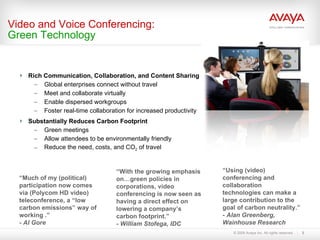
Rich Communication, Collaboration, and Content Sharing  Global enterprises connect without travel Meet and collaborate virtually Enable dispersed workgroups Foster real-time collaboration for increased productivity Substantially Reduces Carbon Footprint Green meetings Allow attendees to be environmentally friendly Reduce the need, costs, and CO 2  of travel Video and Voice Conferencing: Green Technology “ With the growing emphasis on…green policies in corporations, video conferencing is now seen as having a direct effect on lowering a company’s carbon footprint.” - William Stofega, IDC “ Using (video) conferencing and collaboration technologies can make a large contribution to the goal of carbon neutrality.” - Alan Greenberg, Wainhouse Research “ Much of my (political) participation now comes via (Polycom HD video) teleconference, a “low carbon emissions” way of working .” - Al Gore
Why consider an in-house conferencing solution? New desktop UC application like MOC, Lotus Sametime and Avaya One-X Portal offer significant worker productivity gains; Audio conferencing is a key element It is difficult to integrate these solution with a hosted conferencing service If Meeting Exchange is not part of their UC solution, customers could  end up with a competitive audio bridge on their network in order to take advantage of these capabilities Improved Business Continuity capabilities/ reduce Business Risk Displacement of workers is a real possibility; enable employees to work from any location, in the event that they cannot get to an office Maintain communication & collaboration capability in a crisis situation Telecommuting is becoming more popular; collaboration tools are key to successful virtual working In 2008,   72%   US workforce will be remote and mobile 89  of top 100 US companies offer telecommuting
Why consider an in-house conferencing solution? The ROI is compelling FCE IP telephony deployments and changes in how and where we work have dramatically changed the value proposition for premise-based conferencing 40%-60% of voice traffic on many corporate networks is used for conferencing  Running conferencing traffic on an IP network reduces spending  further by eliminating transport costs Average customers realize an ROI in about 6 months and save up to 50% on conferencing expenses vs. outsourced services Go Green For every 3 meetings held by conference call instead of flying cross-country, it would be like taking a car off the road for an entire year The average commuter burns 340 gallons of gas & creates a 3.4 ton cloud of CO2 a year. Teleworking, even occasionally, can cut that figure significantly.
Sample Conferencing ROI Customer scenario using Service Provider: Company with up to 8,500 employees Audio conferencing:  Using 1.8 million minutes per month Monthly service provider charges: $88,400 ($0.05/minute rate) Total annual spend:  $1,060,800 -------------------------------------------------------------------------------- Avaya recommendation :   600-port  Meeting Exchange (SIP-based S6200)  Total system purchase cost (cost of entry):   $539,000 (list price) Months to payback:   5 months Average monthly savings compared with outsourced services  (after 1 st  month): $85,000  Expected 3-year cost savings:  $3m *Best value delivered where there are the largest number of on-net users
Sample Conferencing ROI Customer scenario using Service Provider: Company with up 1,000 employees Audio conferencing:  Using around 200,000 minutes per month Monthly service provider charges: $10,000 ($0.05/minute rate for 100k minutes) Total annual spend:  $120,000 -------------------------------------------------------------------------------- Avaya recommendation :   72-port  Meeting Exchange (SIP-based S6200) Total system purchase cost (cost of entry):   $74k (list price) Months to payback:  6  months  Average monthly savings compared with outsourced services  (after 1 st  month): $8,600  Best value delivered where there are the largest number of on-network users
Avaya Meeting Exchange Designed and optimized to support today’s converged IP network infrastructures utilizing SIP for call control. Can be easily deployed in traditional TDM voice networks with the use of a gateway (internal PCI board or external standalone gateway). Can be combined with other conferencing applications to increase usability and create more user friendly collaboration solutions.  Runs on a Linux Operating system Scales from 20 to 2000 concurrent participants in a single bridge (market leading scalability) Supports reservation-less, scheduled meet-me, event and alert conferencing types . Full-featured voice conferencing  software  application
Meeting Exchange Portfolio Conferencing for Small to Midsize Organizations Scheduled or Reservation-less for up to  300 users. Simple, cost-effective deployment & management; channel ready. Integration  w/  Sametime Web Conferencing; click-to-conference with Sametime Scheduling via Outlook & Notes Practical, streamlined feature set. Supported by S6100 platform Meeting Exchange Express Scheduled or Reservation-less for up to 2,000 users per platform (up to 12k with connected systems). Full featured, high capacity, high performance audio conferencing. Integration with Avaya Web Conferencing, Sametime, Adobe Connect Integration with Microsoft Office Communicator for click-to-conference Integration w/ UC and enterprise applications from Avaya & leading vendors. Supported by S6200 or S6800 platforms Conferencing for Enterprises & Service Providers Meeting Exchange Enterprise
Avaya Meeting Exchange Enterprise Features Event/Attended conferences The Avaya Conferencing Bridge supports a full range of Operator-attended conferencing capabilities.  Scheduled unattended conferences The Avaya Conferencing Bridge can also permit conference Participants to dial directly into the system and access their conference without any attendant assistance .  Reservation-less – ‘On Demand’ conferences The Avaya Conferencing Bridge can permit first-come-first-serve reservation-less conferences.  Port resources are allocated on a as needed basis. Simultaneous support for multiple conference types
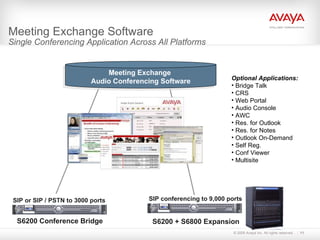
Meeting Exchange Software Single Conferencing Application Across All Platforms   SIP or SIP / PSTN to 3000 ports SIP conferencing to 9,000 ports Meeting Exchange  Audio Conferencing Software Optional Applications: Bridge Talk CRS Web Portal Audio Console AWC Res. for Outlook Res. for Notes Outlook On-Demand Self Reg. Conf Viewer Multisite S6200 Conference Bridge S6200 + S6800 Expansion
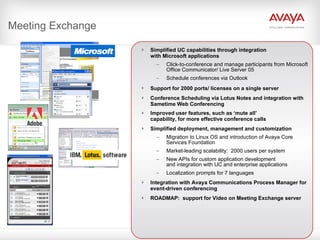
Meeting Exchange Simplified UC capabilities through integration  with Microsoft applications Click-to-conference and manage participants from Microsoft Office Communicator/ Live Server 05 Schedule conferences via Outlook Support for 2000 ports/ licenses on a single server   Conference Scheduling via Lotus Notes and integration with Sametime Web Conferencing Improved   user features, such as ‘mute all’  capability,   for more effective conference calls   Simplified deployment, management and customization Migration to Linux OS and introduction of Avaya Core Services Foundation Market-leading scalability:  2000 users per system New APIs for custom application development  and integration with UC and enterprise applications Localization prompts for 7 languages Integration with Avaya Communications Process Manager for event-driven conferencing ROADMAP:  support for Video on Meeting Exchange server
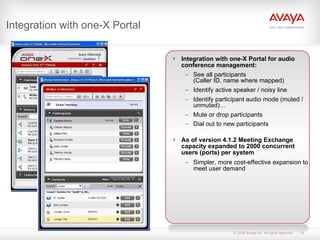
Integration with one-X Portal Integration with one-X Portal for audio conference management: See all participants (Caller ID, name where mapped) Identify active speaker / noisy line Identify participant audio mode (muted / unmuted)… Mute or drop participants Dial out to new participants As of version 4.1.2 Meeting Exchange capacity expanded to 2000 concurrent users (ports) per system Simpler, more cost-effective expansion to meet user demand
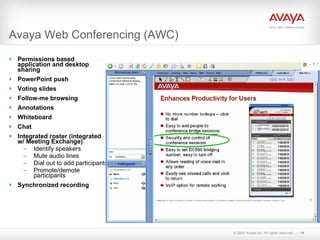
Avaya Web Conferencing (AWC) Permissions based application and desktop sharing PowerPoint push Voting slides Follow-me browsing Annotations Whiteboard Chat Integrated roster (integrated w/ Meeting Exchange) Identify speakers Mute audio lines Dial out to add participants Promote/demote participants Synchronized recording
AWC – Recording & Playback Simultaneously records audio AND web  Playback via Windows Media Player Manage recordings via web interface Requires a recording and streaming server Runs on Windows Server 2003 Hardware Supported -Avaya provided: Dell Poweredge 2900 Includes Dialogic PCI voice interface card
Audio Enabling Microsoft Applications Integrating Meeting Exchange Enterprise with Microsoft applications  delivers the following capabilities: Schedule  conferences from Microsoft Outlook Click-to-Conference  from Microsoft Office Communicator (MOC)   Control audio conference from MOC interface (mute, disconnect, etc.) Click-to-Conference  from Microsoft Outlook Control audio   conference  from Live Meeting interface
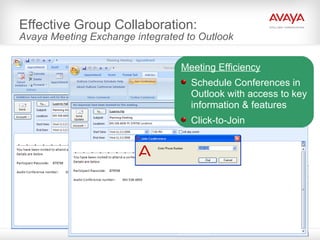
Effective Group Collaboration: Avaya Meeting Exchange integrated to Outlook Meeting Efficiency Schedule Conferences in Outlook with access to key information & features Click-to-Join
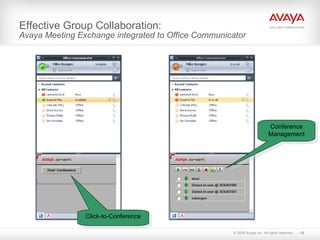
Effective Group Collaboration: Avaya Meeting Exchange integrated to Office Communicator Click-to-Conference Conference Management
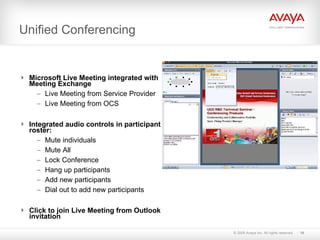
Unified Conferencing Microsoft Live Meeting integrated with Meeting Exchange Live Meeting from Service Provider Live Meeting from OCS Integrated audio controls in participant roster: Mute individuals Mute All Lock Conference Hang up participants Add new participants Dial out to add new participants Click to join Live Meeting from Outlook invitation
IBM Lotus Notes and Sametime Integration Meeting Exchange Express and Enterprise can be integrated with IBM Lotus Notes and Sametime. Points of integration include: New Notes-ST Adapter for 5.0 now supports Lotus Notes 7.0 Audio Conference Scheduling Lotus Notes 7.0 Click to Call (with Sametime 7.5.1) Sametime 7.5.1 Audio Conference Scheduling Sametime 7.5.1 Web Conferencing with Audio participant roster integration Sametime 7.5.1 Connect Client (IM) Client Click to Call Offer Structure CD for the Adapter software 9-tier material structure
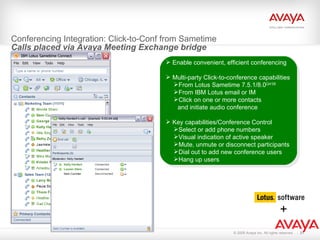
Conferencing Integration: Click-to-Conf from Sametime  Calls placed via Avaya Meeting Exchange bridge Enable convenient, efficient conferencing Multi-party Click-to-conference capabilities From Lotus Sametime 7.5.1/8.0 Q4’08 From IBM Lotus email or IM Click on one or more contacts  and initiate audio conference Key capabilities/Conference Control Select or add phone numbers Visual indication of active speaker Mute, unmute or disconnect participants  Dial out to add new conference users Hang up users +
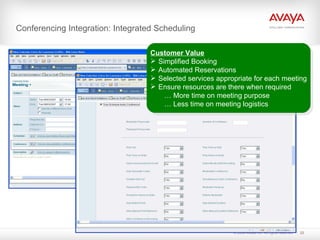
Conferencing Integration: Integrated Scheduling Customer Value   Simplified Booking Automated Reservations Selected services appropriate for each meeting Ensure resources are there when required   … More time on meeting purpose   …   Less time on meeting logistics
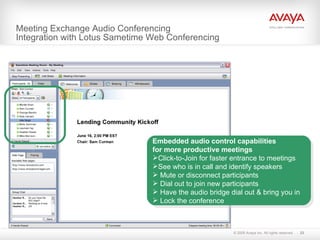
Meeting Exchange Audio Conferencing  Integration with Lotus Sametime Web Conferencing Embedded audio control capabilities for more productive meetings Click-to-Join for faster entrance to meetings  See who is in call and identify speakers Mute or disconnect participants Dial out to join new participants Have the audio bridge dial out & bring you in Lock the conference
Video Solutions
Value Proposition for Video Increase cost efficiencies Improve employee productivity Enhance performance of global infrastructure Simplify vendor relationship: Avaya provides complete solution Natural extension of voice calling  Conference, transfer or route the call & video goes with it Dial an extension & automatically add video Launch video from Softphone when working remotely  Drive efficient workflow with face-to-face interaction User Business
Value Proposition for Video Adopt a single, converged IP infrastructure for voice and video Simpler to deploy and manage across the enterprise Deploy a single network management system for voice and video Ensure optimal performance with bandwidth management Leverage existing infrastructure (Avaya Communication Manager) and IP network; just add video Standards based solution ensures simple  integration IT
What’s New in Video Video-enabled Avaya one-X Communicator Continued partnerships with Polycom and  Tandberg, leveraging leading video products Improve customer service w/ video  applications in Banking, Retail, Branch or  any virtual call center Optimize worker effectiveness by making  video easier to use: 6-way ad-hoc video conferencing, including support by  Meeting Exchange Support for SIP to H.323 video Tandberg Desktop Videophone for  point-to-point “pick up and dial” video  Increase business agility and lower costs by using video to reduce travel: Support for Polycom High Definition video endpoints and RPX immersive room system (Telepresence) All solutions leverage Communication Manager as a multimedia communications platform
Solution View Polycom HDX4000 Polycom Powered H.323 Video Softphone
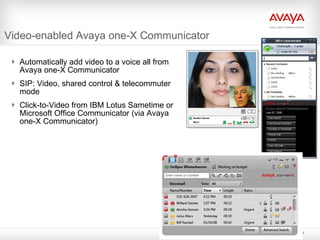
Video-enabled Avaya one-X Communicator  Automatically add video to a voice all from Avaya one-X Communicator SIP: Video, shared control & telecommuter mode Click-to-Video from IBM Lotus Sametime or Microsoft Office Communicator (via Avaya one-X Communicator)
Tandberg Videophone Pick up & dial phone as usual; video “appears” on the screen Includes a keypad and handset like a standard telephone Make audio only calls as well as point-to-point video calls, or participate in multi-point video calls through a video bridge Value Proposition Enable ad-hoc, face-to-face communication from the convenience of a desk phone. Significantly, yet cost-effectively enhance communications by adding visual context  (less expensive than full video conf solution) Easily rollout across the organization with minimal training; single device with a simple user interface and features. Deploy on desktop, in home office or in remote/ branch office
Executives, leaders, doctors, attorneys, commanders and education specialists who are looking for the UltimateHD™ experience  HDX 4000 Desktop Save travel cost and time by having meetings that are “Just Like Being There” Small footprint, personal desktop system Supports PC monitor and video conference with multiple shared screen layout options 5 Mega-pixel Camera with pan / tilt / zoom Stereo Speakers for rich multi-media sound Crisp and clear full motion content sharing Communications are confidential and secure using Advanced Encryption standard (AES)
Support for Polycom RPX  Immersive Video for Conference Rooms Avaya resells the Polycom RPX (RealPresence Experience) immersive room system for high end, executive conference rooms. RPX delivers the best quality video experience available Truly immersive environment, all surrounding, finely tuned, HD quality video Includes  everything  required for a stand-alone, exec. conference room Value Proposition Highest quality tools specifically designed for executives  Lower cost of ownership Sweet-spot pricing for product and services; mobile configuration Standards based video technology HDX interoperable w/ legacy & competitive  standards-based systems Comprehensive service package  delivered by Polycom to ensure  smooth install and rollout
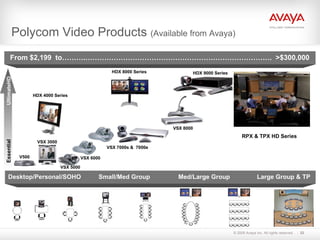
Polycom Video Products  (Available from Avaya) VSX 7000s &  7000e VSX 5000 HDX 9000 Series VSX 6000 HDX 4000 Series RPX & TPX HD Series VSX 8000 HDX 8000 Series UltimateHD Essential VSX 3000 V500 From $2,199  to……….…………………………………………………………………….  >$300,000 Desktop/Personal/SOHO  Small/Med Group Med/Large Group   Large Group & TP
Vertical & Customer Service Video Applications
Industry Specific Applications Productivity and    improved service Maintain progress on a deal w/ impromptu video meetings Improve service through face-to-face client interaction Reduce travel for dispersed or remote workers Branch banks Offer a ‘virtual’ banker to speed mortgage closings Connect customers with specialty services / resources not available at every location Education Distance learning Online courses Education for remote or homebound students Instructor development/ training Access to specialty information/ programs Virtual field trips, guest presenters Everyday staff meetings for dispersed instructors and/or administrators Financial Services Government Telejustice Video arraignments Remote testimony Parole board hearings Crisis Preparedness Advanced communication capabilities for remote responders Communications Continuity Communication and training Agency, district, state or nation wide Healthcare Rural medicine / telemedecine Remote clinic consultation Consultation for traveling patients Collaborative patient treatment between physicians/ med ctrs Psychiatric consults Access to distributed specialty knowledge Continuing education Live view of procedures
Video in the Contact Center or Branch:  Scenarios Resident Expert Offer broader range of services to customers at branch locations via live “face to face” access to experts in other locations Virtual Help Desk  Provide efficient service to callers or online help requests using visual context. Offer streaming self help video based help request (i.e. how to change a printer cartridge, etc) Video Customer Service in Retail / Branch Use video kiosks in branch locations to  provide immediate 2-way service with visual context, such as troubleshooting problems with a consumer product
Case Study: Video Assistance for Retailers  Ever-present Customer Service at Wireless Carrier Retail Locations Business issues/ challenges Highly competitive industry; need stellar customer service experience to    reduce churn and maintain customer satisfaction. Inadequate tech support in retail stores (too expensive to staff tech support    agents in every location or train retail associates). High mobile phone exchange rate for customers in stores (retail staff quick   to exchange phones due to lack of tech knowledge).  Impact of the problem on the business Not maximizing customer satisfaction (risking churn) due to inability to    provide on-site technical support. Leaving money on the table (longer customers spend in store and more    satisfied they are, the more they will spend on other products/ services). Incurring high exchange costs resulting from in-store swap rather than repair Solution Reinvent the retail store experience via technology innovation. Improve customer experience; deliver  more personalized service to branch or    remote locations through  2-way visual context for agent and customer, such as    ability to troubleshoot problems with a consumer product. Results Reducing live agent and training costs  Improving customer satisfaction / drive loyalty / decrease churn  Growing customer base / market share and strengthen brand
Case Study: Video Branch Assistance  Enhanced Customer Service at Branch Banks Business issues/ challenges Losing market share in competitive industry and   not maximizing revenue potential from customer base. Inability to leverage expert resources, and therefore, offer full range of services    at all branch locations results in inconsistent service and lost revenue    opportunity. Impact of the problem on the business Not maximizing revenue per customer due to inability to offer full range of    services / products at every branch location. Not leveraging core expertise across branches. Solution Leverage resident experts across multiple branch locations cost-effectively.  Provide more efficient service through visual context (see expert and refer to    other sources –account balances, websites, etc.) Drive customer sat by providing faster, more secure virtual service. Results Maximizing expert resources (reducing costs, leveraging knowledge base) Improving customer satisfaction / loyalty Driving new revenue generation with expanded service offerings Achieving competitive / market share advantage
Case Study: Video Interpreting for Healthcare  Flexible, Effective Interpreting Throughout the Medical Center Business issues/ challenges Growing demand for interpreters each year outpacing increase in  interpreter resources. Limited resources requires complex scheduling between the clinics and interpreter services.  Very large percentage of the time spent during each encounter is wasted through transportation, no shows, and simply waiting with the patient. Interpreter services is a critical function that is a direct cost to the hospital (patients are not billed for interpreter services). A telephonic interpreter call center has been implemented but with limited success. Impact of the problem on the business Wasting costly interpreting resources, which in turn forces the hospital to outsource encounters to even more expensive external agencies. Patients who do not speak English sometimes have to wait hours for an available interpreter.  For telephonic encounters, important aspects of the conversation can be lost, and the experience is typically more frustrating for all parties involved. Solution Utilize the enhanced integration of the Avaya PBX with Polycom High Definition endpoints to provide an in-person experience but with the flexibility and efficiency of an on-demand call center.
Unified Communications Productivity Speed & Execution Effectiveness & Efficiency Content and Context Customers Simplification Availability Responsiveness Collaboration Work Flow Decision Making Social Network Cost Collaborative & Mobile  Expenses Customer control & retention Opportunity costs Environment Reduce need to travel Reduce carbon footprint Reduce energy consumption “ For every 3 meetings held by video conference instead of flying cross-country,  it would be like taking a car completely off the road for an entire year”  ( SOS live Earth )  Unified  Communications

Avaya Collaboration

  • 1.
  • 2.
    Unified Communications ProductivitySpeed & Execution Effectiveness & Efficiency Content and Context Customers Simplification Availability Responsiveness Collaboration Work Flow Decision Making Social Network Cost Collaborative & Mobile Expenses Customer control & retention Opportunity costs Environment Reduce need to travel Reduce carbon footprint Reduce energy consumption “ For every 3 meetings held by video conference instead of flying cross-country, it would be like taking a car completely off the road for an entire year” ( SOS live Earth ) Unified Communications
  • 3.
    Rich Communication, Collaboration,and Content Sharing Global enterprises connect without travel Meet and collaborate virtually Enable dispersed workgroups Foster real-time collaboration for increased productivity Substantially Reduces Carbon Footprint Green meetings Allow attendees to be environmentally friendly Reduce the need, costs, and CO 2 of travel Video and Voice Conferencing: Green Technology “ With the growing emphasis on…green policies in corporations, video conferencing is now seen as having a direct effect on lowering a company’s carbon footprint.” - William Stofega, IDC “ Using (video) conferencing and collaboration technologies can make a large contribution to the goal of carbon neutrality.” - Alan Greenberg, Wainhouse Research “ Much of my (political) participation now comes via (Polycom HD video) teleconference, a “low carbon emissions” way of working .” - Al Gore
  • 4.
    Why consider anin-house conferencing solution? New desktop UC application like MOC, Lotus Sametime and Avaya One-X Portal offer significant worker productivity gains; Audio conferencing is a key element It is difficult to integrate these solution with a hosted conferencing service If Meeting Exchange is not part of their UC solution, customers could end up with a competitive audio bridge on their network in order to take advantage of these capabilities Improved Business Continuity capabilities/ reduce Business Risk Displacement of workers is a real possibility; enable employees to work from any location, in the event that they cannot get to an office Maintain communication & collaboration capability in a crisis situation Telecommuting is becoming more popular; collaboration tools are key to successful virtual working In 2008, 72% US workforce will be remote and mobile 89 of top 100 US companies offer telecommuting
  • 5.
    Why consider anin-house conferencing solution? The ROI is compelling FCE IP telephony deployments and changes in how and where we work have dramatically changed the value proposition for premise-based conferencing 40%-60% of voice traffic on many corporate networks is used for conferencing Running conferencing traffic on an IP network reduces spending further by eliminating transport costs Average customers realize an ROI in about 6 months and save up to 50% on conferencing expenses vs. outsourced services Go Green For every 3 meetings held by conference call instead of flying cross-country, it would be like taking a car off the road for an entire year The average commuter burns 340 gallons of gas & creates a 3.4 ton cloud of CO2 a year. Teleworking, even occasionally, can cut that figure significantly.
  • 6.
    Sample Conferencing ROICustomer scenario using Service Provider: Company with up to 8,500 employees Audio conferencing: Using 1.8 million minutes per month Monthly service provider charges: $88,400 ($0.05/minute rate) Total annual spend: $1,060,800 -------------------------------------------------------------------------------- Avaya recommendation : 600-port Meeting Exchange (SIP-based S6200) Total system purchase cost (cost of entry): $539,000 (list price) Months to payback: 5 months Average monthly savings compared with outsourced services (after 1 st month): $85,000 Expected 3-year cost savings: $3m *Best value delivered where there are the largest number of on-net users
  • 7.
    Sample Conferencing ROICustomer scenario using Service Provider: Company with up 1,000 employees Audio conferencing: Using around 200,000 minutes per month Monthly service provider charges: $10,000 ($0.05/minute rate for 100k minutes) Total annual spend: $120,000 -------------------------------------------------------------------------------- Avaya recommendation : 72-port Meeting Exchange (SIP-based S6200) Total system purchase cost (cost of entry): $74k (list price) Months to payback: 6 months Average monthly savings compared with outsourced services (after 1 st month): $8,600 Best value delivered where there are the largest number of on-network users
  • 8.
    Avaya Meeting ExchangeDesigned and optimized to support today’s converged IP network infrastructures utilizing SIP for call control. Can be easily deployed in traditional TDM voice networks with the use of a gateway (internal PCI board or external standalone gateway). Can be combined with other conferencing applications to increase usability and create more user friendly collaboration solutions. Runs on a Linux Operating system Scales from 20 to 2000 concurrent participants in a single bridge (market leading scalability) Supports reservation-less, scheduled meet-me, event and alert conferencing types . Full-featured voice conferencing software application
  • 9.
    Meeting Exchange PortfolioConferencing for Small to Midsize Organizations Scheduled or Reservation-less for up to 300 users. Simple, cost-effective deployment & management; channel ready. Integration w/ Sametime Web Conferencing; click-to-conference with Sametime Scheduling via Outlook & Notes Practical, streamlined feature set. Supported by S6100 platform Meeting Exchange Express Scheduled or Reservation-less for up to 2,000 users per platform (up to 12k with connected systems). Full featured, high capacity, high performance audio conferencing. Integration with Avaya Web Conferencing, Sametime, Adobe Connect Integration with Microsoft Office Communicator for click-to-conference Integration w/ UC and enterprise applications from Avaya & leading vendors. Supported by S6200 or S6800 platforms Conferencing for Enterprises & Service Providers Meeting Exchange Enterprise
  • 10.
    Avaya Meeting ExchangeEnterprise Features Event/Attended conferences The Avaya Conferencing Bridge supports a full range of Operator-attended conferencing capabilities. Scheduled unattended conferences The Avaya Conferencing Bridge can also permit conference Participants to dial directly into the system and access their conference without any attendant assistance . Reservation-less – ‘On Demand’ conferences The Avaya Conferencing Bridge can permit first-come-first-serve reservation-less conferences. Port resources are allocated on a as needed basis. Simultaneous support for multiple conference types
  • 11.
    Meeting Exchange SoftwareSingle Conferencing Application Across All Platforms SIP or SIP / PSTN to 3000 ports SIP conferencing to 9,000 ports Meeting Exchange Audio Conferencing Software Optional Applications: Bridge Talk CRS Web Portal Audio Console AWC Res. for Outlook Res. for Notes Outlook On-Demand Self Reg. Conf Viewer Multisite S6200 Conference Bridge S6200 + S6800 Expansion
  • 12.
    Meeting Exchange SimplifiedUC capabilities through integration with Microsoft applications Click-to-conference and manage participants from Microsoft Office Communicator/ Live Server 05 Schedule conferences via Outlook Support for 2000 ports/ licenses on a single server Conference Scheduling via Lotus Notes and integration with Sametime Web Conferencing Improved user features, such as ‘mute all’ capability, for more effective conference calls Simplified deployment, management and customization Migration to Linux OS and introduction of Avaya Core Services Foundation Market-leading scalability: 2000 users per system New APIs for custom application development and integration with UC and enterprise applications Localization prompts for 7 languages Integration with Avaya Communications Process Manager for event-driven conferencing ROADMAP: support for Video on Meeting Exchange server
  • 13.
    Integration with one-XPortal Integration with one-X Portal for audio conference management: See all participants (Caller ID, name where mapped) Identify active speaker / noisy line Identify participant audio mode (muted / unmuted)… Mute or drop participants Dial out to new participants As of version 4.1.2 Meeting Exchange capacity expanded to 2000 concurrent users (ports) per system Simpler, more cost-effective expansion to meet user demand
  • 14.
    Avaya Web Conferencing(AWC) Permissions based application and desktop sharing PowerPoint push Voting slides Follow-me browsing Annotations Whiteboard Chat Integrated roster (integrated w/ Meeting Exchange) Identify speakers Mute audio lines Dial out to add participants Promote/demote participants Synchronized recording
  • 15.
    AWC – Recording& Playback Simultaneously records audio AND web Playback via Windows Media Player Manage recordings via web interface Requires a recording and streaming server Runs on Windows Server 2003 Hardware Supported -Avaya provided: Dell Poweredge 2900 Includes Dialogic PCI voice interface card
  • 16.
    Audio Enabling MicrosoftApplications Integrating Meeting Exchange Enterprise with Microsoft applications delivers the following capabilities: Schedule conferences from Microsoft Outlook Click-to-Conference from Microsoft Office Communicator (MOC) Control audio conference from MOC interface (mute, disconnect, etc.) Click-to-Conference from Microsoft Outlook Control audio conference from Live Meeting interface
  • 17.
    Effective Group Collaboration:Avaya Meeting Exchange integrated to Outlook Meeting Efficiency Schedule Conferences in Outlook with access to key information & features Click-to-Join
  • 18.
    Effective Group Collaboration:Avaya Meeting Exchange integrated to Office Communicator Click-to-Conference Conference Management
  • 19.
    Unified Conferencing MicrosoftLive Meeting integrated with Meeting Exchange Live Meeting from Service Provider Live Meeting from OCS Integrated audio controls in participant roster: Mute individuals Mute All Lock Conference Hang up participants Add new participants Dial out to add new participants Click to join Live Meeting from Outlook invitation
  • 20.
    IBM Lotus Notesand Sametime Integration Meeting Exchange Express and Enterprise can be integrated with IBM Lotus Notes and Sametime. Points of integration include: New Notes-ST Adapter for 5.0 now supports Lotus Notes 7.0 Audio Conference Scheduling Lotus Notes 7.0 Click to Call (with Sametime 7.5.1) Sametime 7.5.1 Audio Conference Scheduling Sametime 7.5.1 Web Conferencing with Audio participant roster integration Sametime 7.5.1 Connect Client (IM) Client Click to Call Offer Structure CD for the Adapter software 9-tier material structure
  • 21.
    Conferencing Integration: Click-to-Conffrom Sametime Calls placed via Avaya Meeting Exchange bridge Enable convenient, efficient conferencing Multi-party Click-to-conference capabilities From Lotus Sametime 7.5.1/8.0 Q4’08 From IBM Lotus email or IM Click on one or more contacts and initiate audio conference Key capabilities/Conference Control Select or add phone numbers Visual indication of active speaker Mute, unmute or disconnect participants Dial out to add new conference users Hang up users +
  • 22.
    Conferencing Integration: IntegratedScheduling Customer Value Simplified Booking Automated Reservations Selected services appropriate for each meeting Ensure resources are there when required … More time on meeting purpose … Less time on meeting logistics
  • 23.
    Meeting Exchange AudioConferencing Integration with Lotus Sametime Web Conferencing Embedded audio control capabilities for more productive meetings Click-to-Join for faster entrance to meetings See who is in call and identify speakers Mute or disconnect participants Dial out to join new participants Have the audio bridge dial out & bring you in Lock the conference
  • 24.
  • 25.
    Value Proposition forVideo Increase cost efficiencies Improve employee productivity Enhance performance of global infrastructure Simplify vendor relationship: Avaya provides complete solution Natural extension of voice calling Conference, transfer or route the call & video goes with it Dial an extension & automatically add video Launch video from Softphone when working remotely Drive efficient workflow with face-to-face interaction User Business
  • 26.
    Value Proposition forVideo Adopt a single, converged IP infrastructure for voice and video Simpler to deploy and manage across the enterprise Deploy a single network management system for voice and video Ensure optimal performance with bandwidth management Leverage existing infrastructure (Avaya Communication Manager) and IP network; just add video Standards based solution ensures simple integration IT
  • 27.
    What’s New inVideo Video-enabled Avaya one-X Communicator Continued partnerships with Polycom and Tandberg, leveraging leading video products Improve customer service w/ video applications in Banking, Retail, Branch or any virtual call center Optimize worker effectiveness by making video easier to use: 6-way ad-hoc video conferencing, including support by Meeting Exchange Support for SIP to H.323 video Tandberg Desktop Videophone for point-to-point “pick up and dial” video Increase business agility and lower costs by using video to reduce travel: Support for Polycom High Definition video endpoints and RPX immersive room system (Telepresence) All solutions leverage Communication Manager as a multimedia communications platform
  • 28.
    Solution View PolycomHDX4000 Polycom Powered H.323 Video Softphone
  • 29.
    Video-enabled Avaya one-XCommunicator Automatically add video to a voice all from Avaya one-X Communicator SIP: Video, shared control & telecommuter mode Click-to-Video from IBM Lotus Sametime or Microsoft Office Communicator (via Avaya one-X Communicator)
  • 30.
    Tandberg Videophone Pickup & dial phone as usual; video “appears” on the screen Includes a keypad and handset like a standard telephone Make audio only calls as well as point-to-point video calls, or participate in multi-point video calls through a video bridge Value Proposition Enable ad-hoc, face-to-face communication from the convenience of a desk phone. Significantly, yet cost-effectively enhance communications by adding visual context (less expensive than full video conf solution) Easily rollout across the organization with minimal training; single device with a simple user interface and features. Deploy on desktop, in home office or in remote/ branch office
  • 31.
    Executives, leaders, doctors,attorneys, commanders and education specialists who are looking for the UltimateHD™ experience HDX 4000 Desktop Save travel cost and time by having meetings that are “Just Like Being There” Small footprint, personal desktop system Supports PC monitor and video conference with multiple shared screen layout options 5 Mega-pixel Camera with pan / tilt / zoom Stereo Speakers for rich multi-media sound Crisp and clear full motion content sharing Communications are confidential and secure using Advanced Encryption standard (AES)
  • 32.
    Support for PolycomRPX Immersive Video for Conference Rooms Avaya resells the Polycom RPX (RealPresence Experience) immersive room system for high end, executive conference rooms. RPX delivers the best quality video experience available Truly immersive environment, all surrounding, finely tuned, HD quality video Includes everything required for a stand-alone, exec. conference room Value Proposition Highest quality tools specifically designed for executives Lower cost of ownership Sweet-spot pricing for product and services; mobile configuration Standards based video technology HDX interoperable w/ legacy & competitive standards-based systems Comprehensive service package delivered by Polycom to ensure smooth install and rollout
  • 33.
    Polycom Video Products (Available from Avaya) VSX 7000s & 7000e VSX 5000 HDX 9000 Series VSX 6000 HDX 4000 Series RPX & TPX HD Series VSX 8000 HDX 8000 Series UltimateHD Essential VSX 3000 V500 From $2,199 to……….……………………………………………………………………. >$300,000 Desktop/Personal/SOHO Small/Med Group Med/Large Group Large Group & TP
  • 34.
    Vertical & CustomerService Video Applications
  • 35.
    Industry Specific ApplicationsProductivity and improved service Maintain progress on a deal w/ impromptu video meetings Improve service through face-to-face client interaction Reduce travel for dispersed or remote workers Branch banks Offer a ‘virtual’ banker to speed mortgage closings Connect customers with specialty services / resources not available at every location Education Distance learning Online courses Education for remote or homebound students Instructor development/ training Access to specialty information/ programs Virtual field trips, guest presenters Everyday staff meetings for dispersed instructors and/or administrators Financial Services Government Telejustice Video arraignments Remote testimony Parole board hearings Crisis Preparedness Advanced communication capabilities for remote responders Communications Continuity Communication and training Agency, district, state or nation wide Healthcare Rural medicine / telemedecine Remote clinic consultation Consultation for traveling patients Collaborative patient treatment between physicians/ med ctrs Psychiatric consults Access to distributed specialty knowledge Continuing education Live view of procedures
  • 36.
    Video in theContact Center or Branch: Scenarios Resident Expert Offer broader range of services to customers at branch locations via live “face to face” access to experts in other locations Virtual Help Desk Provide efficient service to callers or online help requests using visual context. Offer streaming self help video based help request (i.e. how to change a printer cartridge, etc) Video Customer Service in Retail / Branch Use video kiosks in branch locations to provide immediate 2-way service with visual context, such as troubleshooting problems with a consumer product
  • 37.
    Case Study: VideoAssistance for Retailers Ever-present Customer Service at Wireless Carrier Retail Locations Business issues/ challenges Highly competitive industry; need stellar customer service experience to reduce churn and maintain customer satisfaction. Inadequate tech support in retail stores (too expensive to staff tech support agents in every location or train retail associates). High mobile phone exchange rate for customers in stores (retail staff quick to exchange phones due to lack of tech knowledge). Impact of the problem on the business Not maximizing customer satisfaction (risking churn) due to inability to provide on-site technical support. Leaving money on the table (longer customers spend in store and more satisfied they are, the more they will spend on other products/ services). Incurring high exchange costs resulting from in-store swap rather than repair Solution Reinvent the retail store experience via technology innovation. Improve customer experience; deliver more personalized service to branch or remote locations through 2-way visual context for agent and customer, such as ability to troubleshoot problems with a consumer product. Results Reducing live agent and training costs Improving customer satisfaction / drive loyalty / decrease churn Growing customer base / market share and strengthen brand
  • 38.
    Case Study: VideoBranch Assistance Enhanced Customer Service at Branch Banks Business issues/ challenges Losing market share in competitive industry and not maximizing revenue potential from customer base. Inability to leverage expert resources, and therefore, offer full range of services at all branch locations results in inconsistent service and lost revenue opportunity. Impact of the problem on the business Not maximizing revenue per customer due to inability to offer full range of services / products at every branch location. Not leveraging core expertise across branches. Solution Leverage resident experts across multiple branch locations cost-effectively. Provide more efficient service through visual context (see expert and refer to other sources –account balances, websites, etc.) Drive customer sat by providing faster, more secure virtual service. Results Maximizing expert resources (reducing costs, leveraging knowledge base) Improving customer satisfaction / loyalty Driving new revenue generation with expanded service offerings Achieving competitive / market share advantage
  • 39.
    Case Study: VideoInterpreting for Healthcare Flexible, Effective Interpreting Throughout the Medical Center Business issues/ challenges Growing demand for interpreters each year outpacing increase in interpreter resources. Limited resources requires complex scheduling between the clinics and interpreter services. Very large percentage of the time spent during each encounter is wasted through transportation, no shows, and simply waiting with the patient. Interpreter services is a critical function that is a direct cost to the hospital (patients are not billed for interpreter services). A telephonic interpreter call center has been implemented but with limited success. Impact of the problem on the business Wasting costly interpreting resources, which in turn forces the hospital to outsource encounters to even more expensive external agencies. Patients who do not speak English sometimes have to wait hours for an available interpreter. For telephonic encounters, important aspects of the conversation can be lost, and the experience is typically more frustrating for all parties involved. Solution Utilize the enhanced integration of the Avaya PBX with Polycom High Definition endpoints to provide an in-person experience but with the flexibility and efficiency of an on-demand call center.
  • 40.
    Unified Communications ProductivitySpeed & Execution Effectiveness & Efficiency Content and Context Customers Simplification Availability Responsiveness Collaboration Work Flow Decision Making Social Network Cost Collaborative & Mobile Expenses Customer control & retention Opportunity costs Environment Reduce need to travel Reduce carbon footprint Reduce energy consumption “ For every 3 meetings held by video conference instead of flying cross-country, it would be like taking a car completely off the road for an entire year” ( SOS live Earth ) Unified Communications

Editor's Notes

  • #7 Industry Average: .5 conference calls per employee per month  Average time for each call: 52 minutes Average number of participants on a call: 8
  • #8 Industry Average: .5 conference calls per employee per month  Average time for each call: 52 minutes Average number of participants on a call: 8
  • #14 Value Proposition for using one-X Portal to manage call: More secure: know who is on the call Save time no need for roll call know who has come and who has gone add new members easily Eliminate time wasters “ who just joined?” or “did we lose someone?” quickly identify noisy lines or music on hold then mute/drop Greater context: know who is talking More effective meetings more control allows for focus on meeting purpose and less on logistics and technology Value Proposition for expanded capacity: allows more cost-effective expansion MX 4.1.2 will replace the high cost/ low margin Convedia solution at the up to 2000 port size 500-port MX 4.1.2 solution with S6200 is 38% less expensive than same size S6800 system and delivers better margins For the customer: Faster ROI For Avaya: Higher margins and easier solution to sell to this market
  • #15 Supports up to 750 users in a single server Deployment Cluster servers configuration can scale to support up to 32,000 concurrent users Supports full redundant server clusters Maximum of 500 user per conference Runs on Windows Sever 2003 Server can be place inside or outside the firewall No user data stored on the servers Supports SSL encryption Single Avaya Web Conferencing server/cluster can support multiple audio bridges. Separate URL for each bridge Fully redundant dual server deployment option Hardware Supported: Avaya provided; IBM X336, Dell Poweredge 1950, HP DL 380 Customer provided: Compatible off-the-shelf Intel (Pentium/Xeon) Server
  • #26 BUSINESS: Increase cost efficiencies Lower TCO from single network support for voice, data & video Increase reach & extend global footprint more cost-effectively Reduce cost & time of travel by using video for face-to-face interaction Increase employee productivity Connect and manage remote or dispersed employees more efficiently Maximize people resources via real-time access to dispersed experts Improve performance of global infrastructure Reduce the complexities of doing business worldwide; manage people and projects more easily across multiple locations Simplify vendor relationship by leveraging Avaya for complete solution Simplified procurement / reduced suppliers Specialized deployment and support services
  • #31 Owner: Development Manager Primary Input: Product Team Leader to confirm in-scope functionality Presenter: Product Team Leader
  • #37 Virtual Help Desk Customer calls or requests online assistance changing a printer cartridge System or agent selects video based on help request (i.e. Video clip on how to change printer cartridge) Agent can cross-sell, upsell (recommend new printer and show customer where to find it on website, etc) Video Customer Service in Retail/ Branch Customer visits retail location for service with mobile phone Live agent accessible via video kiosk to troubleshoot by looking at actual phone via video, and walking customer through how to configure phone, etc Provide enhanced service: demonstrate new features, upgrade service plan, walk through how to use on-line bill pay, etc. Resident Expert Customer visits branch bank locations requiring services not available at that location Live broker accessible via video to provide secure, “face-to-face” service, allowing customer to access more services and complete transactions more quickly. Value Reduce live agent costs Drive customer retention and strength of brand Achieve competitive advantage via differentiated services Generate incremental revenue: cross-sell, up-sell, provide new services Provide faster service and confirmed transactions Enhanced security via face recognition and using video as additional stream for security questions
  • #38 1. The main business problem was the need to gain advantage in a highly competitive market. One way to do that is to differentiate the offering by providing more efficient and thorough customer service at any retail branch location. In a way, this was more of an opportunity than a problem. 2. Live agent costs are significant and expert resources are spread thin, so finding a way to extend the expert service to more locations was key. 3. Consumers are becoming more sophisticated and have a lot of choices, so being able to give them what they want quickly and efficiently is key. It needs to be easy for them to get tech support rather than immediately offering a new phone. 4. This organization’s goals for adding video customer service included: Provide faster service and confirmed transactions. Drive customer retention and strength of brand. Generate incremental revenue through new services. Reduce live agent costs by extending expert resources without needing to staff every location. Upsell/ cross sell opportunities by auto-selection of video content while a transaction is in process. Enhanced security: facial recognition while a transaction is in process. Results – a side bonus is the fact that retail associates are receiving some ‘free’ technical training on the job by engaging with the virtual tech agents when the kiosks are not in use.
  • #39 1. Financial Services organizations rely heavily on branch locations, however, they are not able to staff every location with experts in all areas. Finding a way to deliver personalized, efficient service to customers at all locations is critical to maintaining competitive advantage and customer loyalty. 2. Live agent costs are significant and expert resources are spread thin, so finding a way to extend the expert service to more locations is critical. 3 . Making transactions convenient for customers is key to maintaining satisfaction and driving new revenue per customer; applications like video help customers in any location get a consistent level of service. 4. Customers want a high level of personalized service –including face-to-face interaction– is important when dealing with financial transactions. Security is also key and being able to work with someone face-to-face aids the perception (and/or reality) of a more secure transaction.
  • #40 1. The main business problem was the need to gain advantage in a highly competitive market. One way to do that is to differentiate the offering by providing more efficient and thorough customer service at any retail branch location. In a way, this was more of an opportunity than a problem. 2. Live agent costs are significant and expert resources are spread thin, so finding a way to extend the expert service to more locations was key. 3. Consumers are becoming more sophisticated and have a lot of choices, so being able to give them what they want quickly and efficiently is key. It needs to be easy for them to get tech support rather than immediately offering a new phone. 4. This organization’s goals for adding video customer service included: Provide faster service and confirmed transactions. Drive customer retention and strength of brand. Generate incremental revenue through new services. Reduce live agent costs by extending expert resources without needing to staff every location. Upsell/ cross sell opportunities by auto-selection of video content while a transaction is in process. Enhanced security: facial recognition while a transaction is in process. Results – a side bonus is the fact that retail associates are receiving some ‘free’ technical training on the job by engaging with the virtual tech agents when the kiosks are not in use.