AUTOMATION USING
PUPPET
By Fahmie Bahweris
WHY AUTOMATION IS IMPORTANT?
• Process is time consuming.
• Process is complex or multiple steps.
• Human are error prone.
• Configuration not consistent or standardized.
• Task can be handled by junior system admin.
• Provide tools to non-technical people to handle.
• Infrastructure become agile and can change rapidly according to demand.
WHY PUPPET?
IT automation for discovering, configuring, and managing your infrastructure
• Productivity / Efficiency - IT management solutions deliver efficiencies that
enables 100s and even 1000s of nodes per sysadmin.
• Responsiveness To Business Needs - dramatically reduced the time it takes them
to deliver applications into production.
• Eliminate Configuration Drift - your nodes remain in the state you set for them,
dramatically improving service availability, reliability, scalability, and performance.
• Visibility - provides rich data sets not only of infrastructure configuration but also
of any changes to that infrastructure.
• Some things that Puppet Can Do as example:
• Wipe and reinstall two servers in 40 minutes - that would have taken close to a full day
of work without puppet
• Set up 3 new database servers in 52 minutes completely from scratch - that would have
taken well over a day without puppet
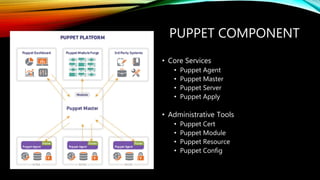
PUPPET COMPONENT
• Core Services
• Puppet Agent
• Puppet Master
• Puppet Server
• Puppet Apply
• Administrative Tools
• Puppet Cert
• Puppet Module
• Puppet Resource
• Puppet Config
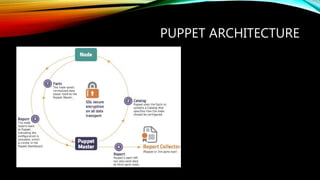
PUPPET ARCHITECTURE
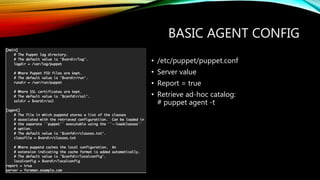
BASIC AGENT CONFIG
• /etc/puppet/puppet.conf
• Server value
• Report = true
• Retrieve ad-hoc catalog:
# puppet agent -t
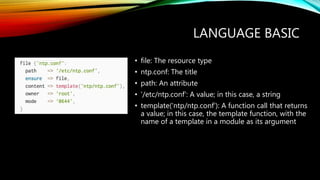
LANGUAGE BASIC
• file: The resource type
• ntp.conf: The title
• path: An attribute
• '/etc/ntp.conf': A value; in this case, a string
• template('ntp/ntp.conf'): A function call that returns
a value; in this case, the template function, with the
name of a template in a module as its argument
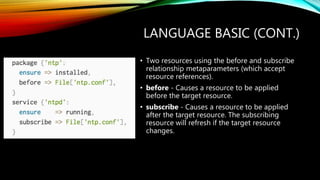
LANGUAGE BASIC (CONT.)
• Two resources using the before and subscribe
relationship metaparameters (which accept
resource references).
• before - Causes a resource to be applied
before the target resource.
• subscribe - Causes a resource to be applied
after the target resource. The subscribing
resource will refresh if the target resource
changes.
LANGUAGE BASIC (CONT.)
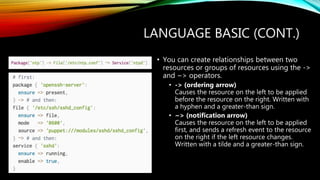
• You can create relationships between two
resources or groups of resources using the ->
and ~> operators.
• -> (ordering arrow)
Causes the resource on the left to be applied
before the resource on the right. Written with
a hyphen and a greater-than sign.
• ~> (notification arrow)
Causes the resource on the left to be applied
first, and sends a refresh event to the resource
on the right if the left resource changes.
Written with a tilde and a greater-than sign.
LANGUAGE BASIC (CONT.)
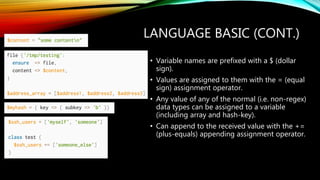
• Variable names are prefixed with a $ (dollar
sign).
• Values are assigned to them with the = (equal
sign) assignment operator.
• Any value of any of the normal (i.e. non-regex)
data types can be assigned to a variable
(including array and hash-key).
• Can append to the received value with the +=
(plus-equals) appending assignment operator.
LANGUAGE BASIC (CONT.)
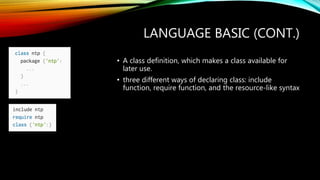
• A class definition, which makes a class available for
later use.
• three different ways of declaring class: include
function, require function, and the resource-like syntax
LANGUAGE BASIC (CONT.)
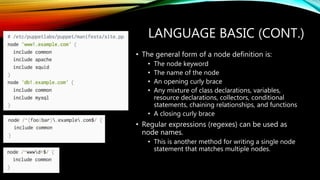
• The general form of a node definition is:
• The node keyword
• The name of the node
• An opening curly brace
• Any mixture of class declarations, variables,
resource declarations, collectors, conditional
statements, chaining relationships, and functions
• A closing curly brace
• Regular expressions (regexes) can be used as
node names.
• This is another method for writing a single node
statement that matches multiple nodes.
LANGUAGE BASIC (CONT.)
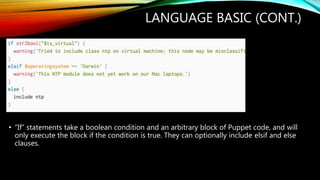
• “If” statements take a boolean condition and an arbitrary block of Puppet code, and will
only execute the block if the condition is true. They can optionally include elsif and else
clauses.
LANGUAGE BASIC (CONT.)
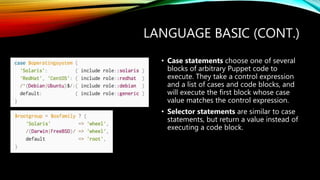
• Case statements choose one of several
blocks of arbitrary Puppet code to
execute. They take a control expression
and a list of cases and code blocks, and
will execute the first block whose case
value matches the control expression.
• Selector statements are similar to case
statements, but return a value instead of
executing a code block.
LANGUAGE BASIC (CONT.)
PUPPET RESOURCE
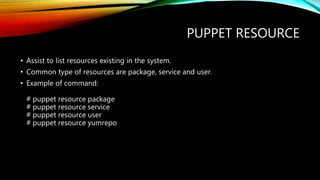
• Assist to list resources existing in the system.
• Common type of resources are package, service and user.
• Example of command:
# puppet resource package
# puppet resource service
# puppet resource user
# puppet resource yumrepo
FACTER
• collections of normalized system information used by Puppet.
• Information can be retrieved like, hostname, ip adress, cpu type, no. of cpu core,
memory size, OS family and many more. This facter information can be used for
conditional rules in puppet catalog.
• Command to retrieve system facts:
# facter
PUPPET MODULES & FORGE
• Modules are self-contained bundles of code and data.
• Write your own modules or you can download pre-built modules from the Puppet
Forge (https://forge.puppet.com/).
• Using modules:
• Modules are how Puppet finds the classes and defined types it can use.
• It automatically loads any class or defined type stored in its modules.
• To make a module available to Puppet, place it in one of the directories in Puppet’s
modulepath.
PUPPET MODULE
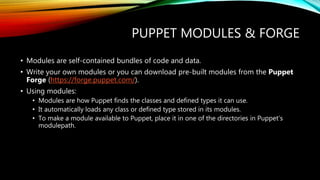
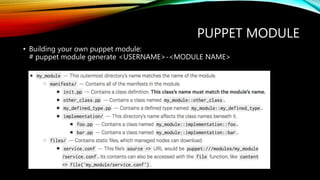
• Building your own puppet module:
# puppet module generate <USERNAME>-<MODULE NAME>
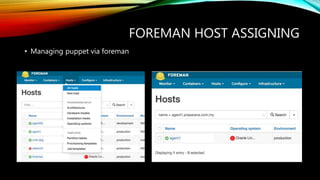
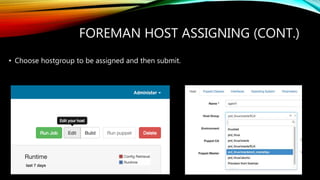
FOREMAN HOST ASSIGNING
• Managing puppet via foreman
FOREMAN HOST ASSIGNING (CONT.)
• Choose hostgroup to be assigned and then submit.
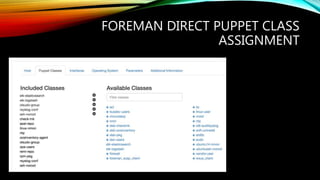
FOREMAN DIRECT PUPPET CLASS
ASSIGNMENT
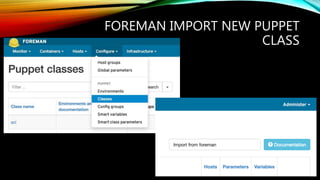
FOREMAN IMPORT NEW PUPPET
CLASS
REFERENCES
• Official documentation of Puppet: https://docs.puppet.com/puppet/3.8/reference/index.html
• Puppet repository module: https://forge.puppet.com
• The foreman documentation: https://theforeman.org/documentation.html
• Installer of puppet can be found at: https://yum.puppetlabs.com/el/6/products/x86_64/ for
Redhat based,
https://apt.puppetlabs.com/ for debian based
and https://downloads.puppetlabs.com/windows/ for windows based.
• Slide from ”System Administration Automation” by Sharuzzaman Ahmat Raslan.
• Foreman and puppet classes by Norhafiz Yaacob.

Automation using Puppet 3

  • 1.
  • 2.
    WHY AUTOMATION ISIMPORTANT? • Process is time consuming. • Process is complex or multiple steps. • Human are error prone. • Configuration not consistent or standardized. • Task can be handled by junior system admin. • Provide tools to non-technical people to handle. • Infrastructure become agile and can change rapidly according to demand.
  • 3.
    WHY PUPPET? IT automationfor discovering, configuring, and managing your infrastructure • Productivity / Efficiency - IT management solutions deliver efficiencies that enables 100s and even 1000s of nodes per sysadmin. • Responsiveness To Business Needs - dramatically reduced the time it takes them to deliver applications into production. • Eliminate Configuration Drift - your nodes remain in the state you set for them, dramatically improving service availability, reliability, scalability, and performance. • Visibility - provides rich data sets not only of infrastructure configuration but also of any changes to that infrastructure. • Some things that Puppet Can Do as example: • Wipe and reinstall two servers in 40 minutes - that would have taken close to a full day of work without puppet • Set up 3 new database servers in 52 minutes completely from scratch - that would have taken well over a day without puppet
  • 4.
    PUPPET COMPONENT • CoreServices • Puppet Agent • Puppet Master • Puppet Server • Puppet Apply • Administrative Tools • Puppet Cert • Puppet Module • Puppet Resource • Puppet Config
  • 5.
  • 6.
    BASIC AGENT CONFIG •/etc/puppet/puppet.conf • Server value • Report = true • Retrieve ad-hoc catalog: # puppet agent -t
  • 7.
    LANGUAGE BASIC • file:The resource type • ntp.conf: The title • path: An attribute • '/etc/ntp.conf': A value; in this case, a string • template('ntp/ntp.conf'): A function call that returns a value; in this case, the template function, with the name of a template in a module as its argument
  • 8.
    LANGUAGE BASIC (CONT.) •Two resources using the before and subscribe relationship metaparameters (which accept resource references). • before - Causes a resource to be applied before the target resource. • subscribe - Causes a resource to be applied after the target resource. The subscribing resource will refresh if the target resource changes.
  • 9.
    LANGUAGE BASIC (CONT.) •You can create relationships between two resources or groups of resources using the -> and ~> operators. • -> (ordering arrow) Causes the resource on the left to be applied before the resource on the right. Written with a hyphen and a greater-than sign. • ~> (notification arrow) Causes the resource on the left to be applied first, and sends a refresh event to the resource on the right if the left resource changes. Written with a tilde and a greater-than sign.
  • 10.
    LANGUAGE BASIC (CONT.) •Variable names are prefixed with a $ (dollar sign). • Values are assigned to them with the = (equal sign) assignment operator. • Any value of any of the normal (i.e. non-regex) data types can be assigned to a variable (including array and hash-key). • Can append to the received value with the += (plus-equals) appending assignment operator.
  • 11.
    LANGUAGE BASIC (CONT.) •A class definition, which makes a class available for later use. • three different ways of declaring class: include function, require function, and the resource-like syntax
  • 12.
    LANGUAGE BASIC (CONT.) •The general form of a node definition is: • The node keyword • The name of the node • An opening curly brace • Any mixture of class declarations, variables, resource declarations, collectors, conditional statements, chaining relationships, and functions • A closing curly brace • Regular expressions (regexes) can be used as node names. • This is another method for writing a single node statement that matches multiple nodes.
  • 13.
    LANGUAGE BASIC (CONT.) •“If” statements take a boolean condition and an arbitrary block of Puppet code, and will only execute the block if the condition is true. They can optionally include elsif and else clauses.
  • 14.
    LANGUAGE BASIC (CONT.) •Case statements choose one of several blocks of arbitrary Puppet code to execute. They take a control expression and a list of cases and code blocks, and will execute the first block whose case value matches the control expression. • Selector statements are similar to case statements, but return a value instead of executing a code block.
  • 15.
  • 16.
    PUPPET RESOURCE • Assistto list resources existing in the system. • Common type of resources are package, service and user. • Example of command: # puppet resource package # puppet resource service # puppet resource user # puppet resource yumrepo
  • 17.
    FACTER • collections ofnormalized system information used by Puppet. • Information can be retrieved like, hostname, ip adress, cpu type, no. of cpu core, memory size, OS family and many more. This facter information can be used for conditional rules in puppet catalog. • Command to retrieve system facts: # facter
  • 18.
    PUPPET MODULES &FORGE • Modules are self-contained bundles of code and data. • Write your own modules or you can download pre-built modules from the Puppet Forge (https://forge.puppet.com/). • Using modules: • Modules are how Puppet finds the classes and defined types it can use. • It automatically loads any class or defined type stored in its modules. • To make a module available to Puppet, place it in one of the directories in Puppet’s modulepath.
  • 19.
    PUPPET MODULE • Buildingyour own puppet module: # puppet module generate <USERNAME>-<MODULE NAME>
  • 20.
    FOREMAN HOST ASSIGNING •Managing puppet via foreman
  • 21.
    FOREMAN HOST ASSIGNING(CONT.) • Choose hostgroup to be assigned and then submit.
  • 22.
    FOREMAN DIRECT PUPPETCLASS ASSIGNMENT
  • 23.
    FOREMAN IMPORT NEWPUPPET CLASS
  • 24.
    REFERENCES • Official documentationof Puppet: https://docs.puppet.com/puppet/3.8/reference/index.html • Puppet repository module: https://forge.puppet.com • The foreman documentation: https://theforeman.org/documentation.html • Installer of puppet can be found at: https://yum.puppetlabs.com/el/6/products/x86_64/ for Redhat based, https://apt.puppetlabs.com/ for debian based and https://downloads.puppetlabs.com/windows/ for windows based. • Slide from ”System Administration Automation” by Sharuzzaman Ahmat Raslan. • Foreman and puppet classes by Norhafiz Yaacob.