Reduce Oracle EBS Month End Accruals
Process Time Using Automated Dashboard
REDUCE ORACLE EBS MONTH END
ACCRUALS PROCESS TIME USING
AUTOMATED DASHBOARD
A Whitepaper by RapidValue Solutions
Reduce Oracle EBS Month End Accruals
Process Time Using Automated Dashboard index
01 Executive Summary
02 Introduction
03 Overview of Purchase Order (PO)
Accruals Automation
05 Business Problem
06 Business Benefits
07 Key Features
12 Solution Architecture
14 The Results
15 Conclusion
©RapidValue Solutions
15 Author
16 About Us
Executive
Summary
Business enterprises are presently living in the age
of digital Darwinism. An enterprise will either have
to adapt to modern trends or it fails to survive in
the competitive market. Traditional enterprise
systems like Enterprise Resource Planning
(ERP) alone cannot suffice the need of tech
savvy millennial workers who expect quick,
intuitive and remotely accessible solutions. A
key requirement for all business enterprises is to
adapt to the modern trends and strive for digital
transformation.
This paper explains the digital transformation of
Oracle EBS payable module and how business
workflow is streamlined by automating the manual
accrual process. It addresses the business benefits,
key features and typical architecture of accrual
automation solution. The information in this paper is
based on a solution implemented by RapidValue for
one of the world’s largest professional social media
company. The paper addresses how RapidValue
digitally transformed the manual vendor accrual
process to an automated web-based dashboard
and integrated it with Oracle E-Business Suite
and Enterprise Resource Planning (ERP) Systems.
Reduce Oracle EBS Month End Accruals
Process Time Using Automated Dashboard
1
©RapidValue Solutions
1
Reduce Oracle EBS Month End Accruals
Process Time Using Automated Dashboard
Introduction
Digital transformation in the form of extending the
on-premise ERP systems to web/mobile platforms,
will not only reduce the infrastructure cost by
promoting the BYOD culture (Bring Your Own
Device) but also, increase the productivity of the
employees as they get empowered to do business
transactions on-the-go.
Vendor Accruals Automation is implemented to
automate the payable accrual process for vendors
in Oracle E-Business Suite. It comprises a user
interface to enter and submit the accruals. The
entire manual process of accruals is automated,
so that each user role can login to the application
and complete the accrual process as per the
requirement. It enables seamless interactions
between different departments in the organization
and reduces the process closure time by two days.
Automation also, saves the cost of labor on a large
scale, by optimizing the workflow.
Digitization does not only mean IT implementation
with disruptive technology alone but also, an
implementation of a proper strategy that integrates
multiple enterprise modules and considers user
needs/customizations to create maximum value.
2
©RapidValue Solutions
Reduce Oracle EBS Month End Accruals
Process Time Using Automated Dashboard
Overview of Purchase Order (PO)
Accruals Automation
The Vendor Accruals Automation is a role-based
application, where a particular user (role-based)
is able to see data, based on the actions taken by
their subordinate.
•• The users (role-based) include Financial
Planning and Analysis (FPA), General Ledger
(GL), GL Manager, System Admin and Auditor.
•• Other roles which are enabled are Requestor,
Budget owner, Project manager, FPA
manager, Accrual owner etc.
•• Requestors are the default requestors on PO/
PR and projects. Accrual owner are the users
who are set up by FPA as requestors for a
particular PO/PR and projects.
•• FPAs will set up these accrual owners
based on their PO/PR and project lines in
Delegate dashboard that is designed within
the application. This dashboard details are
explained in a separate section.
•• Once the Accounts Payable (AP) period closes
for a particular month, the application sends
an email to all the FPAs and requestors to log
in to the application, enter the accrual amount,
submit open Purchase Order (PO), Purchase
Requisites (PR) and open project lines.
•• Initially, the requestors/accrual owners
will login to Accrual system and enter the
required accrual amount and comments.
They can also, attach additional supporting
documents for the entered accrual amount.
•• Once requestors/accrual owners submit
those lines, they will send out a notification
to FPA to take action on those lines. FPA
has an option to override the amount/
comment entered by requestors/accrual
owners. They can also, decertify to push
back the lines to requestors/accrual owner.
•• After the FPA takes action by certifying the
lines, these lines will be moved to GL role user
queue. GL will be able to certify or decertify
those lines. If the lines get decertified, the
lines will go back to FPA’s queue and the
process gets repeated. If the lines get certified,
they will be moved to GL manager’s queue.
•• GL manager also, has an option to certify or
decertify the line. If the GL manager certifies,
these lines will be moved to Oracle for auto
posting and the journal entries gets created. If
the GL manager decertifies, it again goes back
to FPA’s queue and the process gets repeated.
3
©RapidValue Solutions
Reduce Oracle EBS Month End Accruals
Process Time Using Automated Dashboard
•• When each role user takes action on a
particular PO/PR/PA, the corresponding
immediate role user will get an email to log in
to the application and do the required action.
•• All the FPA, GL and GL manager role user will
be able to see all the open POs and PRs in a
separate page and are able to take action on
each PO and PR line.
	 The system admin role is specifically,
there to add other system administrators
or auditors. System admin (user) is able to
control the access given to other role users.
	 Auditor role users are able to see all
the data and able to audit the accrued and
pending amount and lines in the application.
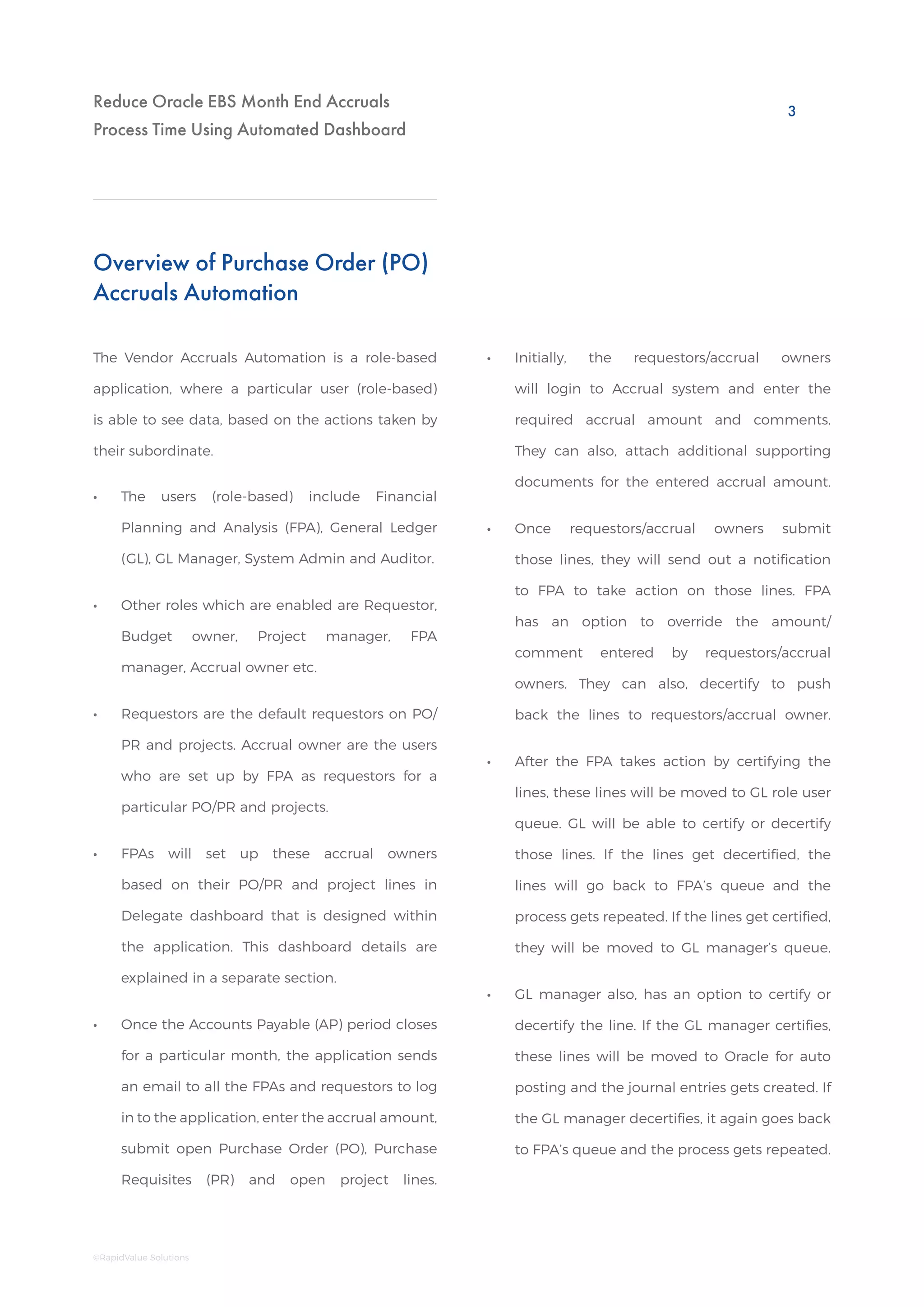
Streamlining Workflow through Accrual Automation Solution
FP & A team
fetching data in XLS
Team member
segregating data
Oracle System
(Data Access)
Wait for inputs from
budget owner
or PO requester
Inputs required
from another
financial planner
XLS sent to
GL User for JE
creation
MANUAL APPROACH
ACCRUAL AUTOMATION SOLUTION
Login to App
(user-role based)
GL User
Dashboard
(Data displayed based on role)
User Certified and
Processed
FP & A
GL Supervisor
4
©RapidValue Solutions
Reduce Oracle EBS Month End Accruals
Process Time Using Automated Dashboard
Business Requirement
Goal
Business Problem
The client, a leading social networking site, wanted
to eliminate the manual process and automate
their vendor accrual process with secure and
seamless integration with their backend systems.
To strategize in order to maximize return on
investment by integrating multiple oracle modules
and corporate emails. Thus, digitizing the manual
vendor accrual process.
Determining correct open PO accruals for each
month-end close is a manual process. It is time
consuming, labor intensive and not scalable.
In preparation of each month end close, a
representative in FP&A or regional GL team runs
the ‘Open PO report’ in Discoverer as each Oracle
AP sub-ledger is closed. The reports are exported
to Microsoft Excel, and pivot tables are created so
that each open PO can be matched to the prior
month’s accrual and appropriate FP&A business
partner. The FP&A business partner provides the
listing to his/her assigned budget managers for
input on amounts to accrue at the end of the
month. FP&A sends the open PO accruals and
supporting documentation to the GL team to
prepare the accrual entry. The GL team uploads
and posts the accrual entries to the GL by the
designated deadline during the month end close.
5
©RapidValue Solutions
Reduce Oracle EBS Month End Accruals
Process Time Using Automated Dashboard
Integration and Process Automation
Business Benefits
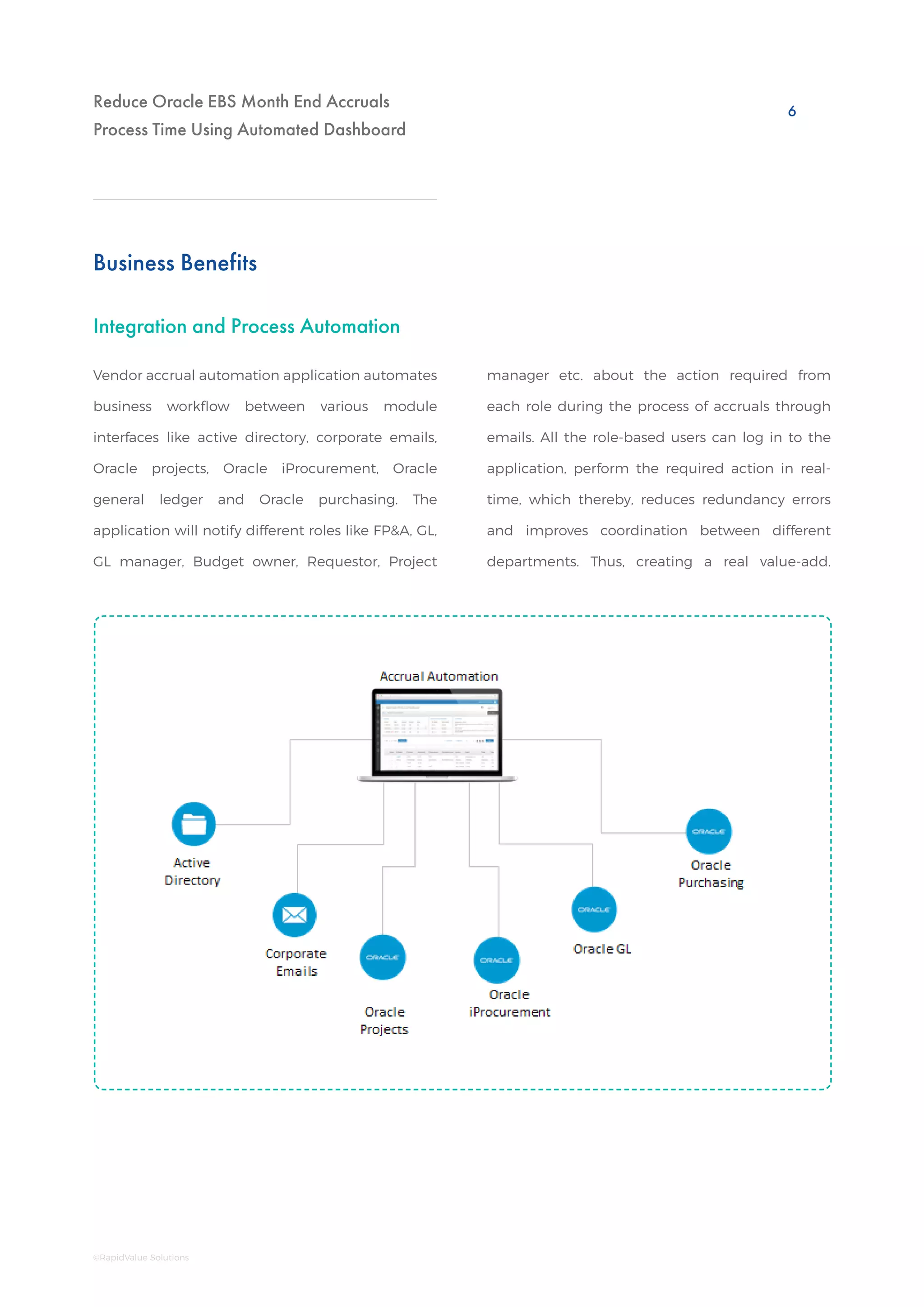
Vendor accrual automation application automates
business workflow between various module
interfaces like active directory, corporate emails,
Oracle projects, Oracle iProcurement, Oracle
general ledger and Oracle purchasing. The
application will notify different roles like FP&A, GL,
GL manager, Budget owner, Requestor, Project
manager etc. about the action required from
each role during the process of accruals through
emails. All the role-based users can log in to the
application, perform the required action in real-
time, which thereby, reduces redundancy errors
and improves coordination between different
departments. Thus, creating a real value-add.
6
©RapidValue Solutions
Reduce Oracle EBS Month End Accruals
Process Time Using Automated Dashboard
Open PO Accrual Dashboard
Key Features
Some of the features of the vendor accrual
application are:
•• The open PO Accrual dashboard will have
all the open PO lines for that month. This
dashboard is accessible to all the role users. The
user is able to add attachments, comments
and delegate lines to the same role user.
•• The FPA, requestor and accrual owner role
users will be able to enter the accrual amount
and certify the PO lines, apart from the above
functionalities.
•• The GL and GL manager will be able to certify
or decertify a line.
•• The grid data is to be exported into excel, pdf or
csv format. The page will have a commentary
list and on selection of each PO, the user will
be able to see all the comments added by the
user in the past three months.
•• The dashboard will have section to list out
the invoices created for each PO and the total
invoice for the last three months. The user will
be able to see all the PO lines of last twelve
months. The previous months’ data will be
‘read-only’ and the user cannot take any
actions on these lines.
•• The open PO accrual dashboard also, has
option for manual accruals. If the user wants
to do accruals for those that have no POs,
then the user can manually add these lines for
accruals in this tab.
•• The process and flow remains similar to open
PO dashboard.
•• The delegated lines can be seen in the
same dashboard by using the options in the
dashboard. We have a dedicated dropdown
that will help to differentiate the lines that are
their own or the lines that are delegated from
other users.
•• The delegation will happen only once for a
particular PO. During delegation, the user
should give the start and end date. Once the
end date is crossed, these lines will go back
to the delegator, if the delegate has not taken
any action on those lines.
•• The accrual owner and FPA will have an option
to close the PO from dashboard. FPA can
directly close the PO from dashboard with a
closure comment. Accrual Owner request will
go to FPA for approval and once FPA approves
it, the PO will be closed. There will be an option
to close entire PO as well, as each line in a PO.
7
©RapidValue Solutions
Reduce Oracle EBS Month End Accruals
Process Time Using Automated Dashboard
•• The user should be able to see the lines which
he/she delegated to other users and are able
to recall these lines.
•• Accrual owners get access to the dashboard
based on the rule set by FPA. FPA will have the
option to view the lines that are delegated to
accrual owners, the lines that do not have any
accrual owner associated with it.
Open PR Accrual Dashboard
•• This dashboard is accessible to all the role-
based users.
•• Similar to open PO, the user will be able to
add attachments, comments and delegate
lines to the same role user.
•• The process remains similar to open PO,
where FPA should be able to enter accrual
amount and certify. The lines will be moved
to GL queue. The process flow remains same
as in open PO.
•• The open PR dashboard also, has a comment
list, where the user should be able to see
comments of the last three months for each
PR.
The open PR accrual dashboard will have all the
open PR lines for that month.
Similar to open PO, PR also has manual and third
Open Projects Accrual Dashboard
•• Open projects are accrued in two different
ways based on the way accruals are done.
•• The accruals can be done based on POs that
are associated with projects using similar
accrual amounts and based on the percentage
of completion.
•• In percentage of completion, user will enter
percentage of completion based on the actual
amount used for that project. Based on that
percentage, accrual amount will be calculated.
•• After all the certification from all the role
users, the journal creation process is different
if compared to Open PO/PR.
•• For projects, first the line details will be
pushed to Oracle Project Accounting (OPA) to
create an expenditure batch, after that these
lines will be pushed directly from OPA to GL to
create journals.
The open projects dashboard will have all the
open project lines for that month.
All other functionalities will remain same as
compared to open PO/PR.
party lines. The functionality remains same as in
open PO.
8
©RapidValue Solutions
Reduce Oracle EBS Month End Accruals
Process Time Using Automated Dashboard
Open PO/PR Status Dashboard
Aged Open PO Accrual Dashboard
Accrual Report
On Hold Report
Closed PO Accrual Dashboard
•• For FPA, the pending lines will display, with
respect to requestor and the count with each
requestor.
•• For GL, it will be entity-wise pending count
with FPA. Similarly for GL manager, the
pending count is entity-wise with respect to
GL user.
•• The status dashboard always shows data with
respect to the current month.
•• Closed PO dashboard gives details about all
the PO lines that are closed between the GL
periods. This dashboard will give information
about all the closed POs irrespective of
Open PO/PR status dashboard gives information
about all the pending lines with the user
subordinate, with respect to each entity.
Aged Open PO dashboard is a repository of PO
lines that is open for more than 90 days. This
dashboard will be read-only and the user will not
be able to take any action on these lines. The lines
present here will also, be available in open PO and
the user will be able to take action in open PO
dashboard.
Accrual report provides information about all the
PO/PR lines that have completed the certification
process. This accrual report includes the manual
accrual lines, timestamp of each role certification,
the journal batch and created date information.
The report can be seen for the last twelve GL
periods.
On hold report gives information about all the
PO/PR lines that are certified by FPA with zero
accrual amounts. This report will be a repository
to show all the PO/PR lines for which there is no
JE creation, as the journal entries should not get
created for the lines that are certified with zero
accrual amounts.
whether a PO has gone through the process of
certification in the dashboard. This dashboard
also, is read-only and the user will not be able
to take any action on the lines.
•• Closed PO dashboard also, has one more tab
for FPA, where all the closed PO requests from
Accrual owner will be listed. FPA will have an
option to approve or reject this request. Once
FPA approves it, the PO will be closed directly
in Oracle.
9
©RapidValue Solutions
Reduce Oracle EBS Month End Accruals
Process Time Using Automated Dashboard
Project On Hold Report
GL Manager Dashboard
Accrual at a Glance
System Admin
FPA Manager Dashboard
Project On hold report gives information about all
the project lines that are certified by FPA with zero
accrual amounts. This report will be a repository
to show all the project lines for which there is no
JE creation, as the journal entries should not get
created for the lines that are certified with zero
accrual amounts.
Accrual at a Glance view is for audit purpose.
This page gives information about the pending
number of lines and pending accrual amount
with each role. This page has information about
the lines that are posted to Oracle, on hold lines
and error out lines.
System admin dashboard, as the name suggests, is
used only by the system administrators, where the
admin can control the access given to each user.
The system admin can add other users as system
admins; they can add other users as auditors.
This dashboard is designed for FPA users and FPA
managers, where they will have a metrics view
with graphical representation of the month-end
accrual process. FPAs will be able to see details
with respect to their own and reporting FPA’s
certified, pending line details. The dashboard
shows information with respect to all PO/PR,
projects and manual accruals.
This dashboard is designed for GL users and
GL managers to view metrics view with respect
to overall status of month-end accruals. The
dashboard shows details with respect to pending
and certified lines from each role and the amount
details with respect to accruals.
Project Accrual Report
Project Accrual report is similar to Accrual report.
However, this will list down all the project lines
that have completed the certification process.
This report will have similar columns as compared
to the Accrual report and other project related
details.
10
©RapidValue Solutions
Reduce Oracle EBS Month End Accruals
Process Time Using Automated Dashboard
Delegate Dashboard
•• In delegate dashboard, FPA has an option to
delegate all his/her lines to another FPA based
on the dates or forever.
•• Delegate dashboard is viewed only by FPA. This
dashboard is used to assign PO/PR and project
lines to accrual owners who are not associated
with a particular PO/PR and project line.
•• FPA can set up rules based on the country,
department, vendor, budget owner, requestor
and other parameters.
•• FPA can set up rules based on one parameter
or multiple parameters and assign data to
accrual owners.
•• These rules can be set up for certain dates or
forever.
•• FPA managers will have the option to update
or delete rules of their reporting FPAs.
11
©RapidValue Solutions
Reduce Oracle EBS Month End Accruals
Process Time Using Automated Dashboard
Solution Architecture
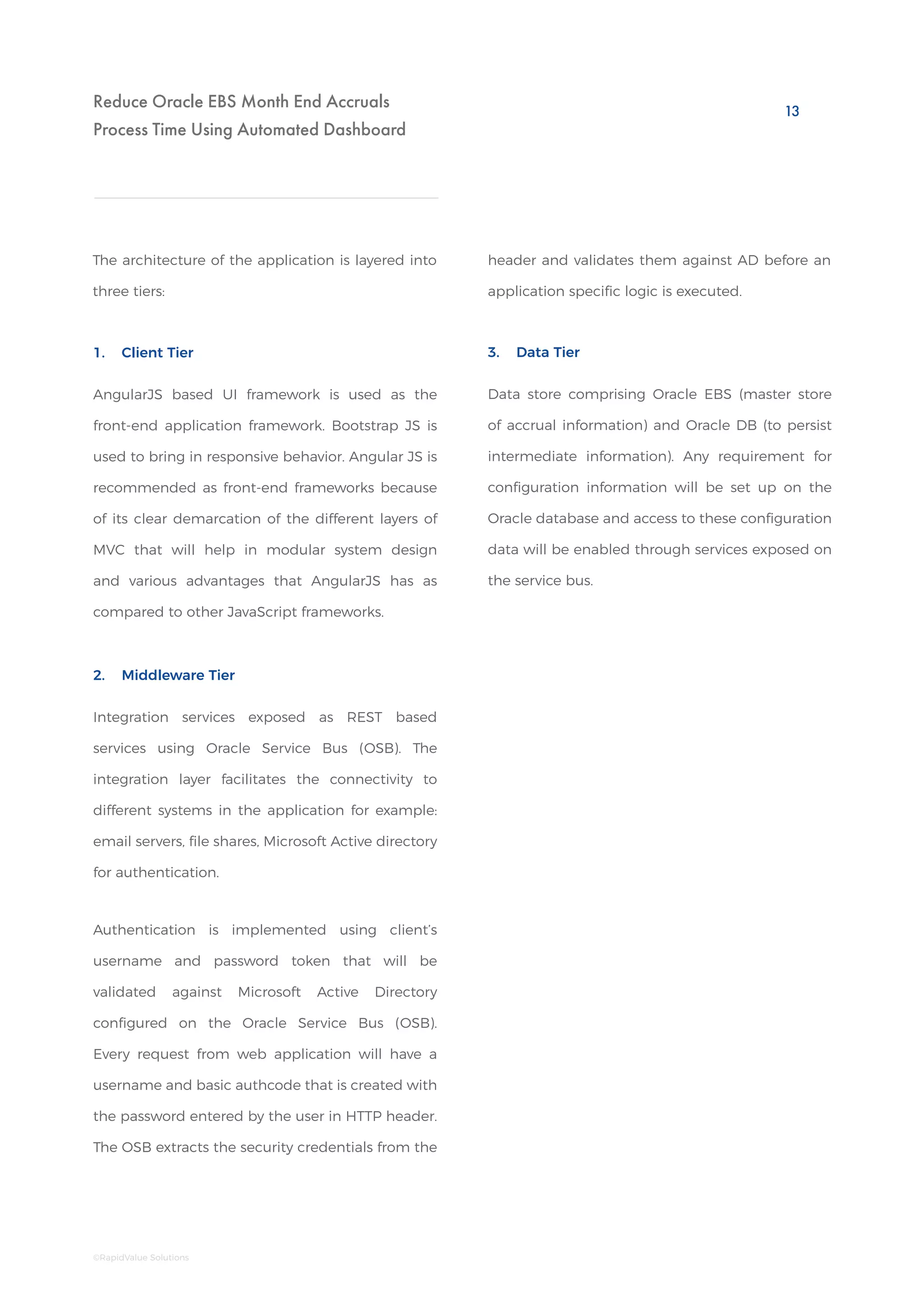
Architecture of Vendor Accrual Automated Solution
AngularJS web application
Oracle ESB
Logging
File Adapters
Transformation
DB Adapters
Security
EIS Adapters
File Share
Oracle DB
Client Tier
Data Tier
Middleware Tier
Mail / Microsoft
Exchange Server
MS Platform
specific Protocol
SMTP
JDBC
File JDBC
Datastore for driving front end
screens and for which there is no
Oracle EBS interactions.
File share holding
document uploads
Dataformat
will be JSON
Master
source of
Accruals
data
REST/HTTP(S)
12
©RapidValue Solutions
Reduce Oracle EBS Month End Accruals
Process Time Using Automated Dashboard
Data store comprising Oracle EBS (master store
of accrual information) and Oracle DB (to persist
intermediate information). Any requirement for
configuration information will be set up on the
Oracle database and access to these configuration
data will be enabled through services exposed on
the service bus.
Integration services exposed as REST based
services using Oracle Service Bus (OSB). The
integration layer facilitates the connectivity to
different systems in the application for example:
email servers, file shares, Microsoft Active directory
for authentication.
Authentication is implemented using client’s
username and password token that will be
validated against Microsoft Active Directory
configured on the Oracle Service Bus (OSB).
Every request from web application will have a
username and basic authcode that is created with
the password entered by the user in HTTP header.
The OSB extracts the security credentials from the
3. Data Tier
2. Middleware Tier
The architecture of the application is layered into
three tiers:
AngularJS based UI framework is used as the
front-end application framework. Bootstrap JS is
used to bring in responsive behavior. Angular JS is
recommended as front-end frameworks because
of its clear demarcation of the different layers of
MVC that will help in modular system design
and various advantages that AngularJS has as
compared to other JavaScript frameworks.
1. Client Tier
header and validates them against AD before an
application specific logic is executed.
13
©RapidValue Solutions
Reduce Oracle EBS Month End Accruals
Process Time Using Automated Dashboard
The Results
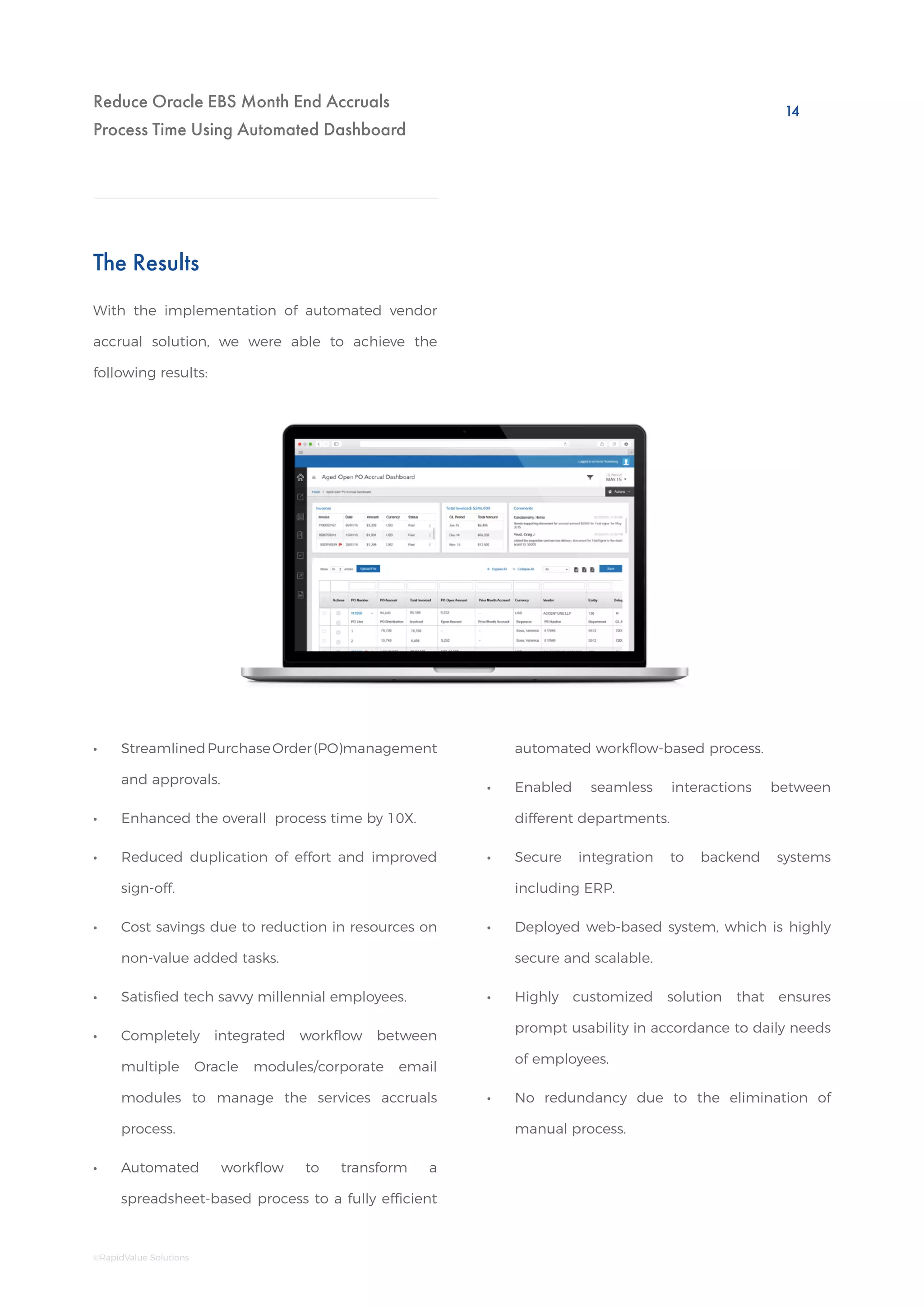
With the implementation of automated vendor
accrual solution, we were able to achieve the
following results:
•• StreamlinedPurchaseOrder(PO)management
and approvals.
•• Enhanced the overall process time by 10X.
•• Reduced duplication of effort and improved
sign-off.
•• Cost savings due to reduction in resources on
non-value added tasks.
•• Satisfied tech savvy millennial employees. 	
•• Completely integrated workflow between
multiple Oracle modules/corporate email
modules to manage the services accruals
process.
•• Automated workflow to transform a
spreadsheet-based process to a fully efficient
automated workflow-based process.
•• Enabled seamless interactions between
different departments.
•• Secure integration to backend systems
including ERP.
•• Deployed web-based system, which is highly
secure and scalable.
•• Highly customized solution that ensures
prompt usability in accordance to daily needs
of employees.
•• No redundancy due to the elimination of
manual process.
14
©RapidValue Solutions
Reduce Oracle EBS Month End Accruals
Process Time Using Automated DashboardConclusion
An enterprise can successfully implement digital
transformation only if the following stands
affirmative :
The accrual automation solution is a perfect
example of digital strategy which blends with
IT implementations (i.e. comprehensive digital
transformation). It is a system that provides value
by integrating multiple corporate systems like
Oracle Purchasing, Projects, Microsoft Active
directory etc. to enable accurate capturing of
accruals and subsequent automated journal
creation. It completely eliminates the task of
spreadsheet-based manual process by enabling a
highly efficient automated workflow, streamlining
accruals hand-offs between multiple departments
like FP&A, Business Owners and GL users.
Author
If you’d like more information on this topic,
please write to us:
contactus@rapidvaluesolutions.com
Abhijit Ramachandran
Practice Manager –
Oracle Mobility Solutions,
RapidValue
1.	 Top leadership teams understand the need to
adapt modern technology trends.
2.	 Enterprise goals are identified and pain points
are addressed.
3.	 Digital strategy addresses customized needs
of employees and to ensure adherence to a
well-thought roadmap.
15
©RapidValue Solutions
15
Reduce Oracle EBS Month End Accruals
Process Time Using Automated Dashboard
Disclaimer:
This document contains information that is confidential and proprietary to RapidValue Solutions Inc. No part of it may be used,
circulated, quoted, or reproduced for distribution outside RapidValue. If you are not the intended recipient of this report, you are
hereby notified that the use, circulation, quoting, or reproducing of this report is strictly prohibited and may be unlawful.
A global leader in digital transformation for enterprise providing end-to-end
mobility, omni-channel, IoT, RPA and cloud solutions. Armed with a large team
of experts in consulting, UX design, application development, integration and
testing, along with experience delivering projects worldwide, in mobility and
cloud, we offer a wide range of services across industry verticals. We deliver services
to the world’s top brands, fortune 1000 companies, Multinational companies and
emerging startups. We have offices in the United States, the United Kingdom,
Germany and India.
www.rapidvaluesolutions.com
+1 877.643.1850
www.rapidvaluesolutions.com/blog
contactus@rapidvaluesolutions.com
©RapidValue Solutions January, 2019

Reduce Oracle EBS Month End Accruals Process Time using Automated Dashboard

  • 1.
    Reduce Oracle EBSMonth End Accruals Process Time Using Automated Dashboard REDUCE ORACLE EBS MONTH END ACCRUALS PROCESS TIME USING AUTOMATED DASHBOARD A Whitepaper by RapidValue Solutions
  • 2.
    Reduce Oracle EBSMonth End Accruals Process Time Using Automated Dashboard index 01 Executive Summary 02 Introduction 03 Overview of Purchase Order (PO) Accruals Automation 05 Business Problem 06 Business Benefits 07 Key Features 12 Solution Architecture 14 The Results 15 Conclusion ©RapidValue Solutions 15 Author 16 About Us
  • 3.
    Executive Summary Business enterprises arepresently living in the age of digital Darwinism. An enterprise will either have to adapt to modern trends or it fails to survive in the competitive market. Traditional enterprise systems like Enterprise Resource Planning (ERP) alone cannot suffice the need of tech savvy millennial workers who expect quick, intuitive and remotely accessible solutions. A key requirement for all business enterprises is to adapt to the modern trends and strive for digital transformation. This paper explains the digital transformation of Oracle EBS payable module and how business workflow is streamlined by automating the manual accrual process. It addresses the business benefits, key features and typical architecture of accrual automation solution. The information in this paper is based on a solution implemented by RapidValue for one of the world’s largest professional social media company. The paper addresses how RapidValue digitally transformed the manual vendor accrual process to an automated web-based dashboard and integrated it with Oracle E-Business Suite and Enterprise Resource Planning (ERP) Systems. Reduce Oracle EBS Month End Accruals Process Time Using Automated Dashboard 1 ©RapidValue Solutions 1
  • 4.
    Reduce Oracle EBSMonth End Accruals Process Time Using Automated Dashboard Introduction Digital transformation in the form of extending the on-premise ERP systems to web/mobile platforms, will not only reduce the infrastructure cost by promoting the BYOD culture (Bring Your Own Device) but also, increase the productivity of the employees as they get empowered to do business transactions on-the-go. Vendor Accruals Automation is implemented to automate the payable accrual process for vendors in Oracle E-Business Suite. It comprises a user interface to enter and submit the accruals. The entire manual process of accruals is automated, so that each user role can login to the application and complete the accrual process as per the requirement. It enables seamless interactions between different departments in the organization and reduces the process closure time by two days. Automation also, saves the cost of labor on a large scale, by optimizing the workflow. Digitization does not only mean IT implementation with disruptive technology alone but also, an implementation of a proper strategy that integrates multiple enterprise modules and considers user needs/customizations to create maximum value. 2 ©RapidValue Solutions
  • 5.
    Reduce Oracle EBSMonth End Accruals Process Time Using Automated Dashboard Overview of Purchase Order (PO) Accruals Automation The Vendor Accruals Automation is a role-based application, where a particular user (role-based) is able to see data, based on the actions taken by their subordinate. •• The users (role-based) include Financial Planning and Analysis (FPA), General Ledger (GL), GL Manager, System Admin and Auditor. •• Other roles which are enabled are Requestor, Budget owner, Project manager, FPA manager, Accrual owner etc. •• Requestors are the default requestors on PO/ PR and projects. Accrual owner are the users who are set up by FPA as requestors for a particular PO/PR and projects. •• FPAs will set up these accrual owners based on their PO/PR and project lines in Delegate dashboard that is designed within the application. This dashboard details are explained in a separate section. •• Once the Accounts Payable (AP) period closes for a particular month, the application sends an email to all the FPAs and requestors to log in to the application, enter the accrual amount, submit open Purchase Order (PO), Purchase Requisites (PR) and open project lines. •• Initially, the requestors/accrual owners will login to Accrual system and enter the required accrual amount and comments. They can also, attach additional supporting documents for the entered accrual amount. •• Once requestors/accrual owners submit those lines, they will send out a notification to FPA to take action on those lines. FPA has an option to override the amount/ comment entered by requestors/accrual owners. They can also, decertify to push back the lines to requestors/accrual owner. •• After the FPA takes action by certifying the lines, these lines will be moved to GL role user queue. GL will be able to certify or decertify those lines. If the lines get decertified, the lines will go back to FPA’s queue and the process gets repeated. If the lines get certified, they will be moved to GL manager’s queue. •• GL manager also, has an option to certify or decertify the line. If the GL manager certifies, these lines will be moved to Oracle for auto posting and the journal entries gets created. If the GL manager decertifies, it again goes back to FPA’s queue and the process gets repeated. 3 ©RapidValue Solutions
  • 6.
    Reduce Oracle EBSMonth End Accruals Process Time Using Automated Dashboard •• When each role user takes action on a particular PO/PR/PA, the corresponding immediate role user will get an email to log in to the application and do the required action. •• All the FPA, GL and GL manager role user will be able to see all the open POs and PRs in a separate page and are able to take action on each PO and PR line. The system admin role is specifically, there to add other system administrators or auditors. System admin (user) is able to control the access given to other role users. Auditor role users are able to see all the data and able to audit the accrued and pending amount and lines in the application. Streamlining Workflow through Accrual Automation Solution FP & A team fetching data in XLS Team member segregating data Oracle System (Data Access) Wait for inputs from budget owner or PO requester Inputs required from another financial planner XLS sent to GL User for JE creation MANUAL APPROACH ACCRUAL AUTOMATION SOLUTION Login to App (user-role based) GL User Dashboard (Data displayed based on role) User Certified and Processed FP & A GL Supervisor 4 ©RapidValue Solutions
  • 7.
    Reduce Oracle EBSMonth End Accruals Process Time Using Automated Dashboard Business Requirement Goal Business Problem The client, a leading social networking site, wanted to eliminate the manual process and automate their vendor accrual process with secure and seamless integration with their backend systems. To strategize in order to maximize return on investment by integrating multiple oracle modules and corporate emails. Thus, digitizing the manual vendor accrual process. Determining correct open PO accruals for each month-end close is a manual process. It is time consuming, labor intensive and not scalable. In preparation of each month end close, a representative in FP&A or regional GL team runs the ‘Open PO report’ in Discoverer as each Oracle AP sub-ledger is closed. The reports are exported to Microsoft Excel, and pivot tables are created so that each open PO can be matched to the prior month’s accrual and appropriate FP&A business partner. The FP&A business partner provides the listing to his/her assigned budget managers for input on amounts to accrue at the end of the month. FP&A sends the open PO accruals and supporting documentation to the GL team to prepare the accrual entry. The GL team uploads and posts the accrual entries to the GL by the designated deadline during the month end close. 5 ©RapidValue Solutions
  • 8.
    Reduce Oracle EBSMonth End Accruals Process Time Using Automated Dashboard Integration and Process Automation Business Benefits Vendor accrual automation application automates business workflow between various module interfaces like active directory, corporate emails, Oracle projects, Oracle iProcurement, Oracle general ledger and Oracle purchasing. The application will notify different roles like FP&A, GL, GL manager, Budget owner, Requestor, Project manager etc. about the action required from each role during the process of accruals through emails. All the role-based users can log in to the application, perform the required action in real- time, which thereby, reduces redundancy errors and improves coordination between different departments. Thus, creating a real value-add. 6 ©RapidValue Solutions
  • 9.
    Reduce Oracle EBSMonth End Accruals Process Time Using Automated Dashboard Open PO Accrual Dashboard Key Features Some of the features of the vendor accrual application are: •• The open PO Accrual dashboard will have all the open PO lines for that month. This dashboard is accessible to all the role users. The user is able to add attachments, comments and delegate lines to the same role user. •• The FPA, requestor and accrual owner role users will be able to enter the accrual amount and certify the PO lines, apart from the above functionalities. •• The GL and GL manager will be able to certify or decertify a line. •• The grid data is to be exported into excel, pdf or csv format. The page will have a commentary list and on selection of each PO, the user will be able to see all the comments added by the user in the past three months. •• The dashboard will have section to list out the invoices created for each PO and the total invoice for the last three months. The user will be able to see all the PO lines of last twelve months. The previous months’ data will be ‘read-only’ and the user cannot take any actions on these lines. •• The open PO accrual dashboard also, has option for manual accruals. If the user wants to do accruals for those that have no POs, then the user can manually add these lines for accruals in this tab. •• The process and flow remains similar to open PO dashboard. •• The delegated lines can be seen in the same dashboard by using the options in the dashboard. We have a dedicated dropdown that will help to differentiate the lines that are their own or the lines that are delegated from other users. •• The delegation will happen only once for a particular PO. During delegation, the user should give the start and end date. Once the end date is crossed, these lines will go back to the delegator, if the delegate has not taken any action on those lines. •• The accrual owner and FPA will have an option to close the PO from dashboard. FPA can directly close the PO from dashboard with a closure comment. Accrual Owner request will go to FPA for approval and once FPA approves it, the PO will be closed. There will be an option to close entire PO as well, as each line in a PO. 7 ©RapidValue Solutions
  • 10.
    Reduce Oracle EBSMonth End Accruals Process Time Using Automated Dashboard •• The user should be able to see the lines which he/she delegated to other users and are able to recall these lines. •• Accrual owners get access to the dashboard based on the rule set by FPA. FPA will have the option to view the lines that are delegated to accrual owners, the lines that do not have any accrual owner associated with it. Open PR Accrual Dashboard •• This dashboard is accessible to all the role- based users. •• Similar to open PO, the user will be able to add attachments, comments and delegate lines to the same role user. •• The process remains similar to open PO, where FPA should be able to enter accrual amount and certify. The lines will be moved to GL queue. The process flow remains same as in open PO. •• The open PR dashboard also, has a comment list, where the user should be able to see comments of the last three months for each PR. The open PR accrual dashboard will have all the open PR lines for that month. Similar to open PO, PR also has manual and third Open Projects Accrual Dashboard •• Open projects are accrued in two different ways based on the way accruals are done. •• The accruals can be done based on POs that are associated with projects using similar accrual amounts and based on the percentage of completion. •• In percentage of completion, user will enter percentage of completion based on the actual amount used for that project. Based on that percentage, accrual amount will be calculated. •• After all the certification from all the role users, the journal creation process is different if compared to Open PO/PR. •• For projects, first the line details will be pushed to Oracle Project Accounting (OPA) to create an expenditure batch, after that these lines will be pushed directly from OPA to GL to create journals. The open projects dashboard will have all the open project lines for that month. All other functionalities will remain same as compared to open PO/PR. party lines. The functionality remains same as in open PO. 8 ©RapidValue Solutions
  • 11.
    Reduce Oracle EBSMonth End Accruals Process Time Using Automated Dashboard Open PO/PR Status Dashboard Aged Open PO Accrual Dashboard Accrual Report On Hold Report Closed PO Accrual Dashboard •• For FPA, the pending lines will display, with respect to requestor and the count with each requestor. •• For GL, it will be entity-wise pending count with FPA. Similarly for GL manager, the pending count is entity-wise with respect to GL user. •• The status dashboard always shows data with respect to the current month. •• Closed PO dashboard gives details about all the PO lines that are closed between the GL periods. This dashboard will give information about all the closed POs irrespective of Open PO/PR status dashboard gives information about all the pending lines with the user subordinate, with respect to each entity. Aged Open PO dashboard is a repository of PO lines that is open for more than 90 days. This dashboard will be read-only and the user will not be able to take any action on these lines. The lines present here will also, be available in open PO and the user will be able to take action in open PO dashboard. Accrual report provides information about all the PO/PR lines that have completed the certification process. This accrual report includes the manual accrual lines, timestamp of each role certification, the journal batch and created date information. The report can be seen for the last twelve GL periods. On hold report gives information about all the PO/PR lines that are certified by FPA with zero accrual amounts. This report will be a repository to show all the PO/PR lines for which there is no JE creation, as the journal entries should not get created for the lines that are certified with zero accrual amounts. whether a PO has gone through the process of certification in the dashboard. This dashboard also, is read-only and the user will not be able to take any action on the lines. •• Closed PO dashboard also, has one more tab for FPA, where all the closed PO requests from Accrual owner will be listed. FPA will have an option to approve or reject this request. Once FPA approves it, the PO will be closed directly in Oracle. 9 ©RapidValue Solutions
  • 12.
    Reduce Oracle EBSMonth End Accruals Process Time Using Automated Dashboard Project On Hold Report GL Manager Dashboard Accrual at a Glance System Admin FPA Manager Dashboard Project On hold report gives information about all the project lines that are certified by FPA with zero accrual amounts. This report will be a repository to show all the project lines for which there is no JE creation, as the journal entries should not get created for the lines that are certified with zero accrual amounts. Accrual at a Glance view is for audit purpose. This page gives information about the pending number of lines and pending accrual amount with each role. This page has information about the lines that are posted to Oracle, on hold lines and error out lines. System admin dashboard, as the name suggests, is used only by the system administrators, where the admin can control the access given to each user. The system admin can add other users as system admins; they can add other users as auditors. This dashboard is designed for FPA users and FPA managers, where they will have a metrics view with graphical representation of the month-end accrual process. FPAs will be able to see details with respect to their own and reporting FPA’s certified, pending line details. The dashboard shows information with respect to all PO/PR, projects and manual accruals. This dashboard is designed for GL users and GL managers to view metrics view with respect to overall status of month-end accruals. The dashboard shows details with respect to pending and certified lines from each role and the amount details with respect to accruals. Project Accrual Report Project Accrual report is similar to Accrual report. However, this will list down all the project lines that have completed the certification process. This report will have similar columns as compared to the Accrual report and other project related details. 10 ©RapidValue Solutions
  • 13.
    Reduce Oracle EBSMonth End Accruals Process Time Using Automated Dashboard Delegate Dashboard •• In delegate dashboard, FPA has an option to delegate all his/her lines to another FPA based on the dates or forever. •• Delegate dashboard is viewed only by FPA. This dashboard is used to assign PO/PR and project lines to accrual owners who are not associated with a particular PO/PR and project line. •• FPA can set up rules based on the country, department, vendor, budget owner, requestor and other parameters. •• FPA can set up rules based on one parameter or multiple parameters and assign data to accrual owners. •• These rules can be set up for certain dates or forever. •• FPA managers will have the option to update or delete rules of their reporting FPAs. 11 ©RapidValue Solutions
  • 14.
    Reduce Oracle EBSMonth End Accruals Process Time Using Automated Dashboard Solution Architecture Architecture of Vendor Accrual Automated Solution AngularJS web application Oracle ESB Logging File Adapters Transformation DB Adapters Security EIS Adapters File Share Oracle DB Client Tier Data Tier Middleware Tier Mail / Microsoft Exchange Server MS Platform specific Protocol SMTP JDBC File JDBC Datastore for driving front end screens and for which there is no Oracle EBS interactions. File share holding document uploads Dataformat will be JSON Master source of Accruals data REST/HTTP(S) 12 ©RapidValue Solutions
  • 15.
    Reduce Oracle EBSMonth End Accruals Process Time Using Automated Dashboard Data store comprising Oracle EBS (master store of accrual information) and Oracle DB (to persist intermediate information). Any requirement for configuration information will be set up on the Oracle database and access to these configuration data will be enabled through services exposed on the service bus. Integration services exposed as REST based services using Oracle Service Bus (OSB). The integration layer facilitates the connectivity to different systems in the application for example: email servers, file shares, Microsoft Active directory for authentication. Authentication is implemented using client’s username and password token that will be validated against Microsoft Active Directory configured on the Oracle Service Bus (OSB). Every request from web application will have a username and basic authcode that is created with the password entered by the user in HTTP header. The OSB extracts the security credentials from the 3. Data Tier 2. Middleware Tier The architecture of the application is layered into three tiers: AngularJS based UI framework is used as the front-end application framework. Bootstrap JS is used to bring in responsive behavior. Angular JS is recommended as front-end frameworks because of its clear demarcation of the different layers of MVC that will help in modular system design and various advantages that AngularJS has as compared to other JavaScript frameworks. 1. Client Tier header and validates them against AD before an application specific logic is executed. 13 ©RapidValue Solutions
  • 16.
    Reduce Oracle EBSMonth End Accruals Process Time Using Automated Dashboard The Results With the implementation of automated vendor accrual solution, we were able to achieve the following results: •• StreamlinedPurchaseOrder(PO)management and approvals. •• Enhanced the overall process time by 10X. •• Reduced duplication of effort and improved sign-off. •• Cost savings due to reduction in resources on non-value added tasks. •• Satisfied tech savvy millennial employees. •• Completely integrated workflow between multiple Oracle modules/corporate email modules to manage the services accruals process. •• Automated workflow to transform a spreadsheet-based process to a fully efficient automated workflow-based process. •• Enabled seamless interactions between different departments. •• Secure integration to backend systems including ERP. •• Deployed web-based system, which is highly secure and scalable. •• Highly customized solution that ensures prompt usability in accordance to daily needs of employees. •• No redundancy due to the elimination of manual process. 14 ©RapidValue Solutions
  • 17.
    Reduce Oracle EBSMonth End Accruals Process Time Using Automated DashboardConclusion An enterprise can successfully implement digital transformation only if the following stands affirmative : The accrual automation solution is a perfect example of digital strategy which blends with IT implementations (i.e. comprehensive digital transformation). It is a system that provides value by integrating multiple corporate systems like Oracle Purchasing, Projects, Microsoft Active directory etc. to enable accurate capturing of accruals and subsequent automated journal creation. It completely eliminates the task of spreadsheet-based manual process by enabling a highly efficient automated workflow, streamlining accruals hand-offs between multiple departments like FP&A, Business Owners and GL users. Author If you’d like more information on this topic, please write to us: contactus@rapidvaluesolutions.com Abhijit Ramachandran Practice Manager – Oracle Mobility Solutions, RapidValue 1. Top leadership teams understand the need to adapt modern technology trends. 2. Enterprise goals are identified and pain points are addressed. 3. Digital strategy addresses customized needs of employees and to ensure adherence to a well-thought roadmap. 15 ©RapidValue Solutions 15
  • 18.
    Reduce Oracle EBSMonth End Accruals Process Time Using Automated Dashboard Disclaimer: This document contains information that is confidential and proprietary to RapidValue Solutions Inc. No part of it may be used, circulated, quoted, or reproduced for distribution outside RapidValue. If you are not the intended recipient of this report, you are hereby notified that the use, circulation, quoting, or reproducing of this report is strictly prohibited and may be unlawful. A global leader in digital transformation for enterprise providing end-to-end mobility, omni-channel, IoT, RPA and cloud solutions. Armed with a large team of experts in consulting, UX design, application development, integration and testing, along with experience delivering projects worldwide, in mobility and cloud, we offer a wide range of services across industry verticals. We deliver services to the world’s top brands, fortune 1000 companies, Multinational companies and emerging startups. We have offices in the United States, the United Kingdom, Germany and India. www.rapidvaluesolutions.com +1 877.643.1850 www.rapidvaluesolutions.com/blog contactus@rapidvaluesolutions.com ©RapidValue Solutions January, 2019