Automated testing
How?
Markko Paas
markko.paas@gmail.com
unit tests
component tests
integration tests
end-to-end and smoke tests
acceptance and contract tests
code review
continuous integration and deployment
4 clear blocks: setup, operation, validation, teardown
Single claim per test, description should not contain “and”
Independently executable
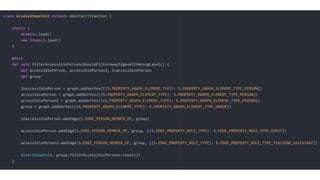
Unit tests
Test descriptions first, then code and tests in parallel
Code first, then tests
Pure TDD (single failing test – single feature – refactor – repeat)
Unit tests
https://github.com/johnpapa/angular-styleguide#write-tests-with-stories
Service1 Service2mock
adapter
?
?
Component tests
Cover interface
Cover possible behaviours of dependencies
Common mock for positive scenarios
Ad-hock mocks for error scenarios
Possible duplication of some unit tests
Mock databases with in-memory databases.
Component tests
Cover interface between units
E.g. if plugins can be plugged in
Often can be omitted because of component tests cover it
Sometimes it may be efficient to create integration tests instead of unit tests
Integration tests
✓ unit tests
✓ component tests
✓ integration tests
end-to-end and smoke tests
acceptance and contract tests
code review
continuous integration and deployment
Use staging environment
Stable test data set in database
(alternative would be setup and teardown as part of test)
Mock external http-based services using Robohydra
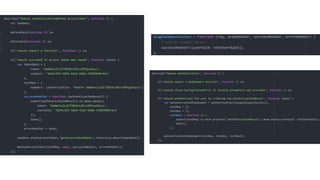
Create page models for abstracting interaction with html/css
Protractor for running tests in browser
End-to-end tests for HTTP API can be done using mocha, much faster
End-to-end tests
Technically same as end-to-end tests
Use in production environment right after deployment
Very limited number of tests, just to validate the deployment success
Smoke tests
Link and track with business requirements
Does not have to be end-to-end test
Acceptance tests
Set of customer-specific requirements
If the customer vanishes, the tests can be removed
Coverage tools can be used to find code that no customer requires
Contract tests
✓ unit tests
✓ component tests
✓ integration tests
✓ end-to-end and smoke tests
✓ acceptance and contract tests
code review
continuous integration and deployment
No seniority – everybody can and has to review
Are the tests descriptions working as a specification?
Has the author revised the existing tests for the entire unit or just added new?
Readability of both code and tests.
Third eye-pair code review for pair programming.
Code review
Continuous integration and deployment
Development
and tests
(feature
branch)
Code
review
Tests
(feature
branch) Merge to
master
Tests
(master)
End-to-end
tests
Deploy to
production
Deploy to
stage
Smoke
tests
Development CI (docker) Stage Production
Protractor – browser end-to-end test runner
Karma – JavaScript unit test runner
Mocha + chai – JavaScript unit test framework
Istanbul – coverage
Nock – http interception for nodejs
Sinon – mocking tool for JavaScript objects and libraries
Robohydra – webserver for mocking
Phabricator + arcanist – code review
Jenkins – continuous integration
Tools

Automated testing - how?

  • 1.
  • 2.
    unit tests component tests integrationtests end-to-end and smoke tests acceptance and contract tests code review continuous integration and deployment
  • 5.
    4 clear blocks:setup, operation, validation, teardown Single claim per test, description should not contain “and” Independently executable Unit tests
  • 6.
    Test descriptions first,then code and tests in parallel Code first, then tests Pure TDD (single failing test – single feature – refactor – repeat) Unit tests
  • 7.
  • 10.
  • 11.
    Cover interface Cover possiblebehaviours of dependencies Common mock for positive scenarios Ad-hock mocks for error scenarios Possible duplication of some unit tests Mock databases with in-memory databases. Component tests
  • 14.
    Cover interface betweenunits E.g. if plugins can be plugged in Often can be omitted because of component tests cover it Sometimes it may be efficient to create integration tests instead of unit tests Integration tests
  • 17.
    ✓ unit tests ✓component tests ✓ integration tests end-to-end and smoke tests acceptance and contract tests code review continuous integration and deployment
  • 18.
    Use staging environment Stabletest data set in database (alternative would be setup and teardown as part of test) Mock external http-based services using Robohydra Create page models for abstracting interaction with html/css Protractor for running tests in browser End-to-end tests for HTTP API can be done using mocha, much faster End-to-end tests
  • 20.
    Technically same asend-to-end tests Use in production environment right after deployment Very limited number of tests, just to validate the deployment success Smoke tests
  • 21.
    Link and trackwith business requirements Does not have to be end-to-end test Acceptance tests
  • 22.
    Set of customer-specificrequirements If the customer vanishes, the tests can be removed Coverage tools can be used to find code that no customer requires Contract tests
  • 23.
    ✓ unit tests ✓component tests ✓ integration tests ✓ end-to-end and smoke tests ✓ acceptance and contract tests code review continuous integration and deployment
  • 24.
    No seniority –everybody can and has to review Are the tests descriptions working as a specification? Has the author revised the existing tests for the entire unit or just added new? Readability of both code and tests. Third eye-pair code review for pair programming. Code review
  • 25.
    Continuous integration anddeployment Development and tests (feature branch) Code review Tests (feature branch) Merge to master Tests (master) End-to-end tests Deploy to production Deploy to stage Smoke tests Development CI (docker) Stage Production
  • 26.
    Protractor – browserend-to-end test runner Karma – JavaScript unit test runner Mocha + chai – JavaScript unit test framework Istanbul – coverage Nock – http interception for nodejs Sinon – mocking tool for JavaScript objects and libraries Robohydra – webserver for mocking Phabricator + arcanist – code review Jenkins – continuous integration Tools