Copyright Ā© 2019 HCL Technologies Limited | www.hcltech.comCopyright Ā© 2020 HCL Technologies Limited | www.hcltechsw.com
HCL AUT Overview, Configuration
&
Debugging/Troubleshooting
Speaker
Somnath Mohanty
Product Support Specialist
Copyright Ā© 2019 HCL Technologies Limited | www.hcltech.comCopyright Ā© 2020 HCL Technologies Limited | www.hcltechsw.com
About Us
Speaker - Somnath Mohanty
Product Support Specialist
HCL Software & Digital Solutions
somnath.m@pnp-hcl.com
Organizer - Vinayak Tavargeri
Senior Manager
HCL Software & Digital Solutions
vtavargeri@pnp-hcl.com
Technical Panelist - Rajendran Jayavel
Senior Technical Architect
HCL Software & Digital Solutions
Technical Panelist - Shrikant Jamkhandi
Group Technical Specialist
HCL Software & Digital Solutions
Technical Panelist – Ranjit Rai
Senior Technical Architect
HCL Software & Digital Solutions
Copyright Ā© 2020 HCL Technologies Limited | www.hcltechsw.com
Agenda
3
 HCL AUT Introduction & Overview
 Advantages over Smart Upgrade
 AUT Architecture
 AUT Server & Client Components
 AUT Configuration
 AUT End to End Process
 AUT Debugging/Troubleshooting
 Questions, Answers & Feedback?
Copyright Ā© 2020 HCL Technologies Limited | www.hcltechsw.com
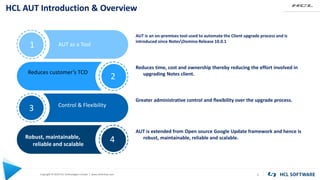
HCL AUT Introduction & Overview
4
AUT as a Tool
Control & Flexibility
Reduces customer’s TCO
Robust, maintainable,
reliable and scalable
1
2
3
4
AUT is an on-premises tool used to automate the Client upgrade process and is
introduced since NotesDomino Release 10.0.1
Reduces time, cost and ownership thereby reducing the effort involved in
upgrading Notes client.
Greater administrative control and flexibility over the upgrade process.
AUT is extended from Open source Google Update framework and hence is
robust, maintainable, reliable and scalable.
Copyright Ā© 2020 HCL Technologies Limited | www.hcltechsw.com
Advantages over Smart Upgrade
5
• AUT manages privileges transparently, for Smart Upgrade,
one must run different process for user with limited rights
on Operating System.
• For AUT, one doesn’t need separate process or steps for user
with limited rights on OS that means a Notes user without
administrative rights or with UAC enabled can still initiate
Notes updates through AUT service.
• AUT Server side management is simpler.
• As AUT is extended from Open source Google Update
framework , it is more robust, maintainable, reliable and
scalable
• The communication between AUT client and AUT server is
encrypted with SSL Handshake in between them so is quite
secured.
Copyright Ā© 2020 HCL Technologies Limited | www.hcltechsw.com
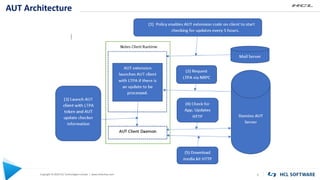
AUT Architecture
6
Copyright Ā© 2020 HCL Technologies Limited | www.hcltechsw.com
AUT Server & Notes Client Components
7
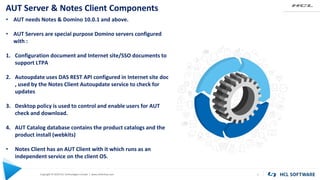
• AUT needs Notes & Domino 10.0.1 and above.
• AUT Servers are special purpose Domino servers configured
with :
1. Configuration document and Internet site/SSO documents to
support LTPA
2. Autoupdate uses DAS REST API configured in Internet site doc
, used by the Notes Client Autoupdate service to check for
updates
3. Desktop policy is used to control and enable users for AUT
check and download.
4. AUT Catalog database contains the product catalogs and the
product install (webkits)
• Notes Client has an AUT Client with it which runs as an
independent service on the client OS.
Copyright Ā© 2020 HCL Technologies Limited | www.hcltechsw.com
AUT Configuration
8
AUT Specific Configuration Document
AUT Catalog Database (Autcat.nsf)
configuration
AUT Desktop Policy Settings
Copyright Ā© 2020 HCL Technologies Limited | www.hcltechsw.com
Creating AUT Specific Configuration Document
9
Admin
Client
Configuration Configuration
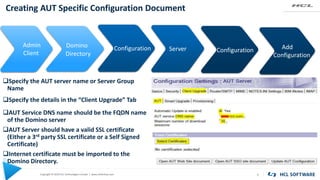
AUT Service DNS name should be the FQDN name
of the Domino server
AUT Server should have a valid SSL certificate
(Either a 3rd party SSL certificate or a Self Signed
Certificate)
Internet certificate must be imported to the
Domino Directory.
KEYWORD KEYWORD
Domino
Directory
Server Add
Configuration
Specify the details in the ā€œClient Upgradeā€ Tab
Specify the AUT server name or Server Group
Name
Copyright Ā© 2020 HCL Technologies Limited | www.hcltechsw.com
Creating AUT Specific Configuration Document Contd…
10
KEYWORD KEYWORD
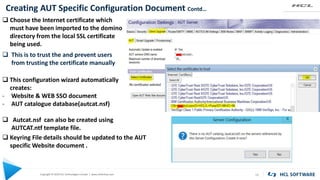
 Choose the Internet certificate which
must have been imported to the domino
directory from the local SSL certificate
being used.
 This is to trust the and prevent users
from trusting the certificate manually
 This configuration wizard automatically
creates:
- Website & WEB SSO document
- AUT catalogue database(autcat.nsf)
 Autcat.nsf can also be created using
AUTCAT.ntf template file.
 Keyring File details should be updated to the AUT
specific Website document .
Copyright Ā© 2020 HCL Technologies Limited | www.hcltechsw.com
AUT Catalog Configuration
11
KEYWORD KEYWORD
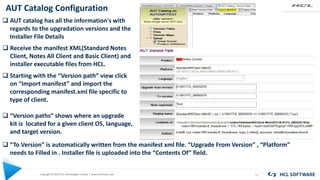
 AUT catalog has all the information's with
regards to the upgradation versions and the
Installer File Details
 Starting with the ā€œVersion pathā€ view click
on ā€œImport manifestā€ and import the
corresponding manifest.xml file specific to
type of client.
 ā€œVersion pathsā€ shows where an upgrade
kit is located for a given client OS, language,
and target version.
 Receive the manifest XML(Standard Notes
Client, Notes All Client and Basic Client) and
installer executable files from HCL.
 ā€œTo Versionā€ is automatically written from the manifest xml file. ā€œUpgrade From Versionā€ , ā€œPlatformā€
needs to Filled in . Installer file is uploaded into the ā€œContents Ofā€ field.
Copyright Ā© 2020 HCL Technologies Limited | www.hcltechsw.com
AUT Catalog Configuration Contd…
12
KEYWORD KEYWORD
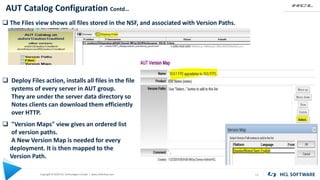
 The Files view shows all files stored in the NSF, and associated with Version Paths.
 Deploy Files action, installs all files in the file
systems of every server in AUT group.
They are under the server data directory so
Notes clients can download them efficiently
over HTTP.
 "Version Maps" view gives an ordered list
of version paths.
A New Version Map is needed for every
deployment. It is then mapped to the
Version Path.
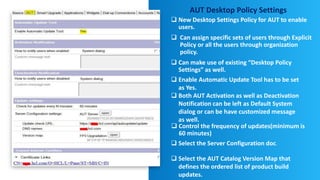
AUT Desktop Policy Settings
 New Desktop Settings Policy for AUT to enable
users.
 Can assign specific sets of users through Explicit
Policy or all the users through organization
policy.
 Can make use of existing ā€œDesktop Policy
Settingsā€ as well.
 Control the frequency of updates(minimum is
60 minutes)
 Select the Server Configuration doc.
 Select the AUT Catalog Version Map that
defines the ordered list of product build
updates.
 Enable Automatic Update Tool has to be set
as Yes.
 Both AUT Activation as well as Deactivation
Notification can be left as Default System
dialog or can be have customized message
as well.
Copyright Ā© 2020 HCL Technologies Limited | www.hcltechsw.com 14
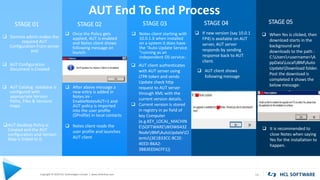
STAGE 01
 Domino admin makes the
required AUT
Configuration From server
end
STAGE 03STAGE 02 STAGE 04 STAGE 05
 After above message a
new entry is added in
Notes.ini -
EnableNotesAUT=1 and
AUT policy is imported
into the user profile
($Profile) in local contacts
AUT Desktop Policy Is
Created and the AUT
configuration and Version
Map is linked to it.
AUT End To End Process
 AUT Configuration
Document is Created
 AUT Catalog database is
configured with
appropriate Version
Paths, Files & Versions
maps
 Once the Policy gets
applied, AUT is enabled
and Notes client shows
following message on
launch:
 Notes client reads the
user profile and launches
AUT client
 Notes client starting with
10.0.1.X when installed
on a system it does have
the ā€œAuto Update Service
ā€œrunning as an
independent OS service:.
 AUT client authenticates
with AUT server using
LTPA token and sends
Update check http
request to AUT server
through XML with the
current version details.
 Current version is stored
in registry in pv field of
key Computer
(e.g.KEY_LOCAL_MACHIN
ESOFTWAREWOW6432
NodeIBMAutoUpdateCl
ients{3E1B33CC-8C2E-
4EED-B6A2-
3BB3EE0ACFF1})
 If new version (say 10.0.1
FP4) is available on AUT
server, AUT server
responds by sending
response back to AUT
client.
 AUT client shows
following message
 When Yes is clicked, then
download starts in the
background and
downloads to the path :
C:Users<username>A
ppDataLocalIBMAuto
UpdateDownload folder.
Post the download is
completed it shows the
below message:
 It is recommended to
close Notes when saying
Yes for the installation to
happen.
Copyright Ā© 2020 HCL Technologies Limited | www.hcltechsw.com
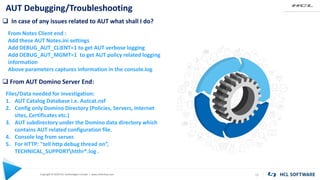
AUT Debugging/Troubleshooting
15
 In case of any issues related to AUT what shall I do?
From Notes Client end :
Add these AUT Notes.ini settings
Add DEBUG_AUT_CLIENT=1 to get AUT verbose logging
Add DEBUG_AUT_MGMT=1 to get AUT policy related logging
information
Above parameters captures information in the console.log
 From AUT Domino Server End:
Files/Data needed for investigation:
1. AUT Catalog Database i.e. Autcat.nsf
2. Config only Domino Directory (Policies, Servers, Internet
sites, Certificates etc.)
3. AUT subdirectory under the Domino data directory which
contains AUT related configuration file.
4. Console log from server.
5. For HTTP: "tell http debug thread onā€,
TECHNICAL_SUPPORThtthr*.log .
Copyright Ā© 2020 HCL Technologies Limited | www.hcltechsw.com
AUT Debugging/Troubleshooting Contd…
16
 Where AUT Client Logs are generated?
C:ProgramDataIBMAutoUpdateLogAutoUpdate.log
 How much load does this put in the Client while it is
running?
No load or performance issue is noticed since the
downloader is a separate process & only interacts with the
Notes client for user authentication
 How long do we expect the download to
take?
Depends on network speeds. The download is supposed
to take place in the background so it shouldn't matter how
long it takes. It's ready when it's ready.
Copyright Ā© 2020 HCL Technologies Limited | www.hcltechsw.com
AUTO Upgrade Log Sample (AUT)
17
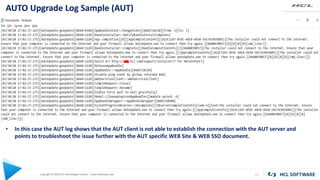
• In this case the AUT log shows that the AUT client is not able to establish the connection with the AUT server and
points to troubleshoot the issue further with the AUT specific WEB Site & WEB SSO document.
Copyright Ā© 2020 HCL Technologies Limited | www.hcltechsw.com
AUTO Upgrade Log Sample (AUT) Contd…
18
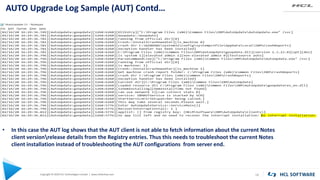
• In this case the AUT log shows that the AUT client is not able to fetch information about the current Notes
client versionrelease details from the Registry entries. Thus this needs to troubleshoot the current Notes
client installation instead of troubleshooting the AUT configurations from server end.
Copyright Ā© 2020 HCL Technologies Limited | www.hcltechsw.com
AUT Debugging/Troubleshooting Contd…
19
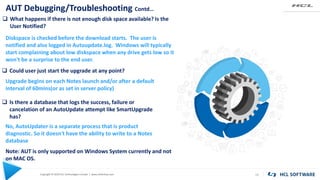
 What happens if there is not enough disk space available? Is the
User Notified?
Diskspace is checked before the download starts. The user is
notified and also logged in Autoupdate.log. Windows will typically
start complaining about low diskspace when any drive gets low so it
won't be a surprise to the end user.
 Could user just start the upgrade at any point?
Upgrade begins on each Notes launch and/or after a default
interval of 60mins(or as set in server policy)
 Is there a database that logs the success, failure or
cancelation of an AutoUpdate attempt like SmartUpgrade
has?
No, AutoUpdater is a separate process that is product
diagnostic. So it doesn't have the ability to write to a Notes
database
Note: AUT is only supported on Windows System currently and not
on MAC OS.
Copyright Ā© 2020 HCL Technologies Limited | www.hcltechsw.com
AUT Debugging/Troubleshooting Contd…
20
 Where to download XML Manifest File for Domino AUT
Catalog to push out Notes client upgrades for 11.0 and future
releases :
https://support.hcltechsw.com/csm?id=kb_article&sysparm_article=KB0074862
 Where to download XML Manifest File for Domino AUT
Catalog to push out Notes client upgrades for 10.0.1 Fix
Packs
https://support.hcltechsw.com/csm?id=kb_article&sysparm_article=KB00
69494
 Auto Upgrade (AUT) procedural document.
https://support.hcltechsw.com/csm?id=kb_article&sysparm_article=KB00
76503
Copyright Ā© 2020 HCL Technologies Limited | www.hcltechsw.com 21
KEYWORD KEYWORD
References
Using Notes Auto Update
https://help.hcltechsw.com/domino/10.0.1/inst_aut_overview.html
Configuring AUT Servers
https://help.hcltechsw.com/domino/10.0.1/inst_aut_configuring_aut_servers.html
Using the AUT Catalog to upload new Notes versions
https://help.hcltechsw.com/domino/10.0.1/inst_aut_using_the_aut_catalog.html
Use Desktop Settings to enable Notes clients to install updates
https://help.hcltechsw.com/domino/10.0.1/inst_aut_enabling_notes_users_for_automatic_updates.html
Copyright Ā© 2020 HCL Technologies Limited | www.hcltechsw.com 22
KEYWORD KEYWORD
Questions, Answers & Feedback?
Thank You!!!
$8.4 BILLION ENTERPRISE | 132,000 IDEAPRENEURS | 44 COUNTRIES
WATCH THE FILM

Auto Update(AUT) - HCL Notes

  • 1.
    Copyright Ā© 2019HCL Technologies Limited | www.hcltech.comCopyright Ā© 2020 HCL Technologies Limited | www.hcltechsw.com HCL AUT Overview, Configuration & Debugging/Troubleshooting Speaker Somnath Mohanty Product Support Specialist
  • 2.
    Copyright Ā© 2019HCL Technologies Limited | www.hcltech.comCopyright Ā© 2020 HCL Technologies Limited | www.hcltechsw.com About Us Speaker - Somnath Mohanty Product Support Specialist HCL Software & Digital Solutions somnath.m@pnp-hcl.com Organizer - Vinayak Tavargeri Senior Manager HCL Software & Digital Solutions vtavargeri@pnp-hcl.com Technical Panelist - Rajendran Jayavel Senior Technical Architect HCL Software & Digital Solutions Technical Panelist - Shrikant Jamkhandi Group Technical Specialist HCL Software & Digital Solutions Technical Panelist – Ranjit Rai Senior Technical Architect HCL Software & Digital Solutions
  • 3.
    Copyright © 2020HCL Technologies Limited | www.hcltechsw.com Agenda 3  HCL AUT Introduction & Overview  Advantages over Smart Upgrade  AUT Architecture  AUT Server & Client Components  AUT Configuration  AUT End to End Process  AUT Debugging/Troubleshooting  Questions, Answers & Feedback?
  • 4.
    Copyright Ā© 2020HCL Technologies Limited | www.hcltechsw.com HCL AUT Introduction & Overview 4 AUT as a Tool Control & Flexibility Reduces customer’s TCO Robust, maintainable, reliable and scalable 1 2 3 4 AUT is an on-premises tool used to automate the Client upgrade process and is introduced since NotesDomino Release 10.0.1 Reduces time, cost and ownership thereby reducing the effort involved in upgrading Notes client. Greater administrative control and flexibility over the upgrade process. AUT is extended from Open source Google Update framework and hence is robust, maintainable, reliable and scalable.
  • 5.
    Copyright Ā© 2020HCL Technologies Limited | www.hcltechsw.com Advantages over Smart Upgrade 5 • AUT manages privileges transparently, for Smart Upgrade, one must run different process for user with limited rights on Operating System. • For AUT, one doesn’t need separate process or steps for user with limited rights on OS that means a Notes user without administrative rights or with UAC enabled can still initiate Notes updates through AUT service. • AUT Server side management is simpler. • As AUT is extended from Open source Google Update framework , it is more robust, maintainable, reliable and scalable • The communication between AUT client and AUT server is encrypted with SSL Handshake in between them so is quite secured.
  • 6.
    Copyright Ā© 2020HCL Technologies Limited | www.hcltechsw.com AUT Architecture 6
  • 7.
    Copyright Ā© 2020HCL Technologies Limited | www.hcltechsw.com AUT Server & Notes Client Components 7 • AUT needs Notes & Domino 10.0.1 and above. • AUT Servers are special purpose Domino servers configured with : 1. Configuration document and Internet site/SSO documents to support LTPA 2. Autoupdate uses DAS REST API configured in Internet site doc , used by the Notes Client Autoupdate service to check for updates 3. Desktop policy is used to control and enable users for AUT check and download. 4. AUT Catalog database contains the product catalogs and the product install (webkits) • Notes Client has an AUT Client with it which runs as an independent service on the client OS.
  • 8.
    Copyright © 2020HCL Technologies Limited | www.hcltechsw.com AUT Configuration 8 AUT Specific Configuration Document AUT Catalog Database (Autcat.nsf) configuration AUT Desktop Policy Settings
  • 9.
    Copyright Ā© 2020HCL Technologies Limited | www.hcltechsw.com Creating AUT Specific Configuration Document 9 Admin Client Configuration Configuration AUT Service DNS name should be the FQDN name of the Domino server AUT Server should have a valid SSL certificate (Either a 3rd party SSL certificate or a Self Signed Certificate) Internet certificate must be imported to the Domino Directory. KEYWORD KEYWORD Domino Directory Server Add Configuration Specify the details in the ā€œClient Upgradeā€ Tab Specify the AUT server name or Server Group Name
  • 10.
    Copyright Ā© 2020HCL Technologies Limited | www.hcltechsw.com Creating AUT Specific Configuration Document Contd… 10 KEYWORD KEYWORD  Choose the Internet certificate which must have been imported to the domino directory from the local SSL certificate being used.  This is to trust the and prevent users from trusting the certificate manually  This configuration wizard automatically creates: - Website & WEB SSO document - AUT catalogue database(autcat.nsf)  Autcat.nsf can also be created using AUTCAT.ntf template file.  Keyring File details should be updated to the AUT specific Website document .
  • 11.
    Copyright Ā© 2020HCL Technologies Limited | www.hcltechsw.com AUT Catalog Configuration 11 KEYWORD KEYWORD  AUT catalog has all the information's with regards to the upgradation versions and the Installer File Details  Starting with the ā€œVersion pathā€ view click on ā€œImport manifestā€ and import the corresponding manifest.xml file specific to type of client.  ā€œVersion pathsā€ shows where an upgrade kit is located for a given client OS, language, and target version.  Receive the manifest XML(Standard Notes Client, Notes All Client and Basic Client) and installer executable files from HCL.  ā€œTo Versionā€ is automatically written from the manifest xml file. ā€œUpgrade From Versionā€ , ā€œPlatformā€ needs to Filled in . Installer file is uploaded into the ā€œContents Ofā€ field.
  • 12.
    Copyright Ā© 2020HCL Technologies Limited | www.hcltechsw.com AUT Catalog Configuration Contd… 12 KEYWORD KEYWORD  The Files view shows all files stored in the NSF, and associated with Version Paths.  Deploy Files action, installs all files in the file systems of every server in AUT group. They are under the server data directory so Notes clients can download them efficiently over HTTP.  "Version Maps" view gives an ordered list of version paths. A New Version Map is needed for every deployment. It is then mapped to the Version Path.
  • 13.
    AUT Desktop PolicySettings  New Desktop Settings Policy for AUT to enable users.  Can assign specific sets of users through Explicit Policy or all the users through organization policy.  Can make use of existing ā€œDesktop Policy Settingsā€ as well.  Control the frequency of updates(minimum is 60 minutes)  Select the Server Configuration doc.  Select the AUT Catalog Version Map that defines the ordered list of product build updates.  Enable Automatic Update Tool has to be set as Yes.  Both AUT Activation as well as Deactivation Notification can be left as Default System dialog or can be have customized message as well.
  • 14.
    Copyright Ā© 2020HCL Technologies Limited | www.hcltechsw.com 14 STAGE 01  Domino admin makes the required AUT Configuration From server end STAGE 03STAGE 02 STAGE 04 STAGE 05  After above message a new entry is added in Notes.ini - EnableNotesAUT=1 and AUT policy is imported into the user profile ($Profile) in local contacts AUT Desktop Policy Is Created and the AUT configuration and Version Map is linked to it. AUT End To End Process  AUT Configuration Document is Created  AUT Catalog database is configured with appropriate Version Paths, Files & Versions maps  Once the Policy gets applied, AUT is enabled and Notes client shows following message on launch:  Notes client reads the user profile and launches AUT client  Notes client starting with 10.0.1.X when installed on a system it does have the ā€œAuto Update Service ā€œrunning as an independent OS service:.  AUT client authenticates with AUT server using LTPA token and sends Update check http request to AUT server through XML with the current version details.  Current version is stored in registry in pv field of key Computer (e.g.KEY_LOCAL_MACHIN ESOFTWAREWOW6432 NodeIBMAutoUpdateCl ients{3E1B33CC-8C2E- 4EED-B6A2- 3BB3EE0ACFF1})  If new version (say 10.0.1 FP4) is available on AUT server, AUT server responds by sending response back to AUT client.  AUT client shows following message  When Yes is clicked, then download starts in the background and downloads to the path : C:Users<username>A ppDataLocalIBMAuto UpdateDownload folder. Post the download is completed it shows the below message:  It is recommended to close Notes when saying Yes for the installation to happen.
  • 15.
    Copyright Ā© 2020HCL Technologies Limited | www.hcltechsw.com AUT Debugging/Troubleshooting 15  In case of any issues related to AUT what shall I do? From Notes Client end : Add these AUT Notes.ini settings Add DEBUG_AUT_CLIENT=1 to get AUT verbose logging Add DEBUG_AUT_MGMT=1 to get AUT policy related logging information Above parameters captures information in the console.log  From AUT Domino Server End: Files/Data needed for investigation: 1. AUT Catalog Database i.e. Autcat.nsf 2. Config only Domino Directory (Policies, Servers, Internet sites, Certificates etc.) 3. AUT subdirectory under the Domino data directory which contains AUT related configuration file. 4. Console log from server. 5. For HTTP: "tell http debug thread onā€, TECHNICAL_SUPPORThtthr*.log .
  • 16.
    Copyright Ā© 2020HCL Technologies Limited | www.hcltechsw.com AUT Debugging/Troubleshooting Contd… 16  Where AUT Client Logs are generated? C:ProgramDataIBMAutoUpdateLogAutoUpdate.log  How much load does this put in the Client while it is running? No load or performance issue is noticed since the downloader is a separate process & only interacts with the Notes client for user authentication  How long do we expect the download to take? Depends on network speeds. The download is supposed to take place in the background so it shouldn't matter how long it takes. It's ready when it's ready.
  • 17.
    Copyright Ā© 2020HCL Technologies Limited | www.hcltechsw.com AUTO Upgrade Log Sample (AUT) 17 • In this case the AUT log shows that the AUT client is not able to establish the connection with the AUT server and points to troubleshoot the issue further with the AUT specific WEB Site & WEB SSO document.
  • 18.
    Copyright Ā© 2020HCL Technologies Limited | www.hcltechsw.com AUTO Upgrade Log Sample (AUT) Contd… 18 • In this case the AUT log shows that the AUT client is not able to fetch information about the current Notes client versionrelease details from the Registry entries. Thus this needs to troubleshoot the current Notes client installation instead of troubleshooting the AUT configurations from server end.
  • 19.
    Copyright Ā© 2020HCL Technologies Limited | www.hcltechsw.com AUT Debugging/Troubleshooting Contd… 19  What happens if there is not enough disk space available? Is the User Notified? Diskspace is checked before the download starts. The user is notified and also logged in Autoupdate.log. Windows will typically start complaining about low diskspace when any drive gets low so it won't be a surprise to the end user.  Could user just start the upgrade at any point? Upgrade begins on each Notes launch and/or after a default interval of 60mins(or as set in server policy)  Is there a database that logs the success, failure or cancelation of an AutoUpdate attempt like SmartUpgrade has? No, AutoUpdater is a separate process that is product diagnostic. So it doesn't have the ability to write to a Notes database Note: AUT is only supported on Windows System currently and not on MAC OS.
  • 20.
    Copyright Ā© 2020HCL Technologies Limited | www.hcltechsw.com AUT Debugging/Troubleshooting Contd… 20  Where to download XML Manifest File for Domino AUT Catalog to push out Notes client upgrades for 11.0 and future releases : https://support.hcltechsw.com/csm?id=kb_article&sysparm_article=KB0074862  Where to download XML Manifest File for Domino AUT Catalog to push out Notes client upgrades for 10.0.1 Fix Packs https://support.hcltechsw.com/csm?id=kb_article&sysparm_article=KB00 69494  Auto Upgrade (AUT) procedural document. https://support.hcltechsw.com/csm?id=kb_article&sysparm_article=KB00 76503
  • 21.
    Copyright Ā© 2020HCL Technologies Limited | www.hcltechsw.com 21 KEYWORD KEYWORD References Using Notes Auto Update https://help.hcltechsw.com/domino/10.0.1/inst_aut_overview.html Configuring AUT Servers https://help.hcltechsw.com/domino/10.0.1/inst_aut_configuring_aut_servers.html Using the AUT Catalog to upload new Notes versions https://help.hcltechsw.com/domino/10.0.1/inst_aut_using_the_aut_catalog.html Use Desktop Settings to enable Notes clients to install updates https://help.hcltechsw.com/domino/10.0.1/inst_aut_enabling_notes_users_for_automatic_updates.html
  • 22.
    Copyright Ā© 2020HCL Technologies Limited | www.hcltechsw.com 22 KEYWORD KEYWORD Questions, Answers & Feedback? Thank You!!!
  • 23.
    $8.4 BILLION ENTERPRISE| 132,000 IDEAPRENEURS | 44 COUNTRIES WATCH THE FILM