Concept Art
Development of My Digital Graphic
I had chose many swords for my game design
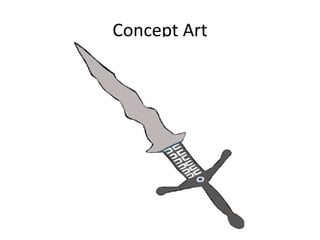
and I decided on choosing the one in the last
slide. I drew this by hand using a pencil then
scanned it by email so I could edit it on
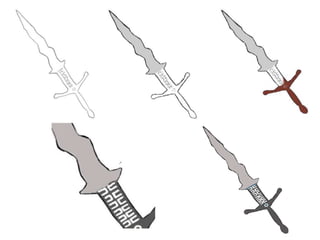
Pixlr.com. I then developed it by adding detail
and accurate lines getting rid of all the mistakes
as you can see in the next slide.
Tools
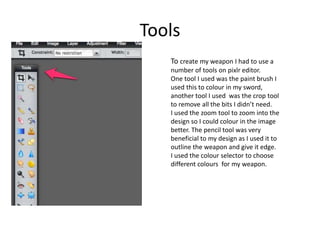
To create my weapon I had to use a
number of tools on pixlr editor.
One tool I used was the paint brush I
used this to colour in my sword,
another tool I used was the crop tool
to remove all the bits I didn’t need.
I used the zoom tool to zoom into the
design so I could colour in the image
better. The pencil tool was very
beneficial to my design as I used it to
outline the weapon and give it edge.
I used the colour selector to choose
different colours for my weapon.
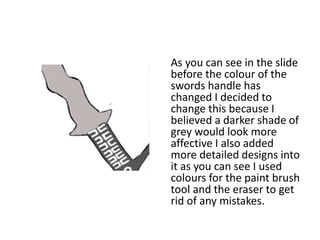
As you can see in the slide
before the colour of the
swords handle has
changed I decided to
change this because I
believed a darker shade of
grey would look more
affective I also added
more detailed designs into
it as you can see I used
colours for the paint brush
tool and the eraser to get
rid of any mistakes.
I had to save my scanned image into my documents
then open the file up onto pixlr so I could trace it
using a sketchpad which we connected to the
computer. I used many tools to make my design
such as the pencil tool and with in that I used the
sketchy and shady tools as well as a plain one the
purpose of this was for it to look more professional.
I used different paint brush tools as well to add
colour to my sword I did this because my sword is
really basic and needed an aspect that stood out.
I used the colours grey to fill my blade in making
it represent steel and look more realistic and a
darker shade of grey to show the handles of the
sword. I used the colours blue and white to add
detail to the design. It is a very unique sword
which I made up from my imagination I have
never seen a design like this before.

unit 13 assignment 4 Edit

  • 1.
  • 2.
    Development of MyDigital Graphic I had chose many swords for my game design and I decided on choosing the one in the last slide. I drew this by hand using a pencil then scanned it by email so I could edit it on Pixlr.com. I then developed it by adding detail and accurate lines getting rid of all the mistakes as you can see in the next slide.
  • 4.
    Tools To create myweapon I had to use a number of tools on pixlr editor. One tool I used was the paint brush I used this to colour in my sword, another tool I used was the crop tool to remove all the bits I didn’t need. I used the zoom tool to zoom into the design so I could colour in the image better. The pencil tool was very beneficial to my design as I used it to outline the weapon and give it edge. I used the colour selector to choose different colours for my weapon.
  • 5.
    As you cansee in the slide before the colour of the swords handle has changed I decided to change this because I believed a darker shade of grey would look more affective I also added more detailed designs into it as you can see I used colours for the paint brush tool and the eraser to get rid of any mistakes.
  • 6.
    I had tosave my scanned image into my documents then open the file up onto pixlr so I could trace it using a sketchpad which we connected to the computer. I used many tools to make my design such as the pencil tool and with in that I used the sketchy and shady tools as well as a plain one the purpose of this was for it to look more professional. I used different paint brush tools as well to add colour to my sword I did this because my sword is really basic and needed an aspect that stood out.
  • 7.
    I used thecolours grey to fill my blade in making it represent steel and look more realistic and a darker shade of grey to show the handles of the sword. I used the colours blue and white to add detail to the design. It is a very unique sword which I made up from my imagination I have never seen a design like this before.