Model View
Controller (MVC)
Group Members
 Muhammad Wajid (12-SE-01)
 Mubasher Hafeez (12-SE-07)
 Muhammad Ahsan (12-SE-53)
Introduction
 ASP.Net MVC is a framework for building web applications.
 Generally applies MVC Pattern on ASP.Net framework.
 Microsoft combines the effectiveness of model-view-controller.
Understanding the History of ASP.Net
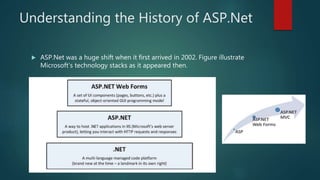
 ASP.Net was a huge shift when it first arrived in 2002. Figure illustrate
Microsoft’s technology stacks as it appeared then.
Understanding ASP.Net Web Forms
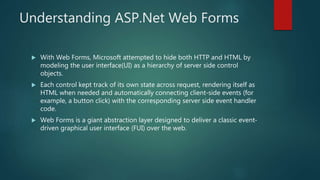
 With Web Forms, Microsoft attempted to hide both HTTP and HTML by
modeling the user interface(UI) as a hierarchy of server side control
objects.
 Each control kept track of its own state across request, rendering itself as
HTML when needed and automatically connecting client-side events (for
example, a button click) with the corresponding server side event handler
code.
 Web Forms is a giant abstraction layer designed to deliver a classic event-
driven graphical user interface (FUI) over the web.
What to choose ?
Web Forms or MVC
 Two important factors you should consider while making the choice is :
 Rapid Application Development - If you want to develop anything rapidly
ASP.NET Web Forms is the only chance you are having, you can’t even
consider for ASP.NET MVC for RAD.
 Unit Testing - If automatic unit testing is most important factor for you
MVC will be best for you.
 Other than what you can do is, write down all your project requirement
and try to compare them with Pros and Cons of both Web Forms and MVC
The MVC Pattern
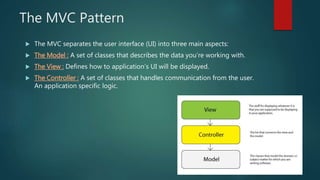
 The MVC separates the user interface (UI) into three main aspects:
 The Model : A set of classes that describes the data you’re working with.
 The View : Defines how to application’s UI will be displayed.
 The Controller : A set of classes that handles communication from the user.
An application specific logic.
Creating an ASP.Net MVC Application
 Begin with choosing File - > New Project as in figure :
Creating an ASP.Net MVC Application
contd…
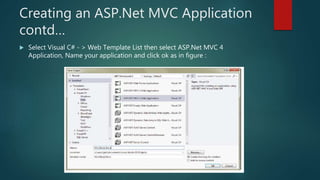
 Select Visual C# - > Web Template List then select ASP.Net MVC 4
Application, Name your application and click ok as in figure :
Creating an ASP.Net MVC Application
contd…
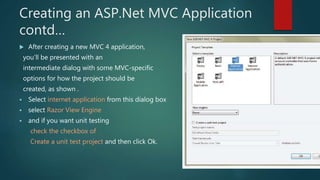
 After creating a new MVC 4 application,
you’ll be presented with an
intermediate dialog with some MVC-specific
options for how the project should be
created, as shown .
 Select internet application from this dialog box
 select Razor View Engine
 and if you want unit testing
check the checkbox of
Create a unit test project and then click Ok.
MVC Application Structure
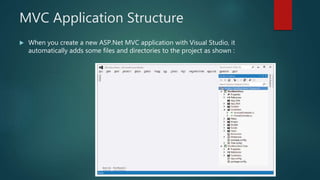
 When you create a new ASP.Net MVC application with Visual Studio, it
automatically adds some files and directories to the project as shown :
The Models
 When you create a new ASP.Net MVC template application project it
contains a folder named Model.
 Model folder usually contains files with extensions .cs .
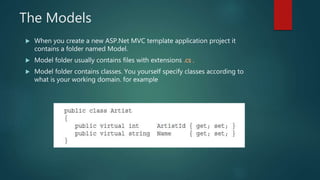
 Model folder contains classes. You yourself specify classes according to
what is your working domain. for example
The Models contd…
 The MVC Model contains all application logic.
 In MVC models both hold and manipulate application data.
Adding classes to Models
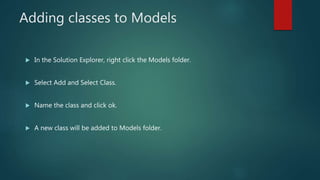
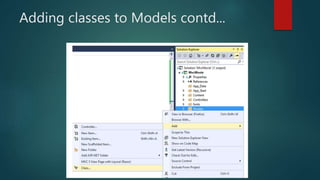
 In the Solution Explorer, right click the Models folder.
 Select Add and Select Class.
 Name the class and click ok.
 A new class will be added to Models folder.
Adding classes to Models contd...
The Controller’s Role
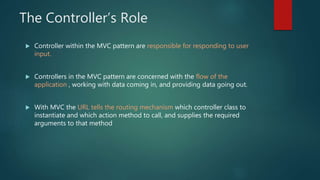
 Controller within the MVC pattern are responsible for responding to user
input.
 Controllers in the MVC pattern are concerned with the flow of the
application , working with data coming in, and providing data going out.
 With MVC the URL tells the routing mechanism which controller class to
instantiate and which action method to call, and supplies the required
arguments to that method
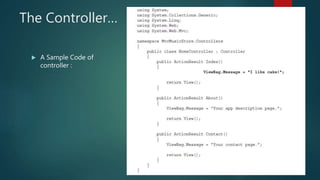
The Controller…
 A Sample Code of
controller :
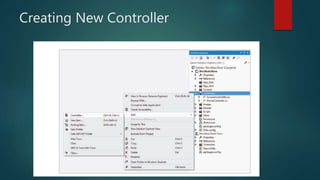
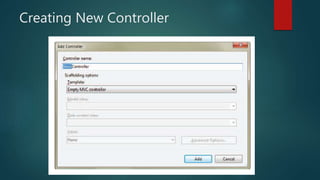
Creating New Controller
Writing Action Method
 Add as many Action Methods as you want:
 This is simple demonstration of writing Action Methods:
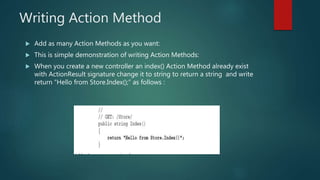
 When you create a new controller an index() Action Method already exist
with ActionResult signature change it to string to return a string and write
return “Hello from Store.Index();” as follows :
Accessing Action Methods
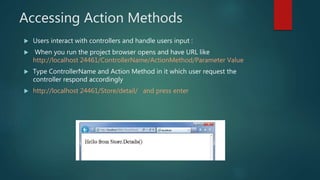
 Users interact with controllers and handle users input :
 When you run the project browser opens and have URL like
http://localhost 24461/ControllerName/ActionMethod/Parameter Value
 Type ControllerName and Action Method in it which user request the
controller respond accordingly
 http://localhost 24461/Store/detail/ and press enter
The Purpose of Views
 The View is responsible for providing the user interface (UI) to the user.
 The view transforms that model into a format ready to be presented to the
user.
 In ASP.Net MVC, the view accomplishes this by examining a model object
handed off to it by the controller and transforming the contents of that to
HTML.
 By convention the views directory contains a folder per controller. With the
same name as the controller.
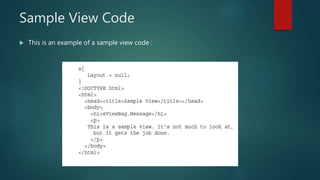
Sample View Code
 This is an example of a sample view code :
ViewData and ViewBag
 These both are use to pass data from controller to view.
 Technically, data is passed from the controllers to the views via a
ViewDataDictionary called ViewData.
 ViewData Syntax as follows :
 ViewBag Syntax as follows :
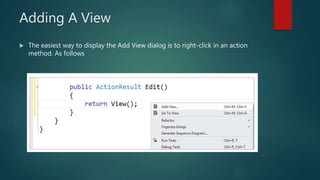
Adding A View
 The easiest way to display the Add View dialog is to right-click in an action
method. As follows
Adding A View contd…
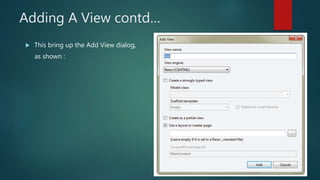
 This bring up the Add View dialog,
as shown :
Partial View
 An action method can also return a partial view in the form of a
PartialViewResult via the PartialView method.
 The partial view itself looks much like a normal view, except it doesn’t
specify a layout.
 This is useful in partial update scenarios using AJAX.
Questions ???

Model view controller (mvc)

  • 1.
  • 2.
    Group Members  MuhammadWajid (12-SE-01)  Mubasher Hafeez (12-SE-07)  Muhammad Ahsan (12-SE-53)
  • 3.
    Introduction  ASP.Net MVCis a framework for building web applications.  Generally applies MVC Pattern on ASP.Net framework.  Microsoft combines the effectiveness of model-view-controller.
  • 4.
    Understanding the Historyof ASP.Net  ASP.Net was a huge shift when it first arrived in 2002. Figure illustrate Microsoft’s technology stacks as it appeared then.
  • 5.
    Understanding ASP.Net WebForms  With Web Forms, Microsoft attempted to hide both HTTP and HTML by modeling the user interface(UI) as a hierarchy of server side control objects.  Each control kept track of its own state across request, rendering itself as HTML when needed and automatically connecting client-side events (for example, a button click) with the corresponding server side event handler code.  Web Forms is a giant abstraction layer designed to deliver a classic event- driven graphical user interface (FUI) over the web.
  • 6.
    What to choose? Web Forms or MVC  Two important factors you should consider while making the choice is :  Rapid Application Development - If you want to develop anything rapidly ASP.NET Web Forms is the only chance you are having, you can’t even consider for ASP.NET MVC for RAD.  Unit Testing - If automatic unit testing is most important factor for you MVC will be best for you.  Other than what you can do is, write down all your project requirement and try to compare them with Pros and Cons of both Web Forms and MVC
  • 7.
    The MVC Pattern The MVC separates the user interface (UI) into three main aspects:  The Model : A set of classes that describes the data you’re working with.  The View : Defines how to application’s UI will be displayed.  The Controller : A set of classes that handles communication from the user. An application specific logic.
  • 8.
    Creating an ASP.NetMVC Application  Begin with choosing File - > New Project as in figure :
  • 9.
    Creating an ASP.NetMVC Application contd…  Select Visual C# - > Web Template List then select ASP.Net MVC 4 Application, Name your application and click ok as in figure :
  • 10.
    Creating an ASP.NetMVC Application contd…  After creating a new MVC 4 application, you’ll be presented with an intermediate dialog with some MVC-specific options for how the project should be created, as shown .  Select internet application from this dialog box  select Razor View Engine  and if you want unit testing check the checkbox of Create a unit test project and then click Ok.
  • 11.
    MVC Application Structure When you create a new ASP.Net MVC application with Visual Studio, it automatically adds some files and directories to the project as shown :
  • 12.
    The Models  Whenyou create a new ASP.Net MVC template application project it contains a folder named Model.  Model folder usually contains files with extensions .cs .  Model folder contains classes. You yourself specify classes according to what is your working domain. for example
  • 13.
    The Models contd… The MVC Model contains all application logic.  In MVC models both hold and manipulate application data.
  • 14.
    Adding classes toModels  In the Solution Explorer, right click the Models folder.  Select Add and Select Class.  Name the class and click ok.  A new class will be added to Models folder.
  • 15.
    Adding classes toModels contd...
  • 16.
    The Controller’s Role Controller within the MVC pattern are responsible for responding to user input.  Controllers in the MVC pattern are concerned with the flow of the application , working with data coming in, and providing data going out.  With MVC the URL tells the routing mechanism which controller class to instantiate and which action method to call, and supplies the required arguments to that method
  • 17.
    The Controller…  ASample Code of controller :
  • 18.
  • 19.
  • 20.
    Writing Action Method Add as many Action Methods as you want:  This is simple demonstration of writing Action Methods:  When you create a new controller an index() Action Method already exist with ActionResult signature change it to string to return a string and write return “Hello from Store.Index();” as follows :
  • 21.
    Accessing Action Methods Users interact with controllers and handle users input :  When you run the project browser opens and have URL like http://localhost 24461/ControllerName/ActionMethod/Parameter Value  Type ControllerName and Action Method in it which user request the controller respond accordingly  http://localhost 24461/Store/detail/ and press enter
  • 22.
    The Purpose ofViews  The View is responsible for providing the user interface (UI) to the user.  The view transforms that model into a format ready to be presented to the user.  In ASP.Net MVC, the view accomplishes this by examining a model object handed off to it by the controller and transforming the contents of that to HTML.  By convention the views directory contains a folder per controller. With the same name as the controller.
  • 23.
    Sample View Code This is an example of a sample view code :
  • 24.
    ViewData and ViewBag These both are use to pass data from controller to view.  Technically, data is passed from the controllers to the views via a ViewDataDictionary called ViewData.  ViewData Syntax as follows :  ViewBag Syntax as follows :
  • 25.
    Adding A View The easiest way to display the Add View dialog is to right-click in an action method. As follows
  • 26.
    Adding A Viewcontd…  This bring up the Add View dialog, as shown :
  • 27.
    Partial View  Anaction method can also return a partial view in the form of a PartialViewResult via the PartialView method.  The partial view itself looks much like a normal view, except it doesn’t specify a layout.  This is useful in partial update scenarios using AJAX.
  • 28.