iOS App Architectures 
VIPER 
Rajat Datta 
CocoaCoder
What is the Problem? 
• Massive View Controllers 
• Model objects (Core Data) are typically quite simple 
• Views are combinations of UIKit components 
• do not have access to models 
• Only interaction with Controllers is via IBActions 
• View Controllers get everything else!
• What goes into View Controllers? 
• Data sources for Views (UITableView 
DataSource) 
• Business Logic 
• Application flow 
• transition between view controllers 
• VIPER is one proposal for a different app structure.
References 
• WWDC 2014 video: Advanced User Interfaces with 
Collection Views 
• Viper (MutualMobile): http://www.objc.io/issue-13/viper.html 
• MVVM Pattern from Microsoft: http://msdn.microsoft.com/en-us/ 
library/hh848246.aspx 
• The Clean Architecture (Uncle Bob): http://blog.8thlight.com/ 
uncle-bob/2012/08/13/the-clean-architecture.html 
• For the academically oriented: Object-Oriented Software 
Construction by Bertrand Meyer
• Lighter weight articles: 
• Clean Table View Code: http://www.objc.io/ 
issue-1/table-views.html 
• Lighter View Controllers: http://www.objc.io/ 
issue-1/lighter-view-controllers.html
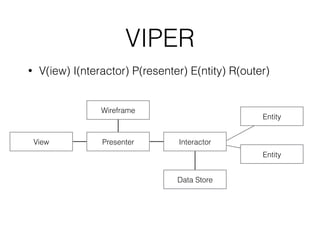
VIPER 
• V(iew) I(nteractor) P(resenter) E(ntity) R(outer) 
View Presenter Interactor 
Entity 
Entity 
Wireframe 
Data Store
Views 
• UIKit components (UILabel, UITableView, …) 
• Presents a public interface that can be used to drive the UI 
• Views are completely passive; they don’t ask for the data to be shown. 
• implemented as public methods (ie. showName:(NSString *)name) 
• Defines an event interface triggered by IBActions, gestures 
• implemented as @protocol methods 
• ie. - (void)addEventAction:(id)sender; 
• The View Controller implements these two interfaces
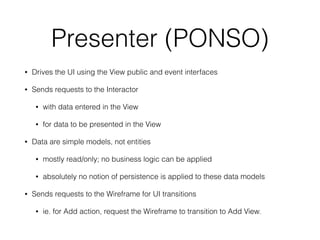
Presenter (PONSO) 
• Drives the UI using the View public and event interfaces 
• Sends requests to the Interactor 
• with data entered in the View 
• for data to be presented in the View 
• Data are simple models, not entities 
• mostly read/only; no business logic can be applied 
• absolutely no notion of persistence is applied to these data models 
• Sends requests to the Wireframe for UI transitions 
• ie. for Add action, request the Wireframe to transition to Add View.
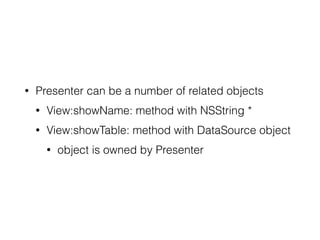
• Presenter can be a number of related objects 
• View:showName: method with NSString * 
• View:showTable: method with DataSource object 
• object is owned by Presenter
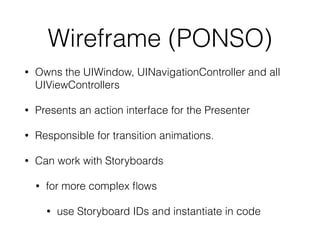
Wireframe (PONSO) 
• Owns the UIWindow, UINavigationController and all 
UIViewControllers 
• Presents an action interface for the Presenter 
• Responsible for transition animations. 
• Can work with Storyboards 
• for more complex flows 
• use Storyboard IDs and instantiate in code
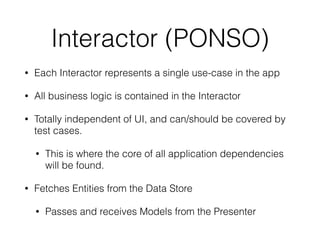
Interactor (PONSO) 
• Each Interactor represents a single use-case in the app 
• All business logic is contained in the Interactor 
• Totally independent of UI, and can/should be covered by 
test cases. 
• This is where the core of all application dependencies 
will be found. 
• Fetches Entities from the Data Store 
• Passes and receives Models from the Presenter
Entities (PONSO) 
• Created by the Data Store 
• Object contents are modified by the Interactor 
• Is not a managed object. Entities do not know how 
to persist themselves. 
• Just data structures. App dependent logic should 
be in an Interactor.
Data Store 
• Responsible for presenting Entities to the Interactor 
• All persistence decisions are made here. 
• Can be replaced by a test double (mock). 
• Can be independently tested.
Demo App 
• Journal App 
• Journal Entry 
• Date and Time 
• Text 
• Last edit Date and Time 
• Use Cases 
• Add Journal Entry 
• Show Journal Entries 
• Edit an existing Journal Entry 
• Persistence 
• Core Data 
• Cloudkit?
Views 
• List View 
• Presenter starts the view with a datasource containing list of 
entries 
• from date, to date fields 
• when set, calls back via protocol method to the Presenter, 
which presents the view with a new datasource. 
• Edit Action (gesture on Table View?) 
• call back via protocol method to the Presenter, along with 
which journal entry selected. 
• Add Action (button?) 
• call back via protocol method to the Presenter.
Presenter 
• Initially, call Interactor and fetch journal entries for last 30 
days 
• Call View:showJournalList: with datasource containing 
list of journal entries; 
• callback from view with from and to dates; fetch data 
from Interactor and call View:showJournalList with that list 
• callback from view with edit action and journal entry; call 
to Wireframe to switch UI to Edit mode; 
• callback from view with add action; call to wireframe to 
switch UI to Add mode.
Interactor 
• For View Action 
• method to fetch all journal articles for last 30 days; also 
returns from date, to date 
• method which, given from date, to date, returns the list of 
journal entries within that time (inclusive). 
• For Add action 
• method which, given a date and time, returns a new, empty, 
journal entry 
• contains only the id for the entry (unix timestamp) 
• method which, given id and journal entry, calls the data store 
to save a new journal entry.
Entity 
• Data structure that Interactor passes along to the Data 
Store and back; 
• id (unix timestamp) for the journal entry. This is 
expected to be unique. 
• text: NSAttributedString 
• to be complete, should support images and formatting 
information. 
• last edit time. 
• In this case, this can also be the model 
• shared between the Interactor and the Presenter.
Wireframe 
• Switch to List View 
• Switch to Edit View 
• Switch to Add View
Data Store 
• in DataStore:init method, setup the Core Data sqlite 
store 
• DataStore:newJournalEntry 
• DataStore:fetchJournalEntriesFromDate:toDate: 
• DataStore:changedJournalEntry:
Edge Cases 
• Out of band information 
• network access status; simple case 
• Push notification informs app of new information 
• overlay Presenter, on top of existing Presenter 
• overlay Presenter can ask Wireframe to change 
the UI. 
• Presenter can offer method that puts a Presenter 
to sleep 
• For games, stop the game clock.
Flow Controllers 
• Reference: http://albertodebortoli.github.io/blog/ 
2014/09/03/flow-controllers-on-ios-for-a-better-navigation- 
control/ 
• Flow Controllers manage navigation control 
• are passed along from view controller to view 
controller 
• are initialized with the navigation controller instance 
• Basically, these are Presenter and Wireframe in one. 
• What about Storyboards?

iOS viper presentation

  • 1.
    iOS App Architectures VIPER Rajat Datta CocoaCoder
  • 2.
    What is theProblem? • Massive View Controllers • Model objects (Core Data) are typically quite simple • Views are combinations of UIKit components • do not have access to models • Only interaction with Controllers is via IBActions • View Controllers get everything else!
  • 3.
    • What goesinto View Controllers? • Data sources for Views (UITableView DataSource) • Business Logic • Application flow • transition between view controllers • VIPER is one proposal for a different app structure.
  • 4.
    References • WWDC2014 video: Advanced User Interfaces with Collection Views • Viper (MutualMobile): http://www.objc.io/issue-13/viper.html • MVVM Pattern from Microsoft: http://msdn.microsoft.com/en-us/ library/hh848246.aspx • The Clean Architecture (Uncle Bob): http://blog.8thlight.com/ uncle-bob/2012/08/13/the-clean-architecture.html • For the academically oriented: Object-Oriented Software Construction by Bertrand Meyer
  • 5.
    • Lighter weightarticles: • Clean Table View Code: http://www.objc.io/ issue-1/table-views.html • Lighter View Controllers: http://www.objc.io/ issue-1/lighter-view-controllers.html
  • 6.
    VIPER • V(iew)I(nteractor) P(resenter) E(ntity) R(outer) View Presenter Interactor Entity Entity Wireframe Data Store
  • 7.
    Views • UIKitcomponents (UILabel, UITableView, …) • Presents a public interface that can be used to drive the UI • Views are completely passive; they don’t ask for the data to be shown. • implemented as public methods (ie. showName:(NSString *)name) • Defines an event interface triggered by IBActions, gestures • implemented as @protocol methods • ie. - (void)addEventAction:(id)sender; • The View Controller implements these two interfaces
  • 8.
    Presenter (PONSO) •Drives the UI using the View public and event interfaces • Sends requests to the Interactor • with data entered in the View • for data to be presented in the View • Data are simple models, not entities • mostly read/only; no business logic can be applied • absolutely no notion of persistence is applied to these data models • Sends requests to the Wireframe for UI transitions • ie. for Add action, request the Wireframe to transition to Add View.
  • 9.
    • Presenter canbe a number of related objects • View:showName: method with NSString * • View:showTable: method with DataSource object • object is owned by Presenter
  • 10.
    Wireframe (PONSO) •Owns the UIWindow, UINavigationController and all UIViewControllers • Presents an action interface for the Presenter • Responsible for transition animations. • Can work with Storyboards • for more complex flows • use Storyboard IDs and instantiate in code
  • 11.
    Interactor (PONSO) •Each Interactor represents a single use-case in the app • All business logic is contained in the Interactor • Totally independent of UI, and can/should be covered by test cases. • This is where the core of all application dependencies will be found. • Fetches Entities from the Data Store • Passes and receives Models from the Presenter
  • 12.
    Entities (PONSO) •Created by the Data Store • Object contents are modified by the Interactor • Is not a managed object. Entities do not know how to persist themselves. • Just data structures. App dependent logic should be in an Interactor.
  • 13.
    Data Store •Responsible for presenting Entities to the Interactor • All persistence decisions are made here. • Can be replaced by a test double (mock). • Can be independently tested.
  • 14.
    Demo App •Journal App • Journal Entry • Date and Time • Text • Last edit Date and Time • Use Cases • Add Journal Entry • Show Journal Entries • Edit an existing Journal Entry • Persistence • Core Data • Cloudkit?
  • 15.
    Views • ListView • Presenter starts the view with a datasource containing list of entries • from date, to date fields • when set, calls back via protocol method to the Presenter, which presents the view with a new datasource. • Edit Action (gesture on Table View?) • call back via protocol method to the Presenter, along with which journal entry selected. • Add Action (button?) • call back via protocol method to the Presenter.
  • 16.
    Presenter • Initially,call Interactor and fetch journal entries for last 30 days • Call View:showJournalList: with datasource containing list of journal entries; • callback from view with from and to dates; fetch data from Interactor and call View:showJournalList with that list • callback from view with edit action and journal entry; call to Wireframe to switch UI to Edit mode; • callback from view with add action; call to wireframe to switch UI to Add mode.
  • 17.
    Interactor • ForView Action • method to fetch all journal articles for last 30 days; also returns from date, to date • method which, given from date, to date, returns the list of journal entries within that time (inclusive). • For Add action • method which, given a date and time, returns a new, empty, journal entry • contains only the id for the entry (unix timestamp) • method which, given id and journal entry, calls the data store to save a new journal entry.
  • 18.
    Entity • Datastructure that Interactor passes along to the Data Store and back; • id (unix timestamp) for the journal entry. This is expected to be unique. • text: NSAttributedString • to be complete, should support images and formatting information. • last edit time. • In this case, this can also be the model • shared between the Interactor and the Presenter.
  • 19.
    Wireframe • Switchto List View • Switch to Edit View • Switch to Add View
  • 20.
    Data Store •in DataStore:init method, setup the Core Data sqlite store • DataStore:newJournalEntry • DataStore:fetchJournalEntriesFromDate:toDate: • DataStore:changedJournalEntry:
  • 21.
    Edge Cases •Out of band information • network access status; simple case • Push notification informs app of new information • overlay Presenter, on top of existing Presenter • overlay Presenter can ask Wireframe to change the UI. • Presenter can offer method that puts a Presenter to sleep • For games, stop the game clock.
  • 22.
    Flow Controllers •Reference: http://albertodebortoli.github.io/blog/ 2014/09/03/flow-controllers-on-ios-for-a-better-navigation- control/ • Flow Controllers manage navigation control • are passed along from view controller to view controller • are initialized with the navigation controller instance • Basically, these are Presenter and Wireframe in one. • What about Storyboards?