Building Effective Web
Applications with ASP .Net 3.5


                 ASIM SHAHZAD
Target Audience
• Prior web development experience
• Best geared towards programmers,
  software engineers, web designers,
  technical leads, task leads and architects.
• Class will be taught using C# which has a
  similar syntax to Java
Course Objectives
• Become familiar with new features in
  ASP .Net 3.5
• Build database driven apps using
  LINQ
• Leverage ASP .Net AJAX on both the
  client and server side
• Learn about state management and
  caching
• Secure your ASP .Net websites
Course Roadmap
• Week 1 – Getting Started
• Week 2 – Data Access, ADO .Net and
  LINQ
• Week 3 – AJAX
• Week 4 – State Management and Caching
• Week 5 – Security
• Week 6 – End to End app and SP1
Course Text and Code Samples
     ASP .Net 3.5 Unleashed ( author
     Stephen Walther - Sam’s
     Publishing)
      Code samples available for download at
      www.superexpert.com
    o CD that accompanies the book has both
      C# and VB .Net versions of the code
    o Chapter 1 is available as a free
      download from www.bookpool.com
    o Demo how to run book code
Today’s Agenda – Getting
         Started
•   Tools We Will Use
•   ASP .Net 3.5 Overview
•   Project Setup/Configuration
•   WebForms Overview
•   Server Controls
•   User Controls
•   Master Pages
•   Debugging and Tracing
•   New Features in ASP .Net 3.5
ASP .Net 3.5 Overview
• ASP .Net 3.5 is a technology that allows
  programmers to create dynamic web
  sites.
• ASP .Net can be used to create small
  personal web sites or Enterprise
  applications
• ASP .Net is part of the .Net Framework
• .Net Framework consists of the
  Framework Class Library and the
  Common Language Runtime
Tools We Will Use
• VS 2008 Professional or
  Visual Web Developer 2008
• SQL Server Express Edition or higher
  (2005 or 2008)
  Express Edition or higher
• Links to download these products can
  be found on http://msdn.microsoft.com
• VS2008 available from MS, MSDN or
  Team System subscription or contact Bill
  Scherer Jr (SRA Enterprise Solutions
Working with .Net Projects –
             VS2003
• VS2003: Single solution file. Project precompiled into a single
  DLL, ASPX markup pages deployed.
• Pros:
   – Compiles/debugs like other projects (WinForms, etc.)
   – Slightly more efficient.
   – Single file deployment + referenced DLLs + HTML.
• Cons:
   – Not easy to use in team environments.
   – Often leads to monolithic DLLs for large sites.
Working with Projects - VS2005

   VS2005: Website Compilation Model – All files
   compiled on demand.
   Pros:
      Works better in teams.
      Easy to deploy/test incremental updates.
   Cons:
      Can be difficult to upgrade from VS2003.
      First hit incurs compilation overhead.
      May mean more files to deploy.
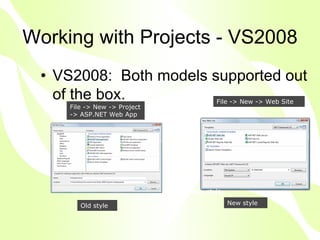
Working with Projects - VS2008
 • VS2008: Both models supported out
   of the box.                      File -> New -> Web Site
                                     File -> New -> Web Site
     File -> New -> Project
     -> ASP.NET Web App


                              New style
                               New style

        Old style                          New style
Demo
• Create a new website using ASP .Net 3.5
  and VS2008
Web Forms Key Points
• ASPX pages handled by a handler that
  facilitate the page lifecycle and events (such
  as Page_Load, PreRender, and control
  events).
• Uses ViewState to encoded state-specific
  information otherwise lost in the stateless
  nature of HTTP.
• Extensive controls library to abstract
  functionality. Buttons, textboxes, etc.
• Extensible.
• Web Forms have a .aspx file extension.
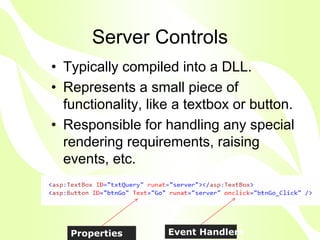
Server Controls
• Typically compiled into a DLL.
• Represents a small piece of
  functionality, like a textbox or button.
• Responsible for handling any special
  rendering requirements, raising
  events, etc.


   Properties       Event Handlers
User Controls
• Collections of HTML and/or Server
  Controls for a broader purpose – such as
  a login dialog box.
• Typically part of a project and compiled
  with the project.
• Can expose properties.
HTML Controls
• Take any HTML tag and add a
  runat=“server” tag.
• This converts the HTML tag into a server-
  side ASP .Net control
• Allow us to program server side events
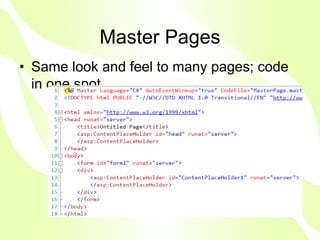
Master Pages
• Same look and feel to many pages; code
  in one spot.
ViewState (p29)
• The HTTP Protocol is a stateless
  protocol
• Web Pages use a
  Request/Response model
• ViewState allows us to save the state
  of a server control across multiple
  page requests
• Comes with performance overhead
• Enabled by default for each control
Demo
• Add page level tracing to existing
  page
• Examine page lifecycle
• Examine Viewstate cost
• Write to trace log
• We can determine if the page is
  posting back by using the
  Page.IsPostback property
• We can turn tracing and debugging
Dynamic Compilation (p35)
• When we create an ASP .Net page
  we are creating source code for a
  .Net class
• Pages are compiled and stored in a
  temp folder on the web server
• Unlike classic ASP the page will not
  be recompiled again, unless we
  disable dynamic compilation
• This allows support for thousands of
Code Behind vs Single File
            Pages
• In a single file ASP .Net page, a single file
  contains both the page code and page
  controls
• A code behind has the page code in a
  separate file
• Which should you use? (p45)
New Features of VS2008
•   Javascript Intellisense/Debugging support
•   Nested Master Pages
•   Enhanced CSS Management
•   Multi-targeting support.
•   New data controls.
•   MUCH improved designer.
Other ASP .Net Resources
• MSDN Web site
• Sra.skillport.com
• MSDN Virtual Labs
• MS Tech-ED Developer
  presentations on my SRA portal site
• VS 2008 Training Kit
• http://www.asp.net/downloads/
• http://www.codeplex.com/aspnet
Questions ?
• Feel free to contact me at
asimshahzad78@yahoo.com

• Thank you!

Asp.Net 3 5 Part 1

  • 1.
    Building Effective Web Applicationswith ASP .Net 3.5 ASIM SHAHZAD
  • 2.
    Target Audience • Priorweb development experience • Best geared towards programmers, software engineers, web designers, technical leads, task leads and architects. • Class will be taught using C# which has a similar syntax to Java
  • 3.
    Course Objectives • Becomefamiliar with new features in ASP .Net 3.5 • Build database driven apps using LINQ • Leverage ASP .Net AJAX on both the client and server side • Learn about state management and caching • Secure your ASP .Net websites
  • 4.
    Course Roadmap • Week1 – Getting Started • Week 2 – Data Access, ADO .Net and LINQ • Week 3 – AJAX • Week 4 – State Management and Caching • Week 5 – Security • Week 6 – End to End app and SP1
  • 5.
    Course Text andCode Samples ASP .Net 3.5 Unleashed ( author Stephen Walther - Sam’s Publishing) Code samples available for download at www.superexpert.com o CD that accompanies the book has both C# and VB .Net versions of the code o Chapter 1 is available as a free download from www.bookpool.com o Demo how to run book code
  • 6.
    Today’s Agenda –Getting Started • Tools We Will Use • ASP .Net 3.5 Overview • Project Setup/Configuration • WebForms Overview • Server Controls • User Controls • Master Pages • Debugging and Tracing • New Features in ASP .Net 3.5
  • 7.
    ASP .Net 3.5Overview • ASP .Net 3.5 is a technology that allows programmers to create dynamic web sites. • ASP .Net can be used to create small personal web sites or Enterprise applications • ASP .Net is part of the .Net Framework • .Net Framework consists of the Framework Class Library and the Common Language Runtime
  • 8.
    Tools We WillUse • VS 2008 Professional or Visual Web Developer 2008 • SQL Server Express Edition or higher (2005 or 2008) Express Edition or higher • Links to download these products can be found on http://msdn.microsoft.com • VS2008 available from MS, MSDN or Team System subscription or contact Bill Scherer Jr (SRA Enterprise Solutions
  • 9.
    Working with .NetProjects – VS2003 • VS2003: Single solution file. Project precompiled into a single DLL, ASPX markup pages deployed. • Pros: – Compiles/debugs like other projects (WinForms, etc.) – Slightly more efficient. – Single file deployment + referenced DLLs + HTML. • Cons: – Not easy to use in team environments. – Often leads to monolithic DLLs for large sites.
  • 10.
    Working with Projects- VS2005 VS2005: Website Compilation Model – All files compiled on demand. Pros: Works better in teams. Easy to deploy/test incremental updates. Cons: Can be difficult to upgrade from VS2003. First hit incurs compilation overhead. May mean more files to deploy.
  • 11.
    Working with Projects- VS2008 • VS2008: Both models supported out of the box. File -> New -> Web Site File -> New -> Web Site File -> New -> Project -> ASP.NET Web App New style New style Old style New style
  • 12.
    Demo • Create anew website using ASP .Net 3.5 and VS2008
  • 13.
    Web Forms KeyPoints • ASPX pages handled by a handler that facilitate the page lifecycle and events (such as Page_Load, PreRender, and control events). • Uses ViewState to encoded state-specific information otherwise lost in the stateless nature of HTTP. • Extensive controls library to abstract functionality. Buttons, textboxes, etc. • Extensible. • Web Forms have a .aspx file extension.
  • 14.
    Server Controls • Typicallycompiled into a DLL. • Represents a small piece of functionality, like a textbox or button. • Responsible for handling any special rendering requirements, raising events, etc. Properties Event Handlers
  • 15.
    User Controls • Collectionsof HTML and/or Server Controls for a broader purpose – such as a login dialog box. • Typically part of a project and compiled with the project. • Can expose properties.
  • 16.
    HTML Controls • Takeany HTML tag and add a runat=“server” tag. • This converts the HTML tag into a server- side ASP .Net control • Allow us to program server side events
  • 17.
    Master Pages • Samelook and feel to many pages; code in one spot.
  • 18.
    ViewState (p29) • TheHTTP Protocol is a stateless protocol • Web Pages use a Request/Response model • ViewState allows us to save the state of a server control across multiple page requests • Comes with performance overhead • Enabled by default for each control
  • 19.
    Demo • Add pagelevel tracing to existing page • Examine page lifecycle • Examine Viewstate cost • Write to trace log • We can determine if the page is posting back by using the Page.IsPostback property • We can turn tracing and debugging
  • 20.
    Dynamic Compilation (p35) •When we create an ASP .Net page we are creating source code for a .Net class • Pages are compiled and stored in a temp folder on the web server • Unlike classic ASP the page will not be recompiled again, unless we disable dynamic compilation • This allows support for thousands of
  • 21.
    Code Behind vsSingle File Pages • In a single file ASP .Net page, a single file contains both the page code and page controls • A code behind has the page code in a separate file • Which should you use? (p45)
  • 22.
    New Features ofVS2008 • Javascript Intellisense/Debugging support • Nested Master Pages • Enhanced CSS Management • Multi-targeting support. • New data controls. • MUCH improved designer.
  • 23.
    Other ASP .NetResources • MSDN Web site • Sra.skillport.com • MSDN Virtual Labs • MS Tech-ED Developer presentations on my SRA portal site • VS 2008 Training Kit • http://www.asp.net/downloads/ • http://www.codeplex.com/aspnet
  • 24.
    Questions ? • Feelfree to contact me at asimshahzad78@yahoo.com • Thank you!