



Disclaimer: This presentation is prepared by trainees of
baabtra as a part of mentoring program. This is not official
document of baabtra –Mentoring Partner
Baabtra-Mentoring Partner is the mentoring division of baabte System Technologies Pvt .
Ltd
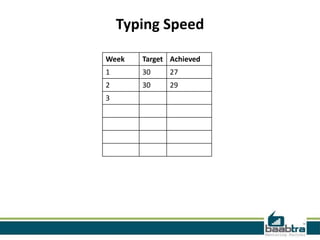
Typing Speed
Week

Target Achieved

1

30

27

2

30

29

3
Jobs Applied
#
1
2
3
4
5

Company

Designation

Applied Date

Current Status
ASP .NET folders and
web.config
Nithil.pp
nithilp@gmail.com
facebook.com/ nithil
padinare peediyekal
twitter.com/nithilpp
in.linkedin.com/in/nithil.pp
9995223505
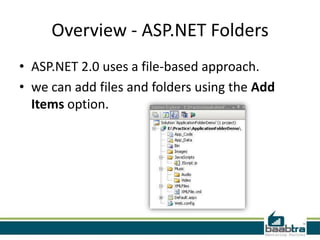
Overview - ASP.NET Folders
• ASP.NET 2.0 uses a file-based approach.
• we can add files and folders using the Add
Items option.
• Can add as many files and folders as we like.

• Dynamically compile them when required.
i.e, uses a predefined folder structure
containing the files, to compile them
dynamically.
Advantages of ASP.NET Application
Folders
• Maintain resources in an organized manner.
• All files and folders are accessible through the
application.
• We can add as many files as required
• Files are compiled dynamically when required
Different Types of Application Folder
•
•
•
•
•
•
•

App_Code Folders
Bin Folders
App_Data Folders
App_Theme Folders
App_Browser Folders
App_WebReference Folders
Resources Folders
– App_LocalResource Folders
– App_GlobalResource Folders
App_Code Folder
• App_Code Folder stores classes, typed data
sets, etc.
• All items stored in App_Code are automatically
accessible throughout the application.
• If we store any class files (like .cs or .vb) it
compiles them automatically.
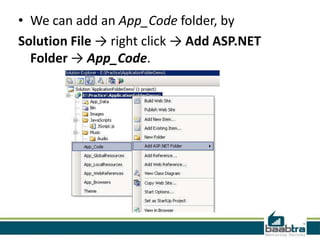
• We can add an App_Code folder, by
Solution File → right click → Add ASP.NET
Folder → App_Code.
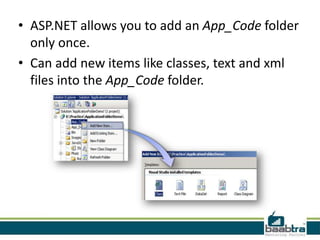
• ASP.NET allows you to add an App_Code folder
only once.
• Can add new items like classes, text and xml
files into the App_Code folder.
• Items entered in App_Code folder is accessible
throughout the application.
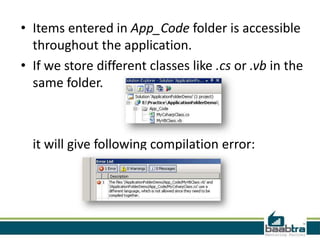
• If we store different classes like .cs or .vb in the
same folder.

it will give following compilation error:
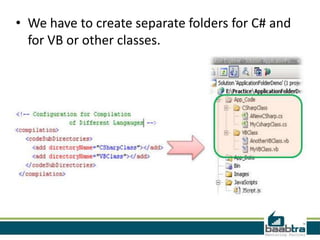
• We have to create separate folders for C# and
for VB or other classes.
Bin Folder
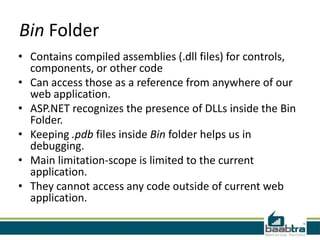
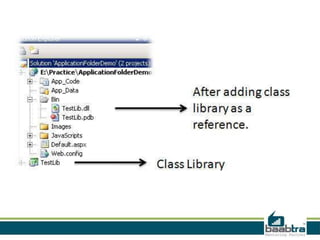
• Contains compiled assemblies (.dll files) for controls,
components, or other code
• Can access those as a reference from anywhere of our
web application.
• ASP.NET recognizes the presence of DLLs inside the Bin
Folder.
• Keeping .pdb files inside Bin folder helps us in
debugging.
• Main limitation-scope is limited to the current
application.
• They cannot access any code outside of current web
application.
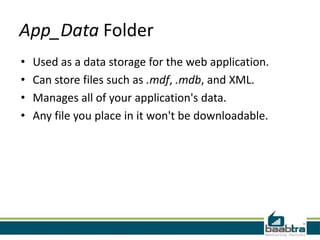
App_Data Folder
•
•
•
•

Used as a data storage for the web application.
Can store files such as .mdf, .mdb, and XML.
Manages all of your application's data.
Any file you place in it won't be downloadable.
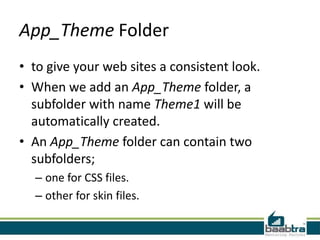
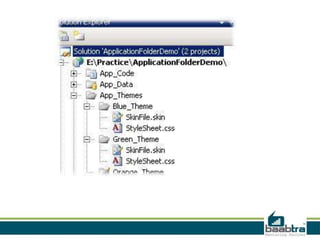
App_Theme Folder
• to give your web sites a consistent look.
• When we add an App_Theme folder, a
subfolder with name Theme1 will be
automatically created.
• An App_Theme folder can contain two
subfolders;
– one for CSS files.
– other for skin files.
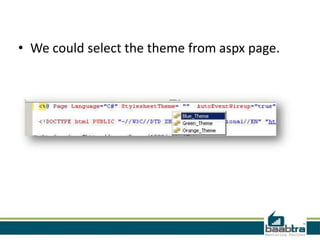
• We could select the theme from aspx page.
App_Browser Folder
• App_Browser folder contains browser
information files (.browser files).
• used to identify the browser and browser
capabilities.
App_WebReference Folder
• Contain references to any web services.
• Contains reference contract files (.wsdl files),
schemas (.xsd files), and discovery document
files (.disco and .discomap files) that let you
create a Web reference
Resources Folders
• The main purpose of resource files
is localization of the web application.
• There are two type of resources:
– Local resources
– Global resources
App_LocalResource Folder
• Contains resources (.resx and .resources files)
that are associated with a specific page, user
control, or master page in an application.
App_GlobalResource Folder
• can be read from any page or code that is
anywhere in the web site.
• We should use theApp_GlobalResource folder
when we need a single resource for multiple
web pages.
web.config
• ASP.NET Web.config allows you to define or revise
the configuration settings.
• Web.config files are stored in XML format.
• Can have any number of Web.config files for an
application.
• All the Web.config files inherit the
root Web.config file available at the following
location.
i.e,
systemrootMicrosoft.NETFrameworkversionNu
mberCONFIGWeb.config location
• IIS is configured in such a way that it prevents
the Web.config file access from the browser.
• The changes in Web.config don’t require the
reboot of the web server.
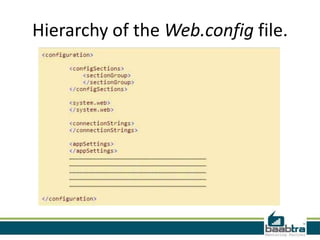
Hierarchy of the Web.config file.
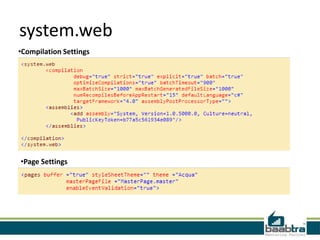
system.web
•Compilation Settings

•Page Settings
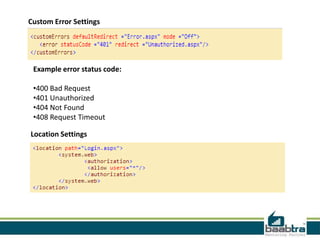
Custom Error Settings

Example error status code:
•400 Bad Request
•401 Unauthorized
•404 Not Found
•408 Request Timeout
Location Settings
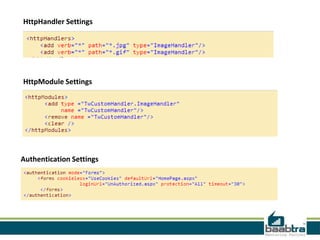
HttpHandler Settings

HttpModule Settings

Authentication Settings
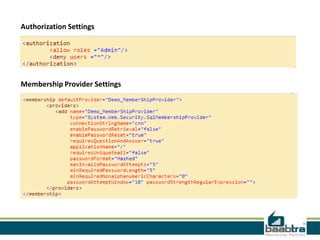
Authorization Settings

Membership Provider Settings
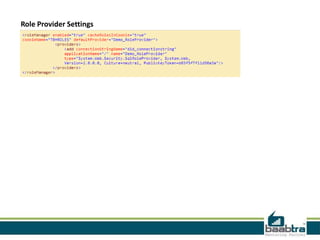
Role Provider Settings
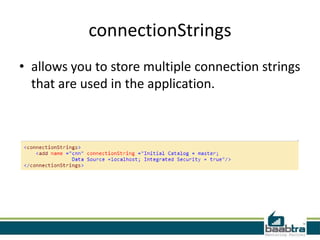
connectionStrings
• allows you to store multiple connection strings
that are used in the application.
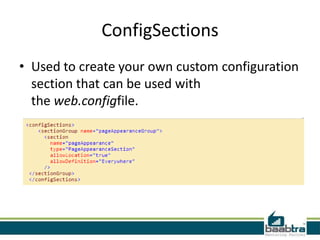
ConfigSections
• Used to create your own custom configuration
section that can be used with
the web.configfile.
If this presentation helped you, please visit our
page facebook.com/baabtra and like it.

Thanks in advance.
www.baabtra.com | www.massbaab.com |www.baabte.com
Contact Us
Emarald Mall (Big Bazar Building)
Mavoor Road, Kozhikode,
Kerala, India.
Ph: + 91 – 495 40 25 550

Start up Village
Eranakulam,
Kerala, India.
Email: info@baabtra.com

NC Complex, Near Bus Stand
Mukkam, Kozhikode,
Kerala, India.
Ph: + 91 – 495 40 25 550

Asp .net folders and web.config

  • 2.
    Disclaimer: This presentationis prepared by trainees of baabtra as a part of mentoring program. This is not official document of baabtra –Mentoring Partner Baabtra-Mentoring Partner is the mentoring division of baabte System Technologies Pvt . Ltd
  • 3.
  • 4.
  • 5.
    ASP .NET foldersand web.config Nithil.pp nithilp@gmail.com facebook.com/ nithil padinare peediyekal twitter.com/nithilpp in.linkedin.com/in/nithil.pp 9995223505
  • 6.
    Overview - ASP.NETFolders • ASP.NET 2.0 uses a file-based approach. • we can add files and folders using the Add Items option.
  • 7.
    • Can addas many files and folders as we like. • Dynamically compile them when required. i.e, uses a predefined folder structure containing the files, to compile them dynamically.
  • 8.
    Advantages of ASP.NETApplication Folders • Maintain resources in an organized manner. • All files and folders are accessible through the application. • We can add as many files as required • Files are compiled dynamically when required
  • 9.
    Different Types ofApplication Folder • • • • • • • App_Code Folders Bin Folders App_Data Folders App_Theme Folders App_Browser Folders App_WebReference Folders Resources Folders – App_LocalResource Folders – App_GlobalResource Folders
  • 10.
    App_Code Folder • App_CodeFolder stores classes, typed data sets, etc. • All items stored in App_Code are automatically accessible throughout the application. • If we store any class files (like .cs or .vb) it compiles them automatically.
  • 11.
    • We canadd an App_Code folder, by Solution File → right click → Add ASP.NET Folder → App_Code.
  • 12.
    • ASP.NET allowsyou to add an App_Code folder only once. • Can add new items like classes, text and xml files into the App_Code folder.
  • 13.
    • Items enteredin App_Code folder is accessible throughout the application. • If we store different classes like .cs or .vb in the same folder. it will give following compilation error:
  • 14.
    • We haveto create separate folders for C# and for VB or other classes.
  • 15.
    Bin Folder • Containscompiled assemblies (.dll files) for controls, components, or other code • Can access those as a reference from anywhere of our web application. • ASP.NET recognizes the presence of DLLs inside the Bin Folder. • Keeping .pdb files inside Bin folder helps us in debugging. • Main limitation-scope is limited to the current application. • They cannot access any code outside of current web application.
  • 17.
    App_Data Folder • • • • Used asa data storage for the web application. Can store files such as .mdf, .mdb, and XML. Manages all of your application's data. Any file you place in it won't be downloadable.
  • 18.
    App_Theme Folder • togive your web sites a consistent look. • When we add an App_Theme folder, a subfolder with name Theme1 will be automatically created. • An App_Theme folder can contain two subfolders; – one for CSS files. – other for skin files.
  • 20.
    • We couldselect the theme from aspx page.
  • 21.
    App_Browser Folder • App_Browserfolder contains browser information files (.browser files). • used to identify the browser and browser capabilities.
  • 22.
    App_WebReference Folder • Containreferences to any web services. • Contains reference contract files (.wsdl files), schemas (.xsd files), and discovery document files (.disco and .discomap files) that let you create a Web reference
  • 23.
    Resources Folders • Themain purpose of resource files is localization of the web application. • There are two type of resources: – Local resources – Global resources
  • 24.
    App_LocalResource Folder • Containsresources (.resx and .resources files) that are associated with a specific page, user control, or master page in an application.
  • 25.
    App_GlobalResource Folder • canbe read from any page or code that is anywhere in the web site. • We should use theApp_GlobalResource folder when we need a single resource for multiple web pages.
  • 26.
    web.config • ASP.NET Web.configallows you to define or revise the configuration settings. • Web.config files are stored in XML format. • Can have any number of Web.config files for an application. • All the Web.config files inherit the root Web.config file available at the following location. i.e, systemrootMicrosoft.NETFrameworkversionNu mberCONFIGWeb.config location
  • 27.
    • IIS isconfigured in such a way that it prevents the Web.config file access from the browser. • The changes in Web.config don’t require the reboot of the web server.
  • 28.
    Hierarchy of theWeb.config file.
  • 29.
  • 30.
    Custom Error Settings Exampleerror status code: •400 Bad Request •401 Unauthorized •404 Not Found •408 Request Timeout Location Settings
  • 31.
  • 32.
  • 33.
  • 34.
    connectionStrings • allows youto store multiple connection strings that are used in the application.
  • 35.
    ConfigSections • Used tocreate your own custom configuration section that can be used with the web.configfile.
  • 37.
    If this presentationhelped you, please visit our page facebook.com/baabtra and like it. Thanks in advance. www.baabtra.com | www.massbaab.com |www.baabte.com
  • 38.
    Contact Us Emarald Mall(Big Bazar Building) Mavoor Road, Kozhikode, Kerala, India. Ph: + 91 – 495 40 25 550 Start up Village Eranakulam, Kerala, India. Email: info@baabtra.com NC Complex, Near Bus Stand Mukkam, Kozhikode, Kerala, India. Ph: + 91 – 495 40 25 550