Online Attendance & Leave Management

              Presented by Parikshit Salve

            9881358202| parikshit@eilisys.com


3/12/2013                                          slide | 1
Who we are and what we do ?
    Eilisys Technologies Private Limited, founded in 2000, to provide simple yet
    sophisticated solutions in the area of Payroll Management.


    We develop and market solution under the brand “Ascent Payroll”.
    Over the years, more than 400 corporates have trusted Ascent Payroll.


    We have added to our product portfolio as online Attendance & Leave Management
    software to help our existing clients with pre-payroll activities.


    Our solutions are deployed
    •       in various verticals such as Information
            Technology, Manufacturing, Insurance, Pharmaceutical, FMCG, BPO, Service
            sectors etc…
    •       in major cities
    •       for varied number of employees starting from 20 to 20,000
3/12/2013                                                                              slide | 2
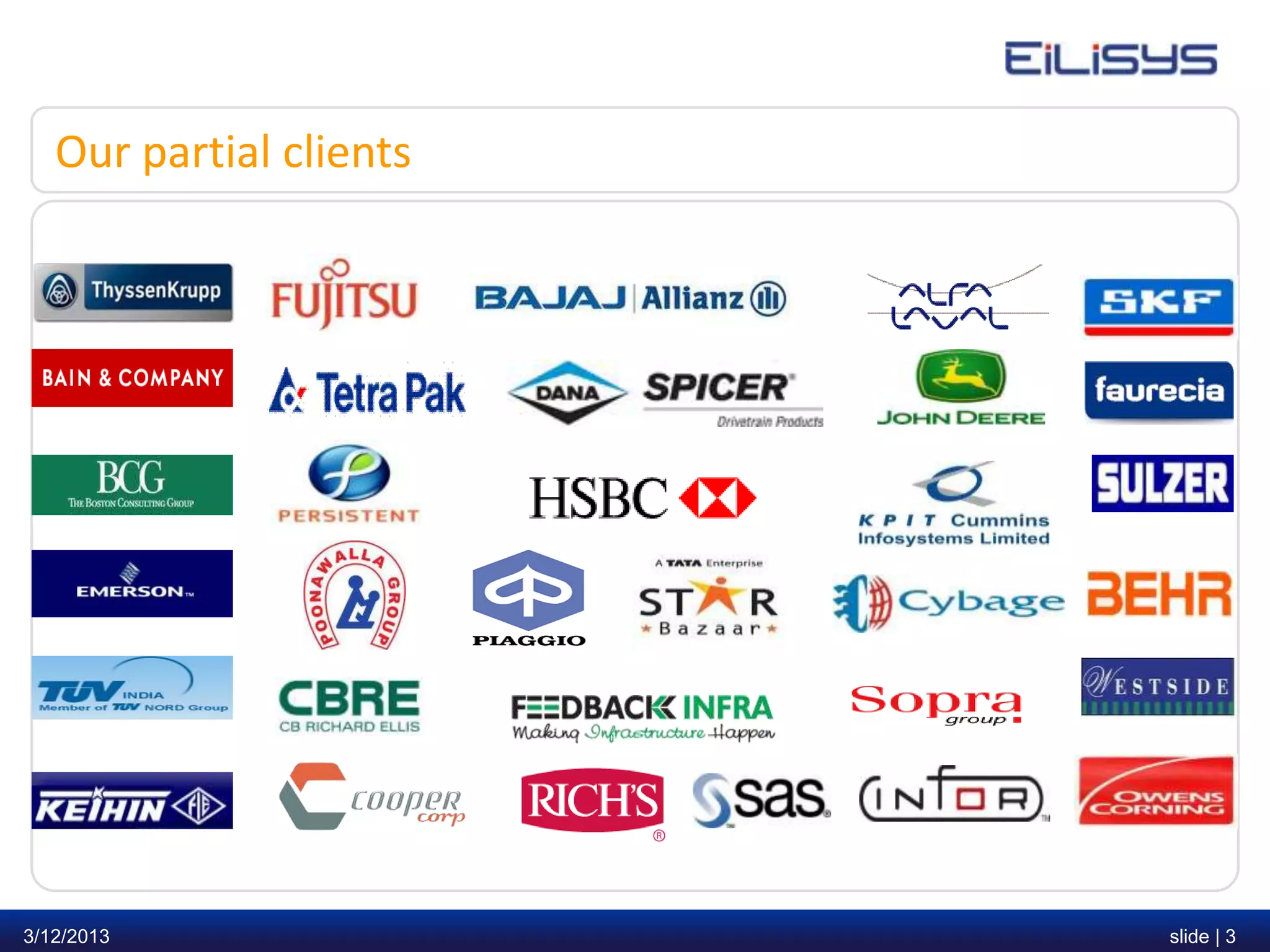
Our partial clients


3/12/2013                slide | 3
Why did they choose us?

    • Packed with Satisfaction Guarantee for 60 days.
    • Mature solution with strong references
    • Work with the established Ascent Payroll brand which continues to invest
      and innovate
    • Lowest total cost of ownership
    • Immediate and measurable ROI


3/12/2013                                                                        slide | 4
Index – Online Attendance & Leave Management
    • Understanding the concept
    • Introduction
    • Benefits
    • Sample Screen


3/12/2013                                         slide | 5
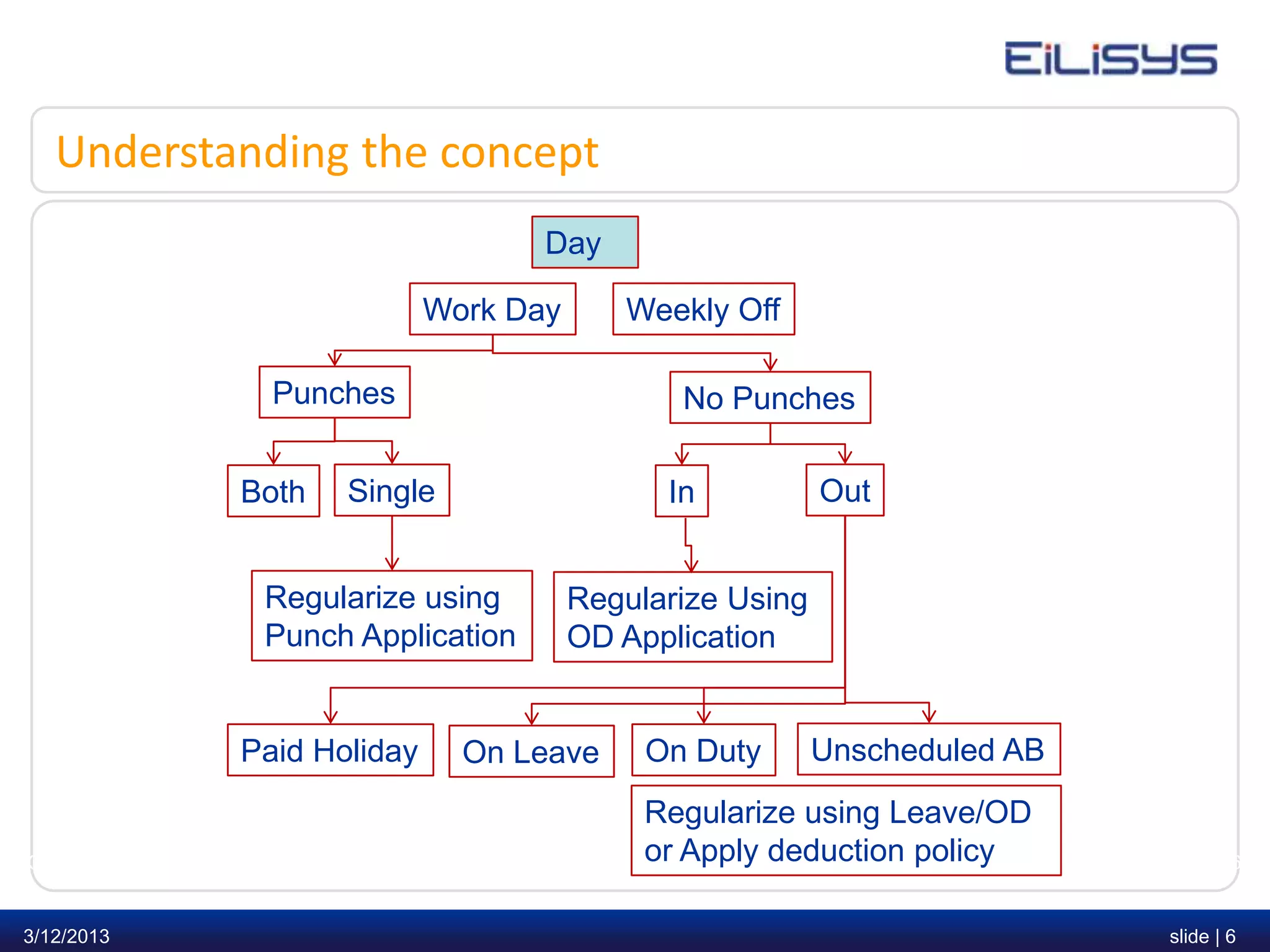
Understanding the concept
                                       Day

                           Work Day             Weekly Off

              Punches                                No Punches

            Both   Single                           In             Out


             Regularize using              Regularize Using
             Punch Application             OD Application


            Paid Holiday     On Leave            On Duty          Unscheduled AB
                                                    Regularize using Leave/OD
3/12/2013            www.eilisys.com   |            or Apply deduction policy
                                           © Eilisys 2010. confidential and proprietary.   slide | 6


3/12/2013                                                                                  slide | 6
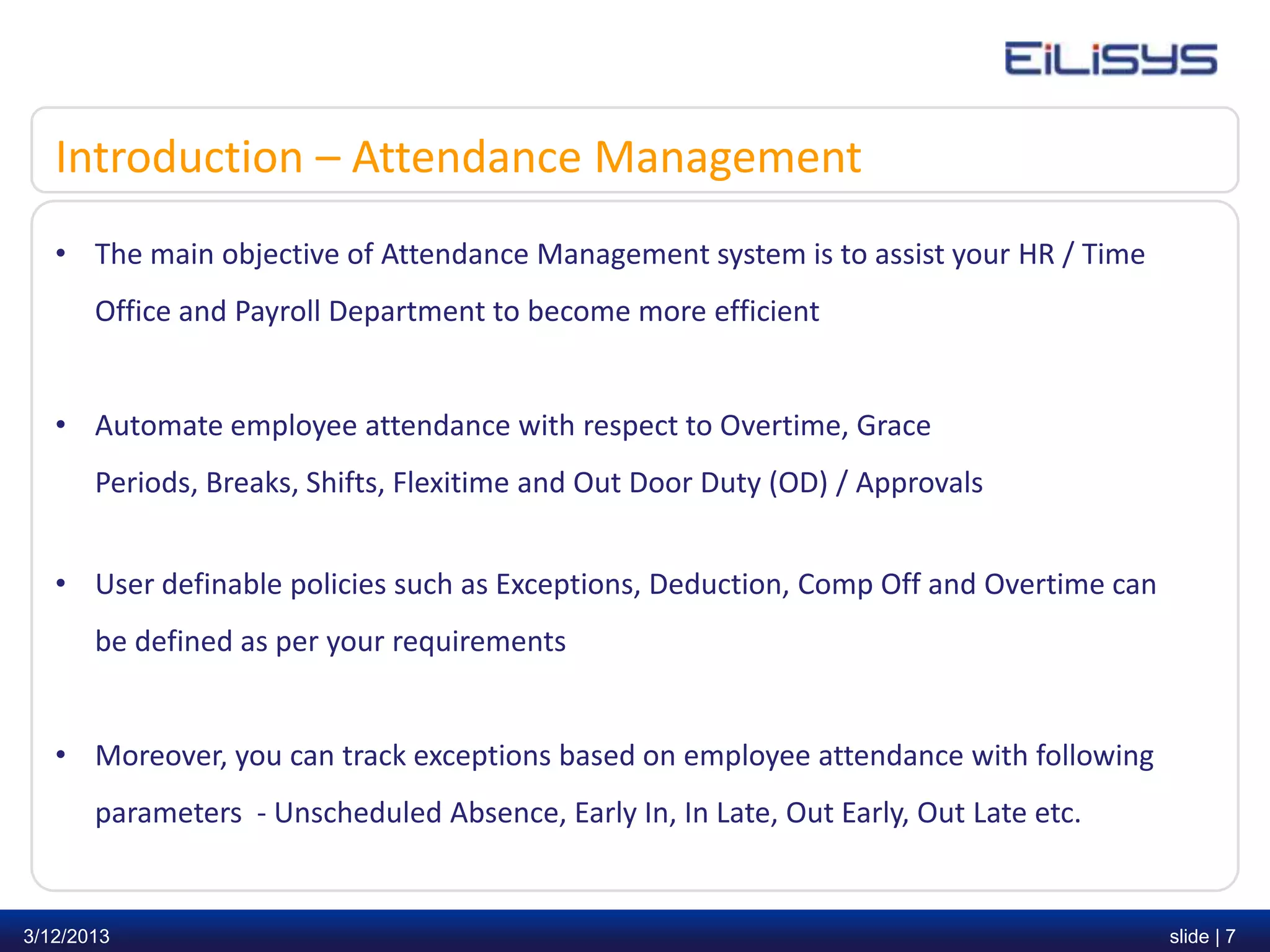
Introduction – Attendance Management
   • The main objective of Attendance Management system is to assist your HR / Time
       Office and Payroll Department to become more efficient


   • Automate employee attendance with respect to Overtime, Grace
       Periods, Breaks, Shifts, Flexitime and Out Door Duty (OD) / Approvals


   • User definable policies such as Exceptions, Deduction, Comp Off and Overtime can
       be defined as per your requirements


   • Moreover, you can track exceptions based on employee attendance with following
       parameters - Unscheduled Absence, Early In, In Late, Out Early, Out Late etc.


3/12/2013                                                                               slide | 7
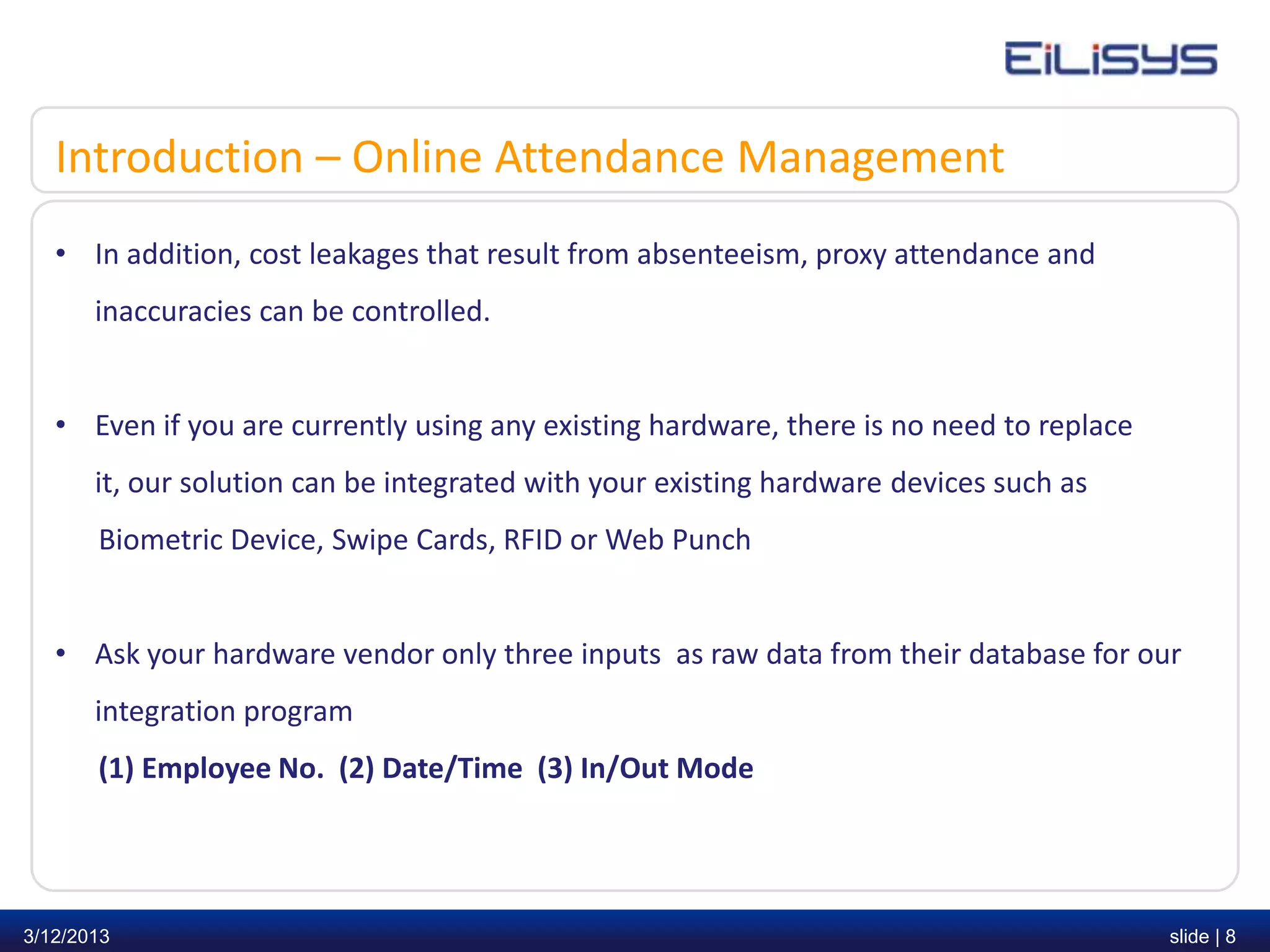
Introduction – Online Attendance Management
   • In addition, cost leakages that result from absenteeism, proxy attendance and
       inaccuracies can be controlled.


   • Even if you are currently using any existing hardware, there is no need to replace
       it, our solution can be integrated with your existing hardware devices such as
       Biometric Device, Swipe Cards, RFID or Web Punch


   • Ask your hardware vendor only three inputs as raw data from their database for our
       integration program
       (1) Employee No. (2) Date/Time (3) In/Out Mode


3/12/2013                                                                                 slide | 8
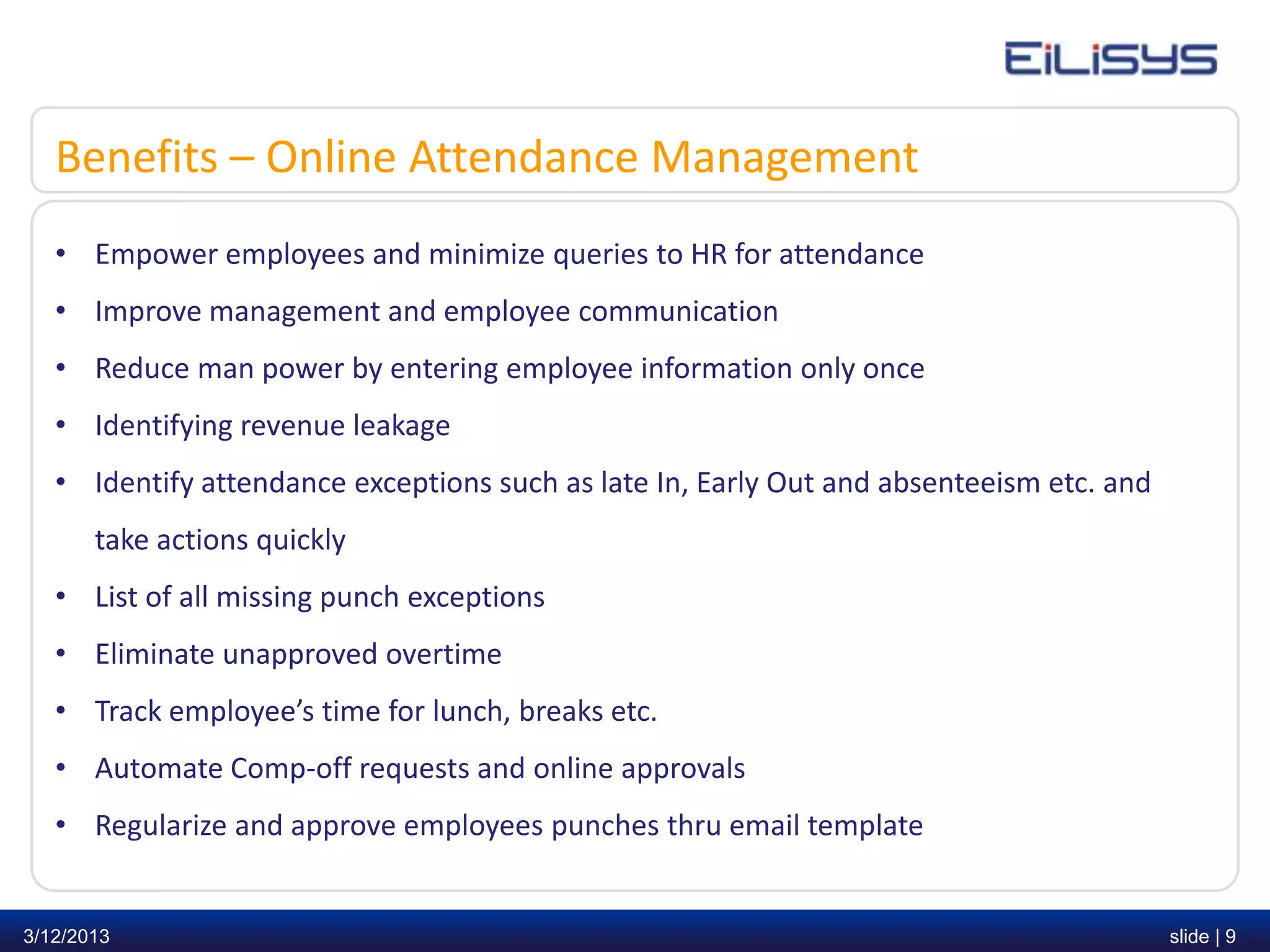
Benefits – Online Attendance Management
   • Empower employees and minimize queries to HR for attendance
   • Improve management and employee communication
   • Reduce man power by entering employee information only once
   • Identifying revenue leakage
   • Identify attendance exceptions such as late In, Early Out and absenteeism etc. and
       take actions quickly
   • List of all missing punch exceptions
   • Eliminate unapproved overtime
   • Track employee’s time for lunch, breaks etc.
   • Automate Comp-off requests and online approvals
   • Regularize and approve employees punches thru email template


3/12/2013                                                                                 slide | 9
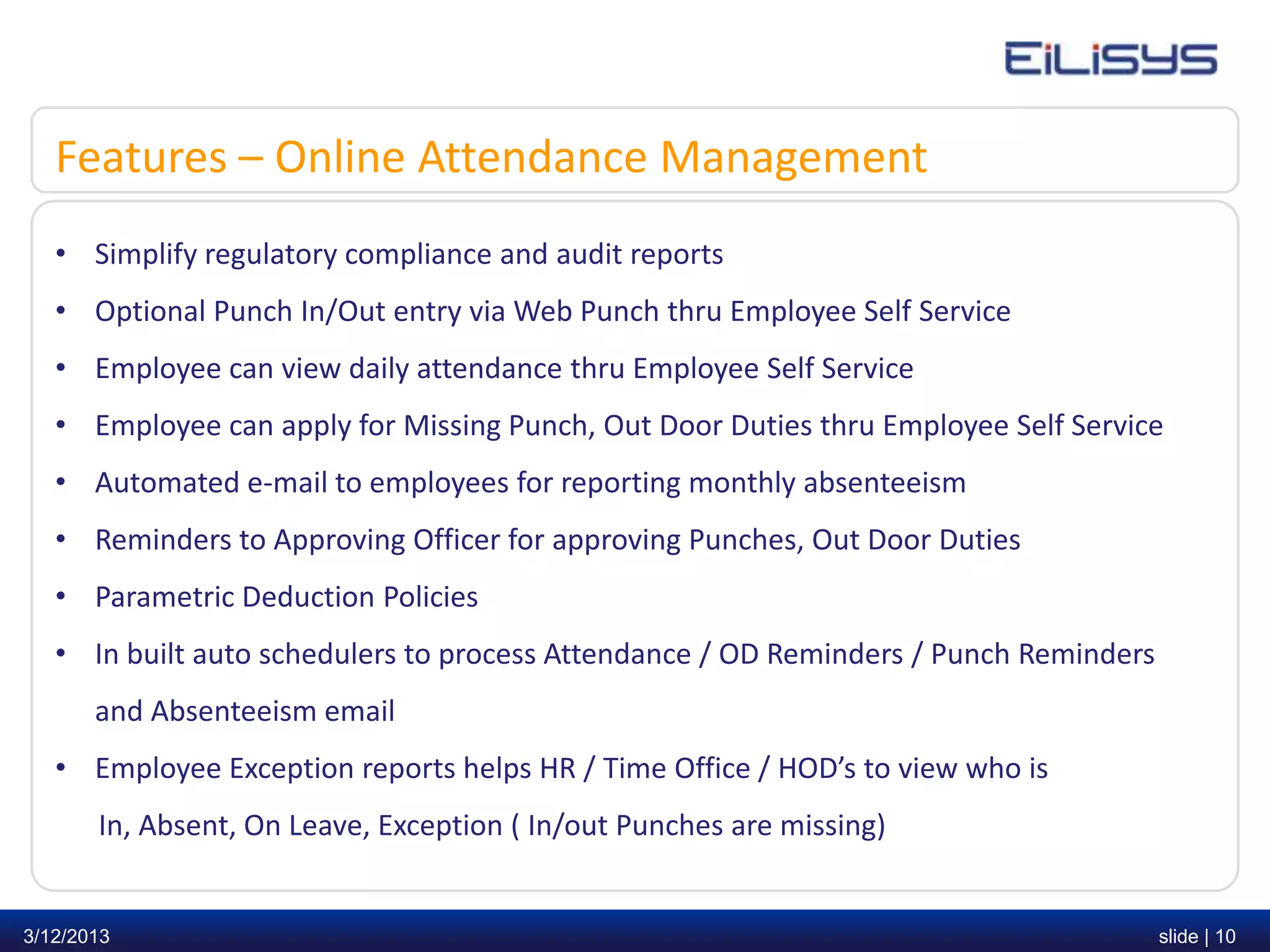
Features – Online Attendance Management
   • Simplify regulatory compliance and audit reports
   • Optional Punch In/Out entry via Web Punch thru Employee Self Service
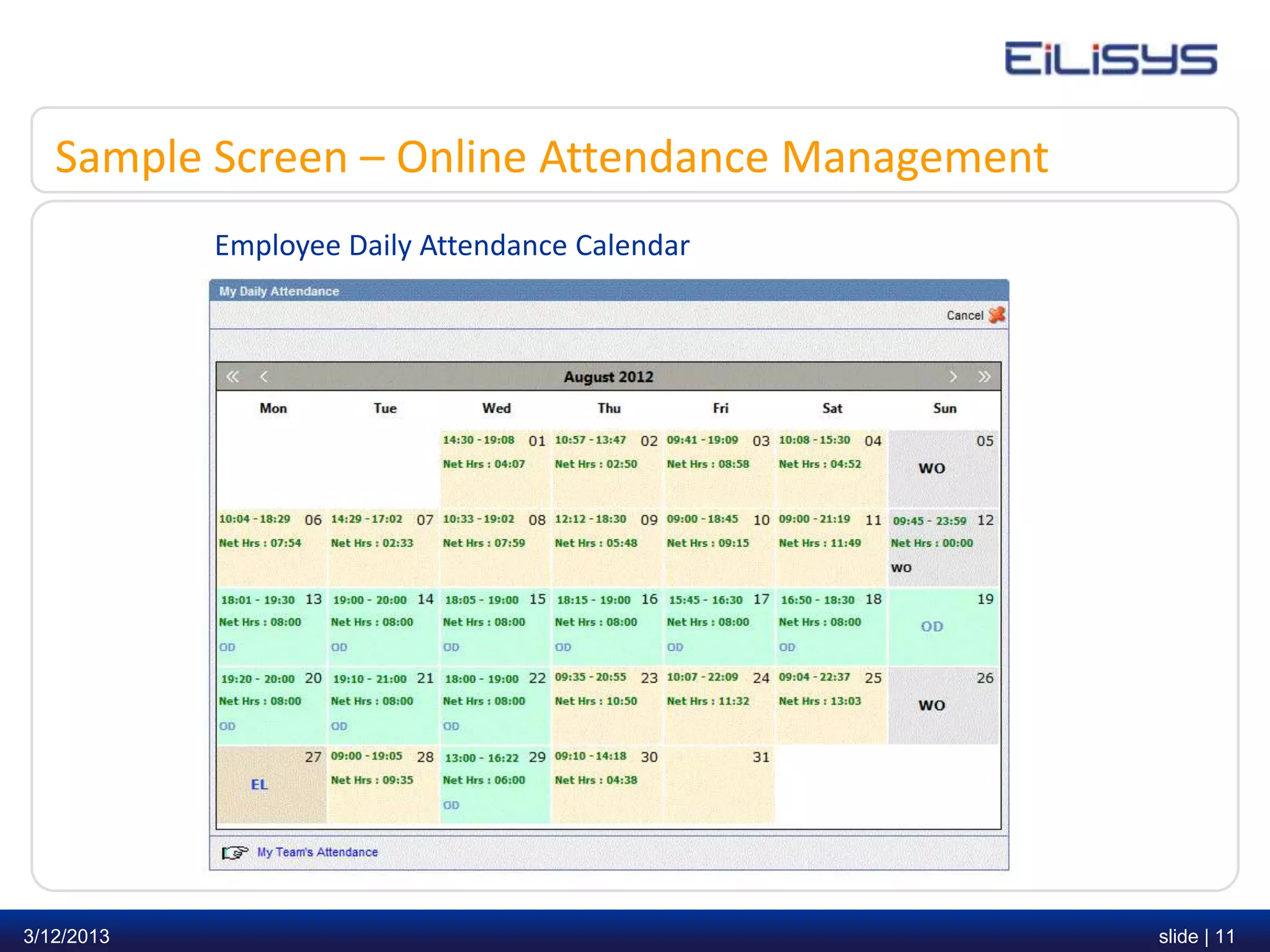
   • Employee can view daily attendance thru Employee Self Service
   • Employee can apply for Missing Punch, Out Door Duties thru Employee Self Service
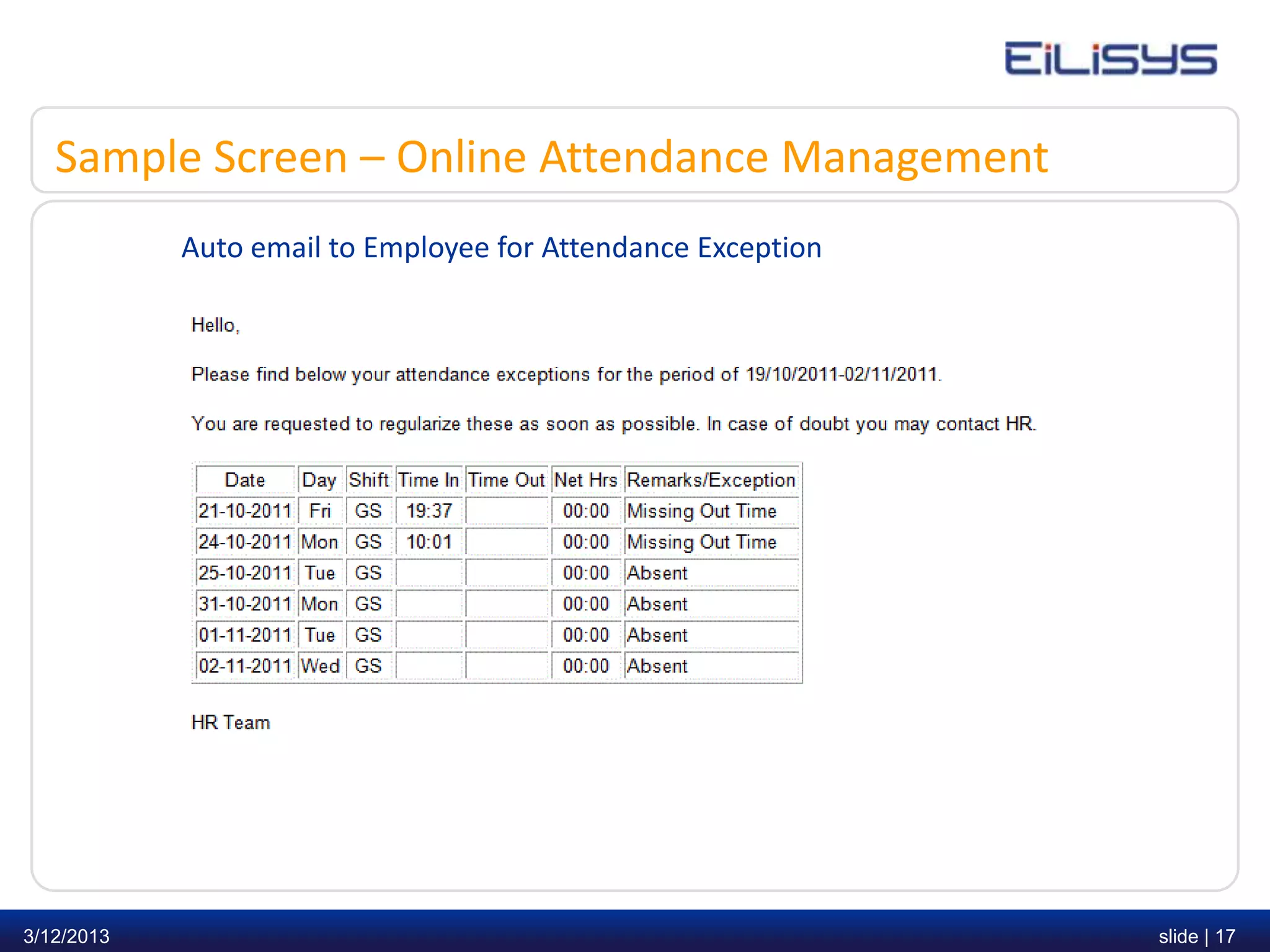
   • Automated e-mail to employees for reporting monthly absenteeism
   • Reminders to Approving Officer for approving Punches, Out Door Duties
   • Parametric Deduction Policies
   • In built auto schedulers to process Attendance / OD Reminders / Punch Reminders
       and Absenteeism email
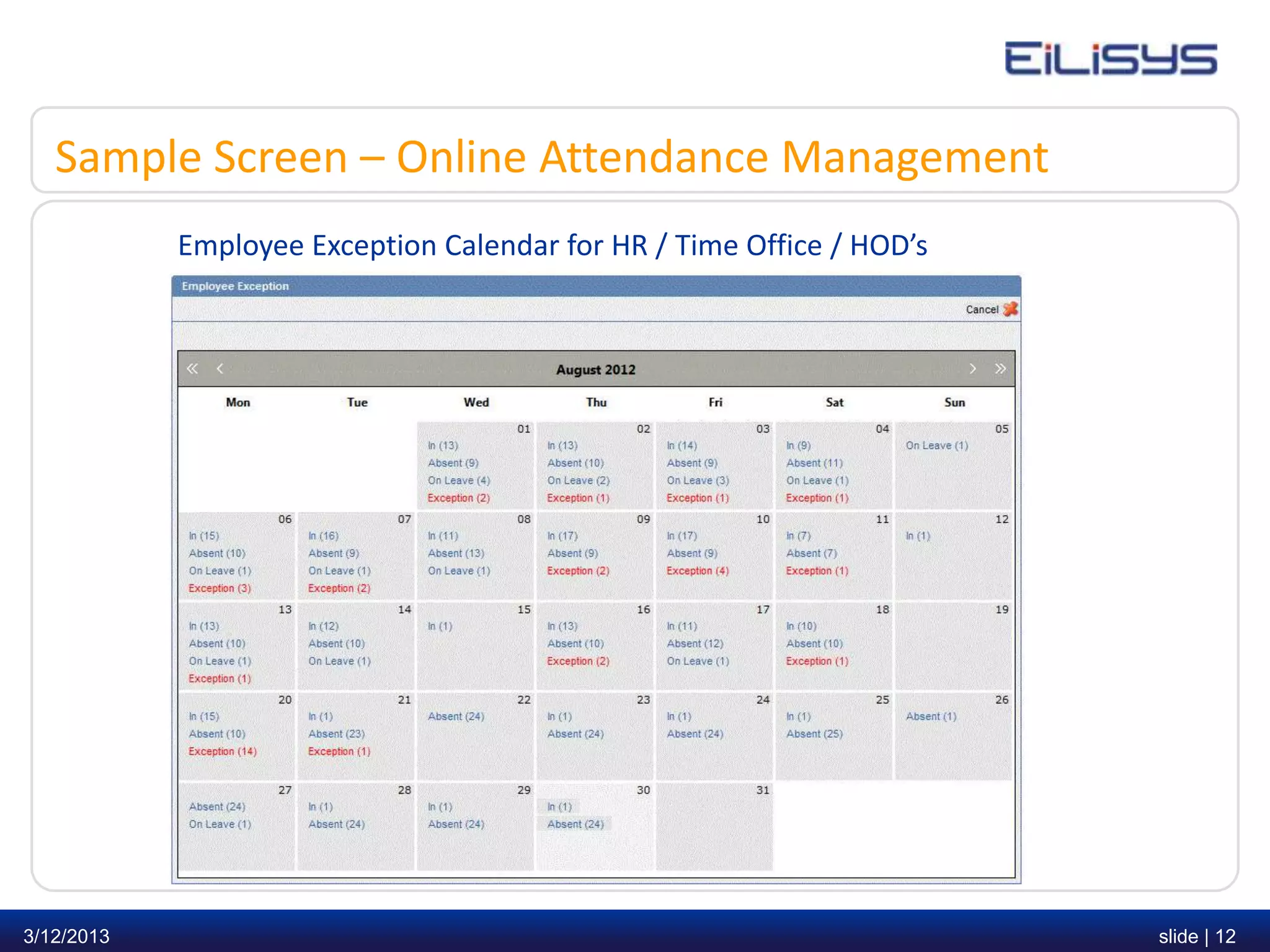
   • Employee Exception reports helps HR / Time Office / HOD’s to view who is
       In, Absent, On Leave, Exception ( In/out Punches are missing)


3/12/2013                                                                              slide | 10
Sample Screen – Online Attendance Management
            Employee Daily Attendance Calendar


3/12/2013                                         slide | 11
Sample Screen – Online Attendance Management
            Employee Exception Calendar for HR / Time Office / HOD’s


3/12/2013                                                              slide | 12
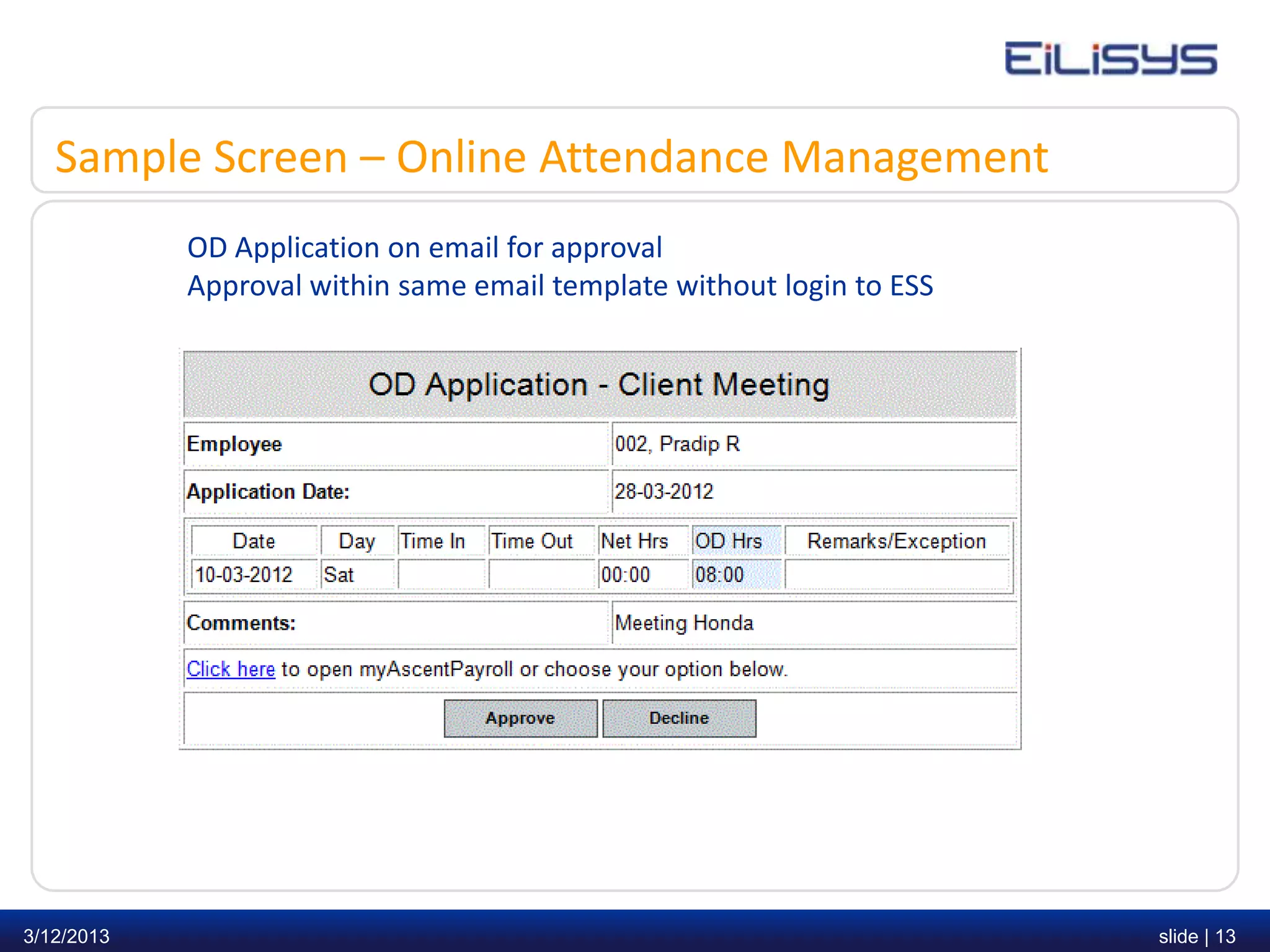
Sample Screen – Online Attendance Management
            OD Application on email for approval
            Approval within same email template without login to ESS


3/12/2013                                                              slide | 13
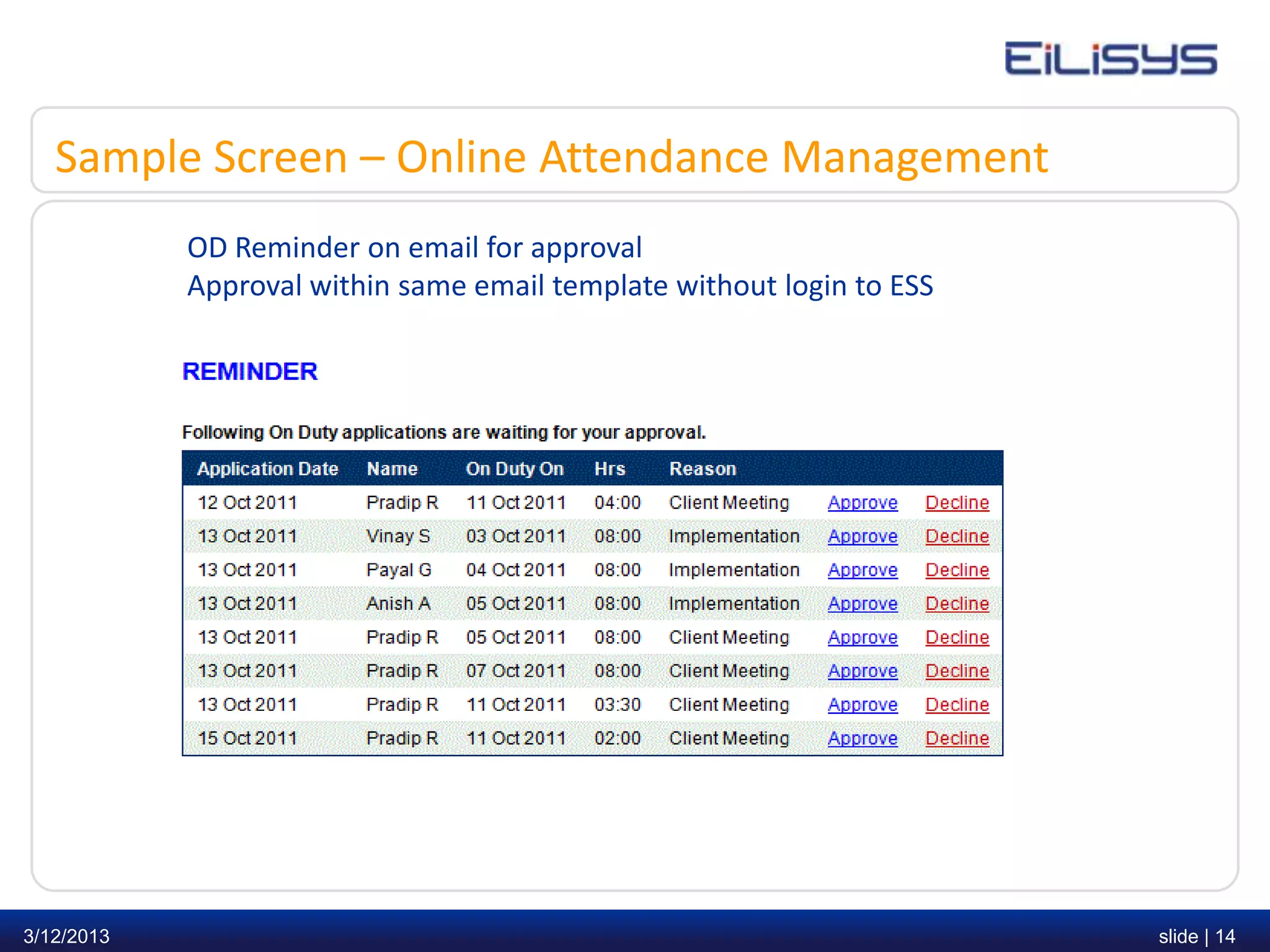
Sample Screen – Online Attendance Management
            OD Reminder on email for approval
            Approval within same email template without login to ESS


3/12/2013                                                              slide | 14
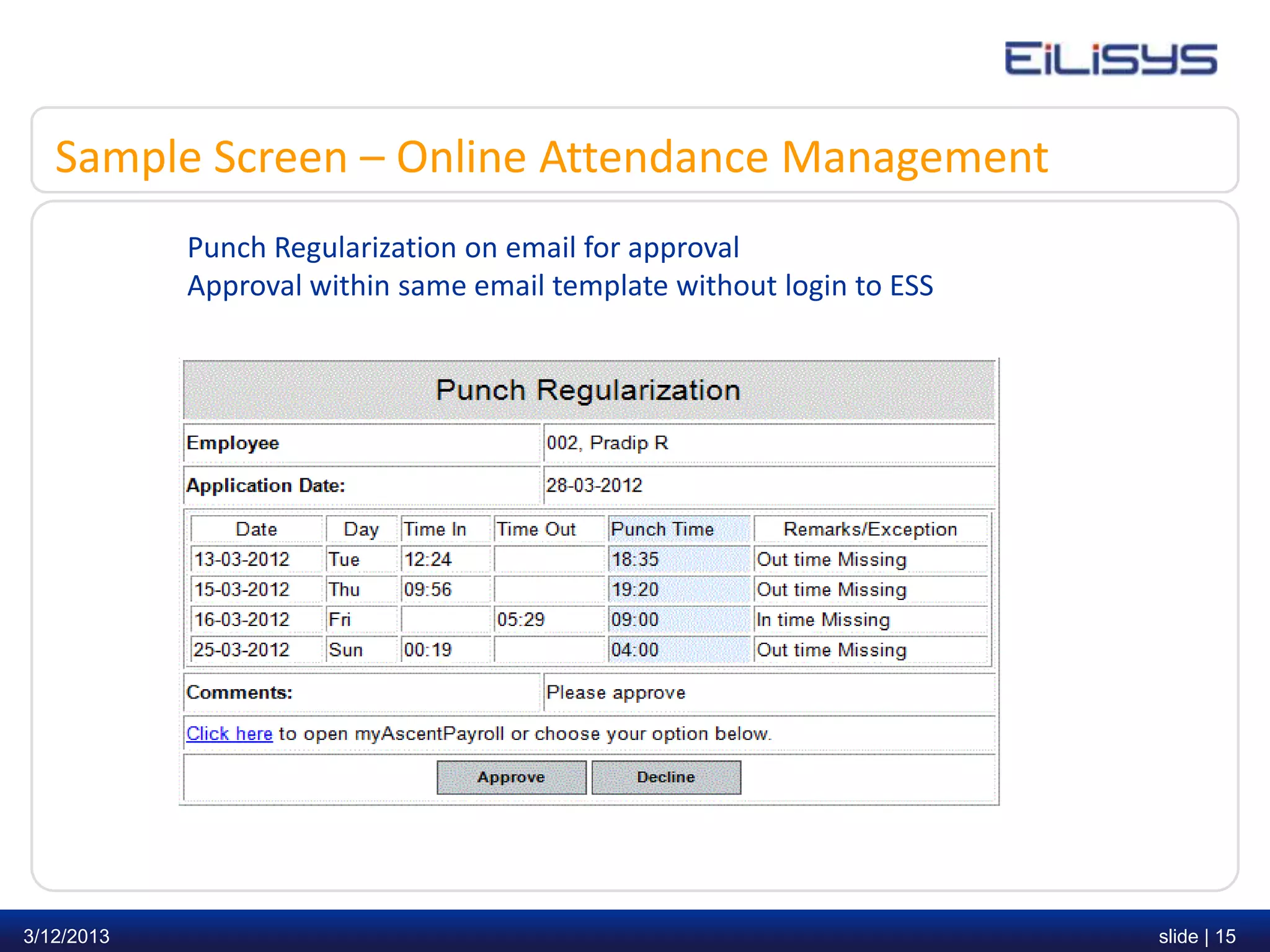
Sample Screen – Online Attendance Management
            Punch Regularization on email for approval
            Approval within same email template without login to ESS


3/12/2013                                                              slide | 15
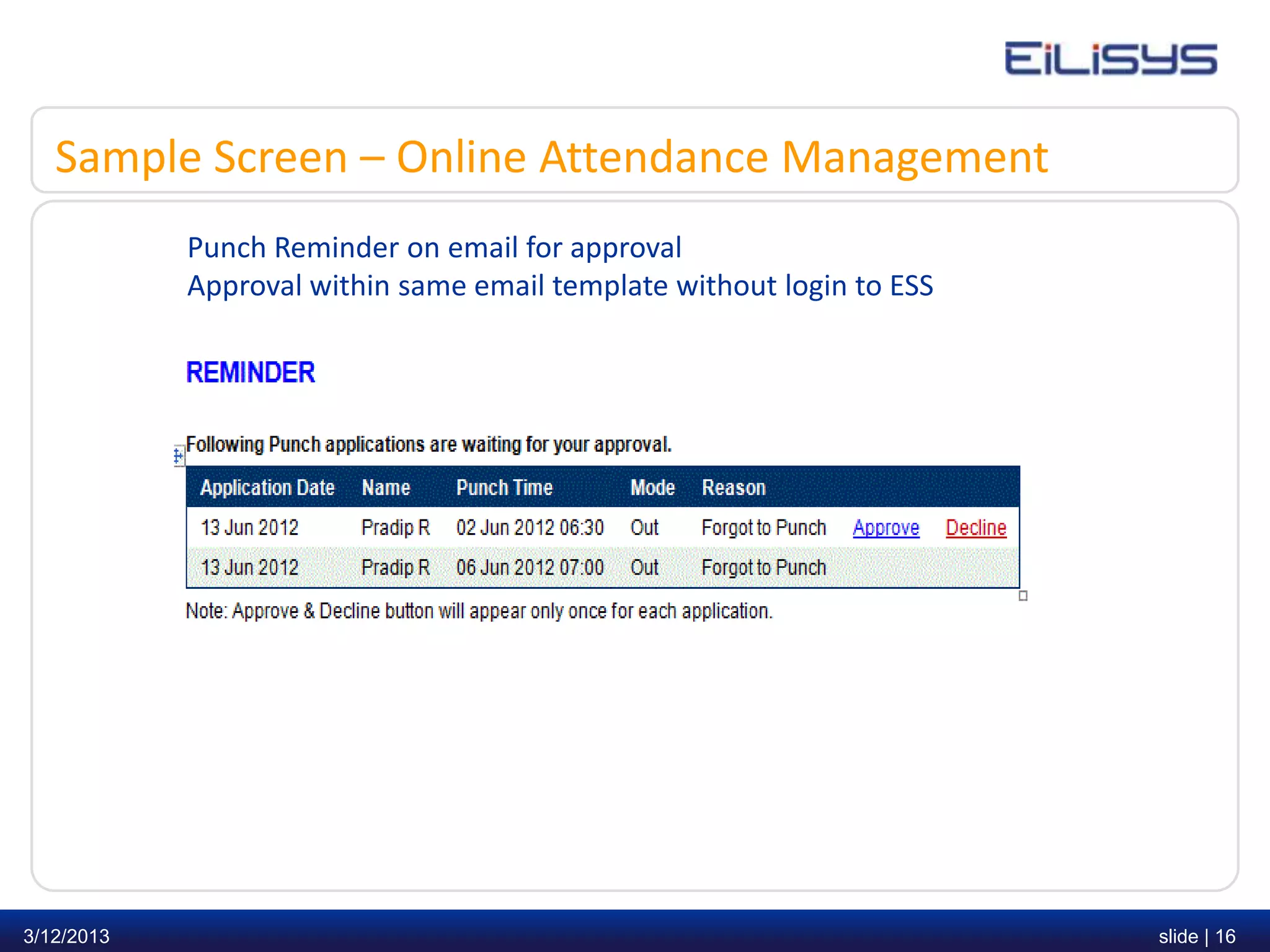
Sample Screen – Online Attendance Management
            Punch Reminder on email for approval
            Approval within same email template without login to ESS


3/12/2013                                                              slide | 16
Sample Screen – Online Attendance Management
            Auto email to Employee for Attendance Exception


3/12/2013                                                     slide | 17
Sample Screen – Online Attendance Management
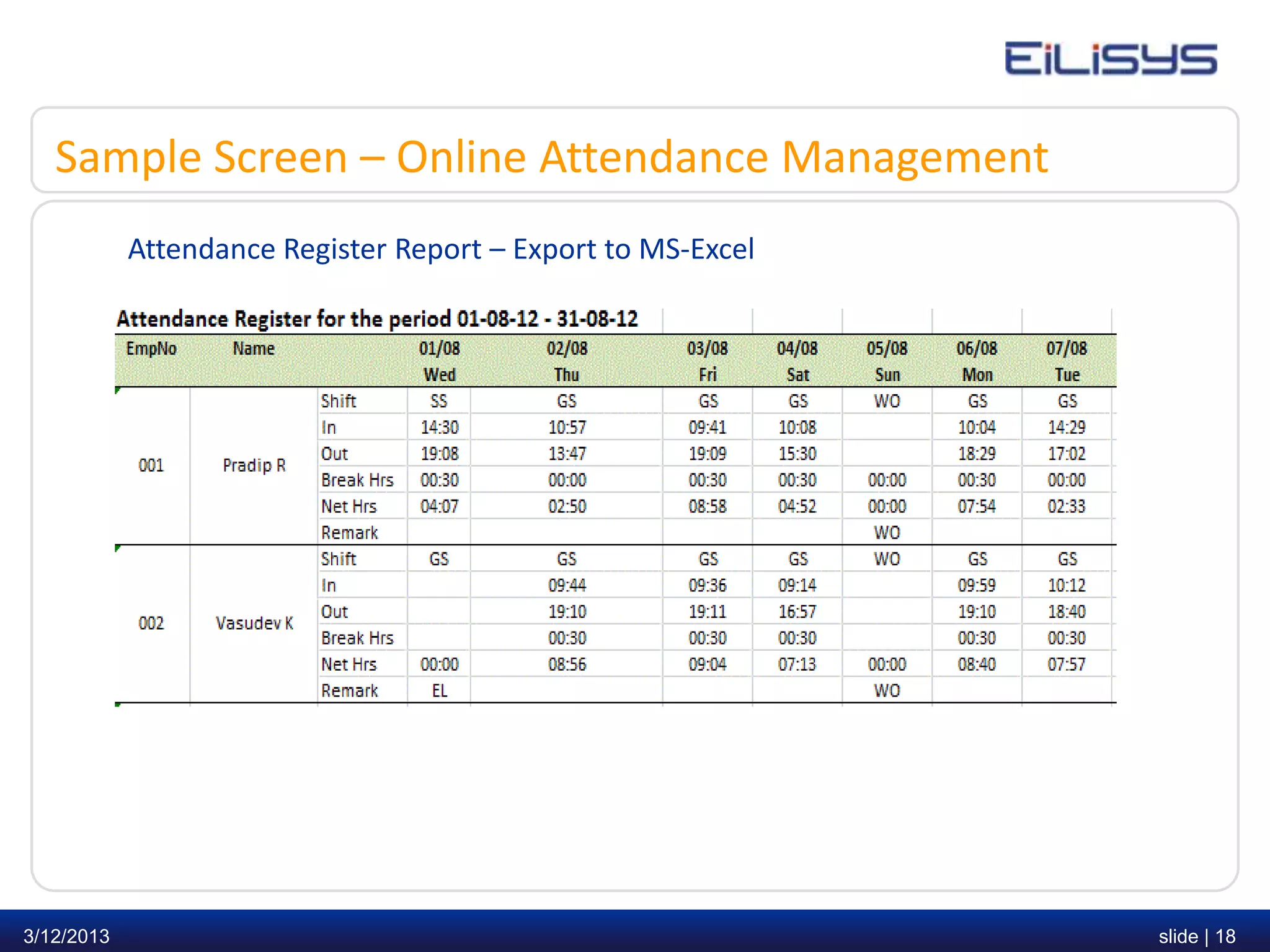
            Attendance Register Report – Export to MS-Excel


3/12/2013                                                     slide | 18
Sample Screen – Online Attendance Management
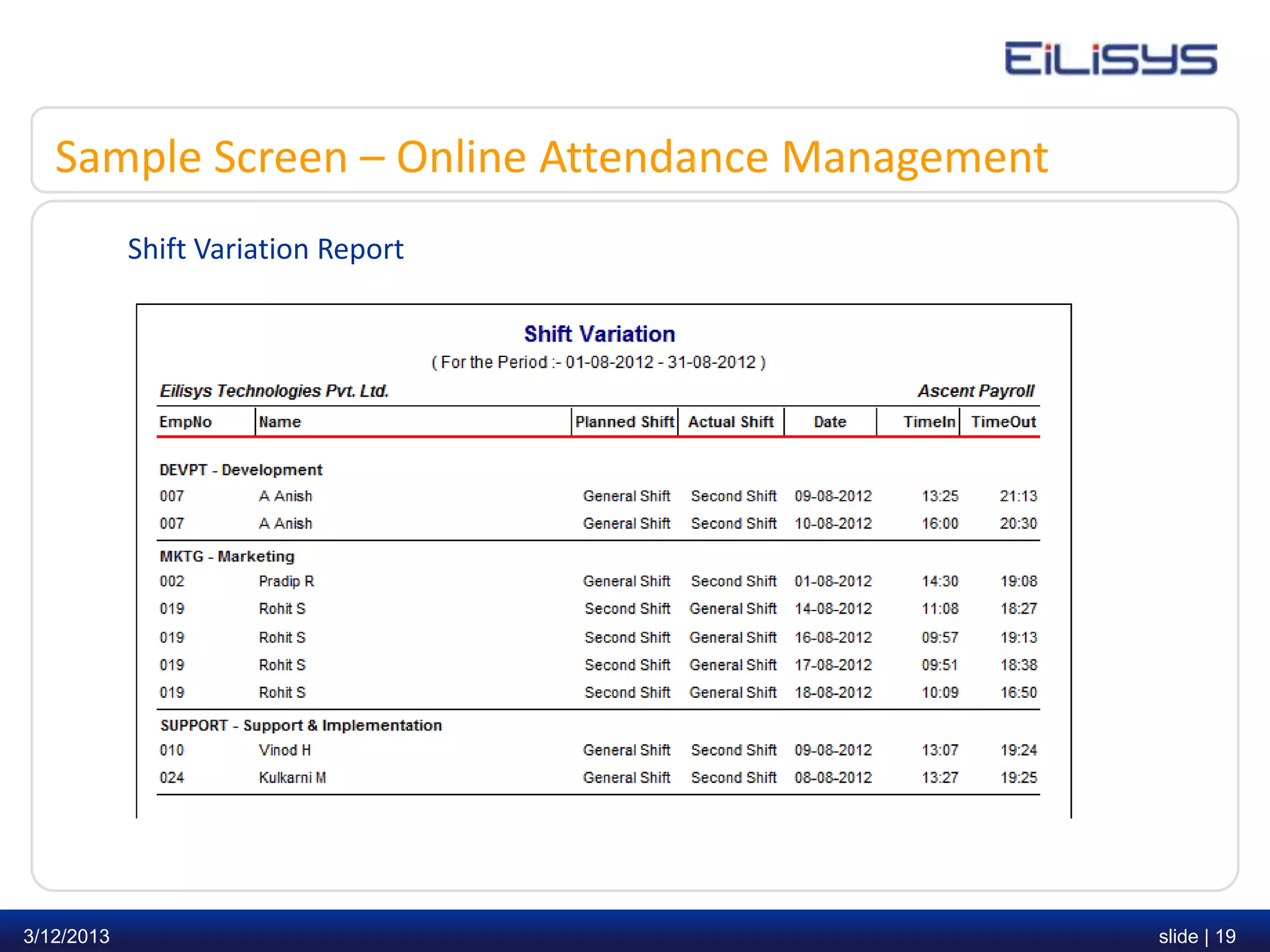
            Shift Variation Report


3/12/2013                                         slide | 19
Introduction – Online Leave Management
   • Leave Management encompasses the processes employees use to request time
       away from work such as (Sick Leave, Privilege Leave, Casual Leave etc.) and
       Approving Officer use to approve or decline Leave requests based on organization
       policies


   • Legacy System: Paper forms, informal requests, and inefficient manual methods


   • New Generation System: Leave request status such as
       (approved, declined, cancelled or pending) is displayed on the employee’s home
       page in Employee Self Service. It streamlines communication between your
       HR, Approving Officers and Employees


3/12/2013                                                                                 slide | 20
Introduction – Online Leave Management
   • Offers powerful capabilities to empower employees via the browser based Employee
       Self Service (ESS) module


   • For Approving Officer, leave approval no longer involve trails of paperwork. The
       system provides full reports of your staff & their leave balances.


   • Employers can fairly and accurately enforce configurable leave policies based on a
       company’s unique business processes.


3/12/2013                                                                                 slide | 21
Leave request flow
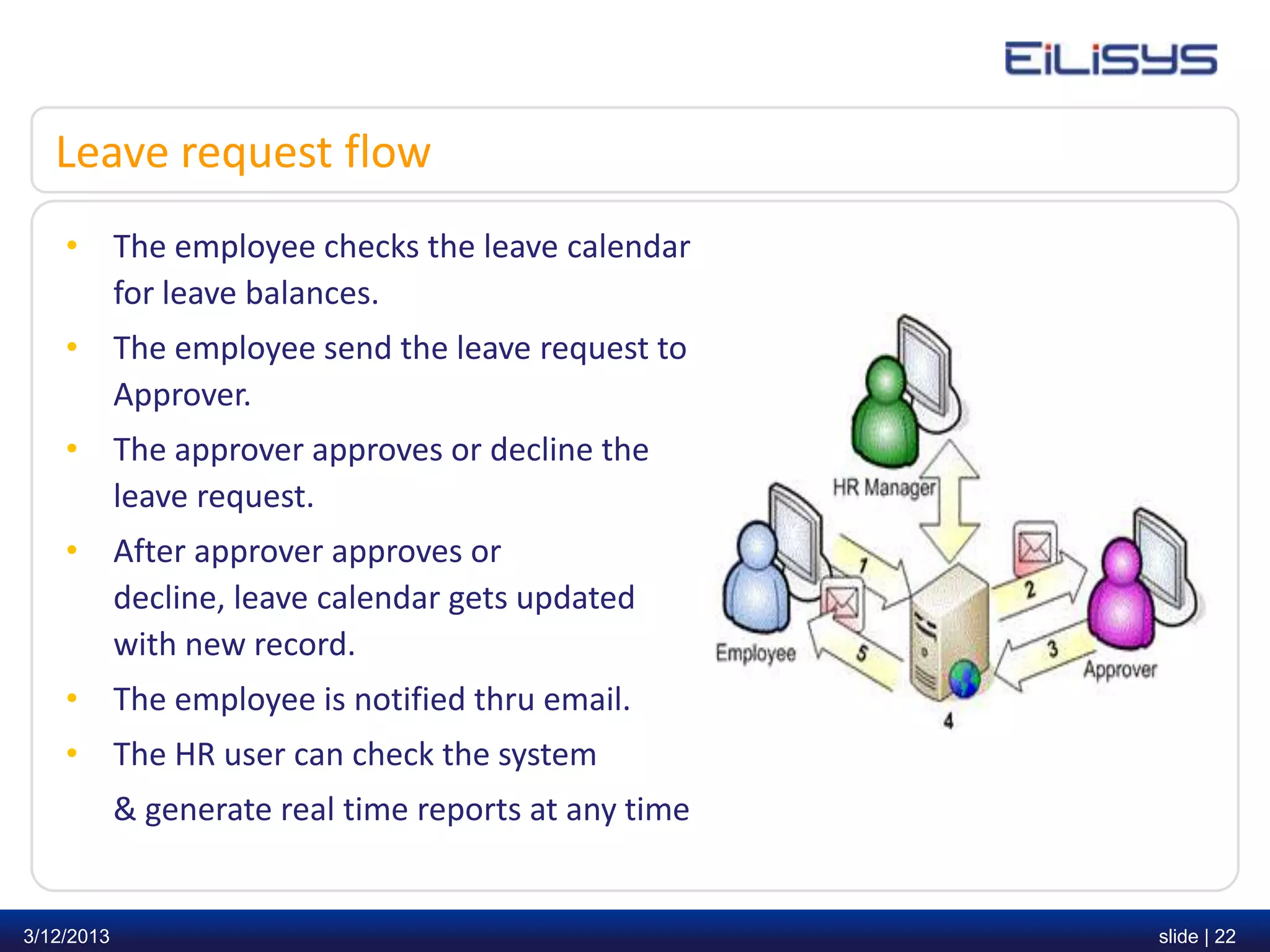
    • The employee checks the leave calendar
      for leave balances.
    • The employee send the leave request to
      Approver.
    • The approver approves or decline the
      leave request.
    • After approver approves or
      decline, leave calendar gets updated
      with new record.
    • The employee is notified thru email.
    • The HR user can check the system
            & generate real time reports at any time


3/12/2013                                              slide | 22
Benefits – Online Leave Management
   • All leave policies are configurable (Parametric)
   • Applicant and Approving Officer can see complete leave records and approval history
       respectively.
   • Leave request is pending till it is approved or declined by the approver. Employee
       can delete leave request before it is approved or declined.
   • After approval if employee decides not to avail this leave, he/she can cancel this
       leave request on or before start day of leave application.
   • Employees can efficiently review benefit balances and comp-off using Employee Self
       Service to send comp-off request for approval.
   • Leave records are updated automatically once applications are approved.
   • Leave records may be printed out or generated into reports.


3/12/2013                                                                                 slide | 23
Benefits – Online Leave Management
   • Accommodates “exceptional cases” in HR policies, such as special leave entitlement
       for individuals. For e.g. in case of new joiner’s a leave type can be configured which
       will be applicable only for a specified period from the date of joining.
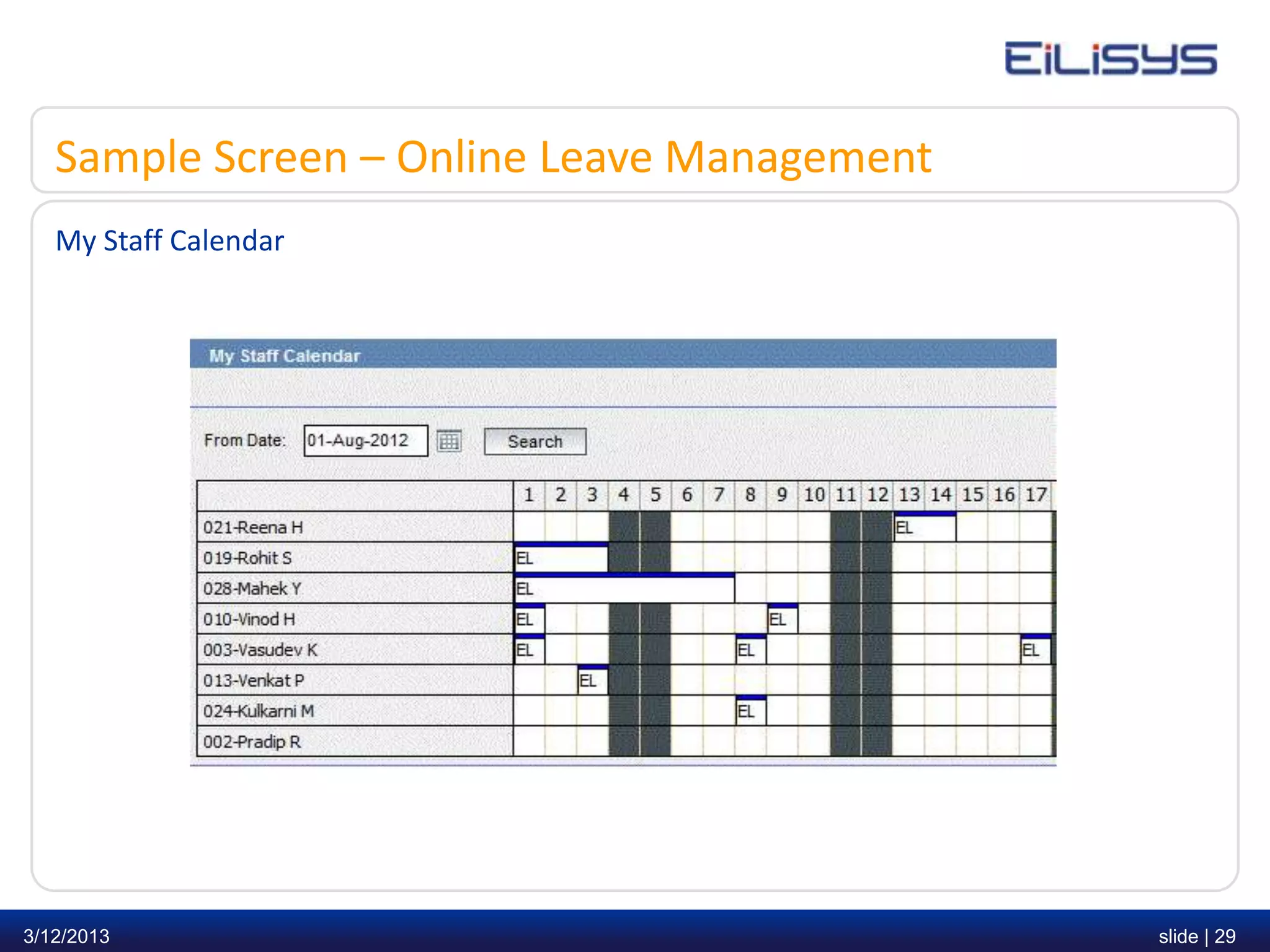
   • My Staff Calendar provides a bird's eye view of who's on leave.
   • Schedulers for processing leave and sending email reminders to Approving Officer
       for pending leave applications.
   • Employee has optional holiday’s facility to choose from the list provided by
       organization including employee birthday, if it is covered under the leave policy.


3/12/2013                                                                                   slide | 24
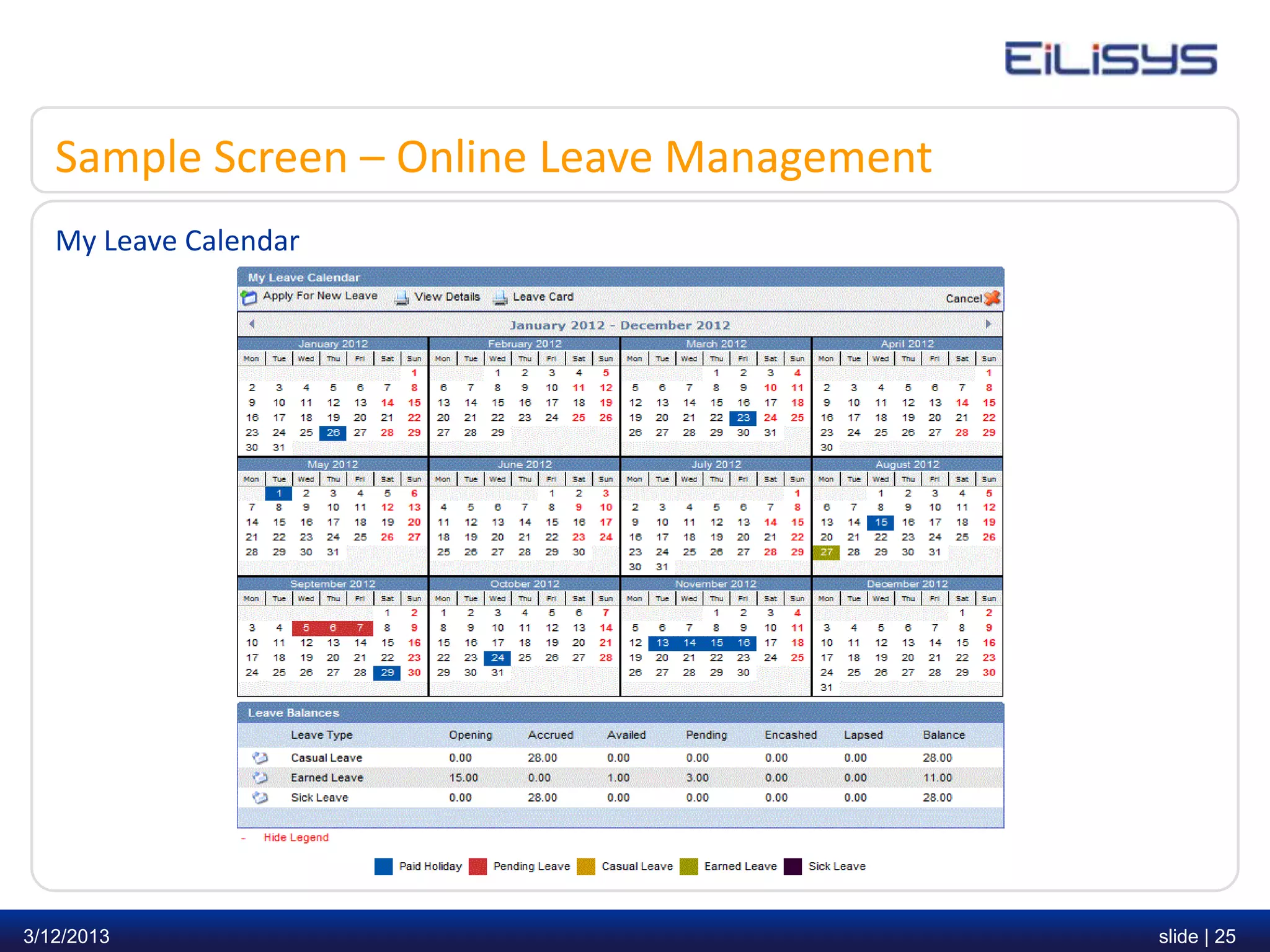
Sample Screen – Online Leave Management
   My Leave Calendar


3/12/2013                                    slide | 25
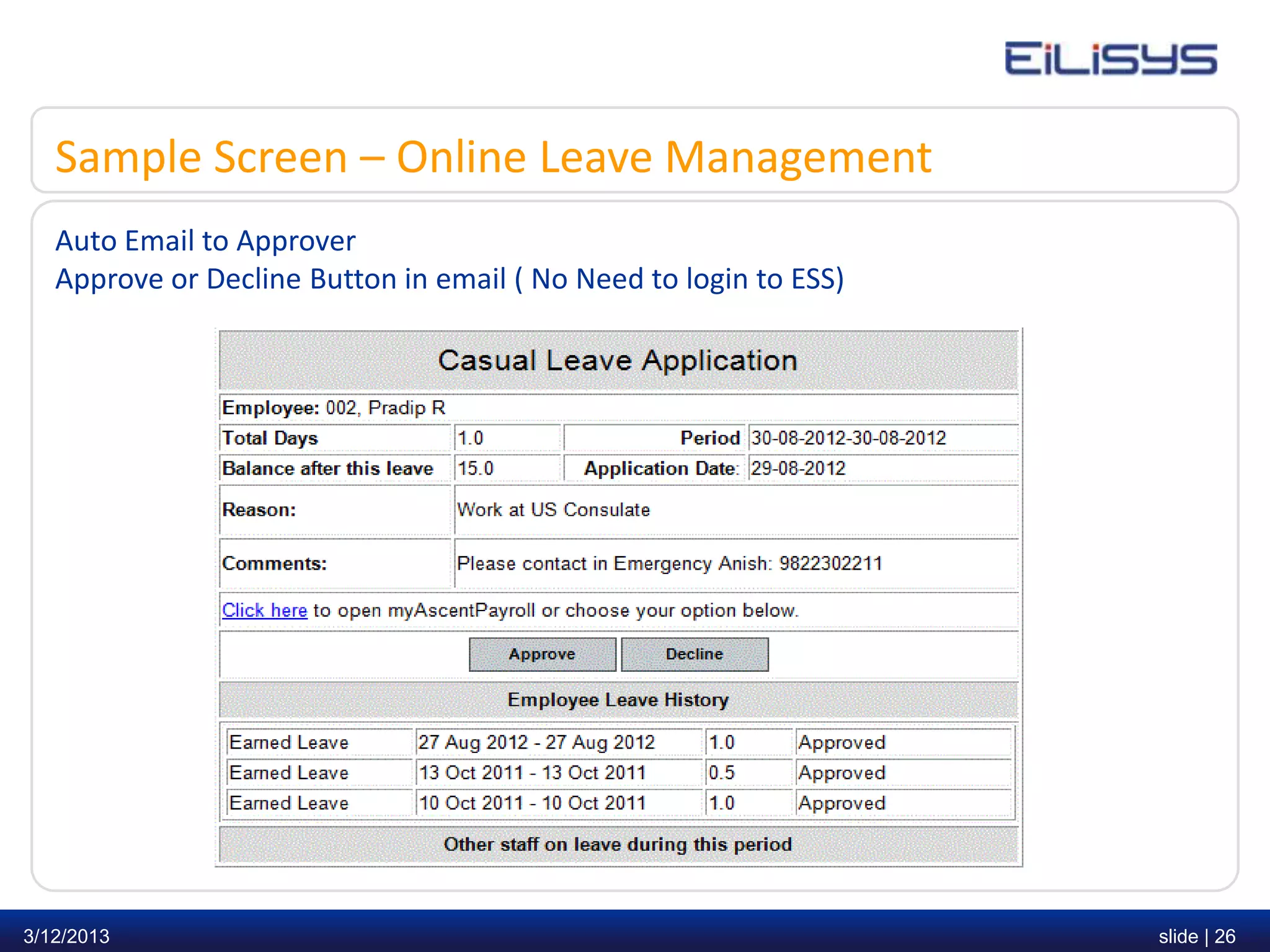
Sample Screen – Online Leave Management
   Auto Email to Approver
   Approve or Decline Button in email ( No Need to login to ESS)


3/12/2013                                                          slide | 26
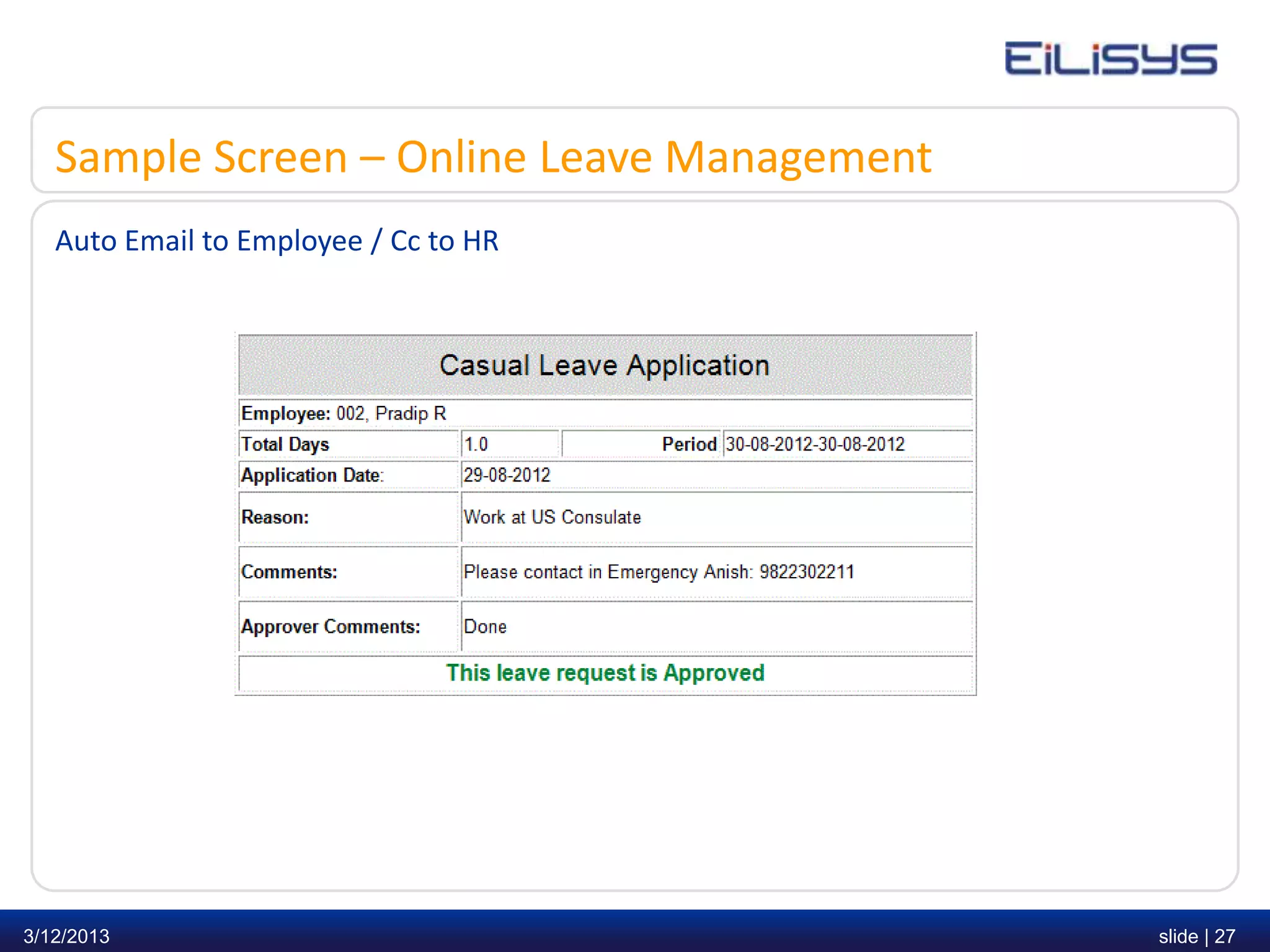
Sample Screen – Online Leave Management
   Auto Email to Employee / Cc to HR


3/12/2013                                    slide | 27
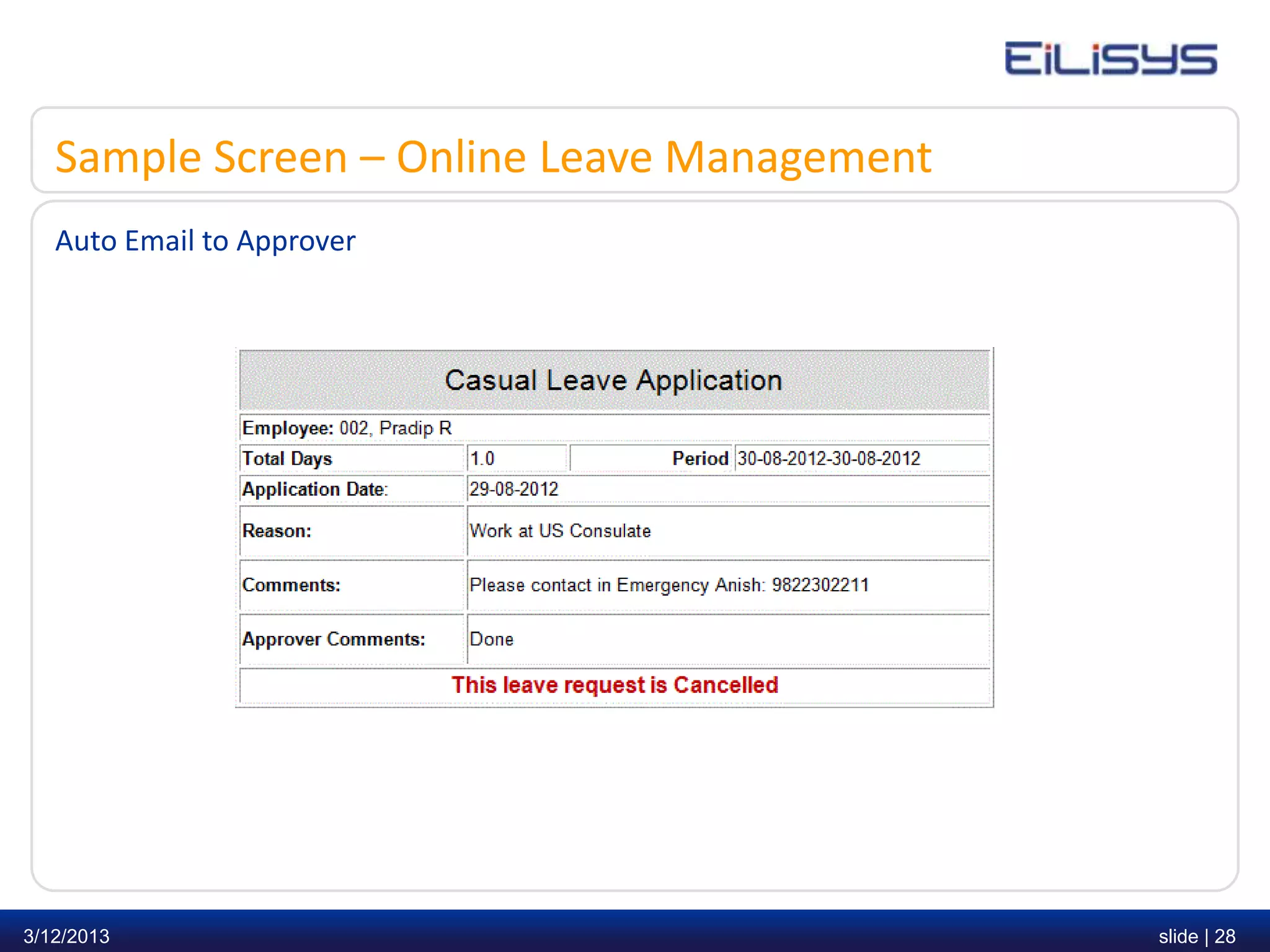
Sample Screen – Online Leave Management
   Auto Email to Approver


3/12/2013                                    slide | 28
Sample Screen – Online Leave Management
   My Staff Calendar


3/12/2013                                    slide | 29
Thank you.

            Any Questions?


3/12/2013                    slide | 30
Contact us

      Parikshit Salve
      Phone: + 91 9881358202
      Email: parikshit.salve@eilisys.com

     Eilisys Technologies Pvt. Ltd.
     Corporate Office:
     Office No.: 321,Siddharth Towers, S.No.: 12 / 3B,
     Near Sangam Press, Kothrud, Pune – 411 038,
     Maharashtra, India.
     Tel. No: + 91 20 2546 6096 / 2546 6097.

     Branch Office:
     B - 185, Sector - 41,
     Noida, NCR, India.
     Phone : + 91 99587 00486


3/12/2013                                                slide | 31

Ascent attendance & leave management presentation

  • 1.
    Online Attendance &Leave Management Presented by Parikshit Salve 9881358202| parikshit@eilisys.com 3/12/2013 slide | 1
  • 2.
    Who we areand what we do ? Eilisys Technologies Private Limited, founded in 2000, to provide simple yet sophisticated solutions in the area of Payroll Management. We develop and market solution under the brand “Ascent Payroll”. Over the years, more than 400 corporates have trusted Ascent Payroll. We have added to our product portfolio as online Attendance & Leave Management software to help our existing clients with pre-payroll activities. Our solutions are deployed • in various verticals such as Information Technology, Manufacturing, Insurance, Pharmaceutical, FMCG, BPO, Service sectors etc… • in major cities • for varied number of employees starting from 20 to 20,000 3/12/2013 slide | 2
  • 3.
  • 4.
    Why did theychoose us? • Packed with Satisfaction Guarantee for 60 days. • Mature solution with strong references • Work with the established Ascent Payroll brand which continues to invest and innovate • Lowest total cost of ownership • Immediate and measurable ROI 3/12/2013 slide | 4
  • 5.
    Index – OnlineAttendance & Leave Management • Understanding the concept • Introduction • Benefits • Sample Screen 3/12/2013 slide | 5
  • 6.
    Understanding the concept Day Work Day Weekly Off Punches No Punches Both Single In Out Regularize using Regularize Using Punch Application OD Application Paid Holiday On Leave On Duty Unscheduled AB Regularize using Leave/OD 3/12/2013 www.eilisys.com | or Apply deduction policy © Eilisys 2010. confidential and proprietary. slide | 6 3/12/2013 slide | 6
  • 7.
    Introduction – AttendanceManagement • The main objective of Attendance Management system is to assist your HR / Time Office and Payroll Department to become more efficient • Automate employee attendance with respect to Overtime, Grace Periods, Breaks, Shifts, Flexitime and Out Door Duty (OD) / Approvals • User definable policies such as Exceptions, Deduction, Comp Off and Overtime can be defined as per your requirements • Moreover, you can track exceptions based on employee attendance with following parameters - Unscheduled Absence, Early In, In Late, Out Early, Out Late etc. 3/12/2013 slide | 7
  • 8.
    Introduction – OnlineAttendance Management • In addition, cost leakages that result from absenteeism, proxy attendance and inaccuracies can be controlled. • Even if you are currently using any existing hardware, there is no need to replace it, our solution can be integrated with your existing hardware devices such as Biometric Device, Swipe Cards, RFID or Web Punch • Ask your hardware vendor only three inputs as raw data from their database for our integration program (1) Employee No. (2) Date/Time (3) In/Out Mode 3/12/2013 slide | 8
  • 9.
    Benefits – OnlineAttendance Management • Empower employees and minimize queries to HR for attendance • Improve management and employee communication • Reduce man power by entering employee information only once • Identifying revenue leakage • Identify attendance exceptions such as late In, Early Out and absenteeism etc. and take actions quickly • List of all missing punch exceptions • Eliminate unapproved overtime • Track employee’s time for lunch, breaks etc. • Automate Comp-off requests and online approvals • Regularize and approve employees punches thru email template 3/12/2013 slide | 9
  • 10.
    Features – OnlineAttendance Management • Simplify regulatory compliance and audit reports • Optional Punch In/Out entry via Web Punch thru Employee Self Service • Employee can view daily attendance thru Employee Self Service • Employee can apply for Missing Punch, Out Door Duties thru Employee Self Service • Automated e-mail to employees for reporting monthly absenteeism • Reminders to Approving Officer for approving Punches, Out Door Duties • Parametric Deduction Policies • In built auto schedulers to process Attendance / OD Reminders / Punch Reminders and Absenteeism email • Employee Exception reports helps HR / Time Office / HOD’s to view who is In, Absent, On Leave, Exception ( In/out Punches are missing) 3/12/2013 slide | 10
  • 11.
    Sample Screen –Online Attendance Management Employee Daily Attendance Calendar 3/12/2013 slide | 11
  • 12.
    Sample Screen –Online Attendance Management Employee Exception Calendar for HR / Time Office / HOD’s 3/12/2013 slide | 12
  • 13.
    Sample Screen –Online Attendance Management OD Application on email for approval Approval within same email template without login to ESS 3/12/2013 slide | 13
  • 14.
    Sample Screen –Online Attendance Management OD Reminder on email for approval Approval within same email template without login to ESS 3/12/2013 slide | 14
  • 15.
    Sample Screen –Online Attendance Management Punch Regularization on email for approval Approval within same email template without login to ESS 3/12/2013 slide | 15
  • 16.
    Sample Screen –Online Attendance Management Punch Reminder on email for approval Approval within same email template without login to ESS 3/12/2013 slide | 16
  • 17.
    Sample Screen –Online Attendance Management Auto email to Employee for Attendance Exception 3/12/2013 slide | 17
  • 18.
    Sample Screen –Online Attendance Management Attendance Register Report – Export to MS-Excel 3/12/2013 slide | 18
  • 19.
    Sample Screen –Online Attendance Management Shift Variation Report 3/12/2013 slide | 19
  • 20.
    Introduction – OnlineLeave Management • Leave Management encompasses the processes employees use to request time away from work such as (Sick Leave, Privilege Leave, Casual Leave etc.) and Approving Officer use to approve or decline Leave requests based on organization policies • Legacy System: Paper forms, informal requests, and inefficient manual methods • New Generation System: Leave request status such as (approved, declined, cancelled or pending) is displayed on the employee’s home page in Employee Self Service. It streamlines communication between your HR, Approving Officers and Employees 3/12/2013 slide | 20
  • 21.
    Introduction – OnlineLeave Management • Offers powerful capabilities to empower employees via the browser based Employee Self Service (ESS) module • For Approving Officer, leave approval no longer involve trails of paperwork. The system provides full reports of your staff & their leave balances. • Employers can fairly and accurately enforce configurable leave policies based on a company’s unique business processes. 3/12/2013 slide | 21
  • 22.
    Leave request flow • The employee checks the leave calendar for leave balances. • The employee send the leave request to Approver. • The approver approves or decline the leave request. • After approver approves or decline, leave calendar gets updated with new record. • The employee is notified thru email. • The HR user can check the system & generate real time reports at any time 3/12/2013 slide | 22
  • 23.
    Benefits – OnlineLeave Management • All leave policies are configurable (Parametric) • Applicant and Approving Officer can see complete leave records and approval history respectively. • Leave request is pending till it is approved or declined by the approver. Employee can delete leave request before it is approved or declined. • After approval if employee decides not to avail this leave, he/she can cancel this leave request on or before start day of leave application. • Employees can efficiently review benefit balances and comp-off using Employee Self Service to send comp-off request for approval. • Leave records are updated automatically once applications are approved. • Leave records may be printed out or generated into reports. 3/12/2013 slide | 23
  • 24.
    Benefits – OnlineLeave Management • Accommodates “exceptional cases” in HR policies, such as special leave entitlement for individuals. For e.g. in case of new joiner’s a leave type can be configured which will be applicable only for a specified period from the date of joining. • My Staff Calendar provides a bird's eye view of who's on leave. • Schedulers for processing leave and sending email reminders to Approving Officer for pending leave applications. • Employee has optional holiday’s facility to choose from the list provided by organization including employee birthday, if it is covered under the leave policy. 3/12/2013 slide | 24
  • 25.
    Sample Screen –Online Leave Management My Leave Calendar 3/12/2013 slide | 25
  • 26.
    Sample Screen –Online Leave Management Auto Email to Approver Approve or Decline Button in email ( No Need to login to ESS) 3/12/2013 slide | 26
  • 27.
    Sample Screen –Online Leave Management Auto Email to Employee / Cc to HR 3/12/2013 slide | 27
  • 28.
    Sample Screen –Online Leave Management Auto Email to Approver 3/12/2013 slide | 28
  • 29.
    Sample Screen –Online Leave Management My Staff Calendar 3/12/2013 slide | 29
  • 30.
    Thank you. Any Questions? 3/12/2013 slide | 30
  • 31.
    Contact us Parikshit Salve Phone: + 91 9881358202 Email: parikshit.salve@eilisys.com Eilisys Technologies Pvt. Ltd. Corporate Office: Office No.: 321,Siddharth Towers, S.No.: 12 / 3B, Near Sangam Press, Kothrud, Pune – 411 038, Maharashtra, India. Tel. No: + 91 20 2546 6096 / 2546 6097. Branch Office: B - 185, Sector - 41, Noida, NCR, India. Phone : + 91 99587 00486 3/12/2013 slide | 31