Arduino 2

    劉士達
   Shih-Ta Liu
   2009/04/13
Outline
•   Arduino 語法
•   Arduino + Flash
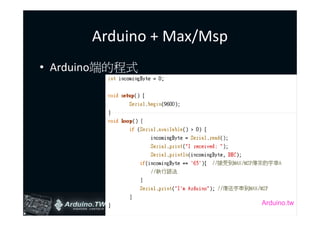
•   Arduino + Max/MSP
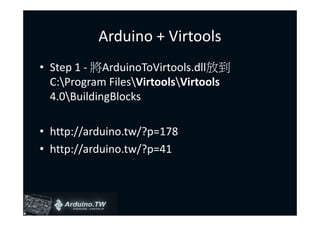
•   Arduino + Virtools
•   Arduino + 超音波 + 紅外線
•   Arduino + ADXL330
•   Arduino + 小型喇叭
•   Arduino + 繼電器 + 直流馬達
•   Arduino + 7段LED顯示器 + Max7219
Arduino 語法
• 掌握Arduino語法的三個學習關鍵
 – Variables (變數)
 – Structure (結構)
 – Functions (函式, 方法)
• 類別庫 Libraries運用(最後面的實作會講)
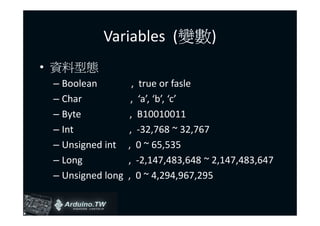
Variables (變數)
• 資料型態
 – Boolean           , true or fasle
 – Char             , ‘a’, ‘b’, ‘c’
 – Byte             , B10010011
 – Int             , -32,768 ~ 32,767
 – Unsigned int    , 0 ~ 65,535
 – Long            , -2,147,483,648 ~ 2,147,483,647
 – Unsigned long   , 0 ~ 4,294,967,295
資料型態
– Float    單精度浮點數, 10^-38 ~ 10^38
– Double   雙精度浮點數, 10^-308 ~ 10^308
– String   , “I’m Arduino”
– Array    , char A[8] = {‘a’, ‘r’, ‘d’, ‘u’, ‘i’, ‘n’, ‘o’}
– Void     , void setup()
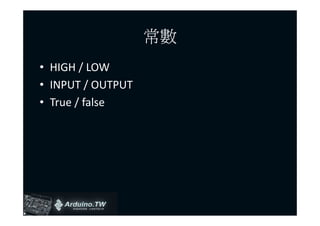
常數
• HIGH / LOW
• INPUT / OUTPUT
• True / false
Arduino Structure
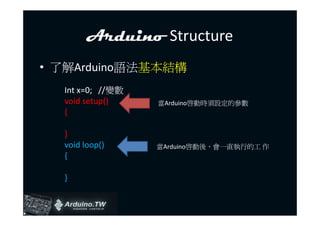
• 了解Arduino語法基本結構
  Int x=0; //變數
  void setup()    當Arduino啟動時須設定的參數
  {

  }
  void loop()     當Arduino啟動後,會一直執行的工 作
  {

  }
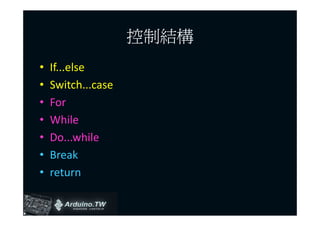
控制結構
•   If...else
•   Switch...case
•   For
•   While
•   Do...while
•   Break
•   return
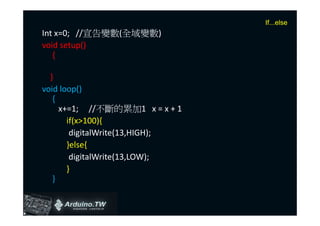
If...else
Int x=0; //宣告變數(全域變數)
void setup()
   {

  }
void loop()
   {
     x+=1; //不斷的累加1 x = x + 1
       if(x>100){
        digitalWrite(13,HIGH);
       }else{
        digitalWrite(13,LOW);
       }
   }
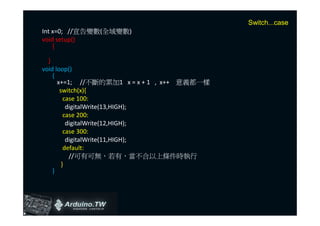
Switch...case
Int x=0; //宣告變數(全域變數)
void setup()
    {

  }
void loop()
    {
      x+=1; //不斷的累加1 x = x + 1 , x++ 意義都一樣
       switch(x){
         case 100:
          digitalWrite(13,HIGH);
         case 200:
          digitalWrite(12,HIGH);
         case 300:
          digitalWrite(11,HIGH);
         default:
           //可有可無,若有,當不合以上條件時執行
        }
    }
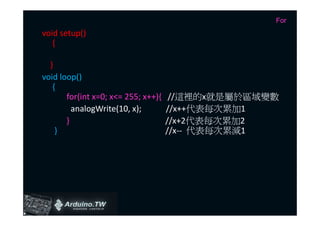
For
void setup()
   {

  }
void loop()
   {
       for(int x=0; x<= 255; x++){    //這裡的x就是屬於區域變數
         analogWrite(10, x);         //x++代表每次累加1
       }                             //x+2代表每次累加2
    }                                //x-- 代表每次累減1
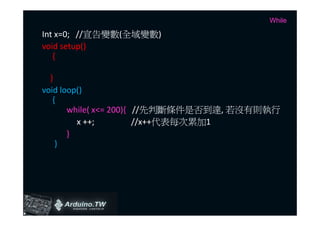
While

Int x=0; //宣告變數(全域變數)
void setup()
   {

  }
void loop()
   {
       while( x<= 200){ //先判斷條件是否到達, 若沒有則執行
         x ++;          //x++代表每次累加1
       }
    }
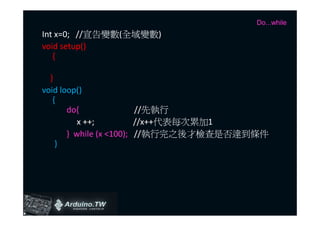
Do...while
Int x=0; //宣告變數(全域變數)
void setup()
   {

  }
void loop()
   {
       do{               //先執行
          x ++;          //x++代表每次累加1
       } while (x <100); //執行完之後才檢查是否達到條件
    }
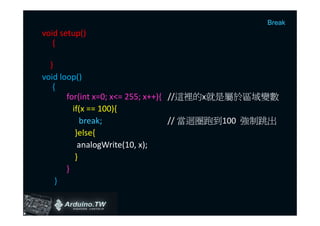
Break
void setup()
   {

  }
void loop()
   {
       for(int x=0; x<= 255; x++){ //這裡的x就是屬於區域變數
         if(x == 100){
            break;                 // 當迴圈跑到100 強制跳出
          }else{
           analogWrite(10, x);
          }
       }
    }
return

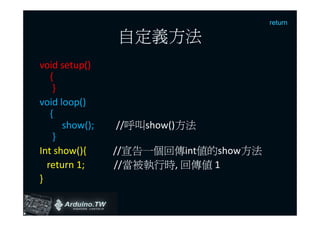
                自定義方法
void setup()
   {
    }
void loop()
   {
      show();   //呼叫show()方法
    }
Int show(){     //宣告一個回傳int值的show方法
  return 1;     //當被執行時, 回傳值 1
}
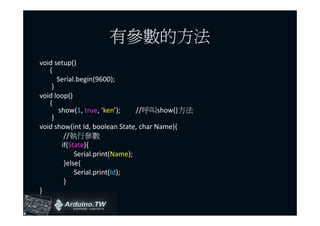
有參數的方法
void setup()
   {
      Serial.begin(9600);
    }
void loop()
   {
       show(1, true, ‘ken’);     //呼叫show()方法
    }
void show(int Id, boolean State, char Name){
         //執行參數
        if(State){
             Serial.print(Name);
         }else{
             Serial.print(Id);
         }
}
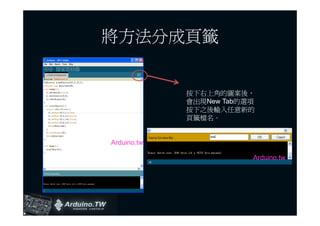
將方法分成頁籤


             按下右上角的圖案後,
             會出現New Tab的選項
             按下之後輸入任意新的
             頁籤檔名。


Arduino.tw

                         Arduino.tw
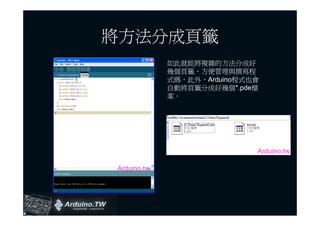
將方法分成頁籤
             如此就能將複雜的方法分成好
             幾個頁籤,方便管理與撰寫程
             式碼,此外,Arduino程式也會
             自動將頁籤分成好幾個*.pde檔
             案。


                             Arduino.tw

Arduino.tw
Functions
• Arduino的Functions主要分成七類
   – Digital
   – Analog
   – Time
   – Math ( (有需要才用)   )
   – Bits/Bytes (有需要才用)
   – Interrupts (有需要才用)
   – Serial Communication
• 以及額外的Libraries
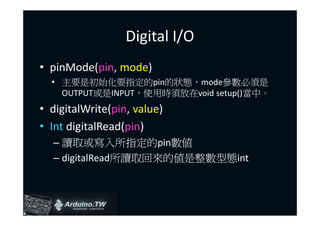
Digital I/O
• pinMode(pin, mode)
  • 主要是初始化要指定的pin的狀態,mode參數必須是
    OUTPUT或是INPUT,使用時須放在void setup()當中。
• digitalWrite(pin, value)
• Int digitalRead(pin)
  – 讀取或寫入所指定的pin數值
  – digitalRead所讀取回來的值是整數型態int
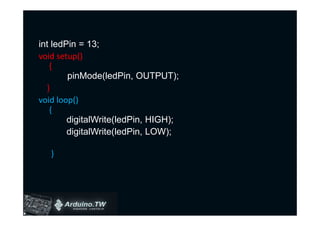
int ledPin = 13;
void setup()
   {
        pinMode(ledPin, OUTPUT);
  }
void loop()
   {
        digitalWrite(ledPin, HIGH);
        digitalWrite(ledPin, LOW);

   }
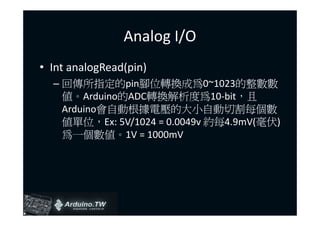
Analog I/O
• Int analogRead(pin)
  – 回傳所指定的pin腳位轉換成為0~1023的整數數
    值。Arduino的ADC轉換解析度為10-bit,且
    Arduino會自動根據電壓的大小自動切割每個數
    值單位,Ex: 5V/1024 = 0.0049v 約每4.9mV(毫伏)
    為一個數值。1V = 1000mV
Analog I/O
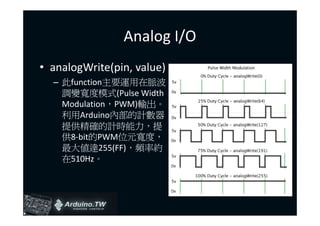
• analogWrite(pin, value)
  – 此function主要運用在脈波
    調變寬度模式(Pulse Width
    Modulation,PWM)輸出。
    利用Arduino內部的計數器
    提供精確的計時能力,提
    供8-bit的PWM位元寬度,
    最大值達255(FF),頻率約
    在510Hz。
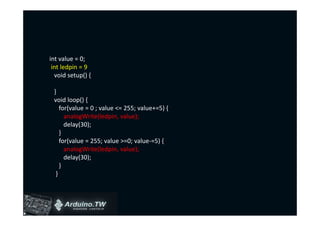
int value = 0;
 int ledpin = 9
  void setup() {

 }
 void loop() {
    for(value = 0 ; value <= 255; value+=5) {
      analogWrite(ledpin, value);
      delay(30);
    }
    for(value = 255; value >=0; value-=5) {
      analogWrite(ledpin, value);
      delay(30);
    }
  }
Time
• delay(ms)
  – 延遲程式迴圈的運作,ms的單位為千分之一秒,
    (毫秒),因此要延遲一秒需填入1000。
• dealyMicroseconds(us)
  – 延遲百萬分之一秒(微秒),微秒是對毫秒需要
    更細的時間切割所使用,此function的最大值為
    16383。
Math
• 數學類別又分成幾個部分
 – min(x, y)取兩數間最小值
 – max(x, y)取兩數間最大值
 – abs(x)取x的絕對值
 – sqrt(x)取平方根
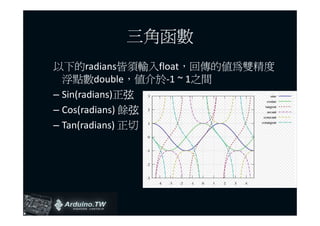
三角函數
以下的radians皆須輸入float,回傳的值為雙精度
  浮點數double,值介於-1 ~ 1之間
– Sin(radians)正弦弦
– Cos(radians) 餘弦
                弦
– Tan(radians) 正切
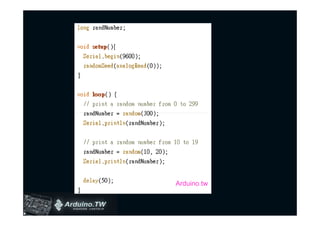
Random
• randomSeed(seed)
  – 每次隨機根據seed值產生一個整數,僅限用於
    Setup()當中,每次程式啟動時產生一次。
• long random(max)
  – 根據max值產生0~max的亂數值
• long random(min, max)
  – 根據min~max產生一個亂數值
Arduino.tw
Serial Communication
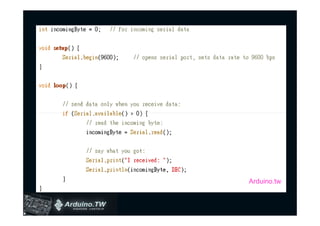
•   Serial.begin(speed)
•   Int Serial.available()
•   Int Serial.read()
•   Serial.print(data)
•   Serial.println(data)
Serial.begin
• 此function主要使用在setup()當中,設定
  RS232序列埠的baud rate speed (鮑率),一般
  設定為9600。其他也可以設定600, 1200,
  2400, 4800, 9600, 19200, 38400, …等等。需
  看接收資料的設備設定為多少?
Serial.available/read
• Serial.available主要運用來判斷序列埠是否
  有資料進來,若有資料,則會回傳大於0的
  數值。
• Serial.read是當資料進來之後,將緩衝區內
  的數值讀入變數當中,所讀取的資料型態,
  一般都是以整數型態呈現,此整數是對應
  ASCII碼,最大到255(FF),Ex: 65 = A, 97 = a

 http://www.cs.utk.edu/~pham/ascii.html
Serial.print/println
• 兩者之間只差在ln會自動加上ASCII 13, Carriage return(Enter)。
• Serial.print(a, DEC)
    – 輸出a的值以10進制顯示
• Serial.print(a, HEX)
    – 輸出a的值以16進制顯示
• Serial.print(a, OCT)
    – 輸出a的值以8進制顯示
• Serial.print(a, BIN)
    – 輸出a的值以2進制顯示
• Serial.print(a, BYTE)
    – 輸出a的值以位元組顯示
• Serial.print(str)
    –   輸出字串顯示
Arduino.tw
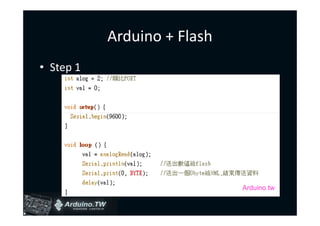
Arduino + Flash
• Step 1


                             Arduino.tw
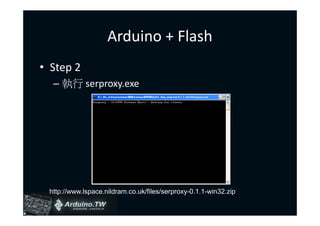
Arduino + Flash
• Step 2
  – 執行 serproxy.exe


 http://www.lspace.nildram.co.uk/files/serproxy-0.1.1-win32.zip
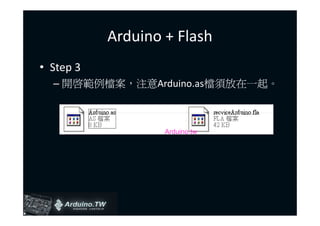
Arduino + Flash
• Step 3
  – 開啟範例檔案,注意Arduino.as檔須放在一起。


                   Arduino.tw
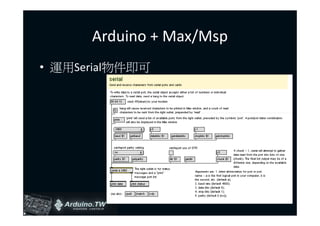
Arduino + Max/Msp
• 運用Serial物件即可
Arduino + Max/Msp
• Arduino端的程式


                          Arduino.tw
Arduino + Virtools
• Step 1 - 將ArduinoToVirtools.dll放到
  C:Program FilesVirtoolsVirtools
  4.0BuildingBlocks

• http://arduino.tw/?p=178
• http://arduino.tw/?p=41
Arduino + Virtools
• Step 2 – 將arduino的程式寫入晶片當中
Arduino + Virtools
• Step 3 – 執行Virtools,並將Arduino BB放入
  程式當中。
實作課程
•   Arduino + 超音波 + 紅外線
•   Arduino + ADXL330
•   Arduino + 小型喇叭
•   Arduino + 繼電器 + 直流馬達
•   Arduino + 7段LED顯示器 + Max7219
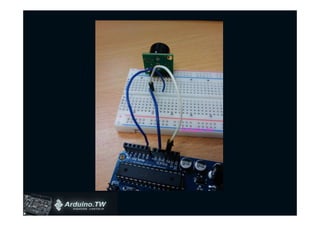
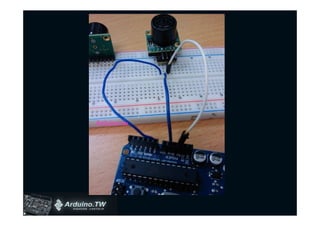
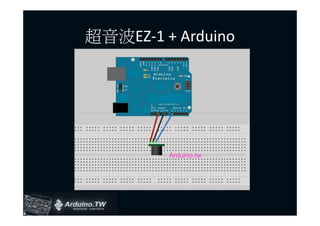
超音波EZ-1 + Arduino


         Arduino.tw
Arduino.tw
Arduino.tw
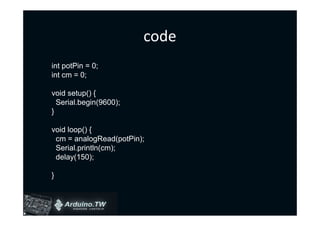
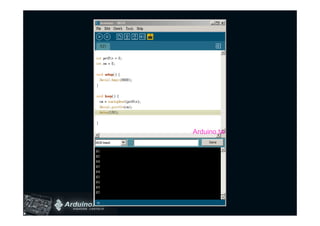
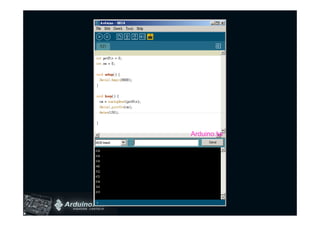
code
int potPin = 0;
int cm = 0;

void setup() {
  Serial.begin(9600);
}

void loop() {
 cm = analogRead(potPin);
 Serial.println(cm);
 delay(150);

}
Arduino.tw
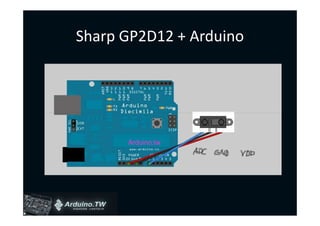
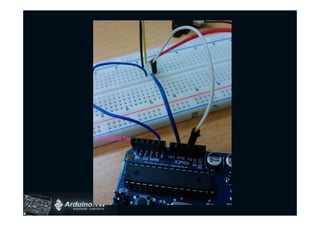
Sharp GP2D12 + Arduino


      Arduino.tw
Arduino.tw
Arduino.tw
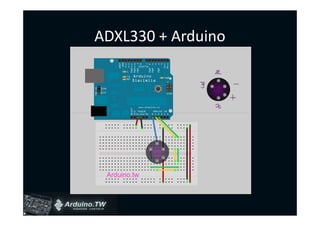
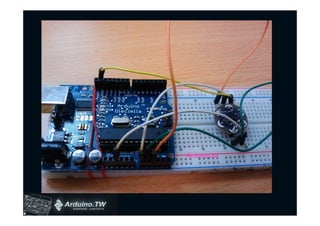
ADXL330 + Arduino


 Arduino.tw
Arduino.tw
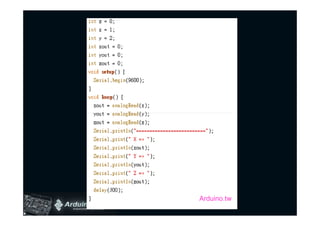
code


       Arduino.tw
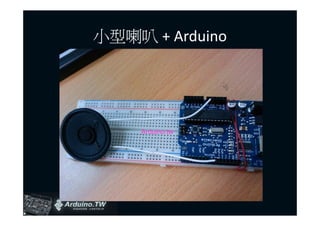
小型喇叭 + Arduino


     Arduino.tw
code
• File > Sketchbook > Examples > Digital >
  Melody
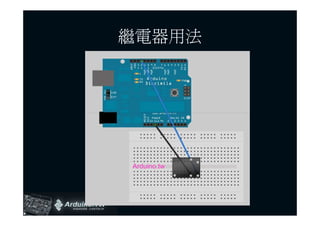
繼電器用法


Arduino.tw
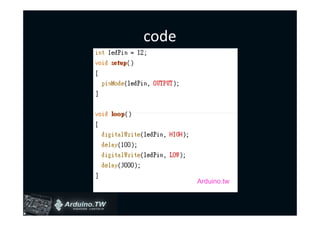
code


       Arduino.tw
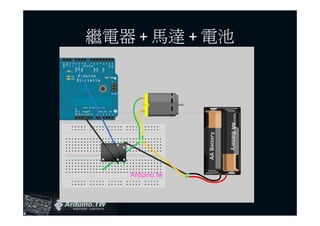
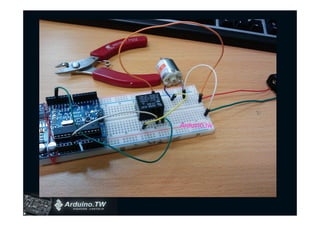
繼電器 + 馬達 + 電池


   Arduino.tw
Arduino.tw
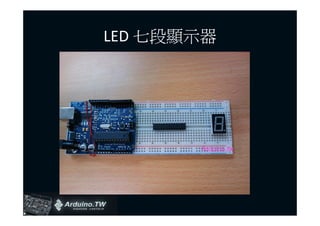
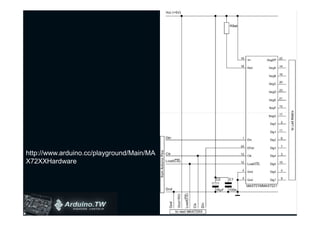
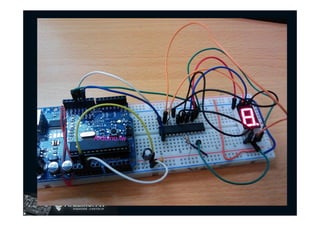
LED 七段顯示器


       Arduino.tw
http://www.arduino.cc/playground/Main/MA
X72XXHardware
Arduino.tw
code
• http://www.arduino.cc/playground/uploads/
  Main/LedControl.zip

• http://www.arduino.cc/playground/uploads/
  Main/LedControlDemos.zip
END


Arduino.tw

Arduino L2

  • 1.
    Arduino 2 劉士達 Shih-Ta Liu 2009/04/13
  • 2.
    Outline • Arduino 語法 • Arduino + Flash • Arduino + Max/MSP • Arduino + Virtools • Arduino + 超音波 + 紅外線 • Arduino + ADXL330 • Arduino + 小型喇叭 • Arduino + 繼電器 + 直流馬達 • Arduino + 7段LED顯示器 + Max7219
  • 3.
    Arduino 語法 • 掌握Arduino語法的三個學習關鍵 – Variables (變數) – Structure (結構) – Functions (函式, 方法) • 類別庫 Libraries運用(最後面的實作會講)
  • 4.
    Variables (變數) • 資料型態 – Boolean , true or fasle – Char , ‘a’, ‘b’, ‘c’ – Byte , B10010011 – Int , -32,768 ~ 32,767 – Unsigned int , 0 ~ 65,535 – Long , -2,147,483,648 ~ 2,147,483,647 – Unsigned long , 0 ~ 4,294,967,295
  • 5.
    資料型態 – Float 單精度浮點數, 10^-38 ~ 10^38 – Double 雙精度浮點數, 10^-308 ~ 10^308 – String , “I’m Arduino” – Array , char A[8] = {‘a’, ‘r’, ‘d’, ‘u’, ‘i’, ‘n’, ‘o’} – Void , void setup()
  • 6.
    常數 • HIGH /LOW • INPUT / OUTPUT • True / false
  • 7.
    Arduino Structure • 了解Arduino語法基本結構 Int x=0; //變數 void setup() 當Arduino啟動時須設定的參數 { } void loop() 當Arduino啟動後,會一直執行的工 作 { }
  • 8.
    控制結構 • If...else • Switch...case • For • While • Do...while • Break • return
  • 9.
    If...else Int x=0; //宣告變數(全域變數) voidsetup() { } void loop() { x+=1; //不斷的累加1 x = x + 1 if(x>100){ digitalWrite(13,HIGH); }else{ digitalWrite(13,LOW); } }
  • 10.
    Switch...case Int x=0; //宣告變數(全域變數) voidsetup() { } void loop() { x+=1; //不斷的累加1 x = x + 1 , x++ 意義都一樣 switch(x){ case 100: digitalWrite(13,HIGH); case 200: digitalWrite(12,HIGH); case 300: digitalWrite(11,HIGH); default: //可有可無,若有,當不合以上條件時執行 } }
  • 11.
    For void setup() { } void loop() { for(int x=0; x<= 255; x++){ //這裡的x就是屬於區域變數 analogWrite(10, x); //x++代表每次累加1 } //x+2代表每次累加2 } //x-- 代表每次累減1
  • 12.
    While Int x=0; //宣告變數(全域變數) voidsetup() { } void loop() { while( x<= 200){ //先判斷條件是否到達, 若沒有則執行 x ++; //x++代表每次累加1 } }
  • 13.
    Do...while Int x=0; //宣告變數(全域變數) voidsetup() { } void loop() { do{ //先執行 x ++; //x++代表每次累加1 } while (x <100); //執行完之後才檢查是否達到條件 }
  • 14.
    Break void setup() { } void loop() { for(int x=0; x<= 255; x++){ //這裡的x就是屬於區域變數 if(x == 100){ break; // 當迴圈跑到100 強制跳出 }else{ analogWrite(10, x); } } }
  • 15.
    return 自定義方法 void setup() { } void loop() { show(); //呼叫show()方法 } Int show(){ //宣告一個回傳int值的show方法 return 1; //當被執行時, 回傳值 1 }
  • 16.
    有參數的方法 void setup() { Serial.begin(9600); } void loop() { show(1, true, ‘ken’); //呼叫show()方法 } void show(int Id, boolean State, char Name){ //執行參數 if(State){ Serial.print(Name); }else{ Serial.print(Id); } }
  • 17.
    將方法分成頁籤 按下右上角的圖案後, 會出現New Tab的選項 按下之後輸入任意新的 頁籤檔名。 Arduino.tw Arduino.tw
  • 18.
    將方法分成頁籤 如此就能將複雜的方法分成好 幾個頁籤,方便管理與撰寫程 式碼,此外,Arduino程式也會 自動將頁籤分成好幾個*.pde檔 案。 Arduino.tw Arduino.tw
  • 19.
    Functions • Arduino的Functions主要分成七類 – Digital – Analog – Time – Math ( (有需要才用) ) – Bits/Bytes (有需要才用) – Interrupts (有需要才用) – Serial Communication • 以及額外的Libraries
  • 20.
    Digital I/O • pinMode(pin,mode) • 主要是初始化要指定的pin的狀態,mode參數必須是 OUTPUT或是INPUT,使用時須放在void setup()當中。 • digitalWrite(pin, value) • Int digitalRead(pin) – 讀取或寫入所指定的pin數值 – digitalRead所讀取回來的值是整數型態int
  • 21.
    int ledPin =13; void setup() { pinMode(ledPin, OUTPUT); } void loop() { digitalWrite(ledPin, HIGH); digitalWrite(ledPin, LOW); }
  • 22.
    Analog I/O • IntanalogRead(pin) – 回傳所指定的pin腳位轉換成為0~1023的整數數 值。Arduino的ADC轉換解析度為10-bit,且 Arduino會自動根據電壓的大小自動切割每個數 值單位,Ex: 5V/1024 = 0.0049v 約每4.9mV(毫伏) 為一個數值。1V = 1000mV
  • 23.
    Analog I/O • analogWrite(pin,value) – 此function主要運用在脈波 調變寬度模式(Pulse Width Modulation,PWM)輸出。 利用Arduino內部的計數器 提供精確的計時能力,提 供8-bit的PWM位元寬度, 最大值達255(FF),頻率約 在510Hz。
  • 24.
    int value =0; int ledpin = 9 void setup() { } void loop() { for(value = 0 ; value <= 255; value+=5) { analogWrite(ledpin, value); delay(30); } for(value = 255; value >=0; value-=5) { analogWrite(ledpin, value); delay(30); } }
  • 25.
    Time • delay(ms) – 延遲程式迴圈的運作,ms的單位為千分之一秒, (毫秒),因此要延遲一秒需填入1000。 • dealyMicroseconds(us) – 延遲百萬分之一秒(微秒),微秒是對毫秒需要 更細的時間切割所使用,此function的最大值為 16383。
  • 26.
    Math • 數學類別又分成幾個部分 –min(x, y)取兩數間最小值 – max(x, y)取兩數間最大值 – abs(x)取x的絕對值 – sqrt(x)取平方根
  • 27.
    三角函數 以下的radians皆須輸入float,回傳的值為雙精度 浮點數double,值介於-1~ 1之間 – Sin(radians)正弦弦 – Cos(radians) 餘弦 弦 – Tan(radians) 正切
  • 28.
    Random • randomSeed(seed) – 每次隨機根據seed值產生一個整數,僅限用於 Setup()當中,每次程式啟動時產生一次。 • long random(max) – 根據max值產生0~max的亂數值 • long random(min, max) – 根據min~max產生一個亂數值
  • 29.
  • 30.
    Serial Communication • Serial.begin(speed) • Int Serial.available() • Int Serial.read() • Serial.print(data) • Serial.println(data)
  • 31.
    Serial.begin • 此function主要使用在setup()當中,設定 RS232序列埠的baud rate speed (鮑率),一般 設定為9600。其他也可以設定600, 1200, 2400, 4800, 9600, 19200, 38400, …等等。需 看接收資料的設備設定為多少?
  • 32.
    Serial.available/read • Serial.available主要運用來判斷序列埠是否 有資料進來,若有資料,則會回傳大於0的 數值。 • Serial.read是當資料進來之後,將緩衝區內 的數值讀入變數當中,所讀取的資料型態, 一般都是以整數型態呈現,此整數是對應 ASCII碼,最大到255(FF),Ex: 65 = A, 97 = a http://www.cs.utk.edu/~pham/ascii.html
  • 33.
    Serial.print/println • 兩者之間只差在ln會自動加上ASCII 13,Carriage return(Enter)。 • Serial.print(a, DEC) – 輸出a的值以10進制顯示 • Serial.print(a, HEX) – 輸出a的值以16進制顯示 • Serial.print(a, OCT) – 輸出a的值以8進制顯示 • Serial.print(a, BIN) – 輸出a的值以2進制顯示 • Serial.print(a, BYTE) – 輸出a的值以位元組顯示 • Serial.print(str) – 輸出字串顯示
  • 34.
  • 35.
    Arduino + Flash •Step 1 Arduino.tw
  • 36.
    Arduino + Flash •Step 2 – 執行 serproxy.exe http://www.lspace.nildram.co.uk/files/serproxy-0.1.1-win32.zip
  • 37.
    Arduino + Flash •Step 3 – 開啟範例檔案,注意Arduino.as檔須放在一起。 Arduino.tw
  • 38.
    Arduino + Max/Msp •運用Serial物件即可
  • 39.
    Arduino + Max/Msp •Arduino端的程式 Arduino.tw
  • 40.
    Arduino + Virtools •Step 1 - 將ArduinoToVirtools.dll放到 C:Program FilesVirtoolsVirtools 4.0BuildingBlocks • http://arduino.tw/?p=178 • http://arduino.tw/?p=41
  • 41.
    Arduino + Virtools •Step 2 – 將arduino的程式寫入晶片當中
  • 42.
    Arduino + Virtools •Step 3 – 執行Virtools,並將Arduino BB放入 程式當中。
  • 43.
    實作課程 • Arduino + 超音波 + 紅外線 • Arduino + ADXL330 • Arduino + 小型喇叭 • Arduino + 繼電器 + 直流馬達 • Arduino + 7段LED顯示器 + Max7219
  • 44.
  • 45.
  • 46.
  • 47.
    code int potPin =0; int cm = 0; void setup() { Serial.begin(9600); } void loop() { cm = analogRead(potPin); Serial.println(cm); delay(150); }
  • 48.
  • 49.
    Sharp GP2D12 +Arduino Arduino.tw
  • 50.
  • 51.
  • 52.
  • 53.
  • 54.
    code Arduino.tw
  • 55.
  • 56.
    code • File >Sketchbook > Examples > Digital > Melody
  • 57.
  • 58.
    code Arduino.tw
  • 59.
    繼電器 + 馬達+ 電池 Arduino.tw
  • 60.
  • 61.
  • 62.
  • 63.
  • 64.
    code • http://www.arduino.cc/playground/uploads/ Main/LedControl.zip • http://www.arduino.cc/playground/uploads/ Main/LedControlDemos.zip
  • 65.