Architectures for Inclusive Design


Colin Clark, Fluid Project Technical Lead
Adaptive Technology Resource Centre
Things we’ll talk about
•   Priorities for software

•   What is software architecture?

•   Object oriented programming

•   Model View Controller

•   Case study: the Web

•   How do assistive technologies work?

•   Rethinking the role-based paradigm

•   Techniques for open architecture
Who am I?

Who are you?
Fluid...
            http://fluidproject.org

• Is an open source community of
  - Designers
  - Developers
  - Accessibility experts
• Helps other open communities
• Consists of universities, museums and
  individuals
What We Do
• Offer design advice and resources
• Contribute to other communities:
  - jQuery UI
  - Dojo
  - W3C Accessibility
• Build Infusion, our JavaScript application
  framework
• Build Kettle, our JavaScript server-side
  infrastructure
Software priorities
Some questions...

1. What’s the most important thing on your
   computer?
2. What’s your favourite piece of software?
3. Why do you use software?
Content is king
• Your stuff.
• The things you do with your stuff.

  Software architectures need to be focussed
  on enabling creativity and contribution, for
  everyone.
Software shouldn’t suck
• Good software...
  • Doesn’t crash
  • Doesn’t eat your data
  • Helps you accomplish your goals
  • Is fast enough to keep up with you
  • Can grow over time with your needs
Architecture
What is architecture?

•   Concerned with the shape of software
•   Defines the structure and APIs of a system
•   Highly abstract: recognition of patterns
•   Best done iteratively, not all up front
Architecture is hard

• Code is hard to understand and maintain
• Goals of a good architecture:
  • Enable growth
  • Allow for outside extension
  • Manage dependencies
Architectural tendencies

 •   Loose coupling
 •   Shallow dependency hierarchies
 •   Interoperability & semantics
 •   Less code
Object Orientation
Goals of OO

•   Define a system in real-world terms
•   Hide away the guts of an implementation
•   Create small, useful modules
•   Enable reusability
Three Pillars of OO

1. Inheritance
2. Encapsulation
3. Polymorphism
Inheritance
• A way of structuring dependencies and
    reusing code
•   Defines the identity of an object (is a)
•   Mammals, Felines, Cats and Lions
•   Vehicles, Cars, and Trucks
•   Fruit, Apples, Oranges
•   Lost of other contrived examples...
Inheritance
                              AbstractMap
                                       Method


                              Method


                                                Method
                                        Data

                                       Method


IdentityHashMap                                          HashMap
            Method                                                Method
   Method


                     Method


                                                         Method


                                                                           Method
            Data                                                  Data

            Method                                                Method


              PrinterStateReasons LinkedHashMap
                                       Method                                                Method
                              Method


                                                Method


                                                                                    Method


                                                                                                      Method
                                       Data                                                  Data

                                       Method                                                Method
Encapsulation

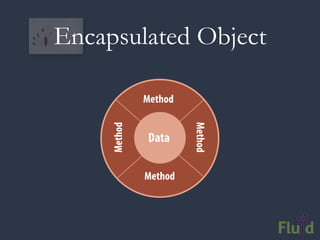
• Hide away the internals of an object
• Define a contract through methods
• Traditionally, data is considered opaque
Encapsulated Object

              Method
     Method


                       Method
              Data

              Method
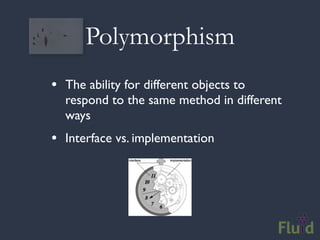
Polymorphism
• The ability for different objects to
  respond to the same method in different
  ways
• Interface vs. implementation
Crumbling Pillars
• Inheritance is brittle and ineffective
• Composition (has a) works better
• Encapsulation can lead to overzealousness:
  • Cuts off access to useful information
  • Assumes custom structures are better than
     plain old, interoperable standards
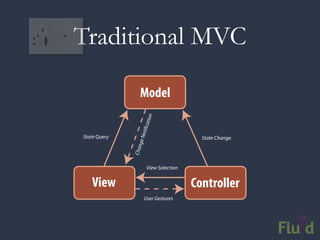
Model View Controller

•   Model is the application data and associated
    behaviour

•   View presents the model and drives the
    interaction logic

•   Controller is glue, mediating access between
    model and view
Traditional MVC

                 Model


                          n
                      atio
                 oti c
State Query                               State Change
               ge N
                  n
              Cha


                       View Selection


   View                                 Controller
                      User Gestures
The Problem with Controllers


•   Controllers are the least defined part of the
    equation

•   What’s “glue?”

•   Always referred to as the non-reusable part

•   MVC has been warped over the decades
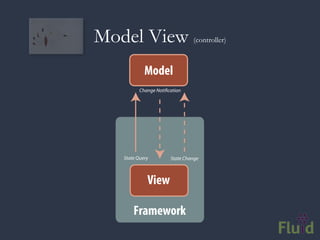
Controllers and Frameworks

•   Orginally, in Smalltalk, the Controller managed the
    low-level event loop for an application

•   In Web apps, they’re usually responsible for parsing
    requests and dispatching

•   These are both things that high-level frameworks
    do for us now

•   E.g. The event loop in a Web browser
Model View                      (controller)


            Model
          Change Noti cation


   State Query         State Change


             View

       Framework
The Web
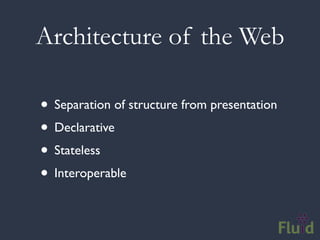
Architecture of the Web

• Separation of structure from presentation
• Declarative
• Stateless
• Interoperable
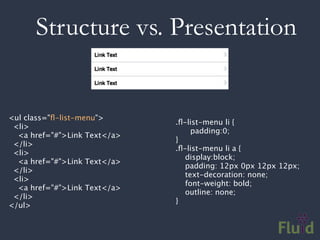
Structure vs. Presentation


<ul class="fl-list-menu">
                               .fl-list-menu li {
  <li>
                               
    padding:0;
   <a href="#">Link Text</a>
                               }
  </li>
                               .fl-list-menu li a {
  <li>
                                  display:block;
   <a href="#">Link Text</a>
                                  padding: 12px 0px 12px 12px;
  </li>
                                  text-decoration: none;
  <li>
                                  font-weight: bold;
   <a href="#">Link Text</a>
                                  outline: none;
  </li>
                               }
</ul>
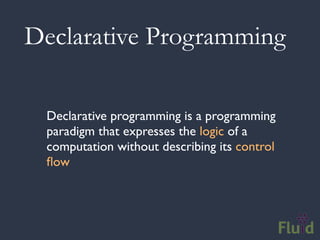
Declarative Programming

 Declarative programming is a programming
 paradigm that expresses the logic of a
 computation without describing its control
 flow
Declarative Programming

         what
         not


         how
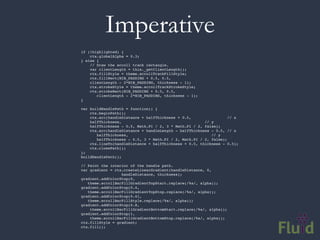
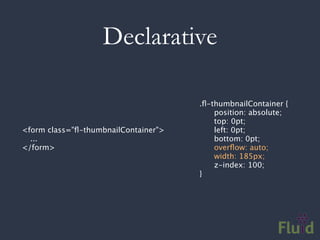
Compare & Contrast
Compare & Contrast


Scroller
Imperative
if (!highlighted) {
    ctx.globalAlpha = 0.3;
} else {
    // Draw the scroll track rectangle.
    var clientLength = this._getClientLength();
    ctx.fillStyle = theme.scrollTrackFillStyle;
    ctx.fillRect(NIB_PADDING + 0.5, 0.5,
    clientLength - 2*NIB_PADDING, thickness - 1);
    ctx.strokeStyle = theme.scrollTrackStrokeStyle;
    ctx.strokeRect(NIB_PADDING + 0.5, 0.5,
       clientLength - 2*NIB_PADDING, thickness - 1);
}

var buildHandlePath = function() {
    ctx.beginPath();
    ctx.arc(handleDistance + halfThickness + 0.5,                 // x
    halfThickness,                                     // y
    halfThickness - 0.5, Math.PI / 2, 3 * Math.PI / 2, false);
    ctx.arc(handleDistance + handleLength - halfThickness - 0.5, // x
       halfThickness,                                     // y
       halfThickness - 0.5, 3 * Math.PI / 2, Math.PI / 2, false);
    ctx.lineTo(handleDistance + halfThickness + 0.5, thickness - 0.5);
    ctx.closePath();
};
buildHandlePath();

// Paint the interior of the handle path.
var gradient = ctx.createLinearGradient(handleDistance, 0,
                  handleDistance, thickness);
gradient.addColorStop(0,
   theme.scrollBarFillGradientTopStart.replace(/%a/, alpha));
gradient.addColorStop(0.4,
   theme.scrollBarFillGradientTopStop.replace(/%a/, alpha));
gradient.addColorStop(0.41,
   theme.scrollBarFillStyle.replace(/%a/, alpha));
gradient.addColorStop(0.8,
    theme.scrollBarFillGradientBottomStart.replace(/%a/, alpha));
gradient.addColorStop(1,
    theme.scrollBarFillGradientBottomStop.replace(/%a/, alpha));
ctx.fillStyle = gradient;
ctx.fill();
Declarative

                                      .fl-thumbnailContainer {
                                      
   position: absolute;
                                      
   top: 0pt;
<form class="fl-thumbnailContainer">   
   left: 0pt;
  ...                                 
   bottom: 0pt;
</form>                               
   overflow: auto;
                                      
   width: 185px;
                                      
   z-index: 100;
                                      }
Statelessness


“The Web is broken. It can’t remember me
between requests”
Statelessness

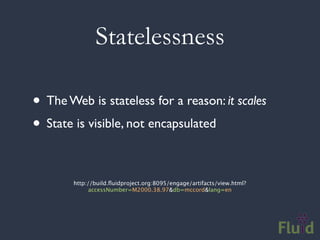
• The Web is stateless for a reason: it scales
• State is visible, not encapsulated

        http://build.fluidproject.org:8095/engage/artifacts/view.html?
              accessNumber=M2000.38.97&db=mccord&lang=en
Interoperable
• Web formats are:
 • Plain text
 • Declarative
 • Openly published and standardized

• This means they are adaptable and extensible
How assistive
technologies work
Assistive Technologies
• Present and control the user interface in
  different ways
• Not just screen readers!
• Use built-in operating system APIs to
  understand the user interface

                                   Screen readers
                                 Screen magnifiers
                              On-screen keyboards
OS AT APIs
•   A channel for UI introspection
•   What’s on screen?
•   How are things labelled, organized, etc.?
•   What states are things in?


• UI Roles, states, properties
The Role-Based Model

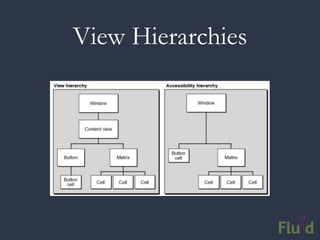
•   Just about every API works the same way
•   Give each UI widget a name
•   e.g. slider, tabs, dialog, button, text field
•   Names imply behaviour
•   For AT users, names define interactions
View Hierarchies
Accessibility Inspector
Like getting a flood of data through a
                 straw...
Hearing it in action
Web Accessibility
Opaque Markup
// These are tabs. How would you know?
<ol>
 <li><a href=”#cats”>Cats</a></li>
 <li><a href=”#dogs”>Dogs</a></li>
 <li><a href=”#gators”>Gators</a></li>
</ol>
<div>
 <div id=”cats”>Cats meow.</div>
 <div id=”dogs”>Dogs bark.</div>
 <div id=”gators”>Gators bite.</div>
</div>
Opaque Markup: Tabs
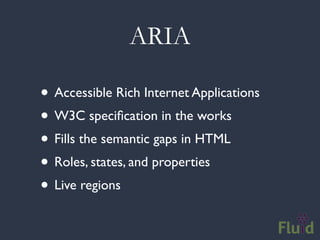
ARIA

• Accessible Rich Internet Applications
• W3C specification in the works
• Fills the semantic gaps in HTML
• Roles, states, and properties
• Live regions
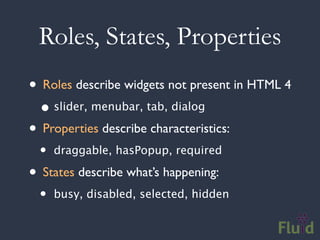
Roles, States, Properties
• Roles describe widgets not present in HTML 4
  • slider, menubar, tab, dialog
• Properties describe characteristics:
  •   draggable, hasPopup, required

• States describe what’s happening:
  •   busy, disabled, selected, hidden
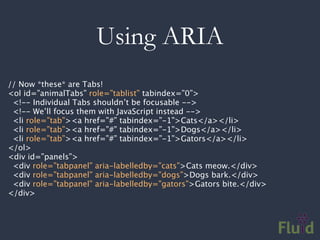
Using ARIA
// Now *these* are Tabs!
<ol id=”animalTabs” role=”tablist” tabindex=”0”>
 <!-- Individual Tabs shouldn’t be focusable -->
 <!-- We’ll focus them with JavaScript instead -->
 <li role=”tab”><a href=”#” tabindex=”-1”>Cats</a></li>
 <li role=”tab”><a href=”#” tabindex=”-1”>Dogs</a></li>
 <li role=”tab”><a href=”#” tabindex=”-1”>Gators</a></li>
</ol>
<div id=”panels”>
 <div role=”tabpanel” aria-labelledby=”cats”>Cats meow.</div>
 <div role=”tabpanel” aria-labelledby=”dogs”>Dogs bark.</div>
 <div role=”tabpanel” aria-labelledby=”gators”>Gators bite.</div>
</div>
Adding ARIA in Code
// Identify the container as a list of tabs.
tabContainer.attr("role", "tablist");

// Give each tab the "tab" role.
tabs.attr("role", "tab");

// Give each panel the appropriate role,          panels.attr("role",
"tabpanel");
panels.each(function (idx, panel) {
   var tabForPanel = that.tabs.eq(idx);
   // Relate the panel to the tab that labels it.
   $(panel).attr("aria-labelledby", tabForPanel[0].id);
});
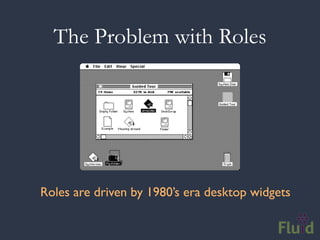
The Problem with Roles


Roles are driven by 1980’s era desktop widgets
The Problem with Roles


   The Web is driving hybrid UIs
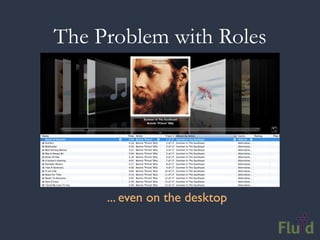
The Problem with Roles


     ... even on the desktop
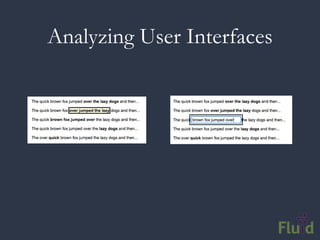
Analyzing User Interfaces
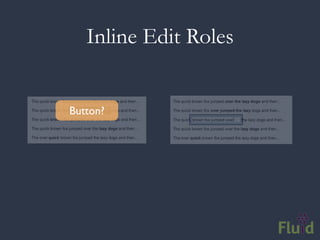
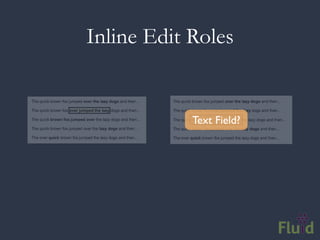
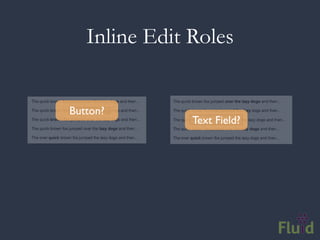
Inline Edit Roles


Button?
Inline Edit Roles


            Text Field?
Inline Edit Roles


Button?
               Text Field?
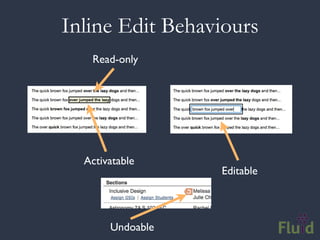
Inline Edit Behaviours
   Read-only


  Activatable
                  Editable


       Undoable
Open Architecture
Open applications

• Transparent models
• Event-driven
• Loosely-coupled and separable

• Case study: Fluid Infusion
Transparent Models

• Break open data encapsulation
• Publicly share models in standard formats
• Allows others to see into your application’s
  data and state
Events

• Interesting moments in the life of your app
• e.g. onSave, onSelect, onOpen, etc.
• Use events to wire up app, and talk to the
  world
• Key feature: notifying people about changes
  in your model
Data Change Events
                        Change Request


          Guard                            Observer


        Guard                              Observer


        Guard                              Observer


                         Apply Change
                                  Method


                                                      Method


                                           Data

                                           Method
      Method


                         Method


               Data

               Method
                                           Method


                                                               Method


                                                    Data

                                                    Method
Accessible Architectures

• Interoperable apps are accessible apps
• Your application state is content, too
• Extensible: allow for alternatives
• Personalisable
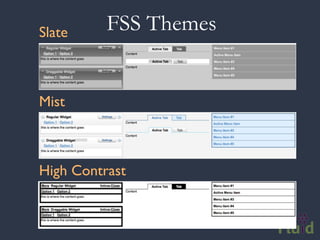
Slate     FSS Themes


Mist


High Contrast
UI Options & FSS
UI Options: High Contrast Theme
Subcomponents

•   Provides loose coupling between parts (IoC)

•   Look up dependencies by name, and the
    framework will instantiate them for you

•   Users can implement their own version or
    configure alternatives
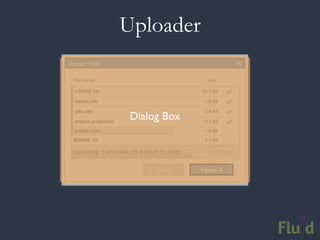
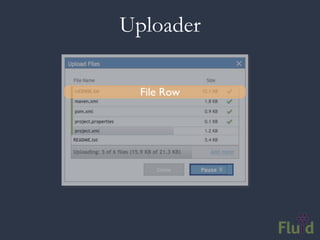
Subcomponents Illustrated
Uploader


 Dialog Box
Uploader


 File Queue
Uploader

  File Row
Uploader


 Progress Bar
Where does this lead us?

• Today, ATs just describe what’s visible
• Imagine alternative representations
• Knowledge of structure, data, actions
• Completely different UI optimized for the user?
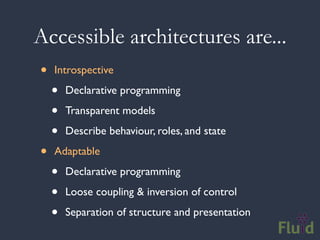
Accessible architectures are...
•   Introspective

    •   Declarative programming

    •   Transparent models

    •   Describe behaviour, roles, and state

•   Adaptable

    •   Declarative programming

    •   Loose coupling & inversion of control

    •   Separation of structure and presentation
Questions?

Architectures for Inclusive Design

  • 1.
    Architectures for InclusiveDesign Colin Clark, Fluid Project Technical Lead Adaptive Technology Resource Centre
  • 2.
    Things we’ll talkabout • Priorities for software • What is software architecture? • Object oriented programming • Model View Controller • Case study: the Web • How do assistive technologies work? • Rethinking the role-based paradigm • Techniques for open architecture
  • 3.
    Who am I? Whoare you?
  • 4.
    Fluid... http://fluidproject.org • Is an open source community of - Designers - Developers - Accessibility experts • Helps other open communities • Consists of universities, museums and individuals
  • 5.
    What We Do •Offer design advice and resources • Contribute to other communities: - jQuery UI - Dojo - W3C Accessibility • Build Infusion, our JavaScript application framework • Build Kettle, our JavaScript server-side infrastructure
  • 6.
  • 7.
    Some questions... 1. What’sthe most important thing on your computer? 2. What’s your favourite piece of software? 3. Why do you use software?
  • 8.
    Content is king •Your stuff. • The things you do with your stuff. Software architectures need to be focussed on enabling creativity and contribution, for everyone.
  • 9.
    Software shouldn’t suck •Good software... • Doesn’t crash • Doesn’t eat your data • Helps you accomplish your goals • Is fast enough to keep up with you • Can grow over time with your needs
  • 10.
  • 11.
    What is architecture? • Concerned with the shape of software • Defines the structure and APIs of a system • Highly abstract: recognition of patterns • Best done iteratively, not all up front
  • 12.
    Architecture is hard •Code is hard to understand and maintain • Goals of a good architecture: • Enable growth • Allow for outside extension • Manage dependencies
  • 13.
    Architectural tendencies • Loose coupling • Shallow dependency hierarchies • Interoperability & semantics • Less code
  • 14.
  • 15.
    Goals of OO • Define a system in real-world terms • Hide away the guts of an implementation • Create small, useful modules • Enable reusability
  • 16.
    Three Pillars ofOO 1. Inheritance 2. Encapsulation 3. Polymorphism
  • 17.
    Inheritance • A wayof structuring dependencies and reusing code • Defines the identity of an object (is a) • Mammals, Felines, Cats and Lions • Vehicles, Cars, and Trucks • Fruit, Apples, Oranges • Lost of other contrived examples...
  • 18.
    Inheritance AbstractMap Method Method Method Data Method IdentityHashMap HashMap Method Method Method Method Method Method Data Data Method Method PrinterStateReasons LinkedHashMap Method Method Method Method Method Method Data Data Method Method
  • 19.
    Encapsulation • Hide awaythe internals of an object • Define a contract through methods • Traditionally, data is considered opaque
  • 20.
    Encapsulated Object Method Method Method Data Method
  • 21.
    Polymorphism • The abilityfor different objects to respond to the same method in different ways • Interface vs. implementation
  • 22.
    Crumbling Pillars • Inheritanceis brittle and ineffective • Composition (has a) works better • Encapsulation can lead to overzealousness: • Cuts off access to useful information • Assumes custom structures are better than plain old, interoperable standards
  • 23.
  • 24.
    Model View Controller • Model is the application data and associated behaviour • View presents the model and drives the interaction logic • Controller is glue, mediating access between model and view
  • 25.
    Traditional MVC Model n atio oti c State Query State Change ge N n Cha View Selection View Controller User Gestures
  • 26.
    The Problem withControllers • Controllers are the least defined part of the equation • What’s “glue?” • Always referred to as the non-reusable part • MVC has been warped over the decades
  • 27.
    Controllers and Frameworks • Orginally, in Smalltalk, the Controller managed the low-level event loop for an application • In Web apps, they’re usually responsible for parsing requests and dispatching • These are both things that high-level frameworks do for us now • E.g. The event loop in a Web browser
  • 28.
    Model View (controller) Model Change Noti cation State Query State Change View Framework
  • 29.
  • 30.
    Architecture of theWeb • Separation of structure from presentation • Declarative • Stateless • Interoperable
  • 31.
    Structure vs. Presentation <ulclass="fl-list-menu"> .fl-list-menu li { <li> padding:0; <a href="#">Link Text</a> } </li> .fl-list-menu li a {   <li> display:block; <a href="#">Link Text</a> padding: 12px 0px 12px 12px; </li> text-decoration: none;   <li> font-weight: bold; <a href="#">Link Text</a> outline: none; </li> } </ul>
  • 32.
    Declarative Programming Declarativeprogramming is a programming paradigm that expresses the logic of a computation without describing its control flow
  • 33.
  • 34.
  • 35.
  • 36.
    Imperative if (!highlighted) { ctx.globalAlpha = 0.3; } else { // Draw the scroll track rectangle. var clientLength = this._getClientLength(); ctx.fillStyle = theme.scrollTrackFillStyle; ctx.fillRect(NIB_PADDING + 0.5, 0.5, clientLength - 2*NIB_PADDING, thickness - 1); ctx.strokeStyle = theme.scrollTrackStrokeStyle; ctx.strokeRect(NIB_PADDING + 0.5, 0.5, clientLength - 2*NIB_PADDING, thickness - 1); } var buildHandlePath = function() { ctx.beginPath(); ctx.arc(handleDistance + halfThickness + 0.5, // x halfThickness, // y halfThickness - 0.5, Math.PI / 2, 3 * Math.PI / 2, false); ctx.arc(handleDistance + handleLength - halfThickness - 0.5, // x halfThickness, // y halfThickness - 0.5, 3 * Math.PI / 2, Math.PI / 2, false); ctx.lineTo(handleDistance + halfThickness + 0.5, thickness - 0.5); ctx.closePath(); }; buildHandlePath(); // Paint the interior of the handle path. var gradient = ctx.createLinearGradient(handleDistance, 0, handleDistance, thickness); gradient.addColorStop(0, theme.scrollBarFillGradientTopStart.replace(/%a/, alpha)); gradient.addColorStop(0.4, theme.scrollBarFillGradientTopStop.replace(/%a/, alpha)); gradient.addColorStop(0.41, theme.scrollBarFillStyle.replace(/%a/, alpha)); gradient.addColorStop(0.8, theme.scrollBarFillGradientBottomStart.replace(/%a/, alpha)); gradient.addColorStop(1, theme.scrollBarFillGradientBottomStop.replace(/%a/, alpha)); ctx.fillStyle = gradient; ctx.fill();
  • 37.
    Declarative .fl-thumbnailContainer { position: absolute; top: 0pt; <form class="fl-thumbnailContainer"> left: 0pt; ... bottom: 0pt; </form> overflow: auto; width: 185px; z-index: 100; }
  • 38.
    Statelessness “The Web isbroken. It can’t remember me between requests”
  • 39.
    Statelessness • The Webis stateless for a reason: it scales • State is visible, not encapsulated http://build.fluidproject.org:8095/engage/artifacts/view.html? accessNumber=M2000.38.97&db=mccord&lang=en
  • 40.
    Interoperable • Web formatsare: • Plain text • Declarative • Openly published and standardized • This means they are adaptable and extensible
  • 41.
  • 42.
    Assistive Technologies • Presentand control the user interface in different ways • Not just screen readers! • Use built-in operating system APIs to understand the user interface Screen readers Screen magnifiers On-screen keyboards
  • 43.
    OS AT APIs • A channel for UI introspection • What’s on screen? • How are things labelled, organized, etc.? • What states are things in? • UI Roles, states, properties
  • 44.
    The Role-Based Model • Just about every API works the same way • Give each UI widget a name • e.g. slider, tabs, dialog, button, text field • Names imply behaviour • For AT users, names define interactions
  • 45.
  • 46.
  • 47.
    Like getting aflood of data through a straw...
  • 48.
  • 49.
  • 50.
    Opaque Markup // Theseare tabs. How would you know? <ol> <li><a href=”#cats”>Cats</a></li> <li><a href=”#dogs”>Dogs</a></li> <li><a href=”#gators”>Gators</a></li> </ol> <div> <div id=”cats”>Cats meow.</div> <div id=”dogs”>Dogs bark.</div> <div id=”gators”>Gators bite.</div> </div>
  • 51.
  • 52.
    ARIA • Accessible RichInternet Applications • W3C specification in the works • Fills the semantic gaps in HTML • Roles, states, and properties • Live regions
  • 53.
    Roles, States, Properties •Roles describe widgets not present in HTML 4 • slider, menubar, tab, dialog • Properties describe characteristics: • draggable, hasPopup, required • States describe what’s happening: • busy, disabled, selected, hidden
  • 54.
    Using ARIA // Now*these* are Tabs! <ol id=”animalTabs” role=”tablist” tabindex=”0”> <!-- Individual Tabs shouldn’t be focusable --> <!-- We’ll focus them with JavaScript instead --> <li role=”tab”><a href=”#” tabindex=”-1”>Cats</a></li> <li role=”tab”><a href=”#” tabindex=”-1”>Dogs</a></li> <li role=”tab”><a href=”#” tabindex=”-1”>Gators</a></li> </ol> <div id=”panels”> <div role=”tabpanel” aria-labelledby=”cats”>Cats meow.</div> <div role=”tabpanel” aria-labelledby=”dogs”>Dogs bark.</div> <div role=”tabpanel” aria-labelledby=”gators”>Gators bite.</div> </div>
  • 55.
    Adding ARIA inCode // Identify the container as a list of tabs. tabContainer.attr("role", "tablist"); // Give each tab the "tab" role. tabs.attr("role", "tab"); // Give each panel the appropriate role, panels.attr("role", "tabpanel"); panels.each(function (idx, panel) { var tabForPanel = that.tabs.eq(idx); // Relate the panel to the tab that labels it. $(panel).attr("aria-labelledby", tabForPanel[0].id); });
  • 56.
    The Problem withRoles Roles are driven by 1980’s era desktop widgets
  • 57.
    The Problem withRoles The Web is driving hybrid UIs
  • 58.
    The Problem withRoles ... even on the desktop
  • 59.
  • 60.
  • 61.
    Inline Edit Roles Text Field?
  • 62.
  • 63.
    Inline Edit Behaviours Read-only Activatable Editable Undoable
  • 64.
  • 65.
    Open applications • Transparentmodels • Event-driven • Loosely-coupled and separable • Case study: Fluid Infusion
  • 66.
    Transparent Models • Breakopen data encapsulation • Publicly share models in standard formats • Allows others to see into your application’s data and state
  • 67.
    Events • Interesting momentsin the life of your app • e.g. onSave, onSelect, onOpen, etc. • Use events to wire up app, and talk to the world • Key feature: notifying people about changes in your model
  • 68.
    Data Change Events Change Request Guard Observer Guard Observer Guard Observer Apply Change Method Method Data Method Method Method Data Method Method Method Data Method
  • 69.
    Accessible Architectures • Interoperableapps are accessible apps • Your application state is content, too • Extensible: allow for alternatives • Personalisable
  • 70.
    Slate FSS Themes Mist High Contrast
  • 71.
  • 72.
    UI Options: HighContrast Theme
  • 73.
    Subcomponents • Provides loose coupling between parts (IoC) • Look up dependencies by name, and the framework will instantiate them for you • Users can implement their own version or configure alternatives
  • 74.
  • 75.
  • 76.
  • 77.
  • 78.
  • 79.
    Where does thislead us? • Today, ATs just describe what’s visible • Imagine alternative representations • Knowledge of structure, data, actions • Completely different UI optimized for the user?
  • 80.
    Accessible architectures are... • Introspective • Declarative programming • Transparent models • Describe behaviour, roles, and state • Adaptable • Declarative programming • Loose coupling & inversion of control • Separation of structure and presentation
  • 81.