Building Accessible User Interfaces
      with jQuery and Fluid Infusion


Colin Clark, Fluid Project Technical Lead,
Adaptive Technology Resource Centre
Topics We’ll Cover

• The Fluid community
• Introducing Infusion
• Developing accessible JavaScript
• Infusion’s Architecture
• Techniques for portals, mashups, CMS’s
• Where we’re headed
Fluid...
          http://fluidproject.org

• Is an open source community of
 • Designers
 • Developers
 • Accessibility experts
• Helps other open communities
• Consists of universities, museums and
  individuals
What We Do
• Offer design advice and resources
• Contribute to other communities:
 • jQuery UI
 • Dojo
 • W3C Accessibility
• Build Infusion, our JavaScript
  application framework
Introducing


http://fluidproject.org/products/infusion/
World, Meet Infusion

• Application framework built on top of jQuery
• The culmination of our work helping others
• Designed for usability and accessibility
• Open architecture: everything is configurable
What’s in Infusion?


• A development framework for building apps
• UI components you can reuse and adapt
• Lightweight CSS framework for styling
• Accessibility tools and plugins for jQuery
Building Great UIs Is Hard

  • Your code gets unruly as it grows
  • UIs are hard to reuse or repurpose
  • Design change requires big code change
  • Accessibility is confusing
  • Combining different code/libraries doesn’t
    always work
Flexible User Interfaces


Infusion is an application framework designed to
provide unprecedented flexibility while
preserving interoperability.
Types of JavaScript Tools

• Foundational Toolkits
• Application Frameworks
     ... compare and contrast
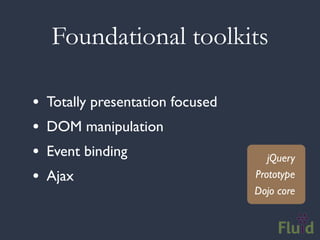
Foundational toolkits

•   Totally presentation focused
•   DOM manipulation
•   Event binding                     jQuery
•   Ajax                           Prototype
                                   Dojo core
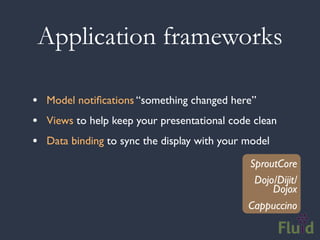
Application frameworks

• Model notifications “something changed here”
• Views to help keep your presentational code clean
• Data binding to sync the display with your model
                                             SproutCore
                                              Dojo/Dijit/
                                                  Dojox
                                             Cappuccino
Infusion is Different

• Accessibility baked right in
• Carefully designed interactions
• Markup is in your control
• Not the same old MVC
• Supports portals, mashups and CMS’s
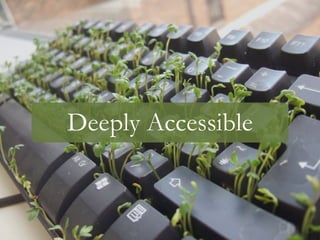
Deeply Accessible
What is Accessibility?
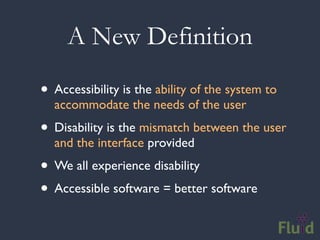
A New Definition

• Accessibility is the ability of the system to
  accommodate the needs of the user
• Disability is the mismatch between the user
  and the interface provided
• We all experience disability
• Accessible software = better software
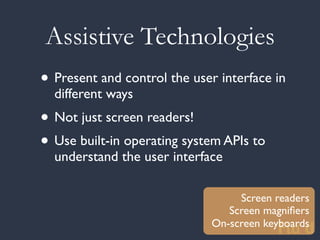
Assistive Technologies
• Present and control the user interface in
  different ways
• Not just screen readers!
• Use built-in operating system APIs to
  understand the user interface

                                   Screen readers
                                 Screen magnifiers
                              On-screen keyboards
DHTML: A New Can of Worms


• Shift from documents to applications
• Familiar a11y techniques aren’t enough
• Most DHTML is completely inaccessible
• New techniques are still being figured out
The Problem

• Custom widgets often look, but don’t act,
  like their counterparts on the desktop
• HTML provides only simple semantics
• Not enough information for ATs
• Dynamic updates require new design
  strategies to be accessible
The Solution


• Describe user interfaces with ARIA
• Add consistent keyboard controls
• Provide flexible styling and presentation
Supporting Assistive Technology
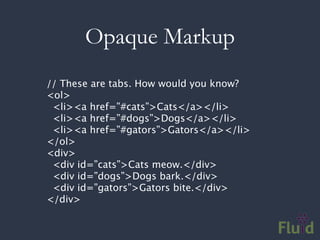
Opaque Markup
// These are tabs. How would you know?
<ol>
 <li><a href=”#cats”>Cats</a></li>
 <li><a href=”#dogs”>Dogs</a></li>
 <li><a href=”#gators”>Gators</a></li>
</ol>
<div>
 <div id=”cats”>Cats meow.</div>
 <div id=”dogs”>Dogs bark.</div>
 <div id=”gators”>Gators bite.</div>
</div>
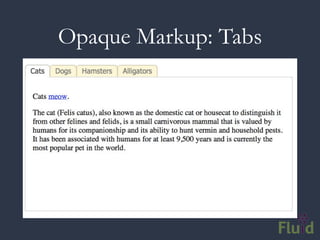
Opaque Markup: Tabs
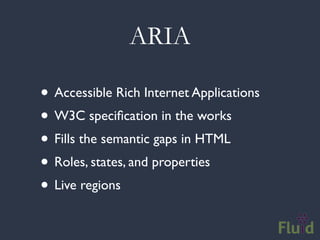
ARIA

• Accessible Rich Internet Applications
• W3C specification in the works
• Fills the semantic gaps in HTML
• Roles, states, and properties
• Live regions
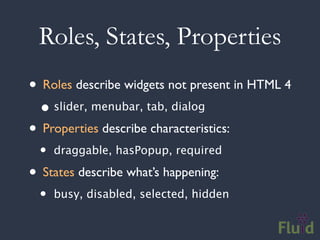
Roles, States, Properties
• Roles describe widgets not present in HTML 4
  • slider, menubar, tab, dialog
• Properties describe characteristics:
  •   draggable, hasPopup, required

• States describe what’s happening:
  •   busy, disabled, selected, hidden
Using ARIA
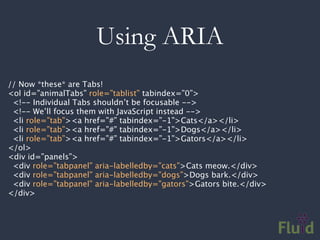
// Now *these* are Tabs!
<ol id=”animalTabs” role=”tablist” tabindex=”0”>
 <!-- Individual Tabs shouldn’t be focusable -->
 <!-- We’ll focus them with JavaScript instead -->
 <li role=”tab”><a href=”#” tabindex=”-1”>Cats</a></li>
 <li role=”tab”><a href=”#” tabindex=”-1”>Dogs</a></li>
 <li role=”tab”><a href=”#” tabindex=”-1”>Gators</a></li>
</ol>
<div id=”panels”>
 <div role=”tabpanel” aria-labelledby=”cats”>Cats meow.</div>
 <div role=”tabpanel” aria-labelledby=”dogs”>Dogs bark.</div>
 <div role=”tabpanel” aria-labelledby=”gators”>Gators bite.</div>
</div>
Adding ARIA in Code
// Identify the container as a list of tabs.
tabContainer.attr("role", "tablist");

// Give each tab the "tab" role.
tabs.attr("role", "tab");

// Give each panel the appropriate role,          panels.attr("role",
"tabpanel");
panels.each(function (idx, panel) {
   var tabForPanel = that.tabs.eq(idx);
   // Relate the panel to the tab that labels it.
   $(panel).attr("aria-labelledby", tabForPanel[0].id);
});
Keyboard Accessibility
Keyboard Navigation

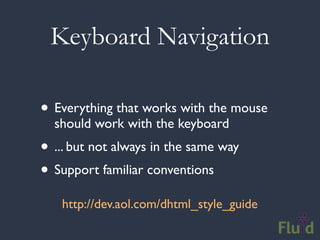
• Everything that works with the mouse
  should work with the keyboard
• ... but not always in the same way
• Support familiar conventions
   http://dev.aol.com/dhtml_style_guide
Keyboard Conventions
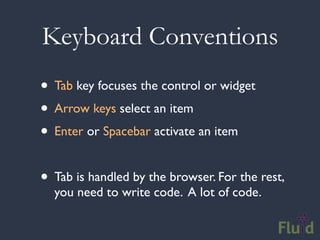
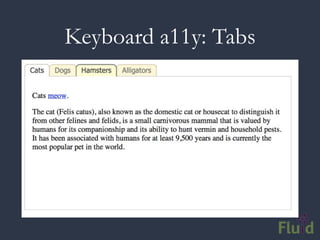
• Tab key focuses the control or widget
• Arrow keys select an item
• Enter or Spacebar activate an item

• Tab is handled by the browser. For the rest,
  you need to write code. A lot of code.
Keyboard a11y: Tabs
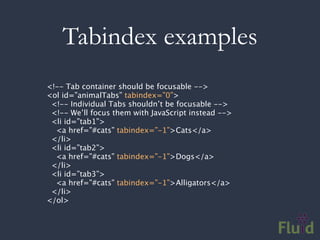
Tabindex examples
<!-- Tab container should be focusable -->
<ol id=”animalTabs” tabindex=”0”>
 <!-- Individual Tabs shouldn’t be focusable -->
 <!-- We’ll focus them with JavaScript instead -->
 <li id=”tab1”>
  <a href=”#cats” tabindex=”-1”>Cats</a>
 </li>
 <li id=”tab2”>
  <a href=”#cats” tabindex=”-1”>Dogs</a>
 </li>
 <li id=”tab3”>
  <a href=”#cats” tabindex=”-1”>Alligators</a>
 </li>
</ol>
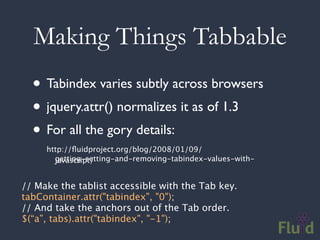
Making Things Tabbable
  • Tabindex varies subtly across browsers
  • jquery.attr() normalizes it as of 1.3
  • For all the gory details:
     http://fluidproject.org/blog/2008/01/09/
       getting-setting-and-removing-tabindex-values-with-
       javascript/


// Make the tablist accessible with the Tab key.
tabContainer.attr("tabindex", "0");
// And take the anchors out of the Tab order.
$(“a”, tabs).attr("tabindex", "-1");
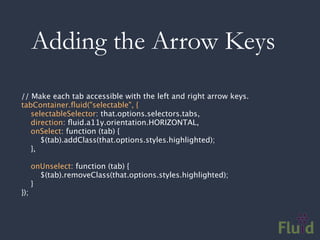
Adding the Arrow Keys
// Make each tab accessible with the left and right arrow keys.
tabContainer.fluid("selectable", {
   selectableSelector: that.options.selectors.tabs,
   direction: fluid.a11y.orientation.HORIZONTAL,
   onSelect: function (tab) {
      $(tab).addClass(that.options.styles.highlighted);
   },

      onUnselect: function (tab) {
        $(tab).removeClass(that.options.styles.highlighted);
      }
});
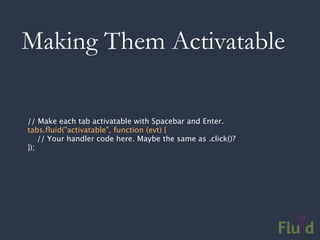
Making Them Activatable

// Make each tab activatable with Spacebar and Enter.
tabs.fluid("activatable", function (evt) {
    // Your handler code here. Maybe the same as .click()?
});
Documentation

• Tutorial:
 http://wiki.fluidproject.org/display/fluid/Keyboard+Accessibility
 +Tutorial


• API Reference:
 http://wiki.fluidproject.org/display/fluid/Keyboard+Accessibility
 +Plugin+API
Infusion Goes Deeper

• jQuery Keyboard Navigation Plugin
• ARIA everywhere
• Everything is highly adaptable and flexible
• UI Options and the Fluid Skinning System:
 • Users can customize their environment
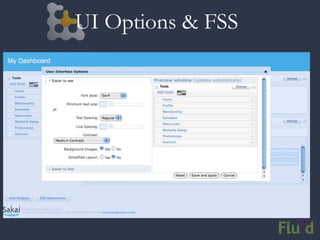
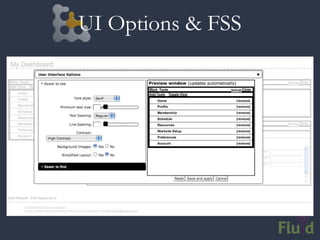
UI Options
• One size doesn’t fit all
• Allows users to customize your app:
 • layout
 • styling
 • navigation
• Uses FSS by default; can be configured to
  work with your own classes
UI Options & FSS
UI Options & FSS
CSS Frameworks
“If you’re going to use a framework, it
should be yours; one that you’ve created.
You can look at existing frameworks for
ideas and hack at it. But the professionals
in this room are not well served by picking
up a framework and using it as-is.”
                               - Eric Meyer
Fluid Skinning System

• FSS is built to be hacked on
• Provides a core set of building blocks
• Reset, text, layouts, themes
• Namespaced: no conflicts with your stuff
• Themes for better legibility & readability
       http://wiki.fluidproject.org/x/96M7
Open Architecture
Markup Agnosticism
• HTML is so fundamental to Web UIs
• Others lock away markup in a black box
• Markup should be totally free to edit, adapt,
  or replace
• Libraries shouldn’t bake in assumptions
  about your markup
• Unobtrusiveness everywhere
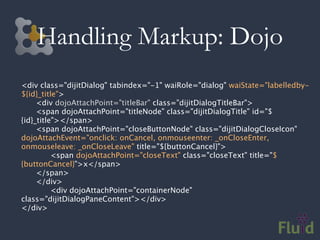
Handling Markup: Dojo
<div class="dijitDialog" tabindex="-1" waiRole="dialog" waiState="labelledby-
${id}_title">

    <div dojoAttachPoint="titleBar" class="dijitDialogTitleBar">

    <span dojoAttachPoint="titleNode" class="dijitDialogTitle" id="$
{id}_title"></span>

    <span dojoAttachPoint="closeButtonNode" class="dijitDialogCloseIcon"
dojoAttachEvent="onclick: onCancel, onmouseenter: _onCloseEnter,
onmouseleave: _onCloseLeave" title="${buttonCancel}">

    
    <span dojoAttachPoint="closeText" class="closeText" title="$
{buttonCancel}">x</span>

    </span>

    </div>

    
    <div dojoAttachPoint="containerNode"
class="dijitDialogPaneContent"></div>
</div>
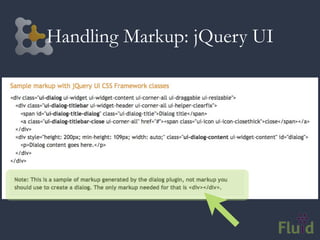
Handling Markup: jQuery UI
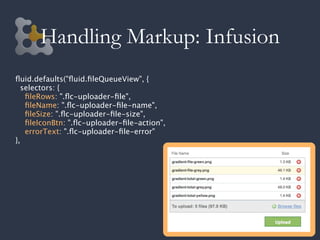
Handling Markup: Infusion
fluid.defaults("fluid.fileQueueView", {
  selectors: {
   fileRows: ".flc-uploader-file",
   fileName: ".flc-uploader-file-name",
   fileSize: ".flc-uploader-file-size",
   fileIconBtn: ".flc-uploader-file-action",
   errorText: ".flc-uploader-file-error"
},
Components
“Components suck. Apps built with components look like it”

      • Infusion components aren’t black boxes
      • Fundamentally adaptable:
       • Change the markup
       • Restyle with CSS
       • Add/replace actual behaviour
      • Everything is super-loosely coupled
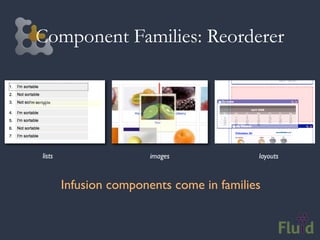
Component Families: Reorderer


lists                   images             layouts


        Infusion components come in families
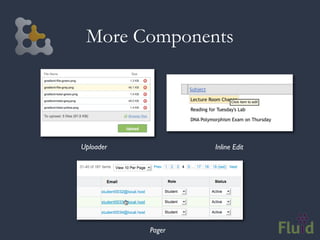
More Components


Uploader           Inline Edit


           Pager
Model, View... but not Controller


 • MVC is a given in most framework
 • JavaScript’s functional idioms offer
   alternatives (hint: events)
 • Infusion has no controller layer at all
 • ... and none of the classical inheritance cruft
   that usually goes with it
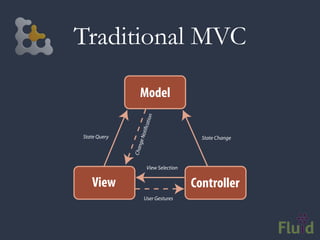
Traditional MVC

                 Model


                          n
                      atio
                 oti c
State Query                               State Change
               ge N
                  n
              Cha


                       View Selection


   View                                 Controller
                      User Gestures
The Problem with Controllers

• Controllers are the least defined
• What’s “glue?”
• Always referred to as the non-reusable part
• MVC has been warped over the decades
• The framework should take care of the glue
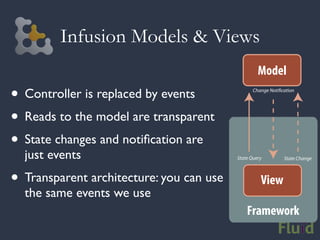
Infusion Models & Views
                                                   Model
• Controller is replaced by events               Change Noti cation


• Reads to the model are transparent
• State changes and notification are
  just events                             State Query         State Change


• Transparent architecture: you can use             View
  the same events we use
                                              Framework
Plain Old Models

• M is the most important thing in your app
• Data needs to travel seamlessly between
  client and server
• Most toolkits force a model to extend
  some base class or particular structure

  In Infusion, models are just plain old JSON
Playing Nice With Others
Portals, Mashups, and CMS’s


• These days, diverse code and markup coexists
• Most JavaScript is written as if it owns the
  whole browser
• As you combine stuff, things can break
• Namespacing and privacy is essential
Writing Collision-Free JavaScript

• Put code in a unique namespace
• Use closures for privacy
• Support more than one on the page
 •   Scope all variables to an instance

 •   Avoid hard-baking ID selectors

• Constrain selectors within a specific element
Keeping it to Ourselves

• Infusion takes namespacing seriously
• We won’t steal your names
• Components are carefully scoped
• We won’t accidently grab the wrong stuff
• Infusion doesn’t expect control of the page
Tying it All Together

• Infusion helps you with accessibility
• Components you can really work with
• Simple structure so your code can grow
• Totally transparent, event-driven design
• Markup and models are under your control
• No inheritance or controller cruft
Where We’re Going
Infusion Next Steps

• Infusion 1.2 coming in October:
 • New lightweight Inversion of Control
 • Data Grid and reworked Pager components
 • Lots of bug fixes
 • New demos portal with example code
 • Screencasts
Fluid Engage

• Open source collaboration with museums
• Visitor engagement: learn and contribute
• Use phones visitors bring into the museum
• Mobile apps and in-gallery kiosks
• All built with open source Web technology
Our Mobile Approach


• No hard intrusions on your content
• Don’t subvert good Web idioms
• Your choice: native-like or webbish
Infusion Mobile


• mFSS: themes for iPhone, Android, more
• ScreenNavigator: unobtrusive mobile navigation
• Components designed for the mobile Web
Kettle: Server-side JS
• Built on top of the JSGI server spec
• Don’t need lots of new APIs on server
• Envjs provides a full browser
• Infusion as application framework
• Choose where markup gets rendered
• Natural, familiardesigners for Web
  developers and
                    environment
Wrapping Up
• Tools for everyone:
 • ARIA
 • Dojo
 • jQuery
 • Infusion
• Give Infusion a try and let us know
• We’re a friendly community!
Wrapping Up


Please fill out an evaluation.
Questions?
http://fluidproject.org

Accessible UIs with jQuery and Infusion

  • 1.
    Building Accessible UserInterfaces with jQuery and Fluid Infusion Colin Clark, Fluid Project Technical Lead, Adaptive Technology Resource Centre
  • 2.
    Topics We’ll Cover •The Fluid community • Introducing Infusion • Developing accessible JavaScript • Infusion’s Architecture • Techniques for portals, mashups, CMS’s • Where we’re headed
  • 3.
    Fluid... http://fluidproject.org • Is an open source community of • Designers • Developers • Accessibility experts • Helps other open communities • Consists of universities, museums and individuals
  • 4.
    What We Do •Offer design advice and resources • Contribute to other communities: • jQuery UI • Dojo • W3C Accessibility • Build Infusion, our JavaScript application framework
  • 5.
  • 6.
    World, Meet Infusion •Application framework built on top of jQuery • The culmination of our work helping others • Designed for usability and accessibility • Open architecture: everything is configurable
  • 7.
    What’s in Infusion? •A development framework for building apps • UI components you can reuse and adapt • Lightweight CSS framework for styling • Accessibility tools and plugins for jQuery
  • 8.
    Building Great UIsIs Hard • Your code gets unruly as it grows • UIs are hard to reuse or repurpose • Design change requires big code change • Accessibility is confusing • Combining different code/libraries doesn’t always work
  • 9.
    Flexible User Interfaces Infusionis an application framework designed to provide unprecedented flexibility while preserving interoperability.
  • 10.
    Types of JavaScriptTools • Foundational Toolkits • Application Frameworks ... compare and contrast
  • 11.
    Foundational toolkits • Totally presentation focused • DOM manipulation • Event binding jQuery • Ajax Prototype Dojo core
  • 12.
    Application frameworks • Modelnotifications “something changed here” • Views to help keep your presentational code clean • Data binding to sync the display with your model SproutCore Dojo/Dijit/ Dojox Cappuccino
  • 13.
    Infusion is Different •Accessibility baked right in • Carefully designed interactions • Markup is in your control • Not the same old MVC • Supports portals, mashups and CMS’s
  • 14.
  • 15.
  • 16.
    A New Definition •Accessibility is the ability of the system to accommodate the needs of the user • Disability is the mismatch between the user and the interface provided • We all experience disability • Accessible software = better software
  • 17.
    Assistive Technologies • Presentand control the user interface in different ways • Not just screen readers! • Use built-in operating system APIs to understand the user interface Screen readers Screen magnifiers On-screen keyboards
  • 18.
    DHTML: A NewCan of Worms • Shift from documents to applications • Familiar a11y techniques aren’t enough • Most DHTML is completely inaccessible • New techniques are still being figured out
  • 19.
    The Problem • Customwidgets often look, but don’t act, like their counterparts on the desktop • HTML provides only simple semantics • Not enough information for ATs • Dynamic updates require new design strategies to be accessible
  • 20.
    The Solution • Describeuser interfaces with ARIA • Add consistent keyboard controls • Provide flexible styling and presentation
  • 21.
  • 22.
    Opaque Markup // Theseare tabs. How would you know? <ol> <li><a href=”#cats”>Cats</a></li> <li><a href=”#dogs”>Dogs</a></li> <li><a href=”#gators”>Gators</a></li> </ol> <div> <div id=”cats”>Cats meow.</div> <div id=”dogs”>Dogs bark.</div> <div id=”gators”>Gators bite.</div> </div>
  • 23.
  • 24.
    ARIA • Accessible RichInternet Applications • W3C specification in the works • Fills the semantic gaps in HTML • Roles, states, and properties • Live regions
  • 25.
    Roles, States, Properties •Roles describe widgets not present in HTML 4 • slider, menubar, tab, dialog • Properties describe characteristics: • draggable, hasPopup, required • States describe what’s happening: • busy, disabled, selected, hidden
  • 26.
    Using ARIA // Now*these* are Tabs! <ol id=”animalTabs” role=”tablist” tabindex=”0”> <!-- Individual Tabs shouldn’t be focusable --> <!-- We’ll focus them with JavaScript instead --> <li role=”tab”><a href=”#” tabindex=”-1”>Cats</a></li> <li role=”tab”><a href=”#” tabindex=”-1”>Dogs</a></li> <li role=”tab”><a href=”#” tabindex=”-1”>Gators</a></li> </ol> <div id=”panels”> <div role=”tabpanel” aria-labelledby=”cats”>Cats meow.</div> <div role=”tabpanel” aria-labelledby=”dogs”>Dogs bark.</div> <div role=”tabpanel” aria-labelledby=”gators”>Gators bite.</div> </div>
  • 27.
    Adding ARIA inCode // Identify the container as a list of tabs. tabContainer.attr("role", "tablist"); // Give each tab the "tab" role. tabs.attr("role", "tab"); // Give each panel the appropriate role, panels.attr("role", "tabpanel"); panels.each(function (idx, panel) { var tabForPanel = that.tabs.eq(idx); // Relate the panel to the tab that labels it. $(panel).attr("aria-labelledby", tabForPanel[0].id); });
  • 28.
  • 29.
    Keyboard Navigation • Everythingthat works with the mouse should work with the keyboard • ... but not always in the same way • Support familiar conventions http://dev.aol.com/dhtml_style_guide
  • 30.
    Keyboard Conventions • Tabkey focuses the control or widget • Arrow keys select an item • Enter or Spacebar activate an item • Tab is handled by the browser. For the rest, you need to write code. A lot of code.
  • 31.
  • 32.
    Tabindex examples <!-- Tabcontainer should be focusable --> <ol id=”animalTabs” tabindex=”0”> <!-- Individual Tabs shouldn’t be focusable --> <!-- We’ll focus them with JavaScript instead --> <li id=”tab1”> <a href=”#cats” tabindex=”-1”>Cats</a> </li> <li id=”tab2”> <a href=”#cats” tabindex=”-1”>Dogs</a> </li> <li id=”tab3”> <a href=”#cats” tabindex=”-1”>Alligators</a> </li> </ol>
  • 33.
    Making Things Tabbable • Tabindex varies subtly across browsers • jquery.attr() normalizes it as of 1.3 • For all the gory details: http://fluidproject.org/blog/2008/01/09/ getting-setting-and-removing-tabindex-values-with- javascript/ // Make the tablist accessible with the Tab key. tabContainer.attr("tabindex", "0"); // And take the anchors out of the Tab order. $(“a”, tabs).attr("tabindex", "-1");
  • 34.
    Adding the ArrowKeys // Make each tab accessible with the left and right arrow keys. tabContainer.fluid("selectable", { selectableSelector: that.options.selectors.tabs, direction: fluid.a11y.orientation.HORIZONTAL, onSelect: function (tab) { $(tab).addClass(that.options.styles.highlighted); }, onUnselect: function (tab) { $(tab).removeClass(that.options.styles.highlighted); } });
  • 35.
    Making Them Activatable //Make each tab activatable with Spacebar and Enter. tabs.fluid("activatable", function (evt) { // Your handler code here. Maybe the same as .click()? });
  • 36.
    Documentation • Tutorial: http://wiki.fluidproject.org/display/fluid/Keyboard+Accessibility +Tutorial • API Reference: http://wiki.fluidproject.org/display/fluid/Keyboard+Accessibility +Plugin+API
  • 37.
    Infusion Goes Deeper •jQuery Keyboard Navigation Plugin • ARIA everywhere • Everything is highly adaptable and flexible • UI Options and the Fluid Skinning System: • Users can customize their environment
  • 38.
    UI Options • Onesize doesn’t fit all • Allows users to customize your app: • layout • styling • navigation • Uses FSS by default; can be configured to work with your own classes
  • 39.
  • 40.
  • 41.
    CSS Frameworks “If you’regoing to use a framework, it should be yours; one that you’ve created. You can look at existing frameworks for ideas and hack at it. But the professionals in this room are not well served by picking up a framework and using it as-is.” - Eric Meyer
  • 42.
    Fluid Skinning System •FSS is built to be hacked on • Provides a core set of building blocks • Reset, text, layouts, themes • Namespaced: no conflicts with your stuff • Themes for better legibility & readability http://wiki.fluidproject.org/x/96M7
  • 43.
  • 44.
    Markup Agnosticism • HTMLis so fundamental to Web UIs • Others lock away markup in a black box • Markup should be totally free to edit, adapt, or replace • Libraries shouldn’t bake in assumptions about your markup • Unobtrusiveness everywhere
  • 45.
    Handling Markup: Dojo <divclass="dijitDialog" tabindex="-1" waiRole="dialog" waiState="labelledby- ${id}_title"> <div dojoAttachPoint="titleBar" class="dijitDialogTitleBar"> <span dojoAttachPoint="titleNode" class="dijitDialogTitle" id="$ {id}_title"></span> <span dojoAttachPoint="closeButtonNode" class="dijitDialogCloseIcon" dojoAttachEvent="onclick: onCancel, onmouseenter: _onCloseEnter, onmouseleave: _onCloseLeave" title="${buttonCancel}"> <span dojoAttachPoint="closeText" class="closeText" title="$ {buttonCancel}">x</span> </span> </div> <div dojoAttachPoint="containerNode" class="dijitDialogPaneContent"></div> </div>
  • 46.
  • 47.
    Handling Markup: Infusion fluid.defaults("fluid.fileQueueView",{ selectors: { fileRows: ".flc-uploader-file", fileName: ".flc-uploader-file-name", fileSize: ".flc-uploader-file-size", fileIconBtn: ".flc-uploader-file-action", errorText: ".flc-uploader-file-error" },
  • 48.
    Components “Components suck. Appsbuilt with components look like it” • Infusion components aren’t black boxes • Fundamentally adaptable: • Change the markup • Restyle with CSS • Add/replace actual behaviour • Everything is super-loosely coupled
  • 49.
    Component Families: Reorderer lists images layouts Infusion components come in families
  • 50.
    More Components Uploader Inline Edit Pager
  • 51.
    Model, View... butnot Controller • MVC is a given in most framework • JavaScript’s functional idioms offer alternatives (hint: events) • Infusion has no controller layer at all • ... and none of the classical inheritance cruft that usually goes with it
  • 52.
    Traditional MVC Model n atio oti c State Query State Change ge N n Cha View Selection View Controller User Gestures
  • 53.
    The Problem withControllers • Controllers are the least defined • What’s “glue?” • Always referred to as the non-reusable part • MVC has been warped over the decades • The framework should take care of the glue
  • 54.
    Infusion Models &Views Model • Controller is replaced by events Change Noti cation • Reads to the model are transparent • State changes and notification are just events State Query State Change • Transparent architecture: you can use View the same events we use Framework
  • 55.
    Plain Old Models •M is the most important thing in your app • Data needs to travel seamlessly between client and server • Most toolkits force a model to extend some base class or particular structure In Infusion, models are just plain old JSON
  • 56.
  • 57.
    Portals, Mashups, andCMS’s • These days, diverse code and markup coexists • Most JavaScript is written as if it owns the whole browser • As you combine stuff, things can break • Namespacing and privacy is essential
  • 58.
    Writing Collision-Free JavaScript •Put code in a unique namespace • Use closures for privacy • Support more than one on the page • Scope all variables to an instance • Avoid hard-baking ID selectors • Constrain selectors within a specific element
  • 59.
    Keeping it toOurselves • Infusion takes namespacing seriously • We won’t steal your names • Components are carefully scoped • We won’t accidently grab the wrong stuff • Infusion doesn’t expect control of the page
  • 60.
    Tying it AllTogether • Infusion helps you with accessibility • Components you can really work with • Simple structure so your code can grow • Totally transparent, event-driven design • Markup and models are under your control • No inheritance or controller cruft
  • 61.
  • 62.
    Infusion Next Steps •Infusion 1.2 coming in October: • New lightweight Inversion of Control • Data Grid and reworked Pager components • Lots of bug fixes • New demos portal with example code • Screencasts
  • 63.
    Fluid Engage • Opensource collaboration with museums • Visitor engagement: learn and contribute • Use phones visitors bring into the museum • Mobile apps and in-gallery kiosks • All built with open source Web technology
  • 64.
    Our Mobile Approach •No hard intrusions on your content • Don’t subvert good Web idioms • Your choice: native-like or webbish
  • 65.
    Infusion Mobile • mFSS:themes for iPhone, Android, more • ScreenNavigator: unobtrusive mobile navigation • Components designed for the mobile Web
  • 66.
    Kettle: Server-side JS •Built on top of the JSGI server spec • Don’t need lots of new APIs on server • Envjs provides a full browser • Infusion as application framework • Choose where markup gets rendered • Natural, familiardesigners for Web developers and environment
  • 67.
    Wrapping Up • Toolsfor everyone: • ARIA • Dojo • jQuery • Infusion • Give Infusion a try and let us know • We’re a friendly community!
  • 68.
    Wrapping Up Please fillout an evaluation.
  • 69.