© Sauce Labs, Inc.
Improving Android app testing with
Appium and Sauce Labs
Presented by Isaac Murchie, Software Developer (Ecosystem and Integration) for Sauce Labs, Inc.May 12, 2015
Unlock the value of scalable testing for mobile apps.
© Sauce Labs, Inc.
Hi! I’m Isaac Murchie.
I am an Ecosystem and Integrations developer at Sauce
Labs, where I work in a variety of languages, on a variety of
tools, in order to help make the experience of testing as
painless as possible. I am also a core contributor to Appium,
the award-winning cross-platform mobile automation
framework.
Find us online
@saucelabs | @imurchie
facebook.com/saucelabs
isaac@saucelabs.com
Sauce Labs
539 Bryant Street, Ste. 303

San Francisco, CA 94102
© Sauce Labs, Inc.
Agenda: Better testing withAppium and Sauce Labs
Writing an Android test
Ever tried using Android’s UI
Automator?
Writing a better Android test
with Appium
Much better, no?
But…
Scaling? What scaling.
Scaling with Sauce Labs
You don’t have to be stuck with a single
device!
All the things are correct
Follow your bliss.
© Sauce Labs, Inc.
Testing testing testing
© Sauce Labs, Inc.
Writing an Android test
i.e., UI Automator all the things
© Sauce Labs, Inc.
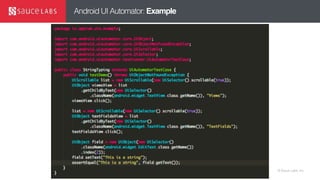
Android UI Automator
“The UI Automator testing framework provides a set of APIs to build UI tests that
perform interactions on user apps and system apps. The UI Automator APIs [sic]
allows you to perform operations such as opening the Settings menu or the app
launcher in a test device. The UI Automator testing framework is well-suited for
writing black box-style automated tests, where the test code does not rely on internal
implementation details of the target app.”
© Sauce Labs, Inc.
Android UI Automator: Example
© Sauce Labs, Inc.
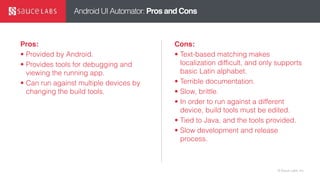
Android UI Automator: Pros and Cons
Pros:
• Provided by Android.
• Provides tools for debugging and
viewing the running app.
• Can run against multiple devices by
changing the build tools.
Cons:
• Text-based matching makes
localization difficult, and only supports
basic Latin alphabet.
• Terrible documentation.
• Slow, brittle.
• In order to run against a different
device, build tools must be edited.
• Tied to Java, and the tools provided.
• Slow development and release
process.
© Sauce Labs, Inc.
Writing a better Android test with Appium
i.e., hiding UI Automator!
© Sauce Labs, Inc.© Sauce Labs, Inc.
Android on Appium: Automated Mobile Testing
“Appium is built on the idea that testing native
apps shouldn't require including an SDK or
recompiling your app. And that you should be
able to use your preferred test practices,
frameworks, and tools. Appium is an open source
project and has made design and tool decisions
to encourage a vibrant contributing community.”
2209 stars and 1526 forks, with 141 contributors,
on GitHub.
Appium is an award-
winning open source
test framework for
automating native,
hybrid and mobile
apps.
© Sauce Labs, Inc.
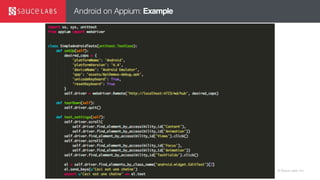
Android on Appium: Example
© Sauce Labs, Inc.
Android on Appium
Stop! Demo time.
© Sauce Labs, Inc.
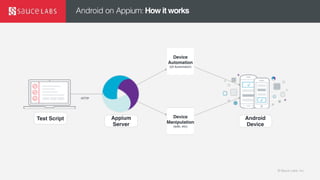
Android on Appium: How it works
Test Script Appium
Server
Device
Manipulation
(adb, etc)
Device
Automation
(UI Automator)
Android
Device
HTTP
© Sauce Labs, Inc.
Android on Appium: Pros and Cons
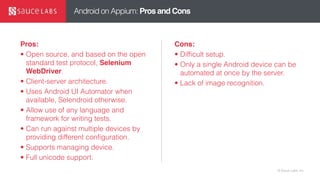
Pros:
• Open source, and based on the open
standard test protocol, Selenium
WebDriver.
• Client-server architecture.
• Uses Android UI Automator when
available, Selendroid otherwise.
• Allow use of any language and
framework for writing tests.
• Can run against multiple devices by
providing different configuration.
• Supports managing device.
• Full unicode support.
Cons:
• Difficult setup.
• Only a single Android device can be
automated at once by the server.
• Lack of image recognition.
© Sauce Labs, Inc.
But
Scaling…
© Sauce Labs, Inc.
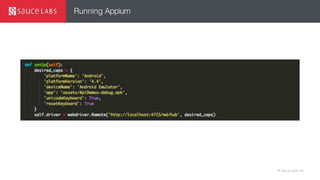
Running Appium
© Sauce Labs, Inc.
Scaling with Sauce Labs
No longer are you tied to your machine.
© Sauce Labs, Inc.
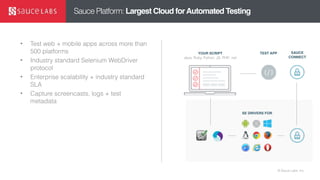
Sauce Platform: Largest Cloud forAutomated Testing
• Test web + mobile apps across more than
500 platforms
• Industry standard Selenium WebDriver
protocol
• Enterprise scalability + industry standard
SLA
• Capture screencasts, logs + test
metadata
TEST APP SAUCE
CONNECT
SE DRIVERS FOR
YOUR SCRIPT
Java, Ruby, Python, JS, PHP, .net
© Sauce Labs, Inc.
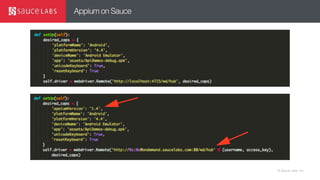
Appium on Sauce
© Sauce Labs, Inc.
Appium on Sauce
Stop! Demo time.
© Sauce Labs, Inc.
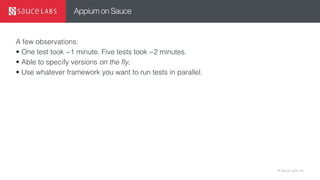
Appium on Sauce
A few observations:
• One test took ~1 minute. Five tests took ~2 minutes.
• Able to specify versions on the fly.
• Use whatever framework you want to run tests in parallel.
© Sauce Labs, Inc.
Know that all the things are correct
© Sauce Labs, Inc.© Sauce Labs, Inc.
Conclusion: TestingAndroidApps
Android testing is difficult, and made more so by the tools
provided by the vendor
Appium solves many of the problems in Android testing by
abstracting away the device and app, leaving tests to
concentrate on testing.
Open to using QA best practices.
Less brittle, more intuitive.
Better control over device automation.
© Sauce Labs, Inc.© Sauce Labs, Inc.
Thanks!
Keep in touch!
@saucelabs @imurchie

Improving Android app testing with Appium and Sauce Labs

  • 1.
    © Sauce Labs,Inc. Improving Android app testing with Appium and Sauce Labs Presented by Isaac Murchie, Software Developer (Ecosystem and Integration) for Sauce Labs, Inc.May 12, 2015 Unlock the value of scalable testing for mobile apps.
  • 2.
    © Sauce Labs,Inc. Hi! I’m Isaac Murchie. I am an Ecosystem and Integrations developer at Sauce Labs, where I work in a variety of languages, on a variety of tools, in order to help make the experience of testing as painless as possible. I am also a core contributor to Appium, the award-winning cross-platform mobile automation framework. Find us online @saucelabs | @imurchie facebook.com/saucelabs isaac@saucelabs.com Sauce Labs 539 Bryant Street, Ste. 303
 San Francisco, CA 94102
  • 3.
    © Sauce Labs,Inc. Agenda: Better testing withAppium and Sauce Labs Writing an Android test Ever tried using Android’s UI Automator? Writing a better Android test with Appium Much better, no? But… Scaling? What scaling. Scaling with Sauce Labs You don’t have to be stuck with a single device! All the things are correct Follow your bliss.
  • 4.
    © Sauce Labs,Inc. Testing testing testing
  • 5.
    © Sauce Labs,Inc. Writing an Android test i.e., UI Automator all the things
  • 6.
    © Sauce Labs,Inc. Android UI Automator “The UI Automator testing framework provides a set of APIs to build UI tests that perform interactions on user apps and system apps. The UI Automator APIs [sic] allows you to perform operations such as opening the Settings menu or the app launcher in a test device. The UI Automator testing framework is well-suited for writing black box-style automated tests, where the test code does not rely on internal implementation details of the target app.”
  • 7.
    © Sauce Labs,Inc. Android UI Automator: Example
  • 8.
    © Sauce Labs,Inc. Android UI Automator: Pros and Cons Pros: • Provided by Android. • Provides tools for debugging and viewing the running app. • Can run against multiple devices by changing the build tools. Cons: • Text-based matching makes localization difficult, and only supports basic Latin alphabet. • Terrible documentation. • Slow, brittle. • In order to run against a different device, build tools must be edited. • Tied to Java, and the tools provided. • Slow development and release process.
  • 9.
    © Sauce Labs,Inc. Writing a better Android test with Appium i.e., hiding UI Automator!
  • 10.
    © Sauce Labs,Inc.© Sauce Labs, Inc. Android on Appium: Automated Mobile Testing “Appium is built on the idea that testing native apps shouldn't require including an SDK or recompiling your app. And that you should be able to use your preferred test practices, frameworks, and tools. Appium is an open source project and has made design and tool decisions to encourage a vibrant contributing community.” 2209 stars and 1526 forks, with 141 contributors, on GitHub. Appium is an award- winning open source test framework for automating native, hybrid and mobile apps.
  • 11.
    © Sauce Labs,Inc. Android on Appium: Example
  • 12.
    © Sauce Labs,Inc. Android on Appium Stop! Demo time.
  • 13.
    © Sauce Labs,Inc. Android on Appium: How it works Test Script Appium Server Device Manipulation (adb, etc) Device Automation (UI Automator) Android Device HTTP
  • 14.
    © Sauce Labs,Inc. Android on Appium: Pros and Cons Pros: • Open source, and based on the open standard test protocol, Selenium WebDriver. • Client-server architecture. • Uses Android UI Automator when available, Selendroid otherwise. • Allow use of any language and framework for writing tests. • Can run against multiple devices by providing different configuration. • Supports managing device. • Full unicode support. Cons: • Difficult setup. • Only a single Android device can be automated at once by the server. • Lack of image recognition.
  • 15.
    © Sauce Labs,Inc. But Scaling…
  • 16.
    © Sauce Labs,Inc. Running Appium
  • 17.
    © Sauce Labs,Inc. Scaling with Sauce Labs No longer are you tied to your machine.
  • 18.
    © Sauce Labs,Inc. Sauce Platform: Largest Cloud forAutomated Testing • Test web + mobile apps across more than 500 platforms • Industry standard Selenium WebDriver protocol • Enterprise scalability + industry standard SLA • Capture screencasts, logs + test metadata TEST APP SAUCE CONNECT SE DRIVERS FOR YOUR SCRIPT Java, Ruby, Python, JS, PHP, .net
  • 19.
    © Sauce Labs,Inc. Appium on Sauce
  • 20.
    © Sauce Labs,Inc. Appium on Sauce Stop! Demo time.
  • 21.
    © Sauce Labs,Inc. Appium on Sauce A few observations: • One test took ~1 minute. Five tests took ~2 minutes. • Able to specify versions on the fly. • Use whatever framework you want to run tests in parallel.
  • 22.
    © Sauce Labs,Inc. Know that all the things are correct
  • 23.
    © Sauce Labs,Inc.© Sauce Labs, Inc. Conclusion: TestingAndroidApps Android testing is difficult, and made more so by the tools provided by the vendor Appium solves many of the problems in Android testing by abstracting away the device and app, leaving tests to concentrate on testing. Open to using QA best practices. Less brittle, more intuitive. Better control over device automation.
  • 24.
    © Sauce Labs,Inc.© Sauce Labs, Inc. Thanks! Keep in touch! @saucelabs @imurchie