Finding a store UX Redesign
Store Locator http://www.apple.com/buy/locator/
User Experience Redesign: Finding a store / store locator www.apple.com
Version 1.0 Date August, 2012 Author Yanina Guerzovich


                                                         UX Analysis
                                                         / Current experience review

                                                         / Other cases review

                                                         / Usability test+interviews with users (to do)
User Experience Redesign: Finding a store / store locator www.apple.com
Version 1.0 Date August, 2012 Author Yanina Guerzovich


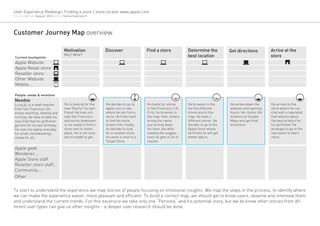
Customer Journey Map overview

                                     Motivation               Discover                 Find a store              Determine the           Get directions         Arrive at the
                                     Why? What?                                                                  best location                                  store
 Current touchpoints
 Apple Website
 Apple Retail store
 Reseller store
 Other Website
 Mobile...

People: needs & emotions                                                          ?
Newbie
Luca,32, is a math teacher           He is looking for the    He decides to go to      He looks for stores       He browses in the       He writes down the     He arrives to the
from San Francisco. He               new iPad for her girl-   apple.com to see         in San Francisco, CA.     list the different      address and opening    store where he can
enjoys teaching, reading and         friend. He lives out-    where he can find a      First, he browses in      stores and in the       hours. He checks the   chat with a specialist
running. He likes to take his        side San Francisco       store. He finds hard     the map, then, enters     map. He sees 2          distance at Google-    that advices about
new iPod that his girlfriend         and works downtown       to find the store        wrong the name            different stores. He    Maps and get final     the best product for
got him for his last birthday.       so he needs to find a    locator link, finally,   just writing down         decides to go to the    directions.            his girlfriend. He
He uses his laptop everyday          store next to either     he decides to look       his town, but after       Apple Store where                              arranges to go to the
for email, homebanking,              place. He is not sure    for a reseller since     reading the sugges-       he thinks he will get                          next event to learn
research, etc.                       which model to get.      his work is next to a    tions he gets a list of   better advice.                                 more.
                                                              Target Store.            results.

Apple geek
Wonderer...
Apple Store staff
Reseller store staff...
Community...
Other


To start to understand the experience we map stories of people focusing on emotional insights. We map the steps in the process, to identify where
we can make the experience easier, more pleasant and efficient. To build a correct map, we should get to know users, observe and interview them
and understand the current trends. For this excersice we take only one “Persona” and his potential story, but we do know other stories from dif-
ferent user types can give us other insights - a deeper user research should be done.
User Experience Redesign: Finding a store / store locator www.apple.com
Version 1.0 Date August, 2012 Author Yanina Guerzovich


Discover - Website overview / www.apple.com

   [Page Title] - Microsoft Internet Explorer
                                                                                       Website Goals
 File Edit View    Favorites Tools Help
                                                                                       It addresses the business and creative main goals:
     Back                                       Search   Favorites                     1. Products/services catalog
            www.apple.com                                                 Go   Links   2. Online Store + Other shopping ways*
                        1
                   2                                                                   3. Support

                                                                                       * Redesign focus


                                                                                       1   Visuals & Branding
                                                                                           It is inline with the Brands´ Identity.

                                                                                       2   Navigation
                                                                                           The placement and sizing of the navigation items
                                                                                           are pertinent and clear. It represents all the appro-
                                                                                           priate pages, however the label Store that is linked
                                                                                           to the online store may be confusing to users look-
                                                                                           ing for a physical store, which can be found at the
                                                                                             g
                                                                                           bottom part of the page “Visit an Apple Retail Store
                                                                                                    p          p              pp
                                                                                           or find a Reseller”
User Experience Redesign: Finding a store / store locator www.apple.com
Version 1.0 Date August, 2012 Author Yanina Guerzovich


Wireframe analysis / http://www.apple.com/

   [Page Title] - Microsoft Internet Explorer
                                                                                                                        Page purpouse and Action Calls
 File Edit View    Favorites Tools Help
                                                                                                                        They respond to its purpouse: Brand presentation
     Back                                       Search   Favorites                                                      through main product.
            www.apple.com                                                                                  Go   Links


                                                                                                                          Layout and Hierarchy
                                                                                                                          Headings, heavier weighted and different sizes text
                                                                                                                          are well used to define different levels of informa-
                                                                                                                          tion. The good use of whitepace and the amount of
                                                                                                                          text and images makes also the page readable.
                                                                                                                          Our focus “Find a store” is not a located at the bot-
                                                                                                                          tom of the page and has very small regular font (3rd
                                                                                                                          level hierarchy), thus is not easily findable.
                  1
                                                                                                                          Content
                                                                                                                          The wireframe content responds to the page pur-
                                                                                                                          pose. It that sense it is appropriate: it is grouped
                                                                                                                          correctly with surrounding information, images and
                                                                                                                          videos are placed correctly.


                  2


                                                          Visit an Apple Retail Store or find a Reseller.
                                                            s
                                                            si      pp                   find
                                                                                          n
                  3
User Experience Redesign: Finding a store / store locator www.apple.com
Version 1.0 Date August, 2012 Author Yanina Guerzovich


Finding a store / Screenshot flow


  1   Go to Apple´s site                                                 2   Decide where I want go (to buy products)                         3   Find a store
      The user goes to www.apple.com                                         The page presents 3 options: Shop online, Shop                       Finally the users arrives to the store locator page.
                                                                             Retail (Apple Stores), Find a Reseller.                              Observations:
      He scrolls down and clicks on (find a) Reseller
      Observations:                                                          The user should go to the third block and type                       1. If the user has typed the text correctly, then the results are
                                                                             where he would like to find a reseller. The search                   shown by list and in the map. If not (e.g. the user has typed one
      1. The link Apple Retail Store directs the user to a different                                                                              the City and not the State or viceversa), it shows “No Results
      page where he can find ONLY Apple stores without showing               acn be done by “City AND State or Zip code” and                      Found” and some Search Tips, making the user to retype the
      other possible stores (resellers) where the users may also find        press enter to go to the next page.                                  correct location.
      what they are looking for.
                                                                             Observations:
      2. Many users looking for a storemay start their journey
                                                                             1. Predefined results list is not available to help user write
      through a google search (e.g. search for “apple store in san
                                                                             the right text.
      francisco”), in this case the the results should lead him to the
      store locator (step 3).                                                2. ‘Suggest searches as you type’ based on user´s history
                                                                             browser´s tool is available.
User Experience Redesign: Finding a store / store locator www.apple.com
Version 1.0 Date August, 2012 Author Yanina Guerzovich


Task 3 : Find a Store Page overview / http://www.apple.com/buy/locator/

   [Page Title] - Microsoft Internet Explorer
                                                                                       Page purpouse
 File Edit View    Favorites Tools Help
                                                                                       The title of the page “Store Locator” indicates clearly
     Back                                       Search   Favorites                     the page purpouse: To locate a sore.
            http://www.apple.com/buy/locator/                             Go   Links


                                                                                         heavier weighted and different sizes text are well
                                                                                         used to define different levels of information. The
                                                                                         good use of whitepace and the amount of text and
                                                                                         images makes also the page readable.
                                                                                         Our focus “Find a store” is not a located at the bot-
                                                                                         tom of the page and has very small regular font (3rd
                                                                                         level hierarchy), thus is not easily findable.

                                                                                         Content
                                                                                         Search criteria: The basic search required input is
                                                                                         City AND State or Zip code. Based on the country
                                                                                         presection, a preset list of possible results is shown
                                                                                         to help the user write correclty. The dropdown
                                                                                         menu to specify the product the user is looking for
                                                                                         is optional. This variable is important since not all
                                                                                         resellers sell all the products, however you can see
                                                                                         this clearly when the results are displayed with its
                                                                                         differentiators.


                                                                                         Results visualization:


                                                                                         Calls to Action
                   4
                                                                                         eadings, heavier weighted and different sizes text
                                                                                         are well used to define different levels of informa-
                                                                                         tion. The good use
User Experience Redesign: Finding a store / store locator www.apple.com
Version 1.0 Date August, 2012 Author Yanina Guerzovich


Task 3.3 : Find a Store Wireframe overview (with results) / http://www.apple.com/buy/locator/

              1
                                                                                  Layout and Hierarchy
                                                                                  The page is divided in 4 areas, defining also the
                  2.1                                    3.1                      hierarchy of the page:

                                                                              1   Page title

                                                                              2   Column 1
                  2.2                                                             2.1
                                                                                      Search Bar (basic+advanced): Main call to action
                                                                                  2.2 Space for Results List


              2
                                                                              3   Column 2
                                                                                   3.1 Empty Interactive Map powered by Google (show

                                                                                  founded results)
                                                                                   3.2 Other (4) Shopping options Links+Text
                                                                          3


                                                                              4   Breadcrumbs (link to Home)
                                                         3.2


                                                                                  Main Visual Area:
                                                                                  It does show the main purpouse of the page. How-
                                                                                  ever, it displays the Map is shown in an important
                                                                                  part of the page, even if it is not possible to search
                                                                                  through it.

                                                                                  Grouping
                                                                                  Column 1 groups 2 Different Tasks a: Searching and
                                                                                  Selecting the best result (by list)
                                                                                  S l i      h b          l (b li )
              4                                                                   Also, C l
                                                                                  Al    Column 2 groups 2 Different Tasks: Select-
                                                                                                            Diff      T k S l
                                                                                  ing the best result (by map) and Discovering other
                                                                                  i    h b         l (b       ) d Di         i     h
                                                                                  shopping options (secondary function).
                                                                                    h   i       i   (      d     f    i )
                                                                                  Thus, the main task Selecting the best result is
                                                                                  divided and the 2 visualizations are not well con-
                                                                                  nected; when scrolling down the user does not see
                                                                                  simultaneously the result in the list and in the map.
                                                                                                                           results”
                                                                                  (see page “Task 3.2: Selecting the best results”)
User Experience Redesign: Finding a store / store locator www.apple.com
Version 1.0 Date August, 2012 Author Yanina Guerzovich


Task 3.1 : Searching for a store / http://www.apple.com/buy/locator/

                                                                           Task 3.1 : Searching for a store
                                                                           In order to find a location, the users needs to enter
                                                                           WHERE is the store located, through the text search.
                 2.1                                     2.2
          1
                                                                                The component provides:

                                                                          1     Basic search: the required input is City AND State or
                                  2.3                                           Zip code.
          2
                                  2.4                                     2.1   While typing if, given enough time, based on the
                                                                                country presection, a preset list of possible results
                                                                                is shown to help the user write correclty.

                                                                          2.4   If the text is not correct (e.g. the user has typed one
         2.1                                                   2.2
                                                                                the City and not the State or viceversa), no results
                                                                                are shown and some Search Tips, making the user
                                                                                to retype the correct location (done also before).
                                                                          2.2
                                                                                The dropdown list filter allows the user to specify
                                                                                the product the user is looking for is optional. This
                                                                                    p                         g          p
                                                                                variable is important since not all resellers sell all
                                                                                              p
                                                               2.3              the products, however you can see this clearly when
                                                                                the results are displayed with its differentiators (see
                                                                                page “Task 3.2: Selecting the best results”)

                                                                          2     Advanced Search: allows the user to filter
         2.4                                                                    Solution and Store Name. This search is pertinent
                                                                                for users knowing exaclty where and what they
                                                                                need but not for most of the users. By default the
                                                                                advanced search is shown, without reflecting most
                                                                                users´ needs; it can be hidden clicking its link.

                                                                          2.3   By Solution: a dropdown list offers many detailed
                                                                                options to the users.

                                                                          2.3   Store Name: Textbox
User Experience Redesign: Finding a store / store locator www.apple.com
Version 1.0 Date August, 2012 Author Yanina Guerzovich


Task 3.2 : Selecting the best store - Browsing / http://www.apple.com/buy/locator/

                                                                          Task 2 : Selecting the best store - Browsing
                                                                          Once the user has writen a “correct location”, he can
                                                                          browse the different options through a list or map.

                                                                              Results can be visualize by:

                                                                          1   List: Under the search component, a table lists the
                                                                              results, organized by proximity to the criteria (city
                                                                              center if not specified) with differentiators, allowing
1
                                                                              the user to select by description. Eight results are
                                                         2
                                                                              shown by page, if there are more the user needs to
                                                                              hit the Next/Previous button.

                                                                              Each result shows:
                                                                              - a map marker reference icon
                                                                              - the name of the store (title hierarchy)
                                                                              - the store´s address
                                                                              - the products that can be found in that store
                                                                              marked with different color dots.

                                                                          2   Location in a Map powered by Google: Once the
                                                                              search is done, the user can navigate in the map
                                                                              to decide if the shown results macht his needs by
                                                                              location. The results shown correspond to the ones
                                                                              in the list, when zooming out, no other results are
                                                                              shown, only when the user advances in the list, he
                                                                              can see the other results, hiding the previous in the
                                                                              map. This reduces the functionality of having a map
                                                                              where the user can see at a glance all results to
                                                                              help him understand where he preferes to go.
User Experience Redesign: Finding a store / store locator www.apple.com
Version 1.0 Date August, 2012 Author Yanina Guerzovich


Task 3.3 : Choosing one store / http://www.apple.com/buy/locator/

                                                                          Task 3 : Choosing one store
                                                                          The selection can be done in the list or map.

                                                                              The user can select one store clicking in the list or
                                                                  2
                                                                              map. When clicking in either place, the chosen op-
                                                                              tion is highlited in both visualizations:

                                                                          1   List: Different color background is used. (Normal:
                                                                              White / Hoover: Light blue / Active: Blue)

                                                                          2   Map: the marker+pop-up is centered in the map and
1                                                                             a pop-up description is shown with:
                                                                              - the name of the store (title hierarchy)
                                                                              - the store´s address
                                                                              - the aprox. distance to the city center
                                                                              - a link to Get directions.
                                                                              - a tablink to see services offered.

                                                                              Services and Shopping at Apple Store are other dif-
                                                                              ferentiator, but the first are not shown in the table
                                                                              only in this tab and the second are identified with a
                                                                              special icon . Users can also search for services
                                                                              through the links below.

                                                                              To check other results, the user can directly select
                                                                              other item in the map or list.
                                                                              To unselect all options, the user must close the
                                                                              pop-up description in the map hitting the close icon
                                                                              “X” or going to the Next/Previous results page in the
                                                                              list.

                                                                              The selection is guided by the location as the shown
                                                                              results are the ones near-by. Other filters can be
                                                                              applied (Products, Solution, Name) in the search
                                                                              component however, the user must do a new search
                                                                              (hit enter or go) to apply the filters.
User Experience Redesign: Finding a store / store locator www.apple.com
Version 1.0 Date August, 2012 Author Yanina Guerzovich


Task 3.4 : Getting directions to get there / http://www.apple.com/buy/locator/

                                                                          Task 3 : Getting directions to get there
                                                                          The user can write down the address, orient himself
                                                                          through the map or enter a start address and get the
                                                                          directions through a GoogleMaps integration.


                                                                          1   When clicking on Get directions a text box is shown
                                                                              where the user can write a specific start address.
                                                                              By hitting the Button Get directions, he will be di-
                                                                              rected to https://maps.google.com/... where he can
                                                                              use all GoogleMaps functions (distance, route, etc).
                                                             1


                                                                              Other shopping options
                                                         A            B
                                                                          A   The page presents other options to help the user
                                                                              find what he is looking for.

                                                                          B
                                                                              Find a Solution Professional: Link to http://solution-
                                                                              professionals.apple.com/

                                                                      D   C
                                                                              Buy Online: Link to http://store.apple.com/us
                                                         C
                                                                          D   Find a Service Provider: http://www.apple.com/buy/
                                                                              locator/service/ :
                                                                              Apple Stores and other resellers to provide services.

                                                                              Shop Retail: http://www.apple.com/retail/ :
                                                                              Apple Stores: these results can also be found with
                                                                              the Store Locator.
User Experience Redesign: Finding a store / store locator www.apple.com
Version 1.0 Date August, 2012 Author Yanina Guerzovich


                                                  Reflexions
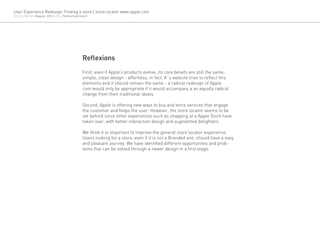
                                                  First, even if Apple’s products evolve, its core beliefs are still the same:
                                                  simple, clean design - effortless, in fact. It´s website tries to reflect this
                                                  elements and it should remain the same - a radical redesign of Apple.
                                                  com would only be appropriate if it would accompany a an equally radical
                                                  change from their traditional ideals.

                                                  Second, Apple is offering new ways to buy and extra services that engage
                                                  the customer and helps the user. However, the store locator seems to be
                                                  set behind since other experiences such as shopping at a Apple Store have
                                                  taken over, with better interaction design and augmented delighters.

                                                  We think it is important to improve the general store locator experience.
                                                  Users looking for a store, even if it is not a Branded one, should have a easy
                                                  and pleasant journey. We have identified different opportunites and prob-
                                                  lems that can be solved through a newer design in a first stage.
User Experience Redesign: Finding a store / store locator www.apple.com
Version 1.0 Date August, 2012 Author Yanina Guerzovich


                                                         UX Redesign
                                                         / Wireframes exploration

                                                         / Redesign proposal

                                                         / Usability test+interviews with users (to do)
User Experience Redesign: Finding a store / store locator www.apple.com
Version 1.0 Date August, 2012 Author Yanina Guerzovich


Find a Store / http://www.apple.com/buy/locator/


 A    Show all results in a map                            B   Show no results - give a reference of what the       B   Show No results found with tips
                                                               user can find to orient if he is in the right page


                                                         Selected Solution
User Experience Redesign: Finding a store / store locator www.apple.com
Version 1.0 Date August, 2012 Author Yanina Guerzovich


Finding a store / Screenshot flow


  1   Go to Apple´s site                                  2   Decide where I want go (to buy products)   3   Find a store
      The user goes to www.apple.com                          This step dissapears.                          The user arrives the the Store Locator.
      He can search directly there where he is looking
      for.
      The search allows, City OR State OR Zip code with
      a dropdown list of preset results.
User Experience Redesign: Finding a store / store locator www.apple.com
Version 1.0 Date August, 2012 Author Yanina Guerzovich


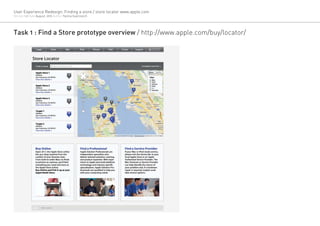
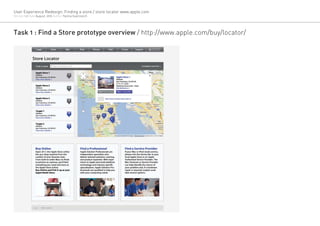
Task 1 : Find a Store prototype overview / http://www.apple.com/buy/locator/
User Experience Redesign: Finding a store / store locator www.apple.com
Version 1.0 Date August, 2012 Author Yanina Guerzovich


Task 1 : Find a Store prototype overview / http://www.apple.com/buy/locator/
User Experience Redesign: Finding a store / store locator www.apple.com
Version 1.0 Date August, 2012 Author Yanina Guerzovich


Task 1 : Find a Store prototype overview / http://www.apple.com/buy/locator/
User Experience Redesign: Finding a store / store locator www.apple.com
Version 1.0 Date August, 2012 Author Yanina Guerzovich


Task 1 : Find a Store prototype overview / http://www.apple.com/buy/locator/
User Experience Redesign: Finding a store / store locator www.apple.com
Version 1.0 Date August, 2012 Author Yanina Guerzovich


Task 1 : Find a Store prototype overview / http://www.apple.com/buy/locator/
User Experience Redesign: Finding a store / store locator www.apple.com
Version 1.0 Date August, 2012 Author Yanina Guerzovich


Task 1 : Find a Store prototype overview / http://www.apple.com/buy/locator/

Apple store locator in process

  • 1.
    Finding a storeUX Redesign Store Locator http://www.apple.com/buy/locator/
  • 2.
    User Experience Redesign:Finding a store / store locator www.apple.com Version 1.0 Date August, 2012 Author Yanina Guerzovich UX Analysis / Current experience review / Other cases review / Usability test+interviews with users (to do)
  • 3.
    User Experience Redesign:Finding a store / store locator www.apple.com Version 1.0 Date August, 2012 Author Yanina Guerzovich Customer Journey Map overview Motivation Discover Find a store Determine the Get directions Arrive at the Why? What? best location store Current touchpoints Apple Website Apple Retail store Reseller store Other Website Mobile... People: needs & emotions ? Newbie Luca,32, is a math teacher He is looking for the He decides to go to He looks for stores He browses in the He writes down the He arrives to the from San Francisco. He new iPad for her girl- apple.com to see in San Francisco, CA. list the different address and opening store where he can enjoys teaching, reading and friend. He lives out- where he can find a First, he browses in stores and in the hours. He checks the chat with a specialist running. He likes to take his side San Francisco store. He finds hard the map, then, enters map. He sees 2 distance at Google- that advices about new iPod that his girlfriend and works downtown to find the store wrong the name different stores. He Maps and get final the best product for got him for his last birthday. so he needs to find a locator link, finally, just writing down decides to go to the directions. his girlfriend. He He uses his laptop everyday store next to either he decides to look his town, but after Apple Store where arranges to go to the for email, homebanking, place. He is not sure for a reseller since reading the sugges- he thinks he will get next event to learn research, etc. which model to get. his work is next to a tions he gets a list of better advice. more. Target Store. results. Apple geek Wonderer... Apple Store staff Reseller store staff... Community... Other To start to understand the experience we map stories of people focusing on emotional insights. We map the steps in the process, to identify where we can make the experience easier, more pleasant and efficient. To build a correct map, we should get to know users, observe and interview them and understand the current trends. For this excersice we take only one “Persona” and his potential story, but we do know other stories from dif- ferent user types can give us other insights - a deeper user research should be done.
  • 4.
    User Experience Redesign:Finding a store / store locator www.apple.com Version 1.0 Date August, 2012 Author Yanina Guerzovich Discover - Website overview / www.apple.com [Page Title] - Microsoft Internet Explorer Website Goals File Edit View Favorites Tools Help It addresses the business and creative main goals: Back Search Favorites 1. Products/services catalog www.apple.com Go Links 2. Online Store + Other shopping ways* 1 2 3. Support * Redesign focus 1 Visuals & Branding It is inline with the Brands´ Identity. 2 Navigation The placement and sizing of the navigation items are pertinent and clear. It represents all the appro- priate pages, however the label Store that is linked to the online store may be confusing to users look- ing for a physical store, which can be found at the g bottom part of the page “Visit an Apple Retail Store p p pp or find a Reseller”
  • 5.
    User Experience Redesign:Finding a store / store locator www.apple.com Version 1.0 Date August, 2012 Author Yanina Guerzovich Wireframe analysis / http://www.apple.com/ [Page Title] - Microsoft Internet Explorer Page purpouse and Action Calls File Edit View Favorites Tools Help They respond to its purpouse: Brand presentation Back Search Favorites through main product. www.apple.com Go Links Layout and Hierarchy Headings, heavier weighted and different sizes text are well used to define different levels of informa- tion. The good use of whitepace and the amount of text and images makes also the page readable. Our focus “Find a store” is not a located at the bot- tom of the page and has very small regular font (3rd level hierarchy), thus is not easily findable. 1 Content The wireframe content responds to the page pur- pose. It that sense it is appropriate: it is grouped correctly with surrounding information, images and videos are placed correctly. 2 Visit an Apple Retail Store or find a Reseller. s si pp find n 3
  • 6.
    User Experience Redesign:Finding a store / store locator www.apple.com Version 1.0 Date August, 2012 Author Yanina Guerzovich Finding a store / Screenshot flow 1 Go to Apple´s site 2 Decide where I want go (to buy products) 3 Find a store The user goes to www.apple.com The page presents 3 options: Shop online, Shop Finally the users arrives to the store locator page. Retail (Apple Stores), Find a Reseller. Observations: He scrolls down and clicks on (find a) Reseller Observations: The user should go to the third block and type 1. If the user has typed the text correctly, then the results are where he would like to find a reseller. The search shown by list and in the map. If not (e.g. the user has typed one 1. The link Apple Retail Store directs the user to a different the City and not the State or viceversa), it shows “No Results page where he can find ONLY Apple stores without showing acn be done by “City AND State or Zip code” and Found” and some Search Tips, making the user to retype the other possible stores (resellers) where the users may also find press enter to go to the next page. correct location. what they are looking for. Observations: 2. Many users looking for a storemay start their journey 1. Predefined results list is not available to help user write through a google search (e.g. search for “apple store in san the right text. francisco”), in this case the the results should lead him to the store locator (step 3). 2. ‘Suggest searches as you type’ based on user´s history browser´s tool is available.
  • 7.
    User Experience Redesign:Finding a store / store locator www.apple.com Version 1.0 Date August, 2012 Author Yanina Guerzovich Task 3 : Find a Store Page overview / http://www.apple.com/buy/locator/ [Page Title] - Microsoft Internet Explorer Page purpouse File Edit View Favorites Tools Help The title of the page “Store Locator” indicates clearly Back Search Favorites the page purpouse: To locate a sore. http://www.apple.com/buy/locator/ Go Links heavier weighted and different sizes text are well used to define different levels of information. The good use of whitepace and the amount of text and images makes also the page readable. Our focus “Find a store” is not a located at the bot- tom of the page and has very small regular font (3rd level hierarchy), thus is not easily findable. Content Search criteria: The basic search required input is City AND State or Zip code. Based on the country presection, a preset list of possible results is shown to help the user write correclty. The dropdown menu to specify the product the user is looking for is optional. This variable is important since not all resellers sell all the products, however you can see this clearly when the results are displayed with its differentiators. Results visualization: Calls to Action 4 eadings, heavier weighted and different sizes text are well used to define different levels of informa- tion. The good use
  • 8.
    User Experience Redesign:Finding a store / store locator www.apple.com Version 1.0 Date August, 2012 Author Yanina Guerzovich Task 3.3 : Find a Store Wireframe overview (with results) / http://www.apple.com/buy/locator/ 1 Layout and Hierarchy The page is divided in 4 areas, defining also the 2.1 3.1 hierarchy of the page: 1 Page title 2 Column 1 2.2 2.1 Search Bar (basic+advanced): Main call to action 2.2 Space for Results List 2 3 Column 2 3.1 Empty Interactive Map powered by Google (show founded results) 3.2 Other (4) Shopping options Links+Text 3 4 Breadcrumbs (link to Home) 3.2 Main Visual Area: It does show the main purpouse of the page. How- ever, it displays the Map is shown in an important part of the page, even if it is not possible to search through it. Grouping Column 1 groups 2 Different Tasks a: Searching and Selecting the best result (by list) S l i h b l (b li ) 4 Also, C l Al Column 2 groups 2 Different Tasks: Select- Diff T k S l ing the best result (by map) and Discovering other i h b l (b ) d Di i h shopping options (secondary function). h i i ( d f i ) Thus, the main task Selecting the best result is divided and the 2 visualizations are not well con- nected; when scrolling down the user does not see simultaneously the result in the list and in the map. results” (see page “Task 3.2: Selecting the best results”)
  • 9.
    User Experience Redesign:Finding a store / store locator www.apple.com Version 1.0 Date August, 2012 Author Yanina Guerzovich Task 3.1 : Searching for a store / http://www.apple.com/buy/locator/ Task 3.1 : Searching for a store In order to find a location, the users needs to enter WHERE is the store located, through the text search. 2.1 2.2 1 The component provides: 1 Basic search: the required input is City AND State or 2.3 Zip code. 2 2.4 2.1 While typing if, given enough time, based on the country presection, a preset list of possible results is shown to help the user write correclty. 2.4 If the text is not correct (e.g. the user has typed one 2.1 2.2 the City and not the State or viceversa), no results are shown and some Search Tips, making the user to retype the correct location (done also before). 2.2 The dropdown list filter allows the user to specify the product the user is looking for is optional. This p g p variable is important since not all resellers sell all p 2.3 the products, however you can see this clearly when the results are displayed with its differentiators (see page “Task 3.2: Selecting the best results”) 2 Advanced Search: allows the user to filter 2.4 Solution and Store Name. This search is pertinent for users knowing exaclty where and what they need but not for most of the users. By default the advanced search is shown, without reflecting most users´ needs; it can be hidden clicking its link. 2.3 By Solution: a dropdown list offers many detailed options to the users. 2.3 Store Name: Textbox
  • 10.
    User Experience Redesign:Finding a store / store locator www.apple.com Version 1.0 Date August, 2012 Author Yanina Guerzovich Task 3.2 : Selecting the best store - Browsing / http://www.apple.com/buy/locator/ Task 2 : Selecting the best store - Browsing Once the user has writen a “correct location”, he can browse the different options through a list or map. Results can be visualize by: 1 List: Under the search component, a table lists the results, organized by proximity to the criteria (city center if not specified) with differentiators, allowing 1 the user to select by description. Eight results are 2 shown by page, if there are more the user needs to hit the Next/Previous button. Each result shows: - a map marker reference icon - the name of the store (title hierarchy) - the store´s address - the products that can be found in that store marked with different color dots. 2 Location in a Map powered by Google: Once the search is done, the user can navigate in the map to decide if the shown results macht his needs by location. The results shown correspond to the ones in the list, when zooming out, no other results are shown, only when the user advances in the list, he can see the other results, hiding the previous in the map. This reduces the functionality of having a map where the user can see at a glance all results to help him understand where he preferes to go.
  • 11.
    User Experience Redesign:Finding a store / store locator www.apple.com Version 1.0 Date August, 2012 Author Yanina Guerzovich Task 3.3 : Choosing one store / http://www.apple.com/buy/locator/ Task 3 : Choosing one store The selection can be done in the list or map. The user can select one store clicking in the list or 2 map. When clicking in either place, the chosen op- tion is highlited in both visualizations: 1 List: Different color background is used. (Normal: White / Hoover: Light blue / Active: Blue) 2 Map: the marker+pop-up is centered in the map and 1 a pop-up description is shown with: - the name of the store (title hierarchy) - the store´s address - the aprox. distance to the city center - a link to Get directions. - a tablink to see services offered. Services and Shopping at Apple Store are other dif- ferentiator, but the first are not shown in the table only in this tab and the second are identified with a special icon . Users can also search for services through the links below. To check other results, the user can directly select other item in the map or list. To unselect all options, the user must close the pop-up description in the map hitting the close icon “X” or going to the Next/Previous results page in the list. The selection is guided by the location as the shown results are the ones near-by. Other filters can be applied (Products, Solution, Name) in the search component however, the user must do a new search (hit enter or go) to apply the filters.
  • 12.
    User Experience Redesign:Finding a store / store locator www.apple.com Version 1.0 Date August, 2012 Author Yanina Guerzovich Task 3.4 : Getting directions to get there / http://www.apple.com/buy/locator/ Task 3 : Getting directions to get there The user can write down the address, orient himself through the map or enter a start address and get the directions through a GoogleMaps integration. 1 When clicking on Get directions a text box is shown where the user can write a specific start address. By hitting the Button Get directions, he will be di- rected to https://maps.google.com/... where he can use all GoogleMaps functions (distance, route, etc). 1 Other shopping options A B A The page presents other options to help the user find what he is looking for. B Find a Solution Professional: Link to http://solution- professionals.apple.com/ D C Buy Online: Link to http://store.apple.com/us C D Find a Service Provider: http://www.apple.com/buy/ locator/service/ : Apple Stores and other resellers to provide services. Shop Retail: http://www.apple.com/retail/ : Apple Stores: these results can also be found with the Store Locator.
  • 13.
    User Experience Redesign:Finding a store / store locator www.apple.com Version 1.0 Date August, 2012 Author Yanina Guerzovich Reflexions First, even if Apple’s products evolve, its core beliefs are still the same: simple, clean design - effortless, in fact. It´s website tries to reflect this elements and it should remain the same - a radical redesign of Apple. com would only be appropriate if it would accompany a an equally radical change from their traditional ideals. Second, Apple is offering new ways to buy and extra services that engage the customer and helps the user. However, the store locator seems to be set behind since other experiences such as shopping at a Apple Store have taken over, with better interaction design and augmented delighters. We think it is important to improve the general store locator experience. Users looking for a store, even if it is not a Branded one, should have a easy and pleasant journey. We have identified different opportunites and prob- lems that can be solved through a newer design in a first stage.
  • 14.
    User Experience Redesign:Finding a store / store locator www.apple.com Version 1.0 Date August, 2012 Author Yanina Guerzovich UX Redesign / Wireframes exploration / Redesign proposal / Usability test+interviews with users (to do)
  • 15.
    User Experience Redesign:Finding a store / store locator www.apple.com Version 1.0 Date August, 2012 Author Yanina Guerzovich Find a Store / http://www.apple.com/buy/locator/ A Show all results in a map B Show no results - give a reference of what the B Show No results found with tips user can find to orient if he is in the right page Selected Solution
  • 16.
    User Experience Redesign:Finding a store / store locator www.apple.com Version 1.0 Date August, 2012 Author Yanina Guerzovich Finding a store / Screenshot flow 1 Go to Apple´s site 2 Decide where I want go (to buy products) 3 Find a store The user goes to www.apple.com This step dissapears. The user arrives the the Store Locator. He can search directly there where he is looking for. The search allows, City OR State OR Zip code with a dropdown list of preset results.
  • 17.
    User Experience Redesign:Finding a store / store locator www.apple.com Version 1.0 Date August, 2012 Author Yanina Guerzovich Task 1 : Find a Store prototype overview / http://www.apple.com/buy/locator/
  • 18.
    User Experience Redesign:Finding a store / store locator www.apple.com Version 1.0 Date August, 2012 Author Yanina Guerzovich Task 1 : Find a Store prototype overview / http://www.apple.com/buy/locator/
  • 19.
    User Experience Redesign:Finding a store / store locator www.apple.com Version 1.0 Date August, 2012 Author Yanina Guerzovich Task 1 : Find a Store prototype overview / http://www.apple.com/buy/locator/
  • 20.
    User Experience Redesign:Finding a store / store locator www.apple.com Version 1.0 Date August, 2012 Author Yanina Guerzovich Task 1 : Find a Store prototype overview / http://www.apple.com/buy/locator/
  • 21.
    User Experience Redesign:Finding a store / store locator www.apple.com Version 1.0 Date August, 2012 Author Yanina Guerzovich Task 1 : Find a Store prototype overview / http://www.apple.com/buy/locator/
  • 22.
    User Experience Redesign:Finding a store / store locator www.apple.com Version 1.0 Date August, 2012 Author Yanina Guerzovich Task 1 : Find a Store prototype overview / http://www.apple.com/buy/locator/