3rd Idea: E-Commerce website
What is an E-commerce website?
• Largest retail growth area in the world.
• Able to purchase anything online like gifts, books
  etc.
• If a person were to sell a product or even service,
  E-commerce website is his or her virtual ‘shop’.
• Allows people to view products online at home
  comfortably.
What is the purpose of E-commerce
                  website?
• Played an important role in attracting traffic to the
  company online. (Online marketing)
• Acts as an additional support to make sure the
  business to the relationship with the consumer is
  being well taken care of.
• Extends the company products online.
• Ensure an enjoyable shopping experience to the
  online consumers.
• Helps to commercialize the company’s products
  and services online.
Things to consider / add in
 an E-commerce website
Consideration: [Bigger audience]
• Make full use of the search engine enhancement.
• Able to drive traffic by creating relevant content with
  important keywords.
• Not to reduce credibility with the consumers by
  having wrong grammar in the E-Commerce
  website.
Consideration: [Compatible browsers]
• At least when considering designing an E-commerce
  website, it has to be able to work on IE (Leader competitor
  in browser) or with Firefox.
Consideration: [Images]
• Images are essential in E-commerce website
  design.
• Strong tool in aiding the seller with product sales,
  including aiding the customers as well.
• Should clearly portray the products sold and
  services offered to customers.
Consideration: [Having a usable site]
• Easy navigation.


• Stay within the three clicks of different icons in the
  website.
Consideration: [Shopping cart]
• It is important to include shopping cart in the design
  when customer is interested in buying the product.
Consideration: [Easy ordering of
                product]
• When the customer is convinced on what he or she
  is going to purchase, close the deal for customers
  easily.
• Ensure that it does not take more than a click to
  allow them to begin their ordering process.
• Every page with regard to the product should have
  an ‘Order Now’ or ‘Add to cart’ icon.
Consideration: [Other components like
              FAQ etc]
• FAQ, privacy policies and the ‘About us’ page are
  essential in the design as well.
• When customers look out for these pages =
  credibility we can give to them.
• Inputting credible information that will make you as
  a honest trader.
Problems that I faced when visiting the
   original E-commerce websites.
• Human instincts : Doubts and fear.
• Unable to feel the real product.
• Description of the product. – too much info about
  the product.
• Unable to check out as guest.
Examples of problems I had
          encountered.


1) Human instinct: Doubts and Fears


-Having too much doubts (whether the store is reliable or not) and fears
in them  being too afraid of purchasing something on the web.

- Customers having high level of curiosity on whether the product is as
good as it looks like when it is shown on the website.

-Afraid of the website cheats on their (Customers) money.
Examples of problems I had
          encountered.


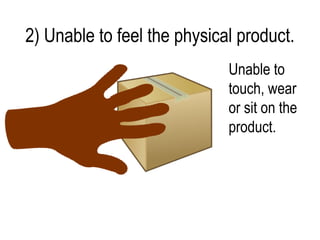
2) Unable to feel the physical product
2) Unable to feel the physical product.
                             Unable to
                             touch, wear
                             or sit on the
                             product.
Examples of problems I had
         encountered.

3) Description of the product. – too
    much info about the product.
3) Description of the product. – too
    much info about the product.
• Do not have focus point.
• Messy.
• Not appealing to customers who are viewing the
  product.
Examples of problems I had
         encountered.


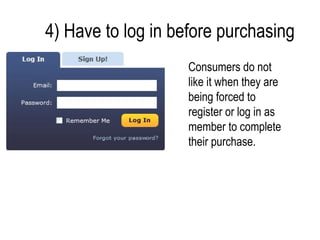
4) Have to log in before purchasing
                    Consumers do not
                    like it when they are
                    being forced to
                    register or log in as
                    member to complete
                    their purchase.
Problems that I am going to tackle on.
•   Doubts and Fears generated in Human.
•   Feeling of the product physically.
•   Description of the product.
•   Require to log in before purchasing.
Design Considerations
Ecommerce website
• Requirements of the website.       • Research.
   – Contact of the seller (email,      – Websites / Tutorials.
     facebook, twitter?)
                                        – Site visits – original Video
   – Logo / name of the website           Blog websites.
     (able to link it back to the
     home page)
   – Products are nicely aligned.
   – Color used for the website.
   – Fonts used in the website.
Ecommerce website
• Target Audience.                 • Website Editing.
   – Consumers who prefer              – Simple layout.
     using guest accounts, but     • Requirements for the users.
     also don’t mind registering
                                      • FAQs must be good to
     as a member for the
                                         show consumers how
     website.
                                         reliable the website.
                                      • Product’s description
                                         cannot be long but it must
                                         be comprehensive.
                                      • Provide another alternative
                                         way so that consumers can
                                         log out as guests.
Initial Sketch.
Layout of the Ecommerce website
E-commerce website
Pros and Cons of Ecommerce
       website layout
Pros: Neat arrangement of components of
                      the website
                                             Header


Left navigation
bar.


                                        Footer
Pros: Clear view of the components.
Pros: Good colour combination for the
                  background with the tabs
                                              Colour of the
                                              tabs.

Colour of the
background
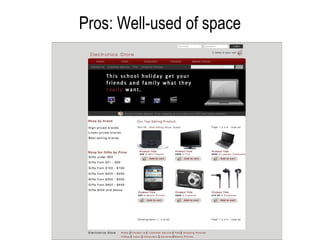
Pros: Well-used of space
Pros: Informative


                    Informative by showing
                    items 1-6 of 24
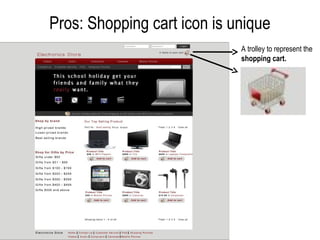
Pros: Shopping cart icon is unique
                             A trolley to represent the
                             shopping cart.
Cons: No categorization of products
Cons: Left navigation links do not look like they
                   are links
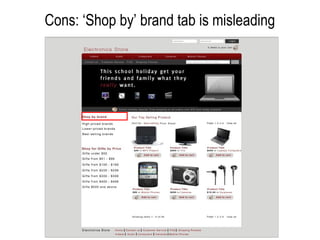
Cons: ‘Shop by’ brand tab is misleading
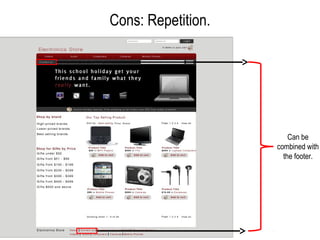
Cons: Repetition.


                        Can be
                    combined with
                      the footer.
Cons: Dark color tone


Not clear due to
the dark color
tone.
Cons: Repetition of ‘Viewing of page’ navigation
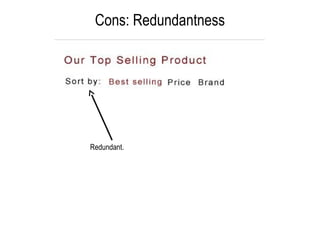
Cons: Redundantness


Redundant.
Cons: Title of the website is not big enough


         Title of the
         website :
         Electronics
         Store
‘Final Layout’
• After pin-pointing out the ‘Pros & Cons’ of the initial
  website layout,
   – I will make improvements to the Ecommerce website
     layout according to my target audiences’ needs.
   – Also, I will take my ‘Pros & Cons’ into my consideration
     when improving it.
Improvement made to the layout
Improvements made.
Before            After
Improvements made (Messy
                   Categorization)


Too many categories (those in red   Unnecessary categories removed and it looks
boxes) confuses the user.           more straightforward and not messy.
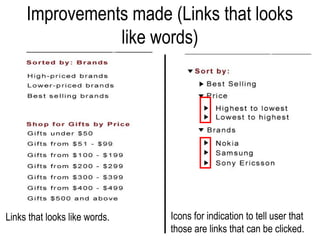
Improvements made (Links that looks
                like words)


Links that looks like words.   Icons for indication to tell user that
                               those are links that can be clicked.
Improvements made (‘Contact Us’
          repeated)


    Repeated                               Removed


       ‘Contact Us’ repeated. Thus, remove
       the repeated one at the top grey
       navigation bar and just use the ‘Contact
       Us’ at the footer.
Improvements made (Highest row of the
    navigation is not clear; Dark Color Tone)
                                 Before


                                 After


•Instead of changing the color of the navigation bar, I’ve improved on the
size of the fonts and changed the color of the font to white.

•User able to see clearly.
Improvements made (‘Viewing of
         pages’ repeated)


‘Viewing of pages' repeated.   Having 2 is redundant. One of it will do.
Improvements made (‘Sort by:’ is
                redundant)


The information in the red box can be
combined with the left navigation bar.
Improvements made (‘Our Top Selling
       Product’ is redundant’)


                  Removed ‘Our Top Selling
                  Product’.
Improvements made (Unused white
     space on top of the title)


                 The title of the website has been
                 enlarged so as to eliminate as
                 much unused white space at the
                 top.
A Walkthrough…
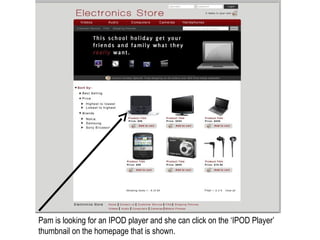
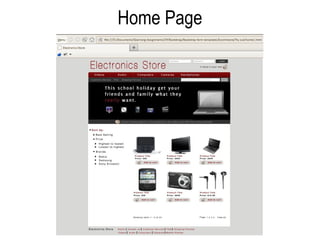
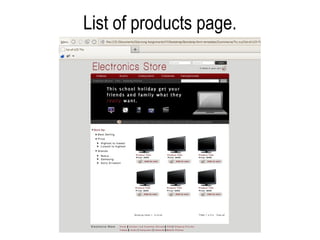
Pam is looking for an IPOD player and she can click on the ‘IPOD Player’
thumbnail on the homepage that is shown.
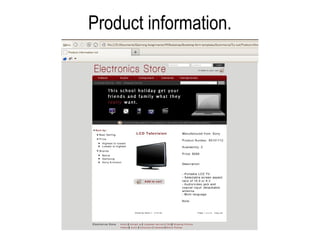
Pam can click on the red hyperlink, that is the name of the product to find out more
about it or she can proceed to the “Add to cart” to purchase the product straight
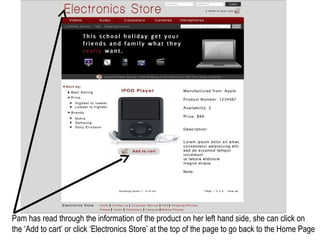
Pam has read through the information of the product on her left hand side, she can click on
the ‘Add to cart’ or click ‘Electronics Store’ at the top of the page to go back to the Home Page
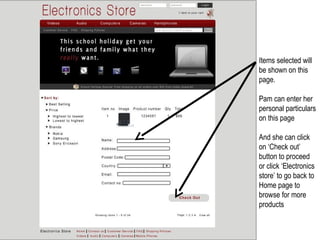
Items selected will
be shown on this
page.

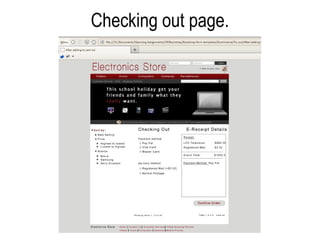
Pam can enter her
personal particulars
on this page

And she can click
on ‘Check out’
button to proceed
or click ‘Electronics
store’ to go back to
Home page to
browse for more
products
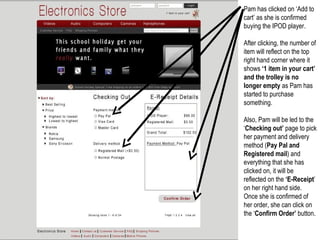
Pam has clicked on ‘Add to
cart’ as she is confirmed
buying the IPOD player.

After clicking, the number of
item will reflect on the top
right hand corner where it
shows ‘1 item in your cart’
and the trolley is no
longer empty as Pam has
started to purchase
something.

Also, Pam will be led to the
‘Checking out’ page to pick
her payment and delivery
method (Pay Pal and
Registered mail) and
everything that she has
clicked on, it will be
reflected on the ‘E-Receipt’
on her right hand side.
Once she is confirmed of
her order, she can click on
the ‘Confirm Order’ button.
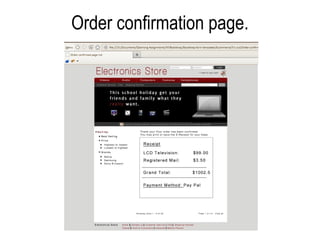
Pam is able to see
that her order has
been confirmed.

And, there is an E-
Receipt to be
shown below the
message.

Pam is able to
choose either to
print or save a copy
of the E-Receipt
and she may click
the ‘Electronics
Store’ to go back to
the Home Page.
A final walk through.
Home Page
List of products page.
Product information.
Add to cart page.
Checking out page.
Order confirmation page.

3rd Portfolio Development Idea: E commerce

  • 1.
  • 2.
    What is anE-commerce website? • Largest retail growth area in the world. • Able to purchase anything online like gifts, books etc. • If a person were to sell a product or even service, E-commerce website is his or her virtual ‘shop’. • Allows people to view products online at home comfortably.
  • 3.
    What is thepurpose of E-commerce website? • Played an important role in attracting traffic to the company online. (Online marketing) • Acts as an additional support to make sure the business to the relationship with the consumer is being well taken care of. • Extends the company products online. • Ensure an enjoyable shopping experience to the online consumers. • Helps to commercialize the company’s products and services online.
  • 4.
    Things to consider/ add in an E-commerce website
  • 5.
    Consideration: [Bigger audience] •Make full use of the search engine enhancement. • Able to drive traffic by creating relevant content with important keywords. • Not to reduce credibility with the consumers by having wrong grammar in the E-Commerce website.
  • 6.
    Consideration: [Compatible browsers] •At least when considering designing an E-commerce website, it has to be able to work on IE (Leader competitor in browser) or with Firefox.
  • 7.
    Consideration: [Images] • Imagesare essential in E-commerce website design. • Strong tool in aiding the seller with product sales, including aiding the customers as well. • Should clearly portray the products sold and services offered to customers.
  • 8.
    Consideration: [Having ausable site] • Easy navigation. • Stay within the three clicks of different icons in the website.
  • 9.
    Consideration: [Shopping cart] •It is important to include shopping cart in the design when customer is interested in buying the product.
  • 10.
    Consideration: [Easy orderingof product] • When the customer is convinced on what he or she is going to purchase, close the deal for customers easily. • Ensure that it does not take more than a click to allow them to begin their ordering process. • Every page with regard to the product should have an ‘Order Now’ or ‘Add to cart’ icon.
  • 11.
    Consideration: [Other componentslike FAQ etc] • FAQ, privacy policies and the ‘About us’ page are essential in the design as well. • When customers look out for these pages = credibility we can give to them. • Inputting credible information that will make you as a honest trader.
  • 12.
    Problems that Ifaced when visiting the original E-commerce websites. • Human instincts : Doubts and fear. • Unable to feel the real product. • Description of the product. – too much info about the product. • Unable to check out as guest.
  • 13.
    Examples of problemsI had encountered. 1) Human instinct: Doubts and Fears
  • 14.
    1) Human instinct:Doubts and Fears -Having too much doubts (whether the store is reliable or not) and fears in them  being too afraid of purchasing something on the web. - Customers having high level of curiosity on whether the product is as good as it looks like when it is shown on the website. -Afraid of the website cheats on their (Customers) money.
  • 15.
    Examples of problemsI had encountered. 2) Unable to feel the physical product
  • 16.
    2) Unable tofeel the physical product. Unable to touch, wear or sit on the product.
  • 17.
    Examples of problemsI had encountered. 3) Description of the product. – too much info about the product.
  • 18.
    3) Description ofthe product. – too much info about the product. • Do not have focus point. • Messy. • Not appealing to customers who are viewing the product.
  • 19.
    Examples of problemsI had encountered. 4) Have to log in before purchasing
  • 20.
    4) Have tolog in before purchasing Consumers do not like it when they are being forced to register or log in as member to complete their purchase.
  • 21.
    Problems that Iam going to tackle on. • Doubts and Fears generated in Human. • Feeling of the product physically. • Description of the product. • Require to log in before purchasing.
  • 22.
  • 23.
    Ecommerce website • Requirementsof the website. • Research. – Contact of the seller (email, – Websites / Tutorials. facebook, twitter?) – Site visits – original Video – Logo / name of the website Blog websites. (able to link it back to the home page) – Products are nicely aligned. – Color used for the website. – Fonts used in the website.
  • 24.
    Ecommerce website • TargetAudience. • Website Editing. – Consumers who prefer – Simple layout. using guest accounts, but • Requirements for the users. also don’t mind registering • FAQs must be good to as a member for the show consumers how website. reliable the website. • Product’s description cannot be long but it must be comprehensive. • Provide another alternative way so that consumers can log out as guests.
  • 25.
  • 27.
    Layout of theEcommerce website
  • 28.
  • 29.
    Pros and Consof Ecommerce website layout
  • 30.
    Pros: Neat arrangementof components of the website Header Left navigation bar. Footer
  • 31.
    Pros: Clear viewof the components.
  • 32.
    Pros: Good colourcombination for the background with the tabs Colour of the tabs. Colour of the background
  • 33.
  • 34.
    Pros: Informative Informative by showing items 1-6 of 24
  • 35.
    Pros: Shopping carticon is unique A trolley to represent the shopping cart.
  • 36.
  • 37.
    Cons: Left navigationlinks do not look like they are links
  • 38.
    Cons: ‘Shop by’brand tab is misleading
  • 39.
    Cons: Repetition. Can be combined with the footer.
  • 40.
    Cons: Dark colortone Not clear due to the dark color tone.
  • 41.
    Cons: Repetition of‘Viewing of page’ navigation
  • 42.
  • 43.
    Cons: Title ofthe website is not big enough Title of the website : Electronics Store
  • 44.
    ‘Final Layout’ • Afterpin-pointing out the ‘Pros & Cons’ of the initial website layout, – I will make improvements to the Ecommerce website layout according to my target audiences’ needs. – Also, I will take my ‘Pros & Cons’ into my consideration when improving it.
  • 45.
  • 46.
  • 47.
    Improvements made (Messy Categorization) Too many categories (those in red Unnecessary categories removed and it looks boxes) confuses the user. more straightforward and not messy.
  • 48.
    Improvements made (Linksthat looks like words) Links that looks like words. Icons for indication to tell user that those are links that can be clicked.
  • 49.
    Improvements made (‘ContactUs’ repeated) Repeated Removed ‘Contact Us’ repeated. Thus, remove the repeated one at the top grey navigation bar and just use the ‘Contact Us’ at the footer.
  • 50.
    Improvements made (Highestrow of the navigation is not clear; Dark Color Tone) Before After •Instead of changing the color of the navigation bar, I’ve improved on the size of the fonts and changed the color of the font to white. •User able to see clearly.
  • 51.
    Improvements made (‘Viewingof pages’ repeated) ‘Viewing of pages' repeated. Having 2 is redundant. One of it will do.
  • 52.
    Improvements made (‘Sortby:’ is redundant) The information in the red box can be combined with the left navigation bar.
  • 53.
    Improvements made (‘OurTop Selling Product’ is redundant’) Removed ‘Our Top Selling Product’.
  • 54.
    Improvements made (Unusedwhite space on top of the title) The title of the website has been enlarged so as to eliminate as much unused white space at the top.
  • 55.
  • 56.
    Pam is lookingfor an IPOD player and she can click on the ‘IPOD Player’ thumbnail on the homepage that is shown.
  • 57.
    Pam can clickon the red hyperlink, that is the name of the product to find out more about it or she can proceed to the “Add to cart” to purchase the product straight
  • 58.
    Pam has readthrough the information of the product on her left hand side, she can click on the ‘Add to cart’ or click ‘Electronics Store’ at the top of the page to go back to the Home Page
  • 59.
    Items selected will beshown on this page. Pam can enter her personal particulars on this page And she can click on ‘Check out’ button to proceed or click ‘Electronics store’ to go back to Home page to browse for more products
  • 60.
    Pam has clickedon ‘Add to cart’ as she is confirmed buying the IPOD player. After clicking, the number of item will reflect on the top right hand corner where it shows ‘1 item in your cart’ and the trolley is no longer empty as Pam has started to purchase something. Also, Pam will be led to the ‘Checking out’ page to pick her payment and delivery method (Pay Pal and Registered mail) and everything that she has clicked on, it will be reflected on the ‘E-Receipt’ on her right hand side. Once she is confirmed of her order, she can click on the ‘Confirm Order’ button.
  • 61.
    Pam is ableto see that her order has been confirmed. And, there is an E- Receipt to be shown below the message. Pam is able to choose either to print or save a copy of the E-Receipt and she may click the ‘Electronics Store’ to go back to the Home Page.
  • 62.
    A final walkthrough.
  • 63.
  • 64.
  • 65.
  • 66.
  • 67.
  • 68.