AppDynamics VS New Relic – The Complete Guide
www.takipi.comTakipi
Table of Contents
1. What is APM?
2. Supported Languages and Environments
3. Features
• Backend Monitoring
• Frontend & Mobile Monitoring
4. How to Solve the Errors You Find
5. Installation
6. Dashboard and Usage
7. Integrations and Plugins
8. Pricing
9. Conclusion
Takipi
www.takipi.com
What is APM
• APM(Application Performance Management) provides analytics around
application’s performance – at the core i.e., timing how long it takes to execute
different areas in the code and complete transactions
• Achieved by :
• Instrumenting the code
• Monitoring logs or
• Including network / hardware metrics.
Takipi
www.takipi.com
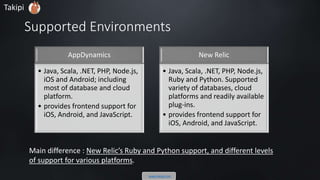
Supported Environments
AppDynamics
• Java, Scala, .NET, PHP, Node.js,
iOS and Android; including
most of database and cloud
platform.
• provides frontend support for
iOS, Android, and JavaScript.
New Relic
• Java, Scala, .NET, PHP, Node.js,
Ruby and Python. Supported
variety of databases, cloud
platforms and readily available
plug-ins.
• provides frontend support for
iOS, Android, and JavaScript.
Takipi
www.takipi.com
Main difference : New Relic’s Ruby and Python support, different levels of
support for various platforms.
Features
• Both New Relic and AppDynamics can be broken down into 6 different products,
all reporting to a main dashboard interface.
• Let’s compare them via:
1. Backend Monitoring
2. Mobile and Frontend Monitoring.
Takipi
www.takipi.com
1.Backend Monitoring
Takipi
www.takipi.com
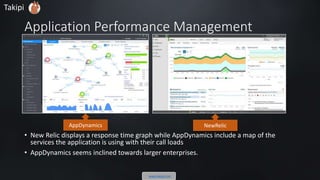
Application Performance Management
• New Relic displays a response time graph while AppDynamics include a map of the
services the application is using with their call loads
• AppDynamics seems inclined towards larger enterprises.
AppDynamics NewRelic
Takipi
www.takipi.com
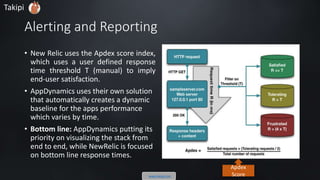
Alerting and Reporting
• New Relic uses the Apdex score index,
which uses a user defined response
time threshold T (manual) to imply
end-user satisfaction.
• AppDynamics uses their own solution
that automatically creates a dynamic
baseline for the apps performance
which varies by time.
• Bottom line: AppDynamics putting its
priority on visualizing the stack from
end to end, while NewRelic is focused
on bottom line response times.
Apdex
Score
Takipi www.takipi.com
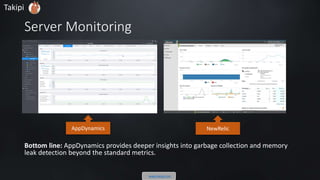
Server Monitoring
Bottom line: AppDynamics provides deeper insights into garbage collection and memory
leak detection beyond the standard metrics.
AppDynamics NewRelic
Takipi
www.takipi.com
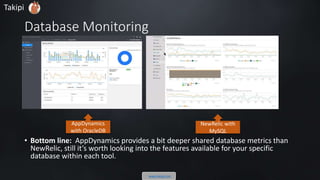
Database Monitoring
• Bottom line: AppDynamics provides a bit deeper shared database metrics than
NewRelic, still it’s worth looking into the features available for your specific
database within each tool.
AppDynamics
with OracleDB
NewRelic with
MySQL
Takipi
www.takipi.com
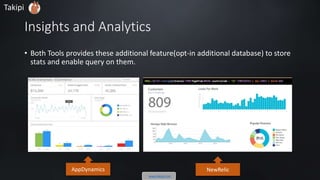
Insights and Analytics
• Both Tools provides these additional feature (opt-in additional database) to store
stats and to enable query on them.
AppDynamics NewRelic
Takipi
www.takipi.com
Takipi
www.takipi.com
2.Frontend & Mobile Monitoring
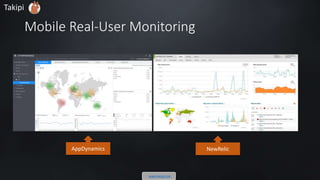
Mobile Real-User Monitoring
AppDynamics NewRelic
Takipi
www.takipi.com
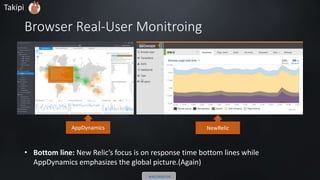
Browser Real-User Monitroing
• Bottom line: New Relic’s focus is on response time bottom lines while
AppDynamics emphasizes the global picture.
AppDynamics NewRelic
Takipi
www.takipi.com
How to Solve the errors you find?
Takipi
www.takipi.com
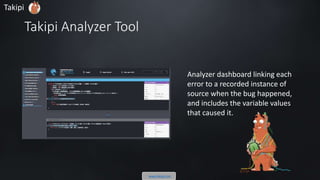
Takipi Analyzer Tool
Analyzer dashboard linking each
error to a recorded instance of
source when the bug happened,
and includes the variable values
that caused it.
Takipi
www.takipi.com
Contd.
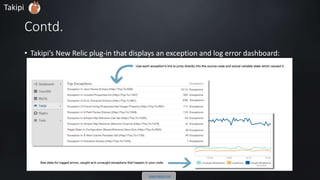
• Takipi’s New Relic plug-in that displays an exception and log error dashboard:
Takipi
www.takipi.com
Dashboard and Usage
• Browse following videos for better feel of each tool’s user experience and way of
solving problems.
• AppDynamics
• NewRelic
Takipi
www.takipi.com
Installation
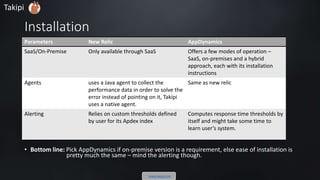
• Bottom line: Pick AppDynamics if on-premise version is a requirement, else ease of installation is
pretty much the same – mind the alerting though.
Parameters New Relic AppDynamics
SaaS/On-Premise Only available through SaaS Offers a few modes of operation –
SaaS, on-premises and a hybrid
approach, each with its installation
instructions
Agents uses a Java agent to collect the
performance data in order to solve the
error instead of pointing on it, Takipi
uses a native agent.
Same as new relic
Alerting Relies on custom thresholds defined
by user for its Apdex index
Computes response time thresholds by
itself and might take some time to
learn user’s system.
Takipi
www.takipi.com
Integrations and Plugins
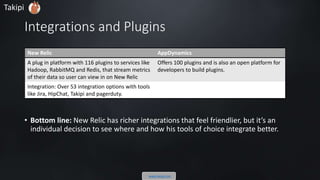
• Bottom line: New Relic has richer integrations that feel friendlier, but it’s an
individual decision to see where and how his tools of choice integrate better.
New Relic AppDynamics
A plug in platform with 116 plugins to services like
Hadoop, RabbitMQ and Redis, that stream metrics
of their data so user can view in on New Relic
Offers 100 plugins and is also an open platform for
developers to build plugins.
Integration: Over 53 integration options with tools
like Jira, HipChat, Takipi and pagerduty.
Takipi
www.takipi.com
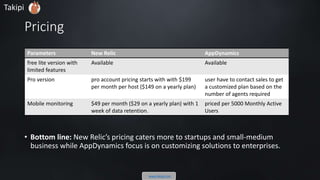
Pricing
• Bottom line: New Relic’s pricing caters more to startups and small-medium
business while AppDynamics focus is on customizing solutions to enterprises.
Parameters New Relic AppDynamics
free version with
limited features
Available Available
Pro version Pro account pricing starts with with $199
per month per host ($149 on a yearly plan)
User have to contact sales to get
a customized plan based on the
number of agents required
Mobile monitoring $49 per month ($29 on a yearly plan) with 1
week of data retention.
Priced per 5000 Monthly Active
Users
Takipi
www.takipi.com
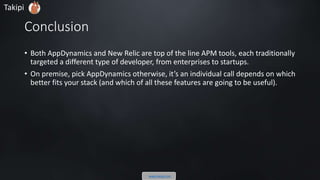
Conclusion
• Both AppDynamics and New Relic are top of the line APM tools, each traditionally
targeted a different type of developers, from enterprises to startups.
• On premises - pick AppDynamics. Otherwise, it’s an individual call depends on
which better fits your stack and which of all these features are going to be useful.
Takipi
www.takipi.com
Originally Posted on
Here is
the link
Takipi Blog
Takipi
www.takipi.com

AppDynamics VS New Relic – The Complete Guide

  • 1.
    AppDynamics VS NewRelic – The Complete Guide www.takipi.comTakipi
  • 2.
    Table of Contents 1.What is APM? 2. Supported Languages and Environments 3. Features • Backend Monitoring • Frontend & Mobile Monitoring 4. How to Solve the Errors You Find 5. Installation 6. Dashboard and Usage 7. Integrations and Plugins 8. Pricing 9. Conclusion Takipi www.takipi.com
  • 3.
    What is APM •APM(Application Performance Management) provides analytics around application’s performance – at the core i.e., timing how long it takes to execute different areas in the code and complete transactions • Achieved by : • Instrumenting the code • Monitoring logs or • Including network / hardware metrics. Takipi www.takipi.com
  • 4.
    Supported Environments AppDynamics • Java,Scala, .NET, PHP, Node.js, iOS and Android; including most of database and cloud platform. • provides frontend support for iOS, Android, and JavaScript. New Relic • Java, Scala, .NET, PHP, Node.js, Ruby and Python. Supported variety of databases, cloud platforms and readily available plug-ins. • provides frontend support for iOS, Android, and JavaScript. Takipi www.takipi.com Main difference : New Relic’s Ruby and Python support, different levels of support for various platforms.
  • 5.
    Features • Both NewRelic and AppDynamics can be broken down into 6 different products, all reporting to a main dashboard interface. • Let’s compare them via: 1. Backend Monitoring 2. Mobile and Frontend Monitoring. Takipi www.takipi.com
  • 6.
  • 7.
    Application Performance Management •New Relic displays a response time graph while AppDynamics include a map of the services the application is using with their call loads • AppDynamics seems inclined towards larger enterprises. AppDynamics NewRelic Takipi www.takipi.com
  • 8.
    Alerting and Reporting •New Relic uses the Apdex score index, which uses a user defined response time threshold T (manual) to imply end-user satisfaction. • AppDynamics uses their own solution that automatically creates a dynamic baseline for the apps performance which varies by time. • Bottom line: AppDynamics putting its priority on visualizing the stack from end to end, while NewRelic is focused on bottom line response times. Apdex Score Takipi www.takipi.com
  • 9.
    Server Monitoring Bottom line:AppDynamics provides deeper insights into garbage collection and memory leak detection beyond the standard metrics. AppDynamics NewRelic Takipi www.takipi.com
  • 10.
    Database Monitoring • Bottomline: AppDynamics provides a bit deeper shared database metrics than NewRelic, still it’s worth looking into the features available for your specific database within each tool. AppDynamics with OracleDB NewRelic with MySQL Takipi www.takipi.com
  • 11.
    Insights and Analytics •Both Tools provides these additional feature (opt-in additional database) to store stats and to enable query on them. AppDynamics NewRelic Takipi www.takipi.com
  • 12.
  • 13.
    Mobile Real-User Monitoring AppDynamicsNewRelic Takipi www.takipi.com
  • 14.
    Browser Real-User Monitroing •Bottom line: New Relic’s focus is on response time bottom lines while AppDynamics emphasizes the global picture. AppDynamics NewRelic Takipi www.takipi.com
  • 15.
    How to Solvethe errors you find? Takipi www.takipi.com
  • 16.
    Takipi Analyzer Tool Analyzerdashboard linking each error to a recorded instance of source when the bug happened, and includes the variable values that caused it. Takipi www.takipi.com
  • 17.
    Contd. • Takipi’s NewRelic plug-in that displays an exception and log error dashboard: Takipi www.takipi.com
  • 18.
    Dashboard and Usage •Browse following videos for better feel of each tool’s user experience and way of solving problems. • AppDynamics • NewRelic Takipi www.takipi.com
  • 19.
    Installation • Bottom line:Pick AppDynamics if on-premise version is a requirement, else ease of installation is pretty much the same – mind the alerting though. Parameters New Relic AppDynamics SaaS/On-Premise Only available through SaaS Offers a few modes of operation – SaaS, on-premises and a hybrid approach, each with its installation instructions Agents uses a Java agent to collect the performance data in order to solve the error instead of pointing on it, Takipi uses a native agent. Same as new relic Alerting Relies on custom thresholds defined by user for its Apdex index Computes response time thresholds by itself and might take some time to learn user’s system. Takipi www.takipi.com
  • 20.
    Integrations and Plugins •Bottom line: New Relic has richer integrations that feel friendlier, but it’s an individual decision to see where and how his tools of choice integrate better. New Relic AppDynamics A plug in platform with 116 plugins to services like Hadoop, RabbitMQ and Redis, that stream metrics of their data so user can view in on New Relic Offers 100 plugins and is also an open platform for developers to build plugins. Integration: Over 53 integration options with tools like Jira, HipChat, Takipi and pagerduty. Takipi www.takipi.com
  • 21.
    Pricing • Bottom line:New Relic’s pricing caters more to startups and small-medium business while AppDynamics focus is on customizing solutions to enterprises. Parameters New Relic AppDynamics free version with limited features Available Available Pro version Pro account pricing starts with with $199 per month per host ($149 on a yearly plan) User have to contact sales to get a customized plan based on the number of agents required Mobile monitoring $49 per month ($29 on a yearly plan) with 1 week of data retention. Priced per 5000 Monthly Active Users Takipi www.takipi.com
  • 22.
    Conclusion • Both AppDynamicsand New Relic are top of the line APM tools, each traditionally targeted a different type of developers, from enterprises to startups. • On premises - pick AppDynamics. Otherwise, it’s an individual call depends on which better fits your stack and which of all these features are going to be useful. Takipi www.takipi.com
  • 23.
    Originally Posted on Hereis the link Takipi Blog Takipi www.takipi.com