B
Copyright © 2008, Oracle. All rights reserved.
Managing Intercompany Transactions
Copyright © 2008, Oracle. All rights reserved.
Objectives
After completing this lesson, you should be able to:
• Describe the Intercompany Transactions Module
• Open periods for intercompany transactions
• Enter intercompany transactions
• Match intercompany transactions
• Post intercompany transactions
• Create Intercompany reports
• Lock Intercompany transactions
• Close Intercompany periods
Copyright © 2008, Oracle. All rights reserved.
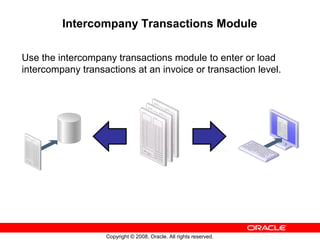
Intercompany Transactions Module
Use the intercompany transactions module to enter or load
intercompany transactions at an invoice or transaction level.
Copyright © 2008, Oracle. All rights reserved.
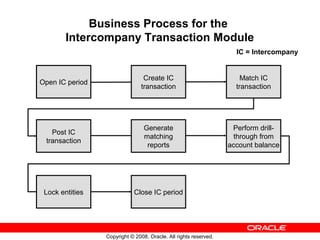
Business Process for the
Intercompany Transaction Module
Open IC period
Create IC
transaction
Match IC
transaction
Post IC
transaction
IC = Intercompany
Generate
matching
reports
Perform drill-
through from
account balance
Lock entities Close IC period
Copyright © 2008, Oracle. All rights reserved.
Setup Considerations for Intercompany
Transactions
The following needs to be considered as part of the setup for
the Intercompany Transactions module:
• IC periods must be open.
• Intercompany transaction rules must be defined in the
rules file and loaded into the application (error message
results if rules are not defined).
• The scaling factor affects the display of the transaction
amount.
• Matching tolerances need to be determined.
• Reason codes need to be defined.
• Currency conversion rates must be entered.
Copyright © 2008, Oracle. All rights reserved.
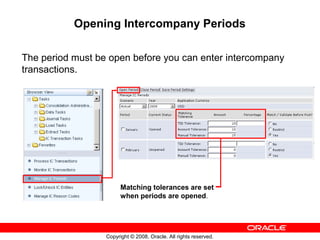
Opening Intercompany Periods
The period must be open before you can enter intercompany
transactions.
Matching tolerances are set
when periods are opened.
Copyright © 2008, Oracle. All rights reserved.
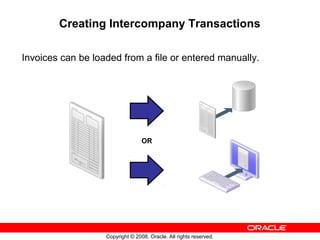
Creating Intercompany Transactions
Invoices can be loaded from a file or entered manually.
OR
Copyright © 2008, Oracle. All rights reserved.
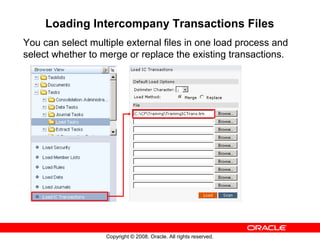
Loading Intercompany Transactions Files
You can select multiple external files in one load process and
select whether to merge or replace the existing transactions.
Copyright © 2008, Oracle. All rights reserved.
About Process IC Transactions
Use Process IC Transactions to create and to perform other
intercompany transaction processes.
Transaction Entries per page
Copyright © 2008, Oracle. All rights reserved.
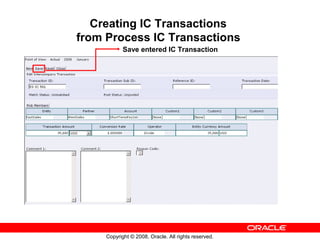
Creating IC Transactions
from Process IC Transactions
Save entered IC Transaction
Copyright © 2008, Oracle. All rights reserved.
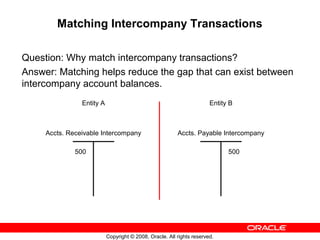
Matching Intercompany Transactions
Question: Why match intercompany transactions?
Answer: Matching helps reduce the gap that can exist between
intercompany account balances.
Entity A
Accts. Receivable Intercompany
500
Entity B
Accts. Payable Intercompany
500
Copyright © 2008, Oracle. All rights reserved.
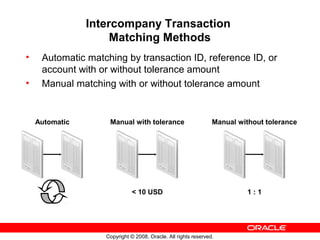
Intercompany Transaction
Matching Methods
• Automatic matching by transaction ID, reference ID, or
account with or without tolerance amount
• Manual matching with or without tolerance amount
Automatic Manual with tolerance
< 10 USD
Manual without tolerance
1 : 1
Copyright © 2008, Oracle. All rights reserved.
Posting Intercompany Transactions
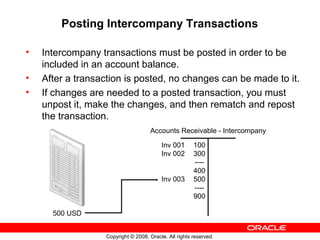
• Intercompany transactions must be posted in order to be
included in an account balance.
• After a transaction is posted, no changes can be made to it.
• If changes are needed to a posted transaction, you must
unpost it, make the changes, and then rematch and repost
the transaction.
500 USD
Inv 001 100
Inv 002 300
----
400
Inv 003 500
----
900
Accounts Receivable - Intercompany
Copyright © 2008, Oracle. All rights reserved.
Generating Matching Reports
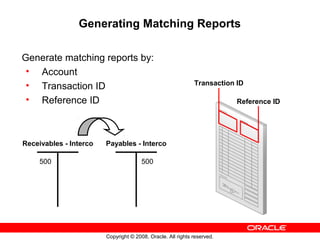
Generate matching reports by:
• Account
• Transaction ID
• Reference ID
Receivables - Interco
500
Payables - Interco
500
Transaction ID
Reference ID
Copyright © 2008, Oracle. All rights reserved.
Drill-Through Reports
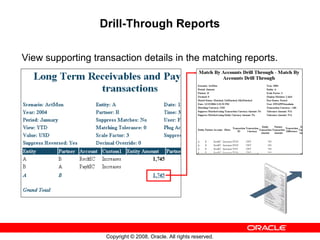
View supporting transaction details in the matching reports.
Copyright © 2008, Oracle. All rights reserved.
Locking Entities
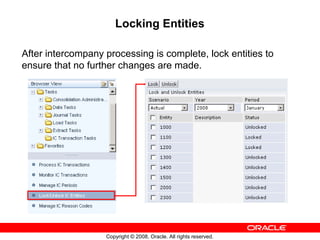
After intercompany processing is complete, lock entities to
ensure that no further changes are made.
Copyright © 2008, Oracle. All rights reserved.
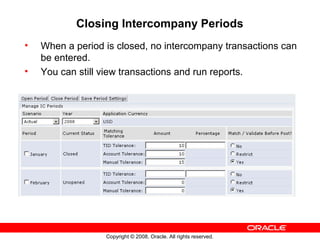
Closing Intercompany Periods
• When a period is closed, no intercompany transactions can
be entered.
• You can still view transactions and run reports.
Copyright © 2008, Oracle. All rights reserved.
Monitoring Intercompany Entity Status
The Monitor Intercompany Transactions task provides status
information for intercompany entities.
Filter by status.
Click an entity to view detail.
Summary of Started and
Not Started Transactions.
Copyright © 2008, Oracle. All rights reserved.
Summary
In this lesson, you should have learned to:
• Describe the Intercompany Transactions Module
• Open periods for intercompany transactions
• Enter intercompany transactions
• Match intercompany transactions
• Post intercompany transactions
• Create Intercompany reports
• Lock Intercompany transactions
• Close Intercompany periods

App b intercompanytrans

  • 1.
    B Copyright © 2008,Oracle. All rights reserved. Managing Intercompany Transactions
  • 2.
    Copyright © 2008,Oracle. All rights reserved. Objectives After completing this lesson, you should be able to: • Describe the Intercompany Transactions Module • Open periods for intercompany transactions • Enter intercompany transactions • Match intercompany transactions • Post intercompany transactions • Create Intercompany reports • Lock Intercompany transactions • Close Intercompany periods
  • 3.
    Copyright © 2008,Oracle. All rights reserved. Intercompany Transactions Module Use the intercompany transactions module to enter or load intercompany transactions at an invoice or transaction level.
  • 4.
    Copyright © 2008,Oracle. All rights reserved. Business Process for the Intercompany Transaction Module Open IC period Create IC transaction Match IC transaction Post IC transaction IC = Intercompany Generate matching reports Perform drill- through from account balance Lock entities Close IC period
  • 5.
    Copyright © 2008,Oracle. All rights reserved. Setup Considerations for Intercompany Transactions The following needs to be considered as part of the setup for the Intercompany Transactions module: • IC periods must be open. • Intercompany transaction rules must be defined in the rules file and loaded into the application (error message results if rules are not defined). • The scaling factor affects the display of the transaction amount. • Matching tolerances need to be determined. • Reason codes need to be defined. • Currency conversion rates must be entered.
  • 6.
    Copyright © 2008,Oracle. All rights reserved. Opening Intercompany Periods The period must be open before you can enter intercompany transactions. Matching tolerances are set when periods are opened.
  • 7.
    Copyright © 2008,Oracle. All rights reserved. Creating Intercompany Transactions Invoices can be loaded from a file or entered manually. OR
  • 8.
    Copyright © 2008,Oracle. All rights reserved. Loading Intercompany Transactions Files You can select multiple external files in one load process and select whether to merge or replace the existing transactions.
  • 9.
    Copyright © 2008,Oracle. All rights reserved. About Process IC Transactions Use Process IC Transactions to create and to perform other intercompany transaction processes. Transaction Entries per page
  • 10.
    Copyright © 2008,Oracle. All rights reserved. Creating IC Transactions from Process IC Transactions Save entered IC Transaction
  • 11.
    Copyright © 2008,Oracle. All rights reserved. Matching Intercompany Transactions Question: Why match intercompany transactions? Answer: Matching helps reduce the gap that can exist between intercompany account balances. Entity A Accts. Receivable Intercompany 500 Entity B Accts. Payable Intercompany 500
  • 12.
    Copyright © 2008,Oracle. All rights reserved. Intercompany Transaction Matching Methods • Automatic matching by transaction ID, reference ID, or account with or without tolerance amount • Manual matching with or without tolerance amount Automatic Manual with tolerance < 10 USD Manual without tolerance 1 : 1
  • 13.
    Copyright © 2008,Oracle. All rights reserved. Posting Intercompany Transactions • Intercompany transactions must be posted in order to be included in an account balance. • After a transaction is posted, no changes can be made to it. • If changes are needed to a posted transaction, you must unpost it, make the changes, and then rematch and repost the transaction. 500 USD Inv 001 100 Inv 002 300 ---- 400 Inv 003 500 ---- 900 Accounts Receivable - Intercompany
  • 14.
    Copyright © 2008,Oracle. All rights reserved. Generating Matching Reports Generate matching reports by: • Account • Transaction ID • Reference ID Receivables - Interco 500 Payables - Interco 500 Transaction ID Reference ID
  • 15.
    Copyright © 2008,Oracle. All rights reserved. Drill-Through Reports View supporting transaction details in the matching reports.
  • 16.
    Copyright © 2008,Oracle. All rights reserved. Locking Entities After intercompany processing is complete, lock entities to ensure that no further changes are made.
  • 17.
    Copyright © 2008,Oracle. All rights reserved. Closing Intercompany Periods • When a period is closed, no intercompany transactions can be entered. • You can still view transactions and run reports.
  • 18.
    Copyright © 2008,Oracle. All rights reserved. Monitoring Intercompany Entity Status The Monitor Intercompany Transactions task provides status information for intercompany entities. Filter by status. Click an entity to view detail. Summary of Started and Not Started Transactions.
  • 19.
    Copyright © 2008,Oracle. All rights reserved. Summary In this lesson, you should have learned to: • Describe the Intercompany Transactions Module • Open periods for intercompany transactions • Enter intercompany transactions • Match intercompany transactions • Post intercompany transactions • Create Intercompany reports • Lock Intercompany transactions • Close Intercompany periods