6
Copyright © 2008, Oracle. All rights reserved.
Configuring Accounts and Custom
Dimensions
Copyright © 2008, Oracle. All rights reserved.
Objectives
After completing this lesson, you should be able to:
• Set up accounts
• Set up custom dimensions
• Assign custom dimension members to accounts
• Audit data
• Set up Intercompany account properties
Copyright © 2008, Oracle. All rights reserved.
Overview: Accounts and Custom Dimensions
• The Account dimension defines the chart of accounts for
an application.
• Custom dimensions provide additional detail for accounts.
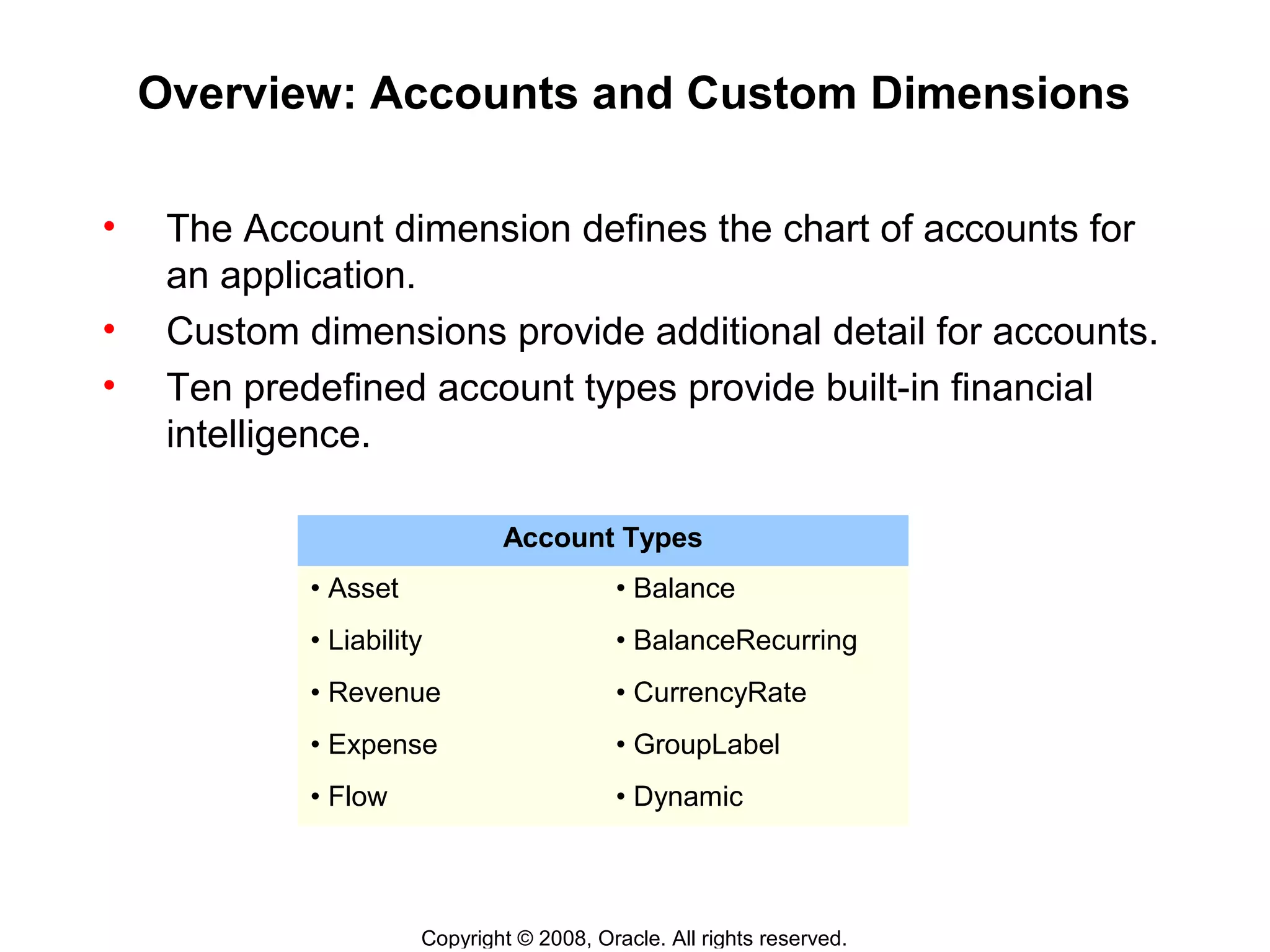
• Ten predefined account types provide built-in financial
intelligence.
Account Types
• Asset • Balance
• Liability • BalanceRecurring
• Revenue • CurrencyRate
• Expense • GroupLabel
• Flow • Dynamic
Copyright © 2008, Oracle. All rights reserved.
Setting Up Account Types and Hierarchies
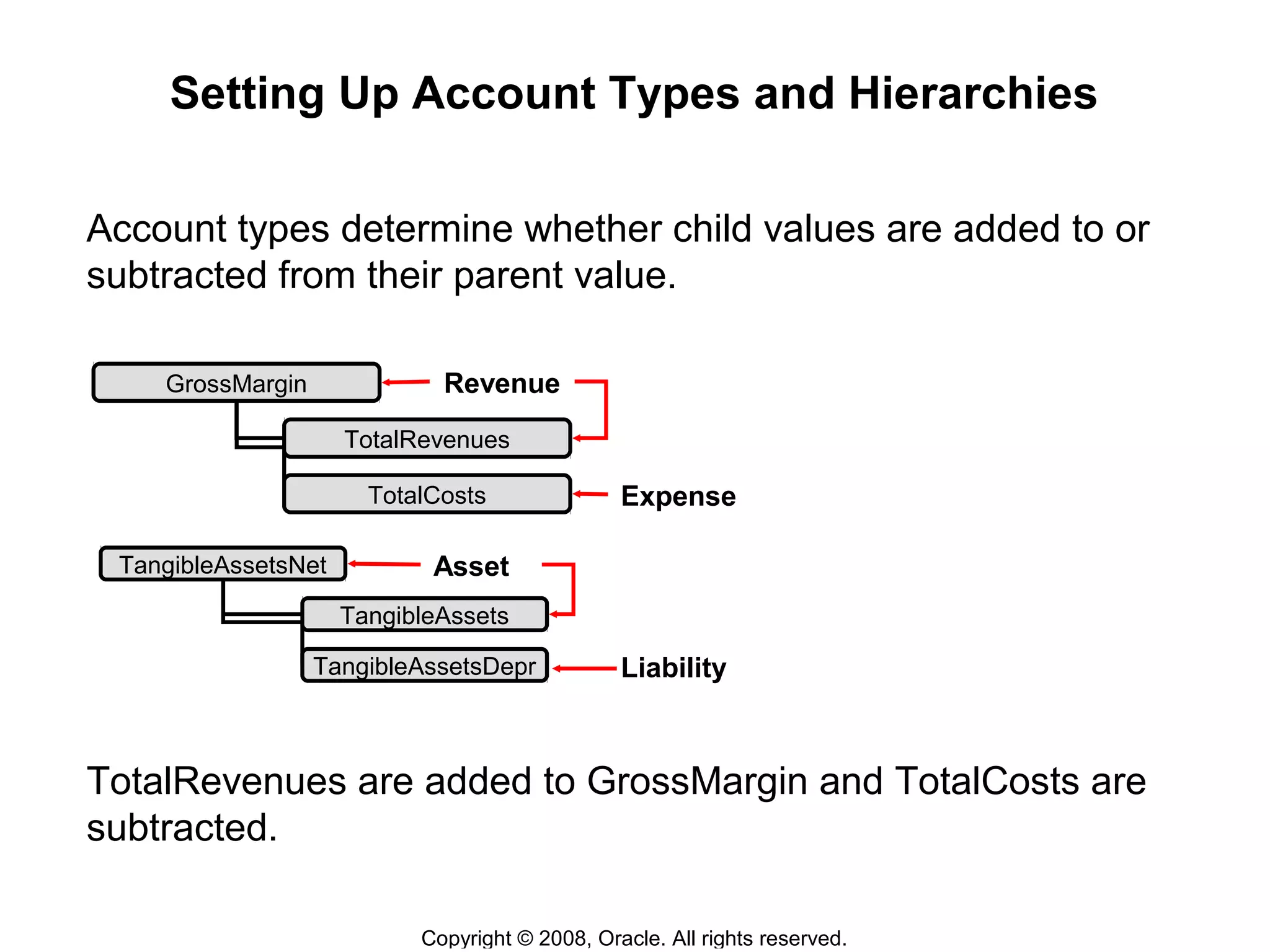
Account types determine whether child values are added to or
subtracted from their parent value.
TotalRevenues are added to GrossMargin and TotalCosts are
subtracted.
GrossMargin
TotalRevenues
TotalCosts
Liability
Expense
Asset
Revenue
TangibleAssetsNet
TangibleAssets
TangibleAssetsDepr
Copyright © 2008, Oracle. All rights reserved.
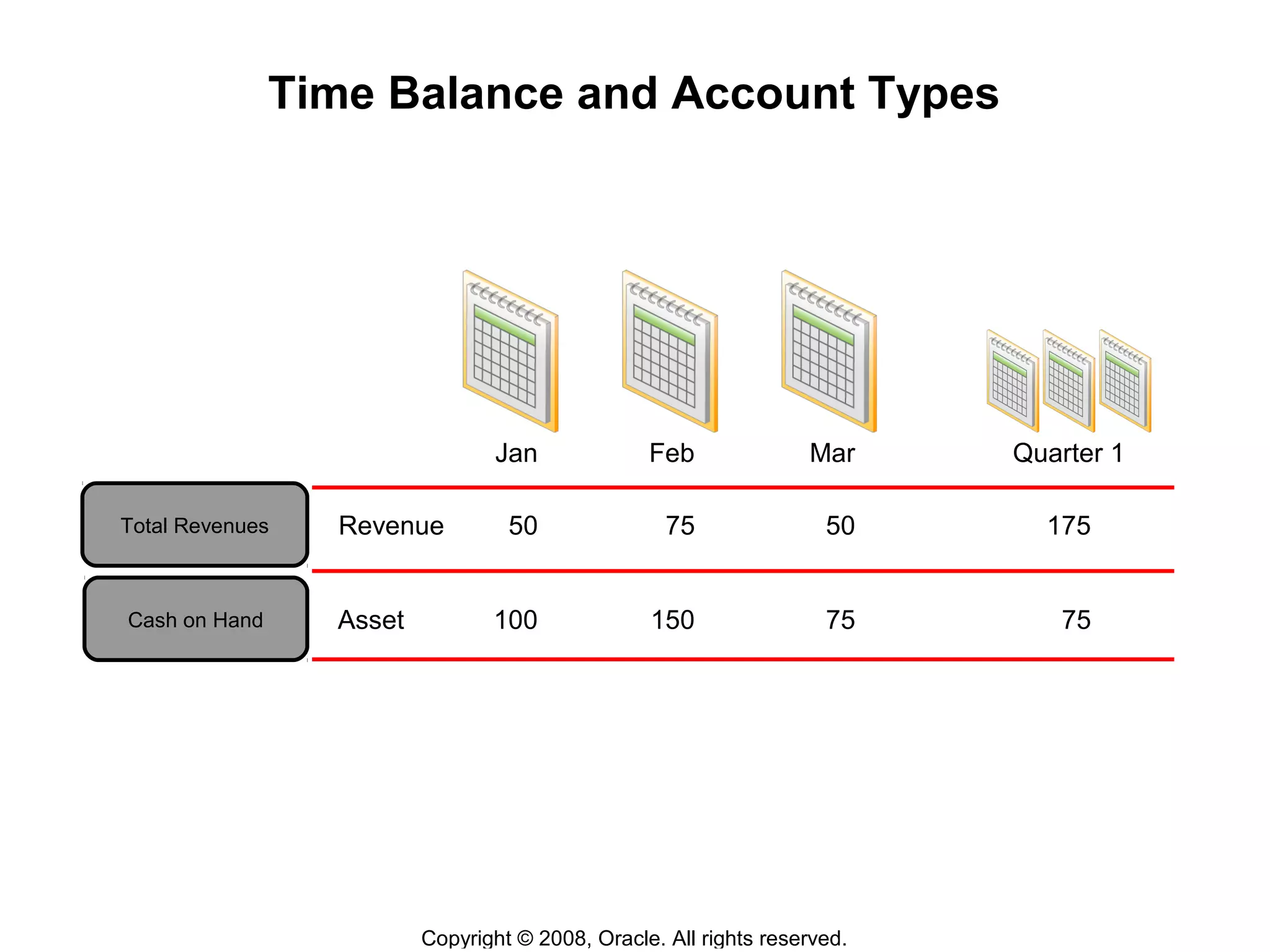
Time Balance and Account Types
Total Revenues Revenue
Cash on Hand Asset
Quarter 1
50 75 50 175
100 150 75 75
Jan Feb Mar
Copyright © 2008, Oracle. All rights reserved.
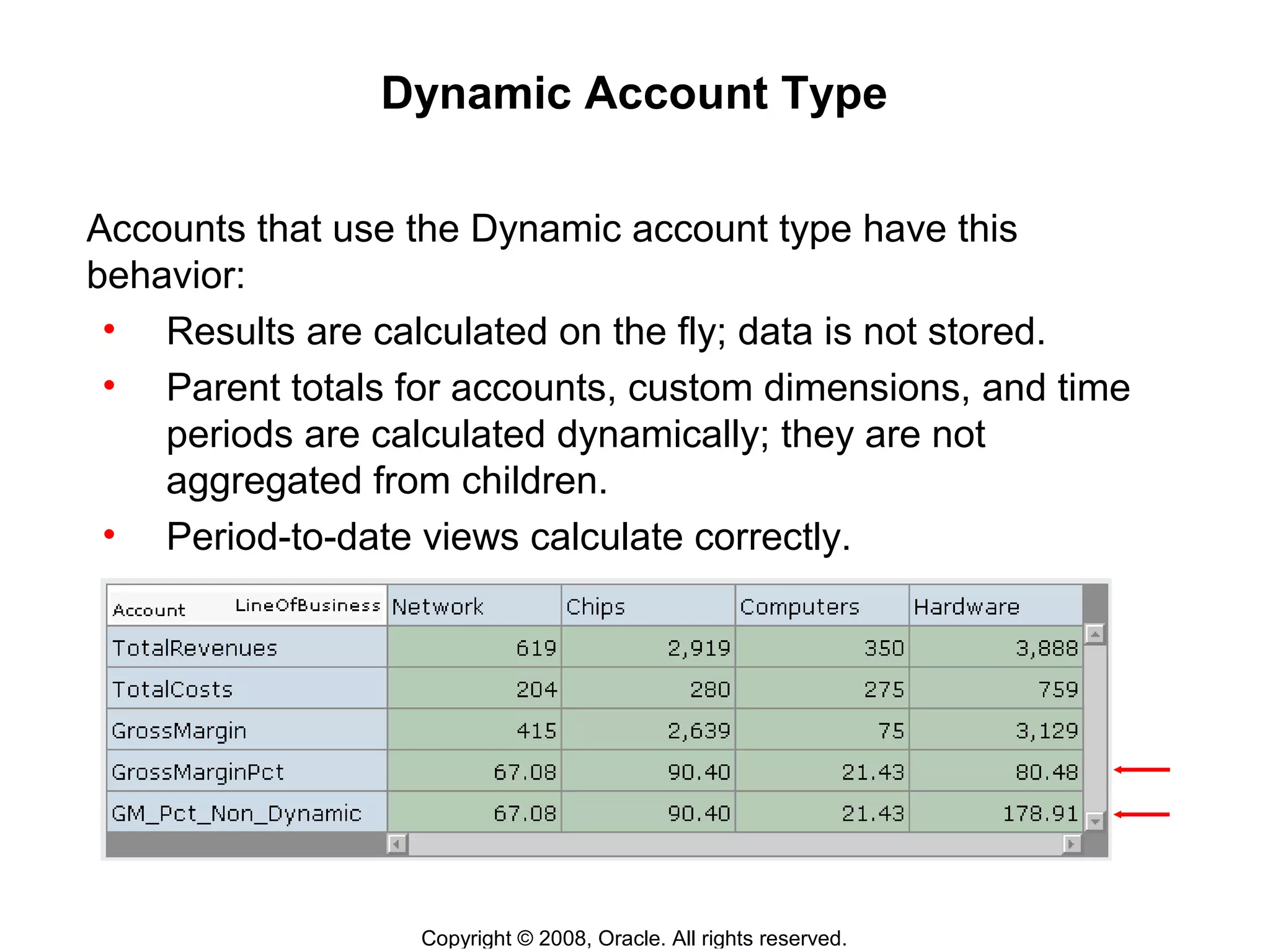
Dynamic Account Type
Accounts that use the Dynamic account type have this
behavior:
• Results are calculated on the fly; data is not stored.
• Parent totals for accounts, custom dimensions, and time
periods are calculated dynamically; they are not
aggregated from children.
• Period-to-date views calculate correctly.
Copyright © 2008, Oracle. All rights reserved.
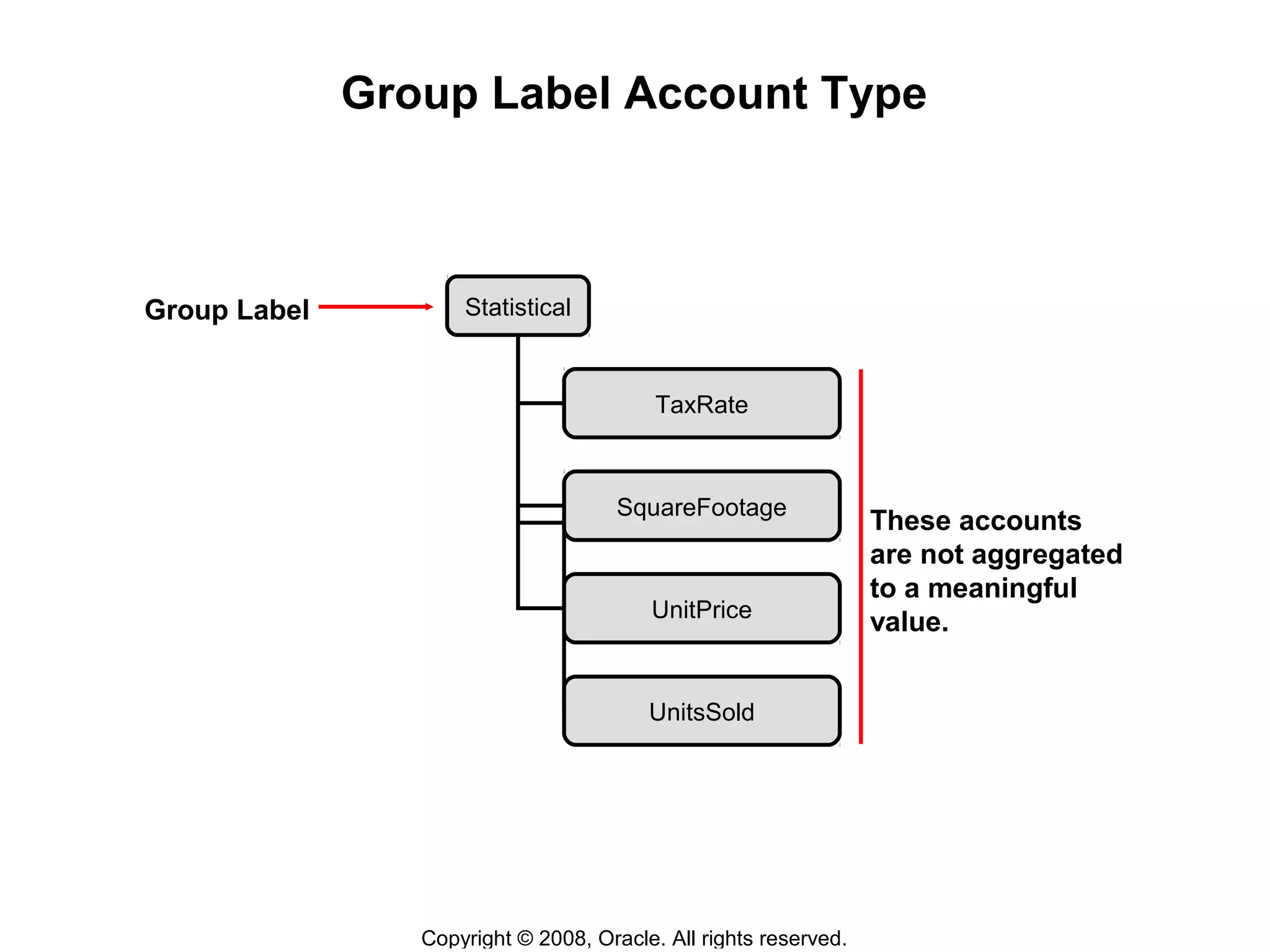
Group Label Account Type
Group Label
These accounts
are not aggregated
to a meaningful
value.
Statistical
TaxRate
SquareFootage
UnitPrice
UnitsSold
Copyright © 2008, Oracle. All rights reserved.
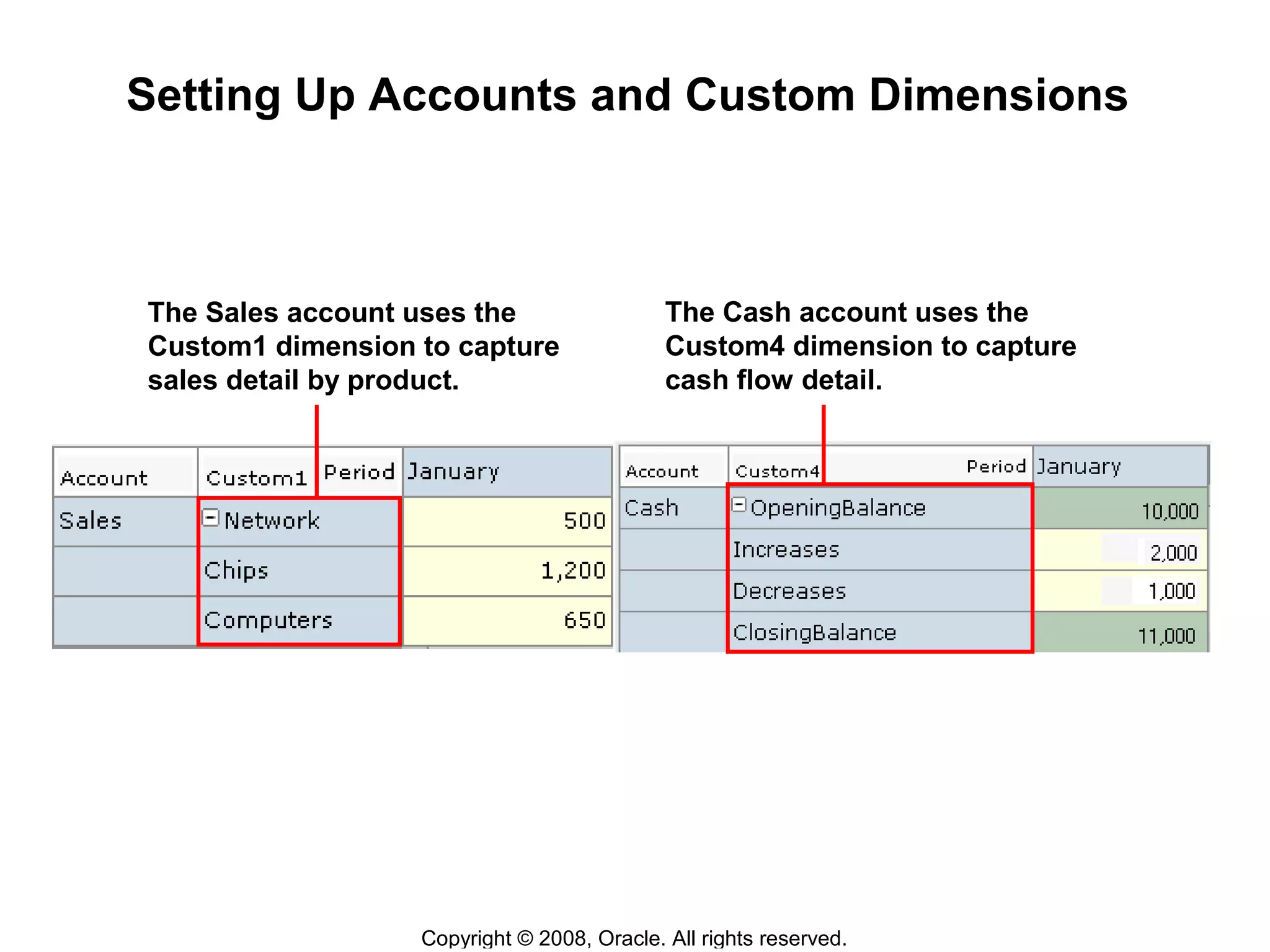
Setting Up Accounts and Custom Dimensions
The Sales account uses the
Custom1 dimension to capture
sales detail by product.
The Cash account uses the
Custom4 dimension to capture
cash flow detail.
Copyright © 2008, Oracle. All rights reserved.
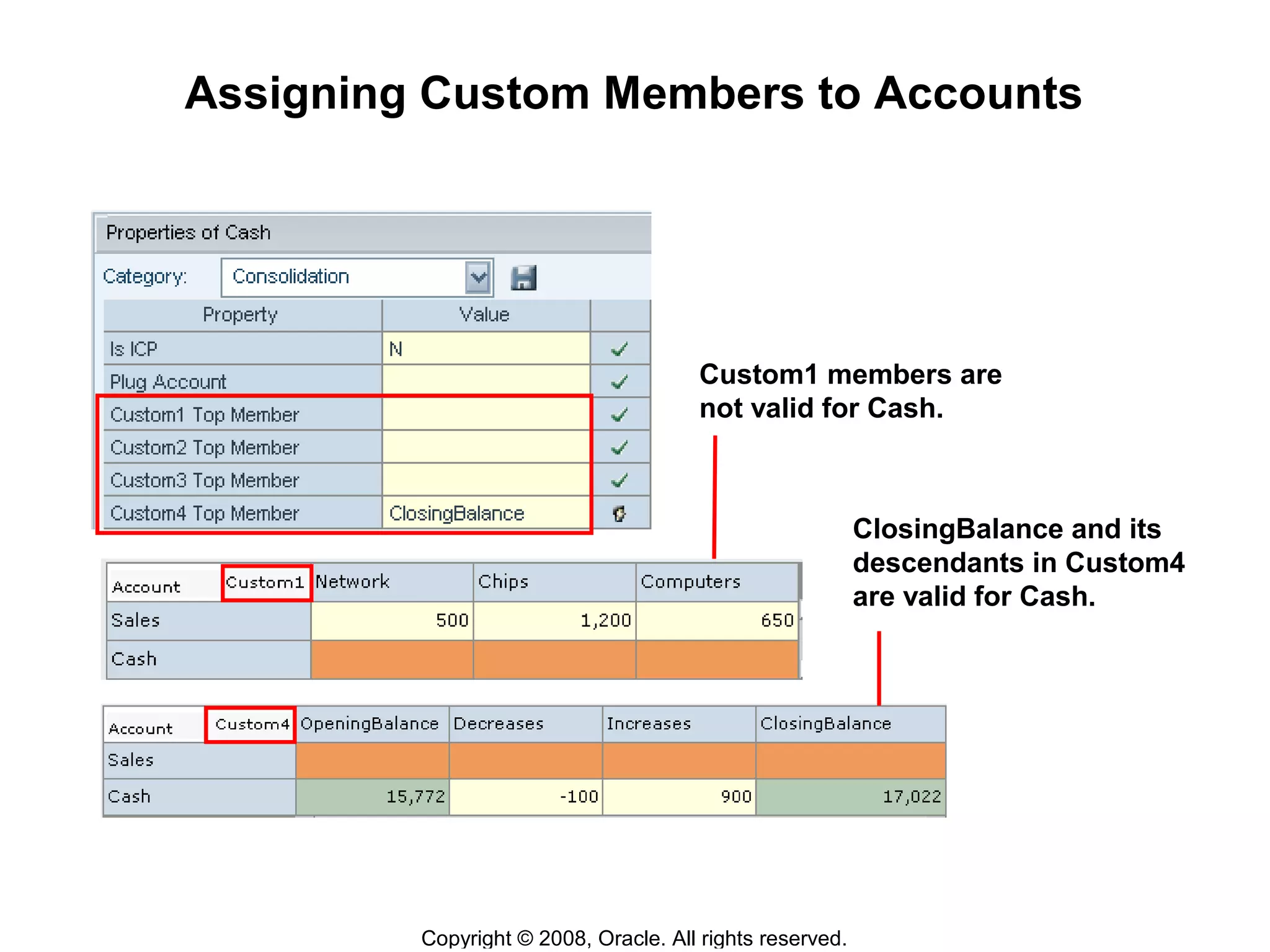
Assigning Custom Members to Accounts
Custom1 members are
not valid for Cash.
ClosingBalance and its
descendants in Custom4
are valid for Cash.
Copyright © 2008, Oracle. All rights reserved.
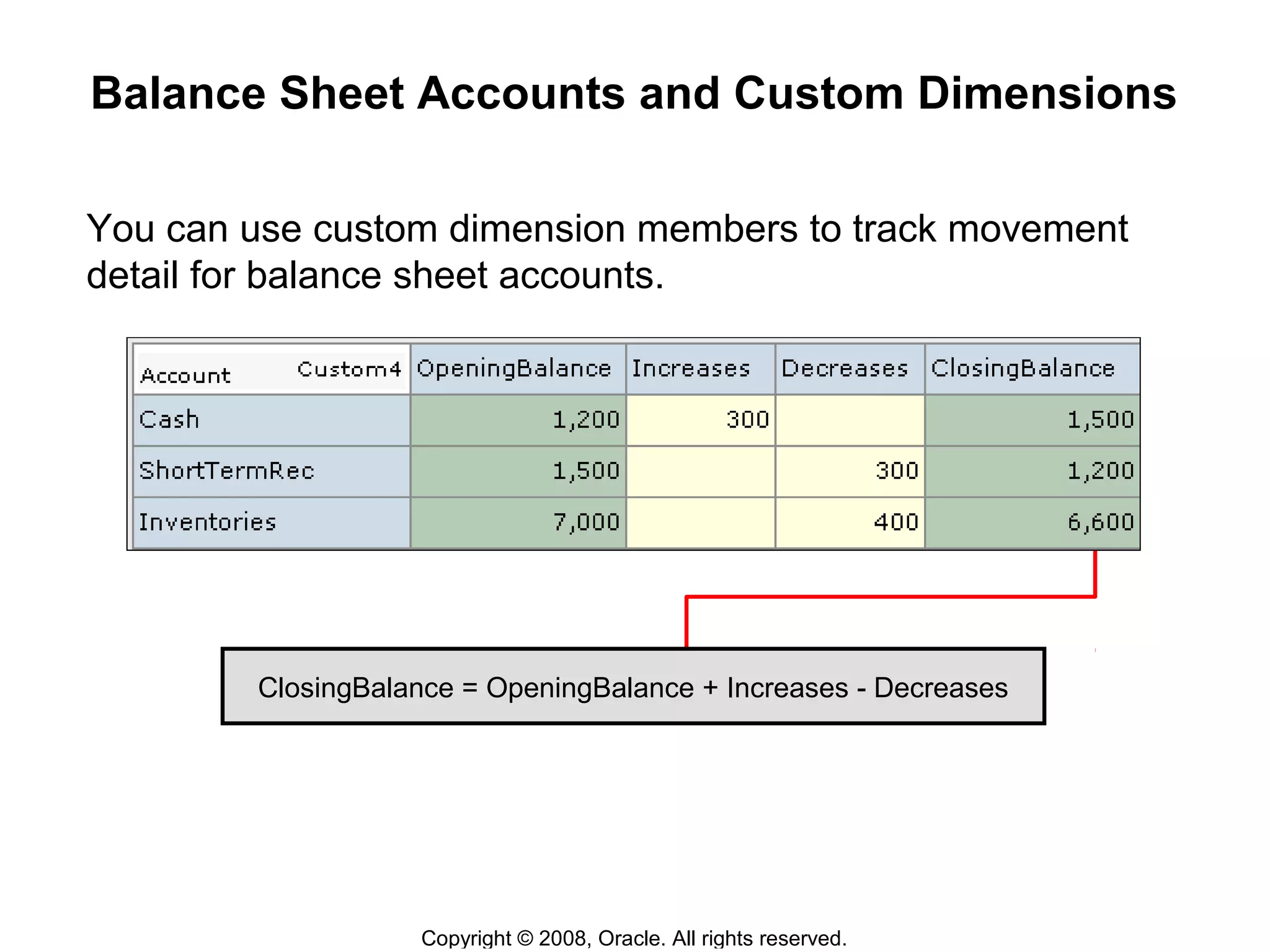
Balance Sheet Accounts and Custom Dimensions
You can use custom dimension members to track movement
detail for balance sheet accounts.
ClosingBalance = OpeningBalance + Increases - Decreases
Copyright © 2008, Oracle. All rights reserved.
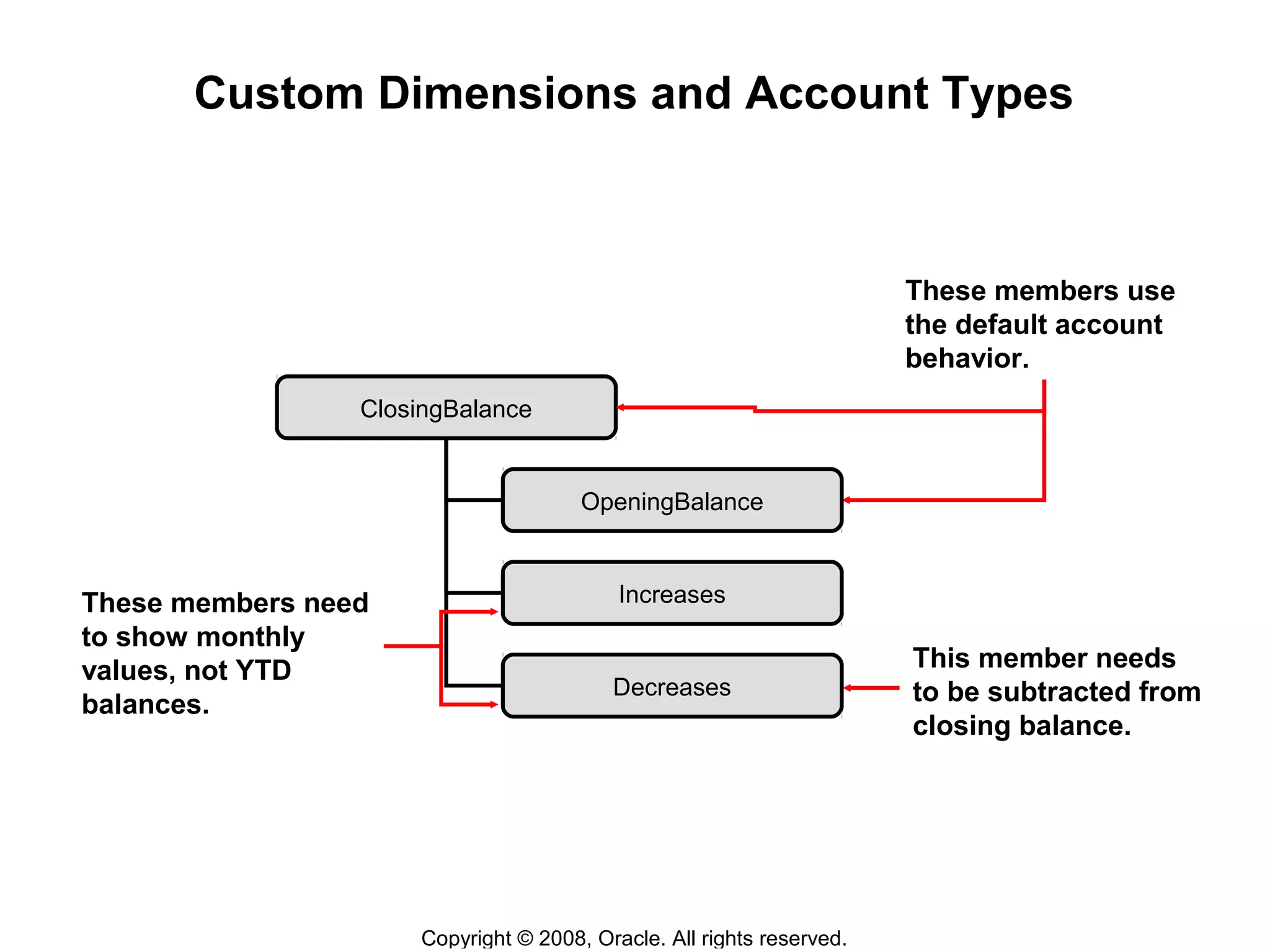
Custom Dimensions and Account Types
These members use
the default account
behavior.
These members need
to show monthly
values, not YTD
balances.
This member needs
to be subtracted from
closing balance.
ClosingBalance
OpeningBalance
Increases
Decreases
Copyright © 2008, Oracle. All rights reserved.
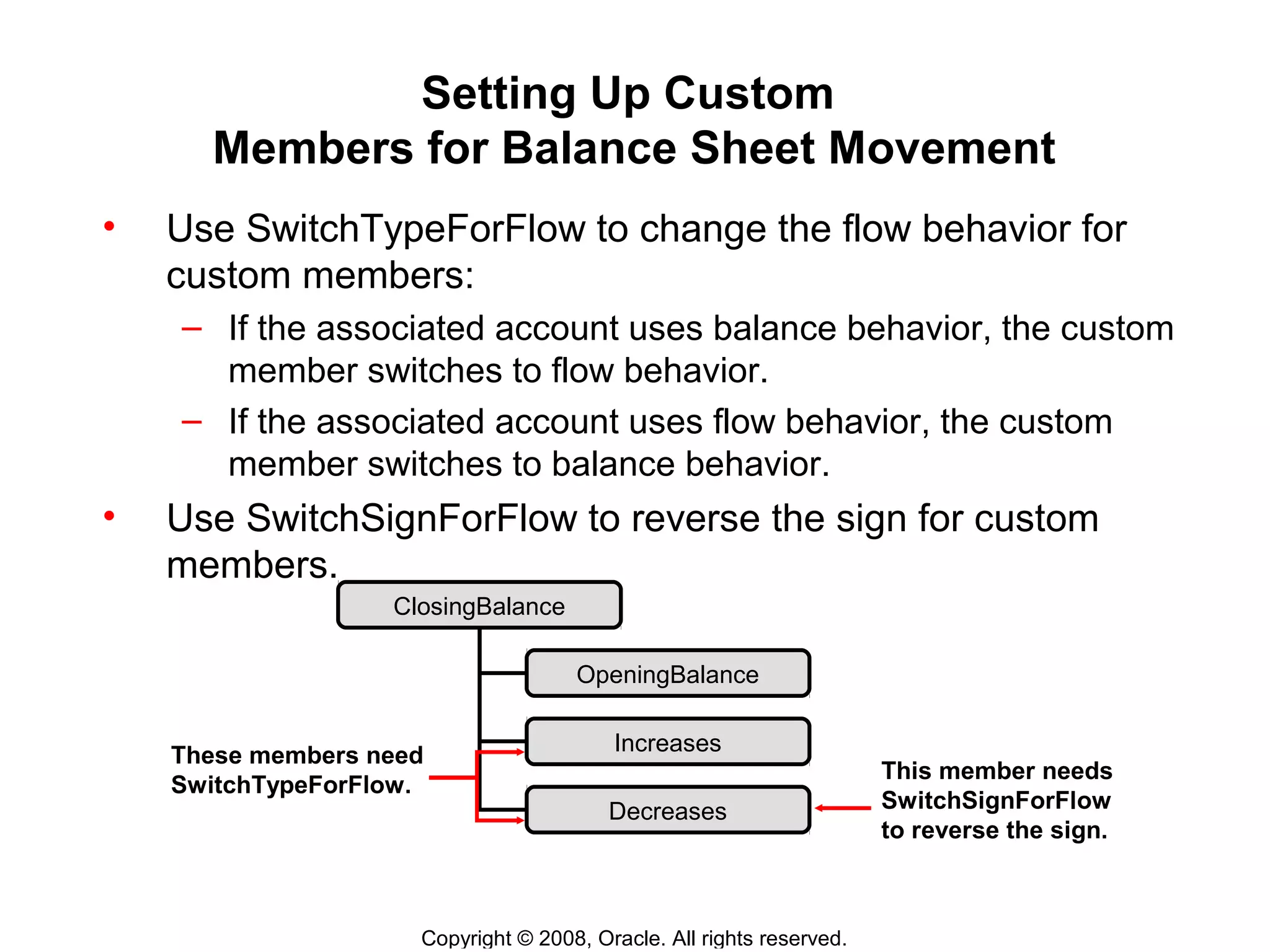
Setting Up Custom
Members for Balance Sheet Movement
• Use SwitchTypeForFlow to change the flow behavior for
custom members:
– If the associated account uses balance behavior, the custom
member switches to flow behavior.
– If the associated account uses flow behavior, the custom
member switches to balance behavior.
• Use SwitchSignForFlow to reverse the sign for custom
members.
This member needs
SwitchSignForFlow
to reverse the sign.
ClosingBalance
OpeningBalance
Increases
Decreases
These members need
SwitchTypeForFlow.
Copyright © 2008, Oracle. All rights reserved.
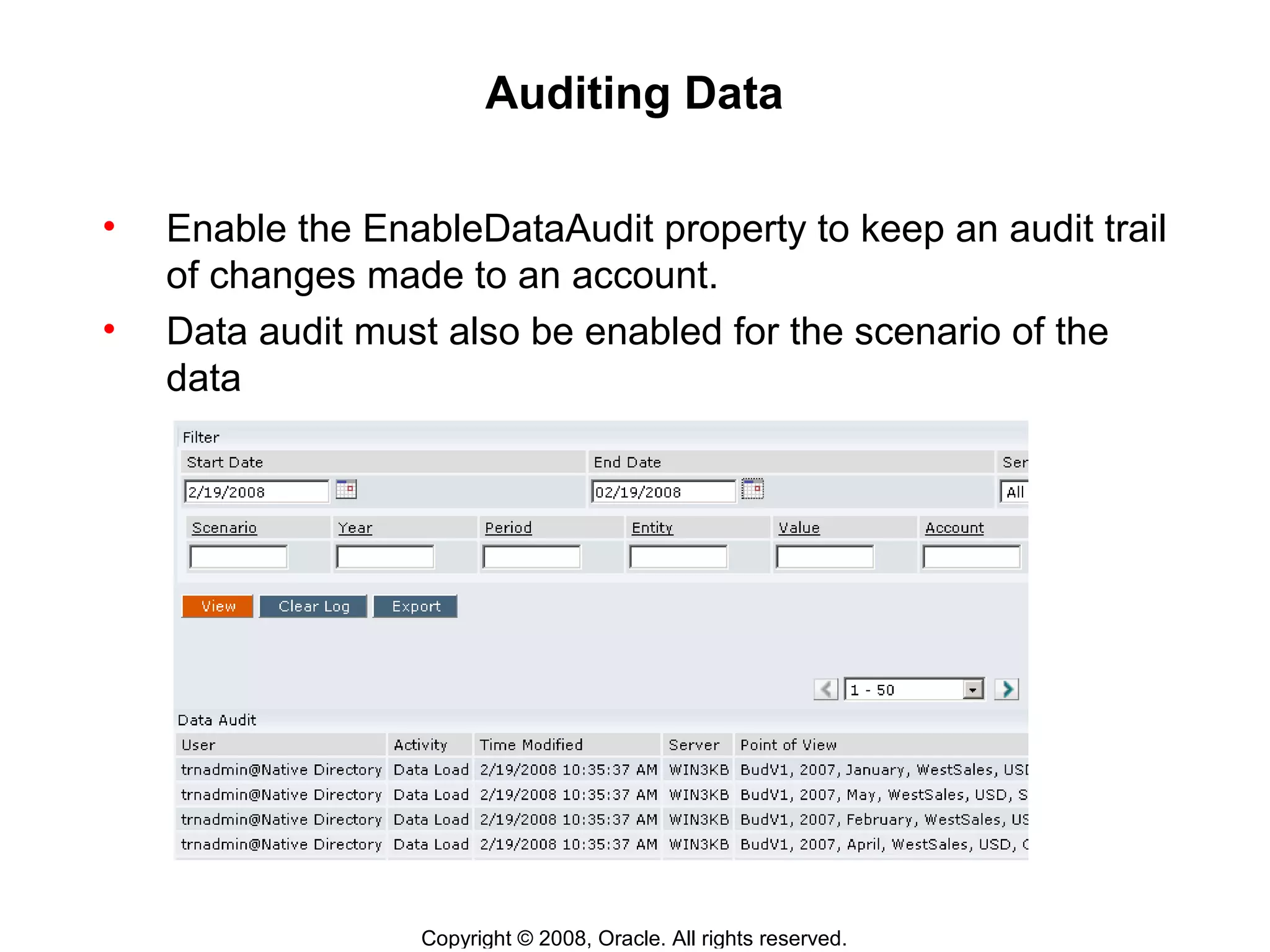
Auditing Data
• Enable the EnableDataAudit property to keep an audit trail
of changes made to an account.
• Data audit must also be enabled for the scenario of the
data
Copyright © 2008, Oracle. All rights reserved.
Intercompany Account Properties
These are the properties for intercompany accounts:
• IsICP
• PlugAcct
• ICPTopMember
Copyright © 2008, Oracle. All rights reserved.
Other Account Properties
• Additional account properties enable you to specify:
• Whether account data is calculated or input
• Whether account data is aggregated to the parent
• Whether data for custom dimensions is aggregated for the
account
• The number of decimal places
• Whether line-item detail is allowed
• Rules calculation information for the account
• The submission group for process control
Copyright © 2008, Oracle. All rights reserved.
Summary
In this lesson, you should have learned to:
• Set up accounts
• Set up custom dimensions
• Assign custom dimension members to accounts
• Audit data
• Set up Intercompany account properties

L06 accounts custom

  • 1.
    6 Copyright © 2008,Oracle. All rights reserved. Configuring Accounts and Custom Dimensions
  • 2.
    Copyright © 2008,Oracle. All rights reserved. Objectives After completing this lesson, you should be able to: • Set up accounts • Set up custom dimensions • Assign custom dimension members to accounts • Audit data • Set up Intercompany account properties
  • 3.
    Copyright © 2008,Oracle. All rights reserved. Overview: Accounts and Custom Dimensions • The Account dimension defines the chart of accounts for an application. • Custom dimensions provide additional detail for accounts. • Ten predefined account types provide built-in financial intelligence. Account Types • Asset • Balance • Liability • BalanceRecurring • Revenue • CurrencyRate • Expense • GroupLabel • Flow • Dynamic
  • 4.
    Copyright © 2008,Oracle. All rights reserved. Setting Up Account Types and Hierarchies Account types determine whether child values are added to or subtracted from their parent value. TotalRevenues are added to GrossMargin and TotalCosts are subtracted. GrossMargin TotalRevenues TotalCosts Liability Expense Asset Revenue TangibleAssetsNet TangibleAssets TangibleAssetsDepr
  • 5.
    Copyright © 2008,Oracle. All rights reserved. Time Balance and Account Types Total Revenues Revenue Cash on Hand Asset Quarter 1 50 75 50 175 100 150 75 75 Jan Feb Mar
  • 6.
    Copyright © 2008,Oracle. All rights reserved. Dynamic Account Type Accounts that use the Dynamic account type have this behavior: • Results are calculated on the fly; data is not stored. • Parent totals for accounts, custom dimensions, and time periods are calculated dynamically; they are not aggregated from children. • Period-to-date views calculate correctly.
  • 7.
    Copyright © 2008,Oracle. All rights reserved. Group Label Account Type Group Label These accounts are not aggregated to a meaningful value. Statistical TaxRate SquareFootage UnitPrice UnitsSold
  • 8.
    Copyright © 2008,Oracle. All rights reserved. Setting Up Accounts and Custom Dimensions The Sales account uses the Custom1 dimension to capture sales detail by product. The Cash account uses the Custom4 dimension to capture cash flow detail.
  • 9.
    Copyright © 2008,Oracle. All rights reserved. Assigning Custom Members to Accounts Custom1 members are not valid for Cash. ClosingBalance and its descendants in Custom4 are valid for Cash.
  • 10.
    Copyright © 2008,Oracle. All rights reserved. Balance Sheet Accounts and Custom Dimensions You can use custom dimension members to track movement detail for balance sheet accounts. ClosingBalance = OpeningBalance + Increases - Decreases
  • 11.
    Copyright © 2008,Oracle. All rights reserved. Custom Dimensions and Account Types These members use the default account behavior. These members need to show monthly values, not YTD balances. This member needs to be subtracted from closing balance. ClosingBalance OpeningBalance Increases Decreases
  • 12.
    Copyright © 2008,Oracle. All rights reserved. Setting Up Custom Members for Balance Sheet Movement • Use SwitchTypeForFlow to change the flow behavior for custom members: – If the associated account uses balance behavior, the custom member switches to flow behavior. – If the associated account uses flow behavior, the custom member switches to balance behavior. • Use SwitchSignForFlow to reverse the sign for custom members. This member needs SwitchSignForFlow to reverse the sign. ClosingBalance OpeningBalance Increases Decreases These members need SwitchTypeForFlow.
  • 13.
    Copyright © 2008,Oracle. All rights reserved. Auditing Data • Enable the EnableDataAudit property to keep an audit trail of changes made to an account. • Data audit must also be enabled for the scenario of the data
  • 14.
    Copyright © 2008,Oracle. All rights reserved. Intercompany Account Properties These are the properties for intercompany accounts: • IsICP • PlugAcct • ICPTopMember
  • 15.
    Copyright © 2008,Oracle. All rights reserved. Other Account Properties • Additional account properties enable you to specify: • Whether account data is calculated or input • Whether account data is aggregated to the parent • Whether data for custom dimensions is aggregated for the account • The number of decimal places • Whether line-item detail is allowed • Rules calculation information for the account • The submission group for process control
  • 16.
    Copyright © 2008,Oracle. All rights reserved. Summary In this lesson, you should have learned to: • Set up accounts • Set up custom dimensions • Assign custom dimension members to accounts • Audit data • Set up Intercompany account properties

Editor's Notes

  • #4 The Account dimension defines the chart of accounts for your application. The Account dimension provides 10 predefined account types. Account types determine how child accounts aggregate to their parents. They also determine how account balances accumulate over time
  • #5 When data is input to base level accounts, totals are automatically rolled up through the hierarchy Account types determines whether to add child values to or subtract them from the parent This lets you build financial calculations directly into your chart of accounts
  • #7 The dynamic accounts type is need to correctly calculating percentages for summary time periods. It is primarily used for accounts that calculate ratios and percentages For example, the Gross Percentage might be 25%, 20% and 25% for January, February and March respectively. If Gross Margin is a non-dynamic account, the Quarter 1 result would be
  • #10 You can restrict which custom members are valid for an account. For example, since the cash on hand is not tracked by product, you could restrict the Cash account so that data entry or data load into the custom dimension members for products is not allowed. Restricting custom members for an account prevents errors in data entry and reduces the database size. The TopMember field for each custom dimension on the Member Attributes tab lets you specify the member valid for an account. You specify a parent member from the custom dimension. The specified parent and its descendants will be the only members valid for data load and data entry for the account. You can enter the keyword All to make all members of the custom dimension valid for the account. If you leave the TopMember field blank for a custom dimension, no members of that dimension are valid for the account. In the illustration, Cash has no Custom1 top member assigned, so the Custom1 members are invalid for data entry and data load for Cash. The cells at the intersection for Cash and Custom1 are shaded red to indicate they are invalid. Cash has ClosingBalances assigned as the top member for Custom4, so ClosingBalance and its descendants are valid for data entry and data load for Cash.
  • #14 The following user activities are logged in the data audit: ● Data Entry ● Data Clear ● Auditing Data ● Data Copy ● Data Load The data audit log includes the following information: ● User name ● Activity performed ● Time modified ● Server name ● Point of view ● Value entered for point of view The data audit log information is stored in a table (APPNAME_DATA_AUDIT). You can back up or extract the info in the table. You should monitor the size of the log and clear it on a regular basis