APACHE TAJO
By Asis Mohanty,
CBIP, CDMP
asismohanty@gmail.com
Tajo: A Data Warehouse System
• Apache Top Level Project
• Distributed and scalable data warehouse system on Hadoop
• Low latency and long running batch queries in a single system
• Features:
 ANSI/ISO SQL compliance
 Mature SQL features: Join, Group by, Order By, Aggregation
and windows functions
 Supports Partition table
 Supports Java/Python, UDF
 JDBC & Java based asynchronous API
 Supports Read/Write of CSV, JSON, RCFile, Sequential file,
Parquet and ORC
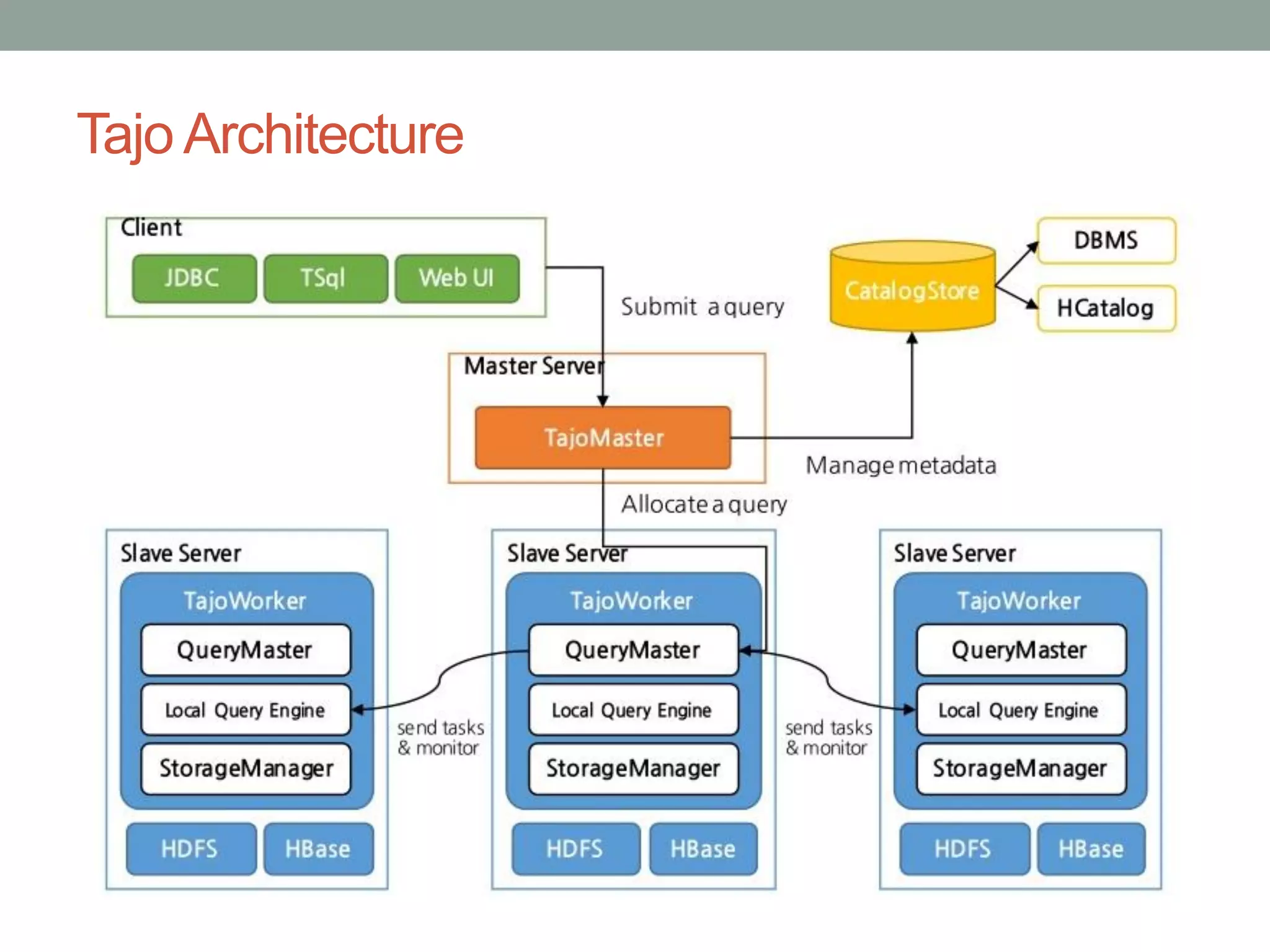
Tajo Architecture
Where to use Tajo
• Extraction, Transformation, Loading (ETL)
• Interactive BI/ Analytics on web-scale Big Data
• Data Discovery/ Exploratory analysis with R and existing SQL tools
• Query federation
• Customer wants a unified system for batch and interactive queries
on Hadoop, Amazon S3 or Hbase
• Customer wants to use mixed use of Hadoop-based DW and
RDBMS-based DW or want to replace RDBMS DW.
• Customer wants to use existing SQL tools on Hadoop DW
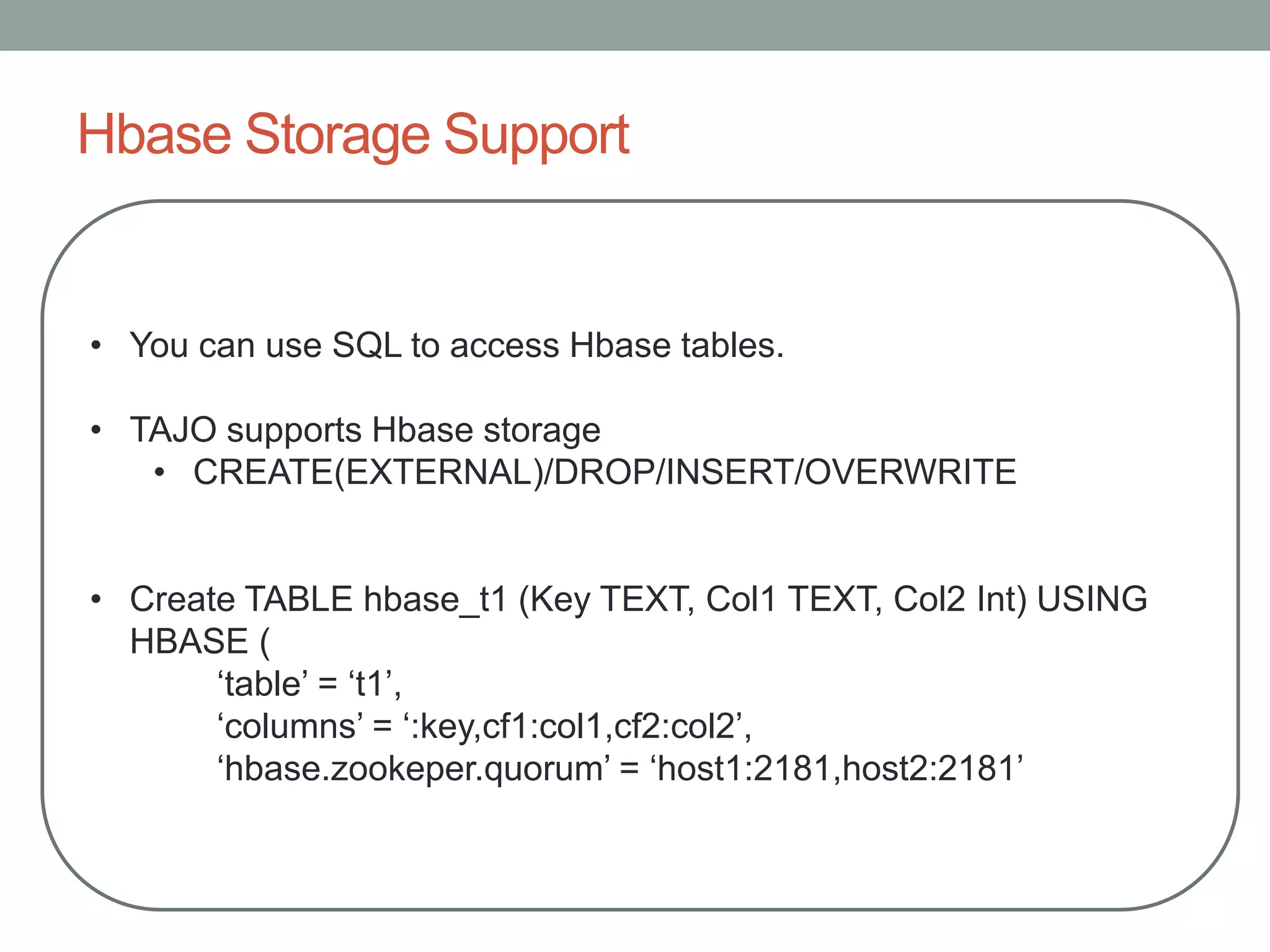
Hbase Storage Support
• You can use SQL to access Hbase tables.
• TAJO supports Hbase storage
• CREATE(EXTERNAL)/DROP/INSERT/OVERWRITE
• Create TABLE hbase_t1 (Key TEXT, Col1 TEXT, Col2 Int) USING
HBASE (
‘table’ = ‘t1’,
‘columns’ = ‘:key,cf1:col1,cf2:col2’,
‘hbase.zookeper.quorum’ = ‘host1:2181,host2:2181’
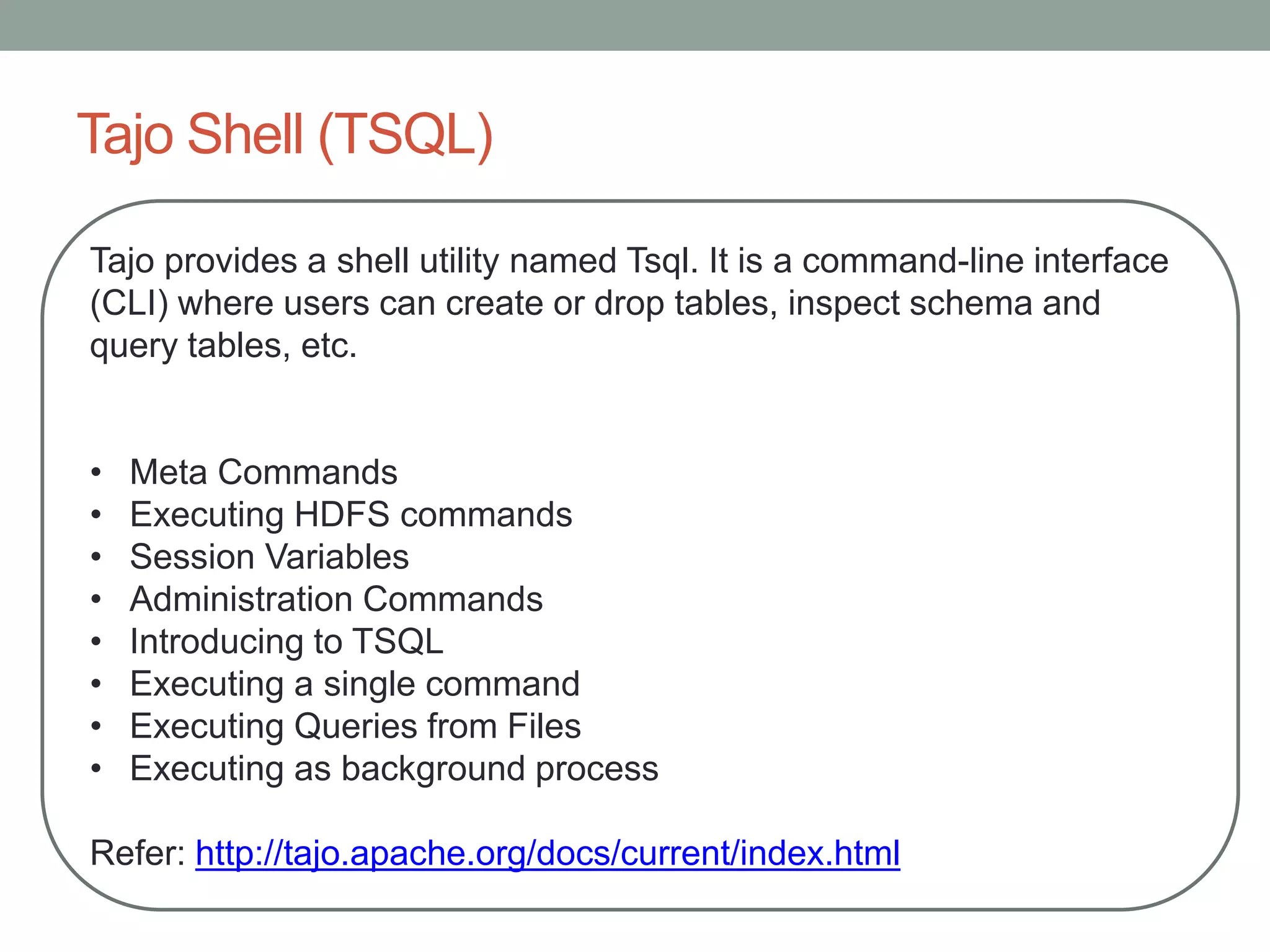
Tajo Shell (TSQL)
Tajo provides a shell utility named Tsql. It is a command-line interface
(CLI) where users can create or drop tables, inspect schema and
query tables, etc.
• Meta Commands
• Executing HDFS commands
• Session Variables
• Administration Commands
• Introducing to TSQL
• Executing a single command
• Executing Queries from Files
• Executing as background process
Refer: http://tajo.apache.org/docs/current/index.html
Tajo SQL Language (DDL)
CREATE DATABASE
CREATE DATABASE [IF NOT EXISTS] <database_name>
DROP DATABASE
DROP DATABASE [IF EXISTS] <database_name>
CREATE TABLE
CREATE TABLE [IF NOT EXISTS] <table_name> [(<column_name> <data_type>, ... )]
[using <storage_type> [with (<key> = <value>, ...)]] [AS <select_statement>]
CREATE EXTERNAL TABLE [IF NOT EXISTS] <table_name> (<column_name> <data_type>, ... )
using <storage_type> [with (<key> = <value>, ...)] LOCATION '<path>'
Compression
L_ORDERKEY bigint,
L_PARTKEY bigint,
...
L_COMMENT text)
USING TEXT WITH ('text.delimiter'='|','compression.codec'='org.apache.hadoop.io.compress.DeflateCodec')
LOCATION 'hdfs://localhost:9010/tajo/warehouse/lineitem_100_snappy';
DROP TABLE
DROP TABLE [IF EXISTS] <table_name> [PURGE]
CREATE INDEX
CREATE INDEX [ name ] ON table_name [ USING method ]
( { column_name | ( expression ) } [ ASC | DESC ] [ NULLS { FIRST | LAST } ] [, ...] )
[ WHERE predicate ]
DROP INDEX
DROP INDEX name
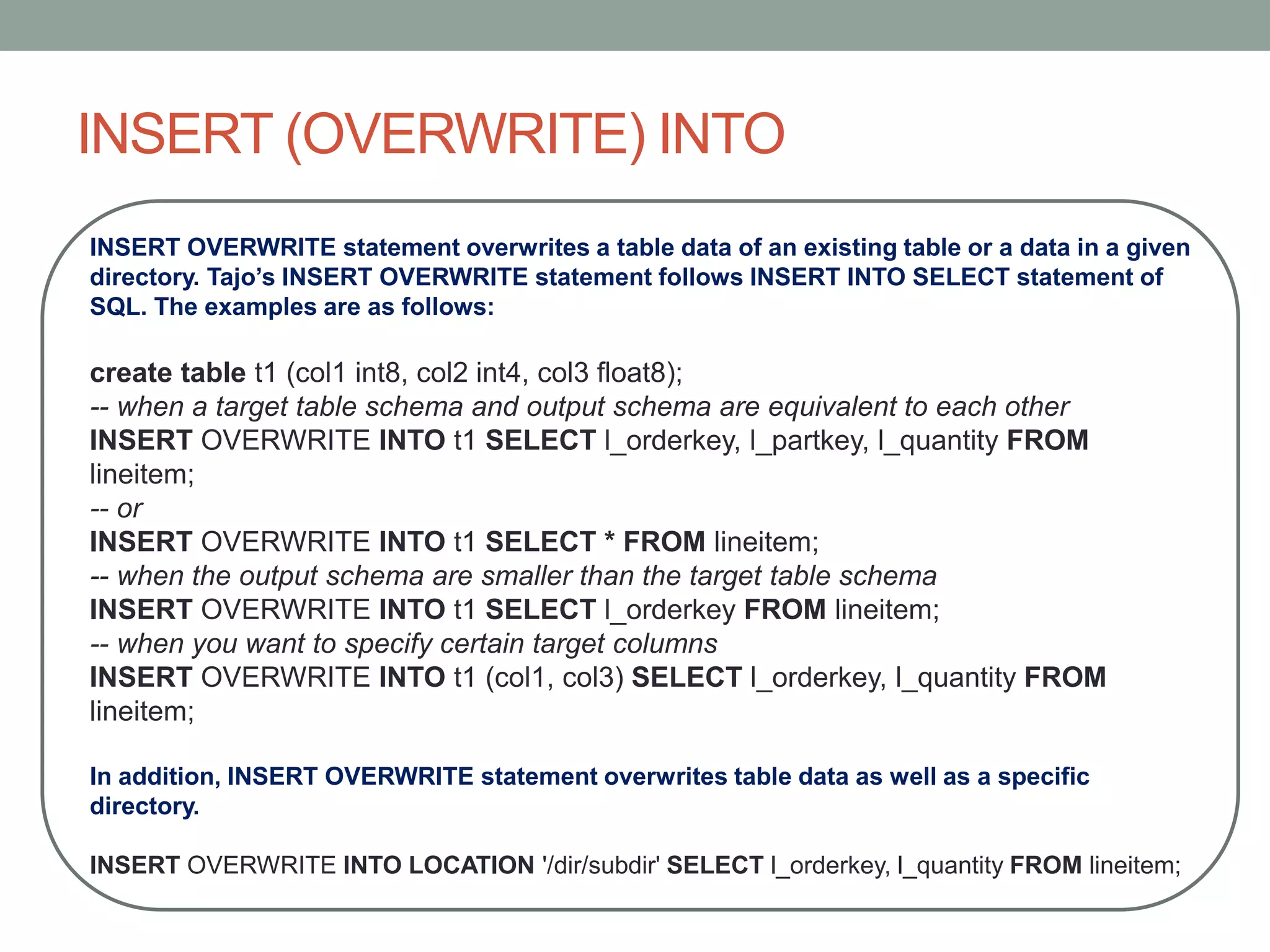
INSERT (OVERWRITE) INTO
INSERT OVERWRITE statement overwrites a table data of an existing table or a data in a given
directory. Tajo’s INSERT OVERWRITE statement follows INSERT INTO SELECT statement of
SQL. The examples are as follows:
create table t1 (col1 int8, col2 int4, col3 float8);
-- when a target table schema and output schema are equivalent to each other
INSERT OVERWRITE INTO t1 SELECT l_orderkey, l_partkey, l_quantity FROM
lineitem;
-- or
INSERT OVERWRITE INTO t1 SELECT * FROM lineitem;
-- when the output schema are smaller than the target table schema
INSERT OVERWRITE INTO t1 SELECT l_orderkey FROM lineitem;
-- when you want to specify certain target columns
INSERT OVERWRITE INTO t1 (col1, col3) SELECT l_orderkey, l_quantity FROM
lineitem;
In addition, INSERT OVERWRITE statement overwrites table data as well as a specific
directory.
INSERT OVERWRITE INTO LOCATION '/dir/subdir' SELECT l_orderkey, l_quantity FROM lineitem;
Tajo Queries
Sample Query
SELECT [distinct [all]] * | <expression> [[AS] <alias>] [, ...]
[FROM <table reference> [[AS] <table alias name>] [, ...]]
[WHERE <condition>]
[GROUP BY <expression> [, ...]]
[HAVING <condition>]
[ORDER BY <expression> [ASC|DESC] [NULL FIRST|NULL LAST] [, ...]]
Table and Table Aliases
A temporary name can be given to tables and complex table references to be used for references to
the derived table in the rest of the query. This is called a table alias.
FROM table_reference AS alias or FROM table_reference alias
Window Functions
A window function performs a calculation across multiple table rows that belong to some window
frame.
SELECT ...., func(param) OVER ([PARTITION BY partition-expr [, ...]] [ORDER BY sort-expr [, ...]]),
...., FROM
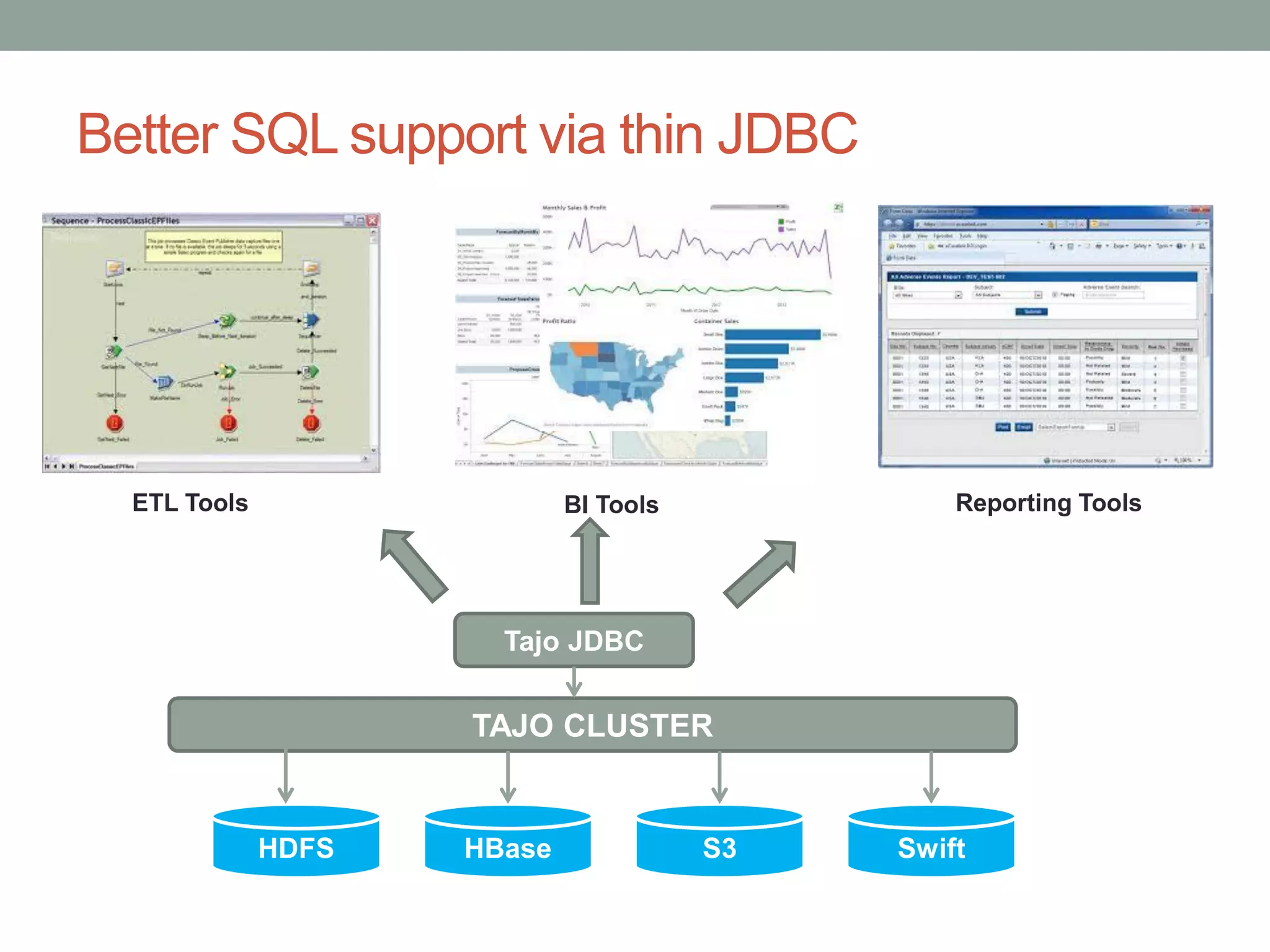
Better SQL support via thin JDBC
ETL Tools BI Tools Reporting Tools
TAJO CLUSTER
Tajo JDBC
HDFS HBase S3 Swift
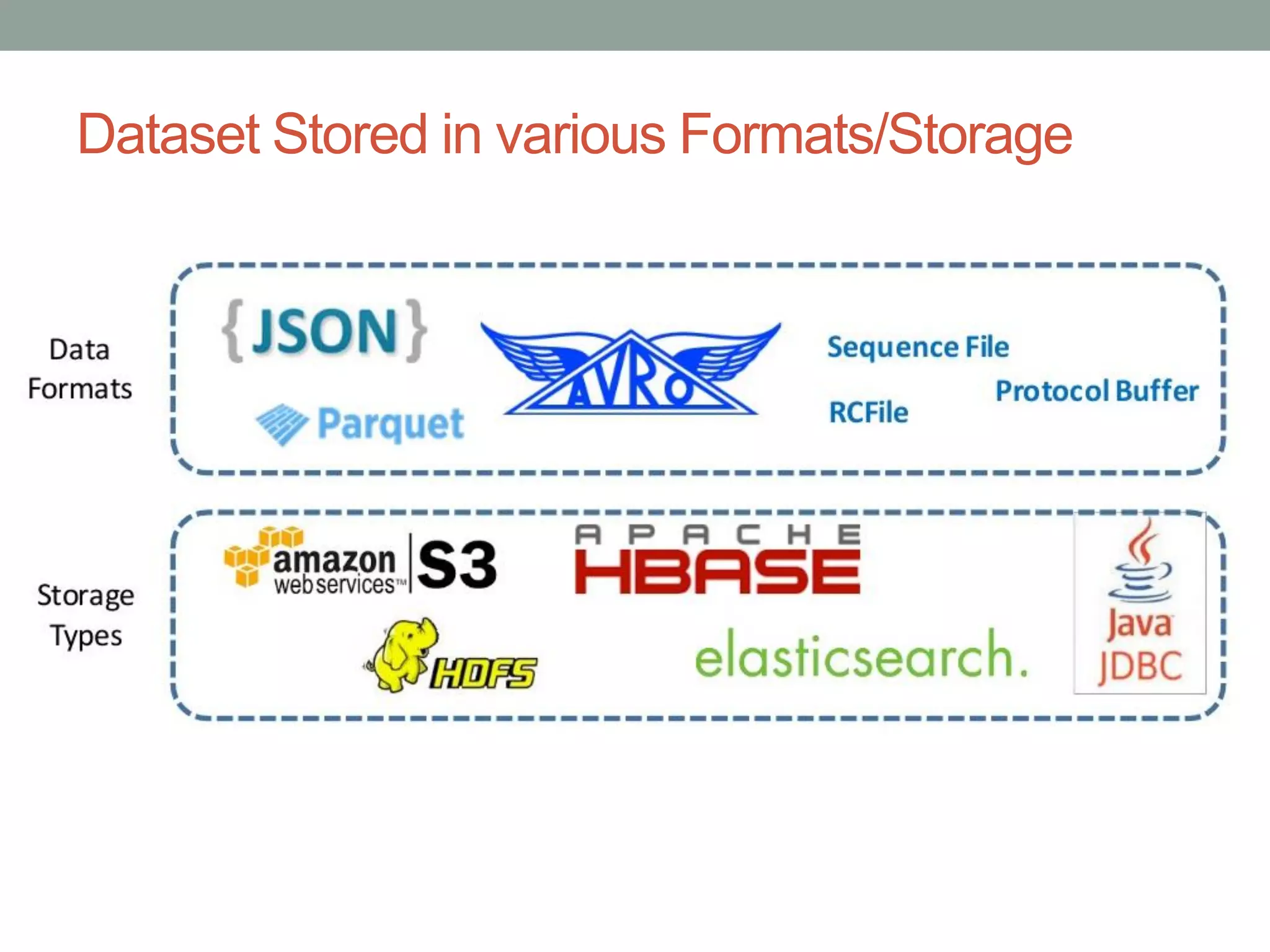
Dataset Stored in various Formats/Storage
Which one to choose
Impala Vs Presto Vs Drill Vs Tajo

Apache TAJO

  • 1.
    APACHE TAJO By AsisMohanty, CBIP, CDMP asismohanty@gmail.com
  • 2.
    Tajo: A DataWarehouse System • Apache Top Level Project • Distributed and scalable data warehouse system on Hadoop • Low latency and long running batch queries in a single system • Features:  ANSI/ISO SQL compliance  Mature SQL features: Join, Group by, Order By, Aggregation and windows functions  Supports Partition table  Supports Java/Python, UDF  JDBC & Java based asynchronous API  Supports Read/Write of CSV, JSON, RCFile, Sequential file, Parquet and ORC
  • 3.
  • 4.
    Where to useTajo • Extraction, Transformation, Loading (ETL) • Interactive BI/ Analytics on web-scale Big Data • Data Discovery/ Exploratory analysis with R and existing SQL tools • Query federation • Customer wants a unified system for batch and interactive queries on Hadoop, Amazon S3 or Hbase • Customer wants to use mixed use of Hadoop-based DW and RDBMS-based DW or want to replace RDBMS DW. • Customer wants to use existing SQL tools on Hadoop DW
  • 5.
    Hbase Storage Support •You can use SQL to access Hbase tables. • TAJO supports Hbase storage • CREATE(EXTERNAL)/DROP/INSERT/OVERWRITE • Create TABLE hbase_t1 (Key TEXT, Col1 TEXT, Col2 Int) USING HBASE ( ‘table’ = ‘t1’, ‘columns’ = ‘:key,cf1:col1,cf2:col2’, ‘hbase.zookeper.quorum’ = ‘host1:2181,host2:2181’
  • 6.
    Tajo Shell (TSQL) Tajoprovides a shell utility named Tsql. It is a command-line interface (CLI) where users can create or drop tables, inspect schema and query tables, etc. • Meta Commands • Executing HDFS commands • Session Variables • Administration Commands • Introducing to TSQL • Executing a single command • Executing Queries from Files • Executing as background process Refer: http://tajo.apache.org/docs/current/index.html
  • 7.
    Tajo SQL Language(DDL) CREATE DATABASE CREATE DATABASE [IF NOT EXISTS] <database_name> DROP DATABASE DROP DATABASE [IF EXISTS] <database_name> CREATE TABLE CREATE TABLE [IF NOT EXISTS] <table_name> [(<column_name> <data_type>, ... )] [using <storage_type> [with (<key> = <value>, ...)]] [AS <select_statement>] CREATE EXTERNAL TABLE [IF NOT EXISTS] <table_name> (<column_name> <data_type>, ... ) using <storage_type> [with (<key> = <value>, ...)] LOCATION '<path>' Compression L_ORDERKEY bigint, L_PARTKEY bigint, ... L_COMMENT text) USING TEXT WITH ('text.delimiter'='|','compression.codec'='org.apache.hadoop.io.compress.DeflateCodec') LOCATION 'hdfs://localhost:9010/tajo/warehouse/lineitem_100_snappy'; DROP TABLE DROP TABLE [IF EXISTS] <table_name> [PURGE] CREATE INDEX CREATE INDEX [ name ] ON table_name [ USING method ] ( { column_name | ( expression ) } [ ASC | DESC ] [ NULLS { FIRST | LAST } ] [, ...] ) [ WHERE predicate ] DROP INDEX DROP INDEX name
  • 8.
    INSERT (OVERWRITE) INTO INSERTOVERWRITE statement overwrites a table data of an existing table or a data in a given directory. Tajo’s INSERT OVERWRITE statement follows INSERT INTO SELECT statement of SQL. The examples are as follows: create table t1 (col1 int8, col2 int4, col3 float8); -- when a target table schema and output schema are equivalent to each other INSERT OVERWRITE INTO t1 SELECT l_orderkey, l_partkey, l_quantity FROM lineitem; -- or INSERT OVERWRITE INTO t1 SELECT * FROM lineitem; -- when the output schema are smaller than the target table schema INSERT OVERWRITE INTO t1 SELECT l_orderkey FROM lineitem; -- when you want to specify certain target columns INSERT OVERWRITE INTO t1 (col1, col3) SELECT l_orderkey, l_quantity FROM lineitem; In addition, INSERT OVERWRITE statement overwrites table data as well as a specific directory. INSERT OVERWRITE INTO LOCATION '/dir/subdir' SELECT l_orderkey, l_quantity FROM lineitem;
  • 9.
    Tajo Queries Sample Query SELECT[distinct [all]] * | <expression> [[AS] <alias>] [, ...] [FROM <table reference> [[AS] <table alias name>] [, ...]] [WHERE <condition>] [GROUP BY <expression> [, ...]] [HAVING <condition>] [ORDER BY <expression> [ASC|DESC] [NULL FIRST|NULL LAST] [, ...]] Table and Table Aliases A temporary name can be given to tables and complex table references to be used for references to the derived table in the rest of the query. This is called a table alias. FROM table_reference AS alias or FROM table_reference alias Window Functions A window function performs a calculation across multiple table rows that belong to some window frame. SELECT ...., func(param) OVER ([PARTITION BY partition-expr [, ...]] [ORDER BY sort-expr [, ...]]), ...., FROM
  • 10.
    Better SQL supportvia thin JDBC ETL Tools BI Tools Reporting Tools TAJO CLUSTER Tajo JDBC HDFS HBase S3 Swift
  • 11.
    Dataset Stored invarious Formats/Storage
  • 12.
    Which one tochoose Impala Vs Presto Vs Drill Vs Tajo