MONTREAL JUNE 30, JULY 1ST AND 2ND 2012


Apache FTP Server integration
Yoann Canal - twitter.com/y_canal
Sophiacom
Agenda

•   Apache FTP Server overview

•   First step: integration in your project

•   Authentication through WebObjects

•   FTPLet: what’s that?

•   Q&A
Preamble

•   The Apache project is not well documented :-(

•   You get almost nothing when you google “Apache FTP Server
    WebObjects”

•   FTP Server has been designed with Spring in mind


➡ This session will not show you a reusable framework but the
     goal is to give you our feedback with some piece of code
Apache FTP Server overview
FTP Server Overview

Except from project web page:

The Apache FtpServer is a 100% pure Java FTP server. It's designed to be a complete and
portable FTP server engine solution based on currently available open protocols. FtpServer
can be run standalone as a Windows service or Unix/Linux daemon, or embedded into a
Java application.We also provide support for integration within Spring applications and
provide our releases as OSGi bundles.
Documentation and download: http://mina.apache.org/ftpserver/
FTP Server Overview

•   Current release is 1.06 (posted on Jul 16, 2011)

•   Url to download:
    http://mina.apache.org/ftpserver/apache-ftpserver-106-
    release.html

•   No dependancies with other libraries
Basic Integration
Project Setup

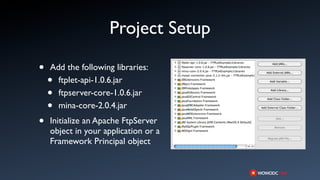
•   Add the following libraries:
    • ftplet-api-1.0.6.jar
    • ftpserver-core-1.0.6.jar
    • mina-core-2.0.4.jar
•   Initialize an Apache FtpServer
    object in your application or a
    Framework Principal object
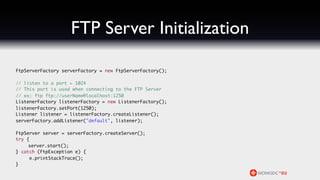
FTP Server Initialization

	   FtpServerFactory serverFactory = new FtpServerFactory();

	   // listen to a port > 1024
	   // This port is used when connecting to the FTP Server
	   // ex: ftp ftp://userName@localhost:1250
	   ListenerFactory listenerFactory = new ListenerFactory();
	   listenerFactory.setPort(1250);
	   Listener listener = listenerFactory.createListener();
	   serverFactory.addListener("default", listener);

	   FtpServer server = serverFactory.createServer();
	   try {
	        server.start();
	   } catch (FtpException e) {
	        e.printStackTrace();
	   }
Authentication through
    WebObjects
Authentication

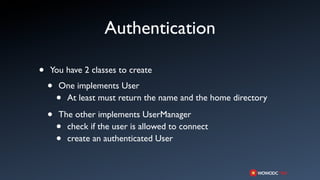
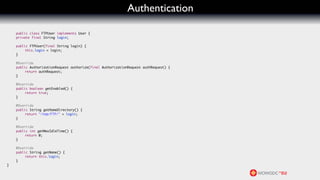
•   You have 2 classes to create

    •   One implements User
        •At least must return the name and the home directory

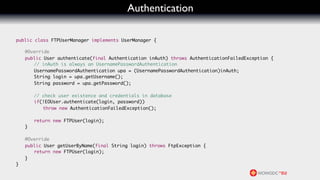
    •   The other implements UserManager
        • check if the user is allowed to connect
        • create an authenticated User
Authentication

    public class FTPUser implements User {
	   private final String login;

	   public FTPUser(final String login) {
	   	    this.login = login;
	   }

	   @Override
	   public AuthorizationRequest authorize(final AuthorizationRequest authRequest) {
	   	    return authRequest;
	   }

	   @Override
	   public boolean getEnabled() {
	   	    return true;
	   }

	   @Override
	   public String getHomeDirectory() {
	   	    return "/tmp/FTP/" + login;
	   }

	   @Override
	   public int getMaxIdleTime() {
	   	    return 0;
	   }

	   @Override
	   public String getName() {
	   	    return this.login;
	   }
}
Authentication

    	
	   public class FTPUserManager implements UserManager {

	   	   @Override
	   	   public User authenticate(final Authentication inAuth) throws AuthenticationFailedException {
	   	   	 // inAuth is always an UsernamePasswordAuthentication
	   	   	 UsernamePasswordAuthentication upa = (UsernamePasswordAuthentication)inAuth;
	   	   	 String login = upa.getUsername();
	   	   	 String password = upa.getPassword();

	   	   	   // check user existence and credentials in database
	   	   	   if(!EOUser.authenticate(login, password))
	   	   	   	 throw new AuthenticationFailedException();

	   	   	   return new FTPUser(login);
	   	   }

	   	   @Override
	   	   public User getUserByName(final String login) throws FtpException {
	   	   	 return new FTPUser(login);
	   	   }
	   }
Authentication


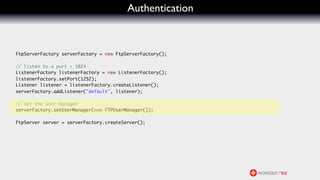
	   FtpServerFactory serverFactory = new FtpServerFactory();

	   // listen to a port > 1024
	   ListenerFactory listenerFactory = new ListenerFactory();
	   listenerFactory.setPort(1252);
	   Listener listener = listenerFactory.createListener();
	   serverFactory.addListener("default", listener);

	   // set the user manager
	   serverFactory.setUserManager(new FTPUserManager());

	   FtpServer server = serverFactory.createServer();
FTPLet
FTPLet

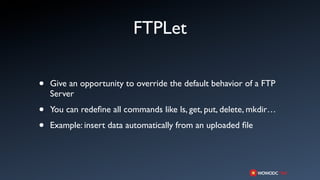
•   Give an opportunity to override the default behavior of a FTP
    Server

•   You can redefine all commands like ls, get, put, delete, mkdir…

•   Example: insert data automatically from an uploaded file
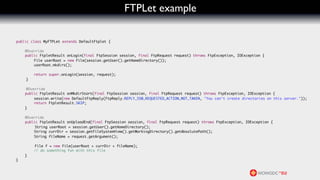
FTPLet example

	   public class MyFTPLet extends DefaultFtplet {

	   	    @Override
	   	    public FtpletResult onLogin(final FtpSession session, final FtpRequest request) throws FtpException, IOException {
	   	    	   File userRoot = new File(session.getUser().getHomeDirectory());
	   	    	   userRoot.mkdirs();

	   	    	    return super.onLogin(session, request);
	         }

	         @Override
	   	    public FtpletResult onMkdirStart(final FtpSession session, final FtpRequest request) throws FtpException, IOException {
	   	    	    session.write(new DefaultFtpReply(FtpReply.REPLY_550_REQUESTED_ACTION_NOT_TAKEN, "You can't create directories on this server."));
	   	    	    return FtpletResult.SKIP;
	   	    }

	   	    @Override
	   	    public FtpletResult onUploadEnd(final FtpSession session, final FtpRequest request) throws FtpException, IOException {
	    	        String userRoot = session.getUser().getHomeDirectory();
	   	    	   String currDir = session.getFileSystemView().getWorkingDirectory().getAbsolutePath();
	   	    	   String fileName = request.getArgument();

	    	        File f = new File(userRoot + currDir + fileName);
	   	    	    // do something fun with this file
	   	    }
	   }
MONTREAL JUNE 30, JULY 1ST AND 2ND 2012


Q&A

Apache FTP Server Integration

  • 1.
    MONTREAL JUNE 30,JULY 1ST AND 2ND 2012 Apache FTP Server integration Yoann Canal - twitter.com/y_canal Sophiacom
  • 2.
    Agenda • Apache FTP Server overview • First step: integration in your project • Authentication through WebObjects • FTPLet: what’s that? • Q&A
  • 3.
    Preamble • The Apache project is not well documented :-( • You get almost nothing when you google “Apache FTP Server WebObjects” • FTP Server has been designed with Spring in mind ➡ This session will not show you a reusable framework but the goal is to give you our feedback with some piece of code
  • 4.
  • 5.
    FTP Server Overview Exceptfrom project web page: The Apache FtpServer is a 100% pure Java FTP server. It's designed to be a complete and portable FTP server engine solution based on currently available open protocols. FtpServer can be run standalone as a Windows service or Unix/Linux daemon, or embedded into a Java application.We also provide support for integration within Spring applications and provide our releases as OSGi bundles. Documentation and download: http://mina.apache.org/ftpserver/
  • 6.
    FTP Server Overview • Current release is 1.06 (posted on Jul 16, 2011) • Url to download: http://mina.apache.org/ftpserver/apache-ftpserver-106- release.html • No dependancies with other libraries
  • 7.
  • 8.
    Project Setup • Add the following libraries: • ftplet-api-1.0.6.jar • ftpserver-core-1.0.6.jar • mina-core-2.0.4.jar • Initialize an Apache FtpServer object in your application or a Framework Principal object
  • 9.
    FTP Server Initialization FtpServerFactory serverFactory = new FtpServerFactory(); // listen to a port > 1024 // This port is used when connecting to the FTP Server // ex: ftp ftp://userName@localhost:1250 ListenerFactory listenerFactory = new ListenerFactory(); listenerFactory.setPort(1250); Listener listener = listenerFactory.createListener(); serverFactory.addListener("default", listener); FtpServer server = serverFactory.createServer(); try { server.start(); } catch (FtpException e) { e.printStackTrace(); }
  • 10.
  • 11.
    Authentication • You have 2 classes to create • One implements User •At least must return the name and the home directory • The other implements UserManager • check if the user is allowed to connect • create an authenticated User
  • 12.
    Authentication public class FTPUser implements User { private final String login; public FTPUser(final String login) { this.login = login; } @Override public AuthorizationRequest authorize(final AuthorizationRequest authRequest) { return authRequest; } @Override public boolean getEnabled() { return true; } @Override public String getHomeDirectory() { return "/tmp/FTP/" + login; } @Override public int getMaxIdleTime() { return 0; } @Override public String getName() { return this.login; } }
  • 13.
    Authentication public class FTPUserManager implements UserManager { @Override public User authenticate(final Authentication inAuth) throws AuthenticationFailedException { // inAuth is always an UsernamePasswordAuthentication UsernamePasswordAuthentication upa = (UsernamePasswordAuthentication)inAuth; String login = upa.getUsername(); String password = upa.getPassword(); // check user existence and credentials in database if(!EOUser.authenticate(login, password)) throw new AuthenticationFailedException(); return new FTPUser(login); } @Override public User getUserByName(final String login) throws FtpException { return new FTPUser(login); } }
  • 14.
    Authentication FtpServerFactory serverFactory = new FtpServerFactory(); // listen to a port > 1024 ListenerFactory listenerFactory = new ListenerFactory(); listenerFactory.setPort(1252); Listener listener = listenerFactory.createListener(); serverFactory.addListener("default", listener); // set the user manager serverFactory.setUserManager(new FTPUserManager()); FtpServer server = serverFactory.createServer();
  • 15.
  • 16.
    FTPLet • Give an opportunity to override the default behavior of a FTP Server • You can redefine all commands like ls, get, put, delete, mkdir… • Example: insert data automatically from an uploaded file
  • 17.
    FTPLet example public class MyFTPLet extends DefaultFtplet { @Override public FtpletResult onLogin(final FtpSession session, final FtpRequest request) throws FtpException, IOException { File userRoot = new File(session.getUser().getHomeDirectory()); userRoot.mkdirs(); return super.onLogin(session, request); } @Override public FtpletResult onMkdirStart(final FtpSession session, final FtpRequest request) throws FtpException, IOException { session.write(new DefaultFtpReply(FtpReply.REPLY_550_REQUESTED_ACTION_NOT_TAKEN, "You can't create directories on this server.")); return FtpletResult.SKIP; } @Override public FtpletResult onUploadEnd(final FtpSession session, final FtpRequest request) throws FtpException, IOException { String userRoot = session.getUser().getHomeDirectory(); String currDir = session.getFileSystemView().getWorkingDirectory().getAbsolutePath(); String fileName = request.getArgument(); File f = new File(userRoot + currDir + fileName); // do something fun with this file } }
  • 18.
    MONTREAL JUNE 30,JULY 1ST AND 2ND 2012 Q&A