NR Computer Learning Center
1835 W. Orangewood Ave . #200 . Orange . CA 92868
www.nrclc.com . (714) 505-3475
Course Description
 This Hands-on introductory-level course enables students to learn the basics of Java
programming to build applications.
 This course introduces the modern programming concepts and other design
methodologies using Java.
 Discusses the concepts of good software design and methods.
 Design programs using object oriented problem solving techniques.
 Use the concepts of different types of structured programming.
 Learn to use flowchart and pseudo-code to decompose a complex problem.
 Develop algorithms using different methods.
 This is also an excellent introductory course for students who are planning to start
a career in software development or planning to take AP Computer Science exam
or preparing for Microsoft Technology Associate (MTA) Certification Exam.
 Pre-requisite: Computer Basic or equivalent
Benefits
By the end of the course students will have learned:
 The modern programming concepts and other design methodologies
using Java.
 The concepts of good software design and methods.
To design programs using Object Oriented problem solving techniques.
To use flowchart and pseudo-code to decompose a complex problem.
To develop algorithms using different methods.
To develop software using various programming techniques.
This is an excellent introductory course for students who are planning
to start a career in software development or take an AP® Course in
Computer Science or preparing for Microsoft Technology Associate
(MTA) Certification Exam.
Topics
Introduction to Java
Setting up Java Environment
Writing Java Code
Compiling and running Java
Program
Rules for writing Java Code
Header
Comments
Warning Messages
Beginning of the program
Defining Variable
Introduction to Flow Chart
Examples of Flowcharting
Simple and Complex Statement
Variable
Data Types
Expression
Numerical Variable
Mathematical Operators
Assignment Operators
Escape Sequence
Relational Operation
Logical Operators & Expression
If statement (If, If … else .. , If …
else if …else … )
The Conditional Operator “? … :”
The keyword “switch”
For Statement
The Comma Operator
The while statement
The do while statement
The break Command
The continue Command
Creating an Array
Defining an Array Dimension
Assigning a value to an array
element
Modifying the value in an array
Topics
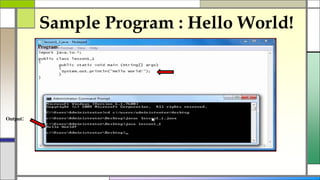
Sample Program : Hello World!
Program:
Output:
public class Demo_Exception {
public static double division(int a, int b) throws ArithmeticException {
If ( b == 0 ) {
throw new ArithmeticException();
}
return (a/b);
}
public static void main(String[] args) {
int x = 50;
int y = 0;
double z = 0;
try {
z = division(x, y);
System.out.println(z);
}
catch (ArithmeticException e) {
System.out.println("Can't Divide By Zero!");
}
}
}
Sample Program :Exception Handling
Program:
Output: Can't Divide By Zero!
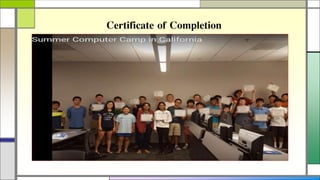
Certificate of Completion
Register at:
NR Computer Learning Center
1835 W. Orangewood Ave, #200,
Orange, Ca 92868
Or
www.nrclc.com
Or
Call: (714) 505-3475

AP Computer Science Test Prep Part 1 - Introduction to java Programming

  • 1.
    NR Computer LearningCenter 1835 W. Orangewood Ave . #200 . Orange . CA 92868 www.nrclc.com . (714) 505-3475
  • 3.
    Course Description  ThisHands-on introductory-level course enables students to learn the basics of Java programming to build applications.  This course introduces the modern programming concepts and other design methodologies using Java.  Discusses the concepts of good software design and methods.  Design programs using object oriented problem solving techniques.  Use the concepts of different types of structured programming.  Learn to use flowchart and pseudo-code to decompose a complex problem.  Develop algorithms using different methods.  This is also an excellent introductory course for students who are planning to start a career in software development or planning to take AP Computer Science exam or preparing for Microsoft Technology Associate (MTA) Certification Exam.  Pre-requisite: Computer Basic or equivalent
  • 4.
    Benefits By the endof the course students will have learned:  The modern programming concepts and other design methodologies using Java.  The concepts of good software design and methods. To design programs using Object Oriented problem solving techniques. To use flowchart and pseudo-code to decompose a complex problem. To develop algorithms using different methods. To develop software using various programming techniques. This is an excellent introductory course for students who are planning to start a career in software development or take an AP® Course in Computer Science or preparing for Microsoft Technology Associate (MTA) Certification Exam.
  • 5.
    Topics Introduction to Java Settingup Java Environment Writing Java Code Compiling and running Java Program Rules for writing Java Code Header Comments Warning Messages Beginning of the program Defining Variable Introduction to Flow Chart Examples of Flowcharting Simple and Complex Statement Variable Data Types Expression Numerical Variable
  • 6.
    Mathematical Operators Assignment Operators EscapeSequence Relational Operation Logical Operators & Expression If statement (If, If … else .. , If … else if …else … ) The Conditional Operator “? … :” The keyword “switch” For Statement The Comma Operator The while statement The do while statement The break Command The continue Command Creating an Array Defining an Array Dimension Assigning a value to an array element Modifying the value in an array Topics
  • 7.
    Sample Program :Hello World! Program: Output:
  • 8.
    public class Demo_Exception{ public static double division(int a, int b) throws ArithmeticException { If ( b == 0 ) { throw new ArithmeticException(); } return (a/b); } public static void main(String[] args) { int x = 50; int y = 0; double z = 0; try { z = division(x, y); System.out.println(z); } catch (ArithmeticException e) { System.out.println("Can't Divide By Zero!"); } } } Sample Program :Exception Handling Program: Output: Can't Divide By Zero!
  • 9.
  • 10.
    Register at: NR ComputerLearning Center 1835 W. Orangewood Ave, #200, Orange, Ca 92868 Or www.nrclc.com Or Call: (714) 505-3475