
ANSWER CALL
EFFECTIVELY &
EFFICIENTLY
BY :
TEAM LEADER HAIRI
TEAM LEADER ZAKI
TEAM LEADER RAZZIF
LEARNING OUTCOMES
By the end of this session, you will be
able to :
a. Answer call appropriately.
b. Solve customer’s problem.
c. Do report.
TELEPHONE COURTESY
The moment you answer the call :
 You are your company.
 You are the front line.
 Your behaviour throughout the call reflect the
company image.
 You have to use “Sir” , “Thank you” ,
“ Please” during the conversation.
Tips :
a. Avoid mumbling. Say Yes instead.
b. Listen carefully.
c. Resist temptation to interrupt.
STEP FOR ANSWERING CALL
STEP 1: GREETING
Use your first name when answering the phone, along
with a standard professional greeting.
In Bahasa : Terima kasih kerana menghubungi TM,
(nama anda) bercakap. Boleh saya bantu?
In English : Thank you for calling TM, (your name)
speaking. How may I assist you?
Tips:
a. Speak politely and clearly.
b. Smile while you speak.
c. Don’t rush!
STEP FOR ANSWERING CALL
STEP 2: DESIGNATION
Get the customer’s name. Remember the
caller’s name and address him / her
appropriately.
In Bahasa: Dato’ / Datin/ Encik / Puan / Cik
In English: Dato’ /Datin / Mr / Mrs / Ms
Tips:
a. Write his / her name immediately.
b. Control your voice.
STEP FOR ANSWERING CALL
STEP 3: SOLUTION
Provide solution for customer:
a. Product Knowledge
b. Troubleshoot
c. General Info
Tips :
a. Ensure understand product,
troubleshoot and general info.
b. Give information needed.
3A. PRODUCT KNOWLEDGE
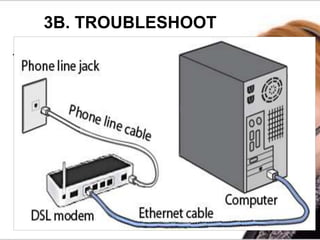
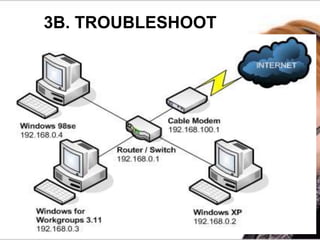
3B. TROUBLESHOOT
1. HARDWARE
a. Modem Faulty
- Look at LED light (colour & blink).
b. Splitter
- Check for functionality.
c. Telephone & Network Cable
- Check for functionality.
3B. TROUBLESHOOT
2. LINE
a. Local Area Network (LAN)
- check at PC or Modem.
b. Telephone Line
- check for ring tone.
3C. GENERAL INFO
 Billing
 Technical
 Move Address
 Warranty
 Miscellaneous
Tips:
a. Be patient and listen to what the
customer is saying.
b. Avoid providing an answer before
customer finished speaking.
STEP FOR ANSWERING CALL
STEP 4: HOLD A CALL
Ask permission or inform before putting a caller on
hold. Try not to keep a caller on hold for a long time.
Maximum 30 seconds.
In Bahasa : Saya akan letakkan Encik / Puan dalam
talian menunggu sementara saya mendapatkan
maklumat.
In English : I will put your call on hold while I get the
information needed.
Tips :
a. Avoid using words or acronyms that
customer may not understand.
b. Be empathetic and remain calm &
professional.
STEP FOR ANSWERING CALL
STEP 5: CLOSE CONVERSATION.
Be helpful. Volunteer help. Don’t wait to be
asked. Don’t forget to end call politely.
In Bahasa : Ada apa-apa lagi yang boleh saya bantu?
…….. Terima kasih kerana menghubungi TM. Bye
In English : Is there anything else I can assist you?
……… Thank you for calling TM. Have a nice day.
Tips :
a. Don’t forget to smile.
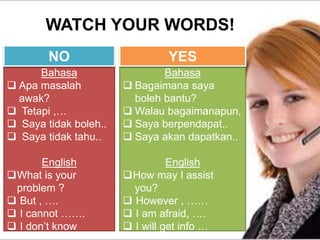
WATCH YOUR WORDS!
Bahasa
 Apa masalah
awak?
 Tetapi ,…
 Saya tidak boleh..
 Saya tidak tahu..
English
What is your
problem ?
 But , ….
 I cannot …….
 I don’t know
Bahasa
 Bagaimana saya
boleh bantu?
 Walau bagaimanapun,
 Saya berpendapat..
 Saya akan dapatkan..
English
How may I assist
you?
 However , ……
 I am afraid, ….
 I will get info …
NO YES
REPORT
 Report must be done per call
basis.
 Use Notepad with information of :
a. Date and time of call
b. Detail info of caller
c. Point of Conversation
d. Suggestion
REPORT
1. Open Notepad.
2. Press F5 (for automatically
insert date and time).
3. Insert Caller Info.
4. Insert Conversation.
5. Summary.

Answer call effectively

  • 1.
    ANSWER CALL EFFECTIVELY & EFFICIENTLY BY: TEAM LEADER HAIRI TEAM LEADER ZAKI TEAM LEADER RAZZIF
  • 2.
    LEARNING OUTCOMES By theend of this session, you will be able to : a. Answer call appropriately. b. Solve customer’s problem. c. Do report.
  • 3.
    TELEPHONE COURTESY The momentyou answer the call :  You are your company.  You are the front line.  Your behaviour throughout the call reflect the company image.  You have to use “Sir” , “Thank you” , “ Please” during the conversation. Tips : a. Avoid mumbling. Say Yes instead. b. Listen carefully. c. Resist temptation to interrupt.
  • 4.
    STEP FOR ANSWERINGCALL STEP 1: GREETING Use your first name when answering the phone, along with a standard professional greeting. In Bahasa : Terima kasih kerana menghubungi TM, (nama anda) bercakap. Boleh saya bantu? In English : Thank you for calling TM, (your name) speaking. How may I assist you? Tips: a. Speak politely and clearly. b. Smile while you speak. c. Don’t rush!
  • 5.
    STEP FOR ANSWERINGCALL STEP 2: DESIGNATION Get the customer’s name. Remember the caller’s name and address him / her appropriately. In Bahasa: Dato’ / Datin/ Encik / Puan / Cik In English: Dato’ /Datin / Mr / Mrs / Ms Tips: a. Write his / her name immediately. b. Control your voice.
  • 6.
    STEP FOR ANSWERINGCALL STEP 3: SOLUTION Provide solution for customer: a. Product Knowledge b. Troubleshoot c. General Info Tips : a. Ensure understand product, troubleshoot and general info. b. Give information needed.
  • 7.
  • 8.
    3B. TROUBLESHOOT 1. HARDWARE a.Modem Faulty - Look at LED light (colour & blink). b. Splitter - Check for functionality. c. Telephone & Network Cable - Check for functionality.
  • 9.
    3B. TROUBLESHOOT 2. LINE a.Local Area Network (LAN) - check at PC or Modem. b. Telephone Line - check for ring tone.
  • 10.
    3C. GENERAL INFO Billing  Technical  Move Address  Warranty  Miscellaneous Tips: a. Be patient and listen to what the customer is saying. b. Avoid providing an answer before customer finished speaking.
  • 11.
    STEP FOR ANSWERINGCALL STEP 4: HOLD A CALL Ask permission or inform before putting a caller on hold. Try not to keep a caller on hold for a long time. Maximum 30 seconds. In Bahasa : Saya akan letakkan Encik / Puan dalam talian menunggu sementara saya mendapatkan maklumat. In English : I will put your call on hold while I get the information needed. Tips : a. Avoid using words or acronyms that customer may not understand. b. Be empathetic and remain calm & professional.
  • 12.
    STEP FOR ANSWERINGCALL STEP 5: CLOSE CONVERSATION. Be helpful. Volunteer help. Don’t wait to be asked. Don’t forget to end call politely. In Bahasa : Ada apa-apa lagi yang boleh saya bantu? …….. Terima kasih kerana menghubungi TM. Bye In English : Is there anything else I can assist you? ……… Thank you for calling TM. Have a nice day. Tips : a. Don’t forget to smile.
  • 13.
    WATCH YOUR WORDS! Bahasa Apa masalah awak?  Tetapi ,…  Saya tidak boleh..  Saya tidak tahu.. English What is your problem ?  But , ….  I cannot …….  I don’t know Bahasa  Bagaimana saya boleh bantu?  Walau bagaimanapun,  Saya berpendapat..  Saya akan dapatkan.. English How may I assist you?  However , ……  I am afraid, ….  I will get info … NO YES
  • 14.
    REPORT  Report mustbe done per call basis.  Use Notepad with information of : a. Date and time of call b. Detail info of caller c. Point of Conversation d. Suggestion
  • 15.
    REPORT 1. Open Notepad. 2.Press F5 (for automatically insert date and time). 3. Insert Caller Info. 4. Insert Conversation. 5. Summary.