Recommended
PPTX
カーネル空間ですべてのプロセスを動かすには -TAL, SFI, Wasmとか - カーネル/VM探検隊15
PDF
CentOS Linux 8 の EOL と対応策の検討
PPTX
BuildKitによる高速でセキュアなイメージビルド
PDF
PPTX
PDF
PDF
PFN のオンプレML基盤の取り組み / オンプレML基盤 on Kubernetes 〜PFN、ヤフー〜
PDF
PPTX
OpenStackを使用したGPU仮想化IaaS環境 事例紹介
PDF
Ansibleはじめよぉ -Infrastructure as Codeを理解-
PPTX
PDF
PPTX
PDF
プログラマ目線から見たRDMAのメリットと�その応用例について
PPTX
PPTX
PPTX
PDF
PDF
40歳過ぎてもエンジニアでいるためにやっていること
PDF
DeNAオリジナル ゲーム専用プラットフォーム Sakashoについて
PPTX
PPTX
PDF
PDF
分散トレーシング技術について(Open tracingやjaeger)
PPT
�Linux/DB Tuning (DevSumi2010, Japanese)
PDF
Docker volume基礎/Project Longhorn紹介
PDF
PDF
オススメのJavaログ管理手法 ~コンテナ編~(Open Source Conference 2022 Online/Spring 発表資料)
PDF
Hieraテクニック - 効率的にパラメータシートから設定値を取り込む - 横山 浩輔、株式会社NTTデータ
PPTX
More Related Content
PPTX
カーネル空間ですべてのプロセスを動かすには -TAL, SFI, Wasmとか - カーネル/VM探検隊15
PDF
CentOS Linux 8 の EOL と対応策の検討
PPTX
BuildKitによる高速でセキュアなイメージビルド
PDF
PPTX
PDF
PDF
PFN のオンプレML基盤の取り組み / オンプレML基盤 on Kubernetes 〜PFN、ヤフー〜
PDF
What's hot
PPTX
OpenStackを使用したGPU仮想化IaaS環境 事例紹介
PDF
Ansibleはじめよぉ -Infrastructure as Codeを理解-
PPTX
PDF
PPTX
PDF
プログラマ目線から見たRDMAのメリットと�その応用例について
PPTX
PPTX
PPTX
PDF
PDF
40歳過ぎてもエンジニアでいるためにやっていること
PDF
DeNAオリジナル ゲーム専用プラットフォーム Sakashoについて
PPTX
PPTX
PDF
PDF
分散トレーシング技術について(Open tracingやjaeger)
PPT
�Linux/DB Tuning (DevSumi2010, Japanese)
PDF
Docker volume基礎/Project Longhorn紹介
PDF
PDF
オススメのJavaログ管理手法 ~コンテナ編~(Open Source Conference 2022 Online/Spring 発表資料)
Viewers also liked
PDF
Hieraテクニック - 効率的にパラメータシートから設定値を取り込む - 横山 浩輔、株式会社NTTデータ
PPTX
PDF
インフラ自動構築エンジン "Ansible"の勘所を1日でつかむ ~基礎入門編~
PPTX
DevOpsにおけるAnsibleの立ち位置と使い所
PDF
PDF
PDF
デブサミ2017【17-E-5】エンタープライズにおけるDevOpsの実態!Cloud Native Application Platformの選択
PDF
忙しい人の5分で分かるMesos入門 - Mesos って何だ?
Similar to Ansible quickstart
PDF
PDF
Okinawa Open Days 2015 Handson - Ansible
PDF
PDF
Ansibleではじめるサーバー・ネットワークの自動化(2018/08/22)
PDF
PPTX
PDF
PDF
PDF
PDF
Ansibleではじめるサーバー・ネットワークの自動化(2019/04版)
PDF
PDF
PDF
PDF
Ansibleではじめるサーバー・ネットワークの自動化(2018/07/05)
PPTX
PDF
自動化ツール Ansible に触れてみよう(技術インターン)
PDF
PDF
Ansibleを使ってローカル開発環境を作ろう ( #PyLadiesTokyo Meetup )
PDF
PDF
More from Hideki Saito
PDF
これからはじめるAnsible - Ansible Night Tokyo 2024
PDF
Ansible automationplatform product updates 2021
PDF
Ansible troubleshooting 101_2021
PDF
Ansible Fest 2020 技術トピックまとめ
PDF
Getting Started - Ansible Galaxy NG
PDF
Ansible troubleshooting 101_202007
PDF
How to contribute code to ansible awx
PDF
Update: Ansible Tower 3.6.0
PDF
OpenStackSDK with Ansible
PDF
PDF
Ansible Tower on OpenShift
PDF
IT Automation with OpenStack and Ansible/AWX
PDF
IT Automation with OpenStack and Ansible/AWX
PDF
PDF
PDF
PDF
OpenStack & Ansible で実現する自動化
PDF
PDF
OpenStack Osloを使おう - cliff編
PDF
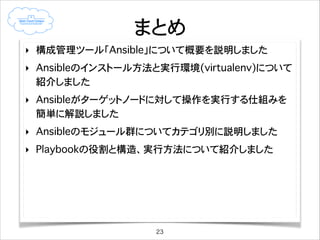
Ansible quickstart 1. 2. 3. 自己紹介
‣
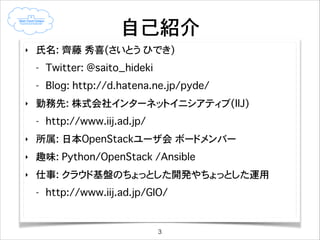
氏名: 齊藤 秀喜(さいとう ひでき)
-
‣
Twitter: @saito_hideki
Blog: http://d.hatena.ne.jp/pyde/
勤務先: 株式会社インターネットイニシアティブ(IIJ)
-
http://www.iij.ad.jp/
‣
所属: 日本OpenStackユーザ会 ボードメンバー
‣
趣味: Python/OpenStack /Ansible
‣
仕事: クラウド基盤のちょっとした開発やちょっとした運用
-
http://www.iij.ad.jp/GIO/
3
4. 5. 6. Ansibleとは?
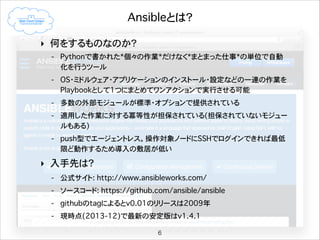
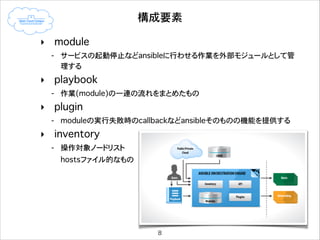
‣ 何をするものなのか?
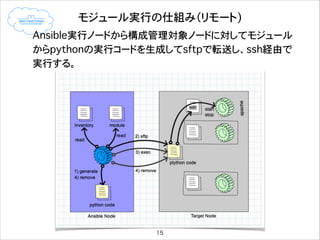
- Pythonで書かれた*個々の作業*だけなく*まとまった仕事*の単位で自動
化を行うツール
- OS・ミドルウェア・アプリケーションのインストール・設定などの一連の作業を
Playbookとして1つにまとめてワンアクションで実行させることが可能
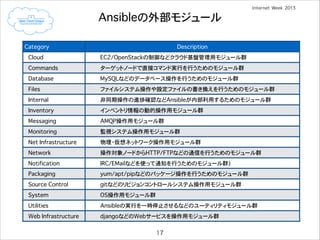
- 多数の外部モジュールが標準・オプションで提供されている
- 適用した作業に対する冪等性が担保されている(担保されていないモジュー
ルもある)
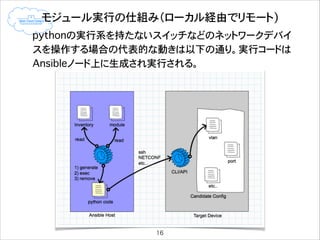
- push型でエージェントレス。操作対象ノードにSSHでログインできれば最低
限ど動作するため導入の敷居が低い
‣ 入手先は?
- 公式サイト: http://www.ansibleworks.com/
- ソースコード: https://github.com/ansible/ansible
- githubのtagによるとv0.01のリリースは2009年
- 現時点(2013-12)で最新の安定版はv1.4.1
6
7. 8. 9. 10. 11. 導入から稼働まで(ubuntu12.04lts編�[2])
!
3. githubからansibleを取得してインストール
- v1.3.4をcheckoutする
- この例ではモジュールはapp/share/ansible/にインストールされる
(app)
(app)
(app)
(app)
(app)
(app)
$ mkdir src && cd src
$ git clone https://github.com/ansible/ansible.git
$ cd ansible
$ git checkout -b v1.3.4 v1.3.4
Switched to a new branch 'v1.3.4’
$ python setup.py build
<pythonのvirtualenv環境>
modules
modules(A)
modules(B)
python
python-virtualenv(A)
~/app/
python-virtualenv(B)
~/hogehoge/
!
OS
virtualenvの外側に影響を与えない
11
12. 13. 14. 15. 16. 17. 18. Ansibleの外部モジュールの使い方
‣
ansible-docコマンドでモジュールのオプションを確認する
[書式] ansible-doc <モジュール名>
(app) $ ansible-doc file
> FILE
!
!
Sets attributes of files, symlinks, and directories, or removes
files/symlinks/directories. Many other modules support the same
options as the [file] module - including [copy], [template], and
[assemble].
Options (= is mandatory):
!
- force
force the creation of the symlinks in two cases: the source
file does not exist (but will appear later); the destination
exists and a file (so, we need to unlink the "path" file and
create symlink to the "src" file in place of it). (Choices:
yes, no)
<…>
Notes:
!
See also [copy], [template], [assemble]
- file: path=/etc/foo.conf owner=foo group=foo mode=0644
- file: src=/file/to/link/to dest=/path/to/symlink owner=foo group=foo state=link
18
19. モジュールを使ってみる
‣
serviceモジュールでターゲットホストのhttpdをリスタートしてみる
(app) $ ansible -i hosts all -u foo -k -K -m service -a "name=httpd state=restarted"
SSH password: ********
sudo password [defaults to SSH password]: ********
172.16.0.1 | success >> {
"changed": true,
"name": "httpd",
"state": "started"
}
!
!
!
!
‣
yumモジュールを使ってlibselinux-pythonパッケージをインストールしてみる
(app) $ ansible -i hosts all -u foo -k -K -m yum -a "name=libselinux-python state=present"
SSH password: ********
sudo password [defaults to SSH password]: ********
172.16.0.1 | success >> {
"changed": true,
"msg": "",
"rc": 0,
"results": [
"Loaded plugins: fastestmirror, prioritiesnLoading mirror speeds from cached hostfilen * base:
ftp.jaist.ac.jpn * epel: ftp.kddilabs.jpn * extras: ftp.jaist.ac.jpn * updates: ftp.jaist.ac.jpn183 packages
excluded due to repository priority protectionsnSetting up Install ProcessnResolving Dependenciesn--> Running
transaction checkn---> Package libselinux-python.x86_64 0:2.0.94-5.3.el6_4.1 will be installedn--> Finished
Dependency ResolutionnnDependencies Resolvedn
n================================================================================n Package
Arch
Version
Repository
Size
n================================================================================nInstalling:n libselinux-python
x86_64
2.0.94-5.3.el6_4.1
updates
202 knnTransaction Summary
n================================================================================nInstall
1 Package(s)nnTotal
download size: 202 knInstalled size: 653 knDownloading Packages:nRunning rpm_check_debugnRunning Transaction Test
nTransaction Test SucceedednRunning Transactionnr Installing : libselinux-python-2.0.94-5.3.el6_4.1.x86_64
1/1 nr Verifying : libselinux-python-2.0.94-5.3.el6_4.1.x86_64
1/1 nnInstalled:n libselinuxpython.x86_64 0:2.0.94-5.3.el6_4.1
nnComplete!n"
]
}
19
20. 21. 22. AnsibleのPlaybookで仕事をさせてみる(3)
ブログサーバを構築して提供するPlaybookを実行してみる
$ ansible-playbook -u root -k -i hosts site.yml
SSH password: ********
!
!
PLAY [Install Wordpress, MySQL, Nginx, and PHP-FPM] ***************************
GATHERING FACTS ***************************************************************
ok: [192.168.100.110]
[省略]
TASK: [Install Mysql package] *************************************************
changed: [192.168.100.110] => (item=mysql-server,MySQL-python,libselinux-python,libsemanage-python)
!
TASK: [Create Mysql configuration file] ***************************************
changed: [192.168.100.110]
[省略]
PLAY RECAP ********************************************************************
192.168.100.110
: ok=25
changed=24
unreachable=0
failed=0
22
23. 24. 25. 26.




![導入から稼働まで(ubuntu12.04lts編�[1])
1. 必要となるパッケージ群をダウンロード
12.04のパッケージ版はv1.1と古く、OpenStack用のモジュールが提供され
ていないためgithubからソースコード(v1.3.4)を取得してインストールする
!
$ sudo apt-get install -y git python-pip python-virtualenv
!
2. virtualenv環境構築してAnsibleをインストール
1. virtualenv環境構築
ansibleをOS標準とは別のモジュールパスにインストールする
!
!
!
!
!
$ virtualenv app
New python executable in ansible/bin/python
Installing distribute....done.
Installing pip...done.
$ source app/bin/activate
(app) $
2. ansibleが依存するモジュール群をインストール
(app) $ pip install PyYAML jinja2
10](https://image.slidesharecdn.com/ansiblequickstart-131201070125-phpapp02/85/Ansible-quickstart-10-320.jpg)
![導入から稼働まで(ubuntu12.04lts編�[2])
!
3. githubからansibleを取得してインストール
- v1.3.4をcheckoutする
- この例ではモジュールはapp/share/ansible/にインストールされる
(app)
(app)
(app)
(app)
(app)
(app)
$ mkdir src && cd src
$ git clone https://github.com/ansible/ansible.git
$ cd ansible
$ git checkout -b v1.3.4 v1.3.4
Switched to a new branch 'v1.3.4’
$ python setup.py build
<pythonのvirtualenv環境>
modules
modules(A)
modules(B)
python
python-virtualenv(A)
~/app/
python-virtualenv(B)
~/hogehoge/
!
OS
virtualenvの外側に影響を与えない
11](https://image.slidesharecdn.com/ansiblequickstart-131201070125-phpapp02/85/Ansible-quickstart-11-320.jpg)
![導入から稼働まで(ubuntu12.04lts編�[3])
3. 動作確認
1. インベントリファイルを作成
インベントリには操作対象となるホストのIPアドレスを記載する
※他にも様々な記載方法が可能
!
(app) $ echo “192.168.100.110” > hosts
!
2. pingモジュールで動作確認(successとなることを確認する)
(app) $ ansible -i hosts all -u foo -k -m ping
SSH password: ********
192.168.100.110 | success >> {
"changed": false,
"ping": "pong"
}
!
-i: インベントリファイル名
-u: 対象ノードにsshログインするユーザ名
-k: 実行時にsshログインパスワードを入力するインタラクションを発生させる
-m <モジュール名>
12](https://image.slidesharecdn.com/ansiblequickstart-131201070125-phpapp02/85/Ansible-quickstart-12-320.jpg)
![restarted
導入から稼働まで(ubuntu12.04lts編�[4])
!
3. setupモジュールで操作対象サーバの情報を取得してみる
取得した情報は環境変数としてPlaybook内で利用可能
(app) $ ansible -i hosts all -u foo -k -m setup
SSH password: ********
172.16.8.130 | success >> {
"ansible_facts": {
"ansible_all_ipv4_addresses": [
"192.168.122.1",
"172.16.8.130",
"169.254.169.254"
],
"ansible_all_ipv6_addresses": [
"fe80::20c:29ff:fe8e:2665",
"fe80::883d:a8ff:fead:cfaf"
],
"ansible_architecture": "x86_64",
"ansible_bios_date": "07/31/2013",
"ansible_bios_version": "6.00",
"ansible_br_ex": {
"active": true,
[省略]
13](https://image.slidesharecdn.com/ansiblequickstart-131201070125-phpapp02/85/Ansible-quickstart-13-320.jpg)

![Ansibleの外部モジュールの使い方
‣
ansible-docコマンドでモジュールのオプションを確認する
[書式] ansible-doc <モジュール名>
(app) $ ansible-doc file
> FILE
!
!
Sets attributes of files, symlinks, and directories, or removes
files/symlinks/directories. Many other modules support the same
options as the [file] module - including [copy], [template], and
[assemble].
Options (= is mandatory):
!
- force
force the creation of the symlinks in two cases: the source
file does not exist (but will appear later); the destination
exists and a file (so, we need to unlink the "path" file and
create symlink to the "src" file in place of it). (Choices:
yes, no)
<…>
Notes:
!
See also [copy], [template], [assemble]
- file: path=/etc/foo.conf owner=foo group=foo mode=0644
- file: src=/file/to/link/to dest=/path/to/symlink owner=foo group=foo state=link
18](https://image.slidesharecdn.com/ansiblequickstart-131201070125-phpapp02/85/Ansible-quickstart-18-320.jpg)
![モジュールを使ってみる
‣
serviceモジュールでターゲットホストのhttpdをリスタートしてみる
(app) $ ansible -i hosts all -u foo -k -K -m service -a "name=httpd state=restarted"
SSH password: ********
sudo password [defaults to SSH password]: ********
172.16.0.1 | success >> {
"changed": true,
"name": "httpd",
"state": "started"
}
!
!
!
!
‣
yumモジュールを使ってlibselinux-pythonパッケージをインストールしてみる
(app) $ ansible -i hosts all -u foo -k -K -m yum -a "name=libselinux-python state=present"
SSH password: ********
sudo password [defaults to SSH password]: ********
172.16.0.1 | success >> {
"changed": true,
"msg": "",
"rc": 0,
"results": [
"Loaded plugins: fastestmirror, prioritiesnLoading mirror speeds from cached hostfilen * base:
ftp.jaist.ac.jpn * epel: ftp.kddilabs.jpn * extras: ftp.jaist.ac.jpn * updates: ftp.jaist.ac.jpn183 packages
excluded due to repository priority protectionsnSetting up Install ProcessnResolving Dependenciesn--> Running
transaction checkn---> Package libselinux-python.x86_64 0:2.0.94-5.3.el6_4.1 will be installedn--> Finished
Dependency ResolutionnnDependencies Resolvedn
n================================================================================n Package
Arch
Version
Repository
Size
n================================================================================nInstalling:n libselinux-python
x86_64
2.0.94-5.3.el6_4.1
updates
202 knnTransaction Summary
n================================================================================nInstall
1 Package(s)nnTotal
download size: 202 knInstalled size: 653 knDownloading Packages:nRunning rpm_check_debugnRunning Transaction Test
nTransaction Test SucceedednRunning Transactionnr Installing : libselinux-python-2.0.94-5.3.el6_4.1.x86_64
1/1 nr Verifying : libselinux-python-2.0.94-5.3.el6_4.1.x86_64
1/1 nnInstalled:n libselinuxpython.x86_64 0:2.0.94-5.3.el6_4.1
nnComplete!n"
]
}
19](https://image.slidesharecdn.com/ansiblequickstart-131201070125-phpapp02/85/Ansible-quickstart-19-320.jpg)
![AnsibleのPlaybookで仕事をさせてみる(3)
ブログサーバを構築して提供するPlaybookを実行してみる
$ ansible-playbook -u root -k -i hosts site.yml
SSH password: ********
!
!
PLAY [Install Wordpress, MySQL, Nginx, and PHP-FPM] ***************************
GATHERING FACTS ***************************************************************
ok: [192.168.100.110]
[省略]
TASK: [Install Mysql package] *************************************************
changed: [192.168.100.110] => (item=mysql-server,MySQL-python,libselinux-python,libsemanage-python)
!
TASK: [Create Mysql configuration file] ***************************************
changed: [192.168.100.110]
[省略]
PLAY RECAP ********************************************************************
192.168.100.110
: ok=25
changed=24
unreachable=0
failed=0
22](https://image.slidesharecdn.com/ansiblequickstart-131201070125-phpapp02/85/Ansible-quickstart-22-320.jpg)