3.


To be able to complete the first stages i used the
spot healing tool, to get rid of any spots or
anything else unwanted in the photograph.
For my third edit i started off by duplicating the
original layer from the original image into three
copies, for what i intend to do.
Effects
-Spot Healing
3.
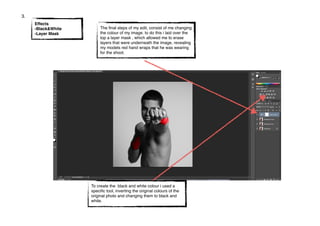
The final steps of my edit, consist of me changing
the colour of my image. to do this i laid over the
top a layer mask , which allowed me to erase
layers that were underneath the image, revealing
my models red hand wraps that he was wearing
for the shoot.
To create the black and white colour i used a
specific tool, inverting the original colours of the
original photo and changing them to black and
white.
Effects
-Black&White
-Layer Mask
3.

Annatation 3

  • 1.
    3. 
 To be ableto complete the first stages i used the spot healing tool, to get rid of any spots or anything else unwanted in the photograph. For my third edit i started off by duplicating the original layer from the original image into three copies, for what i intend to do. Effects -Spot Healing
  • 2.
    3. The final stepsof my edit, consist of me changing the colour of my image. to do this i laid over the top a layer mask , which allowed me to erase layers that were underneath the image, revealing my models red hand wraps that he was wearing for the shoot. To create the black and white colour i used a specific tool, inverting the original colours of the original photo and changing them to black and white. Effects -Black&White -Layer Mask
  • 3.