15 March 2016
Controlling your NowTv box
and everything else with
Android Wear
Who am I?
● Jesus Gumiel
○ @jegumi
● Android developer
○ Telefonica R +D (TU Me, TU Go)
○ The Guardian
○ Sky (Now TV)
● Entrepreneur
○ Footballtracker → http://www.football-tracker.com
Some context
● Hackday at Now TV
○ Develop something for Now TV
● What can I do?
○ Only 4 hours of development
○ Android of course
○ It must be cool to show and easy to understand
○ It must be something interesting to develop
○ It must be useful
The target
Control Now Tv box with a Moto 360
Types of wearables app
Synced Notifications
Notifications on handhelds
can automatically sync to
wearables, so design them
with both devices in mind.
Voice Actions
Register your app to
handle voice actions, like
"Ok Google, take a note,"
for a hands-free
experience.
Build Wearable Apps
Create custom
experiences with
activities, services,
sensors, and much more
with the Android SDK.
Send Data
Send data and actions
between handhelds and
wearables with data
replication APIs and
RPCs
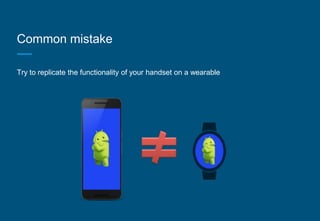
Common mistake
Try to replicate the functionality of your handset on a wearable
Debugging Bluetooth
• Enable Debugging over Bluetooth on the Android Wear companion app. You
should see a tiny status summary appear under the option:
Host: disconnected
Target: connected
• Connect the handheld to your machine over USB and run:
adb forward tcp:4444 localabstract:/adb-hub
adb connect localhost:4444
• In the Android Wear companion app, you should see the status change to:
Host: connected
Target: connected
Wearable app architecture
Create a wearable project
WEARABLE
Wearable layout (activity_main.xml)
<?xml version="1.0" encoding="utf-8"?>
<android.support.wearable.view.WatchViewStub
xmlns:android="http://schemas.android.com/apk/res/android"
xmlns:app="http://schemas.android.com/apk/res-auto"
xmlns:tools="http://schemas.android.com/tools"
android:id="@+id/watch_view_stub"
android:layout_width="match_parent"
android:layout_height="match_parent"
app:rectLayout="@layout/rect_activity_main"
app:roundLayout="@layout/round_activity_main"
tools:context=".MainActivity"
tools:deviceIds="wear"/>
Wearable layout (round_activity_main.xml)
<?xml version="1.0" encoding="utf-8"?>
<GridLayout xmlns:android="http://schemas.android.com/apk/res/android"
xmlns:tools="http://schemas.android.com/tools"
android:layout_width="match_parent"
android:layout_height="match_parent"
android:background="@color/round_bg"
android:columnCount="3”
tools:context=".MainActivity"
tools:deviceIds="wear_round">
Activity
@Override
protected void onCreate(Bundle savedInstanceState) {
super.onCreate(savedInstanceState);
setContentView(R.layout.activity_main);
initFields();
setUpCommunication();
}
Init fields
private void initFields() {
final WatchViewStub stub = (WatchViewStub) findViewById(R.id.watch_view_stub);
stub.setOnLayoutInflatedListener(new WatchViewStub.OnLayoutInflatedListener() {
@Override
public void onLayoutInflated(WatchViewStub stub) {
……..
}
}
}
Connect with the device
private void setUpCommunication() {
mClient = new GoogleApiClient.Builder(this).addApi(Wearable.API).build();
new Thread(new Runnable() {
@Override
public void run() {
mClient.blockingConnect(CONNECTION_TIME_OUT_MS, TimeUnit.MILLISECONDS);
NodeApi.GetConnectedNodesResult result = Wearable.NodeApi.getConnectedNodes(mClient).await();
List<Node> nodes = result.getNodes();
if (!nodes.isEmpty()) {
mNodeId = nodes.get(0).getId();
}
mClient.disconnect();
}
}).start();
}
Communicate with the device
private void sendMessageToDevice(final int message) {
if (mNodeId != null) {
new Thread(new Runnable() {
@Override
public void run() {
mClient.blockingConnect(CONNECTION_TIME_OUT_MS, TimeUnit.MILLISECONDS);
Wearable.MessageApi.sendMessage(mClient, mNodeId, String.valueOf(message), null);
mClient.disconnect();
}
}).start();
}
}
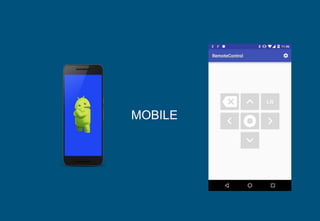
MOBILE
Listener to receive messages
public class ListenerService extends WearableListenerService {
@Override
public void onMessageReceived(MessageEvent messageEvent) {
String command = messageEvent.getPath();
RemoteHelper.sendMessageToBox(this, command );
}
Declare the listener in the Manifest
<service
android:name="com.bskyb.nowtv.ui.ListenerService" >
<intent-filter>
<action android:name="com.google.android.gms.wearable.BIND_LISTENER" />
</intent-filter>
</service>
Sending command to Box
public static void sendMessageToBox(Context context, String command) {
RequestQueue queue = Volley.newRequestQueue(context);
StringRequest stringRequest = new StringRequest(Request.Method.POST, getRemoteUrl(context, command),
new Response.Listener<String>() {
@Override
public void onResponse(String response) {
Log.i(TAG, "onResponse: " + response);
}
}, new Response.ErrorListener() {
@Override
public void onErrorResponse(VolleyError error) {
Log.e(TAG, "onErrorResponse: ", error);
}
});
queue.add(stringRequest);
}
https://github.com/jegumi/londroid2016
Show me the code

Londroid meetup

  • 1.
    15 March 2016 Controllingyour NowTv box and everything else with Android Wear
  • 2.
    Who am I? ●Jesus Gumiel ○ @jegumi ● Android developer ○ Telefonica R +D (TU Me, TU Go) ○ The Guardian ○ Sky (Now TV) ● Entrepreneur ○ Footballtracker → http://www.football-tracker.com
  • 3.
    Some context ● Hackdayat Now TV ○ Develop something for Now TV ● What can I do? ○ Only 4 hours of development ○ Android of course ○ It must be cool to show and easy to understand ○ It must be something interesting to develop ○ It must be useful
  • 4.
    The target Control NowTv box with a Moto 360
  • 6.
    Types of wearablesapp Synced Notifications Notifications on handhelds can automatically sync to wearables, so design them with both devices in mind. Voice Actions Register your app to handle voice actions, like "Ok Google, take a note," for a hands-free experience. Build Wearable Apps Create custom experiences with activities, services, sensors, and much more with the Android SDK. Send Data Send data and actions between handhelds and wearables with data replication APIs and RPCs
  • 7.
    Common mistake Try toreplicate the functionality of your handset on a wearable
  • 8.
    Debugging Bluetooth • EnableDebugging over Bluetooth on the Android Wear companion app. You should see a tiny status summary appear under the option: Host: disconnected Target: connected • Connect the handheld to your machine over USB and run: adb forward tcp:4444 localabstract:/adb-hub adb connect localhost:4444 • In the Android Wear companion app, you should see the status change to: Host: connected Target: connected
  • 9.
  • 10.
  • 11.
  • 12.
    Wearable layout (activity_main.xml) <?xmlversion="1.0" encoding="utf-8"?> <android.support.wearable.view.WatchViewStub xmlns:android="http://schemas.android.com/apk/res/android" xmlns:app="http://schemas.android.com/apk/res-auto" xmlns:tools="http://schemas.android.com/tools" android:id="@+id/watch_view_stub" android:layout_width="match_parent" android:layout_height="match_parent" app:rectLayout="@layout/rect_activity_main" app:roundLayout="@layout/round_activity_main" tools:context=".MainActivity" tools:deviceIds="wear"/>
  • 13.
    Wearable layout (round_activity_main.xml) <?xmlversion="1.0" encoding="utf-8"?> <GridLayout xmlns:android="http://schemas.android.com/apk/res/android" xmlns:tools="http://schemas.android.com/tools" android:layout_width="match_parent" android:layout_height="match_parent" android:background="@color/round_bg" android:columnCount="3” tools:context=".MainActivity" tools:deviceIds="wear_round">
  • 14.
    Activity @Override protected void onCreate(BundlesavedInstanceState) { super.onCreate(savedInstanceState); setContentView(R.layout.activity_main); initFields(); setUpCommunication(); }
  • 15.
    Init fields private voidinitFields() { final WatchViewStub stub = (WatchViewStub) findViewById(R.id.watch_view_stub); stub.setOnLayoutInflatedListener(new WatchViewStub.OnLayoutInflatedListener() { @Override public void onLayoutInflated(WatchViewStub stub) { …….. } } }
  • 16.
    Connect with thedevice private void setUpCommunication() { mClient = new GoogleApiClient.Builder(this).addApi(Wearable.API).build(); new Thread(new Runnable() { @Override public void run() { mClient.blockingConnect(CONNECTION_TIME_OUT_MS, TimeUnit.MILLISECONDS); NodeApi.GetConnectedNodesResult result = Wearable.NodeApi.getConnectedNodes(mClient).await(); List<Node> nodes = result.getNodes(); if (!nodes.isEmpty()) { mNodeId = nodes.get(0).getId(); } mClient.disconnect(); } }).start(); }
  • 17.
    Communicate with thedevice private void sendMessageToDevice(final int message) { if (mNodeId != null) { new Thread(new Runnable() { @Override public void run() { mClient.blockingConnect(CONNECTION_TIME_OUT_MS, TimeUnit.MILLISECONDS); Wearable.MessageApi.sendMessage(mClient, mNodeId, String.valueOf(message), null); mClient.disconnect(); } }).start(); } }
  • 18.
  • 19.
    Listener to receivemessages public class ListenerService extends WearableListenerService { @Override public void onMessageReceived(MessageEvent messageEvent) { String command = messageEvent.getPath(); RemoteHelper.sendMessageToBox(this, command ); }
  • 20.
    Declare the listenerin the Manifest <service android:name="com.bskyb.nowtv.ui.ListenerService" > <intent-filter> <action android:name="com.google.android.gms.wearable.BIND_LISTENER" /> </intent-filter> </service>
  • 21.
    Sending command toBox public static void sendMessageToBox(Context context, String command) { RequestQueue queue = Volley.newRequestQueue(context); StringRequest stringRequest = new StringRequest(Request.Method.POST, getRemoteUrl(context, command), new Response.Listener<String>() { @Override public void onResponse(String response) { Log.i(TAG, "onResponse: " + response); } }, new Response.ErrorListener() { @Override public void onErrorResponse(VolleyError error) { Log.e(TAG, "onErrorResponse: ", error); } }); queue.add(stringRequest); }
  • 22.

Editor's Notes

  • #13 You could use a box inset layout that create a square on the center of the screen and avoid issues with edges
  • #16 If you need to know in code what’s the shape of the device mainView.setOnApplyWindowInsetsListener(new View.OnApplyWindowInsetsListener() @Override public WindowInsets onApplyWindowInsets(View v, WindowInsets insets) { if (insets.isRound()) { Log.d("ViewService", "Round"); } else { Log.d("ViewService", "Square"); } return insets; } });