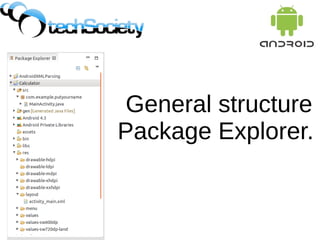
General structure
Package Explorer.
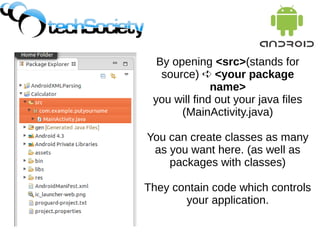
By opening <src>(stands for
source) ➪ <your package
name>
you will find out your java files
(MainActivity.java)
You can create classes as many
as you want here. (as well as
packages with classes)
They contain code which controls
your application.
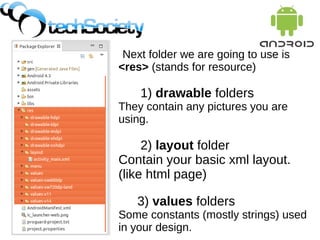
Next folder we are going to use is
<res> (stands for resource)
1) drawable folders
They contain any pictures you are
using.
2) layout folder
Contain your basic xml layout.
(like html page)
3) values folders
Some constants (mostly strings) used
in your design.
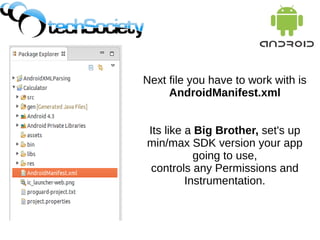
Next file you have to work with is
AndroidManifest.xml
Its like a Big Brother, set's up
min/max SDK version your app
going to use,
controls any Permissions and
Instrumentation.
You don't need to know anything else to
build simple App yet.
But if you are interested, gen is just a
folder with auto generated files and
Andoid folders contains all library files
we are going to use in our java files.
You don't need to know anything else to
build simple App yet.
But if you are interested, gen is just a
folder with auto generated files and
Andoid folders contains all library files
we are going to use in our java files.

Android tutorials7 calculator_packageexploirer

  • 1.
  • 2.
    By opening <src>(standsfor source) ➪ <your package name> you will find out your java files (MainActivity.java) You can create classes as many as you want here. (as well as packages with classes) They contain code which controls your application.
  • 3.
    Next folder weare going to use is <res> (stands for resource) 1) drawable folders They contain any pictures you are using. 2) layout folder Contain your basic xml layout. (like html page) 3) values folders Some constants (mostly strings) used in your design.
  • 4.
    Next file youhave to work with is AndroidManifest.xml Its like a Big Brother, set's up min/max SDK version your app going to use, controls any Permissions and Instrumentation.
  • 5.
    You don't needto know anything else to build simple App yet. But if you are interested, gen is just a folder with auto generated files and Andoid folders contains all library files we are going to use in our java files.
  • 6.
    You don't needto know anything else to build simple App yet. But if you are interested, gen is just a folder with auto generated files and Andoid folders contains all library files we are going to use in our java files.