Pull To Refresh Training
2014/03/11 John
Outline
● Introduction
● Design
● How to implement
○ Touch Event
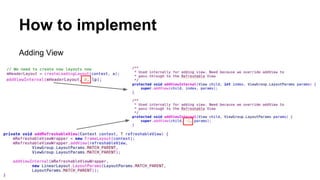
○ Adding view
○ On Touching
○ Smooth Scrolling
○ Window Manager
● Summary
● Homework
Introduction
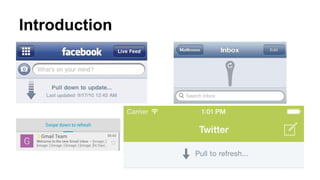
Introduction
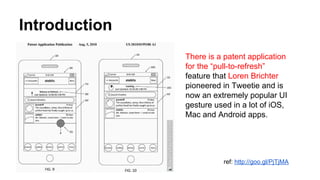
There is a patent application
for the “pull-to-refresh”
feature that Loren Brichter
pioneered in Tweetie and is
now an extremely popular UI
gesture used in a lot of iOS,
Mac and Android apps.
ref: http://goo.gl/PjTjMA
Design
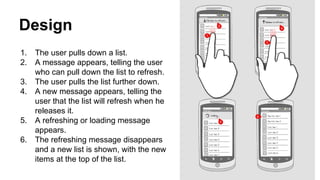
1. The user pulls down a list.
2. A message appears, telling the user
who can pull down the list to refresh.
3. The user pulls the list further down.
4. A new message appears, telling the
user that the list will refresh when he
releases it.
5. A refreshing or loading message
appears.
6. The refreshing message disappears
and a new list is shown, with the new
items at the top of the list.
Design
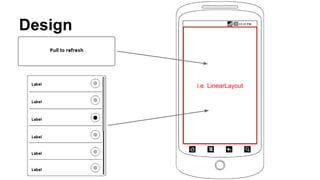
i.e. LinearLayout
How to implement
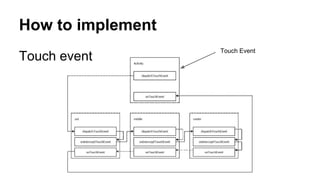
Touch event
Touch Event
How to implement
Touch event
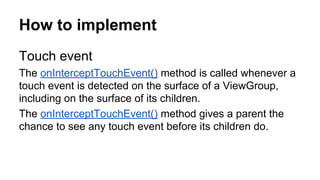
The onInterceptTouchEvent() method is called whenever a
touch event is detected on the surface of a ViewGroup,
including on the surface of its children.
The onInterceptTouchEvent() method gives a parent the
chance to see any touch event before its children do.
How to implement
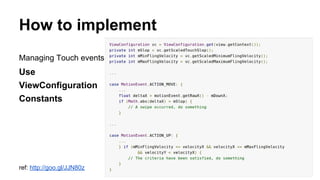
Managing Touch events
Use
ViewConfiguration
Constants
ref: http://goo.gl/JJN80z
How to implement
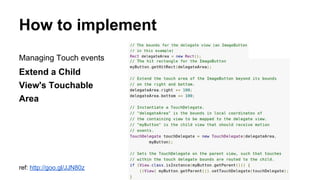
Managing Touch events
Extend a Child
View's Touchable
Area
ref: http://goo.gl/JJN80z
How to implement
Adding View
How to implement
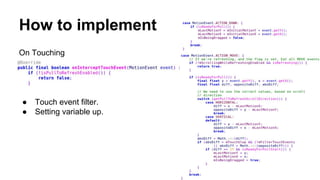
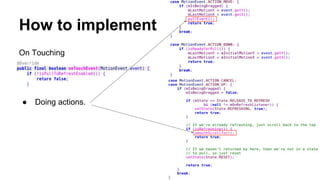
On Touching
● Touch event filter.
● Setting variable up.
How to implement
On Touching
● Doing actions.
How to implement
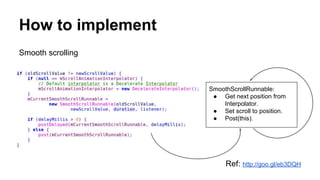
Smooth scrolling
Ref: http://goo.gl/eb3DQH
SmoothScrollRunnable:
● Get next position from
Interpolator.
● Set scroll to position.
● Post(this).
How to implement
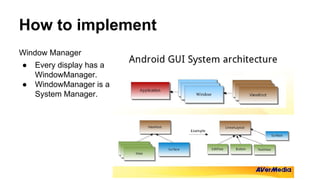
Window Manager
● Every display has a
WindowManager.
● WindowManager is a
System Manager.
How to implement
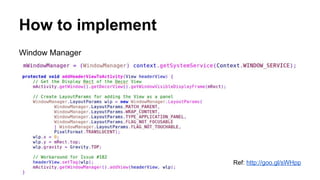
Window Manager
Ref: http://goo.gl/sWHpp
Summary
● “Make it a little simpler”
● How dose Touch event transit.
● How to implement smooth scrolling.
Homework
Sample source code: (You can also fInd it at the video record nearby if this link is invalid.)
https://www.dropbox.com/s/9zqt60tf7drppyi/TrainingPullToRefresh.zip
Basic:
● Let it be pulled from left.
Advance:
● Let it be pulled from both top and bottom.

Android Training - Pull to Refresh

  • 1.
    Pull To RefreshTraining 2014/03/11 John
  • 2.
    Outline ● Introduction ● Design ●How to implement ○ Touch Event ○ Adding view ○ On Touching ○ Smooth Scrolling ○ Window Manager ● Summary ● Homework
  • 3.
  • 4.
    Introduction There is apatent application for the “pull-to-refresh” feature that Loren Brichter pioneered in Tweetie and is now an extremely popular UI gesture used in a lot of iOS, Mac and Android apps. ref: http://goo.gl/PjTjMA
  • 5.
    Design 1. The userpulls down a list. 2. A message appears, telling the user who can pull down the list to refresh. 3. The user pulls the list further down. 4. A new message appears, telling the user that the list will refresh when he releases it. 5. A refreshing or loading message appears. 6. The refreshing message disappears and a new list is shown, with the new items at the top of the list.
  • 6.
  • 7.
    How to implement Touchevent Touch Event
  • 8.
    How to implement Touchevent The onInterceptTouchEvent() method is called whenever a touch event is detected on the surface of a ViewGroup, including on the surface of its children. The onInterceptTouchEvent() method gives a parent the chance to see any touch event before its children do.
  • 9.
    How to implement ManagingTouch events Use ViewConfiguration Constants ref: http://goo.gl/JJN80z
  • 10.
    How to implement ManagingTouch events Extend a Child View's Touchable Area ref: http://goo.gl/JJN80z
  • 11.
  • 12.
    How to implement OnTouching ● Touch event filter. ● Setting variable up.
  • 13.
    How to implement OnTouching ● Doing actions.
  • 14.
    How to implement Smoothscrolling Ref: http://goo.gl/eb3DQH SmoothScrollRunnable: ● Get next position from Interpolator. ● Set scroll to position. ● Post(this).
  • 15.
    How to implement WindowManager ● Every display has a WindowManager. ● WindowManager is a System Manager.
  • 16.
    How to implement WindowManager Ref: http://goo.gl/sWHpp
  • 17.
    Summary ● “Make ita little simpler” ● How dose Touch event transit. ● How to implement smooth scrolling.
  • 18.
    Homework Sample source code:(You can also fInd it at the video record nearby if this link is invalid.) https://www.dropbox.com/s/9zqt60tf7drppyi/TrainingPullToRefresh.zip Basic: ● Let it be pulled from left. Advance: ● Let it be pulled from both top and bottom.