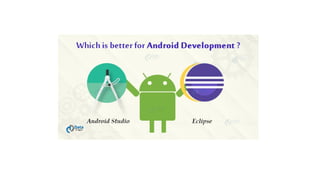
Android Studio vs Eclipse
To get started with what to choose for Android development when it
comes to Android Studio vs Eclipse. In this Android Tutorial, we’ll
have a brief comparison between Eclipse vs Android Studio and then
decide which one is more preferable over the other. We will firstly
learn about both these and what they are, subsequently we’ll begin
with Eclipse and then Android Studio.
Eclipse:-
Eclipse is a Standard package that well suits for java and plug-in development and adding new
plugins. Eclipse is mostly written in Java, thus it’s primarily used for Java. That is one of the
reasons that Eclipse is well-known for Java IDE. Eclipse has its own workspace and an
extensible plug-in system to customize the environment. It is simple, portable and has a short
build time. It is preferable for the development of small applications. The IDE launched Eclipse
is faster. It primarily supports java but can also works for different languages like C, C++, C#,
PHP, Perl, and Ruby.
The history of the Eclipse Foundation.
Eclipse started in 2001 when IBM donated three million lines of code from its
Java tools to develop an open source integrated development environment (
IDE).
Eclipse IDE was initially overseen by a consortium of software vendors seeking
to create and foster a new community complementing Apache's open source
community.
It has been said, though not confirmed, that the platform's name was derived
from a secondary goal, which was to eclipse Microsoft's popular IDE,
Visual Studio.
In 2011, Oracle became an Eclipse provider, donating the Hudson
continuous integration server it inherited from Sun Microsystems and the
Java 2 Platform, Enterprise Edition (Java EE), in 2017.
In 2016, Microsoft announced it would join the Eclipse Foundation and support
the integration of Visual Studio by giving Eclipse developers full access to
Visual Studio Team Services.
Eclipse's board of directors includes executive director Mike Milinkovich and
strategic members from CA Technologies, IBM, Oracle and SAP.
How to Set Eclipse for Android Developers
https://data-flair.training/blogs/set-eclipse-for-android-
developers/
Android Studio
Android Studio is an IDE for Android Operating Systems. An IDE stands for
an Integrated Development Environment, it is a tool to make app development
easy. It is the official IDE of Google for Android development. Android Studio
has various features like auto code completion and refactoring to make the
project development stress free. It’s release date is 16 May 2013. Android
Studio uses IntelliJ IDEA. It is specifically for the development of Android
applications. It is freely available and open source.
Similarities in Android Studio and Eclipse
There are certain similarities between them both. A few important common
features are as follows:
• Both provide automatic java code completion support.
• They both provide us with great Graphical User Interface.
• Both supports java coding for application
• These two help in writing neat and clean, error-free code.
• Both are capable of developing Android Applications.
Android Studio vs Eclipse
Now, we’ll see the comparison between them and reach out to a conclusion for
which one to prefer for the development of applications for the android
operating system. The provided following table show the comparison between
the two:
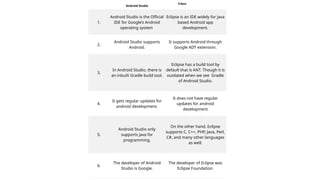
Android Studio
Eclipse
1.
Android Studio is the Official
IDE for Google’s Android
operating system
Eclipse is an IDE widely for java
based Android app
development.
2.
Android Studio supports
Android.
It supports Android through
Google ADT extension.
3.
In Android Studio, there is
an inbuilt Gradle build tool.
Eclipse has a build tool by
default that is ANT. Though it is
outdated when we see Gradle
of Android Studio.
4.
It gets regular updates for
android development.
It does not have regular
updates for android
development
5.
Android Studio only
supports java for
programming.
On the other hand, Eclipse
supports C, C++, PHP, Java, Perl,
C#, and many other languages
as well.
6.
The developer of Android
Studio is Google.
The developer of Eclipse was
Eclipse Foundation.
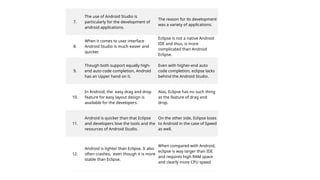
7.
The use of Android Studio is
particularly for the development of
android applications.
The reason for its development
was a variety of applications.
8.
When it comes to user interface
Android Studio is much easier and
quicker.
Eclipse is not a native Android
IDE and thus, is more
complicated than Android
Eclipse.
9.
Though both support equally high-
end auto code completion, Android
has an Upper hand on it.
Even with higher-end auto
code completion, eclipse lacks
behind the Android Studio.
10.
In Android, the easy drag and drop
feature for easy layout design is
available for the developers.
Alas, Eclipse has no such thing
as the feature of drag and
drop.
11.
Android is quicker than that Eclipse
and developers love the tools and the
resources of Android Studio.
On the other side, Eclipse loses
to Android in the case of Speed
as well.
12.
Android is lighter than Eclipse. It also
often crashes, even though it is more
stable than Eclipse.
When compared with Android,
eclipse is way larger than IDE
and requires high RAM space
and clearly more CPU speed.
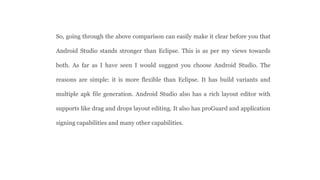
So, going through the above comparison can easily make it clear before you that
Android Studio stands stronger than Eclipse. This is as per my views towards
both. As far as I have seen I would suggest you choose Android Studio. The
reasons are simple: it is more flexible than Eclipse. It has build variants and
multiple apk file generation. Android Studio also has a rich layout editor with
supports like drag and drops layout editing. It also has proGuard and application
signing capabilities and many other capabilities.
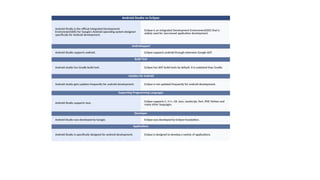
Android Studio vs Eclipse
Android Studio is the official Integrated Development
Environment(IDE) for Google’s Android operating system designed
specifically for Android development.
Eclipse is an Integrated Development Environment(IDE) that is
widely used for Java-based application development.
AndroiSupport
Android Studio supports android. Eclipse supports android through extension Google ADT.
Build Tool
Android studio has Gradle build tool. Eclipse has ANT build tools by default. It is outdated than Gradle.
Updates for Android
Android studio gets updates frequently for android development. Eclipse is not updated frequently for android development.
Supporting Programming Languages
Android Studio supports Java. Eclipse supports C, C++, C#, Java, JavaScript, Perl, PHP, Python and
many other languages.
Developer
Android Studio was developed by Google. Eclipse was developed by Eclipse Foundation.
Applications
Android Studio is specifically designed for android development. Eclipse is designed to develop a variety of applications.

Android Studio Vs Eclipse lecture for mobile.pptx

  • 1.
  • 2.
    To get startedwith what to choose for Android development when it comes to Android Studio vs Eclipse. In this Android Tutorial, we’ll have a brief comparison between Eclipse vs Android Studio and then decide which one is more preferable over the other. We will firstly learn about both these and what they are, subsequently we’ll begin with Eclipse and then Android Studio.
  • 3.
    Eclipse:- Eclipse is aStandard package that well suits for java and plug-in development and adding new plugins. Eclipse is mostly written in Java, thus it’s primarily used for Java. That is one of the reasons that Eclipse is well-known for Java IDE. Eclipse has its own workspace and an extensible plug-in system to customize the environment. It is simple, portable and has a short build time. It is preferable for the development of small applications. The IDE launched Eclipse is faster. It primarily supports java but can also works for different languages like C, C++, C#, PHP, Perl, and Ruby.
  • 4.
    The history ofthe Eclipse Foundation. Eclipse started in 2001 when IBM donated three million lines of code from its Java tools to develop an open source integrated development environment ( IDE). Eclipse IDE was initially overseen by a consortium of software vendors seeking to create and foster a new community complementing Apache's open source community. It has been said, though not confirmed, that the platform's name was derived from a secondary goal, which was to eclipse Microsoft's popular IDE, Visual Studio. In 2011, Oracle became an Eclipse provider, donating the Hudson continuous integration server it inherited from Sun Microsystems and the Java 2 Platform, Enterprise Edition (Java EE), in 2017. In 2016, Microsoft announced it would join the Eclipse Foundation and support the integration of Visual Studio by giving Eclipse developers full access to Visual Studio Team Services. Eclipse's board of directors includes executive director Mike Milinkovich and strategic members from CA Technologies, IBM, Oracle and SAP.
  • 5.
    How to SetEclipse for Android Developers https://data-flair.training/blogs/set-eclipse-for-android- developers/
  • 6.
    Android Studio Android Studiois an IDE for Android Operating Systems. An IDE stands for an Integrated Development Environment, it is a tool to make app development easy. It is the official IDE of Google for Android development. Android Studio has various features like auto code completion and refactoring to make the project development stress free. It’s release date is 16 May 2013. Android Studio uses IntelliJ IDEA. It is specifically for the development of Android applications. It is freely available and open source.
  • 8.
    Similarities in AndroidStudio and Eclipse
  • 9.
    There are certainsimilarities between them both. A few important common features are as follows: • Both provide automatic java code completion support. • They both provide us with great Graphical User Interface. • Both supports java coding for application • These two help in writing neat and clean, error-free code. • Both are capable of developing Android Applications.
  • 10.
    Android Studio vsEclipse Now, we’ll see the comparison between them and reach out to a conclusion for which one to prefer for the development of applications for the android operating system. The provided following table show the comparison between the two:
  • 11.
    Android Studio Eclipse 1. Android Studiois the Official IDE for Google’s Android operating system Eclipse is an IDE widely for java based Android app development. 2. Android Studio supports Android. It supports Android through Google ADT extension. 3. In Android Studio, there is an inbuilt Gradle build tool. Eclipse has a build tool by default that is ANT. Though it is outdated when we see Gradle of Android Studio. 4. It gets regular updates for android development. It does not have regular updates for android development 5. Android Studio only supports java for programming. On the other hand, Eclipse supports C, C++, PHP, Java, Perl, C#, and many other languages as well. 6. The developer of Android Studio is Google. The developer of Eclipse was Eclipse Foundation.
  • 12.
    7. The use ofAndroid Studio is particularly for the development of android applications. The reason for its development was a variety of applications. 8. When it comes to user interface Android Studio is much easier and quicker. Eclipse is not a native Android IDE and thus, is more complicated than Android Eclipse. 9. Though both support equally high- end auto code completion, Android has an Upper hand on it. Even with higher-end auto code completion, eclipse lacks behind the Android Studio. 10. In Android, the easy drag and drop feature for easy layout design is available for the developers. Alas, Eclipse has no such thing as the feature of drag and drop. 11. Android is quicker than that Eclipse and developers love the tools and the resources of Android Studio. On the other side, Eclipse loses to Android in the case of Speed as well. 12. Android is lighter than Eclipse. It also often crashes, even though it is more stable than Eclipse. When compared with Android, eclipse is way larger than IDE and requires high RAM space and clearly more CPU speed.
  • 13.
    So, going throughthe above comparison can easily make it clear before you that Android Studio stands stronger than Eclipse. This is as per my views towards both. As far as I have seen I would suggest you choose Android Studio. The reasons are simple: it is more flexible than Eclipse. It has build variants and multiple apk file generation. Android Studio also has a rich layout editor with supports like drag and drops layout editing. It also has proGuard and application signing capabilities and many other capabilities.
  • 14.
    Android Studio vsEclipse Android Studio is the official Integrated Development Environment(IDE) for Google’s Android operating system designed specifically for Android development. Eclipse is an Integrated Development Environment(IDE) that is widely used for Java-based application development. AndroiSupport Android Studio supports android. Eclipse supports android through extension Google ADT. Build Tool Android studio has Gradle build tool. Eclipse has ANT build tools by default. It is outdated than Gradle. Updates for Android Android studio gets updates frequently for android development. Eclipse is not updated frequently for android development. Supporting Programming Languages Android Studio supports Java. Eclipse supports C, C++, C#, Java, JavaScript, Perl, PHP, Python and many other languages. Developer Android Studio was developed by Google. Eclipse was developed by Eclipse Foundation. Applications Android Studio is specifically designed for android development. Eclipse is designed to develop a variety of applications.