Fixing common
problems with Lint
Sinan Kozak
@snnkzk
What is Lint?
• lint, or a linter, is a tool that analyzes source code to flag
programming errors, bugs, stylistic errors, and suspicious
constructs. The term originates from a Unix utility that
examined C language source code.
Source: https://en.wikipedia.org/wiki/Lint_%28software%29
@snnkzk
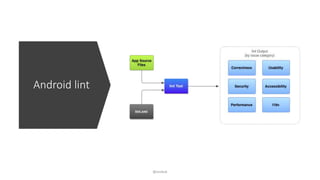
Android lint
@snnkzk
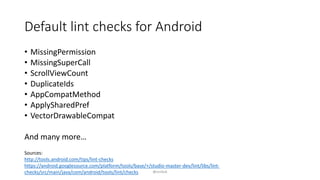
Default lint checks for Android
• MissingPermission
• MissingSuperCall
• ScrollViewCount
• DuplicateIds
• AppCompatMethod
• ApplySharedPref
• VectorDrawableCompat
And many more…
Sources:
http://tools.android.com/tips/lint-checks
https://android.googlesource.com/platform/tools/base/+/studio-master-dev/lint/libs/lint-
checks/src/main/java/com/android/tools/lint/checks @snnkzk
How to run
Android lint
• ./gradlew lint
• ./gradlew lintDebug
With gradle task
• lint [flags] <project directory>
With CLI tool – “android_sdk/tools”
@snnkzk
Lint result
• It can fail the build
• abortOnError true
• Print command line
• Create xml and html reports
• Configure warnings as error
to fail build
• warningsAsErrors true
@snnkzk
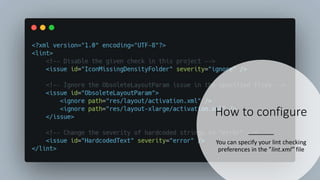
How to configure
You can specify your lint checking
preferences in the ”lint.xml” file
@snnkzk
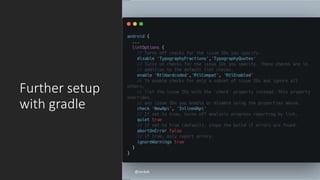
Further setup
with gradle
@snnkzk
Integrating to
existing
codebase
After first lint run for a old project, there will
be thousands of issues. Android lint supports
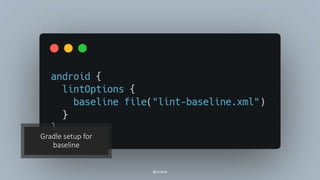
baseline file for ignoring existing issues
You can focus on new code
Lint can be integrated anytime
We run Lint with every pull request
Gradle setup for
baseline
@snnkzk
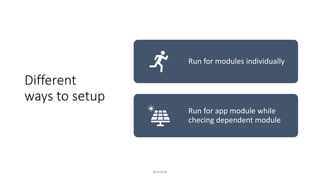
Different
ways to setup
Run for modules individually
Run for app module while
checing dependent module
@snnkzk
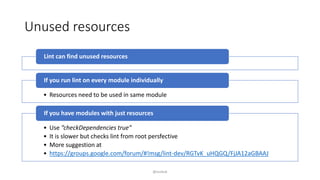
Unused resources
Lint can find unused resources
• Resources need to be used in same module
If you run lint on every module individually
• Use ”checkDependencies true”
• It is slower but checks lint from root persfective
• More suggestion at
• https://groups.google.com/forum/#!msg/lint-dev/RGTvK_uHQGQ/FjJA12aGBAAJ
If you have modules with just resources
@snnkzk
Beyond default rules
• You can;
• write custom rule
• integrate libraries with custom rules
• publish library with custom lint rules
Writing a
custom rule
@snnkzk
There are lots of blogs about
first lint rule
Android default lints are open
source
You can develop using TDD
Using TDD for
lint
development
Android lint has nice testing framework
You can create virtual files (java, kotlin, xml…)
It is way faster than running lint on project
You can create edge cases
You can even test codes with error
@snnkzk
Publishing library
with lint
• Libraries can pack their own lints rules
• By default, they are added to customer project
• Enforce best practices
• Check wrong usage of library
• Guided migration
@snnkzk
Some
custom
lint rule
libraries
• https://github.com/vanniktech/lint-rules
• AlertDialogUsage
• RawColor
• ResourcesGetColorStateListCall
• UnsupportedLayoutAttribute
• RxJava2MissingCompositeDisposableCl
ear
• https://github.com/kozaxinan/android-lints
• ImmutableDataClassRule
• NetworkLayerClassSerializedNameRule
@snnkzk
There are problems
• Android Studio does not care about custom lint setup
• https://issuetracker.google.com/issues/153521705
• Android Studio does not care about baseline file
• https://issuetracker.google.com/issues/153521704
• Lint task is not cacheable or incremental
• https://issuetracker.google.com/issues/64323422
@snnkzk
Q/A
@snnkzk
THANK YOU FOR LISTENING SINAN KOZAK
SENIOR ANDROID DEVELOPER
IMMOSCOUT24

Android lint presentation

  • 1.
    Fixing common problems withLint Sinan Kozak @snnkzk
  • 2.
    What is Lint? •lint, or a linter, is a tool that analyzes source code to flag programming errors, bugs, stylistic errors, and suspicious constructs. The term originates from a Unix utility that examined C language source code. Source: https://en.wikipedia.org/wiki/Lint_%28software%29 @snnkzk
  • 3.
  • 4.
    Default lint checksfor Android • MissingPermission • MissingSuperCall • ScrollViewCount • DuplicateIds • AppCompatMethod • ApplySharedPref • VectorDrawableCompat And many more… Sources: http://tools.android.com/tips/lint-checks https://android.googlesource.com/platform/tools/base/+/studio-master-dev/lint/libs/lint- checks/src/main/java/com/android/tools/lint/checks @snnkzk
  • 5.
    How to run Androidlint • ./gradlew lint • ./gradlew lintDebug With gradle task • lint [flags] <project directory> With CLI tool – “android_sdk/tools” @snnkzk
  • 6.
    Lint result • Itcan fail the build • abortOnError true • Print command line • Create xml and html reports • Configure warnings as error to fail build • warningsAsErrors true @snnkzk
  • 7.
    How to configure Youcan specify your lint checking preferences in the ”lint.xml” file @snnkzk
  • 8.
  • 9.
    Integrating to existing codebase After firstlint run for a old project, there will be thousands of issues. Android lint supports baseline file for ignoring existing issues You can focus on new code Lint can be integrated anytime We run Lint with every pull request
  • 10.
  • 11.
    Different ways to setup Runfor modules individually Run for app module while checing dependent module @snnkzk
  • 12.
    Unused resources Lint canfind unused resources • Resources need to be used in same module If you run lint on every module individually • Use ”checkDependencies true” • It is slower but checks lint from root persfective • More suggestion at • https://groups.google.com/forum/#!msg/lint-dev/RGTvK_uHQGQ/FjJA12aGBAAJ If you have modules with just resources @snnkzk
  • 13.
    Beyond default rules •You can; • write custom rule • integrate libraries with custom rules • publish library with custom lint rules
  • 14.
    Writing a custom rule @snnkzk Thereare lots of blogs about first lint rule Android default lints are open source You can develop using TDD
  • 15.
    Using TDD for lint development Androidlint has nice testing framework You can create virtual files (java, kotlin, xml…) It is way faster than running lint on project You can create edge cases You can even test codes with error @snnkzk
  • 16.
    Publishing library with lint •Libraries can pack their own lints rules • By default, they are added to customer project • Enforce best practices • Check wrong usage of library • Guided migration @snnkzk
  • 17.
    Some custom lint rule libraries • https://github.com/vanniktech/lint-rules •AlertDialogUsage • RawColor • ResourcesGetColorStateListCall • UnsupportedLayoutAttribute • RxJava2MissingCompositeDisposableCl ear • https://github.com/kozaxinan/android-lints • ImmutableDataClassRule • NetworkLayerClassSerializedNameRule @snnkzk
  • 18.
    There are problems •Android Studio does not care about custom lint setup • https://issuetracker.google.com/issues/153521705 • Android Studio does not care about baseline file • https://issuetracker.google.com/issues/153521704 • Lint task is not cacheable or incremental • https://issuetracker.google.com/issues/64323422 @snnkzk
  • 19.
    Q/A @snnkzk THANK YOU FORLISTENING SINAN KOZAK SENIOR ANDROID DEVELOPER IMMOSCOUT24

Editor's Notes

  • #11 After adding this configuration wtihout any baseline Lint will fail and create baseline file Commit And update file when AGP update
  • #12 If you have multi module setup Two options
  • #13 Example lint for multi module setup