Fernando Cejas - @fernando_cejas
Fernando García - @fegabe
 Introduction
 What’s Push?
 Push vs. Poll
 Cloud to device messaging
 Android Implementation
 Build your app
?
 F.A.Q
 “fastDove Push”
                                  Who   we are?
     App for this demo


   http://bit.ly/ac2dm_sample
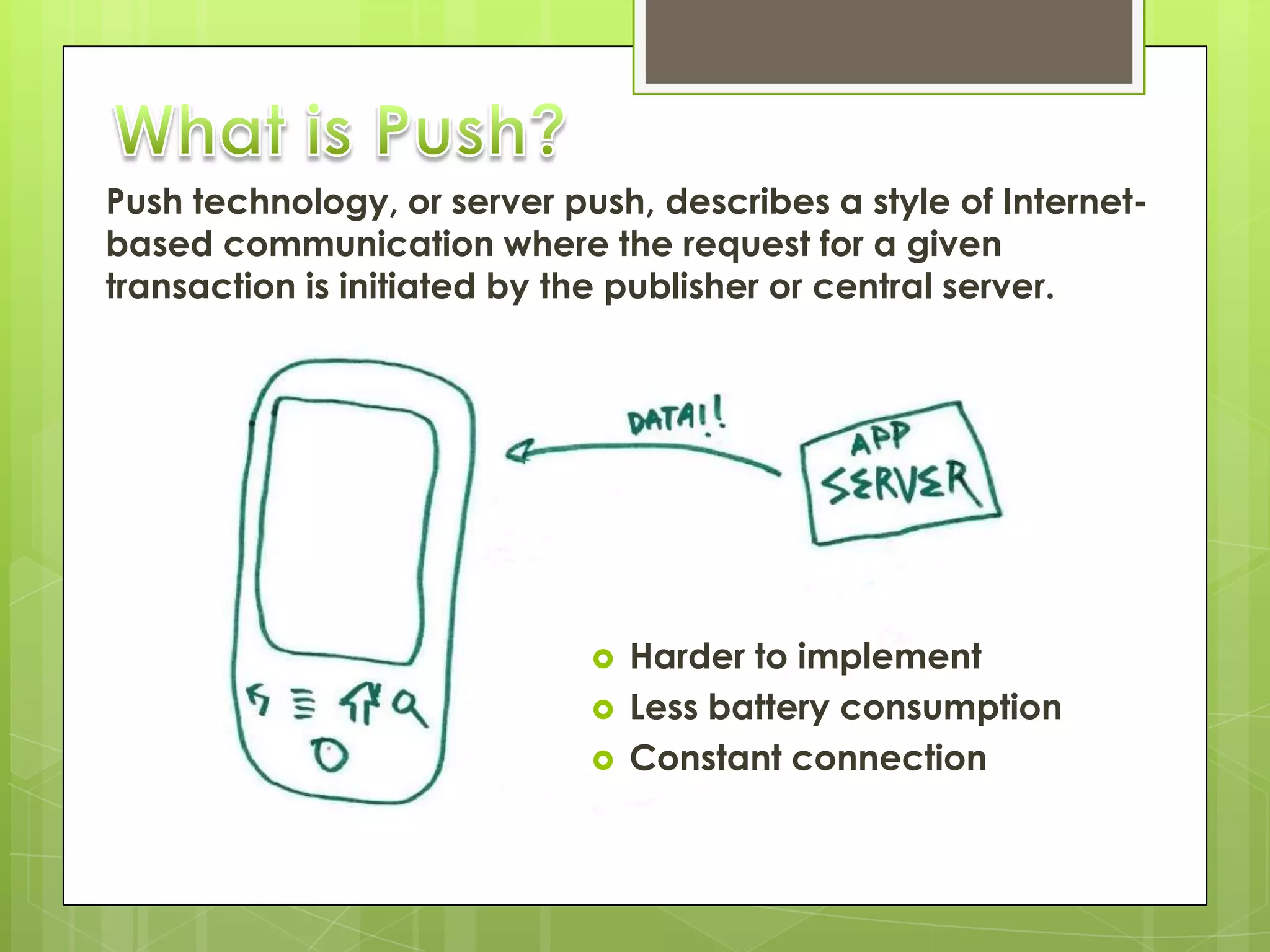
Push technology, or server push, describes a style of Internet-
based communication where the request for a given
transaction is initiated by the publisher or central server.


                                Harder to implement
                                Less battery consumption
                                Constant connection
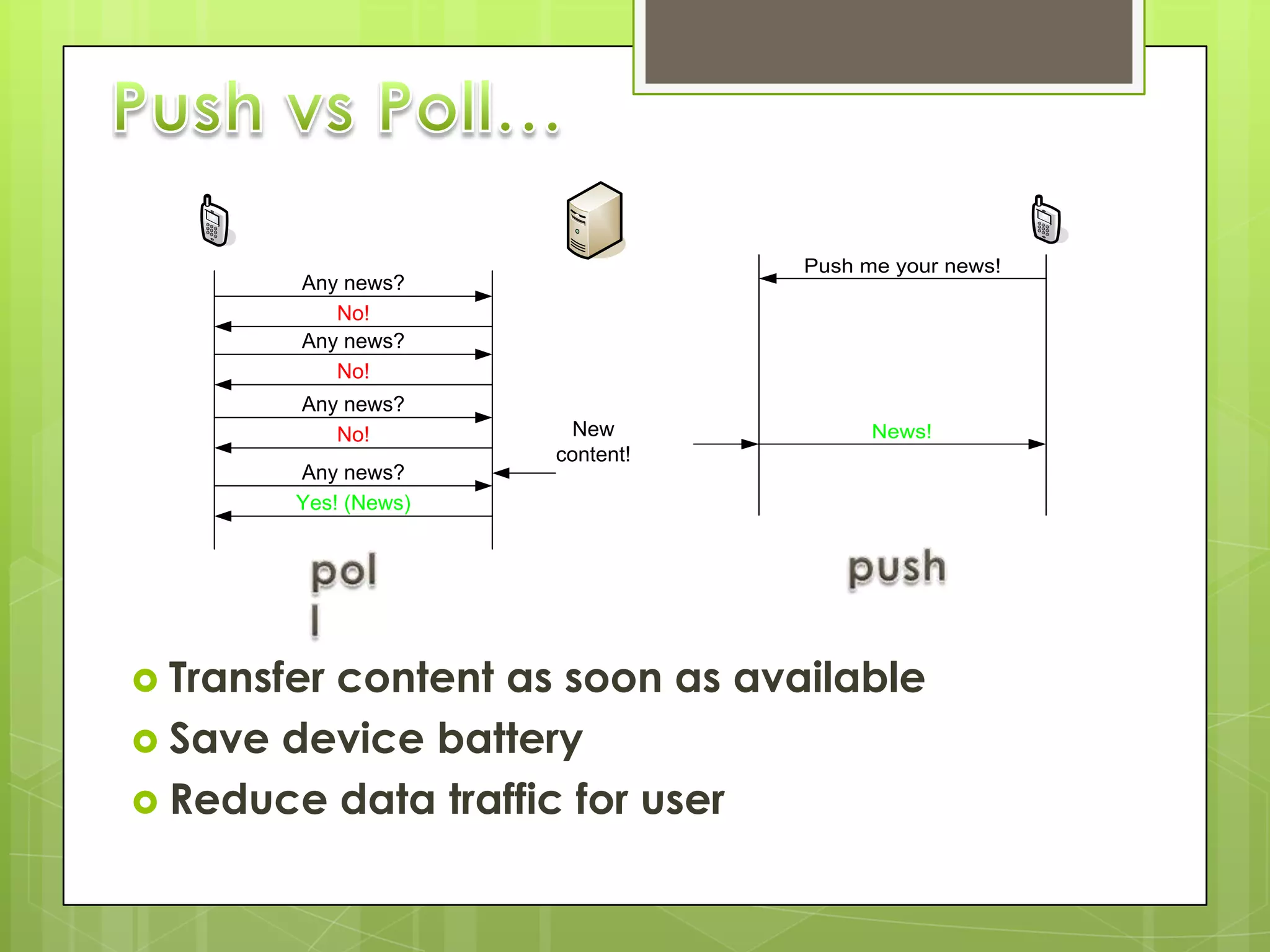
Push me your news!
        Any news?
           No!
        Any news?
           No!
        Any news?
           No!          New            News!
                      content!
        Any news?
        Yes! (News)


 Transfer
         content as soon as available
 Save device battery
 Reduce data traffic for user
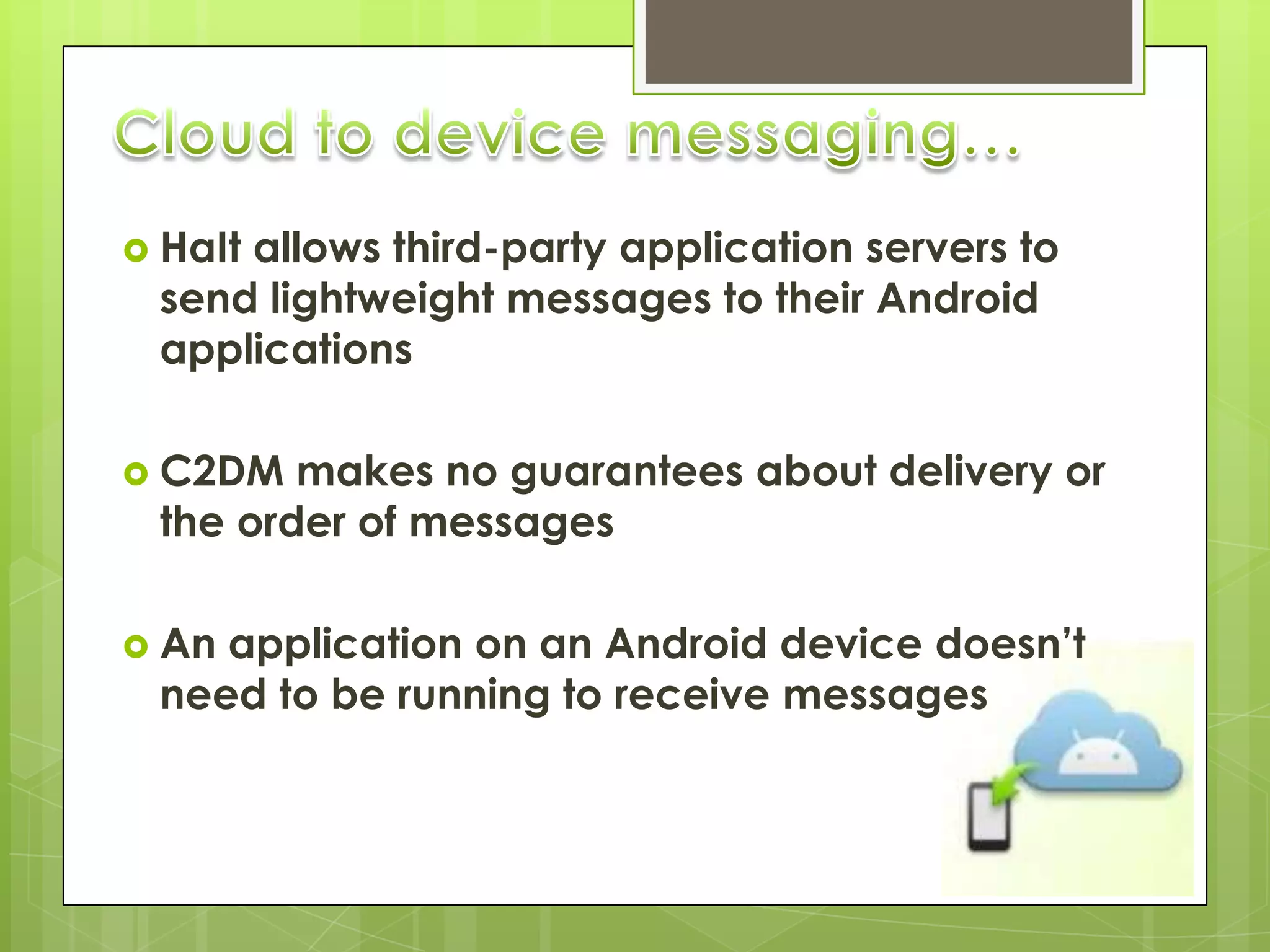
 HaIt
     allows third-party application servers to
 send lightweight messages to their Android
 applications

 C2DM  makes no guarantees about delivery or
 the order of messages

 Anapplication on an Android device doesn’t
 need to be running to receive messages
 Itdoes not provide any built-in user interface or
  other handling for message data

 Itrequires devices running Android 2.2 or higher
  that also have the Market application installed

 Ituses an existing connection for Google
  services
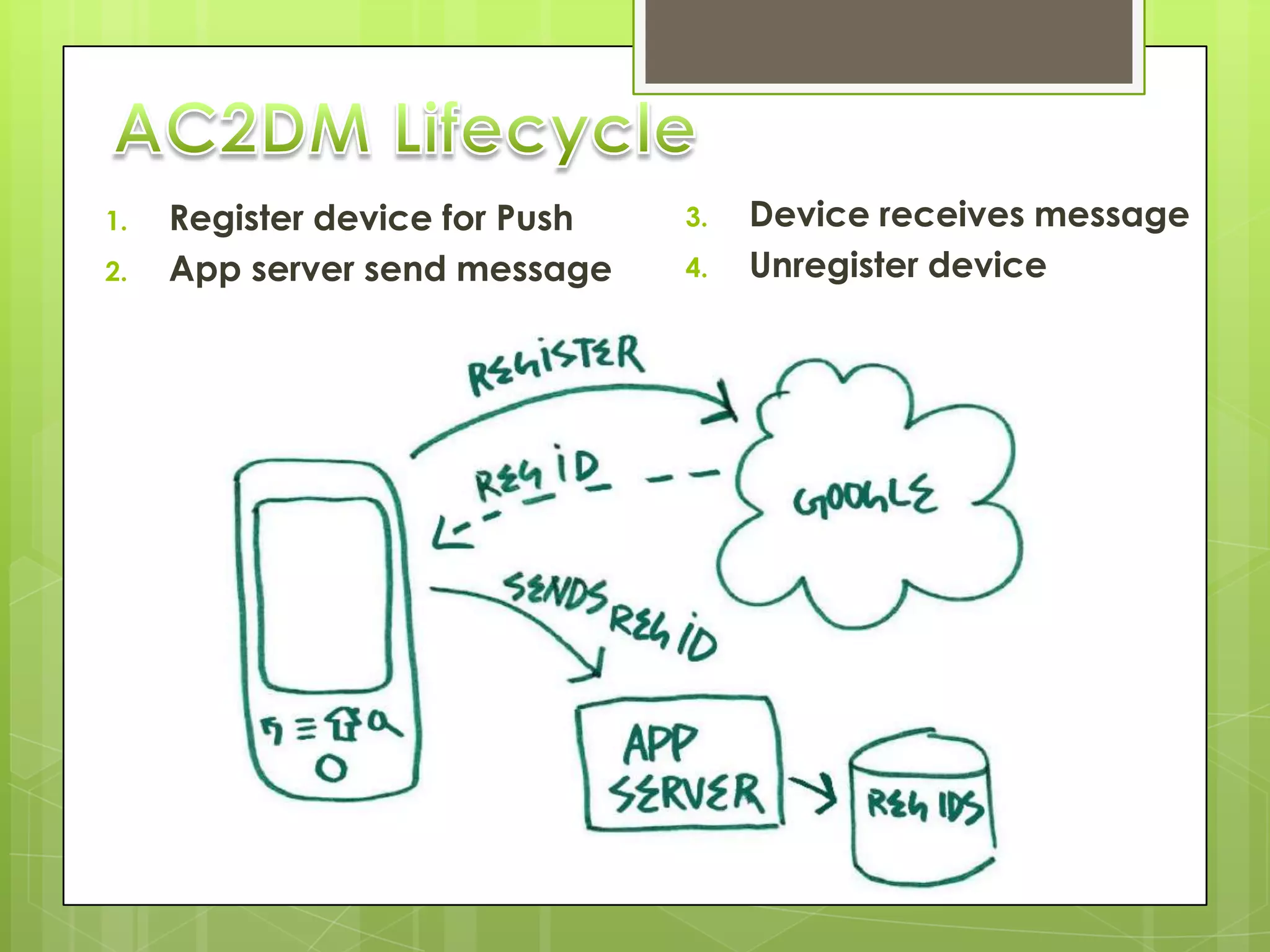
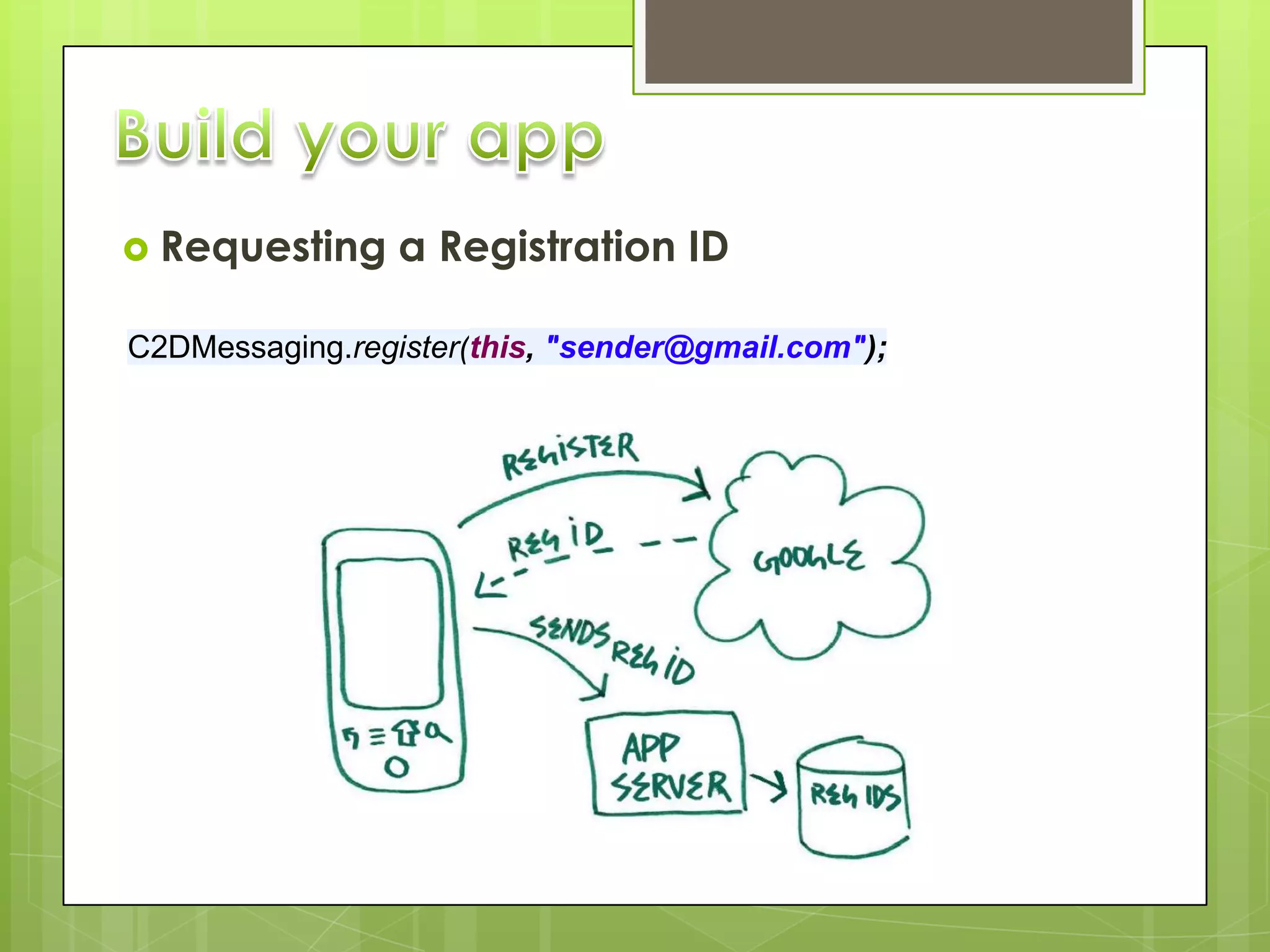
1.   Register device for Push   3.   Device receives message
2.   App server send message    4.   Unregister device
 Requesting     a Registration ID

C2DMessaging.register(this, "sender@gmail.com");
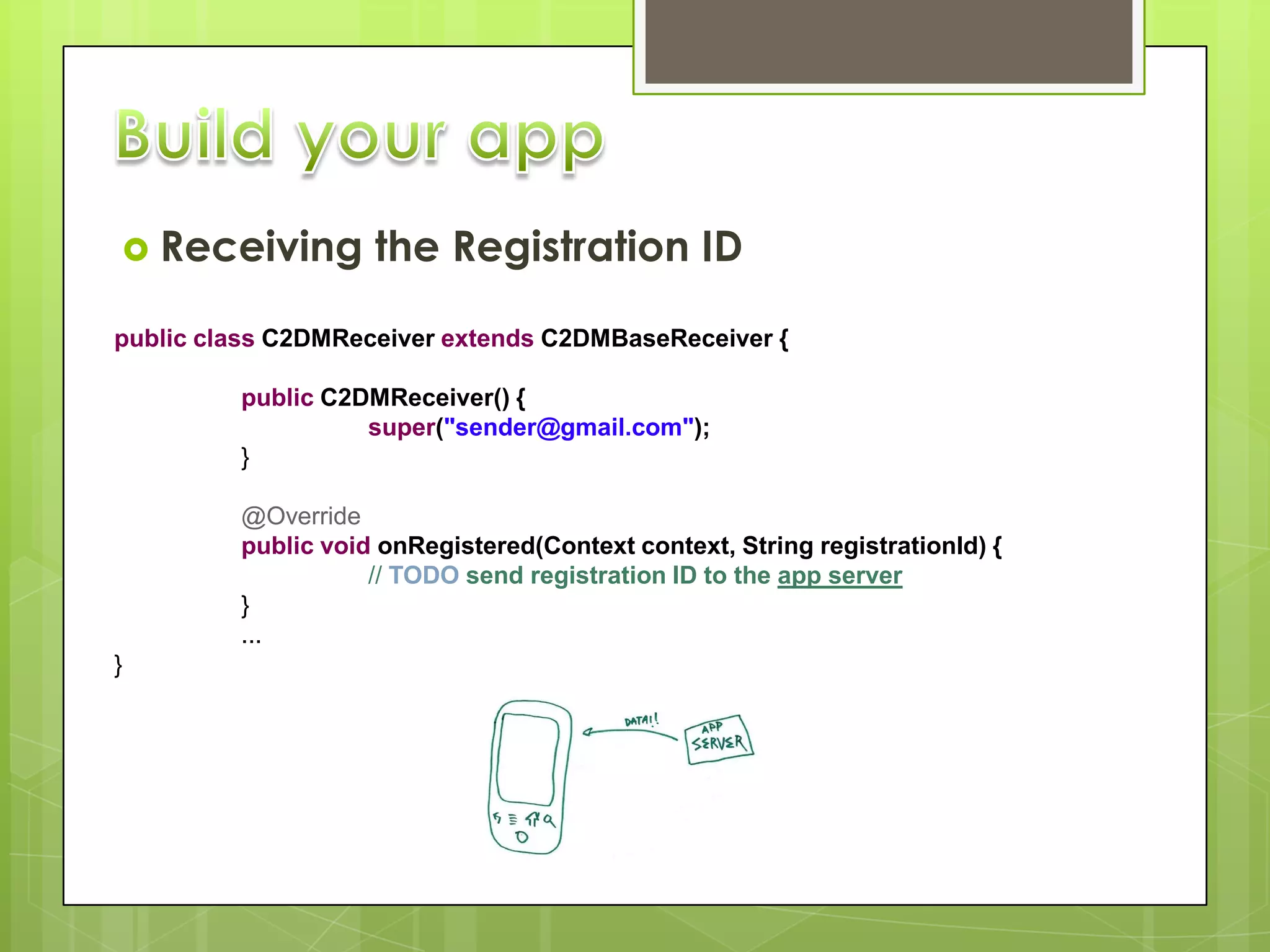
 Receiving         the Registration ID

public class C2DMReceiver extends C2DMBaseReceiver {

         public C2DMReceiver() {
                   super("sender@gmail.com");
         }

         @Override
         public void onRegistered(Context context, String registrationId) {
                    // TODO send registration ID to the app server
         }
         ...
}
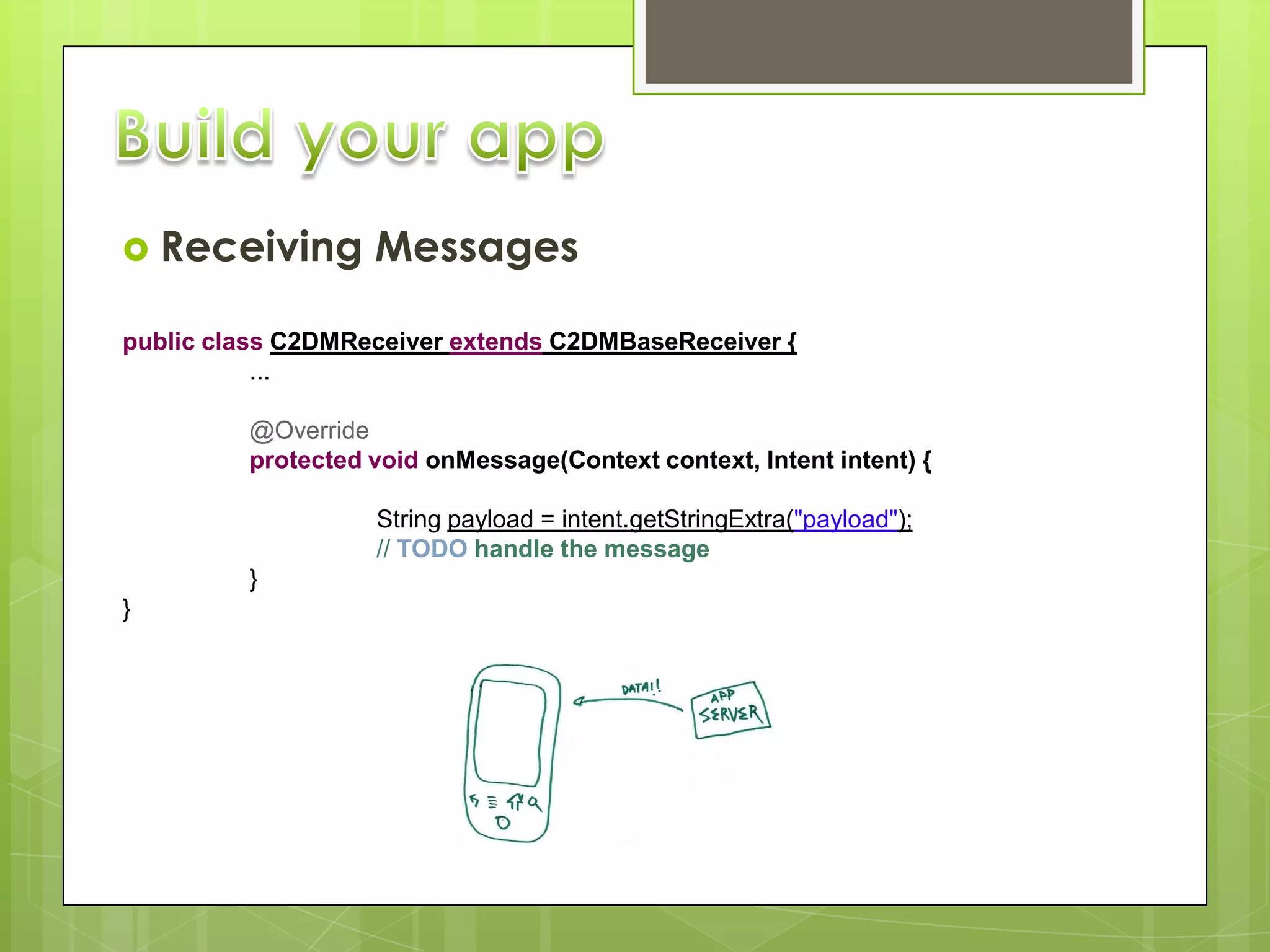
 Receiving        Messages

public class C2DMReceiver extends C2DMBaseReceiver {
           ...

         @Override
         protected void onMessage(Context context, Intent intent) {

                   String payload = intent.getStringExtra("payload");
                   // TODO handle the message
         }
}
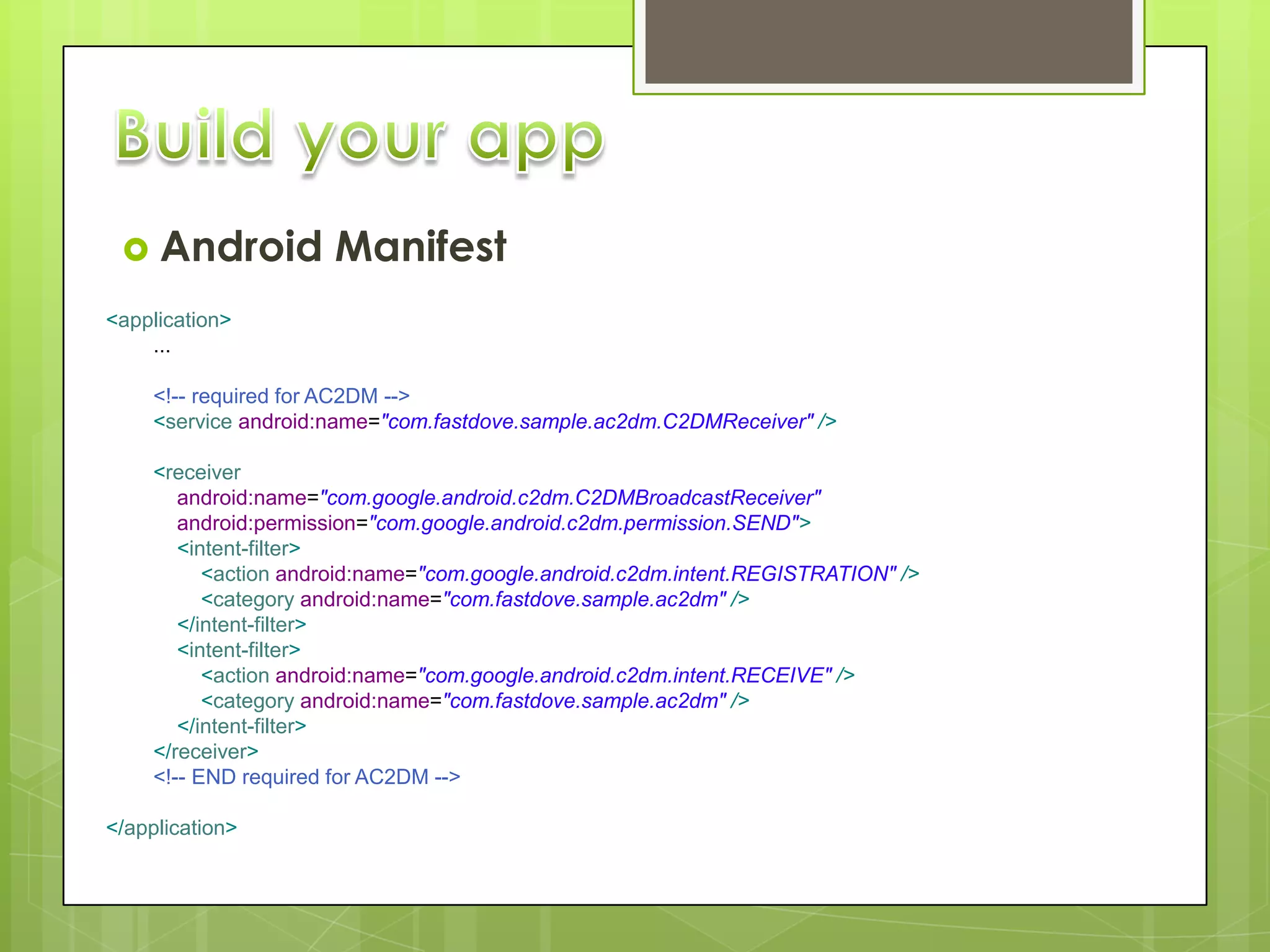
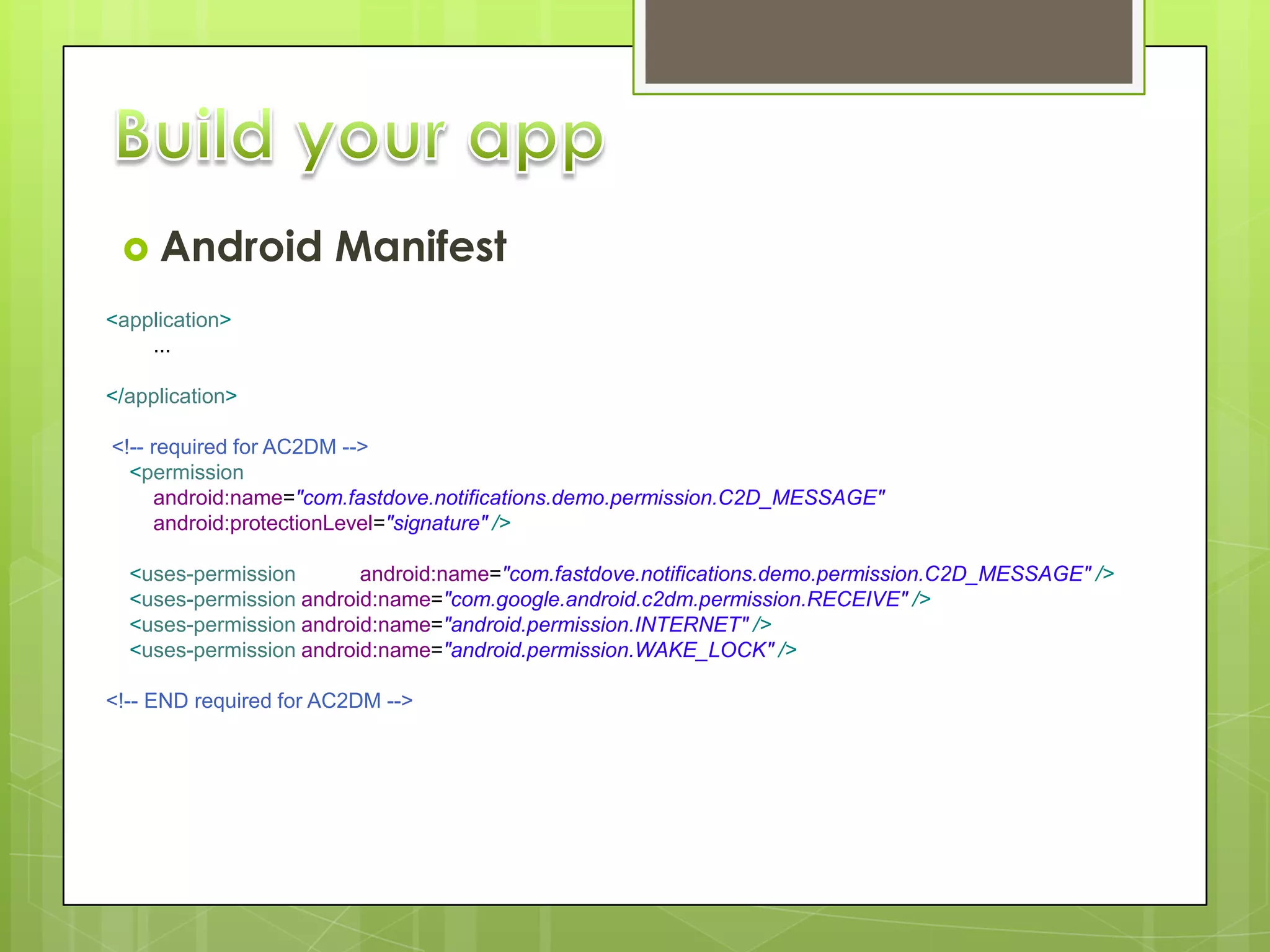
 Android            Manifest
<application>
    ...

     <!-- required for AC2DM -->
     <service android:name="com.fastdove.sample.ac2dm.C2DMReceiver" />

     <receiver
        android:name="com.google.android.c2dm.C2DMBroadcastReceiver"
        android:permission="com.google.android.c2dm.permission.SEND">
        <intent-filter>
           <action android:name="com.google.android.c2dm.intent.REGISTRATION" />
           <category android:name="com.fastdove.sample.ac2dm" />
        </intent-filter>
        <intent-filter>
           <action android:name="com.google.android.c2dm.intent.RECEIVE" />
           <category android:name="com.fastdove.sample.ac2dm" />
        </intent-filter>
     </receiver>
     <!-- END required for AC2DM -->

</application>
 Android             Manifest
<application>
    ...

</application>

<!-- required for AC2DM -->
  <permission
     android:name="com.fastdove.notifications.demo.permission.C2D_MESSAGE"
     android:protectionLevel="signature" />

  <uses-permission       android:name="com.fastdove.notifications.demo.permission.C2D_MESSAGE" />
  <uses-permission android:name="com.google.android.c2dm.permission.RECEIVE" />
  <uses-permission android:name="android.permission.INTERNET" />
  <uses-permission android:name="android.permission.WAKE_LOCK" />

<!-- END required for AC2DM -->
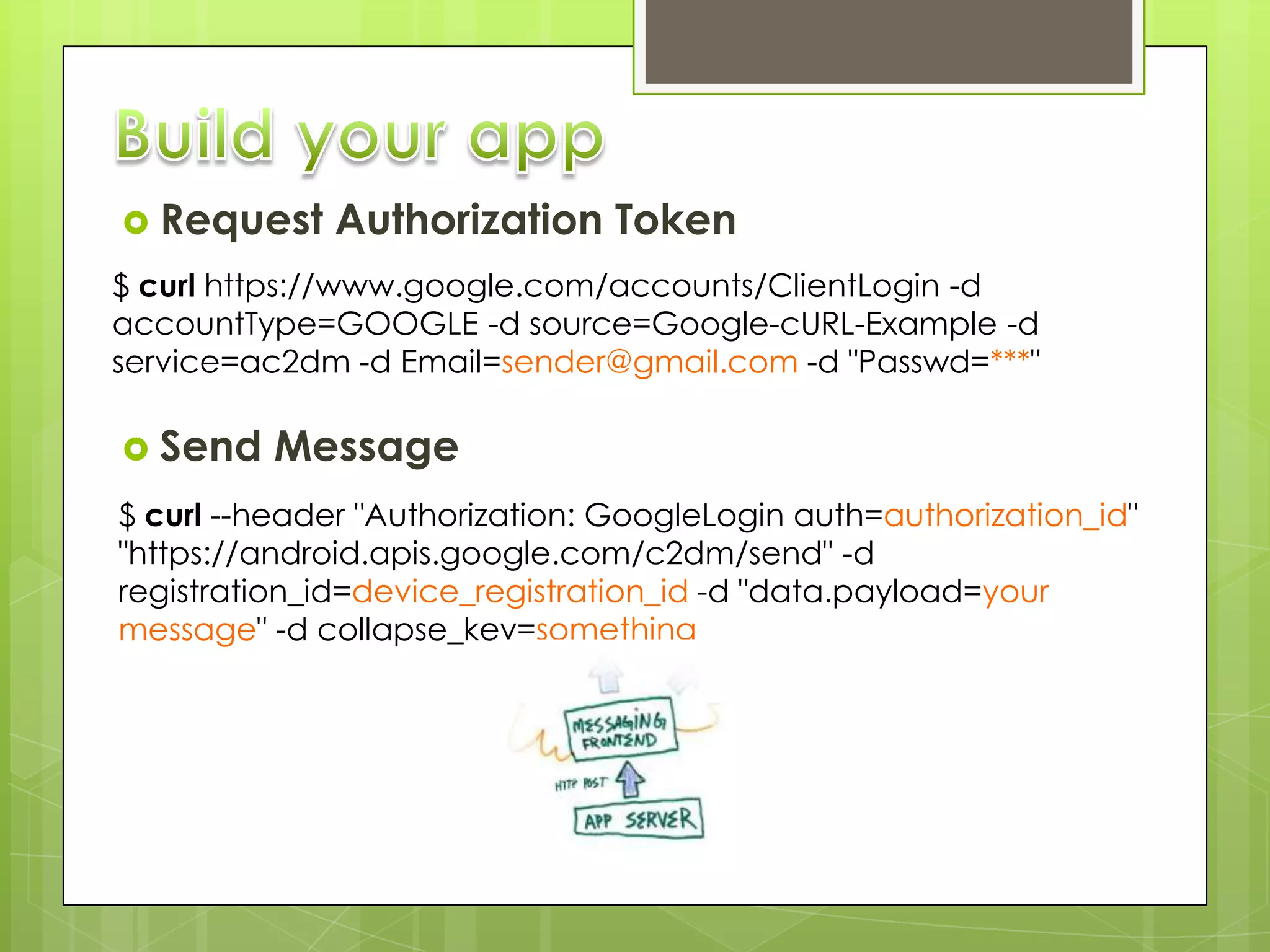
 Request     Authorization Token
$ curl https://www.google.com/accounts/ClientLogin -d
accountType=GOOGLE -d source=Google-cURL-Example -d
service=ac2dm -d Email=sender@gmail.com -d "Passwd=***"

 Send    Message
$ curl --header "Authorization: GoogleLogin auth=authorization_id"
"https://android.apis.google.com/c2dm/send" -d
registration_id=device_registration_id -d "data.payload=your
message" -d collapse_key=something
http://www.fastdove.com/

@fastdove
@fastdovedev

info@fastdove.com

Fernando Cejas - @fernando_cejas
Fernando García - @fegabe
Say thanks to the people I got
information from:

@johanni
@vogella

Android Cloud To Device Messaging

  • 1.
    Fernando Cejas -@fernando_cejas Fernando García - @fegabe
  • 2.
     Introduction  What’sPush?  Push vs. Poll  Cloud to device messaging  Android Implementation  Build your app ?  F.A.Q
  • 3.
     “fastDove Push”  Who we are? App for this demo  http://bit.ly/ac2dm_sample
  • 4.
    Push technology, orserver push, describes a style of Internet- based communication where the request for a given transaction is initiated by the publisher or central server.  Harder to implement  Less battery consumption  Constant connection
  • 5.
    Push me yournews! Any news? No! Any news? No! Any news? No! New News! content! Any news? Yes! (News)  Transfer content as soon as available  Save device battery  Reduce data traffic for user
  • 6.
     HaIt allows third-party application servers to send lightweight messages to their Android applications  C2DM makes no guarantees about delivery or the order of messages  Anapplication on an Android device doesn’t need to be running to receive messages
  • 7.
     Itdoes notprovide any built-in user interface or other handling for message data  Itrequires devices running Android 2.2 or higher that also have the Market application installed  Ituses an existing connection for Google services
  • 8.
    1. Register device for Push 3. Device receives message 2. App server send message 4. Unregister device
  • 9.
     Requesting a Registration ID C2DMessaging.register(this, "sender@gmail.com");
  • 10.
     Receiving the Registration ID public class C2DMReceiver extends C2DMBaseReceiver { public C2DMReceiver() { super("sender@gmail.com"); } @Override public void onRegistered(Context context, String registrationId) { // TODO send registration ID to the app server } ... }
  • 11.
     Receiving Messages public class C2DMReceiver extends C2DMBaseReceiver { ... @Override protected void onMessage(Context context, Intent intent) { String payload = intent.getStringExtra("payload"); // TODO handle the message } }
  • 12.
     Android Manifest <application> ... <!-- required for AC2DM --> <service android:name="com.fastdove.sample.ac2dm.C2DMReceiver" /> <receiver android:name="com.google.android.c2dm.C2DMBroadcastReceiver" android:permission="com.google.android.c2dm.permission.SEND"> <intent-filter> <action android:name="com.google.android.c2dm.intent.REGISTRATION" /> <category android:name="com.fastdove.sample.ac2dm" /> </intent-filter> <intent-filter> <action android:name="com.google.android.c2dm.intent.RECEIVE" /> <category android:name="com.fastdove.sample.ac2dm" /> </intent-filter> </receiver> <!-- END required for AC2DM --> </application>
  • 13.
     Android Manifest <application> ... </application> <!-- required for AC2DM --> <permission android:name="com.fastdove.notifications.demo.permission.C2D_MESSAGE" android:protectionLevel="signature" /> <uses-permission android:name="com.fastdove.notifications.demo.permission.C2D_MESSAGE" /> <uses-permission android:name="com.google.android.c2dm.permission.RECEIVE" /> <uses-permission android:name="android.permission.INTERNET" /> <uses-permission android:name="android.permission.WAKE_LOCK" /> <!-- END required for AC2DM -->
  • 14.
     Request Authorization Token $ curl https://www.google.com/accounts/ClientLogin -d accountType=GOOGLE -d source=Google-cURL-Example -d service=ac2dm -d Email=sender@gmail.com -d "Passwd=***"  Send Message $ curl --header "Authorization: GoogleLogin auth=authorization_id" "https://android.apis.google.com/c2dm/send" -d registration_id=device_registration_id -d "data.payload=your message" -d collapse_key=something
  • 17.
  • 18.
    Say thanks tothe people I got information from: @johanni @vogella