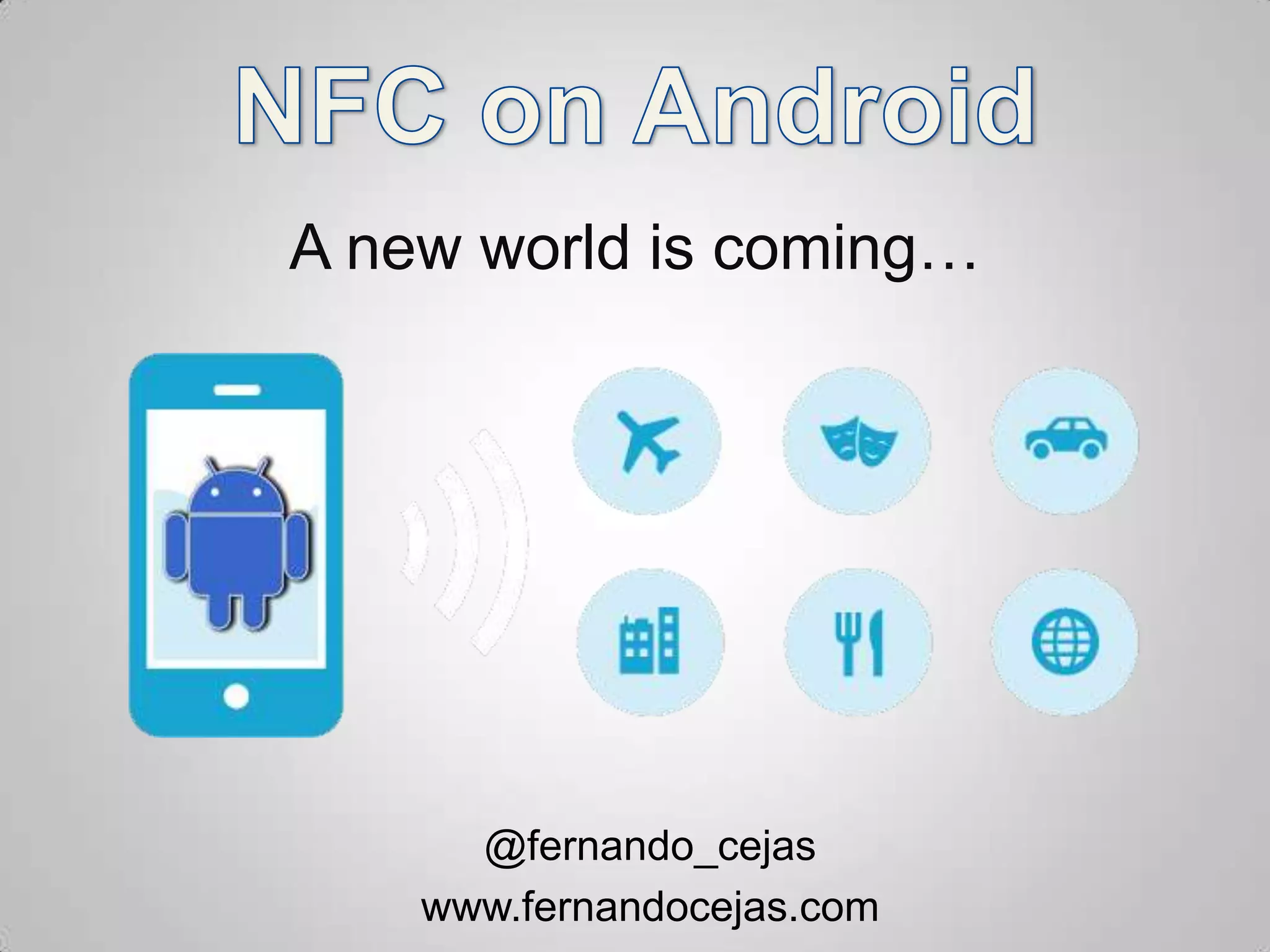
A new world is coming…


      @fernando_cejas
    www.fernandocejas.com
Who am I?

• Barcelona GDG Organizer
• NFC, Android and Agile Geek

• Android10.org
• NFC Actions App
• Flojack (@flomio)

• @fernando_cejas
• http://www.fernandocejas.com/
Agenda

•   What is NFC?
•   NFC Features and components
•   Common (and not) use cases
•   Android and NFC
•   Android NFC Development
•   Demo code
•   Faq
What is Near Field Communication?

• Near Field Communication (NFC) is a global standard for
  short-range wireless connectivity technology

• Driven by NFC Forum (http://www.nfc-forum.org) since
  2004.

• 160 + members, including Google, Intel, Microsoft,
  Nokia, NEC, Paypal, At&t, Visa, VTT.

• Promote N-Mark trademark as a universal symbol for
  NFC.
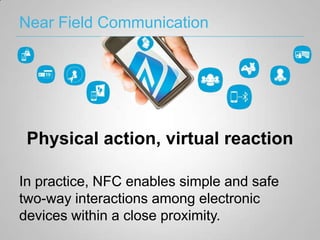
Near Field Communication


 Physical action, virtual reaction

In practice, NFC enables simple and safe
two-way interactions among electronic
devices within a close proximity.
NFC Features
• Short range technology
   – Connection established when devices or tag close enough (5-10
     cm)
   – Simple setup (instant configuration)

• 2-way communication
   – Not only reading like in contactless smart cards, but data exchange

• Passive tags
   – No need for external power
   – Low-price

• Security
  – Support secure element
  – Close proximity use brings some basic security
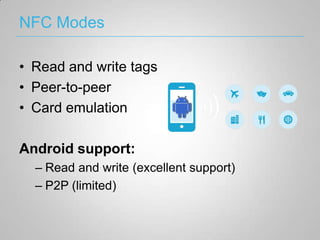
NFC Modes

• Read and write tags
• Peer-to-peer
• Card emulation

Android support:
  – Read and write (excellent support)
  – P2P (limited)
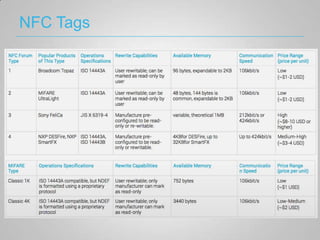
NFC Tags
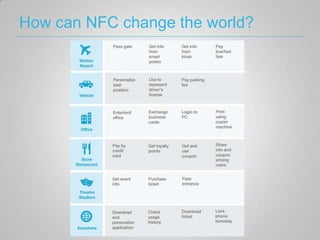
How can NFC change the world?
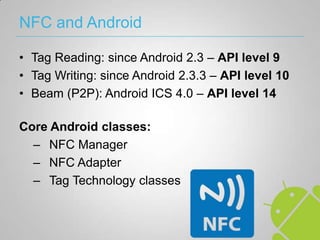
NFC and Android

• Tag Reading: since Android 2.3 – API level 9
• Tag Writing: since Android 2.3.3 – API level 10
• Beam (P2P): Android ICS 4.0 – API level 14

Core Android classes:
  – NFC Manager
  – NFC Adapter
  – Tag Technology classes
NFC Manager


• NFCManager used to get the NFCAdapter
• Boring
• Shortcut for
  getSystemService(NFC_SERVICE)
NFC Adapter

• The real thing

• Control Foreground Dispatch and P2P
  (Android Beam)

• Check if NFC is turned on
Android Manifest

• NFC Permission
<uses-permission android:name="android.permission.NFC" />


• API Level
<uses-sdk android:minSdkVersion="10" />


• NFC Feature
<uses-feature android:name="android.hardware.nfc" android:required="true" />
NDEF Messages
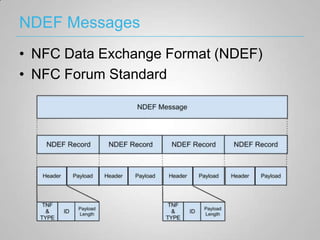
• NFC Data Exchange Format (NDEF)
• NFC Forum Standard
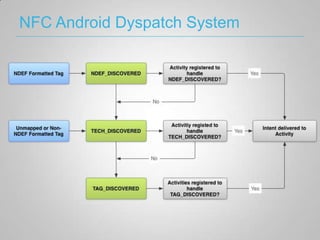
NFC Android Dyspatch System
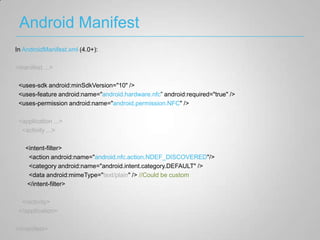
Android Manifest
In AndroidManifest.xml (4.0+):

<manifest ...>

 <uses-sdk android:minSdkVersion="10" />
 <uses-feature android:name="android.hardware.nfc” android:required="true" />
 <uses-permission android:name="android.permission.NFC" />

 <application ...>
  <activity ...>

   <intent-filter>
    <action android:name="android.nfc.action.NDEF_DISCOVERED"/>
    <category android:name="android.intent.category.DEFAULT" />
    <data android:mimeType="text/plain" /> //Could be custom
   </intent-filter>

  </activity>
 </application>

</manifest>
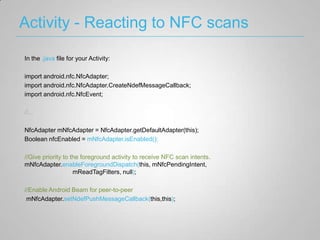
Activity - Reacting to NFC scans

In the .java file for your Activity:

import android.nfc.NfcAdapter;
import android.nfc.NfcAdapter.CreateNdefMessageCallback;
import android.nfc.NfcEvent;

//...

NfcAdapter mNfcAdapter = NfcAdapter.getDefaultAdapter(this);
Boolean nfcEnabled = mNfcAdapter.isEnabled();

//Give priority to the foreground activity to receive NFC scan intents.
mNfcAdapter.enableForegroundDispatch(this, mNfcPendingIntent,
                    mReadTagFilters, null);

//Enable Android Beam for peer-to-peer
 mNfcAdapter.setNdefPushMessageCallback(this,this);
Activity - Formatting to NDEF Format
In the .java file for your Activity:

import android.nfc.NdefMessage;
import android.nfc.NdefRecord;
import android.nfc.tech.Ndef;
import android.nfc.tech.NdefFormatable;
//...

String data = “Hello NFC”;

// create a new NDEF record w/ NDEF message using the app's custom MIME type:
String mimeType = "application/root.gast.playground.nfc"; //unique to your app
byte[] mimeBytes = mimeType.getBytes(Charset.forName("UTF-8"));
byte[] dataBytes = data.getBytes(Charset.forName("UTF-8"));
byte[] id = new byte[0];

NdefRecord record = new NdefRecord(NdefRecord.TNF_MIME_MEDIA,
                                    mimeBytes, id, dataBytes);
NdefMessage m = new NdefMessage(new NdefRecord[] { record });
Activity - Reading NDEF Format

In the .java file for your Activity: import android.nfc.Tag;
//...

Parcelable[] rawMsgs =
 intent.getParcelableArrayExtra(NfcAdapter.EXTRA_NDEF_MESSAGES);

NdefMessage[] msgs = new NdefMessage[rawMsgs.length];

for (int i = 0; i < rawMsgs.length; i++) {
  msgs[i] = (NdefMessage) rawMsgs[i];
}

NdefRecord record = msgs[0].getRecords()[0];
byte[] payload = record.getPayload(); //the info you wanted
Activity - Android Beam
In the .java file for your Activity:

//Implement the interface
public class BeamActivity extends Activity implements CreateNdefMessageCallback

// Register callback
mNfcAdapter.setNdefPushMessageCallback(this, this);

public NdefMessage createNdefMessage(NfcEvent event) {
           String data = "Hello NFC”;

     // create a new NDEF record and containing NDEF message:
     String mimeType = "application/com.fernandocejas.example.android.nfc”;
     byte[] mimeBytes = mimeType.getBytes(Charset.forName("UTF-8"));
     byte[] dataBytes = data.getBytes(Charset.forName("UTF-8"));
     byte[] id = new byte[0];
     NdefRecord record = new NdefRecord(NdefRecord.TNF_MIME_MEDIA,
                              mimeBytes, id, dataBytes);
     NdefMessage message = new NdefMessage(new NdefRecord[] { record });

     return message;
}
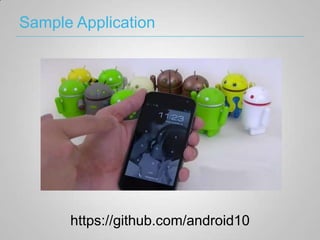
Sample Application


      https://github.com/android10
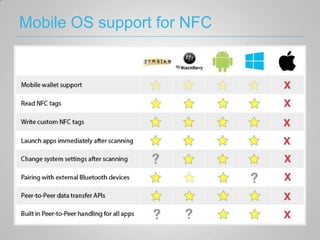
Mobile OS support for NFC
Any questions?
Thanks!


When you look at the dark side, careful you
 must be ... for the dark side looks back.

             @fernando_cejas
           www.fernandocejas.com

Nfc on Android

  • 1.
    A new worldis coming… @fernando_cejas www.fernandocejas.com
  • 2.
    Who am I? •Barcelona GDG Organizer • NFC, Android and Agile Geek • Android10.org • NFC Actions App • Flojack (@flomio) • @fernando_cejas • http://www.fernandocejas.com/
  • 3.
    Agenda • What is NFC? • NFC Features and components • Common (and not) use cases • Android and NFC • Android NFC Development • Demo code • Faq
  • 4.
    What is NearField Communication? • Near Field Communication (NFC) is a global standard for short-range wireless connectivity technology • Driven by NFC Forum (http://www.nfc-forum.org) since 2004. • 160 + members, including Google, Intel, Microsoft, Nokia, NEC, Paypal, At&t, Visa, VTT. • Promote N-Mark trademark as a universal symbol for NFC.
  • 5.
    Near Field Communication Physical action, virtual reaction In practice, NFC enables simple and safe two-way interactions among electronic devices within a close proximity.
  • 6.
    NFC Features • Shortrange technology – Connection established when devices or tag close enough (5-10 cm) – Simple setup (instant configuration) • 2-way communication – Not only reading like in contactless smart cards, but data exchange • Passive tags – No need for external power – Low-price • Security – Support secure element – Close proximity use brings some basic security
  • 7.
    NFC Modes • Readand write tags • Peer-to-peer • Card emulation Android support: – Read and write (excellent support) – P2P (limited)
  • 8.
  • 9.
    How can NFCchange the world?
  • 10.
    NFC and Android •Tag Reading: since Android 2.3 – API level 9 • Tag Writing: since Android 2.3.3 – API level 10 • Beam (P2P): Android ICS 4.0 – API level 14 Core Android classes: – NFC Manager – NFC Adapter – Tag Technology classes
  • 11.
    NFC Manager • NFCManagerused to get the NFCAdapter • Boring • Shortcut for getSystemService(NFC_SERVICE)
  • 12.
    NFC Adapter • Thereal thing • Control Foreground Dispatch and P2P (Android Beam) • Check if NFC is turned on
  • 13.
    Android Manifest • NFCPermission <uses-permission android:name="android.permission.NFC" /> • API Level <uses-sdk android:minSdkVersion="10" /> • NFC Feature <uses-feature android:name="android.hardware.nfc" android:required="true" />
  • 14.
    NDEF Messages • NFCData Exchange Format (NDEF) • NFC Forum Standard
  • 15.
  • 16.
    Android Manifest In AndroidManifest.xml(4.0+): <manifest ...> <uses-sdk android:minSdkVersion="10" /> <uses-feature android:name="android.hardware.nfc” android:required="true" /> <uses-permission android:name="android.permission.NFC" /> <application ...> <activity ...> <intent-filter> <action android:name="android.nfc.action.NDEF_DISCOVERED"/> <category android:name="android.intent.category.DEFAULT" /> <data android:mimeType="text/plain" /> //Could be custom </intent-filter> </activity> </application> </manifest>
  • 17.
    Activity - Reactingto NFC scans In the .java file for your Activity: import android.nfc.NfcAdapter; import android.nfc.NfcAdapter.CreateNdefMessageCallback; import android.nfc.NfcEvent; //... NfcAdapter mNfcAdapter = NfcAdapter.getDefaultAdapter(this); Boolean nfcEnabled = mNfcAdapter.isEnabled(); //Give priority to the foreground activity to receive NFC scan intents. mNfcAdapter.enableForegroundDispatch(this, mNfcPendingIntent, mReadTagFilters, null); //Enable Android Beam for peer-to-peer mNfcAdapter.setNdefPushMessageCallback(this,this);
  • 18.
    Activity - Formattingto NDEF Format In the .java file for your Activity: import android.nfc.NdefMessage; import android.nfc.NdefRecord; import android.nfc.tech.Ndef; import android.nfc.tech.NdefFormatable; //... String data = “Hello NFC”; // create a new NDEF record w/ NDEF message using the app's custom MIME type: String mimeType = "application/root.gast.playground.nfc"; //unique to your app byte[] mimeBytes = mimeType.getBytes(Charset.forName("UTF-8")); byte[] dataBytes = data.getBytes(Charset.forName("UTF-8")); byte[] id = new byte[0]; NdefRecord record = new NdefRecord(NdefRecord.TNF_MIME_MEDIA, mimeBytes, id, dataBytes); NdefMessage m = new NdefMessage(new NdefRecord[] { record });
  • 19.
    Activity - ReadingNDEF Format In the .java file for your Activity: import android.nfc.Tag; //... Parcelable[] rawMsgs = intent.getParcelableArrayExtra(NfcAdapter.EXTRA_NDEF_MESSAGES); NdefMessage[] msgs = new NdefMessage[rawMsgs.length]; for (int i = 0; i < rawMsgs.length; i++) { msgs[i] = (NdefMessage) rawMsgs[i]; } NdefRecord record = msgs[0].getRecords()[0]; byte[] payload = record.getPayload(); //the info you wanted
  • 20.
    Activity - AndroidBeam In the .java file for your Activity: //Implement the interface public class BeamActivity extends Activity implements CreateNdefMessageCallback // Register callback mNfcAdapter.setNdefPushMessageCallback(this, this); public NdefMessage createNdefMessage(NfcEvent event) { String data = "Hello NFC”; // create a new NDEF record and containing NDEF message: String mimeType = "application/com.fernandocejas.example.android.nfc”; byte[] mimeBytes = mimeType.getBytes(Charset.forName("UTF-8")); byte[] dataBytes = data.getBytes(Charset.forName("UTF-8")); byte[] id = new byte[0]; NdefRecord record = new NdefRecord(NdefRecord.TNF_MIME_MEDIA, mimeBytes, id, dataBytes); NdefMessage message = new NdefMessage(new NdefRecord[] { record }); return message; }
  • 21.
    Sample Application https://github.com/android10
  • 22.
  • 23.
  • 24.
    Thanks! When you lookat the dark side, careful you must be ... for the dark side looks back. @fernando_cejas www.fernandocejas.com