Ashish Raj
Student- MIMIT MALOUT
About me
Research Scholar
Developer cum Corporate
Trainer at Xperia Technologies
Pvt. Ltd.
Workshop Event Organizer –
National Android Development
Challenge (NADC)
What we will be discussing today.
Google Cloud Messaging
What is
GCM?
Why do we
need GCM?
How it is
implemented
?
What is GCM?
GCM definition
 GCM stands for Google Cloud Messaging .
 It is a free service that allows developers to send data from third
party servers to their applications running on android devices
 Handles queuing of messages and delivery to the target
application running on the target device.
 Intended use is not to send huge amount of data to the client
device
Things to keep in mind
Application on the android device DOES
NOT need to be running to receive
messages.
Requires user to set up a Google account
on the device.
It is purely a routing component
There is no guaranteed delivery of
messages to the device .
Focus of GCM
Ease of use. No
sign-up forms.
No quotas.
GCM stats are
available through
the Android
Developer
Console.
Battery efficiency.
Rich set of new
APIs
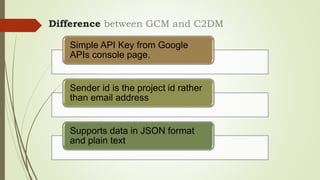
Difference between GCM and C2DM
Simple API Key from Google
APIs console page.
Sender id is the project id rather
than email address
Supports data in JSON format
and plain text
Difference between GCM and C2DM
Multicast message support
Multiple senders
Messages have time to live ( 0 ~
4 weeks ) eg. Expiring invitations
Payload up to 4kb
Why do we need GCM?
The need to use GCM
 Client server architecture is the most common architecture .
 Most application do all the heavy lifting and processing at
the servers and then use the processed data within the
applications .
 Scalability & extensibility
 More computing power
 Background process polling server for information at regular
intervals is a bad design
 Battery performance
 System resource usage ( memory , CPU )
 Complicated coding
The need to use GCM
 Less coding required
 Not need to worry about queuing of messages
 Differed delivery
 Simpler application flow
 Application does not need to be running in the background for
receiving data messages.
 Lower cost and better tracking than SMS.
How it is implemented?
Major Components
Your application server
GCM servers
Mobile device
Typical sequence of events
The application
server sends a
message to
GCM servers.
Google queues
and stores the
message in
case the device
is offline.
When the
device is
online, Google
sends the
message to the
device.
On the device,
the system
broadcasts the
message to the
specified
Android. This
wakes the
Android
application up.
The Android
application
processes the
message
Minimum requirements ( device side )
Android 2.2 +
Android market place should be installed
Emulator with Google APIs
Internet connection
Google account ( device version < 4.0.4 )
Minimum requirements ( server side )
HTTPS application server that should be
Able to communicate with your client.
Able to fire off HTTP requests to the GCM
server.
Able to handle requests and queue data as
needed. For example, it should be able to
perform exponential back off.
Able to store the user device registration id .
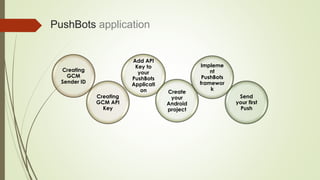
PushBots application
Creating
GCM
Sender ID
Creating
GCM API
Key
Add API
Key to
your
PushBots
Applicati
on Create
your
Android
project
Impleme
nt
PushBots
framewor
k
Send
your first
Push
Snapshots
1 Creating GCM Sender ID
Sender ID
2. Creating GCM API Key
3. Add API Key to your PushBots Application
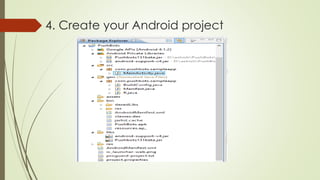
4. Create your Android project
5. Implement PushBots framework
6. Send your first Push
Thank you

GCM with Pushbots

  • 1.
  • 2.
    About me Research Scholar Developercum Corporate Trainer at Xperia Technologies Pvt. Ltd. Workshop Event Organizer – National Android Development Challenge (NADC)
  • 3.
    What we willbe discussing today. Google Cloud Messaging What is GCM? Why do we need GCM? How it is implemented ?
  • 4.
  • 5.
    GCM definition  GCMstands for Google Cloud Messaging .  It is a free service that allows developers to send data from third party servers to their applications running on android devices  Handles queuing of messages and delivery to the target application running on the target device.  Intended use is not to send huge amount of data to the client device
  • 6.
    Things to keepin mind Application on the android device DOES NOT need to be running to receive messages. Requires user to set up a Google account on the device. It is purely a routing component There is no guaranteed delivery of messages to the device .
  • 7.
    Focus of GCM Easeof use. No sign-up forms. No quotas. GCM stats are available through the Android Developer Console. Battery efficiency. Rich set of new APIs
  • 8.
    Difference between GCMand C2DM Simple API Key from Google APIs console page. Sender id is the project id rather than email address Supports data in JSON format and plain text
  • 9.
    Difference between GCMand C2DM Multicast message support Multiple senders Messages have time to live ( 0 ~ 4 weeks ) eg. Expiring invitations Payload up to 4kb
  • 10.
    Why do weneed GCM?
  • 11.
    The need touse GCM  Client server architecture is the most common architecture .  Most application do all the heavy lifting and processing at the servers and then use the processed data within the applications .  Scalability & extensibility  More computing power  Background process polling server for information at regular intervals is a bad design  Battery performance  System resource usage ( memory , CPU )  Complicated coding
  • 12.
    The need touse GCM  Less coding required  Not need to worry about queuing of messages  Differed delivery  Simpler application flow  Application does not need to be running in the background for receiving data messages.  Lower cost and better tracking than SMS.
  • 13.
    How it isimplemented?
  • 14.
    Major Components Your applicationserver GCM servers Mobile device
  • 15.
    Typical sequence ofevents The application server sends a message to GCM servers. Google queues and stores the message in case the device is offline. When the device is online, Google sends the message to the device. On the device, the system broadcasts the message to the specified Android. This wakes the Android application up. The Android application processes the message
  • 16.
    Minimum requirements (device side ) Android 2.2 + Android market place should be installed Emulator with Google APIs Internet connection Google account ( device version < 4.0.4 )
  • 17.
    Minimum requirements (server side ) HTTPS application server that should be Able to communicate with your client. Able to fire off HTTP requests to the GCM server. Able to handle requests and queue data as needed. For example, it should be able to perform exponential back off. Able to store the user device registration id .
  • 18.
    PushBots application Creating GCM Sender ID Creating GCMAPI Key Add API Key to your PushBots Applicati on Create your Android project Impleme nt PushBots framewor k Send your first Push
  • 19.
    Snapshots 1 Creating GCMSender ID Sender ID
  • 20.
  • 21.
    3. Add APIKey to your PushBots Application
  • 22.
    4. Create yourAndroid project
  • 23.
  • 24.
    6. Send yourfirst Push
  • 25.