University of Kentucky
UKnowledge
UKnowledge
Theses and Dissertations--Computer Science Computer Science
2016
An Optical Character Recognition Engine for Graphical Processing
Units
Units
Jeremy Reed
University of Kentucky, jp_reed@yahoo.com
Author ORCID Identifier:
http://orcid.org/0000-0001-7491-9683
Digital Object Identifier: https://doi.org/10.13023/ETD.2016.506
Right click to open a feedback form in a new tab to let us know how this document benefits you.
Recommended Citation
Reed, Jeremy, "An Optical Character Recognition Engine for Graphical Processing Units" (2016). Theses
and Dissertations--Computer Science. 54.
https://uknowledge.uky.edu/cs_etds/54
This Doctoral Dissertation is brought to you for free and open access by the Computer Science at UKnowledge. It has
been accepted for inclusion in Theses and Dissertations--Computer Science by an authorized administrator of
UKnowledge. For more information, please contact UKnowledge@lsv.uky.edu.
STUDENT AGREEMENT:
STUDENT AGREEMENT:
I represent that my thesis or dissertation and abstract are my original work. Proper attribution
has been given to all outside sources. I understand that I am solely responsible for obtaining
any needed copyright permissions. I have obtained needed written permission statement(s)
from the owner(s) of each third-party copyrighted matter to be included in my work, allowing
electronic distribution (if such use is not permitted by the fair use doctrine) which will be
submitted to UKnowledge as Additional File.
I hereby grant to The University of Kentucky and its agents the irrevocable, non-exclusive, and
royalty-free license to archive and make accessible my work in whole or in part in all forms of
media, now or hereafter known. I agree that the document mentioned above may be made
available immediately for worldwide access unless an embargo applies.
I retain all other ownership rights to the copyright of my work. I also retain the right to use in
future works (such as articles or books) all or part of my work. I understand that I am free to
register the copyright to my work.
REVIEW, APPROVAL AND ACCEPTANCE
The document mentioned above has been reviewed and accepted by the student’s advisor, on
behalf of the advisory committee, and by the Director of Graduate Studies (DGS), on behalf of
the program; we verify that this is the final, approved version of the student’s thesis including all
changes required by the advisory committee. The undersigned agree to abide by the statements
above.
Jeremy Reed, Student
Dr. Raphael Finkel, Major Professor
Dr. Miroslaw Truszczyński, Director of Graduate Studies
An Optical Character Recognition Engine for Graphical Processing Units
DISSERTATION
A dissertation submitted in partial
fulfillment of the requirements for the
degree of Doctor of Philosophy in the
College of Engineering at the
University of Kentucky
By
Jeremy Reed
Lexington, Kentucky
Director: Dr. Raphael Finkel
Professor of Computer Science
Lexington, Kentucky 2016
Copyright©
Jeremy Reed 2016
ABSTRACT OF DISSERTATION
An Optical Character Recognition Engine for Graphical Processing Units
This dissertation investigates how to build an optical character recognition engine (OCR)
for a graphical processing unit (GPU). I introduce basic concepts for both building an OCR
engine and for programming on the GPU. I then describe the SegRec algorithm in detail
and discuss my findings.
KEYWORDS: OCR, CUDA, GPU
Author’s signature: Jeremy Reed
Date: November 22, 2016
An Optical Character Recognition Engine for Graphical Processing Units
By
Jeremy Reed
Director of Dissertation: Raphael Finkel
Director of Graduate Studies: Miroslaw Truszczyński
Date: November 22, 2016
ACKNOWLEDGMENTS
My wife, Anrea, first and foremost, is the reason this dissertation exists in a finished form.
Her support and encouragement over the years to "finish my OCR" served as a driving
force to help keep me on track. My advisor, Dr. Raphael Finkel, follows at a close second.
He served — and continues to serve — as a sounding board upon which ideas are bounced
and as a source of wisdom and advice. I am grateful to him for all he has helped me do and
look forward to ever more.
I would also like to thank the members of my committee for their time, effort, and feedback.
Special thanks goes to NVIDIA for providing the Tesla K40 upon which I tested SegRec.
iii
TABLE OF CONTENTS
Acknowledgments . . . . . . . . . . . . . . . . . . . . . . . . . . . . . . . . . . . . iii
Table of Contents . . . . . . . . . . . . . . . . . . . . . . . . . . . . . . . . . . . . iv
List of Figures . . . . . . . . . . . . . . . . . . . . . . . . . . . . . . . . . . . . . . vi
List of Tables . . . . . . . . . . . . . . . . . . . . . . . . . . . . . . . . . . . . . . x
Chapter 1 Introduction . . . . . . . . . . . . . . . . . . . . . . . . . . . . . . . 1
1.1 Motivation . . . . . . . . . . . . . . . . . . . . . . . . . . . . . . . . . . . 1
1.2 Contribution . . . . . . . . . . . . . . . . . . . . . . . . . . . . . . . . . . 1
1.3 Structure of the dissertation . . . . . . . . . . . . . . . . . . . . . . . . . . 2
Chapter 2 Preliminaries . . . . . . . . . . . . . . . . . . . . . . . . . . . . . . . 4
2.1 Terminology . . . . . . . . . . . . . . . . . . . . . . . . . . . . . . . . . . 4
2.2 OCR Phases . . . . . . . . . . . . . . . . . . . . . . . . . . . . . . . . . . 4
2.3 Pre-processing phase: Problems . . . . . . . . . . . . . . . . . . . . . . . 5
2.4 Pre-processing phase: Techniques and solutions . . . . . . . . . . . . . . . 6
2.5 Isolation phase: Problems . . . . . . . . . . . . . . . . . . . . . . . . . . . 15
2.6 Isolation phase: Techniques and solutions . . . . . . . . . . . . . . . . . . 16
2.7 Identification phase: Problems . . . . . . . . . . . . . . . . . . . . . . . . 26
2.8 Identification Phase: Techniques and solutions . . . . . . . . . . . . . . . . 27
2.9 Post-processing phase: Problems . . . . . . . . . . . . . . . . . . . . . . . 40
2.10 Conclusion . . . . . . . . . . . . . . . . . . . . . . . . . . . . . . . . . . 41
Chapter 3 Introduction to GPUs . . . . . . . . . . . . . . . . . . . . . . . . . . 42
3.1 Virtual and physical architecture . . . . . . . . . . . . . . . . . . . . . . . 42
3.2 Kernel execution . . . . . . . . . . . . . . . . . . . . . . . . . . . . . . . 42
3.3 Programming a GPU . . . . . . . . . . . . . . . . . . . . . . . . . . . . . 43
3.4 GPU memory types . . . . . . . . . . . . . . . . . . . . . . . . . . . . . . 45
3.5 Programming hints . . . . . . . . . . . . . . . . . . . . . . . . . . . . . . 46
3.6 Conclusion . . . . . . . . . . . . . . . . . . . . . . . . . . . . . . . . . . 47
Chapter 4 The SegRec Algorithm . . . . . . . . . . . . . . . . . . . . . . . . . 48
4.1 Version 1 . . . . . . . . . . . . . . . . . . . . . . . . . . . . . . . . . . . 48
4.2 Version 2 . . . . . . . . . . . . . . . . . . . . . . . . . . . . . . . . . . . 51
4.3 Version 3 . . . . . . . . . . . . . . . . . . . . . . . . . . . . . . . . . . . 53
4.4 Output . . . . . . . . . . . . . . . . . . . . . . . . . . . . . . . . . . . . . 70
Chapter 5 Findings and Results . . . . . . . . . . . . . . . . . . . . . . . . . . . 72
5.1 OCR engines . . . . . . . . . . . . . . . . . . . . . . . . . . . . . . . . . 72
iv
5.2 Image set creation . . . . . . . . . . . . . . . . . . . . . . . . . . . . . . . 72
5.3 Results . . . . . . . . . . . . . . . . . . . . . . . . . . . . . . . . . . . . . 74
5.4 Metrics . . . . . . . . . . . . . . . . . . . . . . . . . . . . . . . . . . . . 74
5.5 Discussion: Software limitations . . . . . . . . . . . . . . . . . . . . . . . 78
5.6 Discussion: Speed . . . . . . . . . . . . . . . . . . . . . . . . . . . . . . . 78
5.7 Discussion: Image sets . . . . . . . . . . . . . . . . . . . . . . . . . . . . 78
5.8 Discussion: SegRec . . . . . . . . . . . . . . . . . . . . . . . . . . . . . . 79
Chapter 6 Moving Forward . . . . . . . . . . . . . . . . . . . . . . . . . . . . . 82
6.1 Improving SegRec . . . . . . . . . . . . . . . . . . . . . . . . . . . . . . . 82
6.2 Towards a full-featured OCR engine . . . . . . . . . . . . . . . . . . . . . 82
Appendix A Measures of accuracy and precision for OCR . . . . . . . . . . . . . . 84
Appendix B Sample pages . . . . . . . . . . . . . . . . . . . . . . . . . . . . . . 86
Appendix C Avoiding branching with inline Boolean expressions . . . . . . . . . . 92
Appendix D Full character results from testing . . . . . . . . . . . . . . . . . . . . 99
Bibliography . . . . . . . . . . . . . . . . . . . . . . . . . . . . . . . . . . . . . . 134
Vita . . . . . . . . . . . . . . . . . . . . . . . . . . . . . . . . . . . . . . . . . . . 138
v
LIST OF FIGURES
2.1 The original image with 6 grayscale values (a) and its histogram (b). The re-
duced image with 3 grayscale values (c) and its histogram (d). . . . . . . . . . 7
2.2 Original grayscale image (resized to fit). Image by QT Luong http://www.
terragalleria.com/america/nevada/virginia-city/ . . . . . . . . . . 8
2.3 The grayscale histogram of Figure 2.2. The arrow denotes the point at which
half the pixels are on the left and half are on the right. . . . . . . . . . . . . . . 8
2.4 Original image after the threshold from Figure 2.3 is applied. . . . . . . . . . . 9
2.5 (a) and (c) show the two chain code scoring methods; (b) and (d) show a sam-
ple chain using their respective scoring methods; (e) shows an ‘a’ and its cor-
responding chain code. The arrow denotes the starting position for each chain
code. . . . . . . . . . . . . . . . . . . . . . . . . . . . . . . . . . . . . . . . . 10
2.6 Horizontal and vertical projection profiles. Figure recreated from Abdelwahab
et al. [56]. . . . . . . . . . . . . . . . . . . . . . . . . . . . . . . . . . . . . . 11
2.7 Nearest-neighbor clustering uses the angle between pixel groups to compute
rotation. In this example, the glyphs themselves form the pixel groups. . . . . . 12
2.8 Depiction of the mean line and base line. Figure recreated from Das et al. [12]. 12
2.9 The Hough transform projects lines through pixels and counts the intersections
to find the mean line and the baseline. . . . . . . . . . . . . . . . . . . . . . . 13
2.10 An example 2×2-pixel morphological close operation. (a) the original shape,
(b) the shape after the structuring element is applied. . . . . . . . . . . . . . . 13
2.11 An example 2×2-pixel morphological open operation. (a) the original shape,
(b) the shape after the structuring element is applied. . . . . . . . . . . . . . . 14
2.12 The Das and Chanda morphology method. (a) the original text, (b) the text
after the close operation using a 12 pixel horizontal structuring element. (c)
the text after the open operation with a 5 pixel x 5 pixel structuring element.
(d) the transitions from black to white pixels, representing the baseline of the
text. . . . . . . . . . . . . . . . . . . . . . . . . . . . . . . . . . . . . . . . . 14
2.13 The bounding-box reduction method. (a) through (c) show progressively smaller
bounding boxes as the object being rotated progresses towards being horizontal. 15
2.14 Sample text rotated then corrected with a shear transformation. (a) the original
text, (b) the text rotated by 2.5◦
, (c) the rotated text overlayed by a line denoting
the target −2.5◦
vertical shear angle, and (d) the corrected text. . . . . . . . . . 15
2.15 Chain codes can isolate kerned characters like those in (a). The chain code in
(c) represents the outside edge of the ’J’ character in (b). . . . . . . . . . . . . 17
2.16 Borders for a best-fit bounding box. . . . . . . . . . . . . . . . . . . . . . . . 17
2.17 The execution of the path-finding algorithm to find the white space between
characters. . . . . . . . . . . . . . . . . . . . . . . . . . . . . . . . . . . . . . 17
2.18 PathFind pseudo code. . . . . . . . . . . . . . . . . . . . . . . . . . . . . . . 19
2.19 Possible vertical boundary borders of a best-fit bounding box. . . . . . . . . . . 20
vi
2.20 Several potential chop points that the Tesseract OCR engine might use to over-
come ligatures. Figure recreated from Smith [53]. . . . . . . . . . . . . . . . . 20
2.21 A complex page layout with horizontal and vertical projection graphs. Valleys
in the graphs show potential split points. . . . . . . . . . . . . . . . . . . . . . 21
2.22 (a) the original paragraph, (b) and (c) horizontal and vertical smearing, respec-
tively, using a 6 pixel threshold. . . . . . . . . . . . . . . . . . . . . . . . . . . 22
2.23 White-space analysis finds set of rectangles that comprise white space within
the document. The gray rectangles indicate white space. . . . . . . . . . . . . . 22
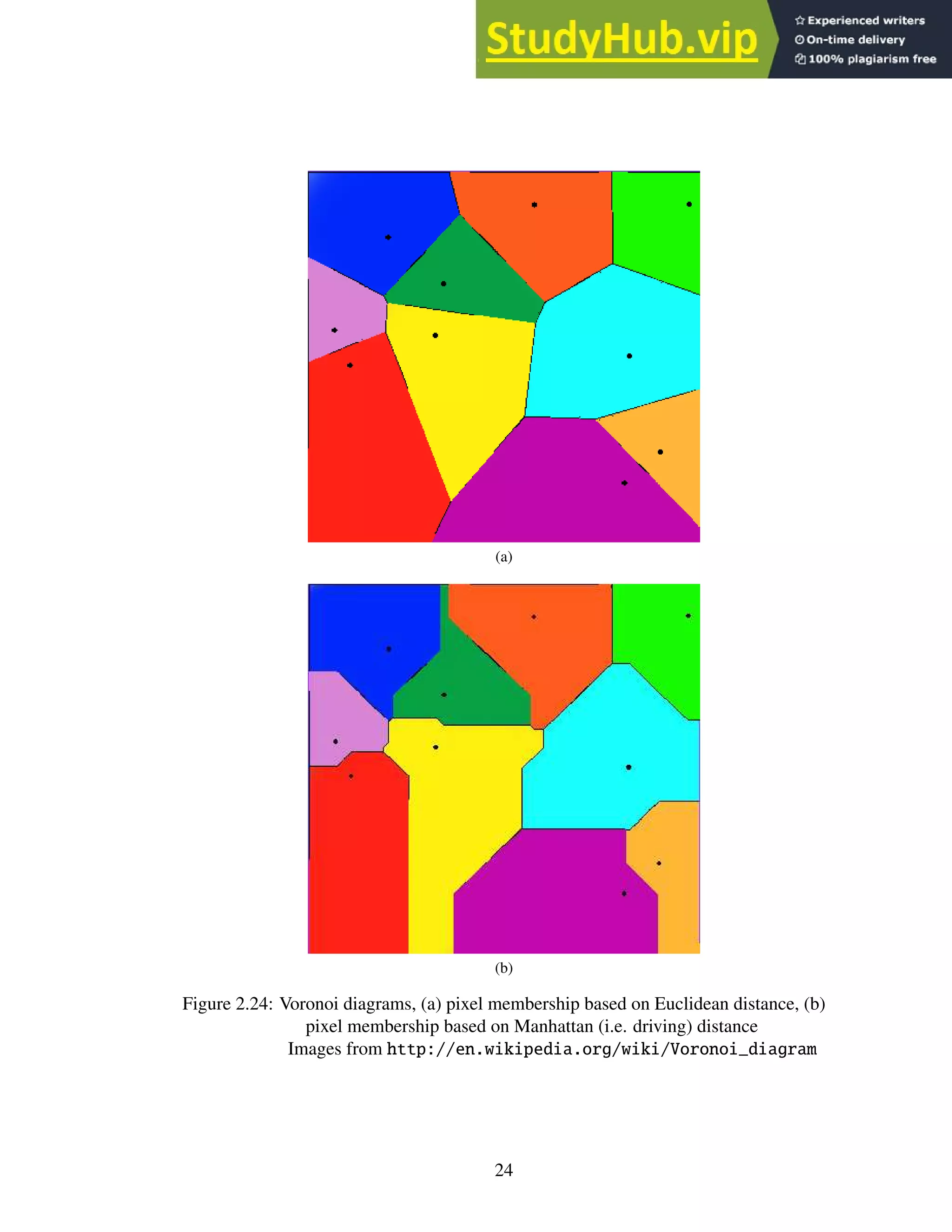
2.24 Voronoi diagrams, (a) pixel membership based on Euclidean distance, (b) pixel
membership based on Manhattan (i.e. driving) distance
Images from http://en.wikipedia.org/wiki/Voronoi_diagram . . . . . 24
2.25 Multiple color image with negative color text and isolated color components,
(a) the original image, (b) the R component, (c) the G component, (d) the B
component. . . . . . . . . . . . . . . . . . . . . . . . . . . . . . . . . . . . . 25
2.26 The letter ‘A’ undergoing horizontal skeletonization. The gray pixels indicate
pixels selected for deletion. . . . . . . . . . . . . . . . . . . . . . . . . . . . . 27
2.27 (a) the original character (b) horizontal runs (c) runs marked as splitting or
merging; unmarked runs are continuous (d) blocks (e) centroid computation (f)
connected centroids. Figure recreated from Lakshmi et al. [26]. . . . . . . . . . 28
2.28 Allowed connection paths. The sizes are not relative. Figure recreated from
Lakshmi et al. [26]. . . . . . . . . . . . . . . . . . . . . . . . . . . . . . . . . 28
2.29 The calculated skeleton. . . . . . . . . . . . . . . . . . . . . . . . . . . . . . . 28
2.30 (a) a 72pt character scaled down to 36pt. (b) a 12pt character scaled up to 36pt.
(c) an original 36pt character. . . . . . . . . . . . . . . . . . . . . . . . . . . . 28
2.31 The black and white dots show the sampling positions. (a) the original charac-
ters with various orientations within the image. (b) the resultant scaled-down
characters. Figure recreated from Barrera et al. [6]. . . . . . . . . . . . . . . . 29
2.32 (a) the original degraded characters; (b) the combined “stamp”. . . . . . . . . . 30
2.33 (a) the original character (b) a set of shape priors (c) – (g) shape prior border
alignment; the arrow depicts the most likely border for alignment. The image
degradation is intentional. . . . . . . . . . . . . . . . . . . . . . . . . . . . . . 31
2.34 (a) shape priors and (b) the confidence map. Darker pixels are more likely
to appear and are weighted more heavily during comparisons with unknown
characters. . . . . . . . . . . . . . . . . . . . . . . . . . . . . . . . . . . . . . 31
2.35 A character glyph segmented into 3×3 pixel segments. . . . . . . . . . . . . . 32
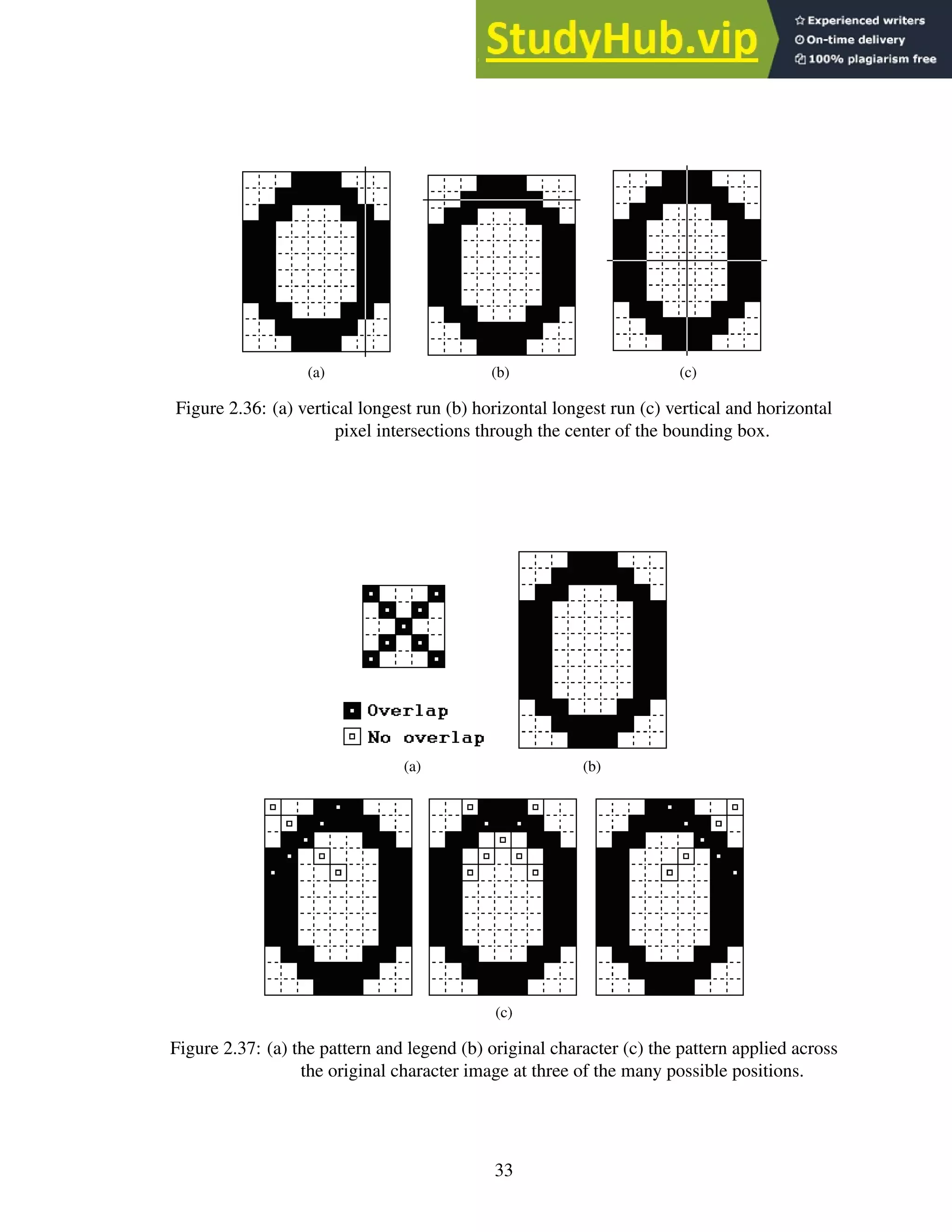
2.36 (a) vertical longest run (b) horizontal longest run (c) vertical and horizontal
pixel intersections through the center of the bounding box. . . . . . . . . . . . 33
2.37 (a) the pattern and legend (b) original character (c) the pattern applied across
the original character image at three of the many possible positions. . . . . . . 33
2.38 (a) three 72pt Arial characters overlayed on one another (b) filled locations are
unique to a single character. . . . . . . . . . . . . . . . . . . . . . . . . . . . . 34
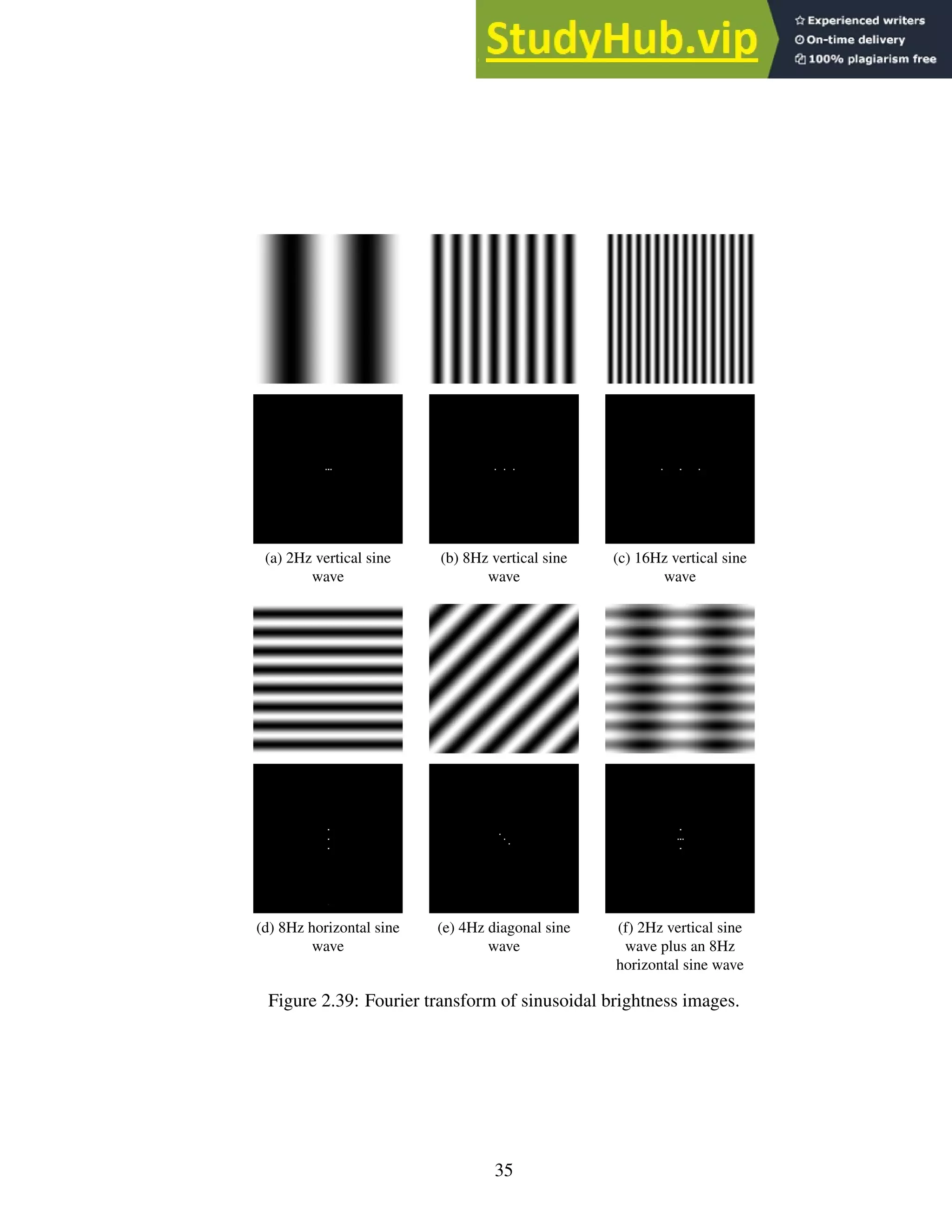
2.39 Fourier transform of sinusoidal brightness images. . . . . . . . . . . . . . . . . 35
2.40 Fourier transform of 3 character images. . . . . . . . . . . . . . . . . . . . . . 36
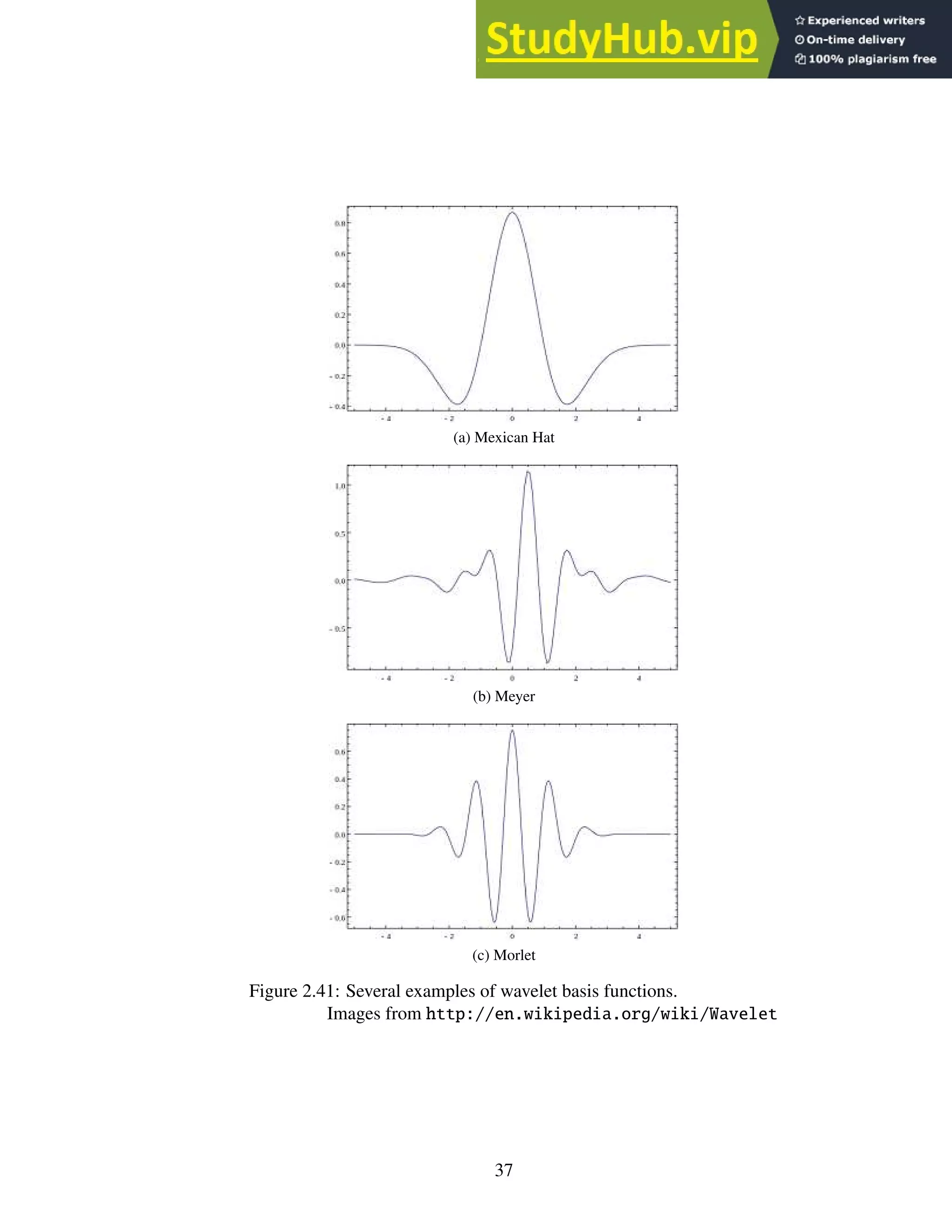
2.41 Several examples of wavelet basis functions.
Images from http://en.wikipedia.org/wiki/Wavelet . . . . . . . . . . 37
vii
2.42 The Haar wavelet.
Image from http://en.wikipedia.org/wiki/Haar_wavelet . . . . . . . 38
2.43 The Haar transform in action. . . . . . . . . . . . . . . . . . . . . . . . . . . . 39
3.1 The thread-warp-block-grid hierarchy. From left to right: one thread, 32 threads
inside a warp, which is inside a block of 16 warps, which is inside a grid of 9
blocks. . . . . . . . . . . . . . . . . . . . . . . . . . . . . . . . . . . . . . . . 42
3.2 Example CUDA program modified from the NVIDIA CUDA C Programming
Guide [34]. . . . . . . . . . . . . . . . . . . . . . . . . . . . . . . . . . . . . 44
4.1 A graphical representation of Version 1 of the SegRec algorithm. . . . . . . . . 49
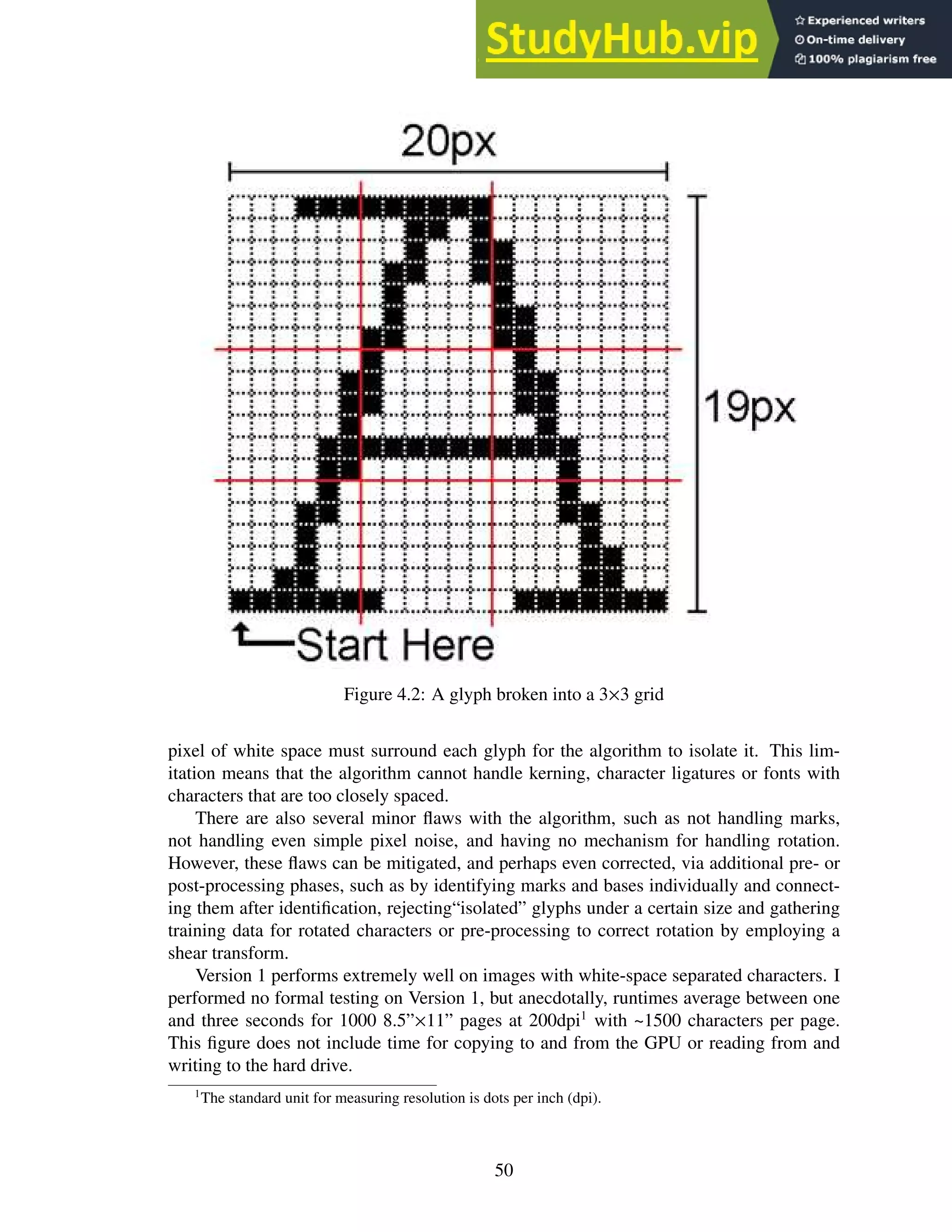
4.2 A glyph broken into a 3×3 grid . . . . . . . . . . . . . . . . . . . . . . . . . . 50
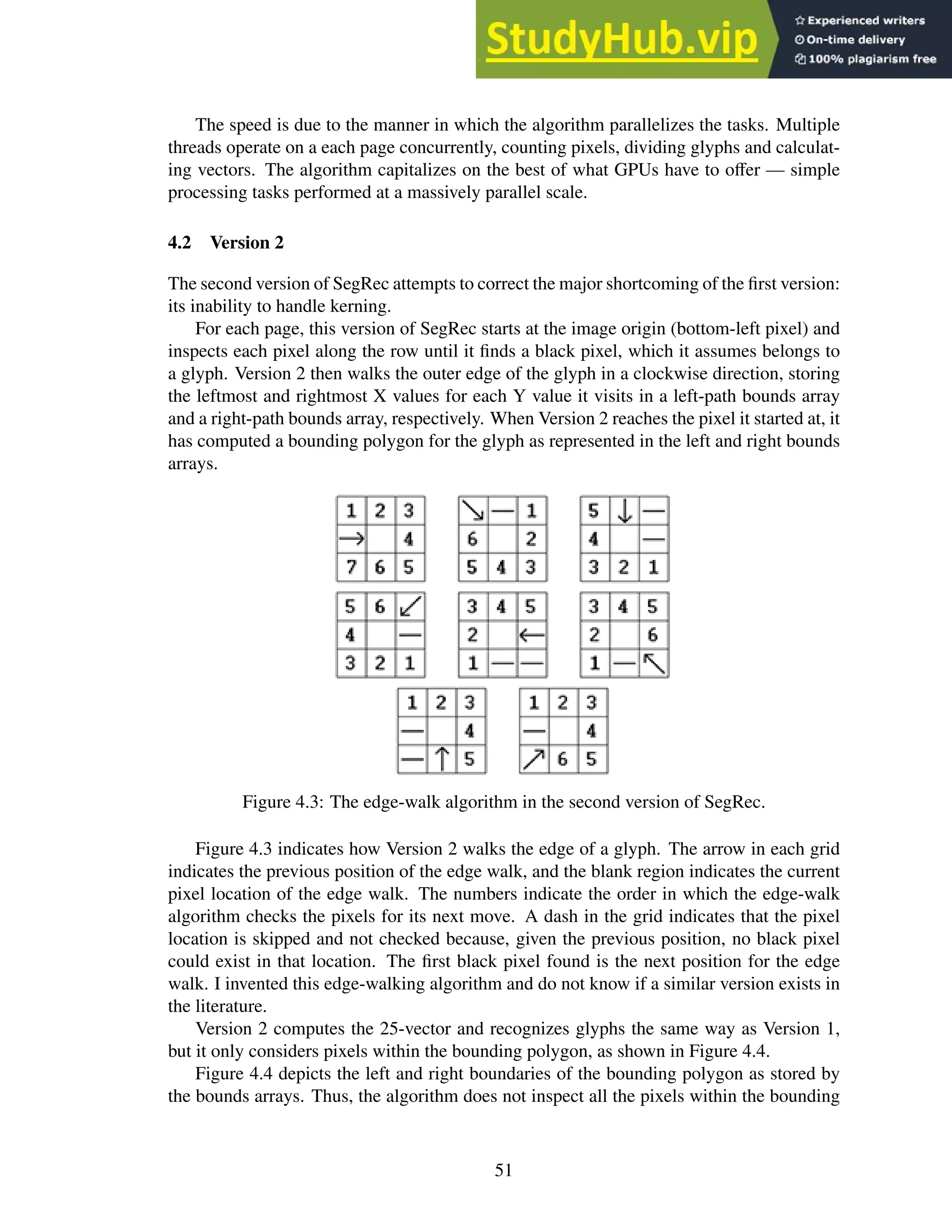
4.3 The edge-walk algorithm in the second version of SegRec. . . . . . . . . . . . 51
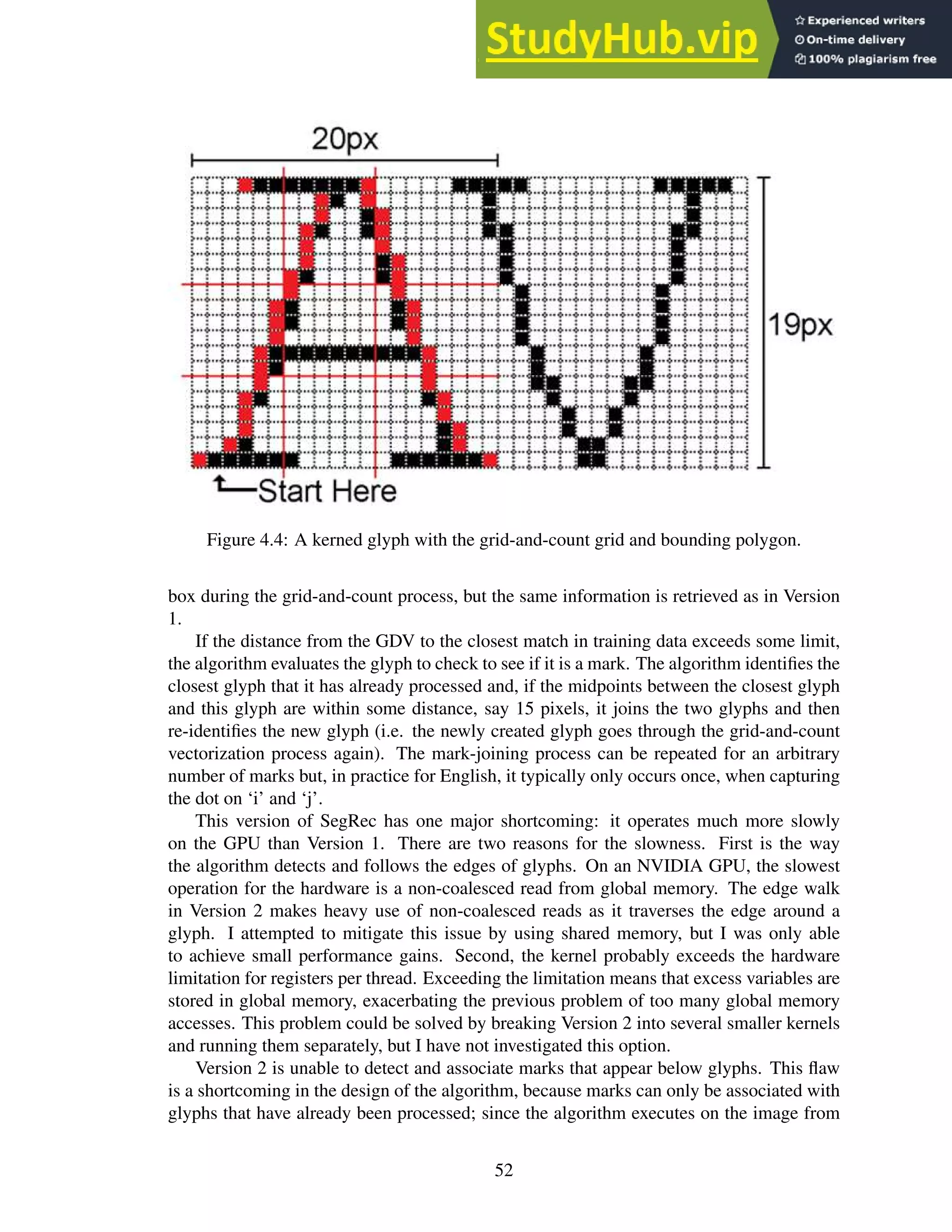
4.4 A kerned glyph with the grid-and-count grid and bounding polygon. . . . . . . 52
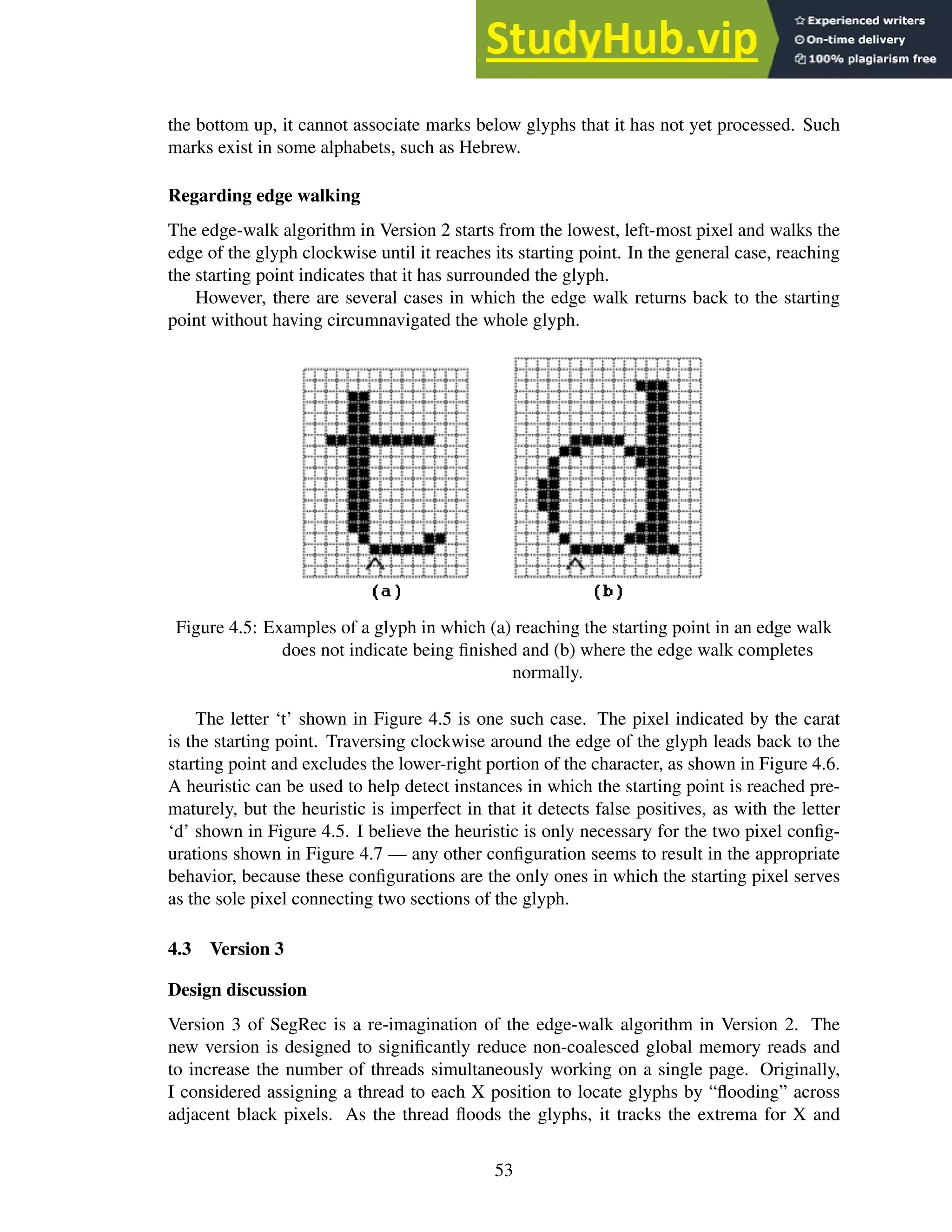
4.5 Examples of a glyph in which (a) reaching the starting point in an edge walk
does not indicate being finished and (b) where the edge walk completes normally. 53
4.6 Figure 4.5 highlighting the paths the edge-walk algorithm finds. . . . . . . . . 54
4.7 The pixel configurations fo which extra processing is necessary to detect the
appropriate next step for the edge-walk algorithm. . . . . . . . . . . . . . . . . 54
4.8 Two groups of black pixels. The red pixels show the divide between the groups. 56
4.9 Three glyphs with their bounding polygons highlighted. The coordinates high-
lighted are what would be stored in the bound arrays. . . . . . . . . . . . . . . 57
4.10 Process a byte of image data. . . . . . . . . . . . . . . . . . . . . . . . . . . . 58
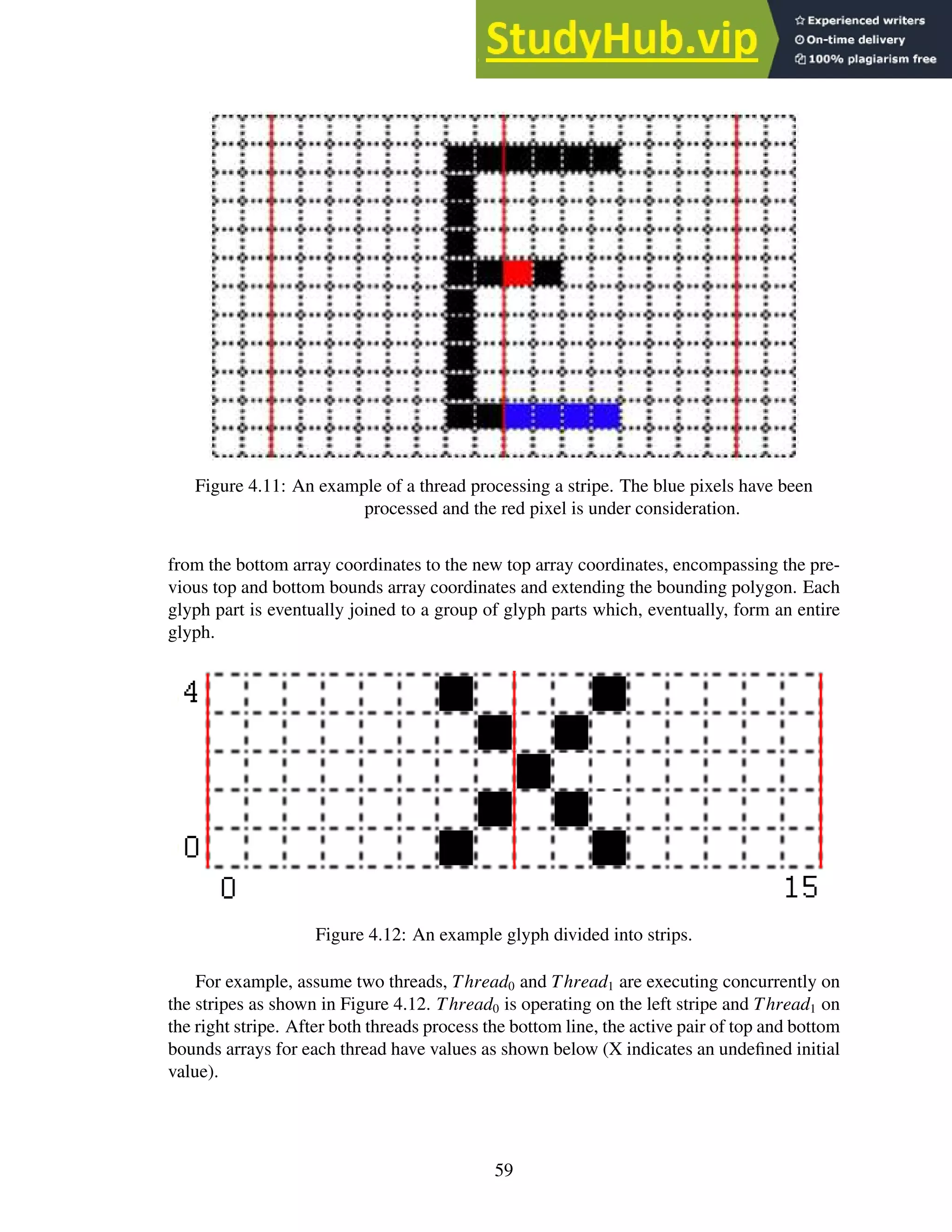
4.11 An example of a thread processing a stripe. The blue pixels have been pro-
cessed and the red pixel is under consideration. . . . . . . . . . . . . . . . . . 59
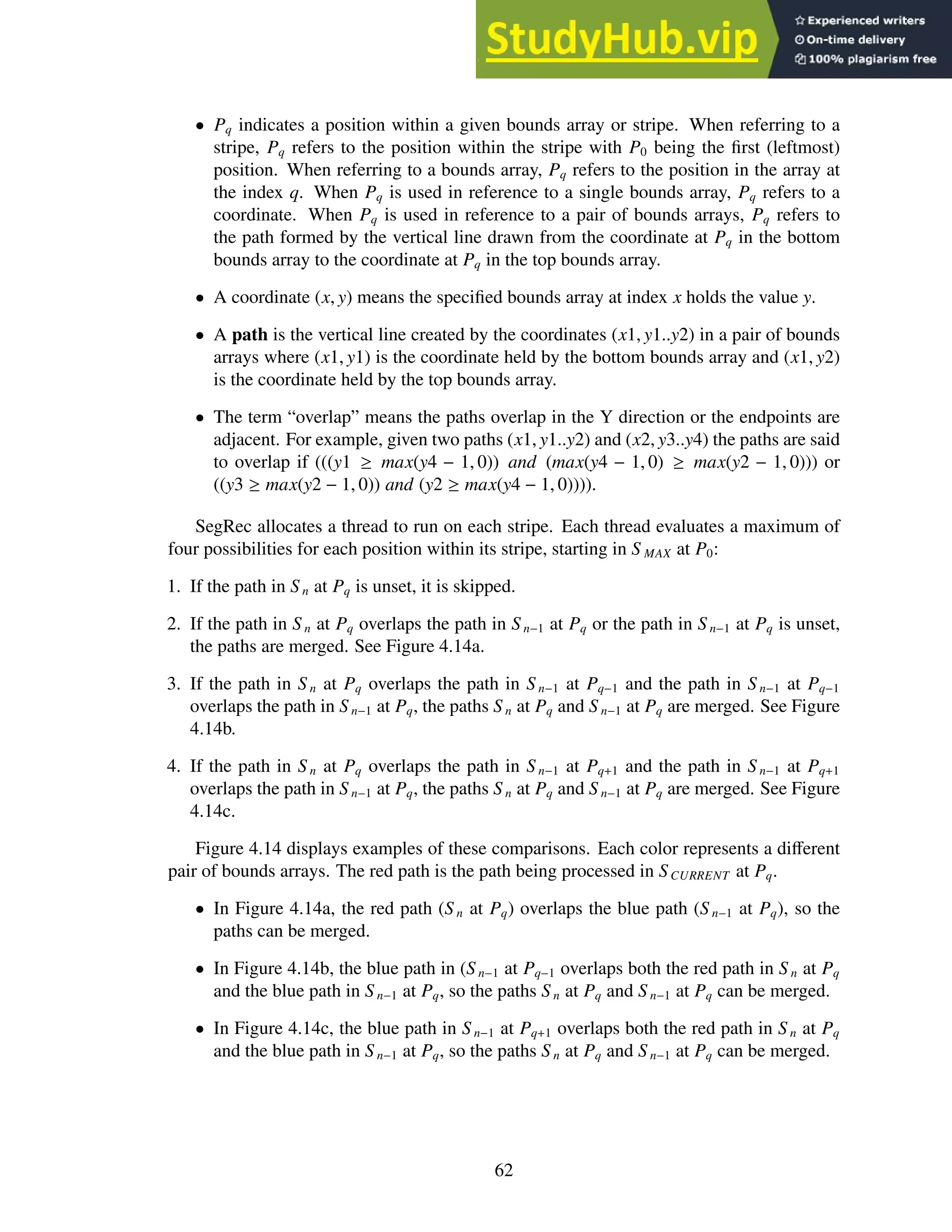
4.12 An example glyph divided into strips. . . . . . . . . . . . . . . . . . . . . . . 59
4.13 A glyph encircled by a polygonal bounding box. . . . . . . . . . . . . . . . . . 61
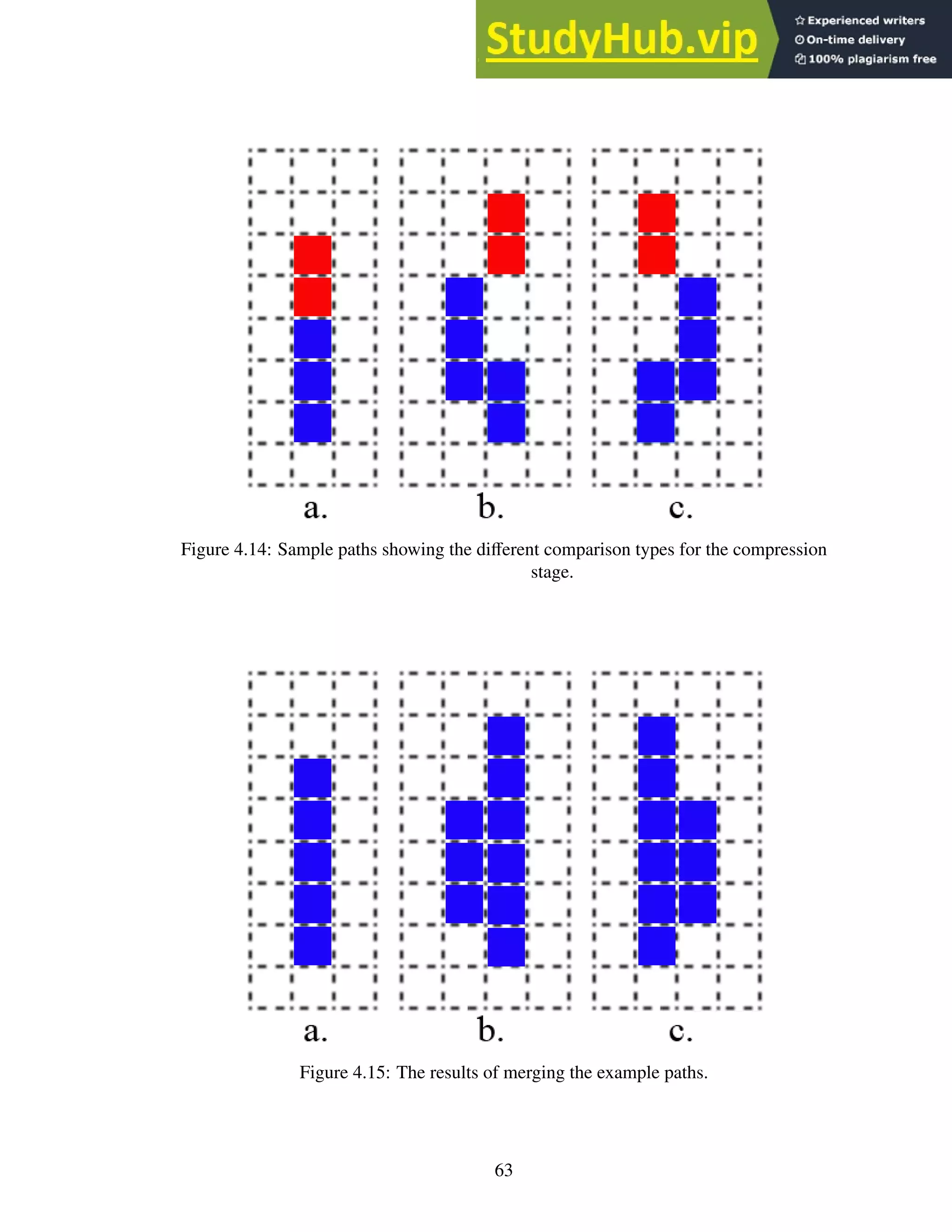
4.14 Sample paths showing the different comparison types for the compression stage. 63
4.15 The results of merging the example paths. . . . . . . . . . . . . . . . . . . . . 63
4.16 The bounding polygon for the example. . . . . . . . . . . . . . . . . . . . . . 65
4.17 Three glyphs. . . . . . . . . . . . . . . . . . . . . . . . . . . . . . . . . . . . 66
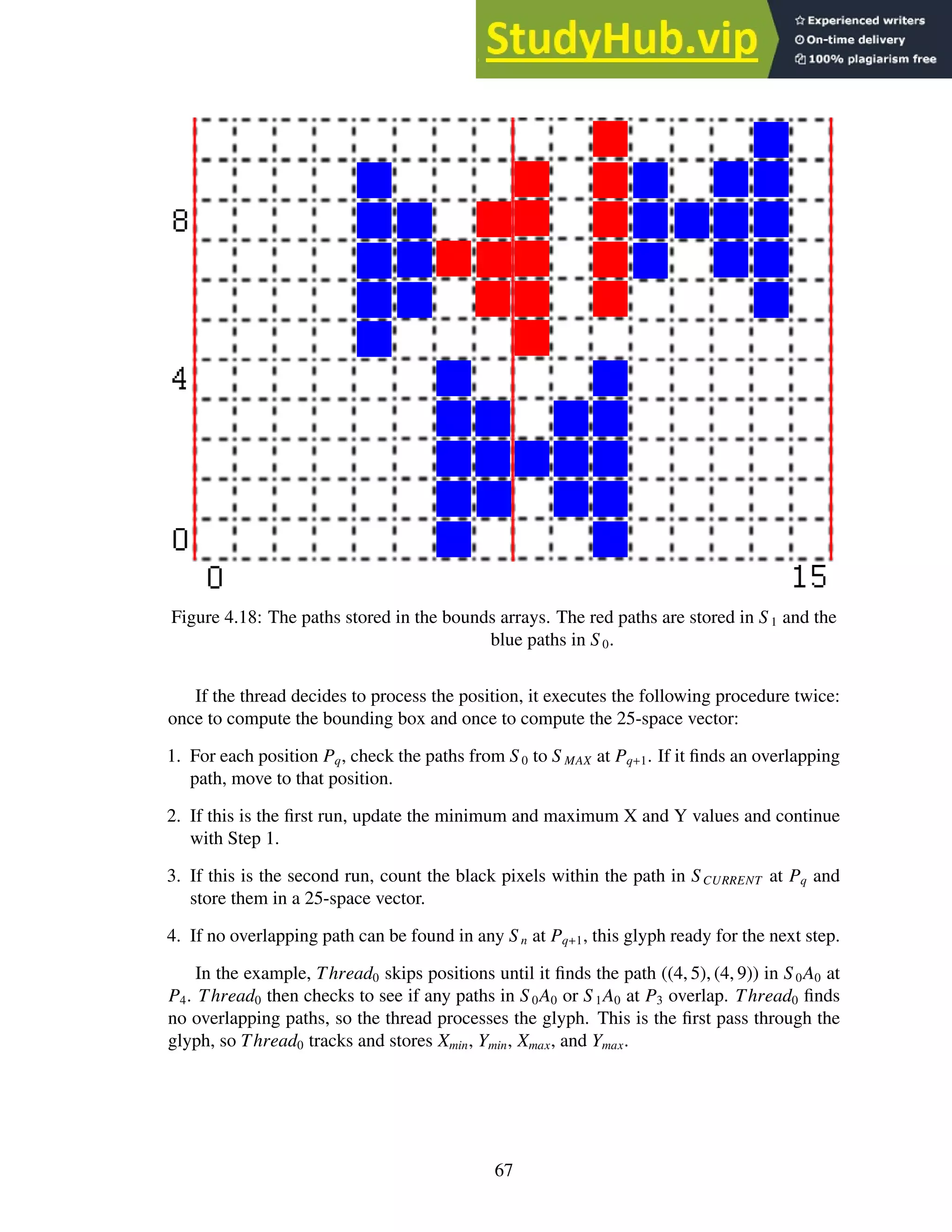
4.18 The paths stored in the bounds arrays. The red paths are stored in S 1 and the
blue paths in S 0. . . . . . . . . . . . . . . . . . . . . . . . . . . . . . . . . . . 67
4.19 Sample XML output. . . . . . . . . . . . . . . . . . . . . . . . . . . . . . . . 71
5.1 (a) Original characters. (b) Characters with added noise. . . . . . . . . . . . . 73
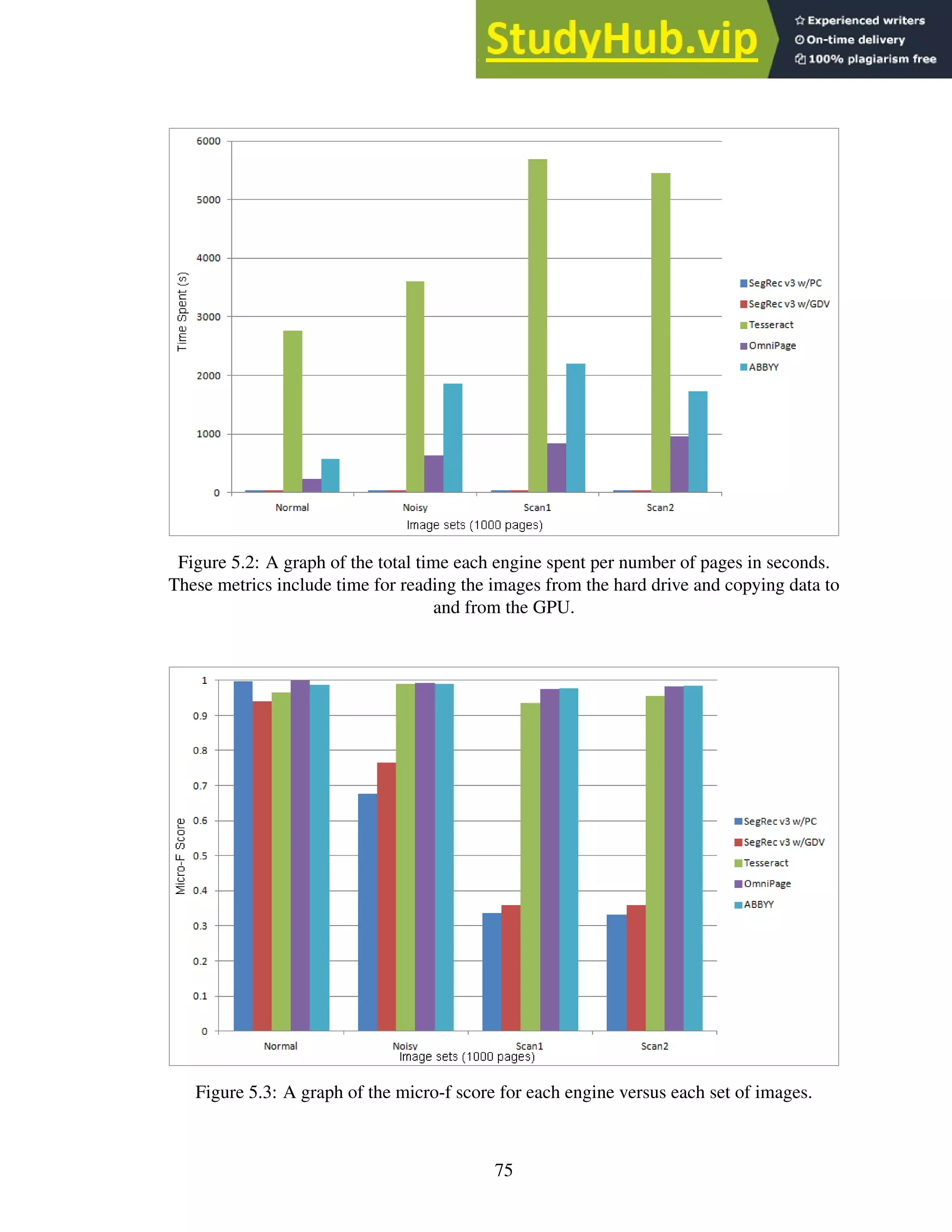
5.2 A graph of the total time each engine spent per number of pages in seconds.
These metrics include time for reading the images from the hard drive and
copying data to and from the GPU. . . . . . . . . . . . . . . . . . . . . . . . . 75
5.3 A graph of the micro-f score for each engine versus each set of images. . . . . . 75
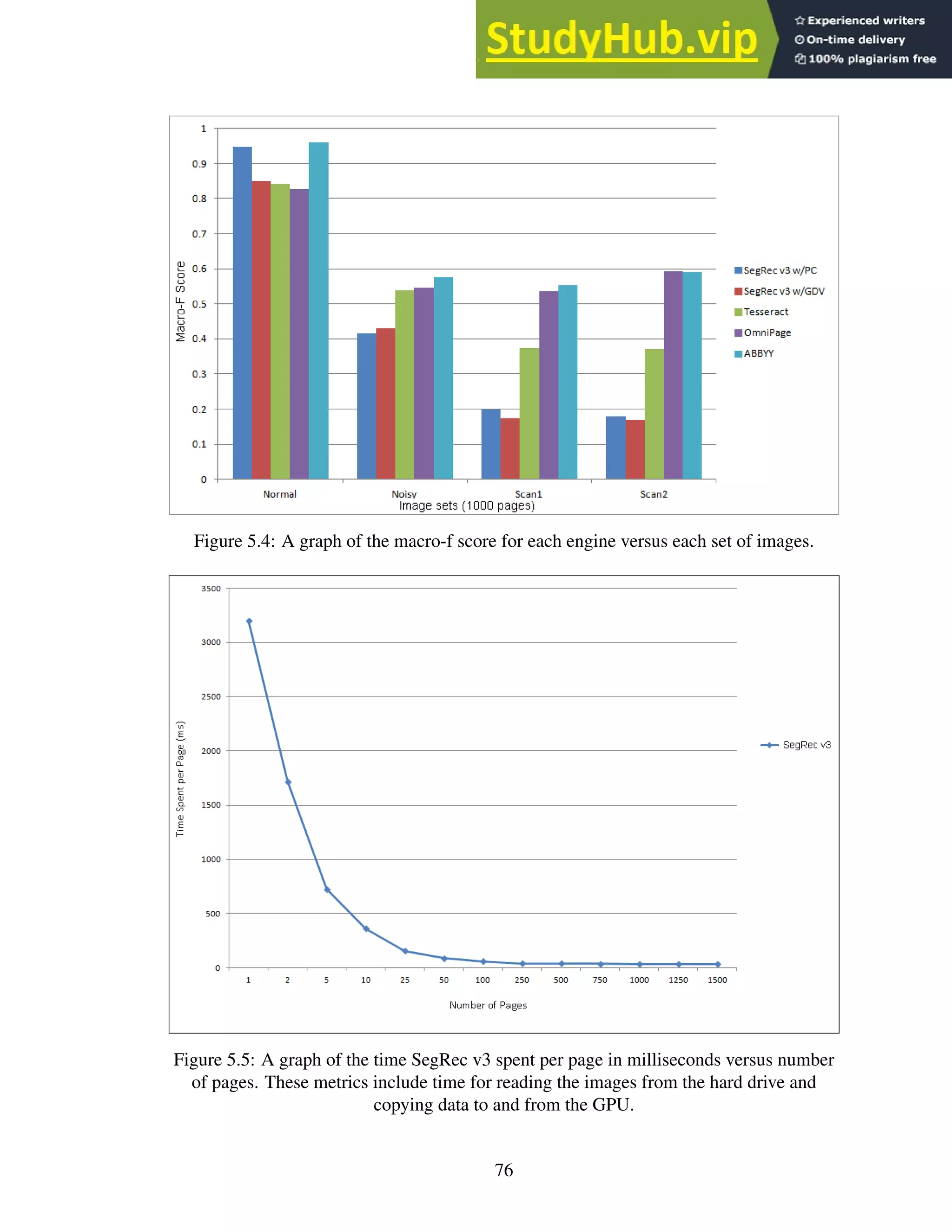
5.4 A graph of the macro-f score for each engine versus each set of images. . . . . 76
5.5 A graph of the time SegRec v3 spent per page in milliseconds versus number of
pages. These metrics include time for reading the images from the hard drive
and copying data to and from the GPU. . . . . . . . . . . . . . . . . . . . . . . 76
viii
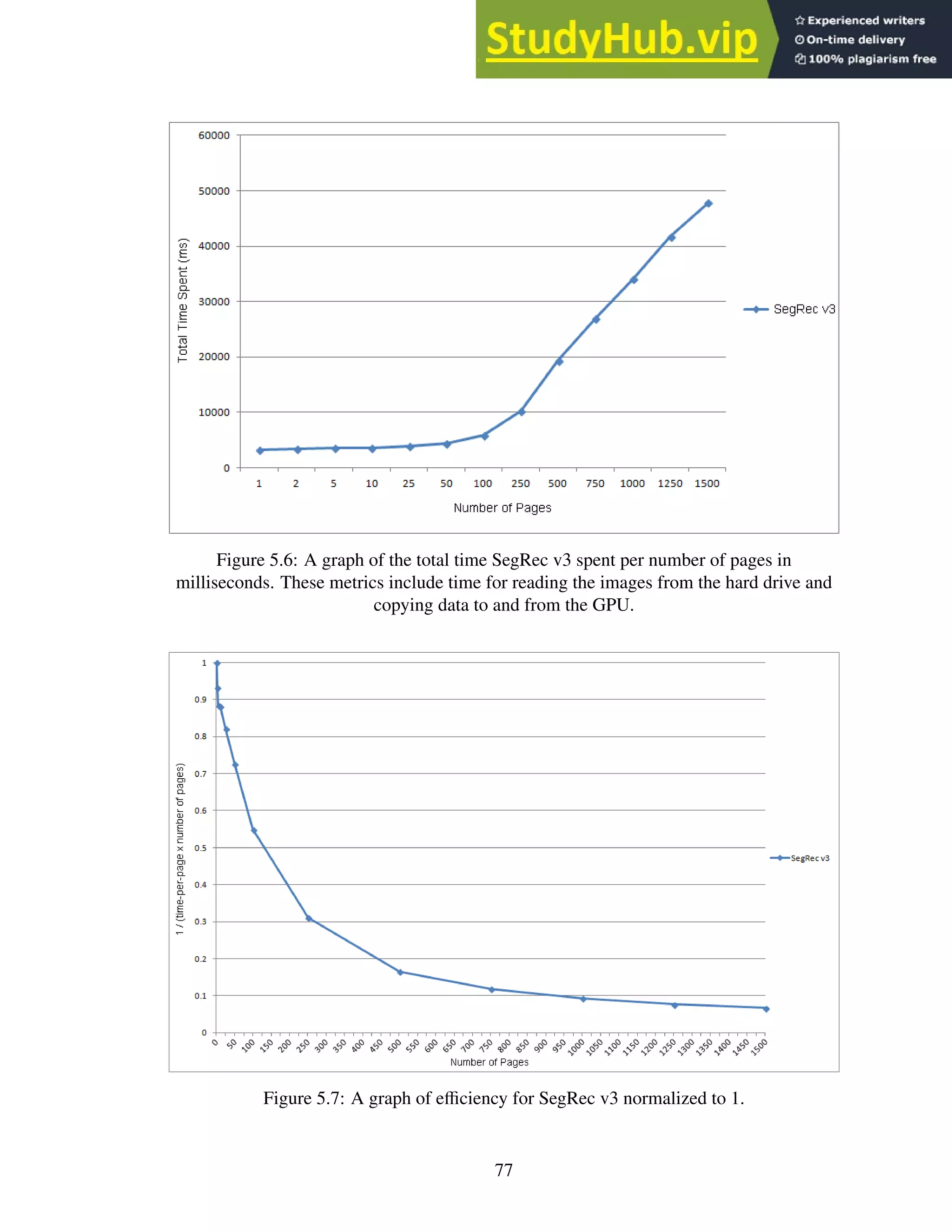
5.6 A graph of the total time SegRec v3 spent per number of pages in milliseconds.
These metrics include time for reading the images from the hard drive and
copying data to and from the GPU. . . . . . . . . . . . . . . . . . . . . . . . . 77
5.7 A graph of efficiency for SegRec v3 normalized to 1. . . . . . . . . . . . . . . 77
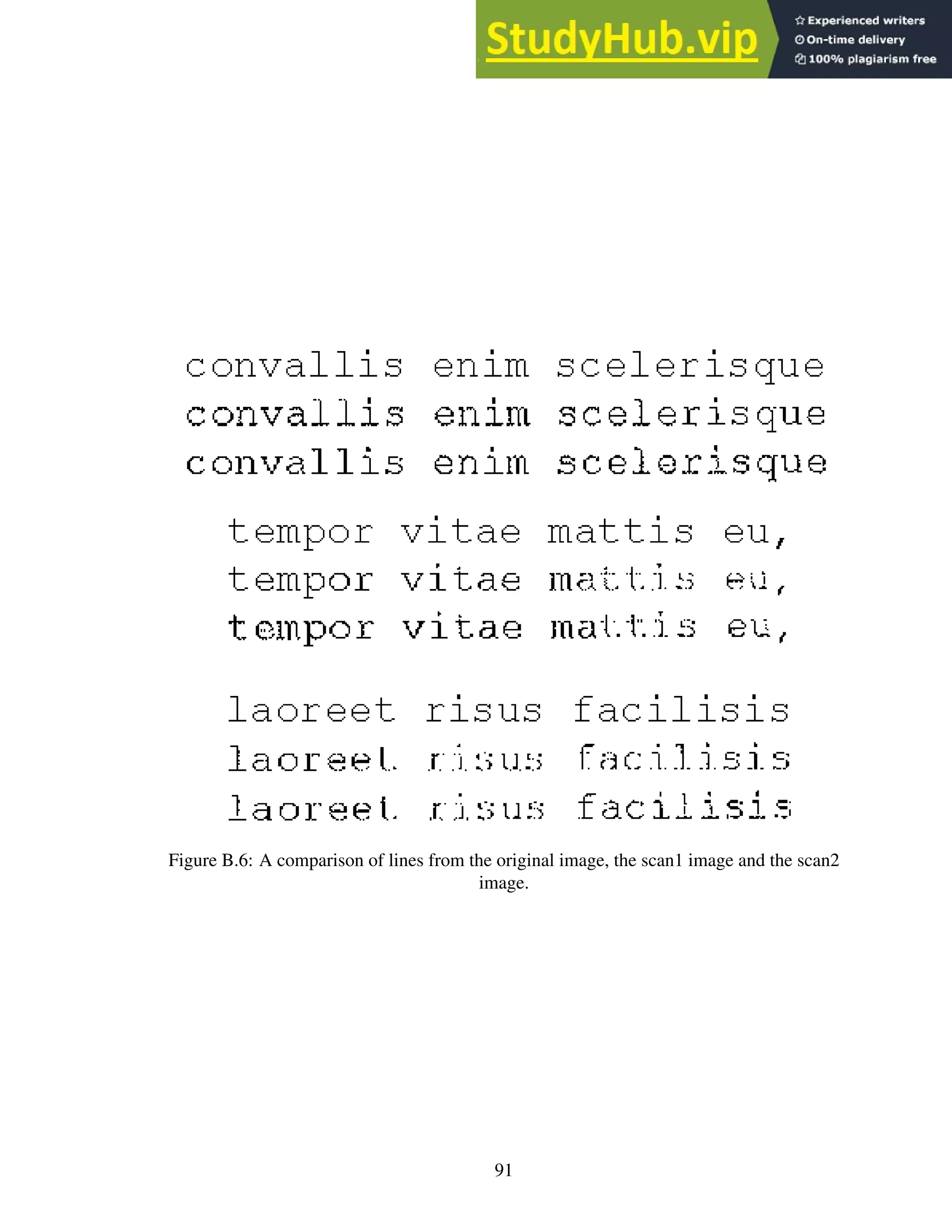
5.8 A comparison of lines from the original image, the Scan1 image and the Scan2
image. . . . . . . . . . . . . . . . . . . . . . . . . . . . . . . . . . . . . . . . 80
5.9 Breakdown of time spent for SegRec v3 using pixel count classification across
all image sets. SegRec v3 using global density classification is similar, but with
more time spent in the classification. . . . . . . . . . . . . . . . . . . . . . . . 81
ix
LIST OF TABLES
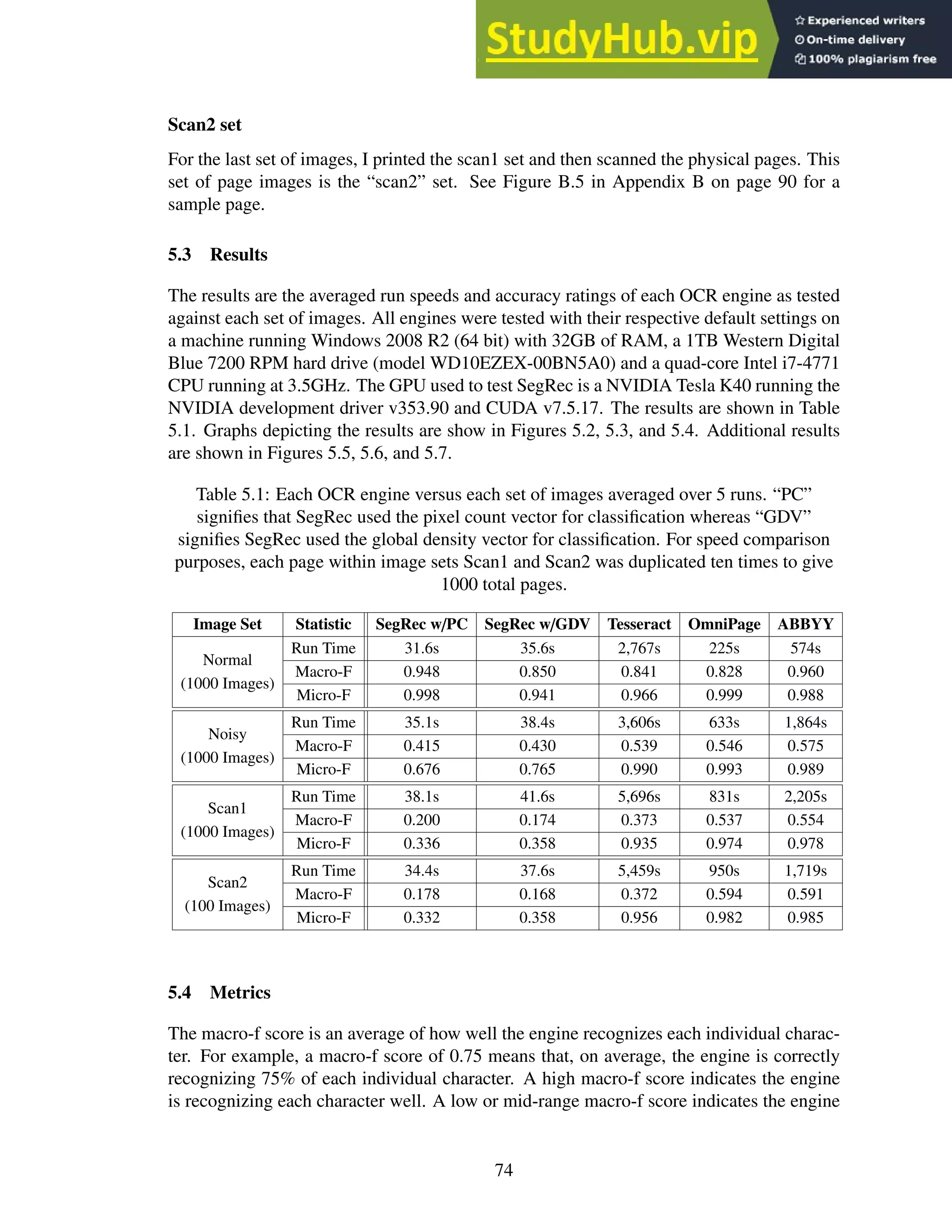
5.1 Each OCR engine versus each set of images averaged over 5 runs. “PC” signi-
fies that SegRec used the pixel count vector for classification whereas “GDV”
signifies SegRec used the global density vector for classification. For speed
comparison purposes, each page within image sets Scan1 and Scan2 was du-
plicated ten times to give 1000 total pages. . . . . . . . . . . . . . . . . . . . . 74
5.2 The reason for the relatively low macro-f scores for SegRec w/GDC and Tesser-
act. A subset of the confusing character set for each engine. . . . . . . . . . . . 79
5.3 Actual times for SegRec v3, averaged over 5 runs. “PC” signifies that SegRec
used the pixel count vector for classification whereas “GDV” signifies SegRec
used the global density vector for classification. . . . . . . . . . . . . . . . . . 81
x
Chapter 1: Introduction
1.1 Motivation
This dissertation describes research and development for an optical character recognition
(OCR) engine that runs on a graphical processing unit (GPU). The purpose of this en-
deavor is to significantly increase the speed of the image-processing and glyph-recognition
steps while maintaining accuracy and precision measures that favorably compare to exist-
ing commercial engines.
OCR was first introduced in the early 1900s as a technology designed to enable sight-
impaired people to read. The “Type-reading Optophone”, introduced in 1914, converts light
reflected off of type-written text into sounds — each glyph emitting a unique tone. With
training, a person could learn to discern the tones and “read” the text [11]. A later invention,
patented in 1931 and dubbed the “Statistical Machine”, was designed to help speed the
search for text in microfilm archives [16]. A light source positioned below the microfilm
and “search plates”, solid, opaque plates with the search text carved out, positioned above
the microfilm provides a variable light-source to a light detector positioned above the search
plate. As the microfilm moves, the light level above the search plate varies such that when
the text matches exactly with the search plate, very little light passes through the film to the
detector. The detector then records the occurrence as a possible text match [16].
This dissertation describes an OCR engine that processes glyphs that have already been
captured in image form, but much of the same process occurs as in the devices described
previously. Modern optical character recognition can be segmented into four main phases:
pre-processing, isolation, identification and post-processing. The pre-processing phase
prepares the image for the next phase and includes such tasks as noise reduction and ro-
tation correction. The isolation phase deals with dividing an image into sub-images, de-
lineating where lines, words and, ultimately, characters begin and end. The identification
phase accepts the output from the isolation phase and attempts to recognize the sub-images
passed to it as characters. The post-processing phase attempts to reassemble the charac-
ters into words and sentences. The main focus of this dissertation is on the isolation and
identification phases.
1.2 Contribution
In this dissertation, I present a series of algorithms for quickly isolating and identifying
characters from a large number of images containing typewritten text. As a whole, this
work comprises a framework for a GPU-enabled OCR engine.
During my research, I invented a number of algorithms:
• PathFind is a path-finding algorithm that operates on bi-tonal images and requires
no recursion or complex data structures. PathFind is discussed on page 18.
1
• EdgeWalk is an edge-walking algorithm that traverses the edges of a glyph in a
bi-tonal image using pixel-based heuristics to decide the next step. EdgeWalk is
discussed on page 53.
• SegRec Version 1 is a naïve implementation of the isolation phase that introduces
a parallel algorithm similar to the x-y cut segmentation algorithm. The x-y cut
segmentation algorithm from which Version 1 is partially derived is discussed on
page 20. SegRec Version 1 is discussed in section 4.1 on page 48.
• SegRec Version 2 is a reimplementation of SegRec Version 1 and discards the sim-
ilarities to x-y cut altogether. Version 2 uses the EdgeWalk algorithm to compute
glyph boundaries. SegRec Version 2 is discussed in section 4.2 on page 51.
• SegRec Version 3 is a reimplementation of SegRec Version 2 and forms the bulk
of my contribution. Version 3 introduces a novel algorithm to discover and process
glyphs in a parallel manner. Version 3 is discussed in section 4.3 on page 53.
1.3 Structure of the dissertation
This dissertation outlines the methods and algorithms I chose for handling the first three
phases within the GPU OCR engine and the reasons for those choices.
Chapter 2, Preliminaries
In section 2.1, I introduce the fundamental terminology upon which the concepts of
OCR are built.
In sections 2.2 through 2.9, I describe, in greater detail, the four phases of
OCR, the typical problems and solutions associated with each phase and the base
concepts and ideas that I reference throughout the dissertation. These sections also
include a literature review that outlines the current state of the field and provides
background information relevant to the particular phase of OCR under discussion.
This chapter assumes no prior experience with OCR or related fields.
Chapter 3, OCR on GPUs
This chapter provides an introduction to GPU hardware and a basic introduction to
GPU programming.
This chapter assumes no prior experience with GPUs.
Chapter 4, The SegRec Algorithm
This chapter describes each of the three versions of the SegRec algorithm in detail.
Chapter 5, Results and Findings
This chapter compares SegRec against other open-source and commercial OCR en-
gines.
2
Chapter 6, Conclusion and Future Work
This chapter summarizes the results presented in this dissertation and details future
research that could improve SegRec.
3
Chapter 2: Preliminaries
Figures and images
Unless otherwise noted in the caption, I created every figure and image with my own im-
plementation of the algorithm the figure or image illustrates.
2.1 Terminology
We introduce some of the basic terminology here; we introduce more definitions later as
they become relevant.
Base
The core portion of a character; for instance, in the character â, the base is ‘a’.
Mark
A character accent not physically connected to the base, for instance, in the character
â, the mark is ‘ˆ’.
Glyph
The pictorial representation of a character.
2.2 OCR Phases
Pre-processing
The purpose of the pre-processing phase is to prepare a given image for the isolation phase
— primarily, to make it easier for the isolation phase to determine where character glyphs
begin and end. Section 2.3 describes this phase and its associated problems in detail.
Isolation
The isolation phase analyzes the cleaned image data from the pre-processing phase in an
effort to locate and isolate pockets of text. These pockets are then further broken down into
lines and, finally, into single glyphs. Section 2.5 describes this phase and its associated
problems in detail.
Identification
The identification phase examines the isolated glyphs and attempts to classify each of them
as a particular character. Section 2.7 describes this phase and its associated problems in
detail.
4
Post-processing
Post-processing attempts to construct text from the output provided by the identification
phase. The output might include spacing and formatting. Section 2.9 provides an overview
of this phase and gives a brief introduction to its associated problems.
2.3 Pre-processing phase: Problems
The pre-processing phase must deal with pixel noise, varying degrees of contrast, bleed-
through text, multiple colors, and document rotation. Below is a breakdown of these issues
and a brief description about why they pose a problem.
Pixel noise
Pixel noise usually refers to the random marks, streaks or other image artifacts found
throughout low-quality images, but it can also refer to unwanted background images, bor-
ders or other document flourishes that impede the isolation or identification phases. Re-
moving the noise is key for accurately isolating and identifying glyphs, because untreated
noise can disrupt the use of white space to find paragraphs and lines or cause incorrect
identification.
Degrees of contrast
In faxed documents, poorly scanned documents, and historical documents, the quality of
the image may vary from one page to another. Often, documents contain varying levels
of contrast within the text itself. This situation affects the ability of the OCR algorithm
to choose an appropriate threshold for converting to a binary image and could affect the
overall effectiveness of noise-removal techniques.
Bleed-through text
Bleed-through text, where ink from one side of a piece of paper is visible on the other side,
is often found in historical documents or on images scanned from documents printed on
thin paper. Because differentiating between bleed-through text and text that is merely low-
contrast or faded is difficult, bleed-through text, like varying degrees of contrast, interferes
with most noise-removal techniques.
Multiple colors
Some images contain characters of varying colors on backgrounds of varying colors. The
OCR application must be able to differentiate background from character. There is some
overlap between this problem and the isolation phase “Complex Page Layout” problem,
because colors are typically blocked and grouped in a complex manner.
5
Rotation detection, estimation and correction
The whole image can be rotated, lines can be skewed or individual letters can be skewed.
The OCR algorithm must recognize the transformation and correct it prior to identification.
Alternatively, the identification phase must be aware of the transformation and adjust its
training data or other internal recognition mechanisms accordingly.
2.4 Pre-processing phase: Techniques and solutions
Thresholding
All thresholding1
techniques fall under the class of “data-reduction” algorithms. That is,
the techniques seek to compress or reduce the information contained within a given image
in order to reduce computational complexity. The purpose then, is to remove or reduce
the unwanted information or “noise” and leave the “important” information intact, such as
removing the background of a bank check so the OCR application can read the signature
panel.
For OCR applications, data reduction is usually confined to reducing a grayscale or
color image to a black and white (binary or bi-tonal) image. This reduction is accomplished
by calculating a level of intensity against which individual pixel values are compared. The
values that fall below the threshold are included in the binary image as black pixels; the
others are white [48]. The threshold value can be calculated on a global or local level, and
the techniques implementing each method are referred to as global or adaptive2
threshold-
ing, respectively. Global methods calculate the threshold using the entire image, whereas
local or adaptive thresholds readjust the threshold based on the area of the image around
which processing is taking place [4]. Adaptive techniques typically calculate a “running
value” for the threshold and make the black or white decision based on comparisons against
this value [56].
These thresholding techniques are also appropriate for removing bleed-through text,
because such text generally appears on the page at a much lighter contrast than normal text.
However, for severely degraded text or in cases where a document exhibits both varying
degrees of contrast and bleed-through text, thresholding is usually avoided [5].
1. Histogram-based thresholding techniques build a histogram of grayscale values and then
analyze the histogram topology. The analysis finds groups of peaks that are then com-
bined by averaging the grayscale values within the group, thereby reducing the total
number of grayscale values. Figure 2.1 shows an example of this method. Figure 2.1a
contains 6 grayscale values. The histogram groups the peaks. Averaging the groupings
results in the image Figure 2.1c, which gives a reduction in grayscale values of 50%
[46].
2. The clustering technique (or Otsu’s method) attempts to find the threshold that sepa-
rates the grayscale values into classes that maximize the between-class variance [37]. In
simpler terms, the technique attempts to find the histogram grouping that maximizes the
1
Also referred to as binarization.
2
Also referred to as local thresholding.
6
(a) (b)
(c) (d)
Figure 2.1: The original image with 6 grayscale values (a) and its histogram (b). The
reduced image with 3 grayscale values (c) and its histogram (d).
difference in intensity between two groups of grayscale values. In the final grouping,
the lighter values are drawn as white pixels and the darker values as black pixels. The
threshold is the value that splits the class groupings.
Singh et al. parallelized Otsu’s method for an average speedup of 1.6× over serial meth-
ods [51].
3. Entropy methods select a threshold based upon entropic calculations performed on the
histogram [3, 8, 21]. In the simplest form, the chosen threshold splits the pixel count
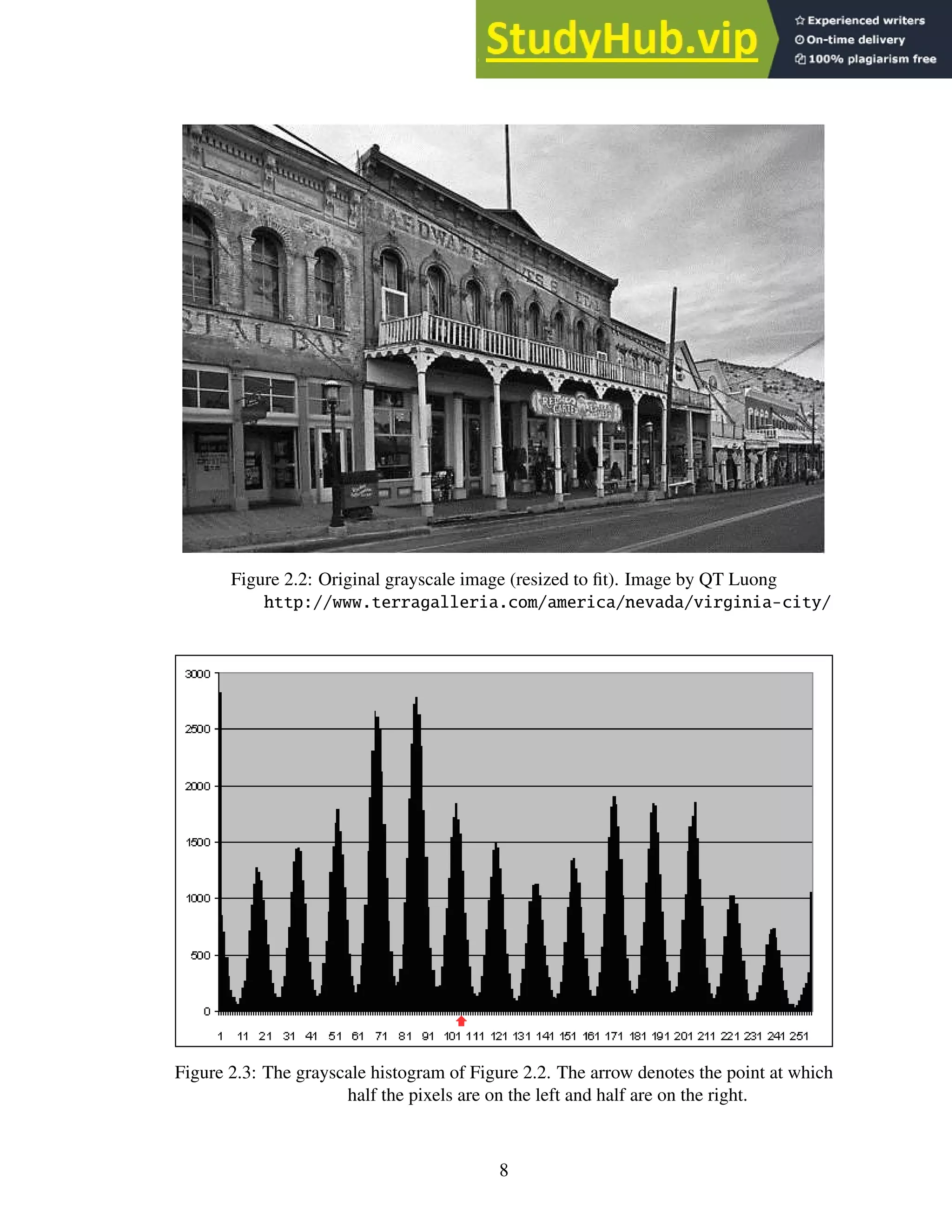
equally, as entropy is maximized when a pixel is equally as likely to be black as it is to
be white. See Figures 2.3 and 2.4.
4. An object-attribute method examines a particular attribute of an object (in this case,
a glyph) and utilizes some specific feature of that object to perform a function. An
example of such an algorithm utilizes edge detection to perform thresholding. First, the
algorithm applies a heuristic to choose the initial threshold values based upon the peak
values within the grayscale histogram of the image. Next, an edge detection routine runs
on both the original image and the thresholded image. If the edges match, the thresholds
are kept and the process is complete. If not, the image is broken down into smaller
chunks and the whole process repeats. Thus, this technique utilizes global thresholding
at the beginning and selectively applies adaptive thresholding as the need arises [19].
7
Figure 2.2: Original grayscale image (resized to fit). Image by QT Luong
http://www.terragalleria.com/america/nevada/virginia-city/
Figure 2.3: The grayscale histogram of Figure 2.2. The arrow denotes the point at which
half the pixels are on the left and half are on the right.
8
Figure 2.4: Original image after the threshold from Figure 2.3 is applied.
5. A dynamic algorithm, called the integrated function algorithm, is able to separate
text from backgrounds with as little as 20% difference in contrast. The algorithm first
identifies edges of sharp contrast (similar to the previous method) and then assumes
that character strokes range in width from 0.2mm to 1mm in order to determine if an
identified region is a character or an area of high-contrast background. The algorithm
marks regions identified as characters black and all other regions as white [55].
6. The basic adaptive thresholding technique is called the Niblack binarization algo-
rithm. The algorithm works by calculating the threshold value within a sliding window
using the mean and the standard deviation and includes or excludes the pixels in the area
according to the calculated value. The window shape is up to the implementation and
can vary based upon the requirements of the images being processed [31]. Sauvola’s
algorithm modifies Niblack to store and use the dynamic range of standard deviation,
which adapts the threshold to ignore noisy backgrounds [45].
Singh et al. parallelized Niblack’s binarization algorithm for a speedup of 20× to 22×
over serial methods [50]. Singh et al. and Chen et al. also parallelized Souvala’s algo-
rithm for a speedup of 20× to 22× and 38×, respectively, over serial methods [9, 52].
7. A variation on Niblack’s algorithm is pixel density thresholding. This method deter-
mines the average pixel density within a sliding window and includes or excludes the
pixels in that area accordingly. The window shape is up to the implementation and
can vary based upon the requirements of the images being processed. This technique
is useful for removing streaks and marks due to poor image quality and can also oper-
9
ate in conjunction with another thresholding algorithm. The pixel density thresholding
technique is not mentioned in any paper I have found.
(a) (b)
(c) (d)
(e)
Figure 2.5: (a) and (c) show the two chain code scoring methods; (b) and (d) show a
sample chain using their respective scoring methods; (e) shows an ‘a’ and its
corresponding chain code. The arrow denotes the starting position for each
chain code.
8. Another algorithm for a noise-reduction thresholding technique is called chain code
thresholding. A chain code is a data structure that consists of a start point and a string
of digits representing a list of directions. The digit string contains numerals in the range
0-7 (or 0-3) that represent all possible directions on a 2D image. A chain code is formed
by choosing a starting point, moving one pixel in an allowed direction and appending
that direction to the digit list. Thus, the chain code is a representation of a path in 2D
space. Chain code thresholding constructs chain codes representing the border of each
pixel group and analyzes the resultant digit string. During the isolation phase, if a chain
code has a length below a certain threshold, it can be discarded. This method is not
mentioned in the literature, though chain codes are described in detail by Freeman [14].
10
DIBCO, the Document Image Binarization Contest, was started in 2009 in order to
evaluate and test the best thresholding techniques [1]. The contest ran from 2009 through
2014. The winning entries for each year are all hybrid algorithms that break down the
thresholding process and use the best-of-breed algorithm for each part. For example, the
winning submission in 2009 was by Lu et al., a team from the Institute for Infocomm
Research in Singapore. Lu’s submission incorporates Otsu’s method, Niblack’s algorithm,
stroke edge detection and a post-process clean-up step [15]. Unfortunately, the published
results from 2010 to 2014 are too brief to glean any meaningful detail about the algorithms.
However, I include references for each of the yearly result papers for completeness: 2009
[15], 2010 [40], 2011 [41], 2012 [42], 2013 [43], and 2014 [32].
Otsu’s method provides an excellent general-purpose algorithm for thresholding that
many authors still reference as a baseline for comparing their methods. However, advance-
ments made in adaptive thresholding, such as the object-attribute edge detection and the
integrated function algorithms described above, and increased document complexity limit
the appeal of global thresholding as a whole. This shift to adaptive algorithms is because
the cost of each type of algorithm is similar, but the adaptive methods handle contrast gradi-
ents and variations within documents better. Ultimately, choosing a thresholding algorithm
is context- and domain-specific. For example, Otsu’s method is a simple, parameterless
algorithm that will give good results on documents with high contrast between text and
background, whereas the adaptive methods, such as the integrated function algorithm, are
more complex, require tuning and are required only for more complex documents.
Rotation detection, estimation and correction
There are four basic types of rotation-detection algorithms: projection profile, nearest
neighbor clustering, component labeling, and the Hough transform [12].
Figure 2.6: Horizontal and vertical projection profiles. Figure recreated from Abdelwahab
et al. [56].
1. The projection profile technique projects the document at different angles, then, for
each angle, constructs a graph based on the sum of black pixels in each line. Peaks
are due to scanlines with high pixel density and troughs are due to white space and
scanlines with low pixel density. The document angle that gives the maximum difference
between the peaks and troughs is the rotation angle [12]. This technique can be applied
horizontally or vertically. The horizontal application of the projection profile technique
works better for the languages written in rows (i.e. right to left or left to right), such as
English, whereas the vertical application works better for languages written in columns,
such as Chinese. See Figure 2.6.
11
2. The nearest-neighbor clustering method constructs “pixel groups” from directly con-
nected pixels. Every pixel group contains at least one glyph (this technique assumes
there are no groups with only noise). The method calculates the vertical center of each
pixel group and uses it to calculate the angle between the closest pixel groups and a hor-
izontal reference line. Next, the algorithms constructs a histogram from these results,
and the angle found to be most common, indicated by the highest peak in the histogram,
is the rotation angle [12]. See Figure 2.7.
Figure 2.7: Nearest-neighbor clustering uses the angle between pixel groups to compute
rotation. In this example, the glyphs themselves form the pixel groups.
3. Component labeling, a technique adapted from graph theory, attempts to calculate the
average height of the characters in a line in order to identify the mean line and baseline.
Once identified, these lines can be used to calculate the rotation. The mean line is
roughly defined as the equivalent to the top of a lowercase character, excluding those
characters with ascenders or descenders (e.g. d, t, g, y, etc.). The baseline is the line
upon which the characters are printed. The algorithm groups and labels sets of pixels as
belonging to either the mean line, baseline or neither by maintaining a running average
for the height of a character and excluding outliers, such as tall characters, marks, and
letters with ascenders or descenders. Once the process is complete and the average
height is known, the mean line and baseline estimate the rotation angle [12].
Figure 2.8: Depiction of the mean line and base line. Figure recreated from Das et al. [12].
4. The Hough transform also attempts to discover the mean lines and baselines in an im-
age of text as a way to calculate rotation. The algorithm maintains a two-dimensional
array indexed by line slope and origin that functions as an accumulator. A naïve imple-
mentation of the transform projects lines at varying angles through each black pixel and
counts the number of intersections with other black pixels. If the number of intersections
is above a threshold, the algorithm increments the corresponding slots for the line angle
and origin within the accumulator array. This algorithm operates under the assumption
that the mean lines and baselines for a given page of text have the highest pixel density.
The angle represented by the bucket with the highest value is taken as the angle of either
12
the mean line or the base line (or both) and is the rotation angle [29]. This algorithm can
be applied on a global or local scale. The main drawback for implementing the Hough
transform is its computational complexity [12]. See Figure 2.9.
Figure 2.9: The Hough transform projects lines through pixels and counts the intersections
to find the mean line and the baseline.
5. The Das and Chanda morphology method calculates rotation by performing the mor-
phological close operation (described below) with a 12×1-pixel horizontal line struc-
turing element to reduce each line of text into a black band. The algorithm smooths
each band with a morphological open operation (described below) and marks the bot-
toms with a line. The algorithm measures these lines and averages their rotations. The
average of the angles is the rotation angle.
A morphological close operation works by sliding a structuring element across a binary
image. Everywhere the structuring element overlaps only white pixels remains white;
the white pixels where the element does not fit are made black. See Figure 2.10.
(a) (b)
Figure 2.10: An example 2×2-pixel morphological close operation. (a) the original shape,
(b) the shape after the structuring element is applied.
After the algorithm applies the 12×1-pixel horizontal line structuring element via the
morphological close, each black band contains rough edges corresponding to the pres-
ence of ascenders and descenders. The algorithm smooths these bumps by applying the
morphological open operation with a 5×5-pixel structuring element. The open opera-
tion works like the close operation, except instead of sliding around on the white pixels,
the algorithm places the open structuring element on the black pixels in an image. Ev-
erywhere the opening structuring element fits, the pixels remain black; the black pixels
where the element does not fit are made white. See Figure 2.11.
Once the black bands are smoothed, the algorithm scans the document top to bottom
and marks black to white transitions. Essentially, this step captures the baseline of each
text line. If the line length exceeds some threshold, the angles of the lines are measured
and averaged and the resultant angle is the rotation angle [12]. See Figure 2.12 on page
14.
13
(a) (b)
Figure 2.11: An example 2×2-pixel morphological open operation. (a) the original shape,
(b) the shape after the structuring element is applied.
(a) (b)
(c) (d)
Figure 2.12: The Das and Chanda morphology method. (a) the original text, (b) the text
after the close operation using a 12 pixel horizontal structuring element. (c)
the text after the open operation with a 5 pixel x 5 pixel structuring element.
(d) the transitions from black to white pixels, representing the baseline of the
text.
6. The bounding-box reduction method subdivides the image into sections by global and
adaptive thresholding, then attempts to reduce the bounding boxes around each subsec-
tion through a brute-force rotation mechanism. The algorithm rotates each subsection of
the document by a step angle, then re-calculates the bounding box for that subsection.
The algorithm accepts the angle that minimizes the overall area of the bounding box as
the rotation angle for that subsection. This method allows for multiple rotation angles to
be present on a document. This method also works on documents that include graphics,
as each graphic is treated as just another subsection [4]. See Figure 2.13.
All these algorithms are adequate at finding the rotation angle on a rotated document.
Typical results from each of the corresponding references report deviations from the actual
rotation value of less than several tenths of a degree. However, the clear winner is the
bounding-box reduction method. This algorithm can be used with mixed graphics and text
documents and can handle multiple rotation angles on the same page, since it processes
each section separately. For text-only documents, the Das and Chanda morphology method
is viable, though the implementation depends heavily on the efficiency of the open and
close morphology operations.
In general, the rotation angle in scanned text tends to be less than a few degrees and,
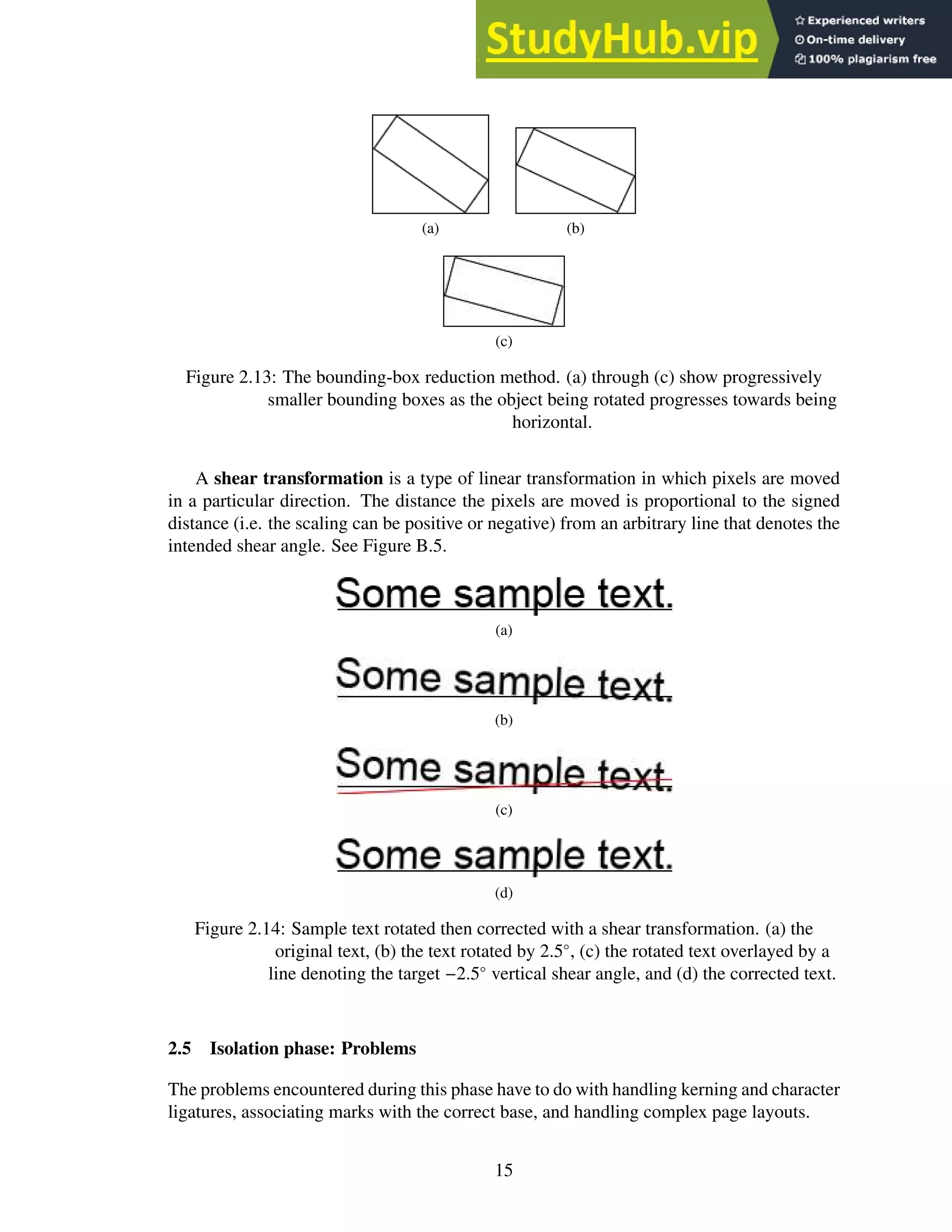
in such cases, a shear transformation (or shear mapping) is an efficient corrective measure;
rotation is much more expensive.
14
(a) (b)
(c)
Figure 2.13: The bounding-box reduction method. (a) through (c) show progressively
smaller bounding boxes as the object being rotated progresses towards being
horizontal.
A shear transformation is a type of linear transformation in which pixels are moved
in a particular direction. The distance the pixels are moved is proportional to the signed
distance (i.e. the scaling can be positive or negative) from an arbitrary line that denotes the
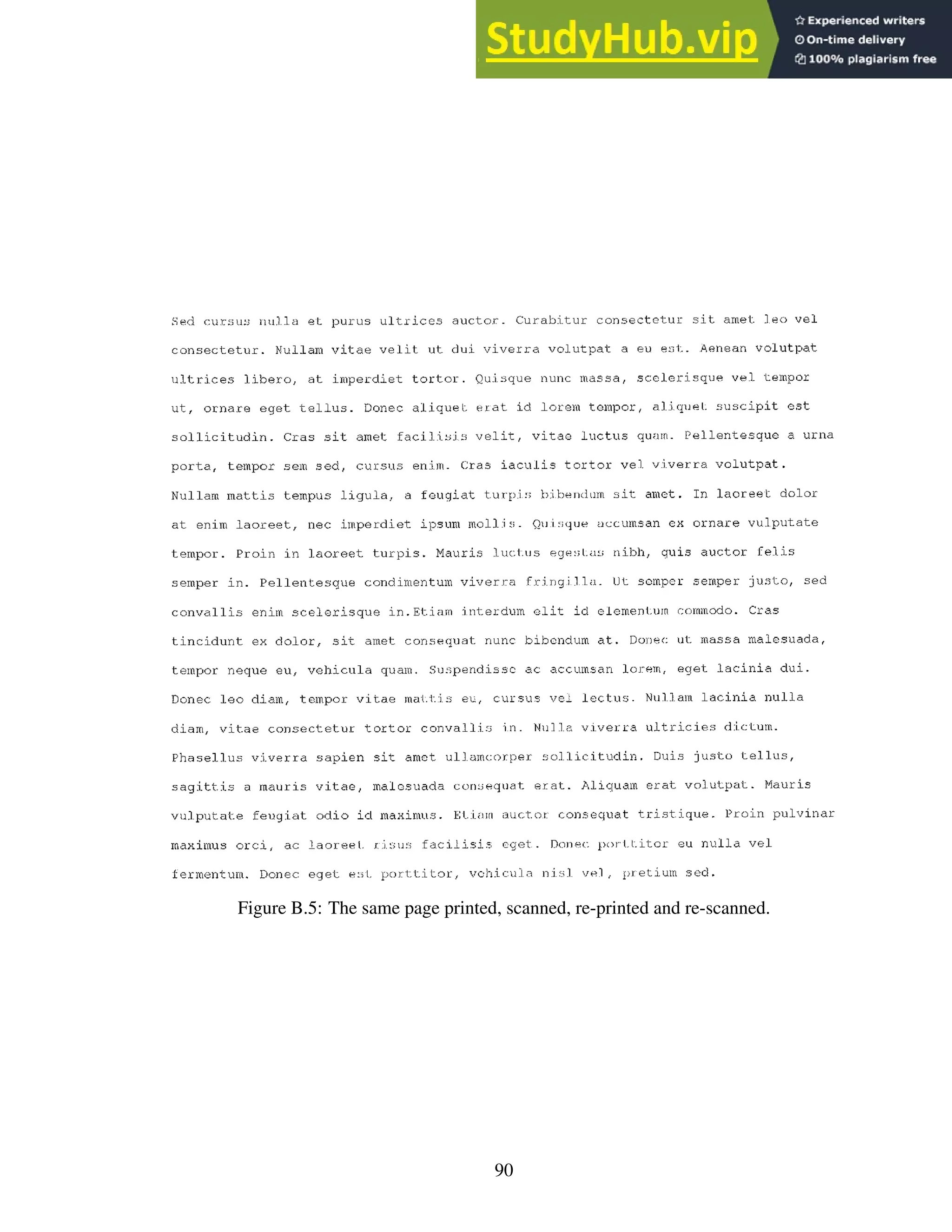
intended shear angle. See Figure B.5.
(a)
(b)
(c)
(d)
Figure 2.14: Sample text rotated then corrected with a shear transformation. (a) the
original text, (b) the text rotated by 2.5◦
, (c) the rotated text overlayed by a
line denoting the target −2.5◦
vertical shear angle, and (d) the corrected text.
2.5 Isolation phase: Problems
The problems encountered during this phase have to do with handling kerning and character
ligatures, associating marks with the correct base, and handling complex page layouts.
15
Kerning
Some fonts and handwriting styles contain characters that project into the vertical space
of surrounding characters, which makes isolating individual characters more complex as
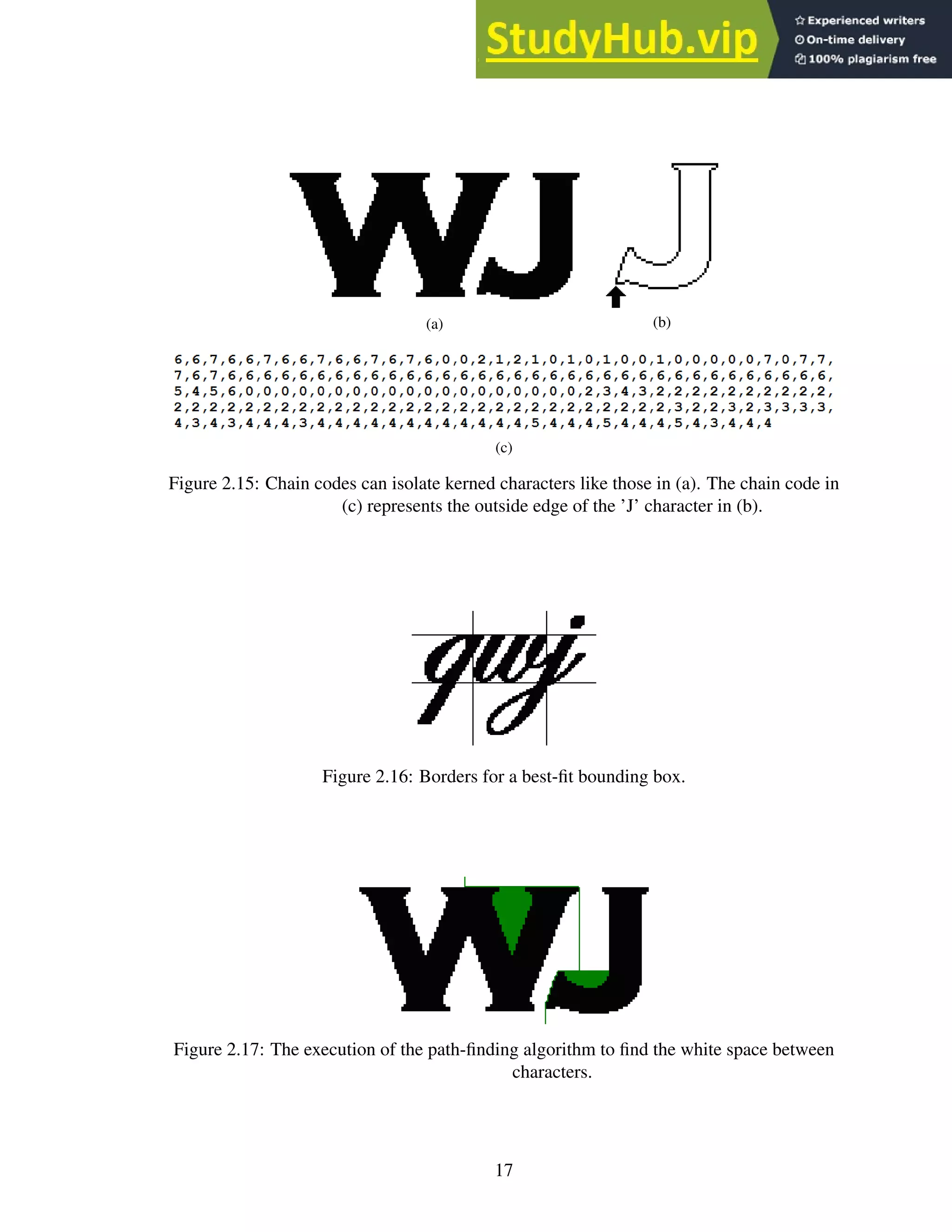
compared to fonts with clearly separated characters. For example, the characters “WJ’ are
not separated by vertical white space.
Character ligatures
Ligatures are strokes that connect one letter to another. Small fonts, cursive English hand-
writing and Arabic all exhibit characters that are connected via a continuous stroke. Con-
nected characters are hard to separate.
Marks
In many languages, letters have various accents and accompanying strokes (marks) that
are unconnected to the rest of the letter, such as the dot in the English lower case ‘i’.
Because the meaning of a glyph can change based on these marks, the OCR application
must correctly group them with the base. Marks can appear above or below a base.
Complex page layout
If a page is multi-columnar or contains sidebars of text or textual graphics such as solid
lines separating sections, the OCR application needs to be able to group the appropriate
lines of text together and discard the graphics as noise.
2.6 Isolation phase: Techniques and solutions
Kerning
1. Chain codes representing boundaries are an effective way to capture entire characters
even if they are kerned. The chain code moves around the border, operating on either the
black pixels of the character itself or the white pixels directly adjacent to the character,
until the entire character has been enveloped. This algorithm fails if characters are not
separated by white space.
2. An alternative method is to find the best-fit bounding box. A best-fit bounding box is a
rectangle that surrounds the character and is bounded by the most likely horizontal loca-
tion where one character ends and another begins. An algorithm finds these locations by
calculating the horizontal and vertical pixel density of the area and choosing the valley
locations [28]. These bounding boxes may intersect and include portions of other char-
acters, so this method requires additional processing to remove any extra pixels caused
by this inclusion. Noise reduction algorithms, such as chain-code thresholding, can re-
move the extra pixels. An enhancement to the algorithm is to calculate the average size
of each letter and impose minimum and maximum widths (or heights) for the bounding
box. See Figure 2.16.
16
(a) (b)
(c)
Figure 2.15: Chain codes can isolate kerned characters like those in (a). The chain code in
(c) represents the outside edge of the ’J’ character in (b).
Figure 2.16: Borders for a best-fit bounding box.
Figure 2.17: The execution of the path-finding algorithm to find the white space between
characters.
17
3. Another method is to find a path between kerned characters. This method creates a
bounding polygon that isolates the characters from each other. The downside to this
algorithm is its computational complexity.
I developed a pathing algorithm, PathFind, that operates on a bi-tonal image as shown in
Figure 2.18 on page 19. This path-finding algorithm requires no recursion or complex
data structures, results in an array of fixed size, requires no target ‘end point’ (it only
tries to find a path to some x at image_height − 1), and requires very little memory.
These features make it especially good for GPU processing.
Of the methods described, the PathFind algorithm seems to be the most likely candi-
date for a general-purpose solution. The best-fit bounding box suffers from the problem of
determining where the “best-fit” actually occurs. For example, in the case of Figure 2.16
on page 17, a reasonable alternative for a best-fit box may only capture half the “w”. The
algorithm using chain codes must check and process every pixel on the border of a glyph
and must convert a finished chain code into a bounding polygon, which generally requires
more processing than the PathFind algorithm (the cost of the chain code algorithm is pro-
portional to the border length of a glyph; the cost of PathFind is proportional to the height
of a glyph).
Marks
1. The only technique in the literature for dealing with marks is to use the overall height-to-
width ratio to determine if a mark belongs with a particular character [29]. If pairing the
mark with a specific character increases the height-to-width ratio of the character beyond
a threshold, the mark is excluded; otherwise it is included with the character. Since most
marks are placed above or below their bases, this method is particularly effective. The
OCR engine could also try to recognize the character both with and without the mark,
accepting whichever version is recognized. If both versions are recognized, confidence
values can be relied upon to determine a winner. The OCR engine could also recognize
marks and bases separately and combine them in post-processing.
2. Using the bounding boxes of isolated glyphs, one can easily compute the distance be-
tween smaller boxes (most likely marks) to the nearest larger box (most likely a base) to
determine to which base the mark belongs. This technique allows the creation of entire
characters from the constituent strokes in the image. This method is not mentioned in
the literature.
This problem needs more research, because there is no good generic algorithm for
associating marks with their base. The lack of any generic algorithm is probably because
the types of marks seen in an alphabet vary widely with the alphabet under consideration,
so any generic algorithm would need to account for this variability. An algorithm could
be derived from the bounding-box idea described above, though heuristic workarounds
would be necessary for some alphabets. If the algorithm is processing a language where
there are no marks under the baseline, English for example, it would never need to consider
character bases above the mark. However, for a language such as Hebrew, bases both above
and below the mark are candidates.
18
1 int x_arr[IMAGE_HEIGHT];
2 // y increases downward, the origin is at the top-left
3 int cur_y = 1;
4 //starting x-value is the middle of the glyph
5 x_arr[0] = IMAGE_WIDTH / 2;
6 while (cur_y < IMAGE_HEIGHT) {
7 if (GetPixel(x_arr[cur_y], cur_y + 1) == White)
8 { // down
9 x_arr[cur_y + 1] = x_arr[cur_y];
10 cur_y = cur_y + 1;
11 MarkPixel(x_arr[cur_y], cur_y);
12 }
13 else if (GetPixel(x_arr[cur_y] + 1, cur_y + 1) == White)
14 { // down right
15 x_arr[cur_y + 1] = x_arr[cur_y] + 1;
16 cur_y = cur_y + 1;
17 MarkPixel(x_arr[cur_y], cur_y);
18 }
19 else if (GetPixel(x_arr[cur_y] - 1, cur_y + 1) == White)
20 { // down left
21 x_arr[cur_y + 1] = x_arr[cur_y] - 1;
22 cur_y = cur_y + 1;
23 MarkPixel(x_arr[cur_y], cur_y);
24 }
25 else if (GetPixel(x_arr[cur_y] + 1, cur_y) == White)
26 { // right
27 x_arr[cur_y] = x_arr[cur_y] + 1;
28 MarkPixel(x_arr[cur_y], cur_y);
29 }
30 else if (GetPixel(x_arr[cur_y] - 1, cur_y) == White)
31 { // left
32 x_arr[cur_y] = x_arr[cur_y] - 1;
33 MarkPixel(x_arr[cur_y], cur_y);
34 }
35 else if (cur_y == 0)
36 { // no path, stop
37 return;
38 }
39 // we have checked the right path
40 // so we reset so to check the left path
41 else if (GetPixel(x_arr[cur_y - 1] - 1, cur_y - 1) == White)
42 {
43 x_arr[cur_y] = x_arr[cur_y - 1];
44 }
45 else
46 { // backtrack
47 cur_y = cur_y - 1;
48 }
49 }
Figure 2.18: PathFind pseudo code.
19
Character ligatures
1. The best-fit bounding box is the only method in the surveyed literature for determining
where to separate characters connected via ligatures [28]. See Figure 2.16 on page 17
for an example.
Figure 2.19: Possible vertical boundary borders of a best-fit bounding box.
2. An alternative method is to calculate the vertical pixel density of the text line and then
create a set of best-fit bounding boxes. Each member of the set corresponds to a bound-
ing box with borders that fall in the valleys for the vertical density graph, as in Figure
2.19. Each set of borders is processed as a best-fit bounding box (with noise reduction,
partial character removal, etc.) and the boxes that are found to contain valid characters
are kept. This method is not mentioned in the literature.
Figure 2.20: Several potential chop points that the Tesseract OCR engine might use to
overcome ligatures. Figure recreated from Smith [53].
3. A method suggested by the Tesseract OCR engine is to determine “chop points” or thin
points on a glyph. The glyphs are then separated at the chop points and recognition is
attempted on the pieces [53].
Complex page layout
1. The x-y cut segmentation algorithm uses recursion to construct a tree-based represen-
tation of the document, with the root as the whole document and each leaf comprising
a single section of similar content (text, graphics, etc.) from the image. First, the algo-
rithm computes the horizontal and vertical projection profile (see Figure 2.6 on page 11)
of the document and splits it into two or more segments based on the valleys in the den-
sity graphs. In Figure 2.21, the vertical density graph shows two potential split points
corresponding to the white space between the columns, and the horizontal density graph
20
Figure 2.21: A complex page layout with horizontal and vertical projection graphs.
Valleys in the graphs show potential split points.
shows many potential split points, one between each line. Once split, these segments are
connected as children to the root node. Then, for each newly created child, the process
recurses. When no more splits can be made, the algorithm is finished [13, 47].
Singh et al. [49] implemented a version of the x-y cut algorithm for segmenting De-
vanagari text lines and words. The paper did not provide a clear explanation of their
implementation, but, according to their results, the authors saw a 20× to 30× speedup
over serial methods.
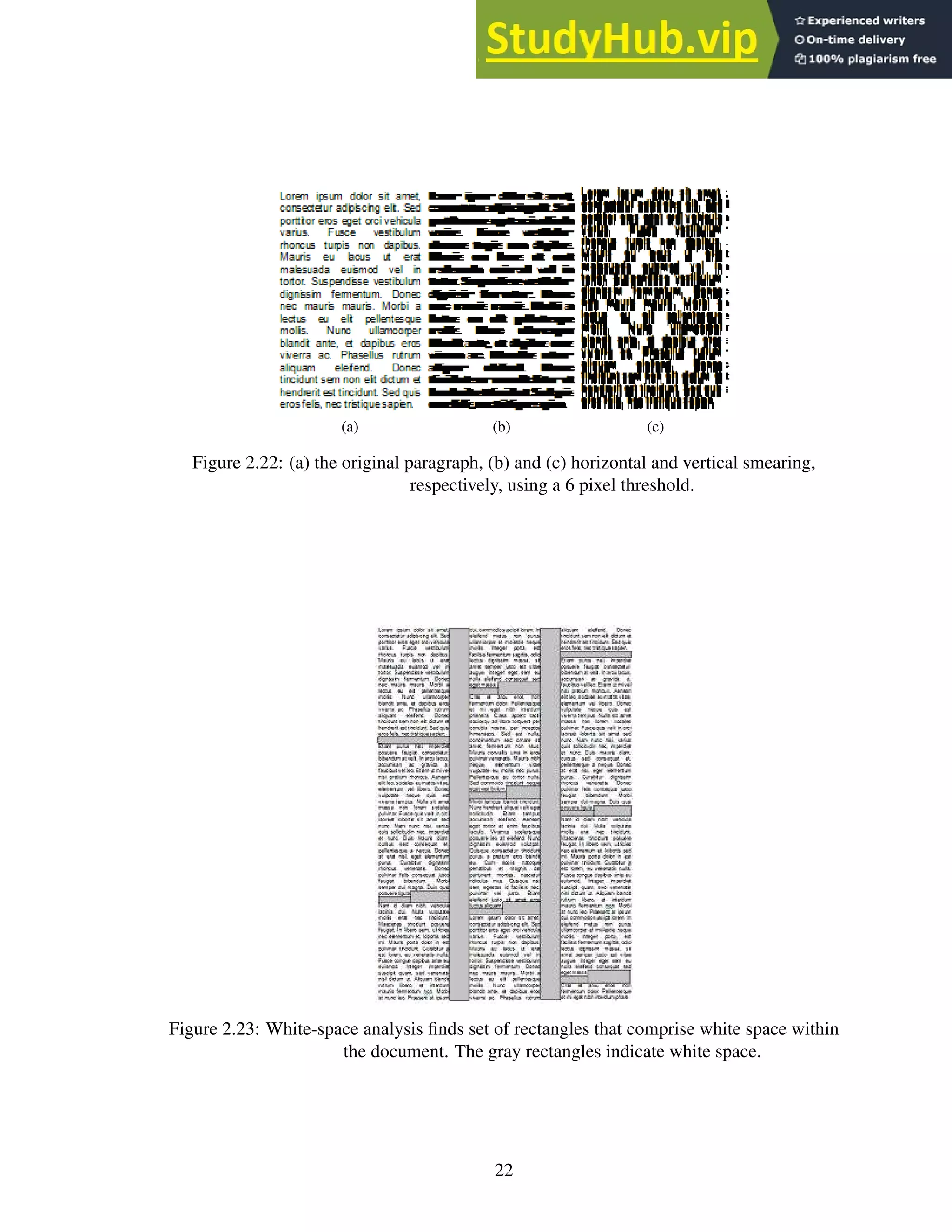
2. The smearing algorithm operates horizontally or vertically on binary images by “smear-
ing” the black pixels across white space if the number of consecutive white pixels falls
below some threshold. This algorithm has the effect of connecting neighboring black
areas that are separated by less than a threshold value. Connected-component analysis
connects the smeared pixel groups to form segments, and the set of segments comprises
the page layout. Typically, horizontal smearing works best for alphabets written hori-
zontally, such as English [47]. See Figure 2.22.
3. White-space analysis finds a set of maximal rectangles whose union is the complete
background. The rectangles are sorted according to their height-to-width ratios, with
21
(a) (b) (c)
Figure 2.22: (a) the original paragraph, (b) and (c) horizontal and vertical smearing,
respectively, using a 6 pixel threshold.
Figure 2.23: White-space analysis finds set of rectangles that comprise white space within
the document. The gray rectangles indicate white space.
22
an additional weight assigned to tall and wide blocks, since these blocks typically rep-
resent breaks between text blocks. Figure 2.23 depicts “tall” blocks between columns
and “wide” blocks between paragraphs. The blocks left uncovered are the text-block
segments [47].
4. The Docstrum algorithm is based on nearest-neighborhood clustering of connected
components. The algorithm partitions the connected components into two groups, one
with characters of the dominant font size, and one with the remaining characters. For
each component, the algorithm identifies k nearest neighbors and calculates the distance
and angle to each neighbor. The neighbors with the shortest distance and smallest angles
are considered to be on the same line. The whole text line is determined by combining
the series of these within-line pairings. The final text block segmentation is formed by
merging text lines based on location, similar rotation angles and line lengths [47].
5. The area Voronoi diagram method is based on the concept of Voronoi diagrams. In
the simplest case, a Voronoi diagram on an x-y plane consists of a set of regions, each
containing a center point and a set of points such that the distance from each point to the
center point is less than the distance from that point to any other center point. The sim-
plest measure is Euclidean distance, but other measures can be used. See Figure 2.24.
The algorithm creates Voronoi regions around each character glyph. The algorithm re-
moves boundaries between regions that are below a minimum distance from each other.
It also removes boundaries between regions whose area is similar in order to cover cases
where images contain graphics and figures. The underlying idea is that, for any individ-
ual character, the area of the Voronoi region is roughly the same, whereas the area for a
graphic or figure is much larger [23].
There is no clear choice for the best page-segmentation algorithm; each has merits un-
der certain document conditions. To summarize the results of the performance evaluation
by Shafait et al. [47]: the x-y cut algorithm is best for clean documents with little to no ro-
tation; the Docstrum and Voronoi algorithms are appropriate for homogeneous documents
that contain similar font sizes and styles; white-space analysis works well on documents
containing many font sizes and styles; and the Voronoi method excels at segmenting page
layouts with text oriented in different fashions [47].
Multiple colors
I was unable to locate any papers describing methods to handle multiple-colored docu-
ments, though one can hypothesize ways to remove solid-color backgrounds and deal with
different-colored foregrounds. One naïve method is to separate a full color image into 3
sub-images, each sub-image containing only the R, G or B color components. Convert
these sub-images to grayscale, then process each of them as a normal grayscale image and
combine the results.
Figure 2.25 contains an example of splitting the R, G and B components from a full-
color image. The colors in the original image, Figure 2.25a, comprise the full list of colors
created by using all combinations of the values 0, 64, 128, 192 and 255 for each component.
23
(a)
(b)
Figure 2.24: Voronoi diagrams, (a) pixel membership based on Euclidean distance, (b)
pixel membership based on Manhattan (i.e. driving) distance
Images from http://en.wikipedia.org/wiki/Voronoi_diagram
24
The text color is the negative color of the background. The components of the negative
color are calculated as 255 − original_component.
For each component image, the algorithm performs adaptive thresholding to convert
the grayscale image to monochrome. To determine which pixels are the “text pixels”, it
might analyze the histogram and look for the most common value (black or white) —
presumably the background pixels comprise the majority of the image. For images such as
those in 2.25, a new analysis method might be useful — adaptive histogram analysis3
.
This method constructs a histogram for a section of an image in order to perform analysis
on that section. The analysis enables an application to adapt to multi-colored backgrounds
and successfully separate the text.
(a)
(b)
(c)
(d)
Figure 2.25: Multiple color image with negative color text and isolated color components,
(a) the original image, (b) the R component, (c) the G component, (d) the B
component.
3
This method is similar to adaptive histogram equalization, which is a technique used to improve
contrast in images and credited to Ketcham et al., Hummel and Pizer [20, 22, 38, 39]
25
2.7 Identification phase: Problems
The identification phase must account for deficiencies in the isolation phase. The problems
this phase must overcome are partial letters, multiple font types and handwriting styles,
character normalization, data extraction and the confusing character set.
Partial letters
Images scanned from books, handwritten documents or historical documents may contain
partially erased, occluded or faded letters. These letters must be recognized in their partial
state.
Multiple font types and handwriting styles
A font refers to the typeface of a particular set of characters. In machine-printed text and
handwritten text, all the various styles and ways to write each character must be recognized
as that specific character.
Character normalization
Often, recognition techniques require normalizing glyph image sizes to a standard image
size in order to match training data. The normalization technique can alter the recogni-
tion rate of the normalized glyph because of differences in the way the technique handles
thick fonts versus thin fonts or tall versus short fonts. Different sizes of fonts also tend to
have different relative stroke thicknesses, but a normalized character glyph maintains its
thickness ratio across scales [24].
Data extraction
The identification phase relies on extracting characteristic data from character glyphs that
can then classify the glyph as a specific character. There are two main options for char-
acter data extraction: feature extraction and image transformation. Feature extraction
techniques extract data directly from the glyph of a character. Image transformation
techniques transform the glyph into another representation, such as a waveform, and then
extract data from the transformed glyph.
The choice of features to extract or transformations to apply is crucial to OCR accuracy.
If character data are poorly extracted, too similar or insufficient, the OCR application may
misidentify the characters.
Confusing character set
The confusing character set contains those characters within a given alphabet and font that
are commonly misrecognized by OCR techniques. For English, the confusing character set
might contain: the uppercase ‘I’ and lowercase ‘l’ (lowercase ‘L’), the number ‘1’ and
lowercase ‘l’, the uppercase ‘O’ and the number ‘0’ and the lowercase ‘e’ and lowercase
‘c’.
26
2.8 Identification Phase: Techniques and solutions
Partial Characters and Multiple Font/Handwriting Types
Skeletonization or “thinning” is a technique that captures the overall shape of a character
by reducing each character stroke to one pixel wide. This process recreates the essence
of the “human” capability to reduce a shape to its constituent parts and capture the overall
shape. This method is able to handle multiple fonts and handwriting types since, theoreti-
cally, the algorithm removes the extra “noise” generated by different fonts and styles.
1. The generic process to skeletonize a character involves removing pixels from each side
of a stroke until only one pixel remains. This process “thins” the character while retain-
ing the overall shape [26]. The technique can be applied both horizontally and vertically.
See Figure 2.26.
Figure 2.26: The letter ‘A’ undergoing horizontal skeletonization. The gray pixels indicate
pixels selected for deletion.
2. Another method for skeletonization projects successively lower horizontal scanlines
across a character and then groups the lines as splitting, merging or continuous (see
Figure 2.27). A splitting line is a scanline that is split by white space, such as a line pro-
jected horizontally through the middle of an English ‘W’. A merging scanline is a line
directly adjoining (above or below) a group of split lines, indicating the character is no
longer split. All other lines are continuous. Adjoining lines of the same type are merged
into blocks. The vertical and horizontal center, called the centroid, of each block serves
as the representative of each block and acts an an endpoint for a connection path (see
Figure 2.28). Centroids that lie on the same vertical or horizontal as another centroid
are connected using a straight line; all others are connected using either a line with a
single 90 degree turn or a line with a single 120 degree turn. The lines are chosen to fit
within the blocks as much as possible while still connecting the centroids. The series of
connected centroids is the skeleton of the original character [26]. See Figure 2.29.
The idea behind skeletonization is to reduce the character glyph to its underlying form
such that multiple fonts reduce to the same structure. From the literature, the only algorithm
that does this reduction reliably is the method of Lakshmi et al. [26]. Unfortunately, the
computational complexity of this algorithm is quite large compared to other, less reliable
algorithms. More research needs to be done on this topic.
27
Figure 2.27: (a) the original character (b) horizontal runs (c) runs marked as splitting or
merging; unmarked runs are continuous (d) blocks (e) centroid computation
(f) connected centroids. Figure recreated from Lakshmi et al. [26].
Figure 2.28: Allowed connection paths. The sizes are not relative. Figure recreated from
Lakshmi et al. [26].
Figure 2.29: The calculated skeleton.
Figure 2.30: (a) a 72pt character scaled down to 36pt. (b) a 12pt character scaled up to
36pt. (c) an original 36pt character.
28
Character normalization
1. A simple method for character normalization is to scale the character based on the size
of the bounding box. Scaling a small font up does not perform as well as scaling a large
font down, due to missing pixel data (see Figure 2.30).
(a)
(b)
Figure 2.31: The black and white dots show the sampling positions. (a) the original
characters with various orientations within the image. (b) the resultant
scaled-down characters. Figure recreated from Barrera et al. [6].
a) Sampling is a down-scaling method that relies on sampling pixels in the horizontal
and vertical directions at a rate defined by the step. For example, a step of 2 means
that every second pixel is included in the sample, whereas a step of 3 means every
third pixel is included. Each sampled pixel is included to construct the final, scaled
down image. Depending on the position of a character at the start of the sampling
process, this method may result in varying shapes (see Figure 2.31).
b) Anchoring is a variation of the sampling method that computes an anchor point
for each character before sampling. The anchor point is the center of the bounding
box that contains the character and serves as the starting point for the sampling
process. By determining a standard starting point, the anchoring method results in
more consistent shapes [6].
Data extraction
There are many techniques for extracting features from character images. Successful OCR
applications combine a number of the following techniques. Rather than list them all, I
29
present a classification4
of the techniques and provide several examples under each heading.
Feature extraction: Templating
Templating algorithms construct a representation of each known character, called a tem-
plate, and then match those templates against unknown symbols to identify them.
(a) (b)
Figure 2.32: (a) the original degraded characters; (b) the combined “stamp”.
1. Edge filtering is a templating method that provides a measure against which unknown
characters can be compared. This method requires a “stamp” to serve as the idealized
form of each character (see Figure 2.32). Stamp creation consists of examining multiple
instances of “normal” and “degraded” characters and combining the common pixels
into the stamp, discarding the rest. The selection and identification of characters that
comprise the stamp is often done manually. The stamp is then matched and aligned
against unknown characters and is identified based on the total overlapping area (i.e. in
a bi-tonal image, the overlapping black pixels) the unknown character shares with the
template. The stamp and unknown character are aligned based on an anchor point,
typically the center of the image. The more the unknown character overlaps with the
stamp, the more likely the stamp and the unknown character represent the same character
[6]. Because the calculation of the anchor point might be incorrect, this method does
not work very well on severely degraded characters.
2. Another method of templating by Bar-Yosef et al. [5], generally used for recognizing
severely degraded historical documents, requires “shape models”. The first step is to
create multiple “shape priors”. Each shape prior is analogous to a “stamp” from the
previous technique. Because the character base can be so severely degraded that no
single image contains the full character, the algorithm creates multiple shape priors.
This method ensures that each portion of the character base is captured in at least one
shape prior. The set of shape priors represent the character base as a whole [5].
All shape priors are compared against one another and aligned based on the maxi-
mum normalized cross-correlation of the two images. The normalized cross-correlation
method maximizes the alignment of the borders within each image to ensure the greatest
amount of overlap between the two shape priors (see Figure 2.33).
The algorithm creates a confidence map for each aligned pair of shape priors by weight-
ing pixels included in both shape priors more heavily than those pixels only included
4
I adopt the classification from the introduction of Shanthi et al. [48].
30
(a) (b)
(c) (d) (e)
(f) (g)
Figure 2.33: (a) the original character (b) a set of shape priors (c) – (g) shape prior border
alignment; the arrow depicts the most likely border for alignment. The image
degradation is intentional.
(a) (b)
Figure 2.34: (a) shape priors and (b) the confidence map. Darker pixels are more likely to
appear and are weighted more heavily during comparisons with unknown
characters.
in one (see Figure 2.34). Then, for each pixel within each confidence map, the final
confidence value for that pixel is the average value from all the confidence maps. The
combined map of these averaged confidence values is the shape model.
The algorithm then compares the shape model against unknown character images by
maximizing border alignment and calculates a confidence value. The higher the confi-
dence value, the more likely the shape model and unknown character represent the same
character [5].
The stamp model by Barrera et al. [6] has significant problems that prevent inclusion
in a practical OCR engine. First, the technique relies on computing an “anchor” point —
a single pixel upon which both the unknown glyph and the stamp can be aligned. This
reliance is a problem because the location of this point can vary based on the width and
height of the unknown glyph; severely degraded characters or very noisy edges skew the
calculation and subsequent alignment. Second, there is no way to choose one stamp from
31
the set of stamps. This selection problem, essentially, is the recognition problem; if the
authors could reliably choose the correct stamp, then the glyph would already be known and
no further processing would be necessary. The method by Bar-Yosef et al. [5] solves these
problems. This method has a built-in alignment technique that far outperforms the simple
notion of anchoring each image at its center and, rather than a single stamp, the algorithm
the authors describe creates multiple stamps for the recognition phase. Further, since most
of the computation occurs during training to build the shape models, the computational
complexity of the recognition step is still comparable to the Barrera method.
Feature extraction: Spatial techniques
Spatial techniques rely on the pixel-based-representation of a glyph and generally rely on
tallying or grouping pixels.
Figure 2.35: A character glyph segmented into 3×3 pixel segments.
1. The grid-and-count method partitions a character image into individual segments,
where each segment covers roughly the same total area in the image, and then counts
the black pixels in those segments. The resultant counts can be converted to a vector
and used in a nearest neighbor search or in some other classifier in order to identify
the glyph [7, 13]. A similar method is called grid-and-chain, which is the same as the
previous technique, except, instead of counting the pixels in each segment, the segments
are converted into chain codes [7].
2. Another method, longest run, projects scanlines across the character image and counts
the intersections to find the longest horizontal and vertical lines within a character image.
The lengths are usually used as supplemental information to another spatial extraction
technique, such as grid-and-count. Stand-alone variations of this algorithm keep multi-
ple values representing the longest horizontal and vertical lines to use in analysis. Other
variants count the pixel intersections along predetermined scanline paths, such as hori-
zontal and vertical lines through the center of the bounding box, and use these values to
classify the glyph [7]. See Figure 2.36.
3. The pattern-count method projects an arbitrary shape on the character image at various
offsets and counts the black pixels that intersect the shape [7]. Similar to the grid-and-
count method, each time the pattern is overlayed on the character image, the algorithm
32
(a) (b) (c)
Figure 2.36: (a) vertical longest run (b) horizontal longest run (c) vertical and horizontal
pixel intersections through the center of the bounding box.
(a) (b)
(c)
Figure 2.37: (a) the pattern and legend (b) original character (c) the pattern applied across
the original character image at three of the many possible positions.
33
counts the number of overlapping black pixels and uses these counts to identify the
glyph. For example, the vector generated by the first three overlays (as seen in Figure
2.37c) of the pattern shown in 2.37a to the character shown in 2.37b is {5, 2, 5}. These
values mean that the first overlay intersects 5 black pixels, the second intersects 2 pixels
and the last intersects 5 pixels. This method is useful because different patterns can
be implemented for different font sizes and styles, and the method works with non-
rectilinear bounding boxes.
(a) (b)
Figure 2.38: (a) three 72pt Arial characters overlayed on one another (b) filled locations
are unique to a single character.
I was unable to find any discussion on how to choose or design an appropriate pattern,
though I have an idea about how I might create one. For a given font size and style F,
a naïve approach creates a set of pixels P such that for each character in F, there exists
at least one overlapping pixel in P. Further, we create P so that a non-empty subset of P
uniquely identifies each character in F. For example, given the set of characters shown
in Figure 2.38, we can choose three pixels (one for each character) such that each pixel
both overlaps a character and uniquely identifies that character. The (x, y) coordinates of
these pixels form a pattern appropriate for disambiguating one character from another.
There are many variations on spatial-feature extraction techniques. The methods men-
tioned are just the basic types. The grid-and-count method can be extended to be pie-shaped
or have an arbitrary shape. The pattern-count method can be used with star-shaped patterns
or patterns that are designed by a genetic algorithm to determine their accuracy. There is
much room for research here. The best method is the one that best exploits the characteris-
tics of the specific alphabet or font set undergoing recognition.
Feature extraction: Transformational techniques
Transformational techniques convert the character image from a pixel representation to an-
other representation. Fourier and Wavelet transforms are examples of this type of technique
[48].
34
(a) 2Hz vertical sine
wave
(b) 8Hz vertical sine
wave
(c) 16Hz vertical sine
wave
(d) 8Hz horizontal sine
wave
(e) 4Hz diagonal sine
wave
(f) 2Hz vertical sine
wave plus an 8Hz
horizontal sine wave
Figure 2.39: Fourier transform of sinusoidal brightness images.
35
1. The Fourier transform is generally used to analyze a closed planar curve. Since each
boundary on a character is a closed curve, the sequence of (x, y) coordinates that speci-
fies the curve is periodic, which makes conversion and analysis with a Fourier transform
possible [28, 30]. The discrete cosine transform is a variation of the Fourier transform.
(a) (b) (c)
Figure 2.40: Fourier transform of 3 character images.
The idea behind the Fourier transform is that any signal can be expressed as a sum
of a series of sine waves. In the case of images, the transform captures variations in
brightness across the image. Each wave, or sinusoid, in the series comprising the orig-
inal image is encoded in the output image of the transform by plotting the phase, the
frequency and the magnitude of the wave (the three variables necessary to describe a
sinusoid). Figure 2.39 on page 35 shows a series of brightness images corresponding to
various sine waves and their resultant Fourier transforms.
2. The main difference between a wavelet transform and a Fourier transform is the ba-
sis function upon which the transforms rely. Whereas Fourier transforms are limited
to the sine and cosine basis functions, the wavelet transform has no such limitation.
The absence of this limitation means that wavelet transforms can (and do) utilize wave
functions that have a defined beginning and end — that is, they are localized in space.
Wave functions that are localized in space are referred to as wavelets and is where the
transform gets its name [17]. See Figure 2.41.
To help clarify, I present an example using one of the basic wavelet basis functions,
called the Haar wavelet (see Figure 2.42). Suppose we are given an array of pixels,
representing a 1-d image:
[12, 4, 6, 10, 9, 2, 5, 7]
36
(a) Mexican Hat
(b) Meyer
(c) Morlet
Figure 2.41: Several examples of wavelet basis functions.
Images from http://en.wikipedia.org/wiki/Wavelet
37
Figure 2.42: The Haar wavelet.
Image from http://en.wikipedia.org/wiki/Haar_wavelet
The Haar transform averages each pair of values (these are called data coefficients):
[12, 4, 6, 10, 9, 2, 5, 7] → [8, 8, 5.5, 6]
It then finds the difference between the maximum value in each original pair and its
average (these are called detail coefficients):
[8, 8, 5.5, 6] → [4, 2, 3.5, 1]
These two sets form the entire first run of the transform, which looks like:
[12, 4, 6, 10, 9, 2, 5, 7] → [8, 8, 5.5, 6, 4, 2, 3.5, 1]
The previous steps comprise one run of the Haar transform. Additional runs operate
recursively on the set of averages from the previous step. The detail coefficients do not
change and are copied through each run. When there is only one average left, no more
transforms can be computed. Thus, if the transform were to carry on for another run, the
result would look like:
[8, 8, 5.5, 6, 4, 2, 3.5, 1] → [8, 5.75, 0, .25, 4, 2, 3.5, 1]
To generalize this approach to a 2-d image, the standard method is to apply the transform
to each pixel row of an image and then to each column [27, 54]. See Figure 2.43.
Feature extraction: Neural networks
A neural network does not explicitly extract features from a character image, rather, during
training, the network adjusts the internal pathway weights and connections within its neural
layers, indirectly molding itself to the features of a given pattern. This innate behavior of
the neural network, in essence, makes it a feature extraction technique, though it cannot
be easily classified as transformational or spatial. There are a myriad of ways to provide
image data to a neural network.
38
(a) The original image. (b) Haar transform applied to rows
only.
(c) Haar transform applied to
columns only.
(d) Transform applied to both rows
and columns. The averages are a
scaled down version of the original;
the detail coefficients maintain
detail.
Figure 2.43: The Haar transform in action.
1. One method is to normalize the character image to a standard size, then feed a 1 or 0 for
each pixel, representing a black or white pixel respectively (grayscale may also work
as a valued between 0 and 1), as input into the network. The output of the network
identifies the character.
2. Alternatively, the output from any of the spatial feature extraction techniques described
previously could also serve as input to the network.
Training data
Each of the identification methods discussed in this thesis relies on some sort of pre-existing
knowledge base against which an algorithm can test unknowns. This knowledge base is
called the training data. The construction of the training data is algorithm-specific and is
usually a manual or semi-automated process. For example, building the training data for a
3×3 grid-and-count algorithm requires several steps:
39
1. Find appropriate "training" glyph images
2. Pair each glyph image with its correct classification
3. Process each glyph image and store the results; these results comprise the training
data
Software can automate some of this process via embedding parts 2 and 3 in an interactive
program (i.e the software presents the user with a glyph image and the user provides the
classification). The software can also be configured to allow for manual correction of OCR
output [13].
2.9 Post-processing phase: Problems
This phase typically also includes the use of language-specific dictionaries and grammar
checks to help increase the overall accuracy of the OCR application.
Text reconstruction
During identification, the OCR application stores coordinates for each glyph (it can also
store other data, such as a confidence value for its classification and less-likely alternatives).
These coordinates correspond to the location of the glyph on the original image. During
text reconstruction, the OCR application sorts the glyphs based on these coordinates and
writes the characters to a text file. The difficulties lie in determining word boundaries and
spacing. Complex formats, such as double/triple column layouts, are typically ignored in
this stage and are not generally recreated.
Language-specific dictionaries and grammar checks
These post-processing techniques help increase the overall accuracy of the OCR application
by validating the reconstructed text.
1. Dictionary validation can help determine if a word should be “the” or “thc” when the
OCR engine could not.
2. If a word appears that is not in the dictionary and it contains a character from the con-
fusing character set, other characters from the set can be substituted to see if the word
becomes recognizable.
3. N-gram analysis provides another method to suggest possible corrections to a character
with a low-confidence value or a misspelled word. N-grams are sets of consecutive
items found in text or speech such as syllables, letters or words. For OCR, n-grams
are typically character sequences. A naïve use of this type of n-gram is to rank the
character sequences from most commonly found in a language, such as English, to least
commonly or never found in language. For example, the bigram "ou" is ranked higher,
or is more common, than the bigram "zz". Then, for misspelled words, low ranking
bigrams could be iteratively replaced with high ranking bigrams that contain one of
40
the original letters. The word can then be rechecked against the dictionary. I highly
recommend Kukich [25] for a full discussion on automatic word correction.
2.10 Conclusion
This chapter has presented a survey of both the problems that OCR engines must overcome
to recognize text and the techniques programmers and researchers implement to accomplish
the feat. I chose the selected references because they fulfill one of three purposes: the
reference provides a complete (or at least complete enough) description of the algorithm;
the reference provides an accessible introduction to a topic, or the reference is the seminal
paper on the topic. Additionally, I chose survey references over the original references
because they provide insight in comparing the algorithms and context for implementation.
41
Chapter 3: Introduction to GPUs
3.1 Virtual and physical architecture
A GPU is a device, connected to a computer’s CPU via a high-speed bus, that contains on-
board memory and, on current NVIDIA hardware, up to ~3000 processing elements that
operate under a single instruction, multiple thread (SIMT) architecture. SIMT is similar to
the single instruction, multiple data (SIMD) architecture except that instructions are issued
to groups of threads (analogous to CPU processes), called warps. Each warp contains 32
threads and is part of a block, which is, itself, part of a grid. The thread-warp-block-grid
hierarchy comprises the virtual architecture for GPU programming. See Figure 3.1.
Figure 3.1: The thread-warp-block-grid hierarchy. From left to right: one thread, 32
threads inside a warp, which is inside a block of 16 warps, which is inside a
grid of 9 blocks.
The physical architecture of a GPU is comprised of streaming multiprocessors (SM)
and cores. A streaming multiprocessor is analogous to a CPU, and a core is analogous to a
CPU core (as in a dual- or quad-core CPU).
3.2 Kernel execution
When a kernel, or function, executes on the GPU, the GPU assigns one or more blocks to an
SM. The SM assigns each block to a core. On current hardware, a streaming multiprocessor
may have up to 192 cores. Once assigned a block, a core partitions its block into warps and
then schedules each warp for execution. When a warp executes, the core issues instructions
to the warp as a whole, and each thread within the warp executes the instruction at the
same time. If the threads within a warp diverge due to executing different paths of a branch
(this is called warp divergence), threads not on the current path of execution are disabled.
The core executes both paths of the branch serially until thread execution converges or
execution ends. Thus, when within-warp branching occurs, execution speed is reduced.
Different warps can execute different code paths without penalty. Each thread executes its
own instance of the kernel. Each grid may only execute one kernel at a time.
42
3.3 Programming a GPU
A programmer has no direct control over how the GPU assigns blocks to cores. However, a
programmer can indirectly influence block assignment by choosing the dimensions of the
block and grid virtual constructs wisely. For example, given a GPU with 8 SMs, each with
8 cores, a programmer can allocate a grid of 64 total blocks where each block contains 64
threads. This design means there is a 1:1 ratio of blocks to cores, so the GPU schedules
1 block per core. Conversely, if the programmer allocates a grid of 32 blocks with 128
threads per block giving the same total number of threads as the previous grid, the GPU still
schedules 1 block per core, but half the cores in the GPU go unused. Generally speaking,
maximizing the occupancy of the GPU results in faster execution.
occupancy =
number of active warps
total number of warps the GPU can support
A programmer codes a kernel in CUDA, a C programming language extension.
OpenCL1
is a viable alternative, but I do not discuss it here. CUDA provides several key-
words, a few built-in variables and various functions that enable low-level access to the
GPU. CUDA makes writing a GPU kernel very similar to writing a C program.
The code in Figure 3.2 on Page 44 illustrates a simple CUDA program. The keyword
__global__ signifies to the compiler that this function is a kernel. The predefined type
dim3 is a vector of three floats x, y and z. The predefined variables blockIdx, blockDim
and threadIdx provide information about the current block ID, grid dimensions and cur-
rent thread ID, respectively.
A block can be defined with up to three dimensions. For example, if a programmer
desires a block size of 512 total threads, blocks of 512×1×1 threads, 16×32×1 threads
or 8×8×8 threads are valid. The only difference among these definitions is how the GPU
assigns thread IDs, which are exposed to the kernel by the predefined variable threadIdx.
For the first block definition, 512×1×1, the dim3 vector threadIdx contains values
such that 0 ≤ threadIdx.x ≤ 511, threadIdx.y = 0 and threadIdx.z = 0. For the second
definition, 16×32×1, threadIdx contains values such that 0 ≤ threadIdx.x ≤ 16, 0 ≤
threadIdx.y ≤ 32 and threadIdx.z = 0. For the last definition, 8×8×8, threadIdx contains
values such that 0 ≤ threadIdx.x ≤ 8, 0 ≤ threadIdx.y ≤ 8 and 0 ≤ threadIdx.z ≤ 8.
The ability to arbitrarily define the dimensions allows a programmer to specify block sizes
that result in thread IDs that map cleanly onto whatever data structure the kernel must
manipulate.
A grid is defined in the same manner, and CUDA assigns block IDs in exactly the same
way as for the threads. The block IDs are exposed by the dim3 vector blockIdx, and the
grid dimensions are exposed by the dim3 vector blockDim. For example, for a grid of
8×8×8 blocks, the blockDim variable contains (8, 8, 8).
The program in Figure 3.2 performs simple vector addition. It bases its calculation
for the index i on the current block and thread IDs, which causes each thread to index a
different part of each array. So, when each thread completes its single addition operation,
the whole calculation is complete.
1
The Open Computing Language (OpenCL) is an alternative to CUDA and is supported on a number
of devices. More information can be found at https://www.khronos.org/opencl.
43
1 // define kernel
2 __global__ void VectorAdd(float* A, float* B, float* C, int N)
3 {
4 int i = blockIdx.x * blockDim.x + threadIdx.x;
5 if (i < N)
6 C[i] = A[i] + B[i];
7 }
8
9 int main()
10 {
11 // define N as total input size
12 int N = ...;
13 size_t size = N * sizeof(float);
14
15 // allocate input vectors in host memory
16 float* host_A = (float*)malloc(size);
17 float* host_B = (float*)malloc(size);
18
19 // initialize input vectors
20 ...
21
22 // allocate vectors in GPU memory
23 float* GPU_A;
24 cudaMalloc(&GPU_A, size);
25 float* GPU_B;
26 cudaMalloc(&GPU_B, size);
27 float* GPU_C;
28 cudaMalloc(&GPU_C, size);
29
30 // copy vectors from host to GPU memory
31 cudaMemcpy(GPU_A, host_A, size, cudaMemcpyHostToDevice);
32 cudaMemcpy(GPU_B, host_B, size, cudaMemcpyHostToDevice);
33
34 // execute kernel
35 dim3 threadsPerBlock(256, 0, 0);
36 dim3 numBlocks((N + threadsPerBlock.x - 1) / threadsPerBlock.x, 0, 0);
37 VectorAdd<<<numBlocks, threadsPerBlock>>>(GPU_A, GPU_B, GPU_C, N);
38
39 // copy results from GPU memory to host memory
40 // GPU_C to host_C
41 cudaMemcpy(host_C, GPU_C, size, cudaMemcpyDeviceToHost);
42
43 // free GPU memory
44 cudaFree(GPU_A);
45 cudaFree(GPU_B);
46 cudaFree(GPU_C);
47
48 // free host memory, then manipulate the results
49 ...
50 }
Figure 3.2: Example CUDA program modified from the NVIDIA CUDA C Programming
Guide [34].
44
The threadsPerBlock and numBlocks variables define the grid size and shape for
the kernel. Both blocks and grids can be arbitrarily sized (with some restriction). However,
each GPU has limitations on the maximum number of threads in a block and the maximum
number of blocks in a grid. Current GPU devices limit the size of a block to 1536 threads
and a grid to 231
− 1 blocks.
Executing a kernel is the same as executing a function in C, except the dimensions of the
virtual grid and block constructs are specified between “<<<” and “>>>” using a variable
of type dim3, as shown in the example program in Figure 3.2.
3.4 GPU memory types
GPUs expose a variety of memory types with varying performance characteristics that a
programmer must take into account when designing a program for GPU. This section gives
a brief overview of the different types of GPU memory.
Register memory
Register memory is the fastest type of memory on a GPU. Variables declared in a kernel
are generally stored in a register, and each thread has its own copy of these variables.
However, the hardware limits each SM to 65,536 registers, and a single thread to 255
registers. If a kernel exceeds the hardware limit, the extra variables are stored in local
memory. Additionally, occupancy may be reduced by kernels using a large number of
registers. For example, if a kernel uses the maximum number of registers, a warp requires
8,160 registers, so that only 8 warps can be active at a time. Given 32 threads to a block, if
the SM has more than 8 cores, then occupancy is reduced. Register memory accesses occur
in less than one GPU clock cycle [10, 34].
Local memory
Local memory is the spill-over location for variables allocated in excess of hardware limi-
tations for registers. Local memory is actually a part of the global memory.
Shared memory
Shared memory comprises 65,536 bytes per SM. Because the shared memory is “on-chip”,
it has much lower access latency than other types of memory, except register memory. Al-
located shared memory is accessible by all threads in the same block and is often used for
communicating between threads. When a block finishes executing, it releases its shared
memory, which can then be re-allocated to other blocks. Like register memory, over-
allocating shared memory reduces occupancy. Shared memory accesses occur in approxi-
mately 22 GPU clock cycles [10, 34].
Constant memory
Constant memory has global scope and is available to all threads within a grid. Constant
memory shares the same performance characteristics as shared memory but is limited to
45
65,536 bytes [10, 34].
Texture memory
Texture memory is a read-only component of global memory accessed through dedicated
hardware optimized for read operations exhibiting high 2D spatial locality (i.e. reading
data elements close to one another). Texture memory is limited to the same size as global
memory minus allocations for padding and texture alignment. Texture memory has global
scope, is available to all threads within a grid and supports interpolated access [10, 34].
Global memory
Global memory is the largest, slowest type of memory on a GPU and is roughly 30× slower
than shared memory. Global memory is available to all threads within a grid. Global
memory accesses occur in approximately 600 GPU clock cycles [10, 34].
Why memory matters
The SegRec algorithm discussed in Chapter 4 is designed to process hundreds of page
images concurrently. I tested SegRec Version 3 with 1000 8.5”×11” page images at 200
dpi with ~1500 characters per page. SegRec must store the images and the output data for
~1.5 million characters. There must also be memory for each thread to process the images.
Memory allocation is critical for the speed of this algorithm.
Coalesced verses non-coalesced
GPU hardware tries to reduce memory reads and writes into as few transactions as pos-
sible. When a kernel takes advantage of this hardware characteristic by grouping reads
or writes into consecutive memory locations, it is called a coalesced read or a coalesced
write. Coalesced operations occur in the number of GPU clock cycles required for a sin-
gle operation of the same type. Non-coalesced operations are handled serially, with each
operation taking the full count of GPU clock cycles.
3.5 Programming hints
A programmer must observe several caveats when programming a GPU:
• On the device, each streaming multiprocessor (on current hardware) has up to 65,536
registers. All variables local to a kernel are stored in registers, which means these
registers must be split among all active threads on a SM. If you want a high occu-
pancy rate, the kernel must not contain a large number of local variables.
Fortunately, the compiler for CUDA reports how many registers the kernel uses. This
information allows the programmer to tweak the kernel in order to reduce the number
of registers needed.
46
• GPU memory is persistent between kernel executions, so unused memory should be
deallocated when the program no longer needs it. This persistence also means it is
possible to feed the results (or original data) from one kernel into another without
copying data between the host and the GPU.
• Copying data between the host and the GPU is typically the slowest step of a CUDA
program. If possible, one should compress the data or avoid copying altogether by
reusing earlier data.
• Registers are in short supply, but computation is cheap. Opt for recalculating over
storing a temporary result.
• Define blocks in multiples of 32 threads; otherwise the GPU adds “inactive threads”
to bring the block size up to the nearest multiple of 32, which can influence thread
ids.
• Warp divergence increases the overall execution time of the kernel. Use bit twid-
dling2
and if-conversion to avoid branching when applicable. See Appendix C on
page 92 for more information.
• There is limited support for recursion in NVIDIA GPU hardware architectures
≥ v2.0. However, stack space is allocated per-thread and must be pre-allocated.
Thus, memory allocation for recursive functions is difficult to predict and can be
wasteful. Given that memory is extremely limited on GPUs, recursion is generally
best avoided. Dynamic Parallelism (DP) is a viable alternative to recursion that is
supported in NVIDIA GPU architectures ≥ v3.5. DP allows “parent” grids to spawn
“child” grids without interacting with the host [34].
• There is no dynamic memory allocation within a kernel. A kernel cannot allocate
additional space during execution. However, shared memory can be dynamically
allocated when a kernel is first executed.
• Adding an “optimization” step that reduces occupancy may actually result in slower
execution than the original algorithm.
3.6 Conclusion
This chapter has presented a brief introduction into the virtual and physical architecture of
a graphical processing unit and the challenges in programming for such a device.
2
Bit Twiddling Hacks: http://graphics.stanford.edu/~seander/bithacks.html
47
Chapter 4: The SegRec Algorithm
The purpose of the SegRec algorithm is to utilize GPU hardware in an effort to increase
the overall speed of OCR image processing while maintaining similar accuracy ratings
to existing OCR engines. In order to meet these goals, SegRec must be able to make
good use of multiple threads of execution on a single scanned page, operate within the
limited on-board memory, and not rely heavily on expensive, non-coalesced global memory
reads/writes. The SegRec algorithm focuses on handling the isolation and identification
phases. Future work will include handling the pre- and post-processing phases.
Each version of the SegRec algorithm operates on monochrome bitmap images. This
image format requires 1 bit per pixel to store pixel data. The host program strips the image
header, converts the raw byte data to a byte array and copies the data to the GPU. The origin
of each page is the lower-left corner; X increases left to right and Y increases bottom to
top. The pages themselves are stored in global memory, with each page occupying 475,200
bytes, or about 453MB total.
Upon completion, the host program copies the SegRec output from the GPU and gen-
erates an XML file that, for every glyph, contains the inferred character classification, the
global density vector, and bounding box coordinates.
4.1 Version 1
I wrote the first version of SegRec as a proof of concept; it is severely limited in functional-
ity and operates solely in GPU global memory. Version 1 requires that lines and characters
be separated by white space and assumes that any marks that occur are vertically aligned
to their bases.
The algorithm operates by finding the white space between lines, then between charac-
ters and, finally, by treating each glyph as a 5×5 grid to use in the grid-and-count feature-
extraction method.
The first stage of the algorithm performs a horizontal pixel count on the image —
counting the black pixels in each horizontal pixel row. It stores the values in an array
indexed by the Y value of the line. The lines that have zero black pixels are comprised
of only white space; these lines either come directly before or directly after a line. Thus,
the first non-zero pixel count in ascending Y values indicates the bottom of a line and,
afterwards, a zero value (assuming there are no marks outside of the bounding box for the
line) indicates the top of the line. The top and bottom boundaries, along with the edge of
the page, form a bounding box for the line. The output of this step is a list of bounding
boxes corresponding to the lines of text in an image.
The next stage of the algorithm counts black pixels in each column within each line’s
bounding boxes. Version 1 stores the counts in an array indexed by the X value. As
in the first stage, zero values indicate white space. Thus, starting at the left, a non-zero
value indicates the left edge of a glyph, and the next zero value indicates the right edge
of the glyph. The edge boundaries, combined with the top and bottom line boundaries,
48
Figure 4.1: A graphical representation of Version 1 of the SegRec algorithm.
form a bounding box for the glyph. The output of this step is a list of bounding boxes
corresponding to the glyphs in each line.
The next stage removes completely white rows from each bounding box, shrinking the
box to be as compact as possible. This stage counts pixels on the rows within the glyph
bounding box and removes rows with zero black pixels. The output of this step is a list of
best-fit bounding boxes corresponding to the glyphs in each line.
In order to recognize each glyph, the next stage partitions each bounding box into a
5×5 grid, counts the number of black pixels in each region within the grid and computes a
25-dimensional vector containing the counts.
Figure 4.2 shows a 3×3 grid, but the idea is the same. Starting from the bottom-left,
counting the black pixels in each region results in the following 9-dimensional vector:
(13, 1, 15, 7, 9, 11, 3, 18, 7)
By dividing each element of the vector by the total area of the glyph, the algorithm
calculates the Global Density Vector (GDV) for the glyph:
(.034, .002, .039, .018, .024, .029, .008, .047, .018)
Version 1 finds the closest match in Euclidean 25-space for this GDV within the training
data; the character associated with that match is the recognized character. The search is a
brute-force comparison of the distance between the search vector against all the vectors in
the training data. A more efficient method is the k-d tree nearest-neighbor search, but this
search requires recursion, which has only limited support on GPUs [13].
The main flaw in this algorithm is that it can only operate on characters cleanly sep-
arated by white space. Due to the way the algorithm forms bounding boxes, at least one
49
Figure 4.2: A glyph broken into a 3×3 grid
pixel of white space must surround each glyph for the algorithm to isolate it. This lim-
itation means that the algorithm cannot handle kerning, character ligatures or fonts with
characters that are too closely spaced.
There are also several minor flaws with the algorithm, such as not handling marks,
not handling even simple pixel noise, and having no mechanism for handling rotation.
However, these flaws can be mitigated, and perhaps even corrected, via additional pre- or
post-processing phases, such as by identifying marks and bases individually and connect-
ing them after identification, rejecting“isolated” glyphs under a certain size and gathering
training data for rotated characters or pre-processing to correct rotation by employing a
shear transform.
Version 1 performs extremely well on images with white-space separated characters. I
performed no formal testing on Version 1, but anecdotally, runtimes average between one
and three seconds for 1000 8.5”×11” pages at 200dpi1
with ~1500 characters per page.
This figure does not include time for copying to and from the GPU or reading from and
writing to the hard drive.
1
The standard unit for measuring resolution is dots per inch (dpi).
50
The speed is due to the manner in which the algorithm parallelizes the tasks. Multiple
threads operate on a each page concurrently, counting pixels, dividing glyphs and calculat-
ing vectors. The algorithm capitalizes on the best of what GPUs have to offer — simple
processing tasks performed at a massively parallel scale.
4.2 Version 2
The second version of SegRec attempts to correct the major shortcoming of the first version:
its inability to handle kerning.
For each page, this version of SegRec starts at the image origin (bottom-left pixel) and
inspects each pixel along the row until it finds a black pixel, which it assumes belongs to
a glyph. Version 2 then walks the outer edge of the glyph in a clockwise direction, storing
the leftmost and rightmost X values for each Y value it visits in a left-path bounds array
and a right-path bounds array, respectively. When Version 2 reaches the pixel it started at, it
has computed a bounding polygon for the glyph as represented in the left and right bounds
arrays.
Figure 4.3: The edge-walk algorithm in the second version of SegRec.
Figure 4.3 indicates how Version 2 walks the edge of a glyph. The arrow in each grid
indicates the previous position of the edge walk, and the blank region indicates the current
pixel location of the edge walk. The numbers indicate the order in which the edge-walk
algorithm checks the pixels for its next move. A dash in the grid indicates that the pixel
location is skipped and not checked because, given the previous position, no black pixel
could exist in that location. The first black pixel found is the next position for the edge
walk. I invented this edge-walking algorithm and do not know if a similar version exists in
the literature.
Version 2 computes the 25-vector and recognizes glyphs the same way as Version 1,
but it only considers pixels within the bounding polygon, as shown in Figure 4.4.
Figure 4.4 depicts the left and right boundaries of the bounding polygon as stored by
the bounds arrays. Thus, the algorithm does not inspect all the pixels within the bounding
51
Figure 4.4: A kerned glyph with the grid-and-count grid and bounding polygon.
box during the grid-and-count process, but the same information is retrieved as in Version
1.
If the distance from the GDV to the closest match in training data exceeds some limit,
the algorithm evaluates the glyph to check to see if it is a mark. The algorithm identifies the
closest glyph that it has already processed and, if the midpoints between the closest glyph
and this glyph are within some distance, say 15 pixels, it joins the two glyphs and then
re-identifies the new glyph (i.e. the newly created glyph goes through the grid-and-count
vectorization process again). The mark-joining process can be repeated for an arbitrary
number of marks but, in practice for English, it typically only occurs once, when capturing
the dot on ‘i’ and ‘j’.
This version of SegRec has one major shortcoming: it operates much more slowly
on the GPU than Version 1. There are two reasons for the slowness. First is the way
the algorithm detects and follows the edges of glyphs. On an NVIDIA GPU, the slowest
operation for the hardware is a non-coalesced read from global memory. The edge walk
in Version 2 makes heavy use of non-coalesced reads as it traverses the edge around a
glyph. I attempted to mitigate this issue by using shared memory, but I was only able
to achieve small performance gains. Second, the kernel probably exceeds the hardware
limitation for registers per thread. Exceeding the limitation means that excess variables are
stored in global memory, exacerbating the previous problem of too many global memory
accesses. This problem could be solved by breaking Version 2 into several smaller kernels
and running them separately, but I have not investigated this option.
Version 2 is unable to detect and associate marks that appear below glyphs. This flaw
is a shortcoming in the design of the algorithm, because marks can only be associated with
glyphs that have already been processed; since the algorithm executes on the image from
52
the bottom up, it cannot associate marks below glyphs that it has not yet processed. Such
marks exist in some alphabets, such as Hebrew.
Regarding edge walking
The edge-walk algorithm in Version 2 starts from the lowest, left-most pixel and walks the
edge of the glyph clockwise until it reaches its starting point. In the general case, reaching
the starting point indicates that it has surrounded the glyph.
However, there are several cases in which the edge walk returns back to the starting
point without having circumnavigated the whole glyph.
Figure 4.5: Examples of a glyph in which (a) reaching the starting point in an edge walk
does not indicate being finished and (b) where the edge walk completes
normally.
The letter ‘t’ shown in Figure 4.5 is one such case. The pixel indicated by the carat
is the starting point. Traversing clockwise around the edge of the glyph leads back to the
starting point and excludes the lower-right portion of the character, as shown in Figure 4.6.
A heuristic can be used to help detect instances in which the starting point is reached pre-
maturely, but the heuristic is imperfect in that it detects false positives, as with the letter
‘d’ shown in Figure 4.5. I believe the heuristic is only necessary for the two pixel config-
urations shown in Figure 4.7 — any other configuration seems to result in the appropriate
behavior, because these configurations are the only ones in which the starting pixel serves
as the sole pixel connecting two sections of the glyph.
4.3 Version 3
Design discussion
Version 3 of SegRec is a re-imagination of the edge-walk algorithm in Version 2. The
new version is designed to significantly reduce non-coalesced global memory reads and
to increase the number of threads simultaneously working on a single page. Originally,
I considered assigning a thread to each X position to locate glyphs by “flooding” across
adjacent black pixels. As the thread floods the glyphs, it tracks the extrema for X and
53
Figure 4.6: Figure 4.5 highlighting the paths the edge-walk algorithm finds.
Figure 4.7: The pixel configurations fo which extra processing is necessary to detect the
appropriate next step for the edge-walk algorithm.
54
Y and calculates a bounding box for the glyph. However, the threads would constantly
be overwriting each other and duplicating work as several of them would be operating on
the same glyph. In order to overcome this limitation, the threads could potentially replace
black pixels with their ThreadID and have the highest ThreadID “win”. Thus, if a thread
were to check a pixel and find a ThreadID higher than its own, the thread would move to
other work. However, this algorithm would require the storage for images to jump from 1
bit per pixel to 16 bits per pixel (in order to accommodate storing the ThreadID), which
would exceed the memory capabilities of many GPUs. Additionally, there is no way to
intelligently allocate memory for output from each of the threads. Because there is no way
to pre-determine which thread will “win” each glyph, a huge excess of memory must be
allocated for each thread, again, potentially exceeding the memory capabilities of many
GPUs.
The next idea was to reduce the thread count to a maximum of 255 per image. This
approach would only increase the input image size from 1 bit per pixel to 8 bits per pixel
instead of 16 bits per pixel. However, it still does not solve the issue of allocating storage
space for thread output, since there is still no way to pre-determine “winners”.
At this point, I shifted focus to exactly what the algorithm would output. Initially, the
algorithm was supposed to output the left and right boundaries associated with each glyph.
However, assuming 100 boundary values per glyph, which gives us a maximum height of
50 pixels (50 boundary values for the left path and 50 values for the right path) at 64 bits
per coordinate (32 bits each for X and Y) and a target throughput of 2.5 million characters,
the required storage equals ~2GB — too much memory to use for output.2
At this point, I
discarded the idea of storing and outputting the full paths. Next, I considered the possibility
of storing a path approximation.
The DPHull algorithm is a variation and improvement upon the Douglas-Peucker line-
simplification algorithm [18]. DPHull reduces the number of vertices that comprise a
closed polygon by incrementally adjusting the position of existing vertices to remove in-
termediate vertices. Applying DPHull has the effect of slightly altering the shape of the
polygon approximation. DPHull sets a threshold for the difference and only allows cumu-
lative changes that fall under the threshold. For a glyph, the difference can be relatively
large (even up to several pixels on both sides of the glyph) while still capturing the overall
shape within a reduced set of coordinates.
However, the paths need not even be stored at all. Since the eventual goal is to compute
the 25-space vector to classify the glyph, we can simply store the path temporarily in order
to compute the vector. The same logic could be applied to the vector, but I choose to output
it, in addition to the other glyph data: bounding box coordinates and the proposed character
classification.
This line of inquiry and realization led to the creation of Version 3.
2
32 bits were required because SegRec stacks the images, thus, for 1000 pages, the y-value ranges from 0
to 2,199,999. Later, I figured out I could use 32 bits for each boundary value (16 bits per component) because
the page offset is calculable and the height of a page is constant.
55
Version 3 of SegRec
The first part of SegRec, called the segmentation stage, allocates several pairs of top and
bottom bounds arrays in shared memory. The number of arrays is dependent on the GPU,
but generally, more is better. The minimum number of pairs required is dependent on
the size, shape and other characteristics of the glyphs to be identified. The pairs of bounds
arrays store the minimum and maximum Y values for the glyph parts detected in the image.
A thread operates in one pair of arrays until it detects a disconnected glyph part, which
causes it to move to the next pair of arrays. A disconnected glyph part is a group of pixels
that is isolated by at least one pixel of white space from any other group of pixels. A
group of pixels is a set of pixels such that each pixel in the group is connected to at least
one other pixel contained within the group. Connected, in this case, means directly or
diagonally adjacent to another pixel (this definition can be changed to tune the algorithm).
For example, there are two groups of pixels in Figure 4.8. The red pixels show the divide
between the two groups.
Figure 4.8: Two groups of black pixels. The red pixels show the divide between the
groups.
Each thread operates on a vertical stripe of the image 8 pixels wide. The indices of
the bounds arrays correspond to the X values of the stripe. The values stored in the
bounds arrays correspond to the Y values (each value is 16 bits). Each array is initial-
ized to “undefined’. The algorithm starts at the bottom-left corner of the image, assigning
stripes to threads. Each thread reads3
a byte of image data (corresponding to 8 pixels in
a monochrome image) from the bottom of its assigned stripe. For each black pixel within
the byte, the thread checks the top bounds array, and if the Y value of the pixel coordinate
is greater than the corresponding element in the top bounds array, it overwrites the top el-
ement. If the Y value of the pixel coordinate is less than the corresponding element of the
bottom bounds array, it overwrites the bottom element. (This situation only occurs when
the bottom bounds array is “undefined”). Thus, after a thread finishes on the first line of
its stripe, both the top and the bottom bounds arrays contain a 0 wherever it found a black
3
That is, transfers a byte of data from global memory to register memory.
56
pixel. The bounds arrays represent the bounding polygon for the glyph and are comprised
of the vertical paths from the pixel coordinate stored in the bottom bounds array to the
pixel coordinate stored in the top bounds array. Figure 4.9 shows several glyphs with their
bounding polygons highlighted in red (the paths stretch vertically from the bottom red pixel
to the top red pixel), as they would be represented in a pair of bounds arrays. Figure 4.10
on page 58 presents this algorithm in pseudocode for processing a byte of data.
Figure 4.9: Three glyphs with their bounding polygons highlighted. The coordinates
highlighted are what would be stored in the bound arrays.
To process the second line of a stripe, the thread follows same steps, but it adds a
new check. If the pixel under consideration would occupy a position in the top or bottom
bounds arrays that overwrites an existing value (i.e. overwrites a pixel coordinate) but is
not connected to the pixel it overwrites, the thread moves to a new set of bounds arrays.
The thread uses the new set of bounds arrays in exactly the same manner, starting at the
pixel that initiated the move.
For example, in Figure 4.11, the blue pixels have already been processed and the red
pixel is the current pixel being examined. The thread has no knowledge of anything to the
left or right of its stripe (denoted by the red borders), so when it processes the pixel marked
in red, it can only compare it to the values it has stored in the bounds arrays (denoted by
the blue pixels). The thread finds that the red pixel is not connected to the blue pixel and
starts using the next pair of bounds arrays.
When any thread fills all its available pairs of bounds arrays or the image is fully pro-
cessed, the compression stage begins. The compression stage consolidates the bounds
arrays by compressing the glyph parts contained within the pairs of top and bottom bounds
arrays into larger glyph parts and, eventually, an entire glyph. A thread is assigned to a
stripe within the bounds arrays (8 elements wide) and it starts at the top pair of bounds ar-
rays, comparing the values in each pair of bounds arrays to the values in the pair of bounds
arrays directly below it. If certain conditions are met (discussed in detail later), the thread
merges the paths. The compression stage has the effect of extending the bounding polygon
57
1 //contains the current buffer count
2 int curBuf = 0;
3 //contains the current byte being processed
4 byte data = ...;
5 //contains the Y value of the current byte
6 short curY = ...;
7
8 for (int x = 7; x >= 0; x-=1) {
9 //if the bit at position x, starting from the left, is 1
10 if (((data >> x) & 1) == 1) {
11 if (GetTopArrayValue(curBuf, x) == Unset) {
12 //bound arrays are empty
13 //set each array to the current Y value
14 SetTopArrayValue(curY, curBuf, x);
15 SetBottomArrayValue(curY, curBuf, x);
16 } else {
17 if (isConnected(x,GetTopArrayValue(curBuf, x), x, curY) == 1) {
18 //this pixel is directly connected
19 //to the one below it; adjust the Y value
20 SetTopArrayValue(curY, curBuf, x);
21 } else if ((isConnected(x - 1,GetTopArrayValue(curBuf, x - 1), x, curY) == 1)
22 and (pathsOverlap(GetTopArrayValue(curBuf, x - 1), x, curY),
23 GetBottomArrayValue(curBuf, x - 1), x, curY),
24 GetTopArrayValue(curBuf, x), x, curY),
25 GetBottomArrayValue(curBuf, x), x, curY)) == 1)) {
26 //the X-1th element is connected with this pixel
27 //and the X-1th element overlaps with the path
28 //this pixel would overwrite
29 SetTopArrayValue(curY, curBuf, x);
30 } else if ((isConnected(x + 1,GetTopArrayValue(curBuf, x + 1), x, curY) == 1)
31 and (pathsOverlap(GetTopArrayValue(curBuf, x + 1), x, curY),
32 GetBottomArrayValue(curBuf, x + 1), x, curY),
33 GetTopArrayValue(curBuf, x), x, curY),
34 GetBottomArrayValue(curBuf, x), x, curY)) == 1)) {
35 //the X+1th element is connected with this pixel
36 //and the X+1th element overlaps with the path
37 //this pixel would overwrite
38 SetTopArrayValue(curY, curBuf, x);
39 } else {
40 //skip to the next buffer
41 curBuf = curBuf + 1;
42 //arrays are empty, so set them
43 SetTopArrayValue(curY, curBuf, x);
44 SetBottomArrayValue(curY, curBuf, x);
45 }
46 } //the value is set
47 } //the pixel is black
48 } //each x value
Figure 4.10: Process a byte of image data.
58
Figure 4.11: An example of a thread processing a stripe. The blue pixels have been
processed and the red pixel is under consideration.
from the bottom array coordinates to the new top array coordinates, encompassing the pre-
vious top and bottom bounds array coordinates and extending the bounding polygon. Each
glyph part is eventually joined to a group of glyph parts which, eventually, form an entire
glyph.
Figure 4.12: An example glyph divided into strips.
For example, assume two threads, Thread0 and Thread1 are executing concurrently on
the stripes as shown in Figure 4.12. Thread0 is operating on the left stripe and Thread1 on
the right stripe. After both threads process the bottom line, the active pair of top and bottom
bounds arrays for each thread have values as shown below (X indicates an undefined initial
value).
59
A fter line 0 :
Top0 : [X,X,X,X,X,X,0,X] [X,X,0,X,X,X,X,X]
Bottom0 : [X,X,X,X,X,X,0,X] [X,X,0,X,X,X,X,X]
The bounds arrays show that Thread0 sees a black pixel at (6, 0) and Thread1 sees a
black pixel at (10, 0). Because these pixels overwrite an unset element, they do not need to
be connected to any previous entries.
A fter line 1 :
Top0 : [X,X,X,X,X,X,0,1] [X,1,0,X,X,X,X,X]
Bottom0 : [X,X,X,X,X,X,0,1] [X,1,0,X,X,X,X,X]
The threads add an additional pixel to the bounds arrays at (7, 1) and (9, 1), respectively.
Both of these pixels overwrite an unset element, so they do not need to be connected (even
though: (7, 1) is connected to (6, 0) and (9, 1) is connected to (10, 0)).
A fter line 2 :
Top0 : [X,X,X,X,X,X,0,1] [2,1,0,X,X,X,X,X]
Bottom0 : [X,X,X,X,X,X,0,1] [2,1,0,X,X,X,X,X]
Thread0 sees only white pixels in line 2, so it does not modify any values in the bounds
arrays. Thread1 sees an additional pixel at (8, 2). This pixel overwrites an unset element,
so it does not need to be connected (even though it is: (8, 2) is connected to (9, 1)).
A fter line 3 :
Top1 : [X,X,X,X,X,X,X,3] [X,X,X,X,X,X,X,X]
Bottom1 : [X,X,X,X,X,X,X,3] [X,X,X,X,X,X,X,X]
Top0 : [X,X,X,X,X,X,0,1] [2,3,0,X,X,X,X,X]
Bottom0 : [X,X,X,X,X,X,0,1] [2,1,0,X,X,X,X,X]
Thread0 sees a pixel at (7, 3), but because the pixel is not connected to any existing
coordinate stored in first set of bounds arrays (the algorithm checks the X − 1th and Xth
element for connectedness), the thread starts using the next pair of bounds arrays. Thread0
adds (7, 3) to the new pair of bounds arrays. Thread1 continues to use the first pair of
bounds arrays and adds an additional pixel found at (9, 3). Because (9, 3) overwrites an
existing pixel coordinate, the thread verifies that it is connected: (9, 3) is connected to
(8, 2).
60
A fter line 4 :
Top1 : [X,X,X,X,X,X,4,3] [X,X,X,X,X,X,X,X]
Bottom1 : [X,X,X,X,X,X,4,3] [X,X,X,X,X,X,X,X]
Top0 : [X,X,X,X,X,X,0,1] [2,3,4,X,X,X,X,X]
Bottom0 : [X X,X,X,X,X,0,1] [2,1,0,X,X,X,X,X]
Thread0 sees a pixel at (6, 4) and adds it to its current pair of bounds arrays. Thread1
sees a pixel at (10, 4). Both pixels overwrite existing coordinates; and the threads verify
that they are connected. (6, 4) is connected to (7, 3) in the second set of bounds arrays and
(10, 4) is connected to (9, 3).
For the sake of the example, say that both threads have completed their entire stripes.
The bounds arrays now represent a polygonal bounding box around the glyph, as shown in
Figure 4.13. Each color represents a different pair of bounds arrays — the blue pixels show
paths stored by S 0, a thread’s first pair of bounds arrays, and the red pixels show paths
stored by S 1, a thread’s second pair of bounds arrays. The compression stage now begins.
Figure 4.13: A glyph encircled by a polygonal bounding box.
I use the following conventions to refer to the pairs of bounds arrays, the positions
within them and the coordinates they represent:
• S n indicates the concatenation of the nth pair of bound arrays across all threads; i.e.
S 0 is the first pair, S 1 is the second pair and so on.
• S n[T|B|A] refers to the top, bottom or both (all) bounds arrays in pair, S n; i.e. S 0B
refers to the bottom bounds array in the first pair and S 1T refers to the top bound
array in the second pair. S 1A refers to both the top and bottom bound arrays in the
second pair.
• S n[T|B|A]m indicates stripe m in the [T|B|A] bounds array in pair S n; i.e. S 0B0 is the
first stripe in the bottom array in the first pair of bounds arrays. In this example, a
stripe consists of eight indices (corresponding to the 8 pixels within the stripes on the
image).
61
• Pq indicates a position within a given bounds array or stripe. When referring to a
stripe, Pq refers to the position within the stripe with P0 being the first (leftmost)
position. When referring to a bounds array, Pq refers to the position in the array at
the index q. When Pq is used in reference to a single bounds array, Pq refers to a
coordinate. When Pq is used in reference to a pair of bounds arrays, Pq refers to
the path formed by the vertical line drawn from the coordinate at Pq in the bottom
bounds array to the coordinate at Pq in the top bounds array.
• A coordinate (x, y) means the specified bounds array at index x holds the value y.
• A path is the vertical line created by the coordinates (x1, y1..y2) in a pair of bounds
arrays where (x1, y1) is the coordinate held by the bottom bounds array and (x1, y2)
is the coordinate held by the top bounds array.
• The term “overlap” means the paths overlap in the Y direction or the endpoints are
adjacent. For example, given two paths (x1, y1..y2) and (x2, y3..y4) the paths are said
to overlap if (((y1 ≥ max(y4 − 1, 0)) and (max(y4 − 1, 0) ≥ max(y2 − 1, 0))) or
((y3 ≥ max(y2 − 1, 0)) and (y2 ≥ max(y4 − 1, 0)))).
SegRec allocates a thread to run on each stripe. Each thread evaluates a maximum of
four possibilities for each position within its stripe, starting in S MAX at P0:
1. If the path in S n at Pq is unset, it is skipped.
2. If the path in S n at Pq overlaps the path in S n−1 at Pq or the path in S n−1 at Pq is unset,
the paths are merged. See Figure 4.14a.
3. If the path in S n at Pq overlaps the path in S n−1 at Pq−1 and the path in S n−1 at Pq−1
overlaps the path in S n−1 at Pq, the paths Sn at Pq and S n−1 at Pq are merged. See Figure
4.14b.
4. If the path in S n at Pq overlaps the path in S n−1 at Pq+1 and the path in Sn−1 at Pq+1
overlaps the path in S n−1 at Pq, the paths S n at Pq and S n−1 at Pq are merged. See Figure
4.14c.
Figure 4.14 displays examples of these comparisons. Each color represents a different
pair of bounds arrays. The red path is the path being processed in SCURRENT at Pq.
• In Figure 4.14a, the red path (S n at Pq) overlaps the blue path (S n−1 at Pq), so the
paths can be merged.
• In Figure 4.14b, the blue path in (S n−1 at Pq−1 overlaps both the red path in S n at Pq
and the blue path in S n−1 at Pq, so the paths S n at Pq and S n−1 at Pq can be merged.
• In Figure 4.14c, the blue path in S n−1 at Pq+1 overlaps both the red path in S n at Pq
and the blue path in S n−1 at Pq, so the paths S n at Pq and Sn−1 at Pq can be merged.
62
Figure 4.14: Sample paths showing the different comparison types for the compression
stage.
Figure 4.15: The results of merging the example paths.
63
Merging combines the paths by moving the value in S nT at Pq to S n−1T at Pq, overwrit-
ing the previous value. If the path in S n−1 is unset, the value in S nB at Pq is also moved.
Merging the paths extends the boundaries of the polygonal bounding box from the bottom
of the path in S n−1 at Pq to the top of the path in S n at Pq, as seen in Figure 4.15.
From the example in Figure 4.13, the bounds arrays currently appear as follows:
S tart state :
Top1 : [X,X,X,X,X,X,4,3] [X,X,X,X,X,X,X,X ]
Bottom1 : [X,X,X,X,X,X,4,3] [X,X,X,X,X,X,X,X ]
Top0 : [X,X,X,X,X,X,0,1] [2,3,4,X,X,X,X,X ]
Bottom0 : [X,X,X,X,X,X,0,1] [2,1,0,X,X,X,X,X ]
SegRec allocates two threads, Thread0 and Thread1 to operate on the two stripes.
Thread0 processes the left stripe and Thread1 processes the right stripe. Thread0 skips
the unset positions and arrives at P6. Thread0 compares S1 at P6 to S 0 at P6 and finds the
paths do not overlap. Thread0 then compares S1 at P6 to S0 at P5 and finds the paths do
not overlap. Thread0 then compares S 1 at P6 to S 0 at P7 and finds the paths do not overlap.
Thread0 is done processing P6 in S 1. Thread1 finds only unset positions and skips them
all.
Thread0 arrives at P7. Thread0 compares S 1 at P7 to S 0 at P7 and finds the paths do
not overlap. Thread0 then compares S 1 at P7 to S 0 at P6 and finds the paths do not overlap.
Thread0 then compares S 1 at P7 to S 0 at P8 (which crosses the stripe border) and finds the
paths overlap. Thread0 then compares S0 at P7 to S 0 at P8 and finds the paths overlap.
Thread0 then merges P7 in S 1 to P7 in S 0. Thread0 unsets P7 in S 1.
A fter pass 1 :
Top1 : [X,X,X,X,X,X,4,X] [X,X,X,X,X,X,X,X]
Bottom1 : [X,X,X,X,X,X,4,X] [X,X,X,X,X,X,X,X]
Top0 : [X,X,X,X,X,X,0,3] [2,3,4,X,X,X,X,X]
Bottom0 : [X,X,X,X,X,X,0,1] [2,1,0,X,X,X,X,X]
Since Thread0 has made a change, all threads perform another compression pass. The
threads repeat this process until no thread makes a change.
Thread0 skips all the unset positions and arrives at P6. Thread0 compares S 1 at P6 to
S 0 at P6 and finds the paths do not overlap. Thread0 then compares S 1 at P6 to S 0 at P5
and finds the paths do not overlap. Thread0 then compares S 1 at P6 to S 0 at P7 and finds
the paths overlap. Thread0 then compares S 0 at P7 to S 0 at P6 and finds the paths overlap.
Thread0 then merges P6 in S 1 to P6 in S 0. Thread0 unsets P6 in S 1. Thread0 skips P7,
because it is unset. Thread1 finds only unset positions and skips them all.
64
A fter pass 2 :
Top1 : [X,X,X,X,X,X,X,X] [X,X,X,X,X,X,X,X]
Bottom1 : [X,X,X,X,X,X,X,X] [X,X,X,X,X,X,X,X]
Top0 : [X,X,X,X,X,X,4,3] [2,3,4,X,X,X,X,X]
Bottom0 : [X,X,X,X,X,X,0,1] [2,1,0,X,X,X,X,X]
Since Thread0 has again made a change, all threads perform another compression pass.
Pass 3 results in no changes, so the compression stage is complete. Figure 4.16 shows the
final bounding polygon for this example.
A fter pass 3 :
Top1 : [X,X,X,X,X,X,X,X] [X,X,X,X,X,X,X,X]
Bottom1 : [X,X,X,X,X,X,X,X] [X,X,X,X,X,X,X,X]
Top0 : [X,X,X,X,X,X,4,3] [2,3,4,X,X,X,X,X]
Bottom0 : [X,X,X,X,X,X,0,1] [2,1,0,X,X,X,X,X]
Figure 4.16: The bounding polygon for the example.
Version 3 of SegRec processes all stripes concurrently due to the mechanism by which
the threads operate on the GPU, assuming we only use one warp per page. Each thread
within a warp executes the same instructions at the same time; thus, each thread is at
exactly the same point within the compression stage at the same time, so there is no chance
the threads can directly interfere with one another. However, it is possible that a thread
could run out of bounds arrays before it, or some other thread, has seen the full glyph.
Thus, Version 3 could begin the compression stage with partial glyphs in the bounds arrays.
Version 3 handles this case by comparing the bounding polygons in the bounds arrays with
the most recently processed Y value; if the bounding polygon shares a border with the Y
value, the algorithm skips the glyph.
65
Once the compression stage is complete, the construction stage begins. For the sake
of the example, assume that we have two more glyphs in our example as shown in Figure
4.17.
Figure 4.17: Three glyphs.
At the end of the compression stage, the bounds arrays look as follows:
With two more glyphs :
Top1 : [X,X,X,X,X,X,7,8] [9,X,10,X,X,X, X,X]
Bottom1 : [X,X,X,X,X,X,7,6] [5,X, 6,X,X,X, X,X]
Top0 : [X,X,X,X,9,8,4,3] [2,3, 4,9,8,9,10,X]
Bottom0 : [X,X,X,X,5,6,0,1] [2,1, 0,7,8,7, 6,X]
Figure 4.18 shows the paths stored by the bounds arrays. The blue paths are stored by
S 0 and the red paths by S1.
Once again, SegRec allocates a thread to run on each stripe. Each thread evaluates two
possibilities for each position within its stripe to determine if it should process the position,
starting in S0 at P0:
1. If the path in S n at Pq is unset, it is skipped.
2. If any path from S 0 to S MAX at Pq−1 overlaps S n at Pq, the position is skipped.
66
Figure 4.18: The paths stored in the bounds arrays. The red paths are stored in S 1 and the
blue paths in S 0.
If the thread decides to process the position, it executes the following procedure twice:
once to compute the bounding box and once to compute the 25-space vector:
1. For each position Pq, check the paths from S0 to S MAX at Pq+1. If it finds an overlapping
path, move to that position.
2. If this is the first run, update the minimum and maximum X and Y values and continue
with Step 1.
3. If this is the second run, count the black pixels within the path in SCURRENT at Pq and
store them in a 25-space vector.
4. If no overlapping path can be found in any S n at Pq+1, this glyph ready for the next step.
In the example, Thread0 skips positions until it finds the path ((4, 5), (4, 9)) in S 0A0 at
P4. Thread0 then checks to see if any paths in S0A0 or S 1A0 at P3 overlap. Thread0 finds
no overlapping paths, so the thread processes the glyph. This is the first pass through the
glyph, so Thread0 tracks and stores Xmin, Ymin, Xmax, and Ymax.
67
A fter processing P4 :
Current Position = S 0A0 at P4
Xmin = 4
Ymin = 5
Xmax = 4
Ymax = 9
Next, Thread0 looks for an overlapping path in S0A0 to S 1A0 at P5. Thread0 finds an
overlapping path in S 0A0 at P5: ((5, 6), (5, 8)). Thread0 moves to this location and checks
the minima and maxima.
A fter processing P5 :
Current Position = S 0A0 at P5
Xmin = 4
Ymin = 5
Xmax = 5
Ymax = 9
Next, Thread0 looks for an overlapping path in S 0A0 to S 1A0 at P6. Thread0 finds an
overlapping path in S 1A0 at P6: ((6, 7), (6, 7)). Thread0 moves to this location and checks
the minima and maxima.
A fter processing P6 :
Current Position = S 1A0 at P6
Xmin = 4
Ymin = 5
Xmax = 6
Ymax = 9
Next, Thread0 looks for an overlapping path in S 0A0 to S 1A0 at P7. Thread0 finds an
overlapping path in S 1A0 at P7: ((7, 6), (7, 8)). Thread0 moves to this location and checks
the minima and maxima.
A fter processing P7 :
Current Position = S 1A0 at P7
Xmin = 4
Ymin = 5
Xmax = 7
Ymax = 9
Next, Thread0 looks for an overlapping path in S 0A0 to S1A0 at P8. Thread0 finds an
overlapping path in S 1A0 at P8: ((8, 5), (8, 9)). Thread0 moves to this location and checks
the minima and maxima.
68
A fter processing P8 :
Current Position = S 1A0 at P8
Xmin = 4
Ymin = 5
Xmax = 8
Ymax = 9
Next, Thread0 looks for an overlapping path in S0A0 to S 1A0 at P9. Thread0 is unable
to find an overlapping path, so this pass is complete. Thread0 goes back to the starting
position, S 0A0 at P4 and iterates through the glyph again in the same manner. During the
second pass, Thread0 counts the black pixels in the paths at each position it processes and
computes a 25-space vector. The vector computed for the first glyph Thread0 finds is:
(1, 0, 0, 0, 1, 0, 1, 0, 1, 0, 0, 0, 1, 0, 0, 0, 1, 0, 1, 0, 1, 0, 0, 0, 1)
As Thread0 counts pixels, it unsets the processed paths. When Thread0 has finished
processing the first glyph, the bounds arrays look as follows (not taking into account
changes by Thread1):
A fter Thread0 processes the first glyph :
Top1 : [X,X,X,X,X,X,X,X] [X,X,10,X,X,X, X,X]
Bottom1 : [X,X,X,X,X,X,X,X] [X,X, 6,X,X,X, X,X]
Top0 : [X,X,X,X,X,X,4,3] [2,3, 4,9,8,9,10,X]
Bottom0 : [X,X,X,X,X,X,0,1] [2,1, 0,7,8,7, 6,X]
Thread0 is not finished processing S0A0, so it resumes from where it left off and finds
another path in S 0A0 at P6, which indicates a new glyph. Thread0 follows the same proce-
dure to process the new glyph.
Thread1 is operating concurrently with Thread0. The following outlines the actions
Thread1 takes while Thread0 is processing:
1. Thread1 finds the path ((8, 2), (8, 2)) in S 0A1 at P0. Thread1 then checks to see
if any paths in S0A1 or S1A1 at P−1 overlap. Thread1 finds an overlapping path
((7, 1, ), (7, 3)) in S 0A1 at P−1, so Thread1 skips P0.
2. Thread1 finds that S 1A1 at P0 is empty, so the position is skipped.
3. Thread1 finds the path ((9, 1), (9, 3)) in S 0A1 at P1. Thread1 then checks to see
if any paths in S 0A1 or S 1A1 at P0 overlap. Thread1 finds an overlapping path
((8, 2, ), (8, 2)) in S0A1 at P0, so Thread1 skips P1.
4. Thread1 finds that S 1A1 at P1 is empty, so the position is skipped.
5. Thread1 finds the path ((10, 0), (10, 4)) in S 0A1 at P2. Thread1 then checks to see
if any paths in S 0A1 or S 1A1 at P1 overlap. Thread1 finds an overlapping path
((9, 1, ), (9, 3)) in S 0A1 at P1, so Thread1 skips P2.
69
6. Thread1 finds the path ((10, 6), (10, 10)) in S1A1 at P2. Thread1 then checks to see
if any paths in S 0A1 or S 1A1 at P1 overlap. Thread1 finds no overlapping paths,
so Thread1 processes the glyph using the same procedure already described. The
bounds arrays look as follows (not taking into account changes by Thread0):
A fter Thread1 processes the glyph :
Top1 : [X,X,X,X,X,X,X,X] [X,X,X,X,X,X,X,X]
Bottom1 : [X,X,X,X,X,X,X,X] [X,X,X,X,X,X,X,X]
Top0 : [X,X,X,X,X,X,4,3] [2,3,4,X,X,X,X,X]
Bottom0 : [X,X,X,X,X,X,0,1] [2,1,0,X,X,X,X,X]
7. Thread1 continues processing at the next position. Thread1 finds that S 0A1 at P3 is
empty, so the position is skipped.
8. Thread1 finds that S 1A1 at P3 is empty, so the position is skipped.
9. Thread1 finds that S 0A1 at P4 is empty, so the position is skipped.
10. Thread1 finds that S 1A1 at P4 is empty, so the position is skipped.
11. Thread1 finds that S 0A1 at P5 is empty, so the position is skipped.
12. Thread1 finds that S 1A1 at P5 is empty, so the position is skipped.
13. Thread1 finds that S 0A1 at P6 is empty, so the position is skipped.
14. Thread1 finds that S 1A1 at P6 is empty, so the position is skipped.
15. Thread1 finds that S 0A1 at P7 is empty, so the position is skipped.
16. Thread1 finds that S 1A1 at P7 is empty, so the position is skipped.
17. At this point, Thread1 has completed processing.
The output of this step of the construction stage is a list of best-fit bounding box co-
ordinates and 25-space vectors. Each bounding box and 25-space vector corresponds to a
glyph that was calculated from the bounding polygon of a glyph in the bounds arrays.
The final step of the construction stage is a search of the training data to classify each
glyph. This step searches in the same manner as Version 1 and Version 2.
4.4 Output
The output of the construction stage, stored in global memory, is a list of best-fit bounding
box coordinates, 25-space vectors, and the character classification. The output is down-
loaded from the GPU into host memory and converted to XML. See Figure 4.19 on page
71 for sample XML output.
70
1 <GlyphContainer>
2 <Glyphs>
3 <Glyph>
4 <ID>0</ID>
5 <Page>0</Page>
6 <BoundingBox>
7 <Left>839</Left>
8 <Bottom>904</Bottom>
9 <Top>918</Top>
10 <Right>853</Right>
11 </BoundingBox>
12 <Vector>2,4,5,4,4,0,6,3,0,3,0,6,3,0,0,0,6,3,0,0,2,6,5,0,0</Vector>
13 <Distance>0</Distance>
14 <Character>L</Character>
15 </Glyph>
16 <Glyph>
17 <ID>1</ID>
18 <Page>0</Page>
19 <BoundingBox>
20 <Left>301</Left>
21 <Bottom>905</Bottom>
22 <Top>919</Top>
23 <Right>317</Right>
24 </BoundingBox>
25 <Vector>0,0,6,0,0,0,2,11,0,0,0,6,7,3,0,1,9,2,6,0,6,9,1,7,4</Vector>
26 <Distance>0</Distance>
27 <Character>V</Character>
28 </Glyph>
29 </Glyphs>
30 </GlyphContainer>
Figure 4.19: Sample XML output.
71
Chapter 5: Findings and Results
5.1 OCR engines
I test SegRec v3 against Tesseract v3.04.01, ABBYY FineReader Professional 12 and Om-
niPage Ultimate 19. Brief descriptions of each engine can be found below.
Tesseract
Tesseract is an open-source, command-line driven OCR engine that was developed by
Hewlett-Packard and presented at the 1995 UNLV Annual Test of OCR Accuracy [53].
Entered as “HP Labs OCR”, Tesseract consistently scored in the top three (out of eight) for
character recognition accuracy [44]. The version I test against is Tesseract v3.04.011
.
ABBYY FineReader
ABBYY FineReader is a commercial OCR engine by ABBYY. ABBYY was founded in
1989 and ABBYY FineReader debuted in 1993 [2]. According to ABBYY, the ABBYY
FineReader software is used by over 30 million people world-wide. The version I test
against is ABBYY FineReader 12 Professional2
.
OmniPage Ultimate
OmniPage Ultimate is a commercial OCR engine by Nuance. Nuance’s products are in use
by over 22 million users [33]. The version I test against is OmniPage Ultimate 193
.
5.2 Image set creation
Normal set
I programatically generated one thousand 8.5”×11” page images of “lorem ipsum”4
using a
12pt “Courier New” font. These page images are flawless and should be easily recognizable
by all engines. This set of page images is the “normal” set. See Figure B.1 in Appendix B
on page 86 for a sample page.
1
Tesseract can be downloaded from https://github.com/tesseract-ocr
2
A trial version of ABBYY FineReader can be downloaded from https://www.abbyy.com/en-us/
finereader/professional/
3
A trial version of OmniPage Ultimate can be downloaded from http://www.nuance.com/
for-business/by-product/omnipage/ultimate/index.htm.
4
Lorem Ipsum is the printing and typesetting industry standard dummy text. See http://www.lipsum.
com/ for more information.
72
Noisy set
Next, I programmatically add noise to the characters on each page. The algorithm I use to
add noise is as follows:
1 //~15% chance to add a pixel to the
2 //end of a left-to-right run of pixels
3 int lastPixelBlack;
4 for (int x = 0; x < image_width; x++) {
5 lastPixelBlack = 0;
6 for (int y = 0; y < image_height; y++) {
7 if (getPixel(x,y) == Black) {
8 lastPixelBlack = 1;
9 } else if (lastPixelBlack == 1) {
10 lastPixelBlack = 0;
11 if (Random.Next(0,1000000) > 850000) {
12 setPixel(x,y,Black);
13 }
14 }
15 }
16 }
The noise algorithm as shown has a ~15% chance of adding a pixel to the end of a
left-to-right run of pixels. I run a variation of this algorithm for top-to-bottom, bottom-
to-top and right-to-left pixel runs, each with a ~15% chance to add a black pixel. The
algorithm simulates the noise that appears from repeated photocopying. After adding noise,
the characters will look similar to Figure B.4. This set of page images is the “noisy” set.
See Figure B.2 in Appendix B on page 87 for a sample page.
Figure 5.1: (a) Original characters. (b) Characters with added noise.
Scan1 set
Next, I printed 100 pages of the original set and then scanned them back into digital form.
This set of page images is the “scan1” set. See Figure B.4 in Appendix B on page 89 for a
sample page.
73
Scan2 set
For the last set of images, I printed the scan1 set and then scanned the physical pages. This
set of page images is the “scan2” set. See Figure B.5 in Appendix B on page 90 for a
sample page.
5.3 Results
The results are the averaged run speeds and accuracy ratings of each OCR engine as tested
against each set of images. All engines were tested with their respective default settings on
a machine running Windows 2008 R2 (64 bit) with 32GB of RAM, a 1TB Western Digital
Blue 7200 RPM hard drive (model WD10EZEX-00BN5A0) and a quad-core Intel i7-4771
CPU running at 3.5GHz. The GPU used to test SegRec is a NVIDIA Tesla K40 running the
NVIDIA development driver v353.90 and CUDA v7.5.17. The results are shown in Table
5.1. Graphs depicting the results are show in Figures 5.2, 5.3, and 5.4. Additional results
are shown in Figures 5.5, 5.6, and 5.7.
Table 5.1: Each OCR engine versus each set of images averaged over 5 runs. “PC”
signifies that SegRec used the pixel count vector for classification whereas “GDV”
signifies SegRec used the global density vector for classification. For speed comparison
purposes, each page within image sets Scan1 and Scan2 was duplicated ten times to give
1000 total pages.
Image Set Statistic SegRec w/PC SegRec w/GDV Tesseract OmniPage ABBYY
Normal
(1000 Images)
Run Time 31.6s 35.6s 2,767s 225s 574s
Macro-F 0.948 0.850 0.841 0.828 0.960
Micro-F 0.998 0.941 0.966 0.999 0.988
Noisy
(1000 Images)
Run Time 35.1s 38.4s 3,606s 633s 1,864s
Macro-F 0.415 0.430 0.539 0.546 0.575
Micro-F 0.676 0.765 0.990 0.993 0.989
Scan1
(1000 Images)
Run Time 38.1s 41.6s 5,696s 831s 2,205s
Macro-F 0.200 0.174 0.373 0.537 0.554
Micro-F 0.336 0.358 0.935 0.974 0.978
Scan2
(100 Images)
Run Time 34.4s 37.6s 5,459s 950s 1,719s
Macro-F 0.178 0.168 0.372 0.594 0.591
Micro-F 0.332 0.358 0.956 0.982 0.985
5.4 Metrics
The macro-f score is an average of how well the engine recognizes each individual charac-
ter. For example, a macro-f score of 0.75 means that, on average, the engine is correctly
recognizing 75% of each individual character. A high macro-f score indicates the engine
is recognizing each character well. A low or mid-range macro-f score indicates the engine
74
Figure 5.2: A graph of the total time each engine spent per number of pages in seconds.
These metrics include time for reading the images from the hard drive and copying data to
and from the GPU.
Figure 5.3: A graph of the micro-f score for each engine versus each set of images.
75
Figure 5.4: A graph of the macro-f score for each engine versus each set of images.
Figure 5.5: A graph of the time SegRec v3 spent per page in milliseconds versus number
of pages. These metrics include time for reading the images from the hard drive and
copying data to and from the GPU.
76
Figure 5.6: A graph of the total time SegRec v3 spent per number of pages in
milliseconds. These metrics include time for reading the images from the hard drive and
copying data to and from the GPU.
Figure 5.7: A graph of efficiency for SegRec v3 normalized to 1.
77
is recognizing at least some of the characters poorly. The micro-f score is the weighted av-
erage of how well the engine recognizes each character, with the weight of each character
reflecting how many times the character appears in the text. For example, a micro-f score
of 0.75 means that the engine is correctly recognizing 75% of the total character count,
regardless of the type of character. A high micro-f score indicates that the engine is rec-
ognizing the vast majority of characters correctly and vice versa for a low or mid-range
micro-f score. See Appendix A for a more in-depth discussion on the macro-f and micro-f
metrics.
5.5 Discussion: Software limitations
I chose to implement SegRec v3 in C#.NET, which interfaces with CUDA via a third-party
library called Cudafy.NET. Unfortunately, .NET has a ~2GB file limit size, which limits
the amount of data I can read and push to the GPU in a single interaction. This limit is
reached at approximately 1500 pages of text, which is why SegRec v3 test results only
include results up to 1500 pages. The Tesla K40 GPU I test on is capable of supporting
up to 12GB of data, which should hold approximately 9000 pages of text, given SegRec
v3’s current memory requirements. I plan to rewrite the .NET portion of SegRec v3 in a
language that does not have such file size limitations in the future.
5.6 Discussion: Speed
Figure 5.5 shows the speed per page for SegRec v3 when running various numbers of
pages. Figure 5.6 shows the total time taken by SegRec v3 when running various num-
bers of pages. The data shows that as SegRec v3 processes more pages, the time spent
per page decreases in a non-linear fashion. In my experience, this decrease is typical of
GPU processing. The reason for that is because the GPU tries to hide the latency of I/O
operations. The GPU has been optimized so that context switching between threads costs
almost nothing. So, when a thread warp issues an I/O operation and is idle while waiting
for the instruction to complete, such as a global memory read or write (SegRec v3 uses
global memory to store image and output data), the GPU will switch to a thread warp that
is ready to execute instructions. In other words, the GPU pipelines I/O and takes advantage
of nearly free context switches to minimize time spent actively executing idle warps and to
maximize instruction execution throughput [34].
5.7 Discussion: Image sets
Normal image set
SegRec is significantly faster than any other engine, with a speedup of ×88 over Tesseract,
×7 over OmniPage Ultimate, and ×18 over ABBYY FineReader. All engines have high
micro-f measures, meaning each engine recognizes the majority of characters correctly.
The relatively low macro-f scores for SegRec w/GDC, Tesseract and Omnipage combined
with the high micro-f scores indicate these engines struggle to recognize several character
types. Examining the full character result tables in D, we see that SegRec w/GDC struggles
78
to recognize the character “l”, mistaking it for an “i”, and Tesseract consistently mistakes
the character “s” for “5” and the character “v“ for “V” (See Table 5.2). OmniPage recog-
nizes each character type consistently well, but also recognizes extra characters that were
not present which reduces the overall average for macro-f.
Table 5.2: The reason for the relatively low macro-f scores for SegRec w/GDC and
Tesseract. A subset of the confusing character set for each engine.
Engine ASCII/Unicode Character False Negatives False Positives True Positives Actual Total
SegRec w/GDV
105 i 311 78,299 131,464 131,775
108 l 78,508 2 6 78,514
Tesseract
53 5 0 25,734 0 0
115 s 26,423 19 83,288 109,711
86 V 0 10,180 2,131 2,131
118 v 10,181 1 10,427 20,608
Noisy image set
Again, SegRec is significantly faster, with a speedup of ×103 over Tesseract, ×18 over Om-
niPage Ultimate, and ×53 over ABBYY FineReader. However, SegRec has significantly
worse micro-f scores. The pixel count classification does the worst, which is expected,
since the Noisy image set randomly adds connected pixels to the glyphs. The global density
classification does better, but still far worse than the other three engines. SegRec struggles
to recognize characters with the additional noise added — the pixel count and global den-
sity classification methods are unable to handle the additional noise. Additional training on
noisy images may improve this result; however, more research should be conducted to find
additional classification methods that fit the massively parallel nature of GPUs. The macro-
f scores of each engine are significantly closer, but it turns out that the remaining engines
recognize extra characters that are not present, which reduces their respective averages.
Scan1 and Scan2 image sets
Once again, SegRec is significantly faster, with a speedup of ×150 and ×159 over Tesseract,
×22 and ×38 over OmniPage Ultimate, and ×58 and ×50 over ABBYY FineReader for
image sets Scan1 and Scan2, respectively. The accuracy metrics for SegRec are abysmal,
but this result is expected for SegRec v3. The glyphs in sets Scan1 and Scan2, in most
instances, are significantly degraded from their original, pristine state, upon which SegRec
was trained. Additionally, many glyphs broke apart (see Figure 5.8) and SegRec treats each
piece as a separate glyph — SegRec, in its current form, does not attempt to reconstruct a
glyph.
5.8 Discussion: SegRec
Figure 5.9 shows the breakdown of the time spent by SegRec for each stage of the algo-
rithm using pixel count classification, and Table 5.3 shows the actual time spent. The vast
79
Figure 5.8: A comparison of lines from the original image, the Scan1 image and the Scan2
image.
majority of execution time is spent in the compression stage because each successful com-
pression sparks an additional run. There are, more than likely, optimizations that can be
implemented to reduce the computational complexity of this stage.
The main focus of future work should be in additional and/or better classification meth-
ods and in reconstructing glyphs. The pixel count and global density classification methods
served fine as prototypes, but it is clear, given the data, that there are better options — such
as the methods implemented by Tesseract, OmniPage and ABBYY. Glyph reconstruction
and, by proxy, assigning marks to their bases, should increase the effectiveness of SegRec
as a whole.
80
Copying from GPU (3%)
3%
Classification (3%)
3%
Construction Stage
18%
Compression Stage
49%
Segmentation Stage
13%
Copying to GPU (1%)
1%
Reading From Disk
13%
Figure 5.9: Breakdown of time spent for SegRec v3 using pixel count classification across
all image sets. SegRec v3 using global density classification is similar, but with more time
spent in the classification.
Table 5.3: Actual times for SegRec v3, averaged over 5 runs. “PC” signifies that SegRec
used the pixel count vector for classification whereas “GDV” signifies SegRec used the
global density vector for classification.
Image Set
Reading
From Disk
Copying to and
from the GPU
Segmentation Compression Construction Classification
Normal w/PC
(1000 images)
4,032ms 1,189ms 4,020ms 15,654ms 5,622ms 1,085ms
Normal w/GDC
(1000 images)
3,975ms 1,253ms 3,994ms 15,756ms 5,518ms 5,145ms
Noisy w/PC
(1000 images)
4,053ms 1,317ms 4,402ms 17,318ms 6,346ms 1,634ms
Noisy w/GDC
(1000 images)
3,778ms 1,239ms 4,414ms 17,389ms 6,357ms 5,196ms
Scan1 w/PC
(100 images)
561ms 157ms 1,071ms 2,982ms 3,451ms 410ms
Scan1 w/GDC
(100 images)
595ms 174ms 1,069ms 2,992ms 3,448ms 1,018ms
Scan2 w/PC
(100 images)
573ms 258ms 925ms 2,775ms 2,110ms 342ms
Scan2 w/GDC
(100 images)
557ms 240ms 956ms 2,777ms 2,106ms 1,026ms
81
Chapter 6: Moving Forward
6.1 Improving SegRec
SegRec v3 is intentionally modularized to support easy modification within stages for the
purposes of enhancing or altering existing functionality. For example, SegRec v3 employs
the grid-and-count feature extraction method but could easily support other (or additional)
methods such as longest run (page 32) or pattern-count (page 32). The grid-and-count
method was chosen because it performs well, is easy to understand and is easy to imple-
ment. More research is necessary to determine the best feature-extraction algorithm for a
GPU.
The classification algorithm employed by SegRec v3 is finding the closest training data
match in Euclidean 25-space. This is a simple, brute-force classifier. More efficient and
more complex classifiers are available and should be investigated for implementation on
the GPU (such as a k-d tree). Research on improving feature extraction and identification
should probably be conducted in tandem, as various classifiers may work better or worse
depending on the type, quality and quantity of features extracted.
6.2 Towards a full-featured OCR engine
SegRec v3 provides an effective means for segmenting and identifying glyphs, but for a
fully-featured OCR engine, that is not enough. SegRec v3, by itself, handles none of the
pre- or post-processing tasks necessary for a full-fledged engine. Additionally, there are
tasks that OCR engines must do to handle real-life data, such as splitting or joining glyphs
and connecting marks with their base, that SegRec v3 does not currently handle. These
tasks are part of a normal OCR engine and were simply omitted due to focusing primarily
on the SegRec algorithms.
Pre-processing
For page or character rotation and skew, SegRec v3 can be trained on text that exhibits
these flaws and, therefore, should be able to identify characters that are skewed or rotated.
However, severely skewed or rotated text may still present a problem, and training will
need to include various degrees of rotation and skew. Additionally, corrective algorithms
can be implemented to fix rotated or skewed pages and lines, rather than simply training
around them.
For pixel noise, SegRec v3 treats the noise as a glyph and outputs a XML record that
can be discarded during the post-processing phase.
For all other pre-processing problems (degrees of contrast, bleed-through text and mul-
tiple colors of text) additional functionality must be added. The desired functionality varies
depending on the intended use of the OCR engine. For example, severely degraded texts
may have high contrast between various sections of text as well as sections of bleed-
82
through. An adaptive thresholding algorithm might work best. For general purposes, global
thresholding will work well.
Post-processing
SegRec v3 handles none of the typical post-processing tasks and, since SegRec v3 ignores
character spacing within the original image, the task of grouping characters into words,
paragraphs, columns and pages is pushed from the isolation phase to this phase. The output
of SegRec v3 is a XML file containing the bounding box dimensions and original image
coordinates for each glyph, so this phase must take this information, determine the original
page layout and reconstruct the text appropriately (accounting for multiple columns, etc.).
Once the text is reconstructed, other post-processing steps can occur, such as per-
forming language-specific dictionary checks to help identify and correct commonly miss-
OCRed letters (such as “thc” instead of “the”).
SegRec v3 is a promising step towards a fully functional OCR engine on the GPU.
83
Appendix A: Measures of accuracy and precision for OCR
Figure A.1: Table for binary classification.
Adapted from http://en.wikipedia.org/wiki/Accuracy_and_precision
For a binary decision, the definitions of accuracy and precision are defined as follows:
• Accuracy:
true positives + true negatives
true positives + true negatives + false positives + false negatives
• Precision:
true positives
true positives + false positives
Additional useful statistical measures:
• Recall:
true positives
true positives + false negatives
• F-measure:
2 ·
Precision · Recall
Precision + Recall
For OCR, the notion of “true negative” is removed because it no longer applies — the
OCR engine can only reply with an answer from the alphabet, it cannot respond “not-A”,
for example. The key concept for multinary classification, as relevant to OCR engines, is
that an incorrect answer by the OCR engine counts as both a “false positive” and a “false
negative“. The answer counts as a false positive for the incorrect character presented as
the answer and as a false negative for the answer that should have been presented. For
example, if the answer is “A” and the engine responds with a “B”, the response counts as
a false positive for B and a false negative for A. A full classification table for the alphabet
[A, B,C] is shown in Figure A.2.
The statistical measures for multinary classification are called micro and macro av-
eraging of F-measures. Macro averaging incorporates the base formulae for precision,
recall and F-measure to calculate a value for an entire system. For a given alphabet, A, the
equation for macro averaging is as follows:
84
Figure A.2: Table for multinary classification. The value in parenthesis denotes to which
character the classification applies.
Adapted from http://en.wikipedia.org/wiki/Accuracy_and_precision
Macro-F Average =
P|A|
i=1 F-measure(Ai)
|A|
The Macro-F equation has the effect of weighting each character within the alphabet the
same. Conversely, micro averaging tends to assign heavier weights to more frequently used
characters over less frequently used characters. For micro averaging, the base measures for
precision and recall are modified as follows:
Precisionmicro
=
P|A|
i=1 true positivesi
P|A|
i=1(true positivesi + false positivesi)
Recallmicro
=
P|A|
i=1 true positivesi
P|A|
i=1(true positivesi + false negativesi)
Which gives the micro averaging F-measure equation:
Micro-F = 2 ·
Precisionmicro
· Recallmicro
Precisionmicro
+ Recallmicro
85
Appendix B: Sample pages
Figure B.1: The original, perfect page.
86
Figure B.2: The same page with noise added.
87
Figure B.3: A comparison of lines from the original image and the noise-added image.
88
Figure B.4: A page printed and then scanned.
89
Figure B.5: The same page printed, scanned, re-printed and re-scanned.
90
Figure B.6: A comparison of lines from the original image, the scan1 image and the scan2
image.
91
Appendix C: Avoiding branching with inline Boolean expressions
This section addresses the question of whether inline Boolean expressions avoid branching
on NVIDIA hardware. In CUDA C, inline Boolean expressions evaluate to 1 for true and
0 for false. A shrewd programmer can take advantage of this fact.
The two functions, example1 and example2, written in CUDA C and shown in Figures
C.1 and C.2, respectively, are functionally identical. Function example1 contains several
nested if statements, and function example2 implements the same functionality with inline
Boolean statements. The compiled PTX1
code for example1 is in Figure C.3 and C.4. The
branching instructions in the figures are highlighted in red, and the labels, which serve as
jump targets, are highlighted in purple. Figure C.5 contains the code for example2. It
contains no branch instructions or jump targets. Clearly, using inline Boolean expressions
avoids branching.
However, threads running example2 might execute many more instructions overall,
so whether avoiding branching actually helps increase execution speed remains unclear.
Benchmarking and testing can determine which function will perform the best given real-
world data. The tests and results that follow were conducted and gathered using a GTX
480.
A grid of 65,535 blocks each containing 1,024 threads executes each function — a total
of 67,107,840 executions per function — and Table C.1 provides the results given by the
NVIDIA command-line profiler, nvprov2
. Branch efficiency, the ratio of non-divergent
branches to total branches, is controlled by altering the input data to force example1 to
execute a specific code path out of the four alternatives3
. Table C.1 compares the execu-
tion time of example1 and example2 at several different branch efficiencies. As branch
efficiency decreases, the run-time of example1 increases, while the run-time of example2
remains relatively constant. This is the predicted behavior. Unexpectedly, the run-time for
example1 at 100% branch efficiency is about 1ms slower than example2.
Table C.2 is a subset of the metrics available from nvprof (full list shown in Table C.3)
and contains metrics where the values gathered by nvprof for each function differ by a sig-
nificant amount. The first metric shown, “Executed Instructs Per Cycle”, provides a reason
for the difference in speed. Even at 100% branch efficiency, the function example1 had
a much lower executed instruction throughput than example2. I hypothesize that the rea-
son for the difference in throughput is the additional number of control-flow instructions4
executed by example1. The data in Table C.2 seems to support this hypothesis. Over the
course of the ~67M function executions, example1 issues and executes 4× more control-
flow instructions than example25
(8,388,840 to 2,097,120). This metric is the only instruc-
1
PTX is an assembly-like language generated by the NVIDIA CUDA compiler and is used by NVIDIA’s
GPUs [34, 35].
2
NVIDIA’s command-line profiler, nvprov, provides information such as run-time, occupancy, and
throughput among a myriad of other metrics [36].
3
The code paths are labeled via comments — see Figure C.1.
4
Control-flow instructions are PTX instructions related to if, switch, do, for, and while statements [34].
5
Remember that NVIDIA GPUs operate with the SIMT (Single Instruction, Multiple Threads) architec-
92
tion that example1 executes more than example2. For all others — integer instructions,
load/store instructions, miscellaneous instructions, etc. — example2 executes more.
Table C.1: Run-time vs. branch efficiency averaged over 5 runs
Branch Efficiency example1 example2
Execution Percentages
Path 1 Path 2 Path 3 Path 4
100% 11.281ms 10.176ms 100% 0% 0% 0%
83.3% 12.009ms 10.179ms 75% 25% 0% 0%
75.0% 13.591ms 10.180ms 50% 25% 25% 0%
70.0% 14.282ms 10.180ms 25% 25% 25% 25%
Table C.2: Subset of the metrics from Table C.3 depicting significant differences.
Metric Name Description example1 example2
ipc Executed Instructions Per Cycle (IPC) 0.664111 0.758048
issued_ipc Issued Instructions Per Cycle 0.664146 0.795211
inst_per_warp Instructions per warp 30.000000 33.000000
eligible_warps_per_cycle Eligible Warps Per Active Cycle 2.567671 2.868818
inst_issued Instructions Issued 62,916,912 72,597,662
inst_executed Instructions Executed 62,913,600 69,204,960
cf_issued Issued Control-Flow Instructions 8,388,480 2,097,120
cf_executed Executed Control-Flow Instructions 8,388,480 2,097,120
inst_integer Integer Instructions 1,140,833,280 1,476,372,480
inst_control Control-Flow Instructions 134,215,680 67,107,840
inst_compute_ld_st Load/Store Instructions 268,431,360 268,431,360
inst_misc Misc Instructions 335,539,200 402,647,040
ldst_issued Issued Load/Store Instructions 8,389,470 11,778,315
inst_replay_overhead Instruction Replay Overhead 0.000053 0.049024
alu_fu_utilization Arithmetic Function Unit Utilization Low (3) Mid (4)
issue_slots Issue Slots 62,916,912 72,597,662
issue_slot_utilization Issue Slot Utilization 33.21% 39.76%
ture which means that 1 instruction is issued to a full warp of 32 threads. The warp executes the instruction
as a group, unless there is warp divergence. See “Introduction to GPUs” on page 42.
93
1 __global__ void check1(int* a, int* b, int* c, int* d) {
2 // calculate global thread ID
3 int gID = blockIdx.x * blockDim.x + threadIdx.x;
4 if (a[gID] < b[gID]) {
5 if (((b[gID] - a[gID]) * 2 + 1) <= (c[gID] % 5))
6 d[gID] = 1; // path 1
7 else
8 d[gID] = 0; // path 2
9 } else if (a[gID] >= b[gID]) {
10 if (((a[gID] - b[gID]) * 2) <= (c[gID] % 5))
11 d[gID] = 1; // path 3
12 else
13 d[gID] = 0; // path 4
14 }
15 }
Figure C.1: CUDA C version of function example1.
1 __global__ void check2(int* a, int* b, int* c, int* d) {
2 // calculate global thread ID
3 int gID = blockIdx.x * blockDim.x + threadIdx.x;
4 d[gID] = (a[gID] < b[gID]) * (((b[gID] - a[gID]) * 2 + 1) <= (c[gID] % 5))
5 + (a[gID] >= b[gID]) * (((a[gID] - b[gID]) * 2) <= (c[gID] % 5));
6 }
Figure C.2: CUDA C version of function example2.
94
1 .version 4.2
2 .target sm_20
3 .address_size 64
4
5 .visible .entry _example1(
6 .param .u64 _example1_param_0,
7 .param .u64 _example1_param_1,
8 .param .u64 _example1_param_2,
9 .param .u64 _example1_param_3
10 )
11 {
12 .reg .pred %p<5>;
13 .reg .s32 %r<29>;
14 .reg .s64 %rd<14>;
15
16 ld.param.u64 %rd3, [_example1_param_0];
17 ld.param.u64 %rd4, [_example1_param_1];
18 ld.param.u64 %rd5, [_example1_param_2];
19 ld.param.u64 %rd6, [_example1_param_3];
20 cvta.to.global.u64 %rd7, %rd6;
21 mov.u32 %r3, %ntid.x;
22 mov.u32 %r4, %ctaid.x;
23 mov.u32 %r5, %tid.x;
24 mad.lo.s32 %r6, %r3, %r4, %r5;
25 cvta.to.global.u64 %rd8, %rd3;
26 mul.wide.s32 %rd9, %r6, 4;
27 add.s64 %rd10, %rd8, %rd9;
28 cvta.to.global.u64 %rd11, %rd4;
29 add.s64 %rd12, %rd11, %rd9;
30 ld.global.u32 %r1, [%rd12];
31 ld.global.u32 %r2, [%rd10];
32 setp.lt.s32 %p1, %r2, %r1;
33 cvta.to.global.u64 %rd13, %rd5;
34 add.s64 %rd1, %rd13, %rd9;
35 add.s64 %rd2, %rd7, %rd9;
36 @%p1 bra BB0_4;
37 bra.uni BB0_1;
38
39 BB0_4:
40 sub.s32 %r18, %r1, %r2;
41 shl.b32 %r19, %r18, 1;
42 ld.global.u32 %r20, [%rd1];
43 mul.hi.s32 %r21, %r20, 1717986919;
44 shr.u32 %r22, %r21, 31;
45 shr.s32 %r23, %r21, 1;
46 add.s32 %r24, %r23, %r22;
47 mul.lo.s32 %r25, %r24, 5;
48 sub.s32 %r26, %r20, %r25;
49 setp.lt.s32 %p3, %r19, %r26;
50 @%p3 bra BB0_6;
51 bra.uni BB0_5;
52
53 BB0_6:
54 mov.u32 %r28, 1;
55 st.global.u32 [%rd2], %r28;
56 bra.uni BB0_7;
57
58
Figure C.3: PTX version of function example1.
95
59 BB0_1:
60 sub.s32 %r7, %r2, %r1;
61 shl.b32 %r8, %r7, 1;
62 ld.global.u32 %r9, [%rd1];
63 mul.hi.s32 %r10, %r9, 1717986919;
64 shr.u32 %r11, %r10, 31;
65 shr.s32 %r12, %r10, 1;
66 add.s32 %r13, %r12, %r11;
67 mul.lo.s32 %r14, %r13, 5;
68 sub.s32 %r15, %r9, %r14;
69 setp.gt.s32 %p2, %r8, %r15;
70 @%p2 bra BB0_3;
71 bra.uni BB0_2;
72
73 BB0_3:
74 mov.u32 %r17, 0;
75 st.global.u32 [%rd2], %r17;
76 bra.uni BB0_7;
77
78 BB0_5:
79 mov.u32 %r27, 0;
80 st.global.u32 [%rd2], %r27;
81 bra.uni BB0_7;
82
83 BB0_2:
84 mov.u32 %r16, 1;
85 st.global.u32 [%rd2], %r16;
86
87 BB0_7:
88 ret;
89 }
Figure C.4: PTX version of function example1 continued.
96
1 .version 4.2
2 .target sm_20
3 .address_size 64
4
5 // .globl _example2
6
7 .visible .entry _example2(
8 .param .u64 _example2_param_0,
9 .param .u64 _example2_param_1,
10 .param .u64 _example2_param_2,
11 .param .u64 _example2_param_3
12 )
13 {
14 .reg .pred %p<7>;
15 .reg .s32 %r<21>;
16 .reg .s64 %rd<14>;
17
18 ld.param.u64 %rd1, [_example2_param_0];
19 ld.param.u64 %rd2, [_example2_param_1];
20 ld.param.u64 %rd3, [_example2_param_2];
21 ld.param.u64 %rd4, [_example2_param_3];
22 cvta.to.global.u64 %rd5, %rd4;
23 cvta.to.global.u64 %rd6, %rd3;
24 cvta.to.global.u64 %rd7, %rd2;
25 cvta.to.global.u64 %rd8, %rd1;
26 mov.u32 %r1, %ctaid.x;
27 mov.u32 %r2, %ntid.x;
28 mov.u32 %r3, %tid.x;
29 mad.lo.s32 %r4, %r2, %r1, %r3;
30 mul.wide.s32 %rd9, %r4, 4;
31 add.s64 %rd10, %rd8, %rd9;
32 ld.global.u32 %r5, [%rd10];
33 add.s64 %rd11, %rd7, %rd9;
34 ld.global.u32 %r6, [%rd11];
35 setp.gt.s32 %p1, %r6, %r5;
36 sub.s32 %r7, %r6, %r5;
37 shl.b32 %r8, %r7, 1;
38 add.s64 %rd12, %rd6, %rd9;
39 ld.global.u32 %r9, [%rd12];
40 mul.hi.s32 %r10, %r9, 1717986919;
41 shr.u32 %r11, %r10, 31;
42 shr.s32 %r12, %r10, 1;
43 add.s32 %r13, %r12, %r11;
44 mul.lo.s32 %r14, %r13, 5;
45 sub.s32 %r15, %r9, %r14;
46 setp.lt.s32 %p2, %r8, %r15;
47 and.pred %p3, %p2, %p1;
48 selp.u32 %r16, 1, 0, %p3;
49 setp.gt.s32 %p4, %r5, %r6;
50 sub.s32 %r17, %r5, %r6;
51 shl.b32 %r18, %r17, 1;
52 setp.le.s32 %p5, %r18, %r15;
53 and.pred %p6, %p5, %p4;
54 selp.u32 %r19, 1, 0, %p6;
55 add.s32 %r20, %r19, %r16;
56 add.s64 %rd13, %rd5, %rd9;
57 st.global.u32 [%rd13], %r20;
58 ret;
59 }
Figure C.5: PTX version of function example2.
97
Table C.3: Nvprof output for example1 and example2 (excluding metrics reporting no
activity).
Metric Name Description example1 example2
achieved_occupancy Achieved Occupancy 0.586682 0.572264
branch_efficiency Branch Efficiency 100.00% 100.00%
warp_execution_efficiency Warp Execution Efficiency 100.00% 100.00%
sm_efficiency Multiprocessor Activity 93.48% 92.33%
ipc Executed Instructions Per Cycle (IPC) 0.664111 0.758048
issued_ipc Issued Instructions Per Cycle 0.664146 0.795211
inst_per_warp Instructions per warp 30.000000 33.000000
eligible_warps_per_cycle Eligible Warps Per Active Cycle 2.567671 2.868818
inst_issued Instructions Issued 62,916,912 72,597,662
inst_executed Instructions Executed 62,913,600 69,204,960
cf_issued Issued Control-Flow Instructions 8,388,480 2,097,120
cf_executed Executed Control-Flow Instructions 8,388,480 2,097,120
inst_integer Integer Instructions 1,140,833,280 1,476,372,480
inst_control Control-Flow Instructions 134,215,680 67,107,840
inst_compute_ld_st Load/Store Instructions 268,431,360 268,431,360
inst_misc Misc Instructions 335,539,200 402,647,040
ldst_issued Issued Load/Store Instructions 8,389,470 11,778,315
ldst_executed Executed Load/Store Instructions 8,388,480 8,388,480
inst_replay_overhead Instruction Replay Overhead 0.000053 0.049024
gld_requested_throughput Requested Global Load Throughput 83.735GB/s 85.950GB/s
gst_requested_throughput Requested Global Store Throughput 27.912GB/s 28.650GB/s
gld_transactions Global Load Transactions 6,297,840 6,294,240
gst_transactions Global Store Transactions 2,099,400 2,100,120
gld_transactions_per_request Global Load Transactions Per Request 1.001030 1.000458
gst_transactions_per_request Global Store Transactions Per Request 1.001087 1.001431
gst_throughput Global Store Throughput 27.912GB/s 28.650GB/s
gld_throughput Global Load Throughput 83.821GB/s 85.989GB/s
gst_efficiency Global Memory Store Efficiency 100.00% 100.00%
gld_efficiency Global Memory Load Efficiency 99.90% 99.95%
stall_inst_fetch Issue Stall Reasons (Instructions Fetch) 5.35% 3.03%
stall_exec_dependency Issue Stall Reasons (Input Not Available) 12.39% 13.15%
stall_memory_dependency Issue Stall Reasons (Data Request) 74.42% 76.33%
stall_other Issue Stall Reasons (Other) 2.51% 2.81%
stall_pipe_busy Issue Stall Reasons (Pipe Busy) 5.33% 4.68%
stall_memory_throttle Issue Stall Reasons (Memory Throttle) 0.00% 0.02%
global_cache_replay_overhead Global Memory Cache Replay Overhead 0.100149 0.091029
dram_read_transactions Device Memory Read Transactions 25,457,261 25,459,065
dram_write_transactions Device Memory Write Transactions 8,389,014 8,388,499
dram_read_throughput Device Memory Read Throughput 84.706GB/s 86.952GB/s
dram_write_throughput Device Memory Write Throughput 27.914GB/s 28.650GB/s
dram_utilization Device Memory Utilization High (7) High (7)
l2_l1_read_throughput L2 Cache Throughput (L1 Reads) 83.735GB/s 85.950GB/s
l2_read_transactions L2 Cache Read Transactions 25,466,315 25,461,201
l2_write_transactions L2 Cache Write Transactions 8,388,885 8,388,499
l2_read_throughput L2 Cache Throughput (Reads) 84.736GB/s 86.960GB/s
l2_write_throughput L2 Cache Throughput (Writes) 27.913GB/s 28.650GB/s
l2_l1_read_transactions L2 Read Transactions (L1 read requests) 25,165,440 25,165,440
l2_l1_write_transactions L2 Write Transactions (L1 write requests 8,388,480 8,388,480
l2_l1_write_throughput L2 Throughput (L1 Writes) 27.912GB/s 28.650GB/s
l2_utilization L2 Cache Utilization Mid (5) Mid (5)
l1_shared_utilization L1/Shared Memory Utilization Low (1) Low (1)
ldst_fu_utilization Load/Store Function Unit Utilization Low (1) Low (1)
alu_fu_utilization Arithmetic Function Unit Utilization Low (3) Mid (4)
cf_fu_utilization Control-Flow Function Unit Utilization Low (1) Low (1)
issue_slots Issue Slots 62,916,912 72,597,662
issue_slot_utilization Issue Slot Utilization 33.21% 39.76%
98
Appendix D: Full character results from testing
Table D.1: Character results from SegRec v3 versus the Normal image set using pixel
count classification.
ASCII/Unicode Character False Negatives False Positives True Positives Actual Total
44 , 44 135 21,067 21,111
46 . 7 928 30,636 30,643
59 ; 135 0 0 135
65 A 7 0 2,210 2,217
67 C 4 0 2,515 2,519
68 D 8 0 3,037 3,045
69 E 10 0 1,030 1,040
70 F 4 0 1,003 1,007
73 I 8 3 2,246 2,254
74 J 0 3 0 0
76 L 3 0 146 149
77 M 13 0 3,048 3,061
78 N 11 0 4,120 4,131
80 P 11 0 4,137 4,148
81 Q 4 0 1,038 1,042
83 S 20 0 3,119 3,139
85 U 3 0 1,027 1,030
86 V 8 0 2,123 2,131
97 a 226 0 105,378 105,604
98 b 49 0 15,835 15,884
99 c 120 34 53,487 53,607
100 d 103 4 35,982 36,085
101 e 338 0 149,384 149,722
102 f 39 0 11,926 11,965
103 g 30 0 16,432 16,462
104 h 14 0 7,412 7,426
105 i 306 0 131,469 131,775
106 j 2 4 1,461 1,463
108 l 197 9 78,317 78,514
109 m 143 0 60,434 60,577
110 n 171 0 77,024 77,195
111 o 127 0 56,542 56,669
112 p 57 0 28,379 28,436
113 q 45 3 16,571 16,616
114 r 149 0 73,854 74,003
115 s 240 9 109,471 109,711
116 t 273 0 108,641 108,914
117 u 255 0 119,065 119,320
118 v 40 0 20,568 20,608
120 x 5 0 2,527 2,532
Total Characters in Image Set 1,365,890
99
Table D.2: Character results from SegRec v3 versus the Normal image set using global
density classification.
ASCII/Unicode Character False Negatives False Positives True Positives Actual Total
44 , 46 135 21,065 21,111
46 . 14 226 30,629 30,643
59 ; 135 0 0 135
65 A 7 178 2,210 2,217
67 C 4 6 2,515 2,519
68 D 8 2 3,037 3,045
69 E 11 0 1,029 1,040
70 F 4 0 1,003 1,007
71 G 0 1 0 0
73 I 8 5 2,246 2,254
74 J 0 1 0 0
76 L 3 4 146 149
77 M 13 3 3,048 3,061
78 N 11 1 4,120 4,131
80 P 10 1 4,138 4,148
81 Q 4 0 1,038 1,042
83 S 13 5 3,126 3,139
84 T 0 1 0 0
85 U 4 0 1,026 1,030
86 V 8 381 2,123 2,131
97 a 229 9 105,375 105,604
98 b 50 4 15,834 15,884
99 c 125 30 53,482 53,607
100 d 109 33 35,976 36,085
101 e 348 5 149,374 149,722
102 f 38 0 11,927 11,965
103 g 32 3 16,430 16,462
104 h 15 1 7,411 7,426
105 i 311 78,299 131,464 131,775
106 j 2 1 1,461 1,463
108 l 78,508 2 6 78,514
109 m 147 29 60,430 60,577
110 n 180 48 77,015 77,195
111 o 130 19 56,539 56,669
112 p 58 15 28,378 28,436
113 q 43 5 16,573 16,616
114 r 153 1 73,850 74,003
115 s 258 4 109,453 109,711
116 t 283 53 108,631 108,914
117 u 266 61 119,054 119,320
118 v 45 9 20,563 20,608
120 x 5 1 2,527 2,532
122 z 0 5 0 0
Total Characters in Image Set 1,365,890
100
Table D.3: Character results from SegRec v3 versus the Noisy image set using pixel count
classification.
(Continued on next page.)
ASCII/Unicode Character False Negatives False Positives True Positives Actual Total
44 , 24 199 21,130 21,154
46 . 32 1,265 30,345 30,377
59 ; 162 0 0 162
65 A 805 44 1,299 2,104
66 B 0 58,786 0 0
67 C 1,782 25,125 689 2,471
68 D 246 27,788 2,791 3,037
69 E 804 1,362 179 983
70 F 370 4,655 615 985
71 G 0 16,062 0 0
72 H 0 543 0 0
73 I 182 4,475 2,193 2,375
74 J 0 11,002 0 0
75 K 0 603 0 0
76 L 20 669 131 151
77 M 610 15,420 2,439 3,049
78 N 1,269 854 2,924 4,193
79 O 0 18,083 0 0
80 P 1,306 3,440 2,800 4,106
81 Q 11 17,105 999 1,010
82 R 0 941 0 0
83 S 1,772 27,384 1,322 3,094
84 T 0 14 0 0
85 U 613 21,881 350 963
86 V 162 1,250 2,018 2,180
87 W 0 76 0 0
88 X 0 203 0 0
89 Y 0 311 0 0
97 a 33,786 11,745 73,425 107,211
98 b 135 8,022 15,068 15,203
99 c 34,405 46 19,905 54,310
100 d 12,149 8,928 25,600 37,749
101 e 34,853 14,864 113,937 148,790
102 f 1,966 30,440 7,036 9,002
103 g 2,419 1,544 15,415 17,834
104 h 1,769 150 5,707 7,476
105 i 95,884 66 35,676 131,560
106 j 2 668 1,516 1,518
107 k 0 27 0 0
101
Table D.3: Character results from SegRec v3 versus the Noisy image set using pixel count
classification.
(Continued from previous page.)
ASCII/Unicode Character False Negatives False Positives True Positives Actual Total
108 l 278 93,907 79,327 79,605
109 m 28,055 3,378 31,441 59,496
110 n 19,326 1,272 59,692 79,018
111 o 26,673 6,936 30,505 57,178
112 p 3,769 445 26,506 30,275
113 q 2,052 13 14,650 16,702
114 r 27,067 307 47,037 74,104
115 s 88,576 176 21,260 109,836
116 t 1,089 557 107,952 109,041
117 u 16,541 583 101,437 117,978
118 v 2,492 141 18,177 20,669
119 w 0 1 0 0
120 x 0 20 0 0
121 y 0 101 0 0
Total Characters in Image Set 1,366,949
102
Table D.4: Character results from SegRec v3 versus the Noisy image set using global
density classification.
(Continued on next page.)
ASCII/Unicode Character False Negatives False Positives True Positives Actual Total
44 , 18 5,581 21,136 21,154
46 . 6,189 81 24,188 30,377
59 ; 162 0 0 162
65 A 1,199 125 905 2,104
66 B 0 56,059 0 0
67 C 2,456 9 15 2,471
68 D 305 31,543 2,732 3,037
69 E 336 825 647 983
70 F 305 950 680 985
71 G 0 746 0 0
72 H 0 462 0 0
73 I 8 3,854 2,367 2,375
74 J 0 3,096 0 0
75 K 0 163 0 0
76 L 20 403 131 151
77 M 999 296 2,050 3,049
78 N 1,266 3,248 2,927 4,193
79 O 0 703 0 0
80 P 71 5,357 4,035 4,106
81 Q 6 19,526 1,004 1,010
82 R 0 628 0 0
83 S 3,072 15 22 3,094
84 T 0 1 0 0
85 U 630 10,444 333 963
86 V 1,550 977 630 2,180
87 W 0 385 0 0
88 X 0 480 0 0
89 Y 0 187 0 0
97 a 30,405 12,811 76,806 107,211
98 b 140 2,280 15,063 15,203
99 c 9,860 1,911 44,450 54,310
100 d 12,401 1,327 25,348 37,749
101 e 26,446 29,080 122,344 148,790
102 f 2,101 11,427 6,901 9,002
103 g 2,573 451 15,261 17,834
104 h 1,769 163 5,707 7,476
105 i 908 64,238 130,652 131,560
106 j 2 14,382 1,516 1,518
107 k 0 31 0 0
103
Table D.4: Character results from SegRec v3 versus the Noisy image set using global
density classification.
(Continued from previous page.)
ASCII/Unicode Character False Negatives False Positives True Positives Actual Total
108 l 64,962 78 14,643 79,605
109 m 9,370 40,808 50,126 59,496
110 n 18,886 1,805 60,132 79,018
111 o 13,567 2,154 43,611 57,178
112 p 5,689 421 24,586 30,275
113 q 2,154 12 14,548 16,702
114 r 9,886 203 64,218 74,104
115 s 63,436 1,851 46,400 109,836
116 t 793 137 108,248 109,041
117 u 16,444 584 101,534 117,978
118 v 1,363 1,601 19,306 20,669
119 w 0 61 0 0
120 x 0 689 0 0
121 y 0 193 0 0
122 z 0 2 0 0
Total Characters in Image Set 1,366,949
104
Table D.5: Character results from SegRec v3 versus the Scan1 image set using pixel count
classification.
(Continued on next page.)
ASCII/Unicode Character False Negatives False Positives True Positives Actual Total
44 , 1,430 1,074 641 2,071
46 . 695 23,080 2,372 3,067
59 ; 16 0 0 16
65 A 168 27 52 220
66 B 0 72 0 0
67 C 206 249 48 254
68 D 220 388 65 285
69 E 90 35 22 112
70 F 81 35 12 93
71 G 0 526 0 0
72 H 0 15 0 0
73 I 169 567 51 220
74 J 0 255 0 0
75 K 0 21 0 0
76 L 16 25 3 19
77 M 246 35 68 314
78 N 329 21 62 391
79 O 0 1,895 0 0
80 P 335 209 107 442
81 Q 100 165 27 127
82 R 0 76 0 0
83 S 264 125 51 315
84 T 0 6 0 0
85 U 89 251 17 106
86 V 161 56 40 201
87 W 0 4 0 0
88 X 0 17 0 0
89 Y 0 1 0 0
97 a 7,287 748 3,212 10,499
98 b 1,269 137 334 1,603
99 c 3,738 696 1,623 5,361
100 d 2,781 245 800 3,581
101 e 10,050 546 4,992 15,042
102 f 888 129 233 1,121
103 g 1,365 84 277 1,642
104 h 645 25 99 744
105 i 9,627 2,131 3,530 13,157
106 j 78 1,424 60 138
107 k 0 7 0 0
105
Table D.5: Character results from SegRec v3 versus the Scan1 image set using pixel count
classification.
(Continued from previous page.)
ASCII/Unicode Character False Negatives False Positives True Positives Actual Total
108 l 4,975 2,172 2,942 7,917
109 m 5,144 158 919 6,063
110 n 6,285 456 1,423 7,708
111 o 4,982 511 711 5,693
112 p 2,176 135 597 2,773
113 q 1,374 216 392 1,766
114 r 5,815 600 1,540 7,355
115 s 8,678 174 2,423 11,101
116 t 7,651 599 3,181 10,832
117 u 9,699 151 2,281 11,980
118 v 1,488 121 543 2,031
119 w 0 11 0 0
120 x 208 36 52 260
121 y 0 1 0 0
122 z 0 7 0 0
Total Characters in Image Set 136,620
106
Table D.6: Character results from SegRec v3 versus the Scan1 image set using global
density classification.
(Continued on next page.)
ASCII/Unicode Character False Negatives False Positives True Positives Actual Total
44 , 1,397 1,534 674 2,071
46 . 1,062 9,608 2,005 3,067
59 ; 16 0 0 16
65 A 118 3,460 102 220
66 B 0 352 0 0
67 C 236 227 18 254
68 D 212 621 73 285
69 E 87 208 25 112
70 F 80 197 13 93
71 G 0 299 0 0
72 H 0 41 0 0
73 I 136 3,475 84 220
74 J 0 85 0 0
75 K 0 79 0 0
76 L 16 619 3 19
77 M 249 134 65 314
78 N 321 191 70 391
79 O 0 28 0 0
80 P 321 797 121 442
81 Q 101 634 26 127
82 R 0 117 0 0
83 S 279 43 36 315
84 T 0 107 0 0
85 U 90 287 16 106
86 V 171 75 30 201
87 W 0 71 0 0
88 X 0 55 0 0
89 Y 0 28 0 0
90 Z 0 22 0 0
97 a 6,038 2,904 4,461 10,499
98 b 1,248 263 355 1,603
99 c 3,320 1,536 2,041 5,361
100 d 2,689 566 892 3,581
101 e 9,248 1,741 5,794 15,042
102 f 839 755 282 1,121
103 g 1,361 349 281 1,642
104 h 644 63 100 744
105 i 7,685 3,744 5,472 13,157
106 j 81 2,057 57 138
107
Table D.6: Character results from SegRec v3 versus the Scan1 image set using global
density classification.
(Continued from previous page.)
ASCII/Unicode Character False Negatives False Positives True Positives Actual Total
107 k 0 539 0 0
108 l 7,558 184 359 7,917
109 m 4,721 906 1,342 6,063
110 n 6,267 603 1,441 7,708
111 o 3,759 1,301 1,934 5,693
112 p 2,157 340 616 2,773
113 q 1,303 836 463 1,766
114 r 5,583 1,238 1,772 7,355
115 s 8,354 429 2,747 11,101
116 t 7,732 495 3,100 10,832
117 u 9,786 285 2,194 11,980
118 v 1,489 207 542 2,031
119 w 0 62 0 0
120 x 202 208 58 260
121 y 0 128 0 0
122 z 0 8 0 0
Total Characters in Image Set 136,620
108
Table D.7: Character results from SegRec v3 versus the Scan2 image set using pixel count
classification.
(Continued on next page.)
ASCII/Unicode Character False Negatives False Positives True Positives Actual Total
44 , 1,517 1,016 554 2,071
46 . 1,205 13,770 1,862 3,067
59 ; 16 0 0 16
65 A 170 32 50 220
66 B 0 236 0 0
67 C 204 295 50 254
68 D 228 618 57 285
69 E 101 49 11 112
70 F 82 25 11 93
71 G 0 828 0 0
72 H 0 21 0 0
73 I 180 548 40 220
74 J 0 281 0 0
75 K 0 39 0 0
76 L 15 577 4 19
77 M 253 37 61 314
78 N 345 10 46 391
79 O 0 2,180 0 0
80 P 340 226 102 442
81 Q 101 375 26 127
82 R 0 36 0 0
83 S 281 125 34 315
84 T 0 2 0 0
85 U 93 449 13 106
86 V 155 117 46 201
87 W 0 18 0 0
88 X 0 23 0 0
89 Y 0 2 0 0
97 a 7,418 1,013 3,081 10,499
98 b 1,291 230 312 1,603
99 c 3,908 583 1,453 5,361
100 d 2,801 291 780 3,581
101 e 10,004 792 5,038 15,042
102 f 883 258 238 1,121
103 g 1,377 130 265 1,642
104 h 678 33 66 744
105 i 8,998 2,333 4,159 13,157
106 j 86 1,731 52 138
109
Table D.7: Character results from SegRec v3 versus the Scan2 image set using pixel count
classification.
(Continued from previous page.)
ASCII/Unicode Character False Negatives False Positives True Positives Actual Total
107 k 0 14 0 0
108 l 5,009 2,559 2,908 7,917
109 m 5,394 194 669 6,063
110 n 6,405 565 1,303 7,708
111 o 5,225 467 468 5,693
112 p 2,204 188 569 2,773
113 q 1,423 214 343 1,766
114 r 5,856 572 1,499 7,355
115 s 9,037 226 2,064 11,101
116 t 7,615 576 3,217 10,832
117 u 9,695 240 2,285 11,980
118 v 1,586 187 445 2,031
119 w 0 22 0 0
120 x 215 36 45 260
121 y 0 1 0 0
122 z 0 11 0 0
Total Characters in Image Set 136,620
110
Table D.8: Character results from SegRec v3 versus the Scan2 image set using global
density count classification.
(Continued on next page.)
ASCII/Unicode Character False Negatives False Positives True Positives Actual Total
44 , 1,479 1,263 592 2,071
46 . 1,335 6,481 1,732 3,067
59 ; 16 0 0 16
65 A 128 2,317 92 220
66 B 0 631 0 0
67 C 244 113 10 254
68 D 217 854 68 285
69 E 89 310 23 112
70 F 81 124 12 93
71 G 0 333 0 0
72 H 0 61 0 0
73 I 132 2,763 88 220
74 J 0 73 0 0
75 K 0 103 0 0
76 L 18 391 1 19
77 M 246 120 68 314
78 N 345 89 46 391
79 O 0 38 0 0
80 P 324 620 118 442
81 Q 98 365 29 127
82 R 0 96 0 0
83 S 303 36 12 315
84 T 0 60 0 0
85 U 95 342 11 106
86 V 171 44 30 201
87 W 0 71 0 0
88 X 0 110 0 0
89 Y 0 19 0 0
90 Z 0 25 0 0
97 a 6,168 3,178 4,331 10,499
98 b 1,239 283 364 1,603
99 c 3,526 1,046 1,835 5,361
100 d 2,725 480 856 3,581
101 e 9,075 1,589 5,967 15,042
102 f 833 670 288 1,121
103 g 1,359 278 283 1,642
104 h 669 55 75 744
105 i 7,799 3,157 5,358 13,157
106 j 86 1,951 52 138
111
Table D.8: Character results from SegRec v3 versus the Scan2 image set using global
density classification.
(Continued from previous page.)
ASCII/Unicode Character False Negatives False Positives True Positives Actual Total
107 k 0 586 0 0
108 l 7,655 171 262 7,917
109 m 5,008 839 1,055 6,063
110 n 6,386 562 1,322 7,708
111 o 3,807 968 1,886 5,693
112 p 2,241 224 532 2,773
113 q 1,332 643 434 1,766
114 r 5,679 891 1,676 7,355
115 s 8,579 419 2,522 11,101
116 t 7,704 482 3,128 10,832
117 u 9,882 187 2,098 11,980
118 v 1,514 237 517 2,031
119 w 0 55 0 0
120 x 218 130 42 260
121 y 0 37 0 0
122 z 0 11 0 0
Total Characters in Image Set 136,620
112
Table D.9: Character results from Tesseract versus the Normal image set.
ASCII/Unicode Character False Negatives False Positives True Positives Actual Total
44 , 3 3 21,108 21,111
46 . 7 7 30,636 30,643
48 0 0 3 0 0
49 1 0 10 0 0
53 5 0 25,734 0 0
59 ; 0 0 135 135
65 A 0 0 2,217 2,217
66 B 0 40 0 0
67 C 0 0 2,519 2,519
68 D 2 383 3,043 3,045
69 E 0 0 1,040 1,040
70 F 0 0 1,007 1,007
73 I 39 3,245 2,215 2,254
76 L 0 0 149 149
77 M 1 1 3,060 3,061
78 N 0 0 4,131 4,131
79 O 0 1 0 0
80 P 1 1 4,147 4,148
81 Q 0 0 1,042 1,042
83 S 1 631 3,138 3,139
85 U 0 0 1,030 1,030
86 V 0 10,180 2,131 2,131
97 a 20 20 105,584 105,604
98 b 1 1 15,883 15,884
99 c 10 10 53,597 53,607
100 d 7 7 36,078 36,085
101 e 27 251 149,695 149,722
102 f 2 2 11,963 11,965
103 g 3 3,556 16,459 16,462
104 h 1 1 7,425 7,426
105 i 32 106 131,743 131,775
106 j 0 0 1,463 1,463
108 l 3,381 57 75,133 78,514
109 m 13 1,400 60,564 60,577
110 n 1,787 19 75,408 77,195
111 o 242 14 56,427 56,669
112 p 6 6 28,430 28,436
113 q 3,556 19 13,060 16,616
114 r 11 11 73,992 74,003
115 s 26,423 19 83,288 109,711
116 t 18 18 108,896 108,914
117 u 30 23 119,290 119,320
118 v 10,181 1 10,427 20,608
120 x 0 0 2,532 2,532
Total Characters in Image Set 1,365,890
113
Table D.10: Character results from Tesseract versus the Noisy image set.
(Continued on next page.)
ASCII/Unicode Character False Negatives False Positives True Positives Actual Total
36 $ 0 9 0 0
38 & 0 3 0 0
39 ’ 0 4 0 0
40 ( 0 1 0 0
44 , 85 205 21,069 21,154
46 . 3,139 66 27,238 30,377
48 0 0 54 0 0
49 1 0 98 0 0
51 3 0 154 0 0
52 4 0 28 0 0
53 5 0 158 0 0
54 6 0 5 0 0
56 8 0 19 0 0
57 9 0 60 0 0
58 : 0 150 0 0
59 ; 13 62 149 162
60 < 0 192 0 0
65 A 0 363 2,104 2,104
66 B 0 82 0 0
67 C 7 103 2,464 2,471
68 D 0 77 3,037 3,037
69 E 2 21 981 983
70 F 0 0 985 985
72 H 0 5 0 0
73 I 101 23 2,274 2,375
76 L 0 1 151 151
77 M 1 0 3,048 3,049
78 N 0 0 4,193 4,193
79 O 0 153 0 0
80 P 6 0 4,100 4,106
81 Q 0 0 1,010 1,010
83 S 91 346 3,003 3,094
85 U 2 8 961 963
86 V 22 836 2,158 2,180
87 W 0 2 0 0
90 Z 0 1 0 0
95 _ 0 4 0 0
97 a 198 1,546 107,013 107,211
98 b 8 4 15,195 15,203
99 c 704 192 53,606 54,310
100 d 3 16 37,746 37,749
101 e 789 2,732 148,001 148,790
102 f 1 1 9,001 9,002
103 g 334 57 17,500 17,834
104 h 2 32 7,474 7,476
114
Table D.10: Character results from Tesseract versus the Noisy image set.
(Continued from previous page.)
ASCII/Unicode Character False Negatives False Positives True Positives Actual Total
105 i 10 328 131,550 131,560
106 j 0 0 1,518 1,518
107 k 0 2 0 0
108 l 116 262 79,489 79,605
109 m 4 1,361 59,492 59,496
110 n 1,474 334 77,544 79,018
111 o 3,872 311 53,306 57,178
112 p 5 0 30,270 30,275
113 q 8 333 16,694 16,702
114 r 482 47 73,622 74,104
115 s 905 581 108,931 109,836
116 t 35 475 109,006 109,041
117 u 406 101 117,572 117,978
118 v 698 31 19,971 20,669
119 w 0 9 0 0
120 x 0 22 0 0
122 z 0 29 0 0
123 { 0 2 0 0
162 ¢ 0 1 0 0
233 é 0 9 0 0
8216 ‘ 0 1,337 0 0
8364 € 0 3 0 0
64257 fi 0 21 0 0
64258 fl 0 2 0 0
Total Characters in Image Set 1,366,949
115
Table D.11: Character results from Tesseract versus the Scan1 image set.
(Continued on next page.)
ASCII/Unicode Character False Negatives False Positives True Positives Actual Total
33 ! 0 2 0 0
34 " 0 6 0 0
38 & 0 1 0 0
39 ’ 0 55 0 0
40 ( 0 16 0 0
41 ) 0 6 0 0
44 , 41 55 2,030 2,071
45 - 0 5 0 0
46 . 193 79 2,874 3,067
47 / 0 4 0 0
48 0 0 95 0 0
49 1 0 357 0 0
50 2 0 3 0 0
51 3 0 21 0 0
53 5 0 188 0 0
54 6 0 3 0 0
55 7 0 5 0 0
56 8 0 5 0 0
57 9 0 39 0 0
58 : 0 133 0 0
59 ; 1 37 15 16
60 < 0 8 0 0
63 ? 0 4 0 0
65 A 4 13 216 220
66 B 0 24 0 0
67 C 8 58 246 254
68 D 6 28 279 285
69 E 13 18 99 112
70 F 4 60 89 93
71 G 0 9 0 0
72 H 0 31 0 0
73 I 45 43 175 220
74 J 0 95 0 0
75 K 0 2 0 0
76 L 2 1,193 17 19
77 M 6 6 308 314
78 N 1 2 390 391
79 O 0 48 0 0
80 P 11 8 431 442
81 Q 1 10 126 127
82 R 0 3 0 0
83 S 22 199 293 315
84 T 0 20 0 0
85 U 1 60 105 106
86 V 7 217 194 201
87 W 0 47 0 0
116
Table D.11: Character results from Tesseract versus the Scan1 image set.
(Continued from previous page.)
ASCII/Unicode Character False Negatives False Positives True Positives Actual Total
89 Y 0 1 0 0
90 Z 0 2 0 0
91 [ 0 19 0 0
92  0 3 0 0
93 ] 0 49 0 0
95 _ 0 9 0 0
97 a 349 167 10,150 10,499
98 b 37 16 1,566 1,603
99 c 220 590 5,141 5,361
100 d 42 21 3,539 3,581
101 e 1,796 265 13,246 15,042
102 f 174 12 947 1,121
103 g 227 36 1,415 1,642
104 h 10 83 734 744
105 i 713 727 12,444 13,157
106 j 7 256 131 138
107 k 0 6 0 0
108 l 1,241 199 6,676 7,917
109 m 84 161 5,979 6,063
110 n 226 264 7,482 7,708
111 o 377 1,014 5,316 5,693
112 p 41 13 2,732 2,773
113 q 23 247 1,743 1,766
114 r 306 59 7,049 7,355
115 s 950 61 10,151 11,101
116 t 1,362 201 9,470 10,832
117 u 293 426 11,687 11,980
118 v 213 73 1,818 2,031
119 w 0 17 0 0
120 x 0 46 260 260
121 y 0 14 0 0
122 z 0 28 0 0
123 { 0 1 0 0
124 | 0 2 0 0
125 } 0 10 0 0
126 ~ 0 1 0 0
187 » 0 4 0 0
233 é 0 1 0 0
8212 — 0 1 0 0
8216 ‘ 0 82 0 0
8217 ’ 0 8 0 0
8220 “ 0 8 0 0
8221 ” 0 5 0 0
64257 fi 0 45 0 0
64258 fl 0 8 0 0
Total Characters in Image Set 136,620
117
Table D.12: Character results from Tesseract versus the Scan2 image set.
(Continued on next page.)
ASCII/Unicode Character False Negatives False Positives True Positives Actual Total
33 ! 0 1 0 0
34 " 0 3 0 0
39 ’ 0 28 0 0
40 ( 0 7 0 0
41 ) 0 7 0 0
44 , 62 102 2,009 2,071
45 - 0 6 0 0
46 . 343 59 2,724 3,067
47 / 0 12 0 0
48 0 0 41 0 0
49 1 0 194 0 0
50 2 0 2 0 0
51 3 0 20 0 0
52 4 0 1 0 0
53 5 0 118 0 0
54 6 0 2 0 0
55 7 0 1 0 0
56 8 0 5 0 0
57 9 0 16 0 0
58 : 0 51 0 0
59 ; 0 12 16 16
60 < 0 3 0 0
62 > 0 1 0 0
63 ? 0 3 0 0
65 A 5 20 215 220
66 B 0 23 0 0
67 C 3 36 251 254
68 D 5 15 280 285
69 E 10 8 102 112
70 F 2 14 91 93
71 G 0 1 0 0
72 H 0 21 0 0
73 I 39 22 181 220
74 J 0 108 0 0
75 K 0 2 0 0
76 L 0 703 19 19
77 M 2 4 312 314
78 N 1 2 390 391
79 O 0 33 0 0
80 P 5 3 437 442
81 Q 1 2 126 127
82 R 0 3 0 0
83 S 13 125 302 315
84 T 0 11 0 0
85 U 2 28 104 106
86 V 6 155 195 201
87 W 0 16 0 0
88 X 0 1 0 0
118
Table D.12: Character results from Tesseract versus the Scan2 image set.
(Continued from previous page.)
ASCII/Unicode Character False Negatives False Positives True Positives Actual Total
89 Y 0 1 0 0
90 Z 0 1 0 0
91 [ 0 6 0 0
92  0 5 0 0
93 ] 0 64 0 0
95 _ 0 4 0 0
97 a 162 183 10,337 10,499
98 b 18 10 1,585 1,603
99 c 162 404 5,199 5,361
100 d 15 15 3,566 3,581
101 e 1,176 275 13,866 15,042
102 f 87 15 1,034 1,121
103 g 138 30 1,504 1,642
104 h 5 60 739 744
105 i 586 406 12,571 13,157
106 j 2 276 136 138
107 k 0 5 0 0
108 l 752 143 7,165 7,917
109 m 36 139 6,027 6,063
110 n 173 160 7,535 7,708
111 o 329 612 5,364 5,693
112 p 22 17 2,751 2,773
113 q 12 149 1,754 1,766
114 r 172 50 7,183 7,355
115 s 633 65 10,468 11,101
116 t 825 149 10,007 10,832
117 u 166 196 11,814 11,980
118 v 142 54 1,889 2,031
119 w 0 8 0 0
120 x 1 36 259 260
121 y 0 11 0 0
122 z 0 15 0 0
123 { 0 1 0 0
124 | 0 2 0 0
125 } 0 6 0 0
126 ~ 0 5 0 0
163 £ 0 1 0 0
187 » 0 4 0 0
233 é 0 2 0 0
8212 — 0 1 0 0
8216 ‘ 0 116 0 0
8217 ’ 0 9 0 0
8220 “ 0 3 0 0
8221 ” 0 1 0 0
8364 € 0 1 0 0
64257 fi 0 36 0 0
64258 fl 0 12 0 0
Total Characters in Image Set 136,620
119
Table D.13: Character results from ABBYY FineReader versus the Normal image set.
ASCII/Unicode Character False Negatives False Positives True Positives Actual Total
44 , 51 27 21,060 21,111
46 . 64 27 30,579 30,643
49 1 0 618 0 0
59 ; 0 0 135 135
65 A 3 3 2,214 2,217
67 C 1 1 2,518 2,519
68 D 4 3 3,041 3,045
69 E 1 1 1,039 1,040
70 F 1 1 1,006 1,007
73 I 2 183 2,252 2,254
76 L 0 0 149 149
77 M 6 6 3,055 3,061
78 N 6 6 4,125 4,131
80 P 6 6 4,142 4,148
81 Q 1 1 1,041 1,042
83 S 4 4 3,135 3,139
85 U 2 2 1,028 1,030
86 V 3 3 2,128 2,131
97 a 115 101 105,489 105,604
98 b 13 13 15,871 15,884
99 c 3,746 63 49,861 53,607
100 d 44 60 36,041 36,085
101 e 162 3,766 149,560 149,722
102 f 20 22 11,945 11,965
103 g 3,904 3,945 12,558 16,462
104 h 8 8 7,418 7,426
105 i 155 1,958 131,620 131,775
106 j 2 2 1,461 1,463
108 l 2,724 89 75,790 78,514
109 m 384 58 60,193 60,577
110 n 95 428 77,100 77,195
111 o 60 57 56,609 56,669
112 p 36 33 28,400 28,436
113 q 3,949 3,903 12,667 16,616
114 r 92 403 73,911 74,003
115 s 126 105 109,585 109,711
116 t 113 98 108,801 108,914
117 u 123 124 119,197 119,320
118 v 35 34 20,573 20,608
120 x 2 2 2,530 2,532
Total Characters in Image Set 1,365,890
120
Table D.14: Character results from ABBYY FineReader versus the Noisy image set.
(Continued on next page.)
ASCII/Unicode Character False Negatives False Positives True Positives Actual Total
33 ! 0 149 0 0
35 # 0 15 0 0
36 $ 0 1 0 0
38 & 0 4 0 0
40 ( 0 1 0 0
42 * 0 309 0 0
44 , 255 2,490 20,899 21,154
45 - 0 396 0 0
46 . 3,130 151 27,247 30,377
47 / 0 35 0 0
49 1 0 12 0 0
51 3 0 3 0 0
59 ; 1 0 161 162
62 > 0 1 0 0
65 A 39 0 2,065 2,104
66 B 0 55 0 0
67 C 198 1 2,273 2,471
68 D 11 22 3,026 3,037
69 E 64 9 919 983
70 F 9 8 976 985
71 G 0 135 0 0
72 H 0 228 0 0
73 I 2 403 2,373 2,375
74 J 0 1 0 0
75 K 0 51 0 0
76 L 23 1 128 151
77 M 98 67 2,951 3,049
78 N 297 0 3,896 4,193
79 O 0 22 0 0
80 P 18 7 4,088 4,106
81 Q 7 0 1,003 1,010
83 S 0 22 3,094 3,094
85 U 19 7 944 963
86 V 0 0 2,180 2,180
87 W 0 9 0 0
88 X 0 59 0 0
90 Z 0 2 0 0
97 a 10 2,041 107,201 107,211
98 b 7 11 15,196 15,203
99 c 3,307 74 51,003 54,310
100 d 2 54 37,747 37,749
101 e 129 4,041 148,661 148,790
121
Table D.14: Character results from ABBYY FineReader versus the Noisy image set.
(Continued from previous page.)
ASCII/Unicode Character False Negatives False Positives True Positives Actual Total
102 f 0 163 9,002 9,002
103 g 0 262 17,834 17,834
104 h 30 10 7,446 7,476
105 i 1,285 1,774 130,275 131,560
106 j 1 0 1,517 1,518
108 l 1,737 734 77,868 79,605
109 m 1,808 27 57,688 59,496
110 n 48 575 78,970 79,018
111 o 1,375 40 55,803 57,178
112 p 6 0 30,269 30,275
113 q 258 0 16,444 16,702
114 r 22 1,486 74,082 74,104
115 s 65 54 109,771 109,836
116 t 66 343 108,975 109,041
117 u 168 15 117,810 117,978
118 v 0 0 20,669 20,669
119 w 0 4 0 0
120 x 0 31 0 0
169 © 0 74 0 0
171 « 0 1 0 0
174 ® 0 4 0 0
8222 „ 0 1 0 0
9830 _ 0 1 0 0
Total Characters in Image Set 1,366,949
122
Table D.15: Character results from ABBYY FineReader versus the Scan1 image set.
(Continued on next page.)
ASCII/Unicode Character False Negatives False Positives True Positives Actual Total
33 ! 0 22 0 0
34 " 0 2 0 0
39 ’ 0 24 0 0
41 ) 0 3 0 0
44 , 8 45 2,063 2,071
45 - 0 9 0 0
46 . 21 663 3,046 3,067
47 / 0 4 0 0
49 1 0 79 0 0
51 3 0 2 0 0
53 5 0 5 0 0
58 : 0 76 0 0
59 ; 0 30 16 16
60 < 0 1 0 0
62 > 0 3 0 0
65 A 0 0 220 220
67 C 15 2 239 254
68 D 3 0 282 285
69 E 6 1 106 112
70 F 1 3 92 93
71 G 0 14 0 0
72 H 0 4 0 0
73 I 4 31 216 220
74 J 0 4 0 0
75 K 0 4 0 0
76 L 0 67 19 19
77 M 1 3 313 314
78 N 7 2 384 391
79 O 0 2 0 0
80 P 5 2 437 442
81 Q 0 0 127 127
82 R 0 1 0 0
83 S 1 2 314 315
84 T 0 4 0 0
85 U 1 7 105 106
86 V 0 0 201 201
87 W 0 1 0 0
93 ] 0 11 0 0
94 ˆ 0 2 0 0
95 _ 0 1 0 0
97 a 75 109 10,424 10,499
98 b 13 16 1,590 1,603
99 c 360 157 5,001 5,361
100 d 11 12 3,570 3,581
123
Table D.15: Character results from ABBYY FineReader versus the Scan1 image set.
(Continued from previous page.)
ASCII/Unicode Character False Negatives False Positives True Positives Actual Total
101 e 270 368 14,772 15,042
102 f 7 7 1,114 1,121
103 g 27 25 1,615 1,642
104 h 15 12 729 744
105 i 126 552 13,031 13,157
106 j 0 14 138 138
107 k 0 2 0 0
108 l 485 110 7,432 7,917
109 m 408 15 5,655 6,063
110 n 38 352 7,670 7,708
111 o 50 147 5,643 5,693
112 p 3 3 2,770 2,773
113 q 27 25 1,739 1,766
114 r 30 307 7,325 7,355
115 s 71 48 11,030 11,101
116 t 133 67 10,699 10,832
117 u 49 47 11,931 11,980
118 v 0 2 2,031 2,031
120 x 4 8 256 260
121 y 0 2 0 0
169 © 0 1 0 0
8216 ‘ 0 1 0 0
8217 ’ 0 2 0 0
Total Characters in Image Set 136,620
124
Table D.16: Character results from ABBYY FineReader versus the Scan2 image set.
(Continued on next page.)
ASCII/Unicode Character False Negatives False Positives True Positives Actual Total
33 ! 0 17 0 0
39 ’ 0 11 0 0
40 ( 0 1 0 0
42 * 0 2 0 0
44 , 11 65 2,060 2,071
45 - 0 22 0 0
46 . 59 374 3,008 3,067
47 / 0 8 0 0
49 1 0 28 0 0
51 3 0 3 0 0
53 5 0 1 0 0
58 : 0 47 0 0
59 ; 0 19 16 16
62 > 0 1 0 0
65 A 0 0 220 220
66 B 0 1 0 0
67 C 9 0 245 254
68 D 0 0 285 285
69 E 4 1 108 112
70 F 0 0 93 93
71 G 0 7 0 0
72 H 0 8 0 0
73 I 6 23 214 220
74 J 0 7 0 0
75 K 0 1 0 0
76 L 0 12 19 19
77 M 1 3 313 314
78 N 10 0 381 391
80 P 2 1 440 442
81 Q 0 0 127 127
83 S 0 2 315 315
85 U 0 7 106 106
86 V 0 0 201 201
87 W 0 1 0 0
93 ] 0 4 0 0
95 _ 0 1 0 0
97 a 40 122 10,459 10,499
98 b 4 27 1,599 1,603
99 c 339 74 5,022 5,361
100 d 6 9 3,575 3,581
101 e 180 341 14,862 15,042
102 f 1 7 1,120 1,121
103 g 15 24 1,627 1,642
125
Table D.16: Character results from ABBYY FineReader versus the Scan2 image set.
(Continued from previous page.)
ASCII/Unicode Character False Negatives False Positives True Positives Actual Total
104 h 25 4 719 744
105 i 81 417 13,076 13,157
106 j 1 9 137 138
107 k 0 3 0 0
108 l 331 66 7,586 7,917
109 m 337 5 5,726 6,063
110 n 15 267 7,693 7,708
111 o 32 115 5,661 5,693
112 p 0 0 2,773 2,773
113 q 23 13 1,743 1,766
114 r 18 224 7,337 7,355
115 s 54 31 11,047 11,101
116 t 48 49 10,784 10,832
117 u 40 32 11,940 11,980
118 v 0 1 2,031 2,031
119 w 0 2 0 0
120 x 7 7 253 260
121 y 0 2 0 0
174 ® 0 2 0 0
8482 ™ 0 2 0 0
9632  0 1 0 0
Total Characters in Image Set 136,620
126
Table D.17: Character results from OmniPage Ultimate versus the Normal image set.
ASCII/Unicode Character False Negatives False Positives True Positives Actual Total
33 ! 0 1 0 0
38  0 43 0 0
44 , 36 21 21,075 21,111
46 . 32 20 30,611 30,643
49 1 0 1 0 0
59 ; 0 0 135 135
61 = 0 2 0 0
65 A 2 2 2,215 2,217
67 C 3 3 2,516 2,519
68 D 0 0 3,045 3,045
69 E 46 0 994 1,040
70 F 0 0 1,007 1,007
71 G 0 1 0 0
73 I 3 3 2,251 2,254
76 L 0 0 149 149
77 M 5 4 3,056 3,061
78 N 2 2 4,129 4,131
80 P 5 5 4,143 4,148
81 Q 0 0 1,042 1,042
83 S 2 5 3,137 3,139
85 U 1 11 1,029 1,030
86 V 0 0 2,131 2,131
97 a 159 182 105,445 105,604
98 b 13 14 15,871 15,884
99 c 38 92 53,569 53,607
100 d 36 36 36,049 36,085
101 e 180 116 149,542 149,722
102 f 4 18 11,961 11,965
103 g 11 11 16,451 16,462
104 h 11 11 7,415 7,426
105 i 141 560 131,634 131,775
106 j 2 2 1,461 1,463
108 l 540 74 77,974 78,514
109 m 114 44 60,463 60,577
110 n 59 66 77,136 77,195
111 o 132 62 56,537 56,669
112 p 25 25 28,411 28,436
113 q 10 10 16,606 16,616
114 r 63 98 73,940 74,003
115 s 90 135 109,621 109,711
116 t 107 89 108,807 108,914
117 u 91 88 119,229 119,320
118 v 22 22 20,586 20,608
119 w 0 1 0 0
120 x 2 3 2,530 2,532
122 z 0 3 0 0
65533 ? 0 2 0 0
Total Characters in Image Set 1,365,890
127
Table D.18: Character results from OmniPage Ultimate versus the Noisy image set.
(Continued on next page.)
ASCII/Unicode Character False Negatives False Positives True Positives Actual Total
33 ! 0 13 0 0
37 % 0 2 0 0
38  0 4 0 0
39 ’ 0 15 0 0
40 ( 0 6 0 0
41 ) 0 46 0 0
44 , 38 52 21,116 21,154
45 - 0 16 0 0
46 . 111 33 30,266 30,377
47 / 0 3 0 0
49 1 0 24 0 0
52 4 0 2 0 0
53 5 0 4 0 0
58 : 0 5 0 0
59 ; 4 2 158 162
61 = 0 6 0 0
63 ? 0 3 0 0
65 A 1 4 2,103 2,104
66 B 0 22 0 0
67 C 231 11 2,240 2,471
68 D 22 15 3,015 3,037
69 E 9 6 974 983
70 F 6 13 979 985
71 G 0 288 0 0
72 H 0 9 0 0
73 I 10 10 2,365 2,375
74 J 0 5 0 0
76 L 3 5 148 151
77 M 1 4 3,048 3,049
78 N 16 5 4,177 4,193
79 O 0 15 0 0
80 P 15 24 4,091 4,106
81 Q 5 2 1,005 1,010
82 R 0 1 0 0
83 S 22 6 3,072 3,094
84 T 0 5 0 0
85 U 45 1 918 963
86 V 11 2 2,169 2,180
87 W 0 1 0 0
93 ] 0 4 0 0
94 ˆ 0 3 0 0
95 _ 0 15 0 0
128
Table D.18: Character results from OmniPage Ultimate versus the Noisy image set.
(Continued from previous page.)
ASCII/Unicode Character False Negatives False Positives True Positives Actual Total
97 a 356 1,251 106,855 107,211
98 b 25 15 15,178 15,203
99 c 574 456 53,736 54,310
100 d 87 62 37,662 37,749
101 e 500 1,278 148,290 148,790
102 f 12 85 8,990 9,002
103 g 22 52 17,812 17,834
104 h 5 67 7,471 7,476
105 i 1,209 1,185 130,351 131,560
106 j 1 31 1,517 1,518
107 k 0 3 0 0
108 l 1,690 866 77,915 79,605
109 m 448 59 59,048 59,496
110 n 138 666 78,880 79,018
111 o 1,993 152 55,185 57,178
112 p 323 44 29,952 30,275
113 q 50 22 16,652 16,702
114 r 474 350 73,630 74,104
115 s 249 191 109,587 109,836
116 t 175 614 108,866 109,041
117 u 453 121 117,525 117,978
118 v 28 284 20,641 20,669
119 w 0 24 0 0
120 x 0 1 0 0
121 y 0 8 0 0
122 z 0 46 0 0
65533 ? 0 20 0 0
Total Characters in Image Set 1,366,949
129
Table D.19: Character results from OmniPage Ultimate versus the Scan1 image set.
(Continued on next page.)
ASCII/Unicode Character False Negatives False Positives True Positives Actual Total
33 ! 0 2 0 0
38  0 2 0 0
39 ’ 0 20 0 0
40 ( 0 5 0 0
41 ) 0 8 0 0
42 * 0 3 0 0
43 + 0 1 0 0
44 , 8 13 2,063 2,071
46 . 9 170 3,058 3,067
47 / 0 3 0 0
49 1 0 6 0 0
50 2 0 1 0 0
51 3 0 8 0 0
52 4 0 2 0 0
58 : 0 28 0 0
59 ; 2 8 14 16
61 = 0 4 0 0
65 A 0 6 220 220
66 B 0 6 0 0
67 C 5 14 249 254
68 D 5 2 280 285
69 E 17 0 95 112
70 F 5 4 88 93
71 G 0 5 0 0
72 H 0 7 0 0
73 I 12 16 208 220
74 J 0 1 0 0
75 K 0 5 0 0
76 L 2 113 17 19
77 M 5 7 309 314
78 N 4 5 387 391
79 O 0 4 0 0
80 P 5 5 437 442
81 Q 0 0 127 127
82 R 0 5 0 0
83 S 2 10 313 315
84 T 0 5 0 0
85 U 7 10 99 106
86 V 0 0 201 201
87 W 0 3 0 0
93 ] 0 27 0 0
95 _ 0 1 0 0
130
Table D.19: Character results from OmniPage Ultimate versus the Scan1 image set.
(Continued from previous page.)
ASCII/Unicode Character False Negatives False Positives True Positives Actual Total
97 a 484 174 10,015 10,499
98 b 14 5 1,589 1,603
99 c 156 84 5,205 5,361
100 d 21 18 3,560 3,581
101 e 1,404 204 13,638 15,042
102 f 62 31 1,059 1,121
103 g 50 19 1,592 1,642
104 h 1 19 743 744
105 i 126 236 13,031 13,157
106 j 3 1 135 138
107 k 0 1 0 0
108 l 310 127 7,607 7,917
109 m 59 28 6,004 6,063
110 n 34 233 7,674 7,708
111 o 86 1,223 5,607 5,693
112 p 16 11 2,757 2,773
113 q 16 35 1,750 1,766
114 r 75 52 7,280 7,355
115 s 208 219 10,893 11,101
116 t 211 162 10,621 10,832
117 u 71 120 11,909 11,980
118 v 7 8 2,024 2,031
119 w 0 6 0 0
120 x 0 16 260 260
121 y 0 8 0 0
122 z 0 39 0 0
65533 ? 0 18 0 0
Total Characters in Image Set 136,620
131
Table D.20: Character results from OmniPage Ultimate versus the Scan2 image set.
(Continued on next page.)
ASCII/Unicode Character False Negatives False Positives True Positives Actual Total
33 ! 0 4 0 0
38  0 3 0 0
39 ’ 0 5 0 0
40 ( 0 3 0 0
41 ) 0 8 0 0
44 , 8 5 2,063 2,071
45 - 0 3 0 0
46 . 8 96 3,059 3,067
48 0 0 1 0 0
49 1 0 3 0 0
51 3 0 9 0 0
58 : 0 21 0 0
59 ; 1 1 15 16
61 = 0 9 0 0
65 A 2 2 218 220
66 B 0 10 0 0
67 C 2 4 252 254
68 D 4 1 281 285
69 E 19 0 93 112
70 F 4 1 89 93
71 G 0 6 0 0
72 H 0 8 0 0
73 I 12 9 208 220
74 J 0 5 0 0
75 K 0 2 0 0
76 L 0 20 19 19
77 M 6 2 308 314
78 N 3 3 388 391
79 O 0 5 0 0
80 P 0 4 442 442
81 Q 0 0 127 127
83 S 0 10 315 315
84 T 0 1 0 0
85 U 1 3 105 106
86 V 0 0 201 201
87 W 0 1 0 0
88 X 0 2 0 0
93 ] 0 21 0 0
132
Table D.20: Character results from OmniPage Ultimate versus the Scan2 image set.
(Continued from previous page.)
ASCII/Unicode Character False Negatives False Positives True Positives Actual Total
97 a 436 179 10,063 10,499
98 b 7 2 1,596 1,603
99 c 175 41 5,186 5,361
100 d 11 7 3,570 3,581
101 e 881 283 14,161 15,042
102 f 22 20 1,099 1,121
103 g 16 5 1,626 1,642
104 h 2 13 742 744
105 i 76 175 13,081 13,157
106 j 0 0 138 138
108 l 244 87 7,673 7,917
109 m 44 18 6,019 6,063
110 n 19 143 7,689 7,708
111 o 74 752 5,619 5,693
112 p 4 2 2,769 2,773
113 q 5 10 1,761 1,766
114 r 51 25 7,304 7,355
115 s 181 214 10,920 11,101
116 t 76 132 10,756 10,832
117 u 48 64 11,932 11,980
118 v 3 5 2,028 2,031
119 w 0 3 0 0
120 x 0 11 260 260
121 y 0 9 0 0
122 z 0 26 0 0
65533 ? 0 12 0 0
Total Characters in Image Set 136,620
133
Bibliography
[1] Dibco 2014. http://users.iit.demokritos.gr/~kntir/HDIBCO2014/
index.html. Accessed: 2015-08-03.
[2] ABBYY. About ABBYY. https://www.abbyy.com/en-us/company/key-facts/, October
2016.
[3] A. S. Abutableb. Automatic thresholding of gray-level pictures using two-
dimensional entropy. Computer Vision, Graphics, and Image Processing, 47:22–32,
1989.
[4] Adnan Amin and Sue Wu. A robust system for thresholding and skew detection
in mixed text/graphics documents. International Journal of Image and Graphics,
5(2):247–265, Apr 2005.
[5] Itay Bar-Yosef, Alik Mokeichev, Klara Kedem, Itshak Dinstein, and Uri Ehrlich.
Adaptive shape prior for recognition and variational segmentation of degraded his-
torical characters. Pattern Recognition, 42(12):3348–3354, Dec 2009.
[6] Junior Barrera, Marcel Brun, Routo Terada, and Edward R. Dougherty. Boosting
OCR classifier by optimal edge noise filtering. Computational Imaging and Vision,
18(9):371–380, 2002.
[7] Subhadip Basu, Nibaran Das, Ram Sarkar, Mahantapas Kundu, Mita Nasipuri, and
Dipak Kumar Basu. A hierarchical approach to recognition of handwritten bangla
characters. Pattern Recognition, 42(7):1467–1484, July 2009.
[8] C. I. Chang, Y. Du, J. Wang, S. M. Guo, and P. D. Thouin. Survey and comparative
analysis of entropy and relative entropy thresholding techniques. IEEE Proceedings
Vision, Image and Signal Processing, 153(6), Dec 2006.
[9] Xin Chen, Yuefang Gao, and Zhonghong Huang. Cuda-accelerated fast sauvola’s
method on kepler architecture. Multimedia Tools and Applications, pages 1–12, 2014.
[10] John Cheng, Max Grossman, and Ty McKercher. Professional CUDA C Program-
ming. John Wiley and Sons, Inc., 2014.
[11] E.E. Fournier D’Albe. On a type-reading optophone. Proceedings of the Royal Society
of London A: Mathematical, Physical and Engineering Sciences, 90(619):373–375,
May 1914.
[12] A. K. Das and B. Chanda. A fast algorithm for skew detection of document images
using morphology. International Journal on Document Analysis and Recognition,
4(2):109–114, 2001.
[13] Raphael Finkel. Multilingual ocr program. personal communication.
134
[14] Herbert Freeman. On the encoding of arbitrary geometric configurations. IRE Trans-
actions on Electronic Computers, EC-10(2):260–268, June 1961.
[15] B. Gatos, K. Ntirogiannis, and I. Pratikakis. Icdar 2009 document image binarization
contest (dibco 2009). pages 1375–1382, July 2009.
[16] Emanuel Goldberg. Statistical machine, Dec 1931. US Patent 1,838,389.
[17] Amara Graps. An introduction to wavelets. IEEE Computation Science and Engi-
neering, 2(2), 1995.
[18] Josh Hershberger and Jack Snoeyink. Speeding up the douglas-peucker line-
simplification algorithm. 1992.
[19] L. Hertz and R. W. Schafer. Multilevel thresholding using edge matching. Computer
Vision, Graphics, and Image Processing, 44:279–295, 1988.
[20] Robert Hummel. Image enhancement by histogram transformation. Computer Graph-
ics and Image Processing, 6(2):184–195, April 1977.
[21] J. N. Kapur, P. K. Sahoo, and A. K. C. Wong. A new method for gray-level picture
thresholding using the entropy of the histogram. Computer Vision, Graphics, and
Image Processing, 29(3):273–285, Mar 1985.
[22] D.J. Ketcham, R.W. Lowe, and J.W. Weber. Real-time image enhancement tech-
niques. Image Processing, 74, July 1976.
[23] Koichi Kise, Akinori Sato, and Motoi Iwata. Segmentation of page images using the
area voronoi diagram. Computer Vision and Image Understanding, 70(3):370–382,
June 1998.
[24] Donald E. Knuth. The concept of a meta-font. Visible Language, 16:3–27, 1982.
[25] Karen Kukich. Techniques for automatically correcting words in text. ACM Comput.
Surv., 24(4):377–439, Dec 1992.
[26] C. Vasantha Lakshmi, Sarika Singh, Ritu Jain, and C. Patvardhan. A novel approach
to skeletonization for multi-font ocr applications. Lecture Notes in Computer Science,
5909:393–399, 2009.
[27] S. Lawson and J. Zhu. Image compression using wavelets and jpeg2000: a tutorial.
Electronics and Communication Engineering Journal, pages 112–121, June 2002.
[28] Sabri A. Mahmoud and Ashraf S. Mahmoud. Arabic character recognition using
modified Fourier spectrum (MFS) vs. Fourier descriptors. Cybernetics and Systems,
40(3):189–210, Mar 2009.
[29] Manjunath Aradhya V. N., Hemantha Kumar G., and Shivakumara P. Skew detec-
tion technique for binary document images based on Hough transform. International
Journal of Information and Communication Engineering, March:498–504, Mar 2007.
135
[30] M. J. Nassiri, A. Vafaei, and A. Monadjemi. Texture feature extraction using Slant-
Hadamard transform. World Academy of Science, Engineering and Technology, 17,
2006.
[31] W. Niblack. An Introduction to Digital Image Processing. Prentice-Hall, Englewood
Cliffs, NJ.
[32] K. Ntirogiannis, B. Gatos, and I. Pratikakis. Icfhr2014 competition on handwritten
document image binarization (h-dibco 2014). pages 809–813, Sept 2014.
[33] Nuance. Nuance fast facts. http://www.nuance.com/company/company-overview/fast-
facts/index.htm, October 2016.
[34] NVIDIA. Nvidia CUDA C Programming Guide v7.0. http://docs.nvidia.com/cuda/pdf/
CUDA_C_Programming_Guide.pdf, March 2015.
[35] NVIDIA. Nvidia Parallel Thread Execution ISA v4.3.
http://docs.nvidia.com/cuda/parallel-thread-execution/, September 2015.
[36] NVIDIA. Nvidia Profiler User’s Guide. http://docs.nvidia.com/cuda/profiler-users-
guide/, September 2015.
[37] N. Otsu. A thresholding selection method from gray-scale histogram. IEEE Transac-
tions on System, Man, and Cybernetics, 9:62–66, 1979.
[38] S.M. Pizer. Intensity mappings for the display of medical images. Functional Map-
ping of Organ Systems and Other Computer Topics, 1981.
[39] Stephen M. Pizer, E. Philip Amburn, John D. Austin, Robert Cromartie, Ari
Geselowitz, Trey Greer, Bart ter Haar Romeny, John B. Zimmerman, and Karel
Zuiderveld. Adaptive histogram equalization and its variations. Computer Vision,
Graphics, and Image Processing, 39:355–368, 1987.
[40] I. Pratikakis, B. Gatos, and K. Ntirogiannis. H-dibco 2010 - handwritten document
image binarization competition. pages 727–732, Nov 2010.
[41] I. Pratikakis, B. Gatos, and K. Ntirogiannis. Icdar 2011 document image binarization
contest (dibco 2011). pages 1506–1510, Sept 2011.
[42] I. Pratikakis, B. Gatos, and K. Ntirogiannis. Icfhr 2012 competition on handwritten
document image binarization (h-dibco 2012). pages 817–822, Sept 2012.
[43] I. Pratikakis, B. Gatos, and K. Ntirogiannis. Icdar 2013 document image binarization
contest (dibco 2013). pages 1471–1476, Aug 2013.
[44] Stephen V. Rice, Frank R. Jenkins, and Thomas A. Nartker. The fourth annual test of
ocr accuracy, technical report 95-03. July 1995.
[45] J. Sauvola and M. Pietikäinen. Adaptive document image binarization. Pattern Recog-
nition, 33(2):225–236, Feb 2000.
136
[46] M. I. Sezan. A peak detection algorithm and its application to histogram-based im-
age data reduction. Computer Vision, Graphics, and Image Processing, 49(1):36–51,
1990.
[47] Faisal Shafait, Daniel Keysers, and Thomas M. Breuel. Performance evaluation and
benchmarking of six page segmentation algorithms. IEEE Transactions on Pattern
Analysis and Machine Intelligence, 30(6):941–954, June 2008.
[48] N. Shanthi and K. Duraiswamy. A novel SVM-based handwritten Tamil character
recognition system. Pattern Analysis and Applications, 13(2):173–180, May 2010.
[49] Brij Mohan Singh, Rashi Nitin Gupta, Ankush Mittal, and Debashish Ghosh. Paral-
lel implementation of devanagari text line and word segmentation approach on gpu.
International Journal of Computer Applications, 24(9):7–14, June 2011.
[50] Brij Mohan Singh, Rahul Sharmal, Ankush Mittal, and Debashish Ghosh. Parallel
implementation of niblack’s binarization approach on cuda. International Journal of
Computer Applications, 32(2):22–27, October 2011.
[51] Brij Mohan Singh, Rahul Sharmal, Ankush Mittal, and Debashish Ghosh. Parallel
implementation of Otsu’s binarization approach on cuda. International Journal of
Computer Applications, 32(2):16–21, October 2011.
[52] Brij Mohan Singh, Rahul Sharmal, Ankush Mittal, and Debashish Ghosh. Parallel
implementation of Souvola’s binarization approach on cuda. International Journal of
Computer Applications, 32(2):28–33, October 2011.
[53] Ray Smith. An overview of the Tesseract OCR engine. Proc. of ICDAR 2007, pages
629–633, 2007.
[54] Eric J. Sollnitz, Tony D. DeRose, and David H. Salesin. Wavelets for computer graph-
ics: A primer, part 1. IEEE Computer Graphics and Applications, 15(3):76–84, May
1995.
[55] J. M. White and G. D. Rohrer. Image thresholding for optical character recognition
and other applications requiring character image extraction. Develop, 27(4):400–411,
July 1983.
[56] Abdelwahab Zramdini and Rolf Ingold. Optical font recognition from projection
profiles. Electronic Publishing, 6(3):249–260, Sep 1993.
137
Vita
Jeremy P. Reed
Education
• B.S., Computer Science,
Centre College, Danville, KY. May, 2001.
Employment
09/14 – Current, Software Architect, Reed Consulting, Lexington, KY
01/10 – 09/16, Research Assistant, Department of Computer Science, University of
Kentucky, Lexington, KY
08/11 – 08/14, Principal Architect, Aspect Software, Inc., Louisville, KY
09/09 –07/11, Software Architect, Reed Consulting, Lexington, KY
06/05 – 08/09, Senior Systems Specialist, ACS, Inc., Lexington, KY
01/03 – 06/05, Senior Developer, REGISTRAT, Inc., Lexington, KY
09/01 – 11/04, Technical Architect, Broadband For Everyone, Inc., Georgetown, KY
Honors and Awards
• John C. Young Scholar, 2000-2001
Publications
1. J. Griffioen, Z. Fei, H. Nasir, C. Carpenter, J. Reed, X.i Wu and S.P. Rivera, “The
GENI Desktop,” The GENI Book, Edited by R. McGeer, M. Berman, C. Elliot, and
R. Ricci, Springer International Publishing, ISBN 978-3-319-33767-8, Sept. 2016.
2. J. Griffioen, Z. Fei, H. Nasir, X. Wu, J. Reed and C. Carpenter, “Measuring experi-
ments in GENI’, Computer Networks”, vol 63, pp. 17–32, 2014.
138
3. J. Griffioen, Z. Fei, H. Nasir, X. Wu, J. Reed and C. Carpenter, “GENI-Enabled
Programming Experiments for Networking Classes”, 2013, pp. 111–118.
4. J. Duerig, R. Ricci, L. Stoller, M. Strum, G. Wong, C. Carpenter, Z. Fei, J. Grif-
fioen, H. Nasir, J. Reed and others,“’Getting started with geni: a user tutorial”, ACM
SIGCOMM Computer Communication Review, vol 42, iss 1, pp. 72–77, 2012.
5. J. Griffioen, Z. Fei, H. Nasir, X. Wu, J. Reed and C. Carpenter, “The design of an
instrumentation system for federated and virtualized network testbeds”, 2012, pp.
1260–1267.
6. J. Griffioen, Z. Fei, H. Nasir, X. Wu, J. Reed and C. Carpenter, “Teaching with the
Emerging GENI Network”, Proc. of the 2012 International Conference on Frontiers
in Education: Computer Science and Computer Engineering, 2012.
Invited Talks
1. Jeremy Reed, “Optical Character Recognition with GPUs: Document Processing
Throughput Increased by a Magnitude’.’ GPU Technology Conference. San Jose,
CA, March 2014.
139

An Optical Character Recognition Engine For Graphical Processing Units

  • 1.
    University of Kentucky Universityof Kentucky UKnowledge UKnowledge Theses and Dissertations--Computer Science Computer Science 2016 An Optical Character Recognition Engine for Graphical Processing An Optical Character Recognition Engine for Graphical Processing Units Units Jeremy Reed University of Kentucky, jp_reed@yahoo.com Author ORCID Identifier: http://orcid.org/0000-0001-7491-9683 Digital Object Identifier: https://doi.org/10.13023/ETD.2016.506 Right click to open a feedback form in a new tab to let us know how this document benefits you. Right click to open a feedback form in a new tab to let us know how this document benefits you. Recommended Citation Recommended Citation Reed, Jeremy, "An Optical Character Recognition Engine for Graphical Processing Units" (2016). Theses and Dissertations--Computer Science. 54. https://uknowledge.uky.edu/cs_etds/54 This Doctoral Dissertation is brought to you for free and open access by the Computer Science at UKnowledge. It has been accepted for inclusion in Theses and Dissertations--Computer Science by an authorized administrator of UKnowledge. For more information, please contact UKnowledge@lsv.uky.edu.
  • 2.
    STUDENT AGREEMENT: STUDENT AGREEMENT: Irepresent that my thesis or dissertation and abstract are my original work. Proper attribution has been given to all outside sources. I understand that I am solely responsible for obtaining any needed copyright permissions. I have obtained needed written permission statement(s) from the owner(s) of each third-party copyrighted matter to be included in my work, allowing electronic distribution (if such use is not permitted by the fair use doctrine) which will be submitted to UKnowledge as Additional File. I hereby grant to The University of Kentucky and its agents the irrevocable, non-exclusive, and royalty-free license to archive and make accessible my work in whole or in part in all forms of media, now or hereafter known. I agree that the document mentioned above may be made available immediately for worldwide access unless an embargo applies. I retain all other ownership rights to the copyright of my work. I also retain the right to use in future works (such as articles or books) all or part of my work. I understand that I am free to register the copyright to my work. REVIEW, APPROVAL AND ACCEPTANCE REVIEW, APPROVAL AND ACCEPTANCE The document mentioned above has been reviewed and accepted by the student’s advisor, on behalf of the advisory committee, and by the Director of Graduate Studies (DGS), on behalf of the program; we verify that this is the final, approved version of the student’s thesis including all changes required by the advisory committee. The undersigned agree to abide by the statements above. Jeremy Reed, Student Dr. Raphael Finkel, Major Professor Dr. Miroslaw Truszczyński, Director of Graduate Studies
  • 3.
    An Optical CharacterRecognition Engine for Graphical Processing Units DISSERTATION A dissertation submitted in partial fulfillment of the requirements for the degree of Doctor of Philosophy in the College of Engineering at the University of Kentucky By Jeremy Reed Lexington, Kentucky Director: Dr. Raphael Finkel Professor of Computer Science Lexington, Kentucky 2016 Copyright© Jeremy Reed 2016
  • 4.
    ABSTRACT OF DISSERTATION AnOptical Character Recognition Engine for Graphical Processing Units This dissertation investigates how to build an optical character recognition engine (OCR) for a graphical processing unit (GPU). I introduce basic concepts for both building an OCR engine and for programming on the GPU. I then describe the SegRec algorithm in detail and discuss my findings. KEYWORDS: OCR, CUDA, GPU Author’s signature: Jeremy Reed Date: November 22, 2016
  • 5.
    An Optical CharacterRecognition Engine for Graphical Processing Units By Jeremy Reed Director of Dissertation: Raphael Finkel Director of Graduate Studies: Miroslaw Truszczyński Date: November 22, 2016
  • 6.
    ACKNOWLEDGMENTS My wife, Anrea,first and foremost, is the reason this dissertation exists in a finished form. Her support and encouragement over the years to "finish my OCR" served as a driving force to help keep me on track. My advisor, Dr. Raphael Finkel, follows at a close second. He served — and continues to serve — as a sounding board upon which ideas are bounced and as a source of wisdom and advice. I am grateful to him for all he has helped me do and look forward to ever more. I would also like to thank the members of my committee for their time, effort, and feedback. Special thanks goes to NVIDIA for providing the Tesla K40 upon which I tested SegRec. iii
  • 7.
    TABLE OF CONTENTS Acknowledgments. . . . . . . . . . . . . . . . . . . . . . . . . . . . . . . . . . . . iii Table of Contents . . . . . . . . . . . . . . . . . . . . . . . . . . . . . . . . . . . . iv List of Figures . . . . . . . . . . . . . . . . . . . . . . . . . . . . . . . . . . . . . . vi List of Tables . . . . . . . . . . . . . . . . . . . . . . . . . . . . . . . . . . . . . . x Chapter 1 Introduction . . . . . . . . . . . . . . . . . . . . . . . . . . . . . . . 1 1.1 Motivation . . . . . . . . . . . . . . . . . . . . . . . . . . . . . . . . . . . 1 1.2 Contribution . . . . . . . . . . . . . . . . . . . . . . . . . . . . . . . . . . 1 1.3 Structure of the dissertation . . . . . . . . . . . . . . . . . . . . . . . . . . 2 Chapter 2 Preliminaries . . . . . . . . . . . . . . . . . . . . . . . . . . . . . . . 4 2.1 Terminology . . . . . . . . . . . . . . . . . . . . . . . . . . . . . . . . . . 4 2.2 OCR Phases . . . . . . . . . . . . . . . . . . . . . . . . . . . . . . . . . . 4 2.3 Pre-processing phase: Problems . . . . . . . . . . . . . . . . . . . . . . . 5 2.4 Pre-processing phase: Techniques and solutions . . . . . . . . . . . . . . . 6 2.5 Isolation phase: Problems . . . . . . . . . . . . . . . . . . . . . . . . . . . 15 2.6 Isolation phase: Techniques and solutions . . . . . . . . . . . . . . . . . . 16 2.7 Identification phase: Problems . . . . . . . . . . . . . . . . . . . . . . . . 26 2.8 Identification Phase: Techniques and solutions . . . . . . . . . . . . . . . . 27 2.9 Post-processing phase: Problems . . . . . . . . . . . . . . . . . . . . . . . 40 2.10 Conclusion . . . . . . . . . . . . . . . . . . . . . . . . . . . . . . . . . . 41 Chapter 3 Introduction to GPUs . . . . . . . . . . . . . . . . . . . . . . . . . . 42 3.1 Virtual and physical architecture . . . . . . . . . . . . . . . . . . . . . . . 42 3.2 Kernel execution . . . . . . . . . . . . . . . . . . . . . . . . . . . . . . . 42 3.3 Programming a GPU . . . . . . . . . . . . . . . . . . . . . . . . . . . . . 43 3.4 GPU memory types . . . . . . . . . . . . . . . . . . . . . . . . . . . . . . 45 3.5 Programming hints . . . . . . . . . . . . . . . . . . . . . . . . . . . . . . 46 3.6 Conclusion . . . . . . . . . . . . . . . . . . . . . . . . . . . . . . . . . . 47 Chapter 4 The SegRec Algorithm . . . . . . . . . . . . . . . . . . . . . . . . . 48 4.1 Version 1 . . . . . . . . . . . . . . . . . . . . . . . . . . . . . . . . . . . 48 4.2 Version 2 . . . . . . . . . . . . . . . . . . . . . . . . . . . . . . . . . . . 51 4.3 Version 3 . . . . . . . . . . . . . . . . . . . . . . . . . . . . . . . . . . . 53 4.4 Output . . . . . . . . . . . . . . . . . . . . . . . . . . . . . . . . . . . . . 70 Chapter 5 Findings and Results . . . . . . . . . . . . . . . . . . . . . . . . . . . 72 5.1 OCR engines . . . . . . . . . . . . . . . . . . . . . . . . . . . . . . . . . 72 iv
  • 8.
    5.2 Image setcreation . . . . . . . . . . . . . . . . . . . . . . . . . . . . . . . 72 5.3 Results . . . . . . . . . . . . . . . . . . . . . . . . . . . . . . . . . . . . . 74 5.4 Metrics . . . . . . . . . . . . . . . . . . . . . . . . . . . . . . . . . . . . 74 5.5 Discussion: Software limitations . . . . . . . . . . . . . . . . . . . . . . . 78 5.6 Discussion: Speed . . . . . . . . . . . . . . . . . . . . . . . . . . . . . . . 78 5.7 Discussion: Image sets . . . . . . . . . . . . . . . . . . . . . . . . . . . . 78 5.8 Discussion: SegRec . . . . . . . . . . . . . . . . . . . . . . . . . . . . . . 79 Chapter 6 Moving Forward . . . . . . . . . . . . . . . . . . . . . . . . . . . . . 82 6.1 Improving SegRec . . . . . . . . . . . . . . . . . . . . . . . . . . . . . . . 82 6.2 Towards a full-featured OCR engine . . . . . . . . . . . . . . . . . . . . . 82 Appendix A Measures of accuracy and precision for OCR . . . . . . . . . . . . . . 84 Appendix B Sample pages . . . . . . . . . . . . . . . . . . . . . . . . . . . . . . 86 Appendix C Avoiding branching with inline Boolean expressions . . . . . . . . . . 92 Appendix D Full character results from testing . . . . . . . . . . . . . . . . . . . . 99 Bibliography . . . . . . . . . . . . . . . . . . . . . . . . . . . . . . . . . . . . . . 134 Vita . . . . . . . . . . . . . . . . . . . . . . . . . . . . . . . . . . . . . . . . . . . 138 v
  • 9.
    LIST OF FIGURES 2.1The original image with 6 grayscale values (a) and its histogram (b). The re- duced image with 3 grayscale values (c) and its histogram (d). . . . . . . . . . 7 2.2 Original grayscale image (resized to fit). Image by QT Luong http://www. terragalleria.com/america/nevada/virginia-city/ . . . . . . . . . . 8 2.3 The grayscale histogram of Figure 2.2. The arrow denotes the point at which half the pixels are on the left and half are on the right. . . . . . . . . . . . . . . 8 2.4 Original image after the threshold from Figure 2.3 is applied. . . . . . . . . . . 9 2.5 (a) and (c) show the two chain code scoring methods; (b) and (d) show a sam- ple chain using their respective scoring methods; (e) shows an ‘a’ and its cor- responding chain code. The arrow denotes the starting position for each chain code. . . . . . . . . . . . . . . . . . . . . . . . . . . . . . . . . . . . . . . . . 10 2.6 Horizontal and vertical projection profiles. Figure recreated from Abdelwahab et al. [56]. . . . . . . . . . . . . . . . . . . . . . . . . . . . . . . . . . . . . . 11 2.7 Nearest-neighbor clustering uses the angle between pixel groups to compute rotation. In this example, the glyphs themselves form the pixel groups. . . . . . 12 2.8 Depiction of the mean line and base line. Figure recreated from Das et al. [12]. 12 2.9 The Hough transform projects lines through pixels and counts the intersections to find the mean line and the baseline. . . . . . . . . . . . . . . . . . . . . . . 13 2.10 An example 2×2-pixel morphological close operation. (a) the original shape, (b) the shape after the structuring element is applied. . . . . . . . . . . . . . . 13 2.11 An example 2×2-pixel morphological open operation. (a) the original shape, (b) the shape after the structuring element is applied. . . . . . . . . . . . . . . 14 2.12 The Das and Chanda morphology method. (a) the original text, (b) the text after the close operation using a 12 pixel horizontal structuring element. (c) the text after the open operation with a 5 pixel x 5 pixel structuring element. (d) the transitions from black to white pixels, representing the baseline of the text. . . . . . . . . . . . . . . . . . . . . . . . . . . . . . . . . . . . . . . . . 14 2.13 The bounding-box reduction method. (a) through (c) show progressively smaller bounding boxes as the object being rotated progresses towards being horizontal. 15 2.14 Sample text rotated then corrected with a shear transformation. (a) the original text, (b) the text rotated by 2.5◦ , (c) the rotated text overlayed by a line denoting the target −2.5◦ vertical shear angle, and (d) the corrected text. . . . . . . . . . 15 2.15 Chain codes can isolate kerned characters like those in (a). The chain code in (c) represents the outside edge of the ’J’ character in (b). . . . . . . . . . . . . 17 2.16 Borders for a best-fit bounding box. . . . . . . . . . . . . . . . . . . . . . . . 17 2.17 The execution of the path-finding algorithm to find the white space between characters. . . . . . . . . . . . . . . . . . . . . . . . . . . . . . . . . . . . . . 17 2.18 PathFind pseudo code. . . . . . . . . . . . . . . . . . . . . . . . . . . . . . . 19 2.19 Possible vertical boundary borders of a best-fit bounding box. . . . . . . . . . . 20 vi
  • 10.
    2.20 Several potentialchop points that the Tesseract OCR engine might use to over- come ligatures. Figure recreated from Smith [53]. . . . . . . . . . . . . . . . . 20 2.21 A complex page layout with horizontal and vertical projection graphs. Valleys in the graphs show potential split points. . . . . . . . . . . . . . . . . . . . . . 21 2.22 (a) the original paragraph, (b) and (c) horizontal and vertical smearing, respec- tively, using a 6 pixel threshold. . . . . . . . . . . . . . . . . . . . . . . . . . . 22 2.23 White-space analysis finds set of rectangles that comprise white space within the document. The gray rectangles indicate white space. . . . . . . . . . . . . . 22 2.24 Voronoi diagrams, (a) pixel membership based on Euclidean distance, (b) pixel membership based on Manhattan (i.e. driving) distance Images from http://en.wikipedia.org/wiki/Voronoi_diagram . . . . . 24 2.25 Multiple color image with negative color text and isolated color components, (a) the original image, (b) the R component, (c) the G component, (d) the B component. . . . . . . . . . . . . . . . . . . . . . . . . . . . . . . . . . . . . 25 2.26 The letter ‘A’ undergoing horizontal skeletonization. The gray pixels indicate pixels selected for deletion. . . . . . . . . . . . . . . . . . . . . . . . . . . . . 27 2.27 (a) the original character (b) horizontal runs (c) runs marked as splitting or merging; unmarked runs are continuous (d) blocks (e) centroid computation (f) connected centroids. Figure recreated from Lakshmi et al. [26]. . . . . . . . . . 28 2.28 Allowed connection paths. The sizes are not relative. Figure recreated from Lakshmi et al. [26]. . . . . . . . . . . . . . . . . . . . . . . . . . . . . . . . . 28 2.29 The calculated skeleton. . . . . . . . . . . . . . . . . . . . . . . . . . . . . . . 28 2.30 (a) a 72pt character scaled down to 36pt. (b) a 12pt character scaled up to 36pt. (c) an original 36pt character. . . . . . . . . . . . . . . . . . . . . . . . . . . . 28 2.31 The black and white dots show the sampling positions. (a) the original charac- ters with various orientations within the image. (b) the resultant scaled-down characters. Figure recreated from Barrera et al. [6]. . . . . . . . . . . . . . . . 29 2.32 (a) the original degraded characters; (b) the combined “stamp”. . . . . . . . . . 30 2.33 (a) the original character (b) a set of shape priors (c) – (g) shape prior border alignment; the arrow depicts the most likely border for alignment. The image degradation is intentional. . . . . . . . . . . . . . . . . . . . . . . . . . . . . . 31 2.34 (a) shape priors and (b) the confidence map. Darker pixels are more likely to appear and are weighted more heavily during comparisons with unknown characters. . . . . . . . . . . . . . . . . . . . . . . . . . . . . . . . . . . . . . 31 2.35 A character glyph segmented into 3×3 pixel segments. . . . . . . . . . . . . . 32 2.36 (a) vertical longest run (b) horizontal longest run (c) vertical and horizontal pixel intersections through the center of the bounding box. . . . . . . . . . . . 33 2.37 (a) the pattern and legend (b) original character (c) the pattern applied across the original character image at three of the many possible positions. . . . . . . 33 2.38 (a) three 72pt Arial characters overlayed on one another (b) filled locations are unique to a single character. . . . . . . . . . . . . . . . . . . . . . . . . . . . . 34 2.39 Fourier transform of sinusoidal brightness images. . . . . . . . . . . . . . . . . 35 2.40 Fourier transform of 3 character images. . . . . . . . . . . . . . . . . . . . . . 36 2.41 Several examples of wavelet basis functions. Images from http://en.wikipedia.org/wiki/Wavelet . . . . . . . . . . 37 vii
  • 11.
    2.42 The Haarwavelet. Image from http://en.wikipedia.org/wiki/Haar_wavelet . . . . . . . 38 2.43 The Haar transform in action. . . . . . . . . . . . . . . . . . . . . . . . . . . . 39 3.1 The thread-warp-block-grid hierarchy. From left to right: one thread, 32 threads inside a warp, which is inside a block of 16 warps, which is inside a grid of 9 blocks. . . . . . . . . . . . . . . . . . . . . . . . . . . . . . . . . . . . . . . . 42 3.2 Example CUDA program modified from the NVIDIA CUDA C Programming Guide [34]. . . . . . . . . . . . . . . . . . . . . . . . . . . . . . . . . . . . . 44 4.1 A graphical representation of Version 1 of the SegRec algorithm. . . . . . . . . 49 4.2 A glyph broken into a 3×3 grid . . . . . . . . . . . . . . . . . . . . . . . . . . 50 4.3 The edge-walk algorithm in the second version of SegRec. . . . . . . . . . . . 51 4.4 A kerned glyph with the grid-and-count grid and bounding polygon. . . . . . . 52 4.5 Examples of a glyph in which (a) reaching the starting point in an edge walk does not indicate being finished and (b) where the edge walk completes normally. 53 4.6 Figure 4.5 highlighting the paths the edge-walk algorithm finds. . . . . . . . . 54 4.7 The pixel configurations fo which extra processing is necessary to detect the appropriate next step for the edge-walk algorithm. . . . . . . . . . . . . . . . . 54 4.8 Two groups of black pixels. The red pixels show the divide between the groups. 56 4.9 Three glyphs with their bounding polygons highlighted. The coordinates high- lighted are what would be stored in the bound arrays. . . . . . . . . . . . . . . 57 4.10 Process a byte of image data. . . . . . . . . . . . . . . . . . . . . . . . . . . . 58 4.11 An example of a thread processing a stripe. The blue pixels have been pro- cessed and the red pixel is under consideration. . . . . . . . . . . . . . . . . . 59 4.12 An example glyph divided into strips. . . . . . . . . . . . . . . . . . . . . . . 59 4.13 A glyph encircled by a polygonal bounding box. . . . . . . . . . . . . . . . . . 61 4.14 Sample paths showing the different comparison types for the compression stage. 63 4.15 The results of merging the example paths. . . . . . . . . . . . . . . . . . . . . 63 4.16 The bounding polygon for the example. . . . . . . . . . . . . . . . . . . . . . 65 4.17 Three glyphs. . . . . . . . . . . . . . . . . . . . . . . . . . . . . . . . . . . . 66 4.18 The paths stored in the bounds arrays. The red paths are stored in S 1 and the blue paths in S 0. . . . . . . . . . . . . . . . . . . . . . . . . . . . . . . . . . . 67 4.19 Sample XML output. . . . . . . . . . . . . . . . . . . . . . . . . . . . . . . . 71 5.1 (a) Original characters. (b) Characters with added noise. . . . . . . . . . . . . 73 5.2 A graph of the total time each engine spent per number of pages in seconds. These metrics include time for reading the images from the hard drive and copying data to and from the GPU. . . . . . . . . . . . . . . . . . . . . . . . . 75 5.3 A graph of the micro-f score for each engine versus each set of images. . . . . . 75 5.4 A graph of the macro-f score for each engine versus each set of images. . . . . 76 5.5 A graph of the time SegRec v3 spent per page in milliseconds versus number of pages. These metrics include time for reading the images from the hard drive and copying data to and from the GPU. . . . . . . . . . . . . . . . . . . . . . . 76 viii
  • 12.
    5.6 A graphof the total time SegRec v3 spent per number of pages in milliseconds. These metrics include time for reading the images from the hard drive and copying data to and from the GPU. . . . . . . . . . . . . . . . . . . . . . . . . 77 5.7 A graph of efficiency for SegRec v3 normalized to 1. . . . . . . . . . . . . . . 77 5.8 A comparison of lines from the original image, the Scan1 image and the Scan2 image. . . . . . . . . . . . . . . . . . . . . . . . . . . . . . . . . . . . . . . . 80 5.9 Breakdown of time spent for SegRec v3 using pixel count classification across all image sets. SegRec v3 using global density classification is similar, but with more time spent in the classification. . . . . . . . . . . . . . . . . . . . . . . . 81 ix
  • 13.
    LIST OF TABLES 5.1Each OCR engine versus each set of images averaged over 5 runs. “PC” signi- fies that SegRec used the pixel count vector for classification whereas “GDV” signifies SegRec used the global density vector for classification. For speed comparison purposes, each page within image sets Scan1 and Scan2 was du- plicated ten times to give 1000 total pages. . . . . . . . . . . . . . . . . . . . . 74 5.2 The reason for the relatively low macro-f scores for SegRec w/GDC and Tesser- act. A subset of the confusing character set for each engine. . . . . . . . . . . . 79 5.3 Actual times for SegRec v3, averaged over 5 runs. “PC” signifies that SegRec used the pixel count vector for classification whereas “GDV” signifies SegRec used the global density vector for classification. . . . . . . . . . . . . . . . . . 81 x
  • 14.
    Chapter 1: Introduction 1.1Motivation This dissertation describes research and development for an optical character recognition (OCR) engine that runs on a graphical processing unit (GPU). The purpose of this en- deavor is to significantly increase the speed of the image-processing and glyph-recognition steps while maintaining accuracy and precision measures that favorably compare to exist- ing commercial engines. OCR was first introduced in the early 1900s as a technology designed to enable sight- impaired people to read. The “Type-reading Optophone”, introduced in 1914, converts light reflected off of type-written text into sounds — each glyph emitting a unique tone. With training, a person could learn to discern the tones and “read” the text [11]. A later invention, patented in 1931 and dubbed the “Statistical Machine”, was designed to help speed the search for text in microfilm archives [16]. A light source positioned below the microfilm and “search plates”, solid, opaque plates with the search text carved out, positioned above the microfilm provides a variable light-source to a light detector positioned above the search plate. As the microfilm moves, the light level above the search plate varies such that when the text matches exactly with the search plate, very little light passes through the film to the detector. The detector then records the occurrence as a possible text match [16]. This dissertation describes an OCR engine that processes glyphs that have already been captured in image form, but much of the same process occurs as in the devices described previously. Modern optical character recognition can be segmented into four main phases: pre-processing, isolation, identification and post-processing. The pre-processing phase prepares the image for the next phase and includes such tasks as noise reduction and ro- tation correction. The isolation phase deals with dividing an image into sub-images, de- lineating where lines, words and, ultimately, characters begin and end. The identification phase accepts the output from the isolation phase and attempts to recognize the sub-images passed to it as characters. The post-processing phase attempts to reassemble the charac- ters into words and sentences. The main focus of this dissertation is on the isolation and identification phases. 1.2 Contribution In this dissertation, I present a series of algorithms for quickly isolating and identifying characters from a large number of images containing typewritten text. As a whole, this work comprises a framework for a GPU-enabled OCR engine. During my research, I invented a number of algorithms: • PathFind is a path-finding algorithm that operates on bi-tonal images and requires no recursion or complex data structures. PathFind is discussed on page 18. 1
  • 15.
    • EdgeWalk isan edge-walking algorithm that traverses the edges of a glyph in a bi-tonal image using pixel-based heuristics to decide the next step. EdgeWalk is discussed on page 53. • SegRec Version 1 is a naïve implementation of the isolation phase that introduces a parallel algorithm similar to the x-y cut segmentation algorithm. The x-y cut segmentation algorithm from which Version 1 is partially derived is discussed on page 20. SegRec Version 1 is discussed in section 4.1 on page 48. • SegRec Version 2 is a reimplementation of SegRec Version 1 and discards the sim- ilarities to x-y cut altogether. Version 2 uses the EdgeWalk algorithm to compute glyph boundaries. SegRec Version 2 is discussed in section 4.2 on page 51. • SegRec Version 3 is a reimplementation of SegRec Version 2 and forms the bulk of my contribution. Version 3 introduces a novel algorithm to discover and process glyphs in a parallel manner. Version 3 is discussed in section 4.3 on page 53. 1.3 Structure of the dissertation This dissertation outlines the methods and algorithms I chose for handling the first three phases within the GPU OCR engine and the reasons for those choices. Chapter 2, Preliminaries In section 2.1, I introduce the fundamental terminology upon which the concepts of OCR are built. In sections 2.2 through 2.9, I describe, in greater detail, the four phases of OCR, the typical problems and solutions associated with each phase and the base concepts and ideas that I reference throughout the dissertation. These sections also include a literature review that outlines the current state of the field and provides background information relevant to the particular phase of OCR under discussion. This chapter assumes no prior experience with OCR or related fields. Chapter 3, OCR on GPUs This chapter provides an introduction to GPU hardware and a basic introduction to GPU programming. This chapter assumes no prior experience with GPUs. Chapter 4, The SegRec Algorithm This chapter describes each of the three versions of the SegRec algorithm in detail. Chapter 5, Results and Findings This chapter compares SegRec against other open-source and commercial OCR en- gines. 2
  • 16.
    Chapter 6, Conclusionand Future Work This chapter summarizes the results presented in this dissertation and details future research that could improve SegRec. 3
  • 17.
    Chapter 2: Preliminaries Figuresand images Unless otherwise noted in the caption, I created every figure and image with my own im- plementation of the algorithm the figure or image illustrates. 2.1 Terminology We introduce some of the basic terminology here; we introduce more definitions later as they become relevant. Base The core portion of a character; for instance, in the character â, the base is ‘a’. Mark A character accent not physically connected to the base, for instance, in the character â, the mark is ‘ˆ’. Glyph The pictorial representation of a character. 2.2 OCR Phases Pre-processing The purpose of the pre-processing phase is to prepare a given image for the isolation phase — primarily, to make it easier for the isolation phase to determine where character glyphs begin and end. Section 2.3 describes this phase and its associated problems in detail. Isolation The isolation phase analyzes the cleaned image data from the pre-processing phase in an effort to locate and isolate pockets of text. These pockets are then further broken down into lines and, finally, into single glyphs. Section 2.5 describes this phase and its associated problems in detail. Identification The identification phase examines the isolated glyphs and attempts to classify each of them as a particular character. Section 2.7 describes this phase and its associated problems in detail. 4
  • 18.
    Post-processing Post-processing attempts toconstruct text from the output provided by the identification phase. The output might include spacing and formatting. Section 2.9 provides an overview of this phase and gives a brief introduction to its associated problems. 2.3 Pre-processing phase: Problems The pre-processing phase must deal with pixel noise, varying degrees of contrast, bleed- through text, multiple colors, and document rotation. Below is a breakdown of these issues and a brief description about why they pose a problem. Pixel noise Pixel noise usually refers to the random marks, streaks or other image artifacts found throughout low-quality images, but it can also refer to unwanted background images, bor- ders or other document flourishes that impede the isolation or identification phases. Re- moving the noise is key for accurately isolating and identifying glyphs, because untreated noise can disrupt the use of white space to find paragraphs and lines or cause incorrect identification. Degrees of contrast In faxed documents, poorly scanned documents, and historical documents, the quality of the image may vary from one page to another. Often, documents contain varying levels of contrast within the text itself. This situation affects the ability of the OCR algorithm to choose an appropriate threshold for converting to a binary image and could affect the overall effectiveness of noise-removal techniques. Bleed-through text Bleed-through text, where ink from one side of a piece of paper is visible on the other side, is often found in historical documents or on images scanned from documents printed on thin paper. Because differentiating between bleed-through text and text that is merely low- contrast or faded is difficult, bleed-through text, like varying degrees of contrast, interferes with most noise-removal techniques. Multiple colors Some images contain characters of varying colors on backgrounds of varying colors. The OCR application must be able to differentiate background from character. There is some overlap between this problem and the isolation phase “Complex Page Layout” problem, because colors are typically blocked and grouped in a complex manner. 5
  • 19.
    Rotation detection, estimationand correction The whole image can be rotated, lines can be skewed or individual letters can be skewed. The OCR algorithm must recognize the transformation and correct it prior to identification. Alternatively, the identification phase must be aware of the transformation and adjust its training data or other internal recognition mechanisms accordingly. 2.4 Pre-processing phase: Techniques and solutions Thresholding All thresholding1 techniques fall under the class of “data-reduction” algorithms. That is, the techniques seek to compress or reduce the information contained within a given image in order to reduce computational complexity. The purpose then, is to remove or reduce the unwanted information or “noise” and leave the “important” information intact, such as removing the background of a bank check so the OCR application can read the signature panel. For OCR applications, data reduction is usually confined to reducing a grayscale or color image to a black and white (binary or bi-tonal) image. This reduction is accomplished by calculating a level of intensity against which individual pixel values are compared. The values that fall below the threshold are included in the binary image as black pixels; the others are white [48]. The threshold value can be calculated on a global or local level, and the techniques implementing each method are referred to as global or adaptive2 threshold- ing, respectively. Global methods calculate the threshold using the entire image, whereas local or adaptive thresholds readjust the threshold based on the area of the image around which processing is taking place [4]. Adaptive techniques typically calculate a “running value” for the threshold and make the black or white decision based on comparisons against this value [56]. These thresholding techniques are also appropriate for removing bleed-through text, because such text generally appears on the page at a much lighter contrast than normal text. However, for severely degraded text or in cases where a document exhibits both varying degrees of contrast and bleed-through text, thresholding is usually avoided [5]. 1. Histogram-based thresholding techniques build a histogram of grayscale values and then analyze the histogram topology. The analysis finds groups of peaks that are then com- bined by averaging the grayscale values within the group, thereby reducing the total number of grayscale values. Figure 2.1 shows an example of this method. Figure 2.1a contains 6 grayscale values. The histogram groups the peaks. Averaging the groupings results in the image Figure 2.1c, which gives a reduction in grayscale values of 50% [46]. 2. The clustering technique (or Otsu’s method) attempts to find the threshold that sepa- rates the grayscale values into classes that maximize the between-class variance [37]. In simpler terms, the technique attempts to find the histogram grouping that maximizes the 1 Also referred to as binarization. 2 Also referred to as local thresholding. 6
  • 20.
    (a) (b) (c) (d) Figure2.1: The original image with 6 grayscale values (a) and its histogram (b). The reduced image with 3 grayscale values (c) and its histogram (d). difference in intensity between two groups of grayscale values. In the final grouping, the lighter values are drawn as white pixels and the darker values as black pixels. The threshold is the value that splits the class groupings. Singh et al. parallelized Otsu’s method for an average speedup of 1.6× over serial meth- ods [51]. 3. Entropy methods select a threshold based upon entropic calculations performed on the histogram [3, 8, 21]. In the simplest form, the chosen threshold splits the pixel count equally, as entropy is maximized when a pixel is equally as likely to be black as it is to be white. See Figures 2.3 and 2.4. 4. An object-attribute method examines a particular attribute of an object (in this case, a glyph) and utilizes some specific feature of that object to perform a function. An example of such an algorithm utilizes edge detection to perform thresholding. First, the algorithm applies a heuristic to choose the initial threshold values based upon the peak values within the grayscale histogram of the image. Next, an edge detection routine runs on both the original image and the thresholded image. If the edges match, the thresholds are kept and the process is complete. If not, the image is broken down into smaller chunks and the whole process repeats. Thus, this technique utilizes global thresholding at the beginning and selectively applies adaptive thresholding as the need arises [19]. 7
  • 21.
    Figure 2.2: Originalgrayscale image (resized to fit). Image by QT Luong http://www.terragalleria.com/america/nevada/virginia-city/ Figure 2.3: The grayscale histogram of Figure 2.2. The arrow denotes the point at which half the pixels are on the left and half are on the right. 8
  • 22.
    Figure 2.4: Originalimage after the threshold from Figure 2.3 is applied. 5. A dynamic algorithm, called the integrated function algorithm, is able to separate text from backgrounds with as little as 20% difference in contrast. The algorithm first identifies edges of sharp contrast (similar to the previous method) and then assumes that character strokes range in width from 0.2mm to 1mm in order to determine if an identified region is a character or an area of high-contrast background. The algorithm marks regions identified as characters black and all other regions as white [55]. 6. The basic adaptive thresholding technique is called the Niblack binarization algo- rithm. The algorithm works by calculating the threshold value within a sliding window using the mean and the standard deviation and includes or excludes the pixels in the area according to the calculated value. The window shape is up to the implementation and can vary based upon the requirements of the images being processed [31]. Sauvola’s algorithm modifies Niblack to store and use the dynamic range of standard deviation, which adapts the threshold to ignore noisy backgrounds [45]. Singh et al. parallelized Niblack’s binarization algorithm for a speedup of 20× to 22× over serial methods [50]. Singh et al. and Chen et al. also parallelized Souvala’s algo- rithm for a speedup of 20× to 22× and 38×, respectively, over serial methods [9, 52]. 7. A variation on Niblack’s algorithm is pixel density thresholding. This method deter- mines the average pixel density within a sliding window and includes or excludes the pixels in that area accordingly. The window shape is up to the implementation and can vary based upon the requirements of the images being processed. This technique is useful for removing streaks and marks due to poor image quality and can also oper- 9
  • 23.
    ate in conjunctionwith another thresholding algorithm. The pixel density thresholding technique is not mentioned in any paper I have found. (a) (b) (c) (d) (e) Figure 2.5: (a) and (c) show the two chain code scoring methods; (b) and (d) show a sample chain using their respective scoring methods; (e) shows an ‘a’ and its corresponding chain code. The arrow denotes the starting position for each chain code. 8. Another algorithm for a noise-reduction thresholding technique is called chain code thresholding. A chain code is a data structure that consists of a start point and a string of digits representing a list of directions. The digit string contains numerals in the range 0-7 (or 0-3) that represent all possible directions on a 2D image. A chain code is formed by choosing a starting point, moving one pixel in an allowed direction and appending that direction to the digit list. Thus, the chain code is a representation of a path in 2D space. Chain code thresholding constructs chain codes representing the border of each pixel group and analyzes the resultant digit string. During the isolation phase, if a chain code has a length below a certain threshold, it can be discarded. This method is not mentioned in the literature, though chain codes are described in detail by Freeman [14]. 10
  • 24.
    DIBCO, the DocumentImage Binarization Contest, was started in 2009 in order to evaluate and test the best thresholding techniques [1]. The contest ran from 2009 through 2014. The winning entries for each year are all hybrid algorithms that break down the thresholding process and use the best-of-breed algorithm for each part. For example, the winning submission in 2009 was by Lu et al., a team from the Institute for Infocomm Research in Singapore. Lu’s submission incorporates Otsu’s method, Niblack’s algorithm, stroke edge detection and a post-process clean-up step [15]. Unfortunately, the published results from 2010 to 2014 are too brief to glean any meaningful detail about the algorithms. However, I include references for each of the yearly result papers for completeness: 2009 [15], 2010 [40], 2011 [41], 2012 [42], 2013 [43], and 2014 [32]. Otsu’s method provides an excellent general-purpose algorithm for thresholding that many authors still reference as a baseline for comparing their methods. However, advance- ments made in adaptive thresholding, such as the object-attribute edge detection and the integrated function algorithms described above, and increased document complexity limit the appeal of global thresholding as a whole. This shift to adaptive algorithms is because the cost of each type of algorithm is similar, but the adaptive methods handle contrast gradi- ents and variations within documents better. Ultimately, choosing a thresholding algorithm is context- and domain-specific. For example, Otsu’s method is a simple, parameterless algorithm that will give good results on documents with high contrast between text and background, whereas the adaptive methods, such as the integrated function algorithm, are more complex, require tuning and are required only for more complex documents. Rotation detection, estimation and correction There are four basic types of rotation-detection algorithms: projection profile, nearest neighbor clustering, component labeling, and the Hough transform [12]. Figure 2.6: Horizontal and vertical projection profiles. Figure recreated from Abdelwahab et al. [56]. 1. The projection profile technique projects the document at different angles, then, for each angle, constructs a graph based on the sum of black pixels in each line. Peaks are due to scanlines with high pixel density and troughs are due to white space and scanlines with low pixel density. The document angle that gives the maximum difference between the peaks and troughs is the rotation angle [12]. This technique can be applied horizontally or vertically. The horizontal application of the projection profile technique works better for the languages written in rows (i.e. right to left or left to right), such as English, whereas the vertical application works better for languages written in columns, such as Chinese. See Figure 2.6. 11
  • 25.
    2. The nearest-neighborclustering method constructs “pixel groups” from directly con- nected pixels. Every pixel group contains at least one glyph (this technique assumes there are no groups with only noise). The method calculates the vertical center of each pixel group and uses it to calculate the angle between the closest pixel groups and a hor- izontal reference line. Next, the algorithms constructs a histogram from these results, and the angle found to be most common, indicated by the highest peak in the histogram, is the rotation angle [12]. See Figure 2.7. Figure 2.7: Nearest-neighbor clustering uses the angle between pixel groups to compute rotation. In this example, the glyphs themselves form the pixel groups. 3. Component labeling, a technique adapted from graph theory, attempts to calculate the average height of the characters in a line in order to identify the mean line and baseline. Once identified, these lines can be used to calculate the rotation. The mean line is roughly defined as the equivalent to the top of a lowercase character, excluding those characters with ascenders or descenders (e.g. d, t, g, y, etc.). The baseline is the line upon which the characters are printed. The algorithm groups and labels sets of pixels as belonging to either the mean line, baseline or neither by maintaining a running average for the height of a character and excluding outliers, such as tall characters, marks, and letters with ascenders or descenders. Once the process is complete and the average height is known, the mean line and baseline estimate the rotation angle [12]. Figure 2.8: Depiction of the mean line and base line. Figure recreated from Das et al. [12]. 4. The Hough transform also attempts to discover the mean lines and baselines in an im- age of text as a way to calculate rotation. The algorithm maintains a two-dimensional array indexed by line slope and origin that functions as an accumulator. A naïve imple- mentation of the transform projects lines at varying angles through each black pixel and counts the number of intersections with other black pixels. If the number of intersections is above a threshold, the algorithm increments the corresponding slots for the line angle and origin within the accumulator array. This algorithm operates under the assumption that the mean lines and baselines for a given page of text have the highest pixel density. The angle represented by the bucket with the highest value is taken as the angle of either 12
  • 26.
    the mean lineor the base line (or both) and is the rotation angle [29]. This algorithm can be applied on a global or local scale. The main drawback for implementing the Hough transform is its computational complexity [12]. See Figure 2.9. Figure 2.9: The Hough transform projects lines through pixels and counts the intersections to find the mean line and the baseline. 5. The Das and Chanda morphology method calculates rotation by performing the mor- phological close operation (described below) with a 12×1-pixel horizontal line struc- turing element to reduce each line of text into a black band. The algorithm smooths each band with a morphological open operation (described below) and marks the bot- toms with a line. The algorithm measures these lines and averages their rotations. The average of the angles is the rotation angle. A morphological close operation works by sliding a structuring element across a binary image. Everywhere the structuring element overlaps only white pixels remains white; the white pixels where the element does not fit are made black. See Figure 2.10. (a) (b) Figure 2.10: An example 2×2-pixel morphological close operation. (a) the original shape, (b) the shape after the structuring element is applied. After the algorithm applies the 12×1-pixel horizontal line structuring element via the morphological close, each black band contains rough edges corresponding to the pres- ence of ascenders and descenders. The algorithm smooths these bumps by applying the morphological open operation with a 5×5-pixel structuring element. The open opera- tion works like the close operation, except instead of sliding around on the white pixels, the algorithm places the open structuring element on the black pixels in an image. Ev- erywhere the opening structuring element fits, the pixels remain black; the black pixels where the element does not fit are made white. See Figure 2.11. Once the black bands are smoothed, the algorithm scans the document top to bottom and marks black to white transitions. Essentially, this step captures the baseline of each text line. If the line length exceeds some threshold, the angles of the lines are measured and averaged and the resultant angle is the rotation angle [12]. See Figure 2.12 on page 14. 13
  • 27.
    (a) (b) Figure 2.11:An example 2×2-pixel morphological open operation. (a) the original shape, (b) the shape after the structuring element is applied. (a) (b) (c) (d) Figure 2.12: The Das and Chanda morphology method. (a) the original text, (b) the text after the close operation using a 12 pixel horizontal structuring element. (c) the text after the open operation with a 5 pixel x 5 pixel structuring element. (d) the transitions from black to white pixels, representing the baseline of the text. 6. The bounding-box reduction method subdivides the image into sections by global and adaptive thresholding, then attempts to reduce the bounding boxes around each subsec- tion through a brute-force rotation mechanism. The algorithm rotates each subsection of the document by a step angle, then re-calculates the bounding box for that subsection. The algorithm accepts the angle that minimizes the overall area of the bounding box as the rotation angle for that subsection. This method allows for multiple rotation angles to be present on a document. This method also works on documents that include graphics, as each graphic is treated as just another subsection [4]. See Figure 2.13. All these algorithms are adequate at finding the rotation angle on a rotated document. Typical results from each of the corresponding references report deviations from the actual rotation value of less than several tenths of a degree. However, the clear winner is the bounding-box reduction method. This algorithm can be used with mixed graphics and text documents and can handle multiple rotation angles on the same page, since it processes each section separately. For text-only documents, the Das and Chanda morphology method is viable, though the implementation depends heavily on the efficiency of the open and close morphology operations. In general, the rotation angle in scanned text tends to be less than a few degrees and, in such cases, a shear transformation (or shear mapping) is an efficient corrective measure; rotation is much more expensive. 14
  • 28.
    (a) (b) (c) Figure 2.13:The bounding-box reduction method. (a) through (c) show progressively smaller bounding boxes as the object being rotated progresses towards being horizontal. A shear transformation is a type of linear transformation in which pixels are moved in a particular direction. The distance the pixels are moved is proportional to the signed distance (i.e. the scaling can be positive or negative) from an arbitrary line that denotes the intended shear angle. See Figure B.5. (a) (b) (c) (d) Figure 2.14: Sample text rotated then corrected with a shear transformation. (a) the original text, (b) the text rotated by 2.5◦ , (c) the rotated text overlayed by a line denoting the target −2.5◦ vertical shear angle, and (d) the corrected text. 2.5 Isolation phase: Problems The problems encountered during this phase have to do with handling kerning and character ligatures, associating marks with the correct base, and handling complex page layouts. 15
  • 29.
    Kerning Some fonts andhandwriting styles contain characters that project into the vertical space of surrounding characters, which makes isolating individual characters more complex as compared to fonts with clearly separated characters. For example, the characters “WJ’ are not separated by vertical white space. Character ligatures Ligatures are strokes that connect one letter to another. Small fonts, cursive English hand- writing and Arabic all exhibit characters that are connected via a continuous stroke. Con- nected characters are hard to separate. Marks In many languages, letters have various accents and accompanying strokes (marks) that are unconnected to the rest of the letter, such as the dot in the English lower case ‘i’. Because the meaning of a glyph can change based on these marks, the OCR application must correctly group them with the base. Marks can appear above or below a base. Complex page layout If a page is multi-columnar or contains sidebars of text or textual graphics such as solid lines separating sections, the OCR application needs to be able to group the appropriate lines of text together and discard the graphics as noise. 2.6 Isolation phase: Techniques and solutions Kerning 1. Chain codes representing boundaries are an effective way to capture entire characters even if they are kerned. The chain code moves around the border, operating on either the black pixels of the character itself or the white pixels directly adjacent to the character, until the entire character has been enveloped. This algorithm fails if characters are not separated by white space. 2. An alternative method is to find the best-fit bounding box. A best-fit bounding box is a rectangle that surrounds the character and is bounded by the most likely horizontal loca- tion where one character ends and another begins. An algorithm finds these locations by calculating the horizontal and vertical pixel density of the area and choosing the valley locations [28]. These bounding boxes may intersect and include portions of other char- acters, so this method requires additional processing to remove any extra pixels caused by this inclusion. Noise reduction algorithms, such as chain-code thresholding, can re- move the extra pixels. An enhancement to the algorithm is to calculate the average size of each letter and impose minimum and maximum widths (or heights) for the bounding box. See Figure 2.16. 16
  • 30.
    (a) (b) (c) Figure 2.15:Chain codes can isolate kerned characters like those in (a). The chain code in (c) represents the outside edge of the ’J’ character in (b). Figure 2.16: Borders for a best-fit bounding box. Figure 2.17: The execution of the path-finding algorithm to find the white space between characters. 17
  • 31.
    3. Another methodis to find a path between kerned characters. This method creates a bounding polygon that isolates the characters from each other. The downside to this algorithm is its computational complexity. I developed a pathing algorithm, PathFind, that operates on a bi-tonal image as shown in Figure 2.18 on page 19. This path-finding algorithm requires no recursion or complex data structures, results in an array of fixed size, requires no target ‘end point’ (it only tries to find a path to some x at image_height − 1), and requires very little memory. These features make it especially good for GPU processing. Of the methods described, the PathFind algorithm seems to be the most likely candi- date for a general-purpose solution. The best-fit bounding box suffers from the problem of determining where the “best-fit” actually occurs. For example, in the case of Figure 2.16 on page 17, a reasonable alternative for a best-fit box may only capture half the “w”. The algorithm using chain codes must check and process every pixel on the border of a glyph and must convert a finished chain code into a bounding polygon, which generally requires more processing than the PathFind algorithm (the cost of the chain code algorithm is pro- portional to the border length of a glyph; the cost of PathFind is proportional to the height of a glyph). Marks 1. The only technique in the literature for dealing with marks is to use the overall height-to- width ratio to determine if a mark belongs with a particular character [29]. If pairing the mark with a specific character increases the height-to-width ratio of the character beyond a threshold, the mark is excluded; otherwise it is included with the character. Since most marks are placed above or below their bases, this method is particularly effective. The OCR engine could also try to recognize the character both with and without the mark, accepting whichever version is recognized. If both versions are recognized, confidence values can be relied upon to determine a winner. The OCR engine could also recognize marks and bases separately and combine them in post-processing. 2. Using the bounding boxes of isolated glyphs, one can easily compute the distance be- tween smaller boxes (most likely marks) to the nearest larger box (most likely a base) to determine to which base the mark belongs. This technique allows the creation of entire characters from the constituent strokes in the image. This method is not mentioned in the literature. This problem needs more research, because there is no good generic algorithm for associating marks with their base. The lack of any generic algorithm is probably because the types of marks seen in an alphabet vary widely with the alphabet under consideration, so any generic algorithm would need to account for this variability. An algorithm could be derived from the bounding-box idea described above, though heuristic workarounds would be necessary for some alphabets. If the algorithm is processing a language where there are no marks under the baseline, English for example, it would never need to consider character bases above the mark. However, for a language such as Hebrew, bases both above and below the mark are candidates. 18
  • 32.
    1 int x_arr[IMAGE_HEIGHT]; 2// y increases downward, the origin is at the top-left 3 int cur_y = 1; 4 //starting x-value is the middle of the glyph 5 x_arr[0] = IMAGE_WIDTH / 2; 6 while (cur_y < IMAGE_HEIGHT) { 7 if (GetPixel(x_arr[cur_y], cur_y + 1) == White) 8 { // down 9 x_arr[cur_y + 1] = x_arr[cur_y]; 10 cur_y = cur_y + 1; 11 MarkPixel(x_arr[cur_y], cur_y); 12 } 13 else if (GetPixel(x_arr[cur_y] + 1, cur_y + 1) == White) 14 { // down right 15 x_arr[cur_y + 1] = x_arr[cur_y] + 1; 16 cur_y = cur_y + 1; 17 MarkPixel(x_arr[cur_y], cur_y); 18 } 19 else if (GetPixel(x_arr[cur_y] - 1, cur_y + 1) == White) 20 { // down left 21 x_arr[cur_y + 1] = x_arr[cur_y] - 1; 22 cur_y = cur_y + 1; 23 MarkPixel(x_arr[cur_y], cur_y); 24 } 25 else if (GetPixel(x_arr[cur_y] + 1, cur_y) == White) 26 { // right 27 x_arr[cur_y] = x_arr[cur_y] + 1; 28 MarkPixel(x_arr[cur_y], cur_y); 29 } 30 else if (GetPixel(x_arr[cur_y] - 1, cur_y) == White) 31 { // left 32 x_arr[cur_y] = x_arr[cur_y] - 1; 33 MarkPixel(x_arr[cur_y], cur_y); 34 } 35 else if (cur_y == 0) 36 { // no path, stop 37 return; 38 } 39 // we have checked the right path 40 // so we reset so to check the left path 41 else if (GetPixel(x_arr[cur_y - 1] - 1, cur_y - 1) == White) 42 { 43 x_arr[cur_y] = x_arr[cur_y - 1]; 44 } 45 else 46 { // backtrack 47 cur_y = cur_y - 1; 48 } 49 } Figure 2.18: PathFind pseudo code. 19
  • 33.
    Character ligatures 1. Thebest-fit bounding box is the only method in the surveyed literature for determining where to separate characters connected via ligatures [28]. See Figure 2.16 on page 17 for an example. Figure 2.19: Possible vertical boundary borders of a best-fit bounding box. 2. An alternative method is to calculate the vertical pixel density of the text line and then create a set of best-fit bounding boxes. Each member of the set corresponds to a bound- ing box with borders that fall in the valleys for the vertical density graph, as in Figure 2.19. Each set of borders is processed as a best-fit bounding box (with noise reduction, partial character removal, etc.) and the boxes that are found to contain valid characters are kept. This method is not mentioned in the literature. Figure 2.20: Several potential chop points that the Tesseract OCR engine might use to overcome ligatures. Figure recreated from Smith [53]. 3. A method suggested by the Tesseract OCR engine is to determine “chop points” or thin points on a glyph. The glyphs are then separated at the chop points and recognition is attempted on the pieces [53]. Complex page layout 1. The x-y cut segmentation algorithm uses recursion to construct a tree-based represen- tation of the document, with the root as the whole document and each leaf comprising a single section of similar content (text, graphics, etc.) from the image. First, the algo- rithm computes the horizontal and vertical projection profile (see Figure 2.6 on page 11) of the document and splits it into two or more segments based on the valleys in the den- sity graphs. In Figure 2.21, the vertical density graph shows two potential split points corresponding to the white space between the columns, and the horizontal density graph 20
  • 34.
    Figure 2.21: Acomplex page layout with horizontal and vertical projection graphs. Valleys in the graphs show potential split points. shows many potential split points, one between each line. Once split, these segments are connected as children to the root node. Then, for each newly created child, the process recurses. When no more splits can be made, the algorithm is finished [13, 47]. Singh et al. [49] implemented a version of the x-y cut algorithm for segmenting De- vanagari text lines and words. The paper did not provide a clear explanation of their implementation, but, according to their results, the authors saw a 20× to 30× speedup over serial methods. 2. The smearing algorithm operates horizontally or vertically on binary images by “smear- ing” the black pixels across white space if the number of consecutive white pixels falls below some threshold. This algorithm has the effect of connecting neighboring black areas that are separated by less than a threshold value. Connected-component analysis connects the smeared pixel groups to form segments, and the set of segments comprises the page layout. Typically, horizontal smearing works best for alphabets written hori- zontally, such as English [47]. See Figure 2.22. 3. White-space analysis finds a set of maximal rectangles whose union is the complete background. The rectangles are sorted according to their height-to-width ratios, with 21
  • 35.
    (a) (b) (c) Figure2.22: (a) the original paragraph, (b) and (c) horizontal and vertical smearing, respectively, using a 6 pixel threshold. Figure 2.23: White-space analysis finds set of rectangles that comprise white space within the document. The gray rectangles indicate white space. 22
  • 36.
    an additional weightassigned to tall and wide blocks, since these blocks typically rep- resent breaks between text blocks. Figure 2.23 depicts “tall” blocks between columns and “wide” blocks between paragraphs. The blocks left uncovered are the text-block segments [47]. 4. The Docstrum algorithm is based on nearest-neighborhood clustering of connected components. The algorithm partitions the connected components into two groups, one with characters of the dominant font size, and one with the remaining characters. For each component, the algorithm identifies k nearest neighbors and calculates the distance and angle to each neighbor. The neighbors with the shortest distance and smallest angles are considered to be on the same line. The whole text line is determined by combining the series of these within-line pairings. The final text block segmentation is formed by merging text lines based on location, similar rotation angles and line lengths [47]. 5. The area Voronoi diagram method is based on the concept of Voronoi diagrams. In the simplest case, a Voronoi diagram on an x-y plane consists of a set of regions, each containing a center point and a set of points such that the distance from each point to the center point is less than the distance from that point to any other center point. The sim- plest measure is Euclidean distance, but other measures can be used. See Figure 2.24. The algorithm creates Voronoi regions around each character glyph. The algorithm re- moves boundaries between regions that are below a minimum distance from each other. It also removes boundaries between regions whose area is similar in order to cover cases where images contain graphics and figures. The underlying idea is that, for any individ- ual character, the area of the Voronoi region is roughly the same, whereas the area for a graphic or figure is much larger [23]. There is no clear choice for the best page-segmentation algorithm; each has merits un- der certain document conditions. To summarize the results of the performance evaluation by Shafait et al. [47]: the x-y cut algorithm is best for clean documents with little to no ro- tation; the Docstrum and Voronoi algorithms are appropriate for homogeneous documents that contain similar font sizes and styles; white-space analysis works well on documents containing many font sizes and styles; and the Voronoi method excels at segmenting page layouts with text oriented in different fashions [47]. Multiple colors I was unable to locate any papers describing methods to handle multiple-colored docu- ments, though one can hypothesize ways to remove solid-color backgrounds and deal with different-colored foregrounds. One naïve method is to separate a full color image into 3 sub-images, each sub-image containing only the R, G or B color components. Convert these sub-images to grayscale, then process each of them as a normal grayscale image and combine the results. Figure 2.25 contains an example of splitting the R, G and B components from a full- color image. The colors in the original image, Figure 2.25a, comprise the full list of colors created by using all combinations of the values 0, 64, 128, 192 and 255 for each component. 23
  • 37.
    (a) (b) Figure 2.24: Voronoidiagrams, (a) pixel membership based on Euclidean distance, (b) pixel membership based on Manhattan (i.e. driving) distance Images from http://en.wikipedia.org/wiki/Voronoi_diagram 24
  • 38.
    The text coloris the negative color of the background. The components of the negative color are calculated as 255 − original_component. For each component image, the algorithm performs adaptive thresholding to convert the grayscale image to monochrome. To determine which pixels are the “text pixels”, it might analyze the histogram and look for the most common value (black or white) — presumably the background pixels comprise the majority of the image. For images such as those in 2.25, a new analysis method might be useful — adaptive histogram analysis3 . This method constructs a histogram for a section of an image in order to perform analysis on that section. The analysis enables an application to adapt to multi-colored backgrounds and successfully separate the text. (a) (b) (c) (d) Figure 2.25: Multiple color image with negative color text and isolated color components, (a) the original image, (b) the R component, (c) the G component, (d) the B component. 3 This method is similar to adaptive histogram equalization, which is a technique used to improve contrast in images and credited to Ketcham et al., Hummel and Pizer [20, 22, 38, 39] 25
  • 39.
    2.7 Identification phase:Problems The identification phase must account for deficiencies in the isolation phase. The problems this phase must overcome are partial letters, multiple font types and handwriting styles, character normalization, data extraction and the confusing character set. Partial letters Images scanned from books, handwritten documents or historical documents may contain partially erased, occluded or faded letters. These letters must be recognized in their partial state. Multiple font types and handwriting styles A font refers to the typeface of a particular set of characters. In machine-printed text and handwritten text, all the various styles and ways to write each character must be recognized as that specific character. Character normalization Often, recognition techniques require normalizing glyph image sizes to a standard image size in order to match training data. The normalization technique can alter the recogni- tion rate of the normalized glyph because of differences in the way the technique handles thick fonts versus thin fonts or tall versus short fonts. Different sizes of fonts also tend to have different relative stroke thicknesses, but a normalized character glyph maintains its thickness ratio across scales [24]. Data extraction The identification phase relies on extracting characteristic data from character glyphs that can then classify the glyph as a specific character. There are two main options for char- acter data extraction: feature extraction and image transformation. Feature extraction techniques extract data directly from the glyph of a character. Image transformation techniques transform the glyph into another representation, such as a waveform, and then extract data from the transformed glyph. The choice of features to extract or transformations to apply is crucial to OCR accuracy. If character data are poorly extracted, too similar or insufficient, the OCR application may misidentify the characters. Confusing character set The confusing character set contains those characters within a given alphabet and font that are commonly misrecognized by OCR techniques. For English, the confusing character set might contain: the uppercase ‘I’ and lowercase ‘l’ (lowercase ‘L’), the number ‘1’ and lowercase ‘l’, the uppercase ‘O’ and the number ‘0’ and the lowercase ‘e’ and lowercase ‘c’. 26
  • 40.
    2.8 Identification Phase:Techniques and solutions Partial Characters and Multiple Font/Handwriting Types Skeletonization or “thinning” is a technique that captures the overall shape of a character by reducing each character stroke to one pixel wide. This process recreates the essence of the “human” capability to reduce a shape to its constituent parts and capture the overall shape. This method is able to handle multiple fonts and handwriting types since, theoreti- cally, the algorithm removes the extra “noise” generated by different fonts and styles. 1. The generic process to skeletonize a character involves removing pixels from each side of a stroke until only one pixel remains. This process “thins” the character while retain- ing the overall shape [26]. The technique can be applied both horizontally and vertically. See Figure 2.26. Figure 2.26: The letter ‘A’ undergoing horizontal skeletonization. The gray pixels indicate pixels selected for deletion. 2. Another method for skeletonization projects successively lower horizontal scanlines across a character and then groups the lines as splitting, merging or continuous (see Figure 2.27). A splitting line is a scanline that is split by white space, such as a line pro- jected horizontally through the middle of an English ‘W’. A merging scanline is a line directly adjoining (above or below) a group of split lines, indicating the character is no longer split. All other lines are continuous. Adjoining lines of the same type are merged into blocks. The vertical and horizontal center, called the centroid, of each block serves as the representative of each block and acts an an endpoint for a connection path (see Figure 2.28). Centroids that lie on the same vertical or horizontal as another centroid are connected using a straight line; all others are connected using either a line with a single 90 degree turn or a line with a single 120 degree turn. The lines are chosen to fit within the blocks as much as possible while still connecting the centroids. The series of connected centroids is the skeleton of the original character [26]. See Figure 2.29. The idea behind skeletonization is to reduce the character glyph to its underlying form such that multiple fonts reduce to the same structure. From the literature, the only algorithm that does this reduction reliably is the method of Lakshmi et al. [26]. Unfortunately, the computational complexity of this algorithm is quite large compared to other, less reliable algorithms. More research needs to be done on this topic. 27
  • 41.
    Figure 2.27: (a)the original character (b) horizontal runs (c) runs marked as splitting or merging; unmarked runs are continuous (d) blocks (e) centroid computation (f) connected centroids. Figure recreated from Lakshmi et al. [26]. Figure 2.28: Allowed connection paths. The sizes are not relative. Figure recreated from Lakshmi et al. [26]. Figure 2.29: The calculated skeleton. Figure 2.30: (a) a 72pt character scaled down to 36pt. (b) a 12pt character scaled up to 36pt. (c) an original 36pt character. 28
  • 42.
    Character normalization 1. Asimple method for character normalization is to scale the character based on the size of the bounding box. Scaling a small font up does not perform as well as scaling a large font down, due to missing pixel data (see Figure 2.30). (a) (b) Figure 2.31: The black and white dots show the sampling positions. (a) the original characters with various orientations within the image. (b) the resultant scaled-down characters. Figure recreated from Barrera et al. [6]. a) Sampling is a down-scaling method that relies on sampling pixels in the horizontal and vertical directions at a rate defined by the step. For example, a step of 2 means that every second pixel is included in the sample, whereas a step of 3 means every third pixel is included. Each sampled pixel is included to construct the final, scaled down image. Depending on the position of a character at the start of the sampling process, this method may result in varying shapes (see Figure 2.31). b) Anchoring is a variation of the sampling method that computes an anchor point for each character before sampling. The anchor point is the center of the bounding box that contains the character and serves as the starting point for the sampling process. By determining a standard starting point, the anchoring method results in more consistent shapes [6]. Data extraction There are many techniques for extracting features from character images. Successful OCR applications combine a number of the following techniques. Rather than list them all, I 29
  • 43.
    present a classification4 ofthe techniques and provide several examples under each heading. Feature extraction: Templating Templating algorithms construct a representation of each known character, called a tem- plate, and then match those templates against unknown symbols to identify them. (a) (b) Figure 2.32: (a) the original degraded characters; (b) the combined “stamp”. 1. Edge filtering is a templating method that provides a measure against which unknown characters can be compared. This method requires a “stamp” to serve as the idealized form of each character (see Figure 2.32). Stamp creation consists of examining multiple instances of “normal” and “degraded” characters and combining the common pixels into the stamp, discarding the rest. The selection and identification of characters that comprise the stamp is often done manually. The stamp is then matched and aligned against unknown characters and is identified based on the total overlapping area (i.e. in a bi-tonal image, the overlapping black pixels) the unknown character shares with the template. The stamp and unknown character are aligned based on an anchor point, typically the center of the image. The more the unknown character overlaps with the stamp, the more likely the stamp and the unknown character represent the same character [6]. Because the calculation of the anchor point might be incorrect, this method does not work very well on severely degraded characters. 2. Another method of templating by Bar-Yosef et al. [5], generally used for recognizing severely degraded historical documents, requires “shape models”. The first step is to create multiple “shape priors”. Each shape prior is analogous to a “stamp” from the previous technique. Because the character base can be so severely degraded that no single image contains the full character, the algorithm creates multiple shape priors. This method ensures that each portion of the character base is captured in at least one shape prior. The set of shape priors represent the character base as a whole [5]. All shape priors are compared against one another and aligned based on the maxi- mum normalized cross-correlation of the two images. The normalized cross-correlation method maximizes the alignment of the borders within each image to ensure the greatest amount of overlap between the two shape priors (see Figure 2.33). The algorithm creates a confidence map for each aligned pair of shape priors by weight- ing pixels included in both shape priors more heavily than those pixels only included 4 I adopt the classification from the introduction of Shanthi et al. [48]. 30
  • 44.
    (a) (b) (c) (d)(e) (f) (g) Figure 2.33: (a) the original character (b) a set of shape priors (c) – (g) shape prior border alignment; the arrow depicts the most likely border for alignment. The image degradation is intentional. (a) (b) Figure 2.34: (a) shape priors and (b) the confidence map. Darker pixels are more likely to appear and are weighted more heavily during comparisons with unknown characters. in one (see Figure 2.34). Then, for each pixel within each confidence map, the final confidence value for that pixel is the average value from all the confidence maps. The combined map of these averaged confidence values is the shape model. The algorithm then compares the shape model against unknown character images by maximizing border alignment and calculates a confidence value. The higher the confi- dence value, the more likely the shape model and unknown character represent the same character [5]. The stamp model by Barrera et al. [6] has significant problems that prevent inclusion in a practical OCR engine. First, the technique relies on computing an “anchor” point — a single pixel upon which both the unknown glyph and the stamp can be aligned. This reliance is a problem because the location of this point can vary based on the width and height of the unknown glyph; severely degraded characters or very noisy edges skew the calculation and subsequent alignment. Second, there is no way to choose one stamp from 31
  • 45.
    the set ofstamps. This selection problem, essentially, is the recognition problem; if the authors could reliably choose the correct stamp, then the glyph would already be known and no further processing would be necessary. The method by Bar-Yosef et al. [5] solves these problems. This method has a built-in alignment technique that far outperforms the simple notion of anchoring each image at its center and, rather than a single stamp, the algorithm the authors describe creates multiple stamps for the recognition phase. Further, since most of the computation occurs during training to build the shape models, the computational complexity of the recognition step is still comparable to the Barrera method. Feature extraction: Spatial techniques Spatial techniques rely on the pixel-based-representation of a glyph and generally rely on tallying or grouping pixels. Figure 2.35: A character glyph segmented into 3×3 pixel segments. 1. The grid-and-count method partitions a character image into individual segments, where each segment covers roughly the same total area in the image, and then counts the black pixels in those segments. The resultant counts can be converted to a vector and used in a nearest neighbor search or in some other classifier in order to identify the glyph [7, 13]. A similar method is called grid-and-chain, which is the same as the previous technique, except, instead of counting the pixels in each segment, the segments are converted into chain codes [7]. 2. Another method, longest run, projects scanlines across the character image and counts the intersections to find the longest horizontal and vertical lines within a character image. The lengths are usually used as supplemental information to another spatial extraction technique, such as grid-and-count. Stand-alone variations of this algorithm keep multi- ple values representing the longest horizontal and vertical lines to use in analysis. Other variants count the pixel intersections along predetermined scanline paths, such as hori- zontal and vertical lines through the center of the bounding box, and use these values to classify the glyph [7]. See Figure 2.36. 3. The pattern-count method projects an arbitrary shape on the character image at various offsets and counts the black pixels that intersect the shape [7]. Similar to the grid-and- count method, each time the pattern is overlayed on the character image, the algorithm 32
  • 46.
    (a) (b) (c) Figure2.36: (a) vertical longest run (b) horizontal longest run (c) vertical and horizontal pixel intersections through the center of the bounding box. (a) (b) (c) Figure 2.37: (a) the pattern and legend (b) original character (c) the pattern applied across the original character image at three of the many possible positions. 33
  • 47.
    counts the numberof overlapping black pixels and uses these counts to identify the glyph. For example, the vector generated by the first three overlays (as seen in Figure 2.37c) of the pattern shown in 2.37a to the character shown in 2.37b is {5, 2, 5}. These values mean that the first overlay intersects 5 black pixels, the second intersects 2 pixels and the last intersects 5 pixels. This method is useful because different patterns can be implemented for different font sizes and styles, and the method works with non- rectilinear bounding boxes. (a) (b) Figure 2.38: (a) three 72pt Arial characters overlayed on one another (b) filled locations are unique to a single character. I was unable to find any discussion on how to choose or design an appropriate pattern, though I have an idea about how I might create one. For a given font size and style F, a naïve approach creates a set of pixels P such that for each character in F, there exists at least one overlapping pixel in P. Further, we create P so that a non-empty subset of P uniquely identifies each character in F. For example, given the set of characters shown in Figure 2.38, we can choose three pixels (one for each character) such that each pixel both overlaps a character and uniquely identifies that character. The (x, y) coordinates of these pixels form a pattern appropriate for disambiguating one character from another. There are many variations on spatial-feature extraction techniques. The methods men- tioned are just the basic types. The grid-and-count method can be extended to be pie-shaped or have an arbitrary shape. The pattern-count method can be used with star-shaped patterns or patterns that are designed by a genetic algorithm to determine their accuracy. There is much room for research here. The best method is the one that best exploits the characteris- tics of the specific alphabet or font set undergoing recognition. Feature extraction: Transformational techniques Transformational techniques convert the character image from a pixel representation to an- other representation. Fourier and Wavelet transforms are examples of this type of technique [48]. 34
  • 48.
    (a) 2Hz verticalsine wave (b) 8Hz vertical sine wave (c) 16Hz vertical sine wave (d) 8Hz horizontal sine wave (e) 4Hz diagonal sine wave (f) 2Hz vertical sine wave plus an 8Hz horizontal sine wave Figure 2.39: Fourier transform of sinusoidal brightness images. 35
  • 49.
    1. The Fouriertransform is generally used to analyze a closed planar curve. Since each boundary on a character is a closed curve, the sequence of (x, y) coordinates that speci- fies the curve is periodic, which makes conversion and analysis with a Fourier transform possible [28, 30]. The discrete cosine transform is a variation of the Fourier transform. (a) (b) (c) Figure 2.40: Fourier transform of 3 character images. The idea behind the Fourier transform is that any signal can be expressed as a sum of a series of sine waves. In the case of images, the transform captures variations in brightness across the image. Each wave, or sinusoid, in the series comprising the orig- inal image is encoded in the output image of the transform by plotting the phase, the frequency and the magnitude of the wave (the three variables necessary to describe a sinusoid). Figure 2.39 on page 35 shows a series of brightness images corresponding to various sine waves and their resultant Fourier transforms. 2. The main difference between a wavelet transform and a Fourier transform is the ba- sis function upon which the transforms rely. Whereas Fourier transforms are limited to the sine and cosine basis functions, the wavelet transform has no such limitation. The absence of this limitation means that wavelet transforms can (and do) utilize wave functions that have a defined beginning and end — that is, they are localized in space. Wave functions that are localized in space are referred to as wavelets and is where the transform gets its name [17]. See Figure 2.41. To help clarify, I present an example using one of the basic wavelet basis functions, called the Haar wavelet (see Figure 2.42). Suppose we are given an array of pixels, representing a 1-d image: [12, 4, 6, 10, 9, 2, 5, 7] 36
  • 50.
    (a) Mexican Hat (b)Meyer (c) Morlet Figure 2.41: Several examples of wavelet basis functions. Images from http://en.wikipedia.org/wiki/Wavelet 37
  • 51.
    Figure 2.42: TheHaar wavelet. Image from http://en.wikipedia.org/wiki/Haar_wavelet The Haar transform averages each pair of values (these are called data coefficients): [12, 4, 6, 10, 9, 2, 5, 7] → [8, 8, 5.5, 6] It then finds the difference between the maximum value in each original pair and its average (these are called detail coefficients): [8, 8, 5.5, 6] → [4, 2, 3.5, 1] These two sets form the entire first run of the transform, which looks like: [12, 4, 6, 10, 9, 2, 5, 7] → [8, 8, 5.5, 6, 4, 2, 3.5, 1] The previous steps comprise one run of the Haar transform. Additional runs operate recursively on the set of averages from the previous step. The detail coefficients do not change and are copied through each run. When there is only one average left, no more transforms can be computed. Thus, if the transform were to carry on for another run, the result would look like: [8, 8, 5.5, 6, 4, 2, 3.5, 1] → [8, 5.75, 0, .25, 4, 2, 3.5, 1] To generalize this approach to a 2-d image, the standard method is to apply the transform to each pixel row of an image and then to each column [27, 54]. See Figure 2.43. Feature extraction: Neural networks A neural network does not explicitly extract features from a character image, rather, during training, the network adjusts the internal pathway weights and connections within its neural layers, indirectly molding itself to the features of a given pattern. This innate behavior of the neural network, in essence, makes it a feature extraction technique, though it cannot be easily classified as transformational or spatial. There are a myriad of ways to provide image data to a neural network. 38
  • 52.
    (a) The originalimage. (b) Haar transform applied to rows only. (c) Haar transform applied to columns only. (d) Transform applied to both rows and columns. The averages are a scaled down version of the original; the detail coefficients maintain detail. Figure 2.43: The Haar transform in action. 1. One method is to normalize the character image to a standard size, then feed a 1 or 0 for each pixel, representing a black or white pixel respectively (grayscale may also work as a valued between 0 and 1), as input into the network. The output of the network identifies the character. 2. Alternatively, the output from any of the spatial feature extraction techniques described previously could also serve as input to the network. Training data Each of the identification methods discussed in this thesis relies on some sort of pre-existing knowledge base against which an algorithm can test unknowns. This knowledge base is called the training data. The construction of the training data is algorithm-specific and is usually a manual or semi-automated process. For example, building the training data for a 3×3 grid-and-count algorithm requires several steps: 39
  • 53.
    1. Find appropriate"training" glyph images 2. Pair each glyph image with its correct classification 3. Process each glyph image and store the results; these results comprise the training data Software can automate some of this process via embedding parts 2 and 3 in an interactive program (i.e the software presents the user with a glyph image and the user provides the classification). The software can also be configured to allow for manual correction of OCR output [13]. 2.9 Post-processing phase: Problems This phase typically also includes the use of language-specific dictionaries and grammar checks to help increase the overall accuracy of the OCR application. Text reconstruction During identification, the OCR application stores coordinates for each glyph (it can also store other data, such as a confidence value for its classification and less-likely alternatives). These coordinates correspond to the location of the glyph on the original image. During text reconstruction, the OCR application sorts the glyphs based on these coordinates and writes the characters to a text file. The difficulties lie in determining word boundaries and spacing. Complex formats, such as double/triple column layouts, are typically ignored in this stage and are not generally recreated. Language-specific dictionaries and grammar checks These post-processing techniques help increase the overall accuracy of the OCR application by validating the reconstructed text. 1. Dictionary validation can help determine if a word should be “the” or “thc” when the OCR engine could not. 2. If a word appears that is not in the dictionary and it contains a character from the con- fusing character set, other characters from the set can be substituted to see if the word becomes recognizable. 3. N-gram analysis provides another method to suggest possible corrections to a character with a low-confidence value or a misspelled word. N-grams are sets of consecutive items found in text or speech such as syllables, letters or words. For OCR, n-grams are typically character sequences. A naïve use of this type of n-gram is to rank the character sequences from most commonly found in a language, such as English, to least commonly or never found in language. For example, the bigram "ou" is ranked higher, or is more common, than the bigram "zz". Then, for misspelled words, low ranking bigrams could be iteratively replaced with high ranking bigrams that contain one of 40
  • 54.
    the original letters.The word can then be rechecked against the dictionary. I highly recommend Kukich [25] for a full discussion on automatic word correction. 2.10 Conclusion This chapter has presented a survey of both the problems that OCR engines must overcome to recognize text and the techniques programmers and researchers implement to accomplish the feat. I chose the selected references because they fulfill one of three purposes: the reference provides a complete (or at least complete enough) description of the algorithm; the reference provides an accessible introduction to a topic, or the reference is the seminal paper on the topic. Additionally, I chose survey references over the original references because they provide insight in comparing the algorithms and context for implementation. 41
  • 55.
    Chapter 3: Introductionto GPUs 3.1 Virtual and physical architecture A GPU is a device, connected to a computer’s CPU via a high-speed bus, that contains on- board memory and, on current NVIDIA hardware, up to ~3000 processing elements that operate under a single instruction, multiple thread (SIMT) architecture. SIMT is similar to the single instruction, multiple data (SIMD) architecture except that instructions are issued to groups of threads (analogous to CPU processes), called warps. Each warp contains 32 threads and is part of a block, which is, itself, part of a grid. The thread-warp-block-grid hierarchy comprises the virtual architecture for GPU programming. See Figure 3.1. Figure 3.1: The thread-warp-block-grid hierarchy. From left to right: one thread, 32 threads inside a warp, which is inside a block of 16 warps, which is inside a grid of 9 blocks. The physical architecture of a GPU is comprised of streaming multiprocessors (SM) and cores. A streaming multiprocessor is analogous to a CPU, and a core is analogous to a CPU core (as in a dual- or quad-core CPU). 3.2 Kernel execution When a kernel, or function, executes on the GPU, the GPU assigns one or more blocks to an SM. The SM assigns each block to a core. On current hardware, a streaming multiprocessor may have up to 192 cores. Once assigned a block, a core partitions its block into warps and then schedules each warp for execution. When a warp executes, the core issues instructions to the warp as a whole, and each thread within the warp executes the instruction at the same time. If the threads within a warp diverge due to executing different paths of a branch (this is called warp divergence), threads not on the current path of execution are disabled. The core executes both paths of the branch serially until thread execution converges or execution ends. Thus, when within-warp branching occurs, execution speed is reduced. Different warps can execute different code paths without penalty. Each thread executes its own instance of the kernel. Each grid may only execute one kernel at a time. 42
  • 56.
    3.3 Programming aGPU A programmer has no direct control over how the GPU assigns blocks to cores. However, a programmer can indirectly influence block assignment by choosing the dimensions of the block and grid virtual constructs wisely. For example, given a GPU with 8 SMs, each with 8 cores, a programmer can allocate a grid of 64 total blocks where each block contains 64 threads. This design means there is a 1:1 ratio of blocks to cores, so the GPU schedules 1 block per core. Conversely, if the programmer allocates a grid of 32 blocks with 128 threads per block giving the same total number of threads as the previous grid, the GPU still schedules 1 block per core, but half the cores in the GPU go unused. Generally speaking, maximizing the occupancy of the GPU results in faster execution. occupancy = number of active warps total number of warps the GPU can support A programmer codes a kernel in CUDA, a C programming language extension. OpenCL1 is a viable alternative, but I do not discuss it here. CUDA provides several key- words, a few built-in variables and various functions that enable low-level access to the GPU. CUDA makes writing a GPU kernel very similar to writing a C program. The code in Figure 3.2 on Page 44 illustrates a simple CUDA program. The keyword __global__ signifies to the compiler that this function is a kernel. The predefined type dim3 is a vector of three floats x, y and z. The predefined variables blockIdx, blockDim and threadIdx provide information about the current block ID, grid dimensions and cur- rent thread ID, respectively. A block can be defined with up to three dimensions. For example, if a programmer desires a block size of 512 total threads, blocks of 512×1×1 threads, 16×32×1 threads or 8×8×8 threads are valid. The only difference among these definitions is how the GPU assigns thread IDs, which are exposed to the kernel by the predefined variable threadIdx. For the first block definition, 512×1×1, the dim3 vector threadIdx contains values such that 0 ≤ threadIdx.x ≤ 511, threadIdx.y = 0 and threadIdx.z = 0. For the second definition, 16×32×1, threadIdx contains values such that 0 ≤ threadIdx.x ≤ 16, 0 ≤ threadIdx.y ≤ 32 and threadIdx.z = 0. For the last definition, 8×8×8, threadIdx contains values such that 0 ≤ threadIdx.x ≤ 8, 0 ≤ threadIdx.y ≤ 8 and 0 ≤ threadIdx.z ≤ 8. The ability to arbitrarily define the dimensions allows a programmer to specify block sizes that result in thread IDs that map cleanly onto whatever data structure the kernel must manipulate. A grid is defined in the same manner, and CUDA assigns block IDs in exactly the same way as for the threads. The block IDs are exposed by the dim3 vector blockIdx, and the grid dimensions are exposed by the dim3 vector blockDim. For example, for a grid of 8×8×8 blocks, the blockDim variable contains (8, 8, 8). The program in Figure 3.2 performs simple vector addition. It bases its calculation for the index i on the current block and thread IDs, which causes each thread to index a different part of each array. So, when each thread completes its single addition operation, the whole calculation is complete. 1 The Open Computing Language (OpenCL) is an alternative to CUDA and is supported on a number of devices. More information can be found at https://www.khronos.org/opencl. 43
  • 57.
    1 // definekernel 2 __global__ void VectorAdd(float* A, float* B, float* C, int N) 3 { 4 int i = blockIdx.x * blockDim.x + threadIdx.x; 5 if (i < N) 6 C[i] = A[i] + B[i]; 7 } 8 9 int main() 10 { 11 // define N as total input size 12 int N = ...; 13 size_t size = N * sizeof(float); 14 15 // allocate input vectors in host memory 16 float* host_A = (float*)malloc(size); 17 float* host_B = (float*)malloc(size); 18 19 // initialize input vectors 20 ... 21 22 // allocate vectors in GPU memory 23 float* GPU_A; 24 cudaMalloc(&GPU_A, size); 25 float* GPU_B; 26 cudaMalloc(&GPU_B, size); 27 float* GPU_C; 28 cudaMalloc(&GPU_C, size); 29 30 // copy vectors from host to GPU memory 31 cudaMemcpy(GPU_A, host_A, size, cudaMemcpyHostToDevice); 32 cudaMemcpy(GPU_B, host_B, size, cudaMemcpyHostToDevice); 33 34 // execute kernel 35 dim3 threadsPerBlock(256, 0, 0); 36 dim3 numBlocks((N + threadsPerBlock.x - 1) / threadsPerBlock.x, 0, 0); 37 VectorAdd<<<numBlocks, threadsPerBlock>>>(GPU_A, GPU_B, GPU_C, N); 38 39 // copy results from GPU memory to host memory 40 // GPU_C to host_C 41 cudaMemcpy(host_C, GPU_C, size, cudaMemcpyDeviceToHost); 42 43 // free GPU memory 44 cudaFree(GPU_A); 45 cudaFree(GPU_B); 46 cudaFree(GPU_C); 47 48 // free host memory, then manipulate the results 49 ... 50 } Figure 3.2: Example CUDA program modified from the NVIDIA CUDA C Programming Guide [34]. 44
  • 58.
    The threadsPerBlock andnumBlocks variables define the grid size and shape for the kernel. Both blocks and grids can be arbitrarily sized (with some restriction). However, each GPU has limitations on the maximum number of threads in a block and the maximum number of blocks in a grid. Current GPU devices limit the size of a block to 1536 threads and a grid to 231 − 1 blocks. Executing a kernel is the same as executing a function in C, except the dimensions of the virtual grid and block constructs are specified between “<<<” and “>>>” using a variable of type dim3, as shown in the example program in Figure 3.2. 3.4 GPU memory types GPUs expose a variety of memory types with varying performance characteristics that a programmer must take into account when designing a program for GPU. This section gives a brief overview of the different types of GPU memory. Register memory Register memory is the fastest type of memory on a GPU. Variables declared in a kernel are generally stored in a register, and each thread has its own copy of these variables. However, the hardware limits each SM to 65,536 registers, and a single thread to 255 registers. If a kernel exceeds the hardware limit, the extra variables are stored in local memory. Additionally, occupancy may be reduced by kernels using a large number of registers. For example, if a kernel uses the maximum number of registers, a warp requires 8,160 registers, so that only 8 warps can be active at a time. Given 32 threads to a block, if the SM has more than 8 cores, then occupancy is reduced. Register memory accesses occur in less than one GPU clock cycle [10, 34]. Local memory Local memory is the spill-over location for variables allocated in excess of hardware limi- tations for registers. Local memory is actually a part of the global memory. Shared memory Shared memory comprises 65,536 bytes per SM. Because the shared memory is “on-chip”, it has much lower access latency than other types of memory, except register memory. Al- located shared memory is accessible by all threads in the same block and is often used for communicating between threads. When a block finishes executing, it releases its shared memory, which can then be re-allocated to other blocks. Like register memory, over- allocating shared memory reduces occupancy. Shared memory accesses occur in approxi- mately 22 GPU clock cycles [10, 34]. Constant memory Constant memory has global scope and is available to all threads within a grid. Constant memory shares the same performance characteristics as shared memory but is limited to 45
  • 59.
    65,536 bytes [10,34]. Texture memory Texture memory is a read-only component of global memory accessed through dedicated hardware optimized for read operations exhibiting high 2D spatial locality (i.e. reading data elements close to one another). Texture memory is limited to the same size as global memory minus allocations for padding and texture alignment. Texture memory has global scope, is available to all threads within a grid and supports interpolated access [10, 34]. Global memory Global memory is the largest, slowest type of memory on a GPU and is roughly 30× slower than shared memory. Global memory is available to all threads within a grid. Global memory accesses occur in approximately 600 GPU clock cycles [10, 34]. Why memory matters The SegRec algorithm discussed in Chapter 4 is designed to process hundreds of page images concurrently. I tested SegRec Version 3 with 1000 8.5”×11” page images at 200 dpi with ~1500 characters per page. SegRec must store the images and the output data for ~1.5 million characters. There must also be memory for each thread to process the images. Memory allocation is critical for the speed of this algorithm. Coalesced verses non-coalesced GPU hardware tries to reduce memory reads and writes into as few transactions as pos- sible. When a kernel takes advantage of this hardware characteristic by grouping reads or writes into consecutive memory locations, it is called a coalesced read or a coalesced write. Coalesced operations occur in the number of GPU clock cycles required for a sin- gle operation of the same type. Non-coalesced operations are handled serially, with each operation taking the full count of GPU clock cycles. 3.5 Programming hints A programmer must observe several caveats when programming a GPU: • On the device, each streaming multiprocessor (on current hardware) has up to 65,536 registers. All variables local to a kernel are stored in registers, which means these registers must be split among all active threads on a SM. If you want a high occu- pancy rate, the kernel must not contain a large number of local variables. Fortunately, the compiler for CUDA reports how many registers the kernel uses. This information allows the programmer to tweak the kernel in order to reduce the number of registers needed. 46
  • 60.
    • GPU memoryis persistent between kernel executions, so unused memory should be deallocated when the program no longer needs it. This persistence also means it is possible to feed the results (or original data) from one kernel into another without copying data between the host and the GPU. • Copying data between the host and the GPU is typically the slowest step of a CUDA program. If possible, one should compress the data or avoid copying altogether by reusing earlier data. • Registers are in short supply, but computation is cheap. Opt for recalculating over storing a temporary result. • Define blocks in multiples of 32 threads; otherwise the GPU adds “inactive threads” to bring the block size up to the nearest multiple of 32, which can influence thread ids. • Warp divergence increases the overall execution time of the kernel. Use bit twid- dling2 and if-conversion to avoid branching when applicable. See Appendix C on page 92 for more information. • There is limited support for recursion in NVIDIA GPU hardware architectures ≥ v2.0. However, stack space is allocated per-thread and must be pre-allocated. Thus, memory allocation for recursive functions is difficult to predict and can be wasteful. Given that memory is extremely limited on GPUs, recursion is generally best avoided. Dynamic Parallelism (DP) is a viable alternative to recursion that is supported in NVIDIA GPU architectures ≥ v3.5. DP allows “parent” grids to spawn “child” grids without interacting with the host [34]. • There is no dynamic memory allocation within a kernel. A kernel cannot allocate additional space during execution. However, shared memory can be dynamically allocated when a kernel is first executed. • Adding an “optimization” step that reduces occupancy may actually result in slower execution than the original algorithm. 3.6 Conclusion This chapter has presented a brief introduction into the virtual and physical architecture of a graphical processing unit and the challenges in programming for such a device. 2 Bit Twiddling Hacks: http://graphics.stanford.edu/~seander/bithacks.html 47
  • 61.
    Chapter 4: TheSegRec Algorithm The purpose of the SegRec algorithm is to utilize GPU hardware in an effort to increase the overall speed of OCR image processing while maintaining similar accuracy ratings to existing OCR engines. In order to meet these goals, SegRec must be able to make good use of multiple threads of execution on a single scanned page, operate within the limited on-board memory, and not rely heavily on expensive, non-coalesced global memory reads/writes. The SegRec algorithm focuses on handling the isolation and identification phases. Future work will include handling the pre- and post-processing phases. Each version of the SegRec algorithm operates on monochrome bitmap images. This image format requires 1 bit per pixel to store pixel data. The host program strips the image header, converts the raw byte data to a byte array and copies the data to the GPU. The origin of each page is the lower-left corner; X increases left to right and Y increases bottom to top. The pages themselves are stored in global memory, with each page occupying 475,200 bytes, or about 453MB total. Upon completion, the host program copies the SegRec output from the GPU and gen- erates an XML file that, for every glyph, contains the inferred character classification, the global density vector, and bounding box coordinates. 4.1 Version 1 I wrote the first version of SegRec as a proof of concept; it is severely limited in functional- ity and operates solely in GPU global memory. Version 1 requires that lines and characters be separated by white space and assumes that any marks that occur are vertically aligned to their bases. The algorithm operates by finding the white space between lines, then between charac- ters and, finally, by treating each glyph as a 5×5 grid to use in the grid-and-count feature- extraction method. The first stage of the algorithm performs a horizontal pixel count on the image — counting the black pixels in each horizontal pixel row. It stores the values in an array indexed by the Y value of the line. The lines that have zero black pixels are comprised of only white space; these lines either come directly before or directly after a line. Thus, the first non-zero pixel count in ascending Y values indicates the bottom of a line and, afterwards, a zero value (assuming there are no marks outside of the bounding box for the line) indicates the top of the line. The top and bottom boundaries, along with the edge of the page, form a bounding box for the line. The output of this step is a list of bounding boxes corresponding to the lines of text in an image. The next stage of the algorithm counts black pixels in each column within each line’s bounding boxes. Version 1 stores the counts in an array indexed by the X value. As in the first stage, zero values indicate white space. Thus, starting at the left, a non-zero value indicates the left edge of a glyph, and the next zero value indicates the right edge of the glyph. The edge boundaries, combined with the top and bottom line boundaries, 48
  • 62.
    Figure 4.1: Agraphical representation of Version 1 of the SegRec algorithm. form a bounding box for the glyph. The output of this step is a list of bounding boxes corresponding to the glyphs in each line. The next stage removes completely white rows from each bounding box, shrinking the box to be as compact as possible. This stage counts pixels on the rows within the glyph bounding box and removes rows with zero black pixels. The output of this step is a list of best-fit bounding boxes corresponding to the glyphs in each line. In order to recognize each glyph, the next stage partitions each bounding box into a 5×5 grid, counts the number of black pixels in each region within the grid and computes a 25-dimensional vector containing the counts. Figure 4.2 shows a 3×3 grid, but the idea is the same. Starting from the bottom-left, counting the black pixels in each region results in the following 9-dimensional vector: (13, 1, 15, 7, 9, 11, 3, 18, 7) By dividing each element of the vector by the total area of the glyph, the algorithm calculates the Global Density Vector (GDV) for the glyph: (.034, .002, .039, .018, .024, .029, .008, .047, .018) Version 1 finds the closest match in Euclidean 25-space for this GDV within the training data; the character associated with that match is the recognized character. The search is a brute-force comparison of the distance between the search vector against all the vectors in the training data. A more efficient method is the k-d tree nearest-neighbor search, but this search requires recursion, which has only limited support on GPUs [13]. The main flaw in this algorithm is that it can only operate on characters cleanly sep- arated by white space. Due to the way the algorithm forms bounding boxes, at least one 49
  • 63.
    Figure 4.2: Aglyph broken into a 3×3 grid pixel of white space must surround each glyph for the algorithm to isolate it. This lim- itation means that the algorithm cannot handle kerning, character ligatures or fonts with characters that are too closely spaced. There are also several minor flaws with the algorithm, such as not handling marks, not handling even simple pixel noise, and having no mechanism for handling rotation. However, these flaws can be mitigated, and perhaps even corrected, via additional pre- or post-processing phases, such as by identifying marks and bases individually and connect- ing them after identification, rejecting“isolated” glyphs under a certain size and gathering training data for rotated characters or pre-processing to correct rotation by employing a shear transform. Version 1 performs extremely well on images with white-space separated characters. I performed no formal testing on Version 1, but anecdotally, runtimes average between one and three seconds for 1000 8.5”×11” pages at 200dpi1 with ~1500 characters per page. This figure does not include time for copying to and from the GPU or reading from and writing to the hard drive. 1 The standard unit for measuring resolution is dots per inch (dpi). 50
  • 64.
    The speed isdue to the manner in which the algorithm parallelizes the tasks. Multiple threads operate on a each page concurrently, counting pixels, dividing glyphs and calculat- ing vectors. The algorithm capitalizes on the best of what GPUs have to offer — simple processing tasks performed at a massively parallel scale. 4.2 Version 2 The second version of SegRec attempts to correct the major shortcoming of the first version: its inability to handle kerning. For each page, this version of SegRec starts at the image origin (bottom-left pixel) and inspects each pixel along the row until it finds a black pixel, which it assumes belongs to a glyph. Version 2 then walks the outer edge of the glyph in a clockwise direction, storing the leftmost and rightmost X values for each Y value it visits in a left-path bounds array and a right-path bounds array, respectively. When Version 2 reaches the pixel it started at, it has computed a bounding polygon for the glyph as represented in the left and right bounds arrays. Figure 4.3: The edge-walk algorithm in the second version of SegRec. Figure 4.3 indicates how Version 2 walks the edge of a glyph. The arrow in each grid indicates the previous position of the edge walk, and the blank region indicates the current pixel location of the edge walk. The numbers indicate the order in which the edge-walk algorithm checks the pixels for its next move. A dash in the grid indicates that the pixel location is skipped and not checked because, given the previous position, no black pixel could exist in that location. The first black pixel found is the next position for the edge walk. I invented this edge-walking algorithm and do not know if a similar version exists in the literature. Version 2 computes the 25-vector and recognizes glyphs the same way as Version 1, but it only considers pixels within the bounding polygon, as shown in Figure 4.4. Figure 4.4 depicts the left and right boundaries of the bounding polygon as stored by the bounds arrays. Thus, the algorithm does not inspect all the pixels within the bounding 51
  • 65.
    Figure 4.4: Akerned glyph with the grid-and-count grid and bounding polygon. box during the grid-and-count process, but the same information is retrieved as in Version 1. If the distance from the GDV to the closest match in training data exceeds some limit, the algorithm evaluates the glyph to check to see if it is a mark. The algorithm identifies the closest glyph that it has already processed and, if the midpoints between the closest glyph and this glyph are within some distance, say 15 pixels, it joins the two glyphs and then re-identifies the new glyph (i.e. the newly created glyph goes through the grid-and-count vectorization process again). The mark-joining process can be repeated for an arbitrary number of marks but, in practice for English, it typically only occurs once, when capturing the dot on ‘i’ and ‘j’. This version of SegRec has one major shortcoming: it operates much more slowly on the GPU than Version 1. There are two reasons for the slowness. First is the way the algorithm detects and follows the edges of glyphs. On an NVIDIA GPU, the slowest operation for the hardware is a non-coalesced read from global memory. The edge walk in Version 2 makes heavy use of non-coalesced reads as it traverses the edge around a glyph. I attempted to mitigate this issue by using shared memory, but I was only able to achieve small performance gains. Second, the kernel probably exceeds the hardware limitation for registers per thread. Exceeding the limitation means that excess variables are stored in global memory, exacerbating the previous problem of too many global memory accesses. This problem could be solved by breaking Version 2 into several smaller kernels and running them separately, but I have not investigated this option. Version 2 is unable to detect and associate marks that appear below glyphs. This flaw is a shortcoming in the design of the algorithm, because marks can only be associated with glyphs that have already been processed; since the algorithm executes on the image from 52
  • 66.
    the bottom up,it cannot associate marks below glyphs that it has not yet processed. Such marks exist in some alphabets, such as Hebrew. Regarding edge walking The edge-walk algorithm in Version 2 starts from the lowest, left-most pixel and walks the edge of the glyph clockwise until it reaches its starting point. In the general case, reaching the starting point indicates that it has surrounded the glyph. However, there are several cases in which the edge walk returns back to the starting point without having circumnavigated the whole glyph. Figure 4.5: Examples of a glyph in which (a) reaching the starting point in an edge walk does not indicate being finished and (b) where the edge walk completes normally. The letter ‘t’ shown in Figure 4.5 is one such case. The pixel indicated by the carat is the starting point. Traversing clockwise around the edge of the glyph leads back to the starting point and excludes the lower-right portion of the character, as shown in Figure 4.6. A heuristic can be used to help detect instances in which the starting point is reached pre- maturely, but the heuristic is imperfect in that it detects false positives, as with the letter ‘d’ shown in Figure 4.5. I believe the heuristic is only necessary for the two pixel config- urations shown in Figure 4.7 — any other configuration seems to result in the appropriate behavior, because these configurations are the only ones in which the starting pixel serves as the sole pixel connecting two sections of the glyph. 4.3 Version 3 Design discussion Version 3 of SegRec is a re-imagination of the edge-walk algorithm in Version 2. The new version is designed to significantly reduce non-coalesced global memory reads and to increase the number of threads simultaneously working on a single page. Originally, I considered assigning a thread to each X position to locate glyphs by “flooding” across adjacent black pixels. As the thread floods the glyphs, it tracks the extrema for X and 53
  • 67.
    Figure 4.6: Figure4.5 highlighting the paths the edge-walk algorithm finds. Figure 4.7: The pixel configurations fo which extra processing is necessary to detect the appropriate next step for the edge-walk algorithm. 54
  • 68.
    Y and calculatesa bounding box for the glyph. However, the threads would constantly be overwriting each other and duplicating work as several of them would be operating on the same glyph. In order to overcome this limitation, the threads could potentially replace black pixels with their ThreadID and have the highest ThreadID “win”. Thus, if a thread were to check a pixel and find a ThreadID higher than its own, the thread would move to other work. However, this algorithm would require the storage for images to jump from 1 bit per pixel to 16 bits per pixel (in order to accommodate storing the ThreadID), which would exceed the memory capabilities of many GPUs. Additionally, there is no way to intelligently allocate memory for output from each of the threads. Because there is no way to pre-determine which thread will “win” each glyph, a huge excess of memory must be allocated for each thread, again, potentially exceeding the memory capabilities of many GPUs. The next idea was to reduce the thread count to a maximum of 255 per image. This approach would only increase the input image size from 1 bit per pixel to 8 bits per pixel instead of 16 bits per pixel. However, it still does not solve the issue of allocating storage space for thread output, since there is still no way to pre-determine “winners”. At this point, I shifted focus to exactly what the algorithm would output. Initially, the algorithm was supposed to output the left and right boundaries associated with each glyph. However, assuming 100 boundary values per glyph, which gives us a maximum height of 50 pixels (50 boundary values for the left path and 50 values for the right path) at 64 bits per coordinate (32 bits each for X and Y) and a target throughput of 2.5 million characters, the required storage equals ~2GB — too much memory to use for output.2 At this point, I discarded the idea of storing and outputting the full paths. Next, I considered the possibility of storing a path approximation. The DPHull algorithm is a variation and improvement upon the Douglas-Peucker line- simplification algorithm [18]. DPHull reduces the number of vertices that comprise a closed polygon by incrementally adjusting the position of existing vertices to remove in- termediate vertices. Applying DPHull has the effect of slightly altering the shape of the polygon approximation. DPHull sets a threshold for the difference and only allows cumu- lative changes that fall under the threshold. For a glyph, the difference can be relatively large (even up to several pixels on both sides of the glyph) while still capturing the overall shape within a reduced set of coordinates. However, the paths need not even be stored at all. Since the eventual goal is to compute the 25-space vector to classify the glyph, we can simply store the path temporarily in order to compute the vector. The same logic could be applied to the vector, but I choose to output it, in addition to the other glyph data: bounding box coordinates and the proposed character classification. This line of inquiry and realization led to the creation of Version 3. 2 32 bits were required because SegRec stacks the images, thus, for 1000 pages, the y-value ranges from 0 to 2,199,999. Later, I figured out I could use 32 bits for each boundary value (16 bits per component) because the page offset is calculable and the height of a page is constant. 55
  • 69.
    Version 3 ofSegRec The first part of SegRec, called the segmentation stage, allocates several pairs of top and bottom bounds arrays in shared memory. The number of arrays is dependent on the GPU, but generally, more is better. The minimum number of pairs required is dependent on the size, shape and other characteristics of the glyphs to be identified. The pairs of bounds arrays store the minimum and maximum Y values for the glyph parts detected in the image. A thread operates in one pair of arrays until it detects a disconnected glyph part, which causes it to move to the next pair of arrays. A disconnected glyph part is a group of pixels that is isolated by at least one pixel of white space from any other group of pixels. A group of pixels is a set of pixels such that each pixel in the group is connected to at least one other pixel contained within the group. Connected, in this case, means directly or diagonally adjacent to another pixel (this definition can be changed to tune the algorithm). For example, there are two groups of pixels in Figure 4.8. The red pixels show the divide between the two groups. Figure 4.8: Two groups of black pixels. The red pixels show the divide between the groups. Each thread operates on a vertical stripe of the image 8 pixels wide. The indices of the bounds arrays correspond to the X values of the stripe. The values stored in the bounds arrays correspond to the Y values (each value is 16 bits). Each array is initial- ized to “undefined’. The algorithm starts at the bottom-left corner of the image, assigning stripes to threads. Each thread reads3 a byte of image data (corresponding to 8 pixels in a monochrome image) from the bottom of its assigned stripe. For each black pixel within the byte, the thread checks the top bounds array, and if the Y value of the pixel coordinate is greater than the corresponding element in the top bounds array, it overwrites the top el- ement. If the Y value of the pixel coordinate is less than the corresponding element of the bottom bounds array, it overwrites the bottom element. (This situation only occurs when the bottom bounds array is “undefined”). Thus, after a thread finishes on the first line of its stripe, both the top and the bottom bounds arrays contain a 0 wherever it found a black 3 That is, transfers a byte of data from global memory to register memory. 56
  • 70.
    pixel. The boundsarrays represent the bounding polygon for the glyph and are comprised of the vertical paths from the pixel coordinate stored in the bottom bounds array to the pixel coordinate stored in the top bounds array. Figure 4.9 shows several glyphs with their bounding polygons highlighted in red (the paths stretch vertically from the bottom red pixel to the top red pixel), as they would be represented in a pair of bounds arrays. Figure 4.10 on page 58 presents this algorithm in pseudocode for processing a byte of data. Figure 4.9: Three glyphs with their bounding polygons highlighted. The coordinates highlighted are what would be stored in the bound arrays. To process the second line of a stripe, the thread follows same steps, but it adds a new check. If the pixel under consideration would occupy a position in the top or bottom bounds arrays that overwrites an existing value (i.e. overwrites a pixel coordinate) but is not connected to the pixel it overwrites, the thread moves to a new set of bounds arrays. The thread uses the new set of bounds arrays in exactly the same manner, starting at the pixel that initiated the move. For example, in Figure 4.11, the blue pixels have already been processed and the red pixel is the current pixel being examined. The thread has no knowledge of anything to the left or right of its stripe (denoted by the red borders), so when it processes the pixel marked in red, it can only compare it to the values it has stored in the bounds arrays (denoted by the blue pixels). The thread finds that the red pixel is not connected to the blue pixel and starts using the next pair of bounds arrays. When any thread fills all its available pairs of bounds arrays or the image is fully pro- cessed, the compression stage begins. The compression stage consolidates the bounds arrays by compressing the glyph parts contained within the pairs of top and bottom bounds arrays into larger glyph parts and, eventually, an entire glyph. A thread is assigned to a stripe within the bounds arrays (8 elements wide) and it starts at the top pair of bounds ar- rays, comparing the values in each pair of bounds arrays to the values in the pair of bounds arrays directly below it. If certain conditions are met (discussed in detail later), the thread merges the paths. The compression stage has the effect of extending the bounding polygon 57
  • 71.
    1 //contains thecurrent buffer count 2 int curBuf = 0; 3 //contains the current byte being processed 4 byte data = ...; 5 //contains the Y value of the current byte 6 short curY = ...; 7 8 for (int x = 7; x >= 0; x-=1) { 9 //if the bit at position x, starting from the left, is 1 10 if (((data >> x) & 1) == 1) { 11 if (GetTopArrayValue(curBuf, x) == Unset) { 12 //bound arrays are empty 13 //set each array to the current Y value 14 SetTopArrayValue(curY, curBuf, x); 15 SetBottomArrayValue(curY, curBuf, x); 16 } else { 17 if (isConnected(x,GetTopArrayValue(curBuf, x), x, curY) == 1) { 18 //this pixel is directly connected 19 //to the one below it; adjust the Y value 20 SetTopArrayValue(curY, curBuf, x); 21 } else if ((isConnected(x - 1,GetTopArrayValue(curBuf, x - 1), x, curY) == 1) 22 and (pathsOverlap(GetTopArrayValue(curBuf, x - 1), x, curY), 23 GetBottomArrayValue(curBuf, x - 1), x, curY), 24 GetTopArrayValue(curBuf, x), x, curY), 25 GetBottomArrayValue(curBuf, x), x, curY)) == 1)) { 26 //the X-1th element is connected with this pixel 27 //and the X-1th element overlaps with the path 28 //this pixel would overwrite 29 SetTopArrayValue(curY, curBuf, x); 30 } else if ((isConnected(x + 1,GetTopArrayValue(curBuf, x + 1), x, curY) == 1) 31 and (pathsOverlap(GetTopArrayValue(curBuf, x + 1), x, curY), 32 GetBottomArrayValue(curBuf, x + 1), x, curY), 33 GetTopArrayValue(curBuf, x), x, curY), 34 GetBottomArrayValue(curBuf, x), x, curY)) == 1)) { 35 //the X+1th element is connected with this pixel 36 //and the X+1th element overlaps with the path 37 //this pixel would overwrite 38 SetTopArrayValue(curY, curBuf, x); 39 } else { 40 //skip to the next buffer 41 curBuf = curBuf + 1; 42 //arrays are empty, so set them 43 SetTopArrayValue(curY, curBuf, x); 44 SetBottomArrayValue(curY, curBuf, x); 45 } 46 } //the value is set 47 } //the pixel is black 48 } //each x value Figure 4.10: Process a byte of image data. 58
  • 72.
    Figure 4.11: Anexample of a thread processing a stripe. The blue pixels have been processed and the red pixel is under consideration. from the bottom array coordinates to the new top array coordinates, encompassing the pre- vious top and bottom bounds array coordinates and extending the bounding polygon. Each glyph part is eventually joined to a group of glyph parts which, eventually, form an entire glyph. Figure 4.12: An example glyph divided into strips. For example, assume two threads, Thread0 and Thread1 are executing concurrently on the stripes as shown in Figure 4.12. Thread0 is operating on the left stripe and Thread1 on the right stripe. After both threads process the bottom line, the active pair of top and bottom bounds arrays for each thread have values as shown below (X indicates an undefined initial value). 59
  • 73.
    A fter line0 : Top0 : [X,X,X,X,X,X,0,X] [X,X,0,X,X,X,X,X] Bottom0 : [X,X,X,X,X,X,0,X] [X,X,0,X,X,X,X,X] The bounds arrays show that Thread0 sees a black pixel at (6, 0) and Thread1 sees a black pixel at (10, 0). Because these pixels overwrite an unset element, they do not need to be connected to any previous entries. A fter line 1 : Top0 : [X,X,X,X,X,X,0,1] [X,1,0,X,X,X,X,X] Bottom0 : [X,X,X,X,X,X,0,1] [X,1,0,X,X,X,X,X] The threads add an additional pixel to the bounds arrays at (7, 1) and (9, 1), respectively. Both of these pixels overwrite an unset element, so they do not need to be connected (even though: (7, 1) is connected to (6, 0) and (9, 1) is connected to (10, 0)). A fter line 2 : Top0 : [X,X,X,X,X,X,0,1] [2,1,0,X,X,X,X,X] Bottom0 : [X,X,X,X,X,X,0,1] [2,1,0,X,X,X,X,X] Thread0 sees only white pixels in line 2, so it does not modify any values in the bounds arrays. Thread1 sees an additional pixel at (8, 2). This pixel overwrites an unset element, so it does not need to be connected (even though it is: (8, 2) is connected to (9, 1)). A fter line 3 : Top1 : [X,X,X,X,X,X,X,3] [X,X,X,X,X,X,X,X] Bottom1 : [X,X,X,X,X,X,X,3] [X,X,X,X,X,X,X,X] Top0 : [X,X,X,X,X,X,0,1] [2,3,0,X,X,X,X,X] Bottom0 : [X,X,X,X,X,X,0,1] [2,1,0,X,X,X,X,X] Thread0 sees a pixel at (7, 3), but because the pixel is not connected to any existing coordinate stored in first set of bounds arrays (the algorithm checks the X − 1th and Xth element for connectedness), the thread starts using the next pair of bounds arrays. Thread0 adds (7, 3) to the new pair of bounds arrays. Thread1 continues to use the first pair of bounds arrays and adds an additional pixel found at (9, 3). Because (9, 3) overwrites an existing pixel coordinate, the thread verifies that it is connected: (9, 3) is connected to (8, 2). 60
  • 74.
    A fter line4 : Top1 : [X,X,X,X,X,X,4,3] [X,X,X,X,X,X,X,X] Bottom1 : [X,X,X,X,X,X,4,3] [X,X,X,X,X,X,X,X] Top0 : [X,X,X,X,X,X,0,1] [2,3,4,X,X,X,X,X] Bottom0 : [X X,X,X,X,X,0,1] [2,1,0,X,X,X,X,X] Thread0 sees a pixel at (6, 4) and adds it to its current pair of bounds arrays. Thread1 sees a pixel at (10, 4). Both pixels overwrite existing coordinates; and the threads verify that they are connected. (6, 4) is connected to (7, 3) in the second set of bounds arrays and (10, 4) is connected to (9, 3). For the sake of the example, say that both threads have completed their entire stripes. The bounds arrays now represent a polygonal bounding box around the glyph, as shown in Figure 4.13. Each color represents a different pair of bounds arrays — the blue pixels show paths stored by S 0, a thread’s first pair of bounds arrays, and the red pixels show paths stored by S 1, a thread’s second pair of bounds arrays. The compression stage now begins. Figure 4.13: A glyph encircled by a polygonal bounding box. I use the following conventions to refer to the pairs of bounds arrays, the positions within them and the coordinates they represent: • S n indicates the concatenation of the nth pair of bound arrays across all threads; i.e. S 0 is the first pair, S 1 is the second pair and so on. • S n[T|B|A] refers to the top, bottom or both (all) bounds arrays in pair, S n; i.e. S 0B refers to the bottom bounds array in the first pair and S 1T refers to the top bound array in the second pair. S 1A refers to both the top and bottom bound arrays in the second pair. • S n[T|B|A]m indicates stripe m in the [T|B|A] bounds array in pair S n; i.e. S 0B0 is the first stripe in the bottom array in the first pair of bounds arrays. In this example, a stripe consists of eight indices (corresponding to the 8 pixels within the stripes on the image). 61
  • 75.
    • Pq indicatesa position within a given bounds array or stripe. When referring to a stripe, Pq refers to the position within the stripe with P0 being the first (leftmost) position. When referring to a bounds array, Pq refers to the position in the array at the index q. When Pq is used in reference to a single bounds array, Pq refers to a coordinate. When Pq is used in reference to a pair of bounds arrays, Pq refers to the path formed by the vertical line drawn from the coordinate at Pq in the bottom bounds array to the coordinate at Pq in the top bounds array. • A coordinate (x, y) means the specified bounds array at index x holds the value y. • A path is the vertical line created by the coordinates (x1, y1..y2) in a pair of bounds arrays where (x1, y1) is the coordinate held by the bottom bounds array and (x1, y2) is the coordinate held by the top bounds array. • The term “overlap” means the paths overlap in the Y direction or the endpoints are adjacent. For example, given two paths (x1, y1..y2) and (x2, y3..y4) the paths are said to overlap if (((y1 ≥ max(y4 − 1, 0)) and (max(y4 − 1, 0) ≥ max(y2 − 1, 0))) or ((y3 ≥ max(y2 − 1, 0)) and (y2 ≥ max(y4 − 1, 0)))). SegRec allocates a thread to run on each stripe. Each thread evaluates a maximum of four possibilities for each position within its stripe, starting in S MAX at P0: 1. If the path in S n at Pq is unset, it is skipped. 2. If the path in S n at Pq overlaps the path in S n−1 at Pq or the path in S n−1 at Pq is unset, the paths are merged. See Figure 4.14a. 3. If the path in S n at Pq overlaps the path in S n−1 at Pq−1 and the path in S n−1 at Pq−1 overlaps the path in S n−1 at Pq, the paths Sn at Pq and S n−1 at Pq are merged. See Figure 4.14b. 4. If the path in S n at Pq overlaps the path in S n−1 at Pq+1 and the path in Sn−1 at Pq+1 overlaps the path in S n−1 at Pq, the paths S n at Pq and S n−1 at Pq are merged. See Figure 4.14c. Figure 4.14 displays examples of these comparisons. Each color represents a different pair of bounds arrays. The red path is the path being processed in SCURRENT at Pq. • In Figure 4.14a, the red path (S n at Pq) overlaps the blue path (S n−1 at Pq), so the paths can be merged. • In Figure 4.14b, the blue path in (S n−1 at Pq−1 overlaps both the red path in S n at Pq and the blue path in S n−1 at Pq, so the paths S n at Pq and S n−1 at Pq can be merged. • In Figure 4.14c, the blue path in S n−1 at Pq+1 overlaps both the red path in S n at Pq and the blue path in S n−1 at Pq, so the paths S n at Pq and Sn−1 at Pq can be merged. 62
  • 76.
    Figure 4.14: Samplepaths showing the different comparison types for the compression stage. Figure 4.15: The results of merging the example paths. 63
  • 77.
    Merging combines thepaths by moving the value in S nT at Pq to S n−1T at Pq, overwrit- ing the previous value. If the path in S n−1 is unset, the value in S nB at Pq is also moved. Merging the paths extends the boundaries of the polygonal bounding box from the bottom of the path in S n−1 at Pq to the top of the path in S n at Pq, as seen in Figure 4.15. From the example in Figure 4.13, the bounds arrays currently appear as follows: S tart state : Top1 : [X,X,X,X,X,X,4,3] [X,X,X,X,X,X,X,X ] Bottom1 : [X,X,X,X,X,X,4,3] [X,X,X,X,X,X,X,X ] Top0 : [X,X,X,X,X,X,0,1] [2,3,4,X,X,X,X,X ] Bottom0 : [X,X,X,X,X,X,0,1] [2,1,0,X,X,X,X,X ] SegRec allocates two threads, Thread0 and Thread1 to operate on the two stripes. Thread0 processes the left stripe and Thread1 processes the right stripe. Thread0 skips the unset positions and arrives at P6. Thread0 compares S1 at P6 to S 0 at P6 and finds the paths do not overlap. Thread0 then compares S1 at P6 to S0 at P5 and finds the paths do not overlap. Thread0 then compares S 1 at P6 to S 0 at P7 and finds the paths do not overlap. Thread0 is done processing P6 in S 1. Thread1 finds only unset positions and skips them all. Thread0 arrives at P7. Thread0 compares S 1 at P7 to S 0 at P7 and finds the paths do not overlap. Thread0 then compares S 1 at P7 to S 0 at P6 and finds the paths do not overlap. Thread0 then compares S 1 at P7 to S 0 at P8 (which crosses the stripe border) and finds the paths overlap. Thread0 then compares S0 at P7 to S 0 at P8 and finds the paths overlap. Thread0 then merges P7 in S 1 to P7 in S 0. Thread0 unsets P7 in S 1. A fter pass 1 : Top1 : [X,X,X,X,X,X,4,X] [X,X,X,X,X,X,X,X] Bottom1 : [X,X,X,X,X,X,4,X] [X,X,X,X,X,X,X,X] Top0 : [X,X,X,X,X,X,0,3] [2,3,4,X,X,X,X,X] Bottom0 : [X,X,X,X,X,X,0,1] [2,1,0,X,X,X,X,X] Since Thread0 has made a change, all threads perform another compression pass. The threads repeat this process until no thread makes a change. Thread0 skips all the unset positions and arrives at P6. Thread0 compares S 1 at P6 to S 0 at P6 and finds the paths do not overlap. Thread0 then compares S 1 at P6 to S 0 at P5 and finds the paths do not overlap. Thread0 then compares S 1 at P6 to S 0 at P7 and finds the paths overlap. Thread0 then compares S 0 at P7 to S 0 at P6 and finds the paths overlap. Thread0 then merges P6 in S 1 to P6 in S 0. Thread0 unsets P6 in S 1. Thread0 skips P7, because it is unset. Thread1 finds only unset positions and skips them all. 64
  • 78.
    A fter pass2 : Top1 : [X,X,X,X,X,X,X,X] [X,X,X,X,X,X,X,X] Bottom1 : [X,X,X,X,X,X,X,X] [X,X,X,X,X,X,X,X] Top0 : [X,X,X,X,X,X,4,3] [2,3,4,X,X,X,X,X] Bottom0 : [X,X,X,X,X,X,0,1] [2,1,0,X,X,X,X,X] Since Thread0 has again made a change, all threads perform another compression pass. Pass 3 results in no changes, so the compression stage is complete. Figure 4.16 shows the final bounding polygon for this example. A fter pass 3 : Top1 : [X,X,X,X,X,X,X,X] [X,X,X,X,X,X,X,X] Bottom1 : [X,X,X,X,X,X,X,X] [X,X,X,X,X,X,X,X] Top0 : [X,X,X,X,X,X,4,3] [2,3,4,X,X,X,X,X] Bottom0 : [X,X,X,X,X,X,0,1] [2,1,0,X,X,X,X,X] Figure 4.16: The bounding polygon for the example. Version 3 of SegRec processes all stripes concurrently due to the mechanism by which the threads operate on the GPU, assuming we only use one warp per page. Each thread within a warp executes the same instructions at the same time; thus, each thread is at exactly the same point within the compression stage at the same time, so there is no chance the threads can directly interfere with one another. However, it is possible that a thread could run out of bounds arrays before it, or some other thread, has seen the full glyph. Thus, Version 3 could begin the compression stage with partial glyphs in the bounds arrays. Version 3 handles this case by comparing the bounding polygons in the bounds arrays with the most recently processed Y value; if the bounding polygon shares a border with the Y value, the algorithm skips the glyph. 65
  • 79.
    Once the compressionstage is complete, the construction stage begins. For the sake of the example, assume that we have two more glyphs in our example as shown in Figure 4.17. Figure 4.17: Three glyphs. At the end of the compression stage, the bounds arrays look as follows: With two more glyphs : Top1 : [X,X,X,X,X,X,7,8] [9,X,10,X,X,X, X,X] Bottom1 : [X,X,X,X,X,X,7,6] [5,X, 6,X,X,X, X,X] Top0 : [X,X,X,X,9,8,4,3] [2,3, 4,9,8,9,10,X] Bottom0 : [X,X,X,X,5,6,0,1] [2,1, 0,7,8,7, 6,X] Figure 4.18 shows the paths stored by the bounds arrays. The blue paths are stored by S 0 and the red paths by S1. Once again, SegRec allocates a thread to run on each stripe. Each thread evaluates two possibilities for each position within its stripe to determine if it should process the position, starting in S0 at P0: 1. If the path in S n at Pq is unset, it is skipped. 2. If any path from S 0 to S MAX at Pq−1 overlaps S n at Pq, the position is skipped. 66
  • 80.
    Figure 4.18: Thepaths stored in the bounds arrays. The red paths are stored in S 1 and the blue paths in S 0. If the thread decides to process the position, it executes the following procedure twice: once to compute the bounding box and once to compute the 25-space vector: 1. For each position Pq, check the paths from S0 to S MAX at Pq+1. If it finds an overlapping path, move to that position. 2. If this is the first run, update the minimum and maximum X and Y values and continue with Step 1. 3. If this is the second run, count the black pixels within the path in SCURRENT at Pq and store them in a 25-space vector. 4. If no overlapping path can be found in any S n at Pq+1, this glyph ready for the next step. In the example, Thread0 skips positions until it finds the path ((4, 5), (4, 9)) in S 0A0 at P4. Thread0 then checks to see if any paths in S0A0 or S 1A0 at P3 overlap. Thread0 finds no overlapping paths, so the thread processes the glyph. This is the first pass through the glyph, so Thread0 tracks and stores Xmin, Ymin, Xmax, and Ymax. 67
  • 81.
    A fter processingP4 : Current Position = S 0A0 at P4 Xmin = 4 Ymin = 5 Xmax = 4 Ymax = 9 Next, Thread0 looks for an overlapping path in S0A0 to S 1A0 at P5. Thread0 finds an overlapping path in S 0A0 at P5: ((5, 6), (5, 8)). Thread0 moves to this location and checks the minima and maxima. A fter processing P5 : Current Position = S 0A0 at P5 Xmin = 4 Ymin = 5 Xmax = 5 Ymax = 9 Next, Thread0 looks for an overlapping path in S 0A0 to S 1A0 at P6. Thread0 finds an overlapping path in S 1A0 at P6: ((6, 7), (6, 7)). Thread0 moves to this location and checks the minima and maxima. A fter processing P6 : Current Position = S 1A0 at P6 Xmin = 4 Ymin = 5 Xmax = 6 Ymax = 9 Next, Thread0 looks for an overlapping path in S 0A0 to S 1A0 at P7. Thread0 finds an overlapping path in S 1A0 at P7: ((7, 6), (7, 8)). Thread0 moves to this location and checks the minima and maxima. A fter processing P7 : Current Position = S 1A0 at P7 Xmin = 4 Ymin = 5 Xmax = 7 Ymax = 9 Next, Thread0 looks for an overlapping path in S 0A0 to S1A0 at P8. Thread0 finds an overlapping path in S 1A0 at P8: ((8, 5), (8, 9)). Thread0 moves to this location and checks the minima and maxima. 68
  • 82.
    A fter processingP8 : Current Position = S 1A0 at P8 Xmin = 4 Ymin = 5 Xmax = 8 Ymax = 9 Next, Thread0 looks for an overlapping path in S0A0 to S 1A0 at P9. Thread0 is unable to find an overlapping path, so this pass is complete. Thread0 goes back to the starting position, S 0A0 at P4 and iterates through the glyph again in the same manner. During the second pass, Thread0 counts the black pixels in the paths at each position it processes and computes a 25-space vector. The vector computed for the first glyph Thread0 finds is: (1, 0, 0, 0, 1, 0, 1, 0, 1, 0, 0, 0, 1, 0, 0, 0, 1, 0, 1, 0, 1, 0, 0, 0, 1) As Thread0 counts pixels, it unsets the processed paths. When Thread0 has finished processing the first glyph, the bounds arrays look as follows (not taking into account changes by Thread1): A fter Thread0 processes the first glyph : Top1 : [X,X,X,X,X,X,X,X] [X,X,10,X,X,X, X,X] Bottom1 : [X,X,X,X,X,X,X,X] [X,X, 6,X,X,X, X,X] Top0 : [X,X,X,X,X,X,4,3] [2,3, 4,9,8,9,10,X] Bottom0 : [X,X,X,X,X,X,0,1] [2,1, 0,7,8,7, 6,X] Thread0 is not finished processing S0A0, so it resumes from where it left off and finds another path in S 0A0 at P6, which indicates a new glyph. Thread0 follows the same proce- dure to process the new glyph. Thread1 is operating concurrently with Thread0. The following outlines the actions Thread1 takes while Thread0 is processing: 1. Thread1 finds the path ((8, 2), (8, 2)) in S 0A1 at P0. Thread1 then checks to see if any paths in S0A1 or S1A1 at P−1 overlap. Thread1 finds an overlapping path ((7, 1, ), (7, 3)) in S 0A1 at P−1, so Thread1 skips P0. 2. Thread1 finds that S 1A1 at P0 is empty, so the position is skipped. 3. Thread1 finds the path ((9, 1), (9, 3)) in S 0A1 at P1. Thread1 then checks to see if any paths in S 0A1 or S 1A1 at P0 overlap. Thread1 finds an overlapping path ((8, 2, ), (8, 2)) in S0A1 at P0, so Thread1 skips P1. 4. Thread1 finds that S 1A1 at P1 is empty, so the position is skipped. 5. Thread1 finds the path ((10, 0), (10, 4)) in S 0A1 at P2. Thread1 then checks to see if any paths in S 0A1 or S 1A1 at P1 overlap. Thread1 finds an overlapping path ((9, 1, ), (9, 3)) in S 0A1 at P1, so Thread1 skips P2. 69
  • 83.
    6. Thread1 findsthe path ((10, 6), (10, 10)) in S1A1 at P2. Thread1 then checks to see if any paths in S 0A1 or S 1A1 at P1 overlap. Thread1 finds no overlapping paths, so Thread1 processes the glyph using the same procedure already described. The bounds arrays look as follows (not taking into account changes by Thread0): A fter Thread1 processes the glyph : Top1 : [X,X,X,X,X,X,X,X] [X,X,X,X,X,X,X,X] Bottom1 : [X,X,X,X,X,X,X,X] [X,X,X,X,X,X,X,X] Top0 : [X,X,X,X,X,X,4,3] [2,3,4,X,X,X,X,X] Bottom0 : [X,X,X,X,X,X,0,1] [2,1,0,X,X,X,X,X] 7. Thread1 continues processing at the next position. Thread1 finds that S 0A1 at P3 is empty, so the position is skipped. 8. Thread1 finds that S 1A1 at P3 is empty, so the position is skipped. 9. Thread1 finds that S 0A1 at P4 is empty, so the position is skipped. 10. Thread1 finds that S 1A1 at P4 is empty, so the position is skipped. 11. Thread1 finds that S 0A1 at P5 is empty, so the position is skipped. 12. Thread1 finds that S 1A1 at P5 is empty, so the position is skipped. 13. Thread1 finds that S 0A1 at P6 is empty, so the position is skipped. 14. Thread1 finds that S 1A1 at P6 is empty, so the position is skipped. 15. Thread1 finds that S 0A1 at P7 is empty, so the position is skipped. 16. Thread1 finds that S 1A1 at P7 is empty, so the position is skipped. 17. At this point, Thread1 has completed processing. The output of this step of the construction stage is a list of best-fit bounding box co- ordinates and 25-space vectors. Each bounding box and 25-space vector corresponds to a glyph that was calculated from the bounding polygon of a glyph in the bounds arrays. The final step of the construction stage is a search of the training data to classify each glyph. This step searches in the same manner as Version 1 and Version 2. 4.4 Output The output of the construction stage, stored in global memory, is a list of best-fit bounding box coordinates, 25-space vectors, and the character classification. The output is down- loaded from the GPU into host memory and converted to XML. See Figure 4.19 on page 71 for sample XML output. 70
  • 84.
    1 <GlyphContainer> 2 <Glyphs> 3<Glyph> 4 <ID>0</ID> 5 <Page>0</Page> 6 <BoundingBox> 7 <Left>839</Left> 8 <Bottom>904</Bottom> 9 <Top>918</Top> 10 <Right>853</Right> 11 </BoundingBox> 12 <Vector>2,4,5,4,4,0,6,3,0,3,0,6,3,0,0,0,6,3,0,0,2,6,5,0,0</Vector> 13 <Distance>0</Distance> 14 <Character>L</Character> 15 </Glyph> 16 <Glyph> 17 <ID>1</ID> 18 <Page>0</Page> 19 <BoundingBox> 20 <Left>301</Left> 21 <Bottom>905</Bottom> 22 <Top>919</Top> 23 <Right>317</Right> 24 </BoundingBox> 25 <Vector>0,0,6,0,0,0,2,11,0,0,0,6,7,3,0,1,9,2,6,0,6,9,1,7,4</Vector> 26 <Distance>0</Distance> 27 <Character>V</Character> 28 </Glyph> 29 </Glyphs> 30 </GlyphContainer> Figure 4.19: Sample XML output. 71
  • 85.
    Chapter 5: Findingsand Results 5.1 OCR engines I test SegRec v3 against Tesseract v3.04.01, ABBYY FineReader Professional 12 and Om- niPage Ultimate 19. Brief descriptions of each engine can be found below. Tesseract Tesseract is an open-source, command-line driven OCR engine that was developed by Hewlett-Packard and presented at the 1995 UNLV Annual Test of OCR Accuracy [53]. Entered as “HP Labs OCR”, Tesseract consistently scored in the top three (out of eight) for character recognition accuracy [44]. The version I test against is Tesseract v3.04.011 . ABBYY FineReader ABBYY FineReader is a commercial OCR engine by ABBYY. ABBYY was founded in 1989 and ABBYY FineReader debuted in 1993 [2]. According to ABBYY, the ABBYY FineReader software is used by over 30 million people world-wide. The version I test against is ABBYY FineReader 12 Professional2 . OmniPage Ultimate OmniPage Ultimate is a commercial OCR engine by Nuance. Nuance’s products are in use by over 22 million users [33]. The version I test against is OmniPage Ultimate 193 . 5.2 Image set creation Normal set I programatically generated one thousand 8.5”×11” page images of “lorem ipsum”4 using a 12pt “Courier New” font. These page images are flawless and should be easily recognizable by all engines. This set of page images is the “normal” set. See Figure B.1 in Appendix B on page 86 for a sample page. 1 Tesseract can be downloaded from https://github.com/tesseract-ocr 2 A trial version of ABBYY FineReader can be downloaded from https://www.abbyy.com/en-us/ finereader/professional/ 3 A trial version of OmniPage Ultimate can be downloaded from http://www.nuance.com/ for-business/by-product/omnipage/ultimate/index.htm. 4 Lorem Ipsum is the printing and typesetting industry standard dummy text. See http://www.lipsum. com/ for more information. 72
  • 86.
    Noisy set Next, Iprogrammatically add noise to the characters on each page. The algorithm I use to add noise is as follows: 1 //~15% chance to add a pixel to the 2 //end of a left-to-right run of pixels 3 int lastPixelBlack; 4 for (int x = 0; x < image_width; x++) { 5 lastPixelBlack = 0; 6 for (int y = 0; y < image_height; y++) { 7 if (getPixel(x,y) == Black) { 8 lastPixelBlack = 1; 9 } else if (lastPixelBlack == 1) { 10 lastPixelBlack = 0; 11 if (Random.Next(0,1000000) > 850000) { 12 setPixel(x,y,Black); 13 } 14 } 15 } 16 } The noise algorithm as shown has a ~15% chance of adding a pixel to the end of a left-to-right run of pixels. I run a variation of this algorithm for top-to-bottom, bottom- to-top and right-to-left pixel runs, each with a ~15% chance to add a black pixel. The algorithm simulates the noise that appears from repeated photocopying. After adding noise, the characters will look similar to Figure B.4. This set of page images is the “noisy” set. See Figure B.2 in Appendix B on page 87 for a sample page. Figure 5.1: (a) Original characters. (b) Characters with added noise. Scan1 set Next, I printed 100 pages of the original set and then scanned them back into digital form. This set of page images is the “scan1” set. See Figure B.4 in Appendix B on page 89 for a sample page. 73
  • 87.
    Scan2 set For thelast set of images, I printed the scan1 set and then scanned the physical pages. This set of page images is the “scan2” set. See Figure B.5 in Appendix B on page 90 for a sample page. 5.3 Results The results are the averaged run speeds and accuracy ratings of each OCR engine as tested against each set of images. All engines were tested with their respective default settings on a machine running Windows 2008 R2 (64 bit) with 32GB of RAM, a 1TB Western Digital Blue 7200 RPM hard drive (model WD10EZEX-00BN5A0) and a quad-core Intel i7-4771 CPU running at 3.5GHz. The GPU used to test SegRec is a NVIDIA Tesla K40 running the NVIDIA development driver v353.90 and CUDA v7.5.17. The results are shown in Table 5.1. Graphs depicting the results are show in Figures 5.2, 5.3, and 5.4. Additional results are shown in Figures 5.5, 5.6, and 5.7. Table 5.1: Each OCR engine versus each set of images averaged over 5 runs. “PC” signifies that SegRec used the pixel count vector for classification whereas “GDV” signifies SegRec used the global density vector for classification. For speed comparison purposes, each page within image sets Scan1 and Scan2 was duplicated ten times to give 1000 total pages. Image Set Statistic SegRec w/PC SegRec w/GDV Tesseract OmniPage ABBYY Normal (1000 Images) Run Time 31.6s 35.6s 2,767s 225s 574s Macro-F 0.948 0.850 0.841 0.828 0.960 Micro-F 0.998 0.941 0.966 0.999 0.988 Noisy (1000 Images) Run Time 35.1s 38.4s 3,606s 633s 1,864s Macro-F 0.415 0.430 0.539 0.546 0.575 Micro-F 0.676 0.765 0.990 0.993 0.989 Scan1 (1000 Images) Run Time 38.1s 41.6s 5,696s 831s 2,205s Macro-F 0.200 0.174 0.373 0.537 0.554 Micro-F 0.336 0.358 0.935 0.974 0.978 Scan2 (100 Images) Run Time 34.4s 37.6s 5,459s 950s 1,719s Macro-F 0.178 0.168 0.372 0.594 0.591 Micro-F 0.332 0.358 0.956 0.982 0.985 5.4 Metrics The macro-f score is an average of how well the engine recognizes each individual charac- ter. For example, a macro-f score of 0.75 means that, on average, the engine is correctly recognizing 75% of each individual character. A high macro-f score indicates the engine is recognizing each character well. A low or mid-range macro-f score indicates the engine 74
  • 88.
    Figure 5.2: Agraph of the total time each engine spent per number of pages in seconds. These metrics include time for reading the images from the hard drive and copying data to and from the GPU. Figure 5.3: A graph of the micro-f score for each engine versus each set of images. 75
  • 89.
    Figure 5.4: Agraph of the macro-f score for each engine versus each set of images. Figure 5.5: A graph of the time SegRec v3 spent per page in milliseconds versus number of pages. These metrics include time for reading the images from the hard drive and copying data to and from the GPU. 76
  • 90.
    Figure 5.6: Agraph of the total time SegRec v3 spent per number of pages in milliseconds. These metrics include time for reading the images from the hard drive and copying data to and from the GPU. Figure 5.7: A graph of efficiency for SegRec v3 normalized to 1. 77
  • 91.
    is recognizing atleast some of the characters poorly. The micro-f score is the weighted av- erage of how well the engine recognizes each character, with the weight of each character reflecting how many times the character appears in the text. For example, a micro-f score of 0.75 means that the engine is correctly recognizing 75% of the total character count, regardless of the type of character. A high micro-f score indicates that the engine is rec- ognizing the vast majority of characters correctly and vice versa for a low or mid-range micro-f score. See Appendix A for a more in-depth discussion on the macro-f and micro-f metrics. 5.5 Discussion: Software limitations I chose to implement SegRec v3 in C#.NET, which interfaces with CUDA via a third-party library called Cudafy.NET. Unfortunately, .NET has a ~2GB file limit size, which limits the amount of data I can read and push to the GPU in a single interaction. This limit is reached at approximately 1500 pages of text, which is why SegRec v3 test results only include results up to 1500 pages. The Tesla K40 GPU I test on is capable of supporting up to 12GB of data, which should hold approximately 9000 pages of text, given SegRec v3’s current memory requirements. I plan to rewrite the .NET portion of SegRec v3 in a language that does not have such file size limitations in the future. 5.6 Discussion: Speed Figure 5.5 shows the speed per page for SegRec v3 when running various numbers of pages. Figure 5.6 shows the total time taken by SegRec v3 when running various num- bers of pages. The data shows that as SegRec v3 processes more pages, the time spent per page decreases in a non-linear fashion. In my experience, this decrease is typical of GPU processing. The reason for that is because the GPU tries to hide the latency of I/O operations. The GPU has been optimized so that context switching between threads costs almost nothing. So, when a thread warp issues an I/O operation and is idle while waiting for the instruction to complete, such as a global memory read or write (SegRec v3 uses global memory to store image and output data), the GPU will switch to a thread warp that is ready to execute instructions. In other words, the GPU pipelines I/O and takes advantage of nearly free context switches to minimize time spent actively executing idle warps and to maximize instruction execution throughput [34]. 5.7 Discussion: Image sets Normal image set SegRec is significantly faster than any other engine, with a speedup of ×88 over Tesseract, ×7 over OmniPage Ultimate, and ×18 over ABBYY FineReader. All engines have high micro-f measures, meaning each engine recognizes the majority of characters correctly. The relatively low macro-f scores for SegRec w/GDC, Tesseract and Omnipage combined with the high micro-f scores indicate these engines struggle to recognize several character types. Examining the full character result tables in D, we see that SegRec w/GDC struggles 78
  • 92.
    to recognize thecharacter “l”, mistaking it for an “i”, and Tesseract consistently mistakes the character “s” for “5” and the character “v“ for “V” (See Table 5.2). OmniPage recog- nizes each character type consistently well, but also recognizes extra characters that were not present which reduces the overall average for macro-f. Table 5.2: The reason for the relatively low macro-f scores for SegRec w/GDC and Tesseract. A subset of the confusing character set for each engine. Engine ASCII/Unicode Character False Negatives False Positives True Positives Actual Total SegRec w/GDV 105 i 311 78,299 131,464 131,775 108 l 78,508 2 6 78,514 Tesseract 53 5 0 25,734 0 0 115 s 26,423 19 83,288 109,711 86 V 0 10,180 2,131 2,131 118 v 10,181 1 10,427 20,608 Noisy image set Again, SegRec is significantly faster, with a speedup of ×103 over Tesseract, ×18 over Om- niPage Ultimate, and ×53 over ABBYY FineReader. However, SegRec has significantly worse micro-f scores. The pixel count classification does the worst, which is expected, since the Noisy image set randomly adds connected pixels to the glyphs. The global density classification does better, but still far worse than the other three engines. SegRec struggles to recognize characters with the additional noise added — the pixel count and global den- sity classification methods are unable to handle the additional noise. Additional training on noisy images may improve this result; however, more research should be conducted to find additional classification methods that fit the massively parallel nature of GPUs. The macro- f scores of each engine are significantly closer, but it turns out that the remaining engines recognize extra characters that are not present, which reduces their respective averages. Scan1 and Scan2 image sets Once again, SegRec is significantly faster, with a speedup of ×150 and ×159 over Tesseract, ×22 and ×38 over OmniPage Ultimate, and ×58 and ×50 over ABBYY FineReader for image sets Scan1 and Scan2, respectively. The accuracy metrics for SegRec are abysmal, but this result is expected for SegRec v3. The glyphs in sets Scan1 and Scan2, in most instances, are significantly degraded from their original, pristine state, upon which SegRec was trained. Additionally, many glyphs broke apart (see Figure 5.8) and SegRec treats each piece as a separate glyph — SegRec, in its current form, does not attempt to reconstruct a glyph. 5.8 Discussion: SegRec Figure 5.9 shows the breakdown of the time spent by SegRec for each stage of the algo- rithm using pixel count classification, and Table 5.3 shows the actual time spent. The vast 79
  • 93.
    Figure 5.8: Acomparison of lines from the original image, the Scan1 image and the Scan2 image. majority of execution time is spent in the compression stage because each successful com- pression sparks an additional run. There are, more than likely, optimizations that can be implemented to reduce the computational complexity of this stage. The main focus of future work should be in additional and/or better classification meth- ods and in reconstructing glyphs. The pixel count and global density classification methods served fine as prototypes, but it is clear, given the data, that there are better options — such as the methods implemented by Tesseract, OmniPage and ABBYY. Glyph reconstruction and, by proxy, assigning marks to their bases, should increase the effectiveness of SegRec as a whole. 80
  • 94.
    Copying from GPU(3%) 3% Classification (3%) 3% Construction Stage 18% Compression Stage 49% Segmentation Stage 13% Copying to GPU (1%) 1% Reading From Disk 13% Figure 5.9: Breakdown of time spent for SegRec v3 using pixel count classification across all image sets. SegRec v3 using global density classification is similar, but with more time spent in the classification. Table 5.3: Actual times for SegRec v3, averaged over 5 runs. “PC” signifies that SegRec used the pixel count vector for classification whereas “GDV” signifies SegRec used the global density vector for classification. Image Set Reading From Disk Copying to and from the GPU Segmentation Compression Construction Classification Normal w/PC (1000 images) 4,032ms 1,189ms 4,020ms 15,654ms 5,622ms 1,085ms Normal w/GDC (1000 images) 3,975ms 1,253ms 3,994ms 15,756ms 5,518ms 5,145ms Noisy w/PC (1000 images) 4,053ms 1,317ms 4,402ms 17,318ms 6,346ms 1,634ms Noisy w/GDC (1000 images) 3,778ms 1,239ms 4,414ms 17,389ms 6,357ms 5,196ms Scan1 w/PC (100 images) 561ms 157ms 1,071ms 2,982ms 3,451ms 410ms Scan1 w/GDC (100 images) 595ms 174ms 1,069ms 2,992ms 3,448ms 1,018ms Scan2 w/PC (100 images) 573ms 258ms 925ms 2,775ms 2,110ms 342ms Scan2 w/GDC (100 images) 557ms 240ms 956ms 2,777ms 2,106ms 1,026ms 81
  • 95.
    Chapter 6: MovingForward 6.1 Improving SegRec SegRec v3 is intentionally modularized to support easy modification within stages for the purposes of enhancing or altering existing functionality. For example, SegRec v3 employs the grid-and-count feature extraction method but could easily support other (or additional) methods such as longest run (page 32) or pattern-count (page 32). The grid-and-count method was chosen because it performs well, is easy to understand and is easy to imple- ment. More research is necessary to determine the best feature-extraction algorithm for a GPU. The classification algorithm employed by SegRec v3 is finding the closest training data match in Euclidean 25-space. This is a simple, brute-force classifier. More efficient and more complex classifiers are available and should be investigated for implementation on the GPU (such as a k-d tree). Research on improving feature extraction and identification should probably be conducted in tandem, as various classifiers may work better or worse depending on the type, quality and quantity of features extracted. 6.2 Towards a full-featured OCR engine SegRec v3 provides an effective means for segmenting and identifying glyphs, but for a fully-featured OCR engine, that is not enough. SegRec v3, by itself, handles none of the pre- or post-processing tasks necessary for a full-fledged engine. Additionally, there are tasks that OCR engines must do to handle real-life data, such as splitting or joining glyphs and connecting marks with their base, that SegRec v3 does not currently handle. These tasks are part of a normal OCR engine and were simply omitted due to focusing primarily on the SegRec algorithms. Pre-processing For page or character rotation and skew, SegRec v3 can be trained on text that exhibits these flaws and, therefore, should be able to identify characters that are skewed or rotated. However, severely skewed or rotated text may still present a problem, and training will need to include various degrees of rotation and skew. Additionally, corrective algorithms can be implemented to fix rotated or skewed pages and lines, rather than simply training around them. For pixel noise, SegRec v3 treats the noise as a glyph and outputs a XML record that can be discarded during the post-processing phase. For all other pre-processing problems (degrees of contrast, bleed-through text and mul- tiple colors of text) additional functionality must be added. The desired functionality varies depending on the intended use of the OCR engine. For example, severely degraded texts may have high contrast between various sections of text as well as sections of bleed- 82
  • 96.
    through. An adaptivethresholding algorithm might work best. For general purposes, global thresholding will work well. Post-processing SegRec v3 handles none of the typical post-processing tasks and, since SegRec v3 ignores character spacing within the original image, the task of grouping characters into words, paragraphs, columns and pages is pushed from the isolation phase to this phase. The output of SegRec v3 is a XML file containing the bounding box dimensions and original image coordinates for each glyph, so this phase must take this information, determine the original page layout and reconstruct the text appropriately (accounting for multiple columns, etc.). Once the text is reconstructed, other post-processing steps can occur, such as per- forming language-specific dictionary checks to help identify and correct commonly miss- OCRed letters (such as “thc” instead of “the”). SegRec v3 is a promising step towards a fully functional OCR engine on the GPU. 83
  • 97.
    Appendix A: Measuresof accuracy and precision for OCR Figure A.1: Table for binary classification. Adapted from http://en.wikipedia.org/wiki/Accuracy_and_precision For a binary decision, the definitions of accuracy and precision are defined as follows: • Accuracy: true positives + true negatives true positives + true negatives + false positives + false negatives • Precision: true positives true positives + false positives Additional useful statistical measures: • Recall: true positives true positives + false negatives • F-measure: 2 · Precision · Recall Precision + Recall For OCR, the notion of “true negative” is removed because it no longer applies — the OCR engine can only reply with an answer from the alphabet, it cannot respond “not-A”, for example. The key concept for multinary classification, as relevant to OCR engines, is that an incorrect answer by the OCR engine counts as both a “false positive” and a “false negative“. The answer counts as a false positive for the incorrect character presented as the answer and as a false negative for the answer that should have been presented. For example, if the answer is “A” and the engine responds with a “B”, the response counts as a false positive for B and a false negative for A. A full classification table for the alphabet [A, B,C] is shown in Figure A.2. The statistical measures for multinary classification are called micro and macro av- eraging of F-measures. Macro averaging incorporates the base formulae for precision, recall and F-measure to calculate a value for an entire system. For a given alphabet, A, the equation for macro averaging is as follows: 84
  • 98.
    Figure A.2: Tablefor multinary classification. The value in parenthesis denotes to which character the classification applies. Adapted from http://en.wikipedia.org/wiki/Accuracy_and_precision Macro-F Average = P|A| i=1 F-measure(Ai) |A| The Macro-F equation has the effect of weighting each character within the alphabet the same. Conversely, micro averaging tends to assign heavier weights to more frequently used characters over less frequently used characters. For micro averaging, the base measures for precision and recall are modified as follows: Precisionmicro = P|A| i=1 true positivesi P|A| i=1(true positivesi + false positivesi) Recallmicro = P|A| i=1 true positivesi P|A| i=1(true positivesi + false negativesi) Which gives the micro averaging F-measure equation: Micro-F = 2 · Precisionmicro · Recallmicro Precisionmicro + Recallmicro 85
  • 99.
    Appendix B: Samplepages Figure B.1: The original, perfect page. 86
  • 100.
    Figure B.2: Thesame page with noise added. 87
  • 101.
    Figure B.3: Acomparison of lines from the original image and the noise-added image. 88
  • 102.
    Figure B.4: Apage printed and then scanned. 89
  • 103.
    Figure B.5: Thesame page printed, scanned, re-printed and re-scanned. 90
  • 104.
    Figure B.6: Acomparison of lines from the original image, the scan1 image and the scan2 image. 91
  • 105.
    Appendix C: Avoidingbranching with inline Boolean expressions This section addresses the question of whether inline Boolean expressions avoid branching on NVIDIA hardware. In CUDA C, inline Boolean expressions evaluate to 1 for true and 0 for false. A shrewd programmer can take advantage of this fact. The two functions, example1 and example2, written in CUDA C and shown in Figures C.1 and C.2, respectively, are functionally identical. Function example1 contains several nested if statements, and function example2 implements the same functionality with inline Boolean statements. The compiled PTX1 code for example1 is in Figure C.3 and C.4. The branching instructions in the figures are highlighted in red, and the labels, which serve as jump targets, are highlighted in purple. Figure C.5 contains the code for example2. It contains no branch instructions or jump targets. Clearly, using inline Boolean expressions avoids branching. However, threads running example2 might execute many more instructions overall, so whether avoiding branching actually helps increase execution speed remains unclear. Benchmarking and testing can determine which function will perform the best given real- world data. The tests and results that follow were conducted and gathered using a GTX 480. A grid of 65,535 blocks each containing 1,024 threads executes each function — a total of 67,107,840 executions per function — and Table C.1 provides the results given by the NVIDIA command-line profiler, nvprov2 . Branch efficiency, the ratio of non-divergent branches to total branches, is controlled by altering the input data to force example1 to execute a specific code path out of the four alternatives3 . Table C.1 compares the execu- tion time of example1 and example2 at several different branch efficiencies. As branch efficiency decreases, the run-time of example1 increases, while the run-time of example2 remains relatively constant. This is the predicted behavior. Unexpectedly, the run-time for example1 at 100% branch efficiency is about 1ms slower than example2. Table C.2 is a subset of the metrics available from nvprof (full list shown in Table C.3) and contains metrics where the values gathered by nvprof for each function differ by a sig- nificant amount. The first metric shown, “Executed Instructs Per Cycle”, provides a reason for the difference in speed. Even at 100% branch efficiency, the function example1 had a much lower executed instruction throughput than example2. I hypothesize that the rea- son for the difference in throughput is the additional number of control-flow instructions4 executed by example1. The data in Table C.2 seems to support this hypothesis. Over the course of the ~67M function executions, example1 issues and executes 4× more control- flow instructions than example25 (8,388,840 to 2,097,120). This metric is the only instruc- 1 PTX is an assembly-like language generated by the NVIDIA CUDA compiler and is used by NVIDIA’s GPUs [34, 35]. 2 NVIDIA’s command-line profiler, nvprov, provides information such as run-time, occupancy, and throughput among a myriad of other metrics [36]. 3 The code paths are labeled via comments — see Figure C.1. 4 Control-flow instructions are PTX instructions related to if, switch, do, for, and while statements [34]. 5 Remember that NVIDIA GPUs operate with the SIMT (Single Instruction, Multiple Threads) architec- 92
  • 106.
    tion that example1executes more than example2. For all others — integer instructions, load/store instructions, miscellaneous instructions, etc. — example2 executes more. Table C.1: Run-time vs. branch efficiency averaged over 5 runs Branch Efficiency example1 example2 Execution Percentages Path 1 Path 2 Path 3 Path 4 100% 11.281ms 10.176ms 100% 0% 0% 0% 83.3% 12.009ms 10.179ms 75% 25% 0% 0% 75.0% 13.591ms 10.180ms 50% 25% 25% 0% 70.0% 14.282ms 10.180ms 25% 25% 25% 25% Table C.2: Subset of the metrics from Table C.3 depicting significant differences. Metric Name Description example1 example2 ipc Executed Instructions Per Cycle (IPC) 0.664111 0.758048 issued_ipc Issued Instructions Per Cycle 0.664146 0.795211 inst_per_warp Instructions per warp 30.000000 33.000000 eligible_warps_per_cycle Eligible Warps Per Active Cycle 2.567671 2.868818 inst_issued Instructions Issued 62,916,912 72,597,662 inst_executed Instructions Executed 62,913,600 69,204,960 cf_issued Issued Control-Flow Instructions 8,388,480 2,097,120 cf_executed Executed Control-Flow Instructions 8,388,480 2,097,120 inst_integer Integer Instructions 1,140,833,280 1,476,372,480 inst_control Control-Flow Instructions 134,215,680 67,107,840 inst_compute_ld_st Load/Store Instructions 268,431,360 268,431,360 inst_misc Misc Instructions 335,539,200 402,647,040 ldst_issued Issued Load/Store Instructions 8,389,470 11,778,315 inst_replay_overhead Instruction Replay Overhead 0.000053 0.049024 alu_fu_utilization Arithmetic Function Unit Utilization Low (3) Mid (4) issue_slots Issue Slots 62,916,912 72,597,662 issue_slot_utilization Issue Slot Utilization 33.21% 39.76% ture which means that 1 instruction is issued to a full warp of 32 threads. The warp executes the instruction as a group, unless there is warp divergence. See “Introduction to GPUs” on page 42. 93
  • 107.
    1 __global__ voidcheck1(int* a, int* b, int* c, int* d) { 2 // calculate global thread ID 3 int gID = blockIdx.x * blockDim.x + threadIdx.x; 4 if (a[gID] < b[gID]) { 5 if (((b[gID] - a[gID]) * 2 + 1) <= (c[gID] % 5)) 6 d[gID] = 1; // path 1 7 else 8 d[gID] = 0; // path 2 9 } else if (a[gID] >= b[gID]) { 10 if (((a[gID] - b[gID]) * 2) <= (c[gID] % 5)) 11 d[gID] = 1; // path 3 12 else 13 d[gID] = 0; // path 4 14 } 15 } Figure C.1: CUDA C version of function example1. 1 __global__ void check2(int* a, int* b, int* c, int* d) { 2 // calculate global thread ID 3 int gID = blockIdx.x * blockDim.x + threadIdx.x; 4 d[gID] = (a[gID] < b[gID]) * (((b[gID] - a[gID]) * 2 + 1) <= (c[gID] % 5)) 5 + (a[gID] >= b[gID]) * (((a[gID] - b[gID]) * 2) <= (c[gID] % 5)); 6 } Figure C.2: CUDA C version of function example2. 94
  • 108.
    1 .version 4.2 2.target sm_20 3 .address_size 64 4 5 .visible .entry _example1( 6 .param .u64 _example1_param_0, 7 .param .u64 _example1_param_1, 8 .param .u64 _example1_param_2, 9 .param .u64 _example1_param_3 10 ) 11 { 12 .reg .pred %p<5>; 13 .reg .s32 %r<29>; 14 .reg .s64 %rd<14>; 15 16 ld.param.u64 %rd3, [_example1_param_0]; 17 ld.param.u64 %rd4, [_example1_param_1]; 18 ld.param.u64 %rd5, [_example1_param_2]; 19 ld.param.u64 %rd6, [_example1_param_3]; 20 cvta.to.global.u64 %rd7, %rd6; 21 mov.u32 %r3, %ntid.x; 22 mov.u32 %r4, %ctaid.x; 23 mov.u32 %r5, %tid.x; 24 mad.lo.s32 %r6, %r3, %r4, %r5; 25 cvta.to.global.u64 %rd8, %rd3; 26 mul.wide.s32 %rd9, %r6, 4; 27 add.s64 %rd10, %rd8, %rd9; 28 cvta.to.global.u64 %rd11, %rd4; 29 add.s64 %rd12, %rd11, %rd9; 30 ld.global.u32 %r1, [%rd12]; 31 ld.global.u32 %r2, [%rd10]; 32 setp.lt.s32 %p1, %r2, %r1; 33 cvta.to.global.u64 %rd13, %rd5; 34 add.s64 %rd1, %rd13, %rd9; 35 add.s64 %rd2, %rd7, %rd9; 36 @%p1 bra BB0_4; 37 bra.uni BB0_1; 38 39 BB0_4: 40 sub.s32 %r18, %r1, %r2; 41 shl.b32 %r19, %r18, 1; 42 ld.global.u32 %r20, [%rd1]; 43 mul.hi.s32 %r21, %r20, 1717986919; 44 shr.u32 %r22, %r21, 31; 45 shr.s32 %r23, %r21, 1; 46 add.s32 %r24, %r23, %r22; 47 mul.lo.s32 %r25, %r24, 5; 48 sub.s32 %r26, %r20, %r25; 49 setp.lt.s32 %p3, %r19, %r26; 50 @%p3 bra BB0_6; 51 bra.uni BB0_5; 52 53 BB0_6: 54 mov.u32 %r28, 1; 55 st.global.u32 [%rd2], %r28; 56 bra.uni BB0_7; 57 58 Figure C.3: PTX version of function example1. 95
  • 109.
    59 BB0_1: 60 sub.s32%r7, %r2, %r1; 61 shl.b32 %r8, %r7, 1; 62 ld.global.u32 %r9, [%rd1]; 63 mul.hi.s32 %r10, %r9, 1717986919; 64 shr.u32 %r11, %r10, 31; 65 shr.s32 %r12, %r10, 1; 66 add.s32 %r13, %r12, %r11; 67 mul.lo.s32 %r14, %r13, 5; 68 sub.s32 %r15, %r9, %r14; 69 setp.gt.s32 %p2, %r8, %r15; 70 @%p2 bra BB0_3; 71 bra.uni BB0_2; 72 73 BB0_3: 74 mov.u32 %r17, 0; 75 st.global.u32 [%rd2], %r17; 76 bra.uni BB0_7; 77 78 BB0_5: 79 mov.u32 %r27, 0; 80 st.global.u32 [%rd2], %r27; 81 bra.uni BB0_7; 82 83 BB0_2: 84 mov.u32 %r16, 1; 85 st.global.u32 [%rd2], %r16; 86 87 BB0_7: 88 ret; 89 } Figure C.4: PTX version of function example1 continued. 96
  • 110.
    1 .version 4.2 2.target sm_20 3 .address_size 64 4 5 // .globl _example2 6 7 .visible .entry _example2( 8 .param .u64 _example2_param_0, 9 .param .u64 _example2_param_1, 10 .param .u64 _example2_param_2, 11 .param .u64 _example2_param_3 12 ) 13 { 14 .reg .pred %p<7>; 15 .reg .s32 %r<21>; 16 .reg .s64 %rd<14>; 17 18 ld.param.u64 %rd1, [_example2_param_0]; 19 ld.param.u64 %rd2, [_example2_param_1]; 20 ld.param.u64 %rd3, [_example2_param_2]; 21 ld.param.u64 %rd4, [_example2_param_3]; 22 cvta.to.global.u64 %rd5, %rd4; 23 cvta.to.global.u64 %rd6, %rd3; 24 cvta.to.global.u64 %rd7, %rd2; 25 cvta.to.global.u64 %rd8, %rd1; 26 mov.u32 %r1, %ctaid.x; 27 mov.u32 %r2, %ntid.x; 28 mov.u32 %r3, %tid.x; 29 mad.lo.s32 %r4, %r2, %r1, %r3; 30 mul.wide.s32 %rd9, %r4, 4; 31 add.s64 %rd10, %rd8, %rd9; 32 ld.global.u32 %r5, [%rd10]; 33 add.s64 %rd11, %rd7, %rd9; 34 ld.global.u32 %r6, [%rd11]; 35 setp.gt.s32 %p1, %r6, %r5; 36 sub.s32 %r7, %r6, %r5; 37 shl.b32 %r8, %r7, 1; 38 add.s64 %rd12, %rd6, %rd9; 39 ld.global.u32 %r9, [%rd12]; 40 mul.hi.s32 %r10, %r9, 1717986919; 41 shr.u32 %r11, %r10, 31; 42 shr.s32 %r12, %r10, 1; 43 add.s32 %r13, %r12, %r11; 44 mul.lo.s32 %r14, %r13, 5; 45 sub.s32 %r15, %r9, %r14; 46 setp.lt.s32 %p2, %r8, %r15; 47 and.pred %p3, %p2, %p1; 48 selp.u32 %r16, 1, 0, %p3; 49 setp.gt.s32 %p4, %r5, %r6; 50 sub.s32 %r17, %r5, %r6; 51 shl.b32 %r18, %r17, 1; 52 setp.le.s32 %p5, %r18, %r15; 53 and.pred %p6, %p5, %p4; 54 selp.u32 %r19, 1, 0, %p6; 55 add.s32 %r20, %r19, %r16; 56 add.s64 %rd13, %rd5, %rd9; 57 st.global.u32 [%rd13], %r20; 58 ret; 59 } Figure C.5: PTX version of function example2. 97
  • 111.
    Table C.3: Nvprofoutput for example1 and example2 (excluding metrics reporting no activity). Metric Name Description example1 example2 achieved_occupancy Achieved Occupancy 0.586682 0.572264 branch_efficiency Branch Efficiency 100.00% 100.00% warp_execution_efficiency Warp Execution Efficiency 100.00% 100.00% sm_efficiency Multiprocessor Activity 93.48% 92.33% ipc Executed Instructions Per Cycle (IPC) 0.664111 0.758048 issued_ipc Issued Instructions Per Cycle 0.664146 0.795211 inst_per_warp Instructions per warp 30.000000 33.000000 eligible_warps_per_cycle Eligible Warps Per Active Cycle 2.567671 2.868818 inst_issued Instructions Issued 62,916,912 72,597,662 inst_executed Instructions Executed 62,913,600 69,204,960 cf_issued Issued Control-Flow Instructions 8,388,480 2,097,120 cf_executed Executed Control-Flow Instructions 8,388,480 2,097,120 inst_integer Integer Instructions 1,140,833,280 1,476,372,480 inst_control Control-Flow Instructions 134,215,680 67,107,840 inst_compute_ld_st Load/Store Instructions 268,431,360 268,431,360 inst_misc Misc Instructions 335,539,200 402,647,040 ldst_issued Issued Load/Store Instructions 8,389,470 11,778,315 ldst_executed Executed Load/Store Instructions 8,388,480 8,388,480 inst_replay_overhead Instruction Replay Overhead 0.000053 0.049024 gld_requested_throughput Requested Global Load Throughput 83.735GB/s 85.950GB/s gst_requested_throughput Requested Global Store Throughput 27.912GB/s 28.650GB/s gld_transactions Global Load Transactions 6,297,840 6,294,240 gst_transactions Global Store Transactions 2,099,400 2,100,120 gld_transactions_per_request Global Load Transactions Per Request 1.001030 1.000458 gst_transactions_per_request Global Store Transactions Per Request 1.001087 1.001431 gst_throughput Global Store Throughput 27.912GB/s 28.650GB/s gld_throughput Global Load Throughput 83.821GB/s 85.989GB/s gst_efficiency Global Memory Store Efficiency 100.00% 100.00% gld_efficiency Global Memory Load Efficiency 99.90% 99.95% stall_inst_fetch Issue Stall Reasons (Instructions Fetch) 5.35% 3.03% stall_exec_dependency Issue Stall Reasons (Input Not Available) 12.39% 13.15% stall_memory_dependency Issue Stall Reasons (Data Request) 74.42% 76.33% stall_other Issue Stall Reasons (Other) 2.51% 2.81% stall_pipe_busy Issue Stall Reasons (Pipe Busy) 5.33% 4.68% stall_memory_throttle Issue Stall Reasons (Memory Throttle) 0.00% 0.02% global_cache_replay_overhead Global Memory Cache Replay Overhead 0.100149 0.091029 dram_read_transactions Device Memory Read Transactions 25,457,261 25,459,065 dram_write_transactions Device Memory Write Transactions 8,389,014 8,388,499 dram_read_throughput Device Memory Read Throughput 84.706GB/s 86.952GB/s dram_write_throughput Device Memory Write Throughput 27.914GB/s 28.650GB/s dram_utilization Device Memory Utilization High (7) High (7) l2_l1_read_throughput L2 Cache Throughput (L1 Reads) 83.735GB/s 85.950GB/s l2_read_transactions L2 Cache Read Transactions 25,466,315 25,461,201 l2_write_transactions L2 Cache Write Transactions 8,388,885 8,388,499 l2_read_throughput L2 Cache Throughput (Reads) 84.736GB/s 86.960GB/s l2_write_throughput L2 Cache Throughput (Writes) 27.913GB/s 28.650GB/s l2_l1_read_transactions L2 Read Transactions (L1 read requests) 25,165,440 25,165,440 l2_l1_write_transactions L2 Write Transactions (L1 write requests 8,388,480 8,388,480 l2_l1_write_throughput L2 Throughput (L1 Writes) 27.912GB/s 28.650GB/s l2_utilization L2 Cache Utilization Mid (5) Mid (5) l1_shared_utilization L1/Shared Memory Utilization Low (1) Low (1) ldst_fu_utilization Load/Store Function Unit Utilization Low (1) Low (1) alu_fu_utilization Arithmetic Function Unit Utilization Low (3) Mid (4) cf_fu_utilization Control-Flow Function Unit Utilization Low (1) Low (1) issue_slots Issue Slots 62,916,912 72,597,662 issue_slot_utilization Issue Slot Utilization 33.21% 39.76% 98
  • 112.
    Appendix D: Fullcharacter results from testing Table D.1: Character results from SegRec v3 versus the Normal image set using pixel count classification. ASCII/Unicode Character False Negatives False Positives True Positives Actual Total 44 , 44 135 21,067 21,111 46 . 7 928 30,636 30,643 59 ; 135 0 0 135 65 A 7 0 2,210 2,217 67 C 4 0 2,515 2,519 68 D 8 0 3,037 3,045 69 E 10 0 1,030 1,040 70 F 4 0 1,003 1,007 73 I 8 3 2,246 2,254 74 J 0 3 0 0 76 L 3 0 146 149 77 M 13 0 3,048 3,061 78 N 11 0 4,120 4,131 80 P 11 0 4,137 4,148 81 Q 4 0 1,038 1,042 83 S 20 0 3,119 3,139 85 U 3 0 1,027 1,030 86 V 8 0 2,123 2,131 97 a 226 0 105,378 105,604 98 b 49 0 15,835 15,884 99 c 120 34 53,487 53,607 100 d 103 4 35,982 36,085 101 e 338 0 149,384 149,722 102 f 39 0 11,926 11,965 103 g 30 0 16,432 16,462 104 h 14 0 7,412 7,426 105 i 306 0 131,469 131,775 106 j 2 4 1,461 1,463 108 l 197 9 78,317 78,514 109 m 143 0 60,434 60,577 110 n 171 0 77,024 77,195 111 o 127 0 56,542 56,669 112 p 57 0 28,379 28,436 113 q 45 3 16,571 16,616 114 r 149 0 73,854 74,003 115 s 240 9 109,471 109,711 116 t 273 0 108,641 108,914 117 u 255 0 119,065 119,320 118 v 40 0 20,568 20,608 120 x 5 0 2,527 2,532 Total Characters in Image Set 1,365,890 99
  • 113.
    Table D.2: Characterresults from SegRec v3 versus the Normal image set using global density classification. ASCII/Unicode Character False Negatives False Positives True Positives Actual Total 44 , 46 135 21,065 21,111 46 . 14 226 30,629 30,643 59 ; 135 0 0 135 65 A 7 178 2,210 2,217 67 C 4 6 2,515 2,519 68 D 8 2 3,037 3,045 69 E 11 0 1,029 1,040 70 F 4 0 1,003 1,007 71 G 0 1 0 0 73 I 8 5 2,246 2,254 74 J 0 1 0 0 76 L 3 4 146 149 77 M 13 3 3,048 3,061 78 N 11 1 4,120 4,131 80 P 10 1 4,138 4,148 81 Q 4 0 1,038 1,042 83 S 13 5 3,126 3,139 84 T 0 1 0 0 85 U 4 0 1,026 1,030 86 V 8 381 2,123 2,131 97 a 229 9 105,375 105,604 98 b 50 4 15,834 15,884 99 c 125 30 53,482 53,607 100 d 109 33 35,976 36,085 101 e 348 5 149,374 149,722 102 f 38 0 11,927 11,965 103 g 32 3 16,430 16,462 104 h 15 1 7,411 7,426 105 i 311 78,299 131,464 131,775 106 j 2 1 1,461 1,463 108 l 78,508 2 6 78,514 109 m 147 29 60,430 60,577 110 n 180 48 77,015 77,195 111 o 130 19 56,539 56,669 112 p 58 15 28,378 28,436 113 q 43 5 16,573 16,616 114 r 153 1 73,850 74,003 115 s 258 4 109,453 109,711 116 t 283 53 108,631 108,914 117 u 266 61 119,054 119,320 118 v 45 9 20,563 20,608 120 x 5 1 2,527 2,532 122 z 0 5 0 0 Total Characters in Image Set 1,365,890 100
  • 114.
    Table D.3: Characterresults from SegRec v3 versus the Noisy image set using pixel count classification. (Continued on next page.) ASCII/Unicode Character False Negatives False Positives True Positives Actual Total 44 , 24 199 21,130 21,154 46 . 32 1,265 30,345 30,377 59 ; 162 0 0 162 65 A 805 44 1,299 2,104 66 B 0 58,786 0 0 67 C 1,782 25,125 689 2,471 68 D 246 27,788 2,791 3,037 69 E 804 1,362 179 983 70 F 370 4,655 615 985 71 G 0 16,062 0 0 72 H 0 543 0 0 73 I 182 4,475 2,193 2,375 74 J 0 11,002 0 0 75 K 0 603 0 0 76 L 20 669 131 151 77 M 610 15,420 2,439 3,049 78 N 1,269 854 2,924 4,193 79 O 0 18,083 0 0 80 P 1,306 3,440 2,800 4,106 81 Q 11 17,105 999 1,010 82 R 0 941 0 0 83 S 1,772 27,384 1,322 3,094 84 T 0 14 0 0 85 U 613 21,881 350 963 86 V 162 1,250 2,018 2,180 87 W 0 76 0 0 88 X 0 203 0 0 89 Y 0 311 0 0 97 a 33,786 11,745 73,425 107,211 98 b 135 8,022 15,068 15,203 99 c 34,405 46 19,905 54,310 100 d 12,149 8,928 25,600 37,749 101 e 34,853 14,864 113,937 148,790 102 f 1,966 30,440 7,036 9,002 103 g 2,419 1,544 15,415 17,834 104 h 1,769 150 5,707 7,476 105 i 95,884 66 35,676 131,560 106 j 2 668 1,516 1,518 107 k 0 27 0 0 101
  • 115.
    Table D.3: Characterresults from SegRec v3 versus the Noisy image set using pixel count classification. (Continued from previous page.) ASCII/Unicode Character False Negatives False Positives True Positives Actual Total 108 l 278 93,907 79,327 79,605 109 m 28,055 3,378 31,441 59,496 110 n 19,326 1,272 59,692 79,018 111 o 26,673 6,936 30,505 57,178 112 p 3,769 445 26,506 30,275 113 q 2,052 13 14,650 16,702 114 r 27,067 307 47,037 74,104 115 s 88,576 176 21,260 109,836 116 t 1,089 557 107,952 109,041 117 u 16,541 583 101,437 117,978 118 v 2,492 141 18,177 20,669 119 w 0 1 0 0 120 x 0 20 0 0 121 y 0 101 0 0 Total Characters in Image Set 1,366,949 102
  • 116.
    Table D.4: Characterresults from SegRec v3 versus the Noisy image set using global density classification. (Continued on next page.) ASCII/Unicode Character False Negatives False Positives True Positives Actual Total 44 , 18 5,581 21,136 21,154 46 . 6,189 81 24,188 30,377 59 ; 162 0 0 162 65 A 1,199 125 905 2,104 66 B 0 56,059 0 0 67 C 2,456 9 15 2,471 68 D 305 31,543 2,732 3,037 69 E 336 825 647 983 70 F 305 950 680 985 71 G 0 746 0 0 72 H 0 462 0 0 73 I 8 3,854 2,367 2,375 74 J 0 3,096 0 0 75 K 0 163 0 0 76 L 20 403 131 151 77 M 999 296 2,050 3,049 78 N 1,266 3,248 2,927 4,193 79 O 0 703 0 0 80 P 71 5,357 4,035 4,106 81 Q 6 19,526 1,004 1,010 82 R 0 628 0 0 83 S 3,072 15 22 3,094 84 T 0 1 0 0 85 U 630 10,444 333 963 86 V 1,550 977 630 2,180 87 W 0 385 0 0 88 X 0 480 0 0 89 Y 0 187 0 0 97 a 30,405 12,811 76,806 107,211 98 b 140 2,280 15,063 15,203 99 c 9,860 1,911 44,450 54,310 100 d 12,401 1,327 25,348 37,749 101 e 26,446 29,080 122,344 148,790 102 f 2,101 11,427 6,901 9,002 103 g 2,573 451 15,261 17,834 104 h 1,769 163 5,707 7,476 105 i 908 64,238 130,652 131,560 106 j 2 14,382 1,516 1,518 107 k 0 31 0 0 103
  • 117.
    Table D.4: Characterresults from SegRec v3 versus the Noisy image set using global density classification. (Continued from previous page.) ASCII/Unicode Character False Negatives False Positives True Positives Actual Total 108 l 64,962 78 14,643 79,605 109 m 9,370 40,808 50,126 59,496 110 n 18,886 1,805 60,132 79,018 111 o 13,567 2,154 43,611 57,178 112 p 5,689 421 24,586 30,275 113 q 2,154 12 14,548 16,702 114 r 9,886 203 64,218 74,104 115 s 63,436 1,851 46,400 109,836 116 t 793 137 108,248 109,041 117 u 16,444 584 101,534 117,978 118 v 1,363 1,601 19,306 20,669 119 w 0 61 0 0 120 x 0 689 0 0 121 y 0 193 0 0 122 z 0 2 0 0 Total Characters in Image Set 1,366,949 104
  • 118.
    Table D.5: Characterresults from SegRec v3 versus the Scan1 image set using pixel count classification. (Continued on next page.) ASCII/Unicode Character False Negatives False Positives True Positives Actual Total 44 , 1,430 1,074 641 2,071 46 . 695 23,080 2,372 3,067 59 ; 16 0 0 16 65 A 168 27 52 220 66 B 0 72 0 0 67 C 206 249 48 254 68 D 220 388 65 285 69 E 90 35 22 112 70 F 81 35 12 93 71 G 0 526 0 0 72 H 0 15 0 0 73 I 169 567 51 220 74 J 0 255 0 0 75 K 0 21 0 0 76 L 16 25 3 19 77 M 246 35 68 314 78 N 329 21 62 391 79 O 0 1,895 0 0 80 P 335 209 107 442 81 Q 100 165 27 127 82 R 0 76 0 0 83 S 264 125 51 315 84 T 0 6 0 0 85 U 89 251 17 106 86 V 161 56 40 201 87 W 0 4 0 0 88 X 0 17 0 0 89 Y 0 1 0 0 97 a 7,287 748 3,212 10,499 98 b 1,269 137 334 1,603 99 c 3,738 696 1,623 5,361 100 d 2,781 245 800 3,581 101 e 10,050 546 4,992 15,042 102 f 888 129 233 1,121 103 g 1,365 84 277 1,642 104 h 645 25 99 744 105 i 9,627 2,131 3,530 13,157 106 j 78 1,424 60 138 107 k 0 7 0 0 105
  • 119.
    Table D.5: Characterresults from SegRec v3 versus the Scan1 image set using pixel count classification. (Continued from previous page.) ASCII/Unicode Character False Negatives False Positives True Positives Actual Total 108 l 4,975 2,172 2,942 7,917 109 m 5,144 158 919 6,063 110 n 6,285 456 1,423 7,708 111 o 4,982 511 711 5,693 112 p 2,176 135 597 2,773 113 q 1,374 216 392 1,766 114 r 5,815 600 1,540 7,355 115 s 8,678 174 2,423 11,101 116 t 7,651 599 3,181 10,832 117 u 9,699 151 2,281 11,980 118 v 1,488 121 543 2,031 119 w 0 11 0 0 120 x 208 36 52 260 121 y 0 1 0 0 122 z 0 7 0 0 Total Characters in Image Set 136,620 106
  • 120.
    Table D.6: Characterresults from SegRec v3 versus the Scan1 image set using global density classification. (Continued on next page.) ASCII/Unicode Character False Negatives False Positives True Positives Actual Total 44 , 1,397 1,534 674 2,071 46 . 1,062 9,608 2,005 3,067 59 ; 16 0 0 16 65 A 118 3,460 102 220 66 B 0 352 0 0 67 C 236 227 18 254 68 D 212 621 73 285 69 E 87 208 25 112 70 F 80 197 13 93 71 G 0 299 0 0 72 H 0 41 0 0 73 I 136 3,475 84 220 74 J 0 85 0 0 75 K 0 79 0 0 76 L 16 619 3 19 77 M 249 134 65 314 78 N 321 191 70 391 79 O 0 28 0 0 80 P 321 797 121 442 81 Q 101 634 26 127 82 R 0 117 0 0 83 S 279 43 36 315 84 T 0 107 0 0 85 U 90 287 16 106 86 V 171 75 30 201 87 W 0 71 0 0 88 X 0 55 0 0 89 Y 0 28 0 0 90 Z 0 22 0 0 97 a 6,038 2,904 4,461 10,499 98 b 1,248 263 355 1,603 99 c 3,320 1,536 2,041 5,361 100 d 2,689 566 892 3,581 101 e 9,248 1,741 5,794 15,042 102 f 839 755 282 1,121 103 g 1,361 349 281 1,642 104 h 644 63 100 744 105 i 7,685 3,744 5,472 13,157 106 j 81 2,057 57 138 107
  • 121.
    Table D.6: Characterresults from SegRec v3 versus the Scan1 image set using global density classification. (Continued from previous page.) ASCII/Unicode Character False Negatives False Positives True Positives Actual Total 107 k 0 539 0 0 108 l 7,558 184 359 7,917 109 m 4,721 906 1,342 6,063 110 n 6,267 603 1,441 7,708 111 o 3,759 1,301 1,934 5,693 112 p 2,157 340 616 2,773 113 q 1,303 836 463 1,766 114 r 5,583 1,238 1,772 7,355 115 s 8,354 429 2,747 11,101 116 t 7,732 495 3,100 10,832 117 u 9,786 285 2,194 11,980 118 v 1,489 207 542 2,031 119 w 0 62 0 0 120 x 202 208 58 260 121 y 0 128 0 0 122 z 0 8 0 0 Total Characters in Image Set 136,620 108
  • 122.
    Table D.7: Characterresults from SegRec v3 versus the Scan2 image set using pixel count classification. (Continued on next page.) ASCII/Unicode Character False Negatives False Positives True Positives Actual Total 44 , 1,517 1,016 554 2,071 46 . 1,205 13,770 1,862 3,067 59 ; 16 0 0 16 65 A 170 32 50 220 66 B 0 236 0 0 67 C 204 295 50 254 68 D 228 618 57 285 69 E 101 49 11 112 70 F 82 25 11 93 71 G 0 828 0 0 72 H 0 21 0 0 73 I 180 548 40 220 74 J 0 281 0 0 75 K 0 39 0 0 76 L 15 577 4 19 77 M 253 37 61 314 78 N 345 10 46 391 79 O 0 2,180 0 0 80 P 340 226 102 442 81 Q 101 375 26 127 82 R 0 36 0 0 83 S 281 125 34 315 84 T 0 2 0 0 85 U 93 449 13 106 86 V 155 117 46 201 87 W 0 18 0 0 88 X 0 23 0 0 89 Y 0 2 0 0 97 a 7,418 1,013 3,081 10,499 98 b 1,291 230 312 1,603 99 c 3,908 583 1,453 5,361 100 d 2,801 291 780 3,581 101 e 10,004 792 5,038 15,042 102 f 883 258 238 1,121 103 g 1,377 130 265 1,642 104 h 678 33 66 744 105 i 8,998 2,333 4,159 13,157 106 j 86 1,731 52 138 109
  • 123.
    Table D.7: Characterresults from SegRec v3 versus the Scan2 image set using pixel count classification. (Continued from previous page.) ASCII/Unicode Character False Negatives False Positives True Positives Actual Total 107 k 0 14 0 0 108 l 5,009 2,559 2,908 7,917 109 m 5,394 194 669 6,063 110 n 6,405 565 1,303 7,708 111 o 5,225 467 468 5,693 112 p 2,204 188 569 2,773 113 q 1,423 214 343 1,766 114 r 5,856 572 1,499 7,355 115 s 9,037 226 2,064 11,101 116 t 7,615 576 3,217 10,832 117 u 9,695 240 2,285 11,980 118 v 1,586 187 445 2,031 119 w 0 22 0 0 120 x 215 36 45 260 121 y 0 1 0 0 122 z 0 11 0 0 Total Characters in Image Set 136,620 110
  • 124.
    Table D.8: Characterresults from SegRec v3 versus the Scan2 image set using global density count classification. (Continued on next page.) ASCII/Unicode Character False Negatives False Positives True Positives Actual Total 44 , 1,479 1,263 592 2,071 46 . 1,335 6,481 1,732 3,067 59 ; 16 0 0 16 65 A 128 2,317 92 220 66 B 0 631 0 0 67 C 244 113 10 254 68 D 217 854 68 285 69 E 89 310 23 112 70 F 81 124 12 93 71 G 0 333 0 0 72 H 0 61 0 0 73 I 132 2,763 88 220 74 J 0 73 0 0 75 K 0 103 0 0 76 L 18 391 1 19 77 M 246 120 68 314 78 N 345 89 46 391 79 O 0 38 0 0 80 P 324 620 118 442 81 Q 98 365 29 127 82 R 0 96 0 0 83 S 303 36 12 315 84 T 0 60 0 0 85 U 95 342 11 106 86 V 171 44 30 201 87 W 0 71 0 0 88 X 0 110 0 0 89 Y 0 19 0 0 90 Z 0 25 0 0 97 a 6,168 3,178 4,331 10,499 98 b 1,239 283 364 1,603 99 c 3,526 1,046 1,835 5,361 100 d 2,725 480 856 3,581 101 e 9,075 1,589 5,967 15,042 102 f 833 670 288 1,121 103 g 1,359 278 283 1,642 104 h 669 55 75 744 105 i 7,799 3,157 5,358 13,157 106 j 86 1,951 52 138 111
  • 125.
    Table D.8: Characterresults from SegRec v3 versus the Scan2 image set using global density classification. (Continued from previous page.) ASCII/Unicode Character False Negatives False Positives True Positives Actual Total 107 k 0 586 0 0 108 l 7,655 171 262 7,917 109 m 5,008 839 1,055 6,063 110 n 6,386 562 1,322 7,708 111 o 3,807 968 1,886 5,693 112 p 2,241 224 532 2,773 113 q 1,332 643 434 1,766 114 r 5,679 891 1,676 7,355 115 s 8,579 419 2,522 11,101 116 t 7,704 482 3,128 10,832 117 u 9,882 187 2,098 11,980 118 v 1,514 237 517 2,031 119 w 0 55 0 0 120 x 218 130 42 260 121 y 0 37 0 0 122 z 0 11 0 0 Total Characters in Image Set 136,620 112
  • 126.
    Table D.9: Characterresults from Tesseract versus the Normal image set. ASCII/Unicode Character False Negatives False Positives True Positives Actual Total 44 , 3 3 21,108 21,111 46 . 7 7 30,636 30,643 48 0 0 3 0 0 49 1 0 10 0 0 53 5 0 25,734 0 0 59 ; 0 0 135 135 65 A 0 0 2,217 2,217 66 B 0 40 0 0 67 C 0 0 2,519 2,519 68 D 2 383 3,043 3,045 69 E 0 0 1,040 1,040 70 F 0 0 1,007 1,007 73 I 39 3,245 2,215 2,254 76 L 0 0 149 149 77 M 1 1 3,060 3,061 78 N 0 0 4,131 4,131 79 O 0 1 0 0 80 P 1 1 4,147 4,148 81 Q 0 0 1,042 1,042 83 S 1 631 3,138 3,139 85 U 0 0 1,030 1,030 86 V 0 10,180 2,131 2,131 97 a 20 20 105,584 105,604 98 b 1 1 15,883 15,884 99 c 10 10 53,597 53,607 100 d 7 7 36,078 36,085 101 e 27 251 149,695 149,722 102 f 2 2 11,963 11,965 103 g 3 3,556 16,459 16,462 104 h 1 1 7,425 7,426 105 i 32 106 131,743 131,775 106 j 0 0 1,463 1,463 108 l 3,381 57 75,133 78,514 109 m 13 1,400 60,564 60,577 110 n 1,787 19 75,408 77,195 111 o 242 14 56,427 56,669 112 p 6 6 28,430 28,436 113 q 3,556 19 13,060 16,616 114 r 11 11 73,992 74,003 115 s 26,423 19 83,288 109,711 116 t 18 18 108,896 108,914 117 u 30 23 119,290 119,320 118 v 10,181 1 10,427 20,608 120 x 0 0 2,532 2,532 Total Characters in Image Set 1,365,890 113
  • 127.
    Table D.10: Characterresults from Tesseract versus the Noisy image set. (Continued on next page.) ASCII/Unicode Character False Negatives False Positives True Positives Actual Total 36 $ 0 9 0 0 38 & 0 3 0 0 39 ’ 0 4 0 0 40 ( 0 1 0 0 44 , 85 205 21,069 21,154 46 . 3,139 66 27,238 30,377 48 0 0 54 0 0 49 1 0 98 0 0 51 3 0 154 0 0 52 4 0 28 0 0 53 5 0 158 0 0 54 6 0 5 0 0 56 8 0 19 0 0 57 9 0 60 0 0 58 : 0 150 0 0 59 ; 13 62 149 162 60 < 0 192 0 0 65 A 0 363 2,104 2,104 66 B 0 82 0 0 67 C 7 103 2,464 2,471 68 D 0 77 3,037 3,037 69 E 2 21 981 983 70 F 0 0 985 985 72 H 0 5 0 0 73 I 101 23 2,274 2,375 76 L 0 1 151 151 77 M 1 0 3,048 3,049 78 N 0 0 4,193 4,193 79 O 0 153 0 0 80 P 6 0 4,100 4,106 81 Q 0 0 1,010 1,010 83 S 91 346 3,003 3,094 85 U 2 8 961 963 86 V 22 836 2,158 2,180 87 W 0 2 0 0 90 Z 0 1 0 0 95 _ 0 4 0 0 97 a 198 1,546 107,013 107,211 98 b 8 4 15,195 15,203 99 c 704 192 53,606 54,310 100 d 3 16 37,746 37,749 101 e 789 2,732 148,001 148,790 102 f 1 1 9,001 9,002 103 g 334 57 17,500 17,834 104 h 2 32 7,474 7,476 114
  • 128.
    Table D.10: Characterresults from Tesseract versus the Noisy image set. (Continued from previous page.) ASCII/Unicode Character False Negatives False Positives True Positives Actual Total 105 i 10 328 131,550 131,560 106 j 0 0 1,518 1,518 107 k 0 2 0 0 108 l 116 262 79,489 79,605 109 m 4 1,361 59,492 59,496 110 n 1,474 334 77,544 79,018 111 o 3,872 311 53,306 57,178 112 p 5 0 30,270 30,275 113 q 8 333 16,694 16,702 114 r 482 47 73,622 74,104 115 s 905 581 108,931 109,836 116 t 35 475 109,006 109,041 117 u 406 101 117,572 117,978 118 v 698 31 19,971 20,669 119 w 0 9 0 0 120 x 0 22 0 0 122 z 0 29 0 0 123 { 0 2 0 0 162 ¢ 0 1 0 0 233 é 0 9 0 0 8216 ‘ 0 1,337 0 0 8364 € 0 3 0 0 64257 fi 0 21 0 0 64258 fl 0 2 0 0 Total Characters in Image Set 1,366,949 115
  • 129.
    Table D.11: Characterresults from Tesseract versus the Scan1 image set. (Continued on next page.) ASCII/Unicode Character False Negatives False Positives True Positives Actual Total 33 ! 0 2 0 0 34 " 0 6 0 0 38 & 0 1 0 0 39 ’ 0 55 0 0 40 ( 0 16 0 0 41 ) 0 6 0 0 44 , 41 55 2,030 2,071 45 - 0 5 0 0 46 . 193 79 2,874 3,067 47 / 0 4 0 0 48 0 0 95 0 0 49 1 0 357 0 0 50 2 0 3 0 0 51 3 0 21 0 0 53 5 0 188 0 0 54 6 0 3 0 0 55 7 0 5 0 0 56 8 0 5 0 0 57 9 0 39 0 0 58 : 0 133 0 0 59 ; 1 37 15 16 60 < 0 8 0 0 63 ? 0 4 0 0 65 A 4 13 216 220 66 B 0 24 0 0 67 C 8 58 246 254 68 D 6 28 279 285 69 E 13 18 99 112 70 F 4 60 89 93 71 G 0 9 0 0 72 H 0 31 0 0 73 I 45 43 175 220 74 J 0 95 0 0 75 K 0 2 0 0 76 L 2 1,193 17 19 77 M 6 6 308 314 78 N 1 2 390 391 79 O 0 48 0 0 80 P 11 8 431 442 81 Q 1 10 126 127 82 R 0 3 0 0 83 S 22 199 293 315 84 T 0 20 0 0 85 U 1 60 105 106 86 V 7 217 194 201 87 W 0 47 0 0 116
  • 130.
    Table D.11: Characterresults from Tesseract versus the Scan1 image set. (Continued from previous page.) ASCII/Unicode Character False Negatives False Positives True Positives Actual Total 89 Y 0 1 0 0 90 Z 0 2 0 0 91 [ 0 19 0 0 92 0 3 0 0 93 ] 0 49 0 0 95 _ 0 9 0 0 97 a 349 167 10,150 10,499 98 b 37 16 1,566 1,603 99 c 220 590 5,141 5,361 100 d 42 21 3,539 3,581 101 e 1,796 265 13,246 15,042 102 f 174 12 947 1,121 103 g 227 36 1,415 1,642 104 h 10 83 734 744 105 i 713 727 12,444 13,157 106 j 7 256 131 138 107 k 0 6 0 0 108 l 1,241 199 6,676 7,917 109 m 84 161 5,979 6,063 110 n 226 264 7,482 7,708 111 o 377 1,014 5,316 5,693 112 p 41 13 2,732 2,773 113 q 23 247 1,743 1,766 114 r 306 59 7,049 7,355 115 s 950 61 10,151 11,101 116 t 1,362 201 9,470 10,832 117 u 293 426 11,687 11,980 118 v 213 73 1,818 2,031 119 w 0 17 0 0 120 x 0 46 260 260 121 y 0 14 0 0 122 z 0 28 0 0 123 { 0 1 0 0 124 | 0 2 0 0 125 } 0 10 0 0 126 ~ 0 1 0 0 187 » 0 4 0 0 233 é 0 1 0 0 8212 — 0 1 0 0 8216 ‘ 0 82 0 0 8217 ’ 0 8 0 0 8220 “ 0 8 0 0 8221 ” 0 5 0 0 64257 fi 0 45 0 0 64258 fl 0 8 0 0 Total Characters in Image Set 136,620 117
  • 131.
    Table D.12: Characterresults from Tesseract versus the Scan2 image set. (Continued on next page.) ASCII/Unicode Character False Negatives False Positives True Positives Actual Total 33 ! 0 1 0 0 34 " 0 3 0 0 39 ’ 0 28 0 0 40 ( 0 7 0 0 41 ) 0 7 0 0 44 , 62 102 2,009 2,071 45 - 0 6 0 0 46 . 343 59 2,724 3,067 47 / 0 12 0 0 48 0 0 41 0 0 49 1 0 194 0 0 50 2 0 2 0 0 51 3 0 20 0 0 52 4 0 1 0 0 53 5 0 118 0 0 54 6 0 2 0 0 55 7 0 1 0 0 56 8 0 5 0 0 57 9 0 16 0 0 58 : 0 51 0 0 59 ; 0 12 16 16 60 < 0 3 0 0 62 > 0 1 0 0 63 ? 0 3 0 0 65 A 5 20 215 220 66 B 0 23 0 0 67 C 3 36 251 254 68 D 5 15 280 285 69 E 10 8 102 112 70 F 2 14 91 93 71 G 0 1 0 0 72 H 0 21 0 0 73 I 39 22 181 220 74 J 0 108 0 0 75 K 0 2 0 0 76 L 0 703 19 19 77 M 2 4 312 314 78 N 1 2 390 391 79 O 0 33 0 0 80 P 5 3 437 442 81 Q 1 2 126 127 82 R 0 3 0 0 83 S 13 125 302 315 84 T 0 11 0 0 85 U 2 28 104 106 86 V 6 155 195 201 87 W 0 16 0 0 88 X 0 1 0 0 118
  • 132.
    Table D.12: Characterresults from Tesseract versus the Scan2 image set. (Continued from previous page.) ASCII/Unicode Character False Negatives False Positives True Positives Actual Total 89 Y 0 1 0 0 90 Z 0 1 0 0 91 [ 0 6 0 0 92 0 5 0 0 93 ] 0 64 0 0 95 _ 0 4 0 0 97 a 162 183 10,337 10,499 98 b 18 10 1,585 1,603 99 c 162 404 5,199 5,361 100 d 15 15 3,566 3,581 101 e 1,176 275 13,866 15,042 102 f 87 15 1,034 1,121 103 g 138 30 1,504 1,642 104 h 5 60 739 744 105 i 586 406 12,571 13,157 106 j 2 276 136 138 107 k 0 5 0 0 108 l 752 143 7,165 7,917 109 m 36 139 6,027 6,063 110 n 173 160 7,535 7,708 111 o 329 612 5,364 5,693 112 p 22 17 2,751 2,773 113 q 12 149 1,754 1,766 114 r 172 50 7,183 7,355 115 s 633 65 10,468 11,101 116 t 825 149 10,007 10,832 117 u 166 196 11,814 11,980 118 v 142 54 1,889 2,031 119 w 0 8 0 0 120 x 1 36 259 260 121 y 0 11 0 0 122 z 0 15 0 0 123 { 0 1 0 0 124 | 0 2 0 0 125 } 0 6 0 0 126 ~ 0 5 0 0 163 £ 0 1 0 0 187 » 0 4 0 0 233 é 0 2 0 0 8212 — 0 1 0 0 8216 ‘ 0 116 0 0 8217 ’ 0 9 0 0 8220 “ 0 3 0 0 8221 ” 0 1 0 0 8364 € 0 1 0 0 64257 fi 0 36 0 0 64258 fl 0 12 0 0 Total Characters in Image Set 136,620 119
  • 133.
    Table D.13: Characterresults from ABBYY FineReader versus the Normal image set. ASCII/Unicode Character False Negatives False Positives True Positives Actual Total 44 , 51 27 21,060 21,111 46 . 64 27 30,579 30,643 49 1 0 618 0 0 59 ; 0 0 135 135 65 A 3 3 2,214 2,217 67 C 1 1 2,518 2,519 68 D 4 3 3,041 3,045 69 E 1 1 1,039 1,040 70 F 1 1 1,006 1,007 73 I 2 183 2,252 2,254 76 L 0 0 149 149 77 M 6 6 3,055 3,061 78 N 6 6 4,125 4,131 80 P 6 6 4,142 4,148 81 Q 1 1 1,041 1,042 83 S 4 4 3,135 3,139 85 U 2 2 1,028 1,030 86 V 3 3 2,128 2,131 97 a 115 101 105,489 105,604 98 b 13 13 15,871 15,884 99 c 3,746 63 49,861 53,607 100 d 44 60 36,041 36,085 101 e 162 3,766 149,560 149,722 102 f 20 22 11,945 11,965 103 g 3,904 3,945 12,558 16,462 104 h 8 8 7,418 7,426 105 i 155 1,958 131,620 131,775 106 j 2 2 1,461 1,463 108 l 2,724 89 75,790 78,514 109 m 384 58 60,193 60,577 110 n 95 428 77,100 77,195 111 o 60 57 56,609 56,669 112 p 36 33 28,400 28,436 113 q 3,949 3,903 12,667 16,616 114 r 92 403 73,911 74,003 115 s 126 105 109,585 109,711 116 t 113 98 108,801 108,914 117 u 123 124 119,197 119,320 118 v 35 34 20,573 20,608 120 x 2 2 2,530 2,532 Total Characters in Image Set 1,365,890 120
  • 134.
    Table D.14: Characterresults from ABBYY FineReader versus the Noisy image set. (Continued on next page.) ASCII/Unicode Character False Negatives False Positives True Positives Actual Total 33 ! 0 149 0 0 35 # 0 15 0 0 36 $ 0 1 0 0 38 & 0 4 0 0 40 ( 0 1 0 0 42 * 0 309 0 0 44 , 255 2,490 20,899 21,154 45 - 0 396 0 0 46 . 3,130 151 27,247 30,377 47 / 0 35 0 0 49 1 0 12 0 0 51 3 0 3 0 0 59 ; 1 0 161 162 62 > 0 1 0 0 65 A 39 0 2,065 2,104 66 B 0 55 0 0 67 C 198 1 2,273 2,471 68 D 11 22 3,026 3,037 69 E 64 9 919 983 70 F 9 8 976 985 71 G 0 135 0 0 72 H 0 228 0 0 73 I 2 403 2,373 2,375 74 J 0 1 0 0 75 K 0 51 0 0 76 L 23 1 128 151 77 M 98 67 2,951 3,049 78 N 297 0 3,896 4,193 79 O 0 22 0 0 80 P 18 7 4,088 4,106 81 Q 7 0 1,003 1,010 83 S 0 22 3,094 3,094 85 U 19 7 944 963 86 V 0 0 2,180 2,180 87 W 0 9 0 0 88 X 0 59 0 0 90 Z 0 2 0 0 97 a 10 2,041 107,201 107,211 98 b 7 11 15,196 15,203 99 c 3,307 74 51,003 54,310 100 d 2 54 37,747 37,749 101 e 129 4,041 148,661 148,790 121
  • 135.
    Table D.14: Characterresults from ABBYY FineReader versus the Noisy image set. (Continued from previous page.) ASCII/Unicode Character False Negatives False Positives True Positives Actual Total 102 f 0 163 9,002 9,002 103 g 0 262 17,834 17,834 104 h 30 10 7,446 7,476 105 i 1,285 1,774 130,275 131,560 106 j 1 0 1,517 1,518 108 l 1,737 734 77,868 79,605 109 m 1,808 27 57,688 59,496 110 n 48 575 78,970 79,018 111 o 1,375 40 55,803 57,178 112 p 6 0 30,269 30,275 113 q 258 0 16,444 16,702 114 r 22 1,486 74,082 74,104 115 s 65 54 109,771 109,836 116 t 66 343 108,975 109,041 117 u 168 15 117,810 117,978 118 v 0 0 20,669 20,669 119 w 0 4 0 0 120 x 0 31 0 0 169 © 0 74 0 0 171 « 0 1 0 0 174 ® 0 4 0 0 8222 „ 0 1 0 0 9830 _ 0 1 0 0 Total Characters in Image Set 1,366,949 122
  • 136.
    Table D.15: Characterresults from ABBYY FineReader versus the Scan1 image set. (Continued on next page.) ASCII/Unicode Character False Negatives False Positives True Positives Actual Total 33 ! 0 22 0 0 34 " 0 2 0 0 39 ’ 0 24 0 0 41 ) 0 3 0 0 44 , 8 45 2,063 2,071 45 - 0 9 0 0 46 . 21 663 3,046 3,067 47 / 0 4 0 0 49 1 0 79 0 0 51 3 0 2 0 0 53 5 0 5 0 0 58 : 0 76 0 0 59 ; 0 30 16 16 60 < 0 1 0 0 62 > 0 3 0 0 65 A 0 0 220 220 67 C 15 2 239 254 68 D 3 0 282 285 69 E 6 1 106 112 70 F 1 3 92 93 71 G 0 14 0 0 72 H 0 4 0 0 73 I 4 31 216 220 74 J 0 4 0 0 75 K 0 4 0 0 76 L 0 67 19 19 77 M 1 3 313 314 78 N 7 2 384 391 79 O 0 2 0 0 80 P 5 2 437 442 81 Q 0 0 127 127 82 R 0 1 0 0 83 S 1 2 314 315 84 T 0 4 0 0 85 U 1 7 105 106 86 V 0 0 201 201 87 W 0 1 0 0 93 ] 0 11 0 0 94 ˆ 0 2 0 0 95 _ 0 1 0 0 97 a 75 109 10,424 10,499 98 b 13 16 1,590 1,603 99 c 360 157 5,001 5,361 100 d 11 12 3,570 3,581 123
  • 137.
    Table D.15: Characterresults from ABBYY FineReader versus the Scan1 image set. (Continued from previous page.) ASCII/Unicode Character False Negatives False Positives True Positives Actual Total 101 e 270 368 14,772 15,042 102 f 7 7 1,114 1,121 103 g 27 25 1,615 1,642 104 h 15 12 729 744 105 i 126 552 13,031 13,157 106 j 0 14 138 138 107 k 0 2 0 0 108 l 485 110 7,432 7,917 109 m 408 15 5,655 6,063 110 n 38 352 7,670 7,708 111 o 50 147 5,643 5,693 112 p 3 3 2,770 2,773 113 q 27 25 1,739 1,766 114 r 30 307 7,325 7,355 115 s 71 48 11,030 11,101 116 t 133 67 10,699 10,832 117 u 49 47 11,931 11,980 118 v 0 2 2,031 2,031 120 x 4 8 256 260 121 y 0 2 0 0 169 © 0 1 0 0 8216 ‘ 0 1 0 0 8217 ’ 0 2 0 0 Total Characters in Image Set 136,620 124
  • 138.
    Table D.16: Characterresults from ABBYY FineReader versus the Scan2 image set. (Continued on next page.) ASCII/Unicode Character False Negatives False Positives True Positives Actual Total 33 ! 0 17 0 0 39 ’ 0 11 0 0 40 ( 0 1 0 0 42 * 0 2 0 0 44 , 11 65 2,060 2,071 45 - 0 22 0 0 46 . 59 374 3,008 3,067 47 / 0 8 0 0 49 1 0 28 0 0 51 3 0 3 0 0 53 5 0 1 0 0 58 : 0 47 0 0 59 ; 0 19 16 16 62 > 0 1 0 0 65 A 0 0 220 220 66 B 0 1 0 0 67 C 9 0 245 254 68 D 0 0 285 285 69 E 4 1 108 112 70 F 0 0 93 93 71 G 0 7 0 0 72 H 0 8 0 0 73 I 6 23 214 220 74 J 0 7 0 0 75 K 0 1 0 0 76 L 0 12 19 19 77 M 1 3 313 314 78 N 10 0 381 391 80 P 2 1 440 442 81 Q 0 0 127 127 83 S 0 2 315 315 85 U 0 7 106 106 86 V 0 0 201 201 87 W 0 1 0 0 93 ] 0 4 0 0 95 _ 0 1 0 0 97 a 40 122 10,459 10,499 98 b 4 27 1,599 1,603 99 c 339 74 5,022 5,361 100 d 6 9 3,575 3,581 101 e 180 341 14,862 15,042 102 f 1 7 1,120 1,121 103 g 15 24 1,627 1,642 125
  • 139.
    Table D.16: Characterresults from ABBYY FineReader versus the Scan2 image set. (Continued from previous page.) ASCII/Unicode Character False Negatives False Positives True Positives Actual Total 104 h 25 4 719 744 105 i 81 417 13,076 13,157 106 j 1 9 137 138 107 k 0 3 0 0 108 l 331 66 7,586 7,917 109 m 337 5 5,726 6,063 110 n 15 267 7,693 7,708 111 o 32 115 5,661 5,693 112 p 0 0 2,773 2,773 113 q 23 13 1,743 1,766 114 r 18 224 7,337 7,355 115 s 54 31 11,047 11,101 116 t 48 49 10,784 10,832 117 u 40 32 11,940 11,980 118 v 0 1 2,031 2,031 119 w 0 2 0 0 120 x 7 7 253 260 121 y 0 2 0 0 174 ® 0 2 0 0 8482 ™ 0 2 0 0 9632 0 1 0 0 Total Characters in Image Set 136,620 126
  • 140.
    Table D.17: Characterresults from OmniPage Ultimate versus the Normal image set. ASCII/Unicode Character False Negatives False Positives True Positives Actual Total 33 ! 0 1 0 0 38 0 43 0 0 44 , 36 21 21,075 21,111 46 . 32 20 30,611 30,643 49 1 0 1 0 0 59 ; 0 0 135 135 61 = 0 2 0 0 65 A 2 2 2,215 2,217 67 C 3 3 2,516 2,519 68 D 0 0 3,045 3,045 69 E 46 0 994 1,040 70 F 0 0 1,007 1,007 71 G 0 1 0 0 73 I 3 3 2,251 2,254 76 L 0 0 149 149 77 M 5 4 3,056 3,061 78 N 2 2 4,129 4,131 80 P 5 5 4,143 4,148 81 Q 0 0 1,042 1,042 83 S 2 5 3,137 3,139 85 U 1 11 1,029 1,030 86 V 0 0 2,131 2,131 97 a 159 182 105,445 105,604 98 b 13 14 15,871 15,884 99 c 38 92 53,569 53,607 100 d 36 36 36,049 36,085 101 e 180 116 149,542 149,722 102 f 4 18 11,961 11,965 103 g 11 11 16,451 16,462 104 h 11 11 7,415 7,426 105 i 141 560 131,634 131,775 106 j 2 2 1,461 1,463 108 l 540 74 77,974 78,514 109 m 114 44 60,463 60,577 110 n 59 66 77,136 77,195 111 o 132 62 56,537 56,669 112 p 25 25 28,411 28,436 113 q 10 10 16,606 16,616 114 r 63 98 73,940 74,003 115 s 90 135 109,621 109,711 116 t 107 89 108,807 108,914 117 u 91 88 119,229 119,320 118 v 22 22 20,586 20,608 119 w 0 1 0 0 120 x 2 3 2,530 2,532 122 z 0 3 0 0 65533 ? 0 2 0 0 Total Characters in Image Set 1,365,890 127
  • 141.
    Table D.18: Characterresults from OmniPage Ultimate versus the Noisy image set. (Continued on next page.) ASCII/Unicode Character False Negatives False Positives True Positives Actual Total 33 ! 0 13 0 0 37 % 0 2 0 0 38 0 4 0 0 39 ’ 0 15 0 0 40 ( 0 6 0 0 41 ) 0 46 0 0 44 , 38 52 21,116 21,154 45 - 0 16 0 0 46 . 111 33 30,266 30,377 47 / 0 3 0 0 49 1 0 24 0 0 52 4 0 2 0 0 53 5 0 4 0 0 58 : 0 5 0 0 59 ; 4 2 158 162 61 = 0 6 0 0 63 ? 0 3 0 0 65 A 1 4 2,103 2,104 66 B 0 22 0 0 67 C 231 11 2,240 2,471 68 D 22 15 3,015 3,037 69 E 9 6 974 983 70 F 6 13 979 985 71 G 0 288 0 0 72 H 0 9 0 0 73 I 10 10 2,365 2,375 74 J 0 5 0 0 76 L 3 5 148 151 77 M 1 4 3,048 3,049 78 N 16 5 4,177 4,193 79 O 0 15 0 0 80 P 15 24 4,091 4,106 81 Q 5 2 1,005 1,010 82 R 0 1 0 0 83 S 22 6 3,072 3,094 84 T 0 5 0 0 85 U 45 1 918 963 86 V 11 2 2,169 2,180 87 W 0 1 0 0 93 ] 0 4 0 0 94 ˆ 0 3 0 0 95 _ 0 15 0 0 128
  • 142.
    Table D.18: Characterresults from OmniPage Ultimate versus the Noisy image set. (Continued from previous page.) ASCII/Unicode Character False Negatives False Positives True Positives Actual Total 97 a 356 1,251 106,855 107,211 98 b 25 15 15,178 15,203 99 c 574 456 53,736 54,310 100 d 87 62 37,662 37,749 101 e 500 1,278 148,290 148,790 102 f 12 85 8,990 9,002 103 g 22 52 17,812 17,834 104 h 5 67 7,471 7,476 105 i 1,209 1,185 130,351 131,560 106 j 1 31 1,517 1,518 107 k 0 3 0 0 108 l 1,690 866 77,915 79,605 109 m 448 59 59,048 59,496 110 n 138 666 78,880 79,018 111 o 1,993 152 55,185 57,178 112 p 323 44 29,952 30,275 113 q 50 22 16,652 16,702 114 r 474 350 73,630 74,104 115 s 249 191 109,587 109,836 116 t 175 614 108,866 109,041 117 u 453 121 117,525 117,978 118 v 28 284 20,641 20,669 119 w 0 24 0 0 120 x 0 1 0 0 121 y 0 8 0 0 122 z 0 46 0 0 65533 ? 0 20 0 0 Total Characters in Image Set 1,366,949 129
  • 143.
    Table D.19: Characterresults from OmniPage Ultimate versus the Scan1 image set. (Continued on next page.) ASCII/Unicode Character False Negatives False Positives True Positives Actual Total 33 ! 0 2 0 0 38 0 2 0 0 39 ’ 0 20 0 0 40 ( 0 5 0 0 41 ) 0 8 0 0 42 * 0 3 0 0 43 + 0 1 0 0 44 , 8 13 2,063 2,071 46 . 9 170 3,058 3,067 47 / 0 3 0 0 49 1 0 6 0 0 50 2 0 1 0 0 51 3 0 8 0 0 52 4 0 2 0 0 58 : 0 28 0 0 59 ; 2 8 14 16 61 = 0 4 0 0 65 A 0 6 220 220 66 B 0 6 0 0 67 C 5 14 249 254 68 D 5 2 280 285 69 E 17 0 95 112 70 F 5 4 88 93 71 G 0 5 0 0 72 H 0 7 0 0 73 I 12 16 208 220 74 J 0 1 0 0 75 K 0 5 0 0 76 L 2 113 17 19 77 M 5 7 309 314 78 N 4 5 387 391 79 O 0 4 0 0 80 P 5 5 437 442 81 Q 0 0 127 127 82 R 0 5 0 0 83 S 2 10 313 315 84 T 0 5 0 0 85 U 7 10 99 106 86 V 0 0 201 201 87 W 0 3 0 0 93 ] 0 27 0 0 95 _ 0 1 0 0 130
  • 144.
    Table D.19: Characterresults from OmniPage Ultimate versus the Scan1 image set. (Continued from previous page.) ASCII/Unicode Character False Negatives False Positives True Positives Actual Total 97 a 484 174 10,015 10,499 98 b 14 5 1,589 1,603 99 c 156 84 5,205 5,361 100 d 21 18 3,560 3,581 101 e 1,404 204 13,638 15,042 102 f 62 31 1,059 1,121 103 g 50 19 1,592 1,642 104 h 1 19 743 744 105 i 126 236 13,031 13,157 106 j 3 1 135 138 107 k 0 1 0 0 108 l 310 127 7,607 7,917 109 m 59 28 6,004 6,063 110 n 34 233 7,674 7,708 111 o 86 1,223 5,607 5,693 112 p 16 11 2,757 2,773 113 q 16 35 1,750 1,766 114 r 75 52 7,280 7,355 115 s 208 219 10,893 11,101 116 t 211 162 10,621 10,832 117 u 71 120 11,909 11,980 118 v 7 8 2,024 2,031 119 w 0 6 0 0 120 x 0 16 260 260 121 y 0 8 0 0 122 z 0 39 0 0 65533 ? 0 18 0 0 Total Characters in Image Set 136,620 131
  • 145.
    Table D.20: Characterresults from OmniPage Ultimate versus the Scan2 image set. (Continued on next page.) ASCII/Unicode Character False Negatives False Positives True Positives Actual Total 33 ! 0 4 0 0 38 0 3 0 0 39 ’ 0 5 0 0 40 ( 0 3 0 0 41 ) 0 8 0 0 44 , 8 5 2,063 2,071 45 - 0 3 0 0 46 . 8 96 3,059 3,067 48 0 0 1 0 0 49 1 0 3 0 0 51 3 0 9 0 0 58 : 0 21 0 0 59 ; 1 1 15 16 61 = 0 9 0 0 65 A 2 2 218 220 66 B 0 10 0 0 67 C 2 4 252 254 68 D 4 1 281 285 69 E 19 0 93 112 70 F 4 1 89 93 71 G 0 6 0 0 72 H 0 8 0 0 73 I 12 9 208 220 74 J 0 5 0 0 75 K 0 2 0 0 76 L 0 20 19 19 77 M 6 2 308 314 78 N 3 3 388 391 79 O 0 5 0 0 80 P 0 4 442 442 81 Q 0 0 127 127 83 S 0 10 315 315 84 T 0 1 0 0 85 U 1 3 105 106 86 V 0 0 201 201 87 W 0 1 0 0 88 X 0 2 0 0 93 ] 0 21 0 0 132
  • 146.
    Table D.20: Characterresults from OmniPage Ultimate versus the Scan2 image set. (Continued from previous page.) ASCII/Unicode Character False Negatives False Positives True Positives Actual Total 97 a 436 179 10,063 10,499 98 b 7 2 1,596 1,603 99 c 175 41 5,186 5,361 100 d 11 7 3,570 3,581 101 e 881 283 14,161 15,042 102 f 22 20 1,099 1,121 103 g 16 5 1,626 1,642 104 h 2 13 742 744 105 i 76 175 13,081 13,157 106 j 0 0 138 138 108 l 244 87 7,673 7,917 109 m 44 18 6,019 6,063 110 n 19 143 7,689 7,708 111 o 74 752 5,619 5,693 112 p 4 2 2,769 2,773 113 q 5 10 1,761 1,766 114 r 51 25 7,304 7,355 115 s 181 214 10,920 11,101 116 t 76 132 10,756 10,832 117 u 48 64 11,932 11,980 118 v 3 5 2,028 2,031 119 w 0 3 0 0 120 x 0 11 260 260 121 y 0 9 0 0 122 z 0 26 0 0 65533 ? 0 12 0 0 Total Characters in Image Set 136,620 133
  • 147.
    Bibliography [1] Dibco 2014.http://users.iit.demokritos.gr/~kntir/HDIBCO2014/ index.html. Accessed: 2015-08-03. [2] ABBYY. About ABBYY. https://www.abbyy.com/en-us/company/key-facts/, October 2016. [3] A. S. Abutableb. Automatic thresholding of gray-level pictures using two- dimensional entropy. Computer Vision, Graphics, and Image Processing, 47:22–32, 1989. [4] Adnan Amin and Sue Wu. A robust system for thresholding and skew detection in mixed text/graphics documents. International Journal of Image and Graphics, 5(2):247–265, Apr 2005. [5] Itay Bar-Yosef, Alik Mokeichev, Klara Kedem, Itshak Dinstein, and Uri Ehrlich. Adaptive shape prior for recognition and variational segmentation of degraded his- torical characters. Pattern Recognition, 42(12):3348–3354, Dec 2009. [6] Junior Barrera, Marcel Brun, Routo Terada, and Edward R. Dougherty. Boosting OCR classifier by optimal edge noise filtering. Computational Imaging and Vision, 18(9):371–380, 2002. [7] Subhadip Basu, Nibaran Das, Ram Sarkar, Mahantapas Kundu, Mita Nasipuri, and Dipak Kumar Basu. A hierarchical approach to recognition of handwritten bangla characters. Pattern Recognition, 42(7):1467–1484, July 2009. [8] C. I. Chang, Y. Du, J. Wang, S. M. Guo, and P. D. Thouin. Survey and comparative analysis of entropy and relative entropy thresholding techniques. IEEE Proceedings Vision, Image and Signal Processing, 153(6), Dec 2006. [9] Xin Chen, Yuefang Gao, and Zhonghong Huang. Cuda-accelerated fast sauvola’s method on kepler architecture. Multimedia Tools and Applications, pages 1–12, 2014. [10] John Cheng, Max Grossman, and Ty McKercher. Professional CUDA C Program- ming. John Wiley and Sons, Inc., 2014. [11] E.E. Fournier D’Albe. On a type-reading optophone. Proceedings of the Royal Society of London A: Mathematical, Physical and Engineering Sciences, 90(619):373–375, May 1914. [12] A. K. Das and B. Chanda. A fast algorithm for skew detection of document images using morphology. International Journal on Document Analysis and Recognition, 4(2):109–114, 2001. [13] Raphael Finkel. Multilingual ocr program. personal communication. 134
  • 148.
    [14] Herbert Freeman.On the encoding of arbitrary geometric configurations. IRE Trans- actions on Electronic Computers, EC-10(2):260–268, June 1961. [15] B. Gatos, K. Ntirogiannis, and I. Pratikakis. Icdar 2009 document image binarization contest (dibco 2009). pages 1375–1382, July 2009. [16] Emanuel Goldberg. Statistical machine, Dec 1931. US Patent 1,838,389. [17] Amara Graps. An introduction to wavelets. IEEE Computation Science and Engi- neering, 2(2), 1995. [18] Josh Hershberger and Jack Snoeyink. Speeding up the douglas-peucker line- simplification algorithm. 1992. [19] L. Hertz and R. W. Schafer. Multilevel thresholding using edge matching. Computer Vision, Graphics, and Image Processing, 44:279–295, 1988. [20] Robert Hummel. Image enhancement by histogram transformation. Computer Graph- ics and Image Processing, 6(2):184–195, April 1977. [21] J. N. Kapur, P. K. Sahoo, and A. K. C. Wong. A new method for gray-level picture thresholding using the entropy of the histogram. Computer Vision, Graphics, and Image Processing, 29(3):273–285, Mar 1985. [22] D.J. Ketcham, R.W. Lowe, and J.W. Weber. Real-time image enhancement tech- niques. Image Processing, 74, July 1976. [23] Koichi Kise, Akinori Sato, and Motoi Iwata. Segmentation of page images using the area voronoi diagram. Computer Vision and Image Understanding, 70(3):370–382, June 1998. [24] Donald E. Knuth. The concept of a meta-font. Visible Language, 16:3–27, 1982. [25] Karen Kukich. Techniques for automatically correcting words in text. ACM Comput. Surv., 24(4):377–439, Dec 1992. [26] C. Vasantha Lakshmi, Sarika Singh, Ritu Jain, and C. Patvardhan. A novel approach to skeletonization for multi-font ocr applications. Lecture Notes in Computer Science, 5909:393–399, 2009. [27] S. Lawson and J. Zhu. Image compression using wavelets and jpeg2000: a tutorial. Electronics and Communication Engineering Journal, pages 112–121, June 2002. [28] Sabri A. Mahmoud and Ashraf S. Mahmoud. Arabic character recognition using modified Fourier spectrum (MFS) vs. Fourier descriptors. Cybernetics and Systems, 40(3):189–210, Mar 2009. [29] Manjunath Aradhya V. N., Hemantha Kumar G., and Shivakumara P. Skew detec- tion technique for binary document images based on Hough transform. International Journal of Information and Communication Engineering, March:498–504, Mar 2007. 135
  • 149.
    [30] M. J.Nassiri, A. Vafaei, and A. Monadjemi. Texture feature extraction using Slant- Hadamard transform. World Academy of Science, Engineering and Technology, 17, 2006. [31] W. Niblack. An Introduction to Digital Image Processing. Prentice-Hall, Englewood Cliffs, NJ. [32] K. Ntirogiannis, B. Gatos, and I. Pratikakis. Icfhr2014 competition on handwritten document image binarization (h-dibco 2014). pages 809–813, Sept 2014. [33] Nuance. Nuance fast facts. http://www.nuance.com/company/company-overview/fast- facts/index.htm, October 2016. [34] NVIDIA. Nvidia CUDA C Programming Guide v7.0. http://docs.nvidia.com/cuda/pdf/ CUDA_C_Programming_Guide.pdf, March 2015. [35] NVIDIA. Nvidia Parallel Thread Execution ISA v4.3. http://docs.nvidia.com/cuda/parallel-thread-execution/, September 2015. [36] NVIDIA. Nvidia Profiler User’s Guide. http://docs.nvidia.com/cuda/profiler-users- guide/, September 2015. [37] N. Otsu. A thresholding selection method from gray-scale histogram. IEEE Transac- tions on System, Man, and Cybernetics, 9:62–66, 1979. [38] S.M. Pizer. Intensity mappings for the display of medical images. Functional Map- ping of Organ Systems and Other Computer Topics, 1981. [39] Stephen M. Pizer, E. Philip Amburn, John D. Austin, Robert Cromartie, Ari Geselowitz, Trey Greer, Bart ter Haar Romeny, John B. Zimmerman, and Karel Zuiderveld. Adaptive histogram equalization and its variations. Computer Vision, Graphics, and Image Processing, 39:355–368, 1987. [40] I. Pratikakis, B. Gatos, and K. Ntirogiannis. H-dibco 2010 - handwritten document image binarization competition. pages 727–732, Nov 2010. [41] I. Pratikakis, B. Gatos, and K. Ntirogiannis. Icdar 2011 document image binarization contest (dibco 2011). pages 1506–1510, Sept 2011. [42] I. Pratikakis, B. Gatos, and K. Ntirogiannis. Icfhr 2012 competition on handwritten document image binarization (h-dibco 2012). pages 817–822, Sept 2012. [43] I. Pratikakis, B. Gatos, and K. Ntirogiannis. Icdar 2013 document image binarization contest (dibco 2013). pages 1471–1476, Aug 2013. [44] Stephen V. Rice, Frank R. Jenkins, and Thomas A. Nartker. The fourth annual test of ocr accuracy, technical report 95-03. July 1995. [45] J. Sauvola and M. Pietikäinen. Adaptive document image binarization. Pattern Recog- nition, 33(2):225–236, Feb 2000. 136
  • 150.
    [46] M. I.Sezan. A peak detection algorithm and its application to histogram-based im- age data reduction. Computer Vision, Graphics, and Image Processing, 49(1):36–51, 1990. [47] Faisal Shafait, Daniel Keysers, and Thomas M. Breuel. Performance evaluation and benchmarking of six page segmentation algorithms. IEEE Transactions on Pattern Analysis and Machine Intelligence, 30(6):941–954, June 2008. [48] N. Shanthi and K. Duraiswamy. A novel SVM-based handwritten Tamil character recognition system. Pattern Analysis and Applications, 13(2):173–180, May 2010. [49] Brij Mohan Singh, Rashi Nitin Gupta, Ankush Mittal, and Debashish Ghosh. Paral- lel implementation of devanagari text line and word segmentation approach on gpu. International Journal of Computer Applications, 24(9):7–14, June 2011. [50] Brij Mohan Singh, Rahul Sharmal, Ankush Mittal, and Debashish Ghosh. Parallel implementation of niblack’s binarization approach on cuda. International Journal of Computer Applications, 32(2):22–27, October 2011. [51] Brij Mohan Singh, Rahul Sharmal, Ankush Mittal, and Debashish Ghosh. Parallel implementation of Otsu’s binarization approach on cuda. International Journal of Computer Applications, 32(2):16–21, October 2011. [52] Brij Mohan Singh, Rahul Sharmal, Ankush Mittal, and Debashish Ghosh. Parallel implementation of Souvola’s binarization approach on cuda. International Journal of Computer Applications, 32(2):28–33, October 2011. [53] Ray Smith. An overview of the Tesseract OCR engine. Proc. of ICDAR 2007, pages 629–633, 2007. [54] Eric J. Sollnitz, Tony D. DeRose, and David H. Salesin. Wavelets for computer graph- ics: A primer, part 1. IEEE Computer Graphics and Applications, 15(3):76–84, May 1995. [55] J. M. White and G. D. Rohrer. Image thresholding for optical character recognition and other applications requiring character image extraction. Develop, 27(4):400–411, July 1983. [56] Abdelwahab Zramdini and Rolf Ingold. Optical font recognition from projection profiles. Electronic Publishing, 6(3):249–260, Sep 1993. 137
  • 151.
    Vita Jeremy P. Reed Education •B.S., Computer Science, Centre College, Danville, KY. May, 2001. Employment 09/14 – Current, Software Architect, Reed Consulting, Lexington, KY 01/10 – 09/16, Research Assistant, Department of Computer Science, University of Kentucky, Lexington, KY 08/11 – 08/14, Principal Architect, Aspect Software, Inc., Louisville, KY 09/09 –07/11, Software Architect, Reed Consulting, Lexington, KY 06/05 – 08/09, Senior Systems Specialist, ACS, Inc., Lexington, KY 01/03 – 06/05, Senior Developer, REGISTRAT, Inc., Lexington, KY 09/01 – 11/04, Technical Architect, Broadband For Everyone, Inc., Georgetown, KY Honors and Awards • John C. Young Scholar, 2000-2001 Publications 1. J. Griffioen, Z. Fei, H. Nasir, C. Carpenter, J. Reed, X.i Wu and S.P. Rivera, “The GENI Desktop,” The GENI Book, Edited by R. McGeer, M. Berman, C. Elliot, and R. Ricci, Springer International Publishing, ISBN 978-3-319-33767-8, Sept. 2016. 2. J. Griffioen, Z. Fei, H. Nasir, X. Wu, J. Reed and C. Carpenter, “Measuring experi- ments in GENI’, Computer Networks”, vol 63, pp. 17–32, 2014. 138
  • 152.
    3. J. Griffioen,Z. Fei, H. Nasir, X. Wu, J. Reed and C. Carpenter, “GENI-Enabled Programming Experiments for Networking Classes”, 2013, pp. 111–118. 4. J. Duerig, R. Ricci, L. Stoller, M. Strum, G. Wong, C. Carpenter, Z. Fei, J. Grif- fioen, H. Nasir, J. Reed and others,“’Getting started with geni: a user tutorial”, ACM SIGCOMM Computer Communication Review, vol 42, iss 1, pp. 72–77, 2012. 5. J. Griffioen, Z. Fei, H. Nasir, X. Wu, J. Reed and C. Carpenter, “The design of an instrumentation system for federated and virtualized network testbeds”, 2012, pp. 1260–1267. 6. J. Griffioen, Z. Fei, H. Nasir, X. Wu, J. Reed and C. Carpenter, “Teaching with the Emerging GENI Network”, Proc. of the 2012 International Conference on Frontiers in Education: Computer Science and Computer Engineering, 2012. Invited Talks 1. Jeremy Reed, “Optical Character Recognition with GPUs: Document Processing Throughput Increased by a Magnitude’.’ GPU Technology Conference. San Jose, CA, March 2014. 139