ApplyStop Intro 1/2
AMIBROKER QUANT COURSE
73
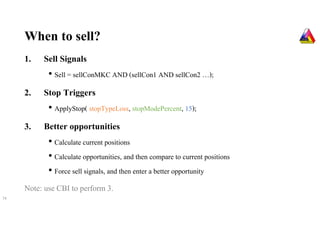
When to sell?
1. Sell Signals
• Sell = sellConMKC AND (sellCon1 AND sellCon2 …);
2. Stop Triggers
• ApplyStop( stopTypeLoss, stopModePercent, 15);
3. Better opportunities
• Calculate current positions
• Calculate opportunities, and then compare to current positions
• Force sell signals, and then enter a better opportunity
Note: use CBI to perform 3.
74
Facts about Stop Triggers
•Stops can help or hurt your results
•Change of degree in stop could result favorably or unfavorably
•Limitation in AmiBroker
•Backtesting VS Execution
•Keep it manageable and executable; otherwise, don’t use it
75
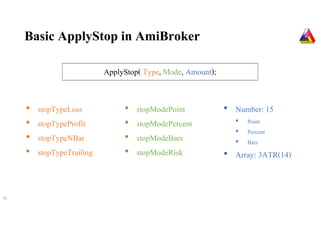
Basic ApplyStop in AmiBroker
76
ApplyStop( Type, Mode, Amount);
• stopTypeLoss
• stopTypeProfit
• stopTypeNBar
• stopTypeTrailing
• stopModePoint
• stopModePercent
• stopModeBars
• stopModeRisk
• Number: 15
• Point
• Percent
• Bars
• Array: 3ATR(14)
77
40 days
100
100
120
Profit from High = 120 – 100 = 20, then 10% profit = 2
118
100
120
High at 120, 10% = 12
High at 110, 10% = 11
108
99
-10%
100
90
10%
100
110
ApplyStop(stopTypeLoss,
stopModePercent, 10);
ApplyStop(stopTypeProfit,
stopModePercent, 10);
ApplyStop(stopTypeNBar,
stopModeBars, 40);
ApplyStop(stopTypeTrailing,
stopModePercent, 10);
ApplyStop(stopTypeTrailing,
stopModeRisk, 10);
EASY ?
Not so fast !
78
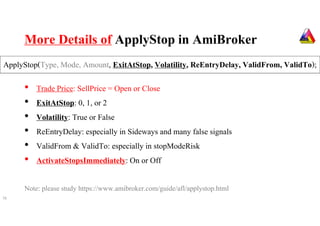
More Details of ApplyStop in AmiBroker
79
• Trade Price: SellPrice = Open or Close
• ExitAtStop: 0, 1, or 2
• Volatility: True or False
• ReEntryDelay: especially in Sideways and many false signals
• ValidFrom & ValidTo: especially in stopModeRisk
• ActivateStopsImmediately: On or Off
Note: please study https://www.amibroker.com/guide/afl/applystop.html
ApplyStop(Type, Mode, Amount, ExitAtStop, Volatility, ReEntryDelay, ValidFrom, ValidTo);
WARNING
Can Code, but Not Execute = Useless
Can Execute, but Not Understand = Risky
80
ApplyStop Intro 2/2
AMIBROKER QUANT COURSE
81
Facts about ApplyStop in AmiBroker
•Compatibility between stopType and stopMode matters
• stopTypeNBar not compatible with stopModePercent
•Compatibility between stopMode and stopAmount matters
• stopModePercent not compatible with stopAmount 3ATR()
•Only one stopMode per one stopType is used
1. ApplyStop(stopTypeTrailing, stopModePercent, 15); //over ruled by next line
2. ApplyStop(stopTypeTrailing, stopModeRisk, 15);
•Keep it manageable and executable; otherwise, don’t use it
82
stopType… and stopMode… in AmiBroker
83
stopType…
stopMode…
Measured FromPoint Percent NBars Risk
Loss Entry price
Profit Entry price
NBar Entry bar
Trailing (1) (1) (2)
(1) % from High
(2) % from High - Entry
ApplyStop( Type, Mode, Amount, ExitAtStop, Volatility, ReentryDelay, ValidFrom, ValidTo);
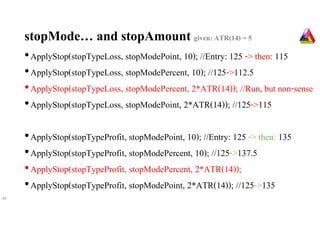
stopMode… and stopAmount given: ATR(14) = 5
•ApplyStop(stopTypeLoss, stopModePoint, 10); //Entry: 125 -> then: 115
•ApplyStop(stopTypeLoss, stopModePercent, 10); //125->112.5
•ApplyStop(stopTypeLoss, stopModePercent, 2*ATR(14)); //Run, but non-sense
•ApplyStop(stopTypeLoss, stopModePoint, 2*ATR(14)); //125->115
•ApplyStop(stopTypeProfit, stopModePoint, 10); //Entry: 125 -> then: 135
•ApplyStop(stopTypeProfit, stopModePercent, 10); //125->137.5
•ApplyStop(stopTypeProfit, stopModePercent, 2*ATR(14));
•ApplyStop(stopTypeProfit, stopModePoint, 2*ATR(14)); //125->135
84
stopMode… and stopAmount given: ATR(14) = 5
•ApplyStop( stopTypeNBar, stopModeBars, 40); // Bar 0 until Bar 40
•ApplyStop( stopTypeNBar, stopModePercent, 40); //Run, but non-sense
•ApplyStop( stopTypeNBar, stopModePoint, 40); //Run, but non-sense
•ApplyStop( stopTypeTrailing, stopModePoint, 25); //100->125->100
•ApplyStop( stopTypeTrailing, stopModePoint, 5*ATR(14)); //100->125->100
•ApplyStop( stopTypeTrailing, stopModePercent, 25); //100->125->93.75
•ApplyStop( stopTypeTrailing, stopModeRisk, 25); //100->125->118.75
85
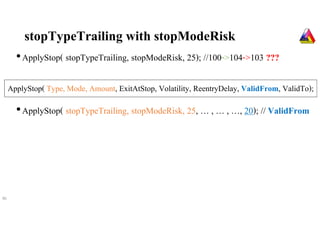
stopTypeTrailing with stopModeRisk
•ApplyStop( stopTypeTrailing, stopModeRisk, 25); //100->104->103 ???
•ApplyStop( stopTypeTrailing, stopModeRisk, 25, … , … , …, 20); // ValidFrom
86
ApplyStop( Type, Mode, Amount, ExitAtStop, Volatility, ReentryDelay, ValidFrom, ValidTo);
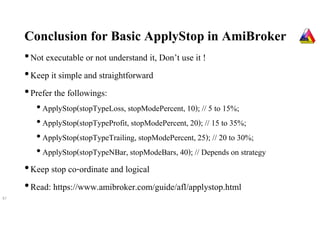
Conclusion for Basic ApplyStop in AmiBroker
•Not executable or not understand it, Don’t use it !
•Keep it simple and straightforward
•Prefer the followings:
• ApplyStop(stopTypeLoss, stopModePercent, 10); // 5 to 15%;
• ApplyStop(stopTypeProfit, stopModePercent, 20); // 15 to 35%;
• ApplyStop(stopTypeTrailing, stopModePercent, 25); // 20 to 30%;
• ApplyStop(stopTypeNBar, stopModeBars, 40); // Depends on strategy
•Keep stop co-ordinate and logical
•Read: https://www.amibroker.com/guide/afl/applystop.html
87
WARNING (AGAIN)
Can Code, but Not Execute = Useless
Can Execute, but Not Understand = Risky
88
Note: please study https://www.amibroker.com/guide/afl/applystop.html

AmiBroker ApplyStop Introduction

  • 1.
  • 2.
    When to sell? 1.Sell Signals • Sell = sellConMKC AND (sellCon1 AND sellCon2 …); 2. Stop Triggers • ApplyStop( stopTypeLoss, stopModePercent, 15); 3. Better opportunities • Calculate current positions • Calculate opportunities, and then compare to current positions • Force sell signals, and then enter a better opportunity Note: use CBI to perform 3. 74
  • 3.
    Facts about StopTriggers •Stops can help or hurt your results •Change of degree in stop could result favorably or unfavorably •Limitation in AmiBroker •Backtesting VS Execution •Keep it manageable and executable; otherwise, don’t use it 75
  • 4.
    Basic ApplyStop inAmiBroker 76 ApplyStop( Type, Mode, Amount); • stopTypeLoss • stopTypeProfit • stopTypeNBar • stopTypeTrailing • stopModePoint • stopModePercent • stopModeBars • stopModeRisk • Number: 15 • Point • Percent • Bars • Array: 3ATR(14)
  • 5.
    77 40 days 100 100 120 Profit fromHigh = 120 – 100 = 20, then 10% profit = 2 118 100 120 High at 120, 10% = 12 High at 110, 10% = 11 108 99 -10% 100 90 10% 100 110 ApplyStop(stopTypeLoss, stopModePercent, 10); ApplyStop(stopTypeProfit, stopModePercent, 10); ApplyStop(stopTypeNBar, stopModeBars, 40); ApplyStop(stopTypeTrailing, stopModePercent, 10); ApplyStop(stopTypeTrailing, stopModeRisk, 10);
  • 6.
    EASY ? Not sofast ! 78
  • 7.
    More Details ofApplyStop in AmiBroker 79 • Trade Price: SellPrice = Open or Close • ExitAtStop: 0, 1, or 2 • Volatility: True or False • ReEntryDelay: especially in Sideways and many false signals • ValidFrom & ValidTo: especially in stopModeRisk • ActivateStopsImmediately: On or Off Note: please study https://www.amibroker.com/guide/afl/applystop.html ApplyStop(Type, Mode, Amount, ExitAtStop, Volatility, ReEntryDelay, ValidFrom, ValidTo);
  • 8.
    WARNING Can Code, butNot Execute = Useless Can Execute, but Not Understand = Risky 80
  • 9.
  • 10.
    Facts about ApplyStopin AmiBroker •Compatibility between stopType and stopMode matters • stopTypeNBar not compatible with stopModePercent •Compatibility between stopMode and stopAmount matters • stopModePercent not compatible with stopAmount 3ATR() •Only one stopMode per one stopType is used 1. ApplyStop(stopTypeTrailing, stopModePercent, 15); //over ruled by next line 2. ApplyStop(stopTypeTrailing, stopModeRisk, 15); •Keep it manageable and executable; otherwise, don’t use it 82
  • 11.
    stopType… and stopMode…in AmiBroker 83 stopType… stopMode… Measured FromPoint Percent NBars Risk Loss Entry price Profit Entry price NBar Entry bar Trailing (1) (1) (2) (1) % from High (2) % from High - Entry ApplyStop( Type, Mode, Amount, ExitAtStop, Volatility, ReentryDelay, ValidFrom, ValidTo);
  • 12.
    stopMode… and stopAmountgiven: ATR(14) = 5 •ApplyStop(stopTypeLoss, stopModePoint, 10); //Entry: 125 -> then: 115 •ApplyStop(stopTypeLoss, stopModePercent, 10); //125->112.5 •ApplyStop(stopTypeLoss, stopModePercent, 2*ATR(14)); //Run, but non-sense •ApplyStop(stopTypeLoss, stopModePoint, 2*ATR(14)); //125->115 •ApplyStop(stopTypeProfit, stopModePoint, 10); //Entry: 125 -> then: 135 •ApplyStop(stopTypeProfit, stopModePercent, 10); //125->137.5 •ApplyStop(stopTypeProfit, stopModePercent, 2*ATR(14)); •ApplyStop(stopTypeProfit, stopModePoint, 2*ATR(14)); //125->135 84
  • 13.
    stopMode… and stopAmountgiven: ATR(14) = 5 •ApplyStop( stopTypeNBar, stopModeBars, 40); // Bar 0 until Bar 40 •ApplyStop( stopTypeNBar, stopModePercent, 40); //Run, but non-sense •ApplyStop( stopTypeNBar, stopModePoint, 40); //Run, but non-sense •ApplyStop( stopTypeTrailing, stopModePoint, 25); //100->125->100 •ApplyStop( stopTypeTrailing, stopModePoint, 5*ATR(14)); //100->125->100 •ApplyStop( stopTypeTrailing, stopModePercent, 25); //100->125->93.75 •ApplyStop( stopTypeTrailing, stopModeRisk, 25); //100->125->118.75 85
  • 14.
    stopTypeTrailing with stopModeRisk •ApplyStop(stopTypeTrailing, stopModeRisk, 25); //100->104->103 ??? •ApplyStop( stopTypeTrailing, stopModeRisk, 25, … , … , …, 20); // ValidFrom 86 ApplyStop( Type, Mode, Amount, ExitAtStop, Volatility, ReentryDelay, ValidFrom, ValidTo);
  • 15.
    Conclusion for BasicApplyStop in AmiBroker •Not executable or not understand it, Don’t use it ! •Keep it simple and straightforward •Prefer the followings: • ApplyStop(stopTypeLoss, stopModePercent, 10); // 5 to 15%; • ApplyStop(stopTypeProfit, stopModePercent, 20); // 15 to 35%; • ApplyStop(stopTypeTrailing, stopModePercent, 25); // 20 to 30%; • ApplyStop(stopTypeNBar, stopModeBars, 40); // Depends on strategy •Keep stop co-ordinate and logical •Read: https://www.amibroker.com/guide/afl/applystop.html 87
  • 16.
    WARNING (AGAIN) Can Code,but Not Execute = Useless Can Execute, but Not Understand = Risky 88 Note: please study https://www.amibroker.com/guide/afl/applystop.html