AS&T - Cloud Computing


                                     Amazon Web Services
                                     In the Cloud Computing Landscape
6177


       © 2011 Accenture. All rights reserved. Accenture, its logo, and Accenture “High performance. Delivered.” are trademarks of Accenture.
Who am I ?

Lode Blomme

Work
• Accenture since August 2011
• Technology Architecture Consultant


Social Media
• Twitter : @lodeblomme
• LinkedIn : http://linkedin.com/in/lodeblomme


Keywords
• architecture – cloud computing – photography – PHP – web 2.0 – web services


Copyright © 2011 Accenture All Rights Reserved                             2
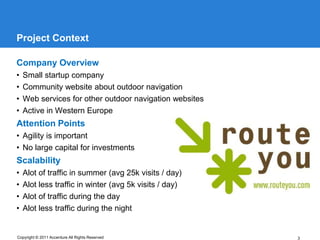
Project Context

Company Overview
•   Small startup company
•   Community website about outdoor navigation
•   Web services for other outdoor navigation websites
•   Active in Western Europe
Attention Points
• Agility is important
• No large capital for investments
Scalability
•   Alot of traffic in summer (avg 25k visits / day)
•   Alot less traffic in winter (avg 5k visits / day)
•   Alot of traffic during the day
•   Alot less traffic during the night


Copyright © 2011 Accenture All Rights Reserved           3
Mirror mirror on the wall, what is the best technology of them all ?


     TECHNOLOGY
     FOCUS
Copyright © 2011 Accenture All Rights Reserved                               4
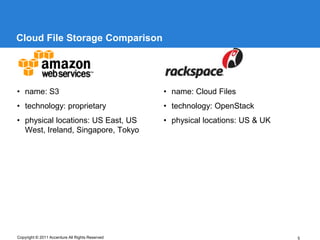
Cloud File Storage Comparison


• name: S3                                       • name: Cloud Files
• technology: proprietary                        • technology: OpenStack
• physical locations: US East, US                • physical locations: US & UK
  West, Ireland, Singapore, Tokyo


Copyright © 2011 Accenture All Rights Reserved                                   5
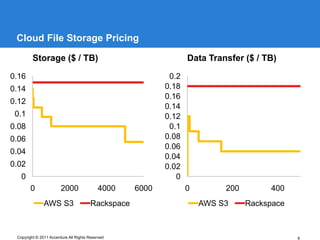
Cloud File Storage Pricing

         Storage ($ / TB)                                        Data Transfer ($ / TB)

0.16                                                       0.2
0.14                                                      0.18
                                                          0.16
0.12
                                                          0.14
 0.1                                                      0.12
0.08                                                       0.1
0.06                                                      0.08
                                                          0.06
0.04
                                                          0.04
0.02                                                      0.02
   0                                                         0
        0               2000               4000    6000          0        200        400
               AWS S3                  Rackspace                     AWS S3     Rackspace


 Copyright © 2011 Accenture All Rights Reserved                                             6
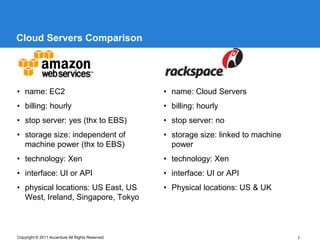
Cloud Servers Comparison


• name: EC2                                      • name: Cloud Servers
• billing: hourly                                • billing: hourly
• stop server: yes (thx to EBS)                  • stop server: no
• storage size: independent of                   • storage size: linked to machine
  machine power (thx to EBS)                       power
• technology: Xen                                • technology: Xen
• interface: UI or API                           • interface: UI or API
• physical locations: US East, US                • Physical locations: US & UK
  West, Ireland, Singapore, Tokyo


Copyright © 2011 Accenture All Rights Reserved                                       7
Technologies Used

Amazon S3 (Cloud File Storage)

Amazon EC2 (Cloud Servers) + EBS + Elastic IP
•   Ubuntu Linux 8.04 – 11.04
•   Apache Web Server 2.2
•   NginX 0.5 – 0.8
•   PHP 5.2 – 5.3
•   PostgreSQL 8.2 – 8.4


Amazon RDS
• MySQL 5.1 – 5.5


Dedicated Servers
• Same as Amazon EC2
Copyright © 2011 Accenture All Rights Reserved   8
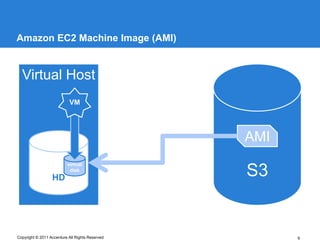
Amazon EC2 Machine Image (AMI)


  Virtual Host
                           VM


                                                 AMI
                          virtual

                  HD
                           disk
                                                 S3


Copyright © 2011 Accenture All Rights Reserved         9
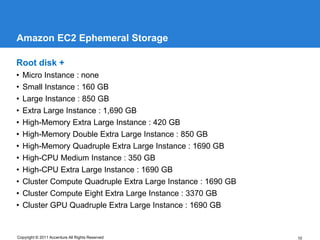
Amazon EC2 Ephemeral Storage

Root disk +
•   Micro Instance : none
•   Small Instance : 160 GB
•   Large Instance : 850 GB
•   Extra Large Instance : 1,690 GB
•   High-Memory Extra Large Instance : 420 GB
•   High-Memory Double Extra Large Instance : 850 GB
•   High-Memory Quadruple Extra Large Instance : 1690 GB
•   High-CPU Medium Instance : 350 GB
•   High-CPU Extra Large Instance : 1690 GB
•   Cluster Compute Quadruple Extra Large Instance : 1690 GB
•   Cluster Compute Eight Extra Large Instance : 3370 GB
•   Cluster GPU Quadruple Extra Large Instance : 1690 GB


Copyright © 2011 Accenture All Rights Reserved                 10
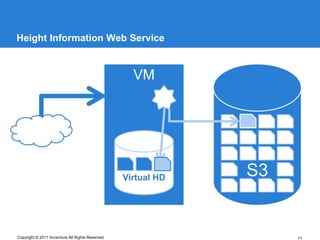
Height Information Web Service


                                                   VM


                                                 Virtual HD   S3


Copyright © 2011 Accenture All Rights Reserved                     11
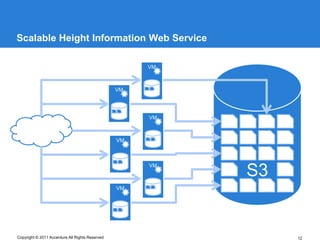
Scalable Height Information Web Service

                                                      VM


                                                 VM


                                                      VM


                                                 VM


                                                      VM
                                                           S3
                                                 VM


Copyright © 2011 Accenture All Rights Reserved                  12
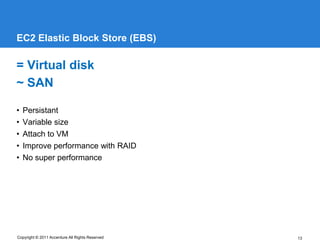
EC2 Elastic Block Store (EBS)

= Virtual disk
~ SAN

•   Persistant
•   Variable size
•   Attach to VM
•   Improve performance with RAID
•   No super performance


Copyright © 2011 Accenture All Rights Reserved   13
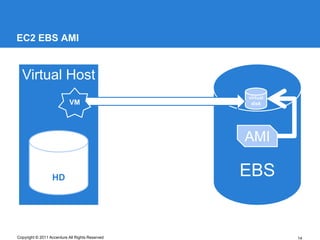
EC2 EBS AMI


  Virtual Host
                                                 virtual
                           VM                     disk


                                                 AMI

                  HD                             EBS


Copyright © 2011 Accenture All Rights Reserved             14
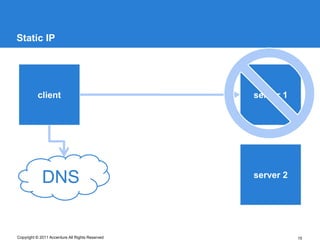
Static IP


          client                                 server 1


             DNS                                 server 2


Copyright © 2011 Accenture All Rights Reserved              15
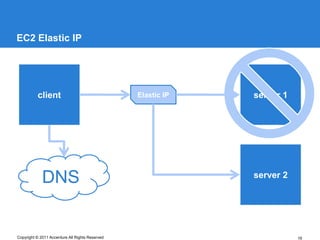
EC2 Elastic IP


          client                                 Elastic IP   server 1


             DNS                                              server 2


Copyright © 2011 Accenture All Rights Reserved                           16
Amazon Relational Database Service


     AMAZON RDS
Copyright © 2011 Accenture All Rights Reserved   17
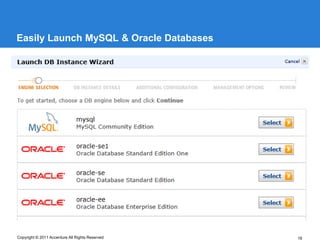
Easily Launch MySQL & Oracle Databases


Copyright © 2011 Accenture All Rights Reserved   18
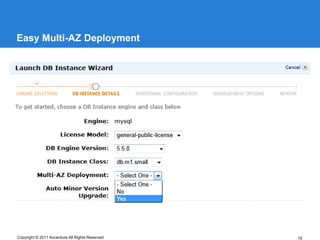
Easy Multi-AZ Deployment


Copyright © 2011 Accenture All Rights Reserved   19
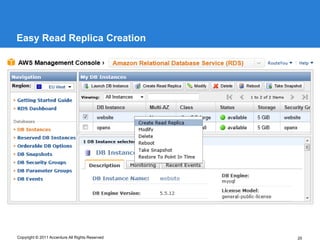
Easy Read Replica Creation


Copyright © 2011 Accenture All Rights Reserved   20
Why Amazon RDS

Pros :
•   Automatic software upgrades
•   Automatic backups
•   Create new RDS instance from any point in time backup
•   Multi-AZ deployment
•   Easy read replica creation


Cons :
• More expensive than running MySQL on EC2 yourself


Copyright © 2011 Accenture All Rights Reserved              21
Lessons Learned

Pro
•   No traffic cost between S3 and EC2 when in same region
•   High speed Amazon network when in same region
•   No time to wait for hardware
•   Easy to clone an existing running server
•   Easy to add/remove storage
•   Easy to replace a server without downtime


Con
• Pay extra for support
• Disk I/O is not top (Ephemeral Storage is faster than EBS)


Copyright © 2011 Accenture All Rights Reserved                 22
Project Numbers

Peak number of instances :
•   2 RDS MySQL databases
•   3 EC2 instances running Memcached
•   3 EC2 instances running PostgreSQL database
•   10 EC2 instances running Apache & PHP
Storage requirements :
• +/- 75GB on S3
• +/- 1TB on EBS


Copyright © 2011 Accenture All Rights Reserved    23
Your own Amazon EC2 and S3


     PRIVATE CLOUD
Copyright © 2011 Accenture All Rights Reserved   24
Private Cloud Amazon EC2

Nimbula Director (http://nimbula.com/)
• From the people behind Amazon EC2
• Uses KVM as hypervisor
• Runs on CentOS
Eucalyptus (http://www.eucalyptus.com/)
• Open Source Software
• AWS Interface Compatibility
• Xen and KVM Hypervisor Support
OpenStack Compute (http://www.openstack.org/projects/compute/)
• Open Source Software


Copyright © 2011 Accenture All Rights Reserved               25
Private Cloud Amazon S3

AmpliStor (http://www.amplidata.com/)
• Belgian Company
Gluster (http://www.gluster.org/)
• Acquired by Red Hat
• Runs on CentOS
OpenStack Object Storage
(http://www.openstack.org/projects/storage/)
• Open Source Software


Copyright © 2011 Accenture All Rights Reserved   26
Or we can go and have a drink …


     Q&A
Copyright © 2011 Accenture All Rights Reserved   27
Amazon CloudWatch

• Monitoring for AWS cloud resources like :
  • EC2 instances
  • EBS volumes
  • Elastic Load Balancers
  • RDS DB instances
  • SQS queues
  • SNS topics
  • Custom metrics generated by a customer’s applications and services.
• Programmatically retrieve your monitoring data
• View graphs
• Set alarms


Copyright © 2011 Accenture All Rights Reserved                            28
Auto Scaling

• Allows you to scale capacity up or down automatically according to conditions
  you define.
• Particularly well suited for applications that experience hourly, daily, or weekly
  variability in usage.
• Enabled by Amazon CloudWatch.
• No additional charge beyond Amazon CloudWatch fees.


Copyright © 2011 Accenture All Rights Reserved                                         29
Application Deployment

• How to get your application running on newly started VMs?
• Number of servers changes constantly which makes deploying new versions
  hard.
• Create a Gold Image with OS and application if your application doesn’t change
  often.
• Create a system that bootstraps your VM when started. Use the same system
  for application updates :
   • CloudInit package from Canonical
   • Chef from Opscode
   • Puppet from Puppet Labs


Copyright © 2011 Accenture All Rights Reserved                                30
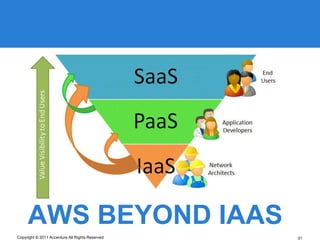
AWS BEYOND IAAS
Copyright © 2011 Accenture All Rights Reserved   31
Non-relational data store


     SIMPLEDB
Copyright © 2011 Accenture All Rights Reserved   32
What is SimpleDB

•   Highly available, flexible, and scalable non-relational data store
•   Automatically multiple geographically distributed copies of each data item
•   Change data model on the fly
•   Data is automatically indexed
•   The Data Model: Domains, Items, Attributes and Values
•   Consistency Options: Eventually Consistent Reads or Consistent Reads


Copyright © 2011 Accenture All Rights Reserved                                   33
When to use SimpleDB

• Utilize index and query functions rather than more complex relational database
  functions
• Don’t want any administrative burden at all in managing their structured data
• Want a service that scales automatically up or down in response to
  demand, without user intervention
• Require the highest availability and can’t tolerate downtime for data backup or
  software maintenance


Copyright © 2011 Accenture All Rights Reserved                                  34
Amazon Relational Database Service


     AMZON RDS
Copyright © 2011 Accenture All Rights Reserved   35
When to use RDS

• Have existing or new applications, code, or tools that require a relational
  database
• Want native access to a MySQL or Oracle relational database, but prefer to
  offload the infrastructure management and database administration to AWS
• Like the flexibility of being able to scale their database compute and storage
  resources with an API call, and only pay for the infrastructure resources they
  actually consume


Copyright © 2011 Accenture All Rights Reserved                                     36
What if SimpleDB and RDS don’t fit?

If you :
• Wish to select from a wide variety of database engines
• Want to exert complete administrative control over their database server


You can always use one of the many relational database AMIs. Or
you can start your own VM on EC2 and install your choice of
database, the way you want it.


Copyright © 2011 Accenture All Rights Reserved                               37
in-memory cache in the cloud


     ELASTICACHE
Copyright © 2011 Accenture All Rights Reserved   38
What is ElastiCache

• In-memory cache in the cloud
• Memcache on EC2  Memcached compatible
• Uses Amazon CloudWatch for monitoring


Copyright © 2011 Accenture All Rights Reserved   39
Why ElastiCache

Pros :
• Automatic failure detection and recovery
• No change needed in your application when adding/removing caching nodes


Cons :
• More expensive than running Memcached on EC2 yourself


Copyright © 2011 Accenture All Rights Reserved                              40
Process vast amounts of data


     ELASTIC MAPREDUCE
Copyright © 2011 Accenture All Rights Reserved   41
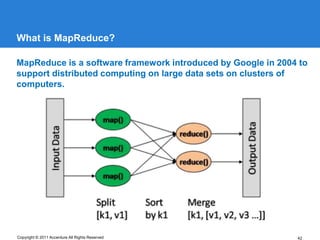
What is MapReduce?

MapReduce is a software framework introduced by Google in 2004 to
support distributed computing on large data sets on clusters of
computers.


Copyright © 2011 Accenture All Rights Reserved                42
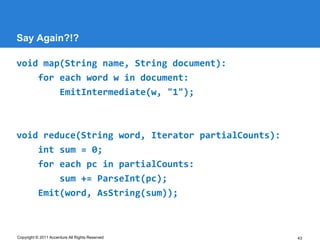
Say Again?!?

void map(String name, String document):
    for each word w in document:
        EmitIntermediate(w, "1");


void reduce(String word, Iterator partialCounts):
    int sum = 0;
    for each pc in partialCounts:
        sum += ParseInt(pc);
    Emit(word, AsString(sum));


Copyright © 2011 Accenture All Rights Reserved      43
What, Why and How?

Software used :

• Usage scenarios: web indexing, data mining, log file analysis, data
  warehousing, machine learning, financial analysis, scientific simulation, and
  bioinformatics research.
• Development :
  • SQL-like languages, such as Hive and Pig
  • Java, Ruby, Perl, Python, PHP, R, or C++
• Store input data and application logic in Amazon S3.
• Output data is stored in Amazon S3.


Copyright © 2011 Accenture All Rights Reserved                                    44
Hadoop Ecosphere

Hive
• Data warehouse system for Hadoop. Easy data summarization, ad-hoc
  queries, and the analysis of large datasets stored in Hadoop compatible file
  systems. Query the data using a SQL-like language called HiveQL.


Pig
• Platform for analyzing large data sets that consists of a high-level language for
  expressing data analysis programs. The salient property of Pig programs is that
  their structure is amenable to substantial parallelization, which in turns enables
  them to handle very large data sets.


Karmasphere Studio
• Graphical environment to develop, debug, deploy and monitor MapReduce jobs
  from your desktop directly to Amazon Elastic MapReduce.


Copyright © 2011 Accenture All Rights Reserved                                    45
Amazon Simple Queue Service


     AMAZON SQS
Copyright © 2011 Accenture All Rights Reserved   46
What is Amazon SQS?

• Reliable, highly scalable, hosted queue for storing messages.
• Move data between distributed components without losing messages or
  requiring each component to be always available.
• Accessible through standards-based SOAP and Query interfaces.
• More info : http://aws.amazon.com/sqs/


Copyright © 2011 Accenture All Rights Reserved                          47
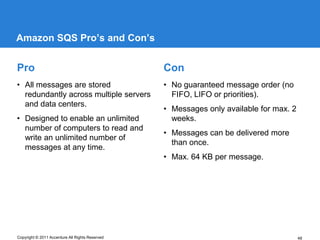
Amazon SQS Pro’s and Con’s


Pro                                              Con
• All messages are stored                        • No guaranteed message order (no
  redundantly across multiple servers              FIFO, LIFO or priorities).
  and data centers.
                                                 • Messages only available for max. 2
• Designed to enable an unlimited                  weeks.
  number of computers to read and
                                                 • Messages can be delivered more
  write an unlimited number of
                                                   than once.
  messages at any time.
                                                 • Max. 64 KB per message.


Copyright © 2011 Accenture All Rights Reserved                                          48
Amazon Simple Notification Service


     AMAZON SNS
Copyright © 2011 Accenture All Rights Reserved   49
What is Amazon SNS

• Publish messages from an application and immediately deliver them to
  subscribers or other applications
• Delivers notifications to clients using a “push” mechanism that eliminates the
  need to periodically check or “poll” for new information and updates.
• Have messages delivered over clients’ protocol of choice:
  • HTTP / HTTPS
  • Email
  • JSON Email
  • Amazon SQS


Copyright © 2011 Accenture All Rights Reserved                                     50
Amazon SNS Pro’s and Con’s


Pro                                              Con
• All messages are stored                        • Messages can be delivered more
  redundantly across multiple servers              than once.
  and data centers.
                                                 • Max. 8 KB per message
• Designed to meet the needs of the
                                                 • Limit of 100 topics per AWS
  largest and most demanding
                                                   account.
  applications, allowing applications
  to publish an unlimited number of
  messages at any time.


Copyright © 2011 Accenture All Rights Reserved                                      51
Amazon SQS vs SNS

• Both messaging services within AWS

• SQS : used by distributed applications to exchange messages
• SNS : send time-critical messages to multiple subscribers

• SQS : polling model
• SNS : push mechanism

• SQS : send and receive messages without requiring each component to be
  concurrently available.


Copyright © 2011 Accenture All Rights Reserved                             52
Vendor Lock-in

• No problem when using plain EC2, it’s just a virtual server.
• EC2 additions (Elastic IP, Auto scaling) get you hooked to AWS.
• Some of Amazon PAAS and SAAS offerings restrict you to using AWS.


Copyright © 2011 Accenture All Rights Reserved                        53

Amazon web services in the cloud computing landscape

  • 1.
    AS&T - CloudComputing Amazon Web Services In the Cloud Computing Landscape 6177 © 2011 Accenture. All rights reserved. Accenture, its logo, and Accenture “High performance. Delivered.” are trademarks of Accenture.
  • 2.
    Who am I? Lode Blomme Work • Accenture since August 2011 • Technology Architecture Consultant Social Media • Twitter : @lodeblomme • LinkedIn : http://linkedin.com/in/lodeblomme Keywords • architecture – cloud computing – photography – PHP – web 2.0 – web services Copyright © 2011 Accenture All Rights Reserved 2
  • 3.
    Project Context Company Overview • Small startup company • Community website about outdoor navigation • Web services for other outdoor navigation websites • Active in Western Europe Attention Points • Agility is important • No large capital for investments Scalability • Alot of traffic in summer (avg 25k visits / day) • Alot less traffic in winter (avg 5k visits / day) • Alot of traffic during the day • Alot less traffic during the night Copyright © 2011 Accenture All Rights Reserved 3
  • 4.
    Mirror mirror onthe wall, what is the best technology of them all ? TECHNOLOGY FOCUS Copyright © 2011 Accenture All Rights Reserved 4
  • 5.
    Cloud File StorageComparison • name: S3 • name: Cloud Files • technology: proprietary • technology: OpenStack • physical locations: US East, US • physical locations: US & UK West, Ireland, Singapore, Tokyo Copyright © 2011 Accenture All Rights Reserved 5
  • 6.
    Cloud File StoragePricing Storage ($ / TB) Data Transfer ($ / TB) 0.16 0.2 0.14 0.18 0.16 0.12 0.14 0.1 0.12 0.08 0.1 0.06 0.08 0.06 0.04 0.04 0.02 0.02 0 0 0 2000 4000 6000 0 200 400 AWS S3 Rackspace AWS S3 Rackspace Copyright © 2011 Accenture All Rights Reserved 6
  • 7.
    Cloud Servers Comparison •name: EC2 • name: Cloud Servers • billing: hourly • billing: hourly • stop server: yes (thx to EBS) • stop server: no • storage size: independent of • storage size: linked to machine machine power (thx to EBS) power • technology: Xen • technology: Xen • interface: UI or API • interface: UI or API • physical locations: US East, US • Physical locations: US & UK West, Ireland, Singapore, Tokyo Copyright © 2011 Accenture All Rights Reserved 7
  • 8.
    Technologies Used Amazon S3(Cloud File Storage) Amazon EC2 (Cloud Servers) + EBS + Elastic IP • Ubuntu Linux 8.04 – 11.04 • Apache Web Server 2.2 • NginX 0.5 – 0.8 • PHP 5.2 – 5.3 • PostgreSQL 8.2 – 8.4 Amazon RDS • MySQL 5.1 – 5.5 Dedicated Servers • Same as Amazon EC2 Copyright © 2011 Accenture All Rights Reserved 8
  • 9.
    Amazon EC2 MachineImage (AMI) Virtual Host VM AMI virtual HD disk S3 Copyright © 2011 Accenture All Rights Reserved 9
  • 10.
    Amazon EC2 EphemeralStorage Root disk + • Micro Instance : none • Small Instance : 160 GB • Large Instance : 850 GB • Extra Large Instance : 1,690 GB • High-Memory Extra Large Instance : 420 GB • High-Memory Double Extra Large Instance : 850 GB • High-Memory Quadruple Extra Large Instance : 1690 GB • High-CPU Medium Instance : 350 GB • High-CPU Extra Large Instance : 1690 GB • Cluster Compute Quadruple Extra Large Instance : 1690 GB • Cluster Compute Eight Extra Large Instance : 3370 GB • Cluster GPU Quadruple Extra Large Instance : 1690 GB Copyright © 2011 Accenture All Rights Reserved 10
  • 11.
    Height Information WebService VM Virtual HD S3 Copyright © 2011 Accenture All Rights Reserved 11
  • 12.
    Scalable Height InformationWeb Service VM VM VM VM VM S3 VM Copyright © 2011 Accenture All Rights Reserved 12
  • 13.
    EC2 Elastic BlockStore (EBS) = Virtual disk ~ SAN • Persistant • Variable size • Attach to VM • Improve performance with RAID • No super performance Copyright © 2011 Accenture All Rights Reserved 13
  • 14.
    EC2 EBS AMI Virtual Host virtual VM disk AMI HD EBS Copyright © 2011 Accenture All Rights Reserved 14
  • 15.
    Static IP client server 1 DNS server 2 Copyright © 2011 Accenture All Rights Reserved 15
  • 16.
    EC2 Elastic IP client Elastic IP server 1 DNS server 2 Copyright © 2011 Accenture All Rights Reserved 16
  • 17.
    Amazon Relational DatabaseService AMAZON RDS Copyright © 2011 Accenture All Rights Reserved 17
  • 18.
    Easily Launch MySQL& Oracle Databases Copyright © 2011 Accenture All Rights Reserved 18
  • 19.
    Easy Multi-AZ Deployment Copyright© 2011 Accenture All Rights Reserved 19
  • 20.
    Easy Read ReplicaCreation Copyright © 2011 Accenture All Rights Reserved 20
  • 21.
    Why Amazon RDS Pros: • Automatic software upgrades • Automatic backups • Create new RDS instance from any point in time backup • Multi-AZ deployment • Easy read replica creation Cons : • More expensive than running MySQL on EC2 yourself Copyright © 2011 Accenture All Rights Reserved 21
  • 22.
    Lessons Learned Pro • No traffic cost between S3 and EC2 when in same region • High speed Amazon network when in same region • No time to wait for hardware • Easy to clone an existing running server • Easy to add/remove storage • Easy to replace a server without downtime Con • Pay extra for support • Disk I/O is not top (Ephemeral Storage is faster than EBS) Copyright © 2011 Accenture All Rights Reserved 22
  • 23.
    Project Numbers Peak numberof instances : • 2 RDS MySQL databases • 3 EC2 instances running Memcached • 3 EC2 instances running PostgreSQL database • 10 EC2 instances running Apache & PHP Storage requirements : • +/- 75GB on S3 • +/- 1TB on EBS Copyright © 2011 Accenture All Rights Reserved 23
  • 24.
    Your own AmazonEC2 and S3 PRIVATE CLOUD Copyright © 2011 Accenture All Rights Reserved 24
  • 25.
    Private Cloud AmazonEC2 Nimbula Director (http://nimbula.com/) • From the people behind Amazon EC2 • Uses KVM as hypervisor • Runs on CentOS Eucalyptus (http://www.eucalyptus.com/) • Open Source Software • AWS Interface Compatibility • Xen and KVM Hypervisor Support OpenStack Compute (http://www.openstack.org/projects/compute/) • Open Source Software Copyright © 2011 Accenture All Rights Reserved 25
  • 26.
    Private Cloud AmazonS3 AmpliStor (http://www.amplidata.com/) • Belgian Company Gluster (http://www.gluster.org/) • Acquired by Red Hat • Runs on CentOS OpenStack Object Storage (http://www.openstack.org/projects/storage/) • Open Source Software Copyright © 2011 Accenture All Rights Reserved 26
  • 27.
    Or we cango and have a drink … Q&A Copyright © 2011 Accenture All Rights Reserved 27
  • 28.
    Amazon CloudWatch • Monitoringfor AWS cloud resources like : • EC2 instances • EBS volumes • Elastic Load Balancers • RDS DB instances • SQS queues • SNS topics • Custom metrics generated by a customer’s applications and services. • Programmatically retrieve your monitoring data • View graphs • Set alarms Copyright © 2011 Accenture All Rights Reserved 28
  • 29.
    Auto Scaling • Allowsyou to scale capacity up or down automatically according to conditions you define. • Particularly well suited for applications that experience hourly, daily, or weekly variability in usage. • Enabled by Amazon CloudWatch. • No additional charge beyond Amazon CloudWatch fees. Copyright © 2011 Accenture All Rights Reserved 29
  • 30.
    Application Deployment • Howto get your application running on newly started VMs? • Number of servers changes constantly which makes deploying new versions hard. • Create a Gold Image with OS and application if your application doesn’t change often. • Create a system that bootstraps your VM when started. Use the same system for application updates : • CloudInit package from Canonical • Chef from Opscode • Puppet from Puppet Labs Copyright © 2011 Accenture All Rights Reserved 30
  • 31.
    AWS BEYOND IAAS Copyright© 2011 Accenture All Rights Reserved 31
  • 32.
    Non-relational data store SIMPLEDB Copyright © 2011 Accenture All Rights Reserved 32
  • 33.
    What is SimpleDB • Highly available, flexible, and scalable non-relational data store • Automatically multiple geographically distributed copies of each data item • Change data model on the fly • Data is automatically indexed • The Data Model: Domains, Items, Attributes and Values • Consistency Options: Eventually Consistent Reads or Consistent Reads Copyright © 2011 Accenture All Rights Reserved 33
  • 34.
    When to useSimpleDB • Utilize index and query functions rather than more complex relational database functions • Don’t want any administrative burden at all in managing their structured data • Want a service that scales automatically up or down in response to demand, without user intervention • Require the highest availability and can’t tolerate downtime for data backup or software maintenance Copyright © 2011 Accenture All Rights Reserved 34
  • 35.
    Amazon Relational DatabaseService AMZON RDS Copyright © 2011 Accenture All Rights Reserved 35
  • 36.
    When to useRDS • Have existing or new applications, code, or tools that require a relational database • Want native access to a MySQL or Oracle relational database, but prefer to offload the infrastructure management and database administration to AWS • Like the flexibility of being able to scale their database compute and storage resources with an API call, and only pay for the infrastructure resources they actually consume Copyright © 2011 Accenture All Rights Reserved 36
  • 37.
    What if SimpleDBand RDS don’t fit? If you : • Wish to select from a wide variety of database engines • Want to exert complete administrative control over their database server You can always use one of the many relational database AMIs. Or you can start your own VM on EC2 and install your choice of database, the way you want it. Copyright © 2011 Accenture All Rights Reserved 37
  • 38.
    in-memory cache inthe cloud ELASTICACHE Copyright © 2011 Accenture All Rights Reserved 38
  • 39.
    What is ElastiCache •In-memory cache in the cloud • Memcache on EC2  Memcached compatible • Uses Amazon CloudWatch for monitoring Copyright © 2011 Accenture All Rights Reserved 39
  • 40.
    Why ElastiCache Pros : •Automatic failure detection and recovery • No change needed in your application when adding/removing caching nodes Cons : • More expensive than running Memcached on EC2 yourself Copyright © 2011 Accenture All Rights Reserved 40
  • 41.
    Process vast amountsof data ELASTIC MAPREDUCE Copyright © 2011 Accenture All Rights Reserved 41
  • 42.
    What is MapReduce? MapReduceis a software framework introduced by Google in 2004 to support distributed computing on large data sets on clusters of computers. Copyright © 2011 Accenture All Rights Reserved 42
  • 43.
    Say Again?!? void map(Stringname, String document): for each word w in document: EmitIntermediate(w, "1"); void reduce(String word, Iterator partialCounts): int sum = 0; for each pc in partialCounts: sum += ParseInt(pc); Emit(word, AsString(sum)); Copyright © 2011 Accenture All Rights Reserved 43
  • 44.
    What, Why andHow? Software used : • Usage scenarios: web indexing, data mining, log file analysis, data warehousing, machine learning, financial analysis, scientific simulation, and bioinformatics research. • Development : • SQL-like languages, such as Hive and Pig • Java, Ruby, Perl, Python, PHP, R, or C++ • Store input data and application logic in Amazon S3. • Output data is stored in Amazon S3. Copyright © 2011 Accenture All Rights Reserved 44
  • 45.
    Hadoop Ecosphere Hive • Datawarehouse system for Hadoop. Easy data summarization, ad-hoc queries, and the analysis of large datasets stored in Hadoop compatible file systems. Query the data using a SQL-like language called HiveQL. Pig • Platform for analyzing large data sets that consists of a high-level language for expressing data analysis programs. The salient property of Pig programs is that their structure is amenable to substantial parallelization, which in turns enables them to handle very large data sets. Karmasphere Studio • Graphical environment to develop, debug, deploy and monitor MapReduce jobs from your desktop directly to Amazon Elastic MapReduce. Copyright © 2011 Accenture All Rights Reserved 45
  • 46.
    Amazon Simple QueueService AMAZON SQS Copyright © 2011 Accenture All Rights Reserved 46
  • 47.
    What is AmazonSQS? • Reliable, highly scalable, hosted queue for storing messages. • Move data between distributed components without losing messages or requiring each component to be always available. • Accessible through standards-based SOAP and Query interfaces. • More info : http://aws.amazon.com/sqs/ Copyright © 2011 Accenture All Rights Reserved 47
  • 48.
    Amazon SQS Pro’sand Con’s Pro Con • All messages are stored • No guaranteed message order (no redundantly across multiple servers FIFO, LIFO or priorities). and data centers. • Messages only available for max. 2 • Designed to enable an unlimited weeks. number of computers to read and • Messages can be delivered more write an unlimited number of than once. messages at any time. • Max. 64 KB per message. Copyright © 2011 Accenture All Rights Reserved 48
  • 49.
    Amazon Simple NotificationService AMAZON SNS Copyright © 2011 Accenture All Rights Reserved 49
  • 50.
    What is AmazonSNS • Publish messages from an application and immediately deliver them to subscribers or other applications • Delivers notifications to clients using a “push” mechanism that eliminates the need to periodically check or “poll” for new information and updates. • Have messages delivered over clients’ protocol of choice: • HTTP / HTTPS • Email • JSON Email • Amazon SQS Copyright © 2011 Accenture All Rights Reserved 50
  • 51.
    Amazon SNS Pro’sand Con’s Pro Con • All messages are stored • Messages can be delivered more redundantly across multiple servers than once. and data centers. • Max. 8 KB per message • Designed to meet the needs of the • Limit of 100 topics per AWS largest and most demanding account. applications, allowing applications to publish an unlimited number of messages at any time. Copyright © 2011 Accenture All Rights Reserved 51
  • 52.
    Amazon SQS vsSNS • Both messaging services within AWS • SQS : used by distributed applications to exchange messages • SNS : send time-critical messages to multiple subscribers • SQS : polling model • SNS : push mechanism • SQS : send and receive messages without requiring each component to be concurrently available. Copyright © 2011 Accenture All Rights Reserved 52
  • 53.
    Vendor Lock-in • Noproblem when using plain EC2, it’s just a virtual server. • EC2 additions (Elastic IP, Auto scaling) get you hooked to AWS. • Some of Amazon PAAS and SAAS offerings restrict you to using AWS. Copyright © 2011 Accenture All Rights Reserved 53