Amazon EC2
What Is Amazon EC2?
• Amazon EC2 stands for Amazon Elastic Compute Cloud (Amazon EC2)
• Subscribers who pay get scalable resources from the EC2 cloud.
• Amazon EC2 is used to launch the virtual servers
Features of Amazon EC2
• Environmnets here are virtual ,which are known as Instances.
• Configurations of CPU, memory, storage, and networking capacity for
instances, are termed as instance types
• Insances are launched by Amazon Machine Image (AMI)
• So stopping or terminating the instances also must be taken care by the user
himself.
Instances and steps involved
An instance is a virtual server in the AWS cloud. With Amazon EC2, you can
set up and configure the operating system and applications that run on your
instance.
Prerequisites while connecting to linux instance
• Step 1: Launch an Instance
• Step 2: Connect to Your Instance
• Step 3: Clean Up Your Instance
Some of the common tasks using EC2 instances
• Installing a LAMP Web Server on Amazon Linux
• Installing a LAMP Web Server with the Amazon Linux AMI
• Hosting a WordPress Blog with Amazon Linux
• Configure Apache Web Server on Amazon Linux to Use SSL/TLS
• Increase the Availability of Your Application on Amazon EC2
• Remotely Manage Your Amazon EC2 Instances
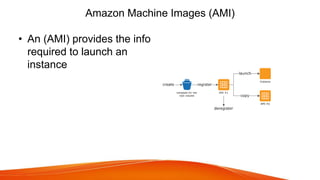
Amazon Machine Images (AMI)
• An (AMI) provides the info
required to launch an
instance
More on EC2 ,Instances and AMI's
To know more about EC2 instances in depth,have a look
on aws training
THANKYOU

Amazon ec2

  • 1.
  • 2.
    What Is AmazonEC2? • Amazon EC2 stands for Amazon Elastic Compute Cloud (Amazon EC2) • Subscribers who pay get scalable resources from the EC2 cloud. • Amazon EC2 is used to launch the virtual servers
  • 3.
    Features of AmazonEC2 • Environmnets here are virtual ,which are known as Instances. • Configurations of CPU, memory, storage, and networking capacity for instances, are termed as instance types • Insances are launched by Amazon Machine Image (AMI) • So stopping or terminating the instances also must be taken care by the user himself.
  • 4.
    Instances and stepsinvolved An instance is a virtual server in the AWS cloud. With Amazon EC2, you can set up and configure the operating system and applications that run on your instance. Prerequisites while connecting to linux instance • Step 1: Launch an Instance • Step 2: Connect to Your Instance • Step 3: Clean Up Your Instance
  • 5.
    Some of thecommon tasks using EC2 instances • Installing a LAMP Web Server on Amazon Linux • Installing a LAMP Web Server with the Amazon Linux AMI • Hosting a WordPress Blog with Amazon Linux • Configure Apache Web Server on Amazon Linux to Use SSL/TLS • Increase the Availability of Your Application on Amazon EC2 • Remotely Manage Your Amazon EC2 Instances
  • 6.
    Amazon Machine Images(AMI) • An (AMI) provides the info required to launch an instance
  • 7.
    More on EC2,Instances and AMI's To know more about EC2 instances in depth,have a look on aws training
  • 8.