N O V E M B E R 6 , 20 1 9
John Melton
Building
Self-Defending
Applications With
OWASP AppSensor
Introduction
thesis:
modern secure applications
protect themselves against
attackers
a (brief) history
• mostly web apps [RoR, PHP, .NET, Java)
• ajax (jquery) use growing
• mobile just getting started
• deployment toVMs
• BI tools
• AWS starting
• cloud hype cycle (NIST)
Not too long ago dev
• servicemesh
• functional/rxprogramming
• cloudeverything
• nosql/CAPlight
• containers /orchestration
• bigdata
• streamprocessing
• microservices
~now dev
• configmanagement
• ci/cd
• beacons[usage,ads,errors,
performance]
• actors/csp
• cqrs/eventsourcing
• mobile
• JSEverywhere
1 .. * of [scale, speed, cloud, lack of environmental access]
• 3rd party libs (dep-check)
• bug bounties
• sast / dast evolve (ZAP)
• iast / rasp
• http security headers
• automatic encoding (JXT)
last ~5 years security
• *-monkey –NetflixOSS
• bdd-security/gauntlt
• ci/cd plugins
• 2fa
• osquery
1 .. * of [scale, speed, cloud, lack of environmental access]
• dev is exploiting fundamental architectural
and deployment changes to add business
value
• security is iterating on existing solutions -
and - trying to close gaps (known problems)
dev vs. security
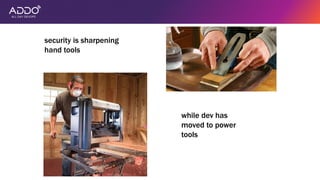
security is sharpening
hand tools
while dev has
moved to power
tools
motivations
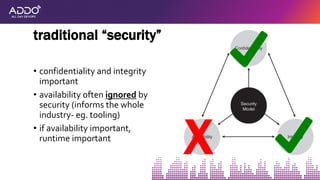
• confidentiality and integrity
important
• availability often ignored by
security (informs the whole
industry- eg. tooling)
• if availability important,
runtime important
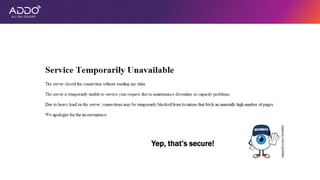
traditional “security”
X
Yep, that’s secure!
•how many concurrent users do you have right
now?
•what are your users doing in the app?
your environment
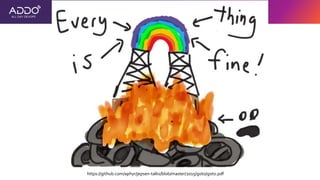
https://github.com/aphyr/jepsen-talks/blob/master/2015/goto/goto.pdf
Intuition:
“traditional” security, dev, ops
doesn’t know what’s going on in
the app at runtime (holistically)
Security defects are a
subset of all defects
• what do dev/qa do for functionality?
• test [unit, integration, system, manual, tools]
• what do attackers do for security?
• test [automated tools, manual]
catching defects
• attackers do bad things
• bad things often easily recognizable (to you … in your
business … if you’re looking)
• attacker success often* requires > 1 attempt
observations
* If not, you lose
Intuition:
security defects exist
attackers don’t magically know
what’s vulnerable
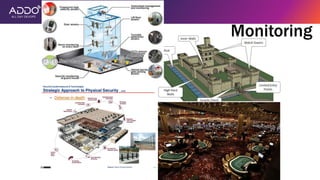
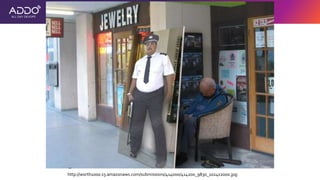
Monitoring
http://worth1000.s3.amazonaws.com/submissions/414000/414200_9830_1024x2000.jpg
Intuition:
existing (security) “monitoring” is
usually terrible
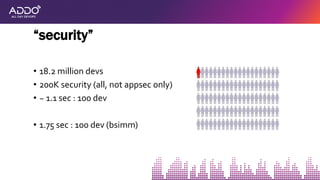
• 18.2 million devs
• 200K security (all, not appsec only)
• ~ 1.1 sec : 100 dev
• 1.75 sec : 100 dev (bsimm)
“security”
Intuition:
there will never be enough
“security” people
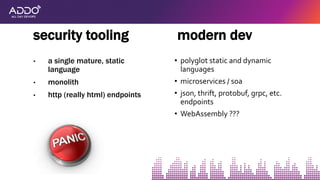
• a single mature, static
language
• monolith
• http (really html) endpoints
security tooling modern dev
• polyglot static and dynamic
languages
• microservices / soa
• json, thrift, protobuf, grpc, etc.
endpoints
• WebAssembly ???
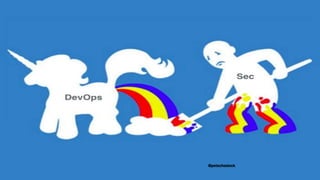
@petecheslock
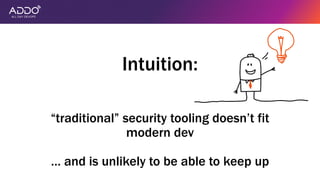
Intuition:
“traditional” security tooling doesn’t fit
modern dev
… and is unlikely to be able to keep up
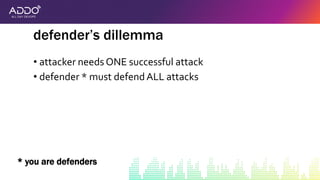
• attacker needs ONE successful attack
• defender * must defendALL attacks
defender’s dillemma
* you are defenders
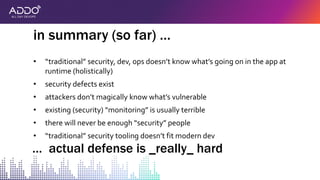
• “traditional” security, dev, ops doesn’t know what’s going on in the app at
runtime (holistically)
• security defects exist
• attackers don’t magically know what’s vulnerable
• existing (security) “monitoring” is usually terrible
• there will never be enough “security” people
• “traditional” security tooling doesn’t fit modern dev
in summary (so far) …
… actual defense is _really_ hard
the pitch
(a humble proposal)
having to deal with [scale, speed, cloud, lack
of environmental access]..
..this as of now incomplete transition..
..is a huge opportunity for improving security
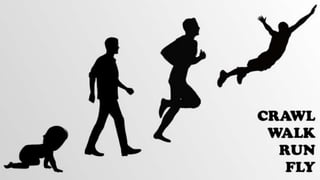
• in addition to a secure SDLC … (ie. > 1 request/attack)
• if you’re not at this stage, work on it first
the pitch (#0)
@petecheslock
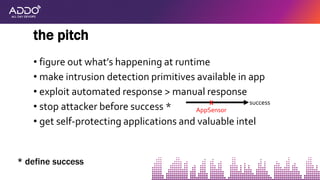
• figure out what’s happening at runtime
• make intrusion detection primitives available in app
• exploit automated response > manual response
• stop attacker before success *
• get self-protecting applications and valuable intel
the pitch
* define success
X success
AppSensor
X
X
X
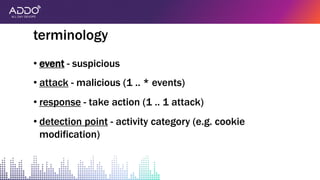
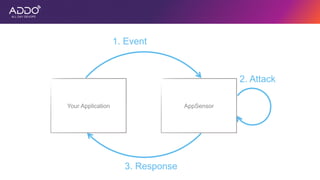
• event - suspicious
• attack - malicious (1 .. * events)
• response - take action (1 .. 1 attack)
• detection point - activity category (e.g. cookie
modification)
terminology
thesis:
modern secure
applications protect
themselves against
attackers
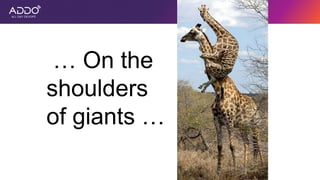
… On the
shoulders
of giants …
the tech
Your Application AppSensor
1. Event
2. Attack
3. Response
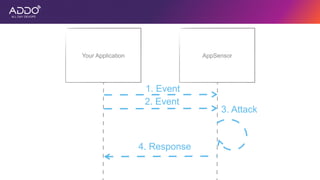
Your Application AppSensor
1. Event
2. Event
3. Attack
4. Response
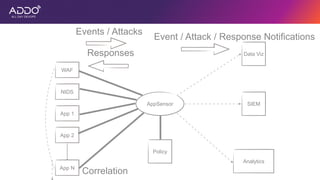
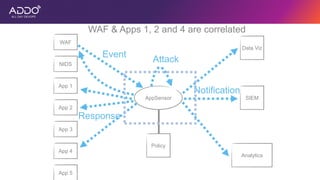
AppSensor
WAF
NIDS
App 1
App 2
App N
Data Viz
SIEM
Analytics
Events / Attacks
Event / Attack / Response Notifications
Policy
Responses
Correlation
AppSensor
NIDS
App 1
App 2
App 3
App 5
Data Viz
SIEM
Analytics
Policy
WAF
App 4
WAF & Apps 1, 2 and 4 are correlated
Event
Attack
Notification
Response
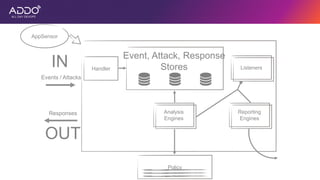
AppSensor
IN
OUT
Policy
Reporting
Engines
Analysis
Engines
Listeners
Event, Attack, Response
StoresHandler
Events / Attacks
Responses
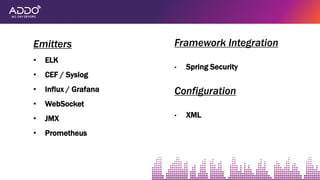
Emitters
• ELK
• CEF / Syslog
• Influx / Grafana
• WebSocket
• JMX
• Prometheus
Framework Integration
• Spring Security
Configuration
• XML
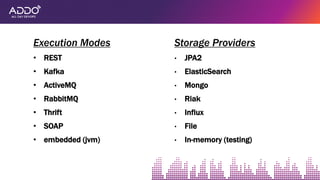
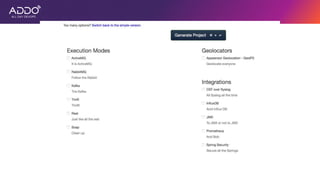
Execution Modes
• REST
• Kafka
• ActiveMQ
• RabbitMQ
• Thrift
• SOAP
• embedded (jvm)
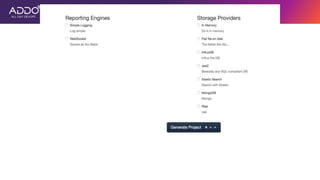
Storage Providers
• JPA2
• ElasticSearch
• Mongo
• Riak
• Influx
• File
• In-memory (testing)
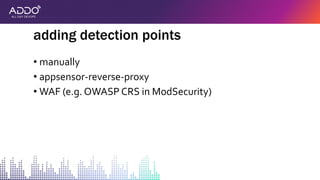
• manually
• appsensor-reverse-proxy
• WAF (e.g. OWASP CRS in ModSecurity)
adding detection points
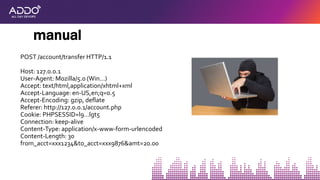
POST /account/transfer HTTP/1.1
Host: 127.0.0.1
User-Agent: Mozilla/5.0 (Win…)
Accept: text/html,application/xhtml+xml
Accept-Language: en-US,en;q=0.5
Accept-Encoding: gzip, deflate
Referer: http://127.0.0.1/account.php
Cookie: PHPSESSID=l9…lgt5
Connection: keep-alive
Content-Type: application/x-www-form-urlencoded
Content-Length: 30
from_acct=xxx1234&to_acct=xxx9876&amt=20.00
manual
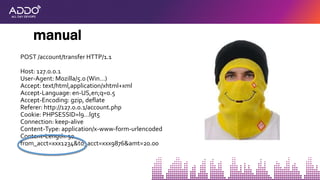
POST /account/transfer HTTP/1.1
Host: 127.0.0.1
User-Agent: Mozilla/5.0 (Win…)
Accept: text/html,application/xhtml+xml
Accept-Language: en-US,en;q=0.5
Accept-Encoding: gzip, deflate
Referer: http://127.0.0.1/account.php
Cookie: PHPSESSID=l9…lgt5
Connection: keep-alive
Content-Type: application/x-www-form-urlencoded
Content-Length: 30
from_acct=xxx1234&to_acct=xxx9876&amt=20.00
manual
thesis:
modern secure
applications protect
themselves against
attackers
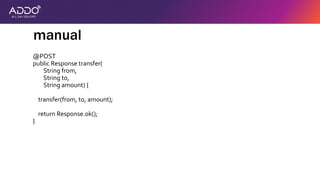
@POST
public Response transfer(
String from,
String to,
String amount) {
transfer(from, to, amount);
return Response.ok();
}
manual
thesis:
modern secure
applications protect
themselves against
attackers
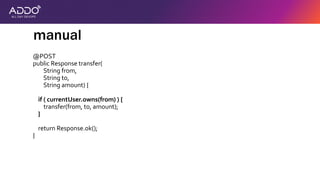
@POST
public Response transfer(
String from,
String to,
String amount) {
if ( currentUser.owns(from) ) {
transfer(from, to, amount);
}
return Response.ok();
}
manual
thesis:
modern secure
applications protect
themselves against
attackers
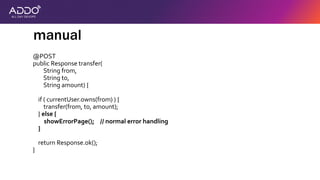
@POST
public Response transfer(
String from,
String to,
String amount) {
if ( currentUser.owns(from) ) {
transfer(from, to, amount);
} else {
showErrorPage(); // normal error handling
}
return Response.ok();
}
manual
thesis:
modern secure
applications protect
themselves against
attackers
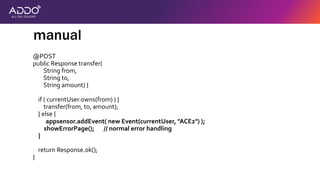
@POST
public Response transfer(
String from,
String to,
String amount) {
if ( currentUser.owns(from) ) {
transfer(from, to, amount);
} else {
appsensor.addEvent( new Event(currentUser, "ACE2") );
showErrorPage(); // normal error handling
}
return Response.ok();
}
manual
thesis:
modern secure
applications protect
themselves against
attackers
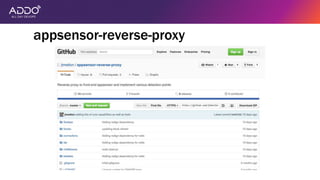
appsensor-reverse-proxy
• Send events and/or attacks
• Receive and process responses
• OWASP CRS in ModSecurity has AppSensor rules already
• https://www.trustwave.com/Resources/SpiderLabs-
Blog/Implementing-AppSensor-Detection-Points-in-
ModSecurity/
WAF
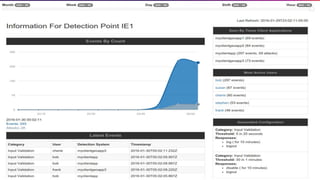
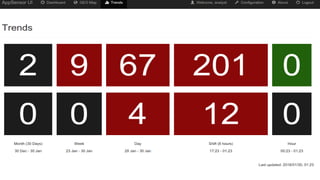
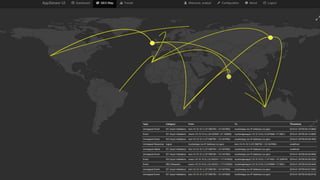
• ELK stack (OWASP SoC)
• influxdb / grafana (OWASP SoC)
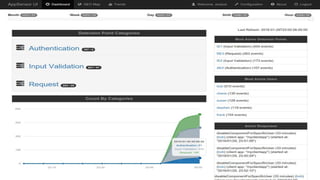
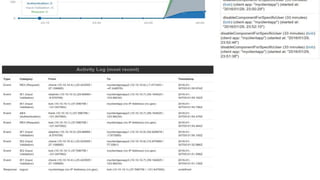
• appsensor-ui
viewing data
• Expand detection capabilities by providing boolean
logic and new span primitives
• Reduce false positives by leveraging several suspicious
events to discover a malicious event
rules engine goals
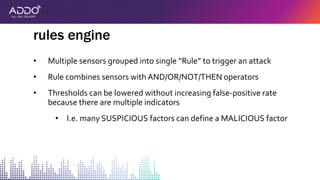
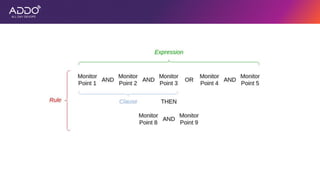
• Multiple sensors grouped into single “Rule” to trigger an attack
• Rule combines sensors with AND/OR/NOT/THEN operators
• Thresholds can be lowered without increasing false-positive rate
because there are multiple indicators
• I.e. many SUSPICIOUS factors can define a MALICIOUS factor
rules engine
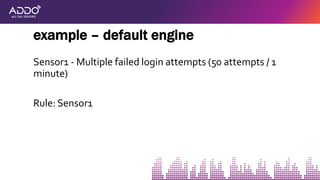
Sensor1 - Multiple failed login attempts (50 attempts / 1
minute)
Rule: Sensor1
example – default engine
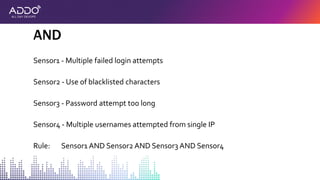
Sensor1 - Multiple failed login attempts
Sensor2 - Use of blacklisted characters
Sensor3 - Password attempt too long
Sensor4 - Multiple usernames attempted from single IP
Rule: Sensor1 AND Sensor2 AND Sensor3 AND Sensor4
AND
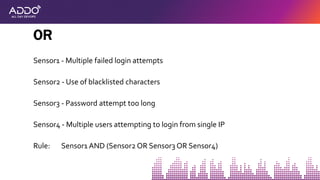
Sensor1 - Multiple failed login attempts
Sensor2 - Use of blacklisted characters
Sensor3 - Password attempt too long
Sensor4 - Multiple users attempting to login from single IP
Rule: Sensor1 AND (Sensor2 OR Sensor3 OR Sensor4)
OR
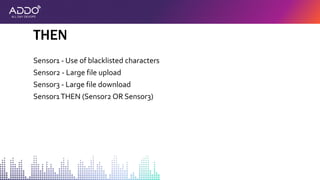
Sensor1 - Use of blacklisted characters
Sensor2 - Large file upload
Sensor3 - Large file download
Sensor1THEN (Sensor2 OR Sensor3)
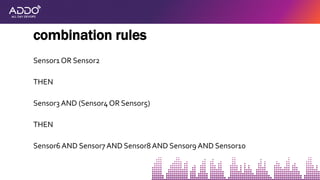
THEN
Sensor1 OR Sensor2
THEN
Sensor3 AND (Sensor4 OR Sensor5)
THEN
Sensor6 AND Sensor7 AND Sensor8 AND Sensor9 AND Sensor10
combination rules
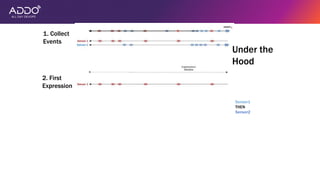
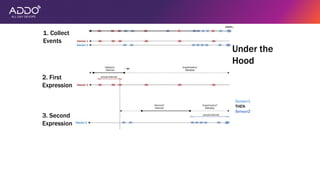
Under the
Hood
Sensor1
THEN
Sensor2
Under the
Hood
Sensor1
THEN
Sensor2
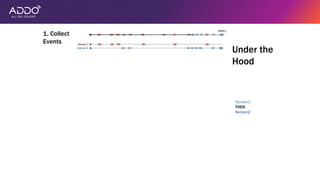
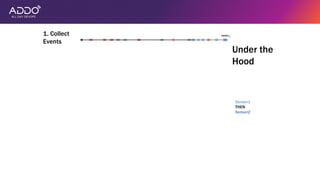
1. Collect
Events
Sensor1
THEN
Sensor2
1. Collect
Events
Under the
Hood
Sensor1
THEN
Sensor2
1. Collect
Events
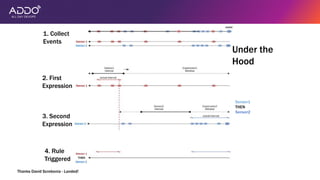
2. First
Expression
Under the
Hood
1. Collect
Events
Sensor1
THEN
Sensor2
Under the
Hood
2. First
Expression
1. Collect
Events
Sensor1
THEN
Sensor2
Under the
Hood
2. First
Expression
1. Collect
Events
Sensor1
THEN
Sensor2
Under the
Hood
2. First
Expression
1. Collect
Events
Under the
Hood
Sensor1
THEN
Sensor2
2. First
Expression
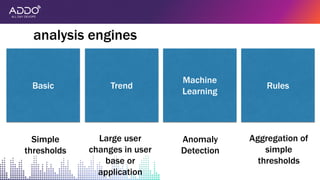
3. Second
Expression
Sensor1
THEN
Sensor2
1. Collect
Events
Under the
Hood
2. First
Expression
3. Second
Expression
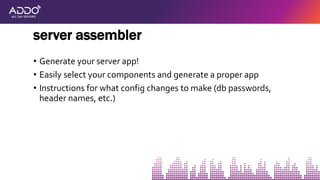
4. Rule
Triggered
Thanks David Scrobonia - Landed!
analysis engines
Simple
thresholds
Large user
changes in user
base or
application
Anomaly
Detection
Aggregation of
simple
thresholds
Basic Trend
Machine
Learning
Rules
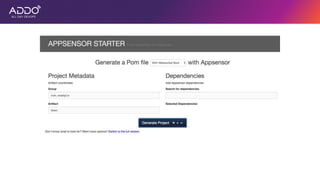
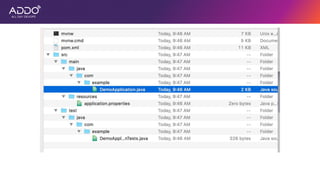
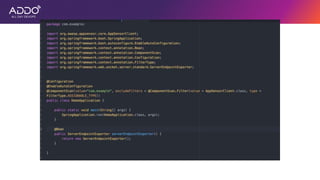
• Generate your server app!
• Easily select your components and generate a proper app
• Instructions for what config changes to make (db passwords,
header names, etc.)
server assembler
thesis:
modern secure
applications protect
themselves against
attackers
thesis:
modern secure
applications protect
themselves against
attackers
thesis:
modern secure
applications protect
themselves against
attackers
thesis:
modern secure
applications protect
themselves against
attackers
thesis:
modern secure
applications protect
themselves against
attackers
wrap-up
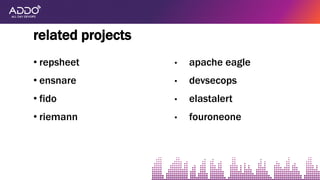
• repsheet
• ensnare
• fido
• riemann
related projects
• apache eagle
• devsecops
• elastalert
• fouroneone
pick a tool (or 2) …
but use the idea
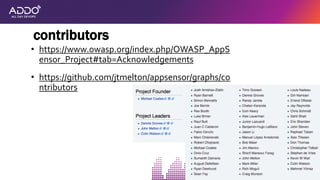
contributors
• https://www.owasp.org/index.php/OWASP_AppS
ensor_Project#tab=Acknowledgements
• https://github.com/jtmelton/appsensor/graphs/co
ntributors
• https://www.owasp.org/index.php/OWASP_AppSensor_Project (download
book, dev guide, etc.)
• http://appsensor.org/ (end user / dev docs)
• https://github.com/jtmelton/appsensor
links
AllDayDevOps 2019 AppSensor

AllDayDevOps 2019 AppSensor

Editor's Notes

  • #5 We’ll spend a good bit of time talking about the idea and why it’s necessary. Then a bit of time discussing what’s possible in the reference implementation.
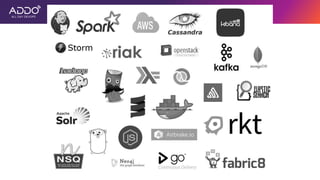
  • #9 This is a sampling of tools. Note the data capture, processing and visualization tools. This mindset is now core to development in a way it wasn’t even a few years ago.
  • #12 There are a few (important) exceptions here, but the changes in the last 5-8 years have largely seen the dev community quickly outpace security in terms of scalability and manageability
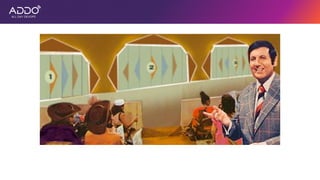
  • #15 This is NOT secure
  • #18 Some may be less well understood in general (specialized knowledge - crypto), but they’re still defects
  • #19 Some may be less well understood in general (specialized knowledge - crypto), but they’re still defects
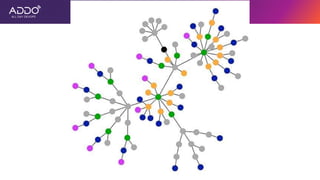
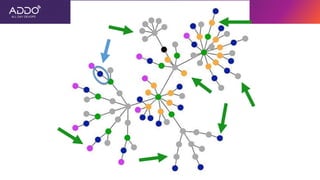
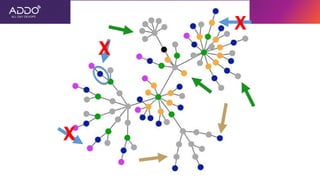
  • #20 Imagine this is your application and it’s features (ignore the text here - just consider the picture)
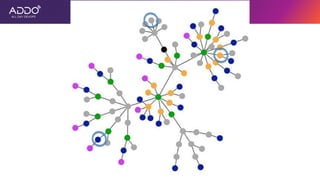
  • #21 Now let’s say this is the location of 3 bugs (security or otherwise)
  • #24 The green arrows are un-successful attack attempts, and the red is a successful attack
  • #26 Some may be less well understood in general (specialized knowledge - crypto), but they’re still defects
  • #27 Here are a few examples. Even castles did some things really well.
  • #28 And this is most of our apps today.
  • #29 Some may be less well understood in general (specialized knowledge - crypto), but they’re still defects
  • #31 Some may be less well understood in general (specialized knowledge - crypto), but they’re still defects
  • #33 Or, another way to phrase this
  • #34 Some may be less well understood in general (specialized knowledge - crypto), but they’re still defects
  • #40 Or, another way to phrase this
  • #42 Or, another way to phrase this
  • #44 we’ll unpack this core thought throughout the talk, but note: modern applications - logging / event infrastructure ubiquitous attackers, not necessarily just attacks - consider the user, not just the event
  • #47 Same basic flow, but just as a sequence diagram of events
  • #48 Note: correlation is possible, and multiple integration points can be used
  • #49 Note: correlation is possible, and multiple integration points can be used
  • #56 we’ll unpack this core thought throughout the talk, but note: modern applications - logging / event infrastructure ubiquitous attackers, not necessarily just attacks - consider the user, not just the event
  • #57 we’ll unpack this core thought throughout the talk, but note: modern applications - logging / event infrastructure ubiquitous attackers, not necessarily just attacks - consider the user, not just the event
  • #58 we’ll unpack this core thought throughout the talk, but note: modern applications - logging / event infrastructure ubiquitous attackers, not necessarily just attacks - consider the user, not just the event
  • #59 we’ll unpack this core thought throughout the talk, but note: modern applications - logging / event infrastructure ubiquitous attackers, not necessarily just attacks - consider the user, not just the event
  • #60 we’ll unpack this core thought throughout the talk, but note: modern applications - logging / event infrastructure ubiquitous attackers, not necessarily just attacks - consider the user, not just the event
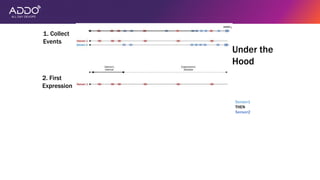
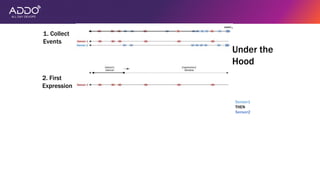
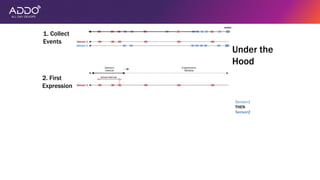
  • #76 Here is an example of what the engine would do to process the rule “Sensor1 then Sensor2”: This whole thing starts each time an event occurs. So in this case, our trigger event has occurred and kickstarted the process. The first step is to collect all the related events (since Rule.Interval time before the trigger event) As you can see there are events from sensor 1 and sensor 2 Now we need to determine whether the first expression of the rule has occurred. We call the clauses separated by THEN operators expressions To check an expression we have to check whether each sensor in the expression has been triggered, in this case we only have one, Sensor 1, so its relatively easy We set the window of time in which Sensor 1 must occur (currently the entire timeline) Then we slide the interval for Sensor 1 down the window to see whether the Sensors threshold count is within this interval Once we find a spot where this happens (what do you know its the first set of events! Almost like it was planned…) we need to mark where the last event occurred, so we know where to begin searching for the next expression With the time where the last expression ended, we can reset our window for Expression 2 and begin to slide our interval for sensor 2 down the window to see whether sensor 2 was triggered (In this case the second expression is the actually the last expression, which means that the trigger event MUST be included for the last expression to be triggered) And now we can see the two intervals in which the two sensors were triggered, and can determine that the Rule was triggered
  • #77 Here is an example of what the engine would do to process the rule “Sensor1 then Sensor2”: This whole thing starts each time an event occurs. So in this case, our trigger event has occurred and kickstarted the process. The first step is to collect all the related events (since Rule.Interval time before the trigger event) As you can see there are events from sensor 1 and sensor 2 Now we need to determine whether the first expression of the rule has occurred. We call the clauses separated by THEN operators expressions To check an expression we have to check whether each sensor in the expression has been triggered, in this case we only have one, Sensor 1, so its relatively easy We set the window of time in which Sensor 1 must occur (currently the entire timeline) Then we slide the interval for Sensor 1 down the window to see whether the Sensors threshold count is within this interval Once we find a spot where this happens (what do you know its the first set of events! Almost like it was planned…) we need to mark where the last event occurred, so we know where to begin searching for the next expression With the time where the last expression ended, we can reset our window for Expression 2 and begin to slide our interval for sensor 2 down the window to see whether sensor 2 was triggered (In this case the second expression is the actually the last expression, which means that the trigger event MUST be included for the last expression to be triggered) And now we can see the two intervals in which the two sensors were triggered, and can determine that the Rule was triggered
  • #78 Here is an example of what the engine would do to process the rule “Sensor1 then Sensor2”: This whole thing starts each time an event occurs. So in this case, our trigger event has occurred and kickstarted the process. The first step is to collect all the related events (since Rule.Interval time before the trigger event) As you can see there are events from sensor 1 and sensor 2 Now we need to determine whether the first expression of the rule has occurred. We call the clauses separated by THEN operators expressions To check an expression we have to check whether each sensor in the expression has been triggered, in this case we only have one, Sensor 1, so its relatively easy We set the window of time in which Sensor 1 must occur (currently the entire timeline) Then we slide the interval for Sensor 1 down the window to see whether the Sensors threshold count is within this interval Once we find a spot where this happens (what do you know its the first set of events! Almost like it was planned…) we need to mark where the last event occurred, so we know where to begin searching for the next expression With the time where the last expression ended, we can reset our window for Expression 2 and begin to slide our interval for sensor 2 down the window to see whether sensor 2 was triggered (In this case the second expression is the actually the last expression, which means that the trigger event MUST be included for the last expression to be triggered) And now we can see the two intervals in which the two sensors were triggered, and can determine that the Rule was triggered
  • #79 Here is an example of what the engine would do to process the rule “Sensor1 then Sensor2”: This whole thing starts each time an event occurs. So in this case, our trigger event has occurred and kickstarted the process. The first step is to collect all the related events (since Rule.Interval time before the trigger event) As you can see there are events from sensor 1 and sensor 2 Now we need to determine whether the first expression of the rule has occurred. We call the clauses separated by THEN operators expressions To check an expression we have to check whether each sensor in the expression has been triggered, in this case we only have one, Sensor 1, so its relatively easy We set the window of time in which Sensor 1 must occur (currently the entire timeline) Then we slide the interval for Sensor 1 down the window to see whether the Sensors threshold count is within this interval Once we find a spot where this happens (what do you know its the first set of events! Almost like it was planned…) we need to mark where the last event occurred, so we know where to begin searching for the next expression With the time where the last expression ended, we can reset our window for Expression 2 and begin to slide our interval for sensor 2 down the window to see whether sensor 2 was triggered (In this case the second expression is the actually the last expression, which means that the trigger event MUST be included for the last expression to be triggered) And now we can see the two intervals in which the two sensors were triggered, and can determine that the Rule was triggered
  • #80 Here is an example of what the engine would do to process the rule “Sensor1 then Sensor2”: This whole thing starts each time an event occurs. So in this case, our trigger event has occurred and kickstarted the process. The first step is to collect all the related events (since Rule.Interval time before the trigger event) As you can see there are events from sensor 1 and sensor 2 Now we need to determine whether the first expression of the rule has occurred. We call the clauses separated by THEN operators expressions To check an expression we have to check whether each sensor in the expression has been triggered, in this case we only have one, Sensor 1, so its relatively easy We set the window of time in which Sensor 1 must occur (currently the entire timeline) Then we slide the interval for Sensor 1 down the window to see whether the Sensors threshold count is within this interval Once we find a spot where this happens (what do you know its the first set of events! Almost like it was planned…) we need to mark where the last event occurred, so we know where to begin searching for the next expression With the time where the last expression ended, we can reset our window for Expression 2 and begin to slide our interval for sensor 2 down the window to see whether sensor 2 was triggered (In this case the second expression is the actually the last expression, which means that the trigger event MUST be included for the last expression to be triggered) And now we can see the two intervals in which the two sensors were triggered, and can determine that the Rule was triggered
  • #81 Here is an example of what the engine would do to process the rule “Sensor1 then Sensor2”: This whole thing starts each time an event occurs. So in this case, our trigger event has occurred and kickstarted the process. The first step is to collect all the related events (since Rule.Interval time before the trigger event) As you can see there are events from sensor 1 and sensor 2 Now we need to determine whether the first expression of the rule has occurred. We call the clauses separated by THEN operators expressions To check an expression we have to check whether each sensor in the expression has been triggered, in this case we only have one, Sensor 1, so its relatively easy We set the window of time in which Sensor 1 must occur (currently the entire timeline) Then we slide the interval for Sensor 1 down the window to see whether the Sensors threshold count is within this interval Once we find a spot where this happens (what do you know its the first set of events! Almost like it was planned…) we need to mark where the last event occurred, so we know where to begin searching for the next expression With the time where the last expression ended, we can reset our window for Expression 2 and begin to slide our interval for sensor 2 down the window to see whether sensor 2 was triggered (In this case the second expression is the actually the last expression, which means that the trigger event MUST be included for the last expression to be triggered) And now we can see the two intervals in which the two sensors were triggered, and can determine that the Rule was triggered
  • #82 Here is an example of what the engine would do to process the rule “Sensor1 then Sensor2”: This whole thing starts each time an event occurs. So in this case, our trigger event has occurred and kickstarted the process. The first step is to collect all the related events (since Rule.Interval time before the trigger event) As you can see there are events from sensor 1 and sensor 2 Now we need to determine whether the first expression of the rule has occurred. We call the clauses separated by THEN operators expressions To check an expression we have to check whether each sensor in the expression has been triggered, in this case we only have one, Sensor 1, so its relatively easy We set the window of time in which Sensor 1 must occur (currently the entire timeline) Then we slide the interval for Sensor 1 down the window to see whether the Sensors threshold count is within this interval Once we find a spot where this happens (what do you know its the first set of events! Almost like it was planned…) we need to mark where the last event occurred, so we know where to begin searching for the next expression With the time where the last expression ended, we can reset our window for Expression 2 and begin to slide our interval for sensor 2 down the window to see whether sensor 2 was triggered (In this case the second expression is the actually the last expression, which means that the trigger event MUST be included for the last expression to be triggered) And now we can see the two intervals in which the two sensors were triggered, and can determine that the Rule was triggered
  • #83 Here is an example of what the engine would do to process the rule “Sensor1 then Sensor2”: This whole thing starts each time an event occurs. So in this case, our trigger event has occurred and kickstarted the process. The first step is to collect all the related events (since Rule.Interval time before the trigger event) As you can see there are events from sensor 1 and sensor 2 Now we need to determine whether the first expression of the rule has occurred. We call the clauses separated by THEN operators expressions To check an expression we have to check whether each sensor in the expression has been triggered, in this case we only have one, Sensor 1, so its relatively easy We set the window of time in which Sensor 1 must occur (currently the entire timeline) Then we slide the interval for Sensor 1 down the window to see whether the Sensors threshold count is within this interval Once we find a spot where this happens (what do you know its the first set of events! Almost like it was planned…) we need to mark where the last event occurred, so we know where to begin searching for the next expression With the time where the last expression ended, we can reset our window for Expression 2 and begin to slide our interval for sensor 2 down the window to see whether sensor 2 was triggered (In this case the second expression is the actually the last expression, which means that the trigger event MUST be included for the last expression to be triggered) And now we can see the two intervals in which the two sensors were triggered, and can determine that the Rule was triggered
  • #84 Here is an example of what the engine would do to process the rule “Sensor1 then Sensor2”: This whole thing starts each time an event occurs. So in this case, our trigger event has occurred and kickstarted the process. The first step is to collect all the related events (since Rule.Interval time before the trigger event) As you can see there are events from sensor 1 and sensor 2 Now we need to determine whether the first expression of the rule has occurred. We call the clauses separated by THEN operators expressions To check an expression we have to check whether each sensor in the expression has been triggered, in this case we only have one, Sensor 1, so its relatively easy We set the window of time in which Sensor 1 must occur (currently the entire timeline) Then we slide the interval for Sensor 1 down the window to see whether the Sensors threshold count is within this interval Once we find a spot where this happens (what do you know its the first set of events! Almost like it was planned…) we need to mark where the last event occurred, so we know where to begin searching for the next expression With the time where the last expression ended, we can reset our window for Expression 2 and begin to slide our interval for sensor 2 down the window to see whether sensor 2 was triggered (In this case the second expression is the actually the last expression, which means that the trigger event MUST be included for the last expression to be triggered) And now we can see the two intervals in which the two sensors were triggered, and can determine that the Rule was triggered
  • #87 we’ll unpack this core thought throughout the talk, but note: modern applications - logging / event infrastructure ubiquitous attackers, not necessarily just attacks - consider the user, not just the event
  • #88 we’ll unpack this core thought throughout the talk, but note: modern applications - logging / event infrastructure ubiquitous attackers, not necessarily just attacks - consider the user, not just the event
  • #89 we’ll unpack this core thought throughout the talk, but note: modern applications - logging / event infrastructure ubiquitous attackers, not necessarily just attacks - consider the user, not just the event
  • #90 we’ll unpack this core thought throughout the talk, but note: modern applications - logging / event infrastructure ubiquitous attackers, not necessarily just attacks - consider the user, not just the event
  • #91 we’ll unpack this core thought throughout the talk, but note: modern applications - logging / event infrastructure ubiquitous attackers, not necessarily just attacks - consider the user, not just the event
  • #97 We’ll spend a good bit of time talking about the idea and why it’s necessary. Then a bit of time discussing what’s possible in the reference implementation.