SP 2013 / Office 365 Work Management Service 
Platin-Partner: Gold-Partner: 
Unified Task Aggregation 
[Adis Jugo] 
Head of Development @ deroso Solutions GmbH
Who the... 
 Born in Sarajevo, Bosnia and Herzegovina, 40 years ago 
 In SP world since 2002, doing nothing else since 2006 
 Microsoft MVP for SharePoint Server 
 Head of Development at deroso Solutions GmbH 
 Blogger, speaker, author adis.jugo.ba 
www.sharepointeurope.com
9/22/2014 3
Why 
• It is challenging for information workers to get a 
comprehensive view of their tasks, or to have a central 
point for managing their work 
• Tasks are stored across applications and systems, and 
even in case where all tasks are stored within a single 
system, information can still be scattered 
9/22/2014 4
Work Management Service 
Application 
• New in SharePoint 2013 
• Provides functionality to aggregate tasks into central 
place 
• Tasks are accessible through the personal site (My 
Tasks) 
9/22/2014 5
Work Management Service 
Application 
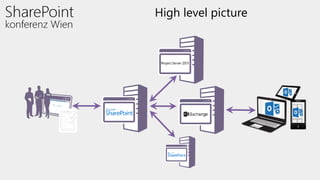
• Tasks can be aggregated from Exchange, Project 
Server and SharePoint 
• Based on 'Provider model' so that other systems can 
be eventually integrated in the future 
• Tasks are cached to a users personal site 
• Work Management Service is exposed as part of 
each users My Site / Newsfeed experience
High level picture
Features 
• Tasks managed from one location (My Tasks in personal 
page) 
• Unified tasks timeline (view, add, close tasks) 
• Sync to Outlook (Exchange) 
• Categorized/grouped by “locations” 
• “Pinning tasks (marking tasks as important) 
• Searching tasks
Prerequisites 
– Work Management Service Application (WMA) 
– User Profile Service Application 
• Import from AD 
– Search Service Application 
• necessary for SharePoint 2013 tasks 
– Exchange 2013* 
– Project Service Application * 
– Personal/Newsfeed site (MySites)
TASK AGGREGATION IN SP 
2013 
DEMO 1 
10 
9/22/201 
4
Under the hood
Service application high level 
architecture
SharePoint 2013: Supported Task 
Types 
• Task Types 
– 171 / New tasks from SP 2013 (“TasksWithTimelineAndHistory”) 
– 107 / Tasks from SP 2010 (Upgraded Lists) 
– 150 / GanttTasks (Upgraded Lists) 
• Any Tasks from any list that support Task content type 
– Task content type must be set as a default content type
Aggregator for SP 2013 as a Task Provider 
Get from 
cached 
locations 
Look at the 
hint store 
Search for tasks 
(if search > 3h 
ago) 
Update cached 
locations 
Provider refresh 
Refreshing or minimum time between provider refreshes: 5 min 
accessing MyTasks 
page triggers 
aggregator code
WMA Properties 
Property Default Value Description 
minimumTimeBetweenProviderRefreshes 
minimumTimeBetweenProviderRefreshes 0:05:00 
This value specifies the minimum amount of 
time between refreshes for a provider for a 
given user. There cannot be a refresh of data if 
this value is not met, all refresh operations will 
be null before that. 
minimumTimeBetweenSearchQueries 
minimumTimeBetweenSearchQueries 3:00:00 
This value specifies the minimum amount of 
time between calls to search for a given user. 
This is used to discover new providers not yet 
known to have tasks for this user.
WMA Admin Settings 
• Cannot be set in GUI 
• Must be set with PowerShell with 
– Set-SPWorkManagementServiceApplication
Relationship to Search 
• Search Crawler locates tasks lists and loads them into the 
cached locations for Querying by the WMA Provider 
• When a task list is added to the cached locations, new tasks 
from this task list will be found during the next Provider refresh 
• Most of the times, even new tasks from the list that are not 
cached will show up in MyTasks 
– Hints (rely on Event Receivers on Task lists) 
– Not triggered if user has no permissions on that list 
– Legacy SharePoint lists will not trigger receiver code (will not end up in 
hints) 
– Generally not guaranteed
Limitations 
• Cross farm aggregation is not supported. 
– The My Tasks page will not report and aggregate tasks from 
another farm from the same domain or from a different 
domain, regardless of the existing trust between the domains 
and farms.
Development model
Developing for WMA Service 
9/22/2014 20
SSOM/CSOM 
9/22/2014 21
Microsoft.Office.Server.WorkManagement UserSettingsManager 
UserOrderedSessionManager 
UserOrderedSession 
LocationOrientedUserOrderedSession 
TaskQuery 
Task 
Location 
RefreshResult 
KeywordFilter 
FieldFilter 
CustomAttributeFilter 
LastModifiedDateRangeFilter 
LocationFilter 
PinnedFilter 
9/22/2014 22
TAMPERING WITH THE TASKS 
THROUGH SERVER OBJECT 
MODEL 
DEMO 2 
23 
9/22/201 
4
Working with refreshes 
DEMO3
Client Object Model 
• CSOM: Full 
• REST: None
Building a metro app 
DEMO4
Thus spoke Microsoft… 
Implementation is based on provider model, so that 
additional systems maybe integrated to same 
architecture in future
…no! 
<NotSupported /> 
9/22/2014 28
Tampering with the Provider 
Model (18+) 
DEMO 5
Further reading: Microsoft white 
paper 
My Tasks Aggregation in SharePoint Server and Exchange 
Task Integration 
http://www.microsoft.com/en-us/ 
download/details.aspx?id=38799
FRAGEN?
Ich freue mich auf Ihr Feedback!
Vielen Dank! 
Platin-Partner: Gold-Partner: 
[Adis Jugo]

SharePoint Conference Vienna 2014: Work Management Service

  • 1.
    SP 2013 /Office 365 Work Management Service Platin-Partner: Gold-Partner: Unified Task Aggregation [Adis Jugo] Head of Development @ deroso Solutions GmbH
  • 2.
    Who the... Born in Sarajevo, Bosnia and Herzegovina, 40 years ago  In SP world since 2002, doing nothing else since 2006  Microsoft MVP for SharePoint Server  Head of Development at deroso Solutions GmbH  Blogger, speaker, author adis.jugo.ba www.sharepointeurope.com
  • 3.
  • 4.
    Why • Itis challenging for information workers to get a comprehensive view of their tasks, or to have a central point for managing their work • Tasks are stored across applications and systems, and even in case where all tasks are stored within a single system, information can still be scattered 9/22/2014 4
  • 5.
    Work Management Service Application • New in SharePoint 2013 • Provides functionality to aggregate tasks into central place • Tasks are accessible through the personal site (My Tasks) 9/22/2014 5
  • 6.
    Work Management Service Application • Tasks can be aggregated from Exchange, Project Server and SharePoint • Based on 'Provider model' so that other systems can be eventually integrated in the future • Tasks are cached to a users personal site • Work Management Service is exposed as part of each users My Site / Newsfeed experience
  • 7.
  • 8.
    Features • Tasksmanaged from one location (My Tasks in personal page) • Unified tasks timeline (view, add, close tasks) • Sync to Outlook (Exchange) • Categorized/grouped by “locations” • “Pinning tasks (marking tasks as important) • Searching tasks
  • 9.
    Prerequisites – WorkManagement Service Application (WMA) – User Profile Service Application • Import from AD – Search Service Application • necessary for SharePoint 2013 tasks – Exchange 2013* – Project Service Application * – Personal/Newsfeed site (MySites)
  • 10.
    TASK AGGREGATION INSP 2013 DEMO 1 10 9/22/201 4
  • 11.
  • 12.
    Service application highlevel architecture
  • 13.
    SharePoint 2013: SupportedTask Types • Task Types – 171 / New tasks from SP 2013 (“TasksWithTimelineAndHistory”) – 107 / Tasks from SP 2010 (Upgraded Lists) – 150 / GanttTasks (Upgraded Lists) • Any Tasks from any list that support Task content type – Task content type must be set as a default content type
  • 14.
    Aggregator for SP2013 as a Task Provider Get from cached locations Look at the hint store Search for tasks (if search > 3h ago) Update cached locations Provider refresh Refreshing or minimum time between provider refreshes: 5 min accessing MyTasks page triggers aggregator code
  • 15.
    WMA Properties PropertyDefault Value Description minimumTimeBetweenProviderRefreshes minimumTimeBetweenProviderRefreshes 0:05:00 This value specifies the minimum amount of time between refreshes for a provider for a given user. There cannot be a refresh of data if this value is not met, all refresh operations will be null before that. minimumTimeBetweenSearchQueries minimumTimeBetweenSearchQueries 3:00:00 This value specifies the minimum amount of time between calls to search for a given user. This is used to discover new providers not yet known to have tasks for this user.
  • 16.
    WMA Admin Settings • Cannot be set in GUI • Must be set with PowerShell with – Set-SPWorkManagementServiceApplication
  • 17.
    Relationship to Search • Search Crawler locates tasks lists and loads them into the cached locations for Querying by the WMA Provider • When a task list is added to the cached locations, new tasks from this task list will be found during the next Provider refresh • Most of the times, even new tasks from the list that are not cached will show up in MyTasks – Hints (rely on Event Receivers on Task lists) – Not triggered if user has no permissions on that list – Legacy SharePoint lists will not trigger receiver code (will not end up in hints) – Generally not guaranteed
  • 18.
    Limitations • Crossfarm aggregation is not supported. – The My Tasks page will not report and aggregate tasks from another farm from the same domain or from a different domain, regardless of the existing trust between the domains and farms.
  • 19.
  • 20.
    Developing for WMAService 9/22/2014 20
  • 21.
  • 22.
    Microsoft.Office.Server.WorkManagement UserSettingsManager UserOrderedSessionManager UserOrderedSession LocationOrientedUserOrderedSession TaskQuery Task Location RefreshResult KeywordFilter FieldFilter CustomAttributeFilter LastModifiedDateRangeFilter LocationFilter PinnedFilter 9/22/2014 22
  • 23.
    TAMPERING WITH THETASKS THROUGH SERVER OBJECT MODEL DEMO 2 23 9/22/201 4
  • 24.
  • 25.
    Client Object Model • CSOM: Full • REST: None
  • 26.
  • 27.
    Thus spoke Microsoft… Implementation is based on provider model, so that additional systems maybe integrated to same architecture in future
  • 28.
  • 29.
    Tampering with theProvider Model (18+) DEMO 5
  • 30.
    Further reading: Microsoftwhite paper My Tasks Aggregation in SharePoint Server and Exchange Task Integration http://www.microsoft.com/en-us/ download/details.aspx?id=38799
  • 31.
  • 32.
    Ich freue michauf Ihr Feedback!
  • 33.
    Vielen Dank! Platin-Partner:Gold-Partner: [Adis Jugo]

Editor's Notes

  • #3 VS 2013 with console VS 2013 empty VS 2012 with WP emulator SP Designer Microsoft Azure (IE) Win Dev Portal (IE) Dev site (Chrome)
  • #8  Note. Cross farm aggregation is not supported, so SP sites have to be on same farm.
  • #13 Important: the WM SSA only contact Search, Personal Site and Project SSAs that are in the same proxy group