

Basic Ajax What is Ajax? Ajax Technology Where to use Ajax How to use Ajax Problems with Ajax
What is Ajax? Something everyone is talking about.   but doesn't understand
What is Ajax? The technological foundation of Web 2.0   ... but probably not socialism
What is Ajax? A heroically heroic hero   That has breathed life into JavaScript
What is Ajax? A synchronous   J avaScript   A nd   X ML Represents interrelated technologies JavaScript Asynchronous HTTP requests XML But the term has expanded to include the technologies surrounding Rich Internet Applications in general: JSON CSS HTML DOM
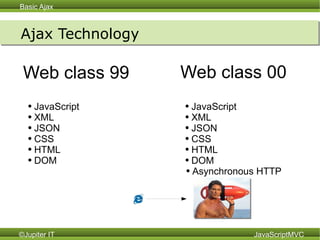
Ajax Technology Web class 99  JavaScript XML JSON CSS HTML DOM Web class 00 JavaScript XML JSON CSS HTML DOM Asynchronous HTTP
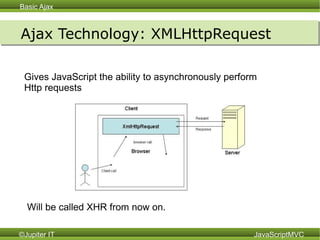
Ajax Technology: XMLHttpRequest Gives JavaScript the ability to asynchronously perform  Http requests Will be called XHR from now on.
Ajax Technology: XMLHttpRequest
var request = new XMLHttpRequest(); request.onreadystatechange = function(){ if(request.readyState == 4) document.getElementById(“response”).innerHTML =  request.responseText } request.open('POST', '/recipes.xml', true); request.setRequestHeader('Content-Type',  'application/x-www-form-urlencoded'); request.send('recipe[title]=Ice+Water&'+ 'recipe[instructions]=Pour+ice+and+water+in+glass'); Ajax Technology: XMLHttpRequest Create a new recipe and put result HTML in 'response' element.
jQuery jQuery.post( url, [data], [callback], [type] )   jQuery.post( “ /recipes.xml”, { “ recipe[title]” : “Ice Water”, “ recipe[instructions]” : “Pour ice and water in glass”  }, function(html){ $(“#response”).text(html)  },  “ html”  )
Prototype new Ajax.Request(url[, options]) new Ajax.Request (“/recipes.xml”,{ parameters :{ “ recipe[title]” : “Ice Water”, “ recipe[instructions]” : “Pour ice and water in glass”  }, onComplete: function(request){  $(“response”).update(request.innerHTML)  },  method: “post” })
YUI YAHOO.util.Connect.asyncRequest(method, sUrl, callbacks, data); YAHOO.util.Connect.asyncRequest ( “ POST” “ /recipes.xml”, { onSuccess :  function(event,args){  document.getElementById(“response”) =  args[0].responseText  } }, { “ recipe[title]” : “Ice Water”, “ recipe[instructions]” : “Pour ice and water in glass”  }  )
Dojo dojo.io.bind([options]) dojo.io.bind({ method: “POST”, url: “/recipes.xml”, load: function(data){    dojo.byId("title").innerHTML = data;  }, content: { “ recipe[title]” : “Ice Water”, “ recipe[instructions]” : “Pour ice and water in glass”  }  )
Benefits of Ajax Makes your web applications More responsive Reduce bandwidth More interactive Make use of more complex UI state.
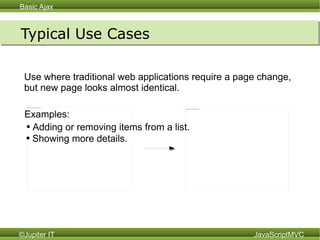
Typical Use Cases Use where traditional web applications require a page change,  but new page looks almost identical. Adding or removing items from a list. Showing more details. Examples:
How to use Ajax Ajax is typically used to get and manipulate data.  Typically the data comes back in one of two ways: Data Text XML JSON Markup HTML HTML+JS Yeah well that's just,  like, your opinion, man.   Enables services JSON on both sides Faster  Send Data and use JSON
Ajax Issues Ajax makes some things more difficult Back Button / History / Bookmarking Duplicate code on the client and server Clients without JavaScript / Web Search Engines Testing Does not support cross domain requests Ajax and JavaScript share many of the same problems.
Ajax Issues Back Button / History / Bookmarking  Problem:  Browser does not capture page changes due to JavaScript. Solution:   Use a library like Really Simple History (RSH).  RSH uses a hidden iframe and changes of the url hash to let JS provide its own history. http://code.google.com/p/reallysimplehistory/
Ajax Issues Duplicate code on the client and server Problem:  Often similar code must be present client and server side which adds to the complexity of the application.  Typically this is markup generation. Solution:   1) Send back markup generated by the Server. 2) Server never creates markup.  Use client side templates to generate  markup.  Dojo Django templates JavaScriptMVC EJS templates jQuery templates
Ajax Issues Clients without JavaScript / Search Engines Problem:  Some people turn off JavaScript.  Most search engines don't understand JavaScript. Solution:   1) Ignore.  95% have JavaScript.  Many popular websites require it. 2) Develop unobtrusively. 3) Use Rhino server side to generate the pages.
Ajax Issues Developing unobtrusively Rules: 1.  Assume client has JavaScript turned off. 2. JavaScript prevents default behavior from happening 3. JavaScript substitutes its own Ajax behavior
Ajax Issues Developing unobtrusively Example : 1.  Create a form that on submit adds an item to a shopping cart. <form id='add' action=”add_to_cart”> <input type='hidden' name=”item” value=”2”> <input type=”submit” value=”add to cart”> </form> 2.  Use JS to cancel the submit event. $(“#add”).submit(function(){ return false; }) 3.  Perform the request, and update the shopping cart total. $(“#add”).submit(function(){  jQuery.post(“ajax_add_to_cart”, {name: this.item.value }, function(html){ $(“#total”).text(html)}, “ html” ) return false;  })
Ajax Issues Testing Problem:  The lack of good automated testing support for JavaScript applications. Solution:   1) Server side frameworks. 2) Client side testing 3) Rhino based client testing 4) Selenium
Ajax Issues Does not support cross domain requests Problem:  The Same Origin Policy prevents XHR from making requests to other domains.  This prevents it from being used in mashups. Solution:   1) Wait 2) JSONP 3) window.name 4) Proxy

Ajax3

  • 1.
    Basic Ajax Whatis Ajax? Ajax Technology Where to use Ajax How to use Ajax Problems with Ajax
  • 2.
    What is Ajax?Something everyone is talking about. but doesn't understand
  • 3.
    What is Ajax?The technological foundation of Web 2.0 ... but probably not socialism
  • 4.
    What is Ajax?A heroically heroic hero That has breathed life into JavaScript
  • 5.
    What is Ajax?A synchronous J avaScript A nd X ML Represents interrelated technologies JavaScript Asynchronous HTTP requests XML But the term has expanded to include the technologies surrounding Rich Internet Applications in general: JSON CSS HTML DOM
  • 6.
    Ajax Technology Webclass 99 JavaScript XML JSON CSS HTML DOM Web class 00 JavaScript XML JSON CSS HTML DOM Asynchronous HTTP
  • 7.
    Ajax Technology: XMLHttpRequestGives JavaScript the ability to asynchronously perform Http requests Will be called XHR from now on.
  • 8.
  • 9.
    var request =new XMLHttpRequest(); request.onreadystatechange = function(){ if(request.readyState == 4) document.getElementById(“response”).innerHTML = request.responseText } request.open('POST', '/recipes.xml', true); request.setRequestHeader('Content-Type', 'application/x-www-form-urlencoded'); request.send('recipe[title]=Ice+Water&'+ 'recipe[instructions]=Pour+ice+and+water+in+glass'); Ajax Technology: XMLHttpRequest Create a new recipe and put result HTML in 'response' element.
  • 10.
    jQuery jQuery.post( url,[data], [callback], [type] ) jQuery.post( “ /recipes.xml”, { “ recipe[title]” : “Ice Water”, “ recipe[instructions]” : “Pour ice and water in glass” }, function(html){ $(“#response”).text(html) }, “ html” )
  • 11.
    Prototype new Ajax.Request(url[,options]) new Ajax.Request (“/recipes.xml”,{ parameters :{ “ recipe[title]” : “Ice Water”, “ recipe[instructions]” : “Pour ice and water in glass” }, onComplete: function(request){ $(“response”).update(request.innerHTML) }, method: “post” })
  • 12.
    YUI YAHOO.util.Connect.asyncRequest(method, sUrl,callbacks, data); YAHOO.util.Connect.asyncRequest ( “ POST” “ /recipes.xml”, { onSuccess : function(event,args){ document.getElementById(“response”) = args[0].responseText } }, { “ recipe[title]” : “Ice Water”, “ recipe[instructions]” : “Pour ice and water in glass” } )
  • 13.
    Dojo dojo.io.bind([options]) dojo.io.bind({method: “POST”, url: “/recipes.xml”, load: function(data){ dojo.byId(&quot;title&quot;).innerHTML = data; }, content: { “ recipe[title]” : “Ice Water”, “ recipe[instructions]” : “Pour ice and water in glass” } )
  • 14.
    Benefits of AjaxMakes your web applications More responsive Reduce bandwidth More interactive Make use of more complex UI state.
  • 15.
    Typical Use CasesUse where traditional web applications require a page change, but new page looks almost identical. Adding or removing items from a list. Showing more details. Examples:
  • 16.
    How to useAjax Ajax is typically used to get and manipulate data. Typically the data comes back in one of two ways: Data Text XML JSON Markup HTML HTML+JS Yeah well that's just, like, your opinion, man. Enables services JSON on both sides Faster Send Data and use JSON
  • 17.
    Ajax Issues Ajaxmakes some things more difficult Back Button / History / Bookmarking Duplicate code on the client and server Clients without JavaScript / Web Search Engines Testing Does not support cross domain requests Ajax and JavaScript share many of the same problems.
  • 18.
    Ajax Issues BackButton / History / Bookmarking Problem: Browser does not capture page changes due to JavaScript. Solution: Use a library like Really Simple History (RSH). RSH uses a hidden iframe and changes of the url hash to let JS provide its own history. http://code.google.com/p/reallysimplehistory/
  • 19.
    Ajax Issues Duplicatecode on the client and server Problem: Often similar code must be present client and server side which adds to the complexity of the application. Typically this is markup generation. Solution: 1) Send back markup generated by the Server. 2) Server never creates markup. Use client side templates to generate markup. Dojo Django templates JavaScriptMVC EJS templates jQuery templates
  • 20.
    Ajax Issues Clientswithout JavaScript / Search Engines Problem: Some people turn off JavaScript. Most search engines don't understand JavaScript. Solution: 1) Ignore. 95% have JavaScript. Many popular websites require it. 2) Develop unobtrusively. 3) Use Rhino server side to generate the pages.
  • 21.
    Ajax Issues Developingunobtrusively Rules: 1. Assume client has JavaScript turned off. 2. JavaScript prevents default behavior from happening 3. JavaScript substitutes its own Ajax behavior
  • 22.
    Ajax Issues Developingunobtrusively Example : 1. Create a form that on submit adds an item to a shopping cart. <form id='add' action=”add_to_cart”> <input type='hidden' name=”item” value=”2”> <input type=”submit” value=”add to cart”> </form> 2. Use JS to cancel the submit event. $(“#add”).submit(function(){ return false; }) 3. Perform the request, and update the shopping cart total. $(“#add”).submit(function(){ jQuery.post(“ajax_add_to_cart”, {name: this.item.value }, function(html){ $(“#total”).text(html)}, “ html” ) return false; })
  • 23.
    Ajax Issues TestingProblem: The lack of good automated testing support for JavaScript applications. Solution: 1) Server side frameworks. 2) Client side testing 3) Rhino based client testing 4) Selenium
  • 24.
    Ajax Issues Doesnot support cross domain requests Problem: The Same Origin Policy prevents XHR from making requests to other domains. This prevents it from being used in mashups. Solution: 1) Wait 2) JSONP 3) window.name 4) Proxy

Editor's Notes

  • #2 Challenges * back button * more javascript (speed concerns w/ files) * SEO